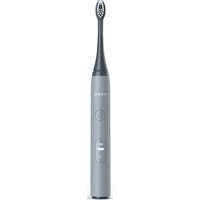
Sonic Lite - Toothbrush Ordo - Free user manual and instructions
Find the device manual for free Sonic Lite Ordo in PDF.


| Product Type | Sonic Electric Toothbrush |
| Model | SL01-ST, SL01-PE, SL01-SN, SL01-LV, SL01-SG, SL01-OC, SL01-SU |
| Dimensions (LxWxH) | 2.5 x 3.4 x 24.3 cm |
| Weight | Approximately 150 g |
| Power Supply | 5 VDC, 2 W via USB-A to USB-C cable |
| Battery | Built-in rechargeable lithium-ion |
| Charging Time | 4 hours |
| Battery Life in Cleaning Mode | 70 cycles per full charge |
| Battery Life in Sensitive Mode | 120 cycles per full charge |
| Brushing Modes | Cleaning and Sensitive (last mode memory) |
| Timer | Quad-Pacer (0.5 s pause every 30 s), auto shut-off after 2 minutes |
| Protection Rating | IPX7 (waterproof up to 1 meter for 30 minutes) |
| Charging and Operating Temperature | 5 °C to 40 °C |
| Warranty | 2 years (technical defects) + 60-day satisfaction guarantee |
| Spare Parts | Brush heads (replacement recommended every 3 months) |
| Repairability | User not repairable; battery replaceable only by a professional |
| Maintenance | Clean with clean water; do not put in dishwasher |
| Included Accessories | USB-A to USB-C cable, travel cap |
| Anti-roll Function | Yes |
Frequently Asked Questions - Sonic Lite Ordo
User questions about Sonic Lite Ordo
0 question about this device. Answer the ones you know or ask your own.
Ask a new question about this device
Download the instructions for your Toothbrush in PDF format for free! Find your manual Sonic Lite - Ordo and take your electronic device back in hand. On this page are published all the documents necessary for the use of your device. Sonic Lite by Ordo.
USER MANUAL Sonic Lite Ordo
Authorised Rep Compliance Ltd., Ground Floor,
71 Lower Baggot Street, Dublin, D02 P593, Ireland.
English
Technical Data
Model number: SL01-ST, SL01-PE, SL01-SN, SL01-LV, SL01-SG, SL01-OC, SL01-SU Input: DC 5V, 2W
Protection class: III
IP rating: IPX7
Dimensions (WxDxH): 2.5 x 3.4 x 24.3 cm
Rechargeable battery: Lithium-ion, 3.7V, 700mAh
Charging time: 4 hours
Charging and operating temperature between: 5 °C and 40 °C
Clean Mode operating time: 70 cycles/full charge
Sensitive Mode operating time: 120 cycles/full charge
Timer: 0.5 second pause after 30 seconds, deactivation after 2 minutes.
Warranty
This product is covered by a 2-year warranty. The extent of the warranty on this product is limited to technical defects caused by faulty production processes. In the event you want to claim warranty, please be sure to contact our customer service team for instructions. For more information, please visit ordolife.com/warranty
60-Day Money-Back Guarantee
Satisfaction guaranteed – if you don't love your toothbrush within 60 days, we'll give you a refund. For more information on our guarantee please visit ordolife.com/guarantee
Customer Service
For more information on Ordo's products and services please visit ordolife.com
If the device is damaged, defective, in need of repair or you require assistance please contact our customer service team:
Email: hello@ordolife.com
Support: ordolife.com/help
Our team are always happy to help.
Recycling & Disposal
At Ordo we are always looking for solutions to reduce packaging and product materials that cannot be recycled effectively. We ask every member of the Ordo family to help us by recycling responsibly.
For more information, please visit ordolife.com/recycling
Do not dispose of the product with normal household waste at the end of its life. Take it to an official collection point for recycling and proper disposal.
This product contains a built-in, lithium-ion rechargeable battery. The battery must only be removed by a qualified professional when the appliance is disposed of.
Your Sonic Lite Toothbrush
The list below refers to the image on page 2.
- Handle
- Power/Mode button
- Sensitive mode indicator
- Clean mode indicator
- Battery indicator
- Brush head travel cap
- Brush head
- USB-A to USB-C cable
- Anti-roll feature
- USB-C charging input
- Charging cover
Using Your Sonic Lite Toothbrush
If you're using your Sonic Lite toothbrush for the first time, it's normal to feel more
vibration than if you were using a manual or battery-powered toothbrush. Some people notice a slight tickling or buzzing sensation – this will pass in time. We recommend using the Sensitive mode for the first 1-2 weeks, then trying the Clean mode once you've become accustomed to the sensation.
Your Sonic Lite toothbrush has two modes: Sensitive and Clean. The Sensitive mode is good for people with sensitive teeth or gums, while the Clean mode is perfect for powerful everyday cleaning. Each mode can be selected by pressing the power button multiple times until you reach your desired mode.
Your Sonic Lite remembers the last mode you used, so next time you use it, all you need to do is press the power button and you're good to go.
It's common for first-time users to apply too much pressure. The benefit of an electric toothbrush is that it does the brushing for you, so you only need to apply gentle pressure. Please follow the instructions below for the best brushing experience.
This toothbrush is safe to use on braces, dental restorations (fillings, crowns, bridges, implants), and cosmetic dental work (veneers, composite bonding), as long the dental work is properly adhered and not compromised. Please ask your dentist for advice if you're unsure in any way.
Brushing instructions:
- Wet the bristles and apply a pea-sized amount of toothpaste.
- Place the toothbrush bristles at a 45-degree angle to the teeth, pressing just enough to make the bristles reach the gum line.
- Press the power/mode button to switch on the toothbrush and select your desired mode.
- Remember not to press too hard when brushing, let the vibrating bristles do the work of clearing away plaque and food debris – no need to scrub as you might with a manual toothbrush.
- Guide the bristles across and between your teeth, using small back and forth motions.
- To ensure you thoroughly brush all surfaces of your teeth, split your mouth into four quadrants: top teeth outer surfaces, top teeth inner surfaces, bottom teeth outer surfaces, bottom teeth inner surfaces. Use the inbuilt Quad-Pacer to guide you between each of the quadrants – every 30 seconds the vibrations will pause briefly to let you know it's time to move onto the next quadrant.
- After 2 minutes the toothbrush will automatically switch off, letting you know that you've brushed your teeth for the dentist recommended time. Of course, you can switch the toothbrush back on if you'd like to brush for longer.
- If at any time before the end of a 2-minute cycle you want to turn the toothbrush off, simply press the power/mode button.
- Once you're done with brushing, spit out any excess toothpaste, but do not rinse your mouth with water. This allows the ingredients of the toothpaste to better protect your teeth.
- Thoroughly rinse the bristles, brush head and handle, ensuring you wash away any toothpaste residue.
Charging Your Sonic Lite Toothbrush
- When the rechargeable battery is low, the battery indicator will flash red.
- Pop open the charging cover on the bottom of the toothbrush. To help open the charging cover, it has a small cut-out near the "ORDO" logo on the back of the toothbrush.
- Ensure the entire toothbrush is fully dry, paying particular attention to the bristles and the area around the charging cover and USB-C charging input.
- Using the included USB cable, connect the USB-A connector to a power source, then connect the USB-C connector to the USB-C charging input on the toothbrush.
- The battery indicator will light up red to show the toothbrush is being charged.
- Allow the toothbrush to charge for 4 hours or until the charging light shows green.
- Disconnect the USB cable from the toothbrush and switch off the power source.
- Securely and fully close the charging cover, ensuring the entire cover is pushed closed as far as it will go.
WARNINGS & CAUTIONS
Intended use
The toothbrush is designed exclusively for cleaning teeth, gums and tongue. It is only intended for private use and is not suitable for commercial purposes. Only use the toothbrush as described in these operating instructions. Any other use is deemed improper and may result in damage to property or even personal injury. The toothbrush is not a child's toy. Ordoclub Ltd accepts no liability for damage caused by improper or incorrect use.
General warnings
- Only use original Ordo accessories or consumables. This includes the brush head and USB cable.
- This appliance cannot be serviced or repaired by the user. If the appliance is damaged, stop using it and contact our customer service team.
- Liability and warranty claims are waived in the event of repairs performed by the user, improper connection of the device or incorrect operation.
Risk of electric shock
A faulty electrical installation or excessive mains voltage may result in an electric shock.
- Only connect the toothbrush to a power source if the output voltage of the socket corresponds to the specification on the nameplate.
- The USB cable cannot be repaired if damaged. In the event of damage, the USB cable must be disposed of and replaced.
- Only connect the toothbrush to an easily accessible socket so that you can quickly disconnect it from the power source in case of a failure.
- Do not operate the toothbrush if it exhibits visible damage.
- Do not use the USB cable if it exhibits visible damage or if the main cord or USB connector is defective.
- Do not open the housing.
- The toothbrush must not be charged with an external timer or with a separate tele-control system.
- Do not immerse the USB cable in water or other liquids.
- Never touch the USB connector with damp hands.
- Ensure the USB-C input cover on the bottom of the toothbrush is securely closed when the toothbrush is not being charged.
- Ensure the entire toothbrush and the USB-C input are fully dry before charging the toothbrush.
- Never pull the USB connector out of the socket by the main cord.
- Never use the USB cable as a carrying strap.
- Keep the toothbrush and USB cable away from open flames and hot surfaces.
- Do not kink the USB cable and do not lay it over sharp edges.
- Only charge the toothbrush in rooms located indoors.
- Never charge the toothbrush such that there is a risk of it falling in a bathtub or sink.
- Never attempt to grab the toothbrush if it has fallen into water during charging. In such a case, immediately disconnect the USB cable, if it is safe to do so.
- Only charge the toothbrush with an original Ordo USB cable, one of which is enclosed with the product.
- Do not insert foreign objects into any of the USB connectors or inside the toothbrush.
- Disconnect the USB cable when you are not charging the toothbrush, before you clean the toothbrush or in the event of a fault.
Battery safety information
Improper handling of rechargeable batteries may cause an explosion. Fluid leaked from the rechargeable battery may lead to chemical burns.
- Only use the rechargeable battery provided with the appliance.
- Never short circuit, overcharge or reverse charge rechargeable batteries.
- Never open, dismantle or damage rechargeable batteries.
- Never throw rechargeable batteries in fire.
- Never expose rechargeable batteries to excessive heat or direct sunlight.
• If the appliance becomes unusually hot, emits an odour, changes colour, releases
gas or smoke, or if the charging process takes longer than normal, stop using and charging the product, and contact our customer service team.
- If the rechargeable battery is damaged or leaking, avoid contact with skin, eyes or mucous membranes. In the event this occurs, immediately flush the affected areas with plenty of clean water and seek medical help.
Danger for children, persons with impaired physical, sensory, or mental capacities
e.g. partially disabled persons, older persons with reduced physical and mental capacities, and those lacking experience and knowledge (e.g. older children).
- The toothbrush may be used by children aged 8 years and above, persons with impaired physical, sensory, or mental capacities, and those lacking experience and knowledge if they are supervised or have been instructed in how to safely use the toothbrush and have understood the risks associated.
- Cleaning and user maintenance must not be performed by children.
- Keep children under 8 years of age away from the toothbrush.
- Do not leave children unattended while using the toothbrush.
- Do not allow children to play with the toothbrush.
Risk of injury
Handling or using the toothbrush improperly may result in injury.
- Lay the USB cable so that it does not pose a tripping hazard.
- Stop using and replace a brush head if it becomes worn or damaged to prevent injury to the mouth and tooth area. Signs of wear include frayed, crushed or bent bristles. Replace the brush head every 3 months or sooner if signs of wear appear.
- Stop using the appliance and seek advice from your dentist/doctor in the event of excessive bleeding after use, if bleeding persists beyond one week of usage, or if you encounter discomfort or pain.
- If you have undergone any oral or gum surgery in the last two months, consult your dentist before using the toothbrush.
Risk of damage
Improper handling of the toothbrush may damage it.
- Place the toothbrush on an easily accessible, level, and dry surface.
- Be careful not to drop the toothbrush. If this does happen, do not use the toothbrush anymore, instead contact our customer service team.
- Turn the toothbrush off when you change the brush head.
- Stop using the toothbrush if any of its parts exhibit cracks or breaks or are deformed.
- Ensure that the toothbrush and USB cable do not come into contact with hot surfaces or open flames.
- Do not place any part of the product in the dishwasher to clean it.
- The toothbrush should only be cleaned with clean water. Do not use abrasive or solvent based cleaning products.
Deutsch
Technische Daten
Modellnummer: SL01-ST, SL01-PE, SL01-SN, SL01-LV, SL01-SG, SL01-OC, SL01-SU
Eingang: DC 5V, 2W
Schutzklasse: III
IP-Schutz: IPX7
Batterie rechargeable: Lithium-ion, 3.7V, 700mAh
E-post: hello@ordolife.com
Support: ordolife.com/help
E-post: hello@ordolife.com
Stöd: ordolife.com/help
Support: ordolife.com/help
E-post: hello@ordolife.com
Tootetugi: ordolife.com/help
ordolife.com/guarantee
خدمة العملاء
ordolife.com/recycling
- English
- Technical Data
- Warranty
- 60-Day Money-Back Guarantee
- Customer Service
- Recycling & Disposal
- Your Sonic Lite Toothbrush
- Using Your Sonic Lite Toothbrush
- Charging Your Sonic Lite Toothbrush
- WARNINGS & CAUTIONS
- Intended use
- General warnings
- Risk of electric shock
- Battery safety information
- Danger for children, persons with impaired physical, sensory, or mental capacities
- Risk of injury
- Risk of damage
- Deutsch
- Technische Daten
Brand : Ordo
Model : Sonic Lite
Category : Toothbrush