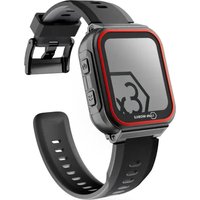
IS-SW1.1 - Smartwatch i.safe Mobile - Free user manual and instructions
Find the device manual for free IS-SW1.1 i.safe Mobile in PDF.


| Brand | i.safe Mobile |
| Model | IS-SW1.1 |
| Product type | Explosion-proof smartwatch |
| Category | Smartwatch |
| Intended use | Explosion hazardous areas 1/21 and 2/22 |
| Power supply | Charging via IS-DCSW1.1 desk charger and power adapter |
| Connectivity | Wi-Fi, Bluetooth |
| Display | Touchscreen |
| Buttons | ON/OFF, right side, left side/SOS |
| Sensors | Integrated sensors (not specified) |
| Strap | Replacement possible outside explosive area |
| Charging temperature | 0 °C to +45 °C |
| Storage temperature | -20 °C to +45 °C (up to 1 month) |
| ATEX protection rating | II 2G Ex ib IIC T4 Gb / II 2D Ex ib IIIC T135°C Db |
| Warranty | Terms at www.isafe-mobile.com |
| Cleaning | Soft, damp antistatic cloth, no chemical products |
| Repairability | No user-serviceable parts, contact i.safe MOBILE support |
| Package contents | 1 x watch, 1 x quick start guide, 1 x safety instructions, 1 x desk charger, 1 x USB-C cable, 1 x power adapter, 1 x screwdriver |
Frequently Asked Questions - IS-SW1.1 i.safe Mobile
User questions about IS-SW1.1 i.safe Mobile
0 question about this device. Answer the ones you know or ask your own.
Ask a new question about this device
Download the instructions for your Smartwatch in PDF format for free! Find your manual IS-SW1.1 - i.safe Mobile and take your electronic device back in hand. On this page are published all the documents necessary for the use of your device. IS-SW1.1 by i.safe Mobile.
USER MANUAL IS-SW1.1 i.safe Mobile
www.isafe-mobile.com Template:TEMPMM01REV10
CONTENTS
English....4
Deutsch....16
Česky 28
Dansk....40
Español....52
Suomi....64
Français....76
Magyar 88
Italiano 100
Nederlands 112
Norsk 124
Polski 136
This Operating Manual complies with these standards:
IEC 60079, IEC 82079, ANSI Z535.6
IEC 60079, IEC 82079, ANSI Z535.6
ENGLISH
>READ AND UNDERSTAND THE INSTRUCTIONS
PROTECT YOUR LIFE AND READ THE OPERATING MANUAL
This Operating Manual is part of the device IS-SW1.1 (model MSW1A01). This Operating Manual provides important information for safe use of the device.
» Before using the device, read this Operating Manual carefully and pay particular attention to the "Safety" section and the warnings highlighted with the warning symbol.
» Also read the Safety Instructions before using the device.
You can find these at www.isafe-mobile.com/en/support/downloads
» Make sure you have access to this Operating Manual when you need it. You can find the current Operating Manual at www.isafe-mobile.com/en/support/downloads
» Follow all instructions given on the device and on the packaging.
» Follow local safety regulations.
INTENDED USE
The IS-SW1.1 is a Smartwatch for use in explosion hazardous areas of Zone 1/21 and 2/22, in accordance with Directives 2014/34/EU, SI 2016 No. 1107, 1999/92/EC and the IECEx system, among others.
Only use the device as described in this Operating Manual. Any other use is considered improper and can lead to death, severe injuries and damage to the device.
The manufacturer i.safe MOBILE GmbH does not assume any liability for damage caused by improper use. The warranty expires in the event of improper use.
WARRANTY
You can find the warranty conditions at www.isafe-mobile.com/en/support/service
For any damage caused by computer viruses that you download while using the Internet functions responsibility is at your hand.
There is no right of recourse against i.safe MOBILE GmbH.
EU/UK DECLARATION OF CONFORMITY
You will find the EU/UK declaration of conformity at www.isafe-mobile.com/en/support/downloads
FCC/IC STATEMENT
The FCC/IC declaration can be found at www.isafe-mobile.com/en/support/downloads
EX MARKINGS
> ATEX:
© II 2G Ex ib IIC T4 Gb
II 2D Ex ib IIIC T135 °C Db
EU Type Examination Certificate:
EPS 22 ATEX 1 196 X
CE-designation: 2004
IECEx:
Ex ib IIC T4 Gb
Ex ib IIIC T135 °C Db
IECEx Certificate: IECEx EPS 22.0028X
UKEX:
II 2G Ex ib IIC T4 Gb
Ea II 2D Ex ib IIIC T135 °C Db
EPS 22 UKEX 1 196 X
UKCA-designation: 2503
North America:
Class I, Division 1, Group ABCD, T4
Class II, Division 1, Group EFG, T4
Class III, Division 1 T4
LR3081
> Temperature range:
-10 °C ... +55 °C (EN/IEC 60079-0)
-10 °C ... +55 °C (EN/IEC 62368-1)
Manufactured by:
i.safe MOBILE GmbH
i_Park Tauberfranken 10
97922 Lauda-Koenigshofen
Germany
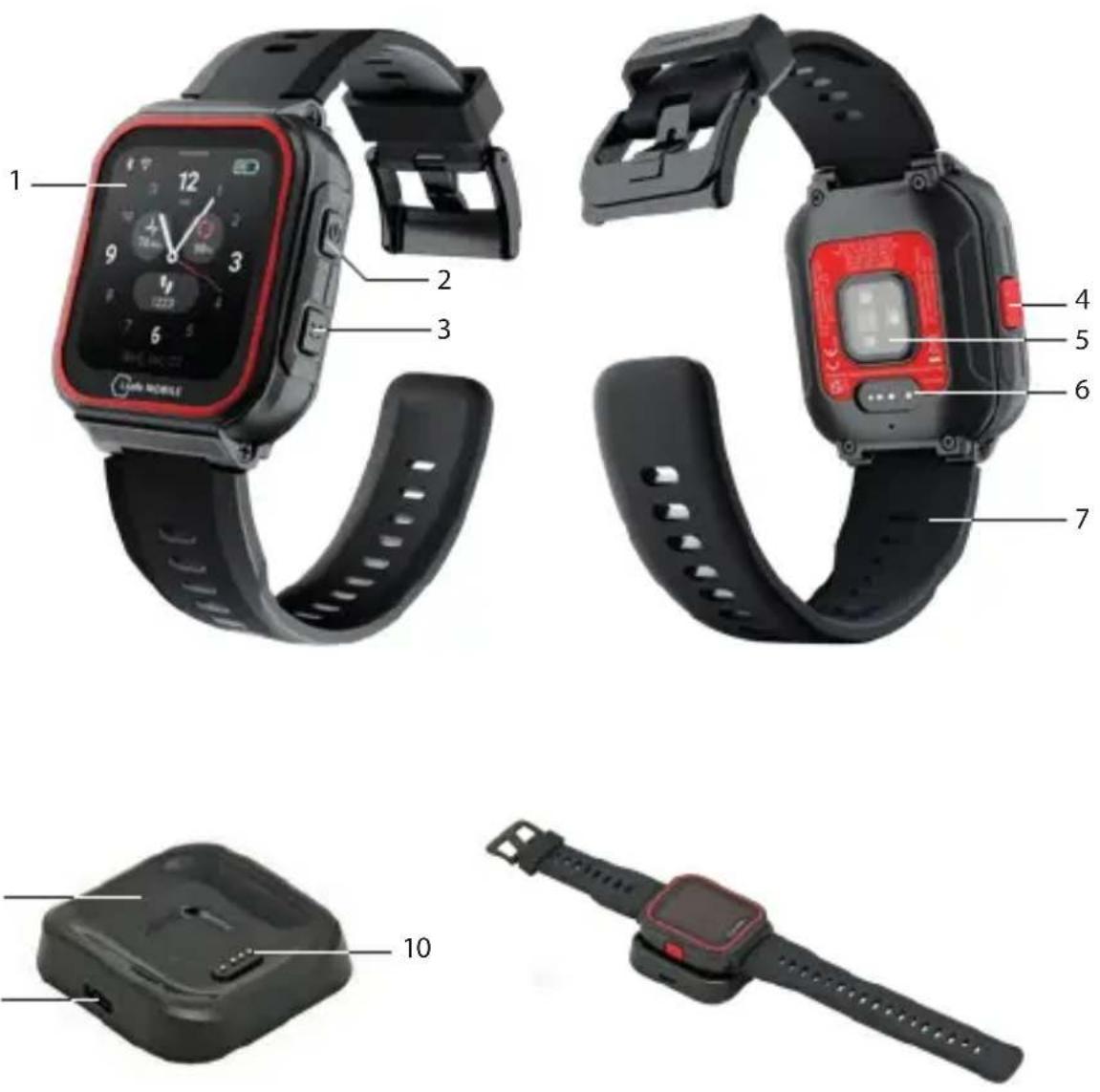
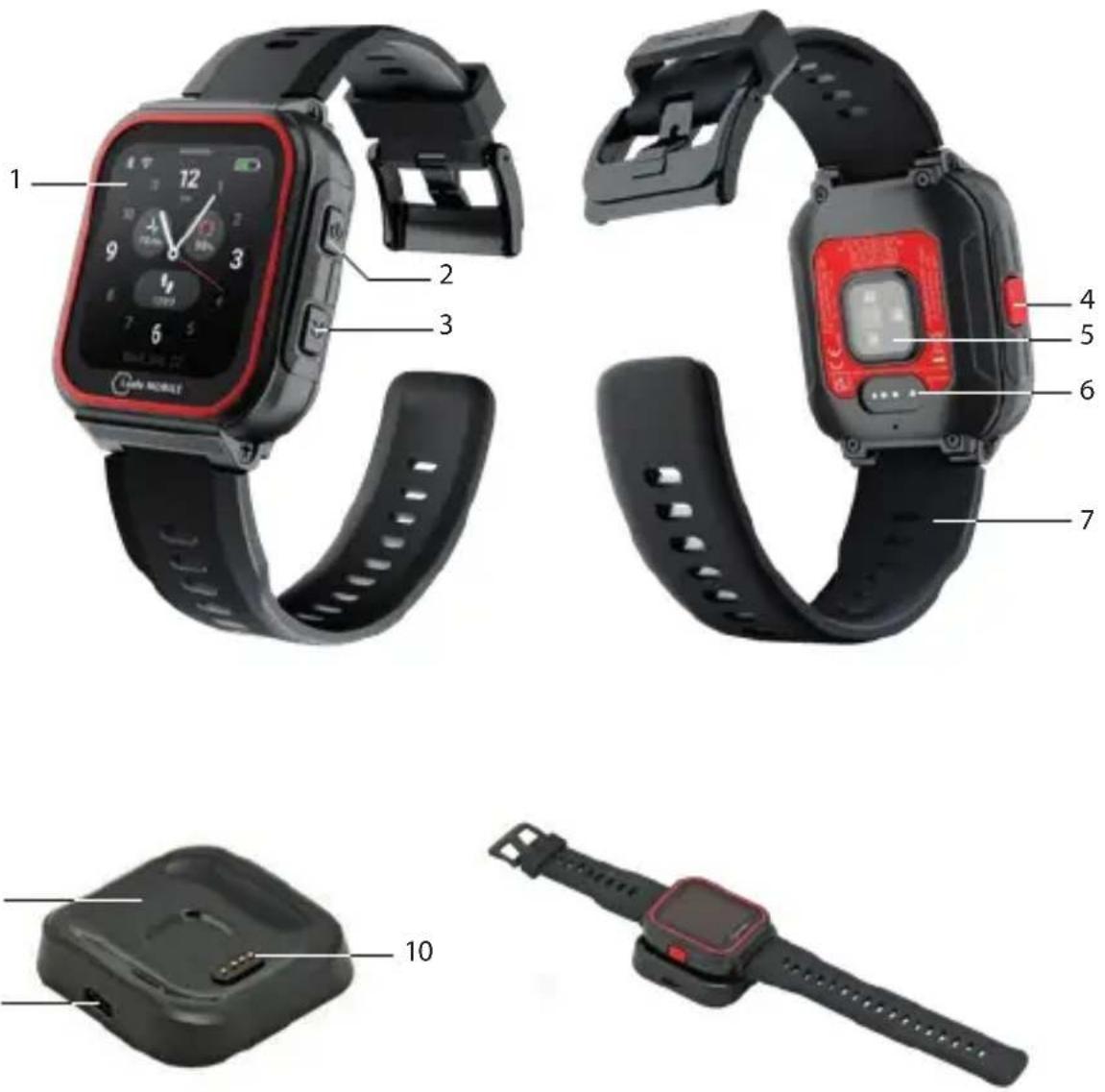
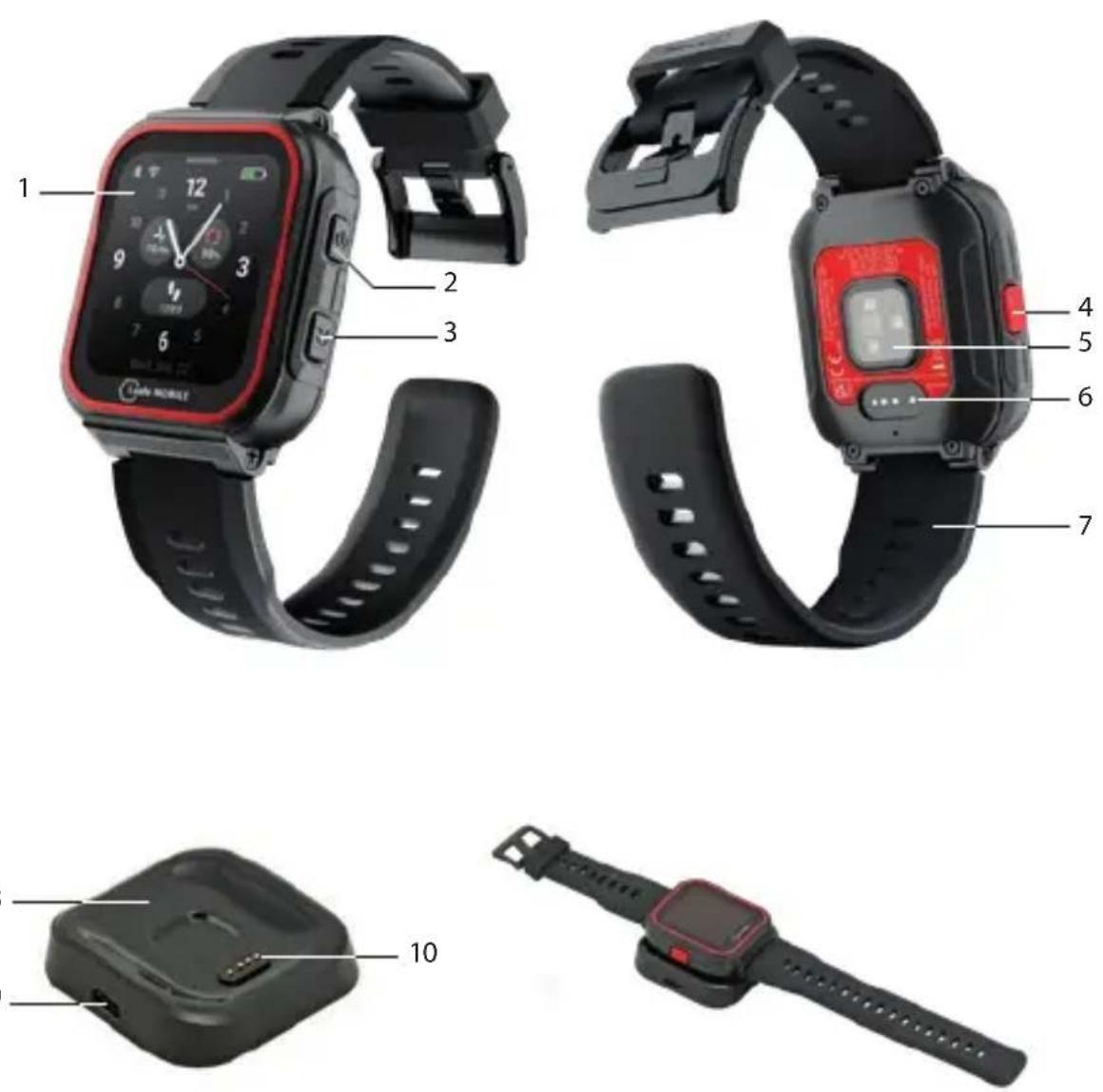
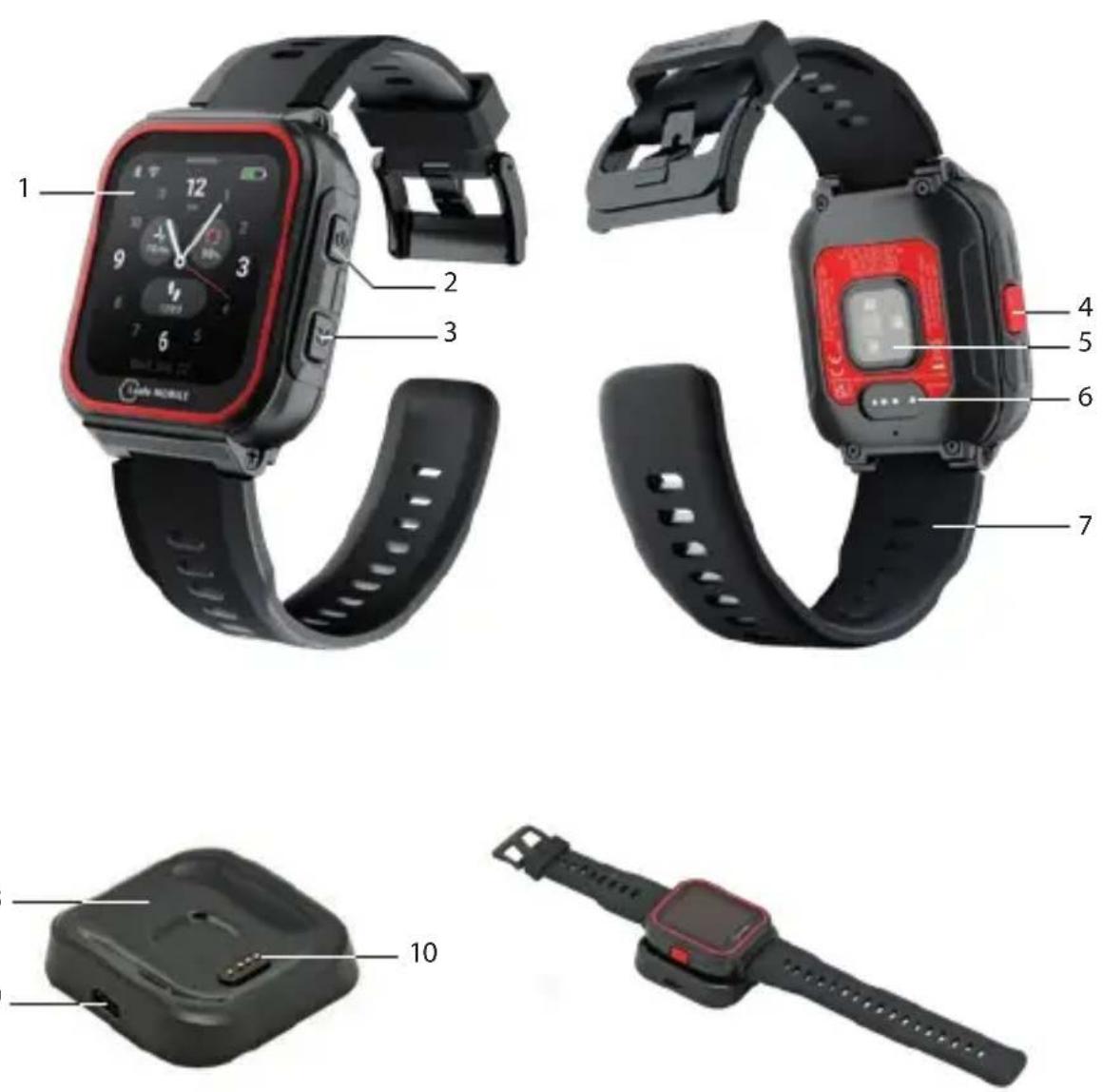
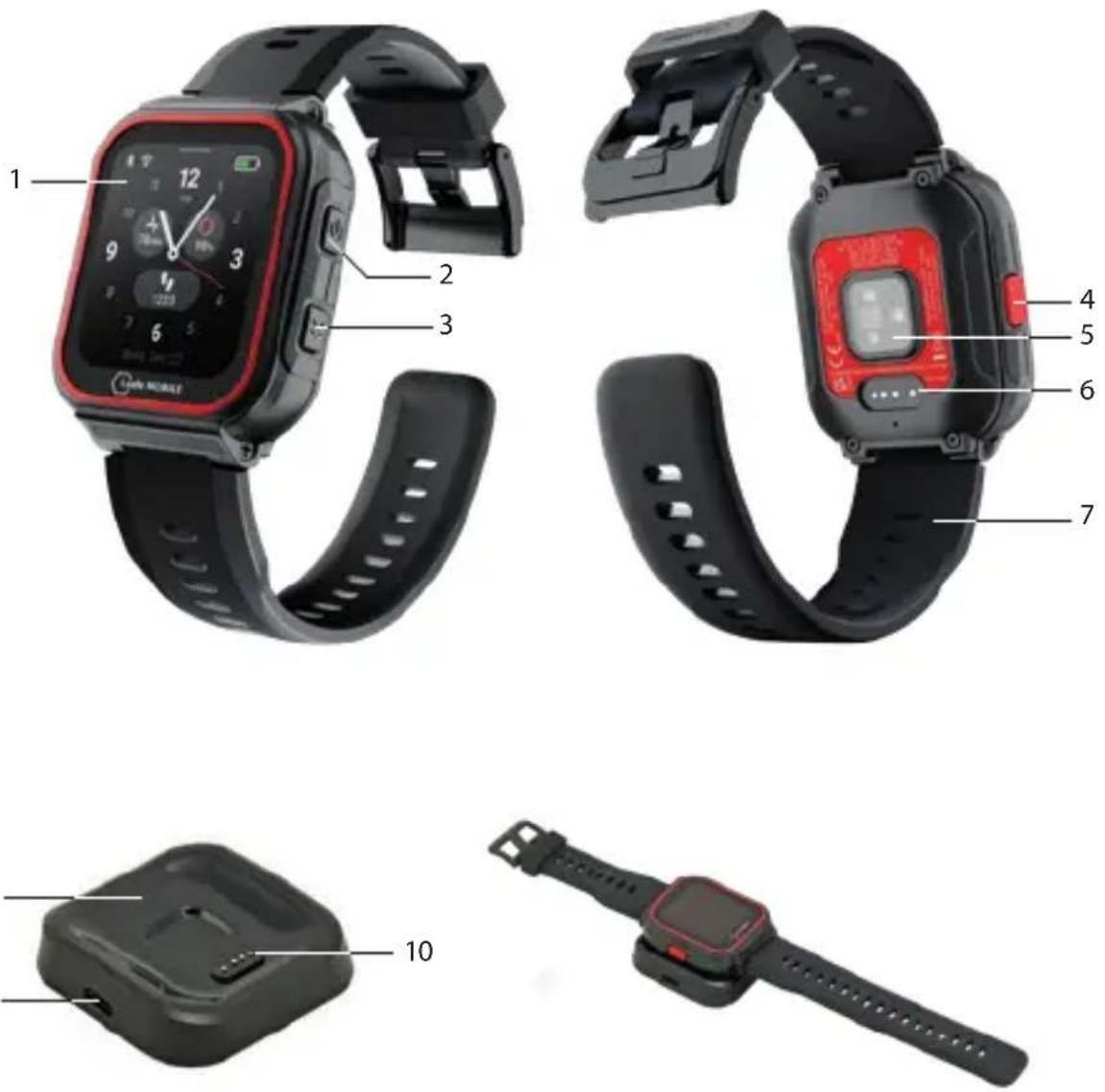
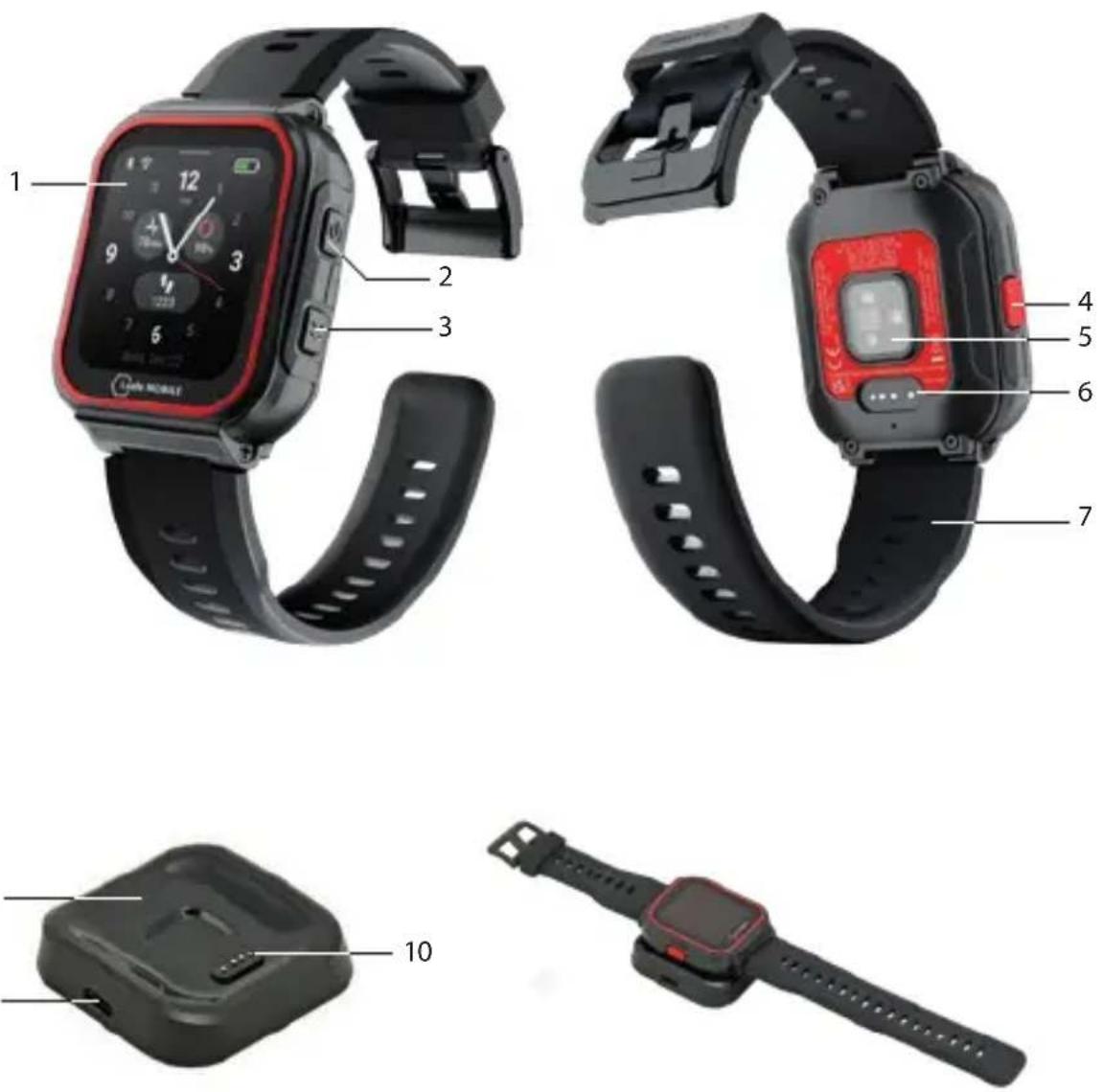
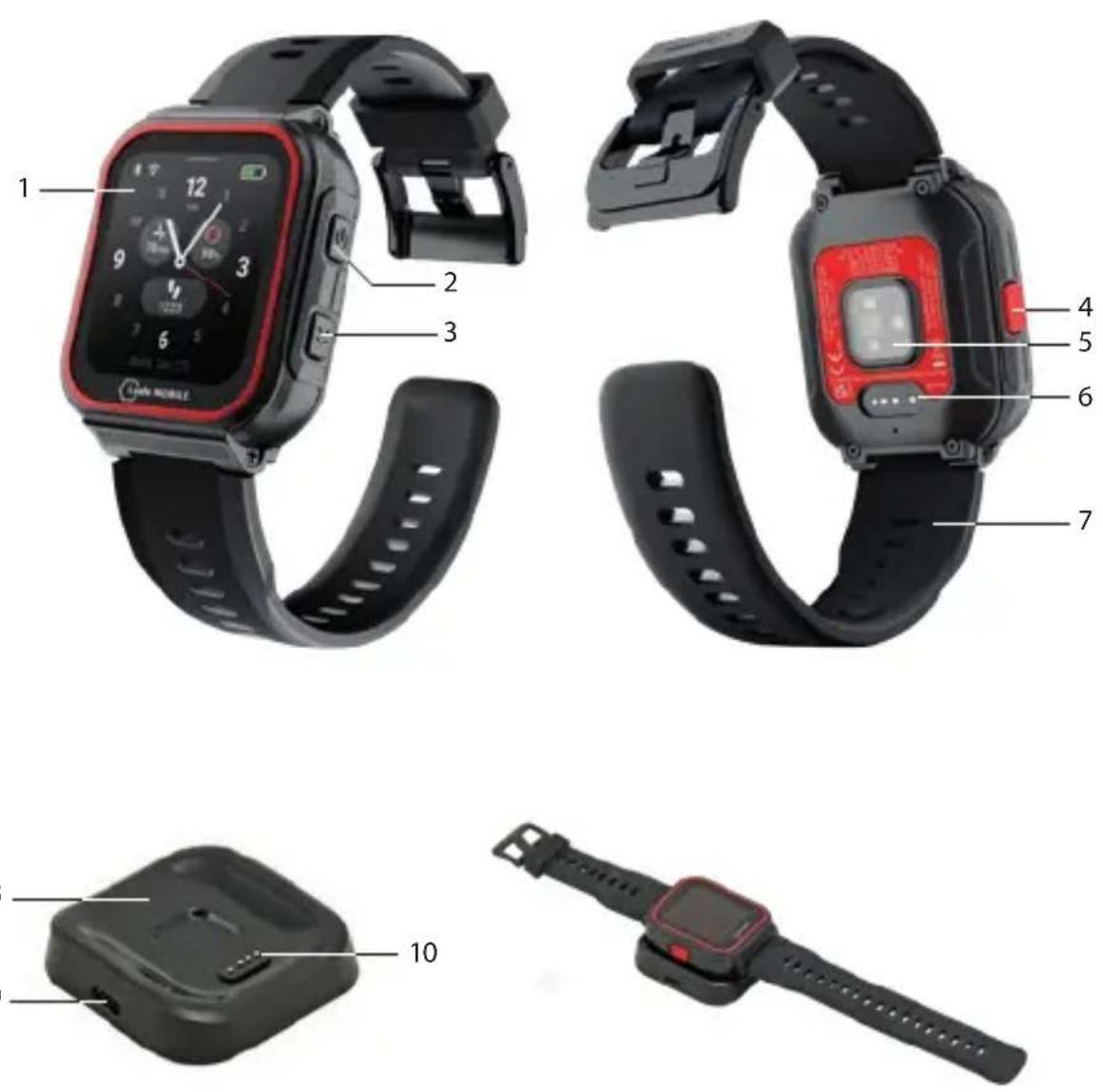
>DEVICE OVERVIEW/FUNCTIONS
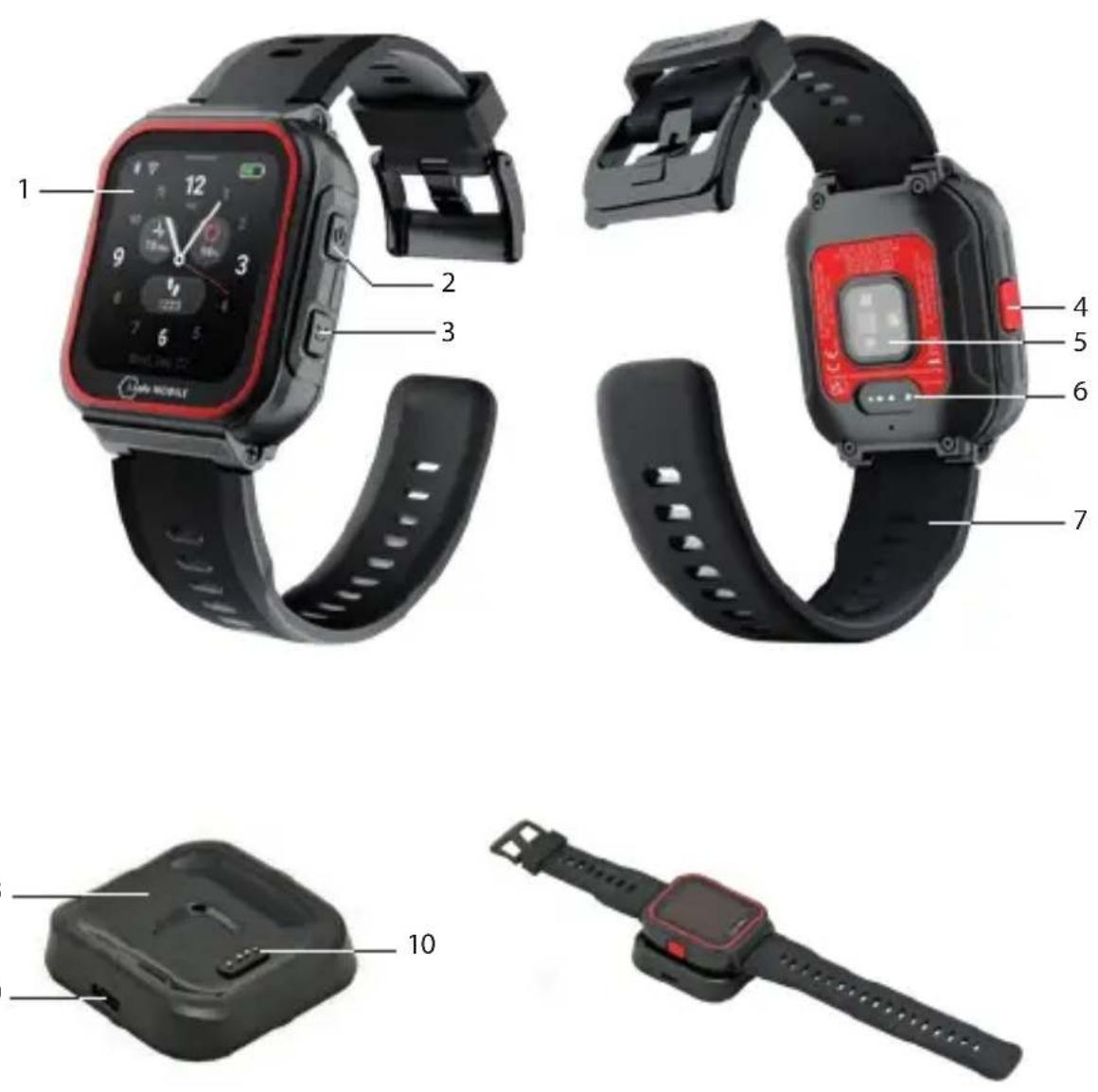
1 > TOUCHSCREEN
2) POWER KEY: A long press switches the device on/off. Depending on where you are in the menu, a short press can have the following function:
- Switch off standby mode
- Go to menu
- Go to watch face
3> SIDE KEY RIGHT: Depending on where you are in the menu, a short press can have the following function:
- Switch on/off standby mode
- Go to previous screen
4> SOS KEY/SIDE KEY LEFT: Optional function - function can be assigned via a customer specific App in connection with a smartphone.
5) SENSORS
6) CHARGINGCONTACTS
7) WRISTBAND
8) IS-DCSW1.1 DESKTOPCHARGER
9 USB INTERFACE: Connection for the i.safe PROTECTOR 2.0 USB-C Cable. Also see sections "Charging" and "Data transfer".
10 CHARGINGCONTACTS
> SAFETY
Read the "Safety" section of this Operating Manual carefully before using the device. If you do not follow these instructions or do not understand them, this could lead to death, severe injuries and damage to the device.
USER
Only trained users who are qualified in the use of Ex devices in explosion hazardous areas and who have read and understood this Operating Manual may use this device.
USE IN EXPLOSION HAZARDOUS AREAS
DANGER
Improper use can result in death or severe injuries!
» Only use the device in explosion hazardous areas of zones 1/21 and 2/22 or outside of explosion hazardous areas.
» Before entering an explosion hazardous area with the device,
• make sure that no gap can be seen between the two halves of the device,
• make sure the device is not damaged,
• make sure that all the labels on the device are readable.
» If you use the device in an explosion hazardous area, read and follow the instructions in the "Possible User Errors" section.
» Switch off the device immediately and leave the explosion hazardous area without delay if
- malfunctions occur on the device,
- you have damaged the housing of the device,
- you have exposed the device to excessive loads,
- the labels on the device are no longer readable.
USE OUTSIDE OF EXPLOSION HAZARDOUS AREAS
DANGER
Improper use can result in death or severe injuries!
» Do not use the device in places where its use is prohibited.
» Make sure you prevent the user errors described in the section entitled "Possible User Errors".
» Only charge the device as described in the "Charging" section.
NOTICE
Incorrect use can damage the device.
» Protect the device, the IS-DCSW1.1 Desktop Charger and the Power Adapter from strong electrical magnetic fields as for example those emitted by induction cookers or microwave ovens, for example.
» Do not touch the touchscreen with sharp objects.
POSSIBLE USER ERRORS
DANGER
Improper use can result in death or severe injuries! Follow the instructions below:
» Do not open the device.
» Do not damage the device.
» Do not loosen the screws on the back of the device.
» Do not modify the device structurally.
» Do not expose the device to high temperatures.
» Do not expose the device to strong UV radiation.
» Do not expose the device to processes with high electrical charges.
» Do not expose the device to aggressive acids or bases.
When working in explosion hazardous areas, please note:
» Do not change the wristband.
» Do not charge the device.
>SCOPE OF DELIVERY
Your device packaging contains the following:
1 x IS-SW1.1
1 x Quick Start Manual
1 x Safety Instructions
1 x IS-DCSW1.1 Desktop Charger
1 x i.safe PROTECTOR 2.0 USB-C Cable
1 x Power Adapter universal (power supply unit and various country-specific adapters)
1 x Screwdriver
CHARGING
DANGER
An incorrect procedure in explosion hazardous areas poses risk of death or severe injuries! Only charge the device outside of explosion hazardous areas. Do not charge the device in the vicinity of flammable substances.
NOTICE
Incorrect charging can cause damage to the device. Please note the following when charging:
» Only charge the device using the IS-DCSW1.1 Desktop Charger and the i.safe PROTECTOR 2.0 USB-C Cable supplied. Only charge the device at ambient temperatures between 0 °C to +45 °C (+32 °F to +113 °F).
» Charge the device under dry indoor conditions only.
» Do not charge the device in environments dusty or humid.
Your device package contains the IS-DCSW1.1 Desktop Charger, a power supply unit, various country-specific adapters and an i.safe PROTECTOR 2.0 USB-C Cable.
» Connect the adapter suitable for your country to the power supply unit.
» Connect the i.safe PROTECTOR 2.0 USB-C Cable to the power supply unit.
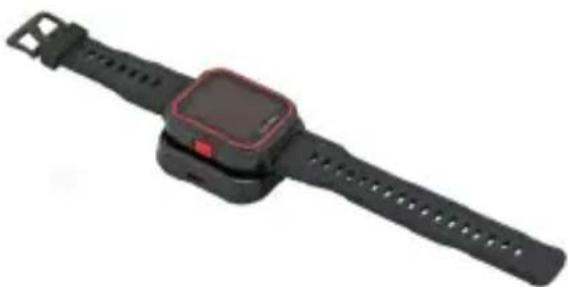
» Connect the i.safe PROTECTOR 2.0 USB-C Cable to the USB interface of the IS-DCSW1.1 Desktop Charger.
» Insert the IS-SW1.1 Smartwatch into the IS-DCSW1.1 Desktop Charger.
» Plug the Power Adapter into a power socket and charge the device completely.
natural_image
Black wristwatch with red square button and black strap, isolated on white background (no text or symbols)WEARING THE DEVICE
» Wear the device above your wrist bone.
» Fit the device snugly but comfortably on your wrist. The device is properly seated if it does not move while walking.
> SWITCHING ON/OFF
» Press and hold the power key for about 3 seconds.
USING THE DEVICE
» When turning on the device for the first time, follow the instructions on the touchscreen.
TOUCHSCREEN
» Swipe up or down to scroll through widgets, features and menus.
» Tap to select.
» Swipe right to go to the previous screen.
» Hold to view a menu of settings and options for the current screen.
Further information on operating the device can be found at www.isafe-mobile.com/de/support/downloads
CONNECT THE DEVICE TO A WI-FI NETWORK
» Press the Power key.
» In the menu, tap "Settings>Wi-Fi".
» Enable "Wi-Fi".
» Select the network and enter the network key.
CONNECTING THE DEVICE TO A SMARTPHONE VIA BLUETOOTH
» Install and start the i.safe CONNECT app on your smartphone.
» Follow the instructions for connecting on the smartphone.
Instructions for installing the i.safe CONNECT app can be found at
www.isafe-mobile.com/en/support/service under the menu item „FAQ“.
SET THE TIME
Manually
You can set the time manually via the menu:
»Press the Power key.
» In the menu, tap "Clock>Date and time".
» Disable "Automatic" if necessary.
» Tap "Set time".
» Swipe up/down to set the time.
» Confirm with "OK".
Automatic
As soon as the unit is connected to a smartphone via Bluetooth, the time is automatically set to the time of the smartphone.
» Press the Power key.
» In the menu, tap "Clock>Date and time".
» Enable "Automatic".
DATA TRANSFER
The USB interface on the IS-DCSW1.1 Desktop Charger is used for charging and data transfer.
DANGER
Improper use can result in death or severe injuries! Only use USB interface outside of explosion hazardous areas.
» Insert the IS-SW1.1 Smartwatch into the IS-DCSW1.1 Desktop Charger.
» Connect other devices to the USB interface of the IS-DCSW1.1 Desktop Charger only by using the i.safe PROTECTOR 2.0 USB-C Cable.
CHANGING THE WRISTBAND
DANGER
Improper use can result in death or severe injuries! Only change the wristband outside of explosion hazardous areas.
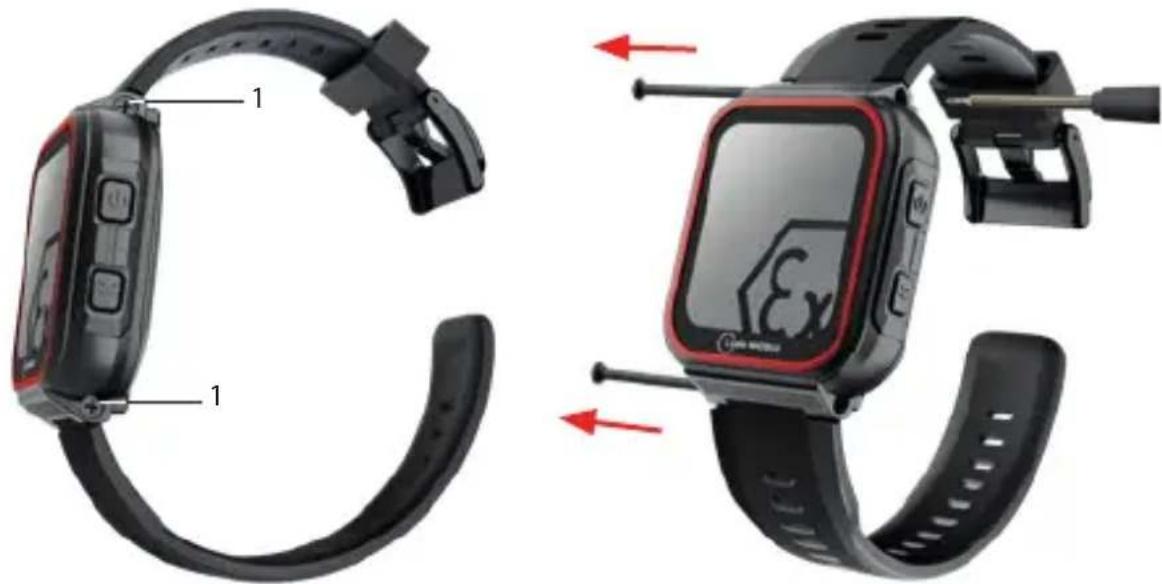
» Loosen only the screws (1) on the right side of the IS-SW1.1 Smartwatch with the screwdriver provided.
» Slide out the threaded sleeves connecting the wristband to the IS-SW1.1 Smartwatch from right to left with the screwdriver.
» Remove the wristband and insert the new wristband.
» Insert the threaded sleeves from the left.
» Insert the screws on the right and tighten them hand-tight with the screwdriver provided.
POSSIBLE DEVICE PROBLEMS
You can find information on possible device problems and how to rectify them at www.isafe-mobile.com/en/support/service under the menu item "FAQ".
If you have any further questions, please contact the i.safe MOBILE repair service at www.isafe-mobile.com/en/support/service
MAINTENANCE/REPAIR
The device itself has no serviceable parts.
WARNING
Incorrect repairs present a risk of explosion or fire, which can result in death or severe injuries! Do not open the device or carry out any repairs yourself.
» Contact the i.safe MOBILE repair service at www.isafe-mobile.com/en/support/service if the device is not working normally, if the device needs to be repaired or if a replacement part is required.
RETURN SHIPMENT
Contact the i.safe MOBILE repair service at www.isafe-mobile.com/en/support/service
DISTRIBUTION PARTNER
You can find the specialist distribution partner responsible for your country at www.isafe-mobile.com/en/contact
CLEANING
NOTICE
Incorrect cleaning can cause damage to the device. Please note the following when cleaning:
» Turn off the device before cleaning.
» Do not charge the device while cleaning.
» Do not use chemical agents for cleaning.
» Clean the IS-SW1.1 Smartwatch, the IS-DCSW1.1 Desktop Charger and the Power Adapter with a soft, moistened antistatic cloth.
» Clean the touchscreen regularly with a soft, antistatic cloth.
STORAGE
NOTICE
Incorrect storage can cause damage to the device.
Store the device at a humidity of 10 % to 60 % at the following ambient temperatures:
Up to one month: -20 °C to +45 °C (-4 °F to +113 °F)
Up to 3 months: -10 °C to +35 °C (+14 °F to +95 °F)
Over 3 months: -10 °C to +25 °C (+14 °F to +77 °F)
RECYCLING
NOTICE
Incorrect disposal of electronic products, batteries and packaging material puts the environment at risk. Please note the following when disposing of items:
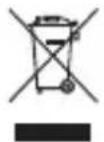
» DO NOT throw away batteries with household waste.
» Always dispose electronic products, batteries and packaging material at the appropriate collection points. This way, you prevent uncontrolled waste disposal and promote the recycling of material resources.
You can obtain further information from regional waste disposal companies, state authorities or the i.safe MOBILE service centre responsible for your country or region at www.isafe-mobile.com/en/support/service
TRADEMARKS
i.safe MOBILE and the i.safe MOBILE logo are registered trademarks of the i.safe MOBILE GmbH.
All other trademarks and copyrights are the properties of their respective owners.
DEUTSCH
Class I, Division 1, Group ABCD, T4
Class II, Division 1, Group EFG, T4
Class III, Division 1 T4
LR3081
>Temperaturbereich:
-10 °C ... +55 °C (EN/IEC 60079-0)
-10 °C ... +55 °C (EN/IEC 62368-1)
>Hersteller:
i.safe MOBILE GmbH
i_Park Tauberfranken 10
97922 Lauda-Koenigshofen
Germany
>GERÄTEÜBERSICHT/FUNKTIONEN
1 > TOUCHSCREEN
natural_image
Black smartwatch with red adjustment pad and black strap (no text or symbols visible)>GERÄT TRAGEN
www.isafe-mobile.com/en/support/downloads
PROHLÁŠENÍ FCC/IC
www.isafe-mobile.com/en/support/downloads
ZNAČENÍ SOUVISEJÍCÍ S NEBEZPEČÍM VÝBUCHU
> ATEX:
II 2G Ex ib IIC T4 Gb
① II 2D Ex ib IIIC T135 °C Db
Class I, Division 1, Group ABCD, T4
Class II, Division 1, Group EFG, T4
Class III, Division 1 T4
LR3081
> Teplotní rozsah:
-10 °C ... +55 °C (EN/IEC 60079-0)
-10 °C ... +55 °C (EN/IEC 62368-1)
Výrobce:
i.safe MOBILE GmbH
i_Park Tauberfranken 10
97922 Lauda-Koenigshofen
Německo
PŘEHLED O ZAŘÍZENÍ/FUNKCÍCH
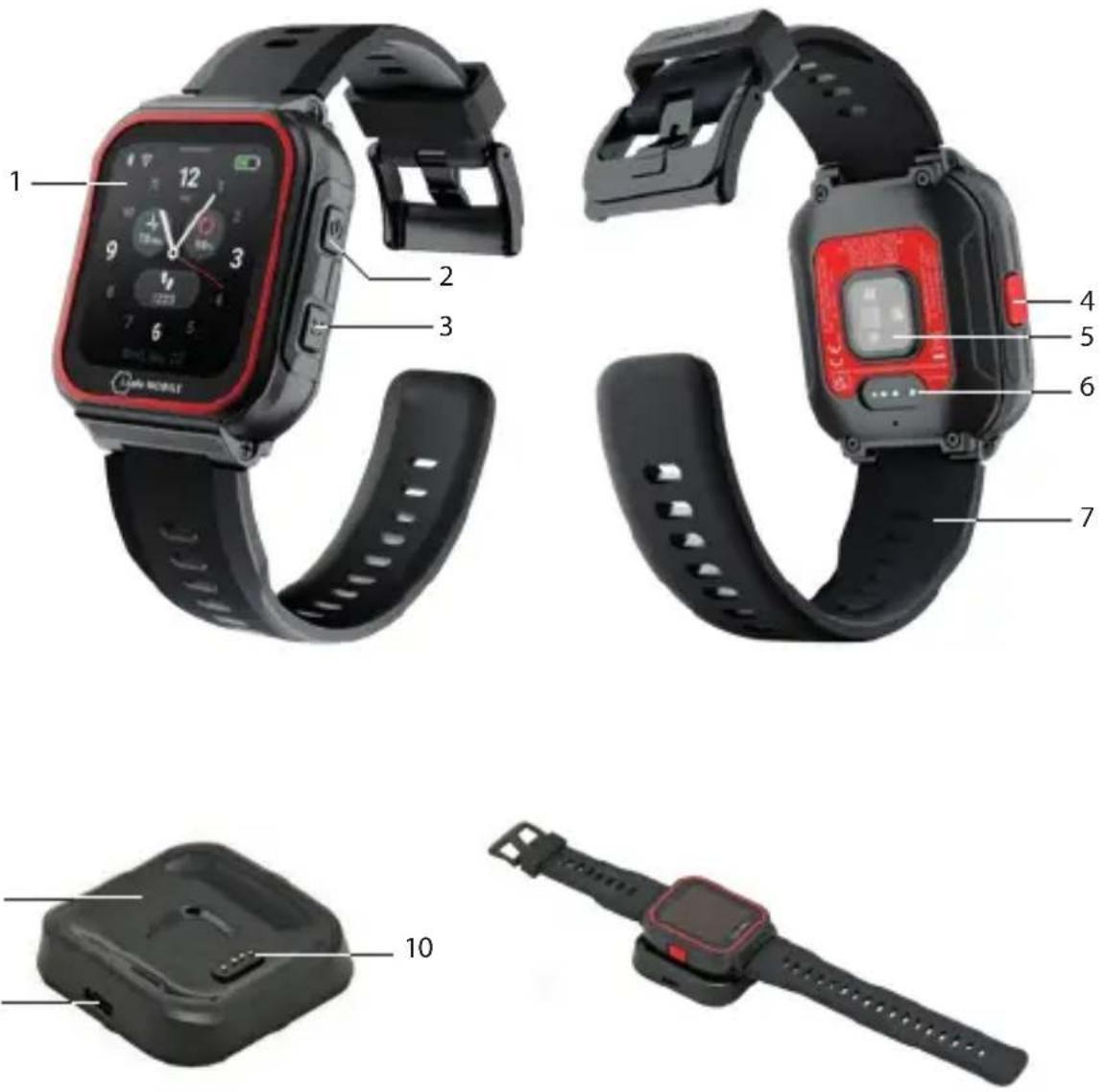
1 > DOTYKOVÁOBRAZOVKA
natural_image
Black wristwatch with red square sensor and black strap (no text or symbols visible)NOŠENÍ ZAŘÍZENÍ
Class I, Division 1, Group ABCD, T4
Class II, Division 1, Group EFG, T4
Class III, Division 1 T4
LR3081
> Temperaturområde:
-10 °C ... +55 °C (EN/IEC 60079-0)
-10 °C ... +55 °C (EN/IEC 62368-1)
Procuent:
i.safe MOBILE GmbH
i_Park Tauberfranken 10
97922 Lauda-Koenigshofen
Tyskland
OVERSIGT OVER ENHEDEN/FUNKTIONER
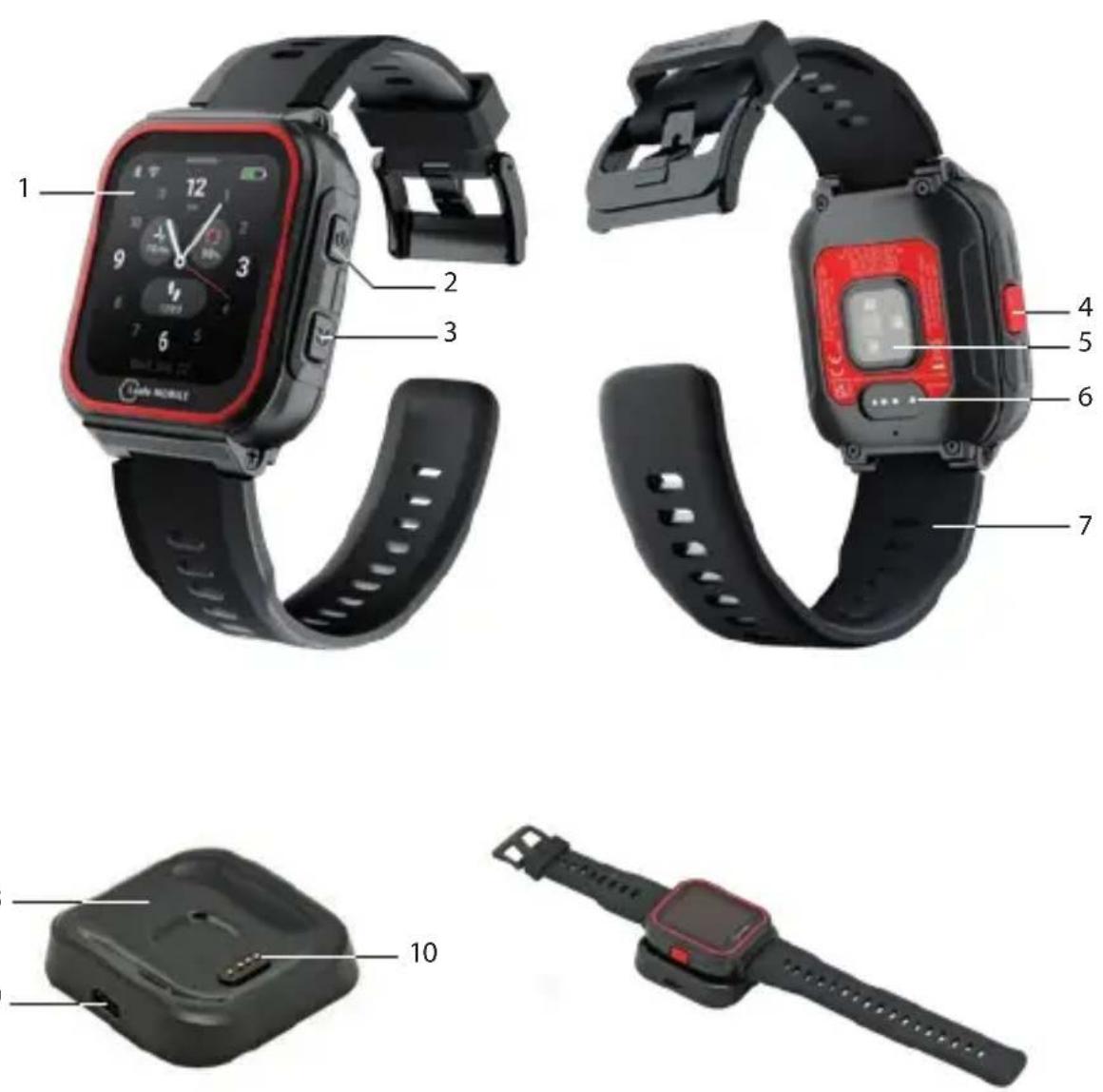
1) TOUCHSKÄRM
natural_image
Black fitness wristwatch with red sensor and black strap (no text or symbols visible)SÅDAN BÆRER DU ENHEDEN
Class I, Division 1, Group ABCD, T4 Class II, Division 1, Group EFG, T4 Class III, Division 1 T4 LR3081
natural_image
Black wristwatch with red adjustment pad and black strap (no text or symbols visible)CÓMO LLEVAR EL DISPOSITIVO
www.isafe-mobile.com/en/support/downloads
FCC-/IC-LAUSUNTO
www.isafe-mobile.com/en/support/downloads
EX-MERKINNÄT
> ATEX:
⑥ II 2G Ex ib IIC T4 Gb
Ea II 2D Ex ib IIIC T135 °C Db
Class I, Division 1, Group ABCD, T4
Class II, Division 1, Group EFG, T4
Class III, Division 1 T4
LR3081
> Lämpötila-alue:
-10°C ... +55°C (EN/IEC 60079-0)
-10°C ... +55°C (EN/IEC 62368-1)
> Valmistaja:
i.safe MOBILE GmbH
i_Park Tauberfranken 10
97922 Lauda-Koenigshofen
Saksa
> LAITTEEN YLEISKUVA JA TOIMINNOT
1 > KOSKETUSNÄYTTÖ
natural_image
Black fitness wristwatch with red adjustment pad and black strap (no text or symbols visible)> LAITTEEN KÄYTTÄMINEN
DÉCLARATION DE CONFORMITÉ UE/UK
Certification CE: 2004
>IECEx:
Ex ib IIC T4 Gb
Ex ib IIIC T135 °C Db
Certificat IECEx: IECEx EPS 22.0028X
UKEX:
⑥ II 2G Ex ib IIC T4 Gb
II 2D Ex ib IIIC T135 °C Db
EPS 22 UKEX 1 196 X
Certification UKCA: 2503
Class I, Division 1, Group ABCD, T4
Class II, Division 1, Group EFG, T4
Class III, Division 1 T4
LR3081
> Plage de temperature:
-10 °C ... +55 °C (EN/IEC 60079-0)
-10 °C ... +55 °C (EN/IEC 62368-1)
> Fabrique par:
i.safe MOBILE GmbH
i_Park Tauberfranken 10
97922 Lauda-Koenigshofen
Allemagne
SYNOPTIQUE DES APPAREILS/FONCTIONS
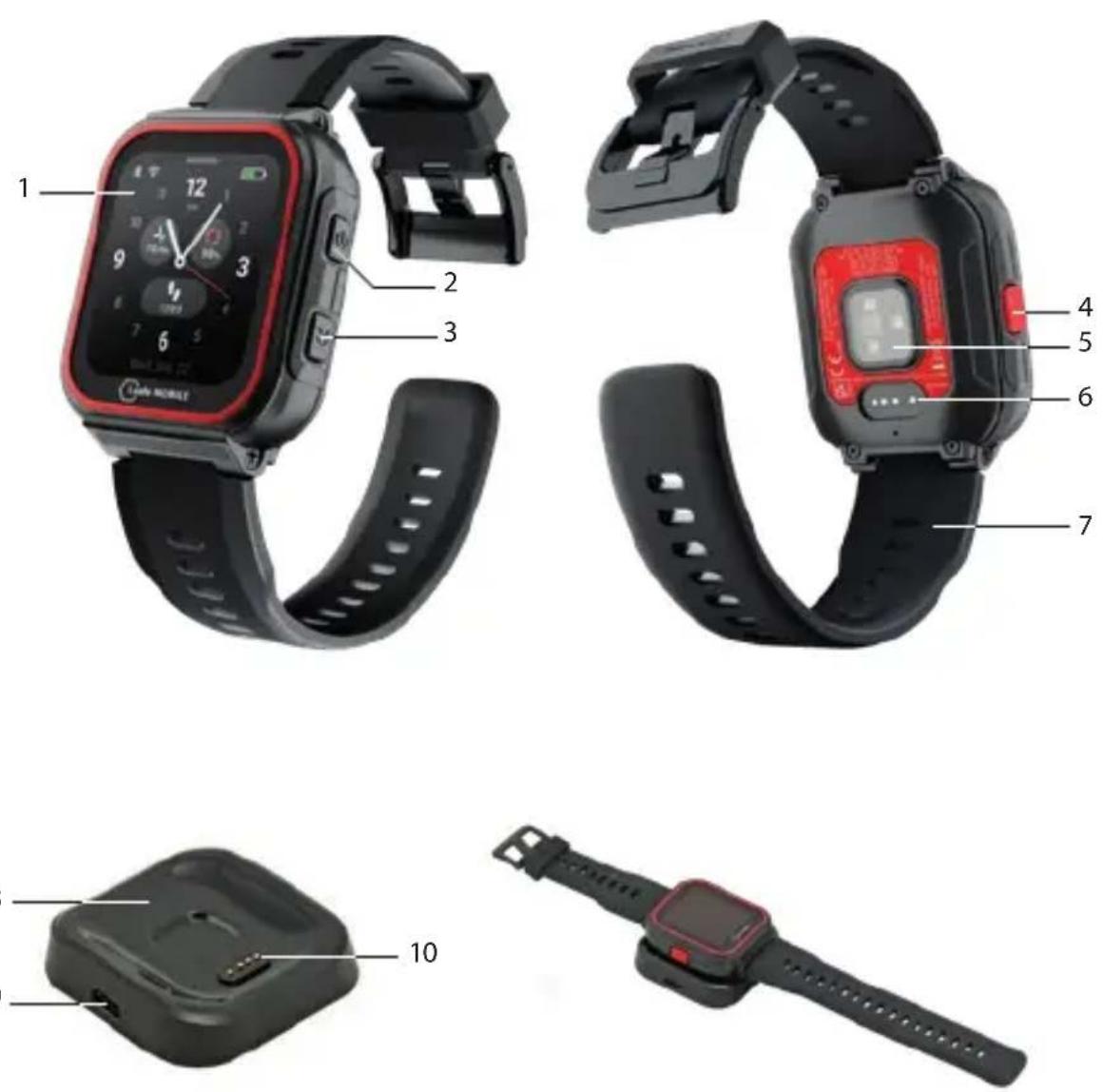
1 > ÉCRAN TACTILE
natural_image
Black and red fitness tracker with circular headband (no text or symbols visible)PORT DE L'APPAREIL
MISE EN MARCHE/ARRÊT
>TRANSFERT DE DONNÉES
Class I, Division 1, Group ABCD, T4
Class II, Division 1, Group EFG, T4
Class III, Division 1 T4
LR3081
Hömerseklet tartomany:
-10 °C ... +55 °C (EN/IEC 60079-0)
-10 °C ... +55 °C (EN/IEC 62368-1)
Gyarto:
i.safe MOBILE GmbH
i_Park Tauberfranken 10
97922 Lauda-Koenigshofen
Németország
> A ESZKÖZ ÁTTEKINTÉSE/FUNKCIÓK
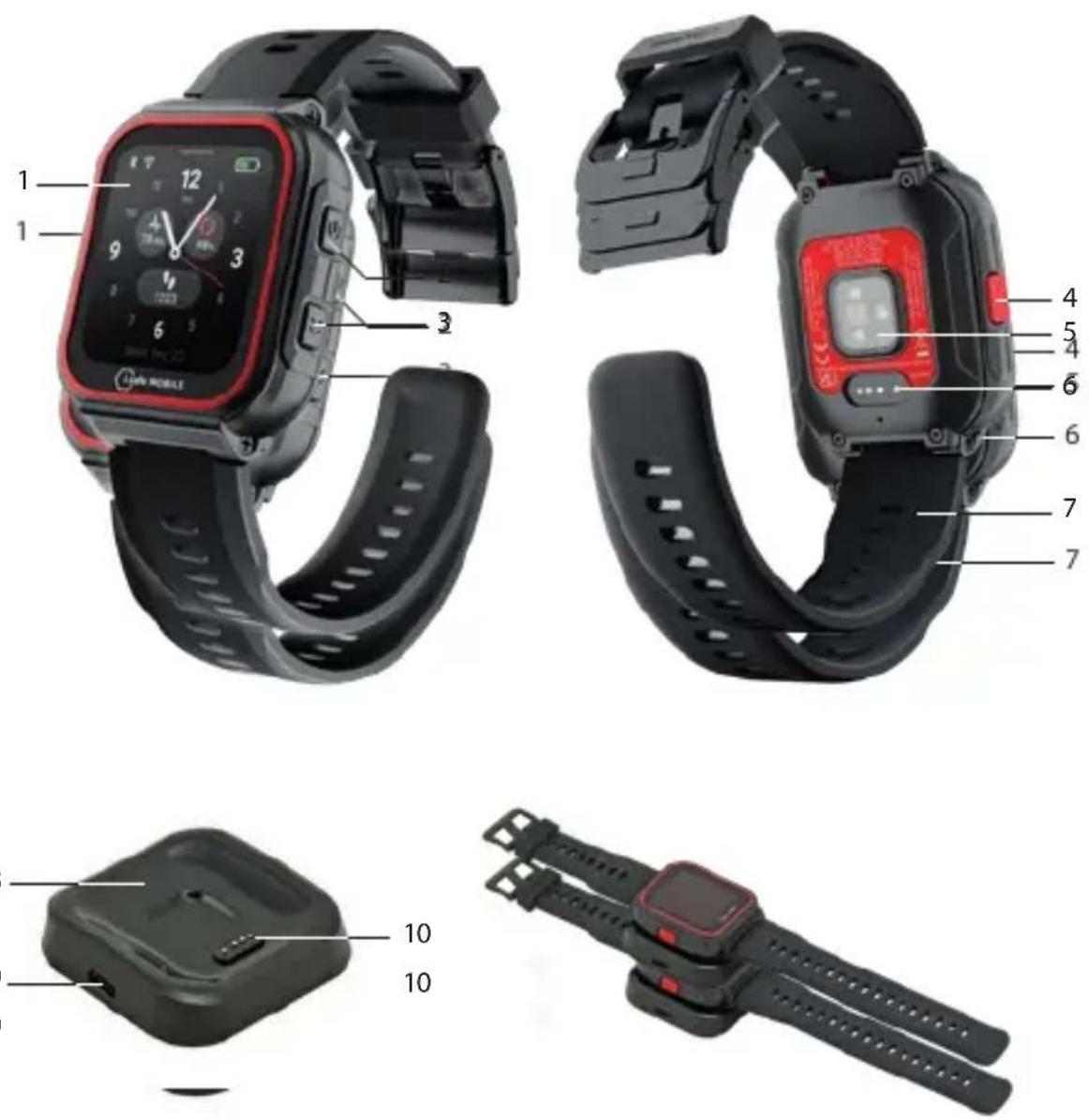
1 > ÉRINTÖKIJELZÖ
natural_image
Black wristwatch with red square button and black strap, isolated on white background (no text or symbols)A KÉSZÜLÉK VISELÉSE
www.isafe-mobile.com/en/support/service
www.isafe-mobile.com/en/support/downloads
DICHIARAZIONE FCC/IC
www.isafe-mobile.com/en/support/downloads
Class I, Division 1, Group ABCD, T4
Class II, Division 1, Group EFG, T4
Class III, Division 1 T4
LR3081
USO IN AREE A RISCHIO DI ESPLOSIONE
PERICOLO
USO FUORI DALLE AREE A RISCHIO DI ESPLOSIONE
PERICOLO
natural_image
Black and red fitness wristwatch with sensor strap (no text or symbols visible)COME INDOSSARE IL DISPOSITIVO
Class I, Division 1, Group ABCD, T4
Class II, Division 1, Group EFG, T4
Class III, Division 1 T4
LR3081
natural_image
Black wristwatch with red adjustment pad and black strap (no text or symbols visible)HET APPARAAT DRAGEN
www.isafe-mobile.com/en/support/downloads
FCC/IC UTTALELSE
FCC/IC-erklæringen finner du på www.isafe-mobile.com/en/support/downloads
EX-MERKING
> ATEX:
④ II 2G Ex ib IIC T4 Gb
II 2D Ex ib IIIC T135 °C Db
Class I, Division 1, Group ABCD, T4
Class II, Division 1, Group EFG, T4
Class III, Division 1 T4
LR3081
> Temperaturomrade:
-10 °C ... +55 °C (EN/IEC 60079-0)
-10 °C ... +55 °C (EN/IEC 62368-1)
> Produsert av:
i.safe MOBILE GmbH
i_Park Tauberfranken 10
97922 Lauda-Koenigshofen
Tyskland
ENHETSOVERSIKT/FUNKSJONER
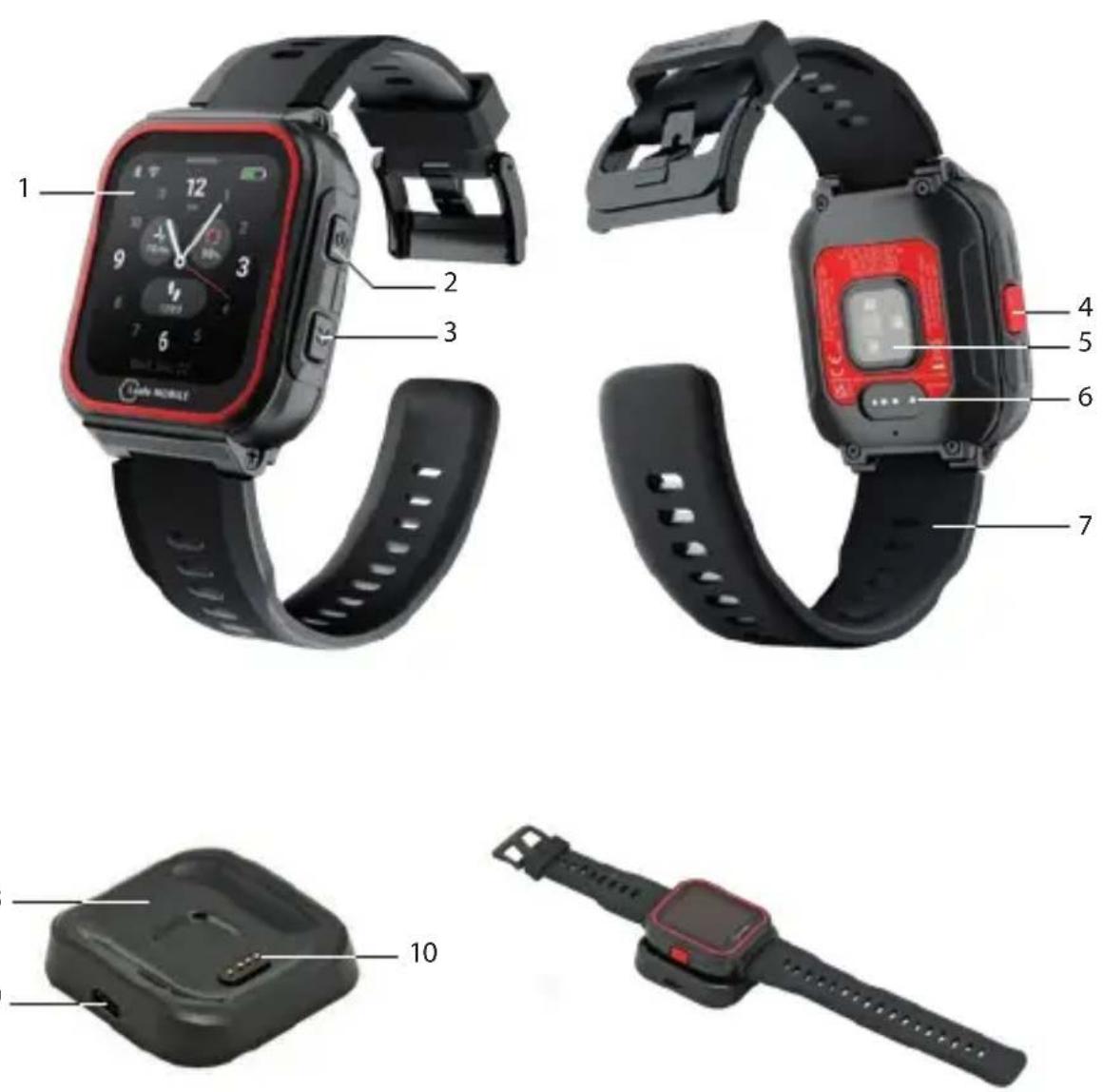
1 > TOUCH-SKJERM
natural_image
Black wristwatch with red square sensor and black strap (no text or symbols visible)PLASSERING AV ENHETEN PÅ ARMEN
VEDLIKEHOLD/REPARASJON
Class I, Division 1, Group ABCD, T4
Class II, Division 1, Group EFG, T4
Class III, Division 1 T4
LR3081
> Zakres temperatur:
-10 °C ... +55 °C (EN/IEC 60079-0)
-10 °C ... +55 °C (EN/IEC 62368-1)
> Producent:
i.safe MOBILE GmbH
i_Park Tauberfranken 10
97922 Lauda-Koenigshofen
Niemcy
> OPIS OGÓLNY/FUNKCJE URZĄDZENIA

1 > EKRANDOTYKOWY
natural_image
Black wristwatch with red square sensor and black strap (no text or symbols visible)NOSZENIE URZĄDZENIA
www.isafe-mobile.com/en/support/service
www.isafe-mobile.com/en/support/downloads
MARCAÇÕES EX
ATEX:
II 2G Ex ib IIC T4 Gb
II 2D Ex ib IIIC T135 °C Db
Class I, Division 1, Group ABCD, T4
Class II, Division 1, Group EFG, T4
Class III, Division 1 T4
LR3081
natural_image
Black and red fitness tracker with wrist strap (no text or symbols visible)>USAR O DISPOSITIVO
www.isafe-mobile.com/en/support/service
www.isafe-mobile.com/en/support/downloads
www.isafe-mobile.com/en/support/downloads
MARCAS
> ATEX:
II 2G Ex ib IIC T4 Gb
II 2D Ex ib IIIC T135 °C Db
Class I, Division 1, Group ABCD, T4
Class II, Division 1, Group EFG, T4
Class III, Division 1 T4
LR3081
natural_image
Black wristwatch with red sensor icon and black strap (no text or symbols visible)>USAR O DISPOSITIVO
CONECTE O DISPOSITIVO A UMA REDE WI-FI
»Pressione a tecla Power.
» No menu, toque em „Configurações>Wi-Fi”.
»Habilite „Wi-Fi“.
» Seleccione a rede e digite a tecla de rede.
CONECTANDO O DISPOSITIVO A UM SMARTPHONE VIA BLUETOOTH
www.isafe-mobile.com/en/support/service
www.isafe-mobile.com/en/support/downloads
ЗАЯВЛЕНИЕ FCC / IC
www.isafe-mobile.com/en/support/downloads
Class I, Division 1, Group ABCD, T4
Class II, Division 1, Group EFG, T4
Class III, Division 1 T4
LR3081
natural_image
Black wristwatch with red sensor icon and black strap (no text or symbols visible)>НОШЕНИЕ УСТРОЙСТВА
Class I, Division 1, Group ABCD, T4
Class II, Division 1, Group EFG, T4
Class III, Division 1 T4
LR3081
> Temperaturintervall:
-10 °C ... +55 °C (EN/IEC 60079-0)
-10 °C ... +55 °C (EN/IEC 62368-1)
> Tillverkad av:
i.safe MOBILE GmbH
i_Park Tauberfranken 10
97922 Lauda-Koenigshofen
Tyskland
ÖVERSIKT/FUNKTIONER HOS ENHETEN
1 PEKSKÄRM
natural_image
Black wristwatch with red square sensor and black strap (no text or symbols visible)ANVÄNDA ENHETEN
IZJAVA O SUKLADNOSTI EU/UK-A
Možete pronaći Izjavu o sukladnosti EU/UK-a na www.isafe-mobile.com/en/support/downloads
IZJAVA FCC-A/IC-A
Izjavu FCC-a/IC-a možete pronaći na www.isafe-mobile.com/en/support/downloads
EX OZNAKE
> ATEX:
II 2G Ex ib IIC T4 Gb
⑥ II 2D Ex ib IIIC T135 °C Db
Certifikat o ispitivanju EU tipa:
EPS 22 ATEX 1 196 X
Oznaka CE: 2004
IECEx:
Ex ib IIC T4 Gb
Ex ib IIIC T135 °C Db
IECEx certifikat: IECEx EPS 22.0028X
UKEX:
II 2G Ex ib IIC T4 Gb
Ex II 2D Ex ib IIIC T135 °C Db
EPS 22 UKEX 1 196 X
Oznaka UKCA: 2503
Sjeverna Amerika:
Class I, Division 1, Group ABCD, T4
Class II, Division 1, Group EFG, T4
Class III, Division 1 T4
LR3081
> Raspon temperature:
-10 °C ... +55 °C (EN/IEC 60079-0)
-10°C ... +55°C (EN/IEC 62368-1)
> Proizvođač:
i.safe MOBILE GmbH
i_Park Tauberfranken 10
97922 Lauda-Koenigshofen
Njemačka
PREGLED/FUNKCIJE UREĐAJA
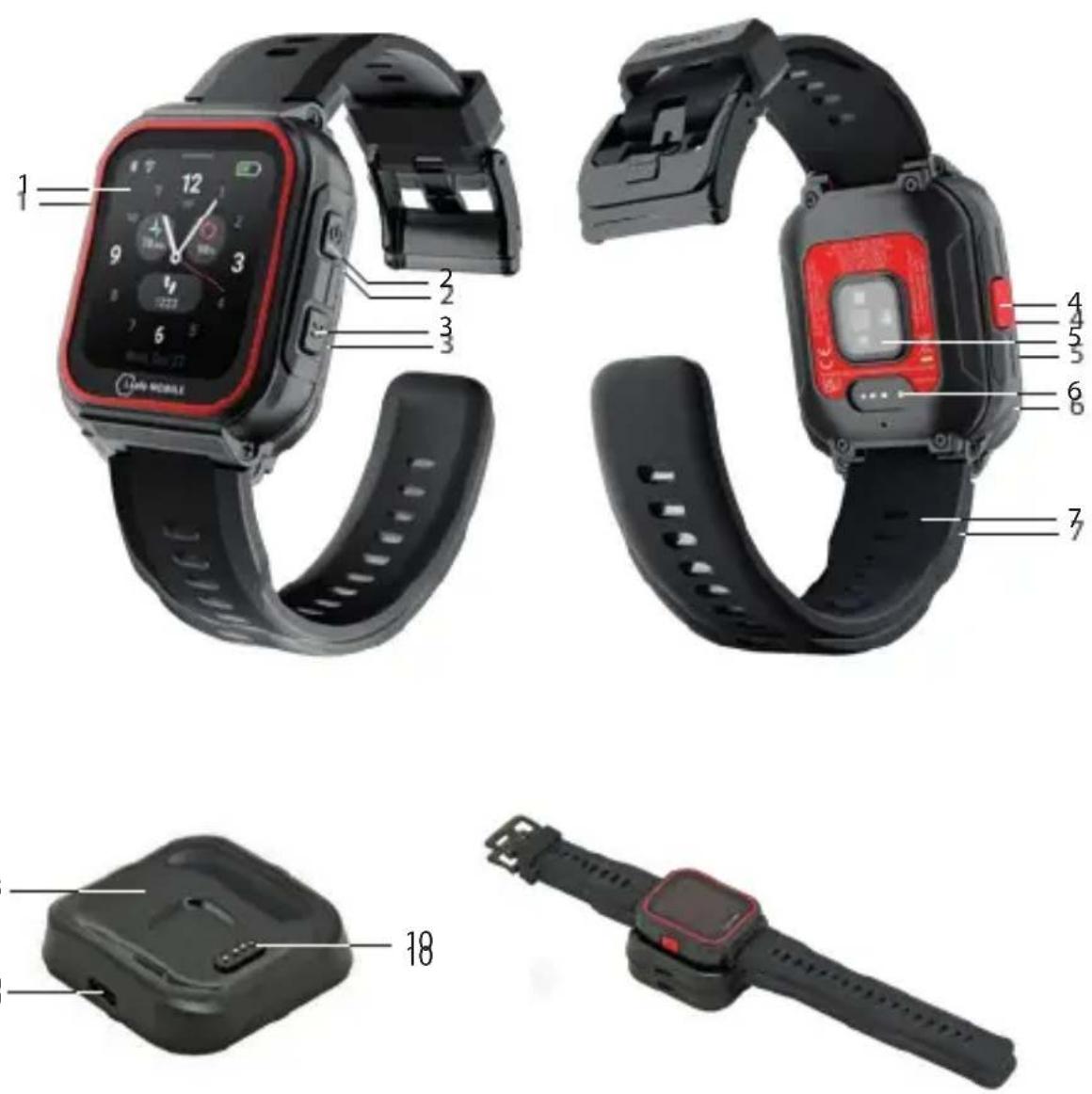
1 > EKRAN NA DODIR
2) TIPKA ZA UKLJUČIVANJE I ISKLJUČIVANJE: Dugi pritisak uključuje/isključuje uređaj. Ovisno o tome gdje se nalazite u izborniku, kratki pritisak može imati sljedeću funkciju:
• Isključite stanje čekanja
- Idi na izbornik
- Idite na brojčanik sata
natural_image
Black fitness wristwatch with red adjustment pad and black strap (no text or symbols visible)>NOŠENJE UREĐAJA
POVEŽITE UREĐAJ S WI-FI MREŽOM
» Otpustite samo vijke (1) na desnoj strani pametnog sata IS-SW1.1, koristeći pripadajući odvijač.
» Izvucite navlake s navojima koje remen sata spajaju s pametnim satom IS-SW1.1 s desna na lijevo, s pomoću odvijača.
» Skinite remen i stavite novi.
» Navlake s navojima umetnite s lijeva.
» Umetnite vijke na desnoj strani i čvrsto ih zategnite s pomoću pripadajućeg odvijača.
>MOGUĆI PROBLEMI S UREĐAJEM
www.isafe-mobile.com/en/support/service
ODRŽAVANJE/POPRAVAK
Sam uređaj nema dijelova koji se mogu servisirati.
UPOZORENJE
Neodgovarajući popravci predstavljaju opasnost od eksplozije ili požara, što može dovesti do smrti ili teških ozljeda! Ne otvarajte uređaj i ne obavljajte sami popravke.
www.isafe-mobile.com/en/support/downloads
VYHLÁSENIE FCC/IC
Vyhlásenie FCC/IC nájdete na www.isafe-mobile.com/en/support/downloads
OZNAČENIA SÚVISIACE S NEBEZPEČENSTVOM VÝBUCHU
> ATEX:
Ea II 2G Ex ib IIC T4 Gb
① II 2D Ex ib IIIC T135 °C Db
Class I, Division 1, Group ABCD, T4
Class II, Division 1, Group EFG, T4
Class III, Division 1 T4
LR3081
> Teplotný rozsah:
-10 °C ... +55 °C (EN/IEC 60079-0)
-10 °C ... +55 °C (EN/IEC 62368-1)
Výrobca:
i.safe MOBILE GmbH
i_Park Tauberfranken 10
97922 Lauda-Koenigshofen
Nemecko
PREHL'AD/FUNKCIE ZARIADENIA
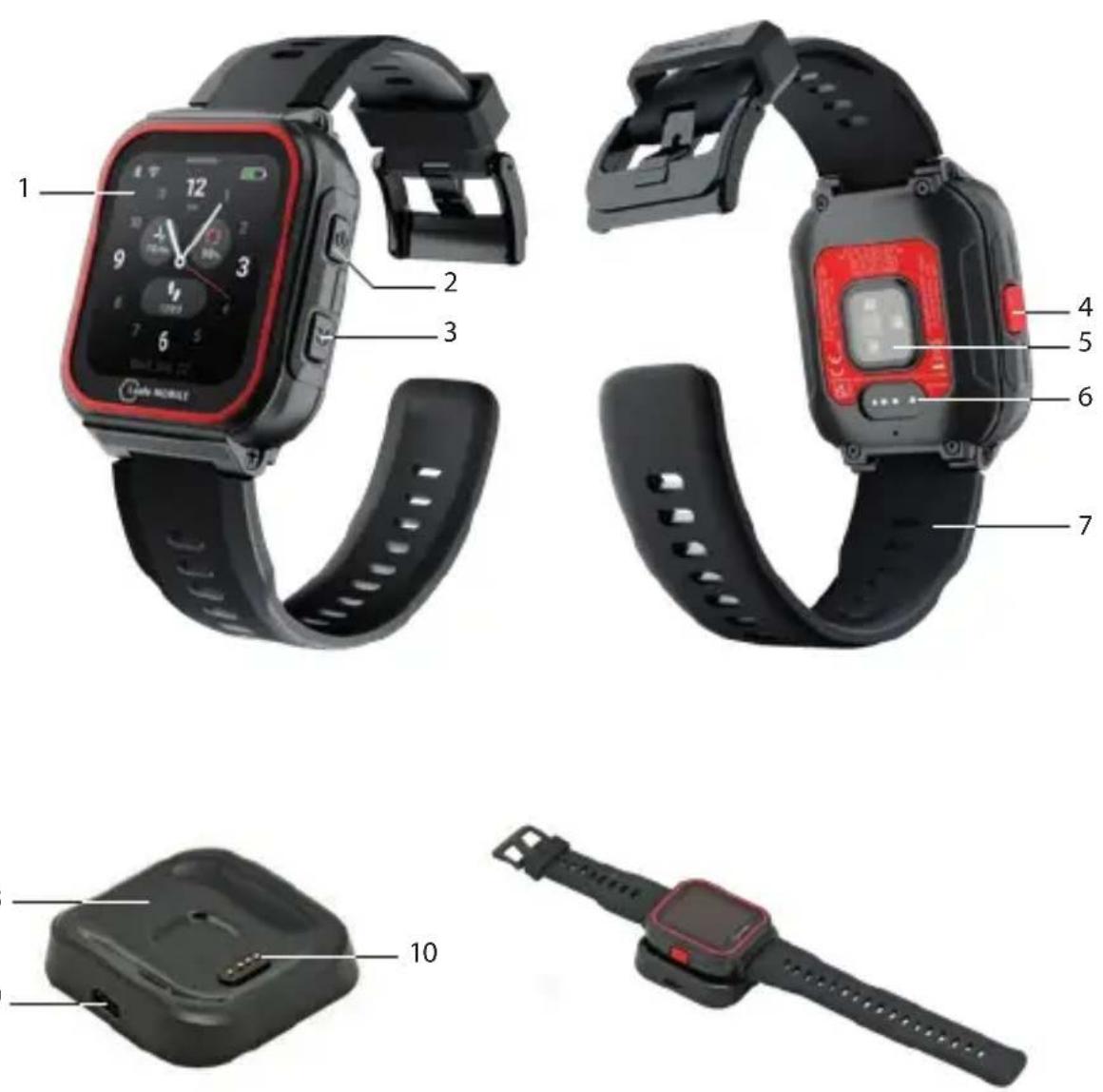
1 > DOTYKOVÁOBRAZOVKA
natural_image
Black wristwatch with red square sensor and black strap (no text or symbols visible)NOSENIE ZARIADENIA
Class I, Division 1, Group ABCD, T4
Class II, Division 1, Group EFG, T4
Class III, Division 1 T4
LR3081
> Температурни опсег:
-10 °C ... +55 °C (EN/IEC 60079-0)
-10°C ... +55°C (EN/IEC 62368-1)
> Произвођач:
i.safe MOBILE GmbH
i_Park Tauberfranken 10
97922 Lauda-Koenigshofen
Немачка
>ПРЕГЛЕД/ФУНКЦИЈЕ УРЕЂАЈА
1> ЕКРАН ОСЕТЛЬИВ НА ДОДИР
natural_image
Black wristwatch with red sensor icon and black strap (no text or symbols visible)>НОШЕЊЕ УРЕЋАЈА
Class I, Division 1, Group ABCD, T4
Class II, Division 1, Group EFG, T4
Class III, Division 1 T4
LR3081
온도 범위:
-10 °C ... +55 °C (EN/IEC 60079-0)
-10 °C ... +55 °C (EN/IEC 62368-1)
제조업체:
i.safe MOBILE GmbH
i_Park Tauberfranken 10
97922 Lauda-Koenigshofen
Germany
>장치 개요/기능
1> 터치 스크린
natural_image
Black fitness wristwatch with red square button and black strap (no text or symbols visible)>장치 착용
》장치를 손목 빠 위로 착용합니다.
Class I, Division 1, Group ABCD, T4
Class II, Division 1, Group EFG, T4
Class III, Division 1 T4
LR3081
温度範囲:
-10 °C ... +55 °C (EN/IEC 60079-0)
-10 °C ... +55 °C (EN/IEC 62368-1)
製造元:
i.safe MOBILE GmbH
i_Park Tauberfranken 10
97922 Lauda-Koenigshofen
Germany
>デバイスの概要と機能
1> タッチスクリーン
natural_image
Black and red fitness tracker device with circular headband (no text or symbols visible)デバイスの装着
Class I, Division 1, Group ABCD, T4
Class II, Division 1, Group EFG, T4
Class III, Division 1 T4
LR3081
温度范围:
-10 °C … +55 °C (EN/IEC 60079-0)
-10^ C ·s + 55^ C (EN/IEC 62368-1)
制造商:
i.safe MOBILE GmbH
i_Park Tauberfranken 10
97922 Lauda-Koenigshofen
Germany
设备总览/功能
1)触摸式屏幕
natural_image
Black fitness wristwatch with red square sensor and black strap (no text or symbols visible)穿戴设备
将设备戴在腕骨上方。
www.isafe-mobile.com/cn/support/downloads
www.isafe-mobile.com/en/support/downloads
www.isafe-mobile.com/en/support/service
www.isafe-mobile.com/en/support/downloads
natural_image
Black and red fitness wristwatch with circular sensor module (no text or symbols visible)ارتداء الجهاز
FOR FURTHER QUESTIONS PLEASE CONTACT OUR SERVICE CENTRE:
» i.safe MOBILE GmbH, i_Park Tauberfranken 10, 97922 Lauda-Koenigshofen, Germany
» support@isafe-mobile.com
» https://support.isafe-mobile.com
natural_image
Nighttime exterior view of a large industrial chemical plant with illuminated towers and piping (no visible text or signage)WWW.ISAFE-MOBILE.COM

- CONTENTS
- ENGLISH
- >READ AND UNDERSTAND THE INSTRUCTIONS
- PROTECT YOUR LIFE AND READ THE OPERATING MANUAL
- INTENDED USE
- WARRANTY
- EU/UK DECLARATION OF CONFORMITY
- FCC/IC STATEMENT
- EX MARKINGS
- > ATEX:
- IECEx:
- UKEX:
- North America:
- > Temperature range:
- Manufactured by:
- >DEVICE OVERVIEW/FUNCTIONS
- > TOUCHSCREEN
- > SAFETY
- USER
- USE IN EXPLOSION HAZARDOUS AREAS
- DANGER
- USE OUTSIDE OF EXPLOSION HAZARDOUS AREAS
- NOTICE
- POSSIBLE USER ERRORS
- When working in explosion hazardous areas, please note:
- >SCOPE OF DELIVERY
- CHARGING
- WEARING THE DEVICE
- > SWITCHING ON/OFF
- USING THE DEVICE
- TOUCHSCREEN
- CONNECT THE DEVICE TO A WI-FI NETWORK
- CONNECTING THE DEVICE TO A SMARTPHONE VIA BLUETOOTH
- SET THE TIME
- Manually
- Automatic
- DATA TRANSFER
- CHANGING THE WRISTBAND
- POSSIBLE DEVICE PROBLEMS
- MAINTENANCE/REPAIR
- WARNING
- RETURN SHIPMENT
- DISTRIBUTION PARTNER
- CLEANING
- STORAGE
- RECYCLING
- TRADEMARKS
- DEUTSCH
- >Temperaturbereich:
- >Hersteller:
- >GERÄTEÜBERSICHT/FUNKTIONEN
- >GERÄT TRAGEN
- PROHLÁŠENÍ FCC/IC
- ZNAČENÍ SOUVISEJÍCÍ S NEBEZPEČÍM VÝBUCHU
- > Teplotní rozsah:
- Výrobce:
- i.safe MOBILE GmbH
- PŘEHLED O ZAŘÍZENÍ/FUNKCÍCH
- > DOTYKOVÁOBRAZOVKA
- NOŠENÍ ZAŘÍZENÍ
- > Temperaturområde:
- Procuent:
- OVERSIGT OVER ENHEDEN/FUNKTIONER
- SÅDAN BÆRER DU ENHEDEN
- CÓMO LLEVAR EL DISPOSITIVO
- FCC-/IC-LAUSUNTO
- EX-MERKINNÄT
- > Lämpötila-alue:
- > Valmistaja:
- > LAITTEEN YLEISKUVA JA TOIMINNOT
- > KOSKETUSNÄYTTÖ
- > LAITTEEN KÄYTTÄMINEN
- DÉCLARATION DE CONFORMITÉ UE/UK
- >IECEx:
- > Plage de temperature:
- > Fabrique par:
- SYNOPTIQUE DES APPAREILS/FONCTIONS
- PORT DE L'APPAREIL
- MISE EN MARCHE/ARRÊT
- >TRANSFERT DE DONNÉES
- Hömerseklet tartomany:
- Gyarto:
- > A ESZKÖZ ÁTTEKINTÉSE/FUNKCIÓK
- > ÉRINTÖKIJELZÖ
- A KÉSZÜLÉK VISELÉSE
- DICHIARAZIONE FCC/IC
- USO IN AREE A RISCHIO DI ESPLOSIONE
- PERICOLO
- USO FUORI DALLE AREE A RISCHIO DI ESPLOSIONE
- COME INDOSSARE IL DISPOSITIVO
- HET APPARAAT DRAGEN
- FCC/IC UTTALELSE
- EX-MERKING
- > Temperaturomrade:
- > Produsert av:
- ENHETSOVERSIKT/FUNKSJONER
- > TOUCH-SKJERM
- PLASSERING AV ENHETEN PÅ ARMEN
- VEDLIKEHOLD/REPARASJON
- > Zakres temperatur:
- > Producent:
- > OPIS OGÓLNY/FUNKCJE URZĄDZENIA
- NOSZENIE URZĄDZENIA
- MARCAÇÕES EX
- ATEX:
- >USAR O DISPOSITIVO
- MARCAS
- CONECTE O DISPOSITIVO A UMA REDE WI-FI
- CONECTANDO O DISPOSITIVO A UM SMARTPHONE VIA BLUETOOTH
- ЗАЯВЛЕНИЕ FCC / IC
- >НОШЕНИЕ УСТРОЙСТВА
- > Temperaturintervall:
- > Tillverkad av:
- ÖVERSIKT/FUNKTIONER HOS ENHETEN
- ANVÄNDA ENHETEN
- IZJAVA O SUKLADNOSTI EU/UK-A
- IZJAVA FCC-A/IC-A
- EX OZNAKE
- Sjeverna Amerika:
- > Raspon temperature:
- > Proizvođač:
- PREGLED/FUNKCIJE UREĐAJA
- > EKRAN NA DODIR
- >NOŠENJE UREĐAJA
- POVEŽITE UREĐAJ S WI-FI MREŽOM
- >MOGUĆI PROBLEMI S UREĐAJEM
- ODRŽAVANJE/POPRAVAK
- UPOZORENJE
- VYHLÁSENIE FCC/IC
- OZNAČENIA SÚVISIACE S NEBEZPEČENSTVOM VÝBUCHU
- > Teplotný rozsah:
- Výrobca:
- PREHL'AD/FUNKCIE ZARIADENIA
- NOSENIE ZARIADENIA
- > Температурни опсег:
- > Произвођач:
- >ПРЕГЛЕД/ФУНКЦИЈЕ УРЕЂАЈА
- >НОШЕЊЕ УРЕЋАЈА
- >장치 개요/기능
- >장치 착용
- 温度範囲:
- 製造元:
- >デバイスの概要と機能
- デバイスの装着
- 设备总览/功能
- 穿戴设备
Brand : i.safe Mobile
Model : IS-SW1.1
Category : Smartwatch