
CFX2 57 - Fridge DOMETIC - Free user manual and instructions
Find the device manual for free CFX2 57 DOMETIC in PDF.
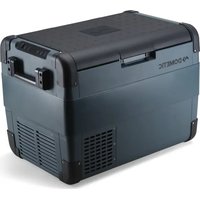


| Product type | Compression refrigerator cooler |
| Brand and model | Dometic CFX2 57 |
| Dimensions (L x W x H) | 808 x 703 x 848 mm |
| Weight | 18.8 kg |
| Usable volume | 57 liters |
| Power supply voltage | 12/24 V DC (cigarette lighter plug) and 100-240 V AC (mains adapter) |
| Power consumption (nominal) | 12 V: 7 A; 24 V: 4 A; 100-240 V: 0.7 A |
| Temperature range | Adjustable from -12 °C to +10 °C |
| Refrigerant type | R600a (isobutane), 47 g |
| Connectivity | Built-in Bluetooth and Wi-Fi for control via Mobile Cooling app |
| Battery protection | 3 levels (LOW, MED, HIGH) with automatic shut-off to prevent deep discharge |
| Display functions | Temperature display in °C/°F, brightness adjustment, sleep mode |
| USB port | 1 USB-A port (5 V, 2 A) for charging small devices |
| Included accessories | 1 removable basket, 12/24 V cable, 220 V cable, quick start guide |
| Cleaning | Clean with a damp cloth; defrost manually if necessary |
| Safety | Reverse polarity protection, fuse in DC plug, automatic shutdown under voltage |
| Maintenance | Regularly check ventilation openings and door seal |
| Repairability | Repairs reserved for professionals; user-replaceable DC fuse |
| Warranty | Legal warranty (refer to manual) |
Frequently Asked Questions - CFX2 57 DOMETIC
User questions about CFX2 57 DOMETIC
0 question about this device. Answer the ones you know or ask your own.
Ask a new question about this device
Download the instructions for your Fridge in PDF format for free! Find your manual CFX2 57 - DOMETIC and take your electronic device back in hand. On this page are published all the documents necessary for the use of your device. CFX2 57 by DOMETIC.
USER MANUAL CFX2 57 DOMETIC
Dometic Group. The usual appearance of the contents of this manual is protected by copyright and design law. The underlying technical design and the products contained herein may be protected by design patent or pending patent. The trademarks mentioned in this manual belong to Dometic Sweden AB. All rights are reserved.
English
1 Important notes. 3 2 Explanation of symbols. 3 3 Explanation of symbols on the device. 4 4 Safety instructions. 5 5 Scope of delivery. 6 6 Accessories. 7 7 Intended use. 8 8 Technical description. 8 9 Operation. 10 10 Cleaning and maintenance. 11 11 Troubleshooting. 12 12 Warranty. 13 13 Disposal. 14 14 Technical data. 14
1 Important notes
Please read these instructions carefully and follow all instructions, guidelines, and warnings included in this product manual in order to ensure that you install, use, and maintain the product properly at all times. These instructions must stay with this product.
By using the product, you hereby confirm that you have read all instructions and warnings carefully and that you understand and agree to abide by the terms and conditions as set forth herein. You agree to use this product only for the intended purpose and application and in accordance with the instructions and warnings as set forth in this product manual as well as in accordance with all applicable laws and regulations. Failure to read and follow the instructions and warnings set forth herein may result in injury to yourself and others, damage to your product, or damage to other property in the vicinity. This product manual, including the instructions, guidelines, and warnings and related documentation, may be subject to changes and updates. For up-to-date product information, please visit documents.dometic.com.
A signal word will identify safety messages and property damage messages and also will indicate the degree or level of hazard seriousness.

DANGER
Indicates a hazardous situation that, if not avoided, will result in death or serious injury.

WARNING
Indicates a hazardous situation that, if not avoided, could result in death or serious injury.

CAUTION
Indicates a hazardous situation that, if not avoided, could result in minor or moderate injury.

NOTICE
Indicates a situation that, if not avoided, can result in property damage.

Supplementary information for operating the product.
Warning: Risk of fire. Flammable materials.
Safety instructions

DANGER: Electrocution hazard.
On boats: If the device is powered by the mains, ensure that the power supply has a residual current circuit breaker (RCCB) or a ground fault circuit interrupter (GFCI). Installation, especially in potentially damp areas, must be in accordance with all applicable installation regulations. Do not touch exposed cables with your bare hands. This applies especially when operating the device from the mains.

WARNING: Electrocution hazard.
Do not operate the cooling device if it is visibly damaged. If this cooling device's power cable is damaged, it must be replaced to prevent safety hazards. This cooling device may only be repaired by qualified personnel. Improper repairs can lead to considerable hazards. Plug the device into sockets that ensure proper connection, especially when the device needs to be earthed.

WARNING: Fire hazard.
When positioning the device, ensure the supply cord is not trapped or damaged. Do not locate multiple portable socket-outlets or portable power supplies at the rear of the device. The refrigerant in the refrigerant circuit is highly flammable, and in the event of a leakage, combustible gases could build up if the appliance is in a small room. In the event of any damage to the refrigerant circuit:
Keep naked flames and potential ignition sources away from the refrigerator. Ventilate the room well. Switch off the refrigerator.
For cooling devices with R600a refrigerant:
The refrigeration circuit contains a small quantity of an environmentally friendly but flammable refrigerant. It does not damage the ozone layer and does not increase the greenhouse effect. Any leaking refrigerant may ignite. Do not use or store the cooling device in confined spaces with none or minimal air flow.
Keep the ventilation openings on the device housing or in installations free of obstructions. Do not use any mechanical objects or other media to speed up the defrosting process unless they have been recommended by the manufacturer for this purpose. Do not open or damage the refrigerant circuit. Do not use electrical devices inside the cooling device unless they are recommended by the manufacturer for that purpose.

WARNING: Health hazard.
This device can be used by children aged from 8 years and above and persons with reduced physical, sensory or mental capabilities or lack of experience and knowledge if they have been given supervision or instruction concerning use of the device in a safe way and understand the hazards involved. Children aged from 3 to 8 years are allowed to load and unload refrigerating devices. Children must be supervised to ensure that they do not play with the device. Cleaning and user maintenance shall not be made by children without supervision.

Do not store any explosive substances such as spray cans with a flammable propellant in the cooling device.

Before starting the cooling device, ensure that the power supply cable and the plug are dry. Disconnect the cooling device from the power supply before each cleaning and maintenance and after every use.

To avoid food contamination, please respect the following instructions.
Check if the cooling capacity of the device is suitable for storing the goods you wish to cool. Food may only be stored in its original packaging or in suitable containers. Opening the cooling device for long periods can cause a significant increase in the temperature in the compartments of the device. Clean regularly surfaces that can come in contact with food and accessible drainage systems.
If the device is left empty for long periods:
Switch off the device. Defrost the device. Clean and dry the device. Leave the lid open to prevent mould developing within the device.

Check that the voltage specification on the type plate corresponds to that of the energy supply. Only connect the cooling device as follows:
With the DC connection cable to a DC power supply in the vehicle.
Or with the AC connection cable to an AC power supply.
Never pull the plug out of the socket by the cable.
If the cooling device is connected to a DC outlet, disconnect the cooling device and other power consuming devices from the battery before connecting a quick charging device. If the cooling device is connected to a DC outlet, disconnect the cooling device or switch it off when you turn off the engine. Otherwise you may discharge the battery. The cooling device is not suitable for transporting caustic materials or materials containing solvents. The insulation of the cooling device contains flammable cyclopentane and requires special disposal procedures. Deliver the cooling device at the end of its life-cycle to an appropriate recycling center. Do not place the cooling device near naked flames or other heat sources (heaters, direct sunlight, gas ovens, etc.). Do not fill the inner container with ice or fluids. Do not immerse the cooling device in water. Protect the cooling device and cables against heat and moisture. The cooling device shall not be exposed to rain. To enable the refrigerant to circulate properly, the cooler may not be tilted by more than 30°. Use a spirit level to ensure the cooler is level. Risk of overheating! Ensure at all times that there is sufficient ventilation on all four sides of the cooling device. Keep the ventilation area free of any objects that could restrict the air flow to the cooling components. Do not place the cooling device in closed compartments or areas with none or minimal air flow.
5 Scope of delivery
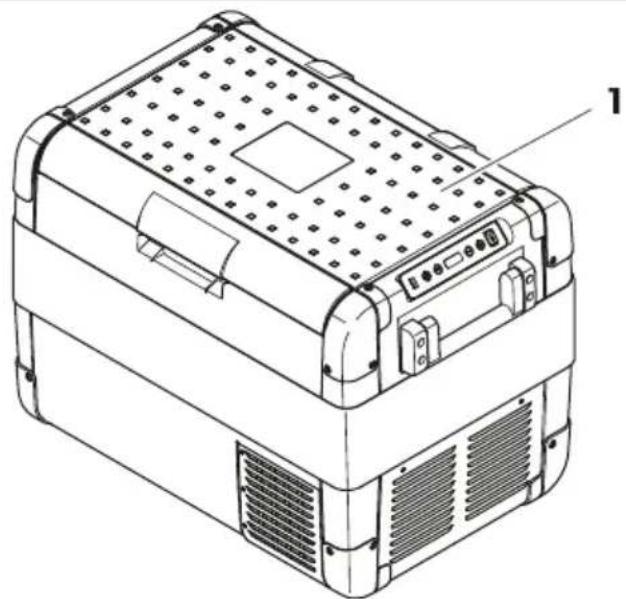
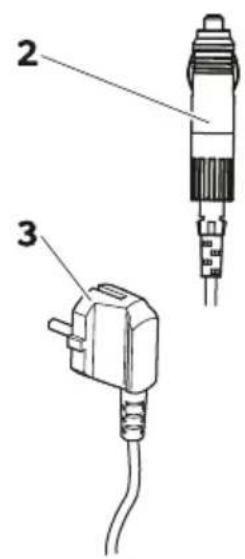
Item Quantity Description
1 Cooler
1 Connection cable for 12 V connection
1 Connection cable for 230 V connection
1 Short operating manual
6 Accessories
Available as accessory, not included in scope of delivery
| Design!tion \(Re_{j}\). no. \(Mo^{\prime}\)el | |
| f uick release @Ling kit MRg-f R! h6CCCCCcd66 MRgB B8 only | |
| f uick release @Ling kit MRg-f R! 3i Di | h6CCCBhi hh MRgB 3j and MRgB Di only |
| Mobile cooling app e suits all models |
7 Intended use
The cooler is suitable for cooling food. The cooler is also suitable for use in vehicles. The cooler is designed to be operated from a 12 V power supply socket of a vehicle or from a 230 V power supply.
The cooler is also suitable for camping use.
The cooler is intended to be used in household and similar applications such as
Staff kitchen areas in shops, offices and other working environments; Farm houses; Clients in hotels, motels and other residential type environments; Bed and breakfast type environments; Catering and similar non-retail applications
The cooler is not suitable for
Quick freezing goods; Storage of corrosive, caustic or solvent-containing substances; Use as a built-in appliance
This cooler is only suitable for the intended purpose and application in accordance with these instructions.
This product is only suitable for the intended purpose and application in accordance with these instructions.
This manual provides information that is necessary for proper installation and/or operation of the product. Poor installation and/or improper operation or maintenance will result in unsatisfactory performance and a possible failure.
The manufacturer accepts no liability for any injury or damage to the product resulting from
Incorrect installation, assembly, or connection, including excess voltage; incorrect maintenance or use of spare parts other than original spare parts provided by the manufacturer; alterations to the product without express permission from the manufacturer; use for purposes other than those described in this manual.
The manufacturer reserves the right to change product appearance and product specifications.
The cooler can cool products. A low-maintenance refrigerant circuit with compressor provides the cooling. The generous insulation and powerful compressor ensure efficient and fast cooling.
The cooler is portable.
The cooler can withstand a short-term inclination of 30° for example on boats.
Scope of functions
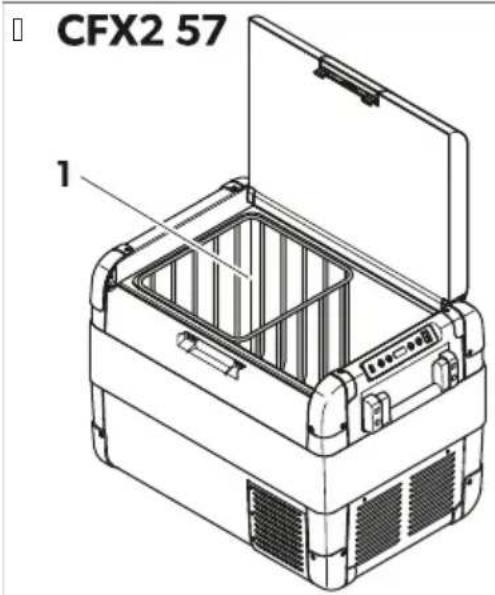
Power supply with priority circuit for connecting to the AC power supply; 3-level battery monitor to protect the vehicle battery; display with temperature gauge in °C and °F; temperature setting with buttons in steps of 1°C/1°F; integrated Bluetooth and Wi-Fi function for controlling the cooler via the mobile cooling app; foldable carrying handles; USB port for a power supply; removable wire basket.
Operating and display elements
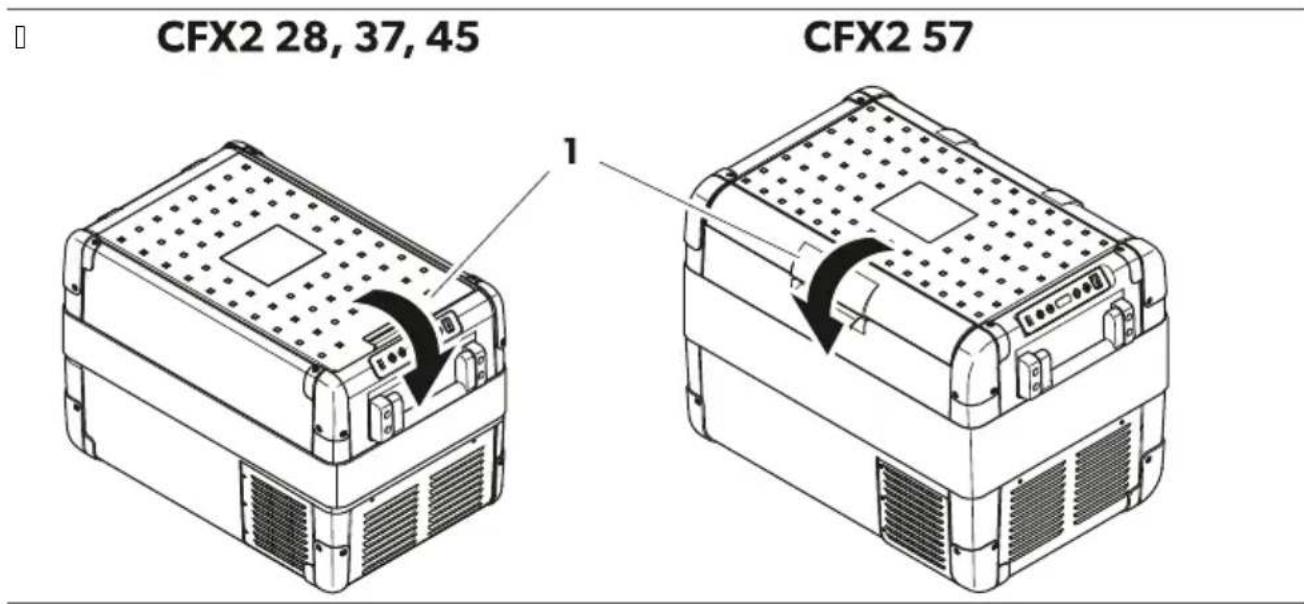
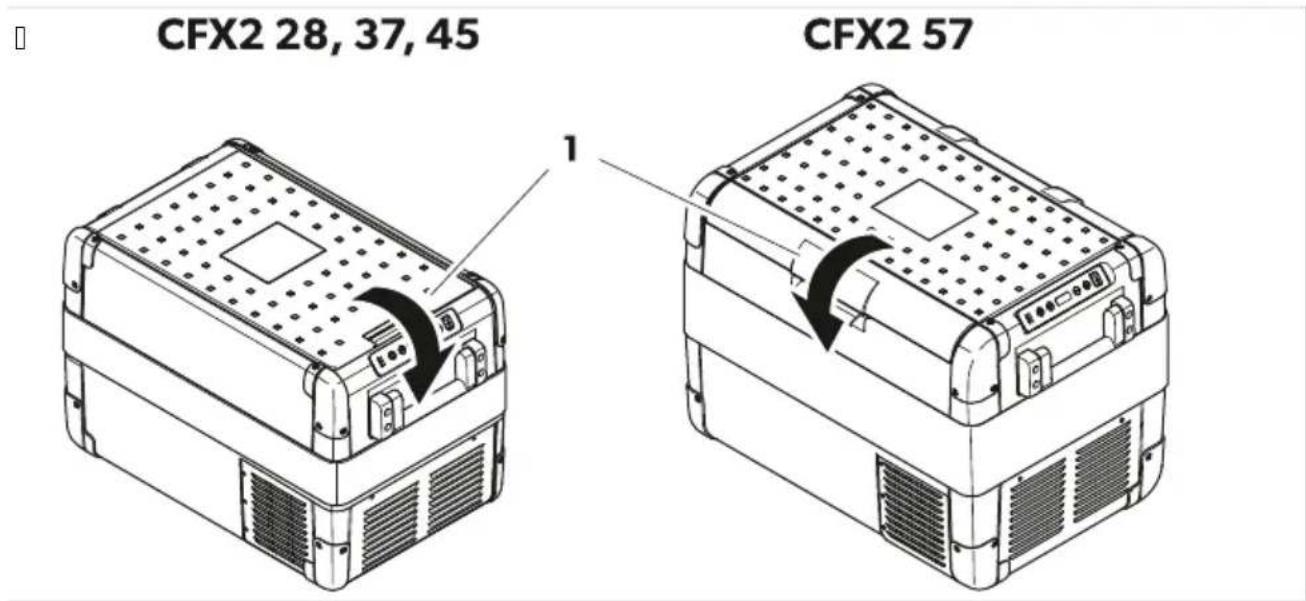
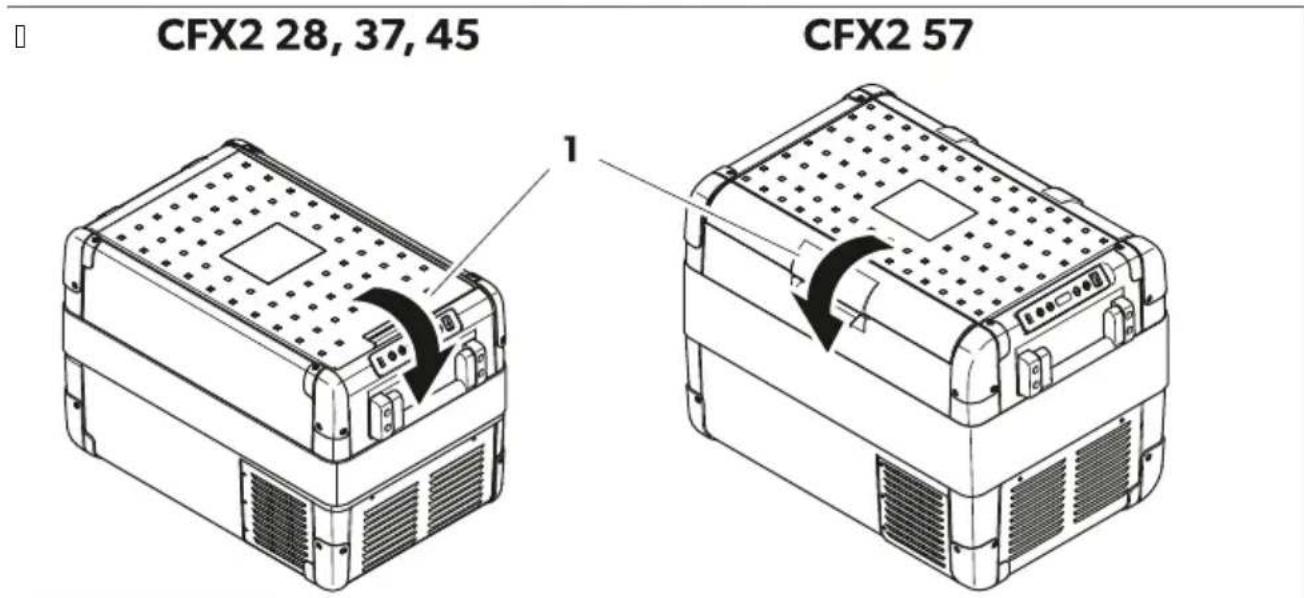
Latch (see figure on page 18) for lid
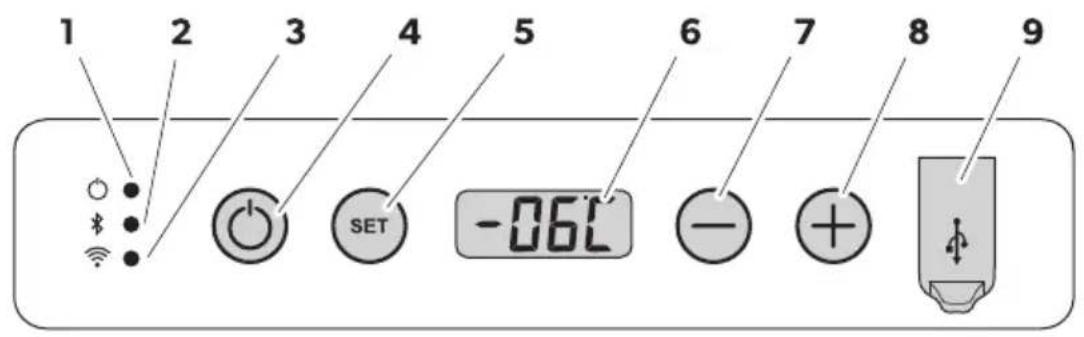
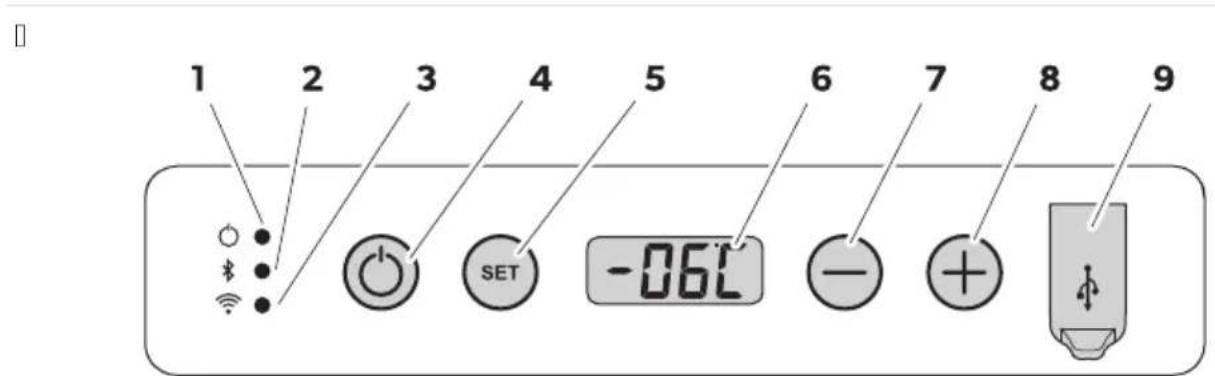
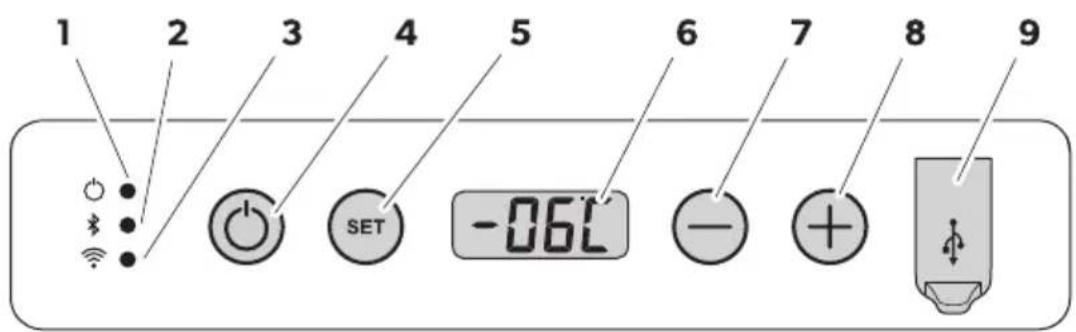
Control panel

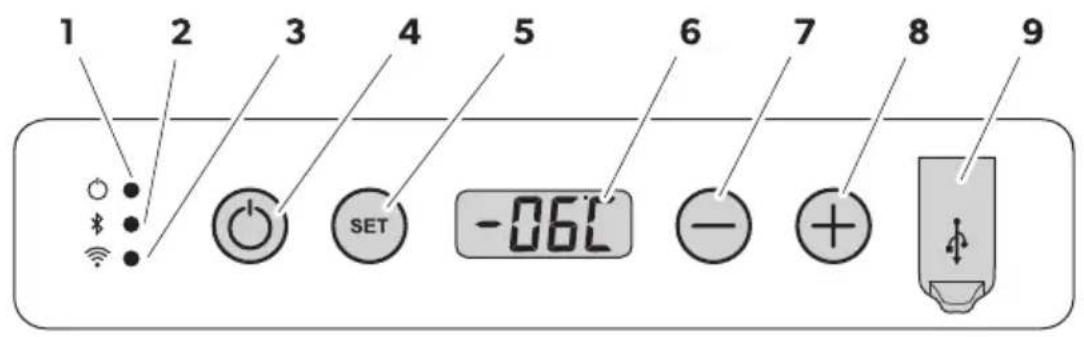
| Item Description Expl! n!tion | |
| I tatus indication | |
| Fhe LKE lights up white! Fhe compressor starts running.d Oower | |
| Fhe LKE lights up orange! Fhe compressor stops running. | |
| BBluetooth | Fhe LKE is switched off! Fhe Bluetooth of the cooler is switched off. |
| Fhe LKE flashes slow white! Fhe Bluetooth of the cooler is switched on. Fhe cooler is not paired with a de ice. | |
| Fhe LKE flashes fast white! Fhe cooler pairs with a de ice ia Bluetooth. | |
| Fhe LKE lights up white! Fhe cooler is paired with a de ice ia Bluetooth. | |
| 3NLJ' | Fhe LKE is switched off! Fhe NLJ' of the cooler is switched off. |
| Fhe LKE flashes white! Fhe NLJ' of the cooler is switched on. Fhe cooler is not connected to a de ice. | |
| Fhe LKE lights up white! Fhe cooler is paired with a de ice ia NLJ'. | |
| D O' kORR I witches the cooler on or off. | |
| iSET | I elects the input mode!U Temperature settingU Melsius or Fahrenheit displayU I et battery monitorU I et brightness of displayU I et the display modeU I et BluetoothU I et NLJ' |
| 6 E isplay | |
| j- | I ents the temperature the temperature unit the battery monitor the brightness of the display the mode the Bluetooth and the NLJ'. |
| 8+ | |
| h UI B port | |
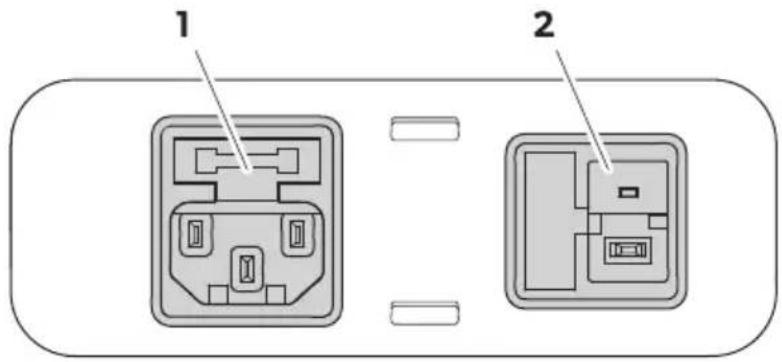
Connection sockets

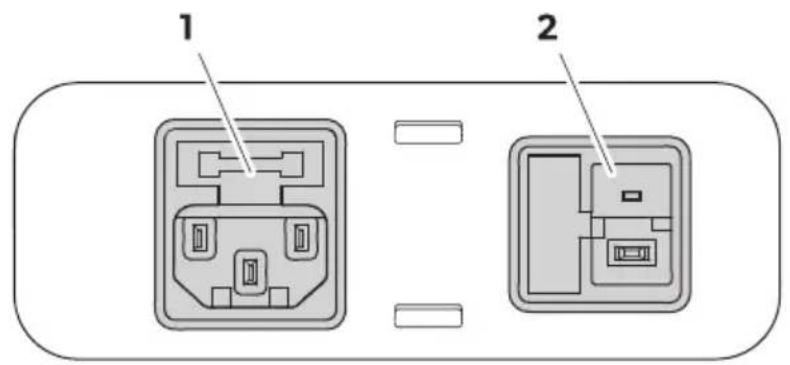
Item Description
A: Connection socket for DC voltage supply
B: Connection socket for AC voltage supply
9 3 Operation
Before initial use

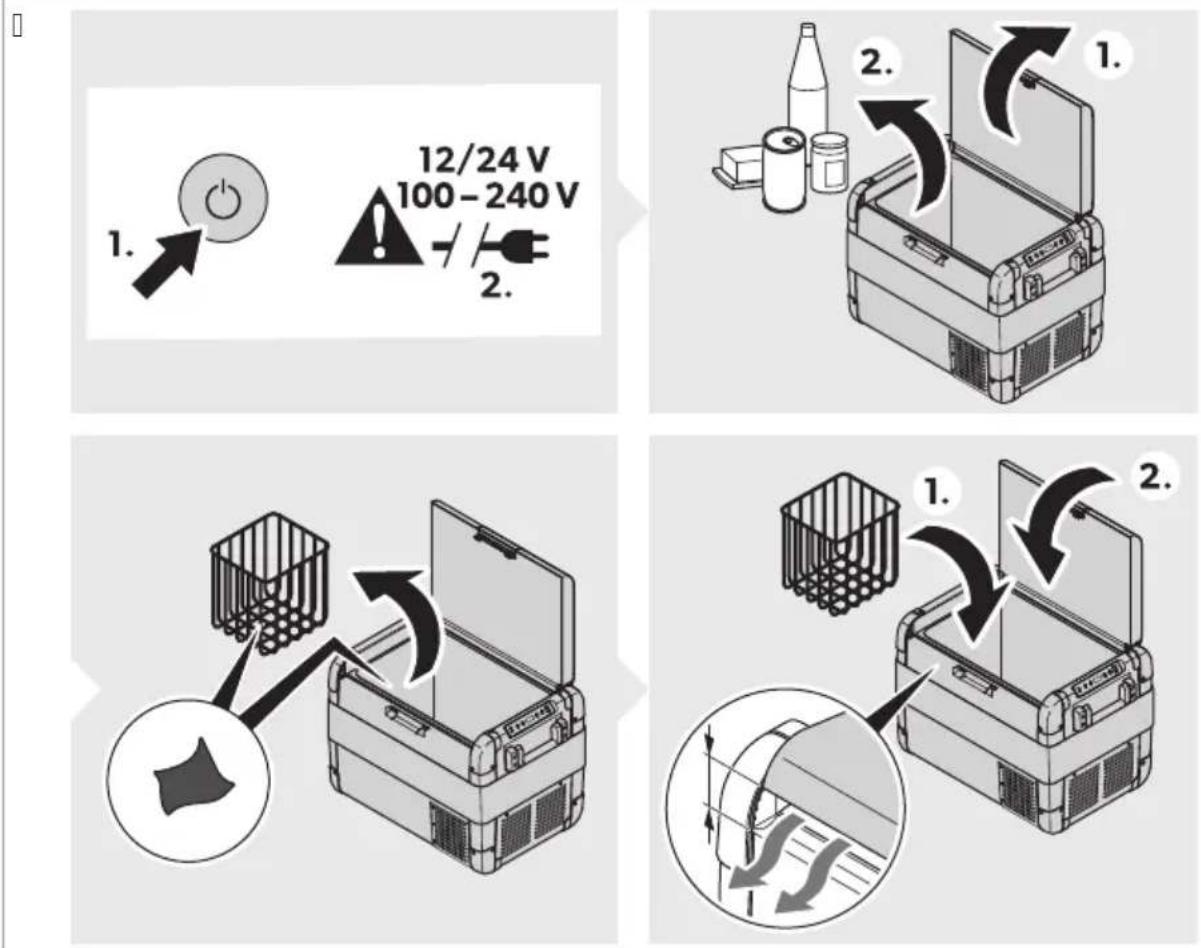
Before starting the cooler for the first time, clean the inside and outside of the cooler with a damp cloth for hygienic reasons. See Cleaning and maintenance on page XX.
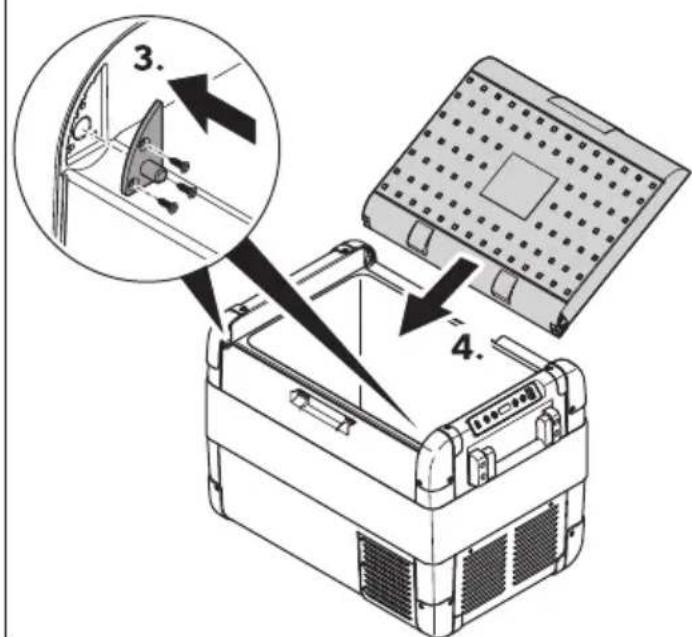
Reversing the lid opening direction (ACFX2 57 only)
The lid hinges can be moved to the opposite side.
a. Open and remove the lid (Fig. on page XX).
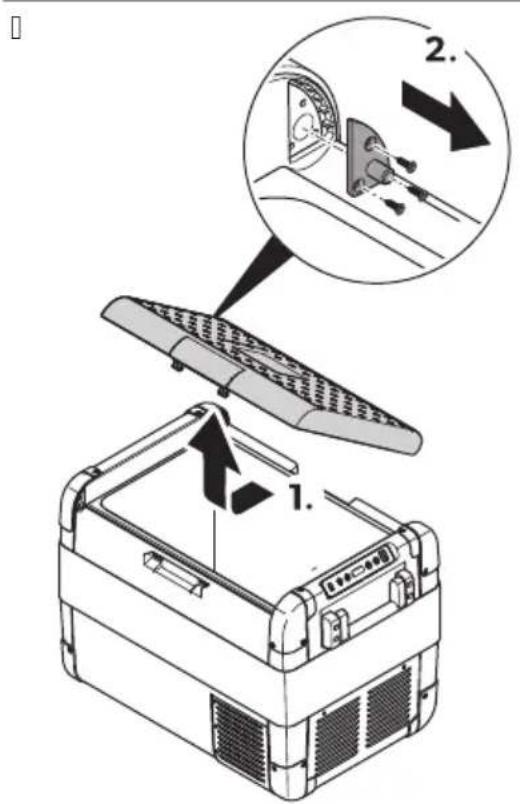
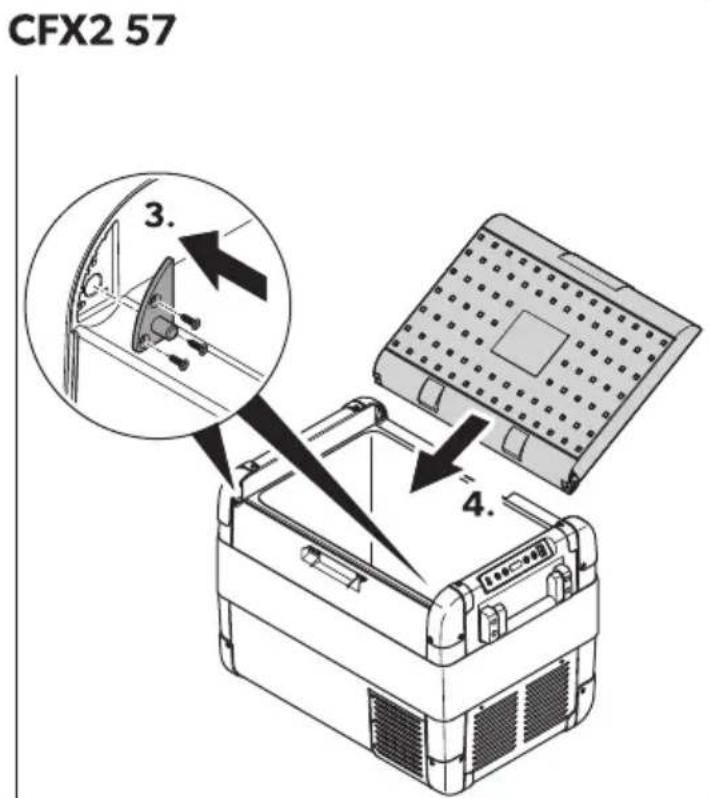
b. Remove the 3 screws for each hinge (Fig. on page XX) and take them off. c. Replace the hinges in the new positions. d. Insert the lid into the new hinge positions (Fig. on page XX).
Saving energy
Choose a well-ventilated location which is protected from direct sunlight. Allow warm food to cool down first before placing it in the cooling device to keep cool. Do not open the cooling device more often than necessary. Do not leave the cooling device open for longer than necessary. If the cooling device has a basket, for optimal energy consumption position the basket according to its position on delivery. On a regular basis ensure that the lid seal still fits properly.
Connecting the cooler
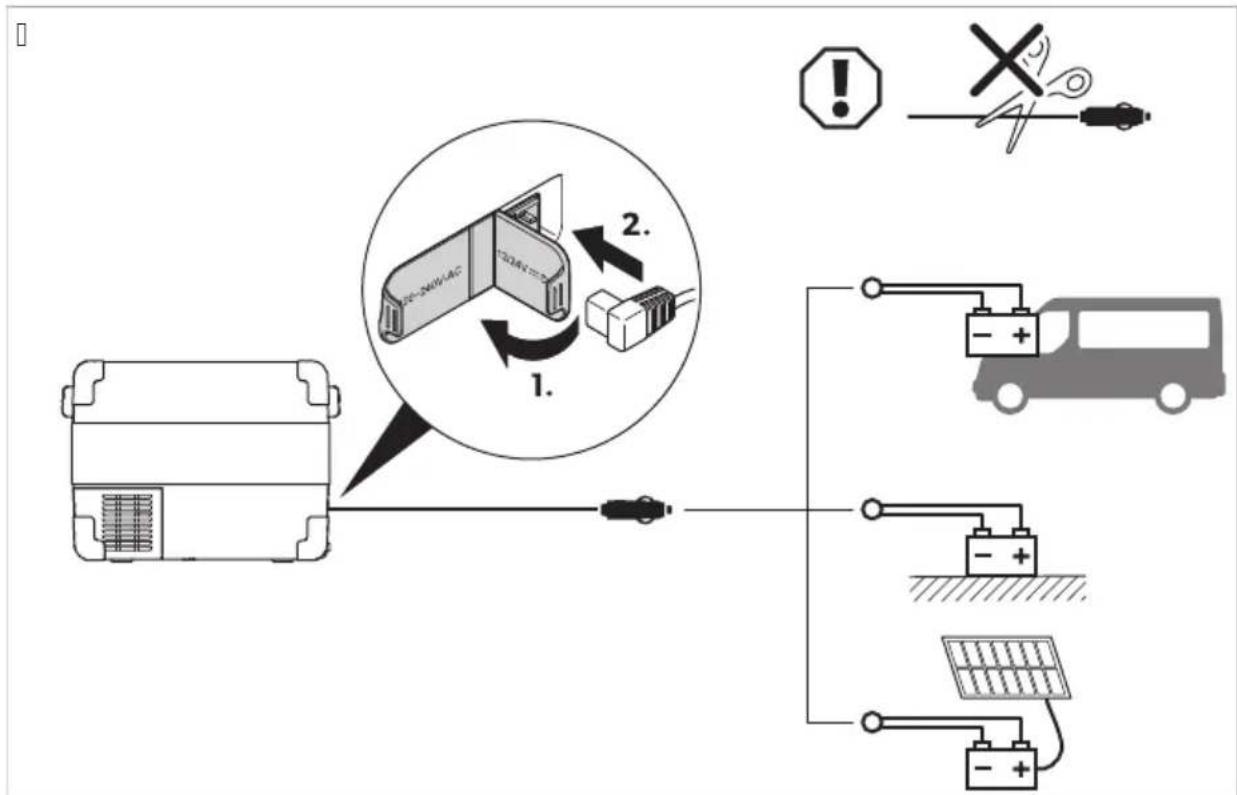
Connecting to a battery

Risk of damage!
For protection of the device, the DC cable supplied includes a fuse inside the plug. Do not remove the fused DC plug. Only use the DC cable supplied. Disconnect the cooler and other consumer units from the battery before connecting the battery to a quick charging device. Overvoltage can damage the electronics of devices connected to the battery.

NOTE: The cooler is equipped with an electronic system to prevent polarity reversal. The electronic system protects the cooler against short-circuiting when connected to a battery.
The cooler can be operated with 12 V or 24 V.
Connect the cooler to a battery using the DC connection cable as shown.
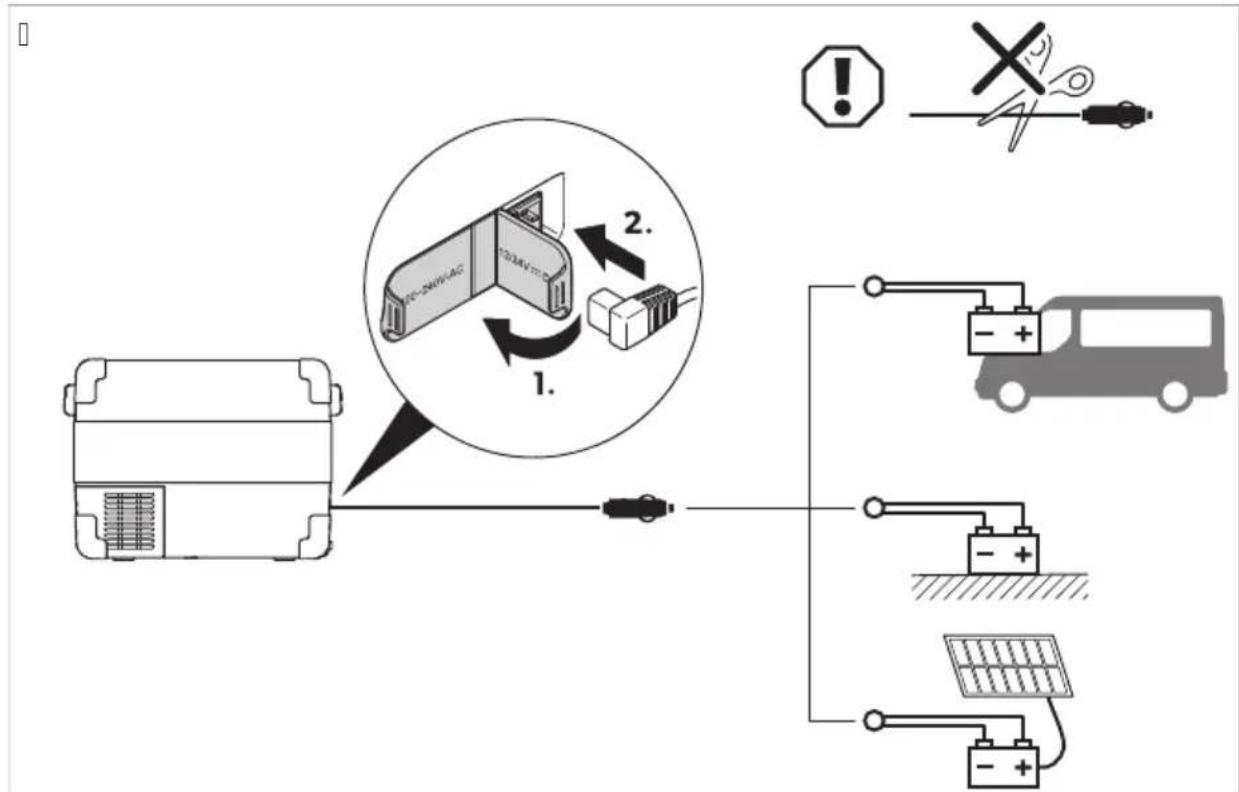
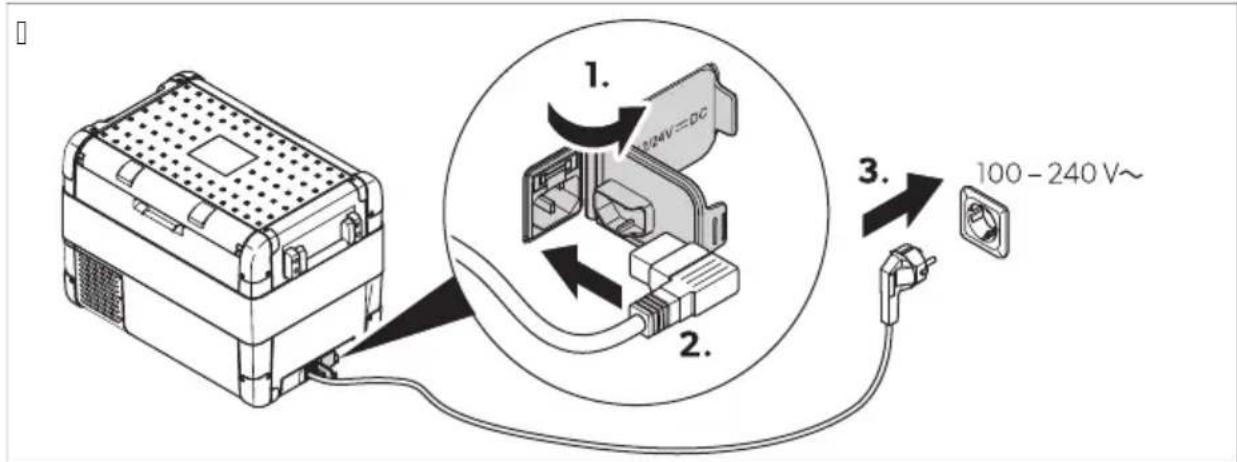
Connecting to AC power supply

DANGER: Electrocution hazard
Never handle plugs and switches with wet hands or if you are standing on a wet surface. If the cooler is operated on board a boat from an AC power supply, a residual current circuit breaker must be installed between the AC power supply and the cooler. Seek advice from a trained technician.

NOTE:
The cooler is equipped with an integrated multi-voltage power supply with priority circuit for connecting to an AC voltage source. The priority circuit automatically switches the cooler to AC operation if the cooler is connected to an AC power supply, even if the DC connection cable is still attached.
Connect the cooler to an AC power supply using the AC connection cable as shown.
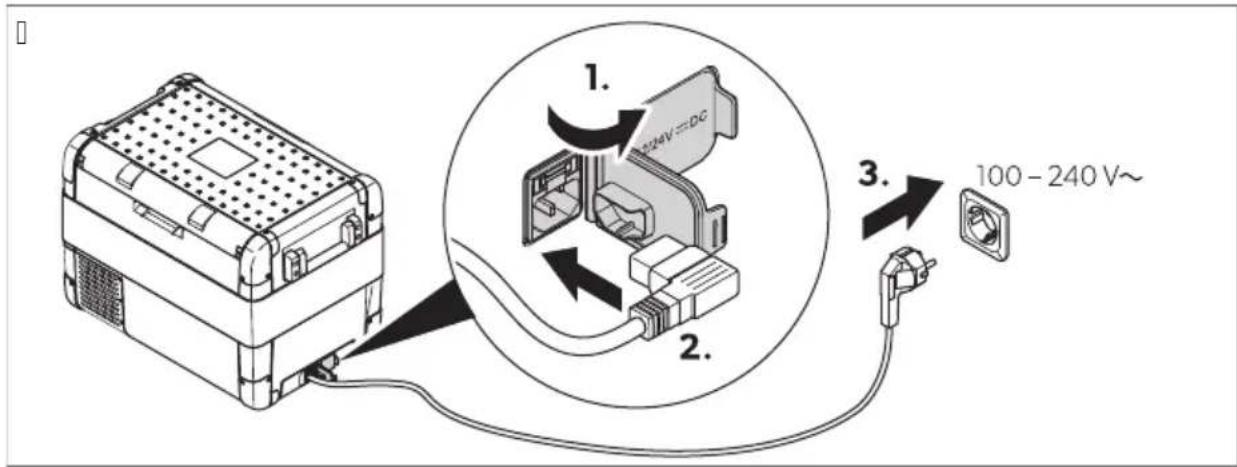
Using the cooler

NOTE: Damage hazard
Place the cooler with the base facing downwards.
a. Place the cooler on a firm foundation. b. Connect the cooler (see chapter 'Connecting the cooler' on page XX).

WARNING: Health hazard
Ensure that only the items that are to be cooled at the selected temperature are placed in the cooler.
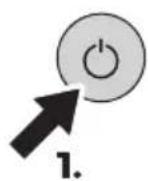
- Press the MODE button for 2 seconds.
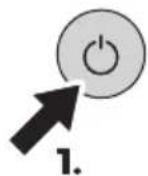
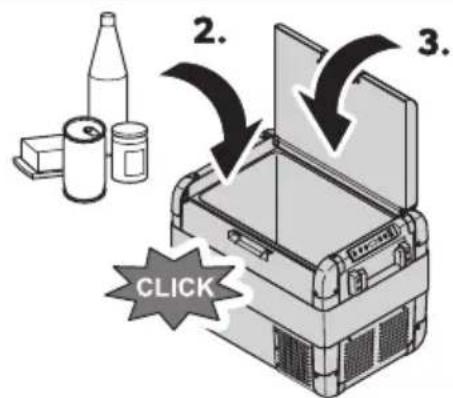
The power LED lights up. The display switches on and displays the current temperature.

Display temperature
The temperature displayed is the temperature of the large interior compartment (see fig. on page X).
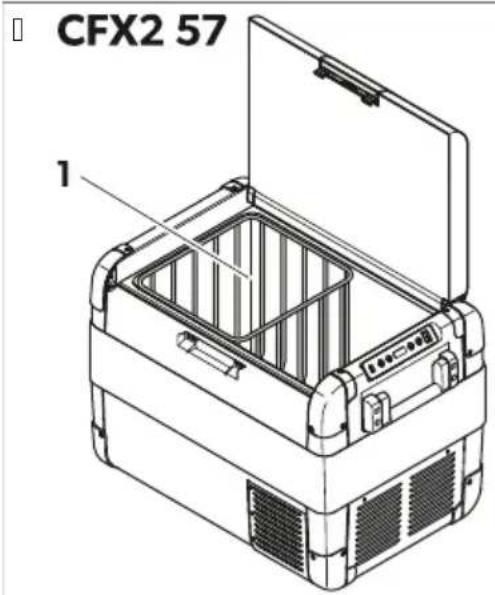
The cooler starts cooling the interior.
Switching the cooler off
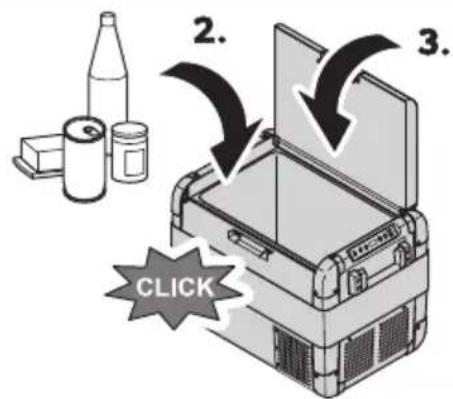
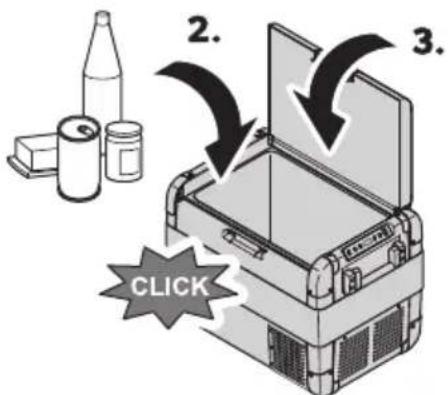
Close the lid. Press the latch down until it audibly clicks into place.
Moving and storing
To avoid food waste, note the following:
Keep temperature fluctuation as low as possible. Only open the cooling device as often and for as long as necessary. Store the goods in such a way that the air can still circulate well. Adjust the temperature to the quantity and type of the foodstuff. Foodstuff can easily absorb or release odor or taste. Always store foodstuff covered or in closed containers/bottles.
Setting the temperature
Press the SET button once.
Use the + and - buttons to select the cooling temperature. The selected temperature appears in the display for a few seconds. The display flashes several times. Afterwards the current temperature is displayed again.
Selecting the temperature unit
Press the SET button 3 times. Press the + or - button to select the temperature unit. The selected temperature unit and are displayed on the display for a few seconds. The display flashes several times before displaying the current temperature.
Using the battery monitor

NOTICE! Damage hazard!
When the battery monitor switches off, the battery is no longer fully charged. Avoid repeated starting or the operation of power consumers without longer charging phases. Ensure that the battery is recharged.
The cooler is equipped with a multi-level battery monitor that protects the vehicle battery against excessive discharging when the cooler is connected to the on-board DC supply.
If the cooler is operated with the vehicle ignition switched off, the cooler switches off automatically as soon as the supply voltage falls below a certain value. The cooler switches on again as soon as the battery is recharged to the restart voltage.
In the "HIGH" mode, the battery monitor responds faster than at the "LOW" and "MED" modes.
| G! tter2 monitor mo' e - 3 W MED HI H | |||
| Testart oltage at dB V | dd.D V | dB.B V | dB.6 V |
| I witch-off oltage at dB V | dC.d V | dd.B V | dd.8 V |
| Testart oltage at BD V | B3 V | Bi .3 V | B6.D V |
| I witch-off oltage at BD V | Bd.i V | BD.d V | BD.6 V |
Select the battery monitor mode as follows:
1. Switch on the cooler. 2. Press the SET button 3 times. 3. Use the + or - buttons to select the battery monitor mode. The display changes as follows: LOW, MED, HIGH.
The selected mode appears in the display for a few seconds. The display flashes several times before returning to the current temperature.

NOTE: When the cooler is supplied by the starting battery, select the battery monitor mode "HIGH". If the cooler is connected to a house battery, select the battery monitor mode "LOW".
Setting the display brightness
The display brightness can be dimmed for low ambient light conditions.
1. Switch on the cooler. 2. Press the SET button 4 times. 3. Use the + or - buttons to set the brightness of the display. The display changes as follows: low, medium, high.
The display shows the set mode for a few seconds. The display flashes a few times before returning to the current brightness.

If a fault occurs, the brightness automatically switches to High (Default). Once the fault has been rectified, the set brightness is restored.
Using the USB port
The USB port allows small devices such as cell phones and MP3 players to be charged.
Connect the device to be charged to the USB port of the cooler using a USB cable (not included).

Ensure that the connected device is compatible with the operation of 5V DC.
Setting the display mode
Press the SET button 3 times.
Use the + or - buttons to set the sleep mode.
The display changes as follows: OFF, ON, LOW
OFF: The sleep mode is deactivated. The display is constantly switched on.
ON: The sleep mode is activated. If the cooler is not used for several minutes, the display only shows a dot. LOW: The sleep sub-mode is activated. If the cooler is not used for several minutes, the display switches to the lowest display brightness.

If the display is in the sleep mode or sleep sub-mode, press a button on the cooler to briefly exit the corresponding mode.
Using the mobile cooling app
The cooler can be monitored and controlled via Bluetooth or Wi-Fi using an app that can be installed on a compatible device.
Download and install the mobile cooling app.

Get the app from Zr.domatic.comkbei DT.
B. Press the SET button as follows
6 times to open the Bluetooth settings.
times to open the NLJ' settings.
- Use the + or - buttons to set the Bluetooth or NLJ'.

N3) E If the cooler is paired with a compatible device a Bluetooth the pairing mode must be set.
The display changes as follows when setting the Bluetooth: bLdairing bPLA

N3) E I bLOF is displayed the display does not change when the - button is pressed. If bLPA is displayed the display does not change when the + button is pressed.
The Bluetooth LKE glashes white and the display displays while the pairing to Bluetooth is being established.
The display changes as follows when setting the NLJ FRRX O'
D. Follow the instructions in the mobile cooling app. The Bluetooth or NLJ LKE lights up when the cooler is connected.
Switching the cooler off
d. Empty the cooler.
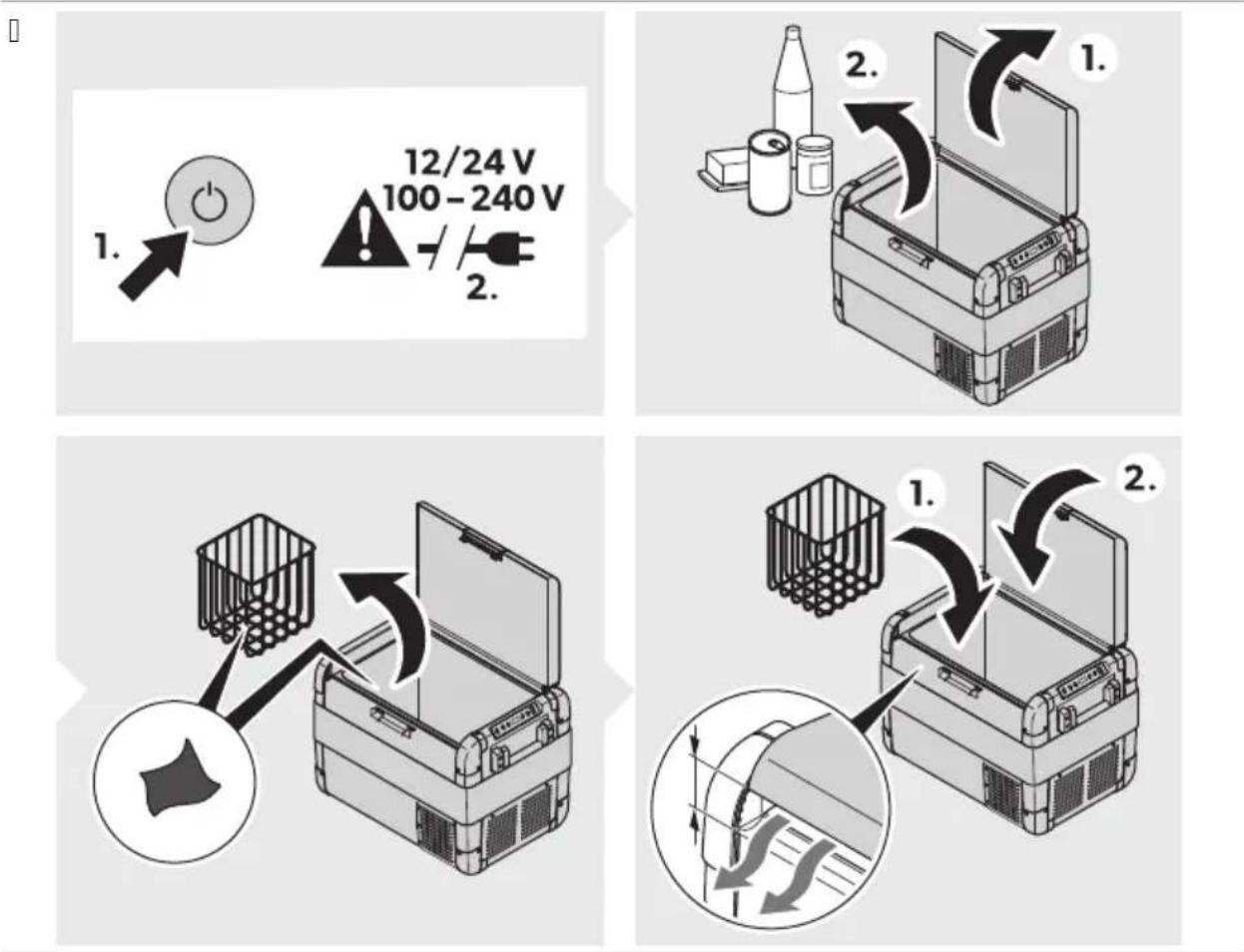
B. Press the pO' kORRp button. 3. Pull out the connection cable. D. If the cooler is not used for a longer period of time, leave the lid open so that no odors can build up.
De, roting the cooler
Humidity can form frost in the interior of the cooler or on the evaporator. This reduces the cooling capacity.

ICE DAMAGE HAZARD
Never use hard or pointed tools to remove ice or to loosen objects which have frozen in place.
To defrost the cooler proceed as follows:
A. Remove the contents of the cooler. B. If necessary, place the contents in another cooler to keep them cool.
- Switch off the cooler. D. Leave the lid open.
Wipe off the defrosted water.
Replacing the fuse

DANGER Electrocution hazard
Disconnect the power supply and the connection cable before replacing the fuse.
A. Disconnect the power supply to the cooler. B. Pull off the connection cable. C. Pry out the fuse insert (Fig. on page 3, item B) with a screwdriver. D. Replace the defective glass fuse with a new one that has the same type and rating (Fig. on page 3, item C).
E. Press the fuse insert back into the housing. F. Reconnect the power supply to the device.
Replacing the DC plug fuse

NOTE: There is an additional fuse inside the device (Automotive standard blade fuse, DC). This fuse can only be replaced by an authorized repair center.
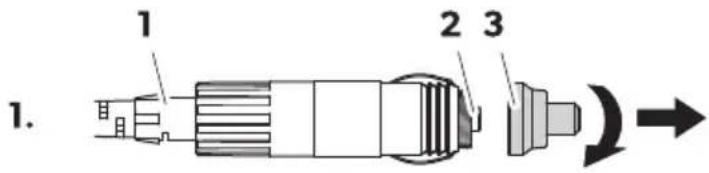
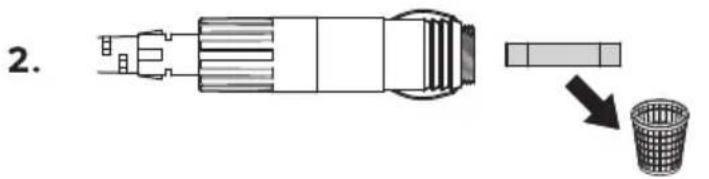
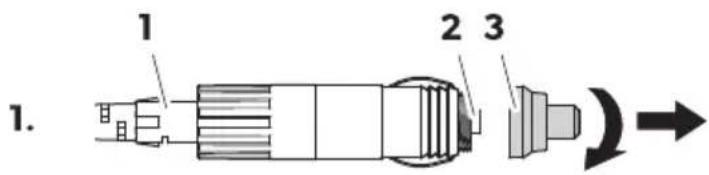
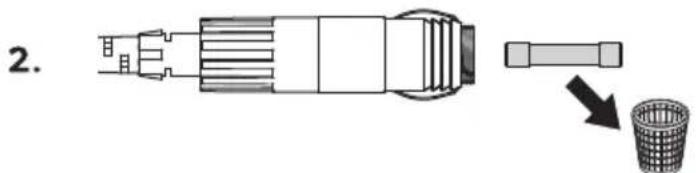
A. Unscrew the contact pin housing (Fig. on page 3, item 3) from the plug (Fig. on page 3, item 1).
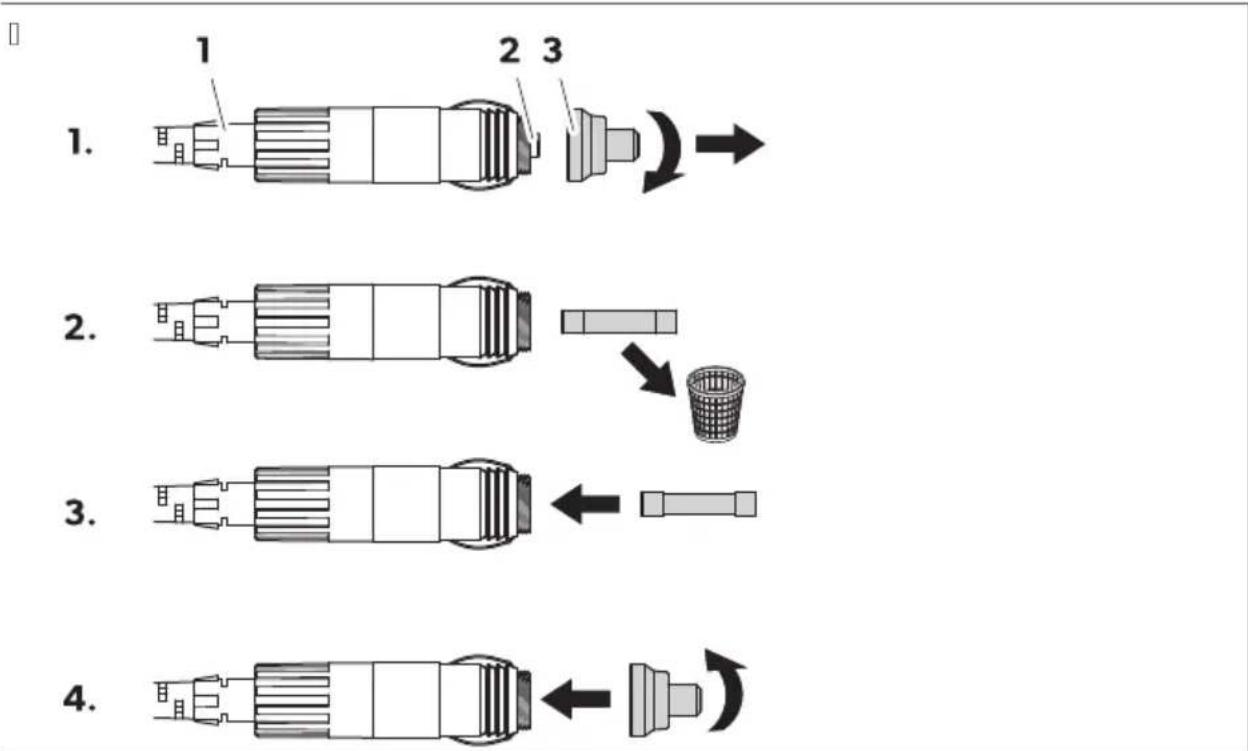
B. Replace the gasket on page 82 with a new gasket of the same type and rating [3].
- Reassemble the plug in reverse order.
Replacing the light (CG

N3) ICE2D!m!geh!z!r
The light OMB may only be replaced by the manufacturer, a service agent, or a similarly qualified person in order to avoid hazard.
Cleaning and maintenance

C/U)13N2Electrocution hazard
Ensure that the cooling device is disconnected from the power supply before any cleaning or maintenance work.

N3) ICE2 D! m! ge h! z! r'
Never clean the cooling device under running water or in dishwater. Do not use abrasive cleaning agents or hard objects during cleaning.
Occasionally clean the device interior and exterior with a damp cloth. Ensure that the air inlet and outlet vents on the cooling device are free of any dust and dirt so that heat can be released and the cooling device is not damaged.
Troubleshooting
| (rblem (ossible c! Ese SEggeste' reme' 2 | ||
| Fhe cooler does not operate. Fhe power LKE does not light up. | 'o oltage is detected at the EM sock- et. | \( \rightharpoondown \) J cti ate the ignition of the ehi- cle. |
| 'o oltage is detected at the J M sock- et. | \( \rightharpoonup \) Use another plug socket. | |
| Fhe J M fuse is defeci e. | \( \rightharpoonup \) Teplace the J M fusei see Teplac ing the J M fuse on pageli8. | |
| Fhe integrated mains adapter is defec- ti e. | \( \rightharpoonup \) Contact an authorized ser ice agent. | |
| Fhe power LKE lights up orange+ the error code E 01 is displayed and the cooler is not cooling e en though the plug is plugged in. | Fhe battery monitor is set too high. | d. I et the battery monitor to a lower mode \( \rightharpoonup \)see Using the battery monitor on pageli x. B. Fest the starting battery. 3. It necessary+ charge the starting battery. Rollow the manufacturer's in- structions. |
| Fhe battery monitor is set too low. | d. I et the battery monitor to a high- er mode \( \rightharpoonup \)see Using the battery monitor on pageli x. B. Fest the starting battery. | |
| (roblem (ossible c! Ese SEggeste' reme' 2 | ||
| 3. Is necessary+ charge the starting battery. Rollow the manufacturer's instructions. | ||
| N hen operating the cooler from the EM outlet! Fhe ignition is on and the cooler does not operate. Fhe power LKE does not light up. | Fhe EM plug is not connected correct-ly. | > Teconnect the EM plug. |
| Fhe EM socket is dirty. This leads to poor electrical contact. | > Mean the EM outlet. Rollow the manufacturer's instructions. | |
| Fhe EM plug fuse has blown. | > Replace the EM plug fuse see chapter Teplacing the EM plug fuse on pageld8. | |
| Fhe EM fuse inside the cooler has blown. | > Montact an authorized ser ice agent. | |
| Fhe ehicle EM outlet fuse has blown. | > Replace the ehicle EM outlet fuse. Rollow the manufacturer's instructions. | |
| Fhe display displays an error code and the cooler does not cool !see Krror codes on pagelBCI. | Fhe cooler has switched off due to an internal fault. | > Montact an authorized ser ice agent. |
Error codes

If one of the error codes E02 to E07 occurs, contact an authorized service agent.
| Error co' e Description |
| E 01 Low oltageko er oltage |
| E 02 Ran o ercurrent |
| E 03 Mompressor start failed |
| E 04 Mompressor speed low |
| E 05 Montroller o erheated |
| E 06 ' FM open circuit |
| E 07 ' FM short circuit |
Warranty
The statutory warranty period applies. If the product is defective, please contact the manufacturer's branch in your country (see dometic.com/dealer or your retailer).
For repair and warranty processing, please include the following documents when you send in the device:
A copy of the receipt with purchasing date
The reason for the claim or description of the fault
Note that self-repair or nonprofessional repair can have safety consequences and might void the warranty.
Disposal

WARNING: Risk of child entrapment
Before disposing of your old cooling device, dismantle the lid. Leave the baskets in place so that children may not easily climb inside.

Place the packaging material in the appropriate recycling waste bins wherever possible. Consult a local recycling center or specialist dealer for details about how to dispose of the product in accordance with the applicable disposal regulations.
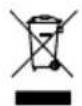
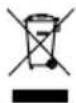
Recycling products with batteries, rechargeable batteries, and light sources: Remove any batteries, rechargeable batteries, and light sources before recycling the product. Return defective or used batteries to your retailer or dispose of them at collection points. Do not dispose of any batteries, rechargeable batteries, and light sources with general household waste. If you wish to finally dispose of the product, ask your local recycling center or specialist dealer for details about how to do this in accordance with the applicable disposal regulations. The product can be disposed of free of charge.
Technical data

NOTE: If the ambient temperature is above 3°C, the minimum temperature cannot be attained.
This product contains fluorinated greenhouse gases.
The cooling unit is hermetically sealed.
| CFX2 28 CFX2 37 CFX2 45 CFX2 57 | ||||
| Tated input | i Clo 6C) z | |||
| dCClo BDC V~ | ||||
| Tated current | dB Vf 8.6 J | dB Vf 8.j J | dB Vf 8.8 J | dB Vf h J |
| BD Vf 3.8 J | BD Vf 3.8i J | BD Vf 3.h J | BD Vf D J | |
| dCC Vf d.6 J | dCC Vf d.63 J | dCC Vf d.6i J | dCC Vf d.j J | |
| BDC Vf C.j j J | BDC Vf C.j 8 J | BDC Vf C.j h J | BDC Vf C.8 J | |
| Mooling capacity | e BB bMlo BC bM | |||
| Jmbient temperature | d6 bMlo D3 bM | |||
| Mclimate class' or F | ||||
| UI B | i VB J | |||
| Tefrigerant T6CCA | ||||
| Tefrigerant Zquantity | d3 g d3 g dD g dj g | |||
EN: CFX2 28, CFX2 37, CFX2 45, CFX2 57
| CFX2 28 CFX2 37 CFX2 45 CFX2 57 | ||||
| Dimensions IN q) qEH including handles | 3Di mmlqDBj mmlq 3j i mm | DCd mmlqDB8 mmlq D3C mm | DCd mmlqDh3 mmlq D3C mm | Di 8 mmlqi C3 mmlq D8i mm |
| Volume | B8 L 3j L Di Li j L | |||
| N eight | d3.i kg | di .8 kg | d6.8 kg | d8.i kg |
| RreZuency bandINLJ' x | B.D G) z | |||
| Mal. output powerNLJ' ch.BB dBm | ||||
| Bluetooth j .h3 dBm | ||||
Hereby, Dometic Group AB declares that the radio equipment type MRG B8H, MRG B3J - MRG D1H, MRG B1J is in compliance with Directive 2014/53/EU. The full text of the EU declaration of conformity is available at the following internet address: documents.dometic.com
Further product information can be accessed via the QR code on the energy label or via eprel.ec.europa.eu.
Deutsch
English
Technical description
Intended use: Mobile cooling
WARRANTY
You should follow these instructions to avoid food spoilage.
3GSER1ER/ZRis. Crs. 1
3 GSERER/Z Ris. Crs. 1
Never immerse the cooling appliance in running water or in a dishwasher. Do not use aggressive cleaning agents or hard objects during cleaning.
r ( padka yobr.lna strnce Bj j HYx pro ikov
3vlB'!cip!nel
U(U)/(ri.!zn! temper!tEr!
The temperature of the large internal compartment is shown in fig. 1 on page 13.
The refrigerator will start cooling the interior.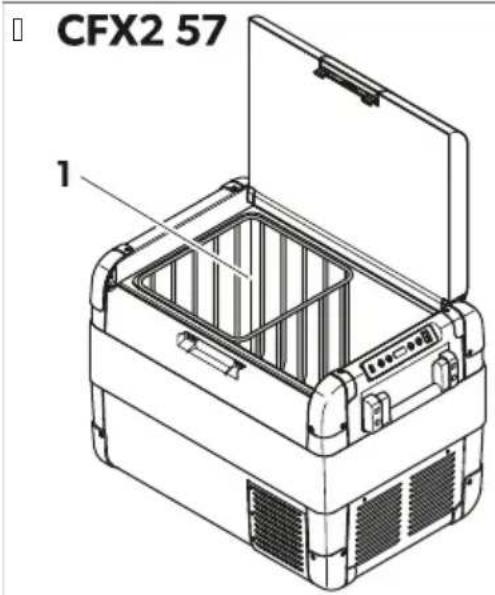
Close the lid. Press the latch until it clicks into place.
Avoiding food waste
To avoid throwing away food, remember the following:
Keep temperature fluctuations to a minimum. Open the cooling appliance only as often and for as long as necessary. Store food in such a way that air can still circulate well. Adjust the temperature to the quantity and type of food. Food can easily absorb or release odors and tastes. Always store food covered or in closed containers or bottles.
Setting the temperature
Press the SET button once.
Select the cooling temperature using the + and - buttons.
The selected temperature will be displayed on the screen for a few seconds, and the screen will flash several times. Then the current temperature is shown again.


10498B9 o; 90/9 06139567 4o71o- 94o:/ 6bД: 686: r/919H MoK: έ9 ΜΟВ: έ: ΩO Mlb21 6J61: K4o /929/7B9/.

BHIMAHNEZ
10498B9 o; 90/9 06139567 4o71o- 94o:/ 6bД: 686: r/919H MoK: έ9 ΜΟБ: έ: έo Α: 4o 6π6 02: έo /929/7B9/:.

BHIMAHNEZ
110498B9 06139567 40710H 940 /: 16bA: 686: r/919- u; IOB: d: do u: 16 ; o 6M3u: 01Bolo.

YHA3AHNE I; bI/61: 9/6/02M9567 89 6029B:/1o01; 20A3419.
OIIACHOCTZ OKPNOI NW I:MRMKVTUMNkTySPL
U H9 lo46v A40 30120ou01B0o 0: 89x29/B9 o1: 4126u: 04919 M2: x9H 3B: 2: 1: 0: H: 89x29/B9:/10 6M9; 2: 4b0B9u 0 00191b: /104 kTMMBX 6J6; 2: 4b0B9u/9 B: 26r919 89 898: M7B9:/GRMIX. Mo/19Kb1H 00o6:/oB; o1:/569n/O BJI9K/6 8o/6-1276B9 n9 6bI: B 0bo1B: 101B6: O B0646; 26IOX6M6 298; o- 2: d66 89 6/019n629:/. U H: ; 6; 9H1: o142616 496: n6 0IroJ6 2b5: . ToB9 0: o1/907 o0o6:/o; 26 89x29/B9:/ o1: n: 4126u: 0-4919 M2: x9.

IPEJYTIPEKDEHNEZ OKPNOINVIV:MRMvLTUMNtysPL
UH:30491:32:d9H94o;O498B9B6M6;OB2:6. U A4o 89x29/B9u671 496:π:3B2:π:/H10n 1276B9 έ9 6bδ: OM:/:/H 89 έ9 0; ; 2: έolB2916:B:/139π/9 o; 90/o01. UTo86xI9I6I:/32:IMOJK:96bI:2:MO/1629/09MOol4B9I6Φ65629/;20o/9I.H:;29B6I/6 2:M0/16MOr91I9IOB:91Iol8/9u61:π/6o;90/o016. U CbB28B9n1: 32: 94bM: J: 4126u: 046 4o/19416H 4o61o o06r327B91; 29B6J/O OBB28B9:/H00o6:/O 4or91o 32: n11276B9 n9 6bJ: 898:M:/.

IPEJYIPEJXDEHNEOKPNOINVIV:KxPL
U Kor91o 298; oJ9r91: 32: nH B/6m9B9n1: 89x29/B9n67496: n9/16b; : 2: q3; : / 6n6; oB2: n/. UH:0019B7n1:2984IO/61:π66π6;OdB6K/689x29/B9/674bM 89d/919 q901/9132: U Xn96n/671 9r:/1 BbB B: 26r919 /9 xn96n/67 9r:/1:06n/o89; 9n6M 6 B O n3q9n /9 6816q9:/ ro26m6 r98OB: Mo91 n9 0:/9123; 91H 94o 32: nbl: BM9n4o; OM: u:/6:. B 0n3q9n /913B2: nn:/ /9loxn9n6- 1: n/919 0601: m9V
UД2bXl:014261orb/6;ol:/569π/6681ou/656/989;9nB9:/g9n:уoIxN9d6π/649.
UII2OB:12:1:062:019719.
The device is designed for operation in the temperature range from -40 to +70 °C. The device is protected against moisture and dust. The device is designed for installation in a control cabinet. The device is equipped with a display and a keyboard. The device is powered by a DC voltage of 24 V. The device is connected to the network via a RS-485 interface. The device is configured using the software. The device is designed for use in industrial environments.

ATTENTION! READ THE INSTRUCTIONS BEFORE USE
The device is designed for operation in the temperature range from -40 to +70 °C. The device is protected against moisture and dust. The device is designed for installation in a control cabinet. The device is equipped with a display and a keyboard. The device is powered by a DC voltage of 24 V. The device is connected to the network via a RS-485 interface. The device is configured using the software. The device is designed for use in industrial environments.

ATTENTION! READ THE INSTRUCTIONS BEFORE USE

The device is designed for operation in the temperature range from -40 to +70 °C. The device is protected against moisture and dust. The device is designed for installation in a control cabinet. The device is equipped with a display and a keyboard. The device is powered by a DC voltage of 24 V. The device is connected to the network via a RS-485 interface. The device is configured using the software. The device is designed for use in industrial environments.

ATTENTION! READ THE INSTRUCTIONS BEFORE USE
The device is designed for operation in the temperature range from -40 to +70 °C. The device is protected against moisture and dust. The device is designed for installation in a control cabinet. The device is equipped with a display and a keyboard. The device is powered by a DC voltage of 24 V. The device is connected to the network via a RS-485 interface. The device is configured using the software. The device is designed for use in industrial environments.
ATTENTION! READ THE INSTRUCTIONS BEFORE USE
The device is designed for operation in the temperature range from -40 to +70 °C. The device is protected against moisture and dust. The device is designed for installation in a control cabinet. The device is equipped with a display and a keyboard. The device is powered by a DC voltage of 24 V. The device is connected to the network via a RS-485 interface. The device is configured using the software. The device is designed for use in industrial environments.

ATTENTION! READ THE INSTRUCTIONS BEFORE USE
UII2OB:2:1:9n6 n9//61:89/9;2:K:/6:1o/9116;OB919 196:49olroB9271/91/9;2:K:/6:1o/9IM-2:K919. U Cb28B9:/1o019B9;ol0:/67/9q6/ UC;001o7//ol04OB67496:.4bm;001o7//ol04OB1o89x29/B9:/919Blom066 UC;2OM:/I6BO1O4OB67496:I4BM:I:4126u:04919M2:K9 U H64or9/lo149y9n1: 40/19419H 491o n2; 91: 496; n9. U A40 ox9Kg9u67 32:Д: O8b289/4bM; o01o7//ol040BO 89x29/B9:/O149u: I: ox9Kg9u67 32:Д 6I23r61: 4o/03m91o26H; 2:Д6Д9В4Лоч61: 3012оу01Вalo 89б280 892:Жd9/:. U A4o oxJ9KgN9I671 32:Д: O8b289/4bM;001o7//ol04OBO 89x29/B9:/V O149u:1:oxJ9KgN9I6732:Д 6JI6 ro 684JIIOU:1:H;2:D6Д9;9π61:ДВ6r91;Л7../9u:MOK:Д9 2982;Д61:943M3JI91o29. U OxJ9KJ9671 32: J:/I: ;OxOJ789;2:/907://912987KJ9M91:269J66J6/9IM91:269J6 0b- Jb2K96 2981BO261:J6. U. 80J956719 /9IOxJ9KJ9I6732: J0bJb2K989; 9JI6M 564JIo; :/19/ 6II27B9 J90: 68Xb2J7; oI0; : 56-9J/9; 2o5: J329.CI: J4297 /9IX6BO19 /9IOXJ9KJ9I6732: Jro; 2: J9I1: /9I; oIxoJ7Ioo; 2: J; 267-16: 892: 564J629:/. UH: ;0019B7H1: ox9Kg9u67 32: nB 6n68o01 no o14261 orb/ 6n6 23r6 681ou/656 /91o; n6/9or/6- n9H/9r2:B91: n6H r98OB6; : 46H n62: 41/9 0Mb/uB9OB: 1n6/9 6 ouiX. UH: ;bJ:/l:Bb12:III/670bA0II:A6I61:q/o016. UH64or9/1;019;7n1:oxJ9KgN6732:D BbB BoD9. UII98:1:oxJ9KJ9u6732;A61496;J61:o11/9r27B9:/6IBn9r9. U OxJ9KJ9671 32:Д/11276B9Д90:68π9r9/9IbKJ. U 39 n9 MoK: xI96π/67 19r:/1 n9 56243n629; 29B6π/oH oxI9n9n67 32: n:/127b9 n90:/94n9/70 ;OB: y: oI 3C b..8; oI8B9nI:/6B: n62H 89 n90: 3B: 261:H u: oxI9n9n67 32: n: xO268o/19n:/. UPTNKIV:KLMrLABPOMZYB:2:1:0:H:;OB074OB2:M:6M9IOO19Ib/9B:/16J9567oH:16261:0129/6/9OXJI9KJ9II6732.II98:1:IIOUI98B:/16J9567q6019o1IB07494B6ob:416H4o610Mor9I9oR29/6Q91;OIO49/9IBb8d3x 4bMOXJ9KJ9II61:4OM;o:/16.H:298;OJI9r9I:OXJI9KJ9Ioo10Bo-2bK:/6:B1891BO2:/6;OM:Ⅲ:/676I6/9IM:0190IIS;OB9S6M6/M9I:/BB83Ⅲ:/ol4.
PP6I VOT T TOSTKPVI LOTMRMJ MOVT
3940;q9π49%φ6r.II/9 0129/659 DCdH Y8 89 49;949V
TP6RI 'PyKL PBRMOTM
| ДМ-OKTNPOTM OБЯ КР | NOMOTM |
| d Moii/o01 | ./Д649567 89 0ь0107/6:10 |
| СВ: 1оД6оДы 1OB: 16 B 67ло'KOM; 2: 0о2ь 189; ouB9,Д9 296o16. | |
| СВ: 1оД6оДы 1OB: 1B9 B O29/JK: - KOM; 2: 0о2ь 10; 629,Д9 296o16. | |
| ВBluetooth | СВ: 1оД6оДы: 684лioч: /v Bluetooth Φ3/456719 /9 xЛ9Д6Л/919 q9/19: 684лioч: /9. |
| СВ: 1оД6оДы 1Мб969В/ОБ67- ПО'Bluetooth Φ3/456719 /9 xЛ9Д6Л/919 q9/19: B4лioч: /9. XЛ9Д6Л/919 ПО'q9/19/: 0ДBO: /9 0 3012ойО1BO. | |
| СВ: 1оД6оДы 1Мб96ь280В 67- ПО'XЛ9Д6Л/919 q9/19 0: 0ДBO7В 9 0 3012ойО1BO q2: 8 Bluetooth. | |
| СВ: 1оД6оДы 1OB: 16 B 67ло' XЛ9Д6Л/919 q9/19: 0ДBO: /9 0 3012ойО1BO q2: 8 Bluetooth. | |
| 3 NLJ' | СВ: 1оД6оДы: 684лioч: /v NLJ' /9 xЛ9Д6Л/919 q9/19: 684лioч: /9. |
| ДМ-OKTNPOTMОб NOMOTM КР | NЛ' /9 xл9Д6Л/919 u9/19:В4ЛIOч: /9. Xл9Д6Л/919 u9/19/: 0Бь289/9 0 3012ОиОь. |
| СВ: 1оД6оДы 1 Мб9 В 67лоч NЛ' /9 xл9Д6Л/919 u9/19:В4ЛIOч: /9. Xл9Д6Л/919 u9/19/: 0Бь289/9 0 3012ОиОь. | |
| СВ: 1оД6оДы 1OB: 16 B 67лоч Xл9Д6Л/919 u9/19: 0ДBO: /9 0 3012ОиОь u9 2:8 NLJ' . | |
| D BKЛ.k. 3KЛ. B4IOUvB 9 6Л6 684IIOuB9 xл9Д6Л/919 u9/19. | |
| iSET | 86629 2:Ж6М9 /9 BБ:ЖД9/: YU H9012ОИ49 /9 1: M; : 29132919U ПО498В9/: /9 II: I86II 6Л6 Φ92: /x9IIU 39Д9В9/: /9 89П61919 /9 943М3Д91O29U 39Д9В9/: /9 724ОII19 /9 I60; I7U 39Д9В9/: /9 2:Ж6М9 /9 I60; I7U 39Д9В9/: /9 BluetoothU 39Д9В9/: /9 NLJ' |
| 6 I60; I: I | |
| j- | H9012ОИВ9 1: M; : 29132919+ : I6/65919 89 1: M; : 291329189П61919 /9 943М3Д91O29H 724ОII19 /9 I60; -I: 7H 2:Ж6М9bluTeoth 6 NLJ' . |
| 8+ | |
| h UI B ; o2I | |
HI OVPK VOT TOM'SP

IMVPIR OKTNPOTM
d Ko/1941/or:/8IO 89;2OM:/I6B01o4OBO 89x29/B9:/
B Ko/1941/or:/80o89;00107//01040BO 89x29/B9:/
9 PP61 VP
\PLMST KbLbPVP yKI VLM6P

YHA3AHNE I2:69019216291:32:989;b2B6;bHro;ou601:1:olBb12:6olBb/x9d6/919/919 0
Bn9k/9 4b2; 9 o1 x6r6://60bo629k:/67B6x1:Piou601B9:/61;o1n2bK49/90129/659 Ddd.
O6LbPOM OP KIN KPVPOV IVBPLoOM OP PKPKaNPJ I' P CFX2 57b
19/161:/949;949 mor91 90:2:M:0171/9;2o16Bo;OIOK/919 0129/9.
d. 01B927/: 6n6 o10129/7B9/: /949; 949 #6r.10 /9 0129/659 DC3x.
CFX257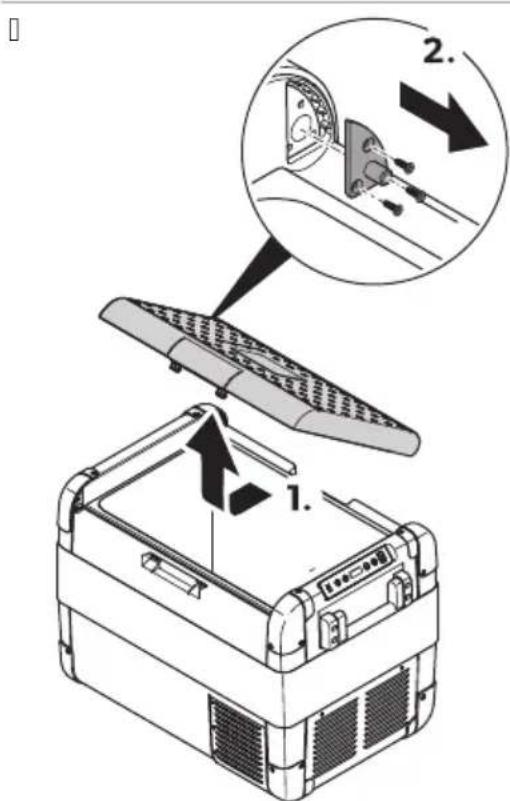
B. O10129:/: 1: 3-1: B6/1989 B0749; 9/19%Φ6r.II /9 0129/659 DC3X 6 r6OB9I: . 3.10019B:1:06291/o;9/161:B/O861;086566. D. IIo019B: 1: 49; 949 B /OB61: ; o86566 /9; 9/161: #φ6r.II /9 0129/659 DC3X.
IkiOJ TApOP:MOMLITa
.86:2:1:do62; 2OB:12:/om701h89II61:/ooll62:41/90B/uy:B9OB:1π6/9. O019B7Hl: 1o;π9 x29/9 έ9 68016/; 2; έ6 έ9 7 o019B61: Bloxπ9κη9ι67 32: Π. H:olb927n1:oxn9xg96732:40r91o/1:/:o6xoq6mo. H:0019B7n1:oxl9x49u6732:01Bo2:/;o-àbIroH o14oI4o1o:/:o6xoI6mo. A40 x196π/671 32: Π 6M9 4oⅢ/659/39 o; 16M9π/9 4o/03M9567/9l:/: 2r67; o019B: 1: 4oⅢ/65919 4941o : 66π9 ; 26 Φ019B4919. P:IOB/O;2OB:27B9H1:9N63;JIb://6:1o/9B291919Φ3/456o/629;29B6J/O.
CBBL'BPOM OP QRPSTROPVP UOVP
CbbL'BPOMKj PKyj yRPVI Lp

BHIMAHNEZ OKPNOI NW I V:KI BL MSP
U 3989619/932:Д9HД0019B:/67;о01o7//ol04OB 496:ПВ4ЛIOuVB9;2:Д;9861:ПВII;4:29.HM;2:- M9XB9I;O01o7//ol04OB67II;0:π0;2:Д;9861:..8;ОI8B9I:09MOДO019B:/67;о01o7//ol0- 4OB 496:П. U O149u: 1: xI96JI/919 u9/19 6 I23r6 40/03M91o26 o1 943M3J91o29-; 2: I6 I9 0Bb2K: I: 943M3J91o-29 4bM 30120I01BO 89 6b280 892: KJ9/.; CB2bx/9; 2: Jx:/6: lo MoX: J9; OB2: J6: JI: 4120/64919 /932: J6H 0Bb289/6 4BM 943M3J91o29.

YHA3AHNE X96/919 9/19: 06023B9/90: 4120//90601:M989; 2: 01B2917B9:/906b2/919; 072/o01. EJ: 412o//919 0601:M9; 2: D; 98B9 x96n/919 49/19 01 4b00 Ob: D6:/6:-40r91o: OBb289/94bM 943M3n91o2.
Xπ9π6π/919 9/19 MoK: έ9 296016 0 dB-¥ 6π6 BD.
Cb2K:1: x96/919 99/19 4bM 943M391020; oMOu19 0Bb28B967 496: J89; o01o7:/1o4H 494I0: ; o4989- /o.
CbbL'BPOMKBJKLIMORTBIVI KBI 'PQLPOBPM

ONACHOCTZ OKPNOI NW I:MRMKVTUMNkTySPL
U H64or9 /: 6029B:1: 040/194161: 64JIOHOB:1: 0 Mo426 2b5: 6JI6 491o 01o61: BB2x3 Mo429; OBb2x-/001. U A40 xJ96J/919 q9/19 296016 0; 20M: /π6Bolo4OBO 89x29/B9:/ /9 6o2q9 /9 JIo49H M: K3; 20- M: /π6Bolo4OBO 89x29/B9:/ 6 xJ96J/919 q9/19 1276B9 q9 0: Mo/1629; 2: 4bO89 y89 o0191b4:/ 104. Iolb20:1; omou o1; 2oΦ: 06o/9I:/ 1: x/64.

YHA3AHNE



The device is designed for use in explosive atmospheres. It must be installed and maintained by qualified personnel. The device must be used in accordance with the manufacturer's instructions. The device must not be used in areas where flammable gases or vapors may be present. The device must be protected from moisture and dust.
d.H9160:/1:63lo/9 SET d;bl.
B. .8;018B9n1:631o/61: +6π6-H89π686:2:1:1:M:29132919/9oxπ9xπ9/. V CII: I IOB9 68629/919 1: M; : 291329 6E0: ; o7B7B91 /9 60; I: 789 /740I40 0: 43/6. I60; I: 71; 2: M6rB9 /740I40 ; b16. CII: I IOB9 0I/OBO 0: ; o498B9 1: 43I919 1: M; : 291329.
d.H9160:/1:631o/9 SET B; b16. B.H9160:/1:631o/9+6π6-89d9686:2:1:66/65919891:M:291329. C1: 1OB968629/919: 6/659891:M; 291329190: ; 07B7B91/9 60; 789/740400: 43/6. 160; 71; 2: M6TB9/740J40; b16H; 2: 6J9; 049K: 1: 43J9191:M; 291329.

ATTENTION! READ THE INSTRUCTIONS BEFORE USE.
Before installation, ensure that the power supply is disconnected. The device must be installed by a qualified electrician in accordance with local regulations. Use only approved cables and connectors.
The device must be installed in a location where it is not exposed to excessive vibration or mechanical shock. Ensure that the mounting surface is stable and can support the weight of the device.
Do not install the device near heat sources or in direct sunlight. Maintain adequate clearance around the device for ventilation.
The device must be installed in a manner that prevents the ingress of water or other liquids. Use appropriate sealing methods for cable entries. The device must be grounded in accordance with local electrical codes.
In the event of a malfunction, disconnect the device from the power supply and contact qualified service personnel. Do not attempt to repair the device yourself.
| PMЖTJ OP 'РцТVPВР 'Р Куj yRPVI LP - 3 W MED aCPEД- | HI H | |
| HO HNBOb | ||
| H9; 2:Ж: /6: /9 /ОВ B4ЛIOчB9/:: 26 dB V | dd1D V | dB#6 V |
| H9; 2:Ж: /6: /9 684ЛIOчB9/:: 26 dB V | dChd V | dd#8 V |
| H9; 2:Ж: /6: /9 /ОВ B4ЛIOчB9/:: 26 BD V | B3 V | Bi #3 V |
| H9; 2:Ж: /6: /9 684ЛIOчB9/:: 26 BD V | Bdi V | BD#6 V |
1. Before installation, read the instructions carefully. 2. Ensure that the power supply is disconnected. 3. Install the device in a suitable location. 4. Connect the device according to the wiring diagram. 5. After installation, test the device to ensure proper operation.
The device is designed for use in accordance with the technical specifications and safety requirements set forth in this manual. It is intended for operation in the specified conditions and should be used only as described.

ATTENTION! Before using the device, read this manual carefully and keep it for future reference. Failure to follow the instructions may result in damage to the device or injury to the user.
SAFETY INSTRUCTIONS
The device must be used only for its intended purpose, in accordance with the operating instructions.
1. General information about the device. 2. Technical specifications. 3. Safety precautions and warnings. 4. Device components and controls. 5. Operating instructions.
Do not use the device in conditions of high humidity or in the presence of flammable liquids or gases. Do not expose the device to direct sunlight or heat sources.

ATTENTION! To prevent electric shock, do not open the device housing. Refer all servicing to qualified personnel. Do not use the device if it has been dropped or damaged.
The device is designed for indoor use only. Do not use it outdoors or in environments with excessive dust or moisture. Keep the device away from water and other liquids.

ATTENTION! When using the device, ensure that the power supply is stable and that the voltage matches the specifications. Do not overload the device.
GENERAL SAFETY PRECAUTIONS
The device can be connected to a computer or mobile device via Bluetooth or USB cable. To establish a connection, enable Bluetooth on your device and follow the on-screen instructions.
1. Connect the device to your computer or mobile device using the provided cable.

To disconnect, safely remove the device from your computer or mobile device.
To disconnect, safely remove the device from your computer or mobile device via Bluetooth.
- Safety precautions and warnings for Bluetooth and USB connections.

YHA3AHNE A40 xπ96π/919 9/19: 0B0: /9 0b0 0bBM: 016Mo 3012o01BO q2: 8 Bluetooth-1276B9 d90: 89d9; 2: k6M /9 0dB07B9/..
VII2689A9B9://9Bluetooth 60;π:710;2om:/7;o0π:4/67/9q6/BLOF3KJI.XH BACJX CABO7bLPA B9:/

YHA3AHNE A4o0:;o49KbLOF H60;π:71/7M9π90:;2om:/6H4or91o0:/9160:/631o/bl-.A4o 0:;o49KbLp0;π:71/7M9π90:;2om:/6H4or91o0:/9160:/631o/b1+.
Cb:1o60bl 89 Bluetooth ; 2: M6rB9 B 67no 6 /9 60; n: 70 : o498B9HnO491o 0: o0bH: 01B7B9 0DBO7B9:/1o 0 Bluetooth.
12689nB9://9N Lj' 60; n:710; 2om:/7; o0n: n/67/9q6F3KJ.
D.CI:B91:6/012345661:BMO66J/ol0;26IOK:/6:89OxJI9J9/..
VB:1060b189Bluetooth 6n6NLJ'OB:1B94or91o xn96n/919 9/19:OBb289/9.
VKROUBPOM OP QRPSTROPVP UPOVP
ONACHOCTZ OKPNOI NV I V:MRMkVL TUMNkTySPL
Π2:Д6Д9ОМ:/71:;2OM:/Д6ВОLO4OB67 63ПО/H O149U:1:89x29/B9/:1060BB28B9II67496:Л.
d. O149u: 1: 89x29/B9:/1o/9 xI9J6J919 q9/19. B. 8b2;91:0BB28B9n67496:n 3. 01Bo2:1:ol;π:/6:1o8963mio/61:Φ6r.II/90129/659DCBIXO1B:2149. D.CM:/1:4;Φ:41/6701b4J:/63IIO/O/OB O1ObIIS6716;69M;29XKDJHBiCVX.
i.B49291l:ol;π:/6:108963110/61:06291/O B 4o2;309. 6.3949q:1:89x29/B9:/lo/932:Ω9.
CJ JOP OP KI NVI JOOI VI KI BTA6yUIOB MkMLP

YHA3AHNE B 3012oH0lBOLO 6M9 Do; bI/61: I:/ ; 2OM:/I6Bolo4OB 63IOO/019/921:/9BlOMo66I:/ 2: I; 9861: nH dC J X. To86 63IOO/MOJK: 90: O:M:/709MOol010268629/0: 2B68.
d. P98B6n1: 4o2; 309 /9 4o/1941/67 n6Φ1 #Φ6r.l0 /9 0129/659 Ddd 3x o1 u; 0: n9 (Φ6r.l0 /9 0129/659 Ddd Yx.




| KLI 6RMJ KLTUTOP PMIIHOTM | ||
| Xn9d6JI/919 q9/19 /: 296o16. CB: 10-Дбды 89 мош/о1 /: 0В: 1В9. | В r:/ 8dIoO 89 ; o0I07/ : / lo4 / : 0: oI-у619 /9; 2: к: /6.. | > A416b629i1: 89; 9Ib9/ : lo /9 ; 2: Bo8/oI 02:Д0lBO. |
| В r:/ 8dIoO 89 ; 2OM: /л6В lo4 / : 0: ol619 /9; 2: к: /6.. | > . 8: оIb89i1:Д23ro r/ : 8ДIO. | |
| П2OM: /л6ВОLO4OB671 63ПО/ : Д: -Ф: 41/. | > CM:/ l: ; 2OM: /л6ВОLO4OB6763ПО/ /9 32:Д9ВБЖI: Cm7/9/9; 2OM: /л6ВОLO4OB67 63ПО/ /9 0129/659 DdC. | |
| ./1: r2629/671 M2:ЖОВ 9Д9; 1: 2:Д: -Ф: 41/. | > Сьь2ж: 1: 0: 03; テЛ/ОMOПС/0: 2В68. | |
| СВ: 1оIб6оьы 189 89x29/B9/ : 0В: 16 ВО29/JK: BOI; o498B9 0: 4OДы /9 r2: П-49 E 01 6 xI9Д6Л/919 q9/19 /: 0: ox-ДжДнВ; 2: 46Ч: II; 0: Л; B4ПО-ч: /. | 39u61919 /9 943M3I91029 : 89Д9Д: /989 Ib2Д: B60040 /9; 2: к: /6.. | d. 39Д9И: 89Ib61919 /9 943M3I910-29 /9; o-/60b4 2:ЖБМ「БбЖI: . 8; oIb8B9/ : /9 89Ib61919 89 943M3I91029 /9 0129/659 DCJ I. |
| B. T: 0Ib9I: 01921OB67 943M3I9102.3. A40: /: obxod6moH 892:Д: 1:01921OB67 943M3I9102.C; 98B9I: 6/012345661: /9; 2o-68BOD61:Д7. | ||
| 39u61919 /9 943M3I91029 : 89Д9Д: /989 Ib2Д: /6040 /9; 2: к: /6.. | d. 39Д9И: 89Ib61919 /9 943M3I910-29 /9; o-B6042:ЖБМ「БбЖI: . 8; oIb8B9/ : /9 89Ib61919 89 943M3I91029 /9 0129/659 DCJ I. | |
| B. T: 0Ib9I: 01921OB67 943M3I91O2.3. A40: /: obxod6moH 892:Д: 1:01921OB67 943M3I9102.C; 98B9I: 6/012345661: /9; 2o-68BOD61:Д7. | ||
| Kor9Iо xI9Ib6I/919 q9/19 296o16 oI; 00I07//ol04OBO r/ : 8ДIy 39; 9Ib9/ : -10: B4IIOU:/o 6 xI9Ib6I/919 q9/19 /: 296O16. CB: 1оIб6оьы 89 мош/о1 /: 0B: 1В9. | ПООI07//ol04OB67I uI:: 0:Д:: 0Bb289/ ; 29B6I/O. | > CBb2Ж: l: ol/OBO; o0I07//ol0-4OB67 uI:: 0:Д. |
| ПООI07//ol04OB6I r/ : 8ДI: 89Mb2-0:/ o. Тов9 ВОДБdo ВОДБ:: /: П: 4126-ч: 046 40/1941. | > ПОч60I: l: 4o/1941989; o0I07:/ /1o4.C; 98B9I: 6/012345661: /9; 2o68BOO61:Д7. | |
| ПООI07//ol04OB67I 63ПО/ /9 r/ : 8ДI: 68ro27I. | > CM:/ l: ; 00I07//ol04OB67 63ПО/ /9 r/ : 8ДI0I+ВБКI: r9B9-19 CM7/9 /9; o0I07//ol04OB6763ПО/ B IIc: 4: 29 /9 0129/659 DdC. | |
| ПООI07//ol04OB67I 63ПО/ B xI9Ib6I/919 q9/19 : 68ro27I. | > CBb2Ж: l: 0: 03; テЛ/ОMOПС/0: 2В68. | |
| ПООI07//ol04OB67I 63ПО/ /9; 2::-Bo8/OI0 02:Д0IBO: 68ro27I. | > CM:/ l: ; o0I07//ol04OB67 63ПО/ /9 r/ : 8ДI0I+9 /2; bo8/OI0 02:Д0IBO. | |
| KLI 6RMJ KLTUTOP PMIIIMOTM | ||
| C;98B9H1:6/012345661:/9 ;2068BOID61:π7. | ||
| H9Д60;П:70:68;60В94оД/9r2:III- 496xI9Д6Л/919ч9/19:/0:oxI9ЖД9 "БбЖ1:КоДов:89r2:ш46/90129/659 Dd3k. | XЛ9Д6Л/919ч9/190::684ЛIOU6Л9;o- 29ДББb12:III/9:/68;29В/o01. >СБь2Ж1:0:03;БЛ/OMOИ: / 0:2В68. | |

E 01 H604o/9;2:k:/6;k,2:/9;2:k:/6: E 02 2: / 9;2: 6:/9B:/16n91o29 E 03 H: 30; i/0 01921629:/ /940M; 2: 0029 E 04 C4o2o0119 /9 40M; 2:0o29 :/6049 E 05 II2:r27B9:/94o/120n:29 E 06 Γ2:Ⅲ49; 26 o l B02:/9 B: 26r9/9 l: 2M601o29 E 07 Kb00b:6:/6:/9' FM-1:2M601029
Y2 TPLPOuTЯ
B9K6 r929/56o//671 02o4H o; 2:Д:Л:/ol894o/9. A4o; 2O34bl:Д:Ф:4I:/HMOJ7HOB2x:1:0:04IO/9/9;2o68-BO61:JI7BBB9II919 0129/9 B6xI: dometic.comkdealer6I6 0 B9II67 Ib2ROB:5/9I2:6/o.
39 06296o149 /9Ir929/56719 612: Mo/19H MoJI7; 26IOK: 1: OI: I/61: IO43M:/16; 26 68; 29II9:/1o/9132:IN
U Ko; 6: o1lΦ94132919 0Ig919 /9I; o43; 4919
U12646/989;2:1:/567196n6o;609/6:/9u;Φ:419
O16:J:K:1:H:09Mo2b: / 6n6 /; 2oΦ:06o/9i:/ 2: Mo/1 MoK: 6M9 ; o0I:Д0Ib67 89 6:8o; 90/o0119 6Ig9 9/3I629 r929/56719.
Y3 IN'QBblRyOM

IPEUYTIPEXJEHNEZPTNKIV'PKRMUPOMOSVMM
II2: 668xBb2161: 01926706 xJ961/32: H; Mo/16291: 49; 949. O019B: 1: 4011/6561: Bb12: H1949 U: D: 5919 d9/. Mor91 d90: /9; bX91 Bb12:.

Kor91o:Bb8MOJ/KOH68XbB2I7H1:O;94OBbU/61:M91:269I6:0bOLB:1/60bIOB:892:564I629/:.Ko/03I- 1629H1:0:OM:01:/5:/1b2892:564I629:/6n60;20d9B9q989;29B6I/O1068Xb2I7://9;20d341B 0bO1B:101B6:0D:N01B9u61:;2:;609/67.
P:564π629://9;20π3416 0 691:266;2:892:Kπ9:M6 691:266 6 681ou/656/9 0B:1π6/9;2:π6π92:564π6291;20π3419. Π2:πB9H;π:41/6 6π6 68x96:/6 691:266 B 1b2roB04919 0601:M9 6π6 B 06o2:/;3/41.H:68xBb2π7H-1:691:266;2:892:Kπ9:M6 691:266 6 681ou/656/9 0B:1π6/9 B 06H 07O;9πb4.A4o 60491:04o/u91;π-/oπ9 68xBb2π61;20π3419H;O;619H:M:01/675:/1b2892:564π629:/6π6O;56π8629/π6πb289 ;Oπ2oB/0016 494 1OB9 H9 O:68Bb2Hb B 0bOB1B:101B6:0B9π6H/61;2:A;609/67.II2oD341bMOK:π9 SbJ: 68xBb2π:/6:8;π9/O.
Y4 TMQOTUMNKT SPOOT

YHA3AHNE A4o1:M;29132919/9040J/91902:9:/9BbM-M6/6M9J/9191:M;291329:/MOK:J9 6bJ:do016r/919.
| CFX2 28 CFX2 37 CFX2 45 CFX2 57 | ||||
| HOM6/9π/9 Bxoid/9 Moii/o01 | i Clo 6C) z dCClo BDC V~ | |||
| HOM6/9π: /1o4 | dB V' 8+6 J | dB V' 8+6 J | dB V' 8+8 J | dB V' h J |
| BD V' 3+8 J | BD V' 3+8 i J | BD V' 3+8 h J | BD V' D J | |
| dCC V' d+6 J | dCC V' d+63 J | dCC V' d+6i J | dCC V' d+6j J | |
| BDC V' Ch j J | BDC V' Ch j 8 J | BDC V' Ch j h J | BDC V' Ch8 J | |
| OxII#61: π/9 Moii/o01 | e BB bMlo BC bM | |||
| O4π/91: m; : 291329 | c6 bMlo D3 bM | |||
| Kπ6m916u: /4π90' 6π6 F | ||||
| UI B | i V B J | |||
| Xπ66π: /9r: /1 T6CCA | ||||
| KoI6u: 0Ib0 /9 xI9d6π-/67 9r: /1 | d3 g d3 g dD g dj g | |||
| P98m: 26 #III q B qДВ4πou61: π/o 2b2k46-1: X | 3Di mmlq DBj mmlq 3j i mm | DCd mmlq DB8 mmlq D3C mm | DCd mmlq Dh3 mmlq D3C mm | Di 8 mmlq i C3 mmlq D8i mm |
| O6: m | B8 L 3j L Di Li j L | |||
| T: rIo | d3-i kg | di #8 kg | d6+8 kg | d8fi kg |
| Φ: 0Iol/9π:/19 "NLJ' X | B-HD G) z | |||
| M940. 68xoi/9 moii-/o01 | ||||
| NLJ' ch+BB dBm | ||||
| Bluetooth j #h3 dBm | ||||
Dometic W huhaiX Technology Mo.H Ltd 492629H: 49029600b02x:/6:0116; MRgB B8H MRgB3j HMRgB Di HMRgBi j : B0bolB:101B6:062:416B9BCdDki 3kEC. IIbI/671:401/9 EC I:492956719 89 0bolB:101B6: /96q:/ /90n:/ /1:2:/ 192:0f documents.dometic.com
До; bI/61: Ⅱ/9 6/фО2M9567 89 ; 2OД3419 мОЖ: Ⅱ9 0: ; oI3u6 u2: 8049/629:/ /9 4oI9 89 6b28 olroBO2 /9 : /: 2r6H/67:164:16I6/9eprel.ec.europa.eu.
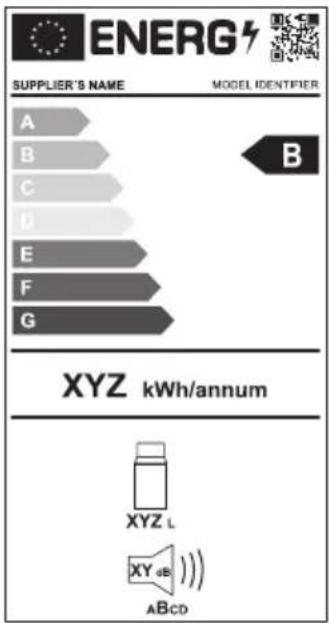
eprel.ec.europa.eu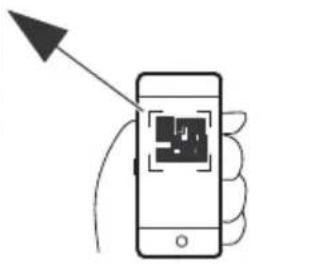
Eesti.eel
1 Important notes. 2 Explanation of symbols. 3 Explanation of symbols on the device. 4 Safety instructions. 5 Scope of delivery. 6 Accessories. 7 Intended use. 8 Technical description. 9 Installation. 10 Cleaning and maintenance. 11 Troubleshooting. 12 Warranty. 13 Disposal. 14 Technical data.
3 Explanation of symbols
4 Safety and maintenance instructions

B. Connect the power cable.
- Connect the connection cable. D. If the refrigerator is not used for a longer period, disconnect the cable and remove the plug.
Refrigerator defrosting
Due to humidity, frost may form on the inside of the refrigerator or on the evaporator. This reduces the cooling capacity.

CAUTION! Risk of injury
Do not use sharp objects to remove frost or to separate frozen items, as they may damage the appliance.
Ttva nOuE, aokouohte Tigtapakatw odnyiec:
d. Aphiéote Ta περιχόμενa tou ζυγέloiU. B. Av xpeiaZeta, tooOeItoTeTa nepiexómeva oéaloo yuyeio, yia va ta δiatnpnoete Kpua. 3. Anevepyonounto yuyelo. D. Afnóte to kānaki avolxto. i. ΣΚουπισεΤΟνερό ΣΟύπιροκαλείαι katá τήν απόψμεξη.
AvtikataoantncaosfaaiaC

ed Frumpas naudojimo ado as
6 (rie'!i
Fiekiama kaipriedasinejeinaj pristatomakomplektacijaw
| (!v! ' inim! s NEor. nr. Mo' elis | ||
| Greitojo atjungimo t irtinimo rinkinys MRg-f R! h6CCCCCd66 Fik MRgB B8 | ||
| Greitojo atjungimo t irtinimo rinkinys MRg-f R! 3i Di | h6CCCCBhi hh | Fik MRgB 3j ir MRgB Di |
| «aldymo programelé mobiliesiems | e | tinka isioms mo-deliams |
7 (!s. irtis
a . jell a 1 aalal alalal
y 15
.
- 1234567890
.
.
R600a yj y jn j 1
Aa aaa a a a a a a a a a a a a a a a a
14

j 1
jgl 1
J 1
Aai jai ai
i 1

aaii aaiiaaiiee iieae e gill aegy y
iill gie 1y jil
jglg jaiu jyabuiu jaiu jygi jLs pldiy
aill jn no n no n no n no n no
yjlll jn aill lslgss s jgs jy jil jal: jaill jll iab iiai yjll jj
:15bill (1,505 a#nally J) abla
1 CFX2 28, 37, 45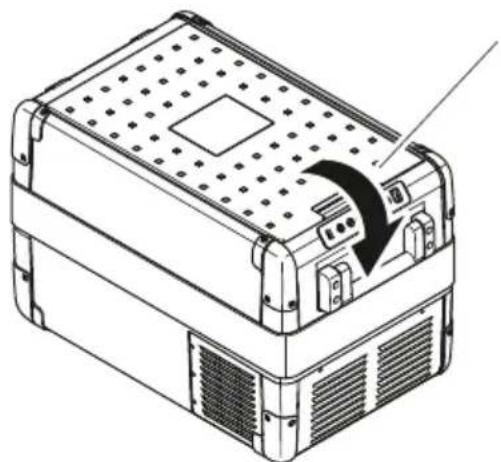
CFX257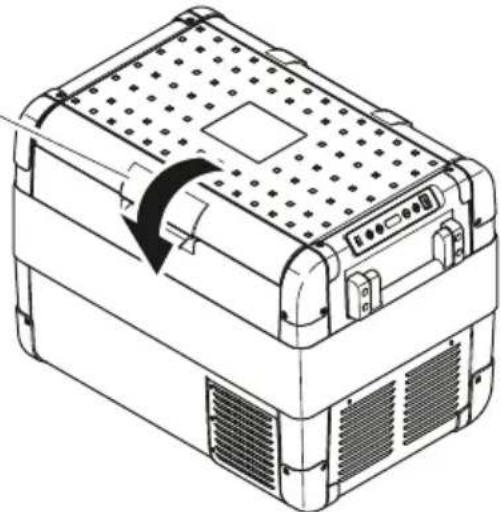
AR::CFX2 28, CFX2 37, CFX2 45, CFX2 57
| ### | ||
| Bluetooth 5G 2023/10/27 | Bluetooth 5G 2023/10/27 | ### |
| Bluetooth 5G 2023/10/27 | Bluetooth 5G 2023/10/27 | ### |
| Bluetooth 5G 2023/10/27 | Bluetooth 5G 2023/10/27 | ### |
| Bluetooth 5G 2023/10/27 | Bluetooth 5G 2.0.0.0 | ### |
| Bluetooth 5G 2023/10/27 | Bluetooth 5G 2023/10/27 | ### |
| Bluetooth 5G 2023/10/27 | Bluetooth 5G 2023/10/27 | ### |
| Bluetooth 5G 2023/10/27 | Bluetooth 5G 2-0-0-0 | ### |
| Bluetooth 5G 2023/10/27 | Bluetooth 5G 2023/10/27 | ### |
| Bluetooth 5G 2023/10/27 | Bluetooth 5G 2023/10/27 | ### |
| Bluetooth 5G 2023/10/27 | Bluetooth 5G 1.0.0.0 | ### |
| Bluetooth 5G 2023/10/27 | Bluetooth 5G 2023/10/27 | ### |
| Bluetooth 5G 2023/10/27 | Bluetooth 5G 2023/10/27 | ### |
| Bluetooth 5G 2023/10/27 | 蓝牙 4.0 | ### |
| Bluetooth 5G 2023/10/27 | 蓝牙 4.0 | ### |
| Bluetooth 5G 2023/10/27 | 蓝牙 4.0 | ### |
| Bluetooth 5G 2023/10/27 | 蓝牙 4.0 | ### |
| Bluetooth 5G 2023/10/27 | Bluetooth 5.0 | ### |
| Bluetooth 5G 2023/10/27 | Bluetooth 5.0 | ### |
| Bluetooth 5G 2023/10/27 | Bluetooth 5.0 | ### |
| Bluetooth 5G 2023/10/27 | Bluetooth 5.0 | ### |
| Bluetooth 5G 2023/10/26 | Bluetooth 5.0 | ### |
| Bluetooth 5G 2023/10/26 | Bluetooth 5.0 | ### |
| Bluetooth 5G 2023/10/26 | Bluetooth 5.0 | ### |
| Bluetooth 5G 2023/10/26 | Bluetooth 5.0 | ### |
| Bluetooth 5G 2023/9/8 | Bluetooth 5.0 | ### |
| Bluetooth 5G 2023/9/8 | Bluetooth 5.0 | ### |
| Bluetooth 5G 2023/9/8 | Bluetooth 5.0 | ### |
| Bluetooth 5G 2023/9/8 | Bluetooth 5.0 | ### |
| Bluetooth 5G 2023/9/8 | Bluetooth 4.0 | ### |
| Bluetooth 5G 2023/9/8 | Bluetooth 4.0 | ### |
| Bluetooth 5G 2023/9/8 | Bluetooth 4.0 | ### |
| Bluetooth 5G 2023/9/8 | Bluetooth 4.0 | ### |
| Bluetooth 5G 2023/9/8 | Bluetooth 4.0 | ### ### |
| Bluetooth 5G 2023/9/8 | Bluetooth 4.0 | ### |
| Bluetooth 5G 2023/9/8 | Bluetooth 4.0 | ### |
| Bluetooth 5G 2023/9/8 | Bluetooth 4.0 | ### |
| Bluetooth 5G 2023/9/8 | Bluetooth 4.0 | ### |
J
| الإستعمال | |
| 1给人一种错误的判断 | |
| 2给人一种错误的判断 |
19
j 1

(bc CFX2 57)
jlll llll 1
(507 aill
.1
CFX257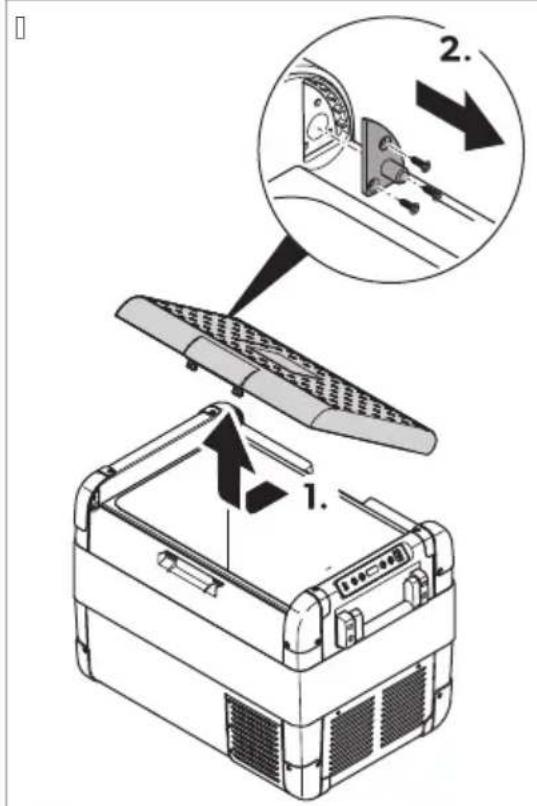
(507 anally J) 1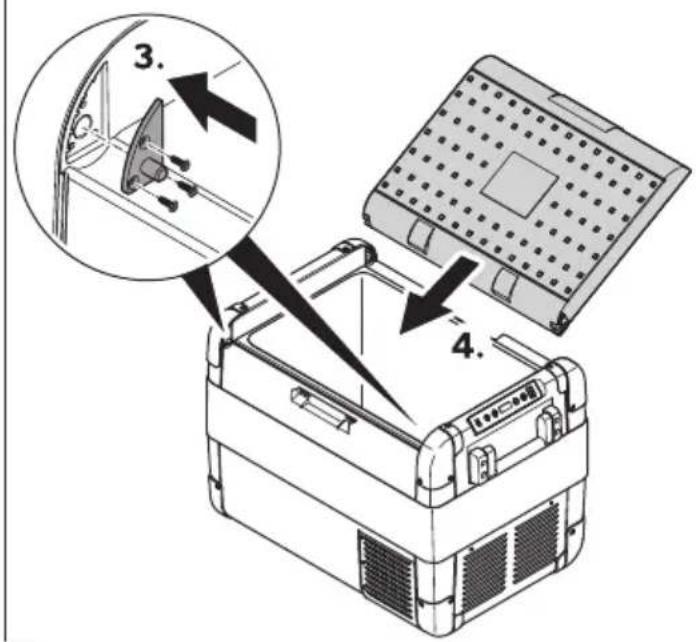
.2 .3. .4
a
julll jil
11jy 111111111111111111111
J 1 J 1 J 1 J 1 J 1 J 1 J 1 J 1 J 1 J 1 J 1 J 1 J 1 J 1 J 1 J 1 J 1 J 1 J 1 J 1 J 1 J 1 J 1 J 1 J 1 J 1 J 1 J 1 J 1 J 1 J 1 J 1 J 1 J 1 J
gaaal gale a jiall jll lssj slaa yd jia jia jia jia jia jia jia
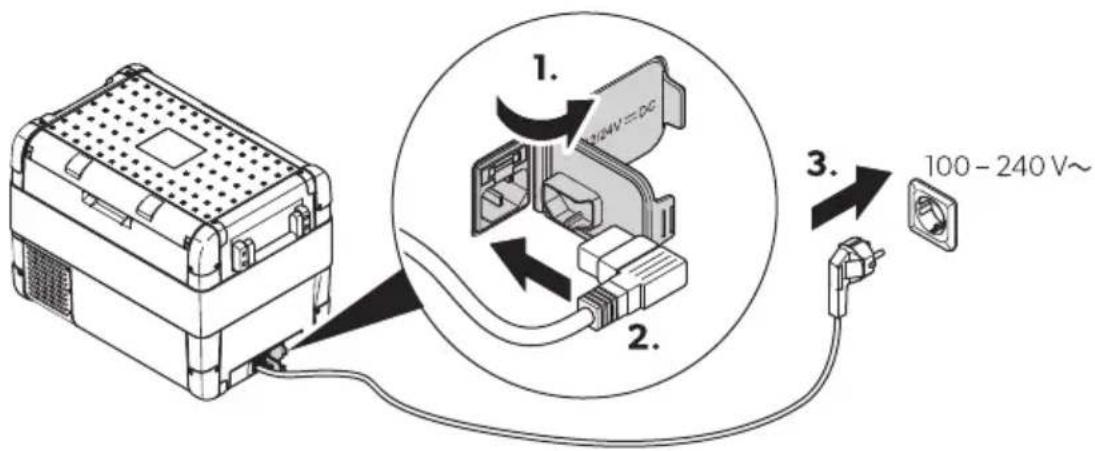

1.
2.(508)

2 1d (J)
1.
.(1510 aJy J) 3 ylll jzjgssd:CFX257

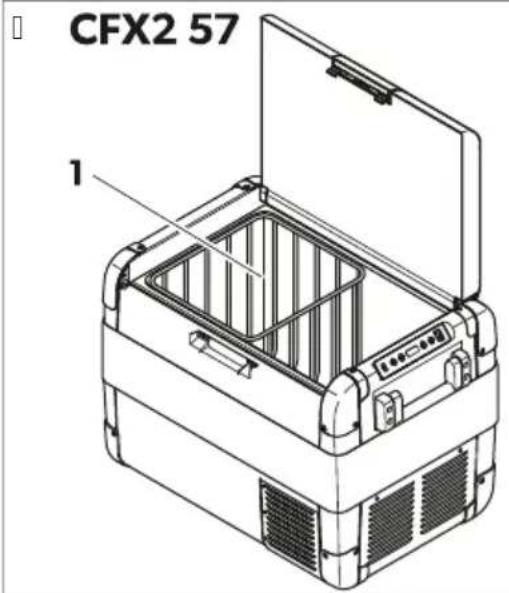
1
abla 2y jz g
- clll jie 2.1gla
aabla jda
- 52d1,80
.2
y
∴ S ΔBCD = S ΔCOD + S ΔBDO - S ΔBOC
a
.1.
.2
A

"MED" 1 (2) "LOW" 1

L 1 (WLAN) and Bluetooth
1.
qr.dometic.com/beiv4R

2.
Bluetooth (WLAN)
(WLAN) 3
1

Bluetooth

1-2
and

Bluetooth
(WLAN)
- 2
The (WLAN) and Bluetooth have LED
and
1.
1
a 1
i j 1
a

2.1
a
y 1

(250,4)
10 10 10 10 10 10 10 10 10 10 10 10 10

.(1514aJ (3514 aJ)
1


(10.3AG) (2514 aill)
.2 3. SC = 1/2 ; ∴ 2 = 1/2
aill jis

10
y

i 1
alba y
alai 1
<
(s (dometic.com/dealer 2)


dometic.com/sales-offices
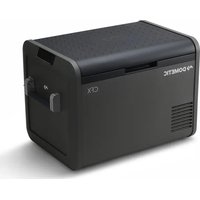
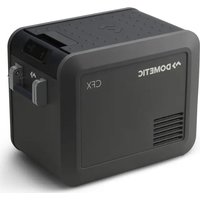

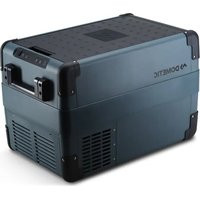
- ENGLISH
- IMPORTANT NOTES
- NOTICE
- SAFETY INSTRUCTIONS
- DANGER: ELECTROCUTION HAZARD
- WARNING: ELECTROCUTION HAZARD
- WARNING: FIRE HAZARD
- WARNING: HEALTH HAZARD
- SCOPE OF DELIVERY
- ITEM QUANTITY DESCRIPTION
- ACCESSORIES
- INTENDED USE
- SCOPE OF FUNCTIONS
- OPERATING AND DISPLAY ELEMENTS
- CONTROL PANEL
- OPERATION
- SAVING ENERGY
- CONNECTING THE COOLER
- RISK OF DAMAGE
- NOTE
- NOTE: DAMAGE HAZARD
- DISPLAY TEMPERATURE
- REPLACING THE FUSE
- REPLACING THE DC PLUG FUSE
- REPLACING THE LIGHT (CG
- CLEANING AND MAINTENANCE
- TROUBLESHOOTING
- ERROR CODES
- WARRANTY
- DISPOSAL
- TECHNICAL DATA
- DEUTSCH
- TECHNICAL DESCRIPTION
- VLB'!CIP!NEL
- AVOIDING FOOD WASTE
- SETTING THE TEMPERATURE
- BHIMAHNEZ
- OIIACHOCTZ OKPNOI NW I:MRMKVTUMNKTYSPL
- IPEJYTIPEKDEHNEZ OKPNOINVIV:MRMVLTUMNTYSPL
- IPEJYIPEJXDEHNEOKPNOINVIV:KXPL
- ATTENTION! READ THE INSTRUCTIONS BEFORE USE
- PP6I VOT T TOSTKPVI LOTMRMJ MOVT
- TP6RI 'PYKL PBRMOTM
- HI OVPK VOT TOM'SP
- IMVPIR OKTNPOTM
- PP61 VP
- PLMST KBLBPVP YKI VLM6P
- IKIOJ TAPOP:MOMLITA
- CBBL'BPOM OP QRPSTROPVP UOVP
- CBBL'BPOMKBJKLIMORTBIVI KBI 'PQLPOBPM
- ONACHOCTZ OKPNOI NW I:MRMKVTUMNKTYSPL
- YHA3AHNE
- GENERAL SAFETY PRECAUTIONS
- V OP QRPSTROPVP UPOVP
- ONACHOCTZ OKPNOI NV I V:MRMKVL TUMNKTYSPL
- CJ JOP OP KI NVI JOOI VI KI BTA6YUIOB MKMLP
- Y2 TPLPOUTЯ
- Y3 IN'QBBLRYOM
- Y4 TMQOTUMNKT SPOOT
- EESTI.EEL
- EXPLANATION OF SYMBOLS
- SAFETY AND MAINTENANCE INSTRUCTIONS
- REFRIGERATOR DEFROSTING
- CAUTION! RISK OF INJURY
- AVTIKATAOANTNCAOSFAAIAC
- (RIE'!I
- (!S. IRTIS
Brand : DOMETIC
Model : CFX2 57
Category : Fridge