
FW-55BZ30J1 - Monitor SONY - Free user manual and instructions
Find the device manual for free FW-55BZ30J1 SONY in PDF.
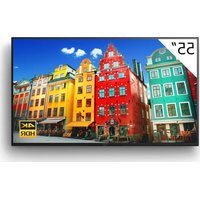


| Product type | LCD Monitor 4K HDR |
| Brand | Sony |
| Model | FW-55BZ30J1 |
| Screen size | 55 inches (138.8 cm diagonal) |
| Resolution | 3840 x 2160 pixels (4K UHD) |
| Panel type | LCD with LED backlight |
| Audio | 2 x 5 W (stereo) |
| Connectors | 4 x HDMI (HDCP 2.3), 2 x USB (USB 2.0 and 3.1), Ethernet, RS-232C, optical output, headphone jack, composite AV input |
| Network | Wi-Fi (2.4 and 5 GHz bands), Bluetooth, Ethernet 10/100 |
| Power supply voltage | 220-240 V AC, 50 Hz |
| Power consumption (standard) | 123 W |
| Standby power consumption | 0.5 W |
| Energy efficiency class | B |
| Weight (with stand) | 16.6 kg |
| Weight (without stand) | 15.7 kg |
| Main functions | Pro mode, RS-232C/IP control, preset image modes (Intense, Expert, Graphics), scheduling. |
| Safety | Professional wall mounting recommended, transport precautions with multiple people. |
| Maintenance and cleaning | Unplug before cleaning, use a soft dry cloth. |
| Spare parts and repairability | Optional wall mounts (SU-WL850, SU-WL450), FWA-CE100 microphone camera, extended software available. |
| General information | Manual available in multiple languages, EU compliance, regular software update recommended. |
Frequently Asked Questions - FW-55BZ30J1 SONY
User questions about FW-55BZ30J1 SONY
0 question about this device. Answer the ones you know or ask your own.
Ask a new question about this device
Download the instructions for your Monitor in PDF format for free! Find your manual FW-55BZ30J1 - SONY and take your electronic device back in hand. On this page are published all the documents necessary for the use of your device. FW-55BZ30J1 by SONY.
USER MANUAL FW-55BZ30J1 SONY
Remote Control and LCD Monitor. . . .7
Settings. 8
Pro mode. 8
Recommended settings. 9
Control functions. 10
RS-232C 10
IP 11
Appendix 13
Extended software 13
Installing the LCD Monitor to the Wall. 14
Troubleshooting. 15
Specifications 15
About Manuals
This LCD Monitor comes with the following manuals. Please retain the manuals for future reference.
Setup Guide
- LCD Monitor installation and setup.
Reference Guide (this manual) / Safety
Documentation
- Safety information, remote control, troubleshooting, wall-mount installation, specification, etc.
Help
Find more troubleshooting and other useful information directly from your LCD Monitor. Press HELP on the remote control to display a list of topics.
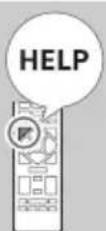
Setting menus are subject to change without notice.
IMPORTANT - Read the End User Software Licence Agreement before using your Sony product. Using your product indicates your acceptance of the End User Software Licence Agreement. The software licence agreement between you and Sony is available online at Sony website (https://www.sony.net/tv-software-licenses/) or on your product screen. Go to [Settings] → [System] → [About] → [Legal information] → [Notices and licences].
Note
Before operating the LCD Monitor, please read the "Safety Information". - Read the supplied safety documentation for additional safety information. - Images and illustrations used in the Setup Guide and this manual are for reference only and may differ from the actual product.
Location of the identification label
Labels for the LCD Monitor Model No., Production Date (year/month) and Power Supply rating are located on the rear of the LCD Monitor or package.
For models with supplied mains adaptor: Labels for mains adaptor Model No. and Serial No. are located on the bottom of mains adaptor.
IMPORTANT NOTICE
Notice for Radio Equipment
Hereby, Sony Corporation declares that the radio equipment types FW-100BZ40J, FW-75BZ30J, FW-65BZ30J, FW-55BZ30J, FW-55BZ30J, FW-50BZ35J, FW-50BZ30J, FW-43BZ35J, FW-43BZ30J, FW-32BZ30J are in compliance with Directive 2014/53/EU. The full text of the EU declaration of conformity is available at the following internet address: https://compliance.sony.eu
Hereby, Sony Corporation declares that the radio equipment types FW-100BZ40J, FW-75BZ30J, FW-65BZ30J, FW-55BZ30J, FW-55BZ30J, FW-50BZ35J, FW-50BZ30J, FW-43BZ35J, FW-43BZ30J, FW-32BZ30J are in compliance with the UK relevant statutory requirements. The full text of the declaration of conformity is available at the following internet address: https://compliance.sony.co.uk
For this radio equipment, the following restrictions on putting into service or of requirements for authorization of use apply in AT, BE, HR, CY, CZ, DK, EE, FI, FR, DE, EL, HU, IE, IT, LV, LT, LU, MT, NL, PL, PT, SK, SI, ES, SE, UK, UK (NI), IS, LI, NO, CH, BG, RO, TR, AL, BA, MK, MD, RS, ME, Kosovo : 5150 - 5350 MHz band is restricted to indoor operations only.
Safety Information
Installation/Set-up
Install and use the LCD Monitor in accordance with the instructions below in order to avoid any risk of fire, electric shock or damage and/or injuries.
Installation
- The LCD Monitor should be installed near an easily accessible mains socket.
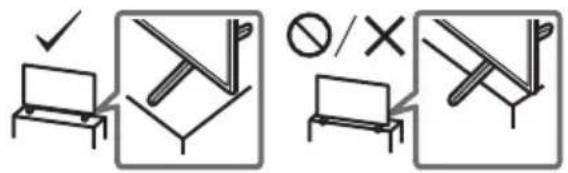
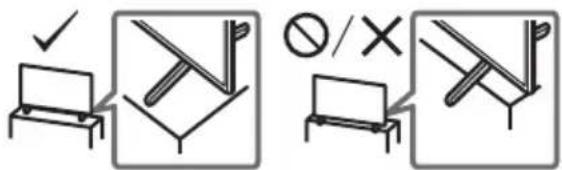
- Place the LCD Monitor on a stable, level surface to prevent it from falling over and causing personal injury or property damage. Install the LCD Monitor where it cannot be pulled, pushed, or knocked over.
- Install the LCD Monitor so that the LCD Monitor's Table-Top Stand does not protrude out from the LCD Monitor stand (not supplied). If the Table-Top Stand protrudes out from the LCD Monitor stand, it may cause LCD Monitor set to topple over, fall down, and cause personal injury or damage to the LCD Monitor.
Transporting
- Before transporting the LCD Monitor, disconnect all cables.
- Two or more people (four or more people for FW-100BZ40J) are needed to transport a large LCD Monitor.
- When transporting the LCD Monitor by hand, hold it as shown below. Do not put stress on the LCD panel and the frame around the screen.
- When lifting or moving the LCD Monitor, hold it firmly from the bottom.
FW-100BZ40J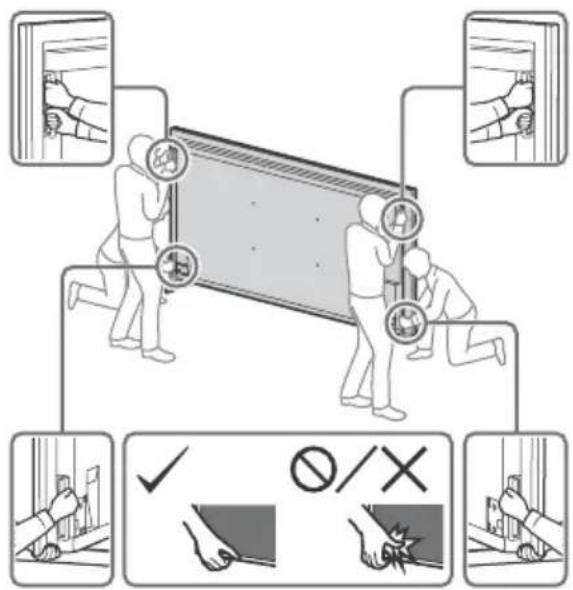
FW-75BZ30J/65BZ30J/55BZ30J/55BZ30J/50BZ35J/ 50BZ30J/43BZ35J/43BZ30J/32BZ30J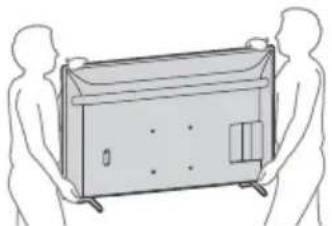
- When transporting the LCD Monitor, do not subject it to jolts or excessive vibration.
- When transporting the LCD Monitor for repairs or when moving, pack it using the original carton and packing material.
Topple prevention
FW-100BZ40J FW-75BZ30J / 65BZ30J / 55BZ30J1 / 55BZ30J / 50BZ35J / 50BZ30J / 43BZ35J / 43BZ30J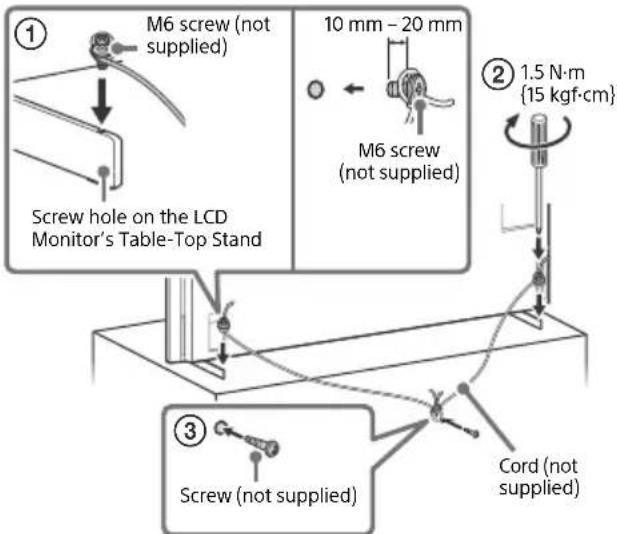
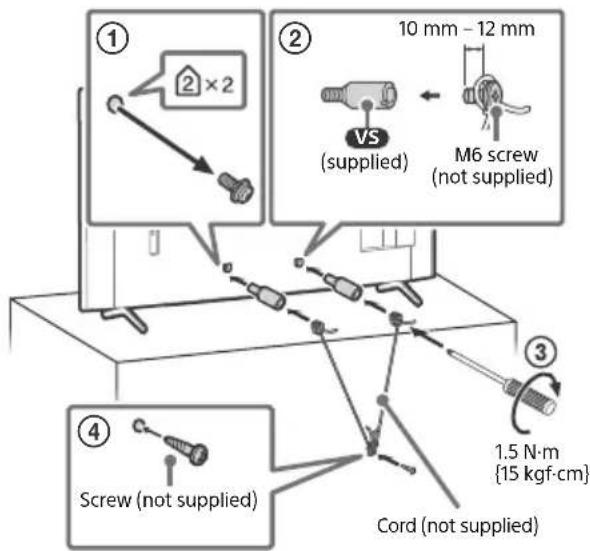
FW-32BZ30J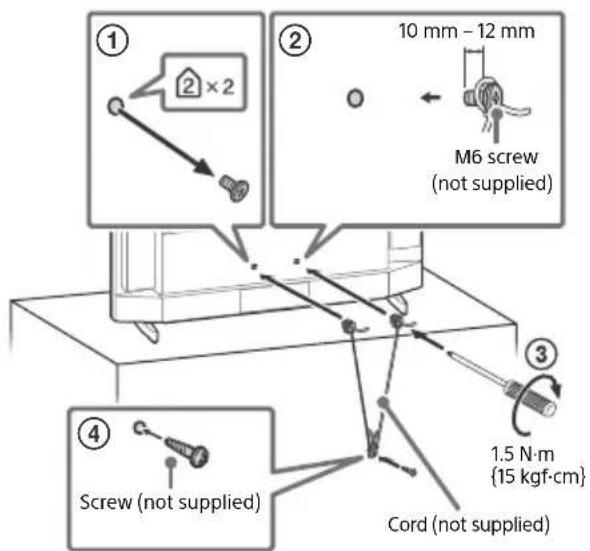
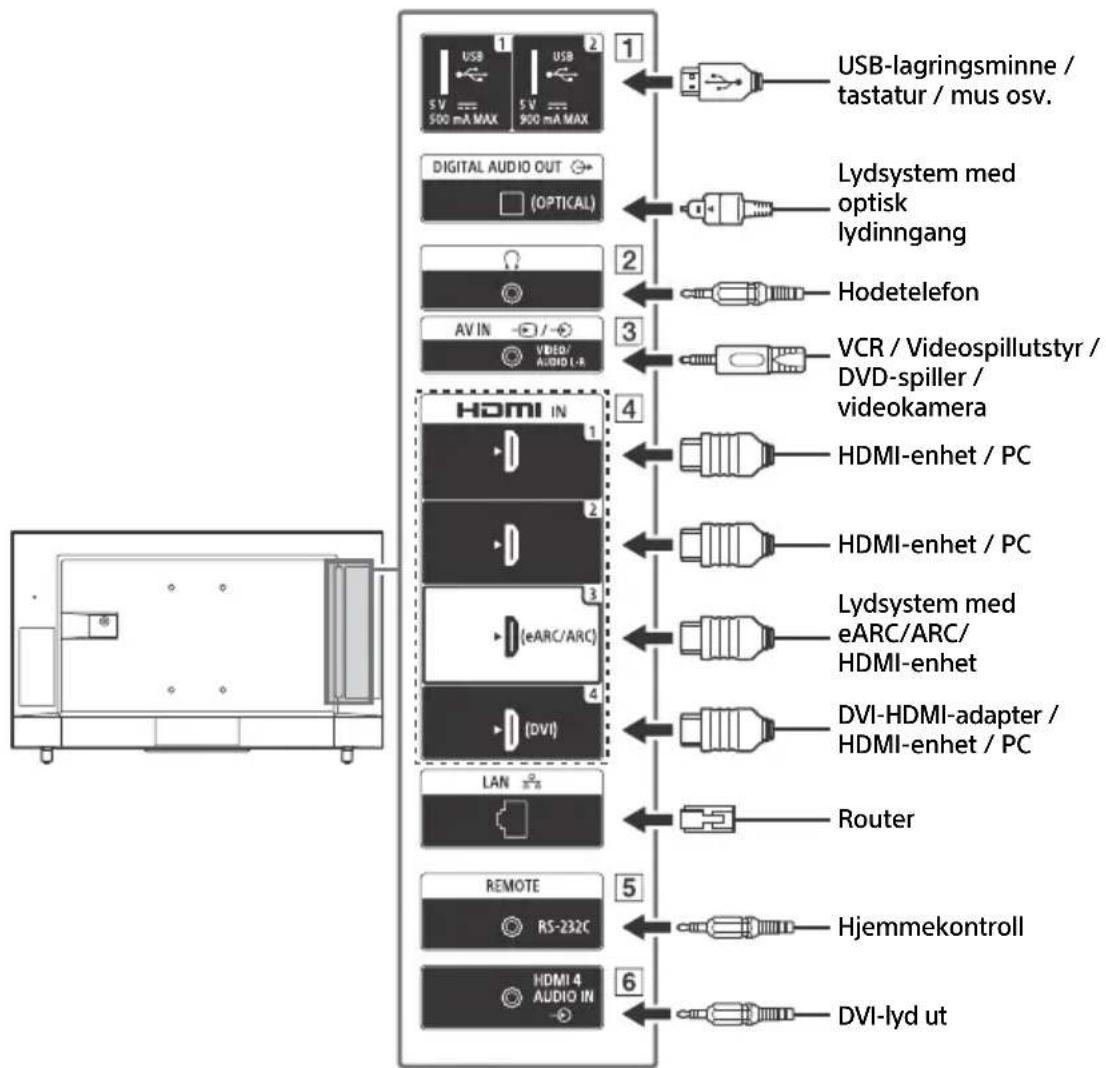
Connection Diagram
Note
- Terminals and labels may vary depending on region/country/LCD Monitor model.
FW-100BZ40J/50BZ35J/43BZ35J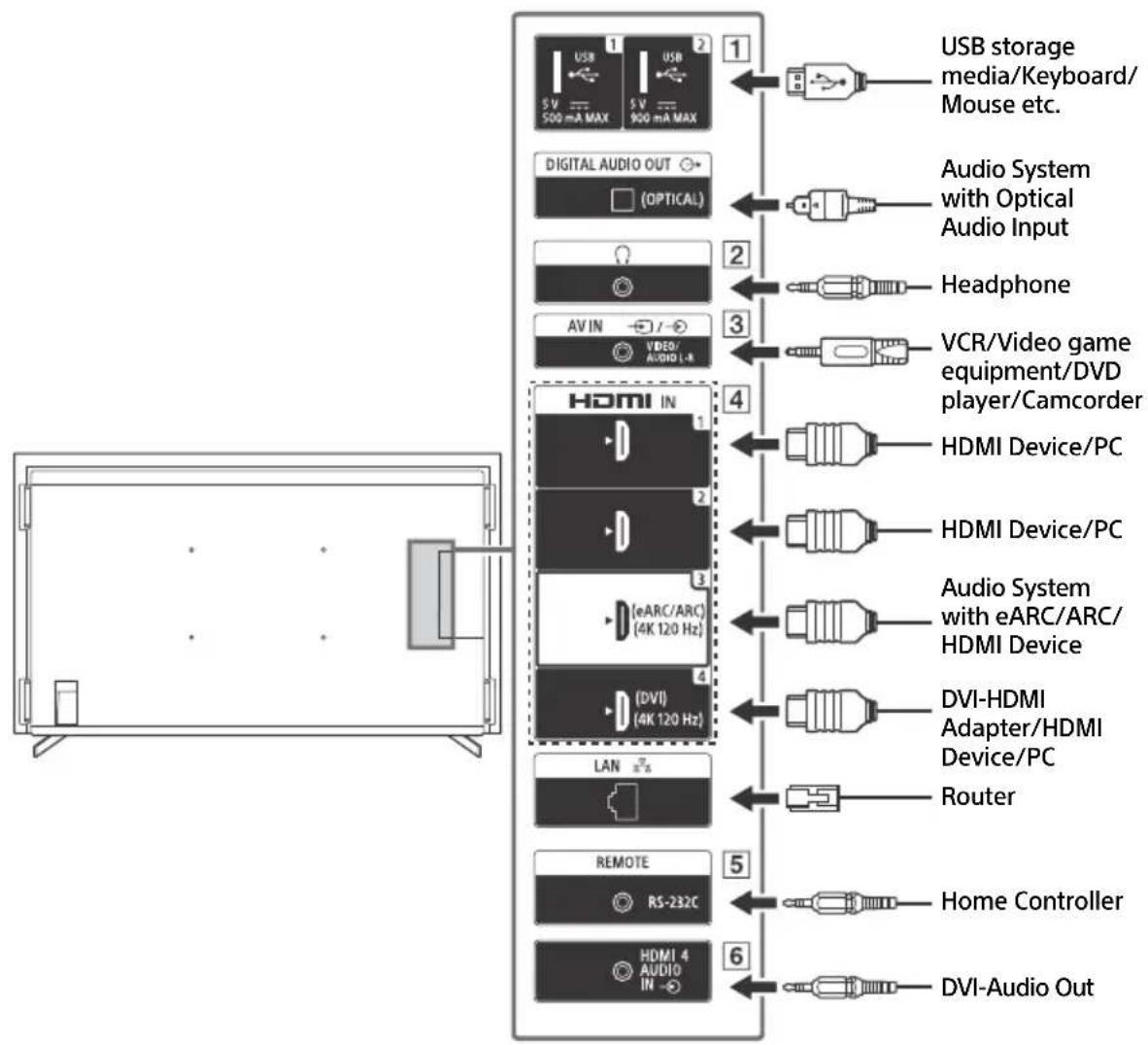
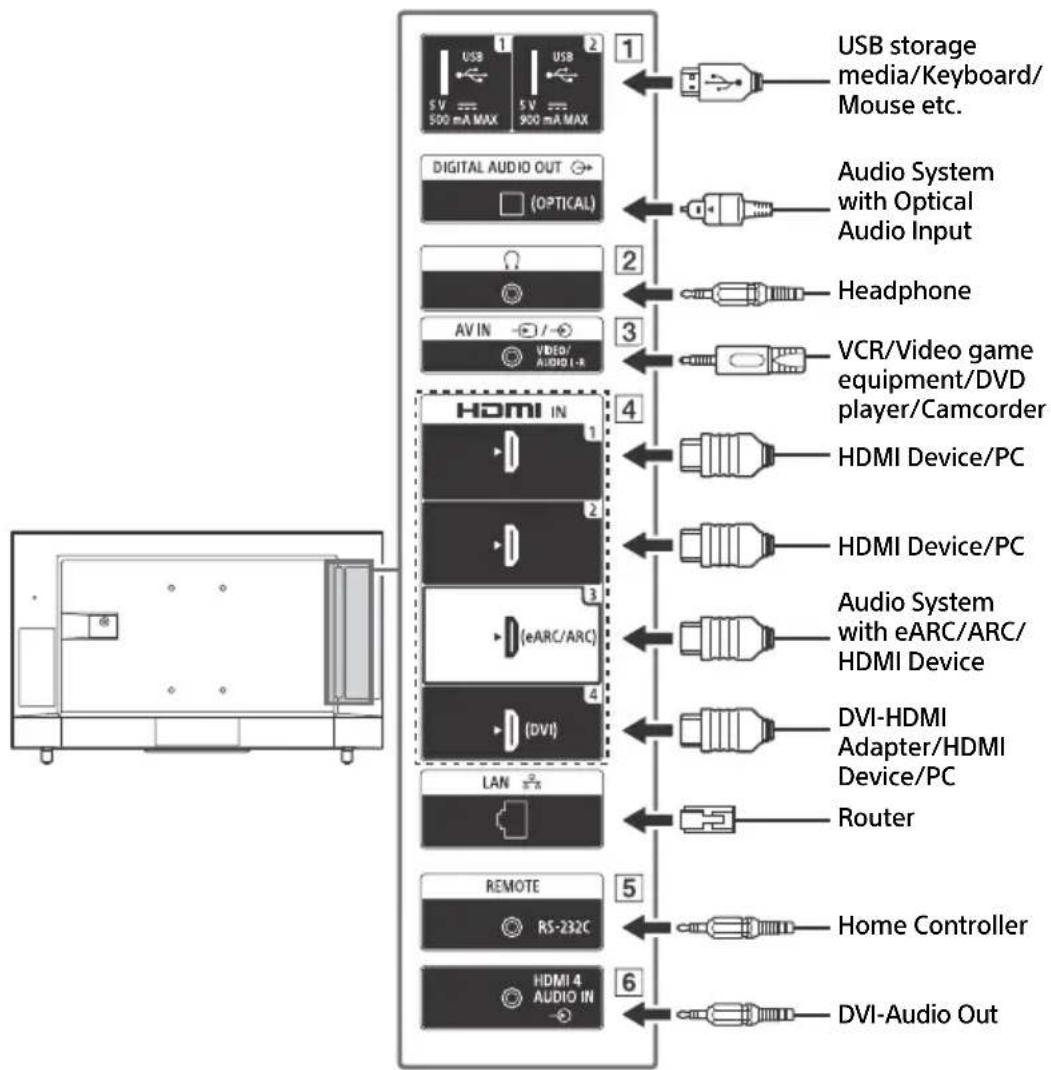
GB
1


USB

- Connecting a large USB device may interfere with other connected devices beside it.
2 (Headphone)
Supports 3-pole stereo mini jack only. - You cannot output sound from both the headphone and the LCD Monitor speakers at the same time.
3


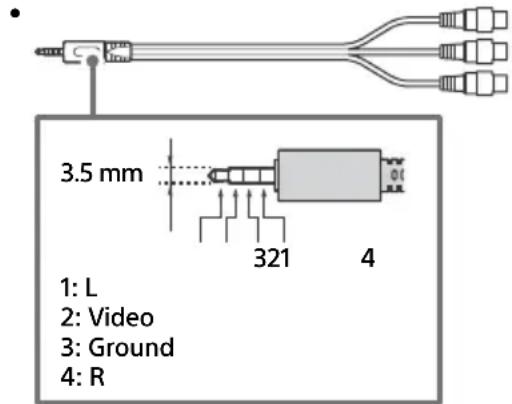
- For a composite connection, use an Analogue Extension Cable (not supplied).
4 HDMI IN 1/2/3/4
- HDMI interface can transfer the digital video and audio on a single cable.
- If the device has a DVI jack, connect it to HDMI IN 4 through a DVI - HDMI adaptor interface (not supplied), and connect the device's audio out jack to HDMI 4 AUDIO IN.
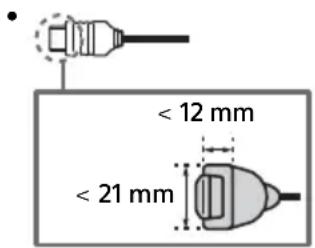
- HDMI IN 3 eARC/ARC (Enhanced Audio Return Channel/Audio Return Channel) Connect your audio system to the HDMI IN 3 to route LCD Monitor audio to your audio system. An audio system that supports HDMI eARC/ARC can send video to the LCD Monitor, and receive audio from the LCD Monitor via the same HDMI cable. If your audio system does not support HDMI eARC/ARC, an additional connection with DIGITAL AUDIO OUT (OPTICAL) is necessary.
- Use the HDMI cable with Ethernet to connect audio system with eARC.
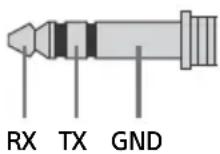
5 REMOTE RS-232C
- Terminal for serial communication. For details, see "Control functions".
6 HDMI4AUDIOIN
- If the device has a DVI jack, connect it to HDMI IN 4 through a DVI - HDMI adaptor interface (not supplied), and connect the device's audio out jack to HDMI 4 AUDIO IN.
Remote Control and LCD Monitor
The remote control shape, layout, availability and function of remote control buttons may vary depending on your region/country/LCD Monitor model/LCD Monitor settings.
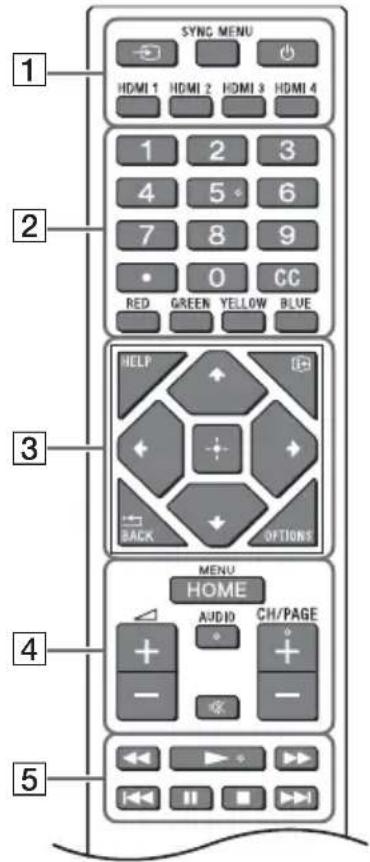
Input select): Display and select the input source, etc.
SYNC MENU: Display the BRAVIA Sync
Menu.
(Power)
HDMI 1/2/3/4
2 Number buttons
dot)
CC
Colour buttons
3 HELP: Display the Help menu.
(一) (Screen display): Display information.
← /BACK
OPTIONS: Displays a list of functions that can be used at that time.
Vdash / Vdash / Vdash / Vdash / Vdash (Navigation D-Pad): On screen menu navigation and selection.
4 HOME/MENU
+/(Volume)
AUDIO: Select the sound of multilingual source or dual sound (depending on programme source).
※ (Mute)*
CH/PAGE +/-
5
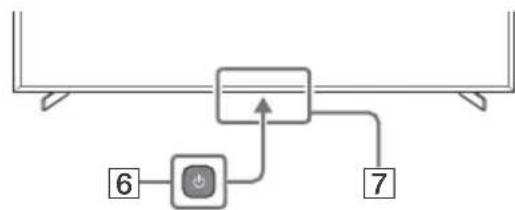
6 (Power) Remote Control sensor / Light sensor / LED
- Accessibility shortcut is available by pressing and holding × (Mute).
Settings
Pro mode
In [Pro mode], you can use various convenient functions for professional use. Here, we introduce how to change to [Pro mode] and typical functions of [Pro mode].
Pro mode
Normal mode: This is the default mode. [Pro mode] functions are not available in this mode.
Pro settings mode: This mode allows you to set various settings of [Pro mode] functions.
Pro mode: This is the operation mode for professional use where you can use the [Pro mode] functions.
How to change the mode
When the Monitor is in Normal mode and Pro settings mode
- Go to [Home (Menu)] → [Apps] → [Pro mode tool], then select the mode you want to change.
When the Monitor is in the Pro mode
- Press the activation keys described below on the remote control in order within a one second interval.
After restarting the Monitor, the mode changes to [Pro settings mode].
Activation key: (Screen display) / (Mute) / → + (-) (Volume +) / HOME/MENU
*Initially you cannot change the mode from [Pro mode tool] in [Pro mode]. If you want to change the mode from [Pro mode tool], go to [Pro settings] → [Function restrictions] → [Apps] and change [Pro mode tool] to [Enable] in [Pro settings mode].
Introduction of the Pro mode functions
In [Pro mode], you can use various convenient functions. Typical [Pro mode] functions are introduced below.
- Setting Monitor operation when turning the AC power on
You can set the operation of the Monitor when unplugging and reinserting the AC power plug.
- Optimized display of the PC input screen
The screen displays the PC input screen with optimum size according to the PC format.
Power supply control and automatic input switching by HDMI signal detection
If you turn on the Monitor when the HDMI device is connected, you can change to the connected HDMI input automatically.
- Settings of the displaying menu when pressing the HOME/MENU button
You can select the menu displayed when pressing the HOME/MENU button on the remote control.
- Initial input source designation when starting the Monitor
You can designate the initial input source when starting the Monitor.
- Pro mode lock
You can protect the settings of [Pro mode] by using a PIN.
- Initial/maximum volume setting
You can set the initial and maximum volume of the Monitor.
- Restriction of the Monitor operation on the remote control
You can restrict the Monitor operation using the remote control.
- Restriction of external inputs
You can restrict the use of external inputs.
- Restriction of using applications
You can restrict the use of Monitor applications.
How to set Pro mode functions
Go to [Home (Menu)] → [Settings] → [Pro settings] when the Monitor is in [Pro settings mode].*
*Varies depending on the version of the OS.
Recommended settings
GB
This section introduces recommended settings when using the Monitor for professional use.
Setting ECO features
1 Go to [Settings] → [System] → [Power and energy].
- Set [Idle TV power off] to [Off].
Setting IP features
2 Go to [Settings] → [Network & Internet] → [Home network setup] → [IP control].
- Set [Authentication] to [Normal and Pre-Shared Key].
- Set [Simple IP control] to [On].
Automatic Software Download
3 Go to [Settings] → [System] → [About] → [System software update].
- Set [Automatically check for update] to [Off].
Picture settings
4 Go to [Settings] → [Display & Sound] → [Picture].
- Set [Light sensor] to [Off]. - Select [Picture mode] according to usage.
[Vivid]: When using the digital signage display
[Custom]: When displaying the original image as is
[Graphics]: When displaying the PC screen
Control functions
RS-232C
You can control the Monitor from an external service via RS-232C. The RS-232C connection is briefly explained on this page.
Interface
Establish the RS-232C connection to the Monitor by using a 3.5 mm stereo mini plug.
When establishing the RS-232C connection, make connection settings as below.
| Baud rate 9600 bps |
| Data 8 bit |
| Parity None |
| Start bit 1 bit |
| Stop bit 1 bit |
| Flow control None |
Data format
We introduce the data format for the RS-232C communication below.
(a) Requests from the controller to the Monitor
| No. Item Value | |||||||
| 1 | H | e | a | d | e | r | 0 |
| 2 | Category | 0x00 | (fixed) | ||||
| 3 | Function | 0xxx | |||||
| 4 | Length | 0xxx | (=Data X+1 byte) | ||||
| 5 | Data 1 | 0xxx | |||||
| : | : | 0xxx | |||||
| : | : | 0xxx | |||||
| X+4 | Data X | 0xxx | |||||
| X+5 Check Sum | 0xxx | ||||||
(b) Responses from the Monitor to the controller
| No. Item Value | ||||||||
| 1 | H | e | a | d | e | r | 0 | |
| 2 Answer 0x00 Completed (Normal End) | ||||||||
| 0x01 : Limit Over (Abnormal End-Exceed maximum value) | ||||||||
| 0x02 : Limit Over (Abnormal End-Exceed minimum value) | ||||||||
| 0x03 : Command Canceled (Abnormal end) | ||||||||
| 0x04 : Parse Error (Data Format Error) | ||||||||
| 3 | C | h | e | c | k | S | u | m |
Command example
Examples of RS-232C communication commands are explained below.
| Control | Head | Category | Function | Length | Data 1 | Data X | Checksum |
| Power on/off | 0x8C | 0x00 | 0x00 | 0x02 | 0x00 (off) | - | 0x8E |
| 0x01 (on) | - | 0x8F | |||||
| HDMI input selection | 0x8C | 0x00 | 0x02 | 0x03 | 0x04 (HDMI) | 0x01 (#1) | 0x96 |
| 0x02 (#2) | 0x97 | ||||||
| 0x03 (#3) | 0x98 | ||||||
| 0x04 (#4) | 0x99 |
For more details on RS-232C, please contact your sales representative.
IP
You can control the Monitor via IP from an HTML5/Android application on the Monitor or on the external device. You can manage and monitor information of input/power, start and terminate applications, control the display such as input source and volume. You can also restrict commands by the authentication function.
Supported IP protocol
| Protocol name | Layer | Format | Authentication | Explanation |
| REST API | HTTP | JSON-RPC | Yes | The APIs whose purpose is device control. |
| IRCC-IP | HTTP | SOAP | Yes | Infrared Compatible Control over Internet Protocol. The technology and formats to transmit remote control commands via the Internet. |
| Simple IP control | TCP | Byte stream | N/A | Only typical functions are supported. |
Monitor settings
When using [IP control], set the Monitor as follows first.
Go to [Settings] → [Network & Internet] → [Home network setup] → [IP control].
For REST API and IRCC-IP,
- Select [Authentication].
- Set [Pre-Shared Key] if needed. For Simple IP control,
- Enable [Simple IP control].
Example of HTTP request and response for REST API
Here is the example of a request and response to acquire the power status to the Monitor (IP address: 192.168.0.1 Pre-shared Key "1234").
URL
http://192.168.0.1/sony/system
Request
POST /sony/system HTTP/1.1 Host: 192.168.0.1 Content-Type: application/json; charset=UTF-8 Content-Length: 70 X-Auth-PSK: 1234 {"method": "getPowerStatus", "params": [], "id": 50, "version": "1.0"}
Response
HTTP/1.1 200 OK
Content-Type: application/json; charset=UTF-8
Content-Length: 44
{"result": ["status": "active"], "id": 50}
For more details on [IP control], please contact your sales representative.
Appendix
Extended software
You can use the Monitor more conveniently by using extended software. This page introduces an example of extended software.
For more details, please contact your sales representative.
Software for office Monitors
Provides convenient functions for using the Monitor as an office Monitor connected to a PC in a conference room or the like.
Function examples:
- Power management/Power supply monitoring functions.
- White board function.
- Presentation timer.
- You can change inputs or turn the power on/off without the remote control.
Software for digital signage
When using the Monitor as a digital signage display, the software provides convenient functions. Function examples:
- Digital signage distribution management function to multiple Monitors via the network.
- Easy signage playback function with USB memory.
- Contents and playlist management function.
- Flexible delivery schedule setting by time and day of the week.
Installing the LCD Monitor to the Wall
Using the optional Wall-Mount Bracket (SU-WL850 or SU-WL450)* (not supplied)
To Customers:
For product protection and safety reasons, Sony strongly recommends that installation of your LCD Monitor be performed by Sony dealers or licensed contractors. Do not attempt to install it yourself.
To Sony Dealers and Contractors:
Provide full attention to safety during the installation, periodic maintenance and examination of this product.
Wall-Mount Bracket Installation Information
For instructions on Wall-Mount Bracket installation, see the Installation Information (Wall-Mount Bracket) on the product page for your LCD Monitor model.
https://www.sony.eu/support
- Follow the instruction guide provided with the Wall-Mount Bracket for your model. Sufficient expertise is required in installing this LCD Monitor, especially to determine the strength of the wall for withstanding the LCD Monitor's weight.
- Sony is not liable for any damage or injury caused by mishandling or improper installation.
- Only qualified service personnel should carry out wall-mount installations.
- For safety reasons, it is strongly recommended that you use Sony accessories, including:
- Wall-Mount Bracket SU-WL850
- Wall-Mount Bracket SU-WL450
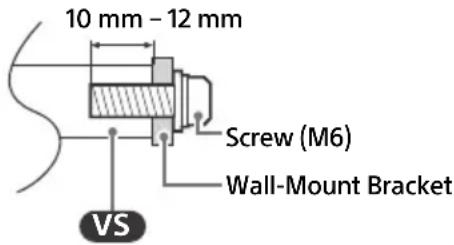
- Be sure to use the screws supplied with the Wall-Mount Bracket when attaching the Wall-Mount Bracket to the LCD Monitor. The supplied screws are designed as indicated by illustration when measured from the attaching surface of the Wall-Mount Bracket.
The diameter and length of the screws differ depending on the Wall-Mount Bracket model. Use of screws other than those supplied may result in internal damage to the LCD Monitor or cause it to fall, etc.
FW-75BZ30J / 65BZ30J / 55BZ30J1 / 55BZ30J / 50BZ35J / 50BZ30J / 43BZ35J / 43BZ30J
FW-32BZ30J
- Be sure to store the unused screws and Table-Top Stand in a safe place until you are ready to attach the Table-Top Stand. Keep the screws away from small children.
- Only for limited region/country/model.
Using the optional Wall-Mount Bracket (Except SU-WL850 or SU-WL450) (not supplied)
This LCD Monitor's instruction manual only provides the steps to prepare the LCD Monitor for Wall-Mount installation before it is installed on the wall.
Your LCD Monitor can be mounted to a wall using a suitable Wall-Mount Bracket (not supplied). If the Table-Top Stand is attached to the LCD Monitor, the LCD Monitor may require detaching the Table-Top Stand. Prepare the LCD Monitor for the Wall-Mount Bracket before making cable connections.
For product protection and safety reasons, Sony strongly recommends that installation of your LCD Monitor on the wall be performed by qualified professionals. Do not attempt to install it yourself.
- Follow the instruction guide provided with the Wall-Mount Bracket for your model. Sufficient expertise is required in installing this LCD Monitor, especially to determine the strength of the wall for withstanding the LCD Monitor's weight.
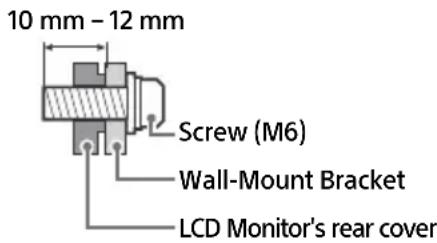
- The screws for installing the Wall-Mount Bracket to the LCD Monitor are not supplied.
- The length of the screw for Wall-Mount Bracket differs depending on the Wall-Mount Bracket thickness. Please refer to below illustration.
FW-100BZ40J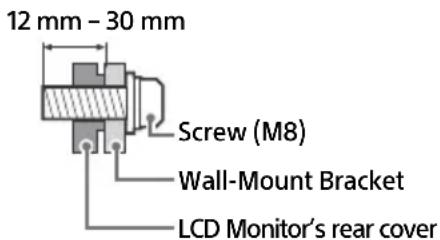
FW-75BZ30J / 65BZ30J / 55BZ30J1 / 55BZ30J / 50BZ35J / 50BZ30J / 43BZ35J / 43BZ30J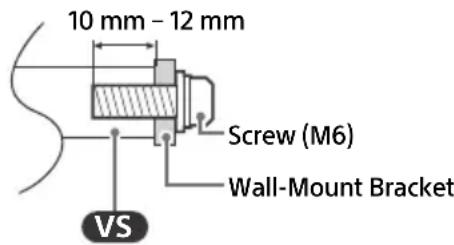
FW-32BZ30J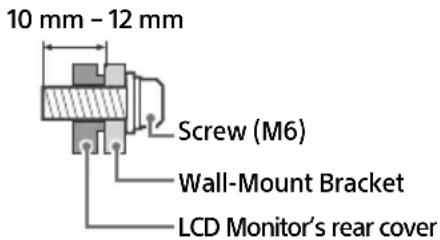
Troubleshooting
General troubleshooting for issues like: black screen, no sound, frozen picture, LCD Monitor does not respond, or network is lost, do the following steps.
1 Restart your LCD Monitor by pressing the power button on the remote control for about five seconds. The LCD Monitor will restart. If the LCD Monitor does not recover, try unplugging the mains lead then press the power button on the LCD Monitor and release it. Wait for two minutes, and plug in the mains lead. Or, press the power button on the LCD Monitor for about 40 seconds until the LCD Monitor turns off. 2 Refer to the Help menu by pressing HELP on the remote control. 3 Connect your LCD Monitor to the Internet and perform a software update. Sony recommends you to keep your LCD Monitor software updated. Software updates provide new features and performance improvements.
When you plug in the LCD Monitor, the LCD Monitor may not be able to turn on for a while even if you press the power button on the remote control or the LCD Monitor.
It takes time to initialize the system. Wait for about one minute, then operate it again.
The remote control does not function.
- Replace the batteries.
Specifications
System
Panel system: LCD (Liquid Crystal Display) Panel, LED Backlight
Sound output:
FW-32BZ30J: 5W + 5W
FW-100BZ40J / 75BZ30J / 65BZ30J / 55BZ30J1 /
55BZ30J / 50BZ35J / 50BZ30J / 43BZ35J /
43BZ30J: 10 W + 10 W
Wireless technology
Protocol IEEE 802.11a/b/g/n/ac
Bluetooth® Version 4.2
| Frequency range Output power | |
| Wireless LAN (LCD Monitor) | |
| 2400-2483.5 MHz | < 20.0 dBm |
| 5150-5250 MHz | < 23.0 dBm |
| 5250-5350 MHz | < 20.0 dBm |
| 5470-5725 MHz | < 20.0 dBm |
| 5725-5850 MHz | < 13.9 dBm |
| Bluetooth® (LCD Monitor) | |
| 2400-2483.5 MHz < 10.0 dBm | |
Input/Output jacks
AVIN
Video/Audio input (mini jack)
HDMI IN 1/2/3/4 (HDCP 2.3-compatible)
Video (FW-100BZ40J / 50BZ35J / 43BZ35J only):
4096×2160p (50, 60 Hz) 1 2, 4096×2160p
4096× 2160p (50, 60 Hz) 12, 4096× 2160p
2160p (24, 25, 30 Hz), 1080p (30, 50, 60, 100,
120 Hz), 1080/24p, 1080i (50, 60 Hz), 720p
(30, 50, 60 Hz), 720/24p, 576p, 480p, PC
Formats
3840 × 2160p (100, 120 Hz) 2 3
3840 × 2160p (100, 120 Hz) 2 3
Video (FW-75BZ30J / 65BZ30J / 55BZ30J1 /
55BZ30J / 50BZ30J / 43BZ30J / 32BZ30J only):
4096×2160p (50, 60 Hz)*1*2, 4096 × 2160p
(24 Hz)*1, 3840 × 2160p (50, 60 Hz)*2, 3840 ×
2160p (24, 25, 30 Hz), 1080p (30, 50, 60 Hz),
1080/24p, 1080i (50, 60 Hz), 720p (30, 50,
60 Hz), 720/24p, 576p, 480p, PC Formats
Audio:
In eARC (Enhanced Audio Return Channel) mode
7.1 channel linear PCM: 32/44.1/48 kHz
16 bits, Dolby Digital, Dolby Digital Plus,
DTS, Dolby TrueHD, DTS-HD MA, Dolby
Atmos, DTS:X Master Audio
Except eARC mode
5.1 channel linear PCM: 32/44.1/48/88.2/
96/176.4/192 kHz 16/20/24 bits, Dolby
Audio, Dolby Atmos, DTS
eARC/ARC (Enhanced Audio Return Channel/
Audio Return Channel) (HDMI IN 3 only)*4
In eARC mode
7.1 channel linear PCM: 32/44.1/48 kHz
16 bits, Dolby Digital, Dolby Digital Plus, DTS,
Dolby TrueHD, DTS-HD MA, Dolby Atmos,
DTS:X Master Audio
In ARC mode
Two channel linear PCM: 48 kHz 16 bits,
Dolby Audio, Dolby Atmos, DTS
DIGITAL AUDIO OUT (OPTICAL)
Digital optical jack (Two channel linear PCM:
48 kHz 16 bits, Dolby Audio, DTS)
HDMI 4 AUDIO IN
USB port 1 supports High Speed USB (USB 2.0)
USB port 2 supports Super Speed USB (USB 3.1
Gen 1)
LAN
10BASE-T/100BASE-TX connector (Depending on the operating environment of the network, connection speed may differ. The communication rate and quality are not guaranteed.)
19.5 V (FW-32BZ30J only)
Mains adaptor input
REMOTE
RS-232C, mini jack
This jack is for receiving the external control
signal.
Power, Product Fiche and others
Power requirements
Except models with supplied mains adaptor
220V-240VAC, 50Hz
Models with supplied mains adaptor only
19.5 V DC with mains adaptor
Rating: Input 220 V - 240 V AC, 50 Hz
Energy Efficiency Class*5
FW-100BZ40J: A+
FW-75BZ30J: A
FW-65BZ30J: A
FW-55BZ30J: B
FW-50BZ35J: A
FW-50BZ30J: B
FW-43BZ35J: B
FW-43BZ30J: A
FW-32BZ30J: B
Screen size (measured diagonally) (Approx.)
FW-100BZ40J: 252.8 cm / 100 inches
FW-75BZ30J: 189.3 cm / 75 inches
FW-65BZ30J: 163.9 cm / 65 inches
FW-55BZ30J1: 138.8 cm / 55 inches
FW-55BZ30J: 138.8 cm / 55 inches
FW-50BZ35J: 125.7 cm / 50 inches
FW-50BZ30J: 125.7 cm / 50 inches
FW-43BZ35J: 108.0 cm / 43 inches
FW-43BZ30J: 108.0 cm / 43 inches
FW-32BZ30J: 80.1 cm / 32 inches
Power consumption*5
In [Standard] mode
FW-100BZ40J: 215 W
FW-75BZ30J: 187 W
FW-65BZ30J: 145 W
FW-55BZ30J: 123 W
FW-50BZ35J: 95 W
FW-50BZ30J: 97 W
FW-43BZ35J: 76 W
FW-43BZ30J: 64 W
FW-32BZ30J: 54 W
Annual energy consumption*5*6
FW-100BZ40J: 298 kWh per year
FW-75BZ30J: 259 kWh per year
FW-65BZ30J: 201 kWh per year
FW-55BZ30J: 171 kWh per year
FW-50BZ35J: 132 kWh per year
FW-50BZ30J: 135 kWh per year
FW-43BZ35J: 105 kWh per year
FW-43BZ30J: 89 kWh per year
FW-32BZ30J: 75 kWh per year
Standby power consumption*5*7*8
FW-100BZ40J / 75BZ30J / 65BZ30J / 55BZ30J1 /
55BZ30J / 50BZ35J / 50BZ30J / 43BZ35J /
43BZ30J: 0.50 W (25 W in software/EPG update mode)
FW-32BZ30J: 0.50 W (10 W in software/EPG update mode)
Display resolution (horizontal × vertical) (pixels) 3840×2160
Output Rating
500 mA (for USB 1), 900 mA (for USB 2)
Dimensions (Approx.) (w × h × d) (cm)
with Table-Top Stand
Standard position:
FW-100BZ40J: 226.0 × 134.6 × 47.5
FW-75BZ30J: 168.6 × 104.5 × 41.0
FW-65BZ30J: 146.2 × 91.2 × 33.8
FW-55BZ30J1: 124.3 × 78.7 × 33.8
FW-55BZ30J: 124.3 × 78.7 × 33.8
FW-50BZ35J: 111.9 × 71.5 × 28.6
FW-50BZ30J: 112.6 × 71.8 × 28.6
FW-43BZ35J: 96.4 × 62.8 × 28.6
FW-43BZ30J: 97.2 × 63.2 × 28.6
FW-32BZ30J: 72.6 × 45.4 × 17.2
Narrow position:
FW-75BZ30J: 168.6 × 104.5 × 41.0
FW-65BZ30J: 146.2 × 91.2 × 33.8
FW-55BZ30J1: 124.3 × 78.7 × 33.8
FW-55BZ30J: 124.3 × 78.7 × 33.8
without Table-Top Stand
FW-100BZ40J: 226.0 × 129.7 × 9.8
FW-75BZ30J: 168.6 × 96.9 × 7.2
FW-65BZ30J: 146.2 × 84.2 × 7.1
FW-55BZ30J1: 124.3 × 72.1 × 7.1
FW-55BZ30J: 124.3 × 71.9 × 7.1
FW-50BZ35J: 111.9 × 64.9 × 7.0
FW-50BZ30J: 112.6 × 65.3 × 7.0
FW-43BZ35J: 96.4 × 56.3 × 6.9
FW-43BZ30J: 97.2 × 56.7 × 7.0
FW-32BZ30J: 72.6 × 43.0 × 7.6
Stand width (Approx.) (cm)
Standard position:
FW-100BZ40J: 190.1
FW-75BZ30J: 133.0
FW-65BZ30J: 113.0
FW-55BZ30J1 / 55BZ30J: 98.3
FW-50BZ35J / 50BZ30J / 43BZ35J / 43BZ30J:
66.5
FW-32BZ30J: 60.6
Narrow position:
FW-75BZ30J: 55.9
FW-65BZ30J: 47.8
FW-55BZ30J1 / 55BZ30J: 45.8
Mass (Approx.) (kg)
with Table-Top Stand
FW-100BZ40J: 92.6
FW-75BZ30J: 32.9
FW-65BZ30J: 22.5
FW-55BZ30J1/55BZ30J: 16.6
FW-50BZ35J: 13.3
FW-50BZ30J: 12.9
FW-43BZ35J: 10.7
FW-43BZ30J:10.5
FW-32BZ30J:7.7
without Table-Top Stand
FW-100BZ40J:88.9
FW-75BZ30J: 31.6
FW-65BZ30J: 21.6
FW-55BZ30J1 / 55BZ30J: 15.7
FW-50BZ35J:12.7
FW-50BZ30J:12.3
FW-43BZ35J: 10.2
FW-43BZ30J:10
FW-32BZ30J:7.5
Others
Optional accessories
Wall-Mount Bracket: SU-WL850 (FW-75BZ30J /
65BZ30J / 55BZ30J1 / 55BZ30J only)
Wall-Mount Bracket: SU-WL450 (Except
FW-100BZ40J)
Camera and Microphone Unit: FWA-CE100
Operating temperature: 0°C - 40°C
Operating humidity: 10% - 80% RH (non-condensing)
1 When 4096 × 2160p is input and [Wide mode] is set to [Normal], the resolution is displayed as 3840 × 2160p. To display 4096 × 2160p, set [Wide mode] setting to [Full 1] or [Full 2]. 2 Refer to the on-screen menu to set [HDMI signal format]. 3 HDMI IN 3 & 4 only. Use the Ultra High Speed HDMI Cable to connect. 4 Connect your audio system to the HDMI IN 3 to route LCD Monitor audio to your audio system. 5 This information is for EU and other countries whose relevant regulation is based on EU energy labelling regulation. 6 Energy consumption in kWh per year, based on the power consumption of the LCD Monitor operating 4 hours per day for 365 days. The actual energy consumption will depend on how the LCD Monitor is used. 7 Specified standby power is reached after the LCD Monitor finishes necessary internal processes. 8 Standby power consumption will increase when your LCD Monitor is connected to the network.
Note
- Optional accessories availability depends on countries/region/LCD Monitor model/stock.
- Design and specifications are subject to change without notice. Some of the on-screen instructions may not apply to your LCD Monitor model.
- Product fiche in this manual is for COMMISSION DELEGATED REGULATION (EU) 1062/2010. Refer to its website for (EU) 2019/2013 information.
Trademark Information
- The terms HDMI, HDMI High-Definition Multimedia Interface, and the HDMI Logo are trademarks or registered trademarks of HDMI Licensing Administrator, Inc.
- Dolby, Dolby Vision, Dolby Atmos, Dolby Audio, and the double-D symbol are trademarks of Dolby Laboratories Licensing Corporation. Manufactured under license from Dolby Laboratories. Confidential unpublished works. Copyright © 1992-2020 Dolby Laboratories. All rights reserved.
- Vewd® Core. Copyright 1995-2021 Vewd Software AS. All rights reserved.
- Google and Android are trademarks of Google LLC.
- Wi-Fi®, Wi-Fi Alliance® and Wi-Fi Direct® are registered trademarks of Wi-Fi Alliance.
- The Wi-Fi CERTIFIED™ Logo is a certification mark of Wi-Fi Alliance.
- For DTS patents, see http://patents.dts.com. Manufactured under license from DTS, Inc. DTS, Digital Surround, and the DTS logo are registered trademarks or trademarks of DTS, Inc. in the United States and other countries. © 2020 DTS, Inc. ALL RIGHTS RESERVED.
- The Bluetooth® word mark and logos are registered trademarks owned by the Bluetooth SLG, Inc. and any use of such marks by Sony Corporation is under license. Other trademarks and trade names are those of their respective owners.
- TUXERA is a registered trademark of Tuxera Inc. in the US and other countries. Covered by one or more claims of the HEVC patents listed at patentlist.accessadvance.com.
- All other trademarks are the property of their respective owners.
Product registration number (COMMISSION DELEGATED REGULATION (EU) 2019/2013)
FW-100BZ40J (495597), FW-75BZ30J (527375), FW-65BZ30J (527373), FW-55BZ30J1 (1218503), FW-55BZ30J (527370), FW-50BZ35J (526764), FW-50BZ30J (527368), FW-43BZ35J (526771), FW-43BZ30J (527366), FW-32BZ30J (527365), FW-32BZ30J/1* (1278992).
- Model identifier followed by "/1" provide a new product registration number in the EPREL database in accordance with Tier 2 requirements enforced from March 2023. Please refer to the energy label included in this product to confirm which model identifier corresponds to your unit.
Table of Contents
IMPORTANT NOTICE. 2
http://192.168.0.1/sony/system
Request
POST /sony/system HTTP/1.1 Host: 192.168.0.1 Content-Type: application/json; charset=UTF-8 Content-Length: 70 X-Auth-PSK: 1234 {"method": "getPowerStatus", "params": [], "id": 50, "version": "1.0"}
Response
HTTP/1.1 200 OK
Content-Type: application/json; charset=UTF-8
Content-Length: 44
{"result": ["status": "active"], "id": 50}
eARC/ARC (Enhanced Audio Return Channel/
Audio Return Channel (HDMI IN 3
uniquely)4
In eARC mode
DIGITAL AUDIO OUT (OPTICAL)
FW-50BZ35J: 125.7 cm / 50 inches
FW-43BZ35J: 108.0 cm / 43 inches
FW-43BZ30J: 108.0 cm / 43 inches
FW-32BZ30J: 80.1 cm / 32 inches
FW-75BZ30J: 168.6 × 104.5 × 41.0
FW-65BZ30J: 146.2 × 91.2 × 33.8
FW-55BZ30J1: 124.3 × 78.7 × 33.8
FW-55BZ30J: 124.3 x 78.7 x 33.8
FW-50BZ35J: 111.9 x 71.5 x 28.6
FW-50BZ30J: 112.6 x 71.8 x 28.6
FW-43BZ35J: 96.4 x 62.8 x 28.6
FW-43BZ30J: 97.2 x 63.2 x 28.6
FW-32BZ30J: 72.6 x 45.4 x 17.2
Narrow position:
FW-75BZ30J: 168.6 x 104.5 x 41.0
FW-65BZ30J: 146.2 x 91.2 x 33.8
FW-55BZ30J1: 124.3 x 78.7 x 33.8
FW-55BZ30J: 124.3 x 78.7 x 33.8
Without table stand
FW-100BZ40J: 226.0 x 129.7 x 9.8
FW-75BZ30J: 168.6 x 96.9 x 7.2
FW-65BZ30J: 146.2 x 84.2 x 7.1
FW-55BZ30J1: 124.3 x 72.1 x 7.1
FW-55BZ30J: 124.3 x 71.9 x 7.1
FW-50BZ35J: 111.9 x 64.9 x 7.0
FW-50BZ30J: 112.6 x 65.3 x 7.0
FW-43BZ35J: 96.4 x 56.3 x 6.9
FW-43BZ30J: 97.2 x 56.7 x 7.0
FW-32BZ30J: 72.6 x 43.0 x 7.6
D-Pad directional:
Protocol IP admitting
http://192.168.0.1/sony/system
Request
POST /sony/system HTTP/1.1
Host: 192.168.0.1
Content-Type: application/json; charset=UTF-8
Content-Length: 70
X-Auth-PSK: 1234
{"method": "getPowerStatus", "params": [], "id": 50, "version": "1.0"}
Response
HTTP/1.1 200 OK
Content-Type: application/json; charset=UTF-8
Content-Length: 44
{"result": ["status": "active"], "id": 50}
https://www.sony.eu/support
Video (only FW-75BZ30J / 65BZ30J /
55BZ30J1 / 55BZ30J / 50BZ30J / 43BZ30J /
32BZ30J:
4096 x 2160p (50, 60 Hz)*1*2, 4096 x 2160p
(24 Hz)*1, 3840 x 2160p (50, 60 Hz)*2, 3840 x
2160p (24, 25, 30 Hz), 1080p (30, 50, 60 Hz),
1080/24p, 1080i (50, 60 Hz), 720p (30, 50,
60 Hz), 720/24p, 576p, 480p, PC formats
Audio:
In eARC (Enhanced Audio Return Channel) mode
Linear PCM 7.1 channels: 32/44.1/48 kHz
16 bits, Dolby Digital, Dolby Digital Plus,
DTS, Dolby TrueHD, DTS-HD MA, Dolby
Atmos, DTS:X Master Audio
eARC/ARC (Enhanced Audio Return Channel/
Audio Return Channel) (only HDMI IN 3)*4
In eARC mode
Linear PCM 7.1 channels: 32/44.1/48 kHz
16 bits, Dolby Digital, Dolby Digital Plus, DTS,
Dolby TrueHD, DTS-HD MA, Dolby Atmos,
DTS:X Master Audio
In ARC mode
Linear PCM 2 channels: 48 kHz 16 bits,
Dolby Audio, Dolby Atmos, DTS
DIGITAL AUDIO OUT (OPTICAL)
Optical digital jack (linear PCM 2
channels: 48 kHz 16 bits, Dolby Audio, DTS)
HDMI 4 AUDIO IN
FW-75BZ30J: 168.6 × 104.5 × 41.0
FW-65BZ30J: 146.2 × 91.2 × 33.8
FW-55BZ30J1: 124.3 × 78.7 × 33.8
FW-55BZ30J: 124.3 × 78.7 × 33.8
FW-50BZ35J: 111.9 × 71.5 × 28.6
FW-50BZ30J: 112.6 × 71.8 × 28.6
FW-43BZ35J: 96.4 × 62.8 × 28.6
FW-43BZ30J: 97.2 × 63.2 × 28.6
FW-32BZ30J: 72.6 × 45.4 × 17.2
Narrow position:
FW-75BZ30J: 168.6 × 104.5 × 41.0
FW-65BZ30J: 146.2 × 91.2 × 33.8
FW-55BZ30J1: 124.3 × 78.7 × 33.8
FW-55BZ30J: 124.3 × 78.7 × 33.8
FW-65BZ30J: 146.2 × 84.2 × 7.1
FW-55BZ30J1: 124.3 × 72.1 × 7.1
FW-55BZ30J: 124.3 × 71.9 × 7.1
FW-50BZ35J: 111.9 × 64.9 × 7.0
FW-50BZ30J: 112.6 × 65.3 × 7.0
FW-43BZ35J: 96.4 × 56.3 × 6.9
FW-43BZ30J: 97.2 × 56.7 × 7.0
FW-32BZ30J: 72.6 × 43.0 × 7.6
Stand width (Approx.) (cm)
Standard position:
FW-100BZ40J: 190.1
FW-75BZ30J: 133.0
FW-65BZ30J: 113.0
FW-55BZ30J1 / 55BZ30J: 98.3
FW-50BZ35J / 50BZ30J / 43BZ35J / 43BZ30J: 66.5
FW-32BZ30J: 60.6
Narrow position:
FW-75BZ30J: 55.9
FW-65BZ30J: 47.8
FW-55BZ30J1 / 55BZ30J: 45.8
Weight (Approx.) (kg)
http://192.168.0.1/sony/system
Request
POST /sony/system HTTP/1.1 Host: 192.168.0.1 Content-Type: application/json; charset=UTF-8 Content-Length: 70 X-Auth-PSK: 1234 {"method": "getPowerStatus", "params": [], "id": 50, "version": "1.0"}
Response
HTTP/1.1 200 OK
Content-Type: application/json; charset=UTF-8
Content-Length: 44
{"result": ["status": "active"], "id": 50}
https://www.roy.eu/support
43BZ30J: 10 W + 10 W
Wireless technology
Protocol IEEE 802.11a/b/g/n/ac
Bluetooth version 4.2
| Frequentiebereik Uitgangsvermögen | |
| Draadloos LAN (LCD-monitor) | |
| 2400-2483,5 MHz | < 20,0 dBm |
| 5150-5250 MHz | < 23,0 dBm |
| 5250-5350 MHz | < 20,0 dBm |
| 5470-5725 MHz | < 20,0 dBm |
| 5725-5850 MHz | < 13,9 dBm |
| Bluetooth® (LCD-monitor) | |
| 2400-2483,5 MHz < 10,0 dBm | |
2160p (24, 25, 30 Hz), 1080p (30, 50, 60 Hz),
1080/24p, 1080i (50, 60 Hz), 720p (30, 50,
60 Hz), 720/24p, 576p, 480p, PC formats
Audio:
In eARC (Enhanced Audio Return
Channel) mode
7.1-channel linear PCM: 32/44.1/48 kHz
16 bits, Dolby Digital, Dolby Digital Plus,
DTS, Dolby TrueHD, DTS-HD MA, Dolby
Atmos, DTS:X Master Audio
Except eARC mode
5.1-channel linear PCM: 32/44.1/48/88.2/
96/176.4/192 kHz 16/20/24 bits, Dolby
Audio, Dolby Atmos, DTS
eARC/ARC (Enhanced Audio Return Channel/Audio Return Channel) (only HDMI IN 3)*4
In eARC mode
7.1-channel linear PCM: 32/44.1/48 kHz
16 bits, Dolby Digital, Dolby Digital Plus, DTS,
Dolby TrueHD, DTS-HD MA, Dolby Atmos,
DTS:X Master Audio
In ARC mode
Two-channel linear PCM: 48 kHz 16 bits,
Dolby Audio, Dolby Atmos, DTS
DIGITAL AUDIO OUT (OPTICAL)
FW-43BZ35J: 108.0 cm / 43 inch
FW-43BZ30J: 108.0 cm / 43 inch
FW-32BZ30J: 80.1 cm / 32 inch
Power consumption*5
In stand [Standaard]
FW-100BZ40J: 215 W
FW-75BZ30J: 187 W
FW-65BZ30J: 145 W
FW-55BZ30J: 123 W
FW-50BZ35J: 95 W
FW-50BZ30J: 97 W
FW-43BZ35J: 76 W
FW-43BZ30J: 64 W
FW-32BZ30J: 54 W
FW-43BZ30J: 89 kWh per year
FW-32BZ30J: 75 kWh per year
FW-43BZ30J: 97.2 x 63.2 x 28.6
FW-32BZ30J: 72.6 x 45.4 x 17.2
Narrow position:
FW-75BZ30J: 168.6 × 104.5 × 41.0
FW-65BZ30J: 146.2 × 91.2 × 33.8
FW-55BZ30J1: 124.3 × 78.7 × 33.8
FW-55BZ30J: 124.3 × 78.7 × 33.8
FW-50BZ35J: 111.9 × 64.9 × 7.0
FW-50BZ30J: 112.6 × 65.3 × 7.0
FW-43BZ35J: 96.4 × 56.3 × 6.9
FW-43BZ30J: 97.2 × 56.7 × 7.0
FW-32BZ30J: 72.6 × 43.0 × 7.6
http://192.168.0.1/sony/system
Request
POST /sony/system HTTP/1.1
Host: 192.168.0.1
Content-Type: application/json; charset=UTF-8
Content-Length: 70
X-Auth-PSK: 1234
{"method": "getPowerStatus", "params": [], "id": 50, "version": "1.0"}
Response
HTTP/1.1 200 OK
Content-Type: application/json; charset=UTF-8
Content-Length: 44
{"result": ["status": "active"], "id": 50}
https://www.sony.eu/support
2160p (24, 25, 30 Hz), 1080p (30, 50, 60, 100,
120 Hz), 1080/24p, 1080i (50, 60 Hz), 720p
(30, 50, 60 Hz), 720/24p, 576p, 480p,
Computer formats
3840 × 2160p (100, 120Hz) 2 3
Video (only FW-75BZ30J / 65BZ30J / 55BZ30J1 /
55BZ30J / 50BZ30J / 43BZ30J / 32BZ30J):
4096× 2160p (50, 60 Hz)*1*2, 4096 × 2160p
(24Hz)*1 , 3840 × 2160p (50, 60 Hz)*2, 3840 ×
2160p (24, 25, 30 Hz), 1080p (30, 50, 60 Hz),
1080/24p, 1080i (50, 60 Hz), 720p (30, 50,
60 Hz), 720/24p, 576p, 480p,
Computer formats
Audio:
In eARC (Enhanced Audio Return
Channel) mode
7.1-channel linear PCM: 32/44.1/48 kHz 16-bit, Dolby Digital, Dolby Digital Plus, DTS,
Dolby TrueHD, DTS-HD MA, Dolby Atmos, DTS:X Master Audio
Except eARC mode
5.1-channel linear PCM: 32/44.1/48/88.2/96/
176.4/192 kHz 16/20/24 bit, Dolby Audio, Dolby Atmos, DTS
eARC/ARC (Enhanced Audio Return Channel/Audio Return Channel) (only HDMI IN 3)*4
In eARC mode
7.1-channel linear PCM: 32/44.1/48 kHz 16 bit, Dolby Digital, Dolby Digital Plus, DTS, Dolby TrueHD, DTS-HD MA, Dolby Atmos, DTS:X
Master Audio
In ARC mode
Two channels, linear PCM: 48 kHz 16 bit, Dolby Audio, Dolby Atmos, DTS
DIGITAL AUDIO OUT (OPTICAL)
High-Speed USB (USB 2.0)
SuperSpeed USB (USB 3.1 Gen 1)
LAN
FW-43BZ35J: 108.0 cm / 43 inches
FW-43BZ30J: 108.0 cm / 43 inches
FW-32BZ30J: 80.1 cm / 32 inches
Power consumption*5
In [Standard] mode
FW-100BZ40J: 215 W
FW-75BZ30J: 187 W
FW-65BZ30J: 145 W
FW-55BZ30J: 123 W
FW-50BZ35J: 95 W
FW-50BZ30J: 97 W
FW-43BZ35J: 76 W
FW-43BZ30J: 64 W
FW-32BZ30J: 54 W
FW-43BZ30J: 97.2 × 63.2 × 28.6
FW-32BZ30J: 72.6 × 45.4 × 17.2
Narrow position:
FW-75BZ30J: 168.6 × 104.5 × 41.0
FW-65BZ30J: 146.2 × 91.2 × 33.8
FW-55BZ30J1: 124.3 × 78.7 × 33.8
FW-55BZ30J: 124.3 × 78.7 × 33.8
without table stand
FW-100BZ40J: 226.0 × 129.7 × 9.8
FW-75BZ30J: 168.6 × 96.9 × 7.2
FW-65BZ30J: 146.2 × 84.2 × 7.1
FW-55BZ30J1: 124.3 × 72.1 × 7.1
FW-55BZ30J: 124.3 × 71.9 × 7.1
FW-50BZ35J: 111.9 × 64.9 × 7.0
FW-50BZ30J: 112.6 × 65.3 × 7.0
FW-43BZ35J: 96.4 × 56.3 × 6.9
FW-43BZ30J: 97.2 × 56.7 × 7.0
FW-32BZ30J: 72.6 × 43.0 × 7.6
http://192.168.0.1/sony/system
Request
POST /sony/system HTTP/1.1 Host: 192.168.0.1 Content-Type: application/json; charset=UTF-8 Content-Length: 70 X-Auth-PSK: 1234 {"method": "getPowerStatus", "params": [], "id": 50, "version": "1.0"}
Response
HTTP/1.1 200 OK
Content-Type: application/json; charset=UTF-8
Content-Length: 44
{"result": ["status": "active"], "id": 50}
43BZ30J: 10 W + 10 W
Wireless technology
Protocol IEEE 802.11a/b/g/n/ac
DIGITAL AUDIO OUT (OPTICAL)
Optical digital output (linear PCM two-channel: 48 kHz 16 bits, Dolby Audio, DTS)
HDMI 4 AUDIO IN
Analog audio input (stereo mini jack)
Headphones
1. 2
1. 2
USB port 1 supports High Speed USB (USB 2.0)
USB port 2 supports Super Speed USB (USB 3.1 Gen 1)
LAN
FW-43BZ35J: 108.0 cm / 43 inches
FW-43BZ30J: 108.0 cm / 43 inches
FW-32BZ30J: 80.1 cm / 32 inches
Power consumption
In [Standard] mode
FW-100BZ40J: 215 W
FW-75BZ30J: 187 W
FW-65BZ30J: 145 W
FW-55BZ30J: 123 W
FW-50BZ35J: 95 W
FW-50BZ30J: 97 W
FW-43BZ35J: 76 W
FW-43BZ30J: 64W
FW-32BZ30J: 54W
Annual energy consumption*5*6
FW-75BZ30J: 168.6 × 104.5 × 41.0
FW-65BZ30J: 146.2 × 91.2 × 33.8
FW-55BZ30J1: 124.3 × 78.7 × 33.8
FW-55BZ30J: 124.3 × 78.7 × 33.8
FW-50BZ35J: 111.9 × 71.5 × 28.6
FW-50BZ30J: 112.6 × 71.8 × 28.6
FW-43BZ35J: 96.4 × 62.8 × 28.6
FW-43BZ30J: 97.2 × 63.2 × 28.6
FW-32BZ30J: 72.6 × 45.4 × 17.2
Narrow position:
FW-75BZ30J: 168.6 × 104.5 × 41.0
FW-65BZ30J: 146.2 × 91.2 × 33.8
FW-55BZ30J1: 124.3 × 78.7 × 33.8
FW-55BZ30J: 124.3 × 78.7 × 33.8
without tabletop stand
FW-100BZ40J: 226.0 × 129.7 × 9.8
FW-75BZ30J: 168.6 × 96.9 × 7.2
FW-65BZ30J: 146.2 × 84.2 × 7.1
FW-55BZ30J1: 124.3 × 72.1 × 7.1
FW-55BZ30J: 124.3 × 71.9 × 7.1
FW-50BZ35J: 111.9 × 64.9 × 7.0
FW-50BZ30J: 112.6 × 65.3 × 7.0
FW-43BZ35J: 96.4 × 56.3 × 6.9
FW-43BZ30J: 97.2 × 56.7 × 7.0
FW-32BZ30J: 72.6 × 43.0 × 7.6
http://192.168.0.1/sony/system
Request
POST /sony/system HTTP/1.1 Host: 192.168.0.1 Content-Type: application/json; charset=UTF-8 Content-Length: 70 X-Auth-PSK: 1234 {"method": "getPowerStatus", "params": [], "id": 50, "version": "1.0"}
Response
HTTP/1.1 200 OK
Content-Type: application/json; charset=UTF-8
Content-Length: 44
{"result": ["status": "active"], "id": 50}
https://www.sony.eu/support
2160p (24, 25, 30 Hz), 1080p (30, 50, 60, 100,
120 Hz), 1080/24p, 1080i (50, 60 Hz), 720p
(30, 50, 60 Hz), 720/24p, 576p, 480p, PC formats
3840 × 2160p (100, 120 Hz) 2 3
Video (FW-75BZ30J / 65BZ30J /
55BZ30J1 / 55BZ30J / 50BZ30J / 43BZ30J /
32BZ30J only):
4096×2160p (50, 60 Hz)*1*2, 4096 × 2160p
(24 Hz)*1, 3840 × 2160p (50, 60 Hz)2, 3840 ×
2160p (24, 25, 30 Hz), 1080p (30, 50, 60 Hz),
1080/24p, 1080i (50, 60 Hz), 720p (30, 50,
60 Hz), 720/24p, 576p, 480p, PC formats
Audio:
eARC/ARC (Enhanced Audio Return Channel/Audio Return Channel) (HDMI IN 3 only)*4
In eARC mode
Linear PCM 7.1 channels: 32/44.1/48 kHz 16 bit
Dolby Digital, Dolby Digital Plus, DTS, Dolby
TrueHD, DTS-HD MA, Dolby Atmos, DTS:X
Master Audio
In ARC mode
DIGITAL AUDIO OUT (OPTICAL)
FW-43BZ35J: 108.0 cm / 43 inches
FW-43BZ30J: 108.0 cm / 43 inches
FW-32BZ30J: 80.1 cm / 32 inches
Power consumption*5
FW-43BZ30J: 97.2×63.2×28.6
FW-32BZ30J: 72.6×45.4×17.2
Narrow position:
FW-75BZ30J: 168.6 × 104.5 × 41.0
FW-65BZ30J: 146.2 × 91.2 × 33.8
FW-55BZ30J1: 124.3 × 78.7 × 33.8
FW-55BZ30J: 124.3 × 78.7 × 33.8
FW-50BZ35J: 111.9 × 64.9 × 7.0
FW-50BZ30J: 112.6 × 65.3 × 7.0
FW-43BZ35J: 96.4 × 56.3 × 6.9
FW-43BZ30J: 97.2 × 56.7 × 7.0
FW-32BZ30J: 72.6 × 43.0 × 7.6
http://192.168.0.1/sony/system
Request
POST /sony/system HTTP/1.1 Host: 192.168.0.1 Content-Type: application/json; charset=UTF-8 Content-Length: 70 X-Auth-PSK: 1234 {"method": "getPowerStatus", "params": [], "id": 50, "version": "1.0"}
Response
HTTP/1.1 200 OK
Content-Type: application/json; charset=UTF-8
Content-Length: 44
{"result": ["status": "active"], "id": 50}
43BZ30J: 10 W + 10 W
Wireless technology
Protocol IEEE 802.11a/b/g/n/ac
Bluetooth® version 4.2
| Frekvensområde Utgängseffekt | |
| Trådlösest LAN (LCD-bildskärm) | |
| 2400-2483,5 MHz | < 20,0 dBm |
| 5150-5250 MHz | < 23,0 dBm |
| 5250-5350 MHz | < 20,0 dBm |
| 5470-5725 MHz | < 20,0 dBm |
| 5725-5850 MHz | < 13,9 dBm |
| Bluetooth® (LCD-bildskärm) | |
| 2400-2483,5 MHz < 10,0 dBm | |
Connectors for inputs/outputs
| AV IN Video/Ljudingång (Mini Jack) |
| HDMI IN 1/2/3/4 (HDCP 2.3-kompatibel) |
| Video (Endast FW-100BZ40J / 50BZ35J / 43BZ35J): |
| 4096 × 2160p (50, 60 Hz)*1*2, 4096 × 2160p (24 Hz)*1, 3840 × 2160p (50, 60 Hz)*2, 3840 × 2160p (24, 25, 30 Hz), 1080p (30, 50, 60, 100, 120 Hz), 1080/24p, 1080i (50, 60 Hz), 720p (30, 50, 60 Hz), 720/24p, 576p, 480p, PC-format |
| 3840 × 2160p (100, 120 Hz)*2*3 |
| Video (Endast FW-75BZ30J / 65BZ30J / 55BZ30J / 55BZ30J / 50BZ30J / 43BZ30J / 32BZ30J): |
| 4096 × 2160p (50, 60 Hz)*1*2, 4096 × 2160p (24 Hz)*1, 3840 × 2160p (50, 60 Hz)*2, 3840 × 2160p (24, 25, 30 Hz), 1030p (30, 50, 60 Hz), 1080/24p, 1080i (50, 60 Hz), 720p (30, 50, 60 Hz), 720/24p, 576p, 480p, PC-format |
| Ljud: |
| I eARC (Enhanced Audio Return Channel)-lage |
| 7,1-kanals linjär PCM: 32/44,1/48 kHz |
| 16-bitars, Dolby Digital, Dolby Digital Plus, DTS, Dolby TrueHD, DTS-HD MA, Dolby Atmos, DTS:X Master Audio |
| Forutom eARC-lage |
| 5,1-kanals linjär PCM: 32/44,1/48/88,2/96/176,4/192 kHz 16/20/24-bitars, Dolby Audio, Dolby Atmos, DTS |
| eARC/ARC (Enhanced Audio Return Channel/Audio Return Channel) (Endast HDMI IN 3)*4 |
| I eARC-lage |
| 7,1-kanals linjär PCM: 32/44,1/48 kHz |
| 16-bitars, Dolby Digital, Dolby Digital Plus, DTS, Dolby TrueHD, DTS-HD MA, Dolby Atmos, DTS:X Master Audio |
| I ARC-lage |
| Tvåkanalig linjär PCM: 48 kHz 16-bitars, Dolby Audio, Dolby Atmos, DTS |
DIGITAL AUDIO OUT (OPTICAL) Digital optical connector (two-channel linear PCM: 48 kHz 16-bit, Dolby Audio, DTS) HDMI 4 AUDIO IN Analog audio input (stereo mini jack) (Stereo mini jack) Headphones
FW-43BZ35J: 105 kWh per year
FW-43BZ30J: 89 kWh per year
FW-32BZ30J: 75 kWh per year
500 mA (for USB 1), 900 mA (for USB 2)
Dimensions (Approx.) (w × h × d) (cm)
with table stand
Standard position:
FW-100BZ40J: 226.0 × 134.6 × 47.5
FW-75BZ30J: 168.6 × 104.5 × 41.0
FW-65BZ30J: 146.2 × 91.2 × 33.8
FW-55BZ30J1: 124.3 × 78.7 × 33.8
FW-55BZ30J: 124.3 × 78.7 × 33.8
FW-50BZ35J: 111.9 × 71.5 × 28.6
FW-50BZ30J: 112.6 × 71.8 × 28.6
FW-43BZ35J: 96.4 × 62.8 × 28.6
FW-43BZ30J: 97.2 × 63.2 × 28.6
FW-32BZ30J: 72.6 × 45.4 × 17.2
Restricted position:
FW-75BZ30J: 168.6 × 104.5 × 41.0
FW-65BZ30J: 146.2 × 91.2 × 33.8
FW-55BZ30J1: 124.3 × 78.7 × 33.8
FW-55BZ30J: 124.3 × 78.7 × 33.8
without table stand
FW-100BZ40J: 226.0 × 129.7 × 9.8
FW-75BZ30J: 168.6 × 96.9 × 7.2
FW-65BZ30J: 146.2 × 84.2 × 7.1
FW-55BZ30J1: 124.3 × 72.1 × 7.1
FW-55BZ30J: 124.3 × 71.9 × 7.1
FW-50BZ35J: 111.9 × 64.9 × 7.0
FW-50BZ30J: 112.6 × 65.3 × 7.0
FW-43BZ35J: 96.4 × 56.3 × 6.9
FW-43BZ30J: 97.2 × 56.7 × 7.0
FW-32BZ30J: 72.6 × 43.0 × 7.6
Stand width (approx.) (cm)
Standard position:
FW-100BZ40J: 190.1
FW-75BZ30J: 133.0
FW-65BZ30J: 113.0
FW-55BZ30J1 / 55BZ30J: 98.3
FW-50BZ35J / 50BZ30J / 43BZ35J / 43BZ30J:
66.5
FW-32BZ30J: 60.6
Restricted position:
FW-75BZ30J: 55.9
FW-65BZ30J: 47.8
FW-55BZ30J1 / 55BZ30J: 45.8
Weight (approx.) (kg)
with table stand
FW-100BZ40J: 92.6
FW-75BZ30J: 32.9
FW-65BZ30J: 22.5
FW-55BZ30J1/55BZ30J: 16.6
FW-50BZ35J: 13.3
FW-50BZ30J: 12.9
FW-43BZ35J: 10.7
FW-43BZ30J:10.5
FW-32BZ30J:7.7
without table stand
FW-100BZ40J:88.9
FW-75BZ30J:31.6
FW-65BZ30J:21.6
FW-55BZ30J1 / 55BZ30J:15.7
FW-50BZ35J:12.7
FW-50BZ30J:12.3
FW-43BZ35J:10.2
FW-43BZ30J:10
FW-32BZ30J:7.5
Other
Optional accessory
Wall mount: SU-WL850 (Only FW-75BZ30J /
65BZ30J / 55BZ30J1 / 55BZ30J)
Wall mount: SU-WL450 (except FW-100BZ40J)
Navigation D-Pad:
Screen menu navigation and selection.
DK
Settings
Pro mode
http://192.168.0.1/sony/system
Request
POST /sony/system HTTP/1.1 Host: 192.168.0.1 Content-Type: application/json; charset=UTF-8 Content-Length: 70 X-Auth-PSK: 1234 {"method": "getPowerStatus", "params": [], "id": 50, "version": "1.0"}
Response
HTTP/1.1 200 OK
Content-Type: application/json; charset=UTF-8
Content-Length: 44
{"result": ["status": "active"], "id": 50}
https://www.sony.eu/support
43BZ30J: 10 W + 10 W
Wireless technology
Protocol IEEE 802.11a/b/g/n/ac
Bluetooth® Version 4.2
| Frekvensområde Udgangseffekt | |
| Trådløst LAN (LCD-skærm) | |
| 2400-2483,5 MHz | < 20,0 dBm |
| 5150-5250 MHz | < 23,0 dBm |
| 5250-5350 MHz | < 20,0 dBm |
| 5470-5725 MHz | < 20,0 dBm |
| 5725-5850 MHz | < 13,9 dBm |
| Bluetooth® (LCD-skærm) | |
| 2400-2483,5 MHz < 10,0 dBm | |
I [Standard] mode
FW-100BZ40J:215 W
FW-75BZ30J:187W
FW-65BZ30J:145W
FW-55BZ30J:123W
FW-50BZ35J:95W
FW-50BZ30J:97W
FW-43BZ35J:76W
FW-43BZ30J:64W
FW-32BZ30J:54W
FW-43BZ30J: 89 kWh per year
FW-32BZ30J: 75 kWh per year
Power consumption in standby 5 7*8
FW-100BZ40J / 75BZ30J / 65BZ30J / 55BZ30J1 /
55BZ30J / 50BZ35J / 50BZ30J / 43BZ35J /
43BZ30J: 0.50 W (25 W in software-/
EPG-update mode)
FW-32BZ30J: 0.50 W (10 W in software-/
EPG-update mode)
Screen resolution (horizontal × vertical) (pixels)
3840 × 2160
Output power
500 mA (for USB 1), 900 mA (for USB 2)
Dimensions (approx.) (w × h × d) (cm)
Including LCD screen stand
Standard position:
FW-100BZ40J: 226.0 × 134.6 × 47.5
FW-75BZ30J: 168.6 × 104.5 × 41.0
FW-65BZ30J: 146.2 × 91.2 × 33.8
FW-55BZ30J1: 124.3 x 78.7 x 33.8
FW-55BZ30J: 124.3 x 78.7 x 33.8
FW-50BZ35J: 111.9 x 71.5 x 28.6
FW-50BZ30J: 112.6 x 71.8 x 28.6
FW-43BZ35J: 96.4 x 62.8 x 28.6
FW-43BZ30J: 97.2 x 63.2 x 28.6
FW-32BZ30J: 72.6 x 45.4 x 17.2
Small position:
FW-75BZ30J: 168.6 x 104.5 x 41.0
FW-65BZ30J: 146.2 x 91.2 x 33.8
FW-55BZ30J1: 124.3 x 78.7 x 33.8
FW-55BZ30J: 124.3 x 78.7 x 33.8
Without LCD stand
FW-100BZ40J: 226.0 x 129.7 x 9.8
FW-75BZ30J: 168.6 x 96.9 x 7.2
FW-65BZ30J: 146.2 × 84.2 × 7.1
FW-55BZ30J1: 124.3 × 72.1 × 7.1
FW-55BZ30J: 124.3 × 71.9 × 7.1
FW-50BZ35J: 111.9 × 64.9 × 7.0
FW-50BZ30J: 112.6 × 65.3 × 7.0
FW-43BZ35J: 96.4 × 56.3 × 6.9
FW-43BZ30J: 97.2 × 56.7 × 7.0
FW-32BZ30J: 72.6 × 43.0 × 7.6
Stand width (approx.) (cm)
Standard position:
FW-100BZ40J: 190.1
FW-75BZ30J: 133.0
FW-65BZ30J: 113.0
FW-55BZ30J1 / 55BZ30J: 98.3
FW-50BZ35J / 50BZ30J / 43BZ35J / 43BZ30J:
66.5
FW-32BZ30J: 60.6
Small position:
FW-75BZ30J: 55.9
FW-65BZ30J: 47.8
FW-55BZ30J1 / 55BZ30J: 45.8
Weight (approx.) (kg)
Incl. LCD display stand
FW-100BZ40J: 92.6
FW-75BZ30J: 32.9
FW-65BZ30J: 22.5
FW-55BZ30J1/55BZ30J: 16.6
FW-50BZ35J: 13.3
FW-50BZ30J: 12.9
FW-43BZ35J: 10.7
FW-43BZ30J:10.5
FW-32BZ30J:7.7
Without LCD stand
FW-100BZ40J:88.9
FW-75BZ30J:31.6
FW-65BZ30J:21.6
FW-55BZ30J1 / 55BZ30J: 15.7
FW-50BZ35J:12.7
FW-50BZ30J:12.3
FW-43BZ35J: 10.2
FW-43BZ30J:10
FW-32BZ30J:7.5
Others
Accessories
http://192.168.0.1/sony/system
Request
POST /sony/system HTTP/1.1 Host: 192.168.0.1 Content-Type: application/json; charset=UTF-8 Content-Length: 70 X-Auth-PSK: 1234 {"method": "getPowerStatus", "params": [], "id": 50, "version": "1.0"}
Response
HTTP/1.1 200 OK
Content-Type: application/json; charset=UTF-8
Content-Length: 44
{"result": ["status": "active"], "id": 50}
43BZ30J: 10 W + 10 W
Wireless technology
Protocol IEEE 802.11a/b/g/n/ac
Bluetooth® version 4.2
| Taajuusalue Lähtöteho | |
| Langaton LAN (LCD-näytö) | |
| 2400-2483,5 MHz | < 20,0 dBm |
| 5150-5250 MHz | < 23,0 dBm |
| 5250-5350 MHz | < 20,0 dBm |
| 5470-5725 MHz | < 20,0 dBm |
| 5725-5850 MHz | < 13,9 dBm |
| Bluetooth® (LCD-näytö) | |
| 2400-2483,5 MHz < 10,0 dBm | |
Input/Output terminals
| AVIN Video/Audio-tulo (minilitäntä) |
| HDMI IN 1/2/3/4 (HDCP 2.3-yhteensopiva) |
| Video (Vain FW-100BZ40J / 50BZ35J / 43BZ35J): |
| 4096 × 2160p (50, 60 Hz)*1*2, 4096 × 2160p (24 Hz)*1, 3840 × 2160p (50, 60 Hz)*2, 3840 × 2160p (24, 25, 30 Hz), 1080p (30, 50, 60, 100, 120 Hz), 1080/24p, 1080i (50, 60 Hz), 720p (30, 50, 60 Hz), 720/24p, 576p, 480p, PC-muodot |
| 3840 × 2160p (100, 120 Hz)*2*3 |
| Video (Vain FW-75BZ30J / 65BZ30J / 55BZ30J / 55BZ30J / 50BZ30J / 43BZ30J / 32BZ30J): |
| 4096 × 2160p (50, 60 Hz)*1*2, 4096 × 2160p (24 Hz)*1, 3840 × 2160p (50, 60 Hz)*2, 3840 × 2160p (24, 25, 30 Hz), 1030p (30, 50, 60 Hz), 1080/24p, 1080i (50, 60 Hz), 720p (30, 50, 60 Hz), 720/24p, 576p, 480p, PC-muodot |
| Audio: |
| eARC (Enhanced Audio Return Channel)-tilassa |
| 7,1.-kanavainen lineaarinen PCM: 32/44,1/48 kHz 16 bittä, Dolby Digital, Dolby Digital Plus, DTS, Dolby TrueHD, DTS-HD MA, Dolby Atmos, DTS:X Master Audio |
| Muussa kuin eARC-tilassa |
| 5,1.-kanavainen lineaarinen PCM: 32/44,1/48/88,2/96/176,4/192 kHz 16/20/24 bittä, Dolby Audio, Dolby Atmos, DTS |
| eARC/ARC (Enhanced Audio Return Channel/ Audio Return Channel) (vain HDMI IN 3)*4 |
| eARC-tilassa |
| 7,1.-kanavainen lineaarinen PCM: 32/44,1/48 kHz 16 bittä, Dolby Digital, Dolby Digital Plus, DTS, Dolby TrueHD, DTS-HD MA, Dolby Atmos, DTS:X Master Audio |
| ARC-tilassa |
| Kaksikanavainen lineaarinen PCM: 48 kHz 16 bittä, Dolby Audio, Dolby Atmos, DTS |
DIGITAL AUDIO OUT (OPTICAL)
FW-43BZ35J: 108.0 cm / 43 inches
FW-43BZ30J: 108.0 cm / 43 inches
FW-32BZ30J: 80.1 cm / 32 inches
Power consumption*5
In [Standard] mode
FW-100BZ40J: 215 W
FW-75BZ30J: 187W
FW-65BZ30J: 145W
FW-55BZ30J: 123W
FW-50BZ35J: 95W
FW-50BZ30J: 97W
FW-43BZ35J: 76W
FW-43BZ30J: 64W
FW-32BZ30J: 54W
FW-43BZ30J: 97.2 × 63.2 × 28.6
FW-32BZ30J: 72.6 × 45.4 × 17.2
Narrow space:
FW-75BZ30J: 168.6 × 104.5 × 41.0
FW-65BZ30J: 146.2 × 91.2 × 33.8
FW-55BZ30J1: 124.3 × 78.7 × 33.8
FW-55BZ30J: 124.3 × 78.7 × 33.8
table stand
FW-100BZ40J: 226.0 × 129.7 × 9.8
FW-75BZ30J: 168.6 × 96.9 × 7.2
FW-65BZ30J: 146.2 × 84.2 × 7.1
FW-55BZ30J1: 124.3 × 72.1 × 7.1
FW-55BZ30J: 124.3 × 71.9 × 7.1
FW-50BZ35J: 111.9 × 64.9 × 7.0
FW-50BZ30J: 112.6 × 65.3 × 7.0
FW-43BZ35J: 96.4 × 56.3 × 6.9
FW-43BZ30J: 97.2 × 56.7 × 7.0
FW-32BZ30J: 72.6 × 43.0 × 7.6
Stand width (Approx.) (cm)
Standard position:
FW-100BZ40J: 190.1
FW-75BZ30J: 133.0
FW-65BZ30J: 113.0
FW-55BZ30J1 / 55BZ30J: 98.3
FW-50BZ35J / 50BZ30J / 43BZ35J / 43BZ30J:
66.5
FW-32BZ30J: 60.6
Narrow place:
FW-75BZ30J: 55.9
FW-65BZ30J: 47.8
FW-55BZ30J1 / 55BZ30J: 45.8
Weight (Approx.) (kg)
https://compliance.sony.eu
For this radio equipment, the following restrictions on use or requirements for authorization of use apply in AT, BE, HR, CY, CZ, DK, EE, FI, FR, DE, EL, HU, IE, IT, LV, LT, LU, MT, NL, PL, PT, SK, SI, ES, SE, UK, UK (NI), IS, LI, NO, CH, BG, RO, TR, AL, BA, MK, MD, RS, ME, Kosovo: The 5150 - 5350 MHz band shall only be used indoors.
FW-75BZ30J/65BZ30J/55BZ30J/55BZ30J/50BZ35J/50BZ30J/43BZ35J/43BZ30J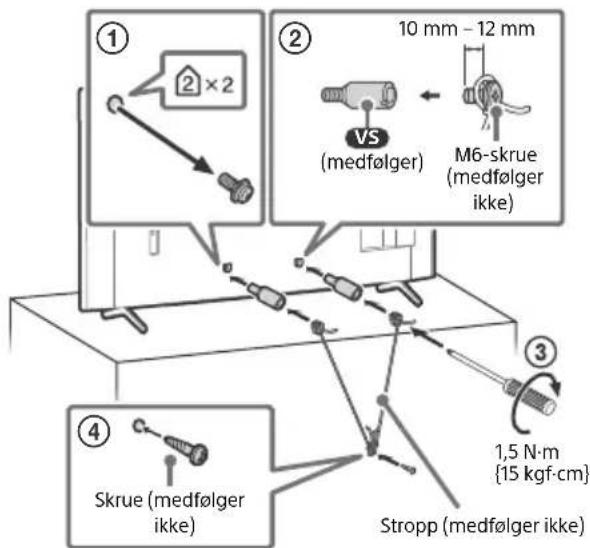
FW-32BZ30J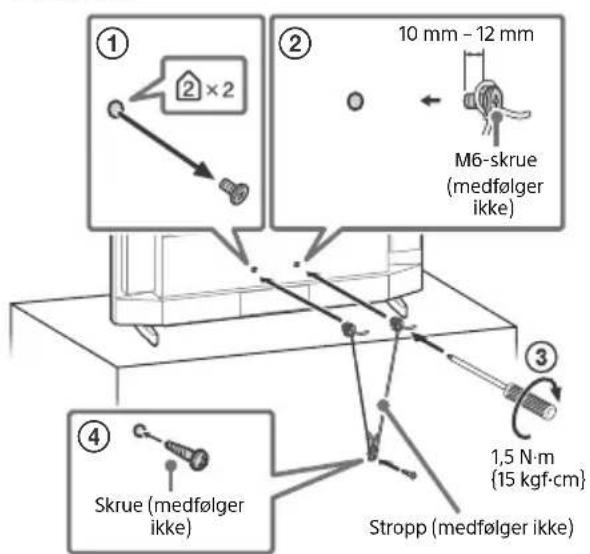
Connection diagram
Notes
- Connectors and labels may vary by region/country/LCD screen model.
FW-100BZ40J/50BZ35J/43BZ35J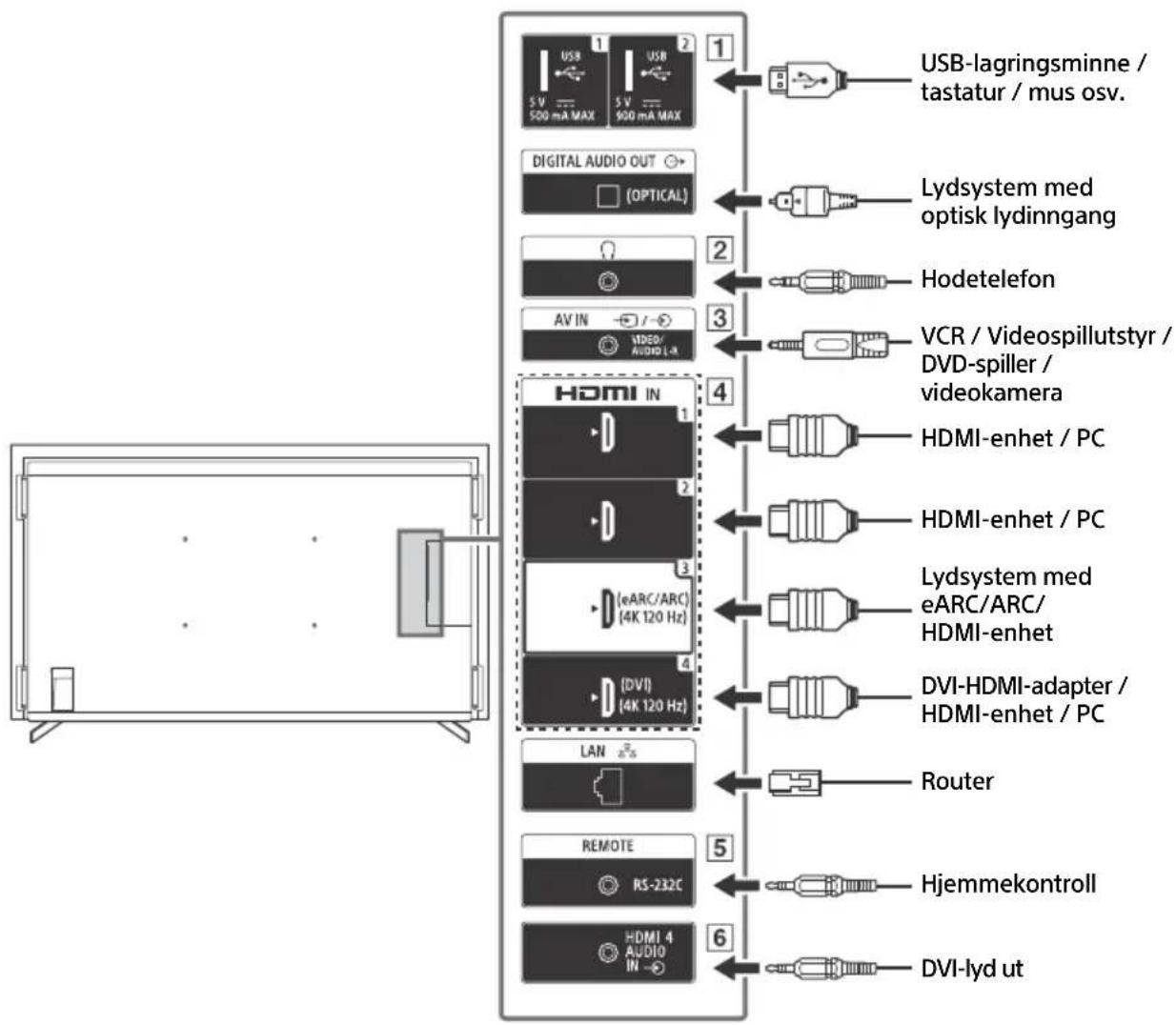
NO
1 USB 1 USB 2
http://192.168.0.1/sony/system
Request
POST /sony/system HTTP/1.1
Host: 192.168.0.1
Content-Type: application/json; charset=UTF-8
Content-Length: 70
X-Auth-PSK: 1234
{"method": "getPowerStatus", "params": [], "id": 50, "version": "1.0"}
Response
HTTP/1.1 200 OK
43BZ30J: 10 W + 10 W
Wireless technology
Protocol IEEE 802.11a/b/g/n/ac
Bluetooth® version 4.2
| Frekvensbänd Utgangseffekt | |
| Trådlost LAN (LCD-skjerm) | |
| 2400-2483,5 MHz | < 20,0 dBm |
| 5150-5250 MHz | < 23,0 dBm |
| 5250-5350 MHz | < 20,0 dBm |
| 5470-5725 MHz | < 20,0 dBm |
| 5725-5850 MHz | < 13,9 dBm |
| Bluetooth® (LCD-skjerm) | |
| 2400-2483,5 MHz < 10,0 dBm | |
2160p (24, 25, 30 Hz), 1080p (30, 50, 60, 100,
120 Hz), 1080/24p, 1080i (50, 60 Hz), 720p
(30, 50, 60 Hz), 720/24p, 576p, 480p,
PC formats
3840 × 2160p (100, 120 Hz)*2*3
Video (only FW-75BZ30J / 65BZ30J / 55BZ30J1 /
55BZ30J / 50BZ30J / 43BZ30J / 32BZ30J:
4096 × 2160p (50, 60 Hz)*1*2, 4096 × 2160p
(24 Hz)*1, 3840 × 2160p (50, 60 Hz)*2, 3840 ×
2160p (24, 25, 30 Hz), 1080p (30, 50, 60 Hz),
1080/24p, 1080i (50, 60 Hz), 720p (30, 50,
60 Hz), 720/24p, 576p, 480p, PC-formats
Audio:
eARC (Enhanced Audio Return
Channel) mode
7.1 channel linear PCM: 32/44.1/48 kHz
16 bits, Dolby Digital, Dolby Digital Plus,
DTS, Dolby TrueHD, DTS-HD MA, Dolby
Atmos, DTS:X Master Audio
Except eARC mode
5.1 channel linear PCM: 32/44.1/48/88.2/96/
176.4/192 kHz 16/20/24 bits, Dolby Audio,
Dolby Atmos, DTS
eARC/ARC (Enhanced Audio Return Channel/Audio Return Channel) (via HDMI IN 3)*4
In eARC mode
7.1-channel linear PCM: 32/44.1/48 kHz, 16-bit,
Dolby Digital, Dolby Digital Plus, DTS, Dolby
TrueHD, DTS-HD MA, Dolby Atmos, DTS:X
Master Audio
In ARC mode
2-channel linear PCM: 48 kHz, 16-bit, Dolby
Audio, Dolby Atmos, DTS
DIGITAL AUDIO OUT (OPTICAL)
Digital optical connector (2-channel linear PCM:
48 kHz, 16-bit, Dolby Audio, DTS)
HDMI 4 AUDIO IN
Analog audio input (minijack, stereo)
Headphone jack (minijack, stereo)
Headphones
- 2
FW-43BZ35J: 108.0 cm / 43 inches
FW-43BZ30J: 108.0 cm / 43 inches
FW-32BZ30J: 80.1 cm / 32 inches
Power consumption*5
In [Standard] mode
FW-100BZ40J: 215 W
FW-75BZ30J: 187 W
FW-65BZ30J: 145 W
FW-55BZ30J: 123 W
FW-50BZ35J: 95 W
FW-50BZ30J: 97 W
FW-43BZ35J: 76 W
FW-43BZ30J: 64 W
FW-32BZ30J: 54 W
FW-43BZ35J: 105 kWh per year
FW-43BZ30J: 89 kWh per year
FW-32BZ30J: 75 kWh per year
500 mA (for USB 1), 900 mA (for USB 2)
Dimensions (approx.) (b × h × d) (cm)
with table stand
Standard placement:
FW-100BZ40J: 226.0 × 134.6 × 47.5
FW-75BZ30J: 168.6 × 104.5 × 41.0
FW-65BZ30J: 146.2 × 91.2 × 33.8
FW-55BZ30J1: 124.3 × 78.7 × 33.8
FW-55BZ30J: 124.3 × 78.7 × 33.8
FW-50BZ35J: 111.9 × 71.5 × 28.6
FW-50BZ30J: 112.6 × 71.8 × 28.6
FW-43BZ35J: 96.4 × 62.8 × 28.6
FW-43BZ30J: 97.2 × 63.2 × 28.6
FW-32BZ30J: 72.6 × 45.4 × 17.2
Without stand:
FW-75BZ30J: 168.6 × 104.5 × 41.0
FW-65BZ30J: 146.2 × 91.2 × 33.8
FW-55BZ30J1: 124.3 × 78.7 × 33.8
FW-55BZ30J: 124.3 × 78.7 × 33.8
Without table stand
FW-100BZ40J: 226.0 × 129.7 × 9.8
FW-75BZ30J: 168.6 × 96.9 × 7.2
FW-65BZ30J: 146.2 × 84.2 × 7.1
FW-55BZ30J1: 124.3 × 72.1 × 7.1
FW-55BZ30J: 124.3 × 71.9 × 7.1
FW-50BZ35J: 111.9 × 64.9 × 7.0
FW-50BZ30J: 112.6 × 65.3 × 7.0
FW-43BZ35J: 96.4 × 56.3 × 6.9
FW-43BZ30J: 97.2 × 56.7 × 7.0
FW-32BZ30J: 72.6 × 43.0 × 7.6
Stand width (approx.) (cm)
Standard placement:
FW-100BZ40J: 190.1
FW-75BZ30J: 133.0
FW-65BZ30J: 113.0
FW-55BZ30J1 / 55BZ30J: 98.3
FW-50BZ35J / 50BZ30J / 43BZ35J / 43BZ30J:
66.5
FW-32BZ30J: 60.6
Narrow placement:
FW-75BZ30J: 55.9
FW-65BZ30J: 47.8
FW-55BZ30J1 / 55BZ30J: 45.8
Weight (approx.) (kg)
with table-top stand
FW-100BZ40J: 92.6
FW-75BZ30J: 32.9
FW-65BZ30J: 22.5
FW-55BZ30J1/55BZ30J: 16.6
FW-50BZ35J: 13.3
FW-50BZ30J: 12.9
FW-43BZ35J: 10.7
FW-43BZ30J: 10.5
FW-32BZ30J: 7.7
without table-top stand
FW-100BZ40J: 88.9
FW-75BZ30J: 31.6
FW-65BZ30J: 21.6
FW-55BZ30J1 / 55BZ30J: 15.7
FW-50BZ35J: 12.7
FW-50BZ30J: 12.3
FW-43BZ35J: 10.2
FW-43BZ30J: 10
FW-32BZ30J: 7.5
Annex
Accessories
Pilot in LCD Monitor .7
Settings 8
Pro Mode 8
Recommended settings. 9
Task
| POST /sony/system HTTP/1.1 |
| Host: 192.168.0.1 |
| Content-Type: application/json; charset=UTF-8 |
| Content-Length: 70 |
| X-Auth-PSK: 1234 |
| {"method": "getPowerStatus", "params": [], "id": 50, "version": "1.0"} |
Response
HTTP/1.1 200 OK
Content-Type: application/json; charset=UTF-8
Content-Length: 44
{"result": {"status": "active"}}], "id": 50}
2160p (24, 25, 30 Hz), 1080p (30, 50, 60 Hz),
1080/24p, 1080i (50, 60 Hz), 720p (30, 50,
60 Hz), 720/24p, 576p, 480p, computer formats
Audio:
In eARC (Enhanced Audio Return Channel) mode
7.1 channels, linear PCM: 32/44.1/48 kHz 16 bits, Dolby Digital, Dolby Digital Plus, DTS, Dolby TrueHD, DTS-HD MA, Dolby Atmos, DTS:X Master Audio
DIGITAL AUDIO OUT (OPTICAL)
USB port 1 supports High Speed USB (USB 2.0) standard
USB port 2 supports Super Speed USB (USB 3.1 Gen 1) standard
FW-43BZ35J: 108.0 cm / 43 inches
FW-43BZ30J: 108.0 cm / 43 inches
FW-32BZ30J: 80.1 cm / 32 inches
Power consumption*5
In [Standard] mode
FW-100BZ40J: 215 W
FW-75BZ30J: 187 W
FW-65BZ30J: 145 W
FW-55BZ30J: 123 W
FW-50BZ35J: 95 W
FW-50BZ30J: 97 W
FW-43BZ35J: 76 W
FW-43BZ30J: 64 W
FW-32BZ30J:54W
FW-43BZ30J:97.2×63.2×28.6
FW-32BZ30J: 72.6×45.4×17.2
Vertical positions:
FW-75BZ30J: 168.6 × 104.5 × 41.0
FW-65BZ30J: 146.2 × 91.2 × 33.8
FW-55BZ30J1: 124.3×78.7×33.8
FW-55BZ30J:124.3×78.7×33.8
without stand
FW-100BZ40J:226.0×129.7×9.8
FW-75BZ30J:168.6×96.9×7.2
FW-65BZ30J: 146.2×84.2×7.1
FW-55BZ30J1: 124.3×72.1×7.1
FW-55BZ30J:124.3×71.9×7.1
FW-50BZ35J: 111.9 × 64.9 × 7.0
FW-50BZ30J: 112.6 × 65.3 × 7.0
FW-43BZ35J: 96.4 × 56.3 × 6.9
FW-43BZ30J: 97.2 × 56.7 × 7.0
FW-32BZ30J: 72.6 × 43.0 × 7.6
http://192.168.0.1/sony/system
Aitnon
POST /sony/system HTTP/1.1 Host: 192.168.0.1 Content-Type: application/json; charset=UTF-8 Content-Length: 70 X-Auth-PSK: 1234 {"method": "getPowerStatus", "params": [], "id": 50, "version": "1.0"}
Anokpion
HTTP/1.1 200 OK Content-Type: application/json; charset=UTF-8 Content-Length: 44 {"result": ["status": "active"], "id": 50}
https://www.sony.eu/support
Read this manual carefully before using the product and keep it for future reference. It is important to have the necessary expertise for the installation of this LCD TV, especially to properly mount it on the wall that supports the weight of the LCD TV. Sony is not liable for any damage or injury caused by improper installation or handling. The wall installation should be performed only by qualified personnel. - For safety reasons, it is recommended to use Sony genuine parts, including:
43BZ30J: 10 W + 10 W
AoupauT n texvoLoyia
2160p (24, 25, 30 Hz), 1080p (30, 50, 60, 100,
120 Hz), 1080/24p, 1080i (50, 60 Hz), 720p
(30, 50, 60 Hz), 720/24p, 576p, 480p, PC
3840 × 2160p (100, 120 Hz)*2*3
Video (motion) for FW-75BZ30J / 65BZ30J /
55BZ30J1 / 55BZ30J / 50BZ30J / 43BZ30J /
32BZ30J):
4096 × 2160p (50, 60 Hz)*1*2, 4096 × 2160p
(24 Hz)*1, 3840 × 2160p (50, 60 Hz)*2, 3840 ×
2160p (24, 25, 30 Hz), 1080p (30, 50, 60 Hz),
1080/24p, 1080i (50, 60 Hz), 720p (30, 50,
eARC/ARC (Enhanced Audio Return Channel/
Audio Return Channel) (only for HDMI IN 3)*4
DIGITAL AUDIO OUT (OPTICAL)
Optical digital audio output (linear PCM
FW-43BZ35J: 108.0 cm / 43 inches
FW-43BZ30J: 108.0 cm / 43 inches
FW-32BZ30J: 80.1 cm / 32 inches
FW-43BZ35J: 105 kWh per year
FW-43BZ30J: 89 kWh per year
FW-32BZ30J: 75 kWh per year
Energy consumption per year*5*8
FW-100BZ40J / 75BZ30J / 65BZ30J / 55BZ30J1 /
55BZ30J / 50BZ35J / 50BZ30J / 43BZ35J /
FW-43BZ30J: 97.2 × 63.2 × 28.6
FW-32BZ30J: 72.6 × 45.4 × 17.2
Limited position:
FW-75BZ30J: 168.6 × 104.5 × 41.0
FW-65BZ30J: 146.2 × 91.2 × 33.8
FW-55BZ30J1: 124.3 × 78.7 × 33.8
FW-55BZ30J: 124.3 × 78.7 × 33.8
FW-100BZ40J: 226.0 × 129.7 × 9.8
FW-75BZ30J: 168.6 × 96.9 × 7.2
FW-65BZ30J: 146.2 × 84.2 × 7.1
FW-55BZ30J1: 124.3 × 72.1 × 7.1
FW-55BZ30J: 124.3 × 71.9 × 7.1
FW-50BZ35J: 111.9 × 64.9 × 7.0
FW-50BZ30J: 112.6 × 65.3 × 7.0
FW-43BZ35J: 96.4 × 56.3 × 6.9
FW-43BZ30J: 97.2 × 56.7 × 7.0
FW-32BZ30J: 72.6 × 43.0 × 7.6
Table stand (approx.) (cm)
Table top:
FW-100BZ40J: 190.1
FW-75BZ30J: 133.0
FW-65BZ30J: 113.0
FW-55BZ30J1/55BZ30J: 98.3
FW-50BZ35J / 50BZ30J / 43BZ35J / 43BZ30J: 66.5
FW-32BZ30J: 60.6
Wall-mounted position:
FW-75BZ30J: 55.9
FW-65BZ30J: 47.8
FW-55BZ30J1 / 55BZ30J: 45.8
Weight (approx.) (kg)
Trademarks
- The terms HDMI and HDMI High-Definition Multimedia Interface, and the HDMI logo are trademarks or registered trademarks of HDMI Licensing Administrator, Inc. in the United States and other countries. Dolby, Dolby Vision, Dolby Atmos, Dolby Audio, and the double-D symbol are trademarks or registered trademarks of Dolby Laboratories Licensing Corporation. Manufactured under license from Dolby Laboratories. Unpublished and other works. Copyright 1992-2020 Dolby Laboratories. All rights reserved.
- Vewd® Core. Copyright 1995-2021 Vewd Software AS. All rights reserved.
- The names Google and Android are trademarks of Google LLC.
- The names Wi-Fi, Wi-Fi Alliance, and Wi-Fi Direct are trademarks or registered trademarks of Wi-Fi Alliance. The Wi-Fi CERTIFIED™ logo is a certification mark of Wi-Fi Alliance.
For DTS patents, see http://patents.dts.com. Manufactured under license from DTS, Inc. The names DTS, Digital Surround, and the DTS logo are trademarks or registered trademarks of DTS, Inc. in the United States and other countries. © 2020 DTS, Inc. ALL RIGHTS RESERVED. The Bluetooth word mark and logos are registered trademarks owned by Bluetooth SIG, Inc. and any use of such marks by Sony Corporation is under license. Other trademarks and trade names are those of their respective owners. The name TUXERA is a trademark of Tuxera Inc. in the U.S. and other countries. Covered by one or more claims of the HEVC patents listed at patentlist.accessadvance.com. All other trademarks are the property of their respective owners.
Product identification code (according to Regulation (EU) 2019/2013)
FW-100BZ40J (495597), FW-75BZ30J (527375), FW-65BZ30J (527373), FW-55BZ30J1 (1218503), FW-55BZ30J (527370), FW-50BZ35J (526764), FW-50BZ30J (527368), FW-43BZ35J (526771), FW-43BZ30J (527366), FW-32BZ30J (527365), FW-32BZ30J/1* (1278992).
*The identification model on which the indication "/1" is written indicates a new product identification code based on the EPREL database, in accordance with the requirements of point 2, which is valid from March 2023. Refer to the energy label provided with this product to determine which identification model corresponds to your unit.
IMPORTANT NOTE 2
http://192.168.0.1/sony/system
Request
POST /sony/system HTTP/1.1
Host: 192.168.0.1
Content-Type: application/json; charset=UTF-8
Content-Length: 70
X-Auth-PSK: 1234
{"method": "getPowerStatus", "params": [], "id": 50, "version": "1.0"}
Response
HTTP/1.1 200 OK
Content-Type: application/json; charset=UTF-8
Content-Length: 44
{"result":[{ "status": "active"}}], "id": 50}
43BZ30J: 10 W + 10 W
FW-75BZ30J: 259 kWh per year
FW-65BZ30J: 201 kWh per year
FW-55BZ30J: 171 kWh per year
FW-50BZ35J: 132 kWh per year
FW-50BZ30J: 135 kWh per year
FW-43BZ35J: 105 kWh per year
FW-43BZ30J: 89 kWh per year
FW-32BZ30J: 75 kWh per year
FW-43BZ30J: 97.2 x 63.2 x 28.6
FW-32BZ30J: 72.6 x 45.4 x 17.2
Narrow position:
FW-75BZ30J: 168.6 × 104.5 × 41.0
FW-65BZ30J: 146.2 × 91.2 × 33.8
FW-55BZ30J1: 124.3 × 78.7 × 33.8
FW-55BZ30J: 124.3 × 78.7 × 33.8
FW-65BZ30J: 146.2 × 84.2 × 7.1
FW-55BZ30J1: 124.3 × 72.1 × 7.1
FW-55BZ30J: 124.3 × 71.9 × 7.1
FW-50BZ35J: 111.9 × 64.9 × 7.0
FW-50BZ30J: 112.6 × 65.3 × 7.0
FW-43BZ35J: 96.4 × 56.3 × 6.9
FW-43BZ30J: 97.2 × 56.7 × 7.0
FW-32BZ30J: 72.6 × 43.0 × 7.6
Recommended settings 10
View directly on the KK monitor. Press HELP on the remote control to display the list of themes.
The settings menu may be changed without notice.
Before electronic devices
Representation in Kazakhstan, 050010, Republic of Kazakhstan, Almaty, Dostyk Ave., 117/7
Safety precautions
Installation/Connection
To prevent fire, electric shock, damage to the monitor, and/or injury, install and operate the monitor in accordance with the following instructions.
Installation
The KK monitor should be installed near an easily accessible power outlet. To prevent tipping, injury, or property damage, place the KK monitor on a stable, flat surface. Install the KK monitor in a location where it cannot be easily tipped over. Position the KK monitor so that its stand does not protrude beyond the stand of the KK monitor (not included). If the stand protrudes beyond the stand of the KK monitor, the KK monitor may tip over and fall, which could result in injury or damage to the KK monitor.
Moving
Before moving the KK monitor, disconnect all cables from it. For moving large KK monitors, use two or more people (for FW-100BZ40J, use two or more people). When lifting the KK monitor by hand, hold it as shown below. Do not apply force to the LCD panel frame of the screen. When lifting or moving the KK monitor, hold it firmly from the bottom.
Before moving the XX monitor, disconnect all cables from it. For moving large-sized XX monitors (e.g., FW-100BZ40J), use two or more people. When moving the XX monitor by hand, hold it as shown below. Do not apply force to the XX panel or the frame of the screen. When receiving or carrying the monitor, hold it firmly from the bottom.
FW-75BZ30J / 65BZ30J / 55BZ30J1 / 55BZ30J / 50BZ35J / 50BZ30J / 43BZ35J / 43BZ30J / 32BZ30J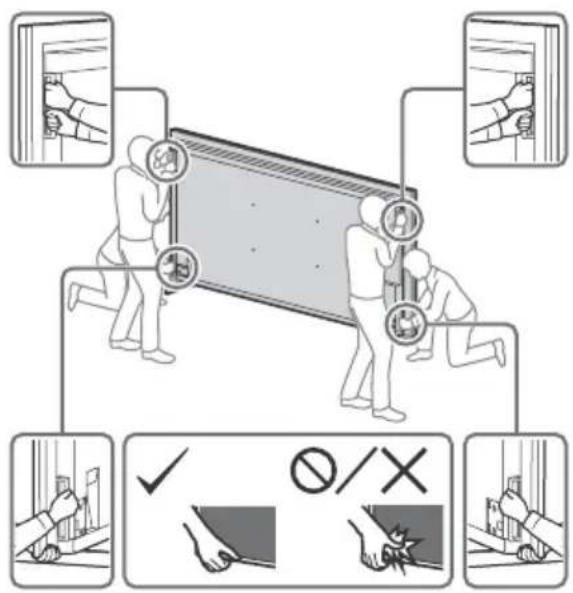
FW-75BZ30J / 65BZ30J / 55BZ30J1 / 55BZ30J / 50BZ35J / 50BZ30J / 43BZ35J / 43BZ30J / 32BZ30J
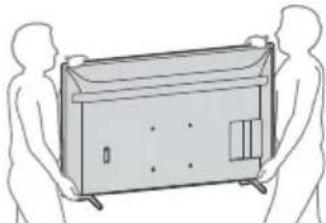
- Please keep the monitor away from impacts and strong vibrations.
- If it is necessary to deliver the monitor to a repair workshop or transport it to another place, pack it in the cardboard box and packing materials in which it was delivered initially.
Prevention of tipping over
FW-100BZ40J FW-75BZ30J / 65BZ30J / 55BZ30J1 / 55BZ30J / 50BZ35J / 50BZ30J / 43BZ35J / 43BZ30J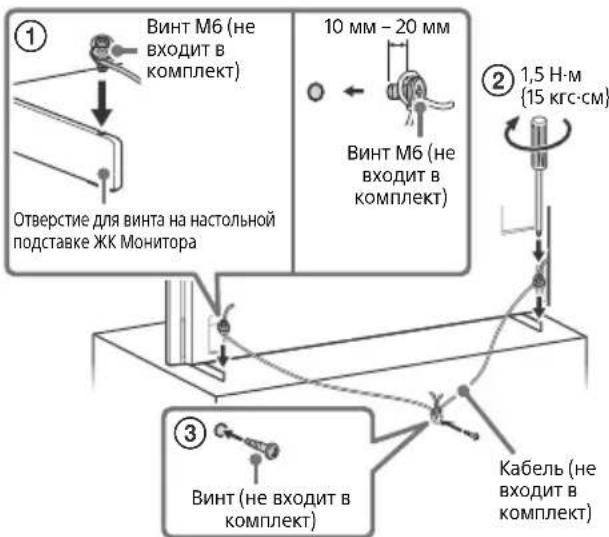
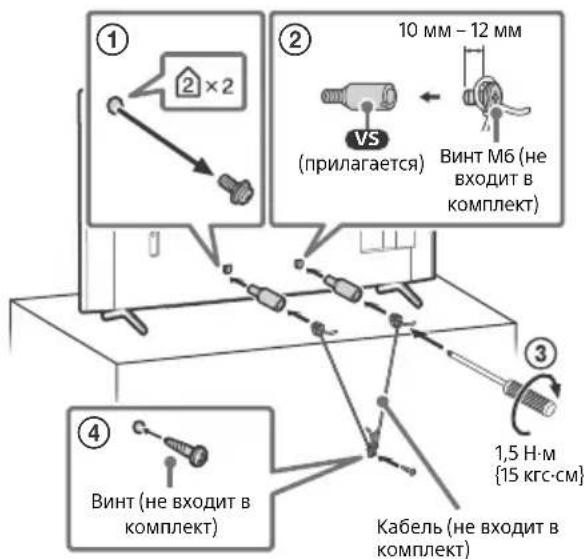
FW-32BZ30J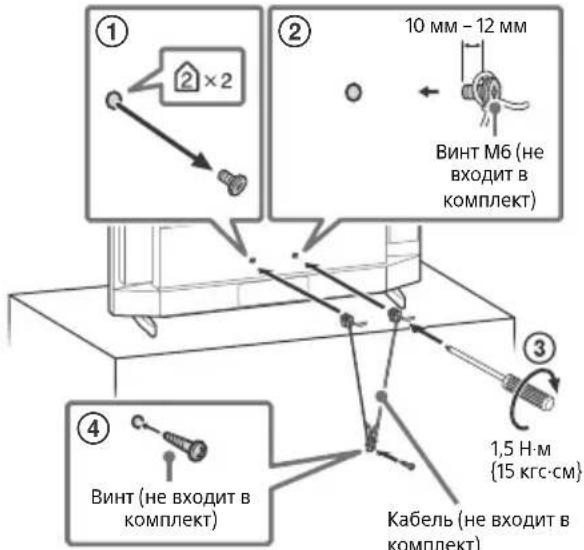
Connection diagram
Note
Detachable headphones may differ depending on the region/country/model of the monitor.
FW-100BZ40J/50BZ35J/43BZ35J
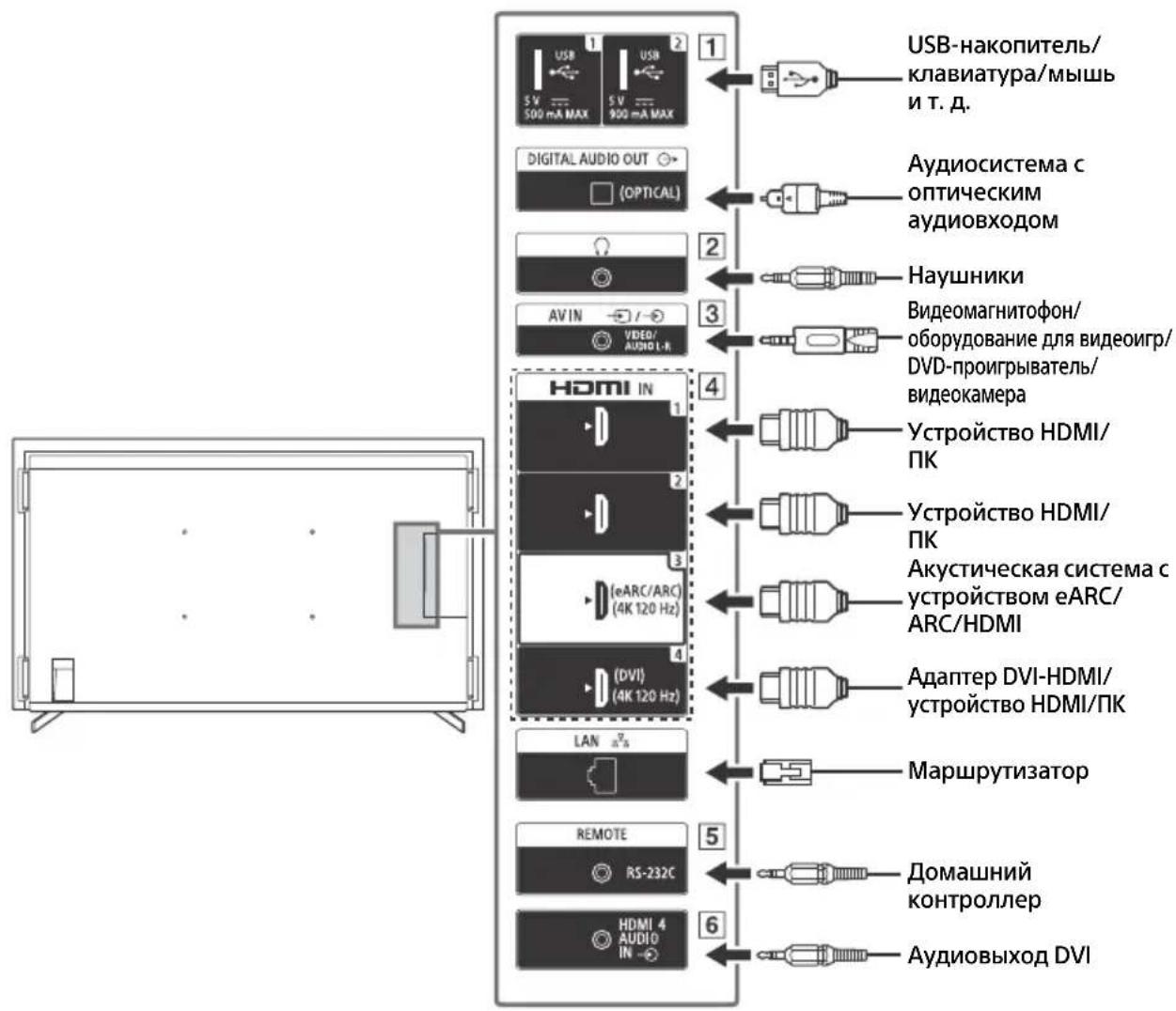
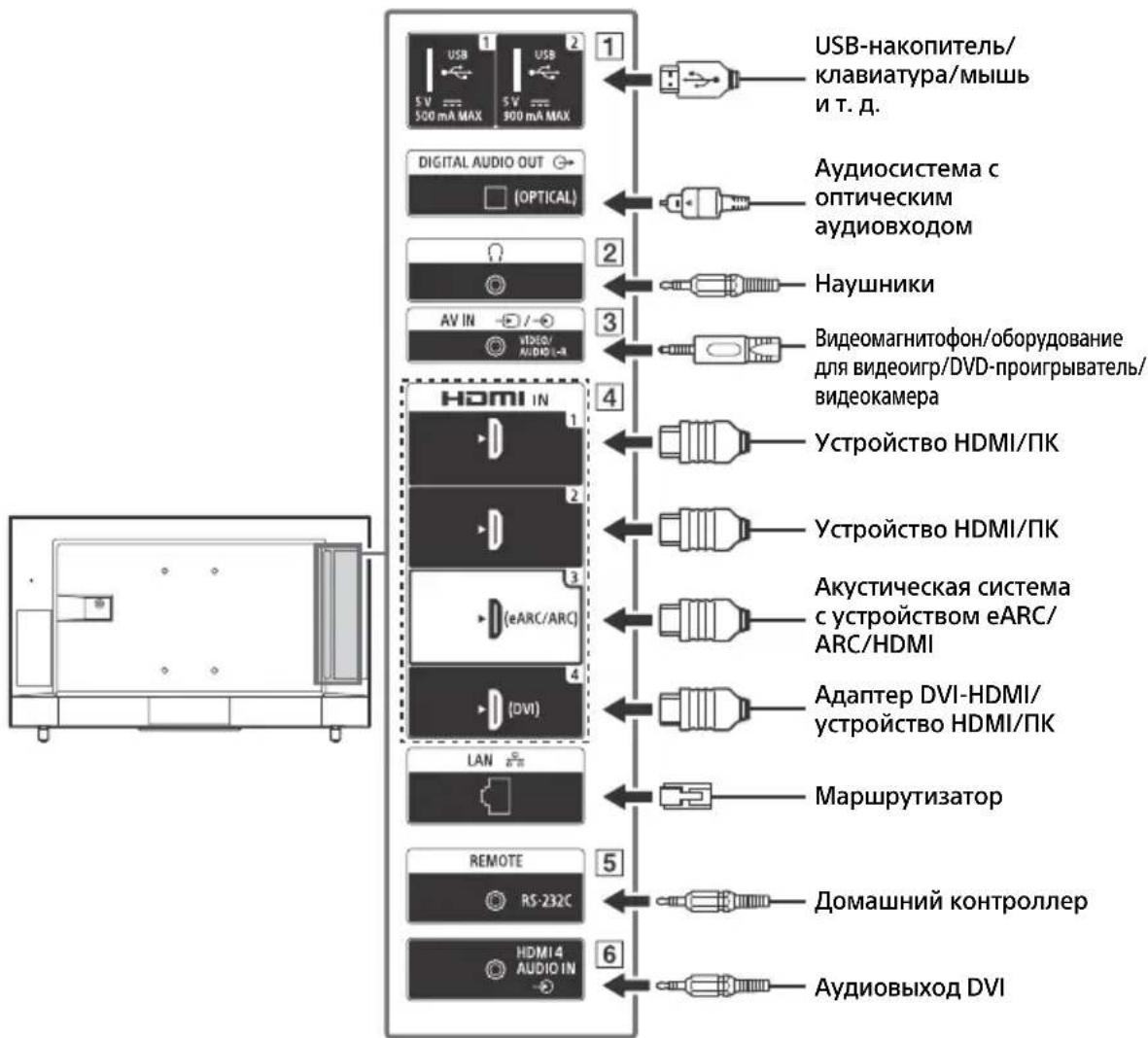
1 -USB

USB
2
OPTIONS: Used to display the list of functions available for use.
/+/=//(Navigation key - switch
Attention: Read the instructions and select the on-screen menu items.
4 HOME/MENU
+/- (Volume)
AUDIO: Select the audio language for multilingual sources or for dual-channel sound (function depends on the program source).
(Mute)*
CH/PAGE +/-

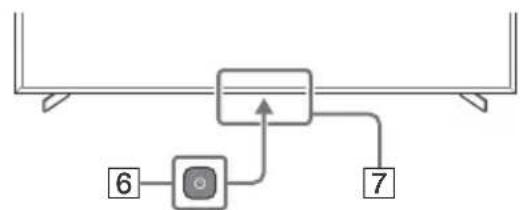
6 (Power) 7 Remote control sensor / Light sensor / LED
*Quick access is provided by pressing and holding the 品 button (Mute).
Parameters
Pro Mode
In [Pro Mode], various useful functions are available for professional tasks. The following describes the switching order in [Pro Mode] and the standard functions of [Pro Mode].
Pro Mode
Normal mode: This is the normal mode. The functions of [Pro Mode] are not available in this mode.
Pro Parameter Mode: In this mode, you can change the settings of the [Pro Mode] functions.
Pro Mode: This mode is intended for solving professional tasks. In this mode, you can get access to the [Pro Mode] functions.
Changing the mode
If the monitor is in normal mode or in Pro parameter mode
- Go to [Menu] → [Accessories] → [Work in Pro mode] and select the mode to change.
If the monitor is in Pro mode
- Press the activation keys on the remote control in the order described below with an interval of one second.
After restarting the monitor, the [Pro parameter mode] will be enabled.
Activation keys: (Screen display) / (Sound off) / +/-(Volume +) / HOME/MENU
*Exiting [Work in Pro mode] to [Pro mode] is not damaged. To exit [Work in Pro mode], go to [Pro settings] → [Restrictions] → [Accessories] and for [Work in Pro mode] select [Enable] in [Pro parameter mode].
Brief description of Pro mode functions
In [Pro mode], various working functions are available. Below are the standard functions of [Pro mode].
Setting up the monitor operation when AC power is connected
It is possible to configure the monitor operation when the power cable is disconnected and reconnected.
- Optimized display of the OSD input screen
The size of the displayed OSD input screen is optimized according to the OSD format.
- Power source control and automatic input switching using the signal detection function
When the monitor is connected to an HDMI device, switching to the input of the connected HDMI device occurs automatically.
- Adjusting the picture settings when pressing the HOME/MENU button
You can select the menu for display by pressing the HOME/MENU button on the remote control.
Setting the initial input source when the monitor is turned on
You can set the initial input source when the monitor is turned on.
Blocking Pro mode
You can ensure the safety of [Pro mode] settings using a PIN code.
Initial/maximum value of the volume setting
You can set the initial and maximum volume values for the monitor.
Restricting monitor control using the remote control
Control of the monitor can be restricted using the remote control.
Prohibiting external input
You can prohibit the use of external input.
Restricting the use of applications
You can restrict the use of monitor applications.
Pro settings functions
Navigate to [Home (Menu)] → [Settings] → [Pro settings]. The monitor must be in [Pro settings mode].*
*Differs depending on the OS version.
Recommended settings
This section provides recommended monitor settings for professional use.
Function settings
1 Navigate to [Settings] → [System] → [Power and energy saving].
- For [Power off when not in use], set the value to [Off].
Function settings
2 Navigate to [Settings] → [Network and Internet] → [Home network settings] → [IP control].
RING: Input → Monitor
Lock settings
During RS-232C lock installation, set the following lock settings.
http://192.168.0.1/sony/system
Request
POST /sony/system HTTP/1.1
Host: 192.168.0.1
Content-Type: application/json; charset=UTF-8
Content-Length: 70
X-Auth-PSK: 1234
{"method": "getPowerStatus", "params": [], "id": 50, "version": "1.0"}
HTTP/1.1 200 OK
Content-Type: application/json; charset=UTF-8
Content-Length: 44
{"result": {"status": "active"}], "id": 50}
- Use the screws supplied with the wall-mount bracket when attaching the wall-mount bracket to the LCD monitor. The supplied screws have the structure shown in the figure, when measuring from the contact surface of the wall-mount bracket. The diameter and length of the screws differ depending on the model and the wall-mount bracket. Using screws other than those supplied may damage the LCD monitor or cause it to fall, etc.
FW-75BZ30J / 65BZ30J / 55BZ30J1 / 55BZ30J / 50BZ35J / 50BZ30J / 43BZ35J / 43BZ30J
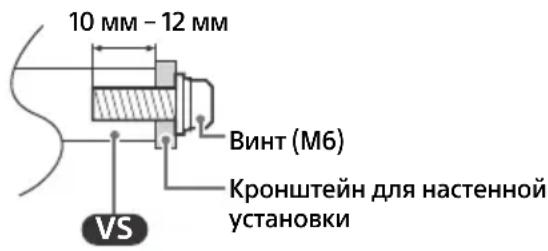
FW-32BZ30J
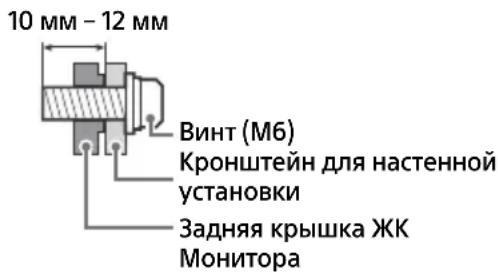
Store the unused screws for the table-top stand in a safe place until you are ready to attach the table-top stand. Keep the screws out of the reach of children. *Only for some regions/countries/models.
Optional accessory: Wall-mount bracket (except for SU-WL850 and SU-WL450 models) (not supplied)
This manual provides only the steps for preparing the monitor for installation before mounting it on the wall.
For wall-mounting the monitor, you can use the corresponding wall-mount bracket (not supplied). If a table-top stand is attached to the monitor, it may be necessary to detach the table-top stand from the monitor.
Prepare the monitor for installation on the wall-mount bracket before connecting cables.
To ensure product safety and for safety reasons, Sony strongly recommends that you have qualified professionals perform the wall-mount installation. Do not attempt to perform the installation yourself.
Follow the instructions included with the wall-mount bracket for wall-mount installation. Proper installation of this product requires adequate experience, especially in determining the suitability of the wall for supporting the monitor's weight. The screws for attaching the wall-mount bracket to the monitor are not supplied. The screws for the wall-mount bracket vary depending on the type of bracket. See the figure below.
FW-100BZ40J
12 mm - 30 mm screw (M8)
Wall-mount bracket
Rear cover of the monitor
FW-75BZ30J / 65BZ30J / 55BZ30J1 / 55BZ30J / 50BZ35J / 50BZ30J / 43BZ35J / 43BZ30J
Screw (M6)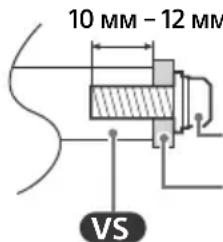
Wall-mount bracket
FW-32BZ30J
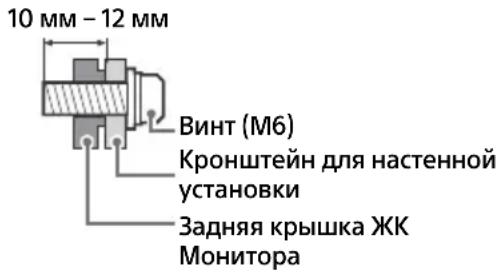
Troubleshooting
Basic troubleshooting methods for the following problems: blank screen, no sound, frozen frames, no response from the monitor when pressing buttons, power loss. If these problems occur, perform the following actions.
1. Restart the LCD monitor by holding down the power button on the remote control for about five seconds. The LCD monitor will restart. If you cannot resume the LCD monitor's operation, try disconnecting the AC power cord, then press the power button on the LCD monitor and release it. Wait two minutes, then reconnect the power cord. Press and hold the power button on the LCD monitor for about 40 seconds until the LCD monitor turns off. 2. See the help menu by pressing the HELP button on the remote control. 3. Connect the LCD monitor to the internet and perform a software update. Sony recommends updating the LCD monitor's software in a timely manner. Thanks to software updates, the operating characteristics of the LCD monitor improve, and new functions become available.
When turning on the LCD monitor, it may take some time to turn on - even when pressing the power button on the remote control or on the LCD monitor itself.
The system initialization requires some time. Wait about one minute, then try again.
The remote control does not work.
- Replace the batteries.
Specifications
System
Panel system: LCD Panel
Input/Output connectors
AV IN
Video/Audio input (minijack type connector)
HDMI IN 1/2/3/4 (with HDCP 2.3 support)
Video (only FW-100BZ40J / 50BZ35J / 43BZ35J):
4096× 2160p (50,60 µ)12, 4096× 2160p
(24 µ)^1 , 3840× 2160p (50,60Γu)²,3840×
2160p (24, 25, 30 Γι), 1080p (30, 50, 60, 100,
120 Γu), 1080/24p, 1080i (50, 60 Γu), 720p
(30, 50, 60 µ ), 720/24p, 576p, 480p,
OpMaTbI NK
3840 × 2160p (100, 120 µ ) 2 3
Bündeo (ToJIbKO FW-75BZ30J / 65BZ30J/
55BZ30J1 / 55BZ30J / 50BZ30J / 43BZ30J /
32BZ30J:
4096× 2160p (50, 60 µ ) *1 2 , 4096× 2160p
(24Γu) 1 , 3840 x 2160p (50, 60 Γu) 2 , 3 8 4 0 x
2160p (24, 25, 30 Γι), 1080p (30, 50, 60 Γι),
1080/24p, 1080i (50, 60 Γι), 720p (30, 50,
60T),720/24p,576p,480p,ΦOpMaTbI NK
Aydno:
B peXime eARC (Enhanced Audio Return Channel)
7.1-channel linear PCM: 32/44.1/48 kHz, 16-bit, Dolby Digital, Dolby Digital Plus, DTS, Dolby TrueHD, DTS-HD MA, Dolby Atmos, DTS:X Master Audio
Except in eARC mode
5.1-channel linear PCM: 32/44.1/
48/88.2/96/176.4/192 kHz, 16/20/24-bit, Dolby Audio, Dolby Atmos, DTS
eARC/ARC (Enhanced Audio Return Channel/Audio Return Channel) (Only HDMI IN 3)*4
In eARC mode
7.1-channel linear PCM: 32/44.1/
48 kHz, 16-bit, Dolby Digital, Dolby Digital
Plus, DTS, Dolby TrueHD, DTS-HD MA, Dolby
Atmos, DTS:X Master Audio
In ARC mode
Two-channel linear PCM: 48 kHz
16-bit, Dolby Audio, Dolby Atmos, DTS
DIGITAL AUDIO OUT (OPTICAL)
Optical digital audio output
Two-channel linear PCM: 48 kHz
6 bits, Dolby Audio, DTS
HDMI 4 AUDIO IN
Analog audio input (stereo
mini-jack)
(Stereo mini-jack)
Headphones
1, 2
USB port 1 supports
high-speed USB connection
(USB 2.0)
USB port 2 supports SuperSpeed
USB connection (USB 3.1 Gen 1)
LAN
10BASE-T/100BASE-TX connector (speed
of connection depends on the operating
network environment. Speed and quality of data transmission
are not guaranteed.)
19.5V (only for FW-32BZ30J)
Network adapter input
REMOTE
RS-232C, minijack type connector
Remote jack for receiving
external control signal.
Power supply, reference sheet for technical data of the device and other
Power requirements except for models with supplied AC adapter 220 V-240 V AC, 50 Hz. Only models with supplied AC adapter 19.5 V DC. With AC adapter nominal power supply: Input power supply 220 V-240 V AC, 50 Hz
Energy efficiency class FW-100BZ40J: A+ FW-75BZ30J: A FW-65BZ30J: A FW-55BZ30J: B FW-50BZ35J: A FW-50BZ30J: B FW-43BZ35J: B FW-43BZ30J: A FW-32BZ30J: B
Screen size (diagonal) (approx.) FW-100BZ40J: 252.8 cm / 100 inches FW-75BZ30J: 189.3 cm / 75 inches FW-65BZ30J: 163.9 cm / 65 inches FW-55BZ30J: 138.8 cm / 55 inches FW-55BZ30J: 138.8 cm / 55 inches FW-50BZ35J: 125.7 cm / 50 inches FW-50BZ30J: 125.7 cm / 50 inches FW-43BZ35J: 108.0 cm / 43 inches FW-43BZ30J: 108.0 cm / 43 inches FW-32BZ30J: 80.1 cm / 32 inches
Specific power consumption in standby [Standard]
FW-100BZ40J: 7.9 MBT/cm² FW-75BZ30J: 12.3 MBT/cm² FW-65BZ30J: 12.5 MBT/cm² FW-55BZ30J: 15.0 MBT/cm² FW-50BZ35J: 14.1 MBT/cm² FW-50BZ30J: 14.4 MBT/cm² FW-43BZ35J: 15.3 MBT/cm² FW-43BZ30J: 12.9 MBT/cm² FW-32BZ30J: 19.7 MBT/cm²
Power consumption [Standby] FW-100BZ40J: 215 W FW-75BZ30J: 187 W FW-65BZ30J: 145 W FW-55BZ30J: 123 W FW-50BZ35J: 95 W FW-50BZ30J: 97 W FW-43BZ35J: 76 W FW-43BZ30J: 64 W FW-32BZ30J: 54 W
Annual energy consumption*5 FW-100BZ40J: 298 kWh/year FW-75BZ30J: 259 kWh/year FW-65BZ30J: 201 kWh/year FW-55BZ30J: 171 kWh/year FW-50BZ35J: 132 kWh/year FW-50BZ30J: 135 kWh/year FW-43BZ35J: 105 kWh/year FW-43BZ30J: 89 kWh/year FW-32BZ30J: 75 kWh/year Power consumption in standby mode*6x7 FW-100BZ40J/75BZ30J/65BZ30J/55BZ30J/50BZ35J/50BZ30J/43BZ35J/43BZ30J: 0.50 W (25 W during software and EPG data update) FW-32BZ30J: 0.50 W (10 W during software and EPG data update) Screen resolution (horizontal × vertical) (dots): 3840×2160 Output parameters: 500 mA (for USB 1), 900 mA (for USB 2)
Dimensions (approx.) (W × H × D) (cm)
With tabletop stand (standard position): FW-100BZ40J: 226.0 × 134.6 × 47.0 FW-75BZ30J: 168.6 × 104.5 × 41.0 FW-65BZ30J: 146.2 × 91.2 × 33.8 FW-55BZ30J1: 124.3 × 78.7 × 33.8 FW-55BZ30J: 124.3 × 78.7 × 33.8 FW-50BZ35J: 111.9 × 71.5 × 28.6 FW-50BZ30J: 112.6 × 71.8 × 28.6 FW-43BZ35J: 96.4 × 62.8 × 28.6 FW-43BZ30J: 97.2 × 63.2 × 28.6 FW-32BZ30J: 72.6 × 45.4 × 17.2 Narrow position: FW-75BZ30J: 168.6 × 104.5 × 41.0 FW-65BZ30J: 146.2 × 91.2 × 33.8 FW-55BZ30J1: 124.3 × 78.7 × 33.8 FW-55BZ30J: 124.3 × 78.7 × 33.8
Without tabletop stand: FW-100BZ40J: 226.0 × 129.7 × 9.8 FW-75BZ30J: 168.6 × 96.9 × 7.2 FW-65BZ30J: 146.2 × 84.2 × 7.1 FW-55BZ30J1: 124.3 × 72.1 × 7.1 FW-55BZ30J: 124.3 × 71.9 × 7.1 FW-50BZ35J: 111.9 × 64.9 × 7.0 FW-50BZ30J: 112.6 × 65.3 × 7.0 FW-43BZ35J: 96.4 × 56.3 × 6.9 FW-43BZ30J: 97.2 × 56.7 × 7.0 FW-32BZ30J: 72.6 × 43.0 × 7.6
Width of stand (approx.) (cm)
Standard position:
FW-100BZ40J: 190.1
FW-75BZ30J: 133.0
FW-65BZ30J: 113.0
FW-55BZ30J1 / 55BZ30J: 98.3
FW-50BZ35J / 50BZ30J / 43BZ35J / 43BZ30J:
66.5
FW-32BZ30J: 60.6
Y3Koe noJoxKeHne:
FW-75BZ30J: 55.9
FW-65BZ30J: 47.8
FW-55BZ30J1/55BZ30J: 45.8
Mass (approx.) (kg)
Standby power consumption
FW-100BZ40J: 92.6
FW-75BZ30J: 32.9
FW-65BZ30J: 22.5
FW-55BZ30J1/55BZ30J: 16.6
FW-50BZ35J: 13.3
FW-50BZ30J: 12.9
FW-43BZ35J: 10.7
FW-43BZ30J: 10.5
FW-32BZ30J: 7.7
For this model
FW-100BZ40J: 88.9
FW-75BZ30J: 31.6
FW-65BZ30J: 21.6
FW-55BZ30J1 / 55BZ30J: 15.7
FW-50BZ35J: 12.7
FW-50BZ30J: 12.3
FW-43BZ35J: 10.2
FW-43BZ30J: 10
FW-32BZ30J: 7.5
Others
Optional accessories
Wall-mount bracket:
SU-WL850 (for models FW-75BZ30J/
65BZ30J / 55BZ30J1 / 55BZ30J)
Components of the installation kit:
SU-WL450 (except model
FW-100BZ40J)
Camera with microphone: FWA-CE100
Storage conditions:
The product should be stored in its packaging in dark, dry, clean, well-ventilated rooms, isolated from storage areas of acids and alkalis. Storage temperature: from -20°C to +60°C. Relative storage humidity: < 80% (without condensation).
Operating temperature: from 0°C to 40°C.
Operating relative humidity: 10-80% (without condensation).
Installation of the RK monitor on the wall 15
Troubleshooting and repair 16 Technical specifications 17
About the manuals
The RK monitor is supplied with the manuals listed below. Keep these manuals for future reference.
Installation manual
- Information on installation and setup of the RK monitor.
User manual (this manual)/Safety documentation
- Information on safe operation, remote control, and troubleshooting of malfunctions, as well as characteristics of the product.
Note
Information about malfunctions and useful information can be found directly on the monitor. Press HELP on the remote control to display
The menu settings may change without notice.
IMPORTANT - Please read the End User License Agreement before using the software. By using this product, you agree to the End User License Agreement. The End User License Agreement between you and Sony Corporation is available on the Sony website (https://www.sony.net/tv-software-licenses/) or on your product screen. Go to [Settings] → [System] → [About] → [Legal information] → [Notices and licenses].
Note
Before using the monitor, read the "Safety Information" and familiarize yourself with the safety information in this document. The external appearance may differ from the images and illustrations in this manual. The illustrations are provided for explanation purposes.
Location of the identification label
The label indicating the model name, serial number, date of manufacture (year/month), and electrical ratings is located on the rear of the monitor or on the packaging.
For models that come with an AC adapter (power supply unit): The label with the model name and serial number is located on the bottom of the AC adapter.
The date of manufacture is indicated on the packaging label with a barcode in the following format: YYYYY/MM, where YYYYY is the year and MM is the month of manufacture.
IMPORTANT NOTE
Product name: Monitor
Sony Corporation hereby declares that the Sony monitor models FW-100BZ40J, FW-75BZ30J, FW-65BZ30J, FW-55BZ30J, FW-55BZ30J, FW-50BZ35J, FW-50BZ30J, FW-43BZ35J, FW-43BZ30J, FW-32BZ30J comply with the technical regulations for radio equipment; the full text of the declaration of conformity is available on the website at the following address: http://www.compliance.sony.ua/.
Radio equipment can be used on the territory of Ukraine without restrictions on the radio frequency spectrum. Manufacturer: Sony Corporation, 1-7-1 Konan Minato-ku Tokyo, 108-0075 Japan. Made in Slovakia or Malaysia or China. Country of manufacture is indicated on the packaging.
InphiMaia ydo 6e3neuHoi ekcnnyataaii
Installation / Setup
Install and use the monitor in accordance with the instructions below to prevent damage, electric shock, and/or injury.
Installation
The monitor must be installed near an easily accessible power outlet. Place the monitor on a stable, flat surface to prevent it from falling and causing injury or damage. Place the monitor where it cannot be easily pulled, pushed, or knocked over. Install the monitor so that the base does not protrude beyond the monitor screen (do not place it on the edge of a desk). If the base protrudes beyond the monitor screen, it may cause the monitor to tip over or fall, resulting in injury or damage to the monitor.
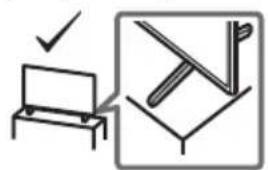
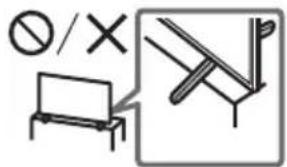
Transportation
- Before transporting the monitor, disconnect all cables. To transport the monitor, two or more people are required (depending on the model, e.g., FW-100BZ40J). When transporting the monitor by hand, hold it as shown in the illustration. Do not press on the monitor panel or the frame around the screen. When lifting or moving the monitor, hold it firmly.
FW-100BZ40J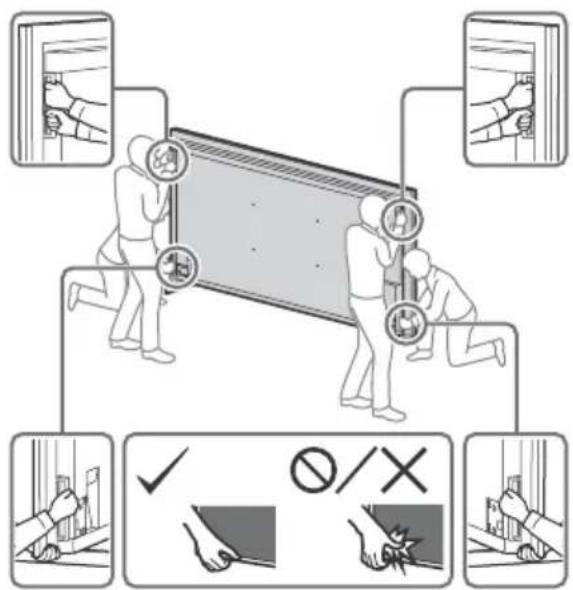
FW-75BZ30J / 65BZ30J / 55BZ30J1 / 55BZ30J / 50BZ35J / 50BZ30J / 43BZ35J / 43BZ30J / 32BZ30J
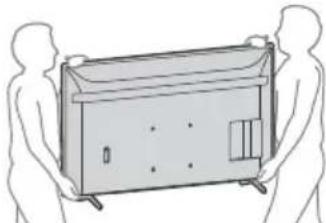
When moving the monitor, be careful to avoid vibration or impact. When transporting the monitor to a service center or during relocation, pack it in the original box using the designated protective materials.
Precautions
FW-100BZ40J FW-75BZ30J / 65BZ30J / 55BZ30J1 / 55BZ30J / 50BZ35J / 50BZ30J / 43BZ35J / 43BZ30J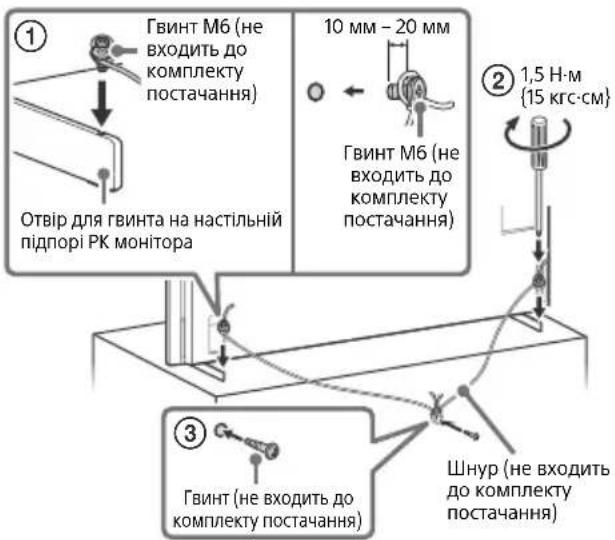
Cable (not included)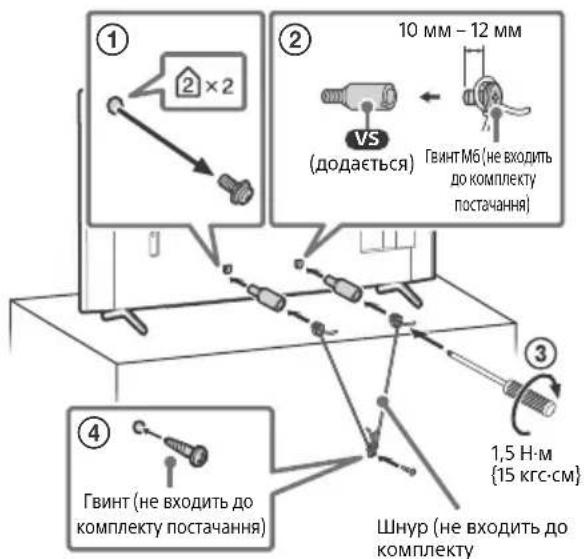
UA
FW-32BZ30J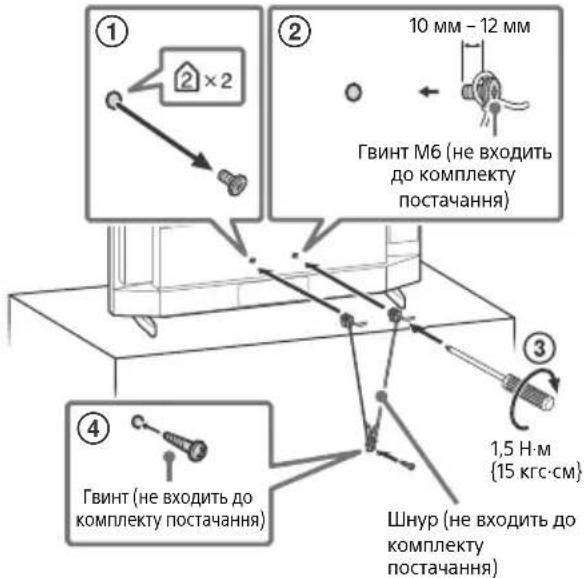
Connection diagram
Note
Design and specifications are subject to change without notice, depending on region, country, and model.
FW-100BZ40J/50BZ35J/43BZ35J
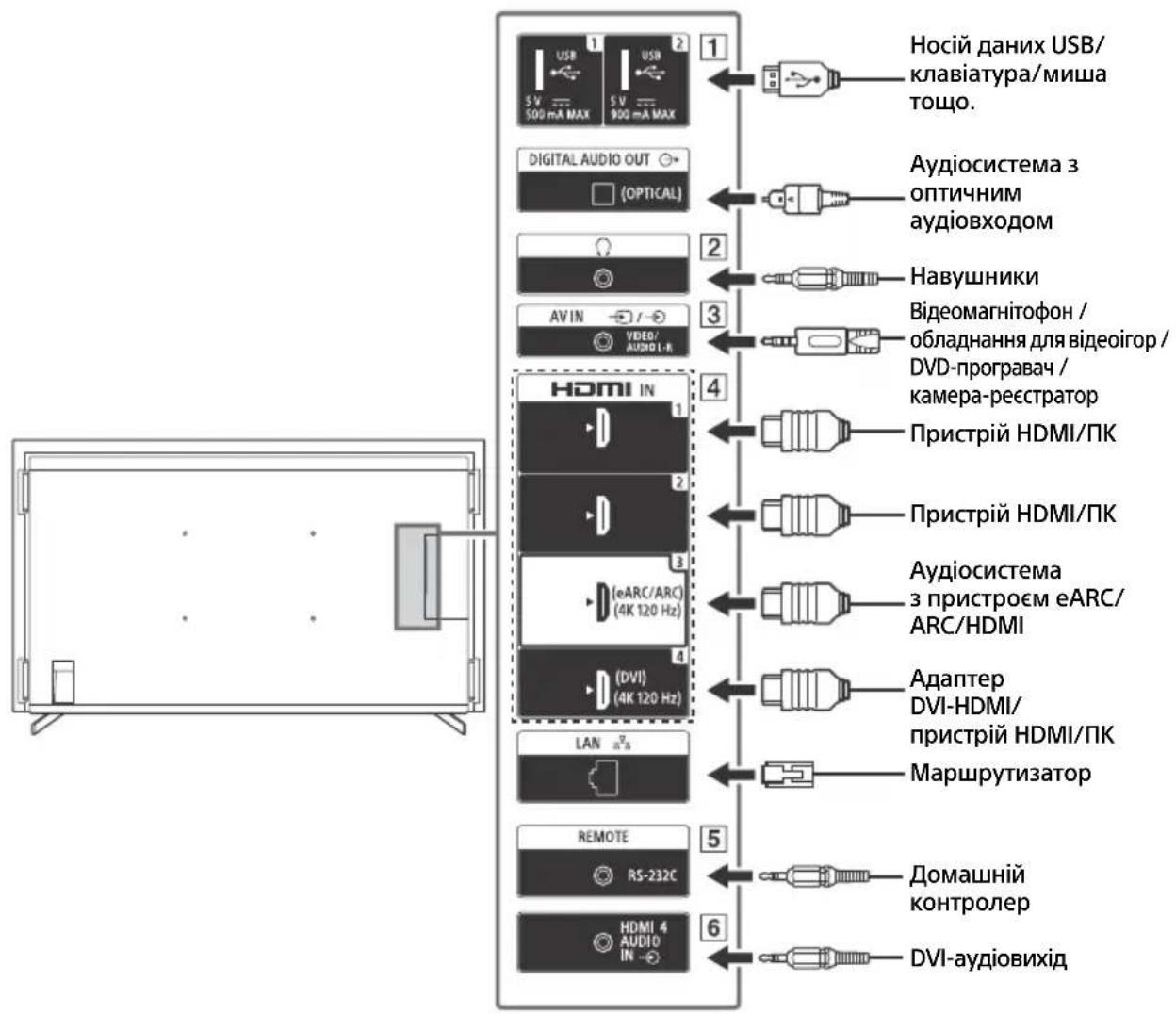
UA
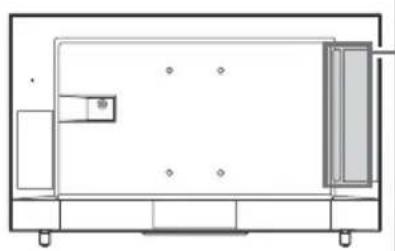
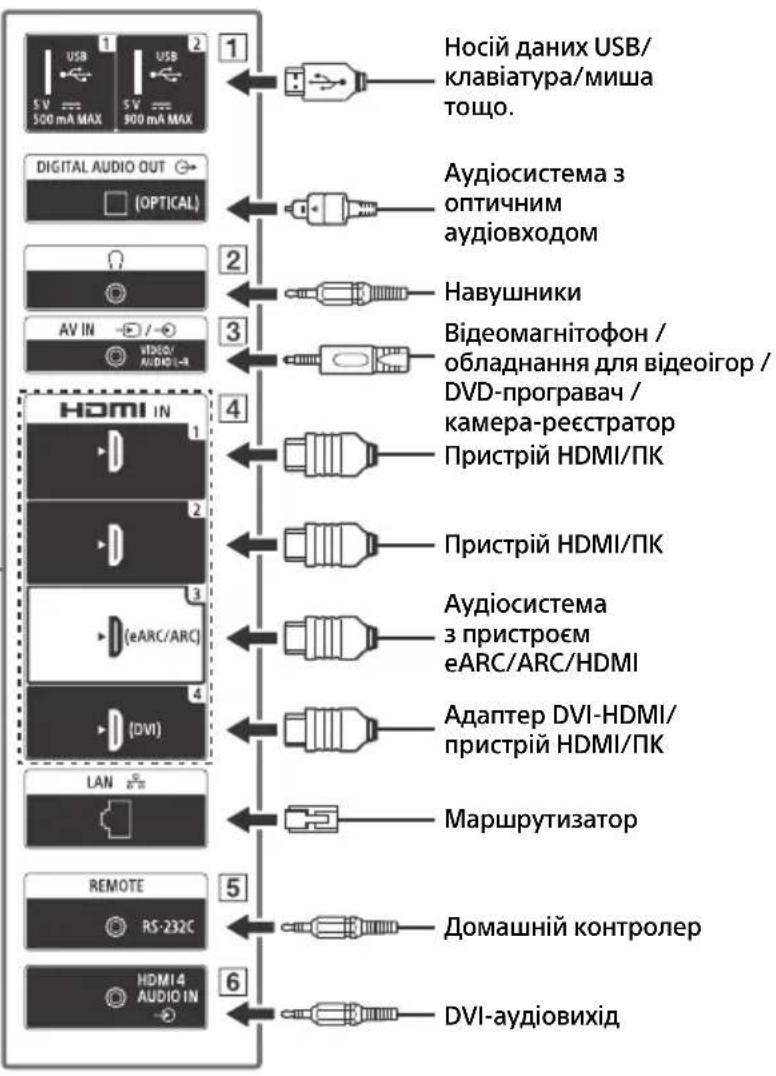
1 -USB

USB
2
1 (Input channel selection):
Display and selection of input signal sources.
SYNC MENU: Display of BRAVIA Sync menu.
(Power)
HDMI 1/2/3/4
2 Numeric buttons
(Dot)
CC
Kolbopobovi Khoŋk
3 HELP: Displays the on-screen menu.
(Display screen): Displays information.
一 一 / BACK
OPTIONS: Displays the list of functions that can be used at the current moment.
十 / 十 /十 /十 /十 (Navigation pad)
D-Pad): Screen menu for navigation and selection.
4 HOME/MENU
+/- (volume)
AUDIO: Selects the sound of the multi-channel source or adjusts the sound (depending on the source).
(Mute)
CH/PAGE +/-

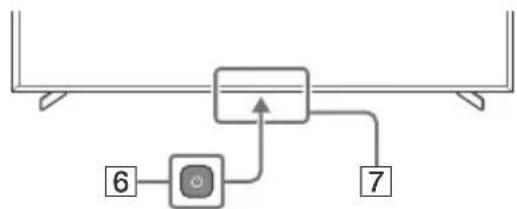
6 (Standby) 7 Remote control sensor / Light sensor / LED
*Full access after pressing and holding (Mute).
Parameters
Pro Mode
[Pro Mode] allows you to use various professional functions. Below is information about switching to [Pro Mode] and the full functions of [Pro Mode].
Pro Mode
Normal mode: This mode is installed by default. The functions of [Pro Mode] are not available in this mode.
Pro parameter mode: With this mode, you can set various parameters for the functions of [Pro Mode].
Pro mode: This is a mode for professional use, which enables the functions of [Pro Mode].
How to switch modes
When the monitor is in normal mode or Pro parameter mode
- Press [Home (Menu)] → [Program] → [Pro Mode Tool], then select the mode you want to change to.
When the monitor is in Pro mode
On the remote control, press the buttons described below to activate with an interval of one second.
After restarting the monitor, the mode will change to [Pro parameter mode].
Activation button: (Screen capture) / ※ (Mute) / +/-(Volume +) / HOME/MENU
It is not possible to change directly from [Pro Mode Tool] to [Pro Mode]. If you need to change from [Pro Mode Tool], go to [Pro Settings] → [Function Restrictions] → [Program] and change [Pro Mode Tool] to [Activate] in [Pro parameter mode].
PexnM Pro
[PexnM Pro] has many different functions. The typical functions of [PexnM Pro] are listed below.
Setting the monitor to standby mode when the signal is lost
You can set the monitor to standby mode when the signal is lost and the cable is reconnected.
- Optimizing the display of the input screen PIK
The input screen PIK is displayed on the screen with an optimal size, according to the PIK format.
- Signal loss control and automatic switching of the input signal in case of HDMI signal loss
If the monitor is turned on and an HDMI device is connected, the input signal can automatically switch to HDMI.
Setting the display of the menu when the HOME/MENU button is pressed
You can select the menu that will be displayed when the HOME/MENU button is pressed on the remote control.
Recognizing the initial source of the input signal during monitor startup
You can set the initial source of the input signal that will be used after the monitor starts.
- PexnM Pro mode
Setting [PexnM Pro] can be protected with a PIN code.
- Initial/Maximum brightness settings
You can set the brightness and maximum density of the monitor.
- Limiting monitor operation using the remote control device
Using the remote control device, you can set limits for monitor operation.
- Limiting external input signals
You can limit the use of external input signals.
- Limiting program usage
You can limit the use of monitor programs.
How to configure Pro mode functions
Press [Home (Menu)] → [Settings] → [Pro Settings], when [Pro Mode Parameters] is selected on the monitor.*
*Depending on the operating system version.
Recommended settings
This section describes recommended settings when the monitor is used in professional environments.
Configuring Eco functions
1. Press [Settings] → [System] → [Power Saving].
Set the [Backlight Brightness] parameter to the desired [Brightness] value.
HanaatyBaHHa IP-Функцi
2 Press [Settings] → [Network] → [LAN Settings] → [IP Control].
Set the IP parameter [Authentication] to [User Name and Password]. Set the [Simple IP Control] parameter to [Enable].
Automatic Update
From [Settings] → [System] → [About] → [System Update]. Set the [Check for Updates Automatically] parameter to [Enable].
Display Settings
4 Go to [Settings] → [Display & Sound] → [Display].
Set the [Backlight] parameter to [Enable]. Select the [Display Mode] according to your needs.
[Note]: When using digital information display
[Individual] When the display shows "KcE"
[Note]: When the display shows "KcE"
Control Functions
RS-232C
The monitor can be controlled from an external device via the RS-232C connection. A brief description of the RS-232C connection is provided on this page.
Interface
Connection of RS-232C to the monitor via a 3.5 mm mini-stereo jack.
3.5 mm mini-stereo jack
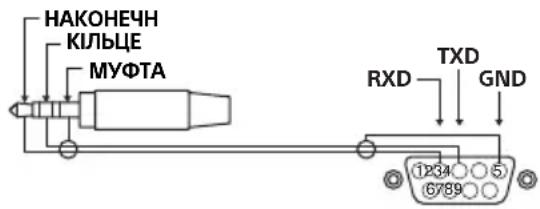
TIP: Monitor → Controller
RING: Controller → Monitor
Connection parameters
To establish an RS-232C connection, set the connection parameters as shown below.
http://192.168.0.1/sony/system
Request
POST /sony/system HTTP/1.1
Host: 192.168.0.1
Content-Type: application/json; charset=UTF-8
Content-Length: 70
X-Auth-PSK: 1234
{"method": "getPowerStatus", "params": [], "id": 50, "version": "1.0"}
Response
Contact your dealer for information.
Appendix
Extended software
Extended software provides additional functions for working with the monitor. The following page shows an example of extended software. Contact your dealer for more information.
Installing the monitor to the wall
Using the optional bracket for wall mounting (SU-WL850 or SU-WL450)* (not supplied)
Information for users:
For the safety and correct installation of the monitor, Sony strongly recommends that installation of the wall mount be performed by qualified Sony dealers or licensed contractors. Do not attempt to install it yourself.
For instructions on installing the bracket for wall mounting, refer to the Installation Information (Wall Mount Bracket) supplied with your monitor model. https://www.sony.eu/support
Follow the instructions supplied with the wall mount bracket for your model. To install this monitor, you must determine the wall location and ensure it can support the weight of the monitor. You must have sufficient experience. Sony is not liable for any damage or injury caused by improper installation or use. Installation of the monitor to the wall must be performed only by qualified service personnel. For safety, it is recommended to use Sony optional accessories, including:
Wall mount bracket SU-WL850
Wall mount bracket SU-WL450
When attaching the monitor to the wall mount bracket, use the screws supplied with the wall mount bracket. The screw specifications shown in the illustration are provided under the condition that they are supplied with the wall mount bracket.
The diameter and length of the screws vary depending on the wall mount bracket model. Using screws other than those specified may cause damage to the internal parts of the monitor or cause it to fall.
FW-75BZ30J / 65BZ30J / 55BZ30J1 / 55BZ30J / 50BZ35J / 50BZ30J / 43BZ35J / 43BZ30J
FW-32BZ30J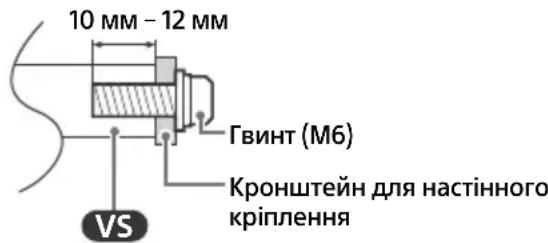
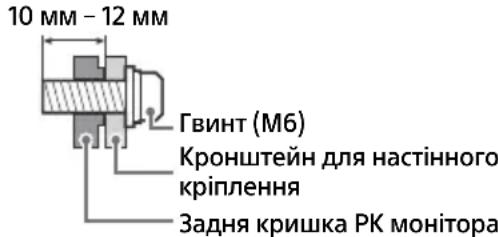
Follow the instructions provided with the wall-mount bracket for partial mounting. To install this LCD monitor, especially for the intended use, the wall must be able to support the weight of the monitor. You need sufficient strength. - Tighten the screws for the wall-mount bracket securely. - The screws for partial mounting must be tightened according to the thickness of the wall-mount bracket for partial mounting. See the illustration below.
FW-100BZ40J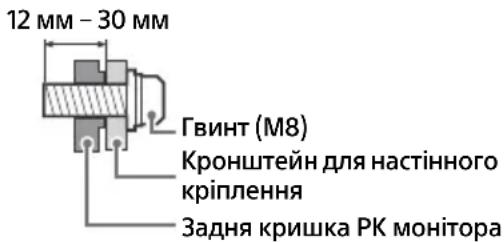
FW-75BZ30J / 65BZ30J / 55BZ30J1 / 55BZ30J / 50BZ35J / 50BZ30J / 43BZ35J / 43BZ30J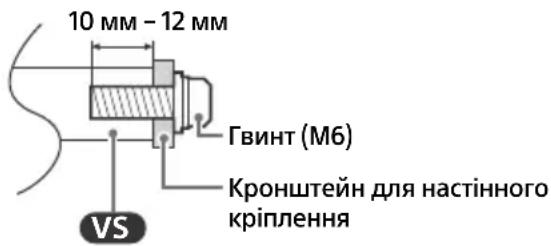
FW-32BZ30J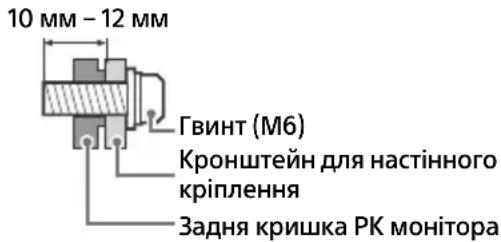
Video input connector (mini jack)
HDMI IN 1/2/3/4 (compatible with HDCP 2.3)
Video (only FW-100BZ40J / 50BZ35J /
43BZ35J):
4096 × 2160p (50, 60 Hz) 1, 4096 × 2160p
2160p (24, 25, 30 Hz), 1080p (30, 50, 60, 100,
120 Hz), 1080/24p, 1080i (50, 60 Hz), 720p
(30, 50, 60 Hz), 720/24p, 576p, 480p,
Formats
3840 × 2160p (100, 120 Hz)*2*3
Video (TilbKn FW-75BZ30J / 65BZ30J /
55BZ30J1 / 55BZ30J / 50BZ30J / 43BZ30J /
32BZ30J):
4096 × 2160p (50, 60 Hz) 1,2, 4096 × 2160p
(24 Hz)*1, 3840 × 2160p (50, 60 Hz)*2, 3840
2160p (24, 25, 30 Hz), 1080p (30, 50, 60 Hz),
1080/24p, 1080i (50, 60 Hz), 720p (30, 50,
60 Hz), 720/24p, 576p, 480p, formats PC
Audio:
Y pekmi eARC (Enhanced Audio Return Channel)
7.1-channel linear PCM
modulation: 32/44.1/48 kHz 16 bit, Dolby
Digital, Dolby Digital Plus, DTS, Dolby
TrueHD, DTS-HD MA, Dolby Atmos, DTS:X
Master Audio
HDMI eARC
5.1-channel linear PCM
DIGITAL AUDIO OUT (OPTICAL)
Digital optical output (optical)
Linear PCM
USB 1 port supports High Speed standard
USB (USB 2.0)
USB 2 port supports Super Speed standard
USB (USB 3.1 Gen 1)
LAN
10BASE-T/100BASE-TX connector (actual
data transfer speed may vary.
Connection may be interrupted. Data
transfer speed is not guaranteed.)
FW-65BZ30J: 163.9 cm / 65"
FW-55BZ30J1: 138.8 cm / 55"
FW-55BZ30J: 138.8 cm / 55"
FW-50BZ35J: 125.7 cm / 50"
FW-50BZ30J: 125.7 cm / 50"
FW-43BZ35J: 108.0 cm / 43"
FW-43BZ30J: 108.0 cm / 43"
FW-32BZ30J: 80.1 cm / 32"
Power consumption of the LCD monitor in standby mode
"OFF"
FW-100BZ40J: 215 W
FW-75BZ30J: 187 W
FW-65BZ30J: 145 W
FW-55BZ30J: 123 W
FW-50BZ35J: 95 W
FW-50BZ30J:97BT
FW-43BZ35J:76BT
FW-43BZ30J:64BT
FW-32BZ30J:54BT
Power consumption in standby mode*5
FW-100BZ40J: 298 kWh per year
FW-75BZ30J:259 kWh per year
FW-65BZ30J:201 kWh per year
FW-55BZ30J:171 kWh per year
FW-50BZ35J: 132 kWh per year
FW-43BZ30J:89 kWh per year
FW-32BZ30J:75 kWh per year
Power consumption of the monitor in "Standby" or "Off" modes
FW-100BZ40J / 75BZ30J / 65BZ30J / 55BZ30J1 /
55BZ30J / 50BZ35J / 50BZ30J / 43BZ35J /
43BZ30J: 0.50 W (25 W in standby mode)
software update/electronic program guide)
FW-32BZ30J: 0.50 W (10 W in standby mode for software update/electronic program guide)
Screen resolution of the LCD monitor in
actual horizontal and vertical pixels:
3840 dots (horizontal) × 2160 rows (vertical)
Input power
500 mA (for USB 1), 900 mA (for USB 2)
Dimensions (approx.) (W × H × D) (cm)
with stand
Standard position:
FW-100BZ40J: 226.0 × 134.6 × 47.5
FW-75BZ30J: 168.6 × 104.5 × 41.0
FW-65BZ30J: 146.2 × 91.2 × 33.8
FW-55BZ30J1: 124.3 × 78.7 × 33.8
FW-55BZ30J: 124.3 × 78.7 × 33.8
FW-50BZ35J: 111.9 × 71.5 × 28.6
FW-50BZ30J: 112.6 × 71.8 × 28.6
FW-43BZ35J: 96.4 × 62.8 × 28.6
FW-43BZ30J: 97.2 × 63.2 × 28.6
FW-32BZ30J: 72.6 × 45.4 × 17.2
Without stand:
FW-75BZ30J: 168.6 × 104.5 × 41.0
FW-65BZ30J: 146.2 × 91.2 × 33.8
FW-55BZ30J1: 124.3 × 78.7 × 33.8
FW-55BZ30J: 124.3 × 78.7 × 33.8
Without stand
FW-100BZ40J: 226.0 × 129.7 × 9.8
FW-75BZ30J: 168.6 × 96.9 × 7.2
FW-65BZ30J: 146.2 × 84.2 × 7.1
FW-55BZ30J1: 124.3 × 72.1 × 7.1
FW-55BZ30J: 124.3 × 71.9 × 7.1
FW-50BZ35J: 111.9 × 64.9 × 7.0
FW-50BZ30J: 112.6 × 65.3 × 7.0
FW-43BZ35J: 96.4 × 56.3 × 6.9
FW-43BZ30J: 97.2 × 56.7 × 7.0
FW-32BZ30J: 72.6 × 43.0 × 7.6
Unpina nipnopn (np6.) (cm)
CtaHdapTHe noJoxeHHa:
FW-100BZ40J: 190.1
FW-75BZ30J: 133.0
FW-65BZ30J: 113.0
FW-55BZ30J1 / 55BZ30J: 98.3
FW-50BZ35J / 50BZ30J / 43BZ35J / 43BZ30J:
66.5
FW-32BZ30J: 60.6
By3bKe noloxehnH:
FW-75BZ30J: 55.9
FW-65BZ30J: 47.8
FW-55BZ30J1/55BZ30J: 45.8
Bara (npn6.) (Kr)
3HaCTIbHOIO NiDnopoIO
FW-100BZ40J: 92.6
FW-75BZ30J: 32.9
FW-65BZ30J: 22.5
FW-55BZ30J1/55BZ30J: 16.6
FW-50BZ35J: 13.3
FW-50BZ30J: 12.9
FW-43BZ35J: 10.7
FW-43BZ30J: 10.5
FW-32BZ30J:7,7
FW-100BZ40J:88,9
FW-75BZ30J: 31,6
FW-65BZ30J:21,6
FW-55BZ30J1 / 55BZ30J: 15,7
FW-50BZ35J:12,7
FW-50BZ30J:12,3
FW-43BZ35J: 10,2
FW-43BZ30J:10
FW-32BZ30J:7,5
Inse
Additional accessories
Mounting hardware for wall mounting:
SU-WL850 (for FW-75BZ30J / 65BZ30J /
55BZ30J1 / 55BZ30J)
For wall mounting:
SU-WL450 (excluding FW-100BZ40J)
DELEGATED REGULATION (EU) 1062/2010
2019/2013 (EU)
HDMI Multimedia Interface
HDMI Licensing Administrator, Inc.
Dolby Audio. Dolby Licensing Corporation
Dolby
2020-1992
. . Dolby
Core. Copyright 1995-2021 Vewd·Vewd
Software AS. All rights reserved.
92.6:FW-100BZ40J
32.9:FW-75BZ30J
22.5:FW-65BZ30J
16.6:55BZ30J/FW-55BZ30J1
13.3:FW-50BZ35J
12.9:FW-50BZ30J
10.7:FW-43BZ35J
10.5:FW-43BZ30J
7.7:FW-32BZ30J
y
, Dolby Atmos , Dolby Vision , 13810yFw740BZ40J
31.6:FW-75BZ30J
21.6:FW-65BZ30J
15.7:55BZ30J/FW-55BZ30J1
12.7:FW-50BZ35J
12.3:FW-50BZ30J
10.2:FW-43BZ35J
10:FW-43BZ30J
7.5:FW-32BZ30J
- Android-Google
. Google LLC
Wi-Fi Direct, Wi-Fi Alliance, Wi-Fi
.Wi-Fi Alliance 0000000000
Wi-Fi CERTIFIEDTM
.Wi-Fi Alliance wwnnn
http://patents.dts.com, DTS
.DTS, Inc.
DTS Digital Surround, DTS
. DTS, Inc.
.2020 DTS, Inc.
Bluetooth SIG, Inc.
Sony Corporation 1
Tuxera TUXERA
HEVC
.1.patentlist.accessadvance.com
(55BZ30J/55BZ30J1/65BZ30J
(FW-100BZ40J Tn) SU-WL450: nnn
FWA-CE100:nnn nn
n nn nnnn, [n] nnnn [n]
2160p×4096yynnynynyn.2160p×3840
[2N]n [1N]n [nnn]nn nn np
Nn nn nnnn nn nnnn nn nnnn nn nnnn nn nnnn nn nnnn nn nnnn nn nnnn nn nnnn nn nnnn nn nnnn nn nnnn nn nnnn nn nnnn nn nnnn nn nnnn nn nnnn nn nnnn nn nnnn nn nnnn nn nnnn nn nnnn nn nnnn nn nnnn nn nann nn nnnn nn nnnn nn nnnn nn nnnn nn nnnn nn nnnn nn nnnn nn nnnn nn nnnn nn nnnn nn nnnn nn
.HDMI
Ultra High Speed-HDMI IN 3 & 43*
HDMI Cable
HDMI IN 3-ynn nn4*
LCD-
yNn nn nn nn nn nn nn 5*
wn by nnnn nn nn nn nn nn
NNNN NNN
6*
LCD-n
365,
LCD-nwwn
LCD-nn7
.077n 077n
8*
27/77N/77
LCD
·nynns
()()()
2160 × 3840
77
(USB2 900mA, (USB1 500 mA
()(y×x×n)()
47.5 × 134.6 × 226.0 : FW-100BZ40J
41.0 × 104.5 × 168.6 : FW-75BZ30J
33.8 × 91.2 × 146.2 : FW-65BZ30J
33.8 × 78.7 × 124.3 : FW-55BZ30J1
33.8 × 78.7 × 124.3 : FW-55BZ30J
28.6 × 71.5 × 111.9 : FW-50BZ35J
28.6 × 71.8 × 112.6 : FW-50BZ30J
28.6 × 62.8 × 96.4 : FW-43BZ35J
28.6 × 63.2 × 97.2 : FW-43BZ30J
17.2 × 45.4 × 72.6 : FW-32BZ30J
41.0 × 104.5 × 168.6 : FW-75BZ30J
33.8 × 91.2 × 146.2 : FW-65BZ30J
33.8 x 78.7 x 124.3: FW-55BZ30J1
33.8 x 78.7 x 124.3: FW-55BZ30J
y
9.8 x 129.7 x 226.0: FW-100BZ40J
7.2 x 96.9 x 168.6: FW-75BZ30J
7.1 x 84.2 x 146.2: FW-65BZ30J
7.1 x 72.1 x 124.3: FW-55BZ30J1
7.1 x 71.9 x 124.3: FW-55BZ30J
7.0 x 64.9 x 111.9: FW-50BZ35J
7.0 x 65.3 x 112.6: FW-50BZ30J
6.9 x 56.3 x 96.4: FW-43BZ35J
7.0 x 56.7 x 97.2: FW-43BZ30J
7.6 x 43.0 x 72.6: FW-32BZ30J
190.1:FW-100BZ40J
133.0:FW-75BZ30J
113.0:FW-65BZ30J
98.3:55BZ30J/FW-55BZ30J1
:43BZ30J/43BZ35J/50BZ30J/FW-50BZ35J
66.5
60.6:FW-32BZ30J
:nnn
55.9:FW-75BZ30J
47.8:FW-65BZ30J
45.8:55BZ30J/FW-55BZ30J1
5*7y7n7x7n7x7n70
A + :FW - 100BZ40J
A:FW-75BZ30J
A:FW-65BZ30J
B:FW-55BZ30J
A:FW-50BZ35J
B:FW-50BZ30J
B:FW-43BZ35J
A:FW-43BZ30J
B:FW-32BZ30J
(1)
100/252.8:FW-100BZ40J
75/189.3:FW-75BZ30J
65/163.9:FW-65BZ30J
55/138.8:FW-55BZ30J1
D55/138.8:FW-55BZ30J
50/125.7:FW-50BZ35J
D'50/125.7:FW-50BZ30J
43/108.0:FW-43BZ35J
43/108.0:FW-43BZ30J
32/80.1:FW-32BZ30J
5*nnnnn
[5x7]
ON215:FW-100BZ40J
UN187:FW-75BZ30J
UN145:FW-65BZ30J
UN123:FW-55BZ30J
ON95:FW-50BZ35J
ON97:FW-50BZ30J
UN76:FW-43BZ35J
UN64:FW-43BZ30J
UN54:FW-32BZ30J
65*77777777
wvWvWvP 298:FW-100BZ40J
wvwnp 259:FW-75BZ30J
wvwnp 201:FW-65BZ30J
wvwnp 171:FW-55BZ30J
wvwnp132:FW-50BZ35J
wvwnp 135:FW-50BZ30J
wvwnp 105:FW-43BZ35J
w89:FW-43BZ30J
/50BZ30J/50BZ35J/55BZ30J/55BZ30J1
TNYON25)0.50:43BZ30J/43BZ35J
(EPG/mnn
125)0.50:FW-32BZ30J
(EPG/mn
eARC
/88.2/48/44.1/32:5.1 PCM
24/20/16 kHz 192/176.4/96
DTS, Dolby Atmos, Dolby Audio
eARC/ARC (Enhanced Audio Return Channel/
4* (HDMI IN 3) (Audio Return Channel
eARC
kHz 48/44.1/32: 7.1 PCM
Dolby Digital, Dolby Digital Plus, 16
DTS, Dolby TrueHD, DTS-HD MA
Dolby Atmos, DTS: X Master Audio
ARC
16 kHz 48: PCM
DTS, Dolby Atmos, Dolby Audio
DIGITAL AUDIO OUT (OPTICAL)
kHz 48: PCM)
(DTS, Dolby Audio, 16
HDMI 4 AUDIO IN
2.1
High Speed USB - USB 1
(USB 2.0)
Super Speed USB - USB 2
(USB 3.1 GEN 1)
LAN
10BASE-T/100BASE-TX
Input/Output terminals
For details, see the following pages.
()
(FW-32BZ30J) 19.5V
DC IN
REMOTE
RS-232C
Unusable
Unusable
Unusable
Unusable
AC 220-240V, 50/60Hz
Unusable
DC 19.5V
AC 220-240V, 50/60Hz
Unusable
Unusable
480p, 576p, 24p / 720, 60, 50
2160p x 3840 (120, 100)
/55BZ30J1/65BZ30J/FW-75BZ30J
32BZ30J/43BZ30J/50BZ30J/55BZ30J
2160p×4096, 1 (60, 50) 2160p×4096
3840, 2 (60, 50) 2160p×3840, 1 (24)
(70, 50, 30) 1080p, (70, 30, 25, 24) 2160p
, 50, 30) 720p, (60, 50) 1080i, 24p/1080
480p, 576p, 24p/720, (60
eARC (Enhanced Audio Return Channel)
kHz 48/44.1/32 : 7.1 PCM
Dolby Digital, Dolby Digital, 16
, DTS-HD MA, Dolby TrueHD, DTS, Plus
DTS:X Master Audio, Dolby Atmos
/55BZ30J1/65BZ30J/FW-75BZ30J
/43BZ35J/50BZ30J/50BZ35J/55BZ30J
43BZ30J
1bynndbyLCD-nxynvynn
FW-32BZ30J
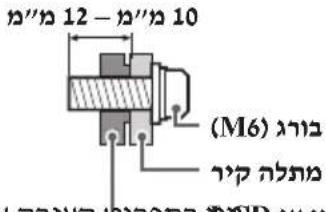
2 HELP y n nn n nn nn POD 3LCD-nn
. pinn vov
LCD-n nnnn nn nn Sony 100000000000000000000000000000000000000000
Nnnu,LCD-nnnnnn nn n 111111111111111111
y
.7pnnn nn nn
.
FW-32BZ30J
12-nn 10
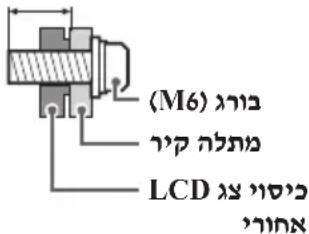
LCD
y
(p) * (SU-WL450 × SU-WL850)
:n
Sony, by
in oio 7 by yann LCD -n as npnnw
- vino
.7
1
Pn Pnnn
.
:Sony
nppnn nnnnnnnnnnnnnnnnnnnnnnnnnnnnnnnnnnnnnnnnnnnnnnnnnnnnnnnnnnnnnnnnnnnnnnnnnnn
( 0,1/2,0,1/4,0,... ) ( 0,1/4,0,... )
Tb) 1nn nn nnnn
nppnn ypa, np nnpnn by mn
LCD-n x y b w nn n (nynnn)
https://www.sony.eu/support
Sony
SU-WL85
SU-WL45
IRCC-IP-REST API
REST API HTTP
.192.168.0.1 Pre-shared Key "1234": IP nnnn nn nn nn nn nn nn nn nn nn nn nn nn nn nn nn nn nn nn nn nn nn nn nn nn nn nn nn nn nn nn nn nn nn nn nn nn nn nn nn nn nn nn nn nn nn nn nn nn nn nn nn nn nn nn nn nn nn nn nn nn nn nn nn nn nn nn nn nn nn nn nn nn nn nn nn nn nn nn nn nn nn nn
URL
http://192.168.0.1/sony/system
#
POST /sony/system HTTP/1.1
Host: 192.168.0.1
Content-Type: application/json; charset=UTF-8
Content-Length: 70
X-Auth-PSK: 1234
{"method": "getPowerStatus", "params": [], "id": 50, "version": "1.0"}
7
HTTP/1.1 200 OK
Content-Type: application/json; charset=UTF-8
Content-Length: 44
{"result":[{ "status": "active"}], "id": 50}
700077
27y0x00()
0x01nynnn:
()
0x027nyn:
()
0x03(ynn) nynn:
0x04(0)
3n7p70
nnp .RS-232C nwnpnnnnpn nn
| 0x8E | - | 0x00 (#0) | 0x8C0x00 | 0x000x02 | |||
| 0x8F | - | 0x01 (#0) | |||||
| 0x96 | 0x01 (#1) | 0x04 (HDMI) | 0x8C0x00 | 0x020x03HDMI | |||
| 0x97 | 0x02 (#2) | ||||||
| 0x98 | 0x03 (#3) | ||||||
| 0x99 | 0x04 (#4) |
nno n no,RS-232C no
IP
Nnnn nn nnnnnnnnnnnnnnnnnnnnnnnnnnnnnnnnnnnnnnnnnnnnnnnnnnnnnnnnnnnnnnnnnnnnnnnnnnnnnnnnnnnnnnnnnnnnnnnnnnnnnnnnnnnnnnnnnnnnnnnnn
RS-232C
| 0xXX | \( \neg \neg \neg \neg \neg \neg \neg \neg \neg \neg \neg \neg \neg \neg \neg \neg \neg \neg \neg \neg \neg \neg \neg \neg \neg \neg \neg \neg \neg \neg \neg \neg \neg \neg \neg \neg \neg \neg \neg \neg \neg \neg \neg \neg \neg \neg \neg \neg \neg \neg \) | 3 | |
| (byte 1 + X \( \neg \neg \neg \neg \neg \neg \neg \neg \neg \neg \neg \neg \neg \neg \neg \neg \neg \neg \neg \neg \neg \neg \neg \neg \neg \neg \neg \neg \neg \neg \neg \neg \neg \neg \neg \neg \neg \neg \neg \neg \neg \neg \neg \neg \neg \neg \neg \neg \neg \nabla \neg \neg \neg \neg \neg \neg \neg \neg \neg \neg \neg \neg \neg \neg \neg \neg \neg \neg \neg \neg \neg \neg \neg \neg \neg \neg \neg \neg \neg \neg \neg \neg \neg \neg \neg \neg \neg \neg \neg \neg \neg \neg \neg \neg \neg \neg \neg \neg \neg \bigtriangleup \neg \neg \neg \neg \neg \neg \neg \neg \neg \neg \neg \neg \neg \neg \neg \neg \neg \neg \neg \neg \neg \neg \neg \neg \neg \neg \neg \neg \neg \neg \neg \neg \neg \neg \neg \neg \neg \neg \neg \neg \neg \neg \neg \neg \neg \neg \neg \neg \neg \dots \) | 0xXX | \( \neg \neg \neg \neg \neg \neg \neg \neg \neg \neg \neg \neg \neg \neg \neg \neg \neg \neg \neg \neg \neg \neg \neg \neg \neg \neg \neg \neg \neg \neg \neg \neg \neg \neg \neg \neg \neg \neg \neg \neg \neg \neg \neg \neg \neg \neg \nabla \neg \nabla \neg \nabla \neg \nabla \neg \nabla \neg \nabla \neg \nabla \neg \nabla \neg \nabla \neg \nabla \neg \nabla \neg \nabla \neg \nabla \neg \nabla \neg \nabla \neg \nabla \neg \nabla \neg \neg \neg \neg \neg \neg \neg \neg \neg \neg \neg \neg \neg \neg \neg \neg \neg \neg \neg \neg \neg \neg \neg \neg \neg \neg \neg \neg \neg \neg \neg \neg \neg \neg \neg \neg \neg \neg \neg \neg \neg \neg \neg \neg \neg \neg \nabla \neg \bigtriangleup \neg \nabla \neg \nabla \neg \nabla \neg \nabla \neg \nabla \neg \nabla \neg \nabla \neg \nabla \neg \nabla \neg \nabla \neg \nabla \neg \nabla \neg \nabla \neg \nabla \neg \nabla \neg \nabla \neg \bigtriangleup \neg \nabla \neg \nabla \neg \nabla \neg \nabla \neg \nabla \neg \nabla \neg \nabla \neg \nabla \neg \nabla \neg \nabla \neg \nabla \neg \nabla \neg \nabla \neg \nabla \neg \neg \neg \neg \neg \neg \neg \nabla \neg \nabla \neg \nabla \neg \nabla \neg \nabla \neg \nabla \neg \nabla \neg \nabla \neg \nabla \neg \nabla \neg \nabla \neg \nabla \neg \nabla \neg \nabla \neg \neg \neg \neg \neg \neg \neg \bigtriangleup \neg \nabla \neg \nabla \neg \nabla \neg \nabla \neg \nabla \neg \nabla \neg \nabla \neg \nabla \neg \nabla \neg \nabla \neg \nabla \neg \nabla \neg \nabla \neg \nabla \neg \nabla \neg \neg \nabla \neg \nabla \neg \nabla \neg \nabla \neg \nabla \neg \nabla \neg \nabla \neg \nabla \neg \nabla \neg \nabla \neg \nabla \neg \nabla \neg \nabla \neg \nabla \neg \nabla \neg \nabla \nabla \neg \nabla \nabla \neg \nabla \nabla \neg \nabla \nabla \neg \nabla \nabla \neg \nabla \nabla \neg \nabla \nabla \neg \nabla \nabla \neg \nabla \nabla \neg \nabla \nabla \neg \nableges = ) \) |
ECO
.
HOMEMENU/(+ywnn)-/+/ (pn)/(ynnn): nynn
Pro
[Pro 2] by nnnn nn nnnn nn nnnn nn nnnn nn, [Pro 2]
nV nV npV npV npV:OPTIONS
.
mnnn:(nnnnnnu)
.7
HDMI
.eARC ynn noyn
REMOTE RS-232C

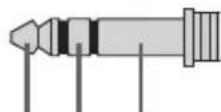
RX TX GND
HDMI 4 AUDIO IN

HDMI 4
HDMI 4 AUDIO IN
IN


LCD-

2018NJ7
(PTTON)
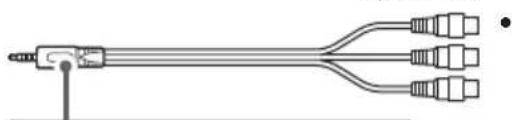
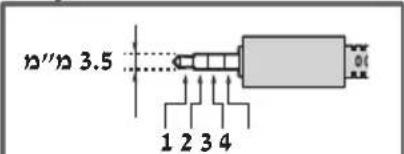
L:1
17 × 27 : 2
nppnn:3
R:4
HDMI IN 1/2/3/4
INTTNIN
HDMI-
ywn
DVI-HDMI onnn pwn 4 IN yynn nn npyn nnn (p)
.HDMI 4 AUDIO IN-5
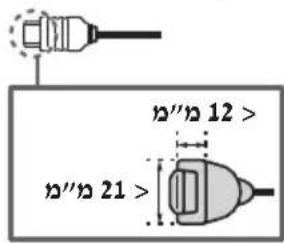
HDMI IN 3
Audio Return Channel/Audio Return
(Channel
HDMI IN 3
LCD
HDMI
eARC/ARC
LCD
HDMI
HDMI eARC/ARC
DIGITAL AUDIO OUT (OPTICAL)
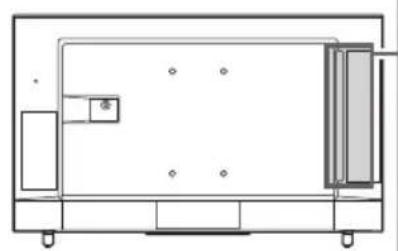
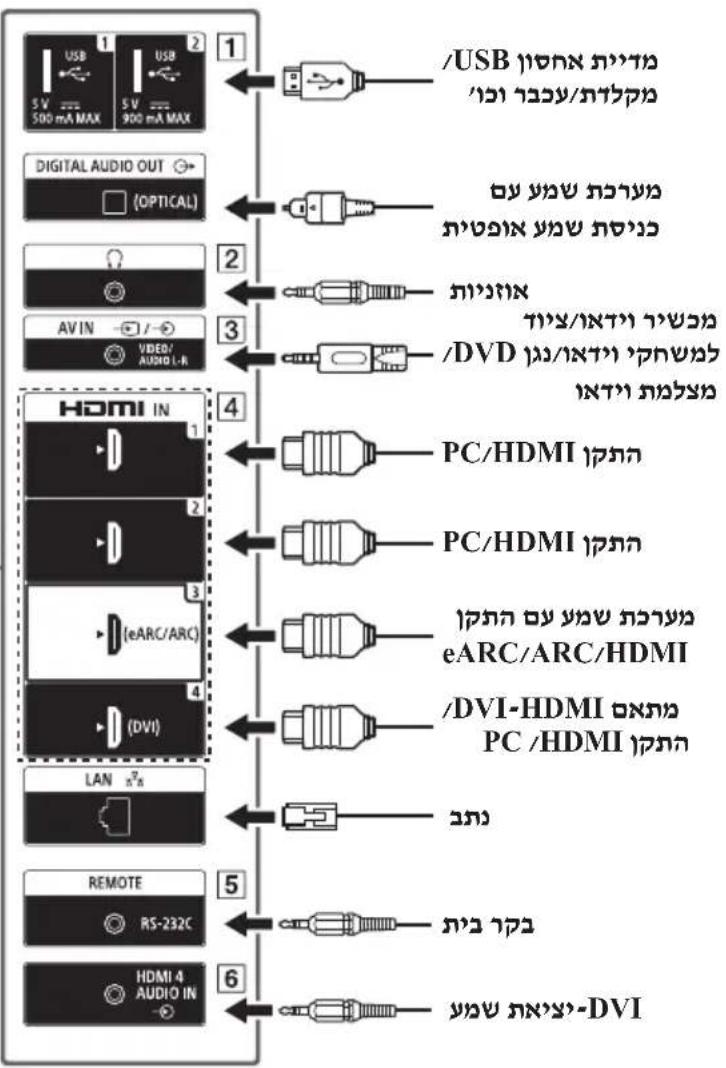
LCD
43BZ35J / 50BZ35J / FW-100BZ40J
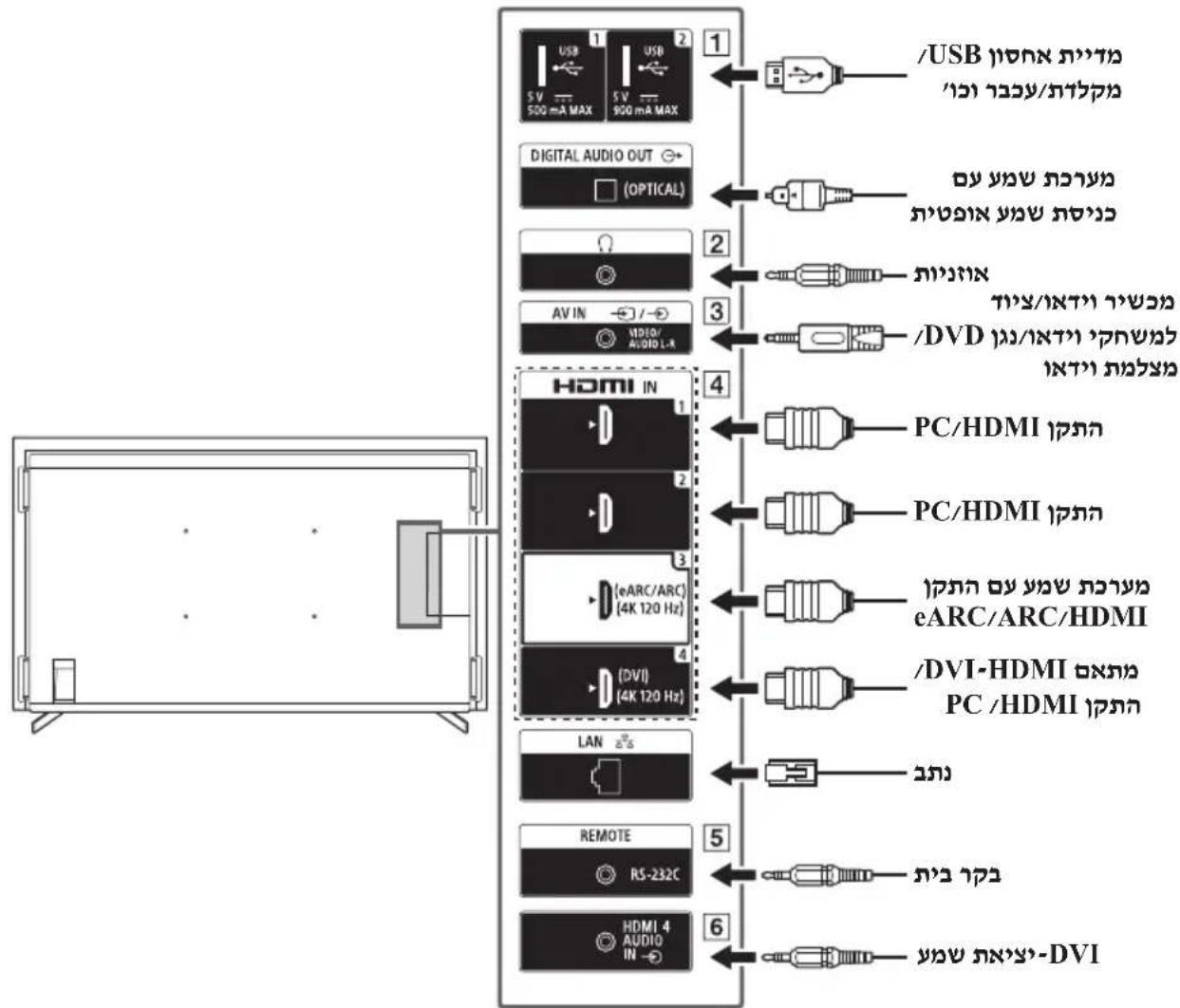
HE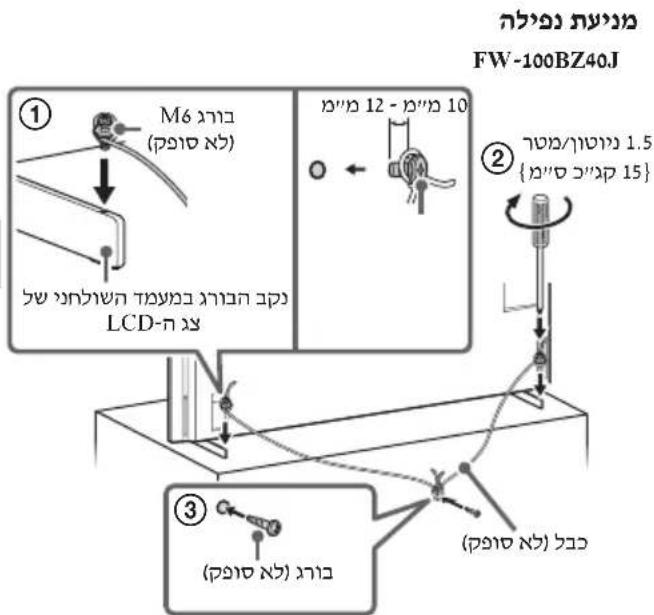
/50BZ35J / 55BZ30J / 55BZ30J / 65BZ30J / FW-75BZ30J 43BZ30J / 43BZ35J / 50BZ30J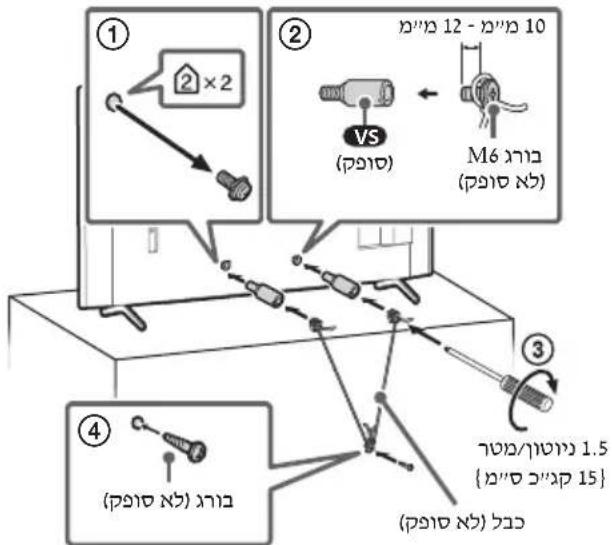
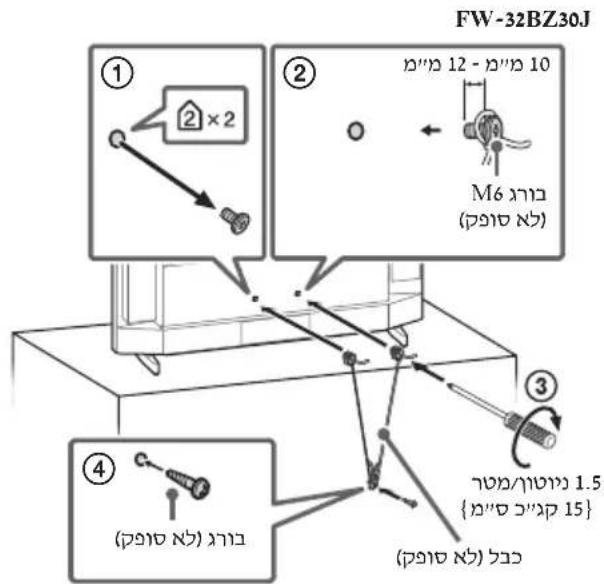
#
.07
LCD (FW-100BZ40J).
{1,2,3} ⇒ {1,3,4} ⇒ {2,3,4} ⇒ {3,4} ⇒ {4,5}
FW-100BZ40J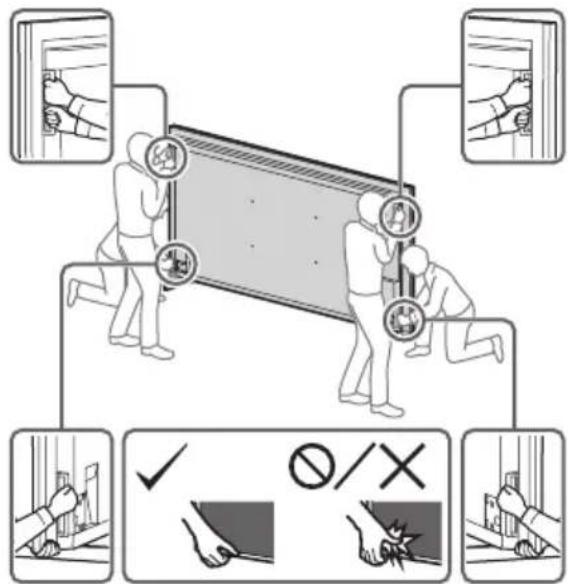
/50BZ35J / 55BZ30J / 55BZ30J1 / 65BZ30J / FW-75BZ30J
32BZ30J / 43BZ30J / 43BZ35J / 50BZ30J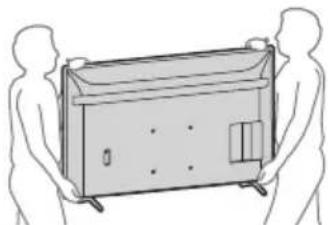
= sin(2α) + cos(2α)
- 111111,
□
(https://www.sony.net/tv-software-licenses/)
__SUPPIMER__
"nnnyy" np,LCD-n nyan
9
ybnn nn nnnn nn nnnnnnnnnnnnnnnnnnnnnnnnnnnnnnnnnnnnnnnnnnnnnnnnnnnnnnnnnnnnnnnnnnnnnnnnnnnnnnnnn
()
nLCD-7ywnnnn nn nnnn nn nnnn
.
:nnnnnnnnnnnnnnnnn
nnnnnnnnnnnnnnnnnnnnnnnnnnnnnnnnnnnnnnnnnnnnnnnnnnnnnnnnnnnnnnnnnnnnnnnnnnnnnnn
.
nwnny
177 777777777
,FW-100BZ40J 7777777777777777777777777777777777777
FW-55BZ30J, FW-55BZ30J1, FW-65BZ30J, FW-75BZ30J
FW-43BZ30J, FW-43BZ35J, FW-50BZ30J, FW-50BZ35J
This device complies with Directive 2014/53/EU. For FW-32BZ30J
The full text of the EU declaration of conformity is available at the following internet address:
https://compliance.sony.eu
This device may be used in all EU member states.
AT, BE, HR, CY, CZ, DK, EE, FI, FR, DE, EL, HU, -
IE, IT, LV, LT, LU, MT, NL, PL, PT, SK, SI, ES, SE, UK
UK (NI), IS, LI, NO, CH, BG, RO, TR, AL, BA, MK, MD, RS
Frequency band: 5150-5350 MHz
5150-5350
This device is restricted to indoor use.
#
LCD panel: The screen is made of glass. Do not drop or subject to impact.
If the screen is damaged, do not touch the broken glass.
#
-wwwnipnLCD-nnnnnnn
- 0777777777777777777777777777
HELP
∴ S ΔACD = S ΔCOD + S ΔBDO - S ΔBOC
Hn Hn Hn Hn Hn Hn Hn Hn Hn Hn Hn Hn Hn Hn Hn Hn Hn Hn Hn Hn Hn Hn Hn Hn Hn Hn Hn Hn Hn Hn Hn Hn Hn Hn Hn Hn Hn Hn Hn Hn Hn Hn Hn Hn Hn Hn Hn Hn Hn Hn Hn
.
PDBN
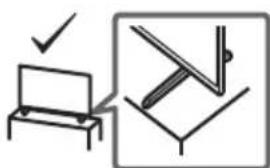
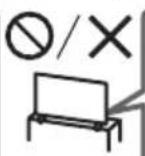
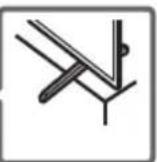
0000
- 7LCDnn
- 1
- Pro 2
9
10000000000000000000000000000000
- RS-232C

Therefore, the area of triangle ACD equals the area of triangle COD plus the area of triangle BDO minus the area of triangle BOC.
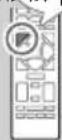

HIGH-DEFINITION MULTIMEDIA INTERFACE

VISION·ATMOS


Bluetooth
TUXERA

Advance

- ABOUT MANUALS
- SETUP GUIDE
- REFERENCE GUIDE (THIS MANUAL) / SAFETY
- DOCUMENTATION
- HELP
- NOTE
- LOCATION OF THE IDENTIFICATION LABEL
- IMPORTANT NOTICE
- NOTICE FOR RADIO EQUIPMENT
- SAFETY INFORMATION
- INSTALLATION/SET-UP
- INSTALLATION
- TRANSPORTING
- TOPPLE PREVENTION
- CONNECTION DIAGRAM
- REMOTE CONTROL AND LCD MONITOR
- SETTINGS
- PRO MODE
- HOW TO CHANGE THE MODE
- WHEN THE MONITOR IS IN NORMAL MODE AND PRO SETTINGS MODE
- WHEN THE MONITOR IS IN THE PRO MODE
- INTRODUCTION OF THE PRO MODE FUNCTIONS
- SETTING MONITOR OPERATION WHEN TURNING THE AC POWER ON
- OPTIMIZED DISPLAY OF THE PC INPUT SCREEN
- POWER SUPPLY CONTROL AND AUTOMATIC INPUT SWITCHING BY HDMI SIGNAL DETECTION
- SETTINGS OF THE DISPLAYING MENU WHEN PRESSING THE HOME/MENU BUTTON
- INITIAL INPUT SOURCE DESIGNATION WHEN STARTING THE MONITOR
- PRO MODE LOCK
- INITIAL/MAXIMUM VOLUME SETTING
- RESTRICTION OF THE MONITOR OPERATION ON THE REMOTE CONTROL
- RESTRICTION OF EXTERNAL INPUTS
- RESTRICTION OF USING APPLICATIONS
- HOW TO SET PRO MODE FUNCTIONS
- RECOMMENDED SETTINGS
- SETTING ECO FEATURES
- SETTING IP FEATURES
- AUTOMATIC SOFTWARE DOWNLOAD
- PICTURE SETTINGS
- CONTROL FUNCTIONS
- RS-232C
- INTERFACE
- DATA FORMAT
- COMMAND EXAMPLE
- IP
- SUPPORTED IP PROTOCOL
- MONITOR SETTINGS
- EXAMPLE OF HTTP REQUEST AND RESPONSE FOR REST API
- URL
- REQUEST
- RESPONSE
- APPENDIX
- EXTENDED SOFTWARE
- SOFTWARE FOR OFFICE MONITORS
- SOFTWARE FOR DIGITAL SIGNAGE
- INSTALLING THE LCD MONITOR TO THE WALL
- USING THE OPTIONAL WALL-MOUNT BRACKET (SU-WL850 OR SU-WL450)* (NOT SUPPLIED)
- TO CUSTOMERS
- TO SONY DEALERS AND CONTRACTORS
- WALL-MOUNT BRACKET INSTALLATION INFORMATION
- FW-32BZ30J
- USING THE OPTIONAL WALL-MOUNT BRACKET (EXCEPT SU-WL850 OR SU-WL450) (NOT SUPPLIED)
- FOR PRODUCT PROTECTION AND SAFETY REASONS, SONY STRONGLY RECOMMENDS THAT INSTALLATION OF YOUR LCD MONITOR ON THE WALL BE PERFORMED BY QUALIFIED PROFESSIONALS. DO NOT ATTEMPT TO INSTALL IT YOURSELF
- TROUBLESHOOTING
- SPECIFICATIONS
- SYSTEM
- INPUT/OUTPUT JACKS
- POWER, PRODUCT FICHE AND OTHERS
- DIMENSIONS (APPROX.) (W × H × D) (CM)
- STAND WIDTH (APPROX.) (CM)
- MASS (APPROX.) (KG)
- OTHERS
- TRADEMARK INFORMATION
- PRODUCT REGISTRATION NUMBER (COMMISSION DELEGATED REGULATION (EU) 2019/2013)
- TABLE OF CONTENTS
- WEIGHT (APPROX.) (KG)
- DIGITAL AUDIO OUT (OPTICAL)
- HDMI 4 AUDIO IN
- HEADPHONES
- LAN
- CONNECTORS FOR INPUTS/OUTPUTS
- OTHER
- INPUT/OUTPUT TERMINALS
- DIMENSIONS (APPROX.) (B × H × D) (CM)
- ANNEX
- TASK
- AITNON
- ANOKPION
- TABLE STAND (APPROX.) (CM)
- TRADEMARKS
- PRODUCT IDENTIFICATION CODE (ACCORDING TO REGULATION (EU) 2019/2013)
- INSTALLATION/CONNECTION
- TO PREVENT FIRE, ELECTRIC SHOCK, DAMAGE TO THE MONITOR, AND/OR INJURY, INSTALL AND OPERATE THE MONITOR IN ACCORDANCE WITH THE FOLLOWING INSTRUCTIONS
- THE KK MONITOR SHOULD BE INSTALLED NEAR AN EASILY ACCESSIBLE POWER OUTLET. TO PREVENT TIPPING, INJURY, OR PROPERTY DAMAGE, PLACE THE KK MONITOR ON A STABLE, FLAT SURFACE. INSTALL THE KK MONITOR IN A LOCATION WHERE IT CANNOT BE EASILY TIPPED OVER. POSITION THE KK MONITOR SO THAT ITS STAND DOES NOT PROTRUDE BEYOND THE STAND OF THE KK MONITOR (NOT INCLUDED). IF THE STAND PROTRUDES BEYOND THE STAND OF THE KK MONITOR, THE KK MONITOR MAY TIP OVER AND FALL, WHICH COULD RESULT IN INJURY OR DAMAGE TO THE KK MONITOR
- BEFORE MOVING THE KK MONITOR, DISCONNECT ALL CABLES FROM IT. FOR MOVING LARGE KK MONITORS, USE TWO OR MORE PEOPLE (FOR FW-100BZ40J, USE TWO OR MORE PEOPLE). WHEN LIFTING THE KK MONITOR BY HAND, HOLD IT AS SHOWN BELOW. DO NOT APPLY FORCE TO THE LCD PANEL FRAME OF THE SCREEN. WHEN LIFTING OR MOVING THE KK MONITOR, HOLD IT FIRMLY FROM THE BOTTOM
- PREVENTION OF TIPPING OVER
- PARAMETERS
- CHANGING THE MODE
- BRIEF DESCRIPTION OF PRO MODE FUNCTIONS
- PRO SETTINGS FUNCTIONS
- FUNCTION SETTINGS
- LOCK SETTINGS
- FW-75BZ30J / 65BZ30J / 55BZ30J1 / 55BZ30J / 50BZ35J / 50BZ30J / 43BZ35J / 43BZ30J
- OPTIONAL ACCESSORY: WALL-MOUNT BRACKET (EXCEPT FOR SU-WL850 AND SU-WL450 MODELS) (NOT SUPPLIED)
- FW-100BZ40J
- INPUT/OUTPUT CONNECTORS
- REMOTE
- POWER SUPPLY, REFERENCE SHEET FOR TECHNICAL DATA OF THE DEVICE AND OTHER
- WIDTH OF STAND (APPROX.) (CM)
- ABOUT THE MANUALS
- INSTALLATION MANUAL
- USER MANUAL (THIS MANUAL)/SAFETY DOCUMENTATION
- IMPORTANT NOTE
- PRODUCT NAME: MONITOR
- INPHIMAIA YDO 6E3NEUHOI EKCNNYATAAII
- INSTALLATION / SETUP
- TRANSPORTATION
- PRECAUTIONS
- HOW TO SWITCH MODES
- PEXNM PRO
- HOW TO CONFIGURE PRO MODE FUNCTIONS
- CONFIGURING ECO FUNCTIONS
- HANAATYBAHHA IP-ФУНКЦI
- AUTOMATIC UPDATE
- DISPLAY SETTINGS
- MM MINI-STEREO JACK
- CONNECTION PARAMETERS
- INSTALLING THE MONITOR TO THE WALL
- UNPINA NIPNOPN (NP6.) (CM)
- BARA (NPN6.) (KR)
- INSE
- UNUSABLE
- LCD
- TB) 1NN NN NNNN
- REST API HTTP
- REMOTE RS-232C
- HDMI IN
- AUDIO RETURN CHANNEL/AUDIO RETURN
- SUPPIMER
- NWNNY
- THIS DEVICE IS RESTRICTED TO INDOOR USE
- PDBN
Brand : SONY
Model : FW-55BZ30J1
Category : Monitor