
PJS1000 - Power bank DOMETIC - Free user manual and instructions
Find the device manual for free PJS1000 DOMETIC in PDF.
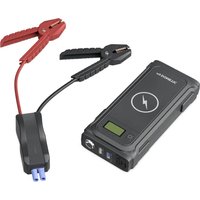


| Product type | Portable battery (jump starter) |
| Brand | Dometic |
| Model | PJS1000 |
| Dimensions (L x D x H) | 192 x 88 x 41.5 mm |
| Weight | 600 g |
| Battery type | Lithium polymer |
| Nominal battery voltage | 14.8 V |
| Battery capacity | 59.2 Wh |
| Starting current | ≤ 400 A (2 s) |
| Peak current | 1000 A (0.1 s) |
| USB outputs | 2 ports: 5 V, 2.1 A / 2 A |
| 12 V DC output | 12 V, ≤ 8 A |
| Wireless charging | Qi, 10 W |
| LED lamp | 1 W, 110 lumens (constant, strobe, SOS) |
| Operating temperature | -10 °C to +45 °C |
| Charging temperature | 0 °C to +45 °C |
| Storage temperature | -20 °C to +60 °C |
| Maintenance and cleaning | Clean with a damp cloth; check cables regularly; recharge every 3 to 6 months |
| Safety protections | Overcurrent, overvoltage, undervoltage, short circuit, overcharge, deep discharge, high/low temperatures, reverse polarity |
| Warranty period | Legal warranty; contact the dealer |
Frequently Asked Questions - PJS1000 DOMETIC
User questions about PJS1000 DOMETIC
0 question about this device. Answer the ones you know or ask your own.
Ask a new question about this device
Download the instructions for your Power bank in PDF format for free! Find your manual PJS1000 - DOMETIC and take your electronic device back in hand. On this page are published all the documents necessary for the use of your device. PJS1000 by DOMETIC.
USER MANUAL PJS1000 DOMETIC
© 2023 Domatic Group. The visual appearance of the contents of this manual is protected by copyright and design law. The underlying technical design and the products contained herein may be protected by design, patent or pending patent. The trademarks mentioned in this manual belong to Domatic Sweden AB. All rights are reserved.
| ENDE FREESPTITNLDA | ||||||
| bk | Black Schwarz Noir Negro Preto Nero Zwart Sort | |||||
| rd | Red Rot Rouge Rojo Vermelho Rosso Rood Rød |
| SV | NO | FI | RU | PL | SK | CS | HU | AR | |
| bk | Svart | Svart | Musta | Черны | Czarny | Čierna | Černá | Fekete | аugsу |
| rd | Röd | Röd | Punainen | Красné | Czerwony | Červená | Červená | Piros | алья |
Please read these instructions carefully and follow all instructions, guidelines, and warnings included in this product manual in order to ensure that you install, use, and maintain the product properly at all times. These instructions MUST stay with this product.
By using the product, you hereby confirm that you have read all instructions, guidelines, and warnings carefully and that you understand and agree to abide by the terms and conditions as set forth herein. You agree to use this product only for the intended purpose and application and in accordance with the instructions, guidelines, and warnings as set forth in this product manual as well as in accordance with all applicable laws and regulations. A failure to read and follow the instructions and warnings set forth herein may result in an injury to yourself and others, damage to your product or damage to other property in the vicinity. This product manual, including the instructions, guidelines, and warnings, and related documentation, may be subject to changes and updates. For up-to-date product information, please visit documents.dometic.com.
Contents
1 Explanation of symbols 9 2 Safety instructions 10 3 Safety precautions when handling batteries 12 4 Scope of delivery. 13 5 Accessories 13 6 Intended use 13 7 Technical description 14 8 Before first use 15 9 Operation. 15 10 Cleaning and maintenance 19 11 Troubleshooting 19 12 Warranty. 20 13 Disposal 21 14 Technical data 21
1 Explanation of symbols

DANGER!
Safety instruction: Indicates a hazardous situation that, if not avoided, will result in death or serious injury.

WARNING!
Safety instruction: Indicates a hazardous situation that, if not avoided, could result in death or serious injury.

CAUTION!
Safety instruction: Indicates a hazardous situation that, if not avoided, could result in minor or moderate injury.

NOTICE!
Indicates a situation that, if not avoided, can result in property damage.

NOTE
Supplementary information for operating the product.
2 Safety instructions
Also observe the safety instructions and stipulations issued by the vehicle manufacturer and authorized workshops.
2.1 General safety

WARNING! Failure to obey these warnings could result in death or serious injury.
Electrocution hazard
- Do not operate the device if it is visibly damaged.
- The jump starter may only be repaired by qualified personnel. Improper repairs can lead to considerable hazards.
- Do not disassemble the device.
- Do not modify or adapt any of the components in any way.
- Only use accessories and spare parts that are recommended by the manufacturer.
- Do not use the device in wet conditions or submerge in any liquid. Store in a dry place.
- Switch off the device and disconnect it from the power supply:
- After every use
- Before each cleaning and maintenance
Risk of asphyxiation
- The cable and control unit of the device can give rise to risks of entanglement, strangulation, tripping or treading if not correctly arranged. Ensure that excess ties and power cables shall be arranged in a safe way.
Health hazard
- Electrical devices are not toys.
Always keep and use the device out of the reach of very young children.
Children must be supervised to ensure that they do not play with the device. - Cleaning and user maintenance shall not be made by children without supervision.

NOTICE! Damage hazard
- Before start-up, check that the voltage specification on the data plate is the same as that of the power supply.
- Ensure that other objects cannot cause a short circuit at the contacts of the device.
- Ensure that the negative and positive poles never come into contact.
- Do not use the cables as a handle.
2.2 Operating the device safely

DANGER! Failure to obey these warnings will result in death or serious injury. Electrocution hazard
- Do not touch exposed cables with your bare hands. This applies especially when operating the device from the AC power supply.
- To be able to disconnect the device quickly from the AC power supply, the socket must be close to the device and be easily accessible.

CAUTION! Failure to obey these cautions could result in minor or moderate injury.
Explosion hazard
- Do not operate the device under the following conditions:
- In salty, wet or damp environments
- In the vicinity of corrosive fumes
- In the vicinity of combustible materials
- In areas where there is a risk of gas or dust explosion
- Do not place the jump starter near heat sources (heaters, direct sunlight, gas ovens, etc.).
- Do not leave the device unattended when in use.
Electrocution hazard
- Before starting the device, ensure that the power supply cable and the plug are dry and the plug is free from rust or dirt.
- When working on electrical systems, ensure that there is somebody close at hand who can help in emergencies.
- Lay the cables so that they cannot be damaged by sharp edges, doors or the hood. Do not lay any cable so that it is heavily kinked. Crushed cables can lead to serious injury.
- Do not disconnect any cables when the device is still in use.
- Never pull the plug out of the socket by the cable.
Fire hazard
- Do not drop, hit or apply excessive force to the device to avoid damage to external and internal parts.
- Do not place the jump starter near flammable materials.
Risk of injury
- When positioning the device, ensure that all cables are suitably secured to avoid any form of trip hazard.

NOTICE! Damage hazard
- Ensure that the air inlets and outlets of the device are not covered.
- Ensure a good ventilation.
- Set up the device in a dry location where it is protected against splashing water.
- Loop the cable loosely when storing, tight wrapping may damage the cable and internal parts.
3 Safety precautions when handling batteries

WARNING! Failure to obey these warnings could result in death or serious injury.
Risk of injury
- Batteries contain aggressive and caustic acids. Avoid battery fluid coming into contact with your body. If your skin does come into contact with battery fluid, wash that part of your body thoroughly with water.
- If you sustain any injuries from acids, contact a doctor immediately.

CAUTION! Failure to obey these cautions could result in minor or moderate injury.
Risk of injury
- When working on batteries, do not wear any metal objects such as watches or rings. Lead acid batteries can cause short circuits which can cause serious injuries.
- Wear goggles and protective clothing when you work on batteries. Do not touch your eyes when you are working on batteries.
Health hazard
- Do not open or damage batteries or allow them to enter the environment, as they contain toxic and environmentally harmful heavy metals.
Explosion hazard
- Never attempt to jump-start or charge a frozen or defective battery. Place the battery in a frost-free area and wait until the battery has acclimatised to the ambient temperature.
- Do not smoke, use an open flame, or cause sparking near the engine or a battery.

NOTICE! Damage hazard
- Only use rechargeable batteries.
- Prevent any metal parts from falling on the battery. This can cause sparks or short-circuit the battery and other electrical parts.
- Ensure that the polarity is correct when connecting the battery.
- Follow the instructions of the battery manufacturer and those of the manufacturer of the system or vehicle in which the battery is used.
- Only store fully charged batteries. Recharge stored batteries regularly.
- Observe the specified optimum storage temperature, as long-term storage at high and low temperatures can impair the service life and performance of the battery.
- Avoid deep discharge of the batteries. Immediately recharge deeply discharged lead batteries to avoid sulfation.
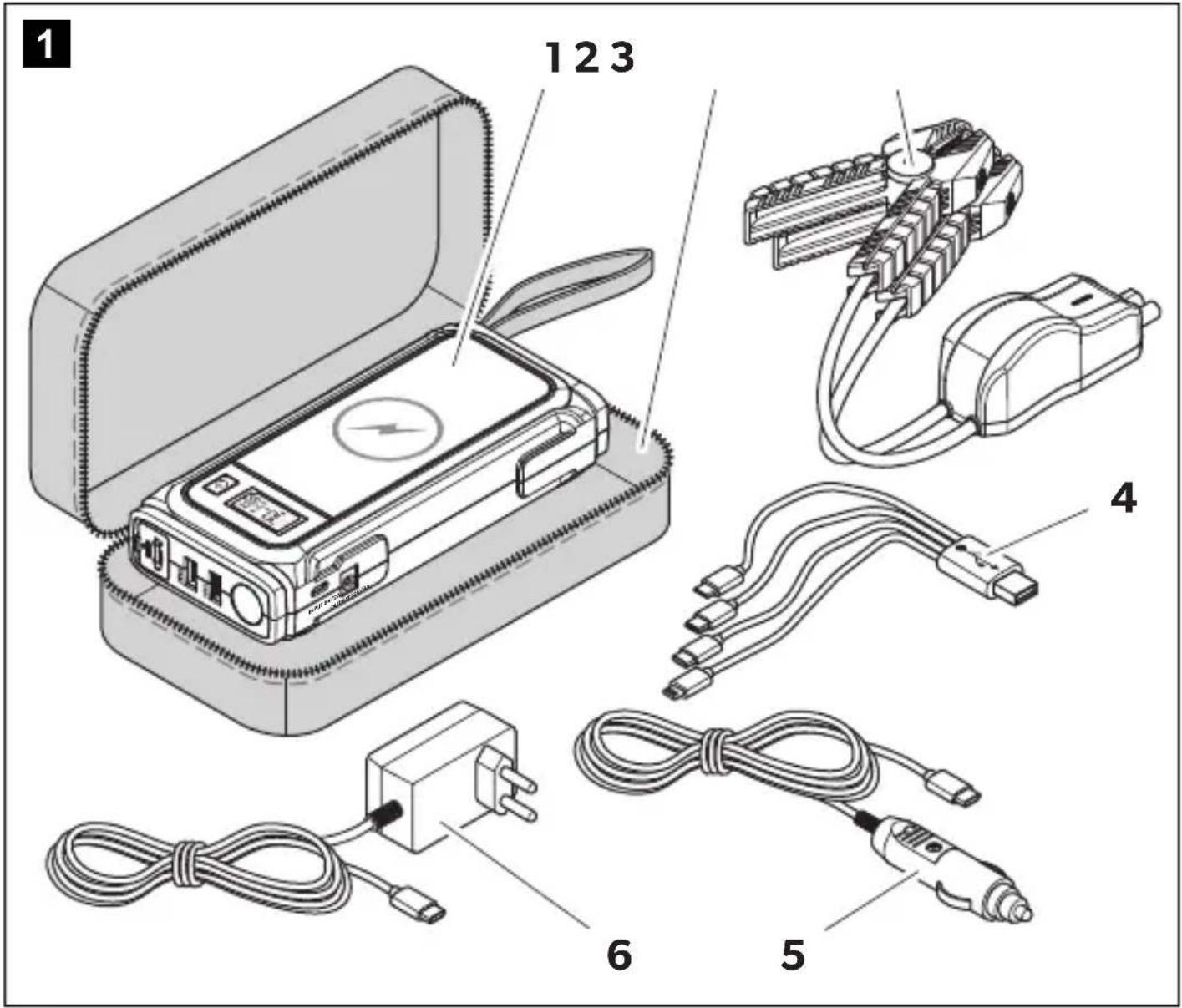
4 Scope of delivery
| No. in fig. 1, Description Quantity page 3 | |
| 1 Jump starter 1 | |
| 2 Carry bag 1 | |
| 3 Jump-starting cable set (160 mm) with battery clamps and plug (EC5) with short circuit protection | |
| 4 USB adapter cable 1 | |
| 5 Car charger 1 | |
| 6 Mains charger 1 | |
| - Short operating manual 1 | |
| - Operating manual (digital only) 1 |
5 Accessories
Designation Ref. no.
Jump-starting cable set (300 mm) with battery clamps and plug (EC5) with short circuit protection
9620006682
6 Intended use
The jump starter is intended to be used for bridging vehicles with 12 V batteries and up to 6 liter gasoline engines or 4 liter diesel engines (e.g., cars, trucks, motorcycles, boats, lawn mowers, etc.) and for charging or operating digital mobile devices (e.g., cell phones, tablets, laptops, cameras, etc.).
The jump starter is intended for temporary use outdoors or in garages, and reasonable care should be exercised when using this device in wet conditions.
Other functions such as charging devices by ports are suitable for use at home, household workshops, or garages.
The jump starter is not suitable for:
- Parallel connection with other jump starters
- Service workshops or commercial use
This product is only suitable for the intended purpose and application in accordance with these instructions.
This manual provides information that is necessary for proper installation and/or operation of the product. Poor installation and/or improper operating or maintenance will result in unsatisfactory performance and a possible failure.
The manufacturer accepts no liability for any injury or damage to the product resulting from:
- Incorrect installation, assembly, or connection, including excess voltage; incorrect maintenance or use of spare parts other than original spare parts provided by the manufacturer
- Alterations to the product without express permission from the manufacturer
- Use for purposes other than those described in this manual
Dometic reserves the right to change product appearance and product specifications.
7 Technical description
7.1 General description
The jump starter allows vehicles to be started without further assistance from third parties if a maximum peak current of 1000 A is required to start the vehicle.
The jump starter is equipped with a lithium polymer battery and an integrated LED flashlight with continuous light, strobe light and SOS signal for emergency situations.
With the two charging cables supplied, the device can be charged via the AC power supply or mobile via a 12 V vehicle socket.
Digital mobile devices can be charged either by wireless or by one of the two USB outputs. In addition, the device can be used to operate 12 V devices via the 12 V DC output.
The jump starter has the following protective mechanisms:
High and low temperature protection Over current protection - Low and over voltage protection - Protection against short circuit Overcharge and deep discharge protection of the internal battery
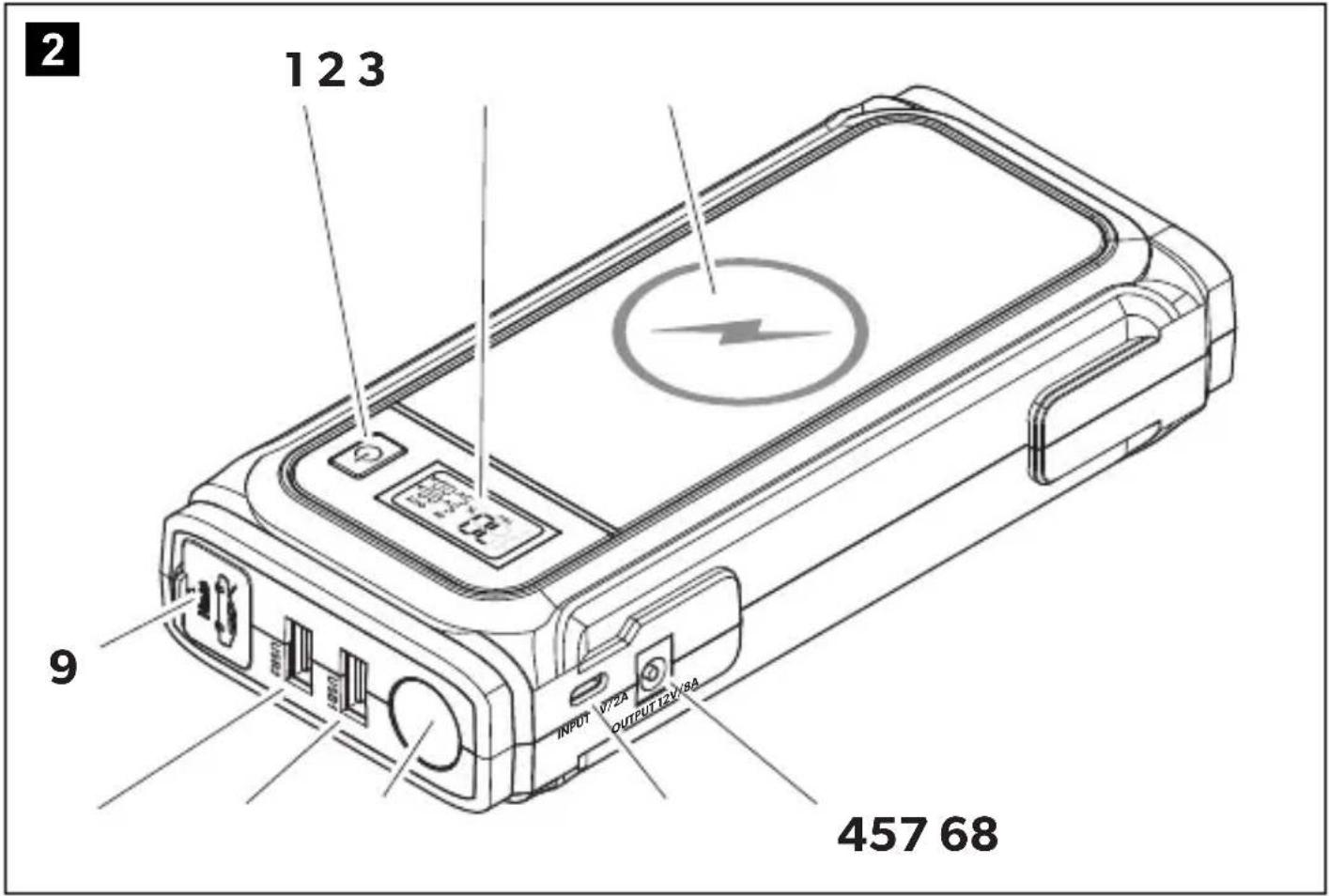
7.2 Description of the device
| Item in fig. 2, page 4 | Designation | Item in fig. 2, page 4 | Designation |
| 1 | 按钮 | 6 LED flashlight | |
| 2 LCD display 7 USB 1 output | |||
| 3 Wireless charging pad 8 USB 2 output | |||
| 4 12 V DC output 9 Jump-starting output (EC5) | |||
| 5 Charging input | |||
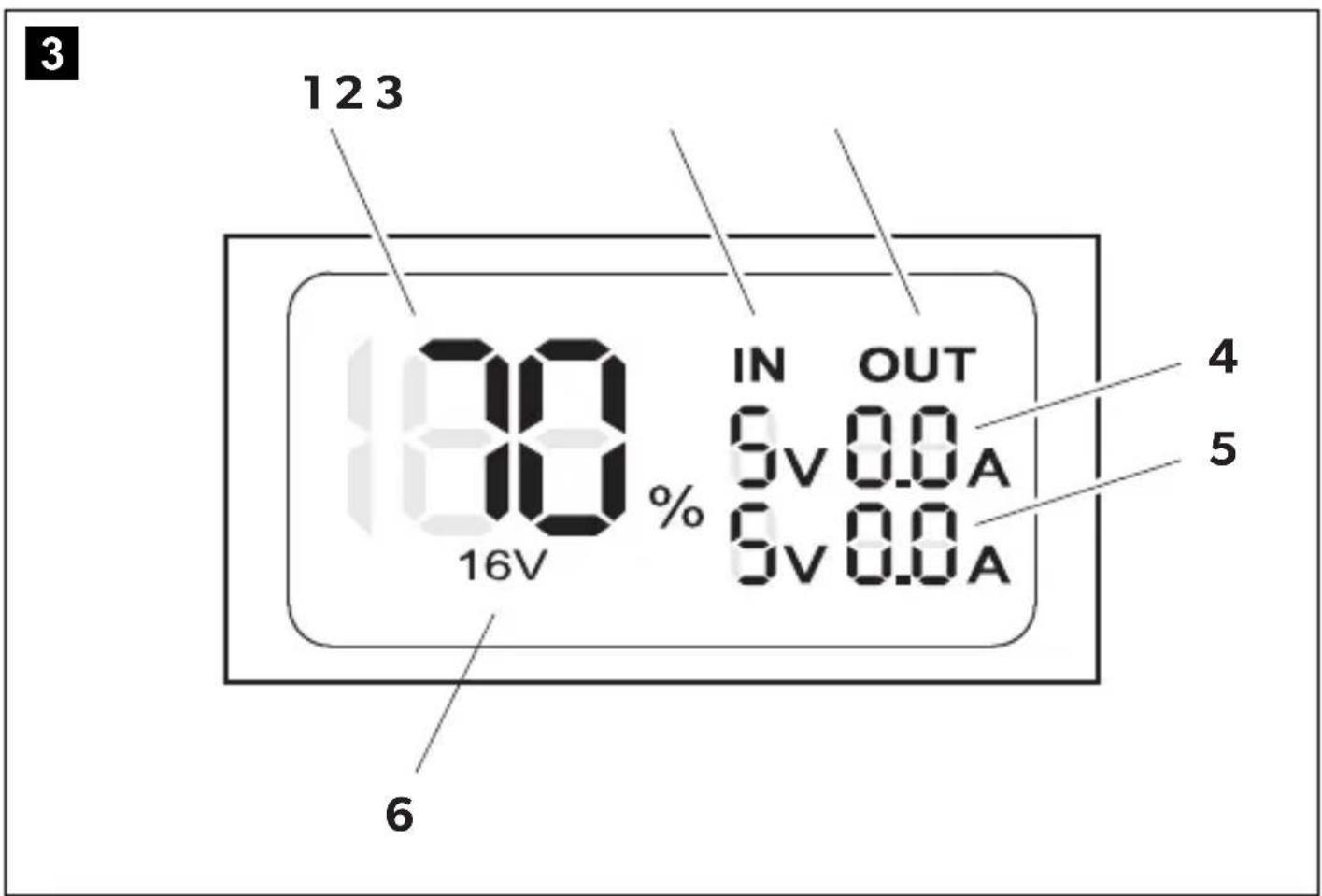
7.3 LCD display elements
| Item in fig. 3, page 4 | Description |
| 1 | Indicates the current state of charge in percent between 0 % (discharged) and 100 % (fully charged) |
| 2 IN: Indicates that the jump starter is being charged. Note: The indicator flashes until the jump starter is 100 % charged. | |
| 3 OUT: Indicates that a device is being charged or a vehicle is being jump started. | |
| 4 | Indicates the measured voltage and current of the digital mobile device connected (USB 1). |
| 5 | Indicates the measured voltage and current of the digital mobile device connected (USB 2). |
| 6 | 16 V: Indicates that a 12 V device is connected (12 V DC output). |
8 Before first use
Charge the jump starter before first use or after long storage until it is fully charged (see chapter "Charging the jump starter" on page 15).
9 Operation
9.1 Switching the jump starter on
Press the button to switch the jump starter on. The LCD display switches on. The device is ready for use.
9.2 Switching the LCD display on

NOTE
The LCD display automatically switches to the power saving mode after 20 seconds if no settings are made.
When the LCD display is in power saving mode, press the button briefly. The LCD display switches on.
9.3 Switching the jump starter off

NOTE
- The jump starter automatically switches off after 20 seconds if no load and no charging source are connected.
- The jump starter cannot be switched off when a load or charging source is connected.
- If connected, disconnect the loads or the charging source.
- Press and hold the button for at least 5 seconds.
The LCD display switches off. The device is switched off.
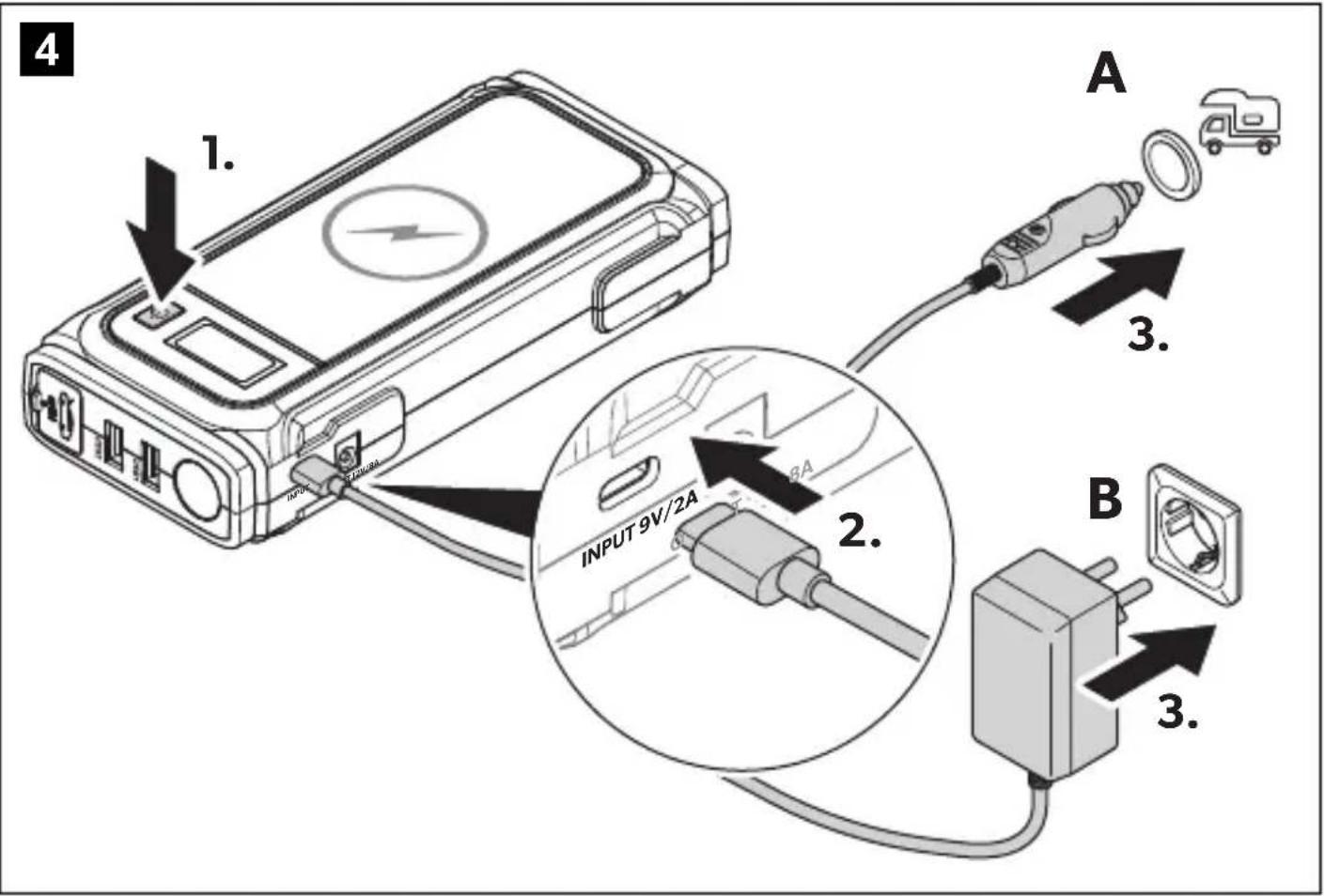
9.4 Charging the jump starter

NOTE
When the device is discharged, a full charge takes 3-5 hours with either charging method.
The jump starter can be charged in two ways:
Using the car charger (fig. 4 A, page 5) or the mains charger (fig. 4 B, page 5). Place the jump starter on a firm base. To charge the jump starter, proceed as shown (fig. 4, page 5).
Charging stops automatically when the jump starter is fully charged:
The LCD display shows the state of charge as 100%. The "IN" indicator stops flashing and is displayed permanently.
Checking the state of charge
Press the button to switch the jump starter on. The LCD display shows the state of charge (fig. 3 B, page 4) between 0% (discharged) and 100% (fully charged).
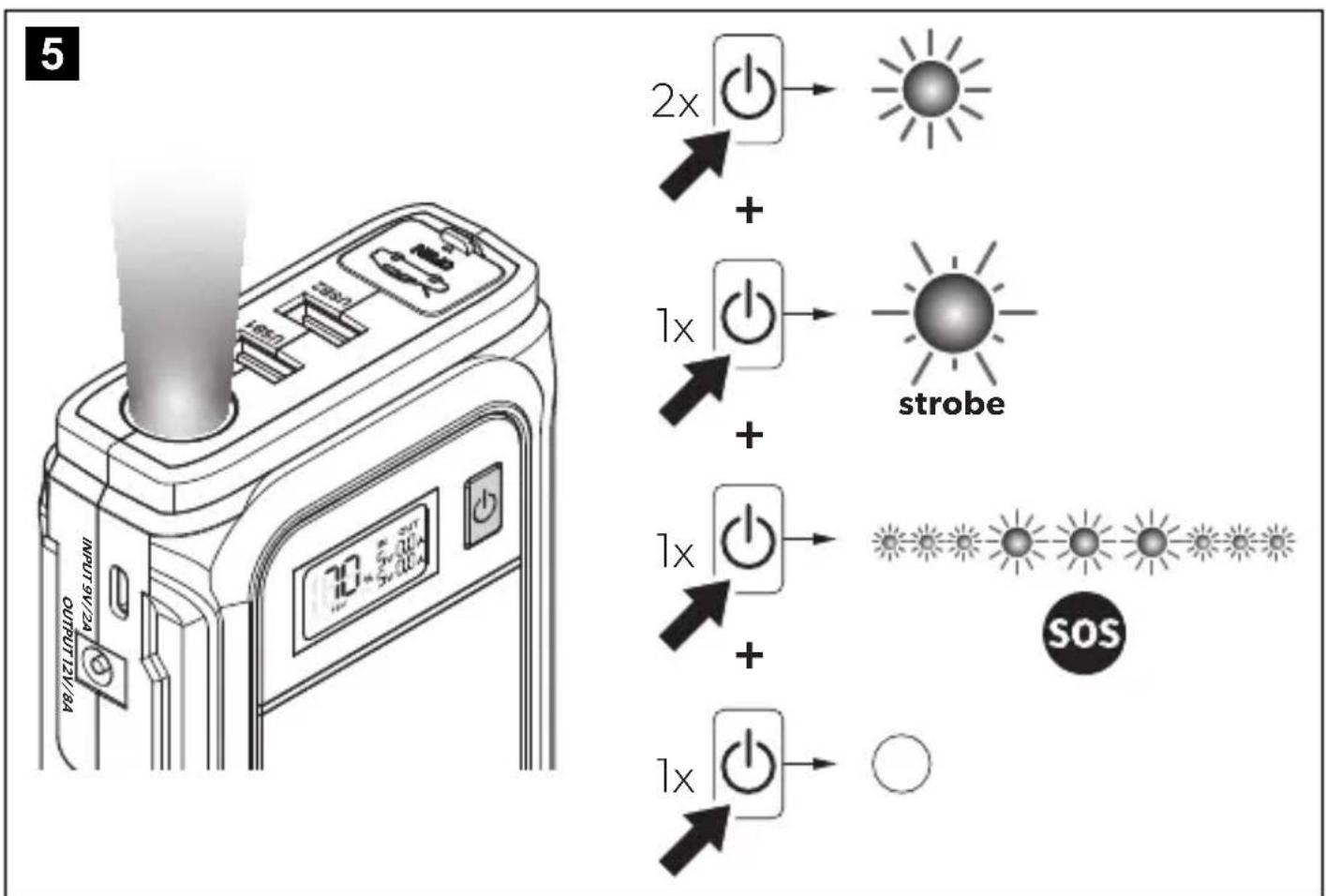
9.5 Using the LED flashlight

CAUTION! Risk of injury
Avoid looking directly into the LED flashlight as this may damage your eyes.

NOTE
The operation of the LED flashlight is not available during charging.
The LED flashlight offers three operating modes:
- Continuous light: The LED flashlight lights up continuously.
- Strobe light: The LED flashlight flashes at a constant interval.
- SOS signal: The LED flashlight is flashing the SOS signal pattern. To use the LED flashlight and switch between the different operating modes, proceed as shown (fig. 5, page 5).
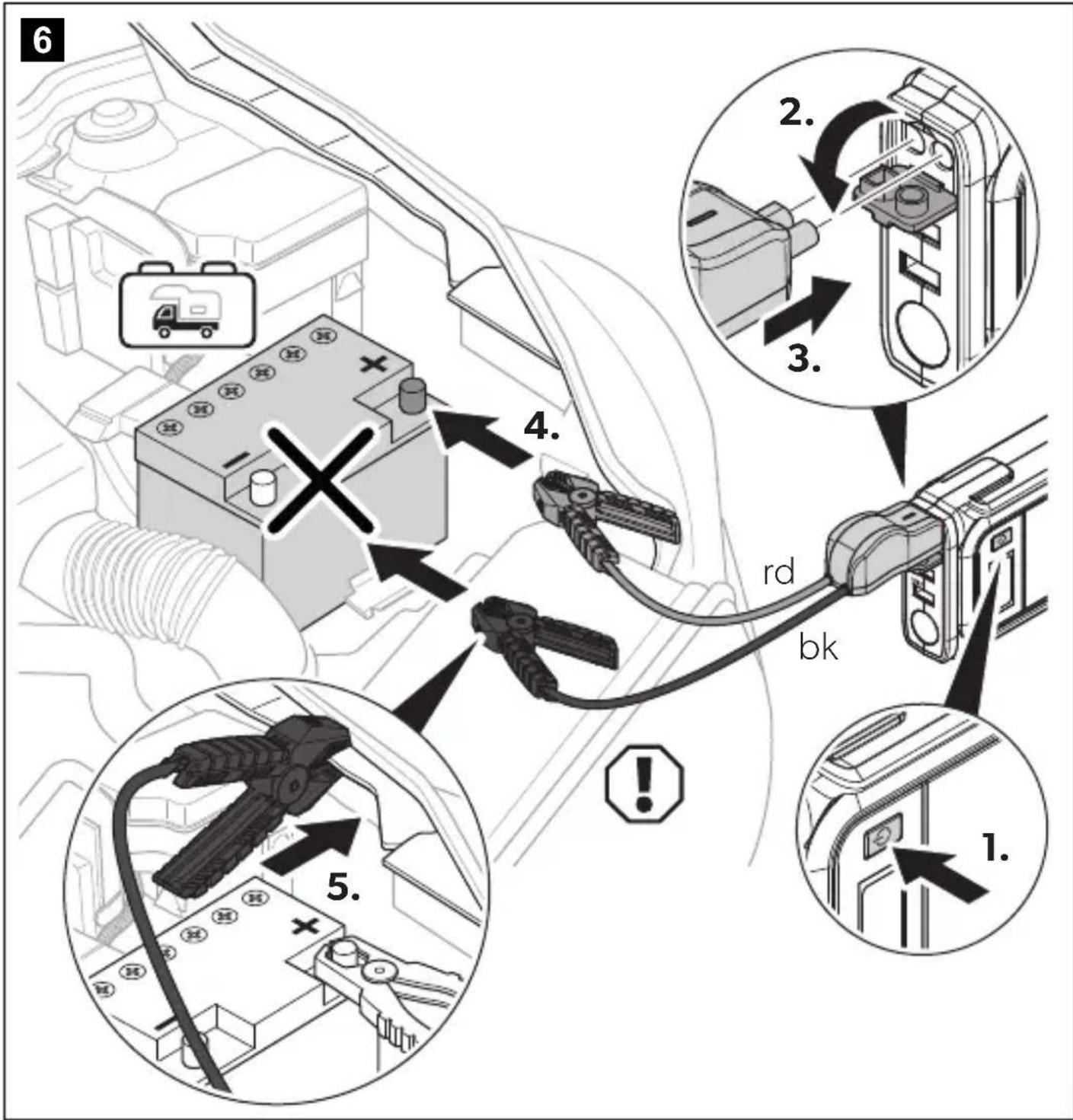
9.6 Jump-starting vehicles

WARNING! Electrocution hazard and fire hazard
- Do not connect the two battery clamps together.
- Do not use battery clamps other than those provided.
- Observe both the required connection and disconnection sequence of the battery clamps and the correct polarity.

CAUTION! Risk of injury
Do not put fingers or hands into the battery clamps.

NOTICE! Damage hazard
- Do not jump-start a deeply discharged or defective vehicle battery.
- Do not attempt to jump start the vehicle more than 3 times in a row. If the vehicle does not start after 3 attempts, the vehicle should be checked by authorized workshops.

NOTE
- The jump starter can jump-start up to 30 times, depending on the displacement and vehicle engine.
- Jump-starting may not work properly for vehicles that require remote battery jumper locations (e.g., battery is in the trunk or other location). Refer to the operating manual of your vehicle.
Battery clamps' LED signal Description
Flashes green and red The jump starter is ready for connection.
| Continuously lit red, with beeping alarm tone | The battery clamps are connected in reverse polarity. |
| Continuously lit green for 30 seconds, then changes to continuously lit red | Disconnect the battery clamps and reconnect them to reuse. The LED will be continuously lit green again. |
| Continuously lit red, with low constant tone | The battery clamps are in contact to each other. |
Observe the following instructions before jump-starting vehicles:
- Put the vehicle in parking position. Ensure that vehicles with manual transmission are in neutral and the handbrake is engaged.
- Ensure that the jump starter is at least 50% charged. If the state of charge is below 50%, the jump starter may not be able to jump start a vehicle.
- Ensure that the plug (EC5) is firmly seated in the jump-starting output on the jump starter.
- Disconnect all digital mobile devices before connecting the battery clamps.
Observe the following instructions after jump-starting vehicles:
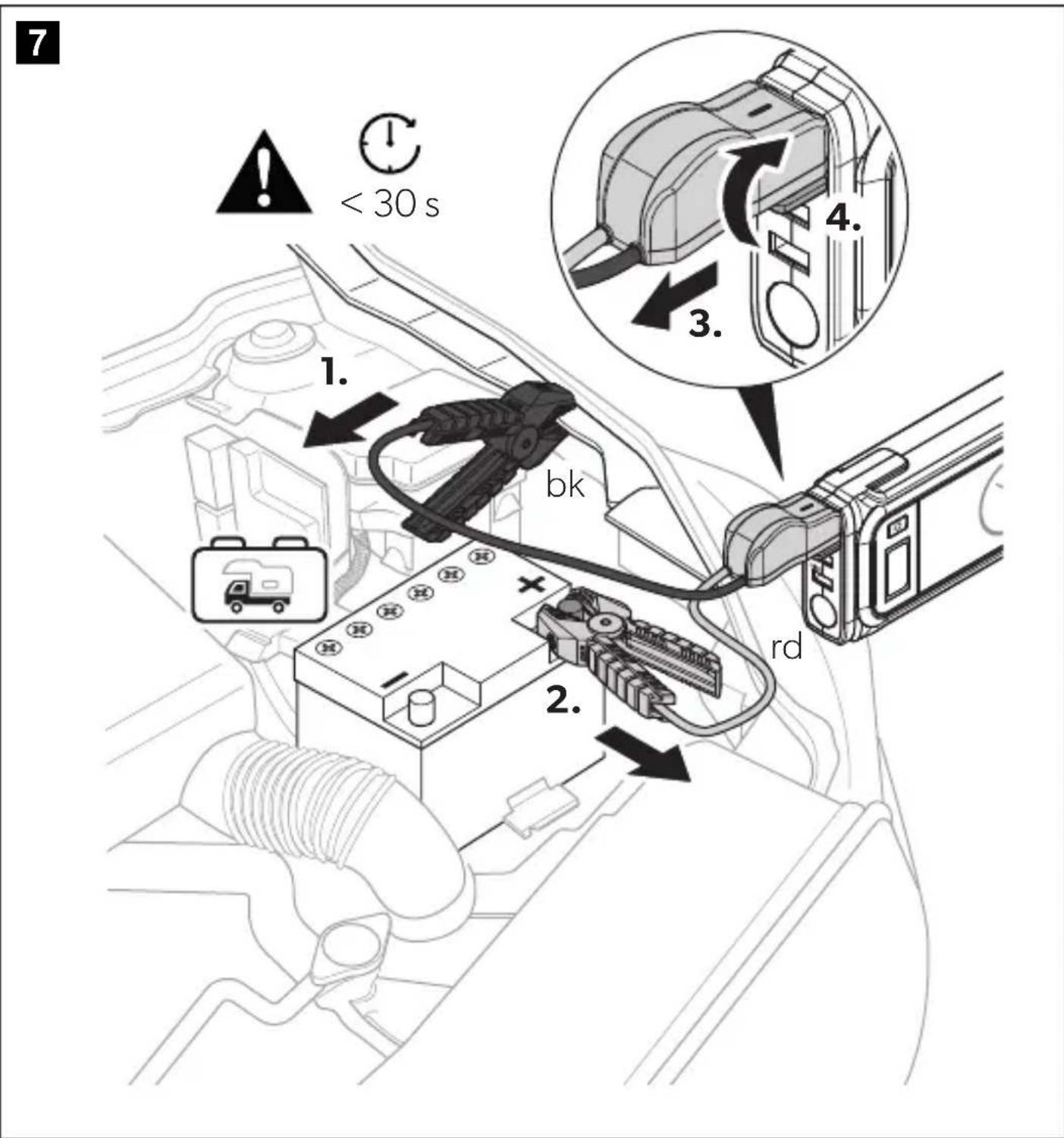
- Disconnect the battery clamps within 30 seconds in reverse order (see chapter "Disconnecting the battery clamps (fig. 7, page 7)" on page 18).
- Switch on electrical consumers, e.g., ventilation to protect the on-board electronics.
- Keep the engine running or drive the vehicle for at least 30 minutes to ensure that the battery can sufficiently recharge.
Connecting the battery clamps (fig. 6, page 6)
- Connect the red (rd) battery clamp to the positive terminal of the starting battery.
- Connect the black (bk) battery clamp to ground (chassis).

NOTE
- If specified, observe the information on suitable ground points in the operating manual of the vehicle.
- Suitable ground points are stable unpainted metal parts in the engine compartment, e.g., the engine block.
- If you cannot connect the black battery clamp ground (chassis), connect it to the negative battery terminal.
- The red and green LED of the battery clamps flash 1 - 3 seconds. Afterwards the green LED of the battery clamp lights up continuously.
Disconnecting the battery clamps (fig. 7, page 7)
- Disconnect the black (bk) battery clamp.
- Disconnect the red (rd) battery clamp.
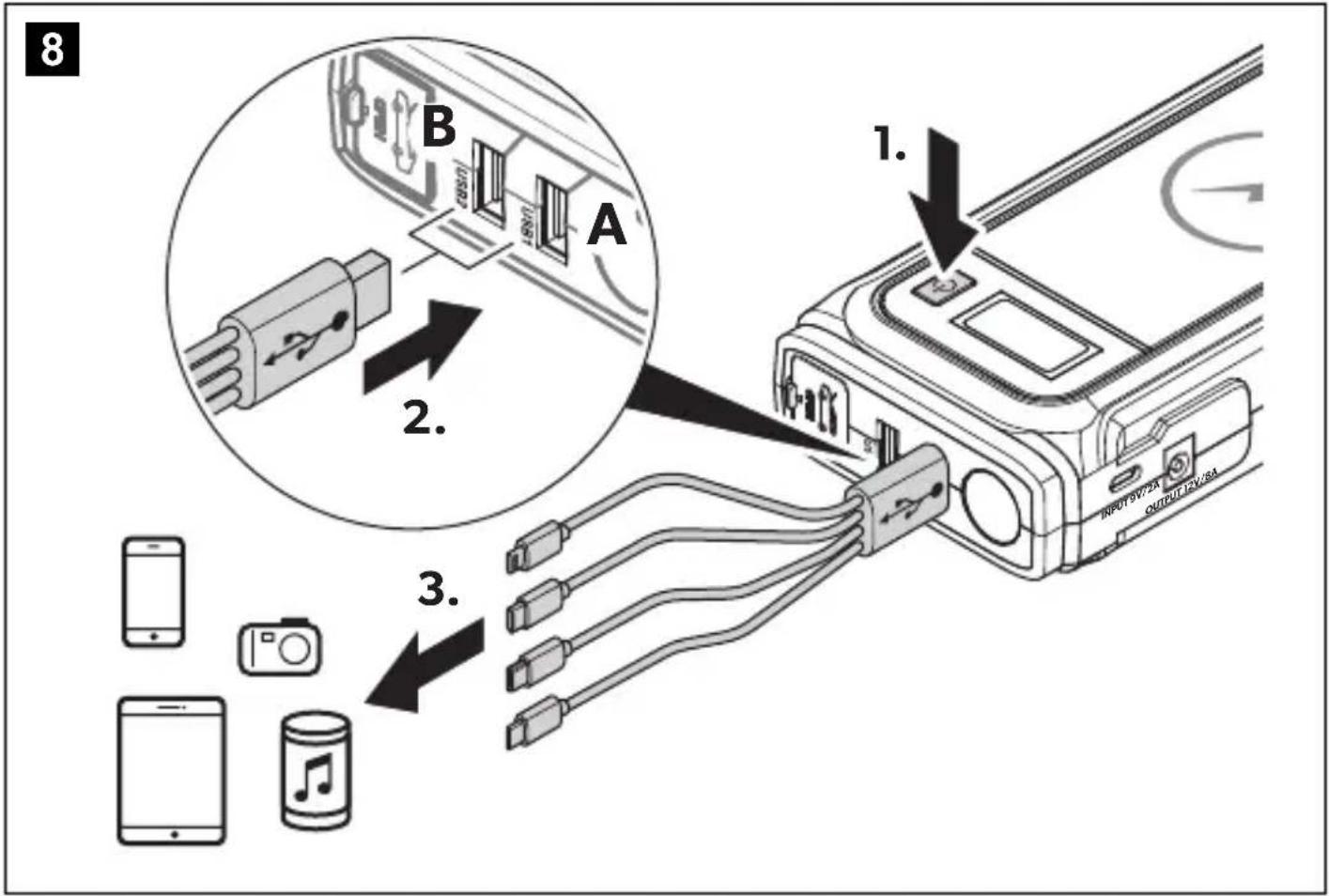
9.7 Charging via USB

NOTE
- Charging of digital mobile devices is not possible while the jump starter is being charged.
- Two digital mobile devices can be charged at the same time by using both USB outputs.
To charge digital mobile devices, use the USB adapter cable provided and proceed as shown (fig. 8, page 8). The LCD display shows the remaining state of charge of the jump starter.
9.8 Operating 12 V devices

NOTE
Operation of 12 V devices is not possible while the jump starter is being charged.
To operate 12 V devices, connect the power cable of the 12 V device to the 12 V DC output of the jump starter (fig. 2 4, page 4). The LCD display shows the remaining state of charge of the jump starter.
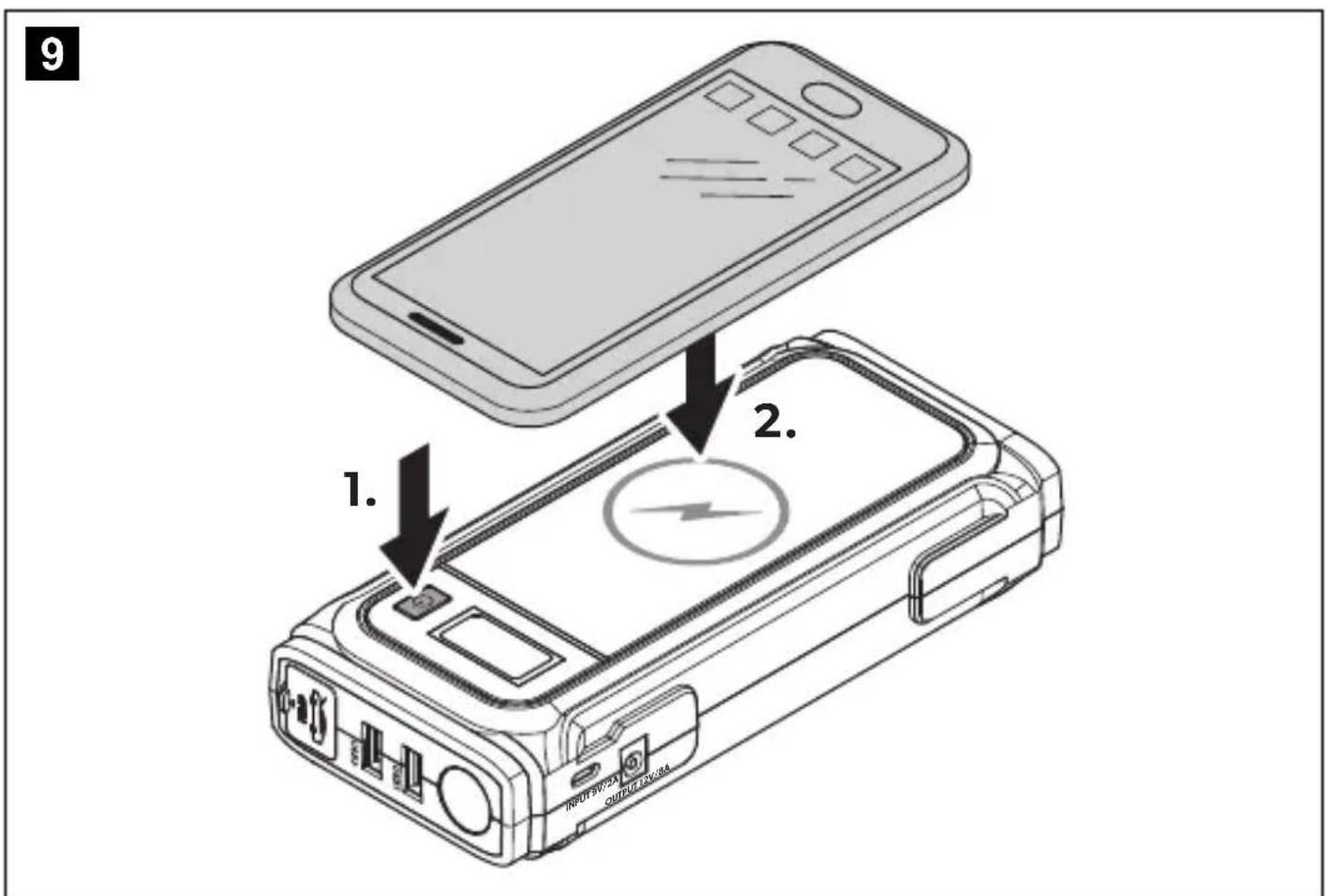
9.9 Wireless charging

NOTE
Ensure the device supports wireless charging.
To wireless charge devices, press the button and place the device on the wireless charging pad, see fig. 9, page 8. The LCD display shows the remaining state of charge of the jump starter.
10 Cleaning and maintenance

WARNING! Electrocution hazard
Unplug the device from the power supply before each cleaning and maintenance.

NOTICE! Damage hazard
- Never clean the device under running water or in dish water.
- Do not use sharp or hard objects, abrasive cleaning agents or bleach during cleaning as these can damage the device.
Occasionally clean the device with a soft, damp cloth. Regularly check live cables or lines for insulation faults, breaks or loose connections. Regularly check the state of charge of the device battery. Charge the battery after each use and at least every 3-6 months, even when not in use.
11 Troubleshooting
| Fault Possible cause Suggested remedy | ||
| The jump starter does not work. The button does not work. | The jump starter is deeply discharged. | Charge the jump starter (see chapter "Charging the jump starter" on page 15). |
| Insulation faults, breaks or loose connections at the live cables. | Check live cables for insulation faults, breaks or loose connections. If you cannot find an error, contact an authorized service agent. | |
| The low voltage protection of the jump starter is active. | Charge the jump starter (see chapter "Charging the jump starter" on page 15) to reactivate it. | |
| The over current protection of the jump starter is active. | Remove the load from the USB or 12 VDC output. Charge the jump starter (see chapter "Charging the jump starter" on page 15) to reactivate it. | |
| The short circuit protection of the jump starter is active. | Remove the load from the USB or 12 VDC output. Charge the jump starter (see chapter "Charging the jump starter" on page 15) to reactivate it. | |
| The battery is significantly sulfated. | Replace the battery. | |
| The vehicle is not jump-started. | The jump starter is less than 50% charged. | Charge the jump starter (see chapter "Charging the jump starter" on page 15). |
| The battery clamps are loose or not connected correctly. | Check the connections. Ensure that the battery clamps are firmly secured and connected correctly. Reconnect if necessary. | |
| The battery terminals are dirty or corroded. | Clean the battery terminals and reconnect the jump starter. | |
| The red LED of the battery clamps lights up. | The jump starter voltage is too low. | Charge the jump starter (see chapter "Charging the jump starter" on page 15). |
| The red LED of the battery clamps lights up and a buzzing sounds. | The battery clamps are short circuited. | Reconnect the battery clamps (see chapter "Jump-starting vehicles" on page 16). |
| The battery clamps are connected incorrectly. | ||
| The green LED of the battery clamps lights up and the red LED flashes. | The battery clamps have not activated within 30 seconds. | Reconnect the battery clamps (see chapter "Jump-starting vehicles" on page 16). |
| The red LED of the battery clamps flashes. The jump starter does not operate. | The battery clamps are not connected. | Connect the jump starter to the starting battery (see chapter "Connecting the battery clamps (fig. 6, page 6)" on page 17). |
| The high voltage protection of the battery clamps is active. | Ensure that the voltage is not too high (>16.7 V). | |
| The low voltage protection of the battery clamps is active. | Charge the jump starter (see chapter "Charging the jump starter" on page 15). | |
| The short circuit protection of the battery clamps is active. | Reconnect the battery clamps (see chapter "Connecting the battery clamps (fig. 6, page 6)" on page 17). | |
| The reverse polarity protections of the battery clamps is active. | ||
| The high temperature protection of the battery clamps is active. | The battery clamps switch off automatically when the operating temperature is too high (>80°C). Let the battery clamps cool down. | |
| The jump starterdoes not operate after it is connected to the starting battery. | The start of the battery clamps is in progress. | Wait 30 seconds. If necessary, reconnect the battery clamps (see chapter "Connecting the battery clamps (fig. 6, page 6)" on page 17). |
| The red and green LED of the battery clamps flashes. | The reverse charging protection is active. | The battery clamps switch off the connection to the jump starter automatically. Ensure the battery clamps are connected correctly (see chapter "Connecting the battery clamps (fig. 6, page 6)" on page 17). |
| The battery clamps are in stand-by mode. | The flashing stops when the battery clamps are put back into operation. | |
12 Warranty
The statutory warranty period applies. If the product is defective, please contact your retailer or the manufacturer's branch in your country (see dometic.com/dealer).
For repair and warranty processing, please include the following documents when you send in the product:
- A copy of the receipt with purchasing date
- A reason for the claim or description of the fault
Note that self-repair or non-professional repair can have safety consequences and might void the warranty.
13 Disposal
Recycling packaging material

Place the packaging material in the appropriate recycling waste bins wherever possible.
Recycling products with non-replaceable batteries, rechargeable batteries, or light sources
If the product contains any non-replaceable batteries, rechargeable batteries, or light sources, you don't have to remove them before disposal. If you wish to finally dispose of the product, ask your local recycling center or specialist dealer for details about how to do this in accordance with the applicable disposal regulations. The product can be disposed free of charge.
Recycling products with non-replaceable batteries, rechargeable batteries, or light sources
Dispose the product in accordance with all applicable regulations. The product can be disposed free of charge.
14 Technical data
| PJS 1000 | |
| Battery pack | |
| Battery type Lithium polymer battery | |
| Rated voltage 14.8 V--- | |
| Battery capacity 59.2 Wh | |
| USB outputs | |
| Charging voltage | 5 V---(9 V---) |
| Rated current 2.1 A (2 A) | |
| DC output | |
| Charging voltage | 12 V---(16 V---) |
| Rated current ≤ 8 A | |
| Wireless | |
| Frequency Range 112 kHz - 148 kHz | |
| Output power 10 W | |
| Wireless charging standard Qi | |
| Charging input | |
| Charging voltage range | 5-9 V---±10% |
| Input current max. 2 A | |
| LED flashlight | |
| LED lighting power 1 W | |
| Lumen 110 lm | |
| General technical data | |
| Start current | ≤400 A (2 s) |
| Peak current | 1000 A (0.1 s) |
| Ambient temperature for operation -10 °C to +45 °C | |
| Charging temperature 0 °C to +45 °C | |
| Storage temperature range -20 °C to +60 °C | |
| Optimal storage temperature | +20 °C |
| Ambient humidity | ≤85%, non-condensing |
| Dimensions (W x D x H) | 192 x 88 x 41.5 mm |
| Weight | 600 g |
| Inspection/certification | CE UK CA |
Hereby, Dometic Germany GmbH declares that the radio equipment type PJS 1000 is in compliance with Directive 2014/53/EU. The full text of the EU declaration of conformity is available at the following Internet address: https://documents.dometic.com.
7 Description technique
customersupportcenter@dometic.com
12.2 Other regions
Make sure that the device supports wireless charging.
To charge devices wirelessly, you must press the button and place the device on the wireless charging pad. See fig. 9, page 8. The LCD display shows the remaining charging status of the jump starter.

J 1
y
JbXyI 1
Jlalll Jlbl Jgliae 15y IaIg aaiu g jllbai
. jieyjiey jiey
J 1
Lg 100000000000000000000000000000000000000000000

jLglll 1000000000000000000000000000000000000000000
y
.
j12
.
y

J 1
·jg jgln

- Since a_n = a_1 + (a_n - 1)
A
j. bai JalSll ayogaoaill ayjbln jz .buiu kay jz
y 1
•
aill 12j aodil jaoi j kaiis
.
4
21j21 22>11, jaiia 21 22>11 jai
y
a 3-1 aal alal alal LED
(7 a. 7 J) aJbIaJoo . (bk) 2JyJIaJIbIaJIaJoo .1 . (rd) 2JyJIaJIbIaJIaJoo .2
USB 9.7
品
J 1. USB
i
8.8
12 9.8
a 1
42) 12 jj 12 jj jj 12 jj jj jj 12 jj jj jj (4
9.9
sL
i
.8 9 jj j j j j j j j j j j j j j j j j j j j j j j j j j j j j j j j j j j j j j j j j j j j
10


aIg aiai iIac J5 jai bll jie jie jie jie
. 1
b >a.b)
6-3 6-3
114
| الترجمة | الترجمة | الترجمة |
| "الإستعمال الحرفية (الإستعمال الحرفية) (237 صعة) | ملاوي بعسف惕ي بعسف惕ي | الترجمة الحرفية (الإستعمال الحرفية) (238 صعة) |
| "الإستعمال الحرفية (الإستعمال الحرفية) (239 صعة) | ملاوي بعسف惕ي بعسف惕ي | الترجمة الحرفية (الإستعمال الحرفية) (240 ص PLL) |
| "الإستعمال الحرفية (الإستnzر الحرفية) (241 صعة) | ملاوي بعسف惕ي بعسف惕ي | الترجمة الح Nzر الحرفية (الإستnzر الح Nzر) |
| "الإستnzر الحرفية (الإستnzر الح Nzر) | ملاوي بعسف惕ي بعسف惕ي | الترجمة الح Nzر الح Nzر |
| "الإستnzر الح Nzر (242 صعة) | ملاوي بعسف惕ي بعسف惕ي | الترجمة الح Nzر (243 ص PLL) |
| "الإستnzر (244 صعة) | ملاوي بعسف惕ي بعسف惕ي | الترجمة الح Nzر (245 ص PLL) |
| "الإستnzر (246 صerea) | ملاوي بعسف惕ي بعسف惕ي | الترجمة الح Nzر (247 ص PLL) |
| "الإستnzر (248 صerea) | ملاوي بعسف惕ي بعسف惕ي | الترجمة الح Nzر (249 ص PLL) |
| "الإستnzر (250 صerea) | ملاوي بعسف惕ي بعسف惕ي | الTRL (251 ص PLL) |
| "الإستnzر (252 صerea) | ملاوي بعسف惕ي بعسف惕ي | الTRL (253 ص PLL) |
| "الإستnzر (254 صerea) | ملاوي بعسف惕ي بعسف惕ي | الTRL (255 ص PLL) |
| "الإستnzر (256 صerea) | ملاوي بعسف惕ي بعسف惕ي | الTRL (257 ص PLL) |
| "الإستnzر (258 صerea) | ملاوي بعسف惕ي بعسف惕ي | الTRL (259 ص PLL) |
| "الإستnzر (260 صerea) | ملاوي بعسف惕ي بعسف惕ي | الTRL (261 ص PLL) |
| "الإستnzر (262 صerea) | ملاوي بعسف惕ي بعسف惕ي | الTRL (263 ص PLL) |
| "الإستnzر (264 صerea) | ملاوي بعسف惕ي بعسف惕ي | الTRL (265 ص PLL) |
| "الإستnzر (266 صerea) | ملاوي بعسف惕ي بعسف惕ي | الTRL (267 ص PLL) |
| "الإستnzر (268 صerea) | ملاوي بعسف惕ي بعسف惕ي | الTRL (269 ص PLL) |
| "الإستnzر (270 صerea) | ملاوي بعسف惕ي بعسف惕ي | الTRL (271 ص PLL) |
| "الإستnzر (272 صerea) | ملاوي بعسف惕ي بعسف惕ي | الTRL (273 ص PLL) |
| "الإستnzر (274 صerea) | ملاوي بعسف惕ي بعسف惕ي | الTRL (275 ص PLL) |
| "الإستnzر (276 صerea) | ملاوي بعسف惕ي بعسف惕ي | الTRL (277 ص PLL) |
| "الإستnzر (278 صerea) | ملاوي بعسف惕ي بعسف惕ي | الTRL (279 ص PLL) |
| "الإستnzر (280 صerea) | ملاوي بعسف惕ي بعسف惕ي | الTRL (281 ص PLL) |
| "الإستnzر (282 صerea) | ملاوي بعسف惕ي بعسف惕ي | الTRL (283 ص PLL) |
| "الإستnzر (284 صerea) | ملاوي بعسف惕ي بعسف惕ي | الTRL (285 ص PLL) |
| "الإستnzر (286 صerea) | ملاوي بعسف惕ي بعسف惕ي | الTRL (287 ص PLL) |
| "الإستnzر (288 صerea) | mلاوي بعسف惕ي بعسف惕ي | الTRL (289 ص PLL) |
| "الإستnzر (290 صerea) | mلاوي بعسف惕ي بعسف惕ي | الTRL (291 ص PLL) |
| "الإستnzر (292 صerea) | mلاوي بعسف惕ي بعسف惕ي | الTRL (293 ص PLL) |
| "الإستnzر (294 صerea) | mلاوي بعسف惕ي بعسف惕ي | الTRL (295 ص PLL) |
| "الإستnzر (296 صerea) | mلاوي بعسف惕ي بعسف惕ي | الTRL (297 ص PLL) |
| "الإستnzر (300 صerea) | mلاوي بعسف惕ي بعسف惕ي | الTRL (301 ص PLL) |
| "الإستnzر (302 صerea) | mلاوي بعسف惕ي بعسف惕ي | الTRL (303 ص PLL) |
| "الإستnzر (304 صerea) | mلاوي بعسف惕ي بعسف惕ي | الTRL (305 ص PLL) |
| "الإستnzر (306 صerea) | mلاوي بعسف惕ي بعسف惕ي | الTRL (307 ص PLL) |
| "الإستnzر (308 صerea) | mلاوي بعسف惕ي بعسف惕ي | الTRL (309 ص PLL) |
| "الإستnzر (310 صerea) | mلاوي بعسف惕ي بعسف惕ي | الTRL (311 ص PLL) |
| "الإستnzر (312 صerea) | mلاوي بعسف惕ي بعسف惕ي | الTRL (313 ص PLL) |
| "الإستnzر (314 صerea) | mلاوي بعسف惕ي بعسف惕ي | الTRL (315 ص PLL) |
| "الإستnzر (316 صerea) | mلاوي بعسف惕ي بعسف惕ي | الTRL (317 sc PLL) |
| "الإستnzر (318 sc PLL) | mلاوي بعسف惕ي بعسف惕ي | الTRL (319 sc PLL) |
| "الإستnzر (320 sc PLL) | mلاوي بعسف惕ي بعسف惕ي | الTRL (321 sc PLL) |
| "الإستnzر (322 sc PLL) | mلاوي بعسف惕ي بعسف惕ي | الTRL (323 sc PLL) |
| "الإستnzر (324 sc PLL) | mلاوي بعسف惕ي بعسف惕ي | الTRL (325 sc PLL) |
| "الإستnzر (326 sc PLL) | mلاوي بعسف惕ي بعسف惕ي | الTRL (327 sc PLL) |
| "الإستnzر (328 sc PLL) | mلاوي بعسف惕ي بعسف惕ي | الTRL (329 sc PLL) |
| "الإستnzر (330 sc PLL) | mلاوي بعسف惕ي بعسف惕ي | الTRL (331 sc PLL) |
| "الإستnzر (332 sc PLL) | mلاوي بعسف惕ي بعسف惕ي | الTRL (333 sc PLL) |
| "الإستnzر (334 sc PLL) | mلاوي بعسف惕ي بعسف惕ي | الTRL (335 sc PLL) |
| "الإستnzر (336 sc PLL) | mلاوي بعسف惕ي بعسف惕ي | الTRL (337 sc PLL) |
| "الإستnzر (338 sc PLL) | mلاوي بعسف惕ي بعسف惕ي | الTRL (339 sc PLL) |
| "الإستnzر (340 sc PLL) | mلاوي بعسف惕ي بعسف惕ي | الTRL (341 sc PLL) |
| "الإستnzر (342 sc PLL) | mلاوي بعسف惕ي بعسف惕ي | الTRL (343 sc PLL) |
| "الإستnzر (344 sc PLL) | mلاوي بعسف惕ي بعسف惕ي | الTRL (345 sc PLL) |
| "الإستnzر (346 sc PLL) | mلاوي بعسف惕ي بعسف惕ي | الTRL (347 sc PLL) |
| "الإستnzر (348 sc PLL) | mلاوي بعسف惕ي بعسف惕ي | الTRL (349 sc PLL) |
| "الإستnzر (350 sc PLL) | mلاوي بعسف惕ي بعسف惕ي | الTRL (351 sc PLL) |
| "الإستnzر (352 sc PLL) | mلاوي بعسف惕ي بعسف惕ي | الTRL (352 sc PLL) |
| "الإستnzر (353 sc PLL) | mلاوي بعسف惕ي بعسف惕ي | الTRL (353 sc PLL) |
| "الإستnzر (354 sc PLL) | mلاوي بعسف惕ي بعسف惕ي | الTRL (354 sc PLL) |
| "الإستnzر (355 sc PLL) | mلاوي بعسف惕ي بعسف惕ي | الTRL (355 sc PLL) |
| "الإستnzر (356 sc PLL) | mلاوي بعسف惕ي بعسف惕ي | الTRL (356 sc PLL) |
| "الإستnzر (357 sc PLL) | mلاوي بعسف惕ي بعسف惕ي | الTRL (357 sc PLL) |
| "الإستnzر (358 sc PLL) | mلاوي بعسف惕ي بعسف惕ي | الTRL (358 sc PLL) |
| "الإستnzر (359 sc PLL) | mلاوي بعسف惕ي بعسف惕ي | الTRL (359 sc PLL) |
| "الإستnzر (360 sc PLL) | mلاوي بعسف惕ي بعسف惕ي | الTRL (360 sc PLL) |
| "الإستnzر (361 sc PLL) | mلاوي بعسف惕ي بعسف惕ي | الTRL (361 sc PLL) |
| "الإستnzر (362 sc PLL) | mلاوي بعسف惕ي بعسف惕ي | الTRL (362 sc PLL) |
| "الإستnzر (363 sc PLL) | mلاوي بعسف惕ي بعسف惕ي | الTRL (363 sc PLL) |
| "الإستnzر (364 sc PLL) | mلاوي بعسف惕ي بعسف惕ي | الTRL (364 sc PLL) |
| "الإستnzر (365 sc PLL) | mلاوي بعسف惕ي بعسف惕ي | الTRL (365 sc PLL) |
| "الإستnzر (366 sc PLL) | mلاوي بعسف惕ي بعسف惕ي | الTRL (366 sc PLL) |
| "الإستnzر (367 sc PLL) | mلاوي بعسف惕ي بعسف惕ي | الTRL (367 sc PLL) |
| "الإستnzر (368 sc PLL) | mلاوي بعسف惕ي بعسف惕ي | الTRL (368 sc PLL) |
| "الإستnzر (369 sc PLL) | mلاوي بعسف惕ي بعسف惕ي | الTRL (369 sc PLL) |
| "الإستnzر (370 sc PLL) | mلاوي بعسف惕ي بعسف惕ي | الTRL (370 sc PLL) |
| "الإستnzر (371 sc PLL) | mلاوي بعسف惕ي بعسف惕ي | الTRL (371 sc PLL) |
| "الإستnzر (372 sc PLL) | mلاوي بعسف惕ي بعسف惕ي | الTRL (372 sc PLL) |
| "الإستnzر (373 sc PLL) | mلاوي بعسف惕ي بعسف惕ي | الTRL (373 sc PLL) |
| "الإستnzر (374 sc PLL) | mلاوي بعسف惕ي بعسف惕ي | الTRL (374 sc PLL) |
| "الإستnzر (375 sc PLL) | mلاوي بعسف惕ي بعسف惕ي | الTRL (375 sc PLL) |
| "الإستnzر (376 sc PLL) | mلاوي بعسف惕ي بعسف惕ي | الTRL (376 sc PLL) |
| "الإستnzر (377 sc PLL) | mلاوي بعسف惕ي بعسف惕ي | الTRL (377 sc PLL) |
| "الإستnzر (378 sc PLL) | mلاوي بعسف惕ي بعسف惕ي | الTRL (378 sc PLL) |
| "الإستnzر (379 sc PLL) | mلاوي بعسف惕ي بعسف惕ي | الTRL (379 sc PLL) |
| "الإستnzر (380 sc PLL) | mلاوي بعسف惕ي بعسف惕ي | الTRL (380 sc PLL) |
| "الإستnzر (381 sc PLL) | mلاوي بعسف惕ي بعسف惕ي | الTRL (381 sc PLL) |
| "الإستnzر (382 sc PLL) | mلاوي بعسف惕ي بعسف惕ي | الTRL (382 sc PLL) |
| "الإستnzر (383 sc PLL) | mلاوي بعسف惕ي بعسف惕ي | الTRL (383 sc PLL) |
| "الإستnzر (384 sc PLL) | mلاوي بعسف惕ي بعسف惕ي | الTRL (384 sc PLL) |
| "الإستnzر (385 sc PLL) | mلاوي بعسف惕ي بعسف惕ي | الTRL (385 sc PLL) |
| "الإستnzر (386 sc PLL) | mلاوي بعسف惕ي بعسف惕i | - |
| الإستعمال | الإستعمال | الإستعمال |
| (238 مصحيطال) | 30.العربية | LED |
| (238 مصحيطال) | 30.العربية | LED |
| (238 مصحيطال) | 30.العربية | LED |
| (238 مصحيطال) | 30.العربية | LED |
| (238 مصحيطال) | 30.العربية | LED |
| (238 مصحيطalus) | 30.العربية | LED |
| (238 مصحيطalus) | 30.العربية | LED |
| (238 مصحيطalus) | 30.العربية | LED |
| (238 مصحيطalus) | 30.العربية | LED |
| (238 مصحيطalus) | 30.العربية | LED |
12
a 1
dome
:
Jboll
a
i111 1ggo ygdo
a

e aai y aaiy aaiy aaiy aaiy aaiy aaiy aaiy aaiy aaiy aaiy aaiy aaiy aaiy aaiy aaiy aaiy aaiy aaiy aaiy aaiy aaiy aaiy aaiy aaiy aaiy aaiy aaiy aaiy aaiy aaiy aaiy aaiy aaiy aaiy
Lgao xixill jie liiy 12 xi
Jaaaii jaoaiaai jaiil 1 aai ai iaii 1jra no jai bla iai jaii iaii nnae
J 1
L

13
dometic.com/sales-offices

- CONTENTS
- EXPLANATION OF SYMBOLS
- DANGER
- WARNING
- CAUTION
- NOTICE
- NOTE
- SAFETY INSTRUCTIONS
- GENERAL SAFETY
- WARNING! FAILURE TO OBEY THESE WARNINGS COULD RESULT IN DEATH OR SERIOUS INJURY
- ELECTROCUTION HAZARD
- RISK OF ASPHYXIATION
- HEALTH HAZARD
- ELECTRICAL DEVICES ARE NOT TOYS
- NOTICE! DAMAGE HAZARD
- OPERATING THE DEVICE SAFELY
- DANGER! FAILURE TO OBEY THESE WARNINGS WILL RESULT IN DEATH OR SERIOUS INJURY. ELECTROCUTION HAZARD
- CAUTION! FAILURE TO OBEY THESE CAUTIONS COULD RESULT IN MINOR OR MODERATE INJURY
- EXPLOSION HAZARD
- FIRE HAZARD
- RISK OF INJURY
- SAFETY PRECAUTIONS WHEN HANDLING BATTERIES
- SCOPE OF DELIVERY
- ACCESSORIES
- DESIGNATION REF. NO
- INTENDED USE
- TECHNICAL DESCRIPTION
- GENERAL DESCRIPTION
- DESCRIPTION OF THE DEVICE
- LCD DISPLAY ELEMENTS
- BEFORE FIRST USE
- OPERATION
- SWITCHING THE JUMP STARTER ON
- SWITCHING THE LCD DISPLAY ON
- SWITCHING THE JUMP STARTER OFF
- CHARGING THE JUMP STARTER
- CHECKING THE STATE OF CHARGE
- USING THE LED FLASHLIGHT
- CAUTION! RISK OF INJURY
- JUMP-STARTING VEHICLES
- WARNING! ELECTROCUTION HAZARD AND FIRE HAZARD
- BATTERY CLAMPS' LED SIGNAL DESCRIPTION
- CONNECTING THE BATTERY CLAMPS (FIG. 6, PAGE 6)
- DISCONNECTING THE BATTERY CLAMPS (FIG. 7, PAGE 7)
- CHARGING VIA USB
- OPERATING 12 V DEVICES
- WIRELESS CHARGING
- CLEANING AND MAINTENANCE
- WARNING! ELECTROCUTION HAZARD
- TROUBLESHOOTING
- WARRANTY
- DISPOSAL
- RECYCLING PACKAGING MATERIAL
- RECYCLING PRODUCTS WITH NON-REPLACEABLE BATTERIES, RECHARGEABLE BATTERIES, OR LIGHT SOURCES
- TECHNICAL DATA
- DESCRIPTION TECHNIQUE
- OTHER REGIONS
- 品
- I
Brand : DOMETIC
Model : PJS1000
Category : Power bank