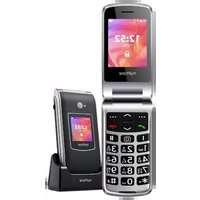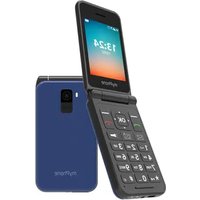
Flip LTE - Phone myPhone - Free user manual and instructions
Find the device manual for free Flip LTE myPhone in PDF.


| Product Type | Clamshell mobile phone (Flip) |
| Brand | myPhone |
| Model | Flip LTE (MF2303 / MF2303e) |
| Dimensions | 104 x 56 x 17.6 mm |
| Weight | 106 g |
| Main display | 2.8 inches, 240 x 320 pixels, color |
| External display | 1.77 inches |
| Compatible networks | GSM 900/1800 MHz, UMTS 900/2100 MHz, LTE 800/900/1800/2100/2600 MHz |
| SIM cards | Dual SIM (mini-SIM) |
| Battery | Li-ion 800 mAh (MF2303) or 1000 mAh (MF2303e), 3.7 V |
| Charger | Input 100-240 V ~ 50/60 Hz, output 5 V = 0.55 A |
| Camera | 1.3 MP with LED flash |
| Connectivity | Bluetooth 5.1, 3.5 mm headphone jack, USB-C |
| Main features | FM radio, MP3 player, flashlight, SOS/ICE button, speed dial |
| Expandable storage | microSD card |
| Maintenance and cleaning | Dry cloth only, avoid acidic or alkaline products |
| Safety | Do not use while driving, turn off in airplanes/hospitals, water resistance not guaranteed |
| Spare parts and repairability | Original myPhone accessories recommended; repair by authorized center only |
| General information | Manufactured by mPTech Sp. z o.o., Poland |
Frequently Asked Questions - Flip LTE myPhone
User questions about Flip LTE myPhone
0 question about this device. Answer the ones you know or ask your own.
Ask a new question about this device
Download the instructions for your Phone in PDF format for free! Find your manual Flip LTE - myPhone and take your electronic device back in hand. On this page are published all the documents necessary for the use of your device. Flip LTE by myPhone.
USER MANUAL Flip LTE myPhone
www.myphone.pl/qr/myphone-mf2303\_mf2303e
www.myphone.pl/qr/myphone-mf2303\_mf2303e
Thank you for choosing myPhone MF2303_MF2303e device. Please read the manual carefully. Without prior written consent of the manufacturer, no part of this manual may be photocopied, reproduced, translated or transmitted in any form or by any means, electronic or mechanical, including photocopying, recording or storing in any systems of storing and sharing information.
THE USE OF THE MANUAL
Please read the precautions and phone user's manual before use. The descriptions contained in this manual are based on the default settings of the phone. The newest version of the manual can be found on our company website:
www.myphone.pl/qr/myphone-mf2303\_mf2303e
Depending on the installed version of the software, applications, service provider, SIM card or country, some of the descriptions in this manual may not match your phone.
SAFETY
Read these guidelines carefully. Not following them may be dangerous or illegal.
-DO NOT RISK-
All wireless devices may cause interferences, which could affect the quality of other connections. Do not switch the device on in places which are prohibited from using cell phones, or when it may cause interferences or other dangers.
-CHILDREN-
This phone is not a toy. Keep the device and its accessories out of reach for children.
—RESTRICTED AREAS—
Switch OFF the device in an airplane since it may disturb the operation of other equipment located therein. The telephone may interfere with operation of the medical equipment in hospitals and health protection entities. Abide by any kinds of prohibitions, regulations and warnings conveyed by the staff.
-QUALIFIED SERVICE-
This product can be repaired or updated only by a qualified myPhone service center or an authorized service. Repairing by an unauthorized or unqualified service may cause phone damage and warranty loss.
—FUEL STATION SAFETY—
Always turn off the phone while refueling your car on petrol station. Do not use your phone close to chemicals.
-ALARM CALLS-
Making alarm calls may not be possible in some areas or circumstances. It is recommended to find an alternative way to notify emergency services if you are going to undeveloped or remote areas.
-ROAD SAFETY-
Do not use this phone while driving any kind of vehicle.
-BATTERY AND ACCESSORIES—
Avoid exposing the battery to very high/low temperatures (below 0^ C/ 32^ F and over 40^ C/ 104^ F). Extreme temperatures may influence capacity and battery life. Avoid contact with liquids and metal objects as it may cause partial or complete battery damage. Do not destroy, impair or throw the battery into flames - it is dangerous and may cause fire. Installing an incorrect battery type can cause an explosion. Never open the battery. Please dispose of battery according to the instructions. Worn-out or impaired battery should be placed in a dedicated container. The battery should be used according to its purpose. Disconnect an unused charger from power grid. Excessive charging the battery can cause damage. Therefore a single battery charge should not last longer than 12 hours (1 day an absolute max.). Use only the original myPhone accessories that are included in your device set.
—WATER RESISTANCE—
This device is not water resistant. Protect it from liquids and moisture.
-HEARING-
To avoid hearing damage, do not use the device at high volume levels for a long period of time, do not put operating device directly to the ear -when loud sound or music is on.
Manufacturer:
mPTech Ltd.
Website: www.myphone-mobile.com
Table of Contents
Package content.... 15
Technical Specifications 16
Appearance of the phone, its functions and buttons.... 16
Turning the phone on/off ....17
Installation of the SIM card(s) and microSD card 18
ICE button and its functions 18
Charging the battery 18
Factory settings.... 18
Troubleshooting 18
Proper use of the battery 19
Device maintenance.... 19
Correct disposal of used equipment....20
Correct disposal of used battery....20
Declaration of conformity with European Union Directives ....21
Package content
Before you start using your phone, make sure all of the following items are included in the box:
- phone
- battery
- charger
- user manual

If any of the above items is missing or damaged, please contact your dealer.

It is recommended to keep the packaging in case of any complaint. Keep the
container out of reach of children.
Technical Specifications
- Dual SIM
• GSM: 900/1800 MHz
• UMTS: 900/2100 MHz
• LTE: 800/900/1800/2100/2600 MHz - Clear, colourful main display 2.8" 240x320px
• FM Radio, Bluetooth, MP3
• 1.3 Mpx Camera with flash
- Battery:
• MF2303 - Li-ion 800 mAh, 3.7V
• MF2303e - Li-ion 1000 mAh, 3.7V
- Charger input parameters: 100-240V \~, 50/60Hz, 0.2A
- Charger output parameters: 5.0V = 0.55A, 2.75W
• Average efficiency during operation (for 230V, 50hz): 71.5%
• Energy consumption in no-load condition: less than 0.059W
• Phone dimensions: 104 x 56 x 17.6mm
- Phone weight: 106g
Appearance of the phone, its functions and buttons
| 1 | Speaker | A speaker used in phone conversations. |
| 2 | Camera | Camera lens. |
| 3 | SOS button | Press and hold to activate alarm. |
| 4 | LED diode | Flashlight. |
| 5 | /{OK>button | While on the main screen enables entering into the Menu.While in the menu confirms chosen options. |
| 6 | /[Back] button | While on the main screen enables entering into the phonebook [Contacts]. While in the menu you can exit or opt out. |
| 7 | Buttons, , , , and | While in menu enables navigating around the menu. On the main screen -radio, - contacts, - shortcuts, - alarm, - Confirmation and camera shutter button. |
| 8 | button | Allows you to reject an incoming call.While in the menu allows you to return to the main screen.While in the standby mode it allows to turn off the display and, if pressed longer, turn it off or oragain. |
| 9 | button | Allows you to receive an incoming call.In the standby mode allows to view the call list. |
| 10 | Button 1 - Speed dial | Allows you to assign one contact to this button, so when pressed, a call to that contact will be initiated. |
| 11 | button | On the main screen it switches on the radio. |
| 12 | Button 2 - Speed dial | Allows you to assign one contact to this button, so when pressed, a call to that contact will be initiated. |
| 13 | <*> button | Pressed twice on the main screen will display a "+" sign, used especially while entering international phone numbers.When writing an SMS, it displays symbols for insertion into the content. |
| 14 | <#> button / <Profile> | On the main screen, held for 3 seconds allows to change the sound mode. When writing an SMS, it switches character input modes. |
| 15 | Phone keypad | Buttons enabling dialling the phone number in the home screen, and entering the letters and numbers of the message body in the SMS writing mode. |
| 16 | Display | Main LCD display 2.8". |
| 17 | Display 2 | External LCD display 1.77". |
| 18 | Charging pins | Used to charge the phone in the docking station. |
| 19 | USB-C port | When connected, the charger enables recharging the battery. It also allows communication with a computer. |
| 20 | Headphone jack | Used to plug earphone (also: used as an antenna while listening to FM radio). |
| 21 | Cut out in the casing | Used to take off the cover. |
| 22 | Button 0 / Activate flashlight | Press button 0 on the keyboard / Hold for 2 seconds to activate or deactivate the flashlight. |
Turning the phone on/off
To turn the phone on/off press and hold the
Installation of the SIM card(s) and microSD card
If the phone is switched on - switch it off. Lift the back cover with your fingernail and gently remove it from the case. Take the battery out.
Insert the SIM card (s) - to open the SIM card reader flap, slide it slightly to the right. The SIM card must be placed with the golden connectors facing down, according to the embossment in the phone. Close the flap by sliding it slightly to the left.
Insert the memory card - insert a microSD card with the golden connectors facing down, according to the embossment in the phone.
Insert the battery - so that its three gold contacts touch the triple connector in the phone bay. Replace the cover and press lightly until the latches are engaged. Make sure the cover is closed well.
ICE button and its functions
ICE (In Case of Emergency) is an shortcut to tell medical services who they should call in case of an emergency. Pressing and holding the 2 ICE key, will display the phone's contacts and user information. To set contacts or user information, hold down <2> or go to [Settings] > [I.C.E].
Charging the battery
Connect the charger's USB-C plug to the phone's charging connector, then plug the charger into a power outlet. *Warning: Improper connection of the charger can cause serious damage to the phone. Damages caused by an improper use of the phone are not covered by the warranty.
While charging, an icon of battery state located in upper right corner of the screen should be animated. When charging is complete the battery icon should be static, then unplug the charger from the power outlet. Unplug the cable from the socket on the phone.
Factory settings
To get back to factory settings enter [Menu] > [Settings] > [Restore factory settings] >
Troubleshooting
| Message | Possible solution |
| Insert SIM card | Make sure SIM card has been correctly installed. |
| Input PIN | If the SIM card is secured with the PIN code you have to enter the PIN when turning the phone on and press <OK>. |
| I cannot hear the caller / The caller cannot hear me | The mic. should be close to mouth.Check if the built-in mic is not covered.When a headset is un use, check if it has been connected correctly.Check if the built in speaker isn't covered. |
| Network fail | In areas where signal or reception is weak, calls may not be possible. Also receiving calls may not be possible. Move to another location and try again. |
| No one can call me | The phone has to be on and within GSM network reach. |
| Poor sound quality while on the phone | Make sure that the speaker and mic. are not covered. |
| The connection cannot be established. | Check if the typed-in phone number is correct.Check if the phone number entered to the [Phonebook] is correct.Enter the correct phone number if necessary. |
| Software problems | Check in [Settings] if you have the latest software version. |
| If the problem persists, contact your dealer. | |
Proper use of the battery
Battery in this device can be charged with a charger. If the battery level is low, charge it. To prolong battery life, let it discharge beneath 20% of the battery capacity before connecting the charger and charge it up to 100%. If not used, unplug the charger from the phone and power grid.
Overcharging or leaving in a too low/too high temperature or within magnetic field may shorten battery life cycle. The temperature of the battery has an impact on its charging cycle. Cool the battery or raise its temperature so that it is similar to the room temperature (approx. 20°C). If the battery temperature exceeds 40°C/104°F the battery must not be charged! Use the battery only according to its intended purpose. Do not use a damaged battery. Do not throw the battery into flames! Do not throw a worn-out battery - send it or return it to an authorized recycling point.
Device maintenance
To extend the life of your phone keep your phone and its accessories out of reach of children, in a dry place, away from moisture. Avoid using the phone in high and low temperatures; it can shorten the life of phone electronic components, melt the plastic parts and destroy the battery. It is recommended that the phone is not used at temperatures higher than 40°C/104°F. Do not try to disassemble the phone. Tampering with its structure in an unprofessional manner may cause
serious damage to the phone or destroy it completely. For cleaning use only a dry cloth. Never use any agent with a high concentration of acids or alkalis. Use the original accessories only. Breaking those rules might cause a loss of warranty.
| Attention | Statement |
| The manufacturer is not responsible for any consequences caused by improper usage of the phone and not obeying the above instructions. | The software version can be upgraded without earlier notice. The representative retains the right to determine the correct interpretation of the above instructions. |
Correct disposal of used equipment
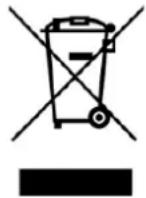
The device is marked with a crossed-out garbage bin, in accordance with the European Directive 2012/19/EU on used electrical and electronic Equipment (Waste Electrical and Electronic equipment - WEEE). Products marked with this symbol should not be disposed of or dumped with other household waste after a period of use. The user is
obliged to get rid of used electrical and electronic equipment by delivering it to designated recycling point in which dangerous waste are being recycled. Collecting this type of waste in designated locations, and the actual process of their recovery contribute to the protection of natural resources. Proper disposal of used electrical and electronic equipment is beneficial to human health and environment. To obtain information on where and how to dispose of used electrical and electronic equipment in an environmentally friendly manner user should contact their local government office, the waste collection point, or point of sale, where the equipment was purchased.
Correct disposal of used battery
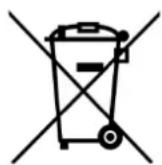
According to the EU directive 2006/66/EC with changes contained in EU directive 2013/56/UE on the disposal of batteries, this product is marked with crossed-out garbage bin symbol. The symbol indicates that the batteries used in this product should not be disposed with
normal household waste, but treated according to the legal directives and local regulations. It is not allowed to dispose of batteries and accumulators with unsorted municipal waste. Users of batteries and accumulators must use the available collection points of these items, which allows them to return, recycle and disposal. Within the EU, the collection and recycling of batteries and accumulators is a subject to separate procedures. To learn more about existing procedures of recycling of batteries and accumulators please contact your local office or an institution for waste disposal or landfill.
Declaration of conformity with European Union Directives
mPTech Ltd. hereby declares that myPhone MF2303_MF2303e cellular phone is compliant with Directive 2014/53/EU. The full text of the EU Declaration of Conformity is available at the following
Internet address:
www.myphone.pl/qr/myphone-mf2303_mf2303e
HASZNÁLATI ÚTMUTATÓ
myPhone MF2303\_MF2303e
www.myphone.pl/qr/myphone-mf2303\_mf2303e
Website: www.myphone-mobile.com
Tartalomjegyzék
www.myphone.pl/qr/myphone-mf2303_mf2303e
www.myphone.pl/qr/myphone-mf2303\_mf2303e
www.myphone.pl/qr/myphone-mf2303_mf2303e
MANUALE D'USO DEL TELEFONO
myPhone MF2303\_MF2303e
www.myphone.pl/qr/myphone-mf2303\_mf2303e
00-511 Warsaw, Poland
Website: www.myphone-mobile.com
Indice
www.myphone.pl/qr/myphone-mf2303_mf2303e
MANUAL ABREVIADO DE INSTRUCCIONES DEL TELEFONO
myPhone MF2303\_MF2303e
www.myphone.pl/qr/myphone-mf2303\_mf2303e
www.myphone.pl/qr/myphone-mf2303_mf2303e
MANUAL DE INSTRUÇÕES
myPhone MF2303\_MF2303e
MANUAL DE INSTRUÇÕES
www.myphone.pl/qr/myphone-mf2303\_mf2303e
www.myphone.pl/qr/myphone-mf2303_mf2303e
MODE D'EMPLOI DU TÉLÉPHONE
myPhone MF2303\_MF2303e
www.myphone.pl/qr/myphone-mf2303\_mf2303e
—SERVICE PROFESSIONNEL—
www.myphone.pl/qr/myphone-mf2303_mf2303e
TELEFONI KASUTUSJUHEND
myPhone MF2303\_MF2303e
www.myphone.pl/qr/myphone-mf2303\_mf2303e
www.myphone.pl/qr/myphone-mf2303_mf2303e
TĀLRUÑA ROKASGRĀMATA
myPhone MF2303\_MF2303e
www.myphone.pl/qr/myphone-mf2303\_mf2303e
www.myphone.pl/qr/myphone-mf2303_mf2303e
PRIETAISO VARTOTOJO VADOVAS
myPhone MF2303\_MF2303e
www.myphone.pl/qr/myphone-mf2303\_mf2303e
www.myphone-mobile.com
Turinys
www.myphone.pl/qr/myphone-mf2303_mf2303e
www.myphone.pl/qr/myphone-mf2303\_mf2303e
00-511 Warsaw, Poland
Сайт: www.mptech.eu
Содержание
Содержание....104
To turn the phone on/off press and hold the
www.myphone.pl/qr/myphone-mf2303_mf2303e
MANUAL DE UTILIZARE
myPhone MF2303\_MF2303e
www.myphone.pl/qr/myphone-mf2303\_mf2303e
www.myphone.pl/qr/myphone-mf2303_mf2303e
www.myphone.pl/qr/myphone-mf2303\_mf2303e
www.myphone.pl/qr/myphone-mf2303_mf2303e
Kratki priručnik
myPhone MF2303\_MF2303e
Hvala vam što ste odabrali MF2303_MF2303e mobilni uređaj. Molimo da pažljivo pročitate ovaj priručnik. Bez prethodnog pisanog pristanka proizvođača nijedan dio ovog priručnika se ne smije fotokopirati, reproducirati, prevoditi ili prenositi u bilo kojem obliku niti bilo kojim sredstvima, elektroničkim ili mehaničkim uključujući fotokopiranje, snimanje ili pohranu u bilo kojem sustavu za pohranu i dijeljene obavijesti.
UPORABA OVOG PRIRUČNIKA
www.myphone.pl/qr/myphone-mf2303\_mf2303e
Ovisno o instaliranoj verziji softvera, pružatelju usluga, SIM kartici ili državi neki od opisa u ovom priručniku ne odgovaraju vašem telefonu, a sam telefon i pribor se mogu razlikovati od onoga prikazanog na ilustracijama u ovom priručniku.
SIGURNOST
www.myphone.pl/qr/myphone-mf2303_mf2303e
POUŽÍVATEL'SKÁ PRÍRUČKA TELEFÓNU
myPhone MF2303\_MF2303e
www.myphone.pl/qr/myphone-mf2303\_mf2303e
www.myphone.pl/qr/myphone-mf2303_mf2303e
POUŽÍVATEL'SKÁ PRÍRUČKA TELEFÓNU
myPhone MF2303\_MF2303e
www.myphone.pl/qr/myphone-mf2303\_mf2303e
www.myphone.pl/qr/myphone-mf2303_mf2303e