ITWT-800 - Remote control Intertechno - Free user manual and instructions
Find the device manual for free ITWT-800 Intertechno in PDF.



User questions about ITWT-800 Intertechno
0 question about this device. Answer the ones you know or ask your own.
Ask a new question about this device
Download the instructions for your Remote control in PDF format for free! Find your manual ITWT-800 - Intertechno and take your electronic device back in hand. On this page are published all the documents necessary for the use of your device. ITWT-800 by Intertechno.
USER MANUAL ITWT-800 Intertechno
GB Operating instructions
GR O8nyiec xponoc
H Kezelésiutasítás
HR Uputa za rukovanje
I Istruzioni d'uso
ISL Notkunarleiöbeiningar
N Bruksanvisning
Scenekobling: (Fig. 1)
Tila 1 on tallennetty!
Operating instructions
ITWT-800
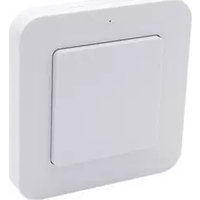
The ITWT-800 wireless wall transmitter can be used individually for all types of intertechno self-learning wireless receivers. For switching on and off lights, dimming and brightening lights, operating blinds and garage doors, etc.
1 random code out of 67 million possible codes guarantees a high level of security.
Scene switching: (Fig. 1)
Multiple wireless receivers can be changed to the desired switching state with the touch of a single button.
3 scenes can be selected.
Wireless receivers with storage are required for scene switching!

Removing battery strips/changing batteries (Fig. 2)
The battery fuse must be removed first.
To do this, use a screwdriver to take off the mounting plate.
The ^+ symbol must face upwards when you insert the battery.
The CR2032 3V battery will last for approx. 20,000 operations (lifetime of around 3 years)
The LED will light up red every 4 seconds when the battery is running out.
When closing the wireless wall transmitter with the mounting plate, ensure that the arrow of the mounting plate and the arrow on the back of the wall transmitter are both pointing upwards.
All 6 clips must properly click into place. If done correctly you should hear a distinct click.
Encoding: Teaching in wireless receivers (Fig. 3)
To adjust the encoding, please also read the operating instructions of your self-learning wireless receiver.
Place the wireless wall transmitter near the wireless receiver.
1.) Open the transmitter as described above.
2.) Move the slider to position 1.
3.) Put the wireless receiver in learn mode.
4.) By pressing the transmitter once, the ON signal is transmitted (the LED will light up green) and the wireless receiver takes over the encoding.
One more receiver can be taught in.
Switching ON and OFF
Now one or more wireless receivers can be switched on by pressing a button. The LED will light up green when ON.
By pressing twice, the off signal will be transmitted and the LED will light up red 2x.
DIMMING AND BRIGHTENING
There are several options for use with a wireless dimmer.


GB
Operating instructions
ITWT-800
1.) Start the dimming cycle by pressing the on signal again and stop the dimming or brightening at the desired brightness with the on signal (press once). Or
2.) Keep the button pressed to dim or brighten the device until the desired brightness is reached then release it to stop.
If the last operation was brightening, pressing again dims the device and vice versa. The last used brightness remains saved until the device is switched on again.
Please note that older and newer wireless dimmer receiver models may differ slightly. The dimming cycle is continuous on older dimmer models when brightening and dimming. On newer models the brightness is stopped at the brightest and dimmest points respectively. A synchronous dimming cycle with multiple dimmer receivers is not guaranteed.
Erasing encoding
To erase the encoding, proceed as described above in 2.) to 4.), but now the off signal is transmitted by pressing 2x. The LED will light up red 2x.
If no scene switching is required, the settings are now complete and you can proceed to mount the switch.
Saving for scene switching (Fig. 4)
Only for wireless receivers which are suitable for scene switching. 3 different scenes can be saved.

To set a scene with several wireless receivers, it is recommended you use a handheld transmitter such as the ITLS-16, ITT-1500, etc. Use it to set your wireless receivers to the desired state, for example, dimmer setting (setting the desired brightness) or to switch them on or off. If no other handheld transmitter is available, the wireless wall transmitter in slider position 1 can be used to program the settings of one wireless receiver after another. The last selected brightness setting remains the same for dimmers when they are switched off.
Scene 1: Move the slider to position 3 and press once for scene 1. The LED will light up green 3x as confirmation and orange once for scene 1. Scene 1 is saved.
Scene 2: Again select the settings and move the slider to position 3 and finally press 2x. The LED will light up green 3x and orange 2x.


GB
Operating instructions
ITWT-800
Scene 3 is taught in by pressing 3x ; the LED will light up green 3x and orange 3x .
If all 3 scenes have been saved, move the slider to position 2.
Press accordingly to activate each scene.
1x for scene 1 the LED will light up orange 1x as confirmation
2x for scene 2 the LED will light up orange 2x as confirmation
3x for scene 3 the LED will light up orange 3x as confirmation
To turn of all scenes, simply press and hold for longer (approx. 2 secs), the LED will light up red 2x . If further ITWT-800 (or ITKL-30 or ITF-100, for example) wireless wall transmitters are to be used for scene switching, the additional transmitters only have to be taught in to the wireless receivers as this will synchronise the scenes automatically.
Mounting (Fig. 5)
Easy-to-install mounting plate.
The mounting plate is easy to affix on glass, wood, wallpaper or tiles, etc.
Double-sided adhesive tape and screws are included.
Caution: Avoid shielding through metal objects.
Each time the battery is replaced or the wall transmitter is moved to another location or mounted, the wall transmitter calibrates itself for the touch sensitivity.
This process takes 16 seconds. It should ensure that the touch sensitivity reacts correctly on different surfaces such as wood, metal, concrete, etc.
Please do not touch or move the wall transmitter during the calibration period before the calibration is complete.
Safety instruction
Do not ingest batteries, risk of burning due to dangerous substances.
This product contains a button cell battery. If the button cell battery is swallowed, severe internal burns can occur within just 2 hours and cause death. Keep new and used batteries out of the reach of children. If the battery compartment does not close securely, do not use the product and keep it away from children. If you think that batteries have been swallowed or are in any part of the body, seek medical attention immediately.
To view the Declaration of Conformity, please visit www.intechno.at/CE

O aoúpuato nouc toixou ITWT-800 mopei va xpoaiopoioiθei eatoukeuéva oδouc touc autopoyapauatióevouc tounoc aoúpuatwv δektwv tnc intertechno.
Tia TnV EvpyoioiOn kai anevpyoioiOn, Tny auOoueiow nTc Evtaoc Tou oWtioou, Tov EeYxo TwV npoiowkai Tnc npotac tou ykapac K. An. IpokoieEvou ia Tn diaaopaiaion nC aopaaiaac napexetai 1 TuXaoC kwdiokc ao6 ekat. mthavouc ouvduoouc.