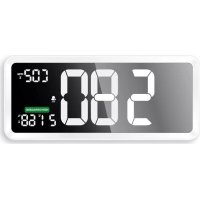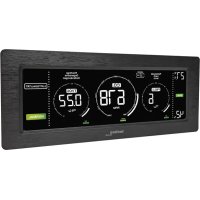
WL 1035 - Climate control TECHNOLINE - Free user manual and instructions
Find the device manual for free WL 1035 TECHNOLINE in PDF.



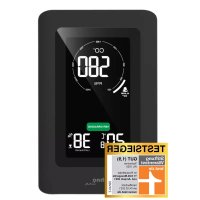
| Product type | Indoor air quality monitoring device |
| Brand | TECHNOLINE |
| Model | WL 1035 |
| Power supply | 5 V DC, 1.2 A power adapter (model KA06E-0501200EU), 1.8 m USB cable included |
| Display type | Triple digital display for PM2.5, CO2, VOC, with moving graphic indicator |
| Sensors | NDIR for CO2, MEMS for VOC, laser for PM2.5 |
| CO2 measurement range | 400 – 5,000 ppm (accuracy ±5% + 50 ppm up to 2,000 ppm) |
| PM2.5 measurement range | 0 – 999 μg/m³ (accuracy <100 μg/m³: ±15 μg/m³, >100 μg/m³: ±15%) |
| VOC measurement range | 0.2 – 9.99 mg/m³ (accuracy ≤0.7 mg/m³: ±0.35 mg/m³, >0.7 mg/m³: ±35%) |
| Temperature range | 0 °C to 50 °C / 32 °F to 122 °F (resolution 0.1 °C) |
| Relative humidity range | 20 – 95% (resolution 1%, accuracy ±5% between 30-70%, ±7% outside range) |
| Memory | Recording of MAX, MIN, AVG values over selectable 8, 12, 24 or 36 hours |
| Adjustable alerts | High and low thresholds for CO2, PM2.5, VOC and relative humidity, with optional audible alarm |
| Calibration | Automatic (over 7 days) and manual possible |
| Backlight | Automatic brightness adjustment (high/medium/low) via optical sensor |
| Additional indicators | Overall air quality level (colors), ventilation recommendation, mold alert (>70% RH) and dryness alert (<30% RH) |
| Maintenance and cleaning | Clean with a soft cloth dampened with water and mild soap; unplug before cleaning; do not use solvents |
| Safety | Do not open the housing; use only the provided adapter; avoid extreme temperatures, direct light, dust, immersion; do not dispose of in fire |
| Operating temperature | 0 to 50 °C, <95% RH non-condensing |
| Included accessories | Power adapter, USB cable, table stand |
| Reparability | No user-serviceable parts; manual calibration recommended every 12 months by a qualified laboratory |
Frequently Asked Questions - WL 1035 TECHNOLINE
User questions about WL 1035 TECHNOLINE
0 question about this device. Answer the ones you know or ask your own.
Ask a new question about this device
Download the instructions for your Climate control in PDF format for free! Find your manual WL 1035 - TECHNOLINE and take your electronic device back in hand. On this page are published all the documents necessary for the use of your device. WL 1035 by TECHNOLINE.
USER MANUAL WL 1035 TECHNOLINE
B4 – “ALERT SET” -Taste
B5 – “ALARM” -Taste
B6 - “+ / MEM” -Taste
C – Rückseite
WL 1035 - Instruction manual Air quality monitor with PM2.5 / CO₂ / TVOC, temperature and relative humidity
Overview
text_image
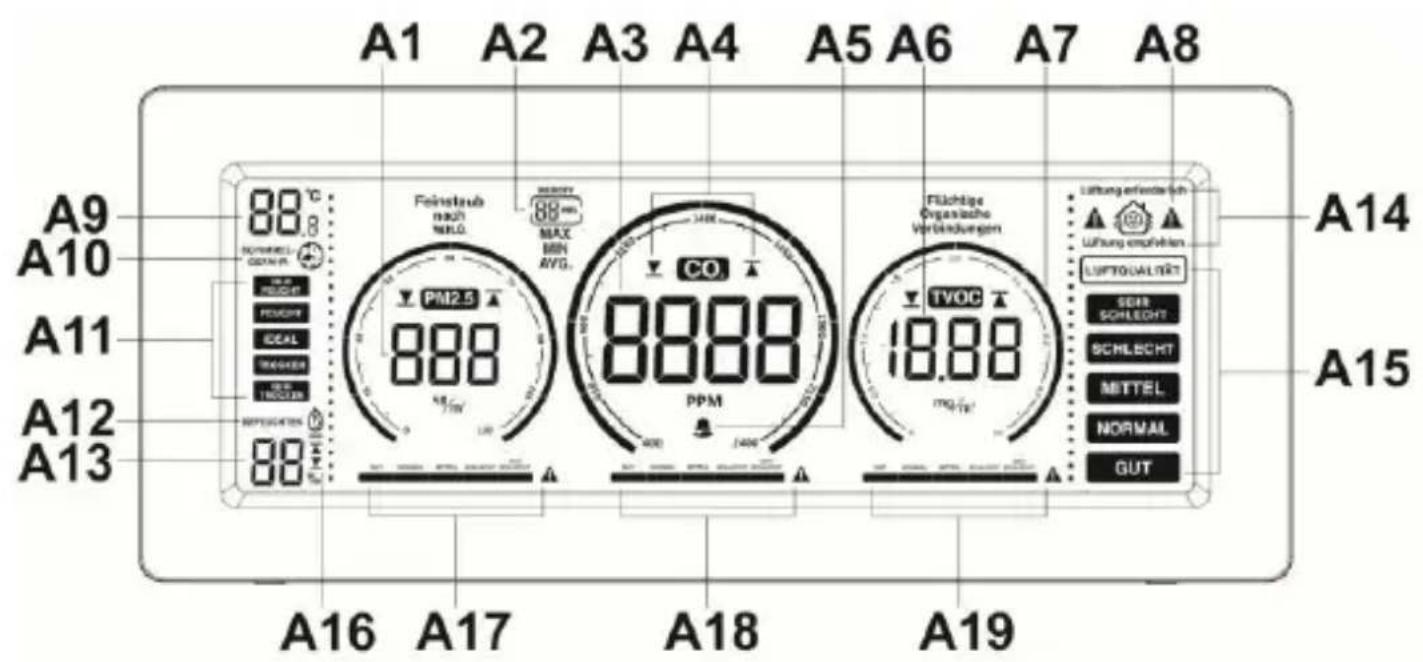
A1 A2 A3 A4 A5 A6 A7 A8 A9 88°C A10 NORWEL GONNA A11 PEACHY MAX A12 DEAL MIN A13 RED CHEDER AVG. A16 REPOZEN 88 Feinstud nach NRLG MAX BGN RVG. PM2.5 888 CO 8888 PPM 1400 Flichtige Organische Verbindungen TVOC 18.88 Lufung erfender sich Lufung empfehlern LUPTIGUALERT SEAR SCHLECHT SCHLECHT METTEL NORMAL GUT A14 A15 A16 A17 A18 A19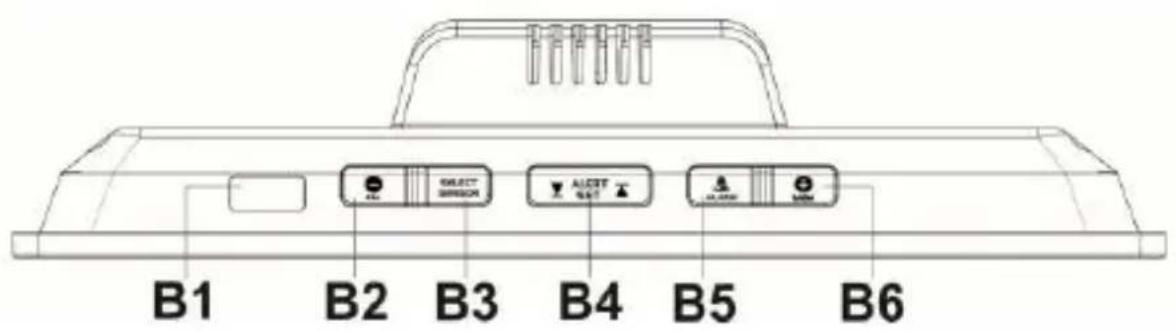
text_image
B1 B2 B3 B4 B5 B6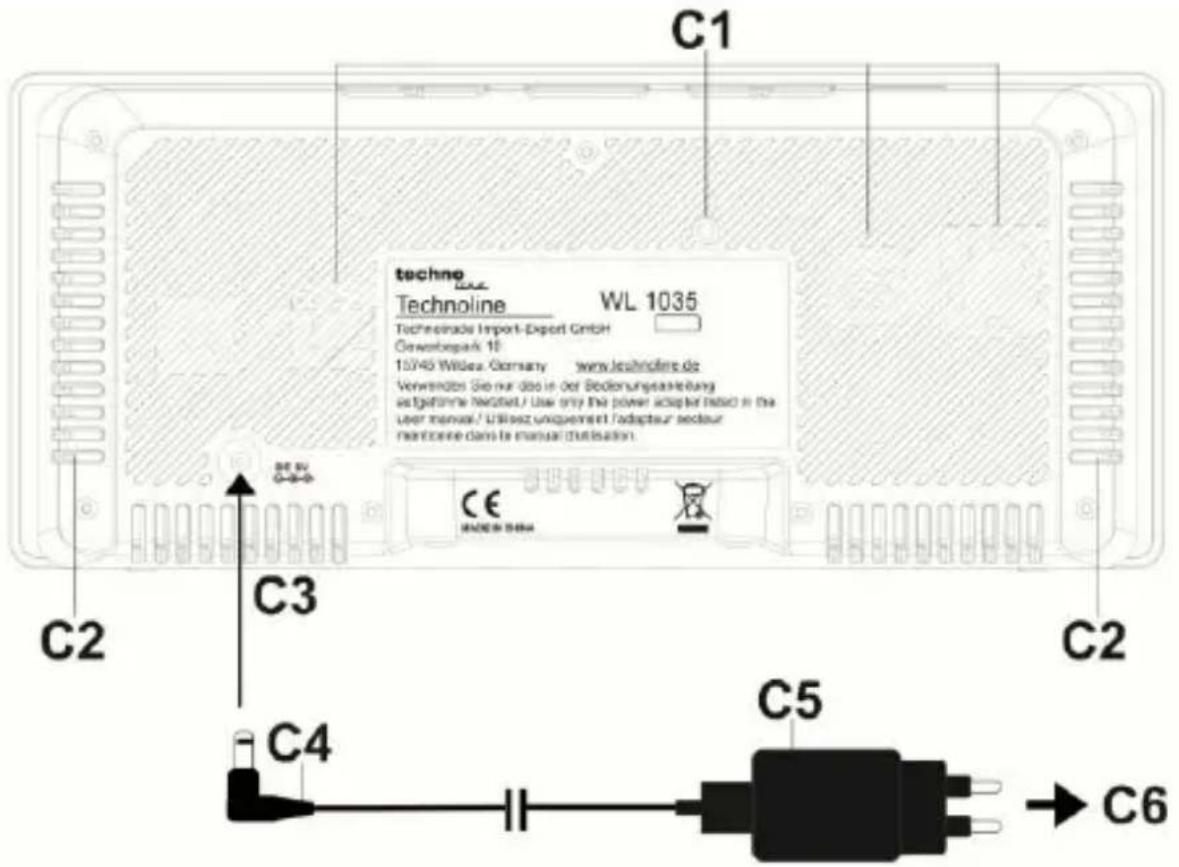
text_image
techno Technoline WL 1035 Technoprolde Import-Export GmbH Gewerbepark 10 10/45 Willesz. Germany www.technolins.de Verwendende Sie nur dso in der Bodenungsanleitung se fgeformte Neutel / Use only the power adapter based in the user manual / Utilienz unigemert l'adaptaur secteur membrane dans le manuel d'utilisation. C2 C3 C4 C5 C6A – Front side / Display
A1 – PM2.5 display
A2 - MIN / MAX / AVG icon
A3 - CO _2 display
A4 – High/Low alert icons
A5 – Sound alarm icon
A6 - TVOC display
A7 – Moving chart indicator
A8 – Warning icon (CO _2 > 2000 ppm)
A9 – Temperature display
A10 – Mold alert icon
A11 – Comfort level display
A12 – Dryness alert icon
A13 – Humidity display
A14 – Ventilation recommendation indicator
A15 – Overall air quality indicator
A16 – Humidity high/low alert icons
A17 – PM2.5 concentration level
A18 - CO _2 concentration level
A19 – TVOC concentration level
B – Upper side / Buttons
B1 – Light sensor
B2 - “- / CAL” button
B3 – “SELECT SENSOR” button
B4 – “ALERT SET” button
B5 – “ALARM” button
B6 - “+ / MEM” button
C - Back side
C1 – Sensor vents
C2 – Ventilation vents (for heat release)
C3 – Insert DC jack to the back case
C4 - USB-cable
C5 - AC/DC adapter
C6 – Insert into AC wall socket
Features
- Large triple display of PM2.5/ CO 2 /TVOC level with moving chart indicator
• Non-dispersive infrared (NDIR) gas sensor for CO 2 detection - TVOC (Microelectro Mechanical System - MEMS) sensor module to test the content of harmful substance in the air
- PM2.5 Laser Particle Sensor module for monitor the dust in the air
- Wide CO2 measuring range from 400 to 5000 PPM
- PM 2.5 measuring range from 0 to 999~ug / m^3
• TVOC measuring range from 0.2 to 9.99 mg/m ^3 -
Overall air quality level and ventilation recommendation on basis of PM 2.5/ CO2/ TVOC concentration in the air (coloured display elements)
• Maximum (MAX), minimum (MIN) and average (AVG) value memory of last 8, 12, 24 or 36 hours selectable -
Adjustable PM 2.5 / CO2 / TVOC high or low value alert with optional alarm sound
- Adjustable alert for high or low humidity
• Automatic baseline calibration - Backlight with automatic adjustable brightness levels by light sensor
• Temperature and relative humidity - Mold alert and dryness indicator
• Built-in memory chip to save settings when power is off - Table standing
- 1.8 m USB cable and 5V\~1.2A adaptor KA06E-0501200EU as power supply (included)
Installation
Plug in the enclosed 5V-1.2A AC/DC adaptor to an AC wall outlet and then the DC jack of the USB cable to the back of your air quality monitor. Connect the free ends of the USB cable with AC/DC power adapter with each other. The display will come on with the relevant temperature and relative humidity. Your PM 2.5/CO 2 /TVOC readings flash with “----”. The relevant data will be displayed in around 180 seconds. It takes 1-2 hours to have all the data of PM 2.5/CO 2 /TVOC, temperature and relative humidity readings initially stabilized.
If the AC power is interrupted, the monitor does not function, the display and the backlight are turned off. The settings of your unit will be kept by the internal memory chip so your monitor will function again after the AC power resumes.
Note:
- For first time use, put the monitor in a well ventilated environment (around lowest possible value of TVOC at 0.22 mg/m ^3 , CO2 at 400 PPM, PM2.5 at 5 ug/m ^3 ) for at least 12
hours to avoid the influence of micro intervening gas inside the package.
Where to place your air quality monitor
- Make sure the place you put your air quality monitor at is well ventilated for at least 6 hours everyday, or you move the monitor to a well ventilated room overnight to perform Automatic Baseline Calibration.
- Do not place your monitor in a highly polluted environment for a long time, the accuracy of the sensors will be reduced or damaged. (i.e. avoid TVOC concentration always over 1 mg / m^3 , CO_2 over 1000 ppm, PM2.5 over 100 ug / m^3 ).
- Please keep the air quality monitor away from a wall surface or any electronics i.e. computer / TV / printer / photocopier as too close to those will affect the readings of PM2.5/CO _2 /TVOC.
- Avoid contact with organic solvents that include silicon gel and other adhesives, paintings, drugs, oil, and high concentration gases.
Colored bar indication charts
PM 2.5/ CO₂/ TVOC concentration level in the air
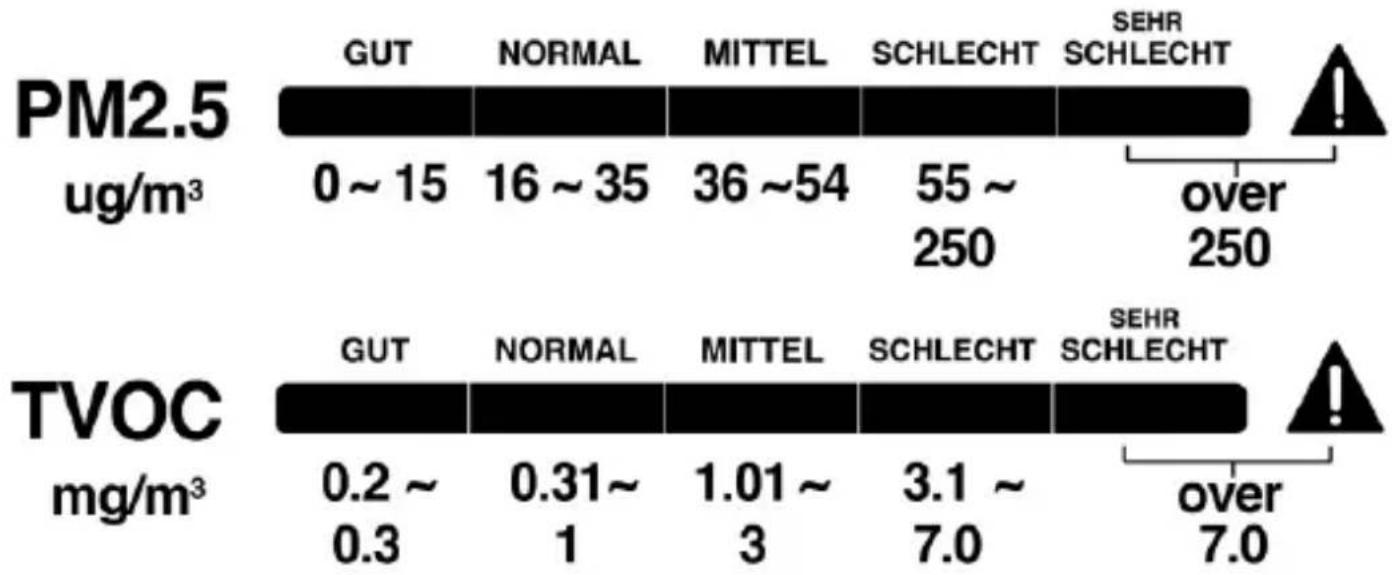
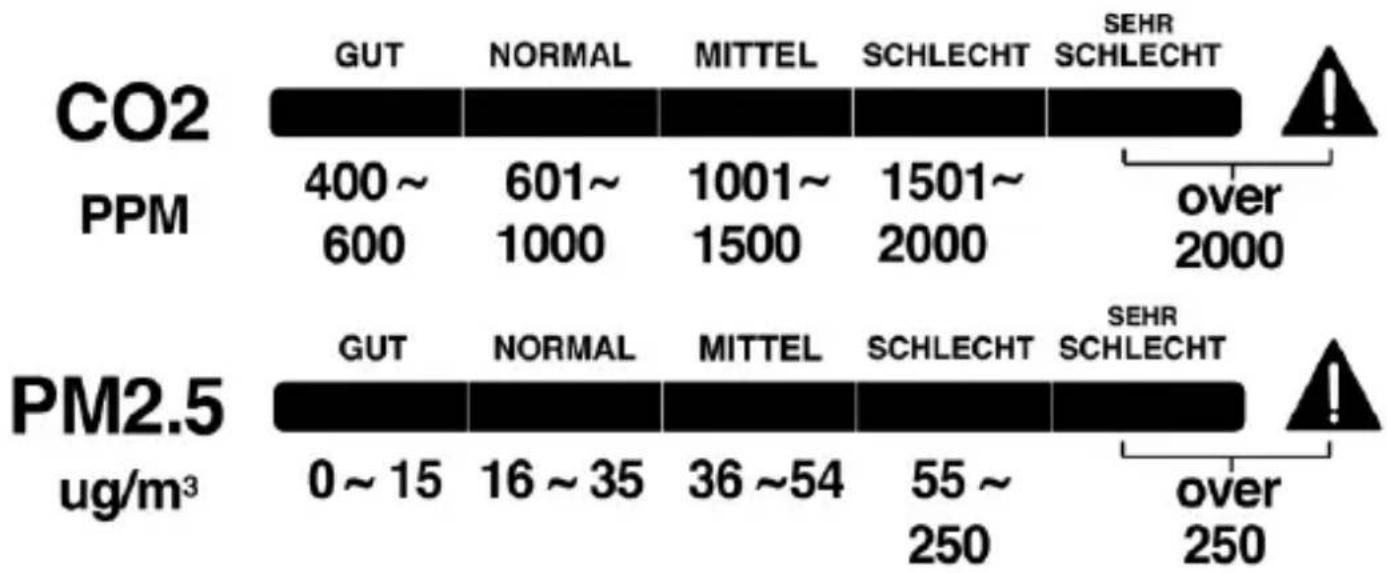
Different PM2.5/CO _2 /TVOC concentration level is indicated in coloured bar chart under each reading :
bar
| CO2 | PPM | PM2.5 | |---|---|---| | GUT | 400~600 | 0~15 | | NORMAL | 601~1000 | 16~35 | | MITTEL | 1001~1500 | 36~54 | | SCHLECHT | 1501~2000 | 55~250 | | SEHR SCHLECHT | over 2000 | over 250 |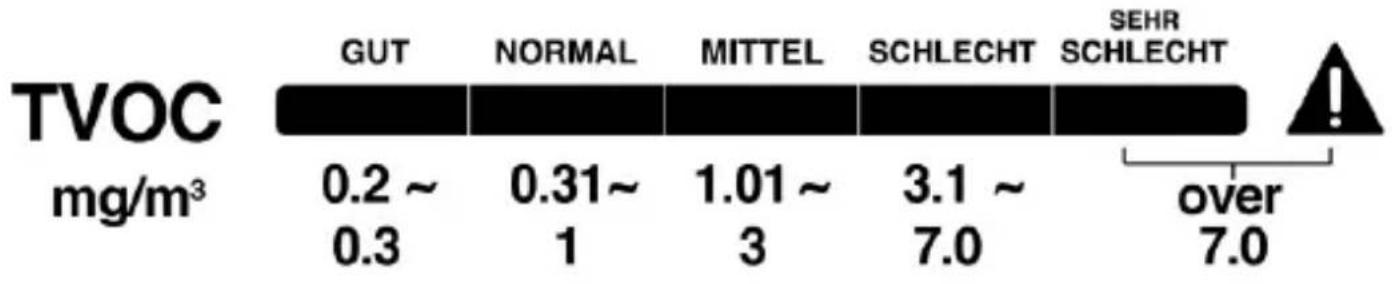
bar
TVOC | mg/m³ | GUT | NORMAL | MITTEL | SCHLECHT | SEHR SCHLECHT | |---|---|---|---|---|---| | | 0.2 ~ 0.3 | 0.31~ 1 | 1.01 ~ 3 | 3.1 ~ 7.0 | over 7.0 | A!The readings are displayed in the steps: GUT (good), NORMAL (normal), MITTEL (middle), SCHLECHT (bad) and SEHR SCHLECHT (very bad).
The overall air quality concentration level
The overall air quality level is indicated by the coloured chart on the right side of the display together with related ventilation recommendation on the basis of PM2.5/CO _2 /TVOC readings:-
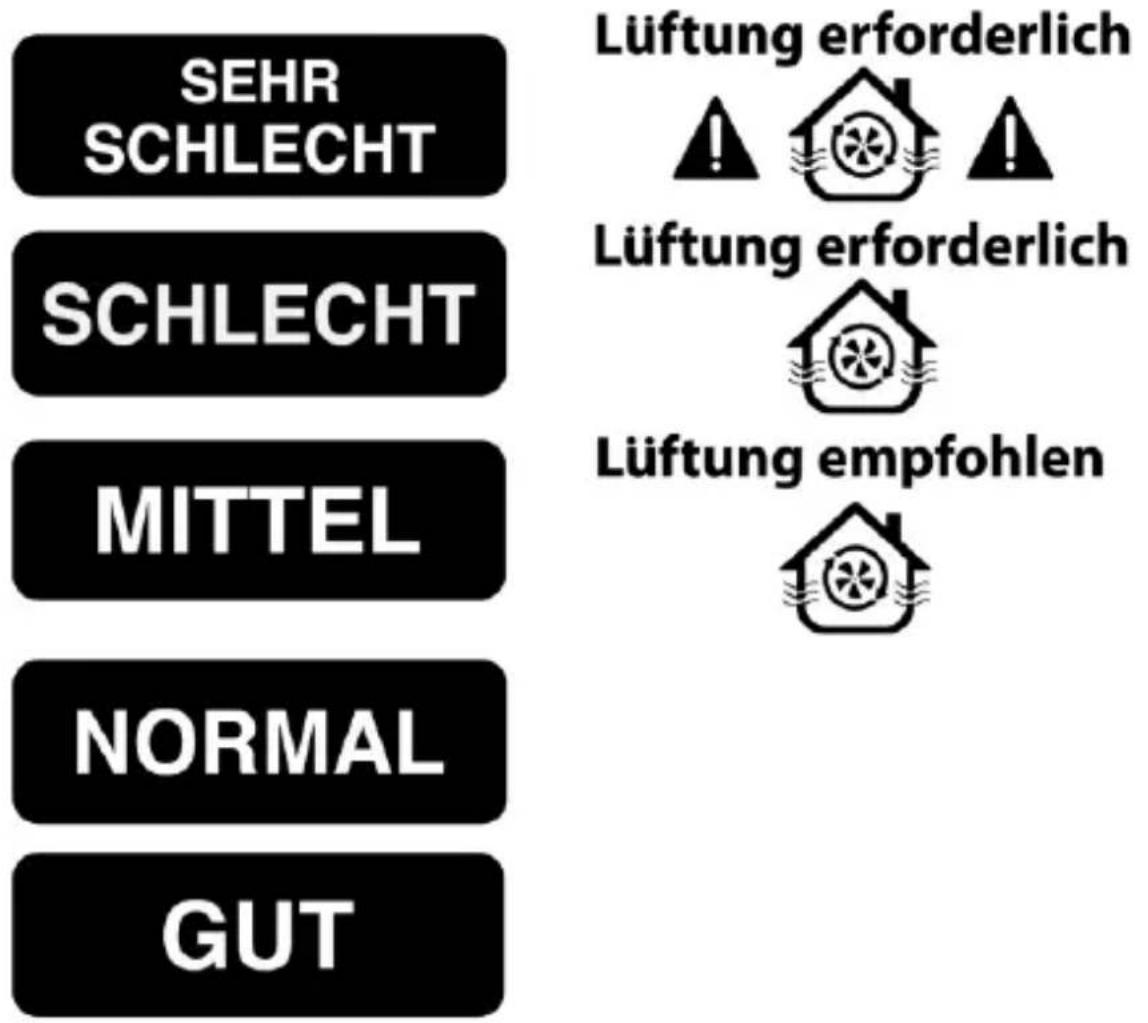
The readings are displayed in the steps: GUT (good), NORMAL (normal), MITTEL (middle), SCHLECHT (bad) and SEHR SCHLECHT (very bad).
It also shows the ventilation icon “” if ventilation is recommended “Lüftung empfohlen” or ventilation is needed “Lüftung erforderlich”
The humidity concentration level
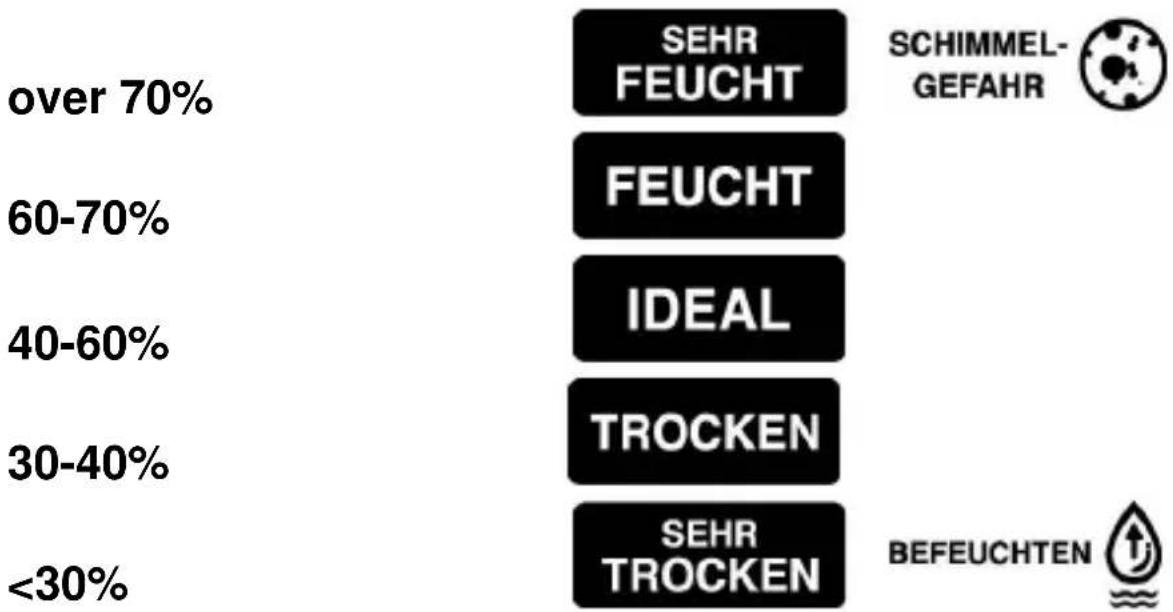
The relative humidity is displayed in \% with coloured recommendations:
bar
| Category | SEHR FEUCHT (%) | FEUCHT (%) | IDEAL (%) | TROCKEN (%) | SEHR TROCKEN (%) | SCHIMMEL-GEFAHR (Circular Marker) | BEFEUCHTEN (Upward Arrow) | | :--- | :--- | :--- | :--- | :--- | :--- | :--- | :--- | | over 70% | | | | | | | | | 60-70% | | | | | | | | | 40-60% | | | | | | | | | 30-40% | | | | | | | | | <30% | | | | | | | |The readings are displayed in the steps: SEHR TROCKEN (very dry), TROCKEN (dry), IDEAL (ideal), FEUCHT (wet) and SEHR FEUCHT (very wet)
Mold alert icon “SCHIMMELGEFAHR 📋” will be displayed when the humidity is over 70%.
Dryness alert icon “BEFEUCHTEN 🔊” will be displayed when the humidity is below 30%.
To set high/low alert of CO₂ / PM2.5 / TVOC / relative humidity
- Press and hold the button, the CO
_2 display flashes.
Press the or the button to select PM 2.5 or CO or TVOC or relative humidity display.
2
- When CO _2 display is selected, press the button once, digits “400” (default) flash and appears.
- Press the or the button to adjust the low alert level of CO_2 . Press once to adjust +/- 10 PPM each time. Press and hold to accelerate setting in fast speed. Lowest alert level is 400 PPM.
- Press the button once again, the CO
2 digits "2000"
(default) flash and appears. Press the or the button to adjust the high alert level of CO_2 . Press once to adjust +/- 10 PPM. Press and hold to accelerate setting in fast speed. The highest CO_2 alert level is 5000 PPM.
- Press the button once again to confirm your settings (or no button is pressed in approximate 10 seconds). Your air quality monitor returns to the normal display.
- Repeat the same of above by selecting another sensor to set the high-low alert value :-
PM2.5 : +/- 5 ug/m ^3 (default low alert 0 ug/m ^3 , high alert 250 ug/m ^3 , highest 550 ug/m ^3 )
TVOC : +/- 0.1 mg/m ^3 (default low alert 0.2 mg/m ^3 , high alert 7 mg/m ^3 , highest 9.99 mg/m ^3 )
Relative humidity: +/- 1% (default low alert 35%, high alert 70%, highest 95%)
When the measured PM 2.5 / CO₂ / TVOC / RH% reaches the set high / low alert level, the related ▶ or ▽ icon appears and flashes to remind you.
To use the sound alarm (for high alert)

- Press the button once to turn on the alarm. When the
alarm is on, the icon appears under the CO _2 reading in the middle of the display.
- When the measured PM 2.5, CO _2 or TVOC reaches the set
high alert level, both the 7 and icons flash and an audible beep sound will be given continuously. The beep sound will accelerate when the measured PM 2.5, CO₂ or or TVOC level exceeds more over the set alert level.
If this happens, please open the windows, adjust the air ventilation and avoid too many people gathering together to improve the air quality of your environment.
- Press the button once to disable the voice alarm.

remains flashing if the PM 2.5, CO_2 or TVOC level exceeds the set high alert.
To set the maximum / minimum / average memory time period (default at 12 HRS)
Press and hold the button, digits "12" HRS flash. Press the

or the
button to select 8 HRS, 12 HRS, 24 HRS or
36 HRS duration of memory. The selected duration appears under MEMORY (between the PM2.5 and CO _2 display).
To recall the maximum, minimum, time-weighted average value memory
Press the button one at a time to view the Maximum => Minimum => Average record of the PM 2.5/ CO₂/ TVOC, temperature and RH% (the MAXON icon appears).
After setting the memory duration, the MAX/MIN/AVG. memory data is reset (all digits on the display become “----”) and your monitor will start to store data for the next 24-hour period.
Note:
- You need to power on your monitor for at least 12 hours to display the relevant last 12 hours weighted average of PM 2.5/CO₂/ TVOC/Temperature and humidity level (and also power on 8 hours to display the last 8-hour weight average)
To calibrate the PM2.5/CO2/TVOC sensors
This monitor is factory calibrated to a 400 PPM CO _2 and 0.2mg/m ^3 TVOC as standard concentration.
Automatic baseline calibration
Your monitor is equipped with a smart chip so that it will automatically calibrate itself to reduce the drift of the CO_2 /TVOC sensor for long time usage. It will calibrate itself automatically at the
minimum CO_2 / TVOC reading detected during 7 days of continuous monitoring.
Make sure the place you put your monitor at is well ventilated (with a CO_2 level near 400 PPM or TVOC near 0.2 mg/m ^3 ) for at least an hour or so everyday, or you move the monitor to such a well ventilated room for an hour or so everyday to perform Automatic Baseline Calibration.
Note:
- Please try not to place your monitor in an environment with a TVOC concentration higher than 1mg/m^3 for a long time. Otherwise, the sensitivity of the TVOC sensor will be reduced or the TVOC sensor will be damaged.
Manual calibration of the PM2.5/CO _2 /TVOC sensors
It is recommended to undergo manual calibration performed by a qualified laboratory every 12 months.
This must be done in a well ventilated room or an environment with clean air (ideally in a room showing lowest value of CO_2 at 400 PPM, TVOC at 0.2mg/m^3 , PM2.5 below 4 ug/m^3 ).
Caution : Do not calibrate the monitor in an environment of unknown CO_2 concentration.
- Power on your air quality monitor it on and wait for 3 minutes until the first PM2.5/CO _2 /TVOC readings are displayed.
- Then press and hold the button, only CO 2 display flashes. Press the or the button repeatedly to select. PM2.5, CO 2 or TVOC is displayed. Then press and hold the CAL button until “CAL” flashes.
- In around 10 minutes, the flashing “CAL” will stop and the calibration is completed. Your air quality monitor will return to normal display mode.
- To stop the manual calibration anytime, press the button once.
Light Sensor
There is a light sensor at the top left side of your air quality monitor. The brightness of the display is automatically adjusted to HI/ MED/LO level according to the surrounding light environment.
Note:
- Do not place any object on the top of the light sensor or cover it in any way, as this would affect the light sensing function.
Troubleshooting
No display or functions
Check the AC/DC adaptor is properly connected.
Response time
Ensure the air flow channels at the back of the monitor are not blocked or covered.
CO _2 reading shows “Err”
The CO_2 sensor is not working properly. Unplug the AC/DC adapter (C8) for 10 seconds to insert it to your monitor again.
Care and maintenance
- Place your monitor on a stable surface, away from sources of direct sunlight or excessive heat or moisture.
- Clean your monitor with a soft cloth moistened only with mild soap and water. Stronger agents such as Benzine, thinner or similar materials can damage the surface of the item. Make sure the monitor is unplugged before cleaning.
- Do not open the back case or tamper with any components of this monitor.
- Do not plug in any other AC/AC or AC/DC adaptor with incorrect specifications or voltage.
CO _2 levels and guidelines
Below are some CO_2 reference levels in general:
400\~600 ppm Background (normal) outdoor air level.
600\~1,000 ppm Typical level for occupied spaces with good air exchange.
1,000 \~1,500 ppm Start ventilation of the room.
1,500\~2,000 ppm Level associated with complaints of drowsiness and poor air. Ventilation recommended!
2,000\~5,000 ppm Level associated with headaches, sleepiness, and stagnant, stale, stuffy air. Poor concentration, loss of attention, increased heart rate and slight nausea may also be present. Ventilation strongly recommended!
5,000 ppm Exposure may lead to serious oxygen deprivation resulting in permanent brain damage, coma, and death. Requires immediate ventilation!
PM2.5 air quality guideline
Fine particulate matter (PM2.5) is an air pollutant that is a concern for people's health when levels in air are high. PM2.5 are tiny particles in the air that reduce visibility and cause the air to appear hazy when levels are elevated.
The WHO updated the new air quality guideline (AQG) levels in 2021 from evidence-based data and information. The highest recommended average annual emission level for PM2.5 is 5 g/m^3 and the 24-hour level is 15 g/m^3 .
Total volatile organic compounds (TVOC) levels
The TVOC covers a large range of different organic gases that may be chemically similar and difficult to distinguish (e.g. Benzene,
Formaldehyde, Napthalene, Styrene, Trichloroethylene, Tetrachloroethylene, Toluene).
The TVOC is considered an important indicator for indoor hygiene and indoor air quality (IAQ). In addition to serious health concerns, there is the psychological aspect: homes, offices, and other environments that smell clean typically seem more welcoming than areas with foul odors caused by organic compounds.
| Reference Level | Air information | Action | TVOC (mg/m3) | Air quality |
| Level 1 | Clean hygienic air (target value) | No action required. | < 0.3 | Very good |
| Level 2 | Good air quality | Ventilation recommended | 0.3 – 1.0 | Normal |
| Level 3 | Noticeable comfort concerns (Not recommended for exposure > 12 months) | Ventilation recommended. Identify sources. | 1.0 – 3.0 | Medium |
| Level 4 | Significant comfort issues (Not recommended for exposure > 1 month) | Refresh air whenever possible. Increase ventilation. Search for source is required. | 3.0 – 7.0 | Poor |
| Level 5 | Unacceptable conditions (not recommended) | Breath only if unavoidable and only for short periods. | > 7.0 | Bad |
Declaration of conformity
Hereby, Technotrade declares that this product WL 1035 is in compliance with the essential requirements and other relevant
provisions of Directive 2014/30/EU and ROHS 2011/65/EC. The original EU declaration of conformity may be found at: www.technoline.de/doc/4029665410357
Specifications
CO_2
Measurement range : 400 – 5000 PPM
Resolution : 1 PPM
Accuracy : +/-5% + 50 PPM (up to 2000 PPM)
Warm up time : 3 minutes
PM 2.5
Measurement range : 0 – 999 ug/m ^3
Resolution : 1 ug/m ^3
Accuracy : <100 ug/m
100 ug/m ^3 (+/- 15 ug/m ^3 ), ^3 (+/- 15% reading)
Warm up time : 3 minutes
TVOC
Measurement range : 0.2 - 9.99 mg/m ^3
Resolution : 0.01 mg/m
Accuracy : ≤0.7mg/m
0.7 mg/m ^3 +/-0.35 mg/m ^3 , ^3 +/-35% (up to 3mg/m ^3 )
Warm up time : 3 minutes
Temperature range : 0°C to 50°C / 32°F to 122°F
Temperature resolution : 0.1°C / 0.2°F
Relative Humidity range : 20% - 95%
Relative Humidity resolution : 1%
Accuracy : 30% \~ 70% +/-5%; out of these ranges
+/-7% RH
Operating temperature : 0°C to 50°C / 32°F to 122°F,
< 95% RH non-condensing
Out of range display
CO_2 : 400 (below 400 PPM) /
HI (over 5000 PPM)
RH% alert : Low - 35%, High - 70%
Voice alarm : Off
Temperature : °C
Max-Min-Average value
Memory duration : 12 HRS
Precautions
- The item is intended to be used only indoors.
- Do not subject the item to excessive force or shock.
- Do not expose the item to extreme temperatures, direct sunlight, dust or humidity.
- Do not immerse in water.
- Avoid contact with any corrosive materials.
- Do not dispose this item in a fire as it may explode.
- Do not open the inner back case or tamper with any components of this item.
Use the product only for its intended purpose!
Consideration of duty according to the law of electrical devices

This symbol means that you must dispose of electrical devices separated from the General household waste when it reaches the end of its useful life. Take your item to your local waste collection point or recycling centre. This applies to all countries
of the European Union, and to other European countries with a separate waste collection system.
natural_image
Symbolic icon of a person walking with arrows, enclosed in a circle (no text or symbols)natural_image
Three black warning symbols: triangular warning triangle, house with circular pattern, and triangular warning triangle (no text or labels)B4 – “ALERT SET” toets
B5 – “ALARM” toets
B6 - “+ / MEM” toets
C – Achterzijde
C1 – Sensoropeningen
Total volatile organic compounds (TVOC) niveaus
A4 – Ikony alertów High/Low
B6 – Przycisk "+ / MEM"
C - Tył
bar
| CO2 | GUT | NORMAL | MITTEL | SCHLECHT | SEHR SCHLECHT | |---|---|---|---|---|---| | PPM | 400~600 | 601~1000 | 1001~1500 | 1501~2000 | over 2000 | Error bar indicates a significant deviation from the main data point. An exclamation mark symbol appears near the top right of the chart. The label 'P' likely denotes an error or warning. The number 'I' is shown at the end of the chart.