WL 1020 - Climate control TECHNOLINE - Free user manual and instructions
Find the device manual for free WL 1020 TECHNOLINE in PDF.


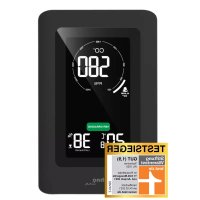
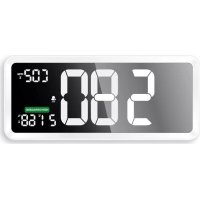
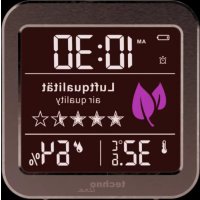
| Product type | Indoor weather station with air quality detection |
| Brand | TECHNOLINE |
| Model | WL 1020 |
| Power supply | 2 AAA batteries (1.5 V) or USB 5 V / 1 A adapter (included) |
| Display | Digital LCD with adjustable white backlight |
| Indoor temperature range | -9.9°C to 50°C (resolution 0.1°C) |
| Indoor humidity range | 10% to 95% (resolution 1%) |
| Air quality detection | TVOC (0 – 9,999 mg/m³) and equivalent CO₂ (400 – 9,999 ppm) |
| Air quality display | 5-star rating (excellent to emergency ventilation) |
| Clock function | 12/24 h display, alarm with snooze (5 min) |
| Value memory | Min/Max temperature and humidity |
| Color backlight | White (normal), yellow (ventilation recommended), red (ventilation urgent) |
| Sensors | Hygrothermal and TVOC (metal oxide) |
| Calibration | Automatic at factory; manual possible (recommended every 1 to 2 weeks) |
| Usage | Indoor only |
| Low battery indicator | Icon displayed when batteries are low |
| Safety | Do not expose to water, shocks, extreme temperatures; do not open |
| Maintenance | Avoid dust; do not touch sensors |
| Reparability | Not user-serviceable; do not open housing |
| Spare parts | Not provided separately |
Frequently Asked Questions - WL 1020 TECHNOLINE
User questions about WL 1020 TECHNOLINE
0 question about this device. Answer the ones you know or ask your own.
Ask a new question about this device
Download the instructions for your Climate control in PDF format for free! Find your manual WL 1020 - TECHNOLINE and take your electronic device back in hand. On this page are published all the documents necessary for the use of your device. WL 1020 by TECHNOLINE.
USER MANUAL WL 1020 TECHNOLINE
4- Air quality display (star icons) 11 - Thermo-hygro sensor
5- Indoor temperature 12 - TVOC sensor
6- Indoor humidity 13 - Battery compartment cover
7- "LIGHT" button 14 - Power adapter connection
Main functions
Quartz clock
12/24 hour time display
- Alarm with 5-minute snooze function
- Display of indoor temperature and humidity
MIN/MAX value memory for temperature and humidity
Air quality display as 5 star icon rating
- Low battery indicator
- White backlight
Changes to yellow: ventilation recommended
EN2
- Changes to red: Air quality sensor (TVOC sensor) measures very high values and ventilation is urgently required
Getting started:
Use with USB adapter
- Use only the included USB adapter to connect a powered device with the WL 1020. Or use a standard DC 5.0V/1A USB-Adapter (not included) to connect the USB adapter cable to an household power socket.
Use with batteries
- Remove the battery compartment cover off the WL 1020 and insert 2 × AAA size battery while observing the correct polarity [“+” and “-” marks]. Close the cover on the battery compartment again.
Notes
EN3
- The air quality sensor will be initialized for about 15 seconds and then the air quality five-star rating will be updated.
- Place the WL 1020 securely on a flat surface with enough free space on all sides. This way, the TVOC sensor and the thermo-hygro sensor within the WL 1020 can get the best results.
Time and alarm time setting
- In normal display mode, hold the "SET" button for 3 seconds to enter the setting mode.
- Press the "+" or the "-" button to adjust the setting and press the "SET" button to confirm each setting. Keep the "+" or the "-" button pressed, to accelerate the process and reach the desired value more quickly.
- The setting sequence is shown as follows: 12/24 hour
EN4
display -> hour -> minute -> alarm time hour -> alarm time minute -> exit
Note:
- The setting will automatically exit in 10 seconds without any adjustment from buttons and return to display mode.
Turning alarm on/off:
- Press the "SET" button to turn the alarm on or off. The alarm icon is displayed as long as the alarm if turned on.
Alarm and snooze function:
-
When alarm sounds, alarm icon is flashing. Press the "LIGHT" button to activate the snooze alarm (alarm icon keeps flashing on the LCD) or any other button to stop the alarm and it will sound at the same time of the next day.
-
Press any button except the "LIGHT" button during the
EN5
active snooze function to stop the snooze alarm.
Note:
- The alarm will sound for 2 minutes and increases in intensity over time before it automatically stops, if not interrupted by pressing any buttons.
Temperature & humidity
- In normal display mode, press the “°C/°F” button to switch between temperature display in °C or °F.
Maximum / minimum temperature & humidity
- In normal display mode, press the "+" button to view maximum and minimum values of temperature and humidity. MAX will be displayed while viewing maximum values and MIN will be displayed while viewing minimum values.
EN6
TVOC and CO2 sensor information
- TVOC and CO2 (CARBON dioxide) adopt metal oxide sensors with long-term stability and low drift.
- TVOC is the abbreviation of total volatile organic compounds, containing thousands of compounds.
- CO2, the sensor does not directly detect CO2 in the environment, but the approximate value derived from other relevant parameters of the sensor.
Air quality testing
When WL 1020 is powered by USB cable:
Air quality (TVOC) sensor will be turned on all the time.
When WL 1020 is powered by batteries:
- Press and hold the "LIGHT" button for 3 seconds to activate the sensor. It will update and display the air quality EN7
five-star rating within 15 seconds.
- The sensor testing mode will be turned off after 5 minutes, in order to save energy and prevent batteries from being drained too fast.
- The display will keep that status of last measuring showing in display
Air quality display
- Air quality is displayed by 5 star symbols, who change accordingly to the measured CO2 value:
| Symbols displayed | Value range | Air quality |
| ★★★★★ | < 500 ppm eq | Outstanding |
EN8
| ★★★★★ | 501-650ppm eq | Very good |
| ★★★★★ | 651-800Ppm eq | Good |
| ★★★★★ | 801-950Ppm eq | Good toaverage |
| ★★★★★ | 951-1200ppm eq | Average |
EN9
| ★★★★☆ | 1201 - 1400 ppm eq | Average to bad |
| ★★★★☆ | 1401 - 1650 ppm eq | Ventilate soon |
| ★★★★☆ | 1651 - 1800 ppm eq | Ventilation recommended |
| ★★★★☆ | 1801 - 2100 ppm eq | Ventilation urgently recommended |
| ★★★★☆ | 2101 - 2450 ppm eq | Ventilation required |
EN10
| ☆☆☆☆☆ | >2451 ppm eq | Ventilation urgently required |
Backlight and color alarm:
- When using batteries, backlight is turned off.
- When using USB adapter, backlight is turned on. Press the "LIGHT" button to adjust the backlight brightness: high brightness - medium brightness - low brightness - backlight turned off.
- When using USB adapter, the backlight color changes to yellow when measured value of air quality sensor is 1401 ppm eq or higher and changes to red when 1801 ppm eq or higher is measured.
Calibration of TVOC and CO2:
The sensor has an automatic factory calibration and can therefore be used immediately. This usage variant is recommended. A manual calibration is also possible.
Manual calibration:
- When using adapter, press and hold the "+" button for 3 seconds and then press the "SET" button to confirm the calibration operation ("CAL" and time display alternately).
- The sensor will be calibrated after 2 hours. Please start the calibration in a non-polluting and ventilated environment. (Please open your window for ventilation while calibrating)
- Calibration will be terminated if the DC power supply is disconnected during calibration process.
- It is recommended to repeat the manual calibration every 1 to 2 weeks.
EN12
Restore factory calibration parameters:
- Press and hold the "-" button if you want to restore factory calibration parameters.
- When the LCD displays "RES", press the "SET" button to confirm and then the factory calibration parameters are restored.
Troubleshooting:
- Do not touch the sensor or don't store the item in packaging materials with strong smell, so as not to affect the accuracy of the sensor.
- WL 1020 should not be placed in a polluted environment for a long time (eg: sealed boxes, contaminated environments).
- Before the WL 1020 is used, it should be placed in a well-ventilated environment to work for more than 1 hours to
EN13
ensure accurate readings.
Low battery indicator:
- The low battery indicator “ ” will be displayed, when the monitor has low battery power
- The batteries in the monitor should be replaced with fresh batteries accordingly.
- You can use the USB adapter to power the monitor while exchanging batteries to avoid losing previously made settings.
Declaration of conformity
Hereby, Technotrade declares that this product WL 1020 is in compliance with the essential requirements and other relevant provisions of Directive 2014/53/EU and ROHS 2011/65/EC. The
EN14
original EU declaration of conformity may be found at: www.technoline.de/doc/4029665210209
Product Specifications
Humidity measurement range: 10% 95%
Humidity resolution: 1%
Temperature measurement range: -9.9 50^ , lower than -9.9^ shows LL, higher than 50^ shows HH.
Temperature resolution: 0.1^
TVOC detection range: 0 -- 9.999 mg/m3
CO2 eq detection range: 400-9999 PPM
Precautions
- This item is intended to be used only indoors.
- Do not subject the item to excessive force or shock.
- Do not expose the item to extreme temperatures, direct
EN15
sunlight, dust or humidity.
- Do not immerse in water.
- Avoid contact with any corrosive materials.
- Do not dispose this item in a fire as it may explode.
- Do not open the inner back case or tamper with any components of this item.
Batteries safety warnings
- Use only alkaline batteries, not rechargeable batteries.
- Install batteries correctly by matching the polarities (+/-) .
- Always replace a complete set of batteries.
- Never mix used and new batteries.
- Remove exhausted batteries immediately.
- Remove batteries when not in use.
- Do not recharge and do not dispose of batteries in fire as the batteries may explode.
EN16
- Ensure batteries are stored away from metal objects as contact may cause a short circuit.
- Avoid exposing batteries to extreme temperature or humidity or direct sunlight.
- Keep all batteries out of reach from children. They are a choking hazard.
Use the product only for its intended purpose!
Consideration of duty according to the battery law
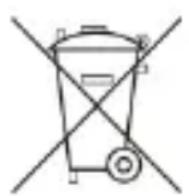
Old batteries do not belong to domestic waste because they could cause damages of health and environment. You can return used batteries free
of charge to your dealer and collection points. As end-user you are committed by law to bring back needed batteries to distributors and other collecting points!
EN17
Consideration of duty according to the law of electrical devices
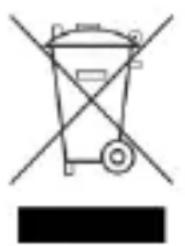
This symbol means that you must dispose of electrical devices separated from the General household waste when it reaches the end of its useful life. Take your item to your local waste
collection point or recycling centre. This applies to all countries of the European Union, and to other European countries with a separate waste collection system.