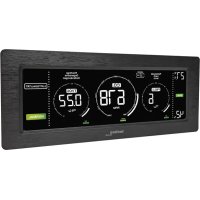
WL 1030 - Climate control TECHNOLINE - Free user manual and instructions
Find the device manual for free WL 1030 TECHNOLINE in PDF.


| Product Type | CO₂, temperature and humidity monitor |
| Brand / Model | TECHNOLINE WL 1030 |
| Power supply | 5 V DC, 1.2 A power adapter (KA0601A-0501200EUS included) |
| CO₂ measurement range | 400 to 5000 ppm (1 ppm resolution) |
| Temperature range | 0 °C to 50 °C / 32 °F to 122 °F (0.1 °C/0.2 °F resolution) |
| Relative humidity range | 20 % to 95 % (1 % resolution) |
| Display | Triple color display with adjustable backlight |
| CO₂ sensor | Non-dispersive infrared (NDIR) sensor with automatic calibration |
| Alert functions | Adjustable visual and audible alarms for CO₂ and humidity (high/low) |
| Memory | Max, Min, Average values over 24 h; 15 min and 8 h weighted averages |
| Ventilation recommendations | Color indicator based on CO₂ level |
| Calibration | Automatic (baseline over 7 days) or manual (at 400 ppm) |
| Operating temperature | 0 °C to 50 °C, < 95 % RH non-condensing |
| Dimensions | Not provided in manual |
| Weight | Not provided in manual |
| Maintenance and cleaning | Soft cloth dampened with water and mild soap; unplug before cleaning |
| Safety | Indoor use only; do not open the housing; do not expose to water, fire, extreme temperatures |
| Spare parts and repairability | No user-serviceable parts; repair by qualified technician |
| Compliance | Directive 2014/53/EU and ROHS 2011/65/EC |
Frequently Asked Questions - WL 1030 TECHNOLINE
User questions about WL 1030 TECHNOLINE
0 question about this device. Answer the ones you know or ask your own.
Ask a new question about this device
Download the instructions for your Climate control in PDF format for free! Find your manual WL 1030 - TECHNOLINE and take your electronic device back in hand. On this page are published all the documents necessary for the use of your device. WL 1030 by TECHNOLINE.
USER MANUAL WL 1030 TECHNOLINE
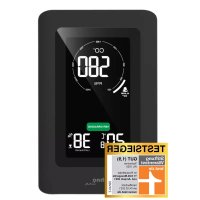
A3 - CO2 moving chart indicator
A4 - CO2 readout
A5 - CO2 sound alarm icon
A6 - CO2 warning icon
A7 - MIN icon
A8-MAXicon
A9 - Ventilation recommendations
A10 - Humidity high alert icon
A11 - Humidity low alert icon
A12 - Indoor temperature
A13 - Indoor humidity
B - Side view
B1 - Power adapter connection point
C-Back view
C1 - "DIMMER" button
C2 - " - " and "CALIBRATE" button
C3 – “MEM” button
C4 - "CO2/RH% / SET" button
C5 - "ALARM CO2" button
C6-“+”and " ^ C / ^ F " button
C7 – Insert DC jack to power up your item
C8 - AC/DC power adapter
C9 - Connect AC plug to household power socket
Main features
- Triple color displays of CO2 level, temperature and relative humidity
- Non-dispersive infrared (NDIR) gas sensor for CO2 detection
- Wide CO2 measuring range from 400 to 5000 PPM
Color display of ventilation recommendation on basis of CO2 concentration in the air - Instant and time weighted average of CO2 reading (15 minutes / 8 hours)
EN2
Max-Min-Average value memory of last 24 hours
- Adjustable CO2 high or low value alert with optional alarm sound for high value alert
- Adjustable humidity high or low value alert (visual only)
Automatic baseline calibration on CO2
- Backlight with adjustable brightness levels
- Built-in memory chip to save settings when power is off
Table standing
Power supply: 5V~1.2A adaptor KA0601A-0501200EUS (included)
Installation
Plug in the enclosed 5V-1.2A AC/DC adaptor to an AC wall outlet and then the DC jack to the back left side of your WL 1030 (B1). The display will come on with the relevant temperature and relative humidity.
Your CO2 reading shows "150" and starts to countdown in seconds with a moving chart. Relevant CO2 data will be displayed within 2.5 minutes. It will continue to calibrate itself and will display the correct CO2 data within 24 hours.
If the AC power is interrupted, the monitor does not work; the display and the backlight are turned off. The settings of your item will be kept by the internal memory chip so your WL 1030 will function again after the AC power resumes.
Ventilation recommendation on the basis of CO2 concentration in the air
Your CO2 monitor measures and displays the CO2 in PPM with color ventilation recommendations:
The cons flash when the current CO2 exceeds 2000 ppm.
To set high alert and low alert of CO2 and humidity
1) Press and hold the "CO2/RH% / SET" button (C4), the CO2 digits "400" (default) flash and the icon (A1) appears. Press the "+" or the "-" button to adjust the low alert level of CO2 in steps of +/- 10 PPM. Lowest alert level is 400 PPM.
2) Press the "CO2/RH% / SET" button (C4) again, the CO2 digits "2000" (default) flash and the icon (A2) appears. Press the "+" or the "-" button to adjust the high alert level of CO2 in steps of +/- 10 PPM. The highest CO2 alert level is 5000 PPM.
3) Press the "CO2/RH% / SET" button (C4) again, the humidity digits "35%" (default) flash and the icon (A1) appears. Press the "+" or the "-" button to adjust the low alert level of RH% in steps of +/-1%. Lowest alert level is 20%.
4) Press the "CO2/RH% / SET" button (C4) again, the humidity digits "70%" (default) flash and the icon (A2) appears. Press the "+" or the "-" button to adjust the high alert level of RH% in steps of +/-1%. Highest alert level is 95%.
5) Press "CO2/RH% / SET" button (C4) again to confirm and end setting. The WL 1030 returns to normal display mode.
Notes:
- Press and hold the "+" or the "-" button to accelerate the setting process.
- Your WL 1030 will store your settings and exit the alert set mode when no button is pressed in approximate 10 seconds.
4 different alert set-ups:
CO2 low alert (default setting 400 ppm eq.)
CO2 high alert (default setting 2000 ppm eq.)
Humidity low alert (default setting 35%
Humidity high alert (default setting 70% )
When the measured CO2 or humidity reaches the set high / low alert level, the related A2) or (A1) icon appears and flashes to remind you.
To use the acoustic CO2 alarm (for high alert)
1) Press the "ALARM CO2" button (C5) once to turn on the CO2 alarm. When the alarm is on, the CO2 sound alarm icon (A5) appears on the display.
2) When the measured CO2 reaches the set high alert level, both the (A2) and CO2 sound alarm icon (A5) flash and an audible beep sound will be given continuously. The beep sound will accelerate when the measured CO2 level exceeds more over the set alert level.
If this happens, please open the windows, adjust the air ventilation and avoid too many people gathering together to improve the air quality of your environment.
3) Press the "ALARM CO2" button (C5) button to disable the CO2 sound alarm. A con (A2) remains flashing if CO2 exceeds the set high alert.
To view the maximum (MAX), minimum (MIN), 15-minute, 8-hour time weighted average value memory
1) Press the "MEM" button (C3) one at a time to view the maximum => minimum record of the CO2, temperature and humidity (MAX or MIN icon appears) and then the 15-minute => 8-hour time weighted average of the CO2 level (15 M or 8Hr appears at the lower LCD).
Note: You need to power on your monitor for at least 15 minutes to display the relevant last 15-minute weighted average of CO2 level (and also power on 8 hours to display the last 8-hour weight average).
2) When the Max / Min /15-M / 8-Hr reading is being displayed, press and hold the "MEM" button (C3) to reset all records (A4, all digits on the display become “----”) and your monitor will start to store data for the next 24-hour period.
To calibrate the CO2 sensor
This monitor is factory calibrated to a 400 PPM CO2 standard concentration.
Caution: Do not manually calibrate the monitor in an environment of unknown CO2 concentration.
Automatic baseline calibration: Your monitor is equipped with a smart chip so that it will automatically calibrate itself to reduce the drift of the CO2 sensor for long time usage. It will calibrate itself automatically at the minimum CO2 reading detected during 7 days of continuous monitoring.
Note: Make sure the place you put your monitor at is well ventilated (with a CO2 level near 400 PPM) for at least one hour everyday, or you move the monitor to such a well ventilated room for a few hours everyday to perform Automatic Baseline Calibration.
Manual calibration of the CO2 sensor
1) Place your CO2 monitor in a 400 PPM calibration surrounding. Power it on and wait for a few minutes until the first CO2 reading is displayed. Then
press and hold the "CALIBRATE" button (C2) until "CAL" flashes on the display.
2) In around 20 minutes, the blinking will stop and the initial calibration is completed. Your CO2 monitor will return to normal display mode and will continue the calibration in the background. It takes 24 hours to let your monitor run and display the correct CO2 level.
Note: Please wait for your CO2 monitor to complete the calibration process by itself. Do not press the "CALIBRATE" button (C2) or any other button during the process.
Temperature
In normal display mode, press the "°C/°F" button (C6) to switch between temperature display in °C or °F.
To adjust the display brightness
Press the "DIMMER" button (C1) to adjust the brightness of the display from High to Low to Off.
Troubleshooting
No display or functions
Check the AC/DC adaptor is properly connected.
Response time
Ensure the air flow channels at the back of the monitor are not blocked or covered.
CO2 reading shows "Err"
The CO2 sensor is not working properly. Unplug the AC/DC adapter (C8) for 10 seconds to insert it to your monitor again.
Care and maintenance
-
Place your monitor on a stable surface, away from sources of direct sunlight or excessive heat or moisture.
-
Clean your monitor with a soft cloth moistened only with mild soap and water. Stronger agents such as Benzine, thinner or similar materials can damage the surface of the item. Make sure the monitor is unplugged before cleaning.
- Do not open the back case or tamper with any components of this monitor.
- Do not plug in any other AC/AC or AC/DC adaptor with incorrect specifications or voltage.
CO2 levels and guidelines
Below are some CO2 reference levels in general:
400~600 ppm Background (normal) outdoor air level.
600~1,000 ppm Typical level for occupied spaces with good air exchange.
1,000 ~ 1,500 ppm Start ventilation of the room.
1,500~2,000 ppm Level associated with complaints of drowsiness and poor air. Ventilation recommended!
2,000~5,000 ppm Level associated with headaches, sleepiness, and stagnant, stale, stuffy air. Poor concentration, loss of attention, increased heart rate and slight nausea may also be present. Ventilation strongly recommended!
5,000 ppm Exposure may lead to serious oxygen deprivation resulting in permanent brain damage, coma, and death. Requires immediate ventilation!
Declaration of conformity
Hereby, Technotrade declares that this product WL 1030 are in compliance with the essential requirements and other relevant provisions of Directive 2014/53/EU and ROHS 2011/65/EC. The original EU declaration of conformity may be found at: www.technoline.de/doc/4029665610306
Specifications
CO2
Measurement range : 400 – 5000 PPM
Resolution : 1 PPM
Accuracy : +/-5% +50 PPM
Warm up time : 1 minute
Temperature range : 0^ to 50^ / 32^ to 122^
Temperature resolution : 0.1^ / 0.2^
Relative humidity range : 20% - 95%
Relative humidity resolution : 1%
Operating temperature : 0^ to 50^ / 32^ to 122^
< 95%, non-condensing
Out of range display
CO2 : 400 (≤ 400 PPM) /
HI (≥ 5000 PPM)
Temperature : LO (≤ 0°C / 32°F) /
HI (≥ 50^ / 122^)
Relative humidity : 20% (≤ 20%) /
95% (≥ 95%)
Power supply : 5V DC, 1.2A adaptor
Default Settings
CO2 alert : Low - 400, High - 2000
RH% alert : Low - 35%, High - 70%
CO2 sound alert : Off
Temperature : ^ C
Display brightness level : High
Precautions
The item is intended to be used only indoors.
- Do not subject the item to excessive force or shock.
- Do not expose the item to extreme temperatures, direct sunlight, dust or humidity.
- Do not immerse in water.
- Avoid contact with any corrosive materials.
EN9
- Do not dispose this item in a fire as it may explode.
- Do not open the inner back case or tamper with any components of this item.
Use the product only for its intended purpose!
Consideration of duty according to the law of electrical devices This symbol means that you must dispose of electrical devices separated from the General household waste when it reaches the end of its useful life. Take your item to your local waste collection point or recycling centre. This applies to all countries of the European Union, and to other European countries with a separate waste collection system.
Precision: +/-5% +50 ppm