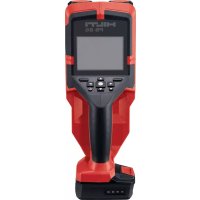
PS 85 - Measuring equipment HILTI - Free user manual and instructions
Find the device manual for free PS 85 HILTI in PDF.
 FR
FR
 BG
BG
 CS
CS
 DA
DA
 DE
DE
 EL
EL
 EN
EN
 ES
ES
 ET
ET
 FI
FI
 HE
HE
 HU
HU
 IT
IT
 JA
JA
 KK
KK
 KO
KO
 LT
LT
 LV
LV
 NL
NL
 NO
NO
 PL
PL
 PT
PT
 RO
RO
 RU
RU
 SK
SK
 SL
SL
 SV
SV
 TR
TR
 UK
UK
 ZH
ZH
| Product type | Wall scanner |
| Brand | Hilti |
| Model | PS 85 |
| Dimensions (L x W x H), without battery | 264 mm x 115 mm x 100 mm |
| Weight (without battery) | 0.57 kg |
| Power supply | Hilti Li-Ion battery series B12 (10.8 V) |
| Typical operating time | Approx. 6 h (with B12-30 battery) |
| Maximum detection depth (dry concrete) | 200 mm |
| Reliable detection depth (metal objects, dry concrete) | ≤ 85 mm |
| Detectable objects | Ferrous/non-ferrous metals, wood, plastic, live cables |
| Measurement modes | Object detection, leak detection, distance measurement |
| Display | Screen with spot, object, 2D signal, and signal views |
| Interface | USB Type-C, microSD card, NFC |
| Button cell (clock) | CR2032 (3 V lithium) |
| Protection rating | IP 5X |
| Operating temperature | -10 °C to 50 °C |
| Storage temperature | -20 °C to 70 °C |
| Package contents | Wall scanner, USB cable, instruction manual |
| Safety | Button cell warning: danger of ingestion |
| Maintenance | Clean with a dry cloth, keep wheels clean |
| Warranty | Contact Hilti customer service |
Frequently Asked Questions - PS 85 HILTI
User questions about PS 85 HILTI
0 question about this device. Answer the ones you know or ask your own.
Ask a new question about this device
Download the instructions for your Measuring equipment in PDF format for free! Find your manual PS 85 - HILTI and take your electronic device back in hand. On this page are published all the documents necessary for the use of your device. PS 85 by HILTI.
USER MANUAL PS 85 HILTI
EC Declaration of Conformity | UK Declaration of Conformity

text_image
HILTIManufacturer:
Hilti Corporation
Hilti (Gt. Britain) Limited
No. 1 Circle Square, 3 Symphony Park
Manchester, England, M1 7FS
PS 85 (01)
Serial Numbers: 1-99999999999
2014/53/EU | Radio Equipment Regulations 2017
2011/65/EU | The Restriction of the Use of Certain Hazardous Substances in Electrical and Electronic Equipment Regulations 2012
EN 50665:2017
EN 301 489-1 V2.2.3
EN 302 065-4 V1.1.1
EN 300 330 V2.1.1
EN 301 489-33 V2.2.1
Dr. Tahar Zrilli
Head of Quality and Process Management Business Area Electric Tools & Accessories
Schaan, 12.02.2024

Sriram Makineedi
Head of BU Measuring Systems
Business Unit Measuring Systems
- INGESTION HAZARD: This product contains a button cell or coin battery. • DEATH or serious injury can occur if ingested. • A swallowed button cell or coin battery can cause Internal Chemical Burns in as little as 2 hours. • KEEP new and used batteries OUT OF REACH of CHILDREN • Seek immediate medical attention if a battery is suspected to be swallowed or inserted inside any part of the body.
natural_image
3D mechanical component diagram showing internal structure with numbered parts (1, 2) and a close-up inset view of a component (no text or symbols)7250 Dallas Parkway, Suite 1000
US-Plano, TX 75024
www.hilti.com
Declaration of Confor
Proposal corded
| Part Name | Hazardous Substances | |||||
| Lead (Pb) | Mercury (Hg) | Cadmium (Cd) | Hexavalent Chromium (Cr(VI)) | Poly-brominated biphenyls (PBB) | br diph | |
| Electronics (PCB, switch, wiring) | X | O | X | O | O | |
| Motor | O | O | O | O | O | |
| Power cord | O | O | O | O | O | |
| Fastener elements | O | O | O | O | O | |
| Metal parts | X | O | O | O | O | |
| Power supplies | O | O | O | O | O | |
| Brass parts | X | O | O | O | O | |
| Aluminium parts | X | O | O | O | O | |
| Battery | O | O | O | O | O | |
| Battery charger | X | O | O | O | O | |
O: Indicates that said hazardous substance contained in all of the homogeneous materials for this part is below the limit requirement of GB/T 26572
X: Indicates that said hazardous substance contained in at least one of the homogenous materials used for this part is above the limit requirement of but corresponds to the exemption
Original operating instructions
1 Information about the operating instructions
1.1 About these operating instructions
- Warning! Read and understand all accompanying documentation, including but not limited to instructions, safety warnings, illustrations, and specifications provided with this product. Familiarize yourself with all the instructions, safety warnings, illustrations, specifications, components, and functions of the product before use. Failure to do so may result in electric shock, fire, and/or serious injury. Save all warnings and instructions for future reference.
- HILTI products are designed for professional users and only trained, authorized personnel are permitted to operate, service and maintain the products. This personnel must be specifically informed about the possible hazards. The product and its ancillary equipment can present hazards if used incorrectly by untrained personnel or if used not in accordance with the intended use.
- The accompanying documentation corresponds to the current state of the art at the time of printing. Please always check for the latest version on the product's page on Hilti's website. To do this, follow the link or scan the QR code in this documentation, marked with the symbol.
- Ensure that these operating instructions are with the product when it is given to other persons.
1.2 Explanation of symbols
1.2.1 Warnings
Warnings alert persons to hazards that occur when handling or using the product. The following signal words are used:

DANGER
DANGER!
- Draws attention to imminent danger that will lead to serious personal injury or fatality.

WARNING
WARNING!
- Draws attention to a potential threat of danger that can lead to serious injury or fatality.

CAUTION
CAUTION!
- Draws attention to a potentially dangerous situation that could lead to personal injury or damage to the equipment or other property.
1.2.2 Symbols in the operating instructions
The following symbols are used in these operating instructions:

Comply with the operating instructions

Instructions for use and other useful information

Dealing with recyclable materials

Do not dispose of electric equipment and batteries as household waste

Hilti Li-ion battery

Hilti charger
1.2.3 Symbols in illustrations
The following symbols are used in illustrations:

These numbers refer to the illustrations at the beginning of these operating instructions.
3
The numbering reflects the sequence of operations shown in the illustrations and may deviate from the steps described in the text.

Item reference numbers are used in the overview illustration and refer to the numbers used in the key in the product overview section.

These characters are intended to specifically draw your attention to certain points when handling the product.
1.3 Product-dependent symbols
1.3.1 Symbols on the product
The following symbols can be used on the product:

SD card

USB

The tool supports near-field communication (NFC) technology compatible with iOS and Android platforms.

Hilti Li-ion battery type series used. Observe the information given in the section headed Intended use.
Li-Ion
Li-ion battery
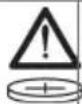
Warning: Swallowable small parts (button-cell battery)

If applied on the product, the product has been certified by this certification body for the US and Canadian markets according to the applicable standards.
1.4 Product information

products are designed for professional users and only trained, authorized personnel are permitted to operate, service and maintain the products. This personnel must be specifically informed about the possible hazards. The product and its ancillary equipment can present hazards if used incorrectly by untrained personnel or if used not in accordance with the intended use.
The type designation and serial number are printed on the rating plate.
Write down the serial number in the table below. You will be required to state the product details when contacting Hilti Service or your local Hilti organization to inquire about the product.
Product information
| Wall scanner PS 85 | |
| Generation 01 | |
| Serial no. |
1.5 Declaration of conformity
EC Declaration of Conformity | UK Declaration of Conformity

text_image
HILTIManufacturer:
Hilti Corporation
Hilti (Gt. Britain) Limited
No. 1 Circle Square, 3 Symphony Park
Manchester, England, M1 7FS
PS 85 (01)
Serial Numbers: 1-99999999999
2014/53/EU | Radio Equipment Regulations 2017
2011/65/EU | The Restriction of the Use of Certain Hazardous Substances in Electrical and Electronic Equipment Regulations 2012
EN 50665:2017
EN 301 489-1 V2.2.3
EN 302 065-4 V1.1.1
EN 300 330 V2.1.1
EN 301 489-33 V2.2.1
Dr. Tahar Zrilli
Head of Quality and Process Management Business Area Electric Tools & Accessories
Schaan, 12.02.2024

Sriram Makineedi
Head of BU Measuring Systems
Business Unit Measuring Systems
The manufacturer declares, on his sole responsibility, that the product described here complies with the applicable legislation and standards.
The technical documentation is filed here:
Hilti Entwicklungsgesellschaft mbH | Tool Certification | Hiltistrasse 6 | D-86916 Kaufering, Germany
1.6 Sticker on the product / on the packaging

WARNING

AVERTISSEMENT
- INGESTION HAZARD: This product contains a button cell or coin battery. • DEATH or serious injury can occur if ingested. • A swallowed button cell or coin battery can cause Internal Chemical Burns in as little as 2 hours. • KEEP new and used batteries OUT OF REACH of CHILDREN • Seek immediate medical attention if a battery is suspected to be swallowed or inserted inside any part of the body.
Comply with the warnings about handling button-cell batteries. 34
2 Safety
2.1 General safety instructions, measuring tools
WARNING! Read all safety precautions and other instructions. Measuring tools can present hazards if handled incorrectly. Failure to observe the safety instructions and other instructions can result in damage to the measuring tool and/or serious injury.
Keep all safety precautions and instructions for future reference.
Work area safety
- Keep your workplace clean and well lit. Cluttered or poorly lit workplaces invite accidents.
- Do not operate the product in explosive atmospheres, such as in the presence of flammable liquids, gases or dust.
- Keep children and other persons clear when the product is in use.
▶ Use the product only within its specified limits.
▶ Comply with your national accident prevention regulations.
Electrical safety
Do not expose the product to rain or moisture. Penetrating moisture can cause short circuits, electrical shock, burns or explosions.
▶ Wipe the product dry before stowing it in the transport container.
Personal safety
- Stay alert, watch what you are doing and use common sense when operating a measuring tool. Do not use a measuring tool while you are tired or under the influence of drugs, alcohol or medication. A moment of inattention while operating the measuring tool can result in serious personal injury.
- Avoid unusual body positions. Keep proper footing and balance at all times.
▶ Wear personal protective equipment. Wearing personal protective equipment reduces the risk of injury.
- Do not render safety devices ineffective and do not remove information and warning notices.
- Avoid accidental starting. Make sure that the measuring tool is switched off before connecting it to the battery and before picking it up or carrying it.
▶ Use the product and accessories in accordance with these instructions and in the way specified for this special type of tool. Take the working conditions and the work to be performed into account. Use of products for applications different from those intended could result in hazardous situations.
- Do not lull yourself into a false sense of security and do not flout the safety rules for measuring tools, even if you are familiar with the measuring tool after using it many times. Carelessness can result in serious injury within a fraction of a second.
- Do not use the measuring tool in the vicinity of medical devices.
Using and handling the measuring tool
▶ Use the product and accessories only when they are in perfect working order.
- Store measuring tools out of reach of children when not in use. Do not allow persons who are not familiar with the product or these instructions to operate it. Measuring tools are dangerous in the hands of inexperienced persons.
▶ Measuring tools need care and attention. Check that moving parts operate satisfactorily and do not jam, and make sure that no parts are broken or damaged in such a way that the measuring tool might no longer function correctly. Have damaged parts repaired before using the measuring tool. Many accidents are caused by poorly maintained measuring tools.
Do not under any circumstances modify or tamper with the product. Changes or modifications not expressly approved by Hilti may restrict the user's authorization to operate the product.
▶ Check the accuracy of the measuring tool before using it for important measurements, and if it has been dropped or subjected to other mechanical stresses.
▶ Due to the measuring principle employed, the results of measurements can be negatively affected by certain ambient conditions. These include, for example, the proximity of devices that produce strong magnetic or electro-magnetic fields, vibrations and temperature changes.
▶ Rapidly changing measuring conditions can falsify the results. - When the product is brought into a warm environment from very cold conditions, or vice-versa, allow it to become acclimatized before use. Big differences in temperature can lead to incorrect operation and incorrect results.
- When adapters or accessories are used, make sure they are mounted securely.
The measuring tool is designed for the tough conditions of jobsite use, but as with other optical and electrical products (e.g. binoculars, spectacles, cameras) it must be handled with care.
The specified operating and storage temperatures must be observed.
2.2 Additional safety instructions
Personal safety
- Keep the measuring tool well away from all implants.
- Comply with the national accident prevention regulations.
- Do not use the measuring tool to examine humans or animals.
▶ Operation of the device in the proximity of expectant mothers or persons with a cardiac pacemaker is not permissible.
Electrical safety
- Remove the battery prior to storage.
Using and handling the measuring tool
▶ Prior to use, always check the measuring tool's presettings and the settings you have made yourself.
▶ After switching on and while using the product, always pay attention to the information and warnings that appear on the display.
- Keep the underside of the scanner and the wheels clean as these parts can have an influence on measuring accuracy.
- Do not affix stickers or adhesive labels to the sensor area at the back of the measuring tool. Metal plates / labels, in particular, will affect measuring results.
▶ While measuring is in progress, always keep all 4 wheels in contact with the surface being scanned. Do not pass over steps or edges.
▶ While scanning is in progress, to avoid influencing the scan hold the measuring tool only by the grip provided for the purpose.
▶ While scanning is in progress, do not wear gloves and ensure an adequate earth/ground connection. An inadequate earth/ground connection can impair material detection (including detection of electrically live lines).
▶ Always move the measuring tool back and forth with a perfectly steady action.
- Do not drill at positions where the measuring tool has detected the presence of an object. Take the diameter of the drill bit into account and always allow an adequate safety factor.
- Do not use the measuring tool to detect critical objects such as load-bearing structural elements, high-tension lines, gas or steam lines, high-pressure lines and similar objects.
▶ Never rely on the measuring tool alone. Verify the results of measurements by cross-checking with other sources of information and by taking control measurements and, if necessary, by drilling pilot holes.
▶ Make sure that the wrist strap is securely attached. Prior to each use, always check the attachment point of the wrist strap for possible damage.
Risk of injury by falling tools and/or accessories. Use only the wrist strap supplied.
HILTI
- Carry the measuring tool only by the grip provided for the purpose. Keep the grip clean, dry and free from oil and grease.
- Keep the display clean and easily readable. Wipe the display only with a clean, non-scratch cloth.
Due to the measuring principle employed, the results of measurements can be negatively affected by certain ambient conditions. These include, e.g. proximity to devices that generate powerful magnetic or electromagnetic fields, dampness, construction materials containing metal, aluminum foil-backed insulation, multiple layers, materials with cavities or electrically conductive wall coverings or tiles. Accordingly, other sources of information (e.g. plans of the building) should also be consulted before beginning drilling, sawing or grinding in the area scanned. - When scanning is in progress, avoid the vicinity of devices (such as cellphones, for example) that emit strong electric, magnetic or electro-magnetic fields. On all devices capable of producing emissions that can impair measurement, deactivate the relevant functions if possible, or switch the devices off.
Do not operate the measuring tool in the vicinity of military installations, airports, radio astronomy facilities or in aircraft unless prior permission has been obtained.
▶ Check the accuracy of the measuring tool if it has been dropped or subjected to other mechanical stresses. If the measuring tool is damaged, have it repaired by a Hilti service center.
The specified operating and storage temperatures must be observed.
2.3 Careful handling and use of batteries
- Comply with the following safety instructions for the safe handling and use of Li-ion batteries.
Failure to comply can lead to skin irritation, severe corrosive injury, chemical burns, fire and/or explosion.
▶ Use only batteries that are in perfect working order.
▶ Treat batteries with care in order to avoid damage and prevent leakage of fluids that are extremely harmful to health! - Do not under any circumstances modify or tamper with batteries!
- Do not disassemble, crush or incinerate batteries and do not subject them to temperatures over 80 °C (176 °F).
▶ Never use or charge a battery that has suffered an impact or been damaged in any other way. Check your batteries regularly for signs of damage.
▶ Never use recycled or repaired batteries.
▶ Never use the battery or a battery-operated power tool as a striking tool.
▶ Never expose batteries to the direct rays of the sun, elevated temperature, sparking, or open flame. This can lead to explosions.
- Do not touch the battery poles with your fingers, tools, jewelry, or other electrically conductive objects. This can damage the battery and also cause material damage and personal injury.
- Keep batteries away from rain, moisture and liquids. Penetrating moisture can cause short circuits, electric shock, burns, fire and explosions.
▶ Use only chargers and power tools approved for the specific battery type. Read and follow the relevant operating instructions.
- Do not use or store the battery in explosive environments.
If the battery is too hot to touch, it may be defective. Put the battery in a place where it is clearly visible and where there is no risk of fire, at an adequate distance from flammable materials. Allow the battery to cool down. If it is still too hot to touch after an hour, the battery is faulty. Consult Hilti Service or read the document entitled "Instructions on safety and use for Hilti Li-ion batteries".

Observe the special guidelines applicable to the transport, storage and use of lithium-ion batteries.

Read the instructions on safety and use of Hilti Li-ion batteries that you can access by scanning the QR code at the end of these operating instructions.
2.4 Careful handling and use of button-cell batteries
▶ Never swallow button-cell batteries. Severe internal caustic burns or death can result within 2 hours of swallowing a button-cell battery.
▶ Make sure that button-cell batteries are inaccessible to children. Call a poison control center to obtain information on treatment if there is any suspicion that a button-cell battery has been swallowed or inserted into a body orifice.
▶ Use only the button-cell batteries stated in these operating instructions. Do not use any other button-cell batteries or other power supply.
- Do not attempt to recharge non-rechargeable button-cell batteries. The button-cell battery can develop a leak, explode, catch fire and injure persons.
Do not force-discharge, charge, disassemble or incinerate the button-cell battery. Do not heat the button-cell battery to a temperature above the maximum temperature stated by the manufacturer. Otherwise there is a risk of injury by degassing, leakage or explosion leading to chemical burns.
Remove discharged button-cell batteries and recycle or dispose of them immediately in accordance with your local regulations. Keep button-cell batteries out of reach of children. Do NOT dispose of button-cell batteries in household waste and do not incinerate them. Discharged button-cell batteries can develop leaks and so damage the product or injure persons.
Even discharged button-cell batteries can lead to serious injuries or death. Do not treat discharged button-cell batteries with less care than new batteries. - Do not bring a damaged button-cell battery into contact with water. In the presence of water, escaping lithium can produce hydrogen and so lead to a fire or an explosion, or cause injury to persons.
- When replacing the button-cell battery, make sure that the correct procedure is followed. Make sure that the button-cell battery is inserted right way round for correct polarity (+ and -). There is a risk of explosion.
▶ Always completely close the compartment of the button-cell battery. If the button-cell battery compartment does not close securely, do not keep the product in use and remove the button-cell battery. Keep the button cell battery out of reach of children.
Do not mix old and new button-cell batteries, different makes or button-cell battery types, such as alkaline, zinc-carbon or rechargeable button-cell batteries.
Remove the button-cell batteries from products that will be out of use for a lengthy period and recycle them or dispose of them immediately in accordance with your local regulations. Do NOT dispose of button-cell batteries in household waste and do not incinerate them.
3.1 Product overview
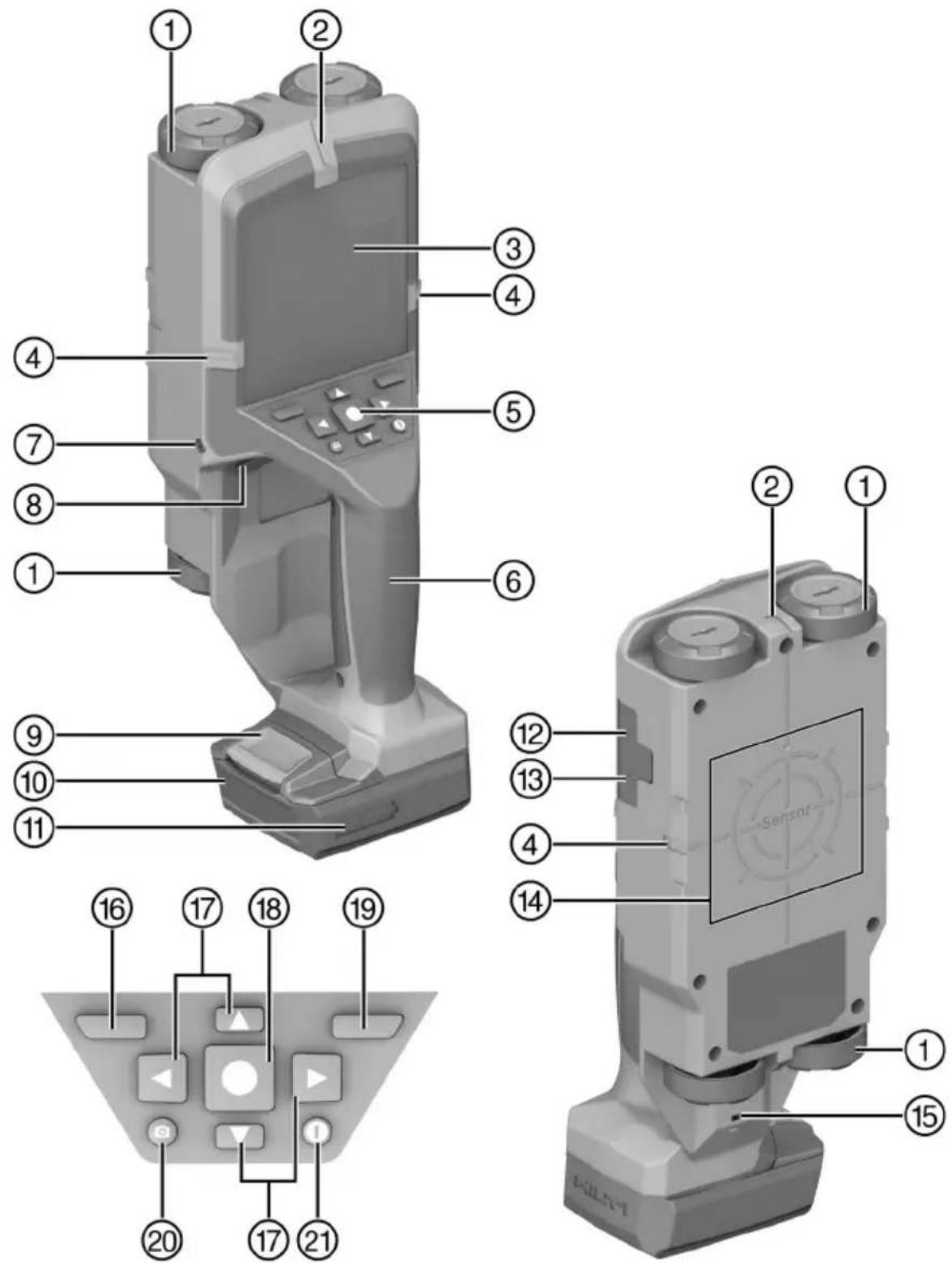
① Wheel
② Top marking notch
③ Display
④ Left/right marking notches
⑤ Control panel
⑥ Grip
⑦ Screw, button-cell battery holder
⑧ Button-cell battery holder
⑨ Battery release button
⑩ Battery
⑪ Battery state of charge indicator
⑫ Slot, micro-SD card
⑬ USB port, type C
⑭ Sensor area
⑮ Eye
⑲ Right function button
⑯ Left function button
⑳ Screenshot button
⑰ Arrow buttons
②1 On/off button
⑱ Start/stop button
3.2 Intended use
The product described is a wall scanner. It is designed to detect objects such as ferrous metals (reinforcing bars), non-ferrous metals (copper, aluminum), wooden beams, plastic pipes, lines and electric cables in dry materials.
Device operation is limited to those engaged professionally in the building and construction trades.
| B 12/2.6 | 0.24 kg | 0.53 lb | C 4/12-50 |
| B 12-30 | 0.25 kg | 0.55 lb | |
| B 12/4.0 | 0.35 kg | 0.77 lb | |
| B 12-55 | 0.33 kg | 0.73 lb |
- For this product, use only Hilti lithium-ion batteries of the B 12 series. For this product, Hilti recommends the use of the batteries stated in this table.
- For these batteries, use only Hilti chargers of the type series stated here.
3.3 Items supplied
Wall scanner, USB cable, operating instructions
Other system products approved for use with this product can be found at your local Hilti Store or at: www.hilti.group
3.4 Overview of measuring modes
The measuring tool supports the following measuring modes:
- Object detection for detecting objects in walls, floors and ceilings.
- Leak detection for detecting leaks.
• Distance measurement for measuring distances.
You can change from mode to mode by selecting the "Measuring mode" item from the menu. 40
4 Technical data

All data stated were measured on special test rigs, mostly in a laboratory environment. On account of additives in the base material, changes in ambient conditions or peculiarities of the objects detected (e.g. bent objects), measuring performance can differ considerably from the values stated (also see the section headed "Additional safety instructions"). Our standard laboratory conditions are:
• Temperature: 20 °C
• Relative humidity: 36.5 %
• Strength class of the concrete: C 50/60
| Maximum detection depth in dry concrete | 200 mm(7.9 in) | |
| Detection depth for absolutely reliable results in dry concrete | metal objects | ≤ 85 mm(≤ 3.3 in) |
| other objects | ≤ 80 mm(≤ 3.1 in) | |
| Detection depth, wooden beams in drywall partitions | 38 mm(1.5 in) | |
| Detection depth, metal objects in early-age concrete | 60 mm(2.4 in) | |
| Detection depth, objects in other supported wall types | 80 mm(3.1 in) | |
| Accuracy of displayed object depth (plus application-specific deviation) | in dry concrete | ±5 mm(±0.2 in) |
| in early-age concrete | ±10 mm(±0.4 in) | |
| Measuring accuracy to center of object | ±5 mm(±0.2 in) | |
| Minimum distance between two neighboring objects | 40 mm(1.6 in) | |
| Measuring accuracy, distance measurement | ±10 mm / 1 m(±0.4 in / 3 ft - 3 in) | |
| Frequency, radar sensor | 1.8 GHz ... 5.7 GHz | |
| Maximum transmitting power, radar sensor | 0.00001 mW | |
| Frequency, inductive sensor | 48 kHz ... 52 kHz | |
| Maximum magnetic field strength (at 10 m) | 20 dBμA/m | |
| Maximum site elevation above datum | 2,000 m(6,561 ft - 8 in) | |
| Maximum relative humidity | 90 % | |
| Maximum relative humidity for detecting electrically live objects | 50 % | |
| Degree of dirtying in accordance with IEC 61010-1 | 2 | |
| Typical battery life with B 12-30 battery | ≈ 6 h | |
| Button-cell battery | CR2032 (3 V lithium battery) | |
| Button-cell battery life | approx. 36 months | |
| Degree of protection | IP 5X | |
| Dimensions (length x width x height), without battery | 264 mm x 115 mm x 100 mm(10.4 in x 4.5 in x 3.9 in) | |
| Weight in accordance with EPTA-Procedure 01, without battery | 0.57 kg(1.26 lb) | |
| Ambient temperature for operation | -10 °C ... 50 °C(14 °F ... 122 °F) | |
| Storage temperature | -20 °C ... 70 °C(-4 °F ... 158 °F) | |
4.1 Battery
| Battery operating voltage | 10.8 V |
| Ambient temperature for operation | -17 °C ... 60 °C(1 °F ... 140 °F) |
| Storage temperature | -20 °C ... 40 °C(-4 °F ... 104 °F) |
| Battery charging starting temperature | -10 °C ... 45 °C(14 °F ... 113 °F) |
5 Operation
Observe the safety instructions and warnings in this documentation and on the product.
5.1 Charging the battery
- Before charging the battery, read the operating instructions for the charger.
- Make sure that the contacts on the battery and the contacts on the charger are clean and dry.
- Use an approved charger to charge the battery. 37
5.2 Inserting the battery

WARNING
Risk of injury by short circuit or falling battery!
Before inserting the battery, make sure that the contacts on the battery and the contacts on the product are free of foreign matter.
▶ Make sure that the battery always engages correctly.
- Charge the battery fully before using it for the first time.
- Push the battery into the product until it engages with an audible click.
- Check that the battery is seated securely.
5.3 Removing the battery
- Press the battery release button.
- Remove the battery from the product.
5.4 Attaching wrist strap

WARNING
Risk of injury due to incorrect attachment of a tool tether! The product can fall. ▶ Do not attach a tool tether to the eyelet and/or the wrist strap.
- Pull the narrow loop of the wrist strap through the eyelet in the underside of the product.
- Pass the broad loop through the narrow loop and pull the wrist strap tight.
5.5 Switching measuring tool on/off

Before switching on the measuring tool, check that the sensor area is not damp. If necessary, wipe the measuring tool dry with a cloth.
- To switch the measuring tool on, press the on/off button or the start/stop button.
- Outside the operating temperature range, a fault message is displayed and the measuring tool automatically switches off. Allow the measuring tool to cool down or warm up, as appropriate, and then switch it on again.

The tool automatically switches itself off completely if it is not used for 5 minutes. You can change this preset delay before automatic deactivation in the main menu.
- To switch the measuring tool off, press the on/off button.
5.6 Menu
5.6.1 Navigating in menu
The functions assigned to the left and right function buttons vary, depending on which display view is active. The assigned function is indicated by a symbol appearing on the display directly above the corresponding function button.
- To open the menu, press the left function button.
- To scroll through a menu, press the up or down arrow button.
- To confirm your choice of a menu option, press the start/stop button.
- To move back up to the next higher menu level, press the left function button.
- To exit the menu, press the right function button (not available in the "Gallery" submenu).
5.6.2 Menu items
Gallery
You can retrieve images saved in the tool's internal memory, or you can delete them by pressing the right function button below the wastebasket symbol.

Data fragments of the images remain in internal memory and the images can be reconstructed. To delete images irretrievably, select Format internal memory. If an SD card is inserted, first select Format SD card, then remove the SD card and then proceed to reformat internal memory. Alternatively, you can irretrievably delete the images by opening the Tool settings menu and selecting Default settings.
Measuring mode
Set the measuring mode you want to use. The measuring tool switches directly to the desired mode as soon as you make your selection. In "Object detection" mode you can also select the most suitable wall type for the planned measurement as well as the view, which determines how the results of measurement are displayed on screen.
Tool settings
- Measuring tape:Switch the measuring tape on and off for the measuring modes "Object detection" (except Spot view) and "Leak detection". You can use the measuring tape to measure the center-to-center distance between two objects, for example. Press the right function button to zero the measuring tape.
- Screen brightness: Set the brightness of the display lighting.
- Audio: Switch the acoustic signal on or off. When the function is switched on, an acoustic signal sounds every time a button is pressed and for each object detected underneath the sensor area.
- Start settings: Choose the settings (e.g. wall type, view, measuring tape) that are activated by default when the measuring tool is switched on. You have the choice of using the settings active when the tool was last switched off, or a personalized basic setting (corresponds to the current settings selected in the main menu).
- Switch off after ...: Select the time after which the measuring tool will switch off automatically if it is not used.
• Language: Select the display language. - Date & time: Set the date and time for saving images and select the date and time formats. When date and time are no longer saved the button-cell battery has to be changed (see the section headed "Inserting/changing button-cell battery" (see Figure D), Page 31).
- Unit of measure: Select the unit of measure to be used in displaying measurements. (Not available in all markets.)
- Default settings: You can reset all menu options to their ex-works default settings. At the same time, all images saved in the tool's internal memory are irretrievably deleted.
Information about the tool
This function enables you to call up tool information such as the software version installed, for example.
5.6.3 Context-sensitive information and help
Whenever the question-mark symbol appears on the display above the right function button, pressing the right function button will call up context-sensitive information and help. This option is available whenever you change the wall type or the view, in all measuring modes of object detection and in leak detection.
5.7 Saving / transferring results of measurement
5.7.1 Saving results of measurement as image
A panorama screenshot function is available in Object view. You can use it to save the results of measurement (including the object depth for each object shown on the display) as an image for documentation and subsequent analysis.
- Measure the desired area in the usual way.
- Then press the "Screenshot" button.
If there a micro-SD card installed in the slot, the images are saved to the card. Otherwise, the images are saved to the measuring tool's internal memory and can be exported via the USB interface.
- You can use the "Gallery" menu item to retrieve or delete images. 40
5.7.2 Data transfer via USB interface
The USB interface is for data transfer only. Batteries or other devices cannot be recharged via this port.
- Open the cover over the USB port.
- With the measuring tool switched off, use the USB cable to establish the connection between the USB port on the tool and your PC.

Use the USB interface only for connecting the measuring tool to a PC. Attempts to connect to other devices can damage the measuring tool.
- Switch the measuring tool on. 39
- Open the file browser on your PC and select "Hilti PS 85" as the drive. The files saved in the measuring tool's internal memory can be copied, moved to your PC, or deleted.
- As soon as you have completed the desired procedure, disconnect the drive in the standard way.

Invariably, you first have to log out the drive from your PC's operating system (Eject drive), as otherwise the measuring tool's internal memory can be damaged.
- Then switch the measuring tool off at the on/off switch.
- Disconnect the USB cable and close the cover over the USB port to protect against dirt and spray.
5.7.3 Data transfer by micro-SD card
If there is a micro-SD card inserted in the measuring tool, images are automatically saved to the card and not to the measuring tool's internal memory.

Switch the measuring tool off before you remove the micro-SD card. Failure to comply with this precaution can result in damage to the micro-SD card.
- Open the cover over the slot for the micro-SD card.
- Press the micro-SD card slightly into the measuring tool until the card unlatches.
- Remove the micro-SD card from the slot and connect it to your PC. The files saved on the card can be copied, moved to your PC, or deleted.
- When you are finished, re-insert the micro-SD card into the slot. Make sure you insert the card right way round. Push the micro-SD card in until it engages.
- Close the cover of the slot to protect against dust and spray.
5.8 Software update
You can update the software of the measuring tool when necessary.
The newest software version can be downloaded from here: Downloading
If the software version is newer than the version installed on your product, download the update file.
- Load the update file on to the micro-SD card.
- Insert the micro-SD card into the measuring tool. 41
▶ Switch the measuring tool on.
If a new update file that was not installed beforehand is found, the update process starts automatically.
- You can follow the progress of the update process on the display. This process can take several minutes to complete.
- When the update procedure completes, the measuring tool reboots automatically.
▶ Hilti recommends subsequently deleting the update file from the micro-SD card.

Switch the measuring tool off before you remove the micro-SD card.
6 "Object detection" measuring mode
6.1 Working principle
The measuring tool is used to examine the base material in the sensor area. If there are objects set one above the other in the wall, the object closest to the surface is shown on the display. In "Object detection" mode you can also select the most suitable wall type for the planned measurement as well as the view, which determines how the results of measurement are displayed on screen.
6.2 Detectable objects
Objects that differ from the wall material are detected.
- Plastic pipes (e.g. water-filled plastic pipes at least 10 mm in diameter, empty pipes at least 20 mm in diameter in solid surrounding material)
• Electric cables (irrespective of whether the cables are live or not) - Three-phase power cables (e.g. for kitchen cooker)
- Low-voltage lines (e.g. for doorbell, telephone, LAN, smart-home wiring)
- Metal pipes, bars, beams of all kinds (e.g. steel, copper, aluminum)
- Reinforcing bars
- Wooden beams
- Cavities
6.3 Special measurement cases
Due to the principle employed, certain adverse circumstances can have a negative effect on the result:
- Multi-layer wall make-ups.
- Empty plastic pipes and wooden beams in cavities and drywall partitions.
- Objects running at an angle in the wall.
- Metal surfaces and damp areas; under certain circumstances (e.g. high water content), might be presented on the display as objects in a wall. Bear in mind that concrete has to cure for several months to reach its fully dry state.
- Cavities in a wall; might be presented on the display as objects.
- Proximity to devices that produce strong magnetic or electro-magnetic fields, such as cellphone base stations or electricity generators.

Before drilling, cutting or milling into the wall, to safeguard against hazards you should also consult other sources of information. The results of measurement can be affected by ambient influences or the condition of the wall, so a hazard might exist even though the display shows no objects present in the sensor area.
6.4 Wall types
Changing wall type
To obtain the best possible results, always set the appropriate wall type. Measuring depth depends on wall type; the maximum is 85 mm (3.3 in).
- Press the left or right arrow button until the wall type you want to use appears on the display.
- Press the start/stop button to confirm your selection of wall type.
Wall type "Brick/universal"
Wall type "Brick/universal" is suitable for most applications in solid masonry or other homogeneous materials. Plastic and metal objects and electrical lines and other lines are shown on the display. Voids in masonry and empty plastic pipes less than 2 cm (0.8 in) in diameter might not show up on the display. This mode works best with homogeneous base materials such as sandstone bricks and clay plates.
Wall type "Concrete"
Wall type "Concrete" is suitable for applications in dry concrete. Plastic and metal objects and electrical lines and other lines are shown on the display. Empty plastic pipes less than 2 cm (0.8 in) in diameter might not show up on the display. When you select the wall type you can also set the maximum measuring depth in the range from 8 cm (3.1 in) to 20 cm (7.9 in).
Wall type "Drywall"
Wall type “Drywall” is suitable for detecting wooden beams, metal framing and electrical lines and other lines in drywall partitions (wood, gypsum board, etc.). Filled plastic pipes and wooden beams appear identical on the display. Empty plastic pipes are not detected. If you identify many objects close to the surface (0-2 mm (0-0.08 in) below the surface), try working with a surface overlay (e.g. a sheet of perspex 1 cm (0.4 in) thick)
Wall type "Vertical coring brick"
Wall type "Vertical coring brick" is eminently suitable for applications in vertical coring bricks. Vertical coring bricks are bricks with many small cavities, generally running vertically. Metal objects and electrical lines and other lines and water-filled plastic pipes are shown on the display. Cavities or empty plastic pipes might not show up on the display.
Wall type "Horizontal coring brick"
Wall type "Horizontal coring brick" is eminently suitable for applications in horizontal coring bricks. Horizontal coring bricks are bricks with a small number of large cavities, generally running horizontally. Shallow-covered metal objects, electrical lines and other lines and water-filled plastic pipes at a maximum measuring depth of 2 cm are shown on the display. Cavities or empty plastic pipes might not show up on the display. To improve the result, additionally scan horizontal coring brick with the "Vertical coring brick" wall type. Be prepared to distinguish between plausible and implausible objects (ghost objects).
Wall type "Early-age concrete"
Wall type "Early-age concrete" is eminently suitable for applications in concrete that has not yet cured to the fully hardened and dry state. Metal objects, plastic and metal pipes and electric lines are shown on the display. It is not possible to differentiate between electrically live and non-live lines. The maximum detection depth is 6 cm (2.4 in). Bear in mind that concrete has to cure for several months to reach its fully hardened and dry state.
6.5 View
Changing view
▶ Repeatedly press the up or down arrow button until the view you want to use is shown.
▶ Press the start/stop button to confirm your selection of the view.
6.5.1 Spot view

text_image
Brick / Universal, 6cmSpot view shows an initial result even without themeasuring tool being moved over the surface. Consequently, it is particularly suitable for measurements in corners or at choke points. The maximum measuring depth is 6 cm. Objects detected are shown with material property, if appropriate, but without depth information. Whenever possible, even in Spot view you should move the measuring tool over the surface in order to obtain the best possible results. If the measuring tool is not moved its ability to pinpoint objects is restricted, particularly with regard to plastic pipes and wooden beams.
Measurement display
If no object is found, only the outside circle appears on the display and it shows green.
If there is an object in the vicinity, the outside circle shows red. As the measuring tool approaches an object the number of concentric circles shown on the display increases. The number of circles diminishes as the measuring tool moves away from an object.
If the signal is strong enough, orientation arrows appear on the display. To pinpoint the center of the object, move the measuring tool in the direction indicated by the orientation arrows. Over the center of the object the reading peaks and if the signal is strong enough centering crosshairs appear on the display. The color coding for material property is the same as in Object view.
Even if the orientation arrows and the centering crosshairs do not appear, there is still the possibility of an object being present in the immediate vicinity.
6.5.2 Object view
bar
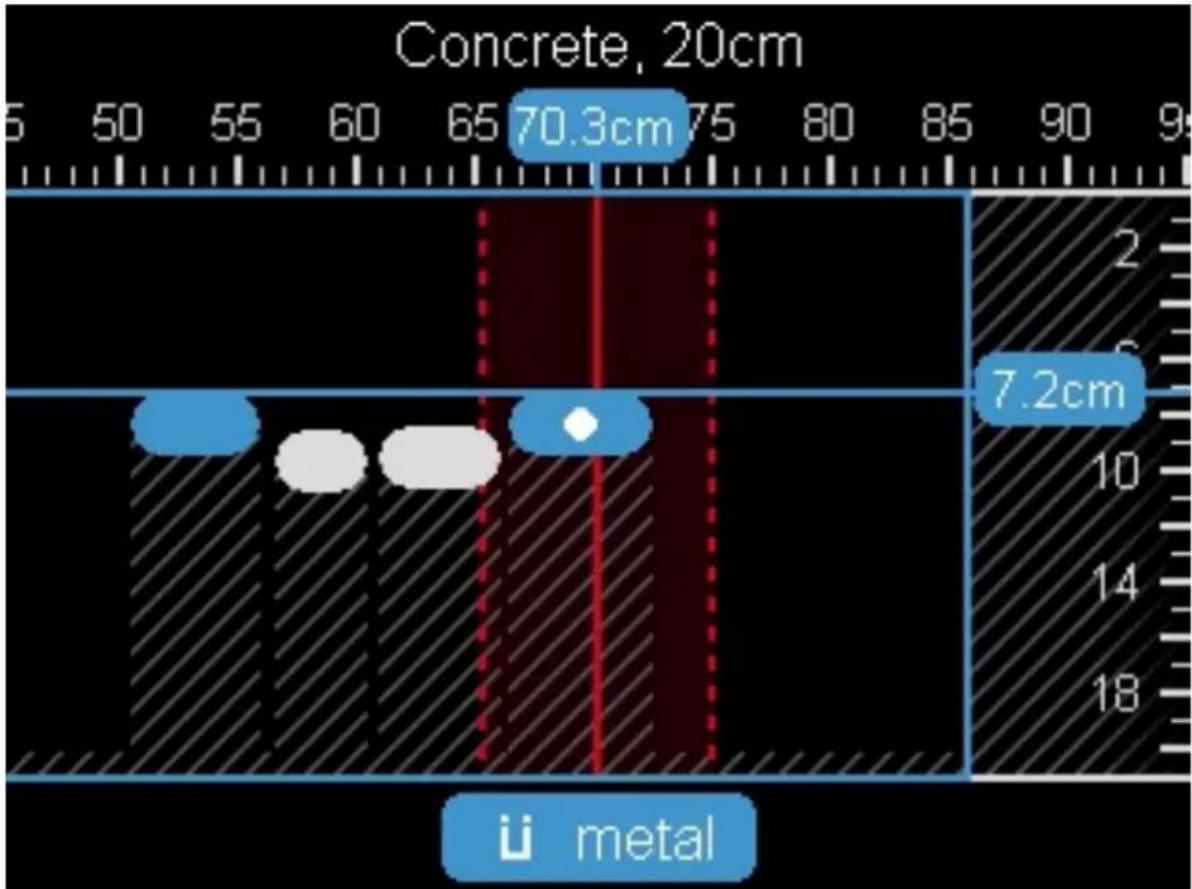
| Position | Value | | -------- | ------- | | Top Left | 70.3cm | | Top Right| 7.2cm |The best possible results of measurement and the maximum measuring depths are available in Object view. Detected objects are shown over the length of the scan complete with depth information and, if applicable, their material property.
Measuring operation
Place the measuring tool on the surface to be scanned and move it in the required direction. The results of measurement appear on the display after the tool has been moved at least approximately 10 cm.
▶ Always move the measuring tool in a straight line, applying light pressure so that the wheels are in firm contact with the surface of the wall.
To obtain optimum results, move the measuring tool slowly over the entire area to be examined and observe the results obtained as you draw the measuring tool back. The scan should be at least 40 cm in length.
▶ You can start a new measurement at any time by pressing the start/stop button.
If you lift the measuring tool off the wall while a measurement is in progress, the most recent result remains visible on the display. Measurement restarts when contact with the wall is re-established, or when movement of the measuring tool resumes.
For particularly sensitive measurements, use Spot view with the appropriate wall type.
text_image
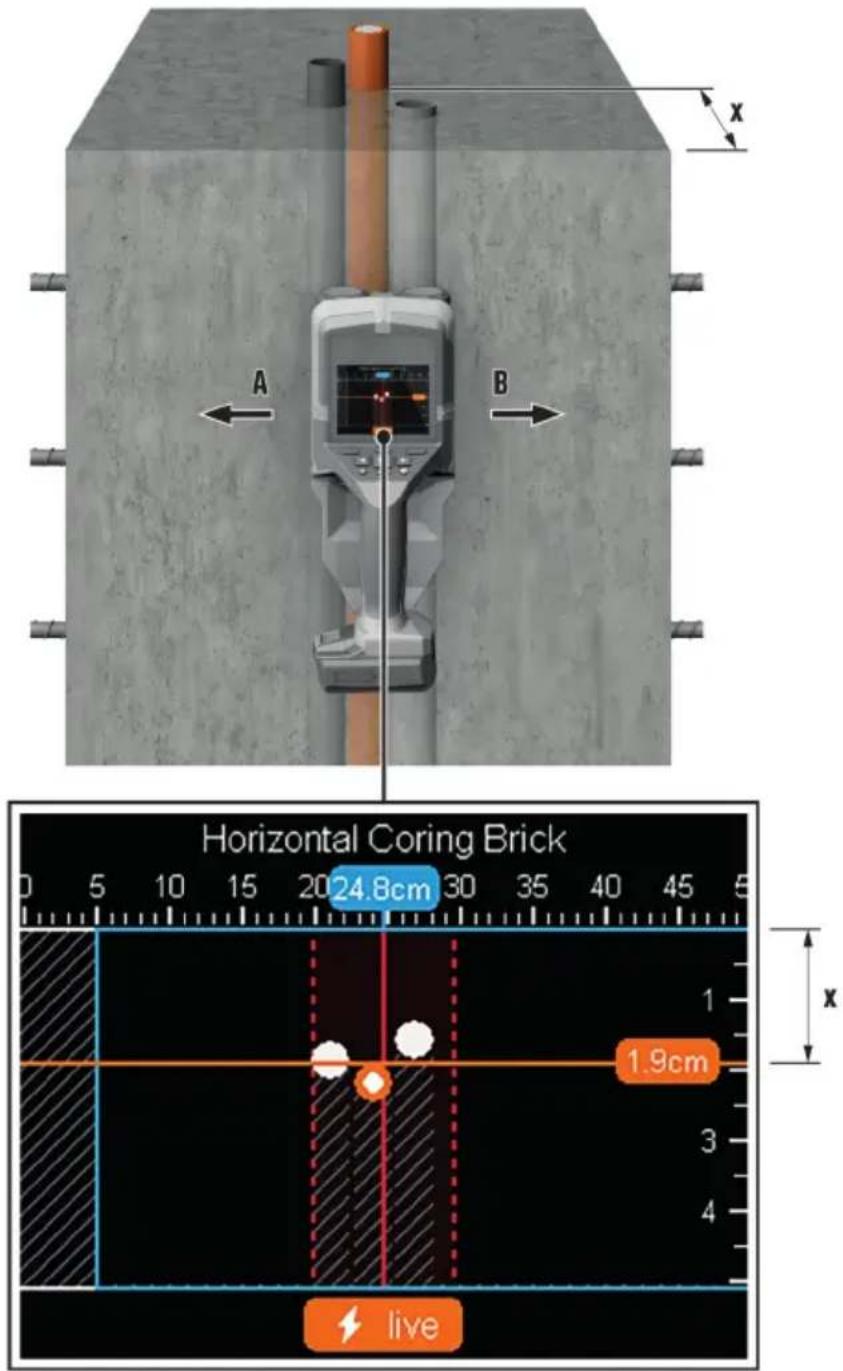
Horizontal Coring Brick 20 24.8cm 1.9cm liveOn account of the operating principle, the top edges of objects transverse to the measuring tool's direction of movement are reliably detected. Consequently, always scan the area to be examined in crosswise passes. A single pass in one direction along the track to be examined suffices to locate objects. If you want to pinpoint and precision-mark a detected object, draw the measuring tool back along the same track in the reverse direction.
You can ascertain the path of a detected object in the wall by running a succession of passes with the measuring tool along adjacent tracks.
Measurement display
If no object was detected in the sensor area, the broken lines and the center line are completely green. A detected object appears between the two broken lines on the display and the two broken lines and the center line are partly or completely red.
The depth scale on the right shows the depth of the detected object's top edge below the surface.
The image of the objects shown on the display can differ from the actual properties of the objects. In particular, very thin objects appear to be thicker than they actually are. Larger-diameter cylindrical objects (e.g. plastic pipes or water pipes) can appear narrower than they actually are.
Color coding of material property
Depending on the nature and the depth of the object detected, it is possible to identify material properties.
They are indicated by color-coding, as follows:
| Orange Electrically live object | |
| Blue magnetic | / ferrous metal (e.g. reinforcing bar) |
| Turquoise Non-magnetic metal (e.g. copper pipe) | |
| White Non-metal (e.g. wood, plastic) | |
| Gray Material | property unknown |

- In the case of electrically live objects, no other property is shown on the display.
- Three-phase power cables might not be identified as electrically live lines.
- Identification of the "electrically live" property might be restricted when relative humidity is above 50 percent.
Marking objects
You can use the marking notch at the top or the outside edge of the measuring tool to mark detected object
▶ Move the measuring tool to the detected object you want to mark.
- Position the measuring tool so that the object is centered relative to the center line on the display.
- Apply one mark at each marking notch for top, right and left.
The point of intersection for the marks you applied coincides with the center of the object.
▶ Alternatively, position the measuring tool so that the object is centered relative to either of the two broken lines on the display.
The object is now centered below the corresponding outside edge of the measuring tool.
▶ Draw a line along this outside edge on the surface of the material and on this line mark a cross at the position of the corresponding side marking notch.
This coincides with the center of the object.

You can mark the path of a detected object in the wall by running a succession of passes with the measuring tool along adjacent tracks and joining up the corresponding series of marks.
6.5.3 Signal view 2D
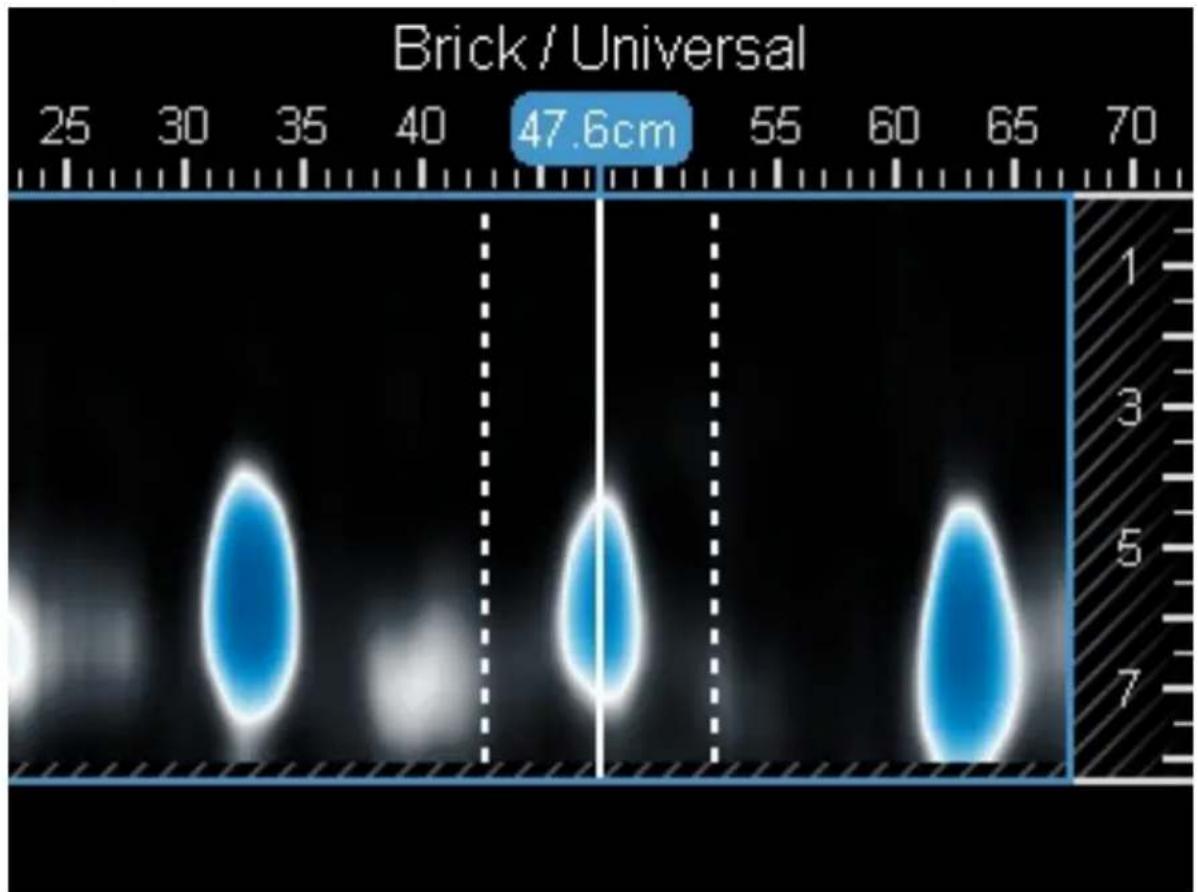
heatmap
| Value | | --------- | | 47.6cm |Signal view 2D shows signal strength at the corresponding measuring position in combination with the object depth. Signal view 2D is a variant of Object view. It shows signal strengths instead of object symbols. The signal strength maximum represents the top edge of the object.
Signal view 2D can be used to pinpoint close-spaced objects and arrive at a better estimation of complicated material make-ups. Even objects with a weak echo and objects underlying other objects can be detected under certain circumstances. See the notes on the measuring operation in Object view.
See the notes on the measuring operation in Object view.
6.5.4 Signal view
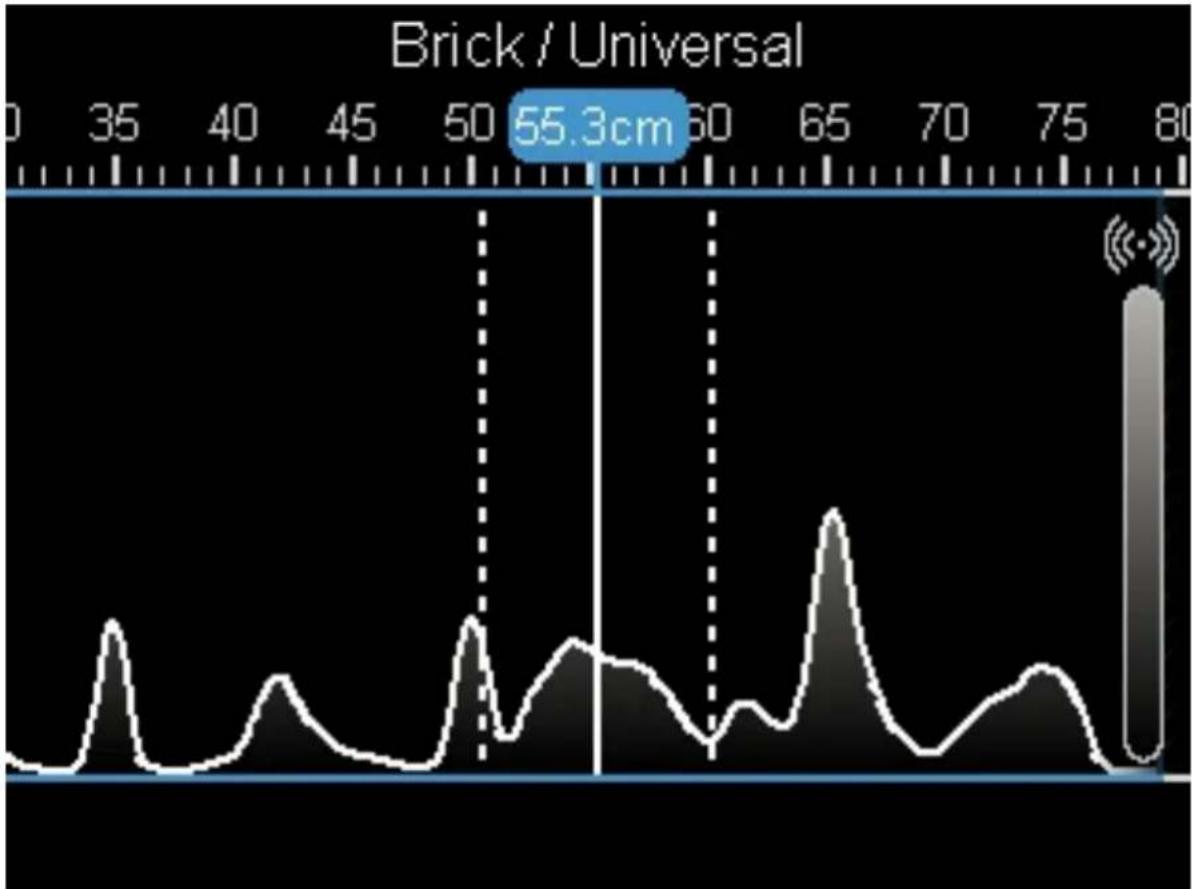
line
| Position | Value | | -------- | --------- | | 55.3cm | 55.3cm |Signal view shows signal strength at the corresponding measuring position, with no information relating to object depth. Signal view can be used to pinpoint close-spaced objects and arrive at a better estimation of complicated material make-ups by studying the signal transient.
7 "Leak detection" measuring mode
The relative material moisture content of the surface is shown in this measuring mode. Consequently, it is suitable for locating the place of maximum material moisture content and thus indicating a possible leak. Different materials on the surface, shallow objects underneath the surface and inhomogeneity in the base material (joints, for example) can falsify the results.
8 "Distance measurement" measuring mode
This measuring mode enables you to measure distances between objects.
The reference point for measurement is always the top marking notch. Measurement is possible only straight ahead in the direction of travel of the wheels. The distance from the starting point is measured continuously. The measured value shown on the display corresponds to the distance from the starting point of the current measurement. It is not the total distance traveled. The measured value counts down when you roll the measuring tool back toward the starting point.
If the measuring tool returns implausible distance values measure a defined distance, for example 1 m (3 ft). If the distance reading is not within tolerance (see the section headed "Technical data"), consult Hilti Service.
9 Care and maintenance

WARNING
Risk of injury with battery inserted!
▶ Always remove the battery before carrying out care and maintenance tasks!
Care of the product
- Carefully remove stubborn dirt.
- Carefully clean the air vents, if present, with a dry, soft brush.
HILTI
- Use only a slightly damp cloth to clean the housing. Do not use cleaning agents containing silicone as these can attack the plastic parts.
- Use a dry, clean cloth to clean the contacts of the product.
Care of the Li-ion batteries
- Never use a battery with clogged air vents. Clean the air vents carefully using a dry, soft brush.
- Avoid unnecessary exposure of the battery to dust and dirt. Never expose the battery to high levels of moisture (e.g. by being dipped in water or left in the rain).
If a battery has been soaked by moisture, treat it as a damaged battery. Isolate it in a non-flammable container and consult Hilti Service.
- Keep the battery free of extraneous oil and grease. Do not permit dust or dirt to accumulate unnecessarily on the battery. Clean the battery with a dry, soft brush or a clean, dry cloth. Do not use cleaning agents containing silicone as these can attack the plastic parts.
Do not touch the contacts of the battery and do not remove the factory-applied grease from the contacts.
- Use only a slightly damp cloth to clean the housing. Do not use cleaning agents containing silicone as these can attack the plastic parts.
Maintenance
- Check all visible parts and controls for signs of damage at regular intervals and make sure that they all function correctly.
- Do not use the product if signs of damage are found or if parts malfunction. Immediately have the product repaired by Hilti Service.
- After cleaning and maintenance, install all guards and protective devices and check that they are in full working order.

To help ensure safe and reliable operation, use only genuine Hilti spare parts and consumables. Spare parts, consumables and accessories approved by Hilti for use with your product can be found at your Hilti Store or online at: www.hilti.group
9.1 Changing button-cell battery
The measuring tool has a button-cell battery to enable it to save the date and time. The button-cell battery has to be changed when it is discharged.
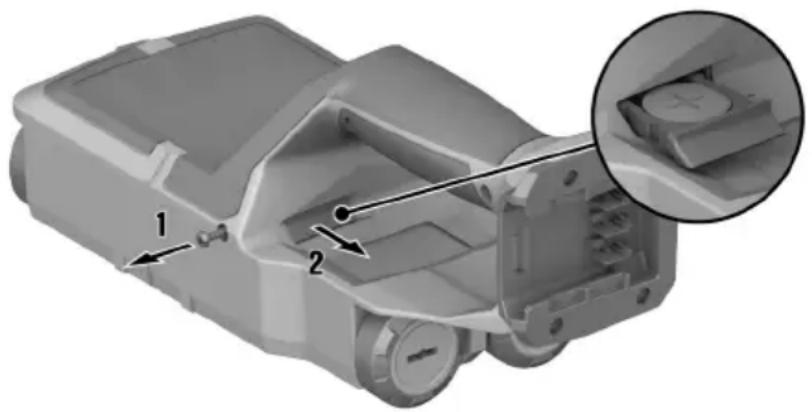
natural_image
3D mechanical component diagram showing internal parts with numbered annotations (no readable text or symbols)- Remove the screw of the button-cell battery holder.
- Ease the button-cell battery holder out of its slot (using a suitable tool if necessary).
- Remove the empty button-cell battery and insert a new button-cell battery. Make sure that polarity is correct. The positive pole of the button-cell battery must be facing up.
- Re-insert the button-cell battery holder into its slot. Make sure that the button-cell battery holder is inserted correctly and fully, as otherwise protection against dust and spray is not ensured.
- Re-install the screw of the button-cell battery holder and tighten it until hand-tight.
Transport

CAUTION
Accidental starting during transport!
▶ Always transport your products with the batteries removed!
▶ Remove the battery/batteries.
- Never transport batteries loose and unprotected. During transport, batteries should be protected from excessive shock and vibration and isolated from any conductive materials or other batteries that may come in contact with the terminals and cause a short circuit. Comply with the locally applicable regulations for transporting batteries.
- Do not send batteries through the mail. Consult your shipper for instructions on how to ship undamaged batteries.
Prior to each use and before and after prolonged transport, check the product and the batteries for damage.
Storage

WARNING
Accidental damage caused by defective or leaking batteries!
▶ Always store your products with the batteries removed!
- Store the product and the batteries in a cool and dry place. Comply with the temperature limits stated in the technical data.
- Do not store batteries on the charger. Always remove the battery from the charger when the charging operation has completed.
▶ Never leave batteries in direct sunlight, on sources of heat, or behind glass. - Store the product and batteries where they cannot be accessed by children or unauthorized persons.
- Prior to each use and before and after prolonged storage, check the product and the batteries for damage.
11 Troubleshooting
If the trouble you are experiencing is not listed in this table or you are unable to remedy the problem by yourself, contact Hilti Service.
| Trouble or fault Possible cause Action to be taken | ||
| Product cannot be switched on. | Battery is discharged ▶ Change | the battery or charge the empty battery. |
| Battery not fully inserted. | ▸ Push the battery in until it engages with an audible click. | |
| Battery does not engage with an audible click. | Retaining lugs on the battery are dirty. | ▸ Clean the retaining lugs and reinsert the battery. |
| Entry by means of control panel not possible | Control panel defective | ▸ Contact Hilti Service. |
| Wheels not running smoothly | Wheels dusty or dirty | ▸ Clean the wheels and casing. |
| Product cannot be connected to a PC. | Product is not detected by the PC. | ▸ Check whether the driver is up to date. You might have to update the driver and/or your operating system. |
| USB cable faulty. | ▸ Use another USB cable to test the connection. Replace the USB cable if necessary. | |
| USB port on the product faulty. | ▸ Contact Hilti Service. | |
| The micro-SD card is not working. | The micro-SD card is not detected. | ▸ Use some other device (such as a PC) to check whether the micro-SD card is working.▸ Use a different or a new micro SD card. If it is not detected either, consult Hilti Service. |
| The micro-SD card is not working. | The micro-SD card is not readable. | ▶ Check the micro-SD card and the corresponding slot in the measuring tool for foreign matter. Clean carefully with a dry, soft brush.▶ If the problem persists, consult Hilti Service. |
12 FCC statement (applicable in US) / IC statement (applicable in Canada)
This equipment has been tested and found to comply with the limits for a class B digital device, pursuant to part 15 of the FCC rules. These limits are designed to provide reasonable protection against harmful interference in a residential installation. This equipment generates, uses, and can radiate radio frequency energy and, if not installed and used in accordance with the instructions, may cause interference to radio communications.
However, there is no guarantee that interference will not occur in a particular installation. If this equipment does cause harmful interference to radio or television reception, which can be determined by turning the equipment off and on, the user is encouraged to try to correct the interference by taking the following measures:
- Re-orient or relocate the receiving antenna.
- Increase the separation between the equipment and receiver.
- Connect the equipment to a power outlet on a circuit different from that to which the receiver is connected.
- Consult the dealer or an experienced TV/radio technician for assistance.

Changes or modifications not expressly approved by Hilti may restrict the user's authorization to operate the equipment.
This device complies with the requirements set out in Paragraph 15 of the FCC rules and fulfills the requirements defined in RSS-220 in combination with the RSS-Gen of IC.
Operation is subject to the following two conditions:
- This device shall cause no harmful interference.
- This device must accept any interference received, including interference that may cause undesired operation.
For users in the USA: Operation of this device is restricted to law enforcement, fire and rescue officials, scientific research institutes, commercial mining companies, construction companies and private parties operating on behalf of these groups. Operation by any other party is a violation of 47 U.S.C. § 301 and can result in serious legal penalties.
Coordination requirements
- UWB imaging systems require coordination through the FCC before the equipment may be used. The operator shall comply with any constraints on equipment usage resulting from this coordination.
-
The users of UWB imaging devices shall supply operational areas to the FCC Office of Engineering and Technology, which shall coordinate this information with the Federal Government through the National Telecommunications and Information Administration. The information provided by the UWB operator shall include the name, address and other pertinent contact information of the user, the desired geographical area(s) of operation, and the FCC ID number and other nomenclature of the UWB device. If the imaging device is intended to be used for mobile applications, the geographical area(s) of operation may be the state(s) or county(ies) in which the equipment will be operated. The operator of an imaging system used for fixed operation shall supply a specific geographical location or the address at which the equipment will be operated. This material shall be submitted to Frequency Coordination Branch, OET, Federal Communications Commission, at the address of the FCC's main office indicated in 47 CFR 0.401(a), ATTN: UWB Coordination.
-
The manufacturers, or their authorized sales agents, must inform purchasers and users of their systems of the requirement to undertake detailed coordination of operational areas with the FCC prior to the equipment being operated.
-
Users of authorized, coordinated UWB systems may transfer them to other qualified users and to different locations upon coordination of change of ownership or location to the FCC and coordination with existing authorized operations.
-
The FCC/NTIA coordination report shall identify those geographical areas within which the operation of an imaging system requires additional coordination or within which the operation of an imaging system is prohibited. If additional coordination is required for operation within specific geographical areas, a local coordination contact will be provided. Except for operation within these designated areas, once the information requested on the UWB imaging system is submitted to the FCC no additional coordination with the FCC is required provided the reported areas of operation do not change. If the area of operation changes, updated information shall be submitted to the FCC following the procedure in paragraph 2) of this section.
- The coordination of routine UWB operations shall not take longer than 15 business days from the receipt of the coordination request by NTIA. Special temporary operations may be handled with an expedited turn-around time when circumstances warrant. The operation of UWB systems in emergency situations involving the safety of life or property may occur without coordination provided a notification procedure, similar to that contained in § 2.405(a) through (e) of this chapter, is followed by the UWB equipment user
Responsible party
Hilti, Inc.
7250 Dallas Parkway, Suite 1000
US-Plano, TX 75024
www.hilti.com
For users in Canada: This radar imaging device shall be operated only where directed toward the floor or wall, and where it is in contact with or at a distance of 20 cm from the floor or wall surface. This radar image device shall be operated only by law enforcement agencies, scientific research institutes, commercial mining companies, construction companies, and emergency rescue or fire-fighting organizations.
13 Disposal

WARNING
Risk of injury due to incorrect disposal! Health hazards due to escaping gases or liquids.
▶ DO NOT send batteries through the mail!
▶ Cover the terminals with a non-conductive material (such as electrical tape) to prevent short circuiting.
- Dispose of your battery out of the reach of children.
▶ Dispose of the battery at your Hilti Store, or consult your local governmental garbage disposal or public health and safety resources for disposal instructions.

Most of the materials from which Hilti products are manufactured can be recycled. The materials must be directly separated before they can be recycled. In many countries, your old tools, machines or appliances can be returned to Hilti for recycling. Ask Hilti Service or your Hilti sales representative for further information.

- Do not dispose of power tools, electronic equipment or batteries as household waste!
14 Manufacturer's warranty
▶ Please contact your local Hilti representative if you have questions about the warranty conditions.
15 Further information
Accessories, system products and more information about your product can all be found here.

China RoHS II
Declaration of Confor
Proposal corded
| Part Name | Hazardous Substances | |||||
| Lead (Pb) | Mercury (Hg) | Cadmium (Cd) | Hexavalent Chromium (Cr(VI)) | Poly-brominated biphenyls (PBB) | br diph | |
| Electronics (PCB, switch, wiring) | X | O | X | O | O | |
| Motor | O | O | O | O | O | |
| Power cord | O | O | O | O | O | |
| Fastener elements | O | O | O | O | O | |
| Metal parts | X | O | O | O | O | |
| Power supplies | O | O | O | O | O | |
| Brass parts | X | O | O | O | O | |
| Aluminium parts | X | O | O | O | O | |
| Battery | O | O | O | O | O | |
| Battery charger | X | O | O | O | O | |
O: Indicates that said hazardous substance contained in all of the homogeneous materials for this part is below the limit requirement of GB/T 26572
X: Indicates that said hazardous substance contained in at least one of the homogenous materials used for this part is above the limit requirement of but corresponds to the exemption
This table is valid for the China market.
16 Hilti Li-ion batteries
Instructions for safety and use
This documentation uses the term battery to describe rechargeable Hilti Li-ion battery packs containing several Li-ion cells joined together. These batteries are to be used in Hilti power tools exclusively. Use only genuine Hilti batteries!
Description
Hilti batteries have cell-management and cell-protection systems.
The batteries are composed of cells that contain lithium-ion storage materials capable of providing high specific energy density. Li-ion cells have a minimal memory effect, but they are very susceptible to external impact, deep discharge, and high temperatures.
The products approved for use with Hilti batteries can be found in your Hilti Store or at: www.hilti.group
Safety
▶ Comply with the following safety instructions for the safe handling and use of Li-ion batteries.
Failure to comply can lead to skin irritation, severe corrosive injury, chemical burns, fire and/or explosion.
▶ Treat batteries with care in order to avoid damage and prevent leakage of fluids that are extremely harmful to health!
- Do not under any circumstances modify or tamper with batteries!
- Do not disassemble, crush or incinerate batteries and do not subject them to temperatures over 80 °C.
▶ Never use or charge a battery that has suffered an impact or been damaged in any other way. Check your batteries regularly for signs of damage.
▶ Never use recycled or repaired batteries.
▶ Never use the battery or a battery-operated power tool as a striking tool.
▶ Never expose batteries to the direct rays of the sun, elevated temperature, sparking, or open flame. This can lead to explosions.
Do not touch the battery poles with your fingers, tools, jewelry, or other electrically conductive objects. This can damage the battery and also cause material damage and personal injury.
- Keep batteries away from rain, moisture and liquids. Penetrating moisture can cause short circuits, electric shock, burns, fire and explosions.
▶ Use only chargers and power tools approved for the specific battery type. Read and follow the relevant operating instructions.
- Do not use or store the battery in explosive environments.
If the battery is too hot to touch it may be defective. Put the battery in a place where it is clearly visible and where there is no risk of fire, at an adequate distance from flammable materials. Allow the battery to cool down. If it is still too hot to touch after an hour, the battery is faulty. Follow the instructions in the section headed What to do in case of a battery fire.
What to do in case of damaged batteries
▶ Always contact Hilti when a battery is damaged.
▶ Never use a battery that is leaking fluid.
- Avoid direct eye and/or skin contact with fluid leaking from a battery. Always wear protective gloves and eye protection when undertaking tasks involving battery fluid.
▶ Use a chemical spill cleanup kit to remove leaked battery fluid. Comply with the locally applicable cleanup regulations for battery fluid.
To store a damaged battery, place the battery in a non-flammable container and cover the battery with dry sand, chalk powder (CaCO3) or silicate (Vermiculite). Then seal the lid air-tight and store the container away from flammable gases, liquids or objects.
- Dispose of the container at your Hilti Store, or consult your local governmental garbage disposal or public health and safety resources for disposal instructions. Comply with the locally applicable regulations for transporting damaged batteries!
What to do in case of dysfunctional batteries
▶ Watch for abnormal battery behavior, such as faulty charging, unusually long charging times, noticeable power loss, unusual LED activity, or leaking fluids. These are signs of an internal problem.
▶ If you suspect an internal battery problem, contact Hilti Service.
▶ A battery that no longer works, cannot be recharged or leaks fluid has to be disposed of correctly. See the section headed Maintenance and disposal.
What to do in case of a battery fire

WARNING
Battery fire hazard! A burning battery releases hazardous and potentially explosive liquids and fumes that can lead to corrosion injuries, burns or explosions.
▶ Wear your personal protective equipment when you tackle a battery fire.
- Provide sufficient venting to permit hazardous and potentially explosive fumes to escape.
Leave the room immediately in case of intense smoke emission. - Consult a doctor in case of any skin or respiratory irritation.
- Alert the fire service before you start tackling the fire.
▶ Use only water to tackle a battery fire and keep as far from the fire as effective extinguishing permits. Powder fire extinguishers and fire blankets are ineffective with Li-ion batteries. Fire in nearby materials can be extinguished with appropriate extinguishing agents. - Do not try to move large quantities of burning batteries. Instead, isolate the batteries by removing unaffected materials from the immediate vicinity.
In the case of a battery that does not cool down, or a smoking or burning battery:
- Scoop the battery up with a shovel and drop it into a bucket of water, which will reduce the risk of igniting adjacent cells that have not yet reached run-away temperature.
Leave the battery in the bucket for at least 24 hours until it has cooled down completely.
▶ See the section headed What to do in case of damaged batteries.
Shipping and storage
- Ambient operating temperature to be kept between -17^ and +60^ / 1^ and 140^ .
Storage temperature to be kept between -20°C and +40°C / -4°F and 104°F. - Do not store batteries on the charger. Always remove the battery from the charger when the charging operation has completed.
HILTI
- Store batteries in a cool and dry place. Cool storage will increase battery life. Never store batteries where they are exposed to direct sunlight, on sources of heat or behind glass.
- Do not send batteries through the mail. Consult your shipper for instructions on how to ship undamaged batteries.
▶ Never transport batteries in bulk form (loose, unprotected). During transport, batteries should be protected from excessive shock and vibration and isolated from any conductive materials or other batteries that may come in contact with the terminals and cause a short circuit. Comply with the locally applicable regulations for transporting batteries.
Maintenance and disposal
- Keep the battery free of oil and grease. Do not permit dust or dirt to accumulate unnecessarily on the battery. Clean the battery with a dry, soft brush or a clean, dry rag.
▶ Never use a battery with clogged ventilation slots. Clean the ventilation slots carefully using a dry, soft brush.
▶ Prevent unnecessary exposure of the battery to dust or debris and never subject the battery to soaking moisture (e.g., submerged in water or left out in the rain).
▶ If a battery is exposed to soaking moisture, treat it as a damaged battery and isolate it in a non-flammable container.
▶ See the section headed What to do in case of damaged batteries.
- Improper disposal may cause health hazards from leaking gases or fluids. Dispose of the battery at your Hilti Store, or consult your local governmental garbage disposal or public health and safety resources for disposal instructions. Comply with the locally applicable regulations for transporting damaged batteries!
- Do not dispose of batteries as household waste.
▶ Dispose of your battery out of the reach of children. Cover the terminals with a non-conductive material (such as electrical tape) to prevent short circuiting.
EC Declaration of Conformity | UK Declaration of Conformity

text_image
HILTIManufacturer:
Hilti Corporation
Hilti (Gt. Britain) Limited
No. 1 Circle Square, 3 Symphony Park
Manchester, England, M1 7FS
PS 85 (01)
Serial Numbers: 1-99999999999
2014/53/EU | Radio Equipment Regulations 2017
2011/65/EU | The Restriction of the Use of Certain Hazardous Substances in Electrical and Electronic Equipment Regulations 2012
EN 50665:2017
EN 301 489-1 V2.2.3
EN 302 065-4 V1.1.1
EN 300 330 V2.1.1
EN 301 489-33 V2.2.1
Dr. Tahar Zrilli
Head of Quality and Process Management Business Area Electric Tools & Accessories
Schaan, 12.02.2024

Sriram Makineedi
Head of BU Measuring Systems
Business Unit Measuring Systems
- INGESTION HAZARD: This product contains a button cell or coin battery. • DEATH or serious injury can occur if ingested. • A swallowed button cell or coin battery can cause Internal Chemical Burns in as little as 2 hours. • KEEP new and used batteries OUT OF REACH of CHILDREN • Seek immediate medical attention if a battery is suspected to be swallowed or inserted inside any part of the body.
natural_image
3D mechanical assembly diagram showing internal components and a close-up inset of a component (no text or symbols)7250 Dallas Parkway, Suite 1000
US-Plano, TX 75024
www.hilti.com
Declaration of Confor
Proposal corded
| Part Name | Hazardous Substances | |||||
| Lead (Pb) | Mercury (Hg) | Cadmium (Cd) | Hexavalent Chromium (Cr(VI)) | Poly-brominated biphenyls (PBB) | br diph | |
| Electronics (PCB, switch, wiring) | X | O | X | O | O | |
| Motor | O | O | O | O | O | |
| Power cord | O | O | O | O | O | |
| Fastener elements | O | O | O | O | O | |
| Metal parts | X | O | O | O | O | |
| Power supplies | O | O | O | O | O | |
| Brass parts | X | O | O | O | O | |
| Aluminium parts | X | O | O | O | O | |
| Battery | O | O | O | O | O | |
| Battery charger | X | O | O | O | O | |
O: Indicates that said hazardous substance contained in all of the homogeneous materials for this part is below the limit requirement of GB/T 26572
X: Indicates that said hazardous substance contained in at least one of the homogenous materials used for this part is above the limit requirement of but corresponds to the exemption
EC Declaration of Conformity | UK Declaration of Conformity

text_image
HILTIManufacturer:
Hilti Corporation
Hilti (Gt. Britain) Limited
No. 1 Circle Square, 3 Symphony Park
Manchester, England, M1 7FS
PS 85 (01)
Serial Numbers: 1-99999999999
2014/53/EU | Radio Equipment Regulations 2017
2011/65/EU | The Restriction of the Use of Certain Hazardous Substances in Electrical and Electronic Equipment Regulations 2012
EN 50665:2017
EN 301 489-1 V2.2.3
EN 302 065-4 V1.1.1
EN 300 330 V2.1.1
EN 301 489-33 V2.2.1
Dr. Tahar Zrilli
Head of Quality and Process Management Business Area Electric Tools & Accessories
Schaan, 12.02.2024

Sriram Makineedi
Head of BU Measuring Systems
Business Unit Measuring Systems
- INGESTION HAZARD: This product contains a button cell or coin battery. • DEATH or serious injury can occur if ingested. • A swallowed button cell or coin battery can cause Internal Chemical Burns in as little as 2 hours. • KEEP new and used batteries OUT OF REACH of CHILDREN • Seek immediate medical attention if a battery is suspected to be swallowed or inserted inside any part of the body.
natural_image
3D mechanical component diagram showing internal structure with numbered parts (no text or symbols)7250 Dallas Parkway, Suite 1000
US-Plano, TX 75024
www.hilti.com
Declaration of Confor
Proposal corded
| Part Name | Hazardous Substances | |||||
| Lead (Pb) | Mercury (Hg) | Cadmium (Cd) | Hexavalent Chromium (Cr(VI)) | Poly-brominated biphenyls (PBB) | br diph | |
| Electronics (PCB, switch, wiring) | X | O | X | O | O | |
| Motor | O | O | O | O | O | |
| Power cord | O | O | O | O | O | |
| Fastener elements | O | O | O | O | O | |
| Metal parts | X | O | O | O | O | |
| Power supplies | O | O | O | O | O | |
| Brass parts | X | O | O | O | O | |
| Aluminium parts | X | O | O | O | O | |
| Battery | O | O | O | O | O | |
| Battery charger | X | O | O | O | O | |
O: Indicates that said hazardous substance contained in all of the homogeneous materials for this part is below the limit requirement of GB/T 26572
X: Indicates that said hazardous substance contained in at least one of the homogenous materials used for this part is above the limit requirement of but corresponds to the exemption
EC Declaration of Conformity | UK Declaration of Conformity

text_image
HILTIManufacturer:
Hilti Corporation
Hilti (Gt. Britain) Limited
No. 1 Circle Square, 3 Symphony Park
Manchester, England, M1 7FS
PS 85 (01)
Serial Numbers: 1-99999999999
2014/53/EU | Radio Equipment Regulations 2017
2011/65/EU | The Restriction of the Use of Certain Hazardous Substances in Electrical and Electronic Equipment Regulations 2012
EN 50665:2017
EN 301 489-1 V2.2.3
EN 302 065-4 V1.1.1
EN 300 330 V2.1.1
EN 301 489-33 V2.2.1
Dr. Tahar Zrilli
Head of Quality and Process Management Business Area Electric Tools & Accessories
Schaan, 12.02.2024

Sriram Makineedi
Head of BU Measuring Systems
Business Unit Measuring Systems
- INGESTION HAZARD: This product contains a button cell or coin battery. • DEATH or serious injury can occur if ingested. • A swallowed button cell or coin battery can cause Internal Chemical Burns in as little as 2 hours. • KEEP new and used batteries OUT OF REACH of CHILDREN • Seek immediate medical attention if a battery is suspected to be swallowed or inserted inside any part of the body.
natural_image
3D mechanical component diagram showing internal structure with numbered parts (no text or symbols)7250 Dallas Parkway, Suite 1000
US-Plano, TX 75024
www.hilti.com
Declaration of Confor
Proposal corded
| Part Name | Hazardous Substances | |||||
| Lead (Pb) | Mercury (Hg) | Cadmium (Cd) | Hexavalent Chromium (Cr(VI)) | Poly-brominated biphenyls (PBB) | br diph | |
| Electronics (PCB, switch, wiring) | X | O | X | O | O | |
| Motor | O | O | O | O | O | |
| Power cord | O | O | O | O | O | |
| Fastener elements | O | O | O | O | O | |
| Metal parts | X | O | O | O | O | |
| Power supplies | O | O | O | O | O | |
| Brass parts | X | O | O | O | O | |
| Aluminium parts | X | O | O | O | O | |
| Battery | O | O | O | O | O | |
| Battery charger | X | O | O | O | O | |
O: Indicates that said hazardous substance contained in all of the homogeneous materials for this part is below the limit requirement of GB/T 26572
X: Indicates that said hazardous substance contained in at least one of the homogenous materials used for this part is above the limit requirement of but corresponds to the exemption
EC Declaration of Conformity | UK Declaration of Conformity

text_image
HILTIManufacturer:
Hilti Corporation
Hilti (Gt. Britain) Limited
No. 1 Circle Square, 3 Symphony Park
Manchester, England, M1 7FS
PS 85 (01)
Serial Numbers: 1-99999999999
2014/53/EU | Radio Equipment Regulations 2017
2011/65/EU | The Restriction of the Use of Certain Hazardous Substances in Electrical and Electronic Equipment Regulations 2012
EN 50665:2017
EN 301 489-1 V2.2.3
EN 302 065-4 V1.1.1
EN 300 330 V2.1.1
EN 301 489-33 V2.2.1
Dr. Tahar Zrilli
Head of Quality and Process Management Business Area Electric Tools & Accessories
Schaan, 12.02.2024

Sriram Makineedi
Head of BU Measuring Systems
Business Unit Measuring Systems
- INGESTION HAZARD: This product contains a button cell or coin battery. • DEATH or serious injury can occur if ingested. • A swallowed button cell or coin battery can cause Internal Chemical Burns in as little as 2 hours. • KEEP new and used batteries OUT OF REACH of CHILDREN • Seek immediate medical attention if a battery is suspected to be swallowed or inserted inside any part of the body.
natural_image
3D mechanical component diagram showing internal structure with numbered parts (no text or symbols)7250 Dallas Parkway, Suite 1000
US-Plano, TX 75024
www.hilti.com
Declaration of Confor
Proposal corded
| Hazardous Substances | ||||||
| Part Name | Lead (Pb) | Mercury (Hg) | Cadmium (Cd) | Hexavalent Chromium (Cr(VI)) | Poly-brominated biphenyls (PBB) | br diph |
| Electronics (PCB, switch, wiring) | X | O | X | O | O | |
| Motor | O | O | O | O | O | |
| Power cord | O | O | O | O | O | |
| Fastener elements | O | O | O | O | O | |
| Metal parts | X | O | O | O | O | |
| Power supplies | O | O | O | O | O | |
| Brass parts | X | O | O | O | O | |
| Aluminium parts | X | O | O | O | O | |
| Battery | O | O | O | O | O | |
| Battery charger | X | O | O | O | O | |
O: Indicates that said hazardous substance contained in all of the homogeneous materials for this part is below the limit requirement of GB/T 26572
X: Indicates that said hazardous substance contained in at least one of the homogenous materials used for this part is above the limit requirement of but corresponds to the exemption
EC Declaration of Conformity | UK Declaration of Conformity

text_image
HILTIManufacturer:
Hilti Corporation
Hilti (Gt. Britain) Limited
No. 1 Circle Square, 3 Symphony Park
Manchester, England, M1 7FS
PS 85 (01)
Serial Numbers: 1-99999999999
2014/53/EU | Radio Equipment Regulations 2017
2011/65/EU | The Restriction of the Use of Certain Hazardous Substances in Electrical and Electronic Equipment Regulations 2012
EN 50665:2017
EN 301 489-1 V2.2.3
EN 302 065-4 V1.1.1
EN 300 330 V2.1.1
EN 301 489-33 V2.2.1
Dr. Tahar Zrilli
Head of Quality and Process Management Business Area Electric Tools & Accessories
Schaan, 12.02.2024

Sriram Makineedi
Head of BU Measuring Systems
Business Unit Measuring Systems
- INGESTION HAZARD: This product contains a button cell or coin battery. • DEATH or serious injury can occur if ingested. • A swallowed button cell or coin battery can cause Internal Chemical Burns in as little as 2 hours. • KEEP new and used batteries OUT OF REACH of CHILDREN • Seek immediate medical attention if a battery is suspected to be swallowed or inserted inside any part of the body.
text_image
Labeled diagram of a mobile phone device with numbered parts for identification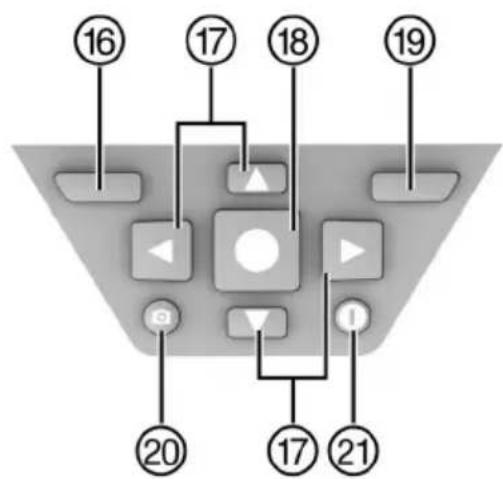
flowchart
graph TD
    A["16"] --> B["Control Panel"]
    C["17"] --> B
    D["18"] --> B
    E["19"] --> B
    F["20"] --> B
    G["17"] --> H["Control Panel"]
    I["21"] --> H
    B --> J["Control Panel"]
    B --> K["Control Panel"]
    B --> L["Control Panel"]
    B --> M["Control Panel"]
    B --> N["Control Panel"]
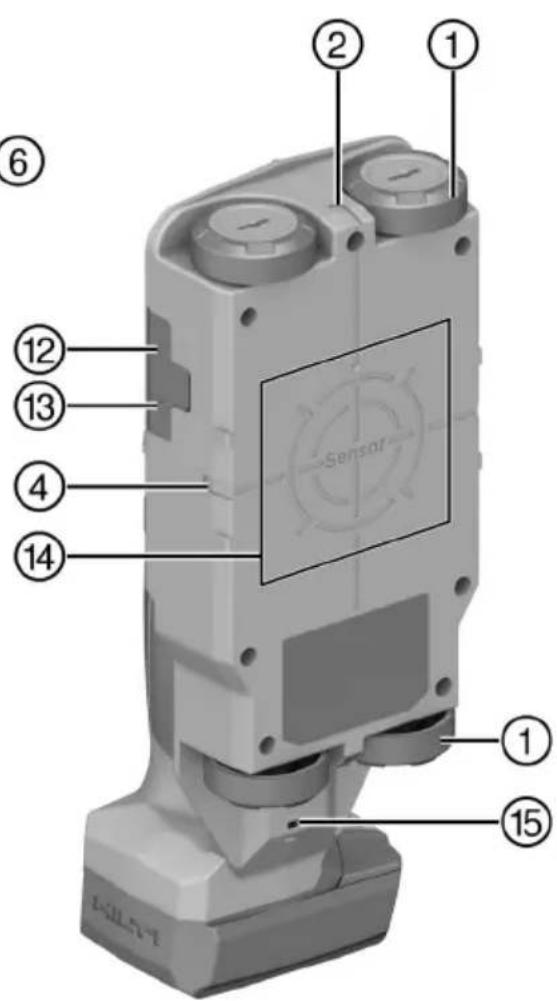
text_image
Labeled diagram of a sensor device with numbered components and a central sensor screennatural_image
3D mechanical component diagram showing internal parts with numbered annotations (no readable text or symbols)7250 Dallas Parkway, Suite 1000
US-Plano, TX 75024
www.hilti.com
Declaration of Confor
Proposal corded
| Part Name | Hazardous Substances | |||||
| Lead (Pb) | Mercury (Hg) | Cadmium (Cd) | Hexavalent Chromium (Cr(VI)) | Poly-brominated biphenyls (PBB) | br diph | |
| Electronics (PCB, switch, wiring) | X | O | X | O | O | |
| Motor | O | O | O | O | O | |
| Power cord | O | O | O | O | O | |
| Fastener elements | O | O | O | O | O | |
| Metal parts | X | O | O | O | O | |
| Power supplies | O | O | O | O | O | |
| Brass parts | X | O | O | O | O | |
| Aluminium parts | X | O | O | O | O | |
| Battery | O | O | O | O | O | |
| Battery charger | X | O | O | O | O | |
O: Indicates that said hazardous substance contained in all of the homogeneous materials for this part is below the limit requirement of GB/T 26572
X: Indicates that said hazardous substance contained in at least one of the homogenous materials used for this part is above the limit requirement of but corresponds to the exemption
EC Declaration of Conformity | UK Declaration of Conformity

text_image
HILTIManufacturer:
Hilti Corporation
Hilti (Gt. Britain) Limited
No. 1 Circle Square, 3 Symphony Park
Manchester, England, M1 7FS
PS 85 (01)
Serial Numbers: 1-99999999999
2014/53/EU | Radio Equipment Regulations 2017
2011/65/EU | The Restriction of the Use of Certain Hazardous Substances in Electrical and Electronic Equipment Regulations 2012
EN 50665:2017
EN 301 489-1 V2.2.3
EN 302 065-4 V1.1.1
EN 300 330 V2.1.1
EN 301 489-33 V2.2.1
Dr. Tahar Zrilli
Head of Quality and Process Management Business Area Electric Tools & Accessories
Schaan, 12.02.2024

Sriram Makineedi
Head of BU Measuring Systems
Business Unit Measuring Systems
- INGESTION HAZARD: This product contains a button cell or coin battery. • DEATH or serious injury can occur if ingested. • A swallowed button cell or coin battery can cause Internal Chemical Burns in as little as 2 hours. • KEEP new and used batteries OUT OF REACH of CHILDREN • Seek immediate medical attention if a battery is suspected to be swallowed or inserted inside any part of the body.
natural_image
3D mechanical component diagram showing internal parts with numbered callouts (no text or symbols)7250 Dallas Parkway, Suite 1000
US-Plano, TX 75024
www.hilti.com
| Part Name | Hazardous Substances | ||||
| Lead (Pb) | Mercury (Hg) | Cadmium (Cd) | Hexavalent Chromium (Cr(VI)) | Poly-brominated biphenyls (PBB) | |
| Electronics (PCB, switch, wiring) | X | O | X | O | O |
| Motor | O | O | O | O | O |
| Power cord | O | O | O | O | O |
| Fastener elements | O | O | O | O | O |
| Metal parts | X | O | O | O | O |
| Power supplies | O | O | O | O | O |
| Brass parts | X | O | O | O | O |
| Aluminium parts | X | O | O | O | O |
| Battery | O | O | O | O | O |
| Battery charger | X | O | O | O | O |
O: Indicates that said hazardous substance contained in all of the homogeneous materials for this part is below the limit requirement of GB/T 20
X: Indicates that said hazardous substance contained in at least one of the homogenous materials used for this part is above the limit requirement but corresponds to the exemption
EC Declaration of Conformity | UK Declaration of Conformity

text_image
HILTIManufacturer:
Hilti Corporation
Hilti (Gt. Britain) Limited
No. 1 Circle Square, 3 Symphony Park
Manchester, England, M1 7FS
PS 85 (01)
Serial Numbers: 1-99999999999
2014/53/EU | Radio Equipment Regulations 2017
2011/65/EU | The Restriction of the Use of Certain Hazardous Substances in Electrical and Electronic Equipment Regulations 2012
EN 50665:2017
EN 301 489-1 V2.2.3
EN 302 065-4 V1.1.1
EN 300 330 V2.1.1
EN 301 489-33 V2.2.1
Dr. Tahar Zrilli
Head of Quality and Process Management Business Area Electric Tools & Accessories
Schaan, 12.02.2024

Sriram Makineedi
Head of BU Measuring Systems
Business Unit Measuring Systems
- INGESTION HAZARD: This product contains a button cell or coin battery. • DEATH or serious injury can occur if ingested. • A swallowed button cell or coin battery can cause Internal Chemical Burns in as little as 2 hours. • KEEP new and used batteries OUT OF REACH of CHILDREN • Seek immediate medical attention if a battery is suspected to be swallowed or inserted inside any part of the body.
text_image
Labeled diagram of a mobile phone with numbered parts for identification and assembly reference.natural_image
3D mechanical component diagram showing internal structure with numbered parts (no text or symbols)7250 Dallas Parkway, Suite 1000
US-Plano, TX 75024
www.hilti.com
Declaration of Confor
Proposal corded
| Part Name | Hazardous Substances | |||||
| Lead (Pb) | Mercury (Hg) | Cadmium (Cd) | Hexavalent Chromium (Cr(VI)) | Poly-brominated biphenyls (PBB) | br diph | |
| Electronics (PCB, switch, wiring) | X | O | X | O | O | |
| Motor | O | O | O | O | O | |
| Power cord | O | O | O | O | O | |
| Fastener elements | O | O | O | O | O | |
| Metal parts | X | O | O | O | O | |
| Power supplies | O | O | O | O | O | |
| Brass parts | X | O | O | O | O | |
| Aluminium parts | X | O | O | O | O | |
| Battery | O | O | O | O | O | |
| Battery charger | X | O | O | O | O | |
O: Indicates that said hazardous substance contained in all of the homogeneous materials for this part is below the limit requirement of GB/T 26572
X: Indicates that said hazardous substance contained in at least one of the homogenous materials used for this part is above the limit requirement of but corresponds to the exemption
EC Declaration of Conformity | UK Declaration of Conformity

text_image
HILTIManufacturer:
Hilti Corporation
Hilti (Gt. Britain) Limited
No. 1 Circle Square, 3 Symphony Park
Manchester, England, M1 7FS
PS 85 (01)
Serial Numbers: 1-99999999999
2014/53/EU | Radio Equipment Regulations 2017
2011/65/EU | The Restriction of the Use of Certain Hazardous Substances in Electrical and Electronic Equipment Regulations 2012
EN 50665:2017
EN 301 489-1 V2.2.3
EN 302 065-4 V1.1.1
EN 300 330 V2.1.1
EN 301 489-33 V2.2.1
Dr. Tahar Zrilli
Head of Quality and Process Management Business Area Electric Tools & Accessories
Schaan, 12.02.2024

Sriram Makineedi
Head of BU Measuring Systems
Business Unit Measuring Systems
-INGESTION HAZARD: This product contains a button cell or coin battery. • DEATH or serious injury can occur if ingested. • A swallowed button cell or coin battery can cause Internal Chemical Burns in as little as 2 hours. • KEEP new and used batteries OUT OF REACH of CHILDREN • Seek immediate medical attention if a battery is suspected to be swallowed or inserted inside any part of the body.
text_image
Labeled diagram of a mobile phone with numbered parts for identification and assembly reference.① Hjul
② Markeringshakk oppe
③ Display
④ Markeringshakk venstre/høyre
⑤ Kontrollpanel
⑥ Håndtak
⑦ Skrue for knappelleholder
⑧ Knappelleholder
⑨ Låseknapp for batteri
⑩ Batteri
⑪ Ladenivåindikator for batteriet
⑫ Spor for microSD-kort
⑬ USB-port, type C
⑭ Sensorområde
Apparatinnstillinger
natural_image
3D mechanical assembly diagram showing internal components and a close-up inset of a component (no text or symbols visible)7250 Dallas Parkway, Suite 1000
US-Plano, TX 75024
www.hilti.com
Declaration of Confor
Proposal corded
| Part Name | Hazardous Substances | |||||
| Lead (Pb) | Mercury (Hg) | Cadmium (Cd) | Hexavalent Chromium (Cr(VI)) | Poly-brominated biphenyls (PBB) | br diph | |
| Electronics (PCB, switch, wiring) | X | O | X | O | O | |
| Motor | O | O | O | O | O | |
| Power cord | O | O | O | O | O | |
| Fastener elements | O | O | O | O | O | |
| Metal parts | X | O | O | O | O | |
| Power supplies | O | O | O | O | O | |
| Brass parts | X | O | O | O | O | |
| Aluminium parts | X | O | O | O | O | |
| Battery | O | O | O | O | O | |
| Battery charger | X | O | O | O | O | |
O: Indicates that said hazardous substance contained in all of the homogeneous materials for this part is below the limit requirement of GB/T 26572
X: Indicates that said hazardous substance contained in at least one of the homogenous materials used for this part is above the limit requirement of but corresponds to the exemption
Denne tabellen gjelder for markedet Kina.
16 Hilti Li-Ion-batterier
EC Declaration of Conformity | UK Declaration of Conformity

text_image
HILTIManufacturer:
Hilti Corporation
Hilti (Gt. Britain) Limited
No. 1 Circle Square, 3 Symphony Park
Manchester, England, M1 7FS
PS 85 (01)
Serial Numbers: 1-99999999999
2014/53/EU | Radio Equipment Regulations 2017
2011/65/EU | The Restriction of the Use of Certain Hazardous Substances in Electrical and Electronic Equipment Regulations 2012
EN 50665:2017
EN 301 489-1 V2.2.3
EN 302 065-4 V1.1.1
EN 300 330 V2.1.1
EN 301 489-33 V2.2.1
Dr. Tahar Zrilli
Head of Quality and Process Management Business Area Electric Tools & Accessories
Schaan, 12.02.2024

Sriram Makineedi
Head of BU Measuring Systems
Business Unit Measuring Systems
- INGESTION HAZARD: This product contains a button cell or coin battery. • DEATH or serious injury can occur if ingested. • A swallowed button cell or coin battery can cause Internal Chemical Burns in as little as 2 hours. • KEEP new and used batteries OUT OF REACH of CHILDREN • Seek immediate medical attention if a battery is suspected to be swallowed or inserted inside any part of the body.
text_image
Labeled diagram of a mobile phone device with numbered parts for identification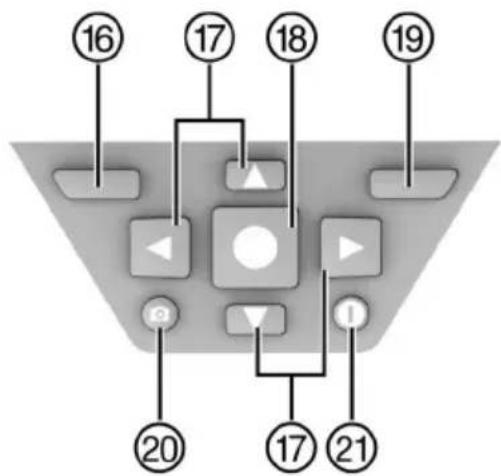
flowchart
graph TD
    A["16"] --> B["17"]
    B --> C["18"]
    C --> D["19"]
    D --> E["20"]
    E --> F["21"]
    F --> G["17"]
    G --> H["23"]
    H --> I["24"]
    I --> J["25"]
    J --> K["26"]
    K --> L["27"]
    L --> M["28"]
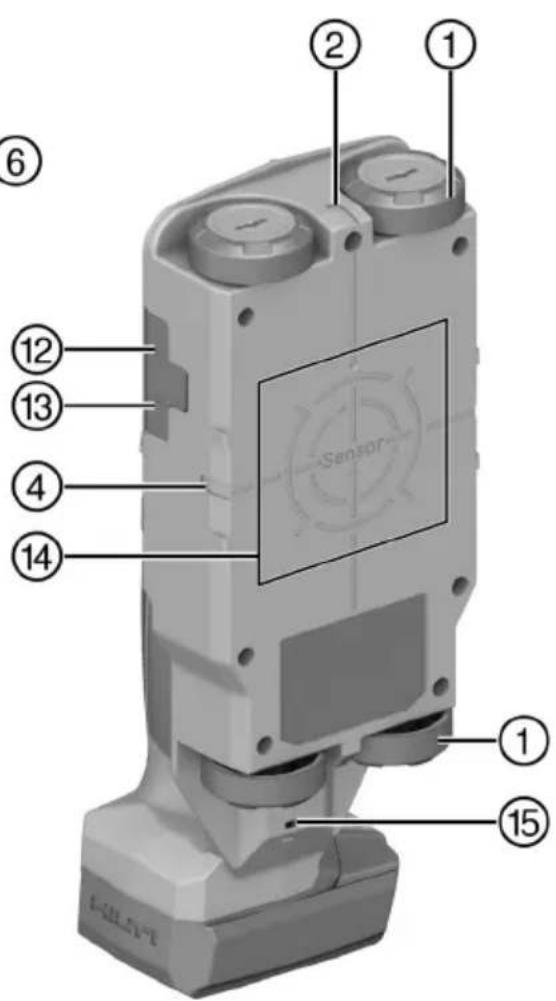
text_image
Labeled diagram of a sensor device with numbered components for identificationnatural_image
3D mechanical assembly diagram showing internal components and a close-up inset of a component (no text or symbols)7250 Dallas Parkway, Suite 1000
US-Plano, TX 75024
www.hilti.com
Declaration of Confor
Proposal corded
| Part Name | Hazardous Substances | |||||
| Lead (Pb) | Mercury (Hg) | Cadmium (Cd) | Hexavalent Chromium (Cr(VI)) | Poly-brominated biphenyls (PBB) | br diph | |
| Electronics (PCB, switch, wiring) | X | O | X | O | O | |
| Motor | O | O | O | O | O | |
| Power cord | O | O | O | O | O | |
| Fastener elements | O | O | O | O | O | |
| Metal parts | X | O | O | O | O | |
| Power supplies | O | O | O | O | O | |
| Brass parts | X | O | O | O | O | |
| Aluminium parts | X | O | O | O | O | |
| Battery | O | O | O | O | O | |
| Battery charger | X | O | O | O | O | |
O: Indicates that said hazardous substance contained in all of the homogeneous materials for this part is below the limit requirement of GB/T 26572
X: Indicates that said hazardous substance contained in at least one of the homogenous materials used for this part is above the limit requirement of but corresponds to the exemption
EC Declaration of Conformity | UK Declaration of Conformity

text_image
HILTIManufacturer:
Hilti Corporation
Hilti (Gt. Britain) Limited
No. 1 Circle Square, 3 Symphony Park
Manchester, England, M1 7FS
PS 85 (01)
Serial Numbers: 1-99999999999
2014/53/EU | Radio Equipment Regulations 2017
2011/65/EU | The Restriction of the Use of Certain Hazardous Substances in Electrical and Electronic Equipment Regulations 2012
EN 50665:2017
EN 301 489-1 V2.2.3
EN 302 065-4 V1.1.1
EN 300 330 V2.1.1
EN 301 489-33 V2.2.1
Dr. Tahar Zrilli
Head of Quality and Process Management Business Area Electric Tools & Accessories
Schaan, 12.02.2024

Sriram Makineedi
Head of BU Measuring Systems
Business Unit Measuring Systems
- INGESTION HAZARD: This product contains a button cell or coin battery. • DEATH or serious injury can occur if ingested. • A swallowed button cell or coin battery can cause Internal Chemical Burns in as little as 2 hours. • KEEP new and used batteries OUT OF REACH of CHILDREN • Seek immediate medical attention if a battery is suspected to be swallowed or inserted inside any part of the body.
text_image
Labeled diagram of a mobile phone device with numbered parts for identification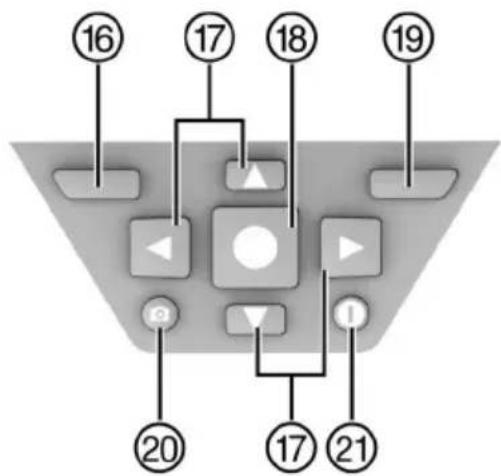
flowchart
graph TD
    A["16"] --> B["Control Button"]
    C["17"] --> B
    D["18"] --> B
    E["19"] --> B
    F["20"] --> G["Control Button"]
    H["17"] --> I["Play Button"]
    J["21"] --> I
    B --> K["Central Play Button"]
    I --> K
    style K fill:#f9f,stroke:#333
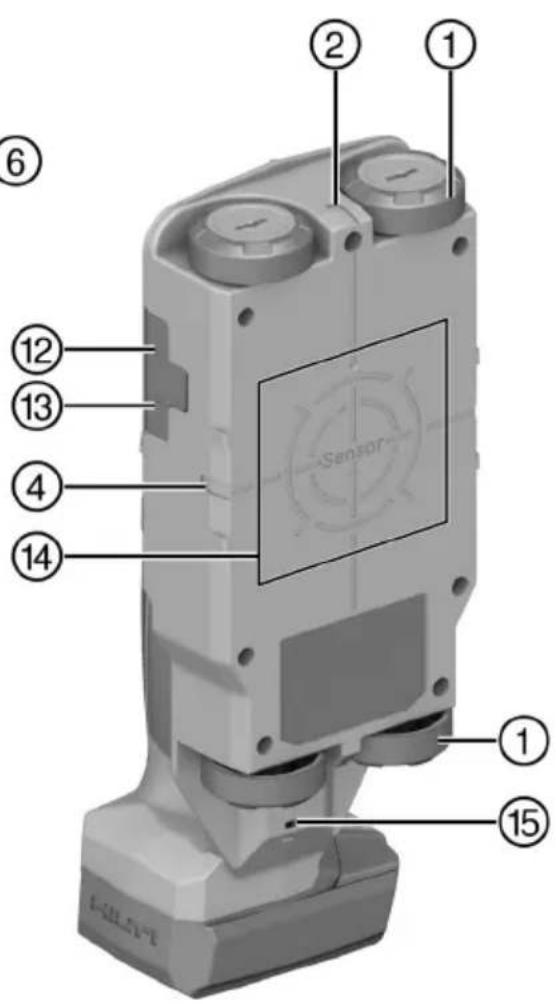
text_image
Labeled diagram of a sensor device with numbered components for identificationnatural_image
3D mechanical component diagram showing internal parts with numbered callouts (no text or symbols)7250 Dallas Parkway, Suite 1000
US-Plano, TX 75024
www.hilti.com
Declaration of Confor
Proposal corded
| Part Name | Hazardous Substances | |||||
| Lead (Pb) | Mercury (Hg) | Cadmium (Cd) | Hexavalent Chromium (Cr(VI)) | Poly-brominated biphenyls (PBB) | br diph | |
| Electronics (PCB, switch, wiring) | X | O | X | O | O | |
| Motor | O | O | O | O | O | |
| Power cord | O | O | O | O | O | |
| Fastener elements | O | O | O | O | O | |
| Metal parts | X | O | O | O | O | |
| Power supplies | O | O | O | O | O | |
| Brass parts | X | O | O | O | O | |
| Aluminium parts | X | O | O | O | O | |
| Battery | O | O | O | O | O | |
| Battery charger | X | O | O | O | O | |
O: Indicates that said hazardous substance contained in all of the homogeneous materials for this part is below the limit requirement of GB/T 26572
X: Indicates that said hazardous substance contained in at least one of the homogenous materials used for this part is above the limit requirement of but corresponds to the exemption
EC Declaration of Conformity | UK Declaration of Conformity

text_image
HILTIManufacturer:
Hilti Corporation
Hilti (Gt. Britain) Limited
No. 1 Circle Square, 3 Symphony Park
Manchester, England, M1 7FS
PS 85 (01)
Serial Numbers: 1-99999999999
2014/53/EU | Radio Equipment Regulations 2017
2011/65/EU | The Restriction of the Use of Certain Hazardous Substances in Electrical and Electronic Equipment Regulations 2012
EN 50665:2017
EN 301 489-1 V2.2.3
EN 302 065-4 V1.1.1
EN 300 330 V2.1.1
EN 301 489-33 V2.2.1
Dr. Tahar Zrilli
Head of Quality and Process Management Business Area Electric Tools & Accessories
Schaan, 12.02.2024

Sriram Makineedi
Head of BU Measuring Systems
Business Unit Measuring Systems
-INGESTION HAZARD: This product contains a button cell or coin battery. • DEATH or serious injury can occur if ingested. • A swallowed button cell or coin battery can cause Internal Chemical Burns in as little as 2 hours. • KEEP new and used batteries OUT OF REACH of CHILDREN • Seek immediate medical attention if a battery is suspected to be swallowed or inserted inside any part of the body.
text_image
Labeled diagram of a mobile phone with numbered parts for identification and assembly reference.natural_image
3D mechanical component diagram showing internal parts with numbered annotations (no readable text or symbols)7250 Dallas Parkway, Suite 1000
US-Plano, TX 75024
www.hilti.com
Declaration of Confor
Proposal corded
| Part Name | Hazardous Substances | |||||
| Lead (Pb) | Mercury (Hg) | Cadmium (Cd) | Hexavalent Chromium (Cr(VI)) | Poly-brominated biphenyls (PBB) | br diph | |
| Electronics (PCB, switch, wiring) | X | O | X | O | O | |
| Motor | O | O | O | O | O | |
| Power cord | O | O | O | O | O | |
| Fastener elements | O | O | O | O | O | |
| Metal parts | X | O | O | O | O | |
| Power supplies | O | O | O | O | O | |
| Brass parts | X | O | O | O | O | |
| Aluminium parts | X | O | O | O | O | |
| Battery | O | O | O | O | O | |
| Battery charger | X | O | O | O | O | |
O: Indicates that said hazardous substance contained in all of the homogeneous materials for this part is below the limit requirement of GB/T 26572
X: Indicates that said hazardous substance contained in at least one of the homogenous materials used for this part is above the limit requirement of but corresponds to the exemption
Šī tabula attiecas uz Kīnas tirgu.
16 Hilti litija jonu akumulatori
EC Declaration of Conformity | UK Declaration of Conformity

text_image
HILTIManufacturer:
Hilti Corporation
Hilti (Gt. Britain) Limited
No. 1 Circle Square, 3 Symphony Park
Manchester, England, M1 7FS
PS 85 (01)
Serial Numbers: 1-99999999999
2014/53/EU | Radio Equipment Regulations 2017
2011/65/EU | The Restriction of the Use of Certain Hazardous Substances in Electrical and Electronic Equipment Regulations 2012
EN 50665:2017
EN 301 489-1 V2.2.3
EN 302 065-4 V1.1.1
EN 300 330 V2.1.1
EN 301 489-33 V2.2.1
Dr. Tahar Zrilli
Head of Quality and Process Management Business Area Electric Tools & Accessories
Schaan, 12.02.2024

Sriram Makineedi
Head of BU Measuring Systems Business Unit Measuring Systems
- INGESTION HAZARD: This product contains a button cell or coin battery. • DEATH or serious injury can occur if ingested. • A swallowed button cell or coin battery can cause Internal Chemical Burns in as little as 2 hours. • KEEP new and used batteries OUT OF REACH of CHILDREN • Seek immediate medical attention if a battery is suspected to be swallowed or inserted inside any part of the body.
natural_image
3D mechanical assembly diagram showing internal components and a close-up inset of a component (no text or symbols)7250 Dallas Parkway, Suite 1000
US-Plano, TX 75024
www.hilti.com
Declaration of Confor
Proposal corded
| Part Name | Hazardous Substances | |||||
| Lead (Pb) | Mercury (Hg) | Cadmium (Cd) | Hexavalent Chromium (Cr(VI)) | Poly-brominated biphenyls (PBB) | br diph | |
| Electronics (PCB, switch, wiring) | X | O | X | O | O | |
| Motor | O | O | O | O | O | |
| Power cord | O | O | O | O | O | |
| Fastener elements | O | O | O | O | O | |
| Metal parts | X | O | O | O | O | |
| Power supplies | O | O | O | O | O | |
| Brass parts | X | O | O | O | O | |
| Aluminium parts | X | O | O | O | O | |
| Battery | O | O | O | O | O | |
| Battery charger | X | O | O | O | O | |
O: Indicates that said hazardous substance contained in all of the homogeneous materials for this part is below the limit requirement of GB/T 26572
X: Indicates that said hazardous substance contained in at least one of the homogenous materials used for this part is above the limit requirement of but corresponds to the exemption
EC Declaration of Conformity | UK Declaration of Conformity

text_image
HILTIManufacturer:
Hilti Corporation
Hilti (Gt. Britain) Limited
No. 1 Circle Square, 3 Symphony Park
Manchester, England, M1 7FS
PS 85 (01)
Serial Numbers: 1-99999999999
2014/53/EU | Radio Equipment Regulations 2017
2011/65/EU | The Restriction of the Use of Certain Hazardous Substances in Electrical and Electronic Equipment Regulations 2012
EN 50665:2017
EN 301 489-1 V2.2.3
EN 302 065-4 V1.1.1
EN 300 330 V2.1.1
EN 301 489-33 V2.2.1
Dr. Tahar Zrilli
Head of Quality and Process Management Business Area Electric Tools & Accessories
Schaan, 12.02.2024

Sriram Makineedi
Head of BU Measuring Systems
Business Unit Measuring Systems
- INGESTION HAZARD: This product contains a button cell or coin battery. • DEATH or serious injury can occur if ingested. • A swallowed button cell or coin battery can cause Internal Chemical Burns in as little as 2 hours. • KEEP new and used batteries OUT OF REACH of CHILDREN • Seek immediate medical attention if a battery is suspected to be swallowed or inserted inside any part of the body.
natural_image
3D mechanical component diagram showing internal structure with numbered parts (no text or symbols)7250 Dallas Parkway, Suite 1000
US-Plano, TX 75024
www.hilti.com
Declaration of Confor
Proposal corded
| Part Name | Hazardous Substances | |||||
| Lead (Pb) | Mercury (Hg) | Cadmium (Cd) | Hexavalent Chromium (Cr(VI)) | Poly-brominated biphenyls (PBB) | br diph | |
| Electronics (PCB, switch, wiring) | X | O | X | O | O | |
| Motor | O | O | O | O | O | |
| Power cord | O | O | O | O | O | |
| Fastener elements | O | O | O | O | O | |
| Metal parts | X | O | O | O | O | |
| Power supplies | O | O | O | O | O | |
| Brass parts | X | O | O | O | O | |
| Aluminium parts | X | O | O | O | O | |
| Battery | O | O | O | O | O | |
| Battery charger | X | O | O | O | O | |
O: Indicates that said hazardous substance contained in all of the homogeneous materials for this part is below the limit requirement of GB/T 26572
X: Indicates that said hazardous substance contained in at least one of the homogenous matrices used for this part is above the limit requirement of but corresponds to the exemption
EC Declaration of Conformity | UK Declaration of Conformity

text_image
HILTIManufacturer:
Hilti Corporation
Hilti (Gt. Britain) Limited
No. 1 Circle Square, 3 Symphony Park
Manchester, England, M1 7FS
PS 85 (01)
Serial Numbers: 1-99999999999
2014/53/EU | Radio Equipment Regulations 2017
2011/65/EU | The Restriction of the Use of Certain Hazardous Substances in Electrical and Electronic Equipment Regulations 2012
EN 50665:2017
EN 301 489-1 V2.2.3
EN 302 065-4 V1.1.1
EN 300 330 V2.1.1
EN 301 489-33 V2.2.1
Dr. Tahar Zrilli
Head of Quality and Process Management Business Area Electric Tools & Accessories
Schaan, 12.02.2024

Sriram Makineedi
Head of BU Measuring Systems Business Unit Measuring Systems
- INGESTION HAZARD: This product contains a button cell or coin battery. • DEATH or serious injury can occur if ingested. • A swallowed button cell or coin battery can cause Internal Chemical Burns in as little as 2 hours. • KEEP new and used batteries OUT OF REACH of CHILDREN • Seek immediate medical attention if a battery is suspected to be swallowed or inserted inside any part of the body.
natural_image
3D mechanical component diagram showing internal structure with numbered parts and a close-up inset view (no text or symbols)7250 Dallas Parkway, Suite 1000
US-Plano, TX 75024
www.hilti.com
| Part Name | Hazardous Substances | ||||
| Lead (Pb) | Mercury (Hg) | Cadmium (Cd) | Hexavalent Chromium (Cr(VI)) | Poly-brominated biphenyls (PBB) | |
| Electronics (PCB, switch, wiring) | X | O | X | O | O |
| Motor | O | O | O | O | O |
| Power cord | O | O | O | O | O |
| Fastener elements | O | O | O | O | O |
| Metal parts | X | O | O | O | O |
| Power supplies | O | O | O | O | O |
| Brass parts | X | O | O | O | O |
| Aluminium parts | X | O | O | O | O |
| Battery | O | O | O | O | O |
| Battery charger | X | O | O | O | O |
O: Indicates that said hazardous substance contained in all of the homogeneous materials for this part is below the limit requirement of GB/T 20
X: Indicates that said hazardous substance contained in at least one of the homogenous materials used for this part is above the limit requireme but corresponds to the exemption
EC Declaration of Conformity | UK Declaration of Conformity

text_image
HILTIManufacturer:
Hilti Corporation
Hilti (Gt. Britain) Limited
No. 1 Circle Square, 3 Symphony Park
Manchester, England, M1 7FS
PS 85 (01)
Serial Numbers: 1-99999999999
2014/53/EU | Radio Equipment Regulations 2017
2011/65/EU | The Restriction of the Use of Certain Hazardous Substances in Electrical and Electronic Equipment Regulations 2012
EN 50665:2017
EN 301 489-1 V2.2.3
EN 302 065-4 V1.1.1
EN 300 330 V2.1.1
EN 301 489-33 V2.2.1
Dr. Tahar Zrilli
Head of Quality and Process Management Business Area Electric Tools & Accessories
Schaan, 12.02.2024

Sriram Makineedi
Head of BU Measuring Systems
Business Unit Measuring Systems
-INGESTION HAZARD: This product contains a button cell or coin battery. • DEATH or serious injury can occur if ingested. • A swallowed button cell or coin battery can cause Internal Chemical Burns in as little as 2 hours. • KEEP new and used batteries OUT OF REACH of CHILDREN • Seek immediate medical attention if a battery is suspected to be swallowed or inserted inside any part of the body.
text_image
Labeled diagram of a mobile phone with numbered parts for identification and assembly reference.natural_image
3D mechanical component diagram showing internal structure with numbered parts (no text or symbols)7250 Dallas Parkway, Suite 1000
US-Plano, TX 75024
www.hilti.com
| Part Name | Hazardous Substances | ||||
| Lead (Pb) | Mercury (Hg) | Cadmium (Cd) | Hexavalent Chromium (Cr(VI)) | Poly-brominated biphenyls (PBB) | |
| Electronics (PCB, switch, wiring) | X | O | X | O | O |
| Motor | O | O | O | O | O |
| Power cord | O | O | O | O | O |
| Fastener elements | O | O | O | O | O |
| Metal parts | X | O | O | O | O |
| Power supplies | O | O | O | O | O |
| Brass parts | X | O | O | O | O |
| Aluminium parts | X | O | O | O | O |
| Battery | O | O | O | O | O |
| Battery charger | X | O | O | O | O |
O: Indicates that said hazardous substance contained in all of the homogeneous materials for this part is below the limit requirement of GB/T 26
X: Indicates that said hazardous substance contained in at least one of the homogenous materials used for this part is above the limit requirement but corresponds to the exemption
EC Declaration of Conformity | UK Declaration of Conformity

text_image
HILTIManufacturer:
Hilti Corporation
Hilti (Gt. Britain) Limited
No. 1 Circle Square, 3 Symphony Park
Manchester, England, M1 7FS
PS 85 (01)
Serial Numbers: 1-99999999999
2014/53/EU | Radio Equipment Regulations 2017
2011/65/EU | The Restriction of the Use of Certain Hazardous Substances in Electrical and Electronic Equipment Regulations 2012
EN 50665:2017
EN 301 489-1 V2.2.3
EN 302 065-4 V1.1.1
EN 300 330 V2.1.1
EN 301 489-33 V2.2.1
Dr. Tahar Zrilli
Head of Quality and Process Management Business Area Electric Tools & Accessories
Schaan, 12.02.2024

Sriram Makineedi
Head of BU Measuring Systems
Business Unit Measuring Systems
-INGESTION HAZARD: This product contains a button cell or coin battery. • DEATH or serious injury can occur if ingested. • A swallowed button cell or coin battery can cause Internal Chemical Burns in as little as 2 hours. • KEEP new and used batteries OUT OF REACH of CHILDREN • Seek immediate medical attention if a battery is suspected to be swallowed or inserted inside any part of the body.
text_image
Labeled diagram of a mobile phone with numbered parts for identification and assembly reference.natural_image
3D mechanical component diagram showing internal structure with numbered parts and a close-up inset view (no text or symbols)7250 Dallas Parkway, Suite 1000
US-Plano, TX 75024
www.hilti.com
| Part Name | Hazardous Substances | ||||
| Lead (Pb) | Mercury (Hg) | Cadmium (Cd) | Hexavalent Chromium (Cr(VI)) | Poly-brominated biphenyls (PBB) | |
| Electronics (PCB, switch, wiring) | X | O | X | O | O |
| Motor | O | O | O | O | O |
| Power cord | O | O | O | O | O |
| Fastener elements | O | O | O | O | O |
| Metal parts | X | O | O | O | O |
| Power supplies | O | O | O | O | O |
| Brass parts | X | O | O | O | O |
| Aluminium parts | X | O | O | O | O |
| Battery | O | O | O | O | O |
| Battery charger | X | O | O | O | O |
O: Indicates that said hazardous substance contained in all of the homogeneous materials for this part is below the limit requirement of GB/T 20
X: Indicates that said hazardous substance contained in at least one of the homogenous materials used for this part is above the limit requireme but corresponds to the exemption
EC Declaration of Conformity | UK Declaration of Conformity

text_image
HILTIManufacturer:
Hilti Corporation
Hilti (Gt. Britain) Limited
No. 1 Circle Square, 3 Symphony Park
Manchester, England, M1 7FS
PS 85 (01)
Serial Numbers: 1-99999999999
2014/53/EU | Radio Equipment Regulations 2017
2011/65/EU | The Restriction of the Use of Certain Hazardous Substances in Electrical and Electronic Equipment Regulations 2012
EN 50665:2017
EN 301 489-1 V2.2.3
EN 302 065-4 V1.1.1
EN 300 330 V2.1.1
EN 301 489-33 V2.2.1
Dr. Tahar Zrilli
Head of Quality and Process Management Business Area Electric Tools & Accessories
Schaan, 12.02.2024

Sriram Makineedi
Head of BU Measuring Systems
Business Unit Measuring Systems
Proizvajalec na lastno odgovornost izjavlja, da tukaj opisani izdelek ustreza veljavni zakonodaji in veljavnim standardom.
- INGESTION HAZARD: This product contains a button cell or coin battery. • DEATH or serious injury can occur if ingested. • A swallowed button cell or coin battery can cause Internal Chemical Burns in as little as 2 hours. • KEEP new and used batteries OUT OF REACH of CHILDREN • Seek immediate medical attention if a battery is suspected to be swallowed or inserted inside any part of the body.
natural_image
3D mechanical assembly diagram showing internal components and a close-up inset of a component (no text or symbols)7250 Dallas Parkway, Suite 1000
US-Plano, TX 75024
www.hilti.com
| Part Name | Hazardous Substances | ||||
| Lead (Pb) | Mercury (Hg) | Cadmium (Cd) | Hexavalent Chromium (Cr(VI)) | Poly-brominated biphenyls (PBB) | |
| Electronics (PCB, switch, wiring) | X | O | X | O | O |
| Motor | O | O | O | O | O |
| Power cord | O | O | O | O | O |
| Fastener elements | O | O | O | O | O |
| Metal parts | X | O | O | O | O |
| Power supplies | O | O | O | O | O |
| Brass parts | X | O | O | O | O |
| Aluminium parts | X | O | O | O | O |
| Battery | O | O | O | O | O |
| Battery charger | X | O | O | O | O |
O: Indicates that said hazardous substance contained in all of the homogeneous materials for this part is below the limit requirement of GB/T 20
X: Indicates that said hazardous substance contained in at least one of the homogenous materials used for this part is above the limit requirement but corresponds to the exemption
EC Declaration of Conformity | UK Declaration of Conformity

text_image
HILTIManufacturer:
Hilti Corporation
Hilti (Gt. Britain) Limited
No. 1 Circle Square, 3 Symphony Park
Manchester, England, M1 7FS
PS 85 (01)
Serial Numbers: 1-99999999999
2014/53/EU | Radio Equipment Regulations 2017
2011/65/EU | The Restriction of the Use of Certain Hazardous Substances in Electrical and Electronic Equipment Regulations 2012
EN 50665:2017
EN 301 489-1 V2.2.3
EN 302 065-4 V1.1.1
EN 300 330 V2.1.1
EN 301 489-33 V2.2.1
Dr. Tahar Zrilli
Head of Quality and Process Management Business Area Electric Tools & Accessories
Schaan, 12.02.2024

Sriram Makineedi
Head of BU Measuring Systems
Business Unit Measuring Systems
-INGESTION HAZARD: This product contains a button cell or coin battery. • DEATH or serious injury can occur if ingested. • A swallowed button cell or coin battery can cause Internal Chemical Burns in as little as 2 hours. • KEEP new and used batteries OUT OF REACH of CHILDREN • Seek immediate medical attention if a battery is suspected to be swallowed or inserted inside any part of the body.
text_image
Labeled diagram of a mobile phone device with numbered parts for identification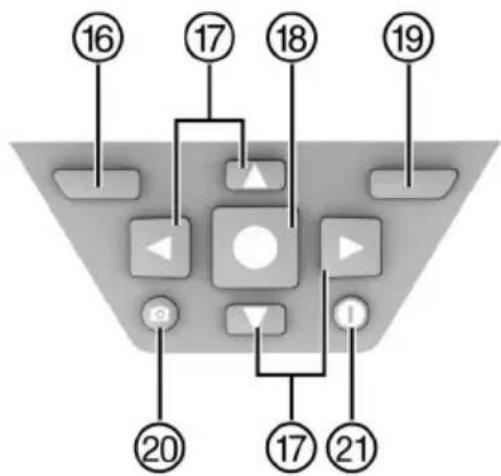
flowchart
graph TD
    A["16"] --> B["17"]
    B --> C["18"]
    C --> D["19"]
    D --> E["20"]
    E --> F["21"]
    F --> G["17"]
    G --> H["23"]
    H --> I["24"]
    I --> J["25"]
    J --> K["26"]
    K --> L["27"]
    L --> M["28"]
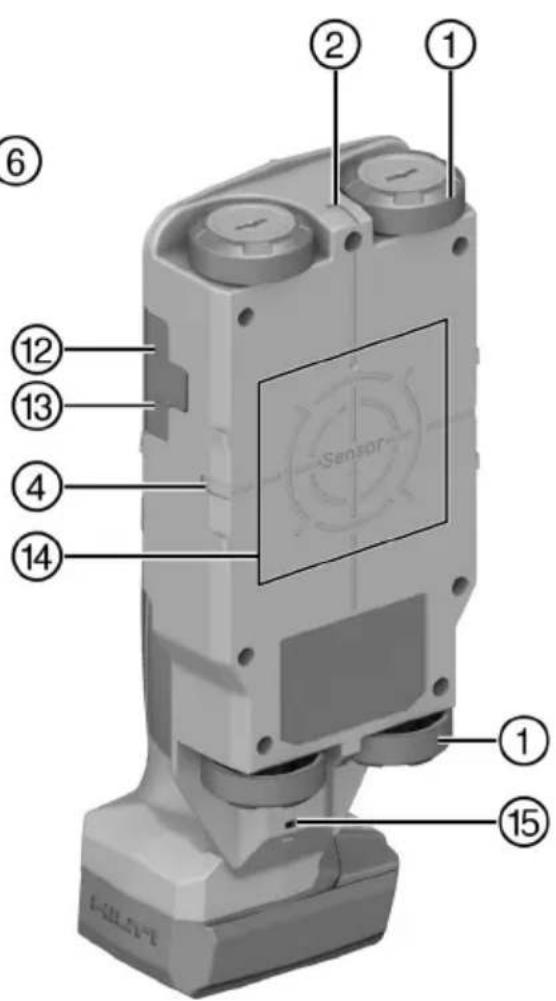
text_image
Labeled diagram of a sensor device with numbered components for identificationnatural_image
3D mechanical component diagram showing internal parts and a close-up inset view (no text or symbols)- Izvadite vijak za držač dugmaste baterije.
- Izvucite držač dugmaste baterije iz otvora (po potrebi prikladnim alatom).
- Izvadite praznu dugmastu bateriju i umetnite novu dugmastu bateriju. Pazite na ispravan polaritet. Pozitivan pol dugmaste baterije mora biti okrenut prema gore.
- Ponovno umetnite držač dugmaste baterije u otvor. Pazite da je držač dugmaste baterije ispravno umetnut do kraja jer u suprotnom nije zajamčena zaštita od prašine i prskanja vode.
- Ponovno stavite vijak za držač dugmaste baterije i pritegnite ga rukom.
Transport

OPREZ
Nehotično pokretanje prilikom transporta!
▶ Svoje proizvode uvijek transportirajte bez umetnutih akumulatorskih baterija!
▶ Izvadite akumulatorsku(e) bateriju(e).
▶ Akumulatorske baterije nikada ne transportirajte u rasutom stanju. Za vrijeme transporta treba zaštititi akumulatorske baterije od prejakog udarca i vibracija te ih izolirati od svih vodljivih materijala ili drugih akumulatorskih baterija kako ne bi došle u dodir s polovima drugih baterija i prouzročile kratak spoj. Poštujte lokalne propise o transportu akumulatorskih baterija.
▶ Akumulatorske baterije ne smiju se slati poštom. Obratite se otpremničkoj tvrtki ako želite slati neoštećene akumulatorske baterije.
▶ Prije svake uporabe i nakon dužeg transporta provjerite jesu li proizvod i akumulatorske baterije oštećeni.
Skladištenje

UPOZORENJE
Nehotično oštećenje zbog neispravnih akumulatorskih baterija ili onih koje cure. !
7250 Dallas Parkway, Suite 1000
US-Plano, TX 75024
www.hilti.com
EC Declaration of Conformity | UK Declaration of Conformity

text_image
HILTIManufacturer:
Hilti Corporation
Hilti (Gt. Britain) Limited
No. 1 Circle Square, 3 Symphony Park
Manchester, England, M1 7FS
PS 85 (01)
Serial Numbers: 1-99999999999
2014/53/EU | Radio Equipment Regulations 2017
2011/65/EU | The Restriction of the Use of Certain Hazardous Substances in Electrical and Electronic Equipment Regulations 2012
EN 50665:2017
EN 301 489-1 V2.2.3
EN 302 065-4 V1.1.1
EN 300 330 V2.1.1
EN 301 489-33 V2.2.1
Dr. Tahar Zrilli
Head of Quality and Process Management Business Area Electric Tools & Accessories
Schaan, 12.02.2024

Sriram Makineedi
Head of BU Measuring Systems Business Unit Measuring Systems
- INGESTION HAZARD: This product contains a button cell or coin battery. • DEATH or serious injury can occur if ingested. • A swallowed button cell or coin battery can cause Internal Chemical Burns in as little as 2 hours. • KEEP new and used batteries OUT OF REACH of CHILDREN • Seek immediate medical attention if a battery is suspected to be swallowed or inserted inside any part of the body.
natural_image
3D mechanical component diagram showing internal structure with numbered parts and a close-up inset of a button (no text or symbols)- Izvadite zavrtanj za držač dugmaste baterije.
- Izvadite držač dugmaste baterije iz okna (eventualno pomoću odgovarajućeg alata).
- Izvadite praznu dugmastu bateriju i ubacite novu dugmastu bateriju. Vodite računa o odgovarajućem polaritetu. Pozitivan pol dugmaste baterije mora da bude okrenut nagore.
- Ponovo postavite držač dugmaste baterije u okno. Vodite računa da držač dugmaste baterije bude pravilno i potpuno uvučen, jer u suprotnom ne bi bila osigurana zaštita od prašine i prskanja vode.
- Ponovo vratite zavrtanj držača dugmaste baterije i ručno ga zategnite.
Transport

OPREZ
Nesmotreno pokretanje prilikom transporta!
▶ Uvek transportujte vaše proizvode bez umetnutih akumulatorskih baterija!
- Izvadite akumulatorsku bateriju ili baterije.
▶ Nemojte transportovati akumulatorske baterije bez ambalaže. Akumulatorske baterije bi trebalo tokom transporta zaštiti od prekomernih udaraca i od materijala koji sprovode struju ili izolovati od drugih akumulatorskih baterija, kako se ne bi dodirnule sa drugim polom baterije i prouzrokovale kratak spoj. Obratite pažnju na vaše lokalne propise za transport akumulatorskih baterija. - Akumulatorske baterije ne smete slati poštom. Obratite se kompaniji za slanje pošiljki, ako želite da pošaljete neoštećene akumulatorske baterije.
▶ Prekontrolišite da li na proizvodu i akumulatorskim baterijama ima oštećenja pre svake upotrebe kao i pre i nakon dugotrajnog transporta.
Skladištenje

UPOZORENJE
7250 Dallas Parkway, Suite 1000
US-Plano, TX 75024
www.hilti.com
Za korisnike u Kanadi: Ovaj uređaj za radarsko snimanje treba da se koristi samo kada je usmeren na pod ili zid i kada je u kontaktu sa podom ili površinom zida ili kada se nalazi na udaljenosti od 20 cm od poda i zida. Ovim uređajem za radarsko snimanje smeju da rukuju samo agencije za sprovođenje zakona, naučno-istraživački instituti, komercijalne rudarske kompanije, građevinske kompanije i spasilačke ili vatrogasne organizacije.
13 Zbrinjavanje otpada
UPOZORENJE
Opasnost od povređivanja usled nestručnog uklanjanja na otpad! Opasnosti po zdravlje prouzrokovane ispuštanjem gasova ili tečnosti.
▶ Nemojte slati oštećene akumulatorske baterije!
▶ Prekrijte priključke materijalom koji ne sprovodi struju, kako biste izbegli kratak spoj.
- Akumulatorske baterije uklonite na otpad tako da ne mogu da dospeju u ruke dece.
Uklonite na otpad akumulatorsku bateriju u vašoj Hilti Store ili se obratite preduzeću za odlaganje koje je nadležno za vas.
Hilti Proizvodi su sa velikim udelom proizvedeni od reciklažnih materijala. Preduslov za ponovnu upotrebu je stručno razdvajanje materijala. U mnogim zemljama Hilti vaš stari uređaj vraća na reciklažu. Pitajte Hilti servis za klijente ili vašeg konsultanta za prodaju.

Električne alate, elektronske uređaje i akumulatorske baterije ne odlažite u kućne otpatke!
| Part Name | Hazardous Substances | ||||
| Lead (Pb) | Mercury (Hg) | Cadmium (Cd) | Hexavalent Chromium (Cr(VI)) | Poly-brominated biphenyls (PBB) | |
| Electronics (PCB, switch, wiring) | X | O | X | O | O |
| Motor | O | O | O | O | O |
| Power cord | O | O | O | O | O |
| Fastener elements | O | O | O | O | O |
| Metal parts | X | O | O | O | O |
| Power supplies | O | O | O | O | O |
| Brass parts | X | O | O | O | O |
| Aluminium parts | X | O | O | O | O |
| Battery | O | O | O | O | O |
| Battery charger | X | O | O | O | O |
O: Indicates that said hazardous substance contained in all of the homogeneous materials for this part is below the limit requirement of GB/T 20
X: Indicates that said hazardous substance contained in at least one of the homogenous materials used for this part is above the limit requirement but corresponds to the exemption
Ova tabelu važi za tržište Kine.
16 Hilti Li-Ion akumulatorske baterije
EC Declaration of Conformity | UK Declaration of Conformity

text_image
HILTIManufacturer:
Hilti Corporation
Hilti (Gt. Britain) Limited
No. 1 Circle Square, 3 Symphony Park
Manchester, England, M1 7FS
PS 85 (01)
Serial Numbers: 1-99999999999
2014/53/EU | Radio Equipment Regulations 2017
2011/65/EU | The Restriction of the Use of Certain Hazardous Substances in Electrical and Electronic Equipment Regulations 2012
EN 50665:2017
EN 301 489-1 V2.2.3
EN 302 065-4 V1.1.1
EN 300 330 V2.1.1
EN 301 489-33 V2.2.1
Dr. Tahar Zrilli
Head of Quality and Process Management Business Area Electric Tools & Accessories
Schaan, 12.02.2024

Sriram Makineedi
Head of BU Measuring Systems
Business Unit Measuring Systems
-INGESTION HAZARD: This product contains a button cell or coin battery. • DEATH or serious injury can occur if ingested. • A swallowed button cell or coin battery can cause Internal Chemical Burns in as little as 2 hours. • KEEP new and used batteries OUT OF REACH of CHILDREN • Seek immediate medical attention if a battery is suspected to be swallowed or inserted inside any part of the body.
text_image
Labeled diagram of a handheld device with numbered parts for identification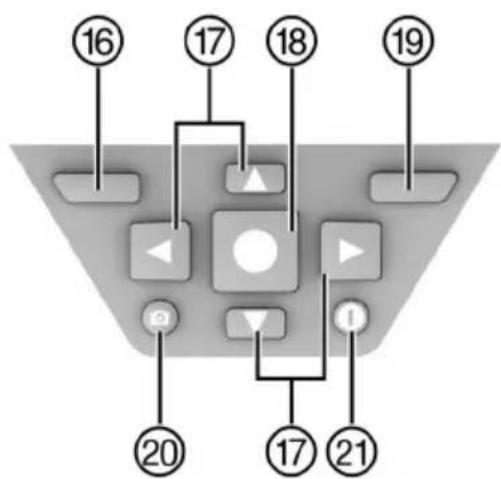
flowchart
graph TD
    A["16"] --> B["Central Node"]
    C["17"] --> B
    D["18"] --> B
    E["19"] --> B
    F["20"] --> B
    G["17"] --> H["Bottom Node"]
    I["21"] --> H
    B --> J["Top Node"]
    B --> K["Bottom Node"]
    B --> L["Bottom Node"]
    B --> M["Bottom Node"]
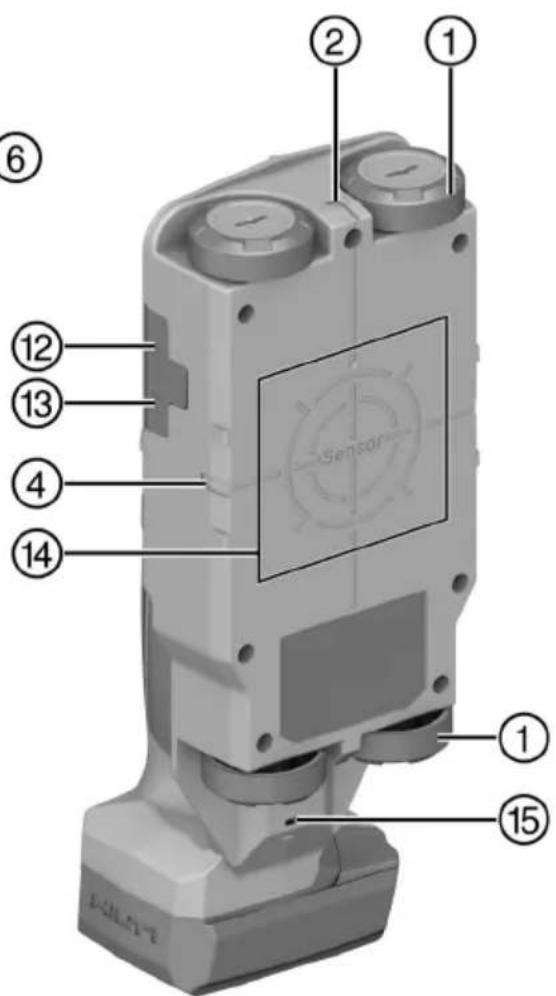
text_image
Labeled diagram of a handheld device with numbered components and sensor display screennatural_image
3D mechanical assembly diagram showing internal components and a close-up inset of a component (no text or symbols)7250 Dallas Parkway, Suite 1000
US-Plano, TX 75024
www.hilti.com
| Hazardous Substances | |||||
| Part Name | Lead (Pb) | Mercury (Hg) | Cadmium (Cd) | Hexavalent Chromium (Cr(VI)) | Poly-brominated biphenyls (PBB) |
| Electronics (PCB, switch, wiring) | X | O | X | O | O |
| Motor | O | O | O | O | O |
| Power cord | O | O | O | O | O |
| Fastener elements | O | O | O | O | O |
| Metal parts | X | O | O | O | O |
| Power supplies | O | O | O | O | O |
| Brass parts | X | O | O | O | O |
| Aluminium parts | X | O | O | O | O |
| Battery | O | O | O | O | O |
| Battery charger | X | O | O | O | O |
O: Indicates that said hazardous substance contained in all of the homogeneous materials for this part is below the limit requirement of GB/T 20
X: Indicates that said hazardous substance contained in at least one of the homogenous matrices used for this part is above the limit requirement but corresponds to the exemption
EC Declaration of Conformity | UK Declaration of Conformity

text_image
HILTIManufacturer:
Hilti Corporation
Hilti (Gt. Britain) Limited
No. 1 Circle Square, 3 Symphony Park
Manchester, England, M1 7FS
PS 85 (01)
Serial Numbers: 1-99999999999
2014/53/EU | Radio Equipment Regulations 2017
2011/65/EU | The Restriction of the Use of Certain Hazardous Substances in Electrical and Electronic Equipment Regulations 2012
EN 50665:2017
EN 301 489-1 V2.2.3
EN 302 065-4 V1.1.1
EN 300 330 V2.1.1
EN 301 489-33 V2.2.1
Dr. Tahar Zrilli
Head of Quality and Process Management Business Area Electric Tools & Accessories
Schaan, 12.02.2024

Sriram Makineedi
Head of BU Measuring Systems
Business Unit Measuring Systems
-INGESTION HAZARD: This product contains a button cell or coin battery. • DEATH or serious injury can occur if ingested. • A swallowed button cell or coin battery can cause Internal Chemical Burns in as little as 2 hours. • KEEP new and used batteries OUT OF REACH of CHILDREN • Seek immediate medical attention if a battery is suspected to be swallowed or inserted inside any part of the body.
text_image
Labeled diagram of a mobile phone device with numbered parts for identification
flowchart
graph TD
    A["16"] --> B["Control Panel"]
    C["17"] --> B
    D["18"] --> B
    E["19"] --> B
    F["20"] --> B
    G["17"] --> H["Control Panel"]
    I["21"] --> H
    B --> J["Control Panel"]
    B --> K["Control Panel"]
    B --> L["Control Panel"]
    B --> M["Control Panel"]
    B --> N["Control Panel"]
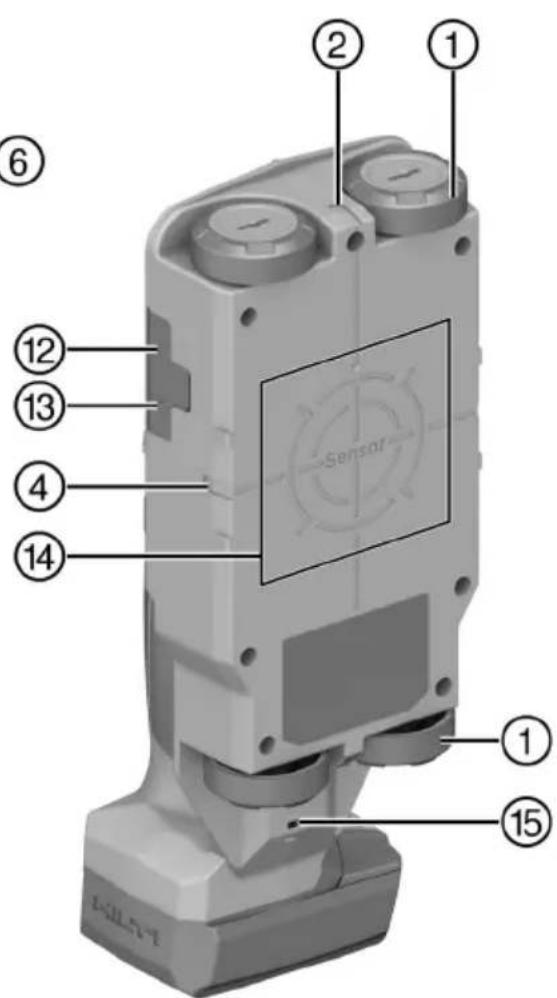
text_image
Labeled diagram of a sensor device with numbered components for identification6.5.3 Signal View 2D
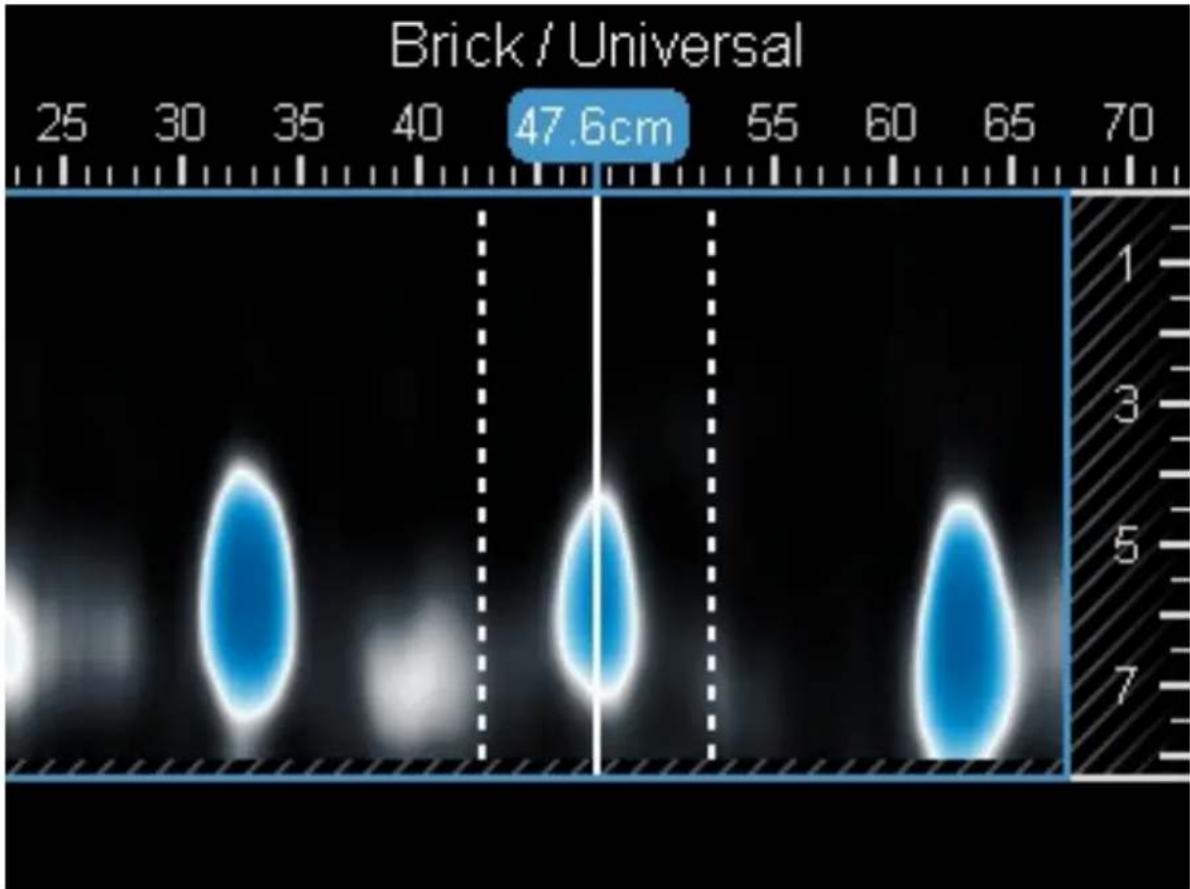
heatmap
| Value | | --------- | | 47.6cm |natural_image
3D mechanical component diagram showing internal structure with numbered parts (1, 2) and a magnified inset view of a component detail (no text or symbols)7250 Dallas Parkway, Suite 1000
US-Plano, TX 75024
www.hilti.com
| Part Name | Hazardous Substances | ||||
| Lead (Pb) | Mercury (Hg) | Cadmium (Cd) | Hexavalent Chromium (Cr(VI)) | Poly-brominated biphenyls (PBB) | |
| Electronics (PCB, switch, wiring) | X | O | X | O | O |
| Motor | O | O | O | O | O |
| Power cord | O | O | O | O | O |
| Fastener elements | O | O | O | O | O |
| Metal parts | X | O | O | O | O |
| Power supplies | O | O | O | O | O |
| Brass parts | X | O | O | O | O |
| Aluminium parts | X | O | O | O | O |
| Battery | O | O | O | O | O |
| Battery charger | X | O | O | O | O |
O: Indicates that said hazardous substance contained in all of the homogeneous materials for this part is below the limit requirement of GB/T 20
X: Indicates that said hazardous substance contained in at least one of the homogenous materials used for this part is above the limit requirement but corresponds to the exemption
EC Declaration of Conformity | UK Declaration of Conformity

text_image
HILTIManufacturer:
Hilti Corporation
Hilti (Gt. Britain) Limited
No. 1 Circle Square, 3 Symphony Park
Manchester, England, M1 7FS
PS 85 (01)
Serial Numbers: 1-99999999999
2014/53/EU | Radio Equipment Regulations 2017
2011/65/EU | The Restriction of the Use of Certain Hazardous Substances in Electrical and Electronic Equipment Regulations 2012
EN 50665:2017
EN 301 489-1 V2.2.3
EN 302 065-4 V1.1.1
EN 300 330 V2.1.1
EN 301 489-33 V2.2.1
Dr. Tahar Zrilli
Head of Quality and Process Management Business Area Electric Tools & Accessories
Schaan, 12.02.2024

Sriram Makineedi
Head of BU Measuring Systems Business Unit Measuring Systems
- INGESTION HAZARD: This product contains a button cell or coin battery. • DEATH or serious injury can occur if ingested. • A swallowed button cell or coin battery can cause Internal Chemical Burns in as little as 2 hours. • KEEP new and used batteries OUT OF REACH of CHILDREN • Seek immediate medical attention if a battery is suspected to be swallowed or inserted inside any part of the body.
natural_image
3D mechanical assembly diagram showing internal components with numbered parts (1, 2) and a close-up inset of a component handle (no text or symbols)7250 Dallas Parkway, Suite 1000
US-Plano, TX 75024
www.hilti.com
| Part Name | Hazardous Substances | ||||
| Lead (Pb) | Mercury (Hg) | Cadmium (Cd) | Hexavalent Chromium (Cr(VI)) | Poly-brominated biphenyls (PBB) | |
| Electronics (PCB, switch, wiring) | X | O | X | O | O |
| Motor | O | O | O | O | O |
| Power cord | O | O | O | O | O |
| Fastener elements | O | O | O | O | O |
| Metal parts | X | O | O | O | O |
| Power supplies | O | O | O | O | O |
| Brass parts | X | O | O | O | O |
| Aluminium parts | X | O | O | O | O |
| Battery | O | O | O | O | O |
| Battery charger | X | O | O | O | O |
O: Indicates that said hazardous substance contained in all of the homogeneous materials for this part is below the limit requirement of GB/T 20
X: Indicates that said hazardous substance contained in at least one of the homogenous materials used for this part is above the limit requireme but corresponds to the exemption
EC Declaration of Conformity | UK Declaration of Conformity

text_image
HILTIManufacturer:
Hilti Corporation
Hilti (Gt. Britain) Limited
No. 1 Circle Square, 3 Symphony Park
Manchester, England, M1 7FS
PS 85 (01)
Serial Numbers: 1-99999999999
2014/53/EU | Radio Equipment Regulations 2017
2011/65/EU | The Restriction of the Use of Certain Hazardous Substances in Electrical and Electronic Equipment Regulations 2012
EN 50665:2017
EN 301 489-1 V2.2.3
EN 302 065-4 V1.1.1
EN 300 330 V2.1.1
EN 301 489-33 V2.2.1
Dr. Tahar Zrilli
Head of Quality and Process Management Business Area Electric Tools & Accessories
Schaan, 12.02.2024

Sriram Makineedi
Head of BU Measuring Systems
Business Unit Measuring Systems
-INGESTION HAZARD: This product contains a button cell or coin battery. • DEATH or serious injury can occur if ingested. • A swallowed button cell or coin battery can cause Internal Chemical Burns in as little as 2 hours. • KEEP new and used batteries OUT OF REACH of CHILDREN • Seek immediate medical attention if a battery is suspected to be swallowed or inserted inside any part of the body.
text_image
Labeled diagram of a mobile phone device with numbered parts for identification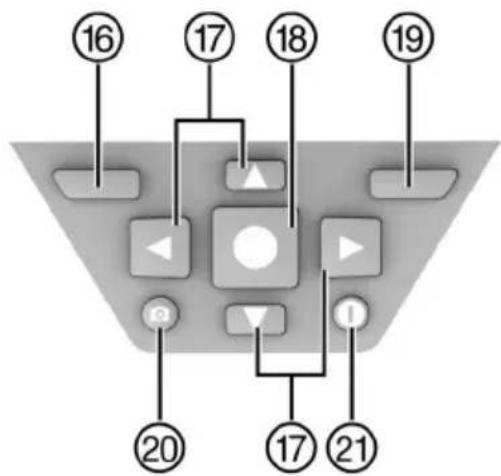
flowchart
graph TD
    A["16"] --> B["17"]
    B --> C["18"]
    C --> D["19"]
    D --> E["20"]
    E --> F["21"]
    F --> G["17"]
    G --> H["23"]
    H --> I["24"]
    I --> J["25"]
    J --> K["26"]
    K --> L["27"]
    L --> M["28"]
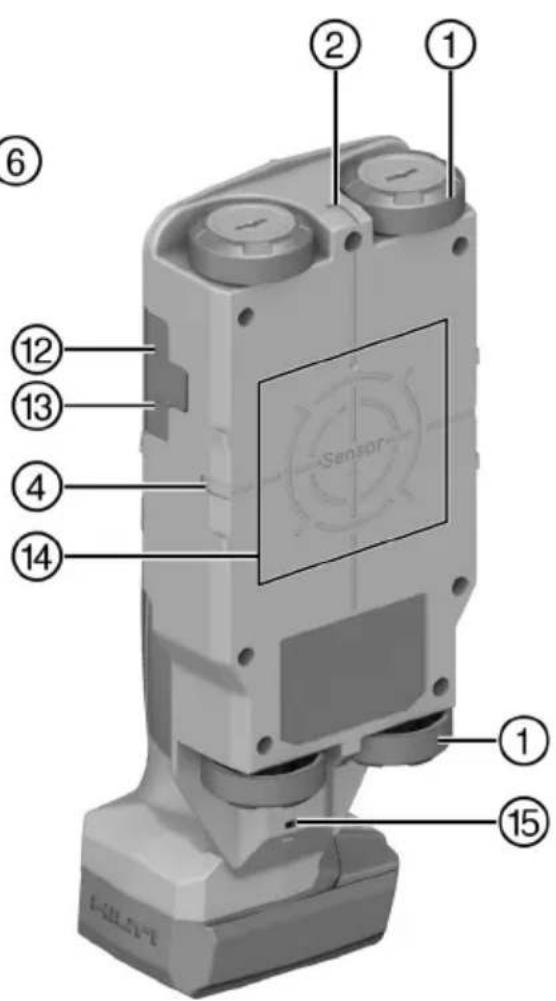
text_image
Labeled diagram of a sensor device with numbered components for identificationnatural_image
3D mechanical assembly diagram showing internal components and a close-up inset of a component (no text or symbols)7250 Dallas Parkway, Suite 1000
US-Plano, TX 75024
www.hilti.com
| Part Name | Hazardous Substances | ||||
| Lead (Pb) | Mercury (Hg) | Cadmium (Cd) | Hexavalent Chromium (Cr(VI)) | Poly-brominated biphenyls (PBB) | |
| Electronics (PCB, switch, wiring) | X | O | X | O | O |
| Motor | O | O | O | O | O |
| Power cord | O | O | O | O | O |
| Fastener elements | O | O | O | O | O |
| Metal parts | X | O | O | O | O |
| Power supplies | O | O | O | O | O |
| Brass parts | X | O | O | O | O |
| Aluminium parts | X | O | O | O | O |
| Battery | O | O | O | O | O |
| Battery charger | X | O | O | O | O |
O: Indicates that said hazardous substance contained in all of the homogeneous materials for this part is below the limit requirement of GB/T 20
X: Indicates that said hazardous substance contained in at least one of the homogenous materials used for this part is above the limit requirement but corresponds to the exemption
EC Declaration of Conformity | UK Declaration of Conformity

text_image
HILTIManufacturer:
Hilti Corporation
Hilti (Gt. Britain) Limited
No. 1 Circle Square, 3 Symphony Park
Manchester, England, M1 7FS
PS 85 (01)
Serial Numbers: 1-99999999999
2014/53/EU | Radio Equipment Regulations 2017
2011/65/EU | The Restriction of the Use of Certain Hazardous Substances in Electrical and Electronic Equipment Regulations 2012
EN 50665:2017
EN 301 489-1 V2.2.3
EN 302 065-4 V1.1.1
EN 300 330 V2.1.1
EN 301 489-33 V2.2.1
Dr. Tahar Zrilli
Head of Quality and Process Management Business Area Electric Tools & Accessories
Schaan, 12.02.2024

Sriram Makineedi
Head of BU Measuring Systems
Business Unit Measuring Systems
- INGESTION HAZARD: This product contains a button cell or coin battery. • DEATH or serious injury can occur if ingested. • A swallowed button cell or coin battery can cause Internal Chemical Burns in as little as 2 hours. • KEEP new and used batteries OUT OF REACH of CHILDREN • Seek immediate medical attention if a battery is suspected to be swallowed or inserted inside any part of the body.
text_image
Labeled diagram of a mobile phone device with numbered parts for identification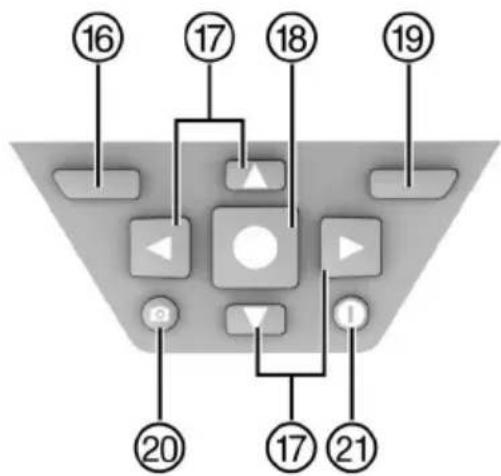
flowchart
graph TD
    A["16"] --> B["17"]
    B --> C["18"]
    C --> D["19"]
    D --> E["20"]
    E --> F["21"]
    F --> G["17"]
    G --> H["23"]
    H --> I["24"]
    I --> J["25"]
    J --> K["26"]
    K --> L["27"]
    L --> M["28"]
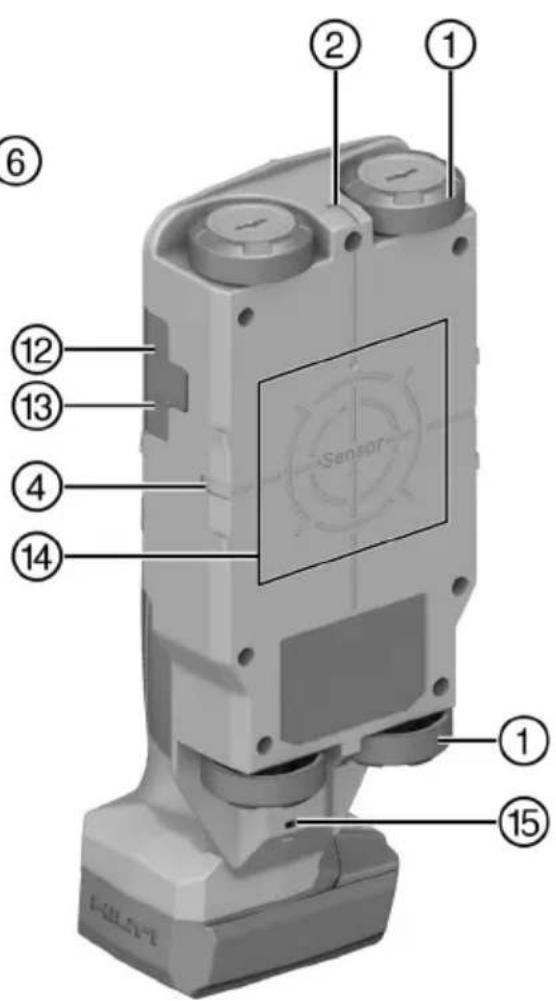
text_image
Labeled diagram of a sensor device with numbered components for identification6.5.3 Signal View 2D
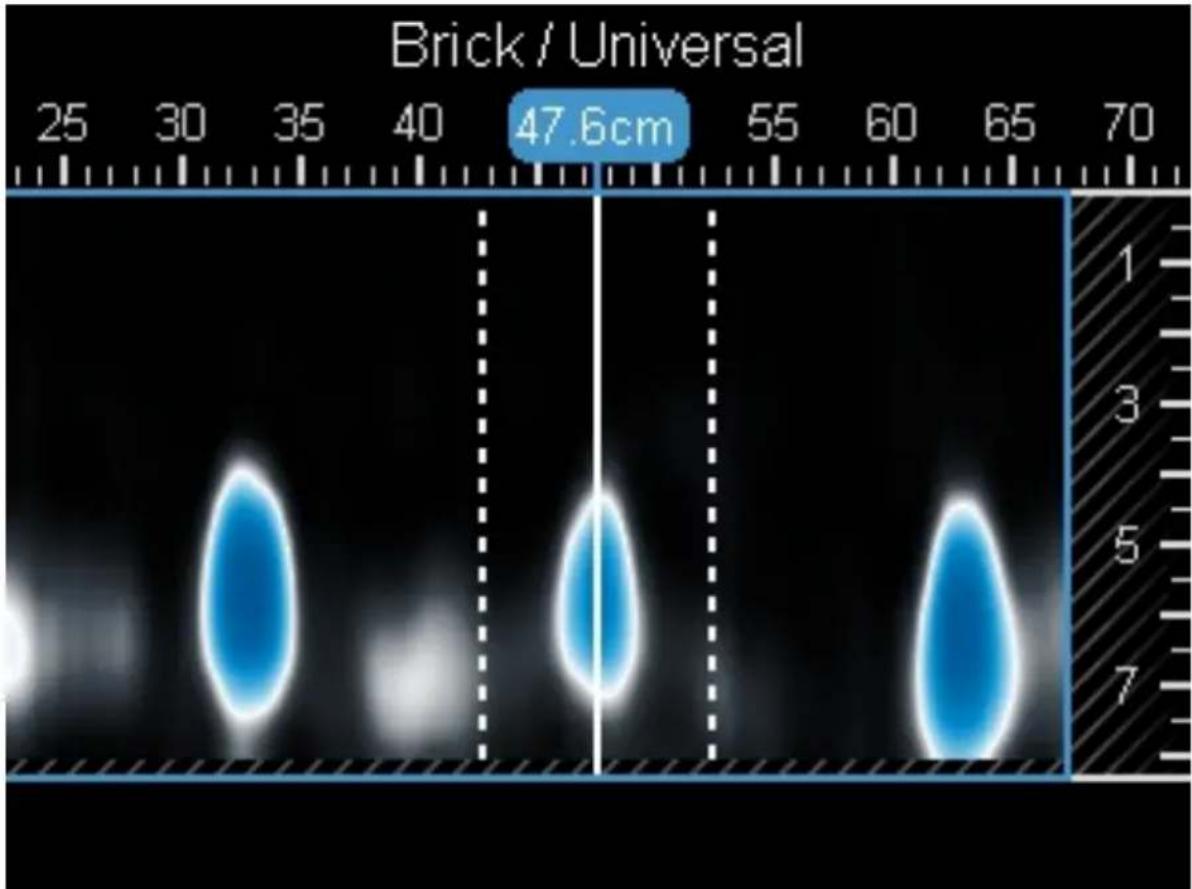
heatmap
| Value | | --------- | | 47.6cm |natural_image
3D mechanical assembly diagram showing internal components and a close-up inset of a component (no text or symbols visible)7250 Dallas Parkway, Suite 1000
US-Plano, TX 75024
www.hilti.com
| Hazardous Substances | |||||
| Part Name | Lead (Pb) | Mercury (Hg) | Cadmium (Cd) | Hexavalent Chromium (Cr(VI)) | Poly-brominated biphenyls (PBB) |
| Electronics (PCB, switch, wiring) | X | O | X | O | O |
| Motor | O | O | O | O | O |
| Power cord | O | O | O | O | O |
| Fastener elements | O | O | O | O | O |
| Metal parts | X | O | O | O | O |
| Power supplies | O | O | O | O | O |
| Brass parts | X | O | O | O | O |
| Aluminium parts | X | O | O | O | O |
| Battery | O | O | O | O | O |
| Battery charger | X | O | O | O | O |
O: Indicates that said hazardous substance contained in all of the homogeneous materials for this part is below the limit requirement of GB/T 20
X: Indicates that said hazardous substance contained in at least one of the homogenous materials used for this part is above the limit requirement but corresponds to the exemption
EC Declaration of Conformity | UK Declaration of Conformity

text_image
HILTIManufacturer:
Hilti Corporation
Hilti (Gt. Britain) Limited
No. 1 Circle Square, 3 Symphony Park
Manchester, England, M1 7FS
PS 85 (01)
Serial Numbers: 1-99999999999
2014/53/EU | Radio Equipment Regulations 2017
2011/65/EU | The Restriction of the Use of Certain Hazardous Substances in Electrical and Electronic Equipment Regulations 2012
EN 50665:2017
EN 301 489-1 V2.2.3
EN 302 065-4 V1.1.1
EN 300 330 V2.1.1
EN 301 489-33 V2.2.1
Dr. Tahar Zrilli
Head of Quality and Process Management Business Area Electric Tools & Accessories
Schaan, 12.02.2024

Sriram Makineedi
Head of BU Measuring Systems
Business Unit Measuring Systems
- INGESTION HAZARD: This product contains a button cell or coin battery. • DEATH or serious injury can occur if ingested. • A swallowed button cell or coin battery can cause Internal Chemical Burns in as little as 2 hours. • KEEP new and used batteries OUT OF REACH of CHILDREN • Seek immediate medical attention if a battery is suspected to be swallowed or inserted inside any part of the body.
text_image
Labeled diagram of a mobile phone device with numbered parts for identification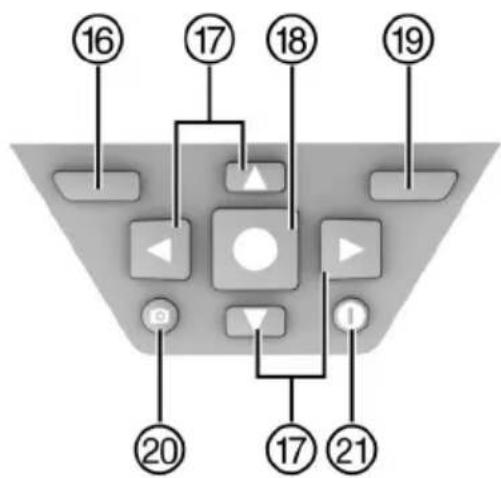
flowchart
graph TD
    A["16"] --> B["17"]
    B --> C["18"]
    C --> D["19"]
    D --> E["20"]
    E --> F["17"]
    F --> G["21"]
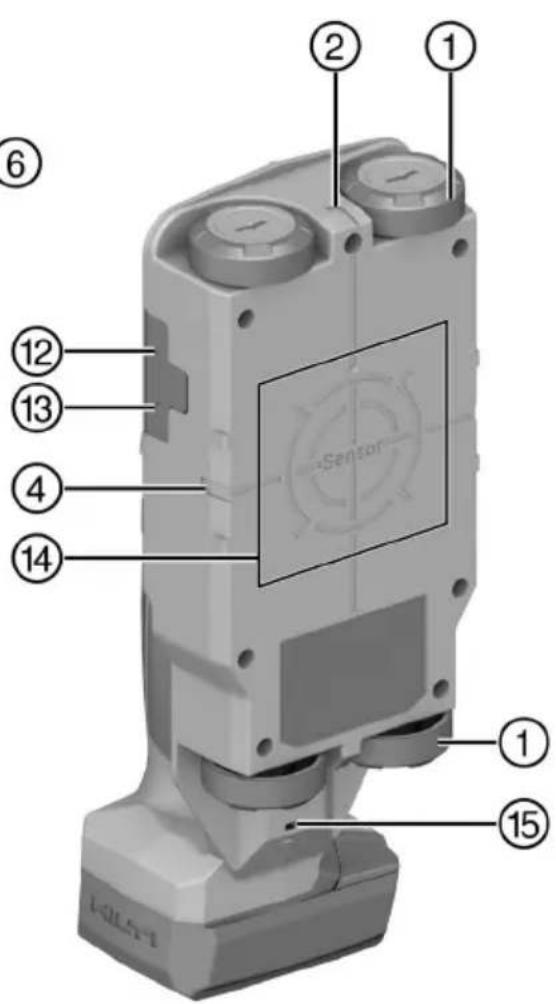
text_image
① ② ① ⑥ ⑫ ⑭ ⑬ ⑭ ④ ⑭ ⑭ ⑮ ⑮ ⑮ ⑮ ⑮ ⑮ ⑮ ⑮ ⑮ ⑮ ⑮ ⑮ ⑮ ⑮ ⑮ ⑮ ⑮ ⑮ ⑮ ⑮ ⑮ ⑮ ⑮ ⑮ ⑮ ⑮ ⑮ ⑮ ⑮ ⑮ ⑮ ⑮ ⑮ ⑮natural_image
3D mechanical assembly diagram showing internal components and a close-up inset of a component (no text or symbols)7250 Dallas Parkway, Suite 1000
US-Plano, TX 75024
www.hilti.com
Declaration of Confor
Proposal corded
| Part Name | Hazardous Substances | |||||
| Lead (Pb) | Mercury (Hg) | Cadmium (Cd) | Hexavalent Chromium (Cr(VI)) | Poly-brominated biphenyls (PBB) | br diph | |
| Electronics (PCB, switch, wiring) | X | O | X | O | O | |
| Motor | O | O | O | O | O | |
| Power cord | O | O | O | O | O | |
| Fastener elements | O | O | O | O | O | |
| Metal parts | X | O | O | O | O | |
| Power supplies | O | O | O | O | O | |
| Brass parts | X | O | O | O | O | |
| Aluminium parts | X | O | O | O | O | |
| Battery | O | O | O | O | O | |
| Battery charger | X | O | O | O | O | |
O: Indicates that said hazardous substance contained in all of the homogeneous materials for this part is below the limit requirement of GB/T 26572
X: Indicates that said hazardous substance contained in at least one of the homogenous materials used for this part is above the limit requirement of but corresponds to the exemption
EC Declaration of Conformity | UK Declaration of Conformity

text_image
HILTIManufacturer:
Hilti Corporation
Hilti (Gt. Britain) Limited
No. 1 Circle Square, 3 Symphony Park
Manchester, England, M1 7FS
PS 85 (01)
Serial Numbers: 1-99999999999
2014/53/EU | Radio Equipment Regulations 2017
2011/65/EU | The Restriction of the Use of Certain Hazardous Substances in Electrical and Electronic Equipment Regulations 2012
EN 50665:2017
EN 301 489-1 V2.2.3
EN 302 065-4 V1.1.1
EN 300 330 V2.1.1
EN 301 489-33 V2.2.1
Dr. Tahar Zrilli
Head of Quality and Process Management Business Area Electric Tools & Accessories
Schaan, 12.02.2024

Sriram Makineedi
Head of BU Measuring Systems Business Unit Measuring Systems
-INGESTION HAZARD: This product contains a button cell or coin battery. • DEATH or serious injury can occur if ingested. • A swallowed button cell or coin battery can cause Internal Chemical Burns in as little as 2 hours. • KEEP new and used batteries OUT OF REACH of CHILDREN • Seek immediate medical attention if a battery is suspected to be swallowed or inserted inside any part of the body.
natural_image
3D mechanical component diagram showing internal structure with numbered callouts (no text or symbols)7250 Dallas Parkway, Suite 1000
US-Plano, TX 75024
www.hilti.com
| Part Name | Hazardous Substances | ||||
| Lead (Pb) | Mercury (Hg) | Cadmium (Cd) | Hexavalent Chromium (Cr(VI)) | Poly-brominated biphenyls (PBB) | |
| Electronics (PCB, switch, wiring) | X | O | X | O | O |
| Motor | O | O | O | O | O |
| Power cord | O | O | O | O | O |
| Fastener elements | O | O | O | O | O |
| Metal parts | X | O | O | O | O |
| Power supplies | O | O | O | O | O |
| Brass parts | X | O | O | O | O |
| Aluminium parts | X | O | O | O | O |
| Battery | O | O | O | O | O |
| Battery charger | X | O | O | O | O |
O: Indicates that said hazardous substance contained in all of the homogeneous materials for this part is below the limit requirement of GB/T 20
X: Indicates that said hazardous substance contained in at least one of the homogenous materials used for this part is above the limit requireme but corresponds to the exemption
EC Declaration of Conformity | UK Declaration of Conformity

text_image
HILTIManufacturer:
Hilti Corporation
Hilti (Gt. Britain) Limited
No. 1 Circle Square, 3 Symphony Park
Manchester, England, M1 7FS
PS 85 (01)
Serial Numbers: 1-99999999999
2014/53/EU | Radio Equipment Regulations 2017
2011/65/EU | The Restriction of the Use of Certain Hazardous Substances in Electrical and Electronic Equipment Regulations 2012
EN 50665:2017
EN 301 489-1 V2.2.3
EN 302 065-4 V1.1.1
EN 300 330 V2.1.1
EN 301 489-33 V2.2.1
Dr. Tahar Zrilli
Head of Quality and Process Management Business Area Electric Tools & Accessories
Schaan, 12.02.2024

Sriram Makineedi
Head of BU Measuring Systems
Business Unit Measuring Systems
- INGESTION HAZARD: This product contains a button cell or coin battery. • DEATH or serious injury can occur if ingested. • A swallowed button cell or coin battery can cause Internal Chemical Burns in as little as 2 hours. • KEEP new and used batteries OUT OF REACH of CHILDREN • Seek immediate medical attention if a battery is suspected to be swallowed or inserted inside any part of the body.
- ثم أ Reported Variables in the Defecture. Ahriss on the Recognition of microSD microSD.
natural_image
3D mechanical component diagram showing internal parts with numbered annotations (no readable text or symbols)7250 Dallas Parkway, Suite 1000
US-Plano, TX 75024
www.hilti.com
Declaration of Conformity (DOC)
; II
Proposal corded power tool
| Hazardous Substances | ||||||
| Lead (Pb) | Mercury (Hg) | Cadmium (Cd) | Hexavalent Chromium (Cr(VI)) | Poly-brominated biphenyls (PBB) | Poly-brominated diphenyl-ethers (PBDE) | |
| (PCB, switch, wiring) | X | O | X | O | O | O |
| O | O | O | O | O | O | |
| O | O | O | O | O | O | |
| ements | O | O | O | O | O | O |
| X | O | O | O | O | O | |
| lies | O | O | O | O | O | O |
| X | O | O | O | O | O | |
| parts | X | O | O | O | O | O |
| O | O | O | O | O | O | |
| ger | X | O | O | O | O | O |
es that said hazardous substance contained in all of the homogeneous materials for this part is below the limit requirement of GB/T 26572
es that said hazardous substance contained in at least one of the homogenous matrials used for this part is above the limit requirement of GB/T 26572 responds to the exemption
EC Declaration of Conformity | UK Declaration of Conformity

text_image
HILTIManufacturer:
Hilti Corporation
Hilti (Gt. Britain) Limited
No. 1 Circle Square, 3 Symphony Park
Manchester, England, M1 7FS
PS 85 (01)
Serial Numbers: 1-99999999999
2014/53/EU | Radio Equipment Regulations 2017
2011/65/EU | The Restriction of the Use of Certain Hazardous Substances in Electrical and Electronic Equipment Regulations 2012
EN 50665:2017
EN 301 489-1 V2.2.3
EN 302 065-4 V1.1.1
EN 300 330 V2.1.1
EN 301 489-33 V2.2.1
Dr. Tahar Zrilli
Head of Quality and Process Management Business Area Electric Tools & Accessories
Schaan, 12.02.2024

Sriram Makineedi
Head of BU Measuring Systems
Business Unit Measuring Systems
-INGESTION HAZARD: This product contains a button cell or coin battery. • DEATH or serious injury can occur if ingested. • A swallowed button cell or coin battery can cause Internal Chemical Burns in as little as 2 hours. • KEEP new and used batteries OUT OF REACH of CHILDREN • Seek immediate medical attention if a battery is suspected to be swallowed or inserted inside any part of the body.
text_image
Labeled diagram of a mobile phone with numbered parts for identification and assembly reference.text_image
Technical diagram of a mechanical testing setup with labeled components A and B, dimension X, and internal components.
text_image
Horizontal Coring Brick 20 24.8cm 1.9cm livenatural_image
3D mechanical assembly diagram showing internal components and a close-up inset of a component (no text or symbols visible)7250 Dallas Parkway, Suite 1000
US-Plano, TX 75024
www.hilti.com
Declaration of Confor
Proposal corded
| Part Name | Hazardous Substances | |||||
| Lead (Pb) | Mercury (Hg) | Cadmium (Cd) | Hexavalent Chromium (Cr(VI)) | Poly-brominated biphenyls (PBB) | br diph | |
| Electronics (PCB, switch, wiring) | X | O | X | O | O | |
| Motor | O | O | O | O | O | |
| Power cord | O | O | O | O | O | |
| Fastener elements | O | O | O | O | O | |
| Metal parts | X | O | O | O | O | |
| Power supplies | O | O | O | O | O | |
| Brass parts | X | O | O | O | O | |
| Aluminium parts | X | O | O | O | O | |
| Battery | O | O | O | O | O | |
| Battery charger | X | O | O | O | O | |
O: Indicates that said hazardous substance contained in all of the homogeneous materials for this part is below the limit requirement of GB/T 26572
X: Indicates that said hazardous substance contained in at least one of the homogenous materials used for this part is above the limit requirement of but corresponds to the exemption
この表は中国市場に適用されるものです。
EC Declaration of Conformity | UK Declaration of Conformity

text_image
HILTIManufacturer:
Hilti Corporation
Hilti (Gt. Britain) Limited
No. 1 Circle Square, 3 Symphony Park
Manchester, England, M1 7FS
PS 85 (01)
Serial Numbers: 1-99999999999
2014/53/EU | Radio Equipment Regulations 2017
2011/65/EU | The Restriction of the Use of Certain Hazardous Substances in Electrical and Electronic Equipment Regulations 2012
EN 50665:2017
EN 301 489-1 V2.2.3
EN 302 065-4 V1.1.1
EN 300 330 V2.1.1
EN 301 489-33 V2.2.1
Dr. Tahar Zrilli
Head of Quality and Process Management Business Area Electric Tools & Accessories
Schaan, 12.02.2024

Sriram Makineedi
Head of BU Measuring Systems Business Unit Measuring Systems
-INGESTION HAZARD: This product contains a button cell or coin battery. • DEATH or serious injury can occur if ingested. • A swallowed button cell or coin battery can cause Internal Chemical Burns in as little as 2 hours. • KEEP new and used batteries OUT OF REACH of CHILDREN • Seek immediate medical attention if a battery is suspected to be swallowed or inserted inside any part of the body.
natural_image
3D mechanical component diagram showing internal structure with numbered parts (no text or symbols)7250 Dallas Parkway, Suite 1000
US-Plano, TX 75024
www.hilti.com
Declaration of Confor
Proposal corded
| Part Name | Hazardous Substances | |||||
| Lead (Pb) | Mercury (Hg) | Cadmium (Cd) | Hexavalent Chromium (Cr(VI)) | Poly-brominated biphenyls (PBB) | br diph | |
| Electronics (PCB, switch, wiring) | X | O | X | O | O | |
| Motor | O | O | O | O | O | |
| Power cord | O | O | O | O | O | |
| Fastener elements | O | O | O | O | O | |
| Metal parts | X | O | O | O | O | |
| Power supplies | O | O | O | O | O | |
| Brass parts | X | O | O | O | O | |
| Aluminium parts | X | O | O | O | O | |
| Battery | O | O | O | O | O | |
| Battery charger | X | O | O | O | O | |
O: Indicates that said hazardous substance contained in all of the homogeneous materials for this part is below the limit requirement of GB/T 26572
X: Indicates that said hazardous substance contained in at least one of the homogenous materials used for this part is above the limit requirement of but corresponds to the exemption
본 도표는 중국 시장에 적용됩니다.
16 Hilti 리튬이온 배터리
안전 및 사용 관련 지침
EC Declaration of Conformity | UK Declaration of Conformity

text_image
HILTIManufacturer:
Hilti Corporation
Hilti (Gt. Britain) Limited
No. 1 Circle Square, 3 Symphony Park
Manchester, England, M1 7FS
PS 85 (01)
Serial Numbers: 1-99999999999
2014/53/EU | Radio Equipment Regulations 2017
2011/65/EU | The Restriction of the Use of Certain Hazardous Substances in Electrical and Electronic Equipment Regulations 2012
EN 50665:2017
EN 301 489-1 V2.2.3
EN 302 065-4 V1.1.1
EN 300 330 V2.1.1
EN 301 489-33 V2.2.1
Dr. Tahar Zrilli
Head of Quality and Process Management
Business Area Electric Tools & Accessories
Schaan, 12.02.2024

Sriram Makineedi
Head of BU Measuring Systems
Business Unit Measuring Systems
-INGESTION HAZARD: This product contains a button cell or coin battery. • DEATH or serious injury can occur if ingested. • A swallowed button cell or coin battery can cause Internal Chemical Burns in as little as 2 hours. • KEEP new and used batteries OUT OF REACH of CHILDREN • Seek immediate medical attention if a battery is suspected to be swallowed or inserted inside any part of the body.
text_image
Labeled diagram of a mobile phone with numbered parts and a sensor display screennatural_image
3D mechanical component diagram showing internal parts with numbered callouts (no text or symbols)7250 Dallas Parkway, Suite 1000
US-Plano, TX 75024
www.hilti.com
24F., No. 16, Xinzhan Rd., Banqiao Dist., New Taipei City 220, Taiwan (R.O.C.)
Tel. 0800-221-036
15 其他資訊
| Part Name | Hazardous Substances | ||||
| Lead (Pb) | Mercury (Hg) | Cadmium (Cd) | Hexavalent Chromium (Cr(VI)) | Poly-brominated biphenyls (PBB) | |
| Electronics (PCB, switch, wiring) | X | O | X | O | O |
| Motor | O | O | O | O | O |
| Power cord | O | O | O | O | O |
| Fastener elements | O | O | O | O | O |
| Metal parts | X | O | O | O | O |
| Power supplies | O | O | O | O | O |
| Brass parts | X | O | O | O | O |
| Aluminium parts | X | O | O | O | O |
| Battery | O | O | O | O | O |
| Battery charger | X | O | O | O | O |
O: Indicates that said hazardous substance contained in all of the homogeneous materials for this part is below the limit requirement of GB/T 20
X: Indicates that said hazardous substance contained in at least one of the homogenous materials used for this part is above the limit requireme but corresponds to the exemption
此表適用於中國市場。
16 Hilti鋰電池
使用與操作說明
EC Declaration of Conformity | UK Declaration of Conformity

text_image
HILTIManufacturer:
Hilti Corporation
Hilti (Gt. Britain) Limited
No. 1 Circle Square, 3 Symphony Park
Manchester, England, M1 7FS
PS 85 (01)
Serial Numbers: 1-99999999999
2014/53/EU | Radio Equipment Regulations 2017
2011/65/EU | The Restriction of the Use of Certain Hazardous Substances in Electrical and Electronic Equipment Regulations 2012
EN 50665:2017
EN 301 489-1 V2.2.3
EN 302 065-4 V1.1.1
EN 300 330 V2.1.1
EN 301 489-33 V2.2.1
Dr. Tahar Zrilli
Head of Quality and Process Management Business Area Electric Tools & Accessories
Schaan, 12.02.2024

Sriram Makineedi
Head of BU Measuring Systems Business Unit Measuring Systems
- INGESTION HAZARD: This product contains a button cell or coin battery. • DEATH or serious injury can occur if ingested. • A swallowed button cell or coin battery can cause Internal Chemical Burns in as little as 2 hours. • KEEP new and used batteries OUT OF REACH of CHILDREN • Seek immediate medical attention if a battery is suspected to be swallowed or inserted inside any part of the body.
text_image
Technical diagram of a mechanical or electrical component with labeled parts A and B, and dimension X indicated.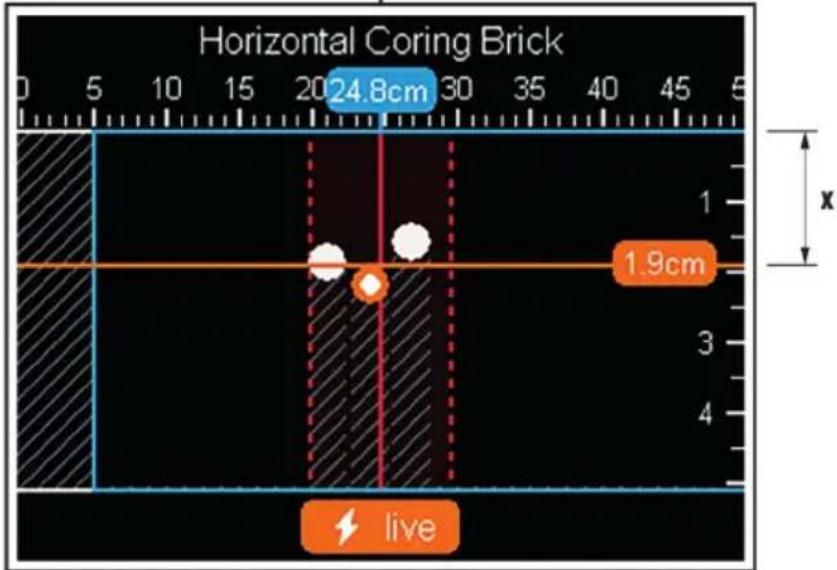
text_image
Horizontal Coring Brick 20 24.8cm 30 45 1 1.9cm x livenatural_image
3D mechanical component diagram showing internal structure with numbered parts and a close-up inset (no text or symbols)7250 Dallas Parkway, Suite 1000
US-Plano, TX 75024
www.hilti.com
Declaration of Confor
Proposal corded
| Part Name | Hazardous Substances | |||||
| Lead (Pb) | Mercury (Hg) | Cadmium (Cd) | Hexavalent Chromium (Cr(VI)) | Poly-brominated biphenyls (PBB) | br diph | |
| Electronics (PCB, switch, wiring) | X | O | X | O | O | |
| Motor | O | O | O | O | O | |
| Power cord | O | O | O | O | O | |
| Fastener elements | O | O | O | O | O | |
| Metal parts | X | O | O | O | O | |
| Power supplies | O | O | O | O | O | |
| Brass parts | X | O | O | O | O | |
| Aluminium parts | X | O | O | O | O | |
| Battery | O | O | O | O | O | |
| Battery charger | X | O | O | O | O | |
O: Indicates that said hazardous substance contained in all of the homogeneous materials for this part is below the limit requirement of GB/T 26572
X: Indicates that said hazardous substance contained in at least one of the homogenous materials used for this part is above the limit requirement of but corresponds to the exemption
该表适用于中国市场。
16 Hilti 锂离子电池
使用和操作说明
EC Declaration of Conformity | UK Declaration of Conformity

text_image
HILTIManufacturer:
Hilti Corporation
Hilti (Gt. Britain) Limited
No. 1 Circle Square, 3 Symphony Park
Manchester, England, M1 7FS
PS 85 (01)
Serial Numbers: 1-99999999999
2014/53/EU | Radio Equipment Regulations 2017
2011/65/EU | The Restriction of the Use of Certain Hazardous Substances in Electrical and Electronic Equipment Regulations 2012
EN 50665:2017
EN 301 489-1 V2.2.3
EN 302 065-4 V1.1.1
EN 300 330 V2.1.1
EN 301 489-33 V2.2.1
Dr. Tahar Zrilli
Head of Quality and Process Management Business Area Electric Tools & Accessories
Schaan, 12.02.2024

Sriram Makineedi
Head of BU Measuring Systems
Business Unit Measuring Systems
.
-INGESTION HAZARD: This product contains a button cell or coin battery. • DEATH or serious injury can occur if ingested. • A swallowed button cell or coin battery can cause Internal Chemical Burns in as little as 2 hours. • KEEP new and used batteries OUT OF REACH of CHILDREN • Seek immediate medical attention if a battery is suspected to be swallowed or inserted inside any part of the body.
הכלהה-הכלהה-הכלהה-הכלהה-הכלהה-הכלהה-הכלהה-הכלהה-הכלהה-הכלהה-הכלהה-הכלהה-הכלהה-הכלהה-הכלהה-הכchia
BUN
.הכלההוּרָהוּרָהוּרָהוּרָהוּרָהוּרָהוּרָהוּרָהוּרָהוּרָהוּרָהוּרָהוּרָהוּרָהוּרָה
הכלהה כרְשׁה 2.3
•
text_image
Labeled diagram of a mobile phone device with numbered parts for identification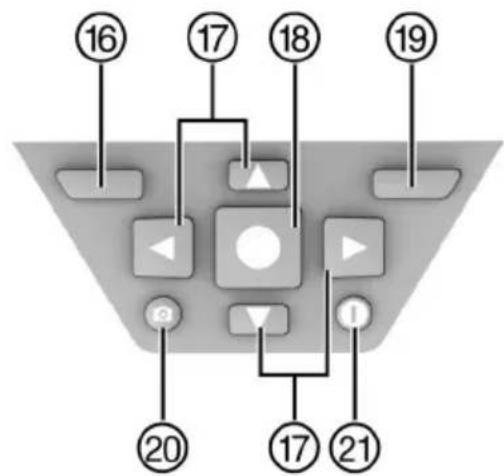
flowchart
graph TD
    A["16"] --> B["Control Button"]
    C["17"] --> B
    D["18"] --> B
    E["19"] --> B
    F["20"] --> G["Control Button"]
    H["17"] --> I["Play Button"]
    J["21"] --> I
    B --> K["Control Button"]
    K --> L["Play Button"]
    L --> M["Control Button"]
    N["Control Button"] --> O["Action Buttons"]
    P["Action Buttons"] --> Q["Action Buttons"]
הכלהה כרִי, ⑧
הכלה ⑨
10
text_image
Labeled diagram of a sensor device with numbered components for identification7771 ①
תְרָהִיַעֹ
3
הכלה (בְרָה) ④
71725
6
The image contains no legible text or characters. It is a graphical symbol (a stylized 'n' or a letter) and cannot be accurately transcribed as standard OCR artifacts. Therefore, no valid OCR text can be generated that matches the visual content of the source image.
[No text detected]
natural_image
3D mechanical component diagram showing internal parts with numbered callouts (no text or symbols)1.
7250 Dallas Parkway, Suite 1000
US-Plano, TX 75024
www.hilti.com
Declaration of Conformity (DOC)
Proposal corded power tool
| Hazardous Substances | ||||||
| Lead (Pb) | Mercury (Hg) | Cadmium (Cd) | Hexavalent Chromium (Cr(VI)) | Poly-brominated biphenyls (PBB) | Poly-brominated diphenyl-ethers (PBDE) | |
| B, switch, wiring) | X | O | X | O | O | O |
| O | O | O | O | O | O | |
| O | O | O | O | O | O | |
| nts | O | O | O | O | O | O |
| X | O | O | O | O | O | |
| O | O | O | O | O | O | |
| X | O | O | O | O | O | |
| ; | X | O | O | O | O | O |
| O | O | O | O | O | O | |
| X | O | O | O | O | O | |
iat said hazardous substance contained in all of the homogeneous materials for this part is below the limit requirement of GB/T 26572
at said hazardous substance contained in at least one of the homogenous materials used for this part is above the limit requirement of GB/T 26572 onds to the exemption
| .הכלההוּרָהוּרָהוּרָהוּרָהוּרָהוּרָהוּרָהוּרָהוּרָהוּרָהוּרָהוּרָהוּרָהוּרָהוּרָה�ּוּרָהוּרָהוּרָהוּרָהוּרָהוּרָהוּרָהוּרָהוּרָהוּרָהוּרָהוּרָהוּרָהוּרָהו' | • |
| .הכלההוּרָהוּרָהוּרָהוּרָהוּרָהוּרָהוּרָהוּרָהוּרָהוּרָהוּרָהוּרָהוּרָהוֱלְלִי,הכלההוּרָהוּרָהוּרָהוּרָהוּרָהוּרָהוּרָהוּרָהוּרָהוּרָהוּרָהוּרָהוּרָהוּר' | • |
| .הכלההוּרָהוּרָהוּרָהוּרָהוּרָהוּרָהוּרָהוּרָהוּרָהוּרָהוּרָהוּר' | • |
| .הכלההוּרָ'וּרָ'וּרָ'וּרָ'וּרָ'וּרָ'וּרָ'וּרָ'וּרָ'וּרָ'וּרָ'וּרָ'וּרָ'וּר' | • |
| .הכלההוּרָ'וּרָ'וּרָ'וּרָ'וּרָ'וּר' | • |
| .הכלההוּרָ'וּרָ'וּרָ'וּר' | • |
| .הכלההוּרָ'וּרָ'וּר' | • |
| .הכלההוּרָ'וּר' | • |
| .הכלההוּרָ'וּר' | • |
| .הכלההוּרָ'וּר' | • |
| .הכלההוּרָ'וּר' | • |
| .הכלההוּרָ'וּר',הכלההוּר' | • |
| .הכלההוּרָ'וּר',הכלההוּר' | • |
| .הכלההוּרָ'וּר',הכלההוּר' | • |
| .הכלההוּרָ'וּר',הכלההוּר' | - |
| .הכלההוּרָ'וּר',הכלההוּר' | • |
| .הכלההוּרָ'וּר',הכלההוּר' | • |
| .הכלההוּרָ'וּר',הכלההוּר' | • |
| .הכchiaוּר' | • |
| .הכchiaוּר' | • |
| .הכchiaוּר' | • |
| .הכchiaוּר' | • |
| .הכchiaוּר' | • |
תְרַעָהִיָה.