KVR 7221 - Vacuum Cleaner Koenic - Free user manual and instructions
Find the device manual for free KVR 7221 Koenic in PDF.



| Product Type | Cordless Vacuum Cleaner |
| Brand | Koenic |
| Model | KVR 7221 |
| Suction Power | 70 W |
| Rated Voltage | 7.2 V |
| Power Supply | USB 5V / 1A (power adapter not included) |
| Battery Type | Built-in Li-ion, non-replaceable |
| Charging Time | Approximately 5 hours (can be reduced with a high-power source) |
| Dust Cup Capacity | 0.1 L |
| Filter | HEPA fabric filter + dirt filter |
| Included Accessories | Crevice tool, brush, USB cable, manual, warranty card |
| Cleaning and Maintenance | Empty the dust cup after each use; clean filters by tapping or with water; do not immerse electrical parts |
| Safety Instructions | Do not vacuum hot or flammable materials; do not use unattended; keep out of reach of children |
| Recommended Use | For dry dust and dirt only, household use |
| Warranty | See the provided warranty card |
Frequently Asked Questions - KVR 7221 Koenic
User questions about KVR 7221 Koenic
0 question about this device. Answer the ones you know or ask your own.
Ask a new question about this device
Download the instructions for your Vacuum Cleaner in PDF format for free! Find your manual KVR 7221 - Koenic and take your electronic device back in hand. On this page are published all the documents necessary for the use of your device. KVR 7221 by Koenic.
USER MANUAL KVR 7221 Koenic
x_1, x_2 = 3.5
KO≡NIC
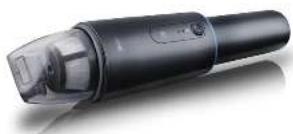
Cordless Mini Vacuum Cleaner
图 652-410
国
图 Manual to instructions
图 1 Make
图 05-12-16
Ⅲ leuian
在“Blends in the”
图 1-20
四 netruks obklui
国 7504120105
图 /a/ntateothes
图 1.1am-1
natural_image
Black handheld electric shaver with transparent grip and control buttons (no visible text or symbols)^1 ^2 ^3 ^4
Sing 3 12
(四) 现金
(3) 1-2
Furri, 12:22
3.674023 29
A##21.1
(1) 2016年7月
13.25
(1) 30 分
P2014-3
M
- 2017年1月1日
28315-3
T###
Inburs GmbH
公
1.2.4.10.10
C. 100%
56% 托“√” 98**73
Kw(27)
MKF7221_2025.3_V13
CE
text_image
Exploded view diagram of a hairbrush with labeled parts in Chinese1.25 - 3.5
Sicherheitshinweise
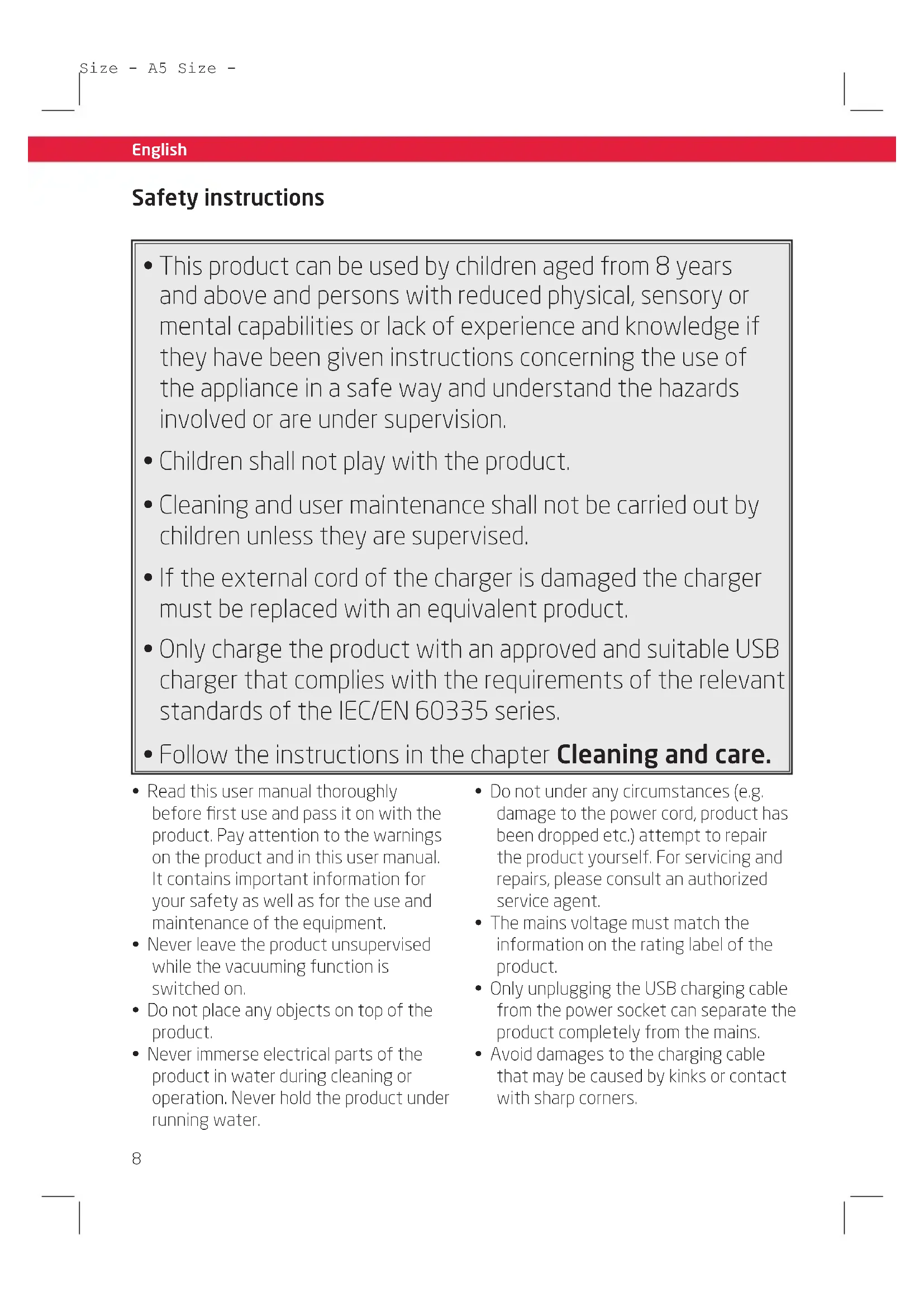
- This product can be used by children aged from 8 years and above and persons with reduced physical, sensory or mental capabilities or lack of experience and knowledge if they have been given instructions concerning the use of the appliance in a safe way and understand the hazards involved or are under supervision.
• Children shall not play with the product. - Cleaning and user maintenance shall not be carried out by children unless they are supervised.
- If the external cord of the charger is damaged the charger must be replaced with an equivalent product.
- Only charge the product with an approved and suitable USB charger that complies with the requirements of the relevant standards of the IEC/EN 60335 series.
-
Follow the instructions in the chapter Cleaning and care.
-
Read this user manual thoroughly before first use and pass it on with the product. Pay attention to the warnings on the product and in this user manual. It contains important information for your safety as well as for the use and maintenance of the equipment.
- Never leave the product unsupervised while the vacuuming function is switched on.
- Do not place any objects on top of the product.
-
Never immerse electrical parts of the product in water during cleaning or operation. Never hold the product under running water.
-
Do not under any circumstances (e.g. damage to the power cord, product has been dropped etc.) attempt to repair the product yourself. For servicing and repairs, please consult an authorized service agent.
- The mains voltage must match the information on the rating label of the product.
- Only unplugging the USB charging cable from the power socket can separate the product completely from the mains.
- Avoid damages to the charging cable that may be caused by kinks or contact with sharp corners.
English
- Keep this product including the charging cable and USB power adapter (not supplied) away from all heat sources, e.g. ovens, hot plates and other heat producing products/objects.
- Only unplug the cable from the charging socket by the plug. Do not pull on the cable.
- Unplug the product ...
- when the product is not being used,
- in case of malfunctions,
- before attaching / detaching accessories and
- before cleaning the product.
- Use this product in dry indoor areas only and never outdoors.
- This product is not intended for commercial use. It is designed for household use only.
- Do not allow the product to operate unsupervised.
- Make sure that the vacuum unit and cable do not become wet.
- Use accessories supplied with the device or recommended by the manufacturer only!
- Let the product cool down sufficiently before storing.
- Do not cover the product while in use. Fire hazard!
- Do not suck up lit cigarettes, hot ashes, matches, etc. fire hazard!
- Do not suck up inflammable or explosive materials and gases. The product must not be used in rooms that contain explosive gases or liquids.
-
Be especially careful when cleaning any kind of stairs.
-
When in use, keep the product away from clothes and body parts (fingers, hair, face).
- Do not try to clean people or animals with the product.
- Never expose the product to excessive heat (e.g. bright sun, fire), and never throw it into fire. The rechargeable battery could explode.
- The rechargeable battery is firmly mounted into the product and cannot be replaced
- Never short-circuit the contacts of the rechargeable battery. There is a danger of fire and explosion!
- Never charge the rechargeable battery of the product unattended.
English
Congratulations!
Thank you for your purchase of a KOENIC product. Please read this manual carefully and keep it for future reference.
Intended use
The vacuum cleaner is designed only to vacuum dry dust and dirt. Using it for anything else can damage the device or cause injury.
Before first time use
Remove the product and accessories carefully from the original packaging. It is recommended to keep the original packaging for storage. If you wish to dispose of the original packaging, please observe applicable legal provisions.
Should you have any questions regarding proper disposal, contact your local waste management center.
Inspect the delivery contents for completeness and damages. Should the delivery contents be incomplete or damaged, contact your sales outlet immediately.
After unpacking, please refer to chapter
Cleaning and care.
Before first time use the built-in batteries must be charged for at least 2.5 hours, please refer to chapter Charging batteries.
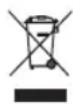
Do not dispose of this product as unsorted municipal waste. Return it to a designated collection point for
the recycling of WEEE. By doing so, you will help to conserve resources and protect the environment. Contact your retailer or local authorities for more information.

Please dispose of batteries in an environmentally friendly manner. Do not put batteries into the household waste.
Please use the return and collection systems in your community or contact the dealer where you purchased the product.
Content
1 x Cordless Mini Vacuum Cleaner
1 x Crevice nozzle
1 x Brush attachment
1 x USB charging cable
1 x User manual
1 x Warranty card
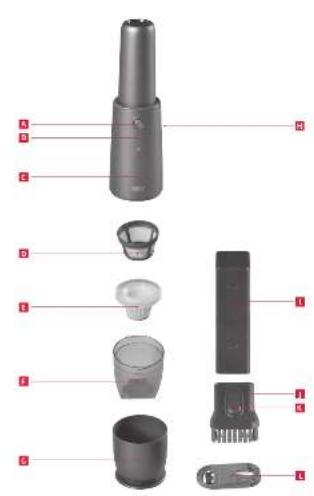
Controls and components
A On/Off button vacuuming function
B Operation indicator vacuuming function / Charging indicator
C Vacuum unit
D Textile filter (HEPA)
E Dirt filters
F Dust container
G Front cover / base element
H USB charging socket
I Crevice nozzle
J Brush attachment
K Release button of brush attachment
USB charging cable
English
Charging batteries
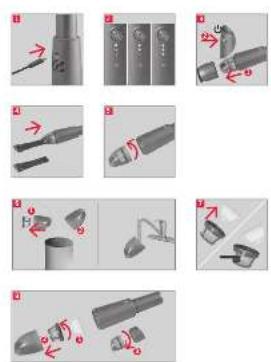
Fig. 1 Either lay the device on the floor horizontally or let it stand on the base element. Connect the USB charging cable to the USB socket and the other end to a USB power adapter (not supplied). Connect the USB power adapter to a wall outlet. Fully charging the completely discharged battery can take up to 5 hours. When using a more powerful power supply, the time can be reduced by half.
Note:
- The USB power adapter should supply at least 1 A to be able to charge the device properly. If you want to charge the device using a computer, make sure to connect it to an USB 3 socket.
- When connecting the charging cable, the product is automatically switched off, should it have still been left on by accident. The device cannot be used while charging.
- It is normal for the charging base and vacuum cleaner to become hot. It's not a cause for concern.
- To protect the battery, we recommend to charge the device only once the battery is completely empty.
Fig. 2 During charging, the LEDs of the charging indicator will alternately light up. Single constantly shining LEDs signal that a certain charging level has been reached. When the battery has been fully charged all three LEDs will briefly shine simultaneously and then turn off automatically.
LED indicator
| LED color Condition | |
| Upper LED, flashing | Battery level is low, has to be charged |
| Three LEDs, alternately flash | During charging |
| Three LEDs, first shine simultaneously, then go off | Charging completed.Fully charged |
Vacuuming
Using the vacuum cleaner
Fig. 3 Remove the charging cable and take off the front cover (base element). Press the On/Off button to activate the vacuuming function. The three white LEDs of the operation indicator will light up indicating that the vacuuming function is active and that the device is fully charged. The amount of LEDs that is shining indicates the charging level of the battery.
Crevice nozzle and brush attachment
Fig. 4 For vacuuming folds, crevices and corners, insert the crevice nozzle into the air intake opening of the dust container. For vacuuming upholstered furniture, mattresses, cushions, curtains, etc., additionally attach the brush attachment to the crevice nozzle.
English
Cleaning and care

Warning
- When cleaning, never use solvents or abrasive materials, hard brushes, metallic or sharp objects. Solvents are harmful to human health and can attack plastic parts, while abrasive cleaning mechanisms and tools may scratch the surface(s).
- Never immerse any electrical parts of the product in water or in other liquids during cleaning. Never place it under running water.
Emptying dust container and cleaning filters
Note: The dust container should be emptied every time after vacuuming.
Fig. 5 Disconnect the USB charging cable. Press the release button to unlock the dust container and remove it from the suction unit.
Fig. 6 Remove the dirt filter and textile filter from the dust container. Clean them by tapping out or brushing out the dirt. If heavily soiled, the dirt filter can be washed out. Ensure to dry all parts completely before re-assembly.
Troubleshooting
If there are any problems during operation, please refer to the following table. If problems cannot be solved as indicated under Solution, please contact your retailer.
| Problem Possible causes Solution | ||
| Product does not work | Interrupted power supplyBattery is empty | Check the power supplyRe-charge battery |
| Product looses suction power | Filters are blocked with dirtFloor nozzle and the brush attachment are blockedDust container full | Clean the filtersClean the floor nozzle and brush attachmentEmpty dust container |
Fig. 7 Empty the dust container. If heavily soiled, the container can be rinsed under running water. Wipe and dry it with a dry cloth.
Assemble dust container and filters
Fig. 8 ① Insert the textile filter into the dirt filter and tighten it by turning it anticlockwise as indicated by the marks ② Insert filters into the dust container ③ Attach the dust container to the vacuum unit and tighten it by turning it anticlockwise as indicated by the marks.
Technical data
Rated voltage: 7.2 V Rated voltage (USB input): 5 V 1 A
Vacuum power : 70 W Protection class : III Battery charging time : up to 5 hrs. Dust container capacity : 0.1 L