
GDS 18V450 PC Professional - Screwdriver BOSCH - Free user manual and instructions
Find the device manual for free GDS 18V450 PC Professional BOSCH in PDF.
 FR
FR
 BG
BG
 CS
CS
 DA
DA
 DE
DE
 EL
EL
 EN
EN
 ES
ES
 ET
ET
 FI
FI
 HU
HU
 ID
ID
 IT
IT
 KK
KK
 KO
KO
 LT
LT
 LV
LV
 MK
MK
 NL
NL
 NO
NO
 PL
PL
 PT
PT
 RO
RO
 RU
RU
 SK
SK
 SL
SL
 SV
SV
 TH
TH
 TR
TR
 UK
UK
 VI
VI
 ZH
ZH
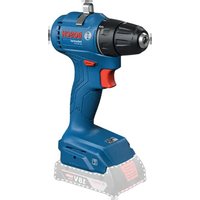
| Product Type | Cordless Impact Wrench |
| Brand | Bosch Professional |
| Model | GDS 18V-450 PC |
| Category | Impact Wrench |
| Rated Voltage | 18 V |
| Battery Technology | Lithium-ion (Bosch 18V system) |
| No-load Speed | 0 – 2400 rpm |
| Impact Rate | 0 – 3200 bpm |
| Max. Torque | 450 Nm |
| Screw Capacity | M6 – M16 (machine screws) |
| Chuck | Hex 1/4" (6.35 mm) |
| Connectivity | Bluetooth® Low Energy (GCY 42 module) |
| Compatible App | Bosch Toolbox (Android 6.0+, iOS 11+) |
| Weight | 1.7 kg (with 4.0 Ah battery) |
| Dimensions (L x W x H) | 133 x 73 x 253 mm |
| Lighting | Integrated LED |
| Protection | Reinforced housing, dust protection |
| Operating Temperature | -20 °C to +50 °C |
| Storage Temperature | -20 °C to +70 °C |
| Cleaning | Dust off with brush, no solvents |
| Spare Parts | Available at bosch-pt.com, 10-digit reference number |
| After-Sales Service France | Direct online customer service, phone 09 70 82 12 26 |
| Delivery Content | Machine, Bluetooth module GCY 42, battery and charger not included |
Frequently Asked Questions - GDS 18V450 PC Professional BOSCH
User questions about GDS 18V450 PC Professional BOSCH
0 question about this device. Answer the ones you know or ask your own.
Ask a new question about this device
Download the instructions for your Screwdriver in PDF format for free! Find your manual GDS 18V450 PC Professional - BOSCH and take your electronic device back in hand. On this page are published all the documents necessary for the use of your device. GDS 18V450 PC Professional by BOSCH.
USER MANUAL GDS 18V450 PC Professional BOSCH

English ...... Page 24
Français......Page 36
German
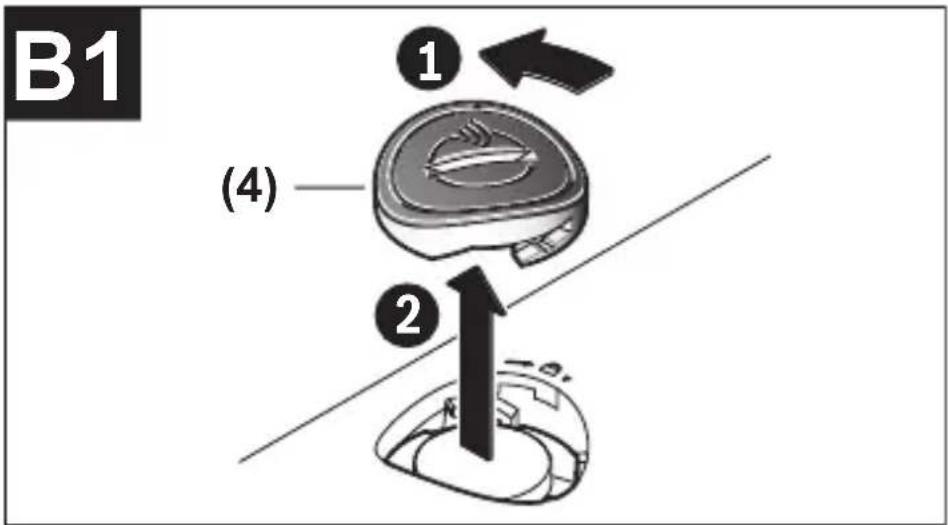
Safety instructions
www.bosch-pt.com/serviceaddresses
Disposal
All instructions must be read and observed in order to enable work with the GCY 42 to be carried out safely. Store these instructions in a safe place and include them with the GCY 42 when giving it to a third party.
▶ Only use the batteries listed in this operating manual. Do not use any other forms of power supply.


WARNING


Ensure that the coin cell is kept out of the reach of children. Coin cells are dangerous.
▶ Coin cells must never be swallowed or inserted into any other part of the body. If you suspect that someone has
English
swallowed a coin cell or that a coin cell has entered the body in another way, seek medical attention immediately. Swallowing coin cells can result in severe internal burns and death within 2 hours.
▶ Ensure that coin cell replacement is carried out properly. There is a risk of explosion. ▶ Only use the coin cells listed in this operating manual. Do not use any other coin cells or other forms of electrical power supply. ▶ Do not attempt to recharge the coin cell and do not short circuit the coin cell. The coin cell may leak, explode, catch fire and cause personal injury. ▶ Remove and dispose of drained coin cell correctly. Drained coin cell may leak and damage the product or cause personal injury. ▶ Do not overheat the coin cell or throw it into fire. The coin cell may leak, explode, catch fire and cause personal injury. ▶ Do not damage the coin cell and or take the coin cell apart. The coin cell may leak, explode, catch fire and cause personal injury.
26 | English
▶ Do not allow damaged coin cells to come into contact with water. Leaking lithium may mix with water to create hydrogen, which could cause a fire, an explosion, or personal injury.
The Bluetooth® word mark and logos are registered trademarks owned by Bluetooth SIG, Inc. and any use of such marks by Robert Bosch Power Tools GmbH is under license.
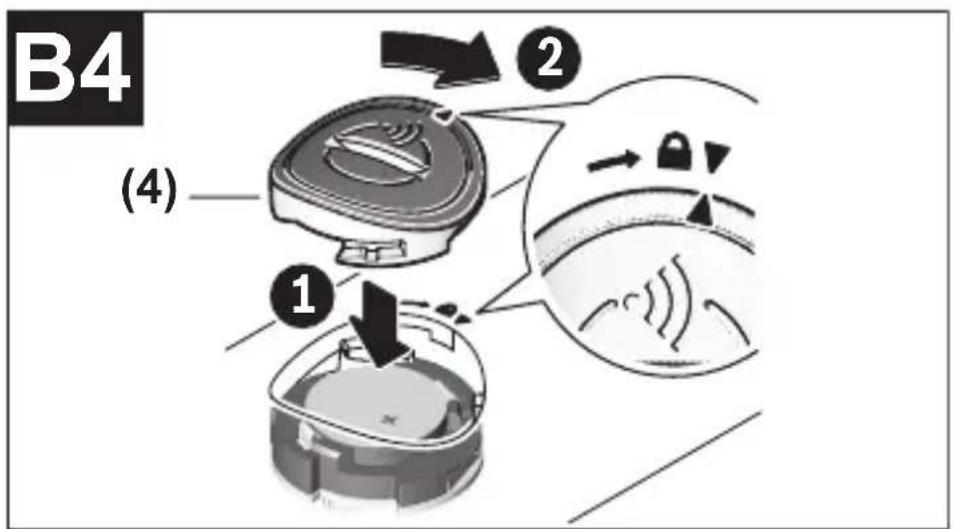
If you cannot close the cover, stop using the Bluetooth® module, remove the button cell and have the module repaired.
Product description and specifications
Intended Use
The Bluetooth® Low Energy Module GCY 42 enables the personalisation and status checking of a power tool and the transfer of settings and data based on Bluetooth® wireless technology. The data transfer must be approved by the user.
Information about the connectivity functions offered can be found in the Bosch Toolbox application (app) or in the operating manual of the power tool you are using.
Product Features
The numbering of the components shown refers to the illustrations on the graphic pages.
(1) Button cell (2) Bluetooth® Low Energy Module GCY 42 (3) Placeholder a) (4) Cover for the Bluetooth® Low Energy Module GCY 42 a) a) Accessories shown or described are not included with the product as standard. You can find the complete selection of accessories in our accessories range.
Technical Data
Bluetooth® Low Energy Module
Article number
GCY 42
1 600 A01 ZE2
1 600 A01 3WF
| Bluetooth®Low Energy Module | GCY 42 |
| 1 600 A01 6NH1 600 A01 L2W | |
| Operating temperature -20 °C to +50 °C | |
| Storage temperature -20 °C to +70 °C | |
| Dimensions 7 x 30 x 30 mm | |
| Weight according to EPTA-Procedure 01:2014 | 0.01 kg |
| Data transfer | |
| Bluetooth® Bluetooth® 4.2 (Low Energy) | A) |
| Signal range Max. 30 m | B) |
| Frequency range used 2402–2480 MHz | |
| Output power < 1 mW | |
| Power supply | |
| Battery Coin cell (3 V lithium battery, CR | 2032) |
Bluetooth® Low Energy Module
GCY 42
Battery life approx. 24 months
A) The mobile terminal devices must be compatible with Bluetooth® Low Energy devices (version 4.2) and support the Generic Access Profile (GAP). B) The signal range may vary greatly depending on external conditions, including the receiving device used. The Bluetooth® range may be significantly weaker inside closed rooms and through metallic barriers (e.g. walls, shelving units, cases, etc.).
System Requirements GCY 42
| Mobile device (tablet, smartphone) | Android 6.0 (and newer) |
| iOS 11 (and newer) |
Assembly and Operation
Power Supply
Remove the cover for the Bluetooth® Low Energy Module GCY 42 on the power tool, e.g. using a screwdriver or a
large coin. Using unsuitable objects can damage the electronics or the cover.
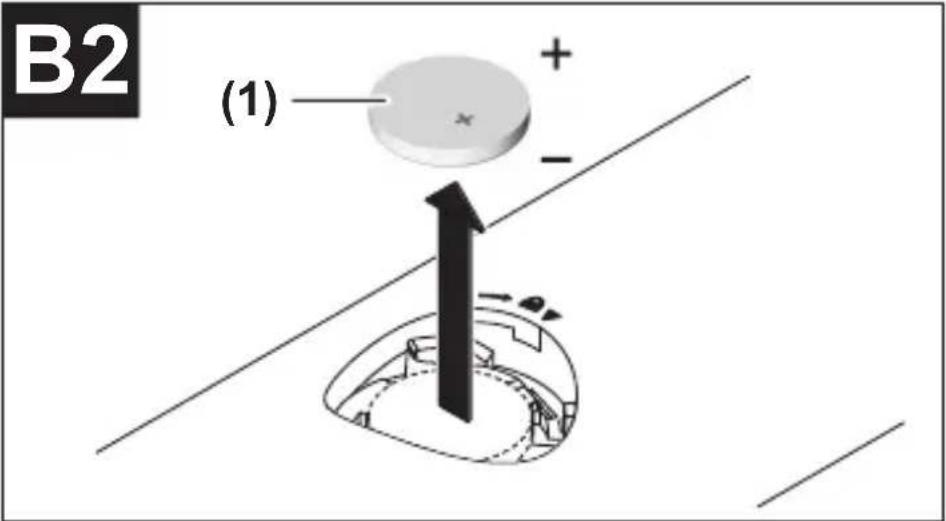
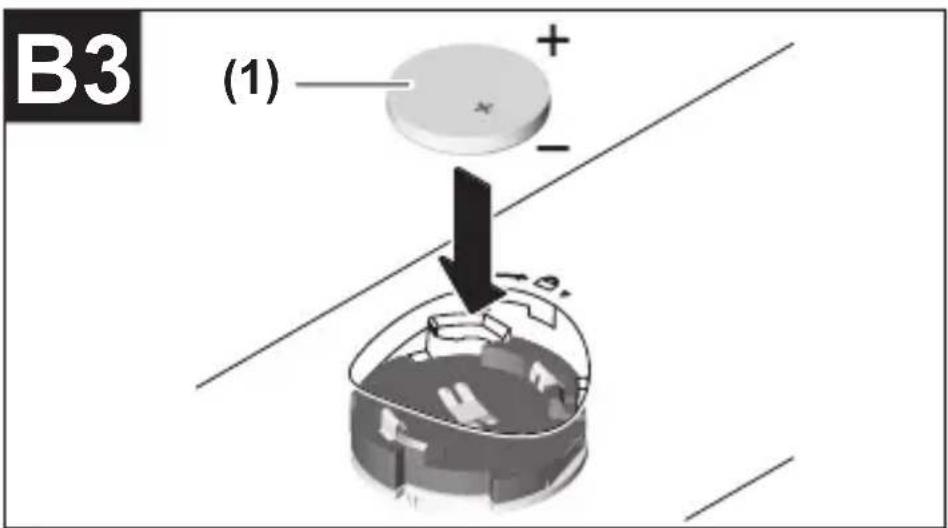
- To start using the product after purchasing it or to change the battery (1), follow the illustrations on the graphics pages. Observe the following advice when doing so.
Initial Starting Operation
(see figures A1-A5)
Note: Store the placeholder (3) of the GCY 42 in a safe place. Refit the placeholder when passing the power tool on without the GCY 42.
Place the battery (1) in the GCY 42 (2) with the plus terminal facing upwards. You do not need to push the battery in as the battery does not engage. It is simply secured in the correct position when you close the cover.
To initialise the GCY 42 after inserting the battery, press the on/off switch of the power tool.
Changing the Battery
(see figures B1-B4)
Only remove the used battery (1) with your fingers.
A warning will be displayed in the app before the battery is fully used up.
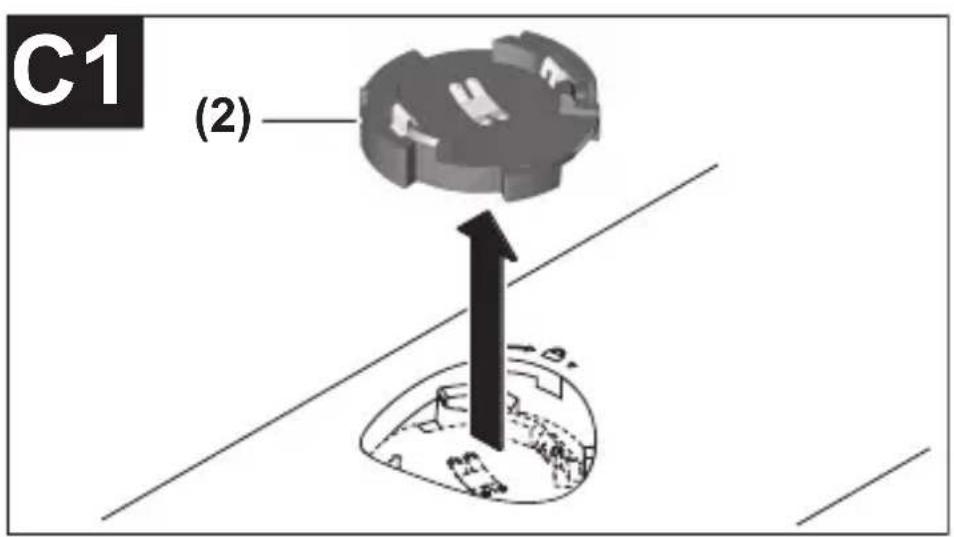
Removing the GCY 42
(see figures C1-C2)
Do not use force to remove the GCY 42 (2). Do not use any sharp or pointed tools.
Note: Turning the power tool over may make it easier to remove the GCY 42.
Starting operation
Once you have inserted the battery (1) and pressed the on/off switch on the power tool, the GCY 42 will transmit a signal continuously. The Bluetooth® signal will only stop the battery is drained or faulty, or if the battery is removed.
You can find further information directly in the app from Bosch.
Installing and Setting up the App
You will need to install the Bosch Toolbox app before you can use the GCY 42.
- Download the Bosch Toolbox app from the relevant app store (Apple App Store, Google Play Store).
Note: You will need to have a user account with the relevant app store to do this.
- Then select the MyTools sub-item in the app.
- The display of your mobile terminal device will show you all subsequent steps required to connect the power tool to the terminal device.
Note: Work through the app tutorial in full first. This will give you a better overview of how the connection is made and how the connectivity functions are used.
Data Transfer via Bluetooth®
The GCY 42 transmits a signal at regular intervals. The ambient conditions may mean it takes several transmission intervals for the GCY 42 to be detected. If the GCY 42 is not detected, check the following:
- Is the distance to the mobile terminal device too great? Reduce the distance between the mobile device and the GCY 42.
- Is the battery too low or drained? Change the battery.
- Switch Bluetooth® off and on again on your mobile device. Check whether the GCY 42 has now been detected.
Maintenance and Service
Maintenance and Cleaning
Remove any dirt using a brush. Do not use any detergents or solvents.
After-Sales Service and Application Service
Our after-sales service responds to your questions concerning maintenance and repair of your product as well as spare parts. You can find explosion drawings and information on spare parts at: www.bosch-pt.com
The Bosch product use advice team will be happy to help you with any questions about our products and their accessories. In all correspondence and spare parts orders, please always include the 10-digit article number given on the nameplate of the product.
Malaysia
Robert Bosch Sdn. Bhd.(220975-V) PT/SMY No. 8A, Jalan 13/6 46200 Petaling Jaya Selangor Tel.: (03) 79663194
Bosch Power Tools 1 609 92A 6RX | (21.02.2022)
34 | English
Toll-Free: 1800 880188
Fax: (03) 79583838
E-Mail: kiathoe.chong@my.bosch.com
www.bosch-pt.com.my
Great Britain
Robert Bosch Ltd. (B.S.C.)
P.O. Box 98
Broadwater Park
North Orbital Road
Denham Uxbridge
UB 9 5HJ
At www.bosch-pt.co.uk you can order spare parts or arrange the collection of a product in need of servicing or repair.
Tel. Service: (0344) 7360109
E-Mail: boschservicecentre@bosch.com
You can find further service addresses at:
www.bosch-pt.com/serviceaddresses
Disposal
GCY 42 modules, accessories and packaging should be recycled in an environmentally friendly manner.
1 609 92A 6RX | (21.02.2022) Bosch Power Tools
English | 35
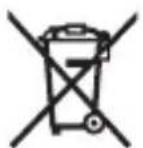
Do not dispose of electronic components and batteries into household waste!
Only for EU countries:
According to the Directive 2012/19/EU on waste electrical and electronic equipment and its transposition into national law, power tools that are no longer usable, and, according to the Directive 2006/66/EC, defective or drained batteries must be collected separately and disposed of in an environmentally correct manner.
If disposed incorrectly, waste electrical and electronic equipment may have harmful effects on the environment and human health, due to the potential presence of hazardous substances.
Further information for South Africa
| Appareil mobile (tablette, smartphone) |
Robert Bosch (France) S.A.S.
www.bosch-pt.com/serviceaddresses
Calle Robert Bosch No. 405
www.bosch-pt.com/serviceaddresses
Disposal
www.bosch-pt.com/serviceaddresses
Disposal
www.bosch-pt.com/serviceaddresses
Disposal
www.bosch-pt.com/serviceaddresses
Waste disposal
Bosch Service Center
Telegrafvej 3
2750 Ballerup
At www.bosch-pt.dk you can order spare parts online or create a repair order.
Service Center phone: 44898855
Bosch Power Tools 1 609 92A 6RX | (21.02.2022)
108 | Danish
Fax: 44898755
E-mail: vaerktoej@dk.bosch.com
www.bosch-pt.com/serviceaddresses
Disposal
Bosch Service Center
Telegrafvej 3
2750 Ballerup
Denmark
Tel.: (08) 7501820 (within Sweden)
Fax: (011) 187691
www.bosch-pt.com/serviceaddresses
Waste disposal
www.bosch-pt.com/serviceaddresses
Disposal
Bluetooth® Bluetooth® 4.2 (Low Energy) A)
www.bosch-pt.com/serviceaddresses
Disposal
www.bosch-pt.com/serviceaddresses
Disposal
Button cell battery (3-V lithium battery,
CR 2032)
www.bosch-pt.com/serviceaddresses
168 | Turkish
Disposal
Robert Bosch Sp. z o.o.
www.bosch-pt.com/serviceaddresses
Waste disposal
| Bluetooth® Bluetooth® 4.2 (Low Energy) |
A)
Bosch Service Center PT
K Vápence 1621/16
692 01 Mikulov
www.bosch-pt.com/serviceaddresses
Disposal
www.bosch-pt.com/serviceaddresses
Disposal
www.bosch-pt.com/serviceaddresses
Removal
| Bluetooth® Bluetooth® 4.2 (Low Energy) | A) |
1 609 92A 6RX | (21.02.2022) Bosch Power Tools
Russian | 223
Bluetooth® Low Energy module
GCY 42
www.bosch-pt.com/serviceaddresses
Disposal
www.bosch-pt.com/serviceaddresses
Disposal
www.bosch-pt.com/serviceaddresses
Disposal
Power tool service
Strada Horia Măcelariu Nr. 30–34, sector 1
013937 Bucharest
www.bosch-pt.com/serviceaddresses
Disposal
Power tool service
Strada Horia Măcelariu Nr. 30–34, sector 1
013937 Bucharest, Romania
www.bosch-pt.com/bg/bg/
Bosch Power Tools 1 609 92A 6RX | (21.02.2022)
282 | Bulgarian
www.bosch-pt.com/serviceaddresses
Disposal
www.bosch-pt.com/serviceaddresses
Removal
www.bosch-pt.com/serviceaddresses
Removal of debris
GCY 42 module, device, and packaging should be taken to a recycling facility that complies with environmental protection standards.
Bosch Power Tools 1 609 92A 6RX | (21.02.2022)
306 | Slovenian
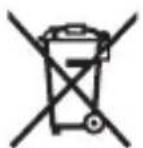
Do not dispose of electronic components and batteries in household waste!
Only for EU countries:
According to European Directive 2012/19/EU on waste electrical and electronic equipment and its implementation in national law, electrical tools that can no longer be used, and according to European Directive 2006/66/EC, defective or exhausted batteries/accumulators must be collected separately and included in recycling that meets environmental requirements.
www.bosch-pt.com/serviceaddresses
Disposal
www.bosch-pt.com/serviceaddresses
Disposal
www.bosch-pt.com/serviceaddresses
www.bosch-pt.com/serviceaddresses
www.bosch-pt.com/serviceaddresses
Disposal
www.bosch-pt.com/serviceaddresses
Disposal
www.bosch-pt.com/serviceaddresses
Disposal
www.bosch-pt.com/serviceaddresses
Disposal
www.bosch-pt.com/serviceaddresses
Disposal
www.bosch-pt.com/serviceaddresses
Disposal
www.bosch-pt.com/serviceaddresses
Disposal
Bluetooth®4.2 (Low Energy)®Bluetooth
Robert Bosch Morocco SARL
53 53
Casablanca 20300
Phone: +212 5 29 31 4;
www.bosch-pt.com/serviceaddresses
444 | Arabic
42 GOY (2) pressure
www.bosch-pt.com/serviceaddresses
Copyright © 2004 - 2020, Texas Instruments Incorporated All rights reserved.
Redistribution and use in source and binary forms, with or without modification, are permitted provided that the following conditions are met:
- Redistributions of source code must retain the above copyright notice, this list of conditions and the following disclaimer.
- Redistributions in binary form must reproduce the above copyright notice, this list of conditions and the following disclaimer in the documentation and/or other materials provided with the distribution.
- Neither the name of Texas Instruments Incorporated nor the names of its contributors may be used to endorse or promote products derived from this software without specific prior written permission.
THIS SOFTWARE IS PROVIDED BY THE COPYRIGHT HOLDERS AND CONTRIBUTORS "AS IS" AND ANY EXPRESS OR IMPLIED WARRANTIES, INCLUDING, BUT NOT LIMITED TO, THE IM-
Bosch Power Tools 1 609 92A 6RX | (21.02.2022)
458
PLIED WARRANTIES OF MERCHANTABILITY AND FITNESS FOR A PARTICULAR PURPOSE ARE DISCLAIMED. IN NO EVENT SHALL THE COPYRIGHT OWNER OR CONTRIBUTORS BE LIABLE FOR ANY DIRECT, INDIRECT, INCIDENTAL, SPECIAL, EXEMPLARY, OR CONSEQUENTIAL DAMAGES (INCLUDING, BUT NOT LIMITED TO, PROCUREMENT OF SUBSTITUTE GOODS OR SERVICES; LOSS OF USE, DATA, OR PROFITS; OR BUSINESS INTERRUPTION) HOWEVER CAUSED AND ON ANY THEORY OF LIABILITY, WHETHER IN CONTRACT, STRICT LIABILITY, OR TORT (INCLUDING NEGLIGENCE OR OTHERWISE) ARISING IN ANY WAY OUT OF THE USE OF THIS SOFTWARE, EVEN IF ADVISED OF THE POSSIBILITY OF SUCH DAMAGE.
Copyright © 2011 Petteri Aimonen
This software is provided 'as-is', without any express or implied warranty. In no event will the authors be held liable for any damages arising from the use of this software.
Permission is granted to anyone to use this software for any purpose, including commercial applications, and to alter it and redistribute it freely, subject to the following restrictions:
- The origin of this software must not be misrepresented; you must not claim that you wrote the original software. If you use
this software in a product, an acknowledgment in the product documentation would be appreciated but is not required.
- Altered source versions must be plainly marked as such, and must not be misrepresented as being the original software.
- This notice may not be removed or altered from any source distribution.
Hereby, Robert Bosch Power Tools GmbH declares that the radio equipment type GCY 42 is in compliance with Directive 2014/53/EU. The full text of the EU declaration of conformity is available at the following internet address:
Declaration of Conformity
Hereby, Robert Bosch Limited as authorised representative acting on behalf of Robert Bosch
Power Tools GmbH declares that the radio equipment type GCY 42 is in compliance with the Radio Equipment Regulations 2017. The full text of the declaration of conformity is available at the following internet address:
https://gb-doc.bosch.com




- GERMAN
- SAFETY INSTRUCTIONS
- DISPOSAL
- WARNING
- ENGLISH
- PRODUCT DESCRIPTION AND SPECIFICATIONS
- INTENDED USE
- PRODUCT FEATURES
- TECHNICAL DATA
- BLUETOOTH® LOW ENERGY MODULE
- ASSEMBLY AND OPERATION
- POWER SUPPLY
- INITIAL STARTING OPERATION
- CHANGING THE BATTERY
- REMOVING THE GCY
- STARTING OPERATION
- INSTALLING AND SETTING UP THE APP
- DATA TRANSFER VIA BLUETOOTH®
- MAINTENANCE AND SERVICE
- MAINTENANCE AND CLEANING
- AFTER-SALES SERVICE AND APPLICATION SERVICE
- MALAYSIA
- GREAT BRITAIN
- YOU CAN FIND FURTHER SERVICE ADDRESSES AT
- ONLY FOR EU COUNTRIES
- FURTHER INFORMATION FOR SOUTH AFRICA
- WASTE DISPOSAL
- DANISH
- TURKISH
- REMOVAL
- BULGARIAN
- REMOVAL OF DEBRIS
- SLOVENIAN
- COPYRIGHT © 2011 PETTERI AIMONEN
- DECLARATION OF CONFORMITY
Brand : BOSCH
Model : GDS 18V450 PC Professional
Category : Screwdriver