USER MANUAL PWSA 20Li D4 PARKSIDE
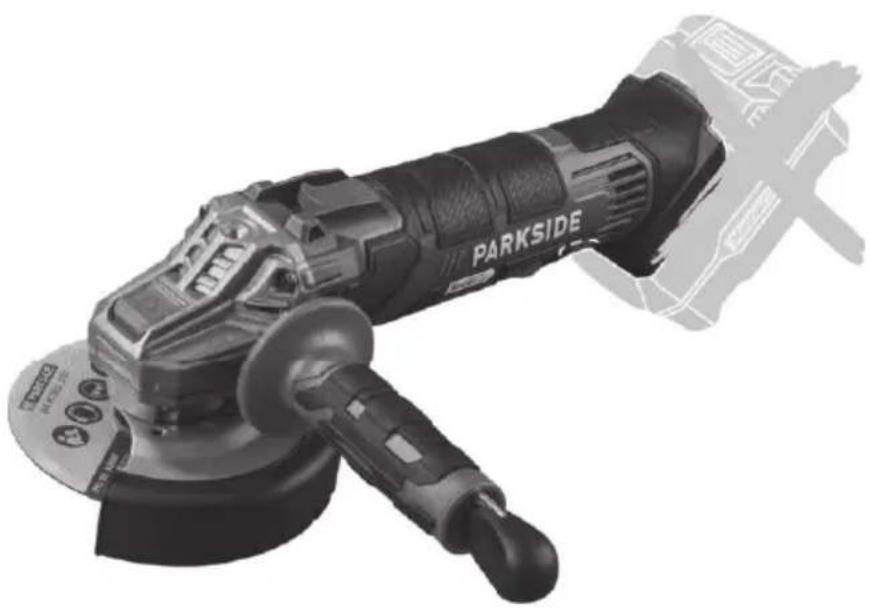

Akku-Winkelschleifer / Cordless Angle Grinder / Meuleuse d'angle sans fi l PWSA 20-Li D4
DE AT CH
Cordless Angle Grinder
Translation of the original instructions
NL BE
Accu-haakse slijpmachine
Before reading, unfold the page containing the illustrations and familiarise yourself with all functions of the device.
FR BE
GB / MT Translation of the original instructions Page
Service-Center......25
Importeur 25
Intended purpose......27
General description......27
Extent of the delivery 27
Description of function 27
Overview....27
Technical data....28
Charging time 28
Notes on safety......29
Symbols and icons 29
General Safety Directions for Power Tools ....30
Safety instructions for all applications ....32
Additional safety instructions for all applications....34
Kickback and corresponding precautions ....34
Special safety instructions for grinding and cutting....34
Other special safety instructions for cutting grinding ....35
Additional safety instructions for working with wire brushes....35
Additional safety instructions ......36
RESIDUAL RISKS 36
Practical tips ......37
Scrubbing wheels....37
Grinding with a wire brush ....37
Cutting disc 37
Chuck key storage....38
Introduction
Congratulations on the purchase of your new device. With it, you have chosen a high quality product.
During production, this equipment has been checked for quality and subjected to a final inspection. The functionality of your equipment is therefore guaranteed.
Assembly....38
Mount handgrip....38
Assemble/set protective hood/
demounting ....38
Fitting the attachment to/ removing the attachment from the protective cover ....39
Installing/changing disc ....39
Installing/changing the wire brush ...39
Operation 40
Inserting/
removing the rechargeable battery...40
Checking the charge level of the rechargeable battery....41
Selecting the speed 41
Turning on and off....41
Continuous operation ....41
Cleaning and servicing......41
Cleaning......42
Storage......42
Waste disposal and environmental protection ....42
Troubleshooting 43
Replacement parts / Accessories 44
Guarantee 44
Repair Service....45
Service-Center 45
Importer 45
Translation of the original
EC declaration of conformity ....266
Exploded Drawing ......277

The operating instructions constitute part of this product. They contain important information on safety, use sposal.
Before using the product, familiarise yourself with all of the operating and safety instructions. Use the product only as described and for the applications specified.
Keep this manual safely and in the event
that the product is passed on, hand over all documents to the third party.
Intended purpose
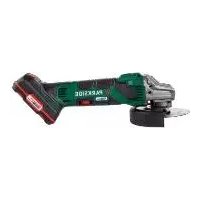
The cordless angle grinder is a tool (device) for cutting, grinding, roughing or brushing metal, stone and wood materials, plastic, tiles and non-ferrous metals without using water.
The device is not intended for any other types of applications (e.g. grinding with unsuitable grinding tools, grinding with a coolant solution, grinding or cutting hazardous materials such as asbestos).
The device is intended to be used by do-it-yourselfers. It was not designed for heavy commercial use. The tool is to be used by adults. Children over the age of 16 may not use the tool except under supervision. The manufacturer is not liable for damages caused by an improper use or incorrect operation of this device.
The device is part of the Parkside X 20 V TEAM series and can be operated using Parkside X 20 V TEAM series batteries. The batteries may only be charged using chargers from the Parkside X 20 V TEAM series.
General description
The illustration of the principal functioning parts can be found on the front and back foldout pages.
Extent of the delivery
Carefully unpack the appliance and check that it is complete:
- Cordless Angle Grinder
- Handle
- Attachment, guard cover
- Chuck key
- Cutting disc
- Instructions for use

The rechargeable battery and charger are not included in delivery.
Description of function
The cordless angle grinder is a tool (device) for cutting, grinding, roughing or brushing metal, stone and wood materials, plastic, tiles and non-ferrous metals. There is a special disc for each of the separate applications. Please refer to the information from the disc manufacturer.
Please refer to the descriptions below for information about the operating devices.
Overview
1 Handle
2 Threads for handle
3 On/Off switch
4 Battery release button
5 Rechargeable battery
6 Speed regulator
7 Guard cover
8 Cutting disc
9 Spindle stop button
10 Chuck key
11 Attachment, guard cover
A 12 Mounting fl ange
A 13 Clamping nut
A 14 Uptake spindle
B 15 Disc
B 16 Screw
C 17 Notch
Technical data
Cordless Angle Grinder....PWSA 20-Li D4
Motor voltage....20 V==
Idling speed (n).....2500-11500 min -1
Cutting / roughing / grinding discs
Outside diameter ..... max. ∅ 125 mm
Bore hole....22.23 mm
Thickness ......max. 6 mm
Spindle thread....M14
Thread length 11 mm
Sound pressure level
(LpA) 83.1 dB(A); KpA = 3 dB
Sound power level ( LWA )
measured...... 94.1 dB(A); KWA=3 dB
Vibration level ( ah )
Device handle .. 3.38 m/s 2 ; K= 1.5 m/s
Handle ...... 3.73 m/s 2 ; K= 1.5 m/s
Vibrations levels are the maximum values generated by the cutting discs supplied.
The actual vibration values may vary depending on the used accessories.
The vibration values are still affected by the handling for the user's.
Cutting disc......PTS 125 A24QBF (included)
Idling speed nmax .....12200 min -1
Disc speed v0 .....80 m/s*
Outer diameter....∅ 125 mm
Bore hole....Ø 22.23 mm
Thickness 1 mm
* The cutting disc must withstand a rotational speed of 80 m/s.
Levels of noise and vibration were determined according to the norms and regulations in the declaration of conformity.
The vibration emission value has been measured according to a standardised
testing method and may be used for comparison with another electric tool.
The indicated vibration emission value may also be used for an introductory assessment of the exposure.

Warning:
The vibration emission value whilst actually using the electrical tool may vary from the given values independently of the type and way in which the electric tool is used.
Try to keep the exposure to vibrations as low as possible. Examples of measures to reduce vibration exposure are the wearing of gloves when using the tool and limiting the working hours. For this purpose all parts of the operating cycle have to be considered (for example, times when the electric tool is switched off and times when it is switched on but running without any load).
Charging time
The device is part of the Parkside X 20 V TEAM series and can be operated with batteries of the Parkside X 20 V TEAM series.
Batteries of the Parkside X 20 V TEAM series may only be charged using chargers of the Parkside X 20 V TEAM series.
We recommend that you operate this appliance with the following batteries only: PAP 20 B1, PAP 20 B3
We recommend charging these batteries with the following chargers: PLG 20 A3, PLG 20 A4, PLG 20 C1, PLG 20 C2 PLG 20 C3, PDSLG 20 A1
An up-to-date list of battery compatibility can be found at: www.lidl.de/akku
| Charging time (min) | PAP 20 A1 PAP 20 B1 | PAP 20 A2 | PAP 20 A3 PAP 20 B3 | Smart PAPS 204 A1 | Smart PAPS 208 A1 |
| PLG 20 A1 PLG 20 A4 PLG 20 C1 | 60 90 | 120 120 21 | 0 | | |
| PLG 20 A2 45 6 | 0 80 80 | 165 | | |
| PLG 20 A3 PLG 20 C3 | 35 45 | 60 50 | 120 | | |
| PDSLG 20 A1 | 35 45 | 60 50 | 120 | | |
| Smart PLGS 2012 A1 | 35 40 | 40 40 | 50 | | |
Notes on safety

CAUTION! When using power tools, observe the following basic safety measures for the prevention of electric shocks and the risk of injury and fi re.
Please read all these instructions before using this electric tool and please keep the safety instructions.
Symbols and icons
Symbols on the device:

This device is part of the Parkside X 20 V TEAM series

Read the manual!

Wear eye protection
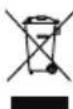
Electrical machines do not belong with domestic waste.

Spindle stop button

Disc direction of travel

'Switch on' direction arrow
Other symbols on the cutting disc:

Do not use for wet grinding

Do not use defective discs

Do not use for side grinding

Intended for working on metal

Wear ear protection

Wear breathing protection

Risk of cuts! Wear cut-resistant gloves.

Wear safety shoes
Symbols used in the instructions:

Hazard symbols with in-
formation on prevention of
personal injury and property
damage

Precaution symbol with information on prevention of harm / damage.

Notice symbol with information on how to handle the device properly.

WARNING! Read all safety notices, instructions, illustrations and technical data that have been provided with this power tool. Omissions in the compliance with safety directions and instructions can cause electrical shock, fire and/or severe injuries.
Retain all safety directions and instructions for future use.
The term „power tool“ in the warnings refers to your mains-operated (corded) power tool or battery-operated (cordless) power tool).
1) Work area safety
a) Keep work area clean and well lit. Cluttered or dark areas invite accidents.
b) Do not operate power tools in explosive atmospheres, such as in the presence of fl ammable liquids, gases or dust. Power tools create sparks which may ignite the dust or fumes.
c) Keep children and bystanders away while operating a power tool. Distractions can cause you to lose control.
2) Electrical safety
a) Power tool plugs must match the outlet. Never modify the plug in any way. Do not use any adapter plugs with earthed (grounded) power tools. Unmodified plugs and matching outlets will reduce risk of electric shock.
b) Avoid body contact with earthed or grounded surfaces, such as pipes, radiators, ranges and refrigerators. There is an increased risk of electric shock if your body is earthed or grounded.
c) Do not expose power tools to rain or wet conditions. Water entering a power tool will increase the risk of electric shock.
d) Do not abuse the cord. Never use the cord for carrying, pulling or unplugging the power tool. Keep cord away from heat, oil, sharp edges or moving parts. Damaged or entangled cords increase the risk of electric shock.
e) When operating a power tool outdoors, use an extension cord suitable for outdoor use. Use of a cord suitable for outdoor use reduces the risk of electric shock.
f) If operating a power tool in a damp location is unavoidable, use a RCD (Residual Current Device). Use of an RCD reduces the risk of electric shock.
3) Personal safety
a) Stay alert, watch what you are doing and use common sense when operating a power tool. Do not use a power tool while you are tired or under the influence of drugs, alcohol or medication. A moment of inattention white operating power tools may result in serious personal injury.
b) Use personal protective equipment. Always wear eye protection. Protective equipment such as dust mask, non-skid safety shoes, hard
hat, or hearing protection used for appropriate conditions will reduce personal injuries.
c) Prevent unintentional starting. Ensure the switch is in the off-position before connecting to power source and/or battery pack, picking up or carrying the tool. Carrying power tools with your fi nger on the switch or energising power tools that have the switch on invites accidents.
d) Remove any adjusting key or wrench before turning the power tool on. A wrench or a key left attached to a rotating part of the power tool may result in personal injury.
e) Do not overreach. Keep proper footing and balance at all times. This enables better control of the power tool in unexpected situations.
f) Dress properly. Do not wear loose clothing or jewellery. Keep your hair, clothing and gloves away from moving parts. Loose clothes, jewellery or long hair can be caught in moving parts.
g) If dust extraction and collection devices can be installed, make sure that these are connected and used correctly. Use of dust collection can reduce dust-related hazards.
4) Power tool use and care
a) Do not force the power tool. Use the correct power tool for your application. The correct power tool will do the job better and safer at the rate for which it was designed.
b) Do not use the power tool if the switch does not turn it on and off. Any power tool that cannot be
controlled with the switch is dangerous and must be repaired.
c) Remove the plug from the wall socket and/or remove the rechargeable battery before you change the device's settings, change accessory parts or put away the power tool. Such preventive safety measures reduce the risk of starting the power tool accidentally.
d) Store idle power tools out of the reach of children and do not allow persons unfamiliar with the power tool or these instructions to operate the power tool. Power tools are dangerous in the hands of untrained users.
e) Look after the power tool and application tool carefully. Check for misalignment or binding of moving parts, breakage of parts and any other condition that may affect the power tool's operation. If damaged, have the power tool repaired before use. Many accidents are caused by poorly maintained power tools.
f) Keep cutting tools sharp and clean. Properly maintained cutting tools with sharp cutting edges are less likely to bind and are easier to control.
g) Use the power tool, accessories and tool bits etc. in accordance with these instructions, taking into account the working conditions and the work to be performed. Use of the power tool for operations different from those intended could result in a hazardous situation.
5) Careful handling and use of battery devices
a) Charge the batteries only in chargers that are recommended by the manufacturer. Risk of fire if a charger that is suitable for a specific type of battery is used with other batteries.
b) In the power tools, use only the batteries designed for the purpose. The use of other batteries may result in injuries and risk of fire.
c) Keep the unused battery away from paper clips, coins, keys, nails, screws and other small metal objects, which could cause bridging of the contacts.
A short circuit between the battery contacts may cause burns or fire.
d) If used incorrectly, liquid may leak from the battery. Avoid contact with this. In the event of accidental contact, rinse off with water. If the liquid gets into eyes, seek medical assistance. Leaking battery fluid may cause skin irritations or burns.
6) Service
a) Have your power tool serviced by a qualified repair person using only identical replacement parts. This will ensure that the safety of the power tool is maintained.
b) Never repair damaged batteries. All battery repairs should be carried out by the manufacturer or authorised customer service centres only.
Safety instructions for all applications
Common safety instructions for grinding, working with wire brushes and cutting grinders:
- This electric tool is to be used as a grinder, wire brush and cutting grinder. Follow all safety instructions, directives, illustrations and facts which you receive with the device. If you do not follow these instructions, an electrical shock, fi re and/or serious injury may occur.
- This electric tool is not suitable for sanding and polishing. Using the electric tool in ways for which it is not intended may cause hazards and injuries.
- Do not use any accessories that are not specifi cally intended and recommended for this electric tool by the manufacturer. Simply because an accessory can be attached to your electric tool does not guarantee safe operation.
- The allowable rotation speed of the attachment tools must be at least as high as the highest rotation speed indicated on the electric tool. Accessories that run faster than the allowable speed can break and fly apart.
- The outside diameter and thickness of the attachment tool must correspond to the dimensions indicated for your electric tool.
Attachment tools which are wrongly dimensioned cannot be sufficiently shielded or controlled.
- Attachment tools with threaded attachment must fit the threading of the grinding spindle ex-
actly. For attachment tools which are mounted through a fl ange, the diameter of the hole in the attachment tool must fit the mounting diameter of the fl ange.
Attachment tools which cannot be precisely attached to the electric tool turn unevenly, vibrate very strongly and can ultimately lead to a loss of control.
- Never use damaged attachment tools. Check attachment tools such as grinding discs for chipping or cracks, grinding plates for cracks, wear or strong abrasion and wire brushes for loose or broken wires before using them. If the electric tool or the attachment tool falls off, check whether it is damaged or, use an undamaged attachment tool. If you have checked the attachment tool and attached it, keep yourself and any nearby persons beyond the level of the rotating attachment tool and allow the device to run for 1 min. at the highest rotational speed. Damaged tools usually break during this test period.
- Wear personal safety equipment. Depending on the application, use full face shields, eye protection or safety goggles. In so far as it is appropriate, wear dust masks, ear protection, gloves or special aprons which keep small grinding and material particles away from you. Eyes should be protected from the foreign matter which can be caused to fly during the various applications. Dust or breathing masks should filter the dust that is created during operation. If you are exposed to loud noise for a long time, you may suffer hearing loss.
- Ensure that other people are at a safe distance to your working area. Anyone who enters the working area should wear personal protective equipment. Broken bits from the piece being worked or broken attachment tools can fly away and cause injuries even beyond the direct working area.
- Hold the electric tool only by the insulated gripping surfaces when performing work in which the cutting tool may come into contact with hidden wiring. Contact with a live wire can also cause a charge in metal parts of the tool and result in an electric shock.
- Never put the electric tool down before the attachment tool has come to a full stop. The rotating attachment tool can come into contact with the surface upon which it is set, whereby you could lose control of the electric tool.
- Never allow the electric tool to run while you are carrying it.
Your clothing may accidentally come into contact with the rotating attachment tool and get caught and the attachment tool could drill into your body.
- Clean the ventilation slots of your electric tool routinely. The motor air pulls dust into the housing and, should too much metallic dust collect, could cause electrical hazards.
- Never use the electric tool near fl ammable material. Sparks could ignite this material.
- Do not use attachment tools which require liquid coolant.
Using water or another liquid coolant could lead to electrical shock.
Additional safety instructions for all applications
Kickback and corresponding precautions
Kickback is the sudden reaction from a chopping or blocked grinder attachment such as a grinding disc, grinding plate, wire brush etc. Chopping or blocking leads to sudden stopping of the rotating attachment. This causes an uncontrolled electric tool to accelerate in a direction counter to the rotational direction of the attachment tool. If, for example, a grinding disc cuts into the workpiece or blocks it, the edge of the grinding disc that digs into the workpiece can get caught and, through that, break off the grinding disc or cause a kickback. The grinding disc then moves towards or away from the operator, depending on the direction of rotation of the disc at the blocked spot. Here, the grinding discs can also break. A kickback is caused by wrongly or incorrectly operating the electric tool. It can be avoided by suitable cautionary measures, such as described below.
a) Hold the electric tool very firmly and bring your body and your arm into a position in which you can resist the kickback force. Always use the supplemental handle if available to give you the best control over kickback force or reaction time during acceleration. The operator can master the kickback and reaction force through suitable precautions.
b) Never bring your hands near a rotating attachment tool. The at-
tachment tool can run over your hand in the kickback.
c) Keep your body away from the area in which the electric tool would move during a kickback. The kickback drives the electric tool in the counter-direction to the rotation of the grinding disc at the blocked spot.
d) Work particularly cautiously in corner areas or where there are sharp corners etc. Prevent the attachment tools from recoiling from the workpiece and jamming. The rotating attachment tool tends to jam when near corners, sharp edges or when it recoils from such. This causes a loss of control or kickback.
e) Do not use chain or toothed saw blades. Such attachment tools frequently cause a kickback or loss of control over the electric tool.
Special safety instructions for grinding and cutting
a) Use only grinders which have been approved for your electric tool and the protective hood intended for these grinders.
Grinders which are not intended for the electric tool may not be sufficiently shielded and are unsafe.
b) Depressed Center grinding wheels must be pre-assembled so that their surface not above the level of the edge of the guard stands out. An improperly mounted grinding wheel, which extends beyond the level of the edge of the guard, not sufficiently shielded.
c) The protective hood must be securely attached to the electric tool and adjusted so that the greatest level of safety is
reached, i.e., the smallest possible amount of the grinder is exposed to the operator. The protective hood should protect the operator from broken bits and accidental contact with the grinder.
d) Grinders may only be used for the recommended attachment options. For example: Never grind with the side surface of a cutting disc. Cutting discs are for cutting material using the edge of the disc. Pushing sideways on these grinders can break them.
e) Always use undamaged clamping fl anges of the correct size and shape for the grinding disc you selected. Suitable fl anges support the grinding disc and thus reduce the danger of the grinding disc breaking. Flanges for cutting discs can be distinguished from fl anges for other grinding discs.
f) Do not use worn grinding discs for larger electric tools. Grinding discs for larger electric tools are not set up for the higher rotation speeds of smaller electric tools and can break.
Other special safety instructions for cutting grinding
a) Avoid blocking the cutting disc or pressing down too hard. Do not make any excessively deep cuts. Overloading the cutting disc increases wear and its tendency to tilt or block and, with that, to kickback or break the grinder.
b) Avoid the area in front of and behind the rotating cutting disc. When you move the cutting disc by itself in the workpiece, in the event that the
electric tool kicks back with the rotating disc, it can spin directly towards you.
c) If the cutting disc jams, or you interrupt your work, switch the device off and hold it until the disc has come to a full stop. Never try to pull the cutting disc out of the cut while it is still running, because it can kick back.
Identify and correct the cause of the jamming.
d) Do not switch the electric tool on again as long as it is in the workpiece. Allow the cutting disc to first reach its full rotational speed before you carefully resume with the cutting. Otherwise, the disc may catch, spring away from the workpiece or cause a kick-back.
e) Support plates or workpieces to reduce the risk of kickback from a jammed cutting disc. Large workpieces may bend under their own weight. The workpiece must be supported on both sides of the disc, near the cutting disc as well as also at the edge.
f) Be particularly careful for pocket cuts in existing walls or other areas where you cannot see what is there. The cutting disc may cause a kickback when it cuts into gas or water lines, electrical lines or other hidden objects.
Additional safety instructions for working with wire brushes
Special safety instructions for working with wire brushes:
- Be aware that the wire brushes also lose wire pieces during typical use. Do not overload the wires by pressing down too hard.
Flying wire pieces can very easily penetrate thin clothing and/or your skin.
- If a protective hood is recommended, do not allow the wire brushes and the protective hood to touch each other. The diameter of plate and cup brushes can enlarge if too much pressure and centrifugal force is exerted.
Additional safety instructions
- Only use grinding discs where the indicated rotational speed is at least as high as what has been specified on the name plate of the device.
- Carry out a visual inspection of the grinding disc before use. Do not use any damaged or deformed grinding discs. Replace any damaged or worn grinding discs.
- Make sure that the sparks produced by grinding do not present a danger, e.g. reach people or ignite fl ammable substances.
- Always wear safety goggles, safety gloves, respiratory protection and ear protection when grinding, brushing and cutting.
- Never keep the fingers between the grinding disc and spark protection or in close proximity to the protective hoods. There is a risk of crushing.
-
The rotating parts of the device cannot be covered due to functional reasons. Therefore, proceed cautiously and hold the workpiece firmly in order to avoid slipping which could cause your hands to come into contact with the grinding disc.
-
The workpiece gets hot during grinding. Do not touch the machined area, allow it to cool down. There is a risk of burning. Do not use coolants or the like.
- If you are tired or have consumed alcohol or tablets, do not work with the device. Always have a break on time.
-
Switch off the device and remove the battery from the device
-
to loosen a blocked insertion tool,
- if the connection line is damaged or entangled,
- in case of unusual sounds.
RESIDUAL RISKS
Even if properly operating and handling this electric tool, some residual risks will remain. Due to its construction and build, this electric tool may present the following hazards:
a) Lung damage if suitable respiratory protection is not worn.
b) Hearing damage if suitable ear protection is not worn.
c) Damage to health due to
- touching the area of the grinding tool which is not covered;
- ejection of parts of workpieces or damaged grinding discs.
d) Health injuries which result from swinging hand and arm, in the event that the device is used over a longer period of time or is not used and maintained properly.

Warning! During operation, this electric tool generates an electromagnetic fi eld which, under certain circumstances, may impair the functionality of active or passive medical implants. To reduce the risk of serious or lethal injuries, we recommend that persons with medical implants consult their doctor and the
manufacturer of their medical implant before operating the machine.
Practical tips

When selecting the tool, ensure that its specified permissible rotation speed is at least as high as the maximum rotation speed specified on the angle grinder.
When selecting the disc, pay attention to the maximum permissible diameter and the maximum permissible thickness.
Pay attention to the thread size M14 when selecting the brush.
Scrubbing wheels

Never use a cutting wheel for scrubbing!

The device must only be operated with the protective hood mounted when the rough grinding wheel is used.
Fit the protective cover (7) for the scrubbing wheels, see "Fitting/adjusting/removing the protective cover".
Exert only moderate pressure on the workpiece. Move the device evenly back and forth.
A working angle of 30° to 40° achieves the best results for scrub grinding.
Grinding with a wire brush

Ensure that you observe the permissible speed when se-
lecting the wire brush. The permissible rotation speed of the wire brush must be at least as high as the highest rotation speed indicated on the angle grinder.

Wear protective goggles: wires may become released!
Suitable for rough rust removal, cleaning weld seams and removing paint.
Press the wire brush with medium force onto the workpiece to be processed. Do not exert excessive strain on the wire brush by pressing down too hard.
Cutting disc

Never use a scrubbing wheel for cutting!

The device must only be operated with the protective hood mounted when the cutting disc is used.
Fit the protective cover (7) and the attachment (11) for the cutting discs, see "Fitting/adjusting/removing the protective cover" and "Fitting the attachment to/removing the attachment from the protective cover".
Only certifi ed, fi bre-reinforced cutting or grinding discs may be used.
In general, work with small scrubs. Exert only moderate pressure on the workpiece. Always work in the counter-direction. This ensures that the device is not pushed out of the cut through lack of control.
Chuck key storage
The chuck key (10) can be stowed in the handle (1), see the detailed illustration on the overview image.
Assembly

Caution! Risk of injury!
- Ensure that you have suffi cient space in which to work, and that you do not endanger other people.
- All hoods and protective devices must be assembled properly before commissioning.
- Remove the rechargeable battery from the device before changing settings on the device.
Mount handgrip

The device must only be operated with the handgrip mounted.
Screw the handle (1) tight on to the thread for the handle. On the device, select the left, right or top thread for the handle (2), depending on how you work.
Assemble/set protective hood/demounting
Adjust the protective hood such that any sparks or detached parts cannot hit either the user or any bystanders.
The protective hood must also be positioned such that the sparks cannot ignite combustible parts, including those in the surroundings.
A Removing the cutting disc/grinding disc/brush:
- Press the spindle stop button (9).
- Turn the mounting spindle (14) until the spindle lock fi xed the mounting spindle. Keep and continue to hold down the spindle lock button (9)
- Release the clamping nut (13) with the chuck key (10). You can release the spindle lock button (9).
- Take off the locknut (13), the adapter fl ange (12) and cutting disc from the spindle fl ange (14).
B Attaching the guard cover:
- Put the guard cover (7) onto the device such that the open side is facing back towards the device.
- Place the disc (15) onto the guard cover (7).
The longest of the three metal plates on the disk must be facing the direction of the handle.
- Fasten the guard cover (7) with the three screws (16).
- Turn the guard cover (7) into the working position. The closed side of the guard cover must always face the operator.
- Readjust the position of the guard cover if you find during use that it does not provide optimum protection.
B Removing the guard cover:
- Remove the guard cover (7) by un-screwing the three screws (16). Then you can remove the disc (15) and the guard cover (7) upwards.
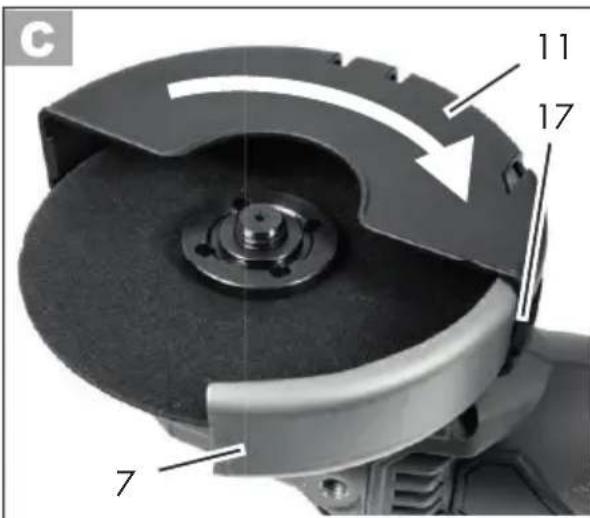
C Fitting the attachment to/removing the attachment from the protective cover
Fitting the attachment
- If necessary, remove the disc for better access, see "Installing/changing disc".
- Fit the attachment (11) onto the guard cover (7).
- Push the attachment (11) onto the guard cover (7) until it clicks into place.
Removing the attachment
- If necessary, remove the disc for better access, see "Installing/changing disc".
- Release the attachment (11) by pushing the notch (17) away from the guard cover (7).
- Unscrew the attachment (11) from the guard cover (7).
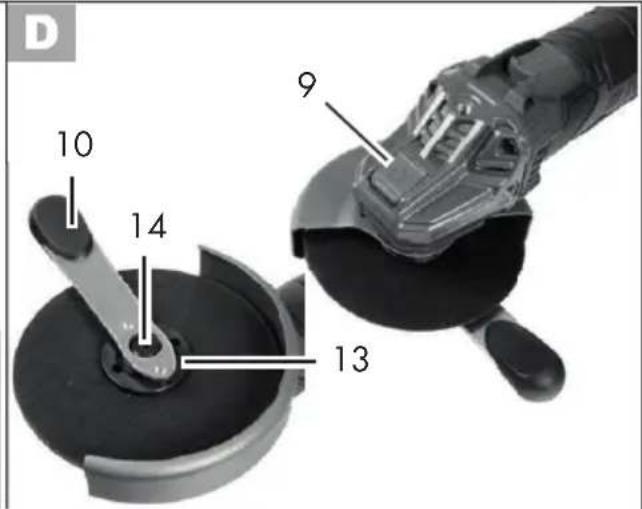
D Installing/changing disc
- Press the spindle stop button (9).
- Turn the mounting spindle (14) until the spindle lock fi xed the mounting spindle. Keep and continue to hold down the spindle lock button (9)
- Release the clamping nut (13) with the chuck key (10). You can release the spindle lock button (9).
- Set the desired disc onto the mounting fl ange (A 12). label on the disc should always face the device.

If the rotary direction is indicated on your disc, ensure that it corresponds to the rotary direction of the angle grinder when mounting. This is indicated on the device below the spindle stop button (9) ( ).

Ensure that the fl ange (A 12) is placed on the device in such a way that the recesses in the fl ange grip into the edge of the device. The mounting spindle (14) must turn simultaneously when you turn the fl ange.
-
Set the clamping nut (13) on the mounting spindel (14) again. The fl at side of the clamping nut must face the attachment tool if the thickness of the disc receptor is < 5 mm.
If the thickness of the disc receptor is ≥ 5 mm, turn the clamping nut.
See illustration A.
-
Press the spindle stop button (9) and turn the mounting spindle (14), until the spindle toggle button holds the spindle fl ange in a fixed position. Pull the clamping nut (13) tight again using the chuck key (10). You can let go of the spindle lock button (9).

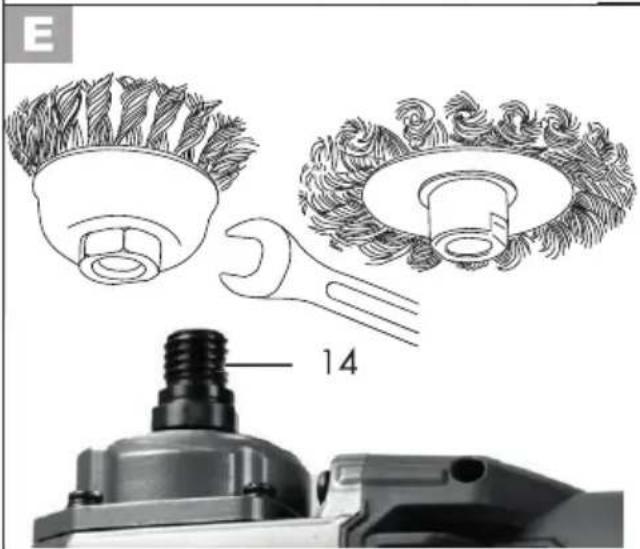
Installing/changing the wire brush
- Press the spindle stop button (9).
- Turn the mounting spindle (14) until the spindle stop button holds the mounting spindle in a fixed position. Keep the spindle stop button (9) depressed.
- Release the wire brush with a combination wrench (not included in the scope of delivery). You can now release the spindle stop button (9).
- Place the desired wire brush onto the mounting spindle.
- Press the spindle stop button (9) and rotate the wire brush on the mounting spindle (14). Tighten the wire brush using a combination wrench. You can now release the spindle stop button (9).
Operation

Caution! Risk of injury!
- Remove the battery before carrying out any work on the device.
- Only use cutting/grinding discs and accessories recommended by the manufacturer. Using other attachment tools and other accessories can represent a risk of injury for you.
- Only use accessory parts which bear information about the manufacturer, type of connection, dimension and permitted number of revolutions.
- Only use accessory parts where the printed rotational speed is at least as high as what has been specified on the name plate of the device.
- Do not use any broken, cracked or otherwise damaged diamond cutting/grinding discs.
- Never operate the device without protective equipment.
- Support the plates or workpieces in order to reduce the risk of kickback from a jammed cutting disc. Large workpieces may bend under their own weight. The workpiece must be supported on both sides of the disc, not only near the cutting disc, but also at the edge.

Keep your hands away from the disc when the device is in operation. Risk of injury.


Switch off the device and remove the battery from the device. Allow the device to cool down.

Wear protective gloves when changing the tool so as to avoid injuries from cuts.

The clamping nut must not be screwed too tightly so as to avoid breaking the disc and nut.
Inserting/removing the rechargeable battery
- To insert the rechargeable battery (5) into the device, push the battery along the guides into the device. You will hear it click into place.
- To remove the battery (5) from the device, press the release button (4) on the battery and pull the battery out.
Checking the charge level of the rechargeable battery
The battery charge level indicator 📋 on the battery (5) indicates the charge level of the battery.
The charge level of the battery is indicated by illumination of the corresponding LED light. Press the button for the charge level indicator 📋 on the battery.
Red-amber-green => battery fully charged
Red-amber => battery approx. half charged
Red => battery needs to be charged
Selecting the speed
The device has 6 levels, which can be set on the speed regulator (6).
| 1: 2500 min -1 | 4: 7000 min -1 |
| 2: 4000 min -1 | 5: 8500 min -1 |
| 3: 5500 min -1 | 6: 11.500 min 1 |
Turning on and off
-
To switch the device on, slide the On/Off switch (3) to the side and then forwards in the direction of the arrow.
-
To switch it off, release the On/Off switch. The device switches off. If you have switched on continuous operation, tap the On/off switch (3) at the back to switch the device off.
After switching on the device, wait until the device has reached its max. speed. Only then should you start with the work.
The tool still runs even after the device has been switched off. Risk of injury.
If the disc is blocked for more than 3 seconds, the device switches off automatically. If blocked for less than that, the disc starts back up automatically.
Trial run:
Always carry out a trial run without a load before carrying out your first procedure as well as after every tool change. Switch the device off immediately if the tool is not rotating smoothly, if considerable vibration occurs, or if you hear abnormal noises.
Continuous operation
-
Turn on the device.
Switching on continuous operation:
-
Push the front of the on/off switch (3) towards the device in the on position. The on/off switch makes an audible click.
Switching off continuous operation:
- Press the back of the on/off switch (3) briefly once. The on/off switch will spring back into its initial position. The device turns off.
Cleaning and servicing
Remove the battery from the device before carrying out any adjustments, maintenance or repair work.
Have any work on the device that is not described in this instruction guide performed
by a professional. Only use original parts. Allow the device to cool off before any maintenance or cleaning is undertaken. There is a risk of burning!
Always check the device before using it for obvious defi ciencies such as loose, worn or damaged parts, correct the positioning of screws or other parts. Examine the cutting/grinding disc in particular. Exchange the damaged parts.
Cleaning

Do not use any cleaning agent or solvent. Chemical substances can etch the plastic parts of the device. Never clean the device under running water.
- Thoroughly clean the device after every use.
- Clean the ventilation openings and the surface of the device with a soft brush or cloth.
Storage
- Store the appliance in a dry place well out of reach of children.
- Cutting discs must be dry and stored upright and should never be stacked.
- Before prolonged storage, remove the rechargeable battery from the device and charge it fully.
- The storage temperature for the rechargeable battery and the device is between 0 °C and 45 °C. Avoid extreme cold or heat during storage to ensure the battery output is not adversely affected.
Waste disposal and environmental protection
Remove the rechargeable battery before disposing of the device!
The device, accessories, battery and packaging should be properly recycled.
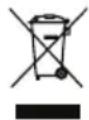
Electrical machines do not belong with domestic waste.
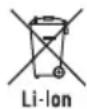
Do not throw batteries into domestic waste, fi re (risk of explosion) or water. Damaged batteries can harm the environment and your health if poisonous fumes or liquids escape.
- Hand over the device at an utilization location. The plastic and metal parts employed can be separated out and thus recycled use can be implemented. Ask our Service-Center for details.
- Defective or used batteries must be recycled in accordance with Directive 2006/66/EC.
- In accordance with the Directive 2012/19/EU on waste electrical and electronic equipment, used electrical devices must be collected separately for disposal and recycled in an environmentally sound manner.
Depending on the implementation in national law, you may have the following options:
- Return to a shop,
- Return to an offi cial collection point. For more information, please contact your local waste management provider or our service centre.
- Return to the manufacturer/distributor. We will dispose of any defective
devices that you send to us free of charge.
This does not affect accessories enclosed with the old devices or tools without any electrical components.
Troubleshooting

Remove the battery from the device before carrying out any maintenance, adjustment or cleaning work on the device. Danger of electric shock!
| Problems Possible Cause Error correction | |
| Device doesn't start | Battery (5) discharged | Charge the battery (observe the separate operating instructions for the rechargeable battery and charger) |
| Battery (5) not inserted | Insert battery (see 'Operation') |
| On/off switch (3) may be defective | Repair by Customer Care |
| Engine faulty |
| Grinding tool does not move although the engine is running | Grinding disc nut is loose | Tighten grinding disc nut (see „Installing/changing disc”) |
| Workpiece, remaining workpieces or remaining grinding tools block drive | Remove blockages |
| Engine is slower and stops | Device is overloaded through workpiece | Reduce pressure on grinding tool |
| Workpiece unsuitable |
| Grinding disc does not rotate smoothly, abnormal noises can be heard | Grinding disc nut is loose | Tighten grinding disc nut (see „Installing/changing disc”) |
| Grinding disc is defective Change | grinding disc |
Replacement parts / Accessories
If you have issues ordering, please use the contact form.
If you have any other questions, contact the "Service-Center" (see page 45).
1 Handgrip91106221
7Protective hood 91106220
8 Cutting disc 30211122
10 Chuck key 91105183
12 Mounting fl ange 91106222
13 Clamping nut
Wire cup, crimped wire 91103213
Wire cup, braided wire 91103214
Guarantee
Dear Customer,
This equipment is provided with a 3-year guarantee from the date of purchase. In case of defects, you have statutory rights against the seller of the product. These statutory rights are not restricted by our guarantee presented below.
Terms of Guarantee
The term of the guarantee begins on the date of purchase. Please retain the original receipt. This document is required as proof of purchase.
If a material or manufacturing defect occurs within three years of the date of purchase of this product, we will repair or replace – at our choice – the product for you free of charge. This guarantee requires the defective equipment and proof of purchase to be presented within the three-year period with a brief written description of what constitutes the defect and when it occurred.
If the defect is covered by our guarantee, you will receive either the repaired product or a new product. No new guarantee period begins on repair or replacement of the product.
Guarantee Period and Statutory Claims for Defects
The guarantee period is not extended by the guarantee service. This also applies for replaced or repaired parts. Any damages and defects already present at the time of purchase must be reported immediately after unpacking. Repairs arising after expiry of the guarantee period are chargeable.
Guarantee Cover
The equipment has been carefully produced in accordance with strict quality guidelines and conscientiously checked prior to delivery.
The guarantee applies for all material and manufacturing defects. This guarantee does not extend to cover product parts that are subject to normal wear and may therefore be considered as wearing parts (e.g. cutting disc, clamping fl anges) or to cover damage to breakable parts (e.g. switches). This guarantee shall be invalid if the product has been damaged, used incorrectly or not maintained. Precise adherence to all of the instructions specified in the operating manual is required for proper use of the product. Intended uses and actions against which the operating manual advises or warns must be categorically avoided.
The product is designed only for private and not commercial use. The guarantee
will be invalidated in case of misuse or improper handling, use of force, or interventions not undertaken by our authorised service branch.
Processing in Case of Guarantee
To ensure efficient handling of your query, please follow the directions below:
- Please have the receipt and item number (IAN 411383_2107) ready as proof of purchase for all enquiries.
- Please find the item number on the rating plate.
- Should functional errors or other defects occur, please initially contact the service department specified below by telephone or by e-mail. You will then receive further information on the processing of your complaint.
- After consultation with our customer service, a product recorded as defective can be sent postage paid to the service address communicated to you, with the proof of purchase (receipt) and specification of what constitutes the defect and when it occurred. In order to avoid acceptance problems and additional costs, please be sure to use only the address communicated to you. Ensure that the consignment is not sent carriage forward or by bulky goods, express or other special freight. Please send the equipment inc. all accessories supplied at the time of purchase and ensure adequate, safe transport packaging.
Repair Service
For a charge, repairs not covered by the guarantee can be carried out by our service branch, which will be happy to issue a cost estimate for you.
We can handle only equipment that has been sent with adequate packaging and postage.
Attention: Please send your equipment to our service branch in clean condition and with an indication of the defect.
Equipment sent carriage forward or by bulky goods, express or other special freight will not be accepted.
We will dispose of your defective devices free of charge when you send them to us.
Service-Center

Service Great Britain
0800 404 7657
E-Mail: grizzly@lidl.co.uk
IAN 411383_2107

Service Malta
Tel.: 80062230
E-Mail: grizzly@lidl.com.mt
IAN 411383_2107
Importer
Please note that the following address is not a service address. Please initially contact the service centre specified above.
Service-Center....70
Importateur 70
Service-Center....92
Importeur 92
Service-Center......115
Importer 115
Service-Center....135
Dovozce....135
Service-Center......155
Dovozca....155
Skrubslibning....167
Introduktion
Service-Center......175
Importør 175
Service-Center......219
Pooblaščeni serviser:
Tel.: 01 888 92 73
E-Mail: grizzly@lidl.si
(Birotehnika, Hodošček Renata s.p., Lendavska ULICA 23, 9000 Murska Sobota)
Garancijski list
 | Translation of the original EC declaration of conformity |
| We hereby confi rm that the Cordless Angle Grinder Design Series PWSA 20-Li D4 Serial Number 000001 - 275000 conforms with the following applicable relevant version of the EU guidelines : |
| 2006/42/EC • 2014/30/EU • 2011/65/EU* & (EU) 2015/863 |
| In order to guarantee consistency, the following harmonised standards as well as national standards and stipulations have been applied: |
| EN 60745-1:2009/A11:2010 • EN 60745-2-3:2011/A13:2015 EN 55014-1:2017/A11:2020 • EN 55014-2:2015 EN IEC 55014-1:2021 • EN IEC 55014-2:2021 EN IEC 63000:2018 |
| This declaration of conformity is issued under the sole responsibility of the manufacturer: |
| CE Grizzly Tools GmbH & Co. KG Stockstädter Straße 20 63762 Großostheim Germany 30.01.2022 | Christian Frank (Documentation Representative) |
* The object of the declaration described above satisfies the provisions of Directive 2011/65/EU of the European Parliament and the Council of 8 June 2011 on limiting the use of certain harmful substances in electrical and electronic appliances.
informativ · informative · informatif · informatief · pouczający · informační
informatívny · informativo · informatív · informativen
20220120_rev02_msAesh
GRIZZLY TOOLS GMBH & CO. KG