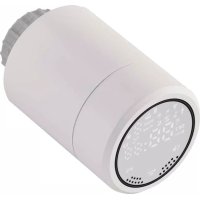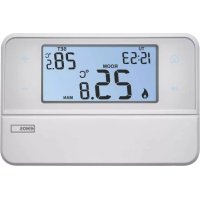
P5606OT - Thermostat Emos - Free user manual and instructions
Find the device manual for free P5606OT Emos in PDF.


| Product type | Programmable room thermostat |
| Brand | Emos |
| Model | P5606OT |
| Dimensions (W × H × D) | 126 × 84 × 25,5 mm |
| Weight | 164 g |
| Main power supply | 2 AA alkaline batteries 1.5 V (LR6) |
| Backup power supply | 1 CR2032 battery 3 V |
| Max switched load | 230 V AC, 6 A resistive / 2 A inductive |
| Measurement range | 0 °C to 40 °C |
| Setting range | 5 °C to 35 °C in steps of 0.5 °C |
| Accuracy | ±1 °C at 20 °C |
| Hysteresis (set variation) | 0.2 °C to 2.0 °C in steps of 0.1 °C |
| Display | LCD screen with backlight (15 s) |
| Programming | 6 programs per day (day/week/weekend) |
| Operating modes | Automatic, Manual, Temporary, Vacation (Holiday), Anti-freeze (OFF) |
| Connectivity | OpenTherm (OT) |
| Connection | ON/OFF (NO, COM, NC) or OpenTherm |
| Special functions | Program copy, Key lock, Calibration, Factory reset |
| Low battery indicator | Yes (icon) |
| Included accessories | Screws (2×), wall plugs (2×) |
| Maintenance and cleaning | Soft, slightly damp cloth; do not use solvents |
| Safety | Disconnect power before installation; entrust to a professional |
| Spare parts and repairability | Batteries replaceable by user; repair by qualified specialist |
| General information | Complies with standards; do not dispose of with household waste |
Frequently Asked Questions - P5606OT Emos
User questions about P5606OT Emos
0 question about this device. Answer the ones you know or ask your own.
Ask a new question about this device
Download the instructions for your Thermostat in PDF format for free! Find your manual P5606OT - Emos and take your electronic device back in hand. On this page are published all the documents necessary for the use of your device. P5606OT by Emos.
USER MANUAL P5606OT Emos
2
GB | Thermostat
The P56060T thermostat is designed for controlling heating and air-conditioning systems.
Important
- Before the first use, make sure to carefully read the operating manual for the thermostat, as well as the manual for the boiler or air-conditioning equipment.
- Turn off power supply before installing the thermostat!
• Installation should be carried out by qualified personnel! - During installation, observe the prescribed standards.
Technical specifications
Switched load: max. 230 V AC; 6 A for resistive load; 2 A for inductive load
Temperature measurement: 0 °C to 40 °C with 0.1 °C resolution accuracy ±1 °C at 20 °C
Temperature setting: 5 °C to 35 °C in 0.5 °C increments
Differential setting: 0.2 °C to 2 °C, in 0.1 °C increments
Power supply: 2× 1.5 V type AA (LR6) batteries
Back-up power supply: 1×3 V type CR2032 battery
Accessories: 2 screws, 2 wall plugs
Dimensions and weight: 126 × 84 × 25.5 mm; 164 g
Description of Control Elements (See Fig. 1)
1 – Home (return to home screen)
3 - Adjust value setting
4 - Confirm (confirm function selection)
5 - Copy
6 - Holiday mode
7 – Battery compartment
8 – Time and date setting
9 – Select and edit programme (PROG)
10 - Anti-freeze mode (OFF)
11 - Manual mode (MAN)
12 – Automatic mode (AUTO)
2 - Next (move to the next option within the current function)
Display Description (See Fig. 2)
13 - Days
14 - Time
15 – Room temperature
16 – Heating 🔒 / cooling
17 - Set temperature
18 – Chosen programme
19 – Holiday mode symbol
20 - Lock display
21 - Temporary mode symbol
22 - Automatic mode (AUTO) symbol
23 - Manual mode (MAN) symbol
24 - Low battery
INSTALLATION
Warning:
Before changing the thermostat, disconnect the heating/air-conditioning system from the main power in your flat. This will prevent potential injury by electric current.
Thermostat Placement
Thermostat location significantly affects its functioning. Choose a room where members of the family spend most of their time, preferably on the inside wall where air circulates freely, with no direct sunlight. Do not place the thermostat in the vicinity of heat sources (such as TV sets, radiators, fridges), or close to a door (due to frequent shocks or vibration). If you do not comply with these recommendations, the thermostat will not control room temperature correctly.
Thermostat Installation
- Remove the rear cover of the switching unit.
- Mark positions for holes.
- Drill two holes, carefully insert the plastic wall plugs into them and use two screws to fasten the rear switching unit cover.
- Connect the wires to the labelled terminals according to the wiring diagram.
- Complete the installation by fitting the switching unit onto the attached rear part of the cover.
Wiring Diagram ON/OFF connection
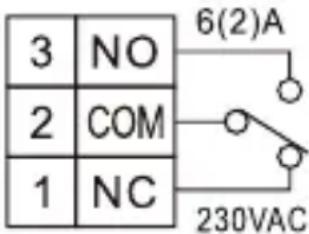
NO normally open contact COM switch contact NC normally closed contact
OpenTherm connection
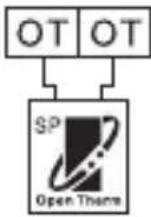
OT OpenTherm connection
OT OpenTherm connection
Putting the Device into Operation
Remove front cover of the transmitter and insert 2× 1.5 V AA alkaline batteries.
Do not use 1.2 V rechargeable batteries.
Insertion of batteries starts the thermostat and activates the display.
If the thermostat is not working properly, please check the polarity of the batteries, and their state of charge.
Factory Preset Programmes
This programmable indoor thermostat was designed to be easy to use and require minimal user input. The preset times and temperatures will suit the majority of users (see the table below). If you wish to use a factory preset programme, move the slider switch to AUTO, which puts the thermostat into automatic mode.
Table of Preset Programmes
| Time Temperature Time Temperature | |||||||
| Monday – Friday | P1 6:00 20 °C | Saturday – Sunday | P1 7:30 20 °C | ||||
| P2 8:00 15 °C | P2 9:30 20 °C | ||||||
| P3 12:00 15 °C | P3 11:30 20 °C | ||||||
| P4 14:00 15 °C | P4 13:30 20 °C | ||||||
| P5 16:30 21 °C | P5 16:30 21 °C | ||||||
| P6 22:30 15 °C | P6 22:30 15 °C | ||||||
Programme Settings
-
Move the slider to PROG until the workdays symbol starts flashing („MO TU WE TH FR“).
-
Press + or - to select mode settings: Workdays / Weekend mode („MO TU WE TH FR“ flashes or „SA SU“ flashes), Week mode („MO TU WE TH FR SA SU“ flashes), 24 hour mode („MO“, „TU“, „WE“, „TH“, „FR“, „SA“, „SU“ flash separately).
-
After choosing a mode, press the ▶ button once; „P1“ will appear on the display and the time value will start flashing. Use + or - to set time to a value of choice.
- Once time is set, press the ▶ button once; the temperature value will start flashing. Use + or - to set the temperature.
- Once temperature is set, press the ▶ button once; „P2“ will appear on the display and the time value will start flashing. Repeat steps 3 and 4 until all six programmes are set.
- After setting all six programmes to the values of choice, press the button to confirm or wait 60 seconds for automatic confirmation.
Using the Copy Function
The thermostat is equipped with a copy function which allows copying an edited programme to another day. You therefore do not have to repeatedly enter the same programme for the next day. This function only works when programming individual days.
- First, set and save a programme for at least one day; see Programme Settings.
- If the thermostat is set to day mode and the slider is on PROG, press the C button.
- „MO“ will appear on the display; at this point, use + or - to select which day's settings you wish to copy to another day.
- Press the ▶button; „TU“ will start flashing on the display. Use + or - to choose the day you wish to copy the selected settings into.
- Press the C button to confirm your day selection; "SAVE" will appear on the display. To choose additional days, repeat steps 3 and 4.
- After copying the original setting to the days of choice, confirm by pressing the ⏻ button or wait 60 seconds for automatic confirmation.
Temporary Mode
- Move the slider to AUTO.
- Use + or - to set the temperature of choice; a hand icon will appear on the display.
- Press the ⏻ button to confirm or wait 15 seconds for automatic confirmation.
This temperature setting will apply until the next preset programme begins or until you press the ⏻ button again to cancel temporary mode.
Manual Temperature Setting Mode (MAN)
- Move the slider to MAN.
- Press + or - to adjust temperature.
In this mode, the thermostat always maintains the manually set temperature and preset programmes are not active. You can cancel the mode by moving the slider to another position.
Holiday Mode
Holiday mode saves power by allowing you to decrease temperature for 1 to 99 days when you are away from home.
- Move the slider to AUTO.
- Press the H button to activate Holiday mode.
- Use + or - to set the number of days you will be away.
- Then press the ▶button to set the temperature and confirm by pressing 🔒.
This mode will be active until the set number of days elapses or can be cancelled manually by pressing 📂.
Anti-Freeze Mode (OFF)
- Move the slider to the OFF position; temperature will now be set to a constant 5 °C.
- You can cancel anti-freeze mode by moving the slider to AUTO.
Time and Date Setting
- Move the slider to TIME/DATE; the field for date setting will start flashing on the display.
- Press ▶; the month field with start flashing on the display.
- Press ▶ the year field with start flashing on the display.
- Press ▶, the hour field with start flashing on the display.
- Press ▶, the minute field with start flashing on the display.
- Press 🔒 to confirm the settings or wait 15 seconds for automatic confirmation.
Calibration of Room Temperature
Move the slider to the OFF position and press H and at the same time to enter settings for calibration of room temperature; CAL will appear on the display. Press + or - to adjust the value (-3.0 °C to 3.0 °C, in 0.5 °C increments).
Press ⬇ to confirm the settings or wait 15 seconds for automatic confirmation.
Calibration of room temperature is used for example if the thermostat shows 21 °C but you want it to show 20 °C. In that case, the calibration value should be set to -1 °C.
Temperature Differential Setting
Move the slider to the OFF position and press H and at the same time to enter settings. Then press the button to go to Temperature Differential Settings; „diFF“ will appear on the display. Press + or - to adjust the value (0.2 °C to 2.0 °C, in 0.1 °C increments).
Press 🔒 to confirm the settings or wait 15 seconds for automatic confirmation.
The temperature differential (hysteresis) is the difference in temperature required for switching on and off. If for example you set the temperature in heating mode to 20 °C and differential to 0.2 °C , the thermostat activates heating as soon as room temperature drops to 19.8 °C and switches heating off when temperature reaches 20.2 °C .
Heating/Cooling Mode
Move the slider to the OFF position and press H and hat the same time to enter settings. Then press the ▶button 2× to go to Heating/Cooling Mode settings.
Use + or - to select heating mode (HEAT) or cooling mode (COOL).
Press ⬇ to confirm the settings or wait 15 seconds for automatic confirmation.
Factory Reset
If the thermostat is not working properly, you can reset it to factory settings.
Move the slider to the OFF position and press and hold H and 📂 at the same time to enter settings. Press the ▶ button 3×; „rESE“ will appear on the screen. Press the A button so that „----“ appears on the screen, then press the A button again. The thermostat will reset to factory settings after a few seconds.
Lock Function
Press and hold the H button for 5 seconds; "will appear on the display and all buttons will be locked. Buttons will not respond to input in this mode. Holding the H button for 5 seconds again will unlock the buttons.
Display Illumination
Pressing any button activates display illumination for 15 seconds.
Battery Replacement
If a „” icon appears on the display, it means the batteries are low and need replacing.
Setting OpenTherm Parameters
Applies only to heating mode.
-
Move the slider to the OFF position and press H and simultaneously to enter OpenTherm parameter settings. „01“ will light up in the left corner and the water temperature in the OpenTherm boiler will appear in the centre (if the thermostat does not receive a temperature reading, „--“ will be displayed instead).
-
Press the ▶button. „02“ will light up in the left corner and the temperature of the water returning back to the boiler will appear in the centre (if the thermostat does not receive a temperature reading, „--“ will be displayed instead).
-
Press the ▶button. "03" will light up in the left corner and the temperature of the hot water will appear in the centre (if the thermostat does not receive a temperature reading, --" will be displayed instead).
-
Pressing the ▶button opens settings for temperature control switching values. "04" will light up in the left corner and OFF will start flashing in the centre of the display. Use + or - to select ON/OFF.
-
If you selected ON in the previous step, pressing ▶ opens settings for the maximum temperature control value. "05" will light up in the left corner of the display and temperature appears in the centre. Use + or - to adjust the temperature.
-
Pressing ▶opens settings for hot water switching. "06" will light up in the left corner and OFF will start flashing in the centre of the display. Use + or - to select ON/OFF.
-
If you selected ON in the previous step, pressing ▶ opens settings for hot water temperature. "07" will light up in the left corner of the display and temperature appears in the centre. Use + or - to adjust the temperature.
-
Pressing ▶ opens the control switching settings. "08" will light up in the left corner and ON will start flashing in the centre of the display. Use + or - to select ON/OFF.
-
Press ⬆ to confirm the settings.
OpenTherm Error Indication
-
If the OpenTherm connection is interrupted, the display will first show the letters „UNCO“, followed by the clock.
-
If there is an error in the OpenTherm communication, the display will first show the letters „CONN“, followed by the clock.
-
If there is an error with the OpenTherm boiler, the display will show, in sequence, the OEM error code / error code and the clock.
Upkeep and Maintenance
The product is designed to serve reliably for many years if used properly. Here are some tips for proper operation:
- Read the manual carefully before using this product.
- Do not expose the product to direct sunlight, extreme cold, humidity and sudden changes in temperature. This would reduce measuring accuracy.
- Do not place the product in locations prone to vibration and shocks – may cause damage.
- Do not subject the product to excessive force, impacts, dust, high temperatures or humidity – doing so may cause malfunction, shorten battery life, damage batteries or deform plastic parts.
- Do not expose the product to rain or high humidity, dropping or splashing water.
- Do not place any open flame sources on the product, e.g. a lit candle, etc.
- Do not place the product in places with inadequate air flow.
- Do not insert any objects in the product's vents.
- Do not tamper with the internal electric circuits of the product – doing so may damage the product and will automatically void the warranty. The product should only be repaired by a qualified professional.
- To clean the product, use a slightly moistened soft cloth. Do not use solvents or cleaning agents – they could scratch the plastic parts and cause corrosion of the electric circuits.
- Do not immerse the product in water or other liquids.
- In the event of damage or defect on the product, do not perform any repairs by yourself. Have it repaired in the shop where you bought it.
- This device is not intended for use by persons (including children) whose physical, sensory or mental disability or lack of experience and expertise prevents safe use, unless they are supervised or instructed in the use of the appliance by a person responsible for their safety. Children must always be supervised and must never play with the device.

Do not dispose with domestic waste. Use special collection points for sorted waste. Contact local authorities for information about collection points. If the electronic devices would be disposed in landfill, dangerous substances may reach groundwater and subsequently food chain, where it could affect human health.
CZ | Termostat
19 – Symbol Holiday mode
19 – Symbol Holiday mode
23 – Symbol manueller Modus (MAN)
24 – Schwache Batterie
MONTAGE
Hinweis:
19 – Symbol Holiday mode
20 – Displayvergrendeling