POWXB40020 - Multitools PowerPlus - Free user manual and instructions
Find the device manual for free POWXB40020 PowerPlus in PDF.



| Product Type | Cordless Multi-Function Oscillating Tool |
| Brand | PowerPlus |
| Model | POWXB40020 |
| Voltage | 20 V DC |
| No Load Speed | 12,000 - 19,500 min⁻¹ |
| Number of Speed Settings | 6 |
| Sound Pressure Level (LpA) | 82 dB(A) |
| Sound Power Level (LwA) | 93 dB(A) |
| Vibration Level (aw) | 4.4 m/s², K=1.5 m/s² |
| Included Accessories | Triangular sanding pad (90x90x90 mm), 5 abrasive sheets (grit 60, 120, 180, 240), 32 mm saw blade, 52 mm scraper blade, 35 mm dust extraction connector |
| Main Functions | Dry sanding, sawing, scraping, polishing, grating, cutting, removing |
| Power Supply | 20 V Lithium-ion battery (not included in manual, but compatible with PowerPlus range) |
| Battery Type | Lithium-ion, rechargeable |
| Charging Time | Approximately 1 hour for full charge |
| Battery Capacity Indicator | 3 LEDs (3 on = full, 2 = 60%, 1 = almost empty) |
| Accessory Fixing System | Tool-free quick release lever |
| Compatible Materials | Wood, plastic, metal, plasterboard, tile (for sawing); paint, varnish, carpet, adhesive (for scraping) |
| Warranty | 36 months (excluding batteries, chargers, normal wear) |
| Maintenance | Clean ventilation slots, use a damp cloth with soapy water, no solvents |
| Safety | Double insulation (class II), requires hearing and eye protection, do not use on wet materials |
| Weight | Approximately 1.3 kg (with battery, typical value for this type of tool) |
| Dimensions (L x W x H) | Approximately 300 x 80 x 100 mm (reasonable estimate) |
Frequently Asked Questions - POWXB40020 PowerPlus
User questions about POWXB40020 PowerPlus
0 question about this device. Answer the ones you know or ask your own.
Ask a new question about this device
Download the instructions for your Multitools in PDF format for free! Find your manual POWXB40020 - PowerPlus and take your electronic device back in hand. On this page are published all the documents necessary for the use of your device. POWXB40020 by PowerPlus.
USER MANUAL POWXB40020 PowerPlus
natural_image
Yellow and black power patrol tool with a base mount, shown against a white background (no text or symbols visible on the device body)
text_image
iNL NEDERLANDS VERTAALDE VERSIE VAN DE ORIGINELE HANDLEIDING
FR FRANÇAIS TRADUCTION DU MODE D'EMPLOI D'ORIGINE
EN ENGLISH ORIGINAL INSTRUCTION MANUAL
text_image
POWERPLUS Green light Red lightFig 3

natural_image
Yellow power Luxembourg 16-branded battery with black ventilation slots and control buttons (no visible text or symbols on body)Fig 3a
text_image
BRUSHLESS LUSXB 4Fig 4
A.
text_image
POWERPLUS WOOD/PLASTICB.
natural_image
White powerPLUS-branded device with abstract cutout design (no visible text or symbols)
natural_image
Triangular brown sand or plaster sample with five circular holes (no text or symbols)C.

natural_image
Black triangular mechanical component with central hole and four mounting holes (no text or symbols)
natural_image
Close-up of a series of brown square tiles with circular holes, arranged in a fan pattern (no text or symbols visible)
natural_image
Stack of brown square platters with circular holes, no text or symbols visibleD.
Fig 5
1 TOEPASSING 3
2 BESCHRIJVING (FIG. A)....3
3 INHOUD VAN DE VERPAKKING....3
4 TOELICHTING VAN DE SYMBOLEN 4
5 ALGEMENE VEILIGHEIDSVOORSCHRIFTEN ....4
5.1 Werkplaats 4
5.2 Elektrische veiligheid....4
2 BESCHRIJVING (FIG. A)
natural_image
Simple line drawing of a rounded rectangle with a small circle on top (no text or symbols)Philippe Vankerkhove
Certification Manager
21/01/2021, Lier - Belgium
1 UTILISATION 3
2 DESCRIPTION (FIG. A) 3
3 LISTE DES PIÈCES CONTENUES DANS L'EMBALLAGE......3
4 PICTOGRAMMES 4
5 CONSIGNES DE SÉCURITÉ GÉNÉRALES ....4
15 DÉCLARATION DE CONFORMITÉ


VARO – Vic. Van Rompuy N.V. - Joseph Van Instraat 9 - BE2500 Lier - BELGIQUE, déclare que :
natural_image
Simple line drawing of a curved object with a circular end, no text or symbols presentPhilippe Vankerkhove
21/01/2021, Lier - Belgium
1 APPLICATION ....3
2 DESCRIPTION (FIG. A) 3
3 PACKAGE CONTENT LIST....3
4 SYMBOLS 4
5 GENERAL POWER TOOL SAFETY WARNINGS....4
5.1 Working area....4
5.2 Electrical safety 4
5.3 Personal safety 4
5.4 Power tool use and care....5
5.5 Battery tool use and care....5
5.6 Service....6
6 MACHINE-SPECIFIC SAFETY WARNINGS....6
6.1 Causes and operator prevention of kickback:....6
7 ADDITIONAL SAFETY INSTRUCTIONS FOR BATTERIES AND CHARGERS 7
7.1 Batteries....7
7.2 Chargers....7
8 ASSEMBLY 7
8.1 Mounting sanding plate/ saw blade/ spatula (Fig. 1)....7
8.2 Mounting/changing the sand paper....8
9 OPERATION....8
9.1 Switching ON/OFF (Fig. 2)....8
9.2 Charging the battery pack....8
9.2.1 Charging indication (Fig 3)....9
9.3 Battery capacity indicator (Fig. 3a)....9
9.4 Inserting and removing the battery 9
9.5 Speed adjusting (Fig. 4)....9
9.6 Application tips....10
9.6.1 Selecting the Application Tool/Accessory....10
9.6.2 Sawing....10
9.6.3 Cutting....10
POWERPLUS® HIGH QUALITY TOOLS
POWXB40020 EN
9.6.4 Sanding 10
9.6.5 Scraping....10
10 CLEANING AND MAINTENANCE 11
11 TECHNICAL DETAILS.... 11
12 NOISE....11
13 WARRANTY....12
14 ENVIRONMENT 12
15 DECLARATION OF CONFORMITY 13
MULTI-OSCILLATING TOOL 20 V BRUSHLESS POWXB40020
1 APPLICATION
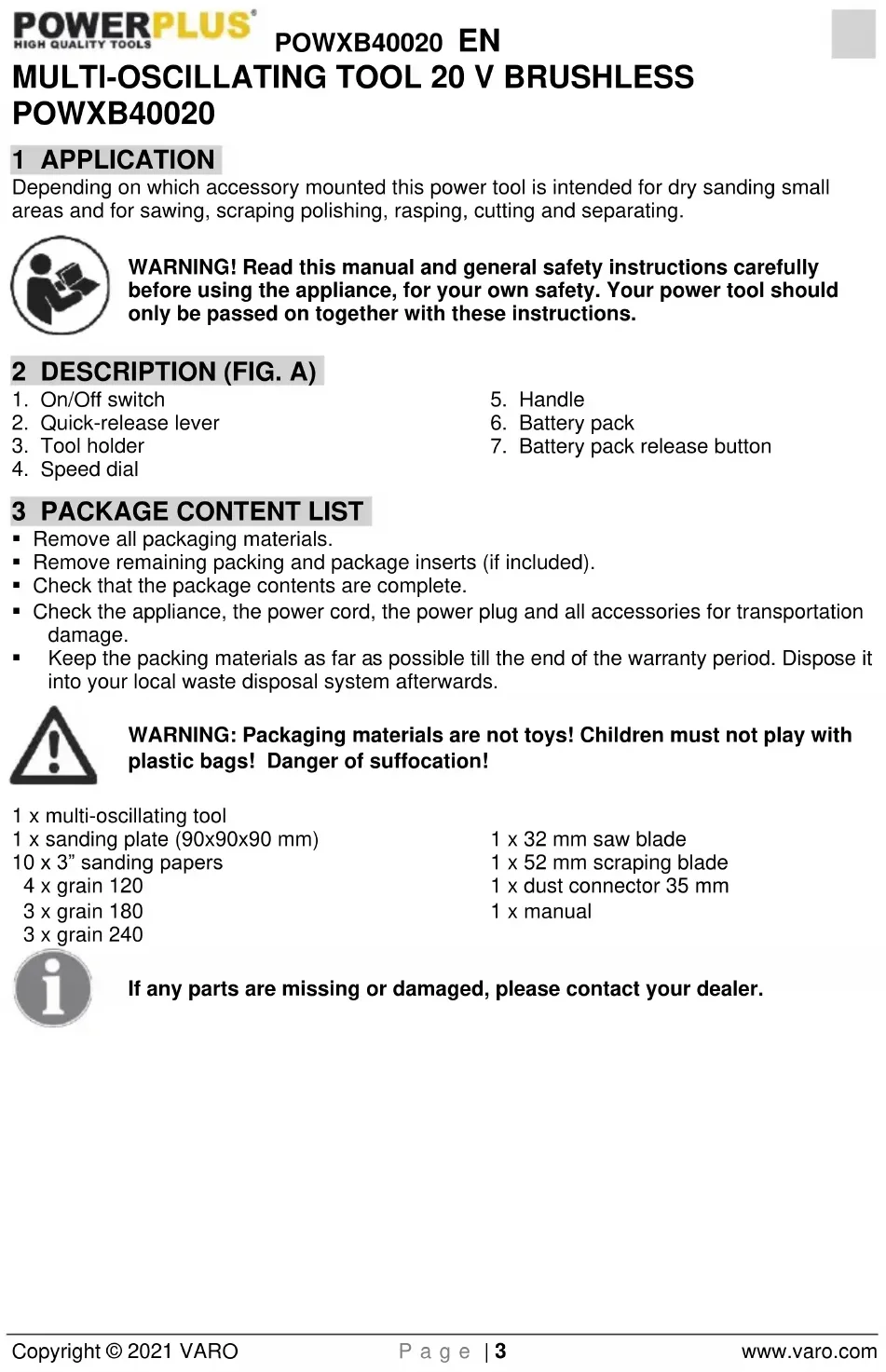
Depending on which accessory mounted this power tool is intended for dry sanding small areas and for sawing, scraping polishing, rasping, cutting and separating.

WARNING! Read this manual and general safety instructions carefully before using the appliance, for your own safety. Your power tool should only be passed on together with these instructions.
2 DESCRIPTION (FIG. A)
- On/Off switch
- Quick-release lever
- Tool holder
-
Speed dial
-
Handle
- Battery pack
- Battery pack release button
3 PACKAGE CONTENT LIST
■ Remove all packaging materials.
- Remove remaining packing and package inserts (if included).
- Check that the package contents are complete.
- Check the appliance, the power cord, the power plug and all accessories for transportation damage.
- Keep the packing materials as far as possible till the end of the warranty period. Dispose it into your local waste disposal system afterwards.

WARNING: Packaging materials are not toys! Children must not play with plastic bags! Danger of suffocation!
1 x multi-oscillating tool
1 x sanding plate (90x90x90 mm)
10 x 3" sanding papers
4 x grain 120
3 x grain 180
3 x grain 240
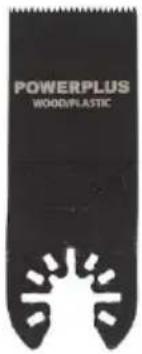
1 x 32 mm saw blade
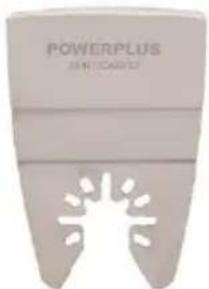
1 x 52 mm scraping blade
1 x dust connector 35 mm
1 x manual

If any parts are missing or damaged, please contact your dealer.
4 SYMBOLS
In this manual and/or on the machine the following symbols are used:
 | Denotes risk of personal injury or damage to the tool. |  | Wear ear guards and goggles. |
 | |||
 | Read manual before use. |  | Wear gloves. |
 | In accordance with essential requirements of the European directive(s). |  | Class II - The machine is double insulated; Earthing wire is therefore not necessary. |
5 GENERAL POWER TOOL SAFETY WARNINGS
Read all safety warnings and instructions. Failure to heed warnings and follow instructions may result in electric shock, fire and/or serious injury. Keep safety warnings and instructions for future reference. The term "power tool" in the safety warnings refers to your mains-operated (corded) power tool or battery-operated (cordless) power tool.
5.1 Working area
- Keep working area clean and well lit. Untidy and dark areas can lead to accidents.
- Do not operate power tools in potentially explosive surroundings, for example, in the presence of inflammable liquids, gases or dust. Power tools create sparks which may ignite the dust or fumes.
- Keep children and bystanders at a distance when operating a power tool. Distractions can cause you to lose control of it.
5.2 Electrical safety
■ Always check that the power supply corresponds to the voltage on the rating plate.
■ Power tool plugs must match the outlet. Never modify the plug in any way. Do not use adapter plugs with earthed power tools. Unmodified plugs and matching outlets will reduce the risk of an electric shock.
- Avoid body contact with earthed surfaces such as pipes, radiators, kitchen ranges and refrigerators. There is an increased risk of an electric shock if your body is earthed.
- Do not expose power tools to rain or wet conditions. If water gets inside a power tool, it will increase the risk of an electric shock.
- Do not damage the cord. Never use the cord for carrying, pulling or unplugging the power tool. Keep the cord away from heat, oil, sharp edges or moving parts. Damaged or entangled cords increase the risk of an electric shock.
- When operating a power tool outdoors, use an extension cable suitable for outdoor use. Using a cord suitable for outdoor use reduces the risk of an electric shock.
- If operating a power tool in a damp location is unavoidable, use a power supply protected by a residual current device (RCD). Using an RCD reduces the risk of an electric shock.
5.3 Personal safety
- Stay alert, watch what you are doing and use common sense when operating a power tool. Do not use a power tool when you are tired or under the influence of drugs, alcohol or
medication. A moment of inattention when operating a power tool may result in serious personal injury.
- Use safety equipment. Always wear eye protection. Using safety equipment such as a dust mask, non-skid safety shoes, a hard hat, or hearing protection whenever it is needed will reduce the risk of personal injury.
- Avoid accidental starts. Ensure the switch is in the off position before inserting the plug. Carrying power tools with your finger on the switch or plugging in power tools when the switch is in the on position makes accidents more likely.
- Remove any adjusting keys or spanners before turning on the power tool. A spanner or key left attached to a rotating part of the power tool may result in personal injury.
- Do not reach out too far. Keep your feet firmly on the ground at all times. This will enable you retain control over the power tool in unexpected situations.
- Dress properly. Do not wear loose clothing or jewellery. Keep your hair, clothing and gloves away from the power tool. Loose clothes, jewellery or long hair can become entangled in the moving parts.
- If there are devices for connecting dust extraction and collection facilities, please ensure that they are attached and used correctly. Using such devices can reduce dust-related hazards.
5.4 Power tool use and care
- Do not expect the power tool to do more than it can. Use the correct power tool for what you want to do. A power tool will achieve better results and be safer if used in the context for which it was designed.
- Do not use the power tool if the switch cannot turn it on and off. A power tool with a broken switch is dangerous and must be repaired.
- Disconnect the plug from the power source before making adjustments, changing accessories, or storing power tools. Such preventive safety measures reduce the risk of starting the power tool accidentally.
- Store power tools, when not in use, out of the reach of children and do not allow people who are not familiar with the power tool or these instructions to operate it. Power tools are potentially dangerous in the hands of untrained users.
- Maintain power tools. Check for misalignment or jammed moving parts, breakages or any other feature that might affect the operation of the power tool. If it is damaged, the power tool must be repaired. Many accidents are caused by using poorly maintained power tools.
- Keep cutting tools sharp and clean. Properly maintained cutting tools with sharp cutting edges are less likely to jam and are easier to control.
- Use the power tool, accessories and cutting tools, etc., in accordance with these instructions and in the manner intended for the particular type of power tool, taking into account the working conditions and the work which needs to be done. Using a power tool in ways for which it was not intended can lead to potentially hazardous situations.
5.5 Battery tool use and care
- Recharge only with the charger specified by the manufacturer. A charger that is suitable for one type of battery pack may create a risk of fire when used with another battery pack.
- Use power tools only with specifically designated battery packs. Use of any other battery packs may create a risk of injury and fire.
- When battery pack is not in use, keep it away from other metal objects, like paper clips, coins, keys, nails, screws or other small metal objects that can make a connection from one terminal to another. Shorting the battery terminals together may cause burns or a fire.
■ Under abusive conditions, liquid may be ejected from the battery: avoid contact. - If contact accidentally occurs, flush with water. If liquid contacts eyes, additionally seek medical help. Liquid ejected from the battery may cause irritation or burns.
5.6 Service
- Your power tool should be serviced by a qualified specialist using only standard spare parts. This will ensure that it meets the required safety standards.
6 MACHINE-SPECIFIC SAFETY WARNINGS
- Keep hands away from cutting area and blade. Keep your second hand on auxiliary handle or motor housing. If both hands are holding the saw, they cannot be cut by the Original instructions blade.
- Only use the power tool for dry sanding. Water entering a power tool will increase the risk of electric shock.
- Keep hands away from the sawing area. Do not reach under the workpiece. Contact with the saw blade can lead to injuries.
- When ripping always use a rip fence or straight edge guide. This improves the accuracy of cut and reduces the chance of blade binding.
- When changing the application tool, wear protective gloves. Application tools can become hot when used for prolonged periods of time.
- Do not scrape any dampened materials(e.g. Wallpaper)or on damp surfaces. Water entering a power tool increases the risk of electric shock.
Take particular care when handling scrapers and blades. The application tools are very sharp. Danger of injury. - Use suitable detectors to determine if there are hidden supply lines or contact the local utility company for assistance. Contact with electric cables can cause fire and electric shock. Damaging gas lines can lead to explosion. Breaking water pipes causes property damage.
- Do not treat the surface you will be working on with any fluids that contain solvents. Poisonous vapors may develop due to the materials heating up when being scraped.
6.1 Causes and operator prevention of kickback:
- Kickback is a sudden reaction to a pinched, bound or misaligned saw blade, causing an uncontrolled saw to lift up and out of the work-piece toward the operator:
- When the blade is pinched or bound tightly by the kerf closing down, the blade stalls and the motor reaction drives the unit rapidly back toward the operator:
- If the blade becomes twisted or misaligned in the cut, the teeth at the back edge of the blade can dig into the top surface of the wood causing the blade to climb out of the kerf and jump back toward the operator.

Note: Kickback is the result of saw misuse and/or incorrect operating procedures or conditions and can be avoided by taking proper precautions as given below.
- Maintain a firm grip with both hands on the saw and position your arms to resist kickback forces. Position your body to either side of the blade, but not in line with the blade.
- When blade is binding, or when interrupting a cut for any reason, release the trigger and hold the saw motionless in the material until the blade comes to a complete stop. Never attempt to remove the saw from the work or pull the saw back- ward while the blade is in motion or kickback may occur.
- When restarting a saw in the work-piece, centre the saw blade in the kerf and check that saw teeth are not engaged into the material.
■ Support large panels to minimize the risk of blade pinching and kickback. - Do not use dull or damaged blades. Unsharpened or improperly set blades produce narrow kerf causing excessive friction, blade binding and kickback.
- Blade depth and bevel adjusting locking levers must be tight and secure before making
cut. If blade adjustment shifts while cutting, it may cause binding and kickback.
- Use extra caution when sawing into existing walls or other blind areas. The protruding blade may cut objects that can cause kickback.
7 ADDITIONAL SAFETY INSTRUCTIONS FOR BATTERIES AND CHARGERS

Use only batteries and chargers applicable for this machine.
7.1 Batteries
■ Never attempt to open for any reason.
- Do not store in locations where the temperature may exceed 40 °C.
- Charge only at ambient temperatures between 4 °C and 40 °C.
- When disposing of batteries, follow the instructions given in the section "Protecting the environment".
- Do not cause short circuits. If connection is made between the positive (+) and negative (-) terminal directly or via accidental contact with metallic objects, the battery is short circuited and an intense current will flow causing heat generation which may lead to casing rupture or fire.
- Do not heat. If batteries are heated to above 100 °C, sealing and insulating separators and other polymer components may be damaged resulting in electrolyte leakage and/or internal short circuiting leading to heat generation causing rupture or file. Moreover do not dispose of the batteries in fire, explosion and/or intense burning may result.
- Under extreme conditions, battery leakage may occur. When you notice liquid on the battery, proceed as follows:
- Carefully wipe the liquid off using a cloth. Avoid skin contact.
– In case of skin or eye contact, follow the instructions below:
√ Immediately rinse with water. Neutralize with a mild acid such as lemon juice or vinegar.
√ In case of eye contact, rinse abundantly with clean water for at least 10 minutes. Consult a physician.

Fire hazard! Avoid short-circuiting the contacts of a detached battery. Do not incinerate the battery.
7.2 Chargers
■ Never attempt to charge non-rechargeable batteries.
■ Have defective cords replaced immediately.
■ Do not expose to water.
- Do not open the charger.
- Do not probe the charger.
- The charger is intended for indoor use only.
8 ASSEMBLY
8.1 Mounting sanding plate/ saw blade/ spatula (Fig. 1)
Take care with sharp tools such as spatulas, saw blades or cutting blades.
- Loosen the clamping plate (b) by pulling the quick-release lever (2) completely open.
- Hold the opening of the quick-install saw blade, sanding plate or spatula toward the output spindle which between cover clamp (a) and clamping plate (b), push the accessory in and place it firmly onto the locating pins (c).
- Fasten using the quick-release lever (2) at the lock position as shown in the Fig. 1.
- Remove the accessory in the opposite way.

Note: Check that the application tool is seated securely. Application tools that are attached incorrectly or are not securely fixed in place may come loose during operation, thereby putting you at risk.
WARNING: Do not use any unmatched accessories.

WARNING: Check the tight seating of the application tool/accessory. Incorrect or not securely fastened application tools/accessories can come loose during operation and pose a hazard.
8.2 Mounting/changing the sand paper
With fast hook and quick release system.
- Position the sand paper and press by hand.
- Press on the sand paper by giving it a short, firm push against the flat surface of sanding plate and switch on the power tool.
- This ensures good adhesion and prevents premature wear.
- If the point has become worn, pull off the sand paper, turn it through 120^ and place it on again, or change the sanding paper.

Note: Check that the application tool is seated securely. Application tools that are attached incorrectly or are not securely fixed in place may come loose during operation, thereby putting you at risk.
9 OPERATION
9.1 Switching ON/OFF (Fig. 2)
- Push and slide battery pack into battery port, make sure the release latch on the rear side of the battery snaps into place and battery is secure before beginning operation.
- Switching the power tool ON: slide ON/OFF switch button (1) forward onto position (I).
■ Switching the power tool OFF: slide ON/OFF switch button (1) backward onto position (O).
9.2 Charging the battery pack
The battery pack for this tool is supplied in a low charge condition to prevent possible problems, therefore, you have to charge the battery before first use.

Note: Batteries will not reach full charge the first time they are charged. Allow several cycles for the item to fully charge. The battery should only be charged indoors.
After normal use, about 1 hour of charging time is required for the battery to be fully charged. The battery pack will become slightly warm while charging, this is normal and does not indicate a problem.
Do not place the charger in an area of extreme heat or cold. Best is at normal room temperature. When the battery becomes fully charged, unplug your charger from the power supply and remove the battery pack from the charger.
Note:
- Allow the battery pack to cool completely before charging.
- Inspect the battery pack before charging, do not charge a cracked or leaking battery pack.
9.2.1 Charging indication (Fig 3)
Connect the charger to the power outlet socket:
■ Solid green: ready to charge.
■ Solid red: charging.
- Solid green: charged.

Note: If the battery does not fit properly, disconnect it and confirm that the battery pack is the correct model for this charger as shown on the specification chart. Do not charge any other battery pack or any battery pack that does not securely fit the charger.
- Frequently monitor the charger and battery pack while connected.
- Unplug the charger and disconnect it from the battery pack when finished.
- Allow the battery pack to cool completely before using it.
- Store the charger and battery pack indoors, out of reach of children.

NOTE: If battery is hot after continuous use in the tool, allow it to cool down to room temperature before charging. This will extend the life of your batteries.

NOTE: Remove battery pack from charger stand which use your thumb or fingers, press the battery's release button in and pull the battery pack off at the same time.
9.3 Battery capacity indicator (Fig. 3a)
There are battery capacity indicators on the battery pack, you can check the capacity status of the battery if you squeeze the button. Before using the machine, please press switch trigger to check if the battery is full enough for properly working.
Those 3 LED might show the status of the capacity level of the battery:
3 LED's are litt: Battery fully charged.
2 LED's are litt: Battery 60% charged.
1 LED is litt: Battery almost discharged.
9.4 Inserting and removing the battery

WARNING: Before making any adjustments ensure the drill is switched off with the direction of rotation selector in the centre position
- Hold the tool with one hand and the battery pack (6) with the other.
- To install: push and slide battery pack into battery port, make sure the release latch on the rear side of the battery snaps into place and battery is secure before beginning operation.
- To remove: Press the battery release latch and pull the battery pack out at the same time.
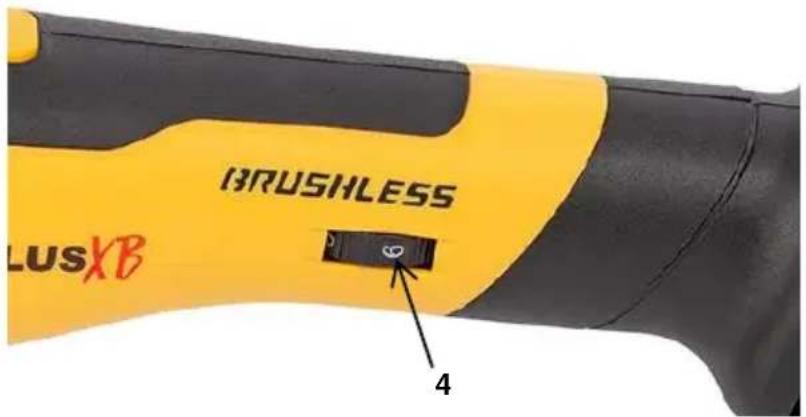
9.5 Speed adjusting (Fig. 4)
The tool can be set at 6-speed adjustment positions. The "1" position indicates the lowest and the "6" position indicates the highest speed, you can adjust different speed by turning the speed control dial (4) from "1" to "6" position. The operator may have to vary the speed to optimize working efficiency.
9.6 Application tips
9.6.1 Selecting the Application Tool/Accessory
| Accessory (Fig. 5) | Material |
| A: 32 mm saw blade | Wooden materials, plastic, metal, gypsum and other soft materials. |
| B: 52 mm Scraping blade | Suitable for the removal of paint and carpet. |
| C: Triangular sanding pad | Sanding pad for 90x90x90 sized sanding papers. |
| D: Triangular sanding papers | Sanding papers in different grains:4x 1203x 1803x 240 |
9.6.2 Sawing

Use undamaged faultless saw blades only. Deformed, blunt saw blades or saw blades that are otherwise damaged can break.

Plunge cuts may only be applied to soft materials, such as wood, gypsum plaster boards, etc.!
Use only undamaged saw blades that are in perfect condition. Bent or dull saw blades can break, negatively influence the cut, or lead to kickback. Plunge cuts may only be applied to soft materials, such as wood, gypsum board, etc.
9.6.3 Cutting
Use a flush cutting saw blade (or "e-cut blade") for making precise cuts in tight areas, close to edges, plunge or flush to a surface. It is important not to force the tool during the flush cutting. If you are experiencing a strong vibration in your hand during the cut, it indicates too much pressure on the tool. Back off on the pressure and let the speed of tool do the work.
9.6.4 Sanding
- The material removal rate and sanding result are primarily determined by the choice of sanding sheet, the preselected orbital stroke rate level and the contact pressure. Only immaculate sanding sheets achieve good sanding performance and make the power tool last longer.
- Pay attention to apply uniform sanding pressure; this increases the working life of the sanding sheets.
- Intensifying the sanding pressure does not lead to an increase of the sanding capacity, but to increased wear of the machine and the sanding sheet.
- Work with the complete surface of the sandpaper, not only with the tip.
9.6.5 Scraping
- Scraper blades are suitable for removing vinyl, varnish, paint layers, carpeting, caulk and other adhesives.
- Using a rigid scraper blade to remove harder materials, such as vinyl flooring, carpeting and tile adhesives in a large area.
- Using a flexible scraper blade (not included) to remove softer material such as caulk.
10 CLEANING AND MAINTENANCE
- Keep the ventilation slots of the machine clean to prevent overheating of the engine.
- Regularly clean the machine housing with a soft cloth, preferably after each use.
- Keep the ventilation slots free from dust and dirt.
- If the dirt does not come off use a soft cloth moistened with soapy water.
- Never use solvents such as petrol, alcohol, ammonia water, etc. These solvents may damage the plastic parts.

Make sure no water can reach the inside of the power tool!
11 TECHNICAL DETAILS
| Model nr. | POWXB40020 |
| Voltage | 20 V DC |
| Number of speed settings | 6 |
| No load speed | 12000-19500 /min-1 |
12 NOISE
Noise emission values measured according to relevant standard. (K=3)
| Acoustic pressure level LpA | 82 dB(A) |
| Acoustic power level LwA | 93 dB(A) |

ATTENTION! Wear hearing protection when sound pressure is over 85 dB(A).
aw (Vibration)
4,4 m/s²
K = 1.5 ~m / s^2
13 WARRANTY
- This product is warranted for a 36-month period effective from the date of purchase by the first user.
- This warranty covers all material or production flaws excluding : batteries, chargers, defective parts subject to normal wear & tear such as bearings, brushes, cables, and plugs, or accessories such as drills, drill bits, saw blades, etc. ; damage or defects resulting from maltreatment, accidents or alterations; nor the cost of transportation.
- Damage and/or defects resulting from inappropriate use also do not fall under the warranty provisions.
- We also disclaim all liability for any bodily injury resulting from inappropriate use of the tool.
- Repairs may only be carried out by an authorised customer service centre for Powerplus tools.
- You can always obtain more information at the number 00 32 3 292 92 90.
- Any transportation costs shall always be borne by the customer, unless agreed otherwise in writing.
- At the same time, no claim can be made on the warranty if the damage of the device is the result of negligent maintenance or overload.
- Definitely excluded from the warranty is damage resulting from fluid permeation, excessive dust penetration, intentional damage (on purpose or by gross carelessness), inappropriate usage (use for purposes for which the device is not suitable), incompetent usage (e.g. not following the instructions given in the manual), inexpert assembly, lightning strike, erroneous net voltage. This list is not exhaustive.
- Acceptance of claims under warranty can never lead to the prolongation of the warranty period nor commencement of a new warranty period in case of a device replacement.
- Devices or parts which are replaced under the warranty therefore remain the property of Varo NV.
- We reserve the right to reject a claim whenever the purchase cannot be verified or when it is clear that the product has not been properly maintained. (Clean ventilation slots, carbon brushes serviced regularly, etc.).
- Your purchase receipt must be kept as proof of date of purchase.
- Your appliance must be returned undismantled to your dealer in an acceptably clean state, (in its original blow-moulded case if applicable to the unit), accompanied by proof of purchase.
14 ENVIRONMENT
Should your appliance need replacement after extended use, do not dispose of it with the household refuse, but in an environmentally safe way.
Waste produced by electrical machine items should not be handled like normal household rubbish. Please recycle where recycle facilities exist. Check with your Local Authority or retailer for recycling advice.
15 DECLARATION OF CONFORMITY


VARO – Vic. Van Rompuy N.V. - Joseph Van Instraat 9 - BE2500 Lier - BELGIUM, declares that,
Product: Multi-Oscillating tool – Battery operated
Trade mark: PowerPlus
Model: POWXB40020
is in conformity with the essential requirements and other relevant provisions of the applicable European Directives, based on the application of European harmonized standards. Any unauthorized modification of the apparatus voids this declaration.
European Directives (including, if applicable, their amendments up to the date of signature):
2011/65/EU
2014/30/EU
2006/42/EC
European harmonized standards (including, if applicable, their amendments up to the date of signature):
EN62841-1: 2015
EN62841-2-4:2014
EN55014-1:2017
EN55014-2:2015
Keeper of the Technical Documentation: Philippe Vankerkhove, VARO – Vic. Van Rompuy N.V.
The undersigned acts on behalf of the company CEO,
natural_image
Simple hand-drawn sketch of a rounded rectangular shape with a small circle on top (no text or symbols)Philippe Vankerkhove
Certification Manager
21/01/2021, Lier - Belgium
1 EINSATZBEREICH 3
natural_image
Simple hand-drawn outline of a rounded rectangular shape with no text or symbolsPhilippe Vankerkhove
21/01/2021, Lier - Belgium
1 APLICACIÓN ....3
21/01/2021, Lier - Belgium
1 APPLICAZIONE 3
natural_image
Simple hand-drawn sketch of a rounded rectangular shape with a small circular mark on top (no text or symbols)Philippe Vankerkhove
Certification Manager
21/01/2021, Lier - Belgium
1 APLICACÃO....3
natural_image
Simple hand-drawn sketch of a rounded rectangle with a small circle on top (no text or symbols)Philippe Vankerkhove Assuntos Regulamentares – Gestor de Conformidade 21/01/2021, Lier - Belgium
1 BRUKSOMRÅDE....3
2 BESKRIVELSE (FIG. A) 3
3 PAKKENS INNHOLD....3
4 SYMBOLFORKLARING .... 4
5 GENERELLE SIKKERHETSADVARSLER 4
natural_image
Simple line drawing of a curved shape with a circular top and a small dot inside (no text or symbols)Philippe Vankerkhove Regulatoriske saker - Samsvarsleder 21/01/2021, Lier - Belgium
1 ANVENDELSE 3
2 BESKRIVELSE (FIG. A) 3
3 MEDF∅LGENDE INDHOLD 3
4 SYMBOLER....4
5 GENERELLE SIKKERHEDSFORSKRIFTER ....4
5.1 Arbejdsområde 4
5.2 Elektrisk sikkerhed....4
5.3 Personlig sikkerhed....5
natural_image
Simple hand-drawn sketch of a rounded rectangular shape with a small circle on top (no text or symbols)Philippe Vankerkhove
Regulatory Affairs (afdelingen for juridiske anliggender) – Compliance Manager 21/01/2021, Lier - Belgium
1 ANVÄNDNINGSOMRÅDE 3
2 BESKRIVNING (FIG. A) 3
3 FÖRPACKNINGSINNEHÅLL 3
4 SYMBOLER....4
5 ALLMÄNNA SÄKERHETSANVISNINGAR FÖR ELEKTRISKA VERKTYG....4
3 FÖRPACKNINGSINNEHÅLL
natural_image
Simple hand-drawn sketch of a rounded rectangular shape with a circular top and a small dot inside (no text or symbols)Philippe Vankerkhove
natural_image
Simple line drawing of a curved shape with a small circle at the top (no text or symbols)Philippe Vankerkhove
21/01/2021, Lier - Belgium
1 ΕΦΑΡΜΟΓΗ 3
2 ПЕРИГРАФН (ЕИК. А)......3
natural_image
Simple hand-drawn sketch of a rounded rectangular shape with a circular top and curved bottom (no text or symbols)natural_image
Simple hand-drawn sketch of a rounded rectangular shape with a circular top and a small circle inside (no text or symbols)Philippe Vankerkhove
21/01/2021, Lier - Belgium
1 PRIMENA 3
2 OPIS (SL. A)....3
3 SPISAK SADRŽAJA PAKOVANJA 3
4 SIMBOLI....4
5 OPŠTA BEZBEDNOSNA UPUTSTVA ZA ELEKTRIČNE ALATE 4
5.1 Radna oblast....4
9.2.1 Indikatori punjača (Sl. 3)....9
9.3 Indikator kapaciteta baterije (Sl.3a) 10
9.2.1 Indikatori punjača (Sl. 3)
natural_image
Simple hand-drawn sketch of a rounded rectangular shape with a small circular mark on top (no text or symbols)Philippe Vankerkhove
Menadžer za sertifikaciju
21/01/2021, Lier - Belgium
natural_image
Simple hand-drawn sketch of a rounded rectangular shape with a small circular top and a small dot inside (no text or symbols)Philippe Vankerkhove
21/01/2021, Lier - Belgium
1 POUŽÍVANIE....3
2 POPIS (OBR. A)....3
3 OBSAH BALENIA....3
4 SYMBOLY 4
5 VŠEOBECNÉ BEZPEČNOSTNÉ VAROVANIA PRE ELEKTRICKÉ NÁRADIE ....4
5.1 Pracovná plocha....4
natural_image
Simple hand-drawn sketch of a rounded rectangular shape with a small circle on top (no text or symbols)Philippe Vankerkhove
Regulačné záležitosti – Compliance Manager
21/01/2021, Lier - Belgium
1 DOMENII DE UTILIZARE....3
2 DOMENII DE UTILIZARE (FIG. A) 3
3 CONTINUTUL PACHETULUI .... 3
4 SIMBOLURI....4
5 AVERTISMENTE GENERALE DE SIGURANTĂ PRIVIND APARATUL ELECTRIC....4
5.1 Zona de lucru....4
natural_image
Simple line drawing of a rounded rectangular shape with a circular top and a small dot inside (no text or symbols)Philippe Vankerkhove
Divizia de reglementare – Director de conformitate
21/01/2021, Lier - Belgium
1 ZASTOSOWANIE ....3
2 OPIS (RYC. A)....3
3 LISTA ELEMENTÓW W OPAKOWANIU 3
4 SYMBOLE 4
5 OGÓLNE ZASADY KORZYSTANIA Z ELEKTRONARZĘDZI .....4
7.1 Akumulatory....8
7.2 Ładowarki....8
8 MONTAZ....8
natural_image
Simple hand-drawn sketch of a rounded rectangular shape with a small circular mark on top (no text or symbols)Philippe Vankerkhove
21/01/2021, Lier - Belgium
1 ALKALMAZÁS....3
2 LEÍRÁS (A ÁBRA) 3
3 CSOMAGOLÁS TARTALMA....3
4 JELZÉSEK 4
5 ÁLTALÁNOS BIZTONSÁGI SZABÁLYOK....4
natural_image
Simple hand-drawn sketch of a rounded rectangle with a small circle on top (no text or symbols)Philippe Vankerkhove
21/01/2021, Lier - Belgium
natural_image
Simple hand-drawn sketch of a rounded rectangular shape with a small circular mark on top (no text or symbols)Philippe Vankerkhove
21/01/2021, Lier - Belgium
natural_image
Simple hand-drawn sketch of a rounded rectangular shape with a small circle on top (no text or symbols)Philippe Vankerkhove
21/01/2021, Lier - Belgium

natural_image
Yellow and black power tool with 'HUSALENS' branding, shown against white background (no text or symbols on device body)
WWW.VARO.COM
DESIGNED AND MARKETED BY VARO
©copyright by varo
VARO - VIC. VAN ROMPUY nv
JOSEPH VAN INSTRAAT 9 - 2500 LIER - BELGIUM
OFFICES: