EasyManual
 H10 Pro - Vacuum Cleaner JIMMY - Free user manual and instructions
Find the device manual for free H10 Pro JIMMY in PDF.



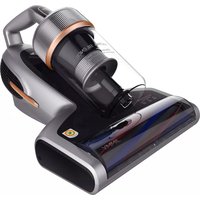
Download the instructions for your Vacuum Cleaner in PDF format for free! Find your manual H10 Pro - JIMMY and take your electronic device back in hand. On this page are published all the documents necessary for the use of your device. H10 Pro by JIMMY.
USER MANUAL H10 Pro JIMMY
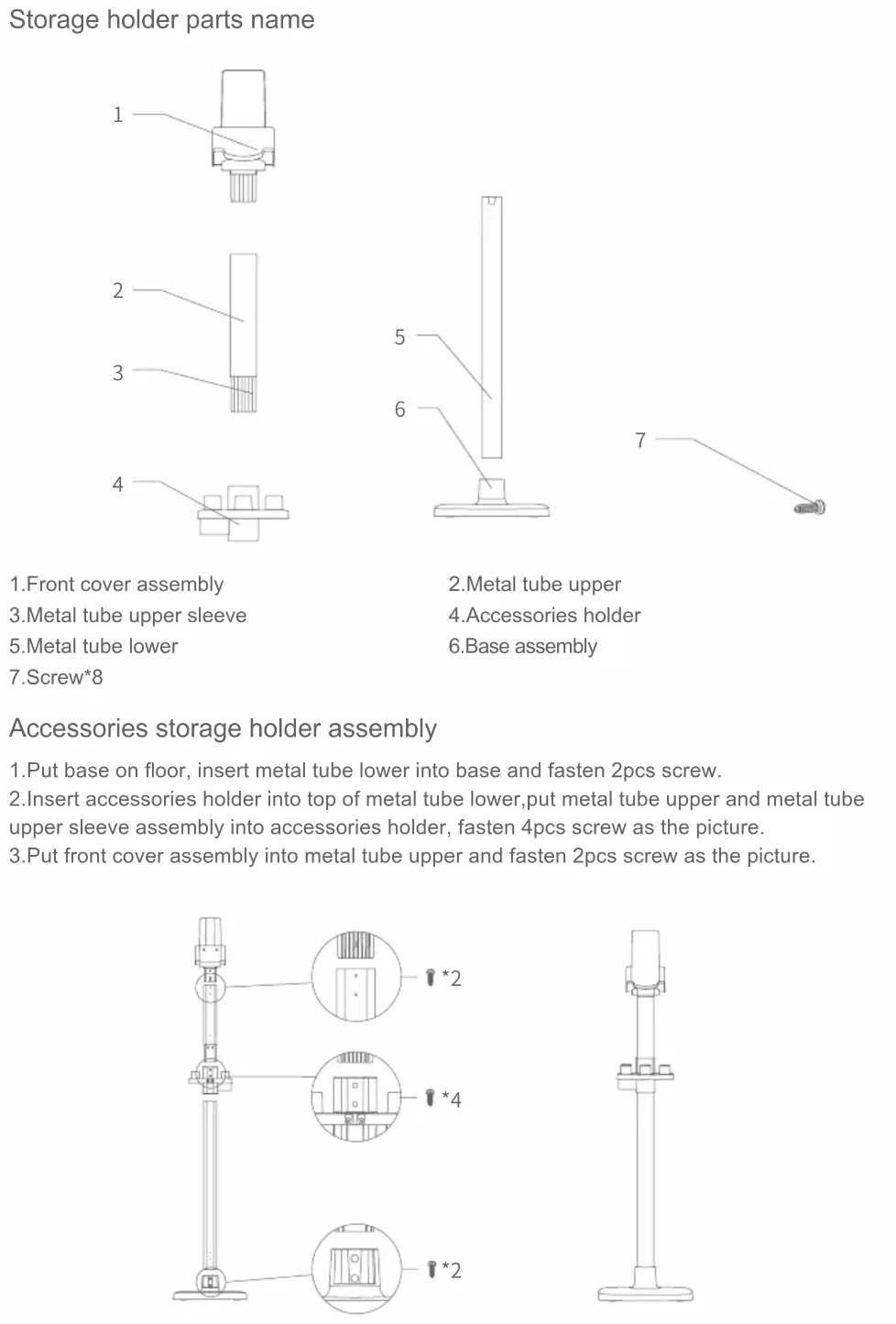
Storage holder parts name Accessories storage holder assembly 1.Put base on oor, insert metal tube lower into base and fasten 2pcs screw. 2.Insert accessories holder into top of metal tube lower,put metal tube upper and metal tube upper sleeve assembly into accessories holder, fasten 4pcs screw as the picture. 3.Put front cover assembly into metal tube upper and fasten 2pcs screw as the picture.4 Part name Handheld vacuum Electric oor head Flexible metal tube Battery pack Crevice tool Quantity 1 1 1 1 1 Part name Soft brush Connector Upholstery tool Stretch hose Carpet brushroll Quantity 1 1 1 1 1 Part name Electric mattress head Adapter Front cover assembly Metal tube upper Accessories holder Quantity 1 1 1 1 1 Part name Metal tube lower Base assembly Screw User manual Quantity 1 1 8 1 Packing List Machine assembly Assemble and disassemble electric oor head with exible metal tube Hold the oor head with left hand, use right hand to insert the metal tube vertically into oor head, align with the conductive needle, press the tube until a “click” sound is heard. Attention:Keep the handle and oor head in the same direction, conductive needle shall align with the socket. When packing, storing or cleaning, if the electric oor head needs to be removed, press the brush release button and pull the metal tube in the direction shown in the picture to take out oor head. Assemble battery pack with handheld vacuum Hold battery pack, align with guiding slot on handheld vacuum body, slide in battery pack in the arrow direction in the picture. And then pull the battery pack after installation to make sure it does not get loose. Attention: when the vacuum cleaner is long idled, please remove the battery, pack the machine and store it in a cool and dry place, avoid direct sunlight or humid environment.
Assemble oor head and metal tube assembly with handheld vacuum First, assemble oor head and metal tube according to the method of assembling electric oor head with metal tube. Then, as shown by the arrow, align the conductive needle of the metal tube with the coupler of the handheld vacuum suction nozzle, push metal tube upward until a“click” sound is heard. Assembly of accessories For the convenience of use, this product is specially equipped with some accessories for the hand-held part of the vacuum cleaner. When you use the handheld vacuum cleaner alone, you can directly connect the accessories according to your needs or connect the accessories through the stretch hose.
H10 Pro Electric mattress brush Upholstery tool Crevice tool Dusting brush Stretch hose Connector Carpet brushroll model Name6 Accessories Connection List
Use of vacuum cleaner Charging Attention: 1.When use the product for rst time, battery power is not full. Need to charge the vacuum before using. 2.If power cord is damaged, to avoid danger, it must be replaced by a professional people of the manufacturer, repairing agent or similar department. The product can be charged in two ways: 1.Charge the battery pack separately: Plug one end of charger to battery pack connector and another end of charger to power socket to charge the battery directly. In this way when under charging the indicator on the side of battery pack is in red and turns green when charging is completed.7 On/off button Mode button LCD screen
2.Charge the battery on machine: lug one end of charger to battery pack connector and another end of charger to power socket to charge the battery when battery pack is assembled in the vacuum cleaner. Machine LCD screen will show battery power percentage. When charging is completed it will show 100% as the pictures shows. Attention: 1.When battery power is below ≤20%, machine will have voice reminding. If machine is working in Max mode in this status, it will change to Eco mode automatically. When battery power runs off, machine will turn off after LCD screen and voices reminds. 2.If vacuum cleaner is long idled, charge the battery every three months to avoid battery failure. Use of handheld vacuum and LCD screen contents Take the vacuum cleaner off the storage holder, press the on/off button to start or stop the vacuum cleaner. Mode button can adjust working mode. When machine is turned on, it works in Auto mode, press the mode button to switch to the sequence of Turbo- Max - Eco-Auto mode. During mode switch the mode will be displayed in LCD screen and there is voice reminding. Middle of LCD screen displays product run time left in current mode. When mode is changed, left run time will also change accordingly. When product works in Max mode and battery power drops below 20%, to extend product run time, product will automatically switch from Max to Eco mode. After battery is charged to higher than 20% power, product can work in Max mode. When the product is working in Auto mode, it will adjust working power basing on the dust content and the oor type it detects, in order to achieve higher cleaning efciency. Under Auto mode, LCD screen display Auto regardless how high the working power is.
The product is equipped with dust content sensor. On LCD screen bottom there are 4 round light circles to display the dust content of 4 kinds of particles with diameter of 10μm-60μm/60μm- 180μm/180-500μm/>500μm respectively. The circles for different dust particle size are in four different colours: red, yellow, blue and green
As dust content decreases from high to low, the colour ll in the circles accordingly . Cleanness of the cleaning surface can be visually displayed through LCD screen. Colour lls in circles when dust content increases Use of exible metal tube The exible metal tube has two modes: vertical and bending. The vertical mode is equivalent to the normal metal tube. The bending mode can be used for cleaning under the sofa, table or bed, etc. When the bending mode is needed,press the release button and the metal tube can achieve 0-90°bending angle. Use of electric oor head Electric oor head is suitable to clean all kinds of oor like hard oor, tile and carpet etc. Product comes with an extra carpet brushroll can be replaced to the oor head to deep clean carpet. Attention: During the operation of the electric oor head, if there is a large volume of foreign matter inhaled or too much fiber wound, or even a child in the play of the machine mistakenly put his hand into the nozzle, resulting in the brushroll abnormal stop, the electric oor head will stop working, in order to protect personal safety and brush motor. Use of accessories Crevice tool: suitable for cleaning crevice, door or window corners and other narrow gaps. Upholstery tool: suitable for cleaning closet, windowsill, sofa and table surface. Red Yellow Blue Green9 Soft brush: suitable for cleaning easy to scratch furniture like bookshelf, handicraft etc. Stretch hose: suitable for connecting with other tools to clean hard to reach areas. Electric mattress head: Suitable for sofa and bed mattress. The brushroll beats out and then cleans the dust mite and allergen from deep sofa or bed. Connector: Can be connected to other tools and bend to different angle to clean dust on top of high cabinets or dust on the roof. Cleaning and Replacing Parts Attention: 1.HEPA filter is available for sale from local vacuum cleaner distributors. 2.It is recommended to clean the dust cup after each use; When the dust cup is full or the HEPA filter is clogged, it needs to be cleaned and replaced if necessary. 3.Electric floor head brushroll might be entangled with hair after long time use. It needs to be cleaned in time to keep the vacuum working moreefficiently. Clean dust cup and filters 1.Press down the dust cup bottom cover to open dust cup bottom cover. Fig
2.Dump dust into trash can.Fig
3.Hold dust cup lid and rotate anti-clockwise, remove cyclone assembly from dust cup for cleaning.Fig
4.Rotate cyclone anti-clockwise, disassemble cyclone to clean.Fig
5.Hold HEPA lid and rotate anti-clockwise, remove HEPA assembly from top cover and then rotate HEPA lid to remove HPEA from the lid for cleaning.Fig
6.If HEPA needs wash, hold the HEPA and rotate clockwise, remove it from HEPA lid for washing. HEPA needs completely dry before reuse.Fig
7. After cleaning, assemble the parts back in the
opposite sequence of disassembly.
Clean brushroll 1.Move the brushroll release button along the arrow direction remove side cover. 2.Remove one end of the brushroll and take it out from nozzle for cleaning. 3.After cleaning or replacing brushroll, assemble it back in opposite sequence of disassembly. Vacuum cleaner storage Battery pack disassembly Press the battery release button, pull battery pack out backward and place the battery in a plastic bag, then store it in a dry place. Product storage When the vacuum is long idled, remove the battery, pack the machine and store it in a cool and dry place, do not put in direct sunlight or humid environment. Brushroll release button Battery release button
Safety Notes This vacuum cleaner is designed for home use. Do not use it for commercial or other purposes. Please read this instruction manual carefully before use, properly save and store it for future use. Do not put the vacuum close to re or other high temperature facility. Do not use or store the machine under extreme bad conditions, for example, extreme temperature. It is recommended to use it indoors between the temperature of 5 °C to 40 °C. Store the machine in dry place and avoid direct sunlight. Fully charge the battery before rst use or after long storage. Before using the vacuum, make sure brushroll is assembled, otherwise, it may lead to motor fan blockage, causing motor burn out. Please do not use the vacuum to pick up detergent, oil, glass slag, needle, cigarette ash, wet dust, water, matches, etc. Please do not use the vacuum to pick up tiny particles such as cement,gypsum powder, wall powder, or large objects such as paper balls, otherwise it will cause malfunctions such as blockage and motor burnout. Avoid blockage to air inlet or brushroll, it may cause motor failure. Do not put your hand or foot into oorhead inlet to avoid body hurt. Do not pour or splash water or other liquids into the machine to avoid short circuit to burn out the machine. If the brushroll is not working, please check whether the brushroll is entangled with hair or other long ber, clean it in time. When storing the machine for a long time, ensure that the battery is fully charged before storage and charge the machine at least every three months. Unplug the charger to clean or repair the machine. Hold the charger when plugging or unplugging it, and do not pull the charging cord. Use a dry cloth to clean the machine. Liquids like gasoline, alcohol, lacquer thinner will cause crack or colour fading and cannot be used. If the machine is not working after fully charged, it must be checked and repaired in our designated ofce, please do not dismantle the machine on your own.12 Trouble Shooting Please check the following issues before sending to designated repair agent. Discarded machine contains batteries. They should be recycled safely. Do not discard them randomly. If there is damage on power cord, to avoid danger, it should be replaced or repaired by manufacturer
repairing agency or professional person. This appliance can be used by children aged from 8 years and above and persons with reduced physical, sensory or mental capabilities or lack of experience and knowledge if they have been given supervision or instruction concerning use of the appliance in a safe way and understand the hazards involved. The appliance is only to be used with the power supply unit provided. Trouble Possible Causes Solutions Motor does not work Battery has no power Charge the vacuum cleaner Metal tube,oorhead, battery pack and vaccum cleaner is not assembled correctly Check the accessories are assembled correctly to the vacuum cleaner Suction drops Dust cup full Clean dust cup Filter blocked Clean or replace lter Floorhead air path blocked Clean oorhead air path Short working time after charging Machine not fully charged Follow instruction manual to fully charge the battery Battery old aging New batteries can be bought from local distributor Dust content indicator is always red Dust sensor covered by dust Clean the dust on the dust sensor which is located in the suction inlet of the handheld vacuum cleaner13 Warning reminding 1.When air path is clogged or dust cup is full, LCD screen will remind to clean dust cup and filter as below pictures. There is also voice reminding.In this status, if product is working in Max mode, it will automatically switch to Eco mode until the clog is cleaned. 2.If floor head needs cleaning, LCD screen will display brushroll and air patch cleaning reminding.There is also voice reminding. Continue to use will activate brushroll stall protection and product will stop working. Product will resume working after blockage is cleaned. 3.If the dust content circles on LCD screen are always red, dust sensor might be covered by dust, please clean the dust on the dust sensor which is located in the suction inlet of the handheld vacuum cleaner. 4.When there is electric components defect,which needs professional after service person for instruction or repairing, LCD screen will display the defect warning with error code of F1 to F8. Please contact after service of local agent and provide error code.
2pcs Dust sensor14 Defect of F1 to F8 is as following: Attention:If any other failures occurred, which need professional tools, in order to avoid danger, the machine must be repaired or replaced by manufacturer, other maintenance offices or professionals from similar offices. Technical specication Code Defect Solutions F1 Battery pack nickel strip broken Replace or repair battery pack F2 Charger defect Replace charger F3 Vacuum motor short circuit Replace vacuum motor F4 Battery cell defect Replace or repair battery pack
Vacuum motor 1st over current protection Replace vacuum motor
Vacuum motor 2nd over current protection Replace vacuum motor
PCB defect or PCB leadwire loose Replace PCB or PCB leadwire F8 Battery pack PCB defect Replace or repair battery pack Model No H10 Pro Rated voltage 28.8V Rated power 650W Adaptor Input Voltage 100-240V ~ 50-60 Hz 0.8A Adaptor Output Voltage 34.2V 0.6A Electric Floorhead Model No T-EB110VA Electric oor head rated power 50W Battery pack capacity 3000mAh Charge time 4-5h15 Disposal The machine, accessories and packaging should be sorted for environmental-friendly recycling.Do not dispose of the machine into household waste! Manufacturer Kingclean Electric Co., Ltd Address No.1 Xiangyang Road, Suzhou New District, Jiangsu Province 215009, China Manufacturer Information Circuit Diagram PCB assemblyLithium battery PCB Display screen assemblyInfrared transmitter PCBDisplay PCB assemblyVacuum motor Floor head motorInfrared receiving PCB Lithium batterySpeaker louderCharger
M16 Only for EC countries: According to the European Guideline 2012/19/EU, machine that are no longer usable, and according to the European Guideline 2006/66/EC, defective or used battery packs/batteries, must be collected separately and disposed of in an environmentally correct manner. Battery packs/batteries: Integrated batteries may only be removed for disposal by qualied personnel. Opening the housing shell can damage or destroy the machine. Do not dispose of battery packs/batteries into household waste, re or water. Battery packs/batteries should, if possible, be discharged, collected, recycled or disposed of in an environmental-friendly manner. Subject to change without notice. Warranty Information This product enjoys two years warranty from the date of purchase. Excluded from the guarantee is normal wear, commercial use, alterations to the appliance as purchased, cleaning activities, consequences of improper use or damage by the purchaser or a third person, damage that can be attributed to external circumstances.17 Elementy produktu 1.Przycisk zwalniający pojemnik na akumulator