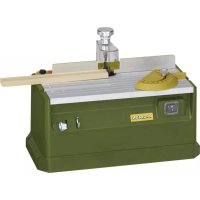
MP 300 - Plane PROXXON - Free user manual and instructions
Find the device manual for free MP 300 PROXXON in PDF.


| Product type | Profile planer (micro router) |
| Brand | Proxxon |
| Model | MP 300 |
| Power supply | 220-240 V, 50/60 Hz, ~ |
| Power | 100 W |
| Operating speed | 25,000 rpm |
| Dimensions (L x W x H) | 340 x 160 x 140 mm (approx.) |
| Weight | 2.5 kg (approx.) |
| Tool shank diameter | Up to 3.2 mm |
| Tool height/thickness | 40 mm |
| Noise level | 104 dB(A) |
| Main functions | Profiling, grooving, chamfering, trimming, cutting |
| Height adjustment of the router bit | Graduated knob, 1 turn = 1 mm, graduation 0.2 mm |
| Longitudinal stop | Removable and adjustable, usable on both sides of the router bit |
| Stop square | Mounted in a groove, adjustable |
| Transparent guard | Adjustable in height, also serves as a work piece hold-down |
| Dust extraction | Rubber dust extraction nozzle (vacuum cleaner connection) |
| Safety | Transparent guard mandatory, wear hearing protection and safety goggles |
| Maintenance and cleaning | Clean after each use with a vacuum cleaner or soft cloth |
| Spare parts | Use only original Proxxon spare parts |
| Repairability | Defective parts must be replaced by a professional |
| General information | Use only in dry rooms. Do not dispose of with household waste. |
Frequently Asked Questions - MP 300 PROXXON
User questions about MP 300 PROXXON
0 question about this device. Answer the ones you know or ask your own.
Ask a new question about this device
Download the instructions for your Plane in PDF format for free! Find your manual MP 300 - PROXXON and take your electronic device back in hand. On this page are published all the documents necessary for the use of your device. MP 300 by PROXXON.
USER MANUAL MP 300 PROXXON
natural_image
3D rendering of a mechanical device with control panel and buttons (no visible text or symbols)Deutsch
Fig.1a
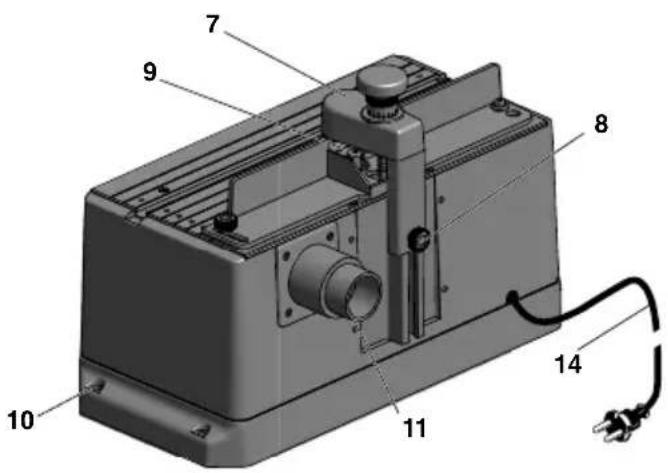
Fig.1b
natural_image
Technical line drawing of a mechanical device with hands operating it, no visible text or symbolsFig.2
natural_image
Mechanical assembly diagram showing a threaded pipe inserted into a housing component (no text or symbols visible)Fig.2b
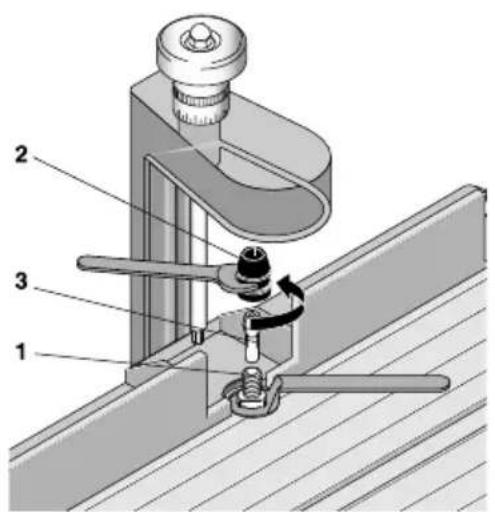
Fig.3aFig.3b
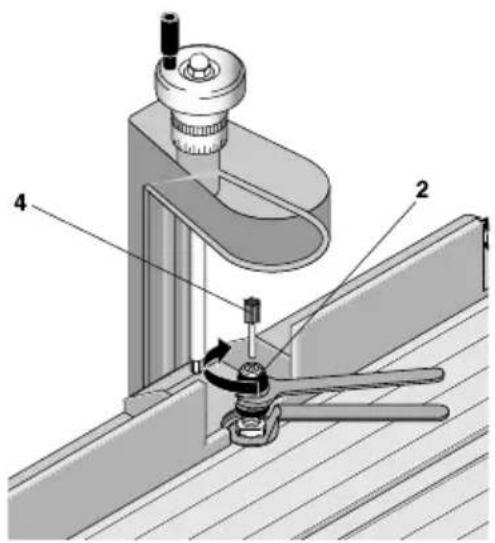
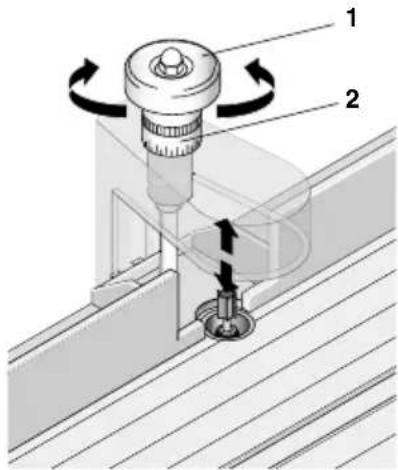
Fig.4
natural_image
3D rendered mechanical component with lever and mounting bracket (no visible text or symbols)Fig.5a
natural_image
3D rendered mechanical component with mounting flanges and a central shaft (no text or symbols visible)Fig.5b
PROXXONwillnotbeliebelforthesafefunction ofthedevicefor:
- handlingthatdoesnotcomplywiththeusual intendeduse,
- otherapplicationusesthatarenotstatedinthe instructions,
•disregardofthesafetyregulations,
Youwillnothaveanywarrantyclaimsfor:
•operatingerrors,
- lackofmaintenance.
Foryoursafety, please comply with the safety regulations without fail. Only use original PROXXON spare parts. All rights reserved for further developments in the course of technical progress. Wewish you much success with the device.
Safetyregulations:
Wearpersonalprotectiveequipmentandalwayswearprotectivegoggles.
Dependingonthetypeanduseoftheelectrical device, wearpersonalprotectiveequipment suchasadustmask, non-slipsafetyshoes, a helmetorhearingprotectiontoreducetheriskof injuries. Wearabreathingmaskiftheworkyou dogeneratesdust.
Ifdustextractorsandcollectorscanbeinstalled,thenensurethattheseareconnected andusedcorrectly.
The use of these devices reduce the hazards that dust poses.
Generalview(fig.1):
1.Housing
2.Table
3.Limitstop
4. Handwheel for profiling height adjustment
5. On-offswitch
6.Lockingscrewforlimitstop
7.Guard
8. Lockingscrewfortoolprotection
9.Profiler
10.Fasteningbores
11. S uctionconnection
12.Spannerholder
13. Anglestop
14.Mainscable
Descriptionofthemachine:
Forprofiling, slotting, chamfering, trimming, separating, etc. Your MP400 enables, e.g., precise machining of sides and long section such as for doors, flaps and housing parts.
Theprofilingtoolisheight-adjustable: Onadovetailguide, thecarriagewiththedrive unitcanbesetpreciselywiththehelpofthe scaledhandwheel(onerevolutionisa1mm heightdifference,i.e.,onescalegraduationline is0.05mm).Whileworking,thishelpsyouto slowlyandveryaccurately“feel”yourwaytowardstherequiredprofiledepthasneeded.The spindleismanufacturedpreciselyandhasa doubleballbearing.
Thesee-throughguardcanbeadjustedin height,thusmakingitpossibletoadjustittothe workpiecethickness;italsofunctionsasaholddown.
Additionalflexibilityisofferedbyananglestop andalongitudinalstop. Thiscanbeusedoneithersideoftheprofilingtoolontheworktable. Thismakesitpossibletomachinealargewidth areaoftheworkpiece. Alsoidealforbroader stripsorboards.
Scopeofdelivery:
1 pc. Profiling device
2 pcs. Spanners
1 pc. Suction connection
1 pc. Angle stop
3 pc. Collets
TechnicalData:
Voltage: 220 - 240 V, 50 Hz, \~
Capacity: 100 watt 10 min
Working speed: 25000 rpm
Dimensions: 340 x 160 x 180 mm
Weight: approx. 2.6 kg
Tool shank diameter: up to 3.2 mm
Sound power level: 104 dB(A)
Work piece
height/thickness: 40 mm
You must wear hearing protection while working!
Only for use in dry rooms
Do not dispose of the electrical device in the household waste!


Operation:
Beforework:
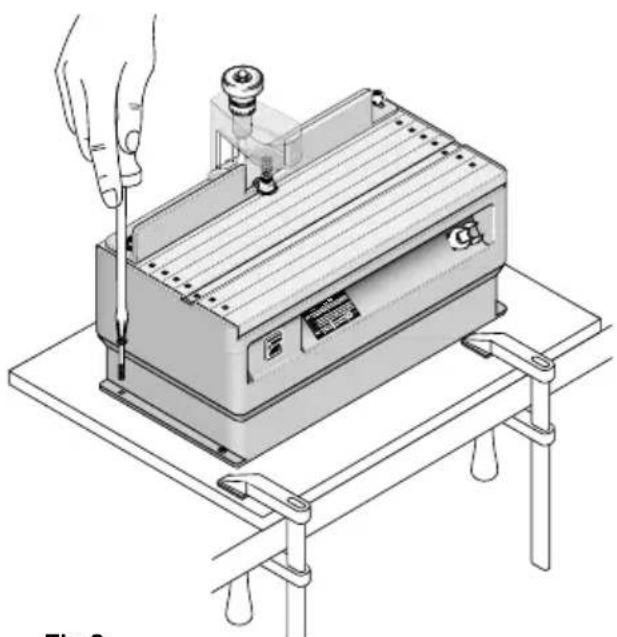
Fasteningtheprofilingdevice(Fig.2):
Before beginning work, fasten the profiling device to a sturdy wood board with the matching screws.
There are drill holes in the housing bottom of the device. The wood board can then be fixed to a table using screw clamps, for example.
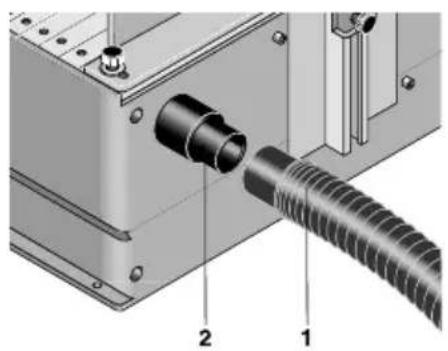
Connectingthevacuumcleaner(Fig.2b):
Caution!
Connectthedustextractor!
It is recommended to always work with dust extraction.
Insert the vacuum hose 1 of the vacuum cleaner into the connecting piece 2.
Insertingandreplacingtheprofilingtool:
Caution!
For all work described below, it is advisable to position the height-adjustable safety mechanism (see Fig. 1, item 7) all the way up. Disconnect the mains plug!
Insertingtheprofilingtool:
Caution!
Make sure that the profiler is suitable for speeds up to 25,000 revolutions per minute.
- Hold the output shaft 1 (see Fig. 3a) with the included open-end spanner and use the other spanner to unscrew and remove the swivel nut 2.
- Insert the appropriate collet 3 into the opening of the shaft and screw the swivel nut back on, but do not tighten!
- Insert the matching profiler 4 (Fig 3b).
- Tighten the swivel nut as shown in Fig. 3b.
Replacingthetool:
- As shown in Fig. 3b, loosen the swivel nut, but do not unscrew it.
- Remove the profiler 4
- Insert a new profiler.
- Re-tighten the swivel nut
Caution!
Please note that the shank diameter must always correspond to the inside diameter of the collets! If the collet must be replaced for this reason, then proceed as previously described in “Inserting the profiling tool”.
Heightadjustment:
Before the profiling process, the height of the profiler must be adjusted. Turn the hand wheel 1 (Fig. 4) to do so.
Turn to the right: profiler moves up, turn to the left: profiler moves down.
Tpreciselyachievethedesireddepthforyour profile, thescalering2canbesettozero:
- Simplyturnthehandwheel1 tosettheprofilertoaheightwhereitjustbarelytouches theworkpiece.
- Hold the hand wheeland turn the zero position of the descalering to themarking on the profiling guard. There required profile depth can now be precisely set with the hand wheel in compliance with thenumerical values on the descalering.
Pleasealsonote:Onefullrevolutionofthehand wheelcorrespondstoatraversepathof1mm, twistingbyonegradationlinecausesaheight adjustmentof0.2mm!
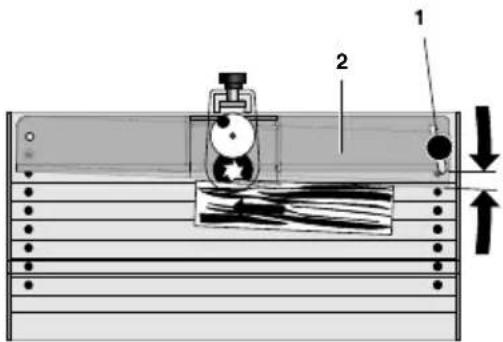
Adjustingthelongitudinalstop(Fig.5and6):
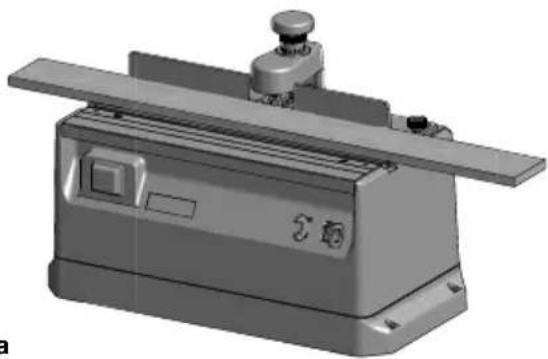
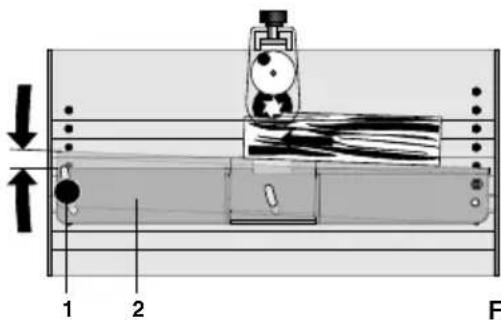
In the positions shown in Fig.5a, the limit stop is suitable for manufacturing chamfers or slots in the front side of strips.
- Loosenknurledscrew1
- Turnlongitudinalstop2tosetthedesired distance
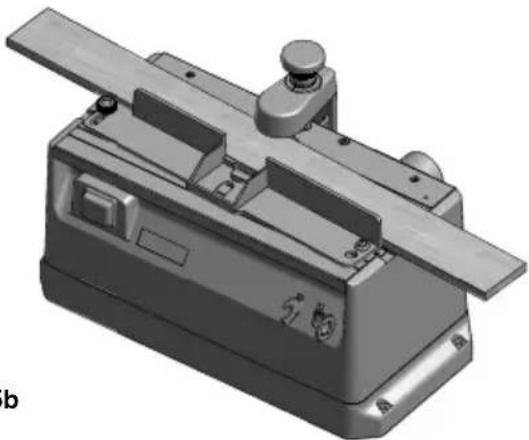
- Retightenknurledscrew If slotsorthelikewillbemadeinwiderstripsor boards, the longitudinalstopcanalsobemountedinthepositionasshowninFig.5b.
Tøremountthelongitudinalstop,pleaseproceed asfollows:
Caution!
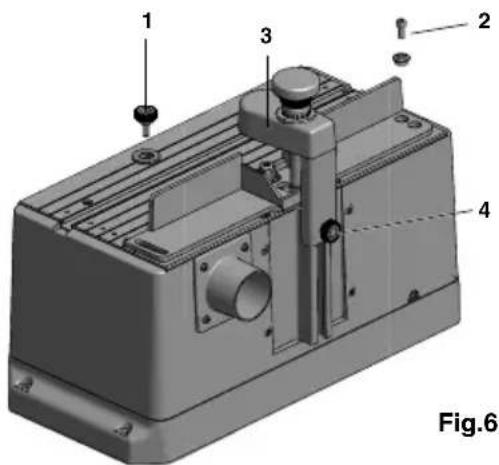
Itmaybenecessarytoremovetheguard(Item 3, Fig.6) forthis. Todoso, releaseknurled screw4 and pullup the guard to remove. When replacing the guard, makes sure you push the square out properly into other of the aluminium profiles that you correctly "hit" the hexagon socket head of the spindle in the work table of the profiling device with the spring-mounted hexagon at them millerguard!
- Completely unscrew the knurledscrew and the Allenscrew 1 and 2 (Fig.6) and remove together with the associated discs and the bushing.
- Roughlyestimatethedistancetotheprofiler; thelongitudinalstopcanbescrewedintothe matchingthreadedholesintheworktablein thepositionasshowninItem3.Donotfor-
getthebushingandthedisc.Donottighten theknurledscrewatfirst!
- Fineadjustmentmaynowbedoneasdescribedearlierunder“Adjustingthelongitudinalstop”.
Anglestop(Fig.1,Item13):
Thisstopcanbeinsertedintothedesignated slot;itcanbemovedbackandforthhere.Toadjust,releasetheknurlednutandturntheplastic element.
WorkingwiththeMicroprofiler:
Caution!
Alwayswearhearingprotectionwhenworking!
Caution!
Neverworkwithouttheprotectivedevice(Item7, Fig1)!
Theguardmustbeadjustedsothatitcoversthemillingcuttercloselyovertheworkpiece.Useextremecarewhenprofilingworkpiecesover5mmheight/thickness.
Neverreachintotherotatingtool!
Theworkpiecemustonlybesolongandwide sothatitstillfitsontheworktableandcanbe easilyguided(max.approx.200mmx500mm). Themaximumchipthicknessshouldneverexceed1mm.
Tomanufacturetheprofile, theworkpieceisallowedtoglidealongthelimitstopasshownin asinFig.5.
Youmustmakesurethattheprofilinginfeed(the removal)andthepushspeedarenottoogreat! Toomuchremovalandatoogreatpushspeed willleadtobadmillingresultsandstrainthemachinemechanicsunnecessarily. Instead,makeseveraloperatingpassesand readjustthelimitstoportheprofilingheightseveraltimes.
Caution!
It is recommended to always work with dust extraction. Arubbersuction connection at therear of the device has been provided for this purpose. You can easily connect a vacuum cleaner here.
Atiponthismatter:
When using the Proxxon CW-matic vacuum cleaner, manual switching on and off is no longer necessary. The CW-matic is fitted with an automatic control device which switches on and off automatically when the power to oil switched on and off.
Careandmaintenance:
Caution!
Havedefectiveindividualcomponentsreplaced byaspecialistonly.
Caution!
Alwaysunplugthemainsplugduringrepairand adjustingwork!
Theprofilingdeviceisprimarilymaintenance free.Foralongservicelife,youshouldclean yourdeviceaftereveryusewithavacuum cleanerorasoftcloth.Pleasealwaysusethe suctiondevice.
Disposal:
Donotdisposeofthedeviceinthehousehold waste! The device contains material that can be recycled. If you have questions concerning this topic, please contact your municipal disposal company or other appropriatemunicipal institutions.
EUconformitydeclaration
Nameandaddressofthemanufacturer:
PROXXONS.A.
6-10, Härebierg
L-6868Wecker
Devidedesignation:MICROProfilingdevice MP400
ArticleNo.:27050
Wedeclarethattheproductsdescribedmeetthe provisionsofthefollowingEUguidelines:
EUEMCDirective2004/108/EC
Appliedstandards:DINEN55014-1/02.2010
DINEN55014-2/06.2009
DINEN61000-3-2/03.2010
DINEN61000-3-3/06.2009
EUMachineryDirective2006/42/EC
Appliedstandards:DINEN61029-1/01.2010
12.03.2012
TheCEdocumentauthorizedagentisidentical withthesignatory.
Traductiondelanoticed'utilisation originaledelaMicrofraiseàprofiler MP400
Cherclient!
Misure:340x160x180mm
Peso:ca.2.6kg
Diametrocorpoutensile:finoa3,2mm
Livellodipotenzasonora:104dB(A)
PROXXON


- Deutsch
- Safetyregulations:
- Wearpersonalprotectiveequipmentandalwayswearprotectivegoggles.
- Generalview(fig.1):
- Descriptionofthemachine:
- Scopeofdelivery:
- TechnicalData:
- Operation:
- Beforework:
- Fasteningtheprofilingdevice(Fig.2):
- Connectingthevacuumcleaner(Fig.2b):
- Caution!
- Connectthedustextractor!
- Insertingandreplacingtheprofilingtool:
- Insertingtheprofilingtool:
- Replacingthetool:
- Heightadjustment:
- Adjustingthelongitudinalstop(Fig.5and6):
- Anglestop(Fig.1,Item13):
- WorkingwiththeMicroprofiler:
- Careandmaintenance:
- Disposal:
- EUconformitydeclaration
- EUEMCDirective2004/108/EC
- EUMachineryDirective2006/42/EC
- Traductiondelanoticed'utilisation originaledelaMicrofraiseàprofiler MP400
- PROXXON
Brand : PROXXON
Model : MP 300
Category : Plane