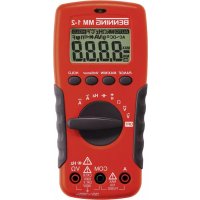
MM 12 - Multimeter BENNING - Free user manual and instructions
Find the device manual for free MM 12 BENNING in PDF.
User questions about MM 12 BENNING
0 question about this device. Answer the ones you know or ask your own.
Ask a new question about this device
Download the instructions for your Multimeter in PDF format for free! Find your manual MM 12 - BENNING and take your electronic device back in hand. On this page are published all the documents necessary for the use of your device. MM 12 by BENNING.

USER MANUAL MM 12 BENNING
D F E H I S 02/ 2011
Operating manual BENNING MM 1‑1/ 1‑2/ 1‑3 Digital multimeter for - DC voltage measurements - AC voltage measurements - DC current measurements (BENNING MM 1-2/ 1-3) - AC current measurements (BENNING MM 1-2/ 1-3) - resistance measurements - diode tests - continuity tests - capacity measurements (BENNING MM 1-2/ 1-3) - frequency measurements (BENNING MM 1-2/ 1-3) - temperature measurements (BENNING MM 1-3) Tableofcontents
10. Usingthefoldingsupportandthesuspensionxture
This operating manual is intended for - skilled electricians and - electrotechnically trained personnel. The BENNING MM 1-1/ 1-2/ 1-3 is intended for measurements under dry am- bient conditions. It must not be used in electrical circuits with a nominal voltage higher than 1000 V DC and 750 V AC (see section 6 „Ambient conditions“ for details). The following symbols are used in this operating manual and on the BENNING MM 1-1/ 1-2/ 1-3:
Warning of electrical danger! Indicates instructions which must be followed to avoid danger to persons.
Important, must comply with documentation! This symbol indicates that the information provided in the operating manual must be complied with in order to avoid risks.
This symbol on the BENNING MM 1-1/ 1-2/ 1-3 indicates that the BENNING MM 1-1/ 1-2/ 1-3 is equipped with protective insulation (protection class II). This symbol on the BENNING MM 1-2/ 1-3 indicates built-in fuses. This symbol appears on the display to indicate a discharged battery. This symbol designates the „diode test” range. This symbol designates the “continuity test“ eld. The buzzer is intended for acoustic result output. This symbol indicates the „capacity test“ eld. (DC) Direct voltage or current
(AC) Alternating voltage or current Ground (voltage against ground). 02/ 2011
The instrument is built and tested in accordance with DIN VDE 0411 Teil 1/ EN 61010-1 and has left the factory in perfectly safe technical condition. To preserve this condition and to ensure safe operation of the device, the user must observe the notes and warnings given in these instructions at all times.
Beforestartingthecurrentclampmultimeter,alwayscheckthe deviceaswellasallmeasuringleadsfordamages. If it can be assumed that safe operation is no longer possible, switch the device off immediately and secure it against unintended operation. Safe operation can be assumed to be no longer possible, if - the device or the measuring leads exhibit visible damages, - the device no longer works, - the device has been stored under unfavourable conditions for a longer pe- riod of time, - the device was exposed to extraordinary stress during transport.
In order to prevent danger - donottouchthebaremeasuringprobetipsofthemeasu‑ ring leads, - insertthemeasuringleadsintotherespectivelydesignated measuringsocketsofthemultimeter.
The scope of delivery of the BENNING MM 1-1/ 1-2/ 1-3 comprises:
3.1 One BENNING MM 1-1/ 1-2/ 1-3,
3.2 One safety measuring lead, red (L = 1.4 m),
3.3 One safety measuring lead, black (L = 1.4 m),
3.4 One measuring adapter with wire temperature sensor type K
3.5 One rubber suspension xture,
3.6 One compact protective pouch,
3.7 Two 1.5 V micro (AAA) batteries are integrated into the device,
3.8 One fuse for initial assembly is integrated into the device
Note on optional accessory (BENNING MM 1-3): - Temperature probe (K-type) made of V4A tube application: insertion probe for soft-plastic materials, liquids, gas and air measuring range: - 196 °C up to 800 °C dimensions: length = 210 mm, tube length = 120 mm, tube diameter = 3 mm, V4A (part no. 044121) Parts subject to wear: - The BENNING MM 1-1/ 1-2/ 1-3 is supplied by means of two integrated
1.5 V micro (AAA) batteries (IEC 6 LR 03).
- The BENNING MM 1-2/ 1-3 is equipped with a fuse for overload protection: One quick-acting fuse, nominal current 10 A (600 V), 50 kA (part no. 748263) - The safety measuring leads mentioned above (tested accessories) comply with CAT III 1000 V and are approved for a current of 10 A. 02/ 2011
See gure 1a, 1b, 1c: Device front The display and operating elements shown in gures 1a, 1b and 1c are desig- nated as follows: Digitaldisplay, displaying measured value and range exceedance, Polarityindication, Batteryindication, appears in case of discharged battery, MIN/MAXkey, storage of the highest and lowest measured value (BENNING MM 1-2/ 1-3), 5 VoltSensorkey, for determining AC voltage to earth, 6 RANGEkey, switch-over between automatic/ manual measuring range, HOLDkey, storage of the displayed measured value, 8 Rotaryswitch, for selecting the measuring function, 9 Jack (positive
), for V, Ω, , Hz, J COM jack, common jack for current/ voltage/ resistance/ frequency/ temperature/ capacity measurements, continuity and diode tests,
), for A range, for currents up to 10 A (BENNING MM 1-2/ 1-3), L Suspensionxture M LED for voltage indicator
) This is what the automatic polarity indication for DC current and voltage refers to
and a decimal point. The highest numerical value to be displayed is
5.1.2 The polarity indication works automatically. Only a polarity contrary
to the jack denition is indicated with “-“.
5.1.3 The range exceedance is indicated by “ 0L“ or “- 0L“ and partly by an
acoustic warning. Attention, no indication and warning in case of overload!
5.1.4 The „MAX/ MIN“ key function automatically determines and stores
the highest and the lowest measured value. Preselect the measuring range by means of the „RANGE“ key, if necessary. By pressing the key, the following values are displayed: „MAX“ shows the highest stored value and „MIN“ the lowest stored value. The continuous determination of the MAX/ MIN value can be stopped or started by pressing the „HOLD“ key . By pressing the „MAX/ MIN“ key for approx. 1 second, you can switch back to normal mode.
5.1.5 The „RANGE“ key 6 is intended for shifting the manual measuring
ranges and masking the „AUTO“ symbol on the display at the same time. Select the automatic range selection by pressing the key for ap- prox. 1 second („AUTO“ is shown on the display).
5.1.6 Measured value storage „HOLD“: Press the “HOLD“ key to store
the measuring result. At the same time, the display shows the “HOLD“ symbol. Press the key again to switch back to the measuring mode.
5.1.7 The nominal measuring rate of the BENNING MM 1-1/ 1-2/ 1-3 is 2
measurements per second for the digital display.
5.1.8 The BENNING MM 1-1/ 1-2/ 1-3 can be switched on or off by means of
prox. 10 minutes (APO, Auto-Power-Off). It is switched on again if a key or the rotary switch is operated. A buzzer tone indicates that the device is switched off automatically. Automatic switch-off can be deactivated by pressing the „RANGE“ key and by simultaneously switching on the BENNING MM 1-1/ 1-2/ 1-3 from the switching position „OFF“.
5.1.10 Temperature coefcient of the measured value: 0.15 x (stated meas-
uring accuracy)/ °C < 18 °C or > 28 °C, related to the value for the reference temperature of 23 °C.
5.1.11 The BENNING MM 1-1/ 1-2/ 1-3 is supplied by means of two 1.5 V
If the battery voltage falls below the specied operating voltage of the BEN- NING MM 1-1/ 1-2/ 1-3, a battery symbol appears on the display .
5.1.13 The battery life is approx. 250 hours (alkaline battery).
5.1.14 Dimensions of the device:
(L x W x H) = 156 x 74 x 44 mm with suspension xture Weight: 320 g with suspension xture and battery
The enclosed safety measuring leads are explicitly intended for the nom- inal voltage and the nominal curent of the BENNING MM 1-1/ 1-2/ 1-3.
5.1.16 The BENNING MM 1-1/ 1-2/ 1-3 can be set up by means of a foldable
support or can be attached by means of the suspension xture. 02/ 2011
5.1.17 The BENNING MM 1-1/ 1-2/ 1-3 is equipped with a detector as voltage
indicator at its top side to localize earthed AC voltages.
6. Ambient conditions
- The BENNING MM 1-1/ 1-2/ 1-3 is intended for measurements under dry ambient conditions, - Maximum barometric height for measurements: 2000 m, - Overvoltage category / installation category: IEC 60664-1/ IEC 61010-1 → 600 V category III; 1000 V category II, - Contamination class: 2, - Protection category: IP 30 DIN VDE 0470-1 IEC/EN 60529 IP 30 means: Protection against access to dangerous parts and protection against solid impurities of a diameter > 2.5 mm, (3 – rst index). No protection against water, (0 – second index). - Operating temperature and relative air humidity: For operating temperatures from 0 °C to 30 °C: relative air humidity less than 80 %, For operating temperatures from 31 °C to 40 °C: relative air humidity less than 75 %, For operating temperatures from 41 °C to 50 °C: relative air humidity less than 45 %, - Storage temperature: The BENNING MM 1-1/ 1-2/ 1-3 can be stored at temperatures between - 15 °C and + 60 °C (air humidity of 0 to 80 %). During storage, the battery should be removed.
7. Electricalspecications
Note: The measuring accuracy is specied as the sum of: - a relative part of the measured value and - a number of digits (i.e. counting steps of the last digit). This measuring accuracy applies for temperatures from 18 °C to 28 °C and a relative air humidity less than 80 %.
7.1 DC voltage ranges
The input resistance is 10 MΩ. Measuring range
Resolution Measuring accuracy Overload protection 200 mV 100 µV ± (0.5 % of the measured value + 2 digits) 1000 V
2 V 1 mV ± (0.5 % of the measured value + 2 digits) 1000 V
20 V 10 mV ± (0.5 % of the measured value + 2 digits) 1000 V
1000 V 1 V ± (0.5 % of the measured value + 2 digits) 1000 V
The input resistance is 10 MΩ in parallel 100 pF. Measuring range
Resolution Measuring accuracy *
750 V eff 2 V 1 mV ± (1.5 % of the measured value + 5 digits) *
750 V eff frequency range 50 Hz - 500 Hz 20 V 10 mV ± (1.5 % of the measured value + 5 digits) *
750 V eff 200 V 100 mV ± (1.5 % of the measured value + 5 digits) *
750 V eff 750 V 1 V ± (1.5 % of the measured value + 5 digits) *
750 V eff The measured value of the BENNING MM 1-1/ 1-2/ 1-3 is obtained by mean value rectication and is displayed as r.m.s. value.
The measuring accuracy is specied for a sinusoidal curve. In case of non- sinusoidal curves, the accuracy of the displayed value decreases. Thus, an additional error results for the following crest factors: Crest factor from 1.4 to 3.0 additional error ± 1.5 % Crest factor from 3.0 to 4.0 additional error ± 3 %
Applies to sinusoidal curves of 50 Hz/ 60 Hz
For automatic range selection (AUTO), the change-over point might be al- ready at a value of 1400! 02/ 2011
7.3 DC current ranges (BENNING MM 1-2/ 1-3)
Overload protection: - 10 A (600 V) fuse, quick-acting, 50 kA, at the 10 A input ( BENNING MM 1-2/ 1-3), Measuring range Resolution Measuring accuracy Voltage drop 2 A 1 mA ± (1.0 % of the measured value + 3 digits) max. 2 V 10 A
7.4 AC current ranges (BENNING MM 1-2/ 1-3)
Overload protection: - 10 A (600 V) fuse, quick-acting, 50 kA at the 10 A input (BENNING MM 1-2/ 1-3), Measuring range Resolution Measuring accuracy
within the frequency range 50 Hz - 500 Hz Voltage drop 2 A 1 mA ± (1.5 % of the measured value + 5 digits) max. 2 V 10 A
10 mA ± (1.5 % of the measured value + 5 digits) max. 2 V The measured value is obtained by mean value rectication and is displayed as r.m.s. value.
The measuring accuracy is specied for a sinusoidal curve. In case of non- sinusoidal curves, the accuracy of the displayed value decreases. Thus, an additional error results for the following crest factors: Crest factor from 1.4 to 3.0 additional error ± 1.5 % Crest factor from 3.0 to 4.0 additional error ± 3 %
7.5 Resistance measuring range
Overload protection for resistance measurements: 600 V eff Measuring range
Resolution Measuring accuracy Max. open-circuit voltage 200 Ω 0.1 Ω ± (0.7 % of the measured value + 3 digits)
2 kΩ 1 Ω ± (0.7 % of the measured value + 3 digits)
20 kΩ 10 Ω ± (0.7 % of the measured value + 3 digits)
200 kΩ 100 Ω ± (0.7 % of the measured value + 3 digits)
2 MΩ 1 kΩ ± (1.0 % of the measured value + 3 digits)
20 MΩ 10 kΩ ± (1.5 % of the measured value + 3 digits)
For automatic range selection (AUTO), the change-over point might be al- ready at a value of 1400!
7.6 Diodeandcontinuitytest
The stated measuring accuracy is applies to a range between 0.4 V and 0.8 V. Overload protection for diode tests: 600 V eff The integrated buzzer sounds at a resistance R lower than 25 Ω. Measuring range Reso- lution Measuring accuracy Max. measuring current Max. open- circuit voltage 10 mV ± (1.5 % of the measured value + 5 digits)
Conditions: Discharge capacitors and apply them according to the specied polarity. Overload protection for capacity measurements: 600 V eff Measuring range Resolution Measuring accuracy 2 nF 1 pF ± (1.9 % of the measured value + 8 digits) 20 nF 10 pF ± (1.9 % of the measured value + 8 digits) 200 nF 100 pF ± (1.9 % of the measured value + 8 digits) 02/ 2011
2 µF 1 nF ± (1.9 % of the measured value + 8 digits) 20 µF 10 nF ± (1.9 % of the measured value + 8 digits) 200 µF 100 nF ± (1.9 % of the measured value + 8 digits) 2 mF 1 µF ± (1.9 % of the measured value + 8 digits) < 10 digits in case of uctuating indication
7.8 Frequencyranges(BENNING MM 1-2/ 1-3)
Overload protection for frequency measurements: 600 V eff Minimum pulse width > 25 ns; operating cycle limitation > 30 % and < 70 % Measuring range Resolution Measuring accuracy for 5 Veff max. Sensitivity 2 kHz 1 Hz ± (0.01 % of the measured value + 1 digits) > 1.5 < 5 V eff 20 kHz 10 Hz ± (0.01 % of the measured value + 1 digits) > 1.5 < 5 V eff 200 kHz 100 Hz ± (0.01 % of the measured value + 1 digits) > 1.5 < 5 V eff 2 MHz 1 kHz ± (0.01 % of the measured value + 1 digits) > 2 < 5 V eff 20 MHz 10 kHz ± (0.01 % of the measured value + 1 digits) > 2 < 5 V eff
7.9 Temperature ranges °C (BENNING MM 1-3)
Temperature measurements (BENNING MM 1-3) are possible by means of the enclosed temperature measuring adapter only. Overload protection for temperature measurements: 600 V eff Measuring range Resolution Measuring accuracy -20 °C ~ 0 °C 1 °C ± (2 % + 4 °C) 1 °C ~ 100 °C 1 °C ± (1 % + 3 °C) 101 °C ~ 500 °C 1 °C ± (2 % + 3 °C) 501 °C ~ 800 °C 1 °C ± (3 % + 2 °C)
8.1 Preparing the measurement
Operate and store the BENNING MM 1-1/ 1-2/ 1-3 at the specied storage and operating temperatures only! Do not permanently expose the device to sunlight. - Check stated nominal voltage and nominal current on the safety measuring leads. Nominal voltage and current of the enclosed safety measuring leads comply with the respective values of the BENNING MM 1-1/ 1-2/ 1-3. - Check insulation of the safety measuring leads. If the insulation is damaged, the safety measuring leads must be replaced immediately. - Check the safety measuring leads for continuity. If the conductor in the safety measuring lead is interrupted, replace the safety measuring leads immediately. - Before selecting another function by means of the rotary switch 8, discon- nect the safety measuring leads from the measuring point.
Strong sources of interference in the vicinity of the BENNING MM 1-1/ 1-2/ 1-3 might involve unstable readings and measuring errors.
8.2 Voltage and current measurement
Do not exceed the maximum permitted voltage with respect to earth potential! Electrical danger! The highest voltage which may be applied to the - COM jack J 02/ 2011
- jack for V, Ω, , Hz 9 - jack for the 10 A range K (BENNING MM 1-2/ 1-3) of the BENNING MM 1-1/ 1-2/ 1-3 against ground is 1000 V.
Electrical danger! Maximumcircuitvoltageforameasured current of 500 V! In caseoffusetriggeringatvaluesabove500V,damagesofthe device might be involved. A damaged device might represent an electrical hazard!
8.2.1 Voltage measurement
- Select the desired function (V AC) or (V DC) by means of the rotary switch 8 of the BENNING MM 1-1/ 1-2/ 1-3. - Connect the black safety measuring lead to the COM jack J of the BENNING MM 1-1/ 1-2/ 1-3. - Connect the red safety measuring lead to the jack for V, Ω, , Hz 9 of the BENNING MM 1-1/ 1-2/ 1-3. - Bring the safety measuring leads into contact with the measuring points and read the measured value on the digital display of the BENNING MM 1-1/ 1-2/ 1-3. See gure 2: DC voltage measurement See gure 3: AC voltage measurement
8.2.2 Current measurement (BENNING MM 1-2/ 1-3)
- Select the desired range and function (A AC) or (A DC) by means of the rotary switch 8 of the BENNING MM 1-2/ 1-3. - Connect the black safety measuring lead to the COM jack J of the BENNING MM 1-2/ 1-3. - Connect the red safety measuring lead to the jack for the 10 A range K (DC or AC currents up to 10 A) of the BENNING MM 1-2/ 1-3. - Bring the safety measuring leads into contact with the measuring points and read the measured value on the digital display of the BENNING MM 1-2/ 1-3. See gure 4: DC current measurement (BENNING MM 1-2/ 1-3) See gure 5: AC current measurement (BENNING MM 1-2/ 1-3)
8.3 Resistance measurement
- Select the desired function (Ω) by means of the rotary switch 8 of the
BENNING MM 1-1/ 1-2/ 1-3
- Connect the black safety measuring lead to the COM jack J of the BENNING MM 1-1/ 1-2/ 1-3. - Connect the red safety measuring lead to the jack for V, , , Hz 9 of the BENNING MM 1-1/ 1-2/ 1-3. - Bring the safety measuring leads into contact with the measuring points and read the measured value on the digital display of the BENNING MM 1-1/ 1-2/ 1-3. See gure 6: Resistance measurement
- Select the desired function ( ) by means of the rotary switch 8 of the BENNING MM 1-1/ 1-2/ 1-3. - Connect the black safety measuring lead to the COM jack J of the BENNING MM 1-1/ 1-2/ 1-3. - Connect the red safety measuring lead to the jack for V, , , Hz 9 of the BENNING MM 1-1/ 1-2/ 1-3. - Bring the safety measuring leads into contact with the diode connec- tions and read the measured value on the digital display of the BENNING MM 1-1/ 1-2/ 1-3. - For a standard Si diode applied in conduction direction, a conduction voltage between 0.400 V and 0.900 V is displayed. „000“ indicates a short- circuit inside the diode, „OL“ indicates an interruption inside the diode. - For a diode applied in reverse direction, „OL“ is indicated. If the diode is defective, „000“ or other values are indicated. See gure 7: Diode test
8.5 Continuitytestwithbuzzer
- Select the desired function ( ) by means of the rotary switch 8 of the BENNING MM 1-1/ 1-2/ 1-3. - Connect the black safety measuring lead to the COM jack J of the BENNING MM 1-1/ 1-2/ 1-3. - Connect the red safety measuring lead to the jack for V, , , Hz 9 of the BENNING MM 1-1/ 1-2/ 1-3. 02/ 2011
- Bring the safety measuring leads into contact with the measuring points. If the lead resistance between the COM jack J and the jack for V, , , Hz 9 falls below 25 , the integrated buzzer of the BENNING MM 1-1/ 1-2/ 1-3 sounds. See gure 8: Continuity test with buzzer
Beforeperforming capacitymeasurements, dischargecapaci‑ torscompletely! Neverapplyvoltagetothecapacitymeasurementjacks! Thismightdamage ordestroythe device!Adamaged device might represent an electrical hazard! - Select the desired function ( ) by means of the rotary switch 8 of the BENNING MM 1-2/ 1-3. - Determine the polarity of the capacitor and completely discharge the ca- pacitor. - Connect the black safety measuring lead to the COM jack J of the BENNING MM 1-2/ 1-3. - Connect the red safety measuring lead to the jack for V, , , Hz 9 of the BENNING MM 1-2/ 1-3. - Bring the safety measuring leads into contact with the discharged capacitor according to ist polarity and read the measured value on the digital display of the BENNING MM 1-2/ 1-3. See gure 9: Capacity measurement
8.7 Frequencymeasurement (BENNING MM 1-2/ 1-3)
- Select the desired function (Hz) by means of the rotary switch 8 of the BENNING MM 1-2/ 1-3. - Connect the black safety measuring lead to the COM jack J of the BENNING MM 1-2/ 1-3. - Connect the red safety measuring lead to the jack for V, , , Hz 9 of the BENNING MM 1-2/ 1-3. Please observe the minimum sensitivity for fre- quency measurements of the BENNING MM 1-2/ 1-3! - Bring the safety measuring leads into contact with the measuring points and read the measured value on the digital display of the BENNING MM 1-2/ 1-3. See gure 10: Frequency measurement
8.8 Temperature measurement (BENNING MM 1-3)
- Select the desired function (°C or °F) by means of the rotary switch 8 of the BENNING MM 1-3. - Connect the temperature measuring adapter and the temperature meas- uring lead to the COM jack (-) J and to the jack for V, , , Hz (+) 9 observing correct polarity. - Arrange the end of the temperature measuring lead in the vicinity of the heat source to be monitored. Read the measured value on the digital display of the BENNING MM 1-3. See gure 11: Temperature measurement
8.9 Voltage indicator
The voltage indicator function is possible from each position of the rotary switch. No measuring leads are required as voltage indicator (non-contact detection of an alternating eld). The detector is located on the upper part of the device behind the LED. By pressing the „VoltSensor“ key 5, the display indication dis- appears (if the display is switched on). If a phase voltage is localized, this is indicated by an acoustic signal and a red LED signal M. An indication is made in earthed AC current networks only! The phase can be determined by means of a single-pole measuring lead. Practical hint: Interruptions (cable breaks) in cables lying around openly such as e.g. cable reels, fairy lights etc. can be traced from the feeding point (phase) to the point of interruption. Functional range: ≥ 230 V See gure 12: Voltage indicator with buzzer
- Connect the red safety measuring lead to the jack for V, , , Hz 9 of the BENNING MM 1-1/ 1-2/ 1-3. - Bring the safety measuring lead into contact with the measuring point of the system part and press the „VoltSensor“ key 5. - If the red LED lights and if there is an acoustic signal, the phase of an earthed AC voltage is applied to this measuring point (system part). 02/ 2011
BeforeopeningtheBENNINGMM1-1/1-2/1-3,makesurethat thedeviceisfreeofvoltage!Electricaldanger! Working on the opened BENNING MM 1-1/ 1-2/ 1-3 under voltage must be car- ried out by skilledelectricianswithspecialprecautionsfortheprevention ofaccidentsonly! Make sure that the BENNING MM 1-1/ 1-2/ 1-3 is free of voltage as described below before opening the device: - First, remove both safety measuring leads from the object to be measured.
Then, remove both safety measuring leads from the BENNING MM 1-1/ 1-2/ 1-3. - Switch the rotary switch 8 to position „OFF“.
9.1 Securing the device
Under certain circumstances, safe operation of the BENNING MM 1-1/ 1-2/ 1-3 might no longer be ensured, e.g. in case of: - visible damages of the housing, - incorrect measuring results, - recognizable consequences of prolonged storage under inadmissible condi- tions and - recognizable consequences of extraordinary stress due to transport. In such cases, immediately switch off the BENNING MM 1-1/ 1-2/ 1-3, discon- nect it from the measuring points and secure it against further use.
Clean the exterior of the device with a clean dry cloth (exception: special cleaning wipers). Do not use any solvents and/or abrasives to clean the device. Make sure that the battery compartment and the battery contacts are not con- taminated by leaking battery electrolyte. If there are electrolyte contamination or white deposits in the area of the battery or the battery compartment, clean these areas as well by means of a dry cloth.
BeforeopeningtheBENNINGMM1-1/1-2/1-3,makesurethat thedeviceisfreeofvoltage!Electricaldanger! The BENNING MM 1-1/ 1-2/ 1-3 is supplid by means of two integrated 1.5 V micro (AAA) batteries. Battery replacement (see gure 13) is required, if the battery symbol appears on the display . Proceed as follows to replace the battery: - Disconnect the safety measuring leads from the measuring circuit. - Disconnect the safety measuring leads from the BENNING MM 1-1/ 1-2/ 1-3. - Switch the rotary switch 8 to position „OFF“. - Put the BENNING MM 1-1/ 1-2/ 1-3 face down and unscrew the screw of the battery compartment cover. - Lift off the battery compartment cover from the bottom part of the battery compartment. - Remove the discharged batteries from the battery compartment. - Insert the new batteries into the battery compartment observing correct po- larity. - Lock the battery compartment cover into place on the bottom part and tighten the screw. See gure 13: Battery replacement
Makeyourcontributionforenvironmentalprotection!Donot dispose of discharged batteries via the household waste. Instead,returnthemtoacollectingpointfor dischargedbat‑ teries or special waste. Please look for information in your community‘sfacilities.
9.4 Fuse replacement (BENNING MM 1-2/ 1-3)
BeforeopeningtheBENNINGMM1-2/1-3,makesurethatthe deviceisfreeofvoltage!Electricaldanger! The BENNING MM 1-2/ 1-3 is protected against overload by means of an inte- grated fuse (G fusible insert) 10 A (see gure 14). Proceed as follows to replace the fuse: - Disconnect the safety measuring leads from the measuring circuit. 02/ 2011
- Disconnect the safety measuring leads from the BENNING MM 1-2/ 1-3. - Switch the rotary switch 8 to position „OFF“. - Put the BENNING MM 1-2/ 1-3 face down and unscrew the screw of the battery compartment cover. - Lift off the battery compartment cover from the bottom part. - Remove the batteries from the battery compartment. - Remove the suspension xture L (lift off the snap-on nose by means of a small slotted screwdriver) from the bottom of the housing. - Unscrew the four screws from the bottom of the housing.
Do not unscrew any screws from the printed circuit of the BENNING MM 1‑2/ 1‑3! - Lift off the bottom of the housing from the front part. - Lift one end of the defective fuse out of the fuse holder. - Completely remove the defective fuse from the fuse holder. - Insert a new fuse of the same nominal current, of the same triggering char- acteristics and of the same dimensions. - Arrange the new fuse in the middle of the holder. - Carefully place the bottom of the housing back onto the device. When closing the bottom of the housing, make sure that the battery springs in the bottom of the housing slide into the receptacle slots! - Lock the bottom of the housing into place onto the front part and fasten the four screws. - Lock the suspension xture L into place on the back of the bottom part of the housing. - Insert the batteries back into the battery compartment observing correct po- larity, close the battery compartment cover and tighten the screws. See gure 14: Fuse replacement
To maintain accuracy of the measuring results, the device must be recalibrated in regular intervals by our factory service. We recommend recalibrating the de- vice once a year. For this purpose, send the device to the following address: Benning Elektrotechnik & Elektronik GmbH & Co. KG Service Center Robert-Bosch-Str. 20 D - 46397 Bocholt
10. Usingthesuspensionxture
- You can store the safety measuring leads by winding them around the de- vice and by engaging the probe tips of the safety measuring leads in a pro- tected way on the suspension xture L (see gure 15). - You can engage a safety measuring lead on the suspension xture L in such a way that the probe Tipp remains free in order to be able to guide the probe tip towards a measuring point together with the BENNING MM 1-1/ 1-2/ 1-3. - The rear support of the device allows an incleadd setup of the BENNING MM 1-1/ 1-2/ 1-3 (facilitates reading the measured values) or suspension of the device (see gure 16). - The suspension xture L is equipped with a lug which can be used for suspension. See gure 15: Winding up the safety measuring leads See gure 16: Erecting the BENNING MM 1-1/ 1-2/ 1-3
11. Technicaldataofthemeasuringaccessories
- Standard: EN 61010-031, - Maximum rated voltage to earth () and measuring category: With push-on caps: 1000 V CAT III, 600 V CAT IV, Without push-on caps: 1000 V CAT II, - Maximum rated current: 10 A, - Protection class II (
), continuous double or reinforced insulation, - Contamination class: 2, - Length: 1.4 m, AWG 18, - Ambient conditions: Barometric height for measurements: max. 2000 m, Temperature: 0°C to + 50 °C, humidity: 50 % to 80 % - Use the measuring leads in perfect and clean condition as well as according to these operating instructions only, as otherwise the protection provided 02/ 2011
might be impaired. - Replace the measuring leads, if the insulation is damaged or if the con- ductor/connector is interrupted. - Do not touch the bare contact tips of the measuring leads. Only touch the area intended for your hands! - Insert the bent terminals into the testing or measuring device.
12. Environmental note
At the end of product life, dispose of the unserviceable device via ap- propriate collecting facilities provided in your community. 02/ 2011
(BENNING MM 1-2/ 1-3)
3.8 egy biztosító, szállításkor beépítve a mérőkészülékbe
(BENNING MM 1-2/ 1-3)
EasyManual