OCR 610 - Alarm clock radio OK - Free user manual and instructions
Find the device manual for free OCR 610 OK in PDF.



| Product type | Clock radio |
| Brand | OK |
| Model | OCR 610 |
| Main power supply | 5V / 1.2A mains adapter (included) |
| Backup power supply | 2 AAA 1.5V batteries (not included) |
| Power consumption | 6 W in operation, ≤1 W in standby |
| Radio frequency | 88-108 MHz (FM) |
| Station memory | 5 stations maximum |
| Alarm function | Alarm with 7 sounds (melodies, animal sounds, radio) |
| Snooze function | Yes, repeats after 9 minutes |
| Sunrise function | Progressive dawn simulation over 30 minutes |
| Sunset function | Sleep timer with light dimming |
| Display | LED display with white and colored backlight |
| Backlight | 3 levels (high, low, off) + colored mode |
| Time setting | 12h/24h, manual setting |
| Volume | 16 levels (U00 to U15) |
| Antenna | Wired antenna |
| Charging port | Micro USB (for power only) |
| Maintenance and cleaning | Unplug before cleaning; soft, damp cloth, mild detergent; do not immerse |
| Safety | Do not expose to moisture, do not open, use only the supplied adapter |
| Batteries and environment | Non-rechargeable batteries, remove if not used for a long time, recycle according to local regulations |
| Repairability | Contact an authorized repairer; LEDs not replaceable |
Frequently Asked Questions - OCR 610 OK
User questions about OCR 610 OK
0 question about this device. Answer the ones you know or ask your own.
Ask a new question about this device
Download the instructions for your Alarm clock radio in PDF format for free! Find your manual OCR 610 - OK and take your electronic device back in hand. On this page are published all the documents necessary for the use of your device. OCR 610 by OK.
USER MANUAL OCR 610 OK
IM_OCR 610_190815_V04

W.007810_19081s_V04_HRinch 1 1s/R19 12.05 pm

OCR 610
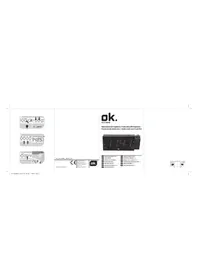
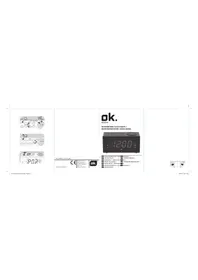
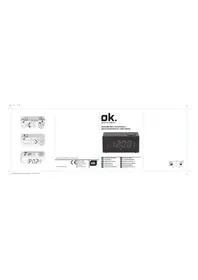
RADIOWECKER MIT LICHTFUNKTION // CLOCK RADIO WITH LIGHT FUNCTION // RADIO RELOJ CON FUNCIÓN DE LUZ// RADIO-REVEIL AVEC FONCTION D'ÉCLAI
text_image
AUC 20:35 C ON FONE J K L M S R G F O NM_OCT810_190815_V04_HRindh 2 168719 12.05 pm
text_image
Diagram showing various digital timer and switch controls with time display and control buttonsHERZLICHEN GLÜCKWUNSCH!
Thanks for your purchase of an ok. product. Please read this manual carefully and keep it for future reference.
IMPORTANT SAFETY INSTRUCTIONS. READ CAREFULLY AND KEEP FOR FUTURE REFERENCE.
- The exclamation point within an

equilateral triangle is intended to alert the user to the presence of important operating and maintenance instructions in the literature accompanying the device.
- For safety reasons, this class II product is

provided with double or reinforced insulation as indicated by this symbol. The should be operated only in connection provided transformer.
-
LED's are not replaceable. When the light source reaches its end of life the whole product shall be replaced.
-
This product is only intended for audio entertainment. Do not use the product for any other purpose than described in this manual in order to avoid any hazardous situation. Improper use is dangerous and will void any warranty claim.
-
For household use only. Do not use outdoors.
-
Danger of suffocation! Keep all packaging material away from children.
-
Only use under normal room temperature and humidity conditions.
-
The product is only suitable for use at moderate degrees of latitude. Do not use in the tropics or in particularly humid climates.
-
Do not move the product from cold into warm places and vice versa. Condensation can cause damage to the product and electrical parts.
-
Do not use attachments or accessories other than recommended by the manufacturer or sold with this product. Install in accordance with this user manual.
-
Do not install near any heat sources such as radiators, heat registers, stoves or other products (including amplifiers) that produce heat.
-
Do not shift or move the product when powered on.
-
Do not touch, push or rub the surface of the product with any sharp or hard objects.
-
Danger! To reduce the risk of fire or electric shock, do not expose this product to rain or moisture.
-
The product shall not be exposed to dripping or splashing and no objects filled with liquids, such as vases, shall be placed on the product.
-
Care should be taken so that no objects or liquids enter the enclosure through openings.
-
No naked flame sources, such as lighted candles, should be placed on the product.
-
Refer all servicing to authorised service agent. Do not attempt to repair the product yourself. Servicing is required when the product has been damaged in any way, such as the supply cord or plug are damaged, liquid has been spilled, objects have fallen into the product, the enclosure is damaged, the product has been exposed to rain or moisture, does not operate normally, or has been dropped.
EN
20
- Before connecting the product to a socket outlet, make sure the voltage indicated on the product corresponds to your local mains.
- If the supply cord is damaged, it must be replaced by the manufacturer or its service agent or similarly qualified person in order to avoid hazard.
- Regularly check if the supply cord, product or extension cable is defective. If found defective, do not put the product into operation. Immediately pull the plug.
- Place the supply cord and, if necessary, an appropriate extension cable in such away that pulling or tripping over it is impossible. Do not allow the supply cord to hang down within easy reach.
- Do not jam, bend or pull the supply cord over sharp edges.
- The power plug is used as the disconnect device; the disconnect device shall remain readily operable. To completely disconnect the power input, disconnect the mains plug.
- The product may not function properly or not react to the operation of any control due to electrostatic discharge. Switch off and disconnect the product; reconnect after a few seconds.
- Protect the supply cord from being walked on or pinched particularly at the plug, convenience receptacles and the point where it exits from the product.
-
Never pull the plug by the supply cord or with wet hands.
-
Disconnect the power plug in case of faults during use, during lightening storms, before cleaning and when not using the product for a longer period of time.
-
Danger! Before cleaning, switch the product off and disconnect the power plug from the socket.
-
When the product has reached the end of its service life, make it defective by disconnecting the plug from the socket and cutting the cord in two.
-
Caution! There is danger of explosion from improper replacement of the batteries. Replace batteries only with the same or equivalent type of battery.
-
Always change the entire battery pack. Do not mix old and new batteries, or batteries with different charge state.
-
Make sure the batteries are correctly inserted. Observe the polarity (+) plus / (-) negative on the battery and the housing. Improperly inserted batteries can lead to leakage or, in extreme cases, a fire or an explosion.
-
Remove used batteries. Remove the batteries if you know that the product will not be used for a longer period of time. Otherwise, the batteries could leak and cause damage.
-
Non-rechargeable batteries must not be recharged.
-
The connections must not be short-circuited.
-
Remove the batteries from the product before disposal.
-
Never expose batteries to excessive heat (e.g. bright sun, fire), and never throw them into fire. The batteries could explode.
EN
22
-
Keep batteries out of reach of small children. If batteries have been swallowed, seek immediate medical attention.
-
If the batteries leak, remove them with a cloth and dispose of them accordingly. Prevent battery acid from coming into contact with skin and eyes. If you do get battery acid in your eyes, flush them thoroughly with lots of water and consult a physician immediately. If battery acid comes into contact with your skin, wash the affected area with lots of water and soap.
-
When installing the device, leave sufficient space for ventilation. Do not install in bookcases, built-in cabinets or the like.
-
Do not impede ventilation by covering the ventilation openings with items, such as newspapers, table-cloths, curtains, etc. Do not insert any objects.
INTENDED USE
This product is intended for audio playback of radio programs and as alarm clock. Any other use may result in damage to product or injuries. This product is designed for household use only and not intended for commercial use. Do not use the product if damage is seen.
Imtron GmbH accepts no liability whatever for any injuries or damages caused to careless, improper or incorrect use of the product or use of the product for purposes not recommended by the manufacturer.
CONTROLS AND COMPONENTS
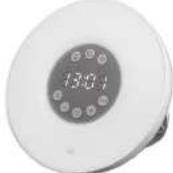
A. Sunrise key
B. Snooze key
C. Light key
D. Time display
E. Radio key FM
F. + key
G. Time setting key
H. - key
I. Alarm setting key
J. Display brightness key
K. 12/24 key
L. Alarm sound/type key
M. Loudness key
N. Wire aerial
O. Foldable stand
P. Battery compartment with lid
Q. Micro USB socket
R. USB cable
S. Power adaptor


EN
24
BEFORE FIRST TIME USE
Remove the product and accessories carefully from the original packaging. Inspect the delivery contents for completeness and damages. Should the delivery contents be incomplete or damaged, contact your sales outlet immediately.
INSTALLATION AND POWER SUPPLY Installation
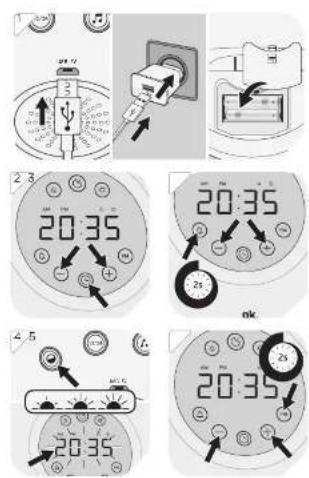
1 For optimal reception, unwind the wire aerial fully and adjust it. Connect the radio and power adapter with the USB cable included and connect the power adapter to the mains.
Back up battery
Insert batteries to enable the clock to continue operating during a possible power failure. After the mains power remains, the correct time will appear on the display.
- Open the battery compartment.
- Insert 2 x 1.5 V battery type AAA (not included in delivery). Make sure the polarity is correct as indicated.
- Close the battery compartment.
Note:
Radio and alarm will not function during back up operation.
GENERAL SETTINGS
Time setting
Note: When the radio is connected to the mains the time is flashing and can be set. Follow below steps.
2 The time can be set only if the radio is in off mode (Standby):
-
Press the time key Ⓛ and set the hours with the +/- keys.
-
Press the time key Ⓛ again and use the +/- keys to set the minutes. Press the time key Ⓛ a third time to finish the setting.
Alarm setting
The alarm can be set only if the FM radio is in off mode (Standby):
3 Acoustic alarm
-
Press the alarm key ⏻ for approx. 2 seconds and set the hours with the +/- keys.
-
Press the alarm key 🙏 again and use the +/- keys to set the minutes. Press the alarm key 🔒 a third time to finish the setting.
-
Use the volume key 🔺 to adjust the volume from U00 (sound off) to U15 (maximum) by pressing it several times, if necessary.
EN
-
Press the alarm tone/type key and set the desired alarm tone (1-7) by pressing the +/- buttons.
-
Alarm type 1-6: Animal sounds
- Alarm type 7: Radio alarm
Press the ♪ button to confirm.
Note:
To check which sound or radio the alarm is set to, press 📌 button twice. The clock will alternate between time and sound number.
Press 📌 button once to cancel this function.
If you have chosen the radio alarm, the selected station will sound at the preset alarm time.
-
Briefly press the alarm key 🔒 to activate or deactivate the alarm. An activated alarm is indicated by the illumination of the alarm symbol 🔒.
-
If the alarm sounds, switch it off with the alarm key 🔒.
Stop alarm
-
Snooze function: Press snooze ⚙ key to suspend alarm sound for a few minutes. The alarm will start again after approx. 9 minutes. The set alarm mode will remain flashing on the display.
-
Press the alarm key 🔒 to stop/cancel alarm.
4 OPERATION
Display backlight setting
With the radio switched off press the display brightness key to adjust the display brightness.
- high
- low
- off
Switching on and off
Press the radio key FM button to turn on the radio. To turn off, press radio key FM button again.
Volume control
Adjust the volume from U00 (mute) to U15 (max.) by pressing the volume 🔊 loudness key as many times as desired.
Sunrise function
30 minutes before the programmed time, the light intensity will slowly increase up to 100%.
- Press the sunrise key for approx. 3 seconds and set the hours with the +/- keys.
- Press the sunrise key again and use the +/- keys to set the minutes. Press the sunrise key a third time to finish the setting.
EN
28
Sunset function
30 minutes before the desired bedtime, the light intensity will be gradually reduced until the light is completely extinguished.
- With the radio switched on press the snooze key shortly to adjust the sleep timer to 60, 30 or 15 minutes or OFF.
RADIO
Tuning and saving
5 1. Turn on the radio.
-
Hold down the radio button FM for at least 2 seconds to start the automatic station search.
-
Received radio stations are automatically saved. Up to 40 stations can be stored.
-
If the automatic station scan and the saving are finished, you can select the stations with the +/- buttons.
LIGHT ON, OFF AND SELECT
6 1. Turn off the radio.
-
Press the light button ⚙ 1x to turn on white light.
-
Use the +/- buttons to select the desired brightness.
-
Press the light button again to turn on colored light. The color changes automatically in this mode.
-
By pressing the +/- buttons, you can permanently set a desired color.
-
The brightness cannot be adjusted in color light mode.
CLEANING AND CARE
- Disconnect the product from the power supply before cleaning it. Clean the product with a soft, damp cloth and a mild cleaning agent. Finish by wiping it with a dry cloth. Do not use alcohol, acetone, benzene, scouring cleansers etc. to clean the product. Do not use hard brushes or metal objects.
- Warning! Never immerse electrical parts of the product in water during cleaning or operation. Never hold the product under running water.
- Warning! When cleaning, never use solvents or abrasive materials, hard brushes, metallic or sharp objects. Solvents are harmful to human health and can attack plastic parts, while abrasive cleaning mechanisms and tools may scratch the surface(s).
TROUBLESHOOTING
If there are any problems during operation, please refer to the following table. If problems cannot be solved as indicated under Solution, please contact your manufacturer.
| Problem Possible causes Solution | ||
| Product does not function | • Interrupted power supply | • Check the power supply |
| No Sound | • Volume is very low | • Adjust the volume |
| No radio reception | • Poor radio reception | • Place the product to another place and adjust the antenna again. |
EN
30
TECHNICAL DATA
Adaptor
Model : AK06WG-0500120VU
Hersteller : Shenzhen Guijin
Technology Co., Ltd.
Rated input : 100-240V\~ 50/60Hz, 0.2A
Rated output : 5V
---, 1.2A
Protection class : II
Radio
Operation power : 6 W
consumption
Standby-power : ≤1 W
consumption
Backup-Batteries : 2 x 1.5 V ---
operation (Type LR03/AAA)
Tuning-range : 88-108 MHz
Tuning grid : 0.1 MHz
Declaration of conformity
Hereby, Imtron GmbH declares that the radio equipment type OCR 610 is in compliance with Directive
2014/53/EU. The full text of the EU declaration of
conformity is available at the following internet address:
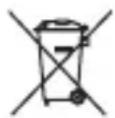
The crossed-out wheeled bin logo requires the separate collection of waste electric and electronic equipment (WEEE). Electric and electronic equipment may contain dangerous and hazardous substances. Do not dispose of this appliance as unsorted municipal waste. Return it to a designated collection point for the recycling of WEEE. By doing so, you will help to conserve resources and protect the environment. Contact your retailer or local authorities for more information.
Please dispose of batteries in an environmentally friendly manner. Do not put batteries into the household waste. Please use the return and collection systems in your community or contact the dealer where you purchased the product.
ES
ENHORABUENA
Consumo in Standby : ≤1 W