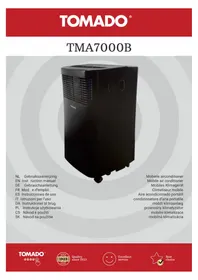
TMA7000B - Air Conditioning Tomado - Free user manual and instructions
Find the device manual for free TMA7000B Tomado in PDF.



| Product type | Monoblock mobile air conditioner |
| Brand | Tomado |
| Model | TMA7000B |
| Dimensions (H x W x D) | 634 x 329 x 318 mm |
| Net weight | 21.5 kg |
| Power supply | 220-240 V ~ 50 Hz |
| Connected power | 980 W |
| Cooling capacity | 7000 Btu/h (2.0 kW) |
| Energy class (EE) | 2.6 |
| EER | 0.8 |
| Refrigerant | R290 (propane), 140 g |
| Max. noise level | 62 dB(A) |
| Temperature range | 17 to 30 °C |
| Fan speeds | 2 (low, high) |
| Max. air flow | 1.94 m³/h |
| Max. dehumidification | 1.94 L/h |
| Functions | Cooling, dehumidification, air circulation, auto, sleep |
| Remote control | Yes (AAA batteries included) |
| Air filter | Washable (weekly cleaning recommended) |
| Condensation drainage | Manual (tank) or continuous (1/2 inch hose) |
| Full tank protection | Audible alarm and code P1 |
| Automatic restart after power failure | Yes |
| Timer | Delayed start and automatic stop (max 24 h) |
| Minimum installation area | 8 m² |
| Protection class | IPX0 |
| Warranty | 24 months |
Frequently Asked Questions - TMA7000B Tomado
User questions about TMA7000B Tomado
0 question about this device. Answer the ones you know or ask your own.
Ask a new question about this device
Download the instructions for your Air Conditioning in PDF format for free! Find your manual TMA7000B - Tomado and take your electronic device back in hand. On this page are published all the documents necessary for the use of your device. TMA7000B by Tomado.
USER MANUAL TMA7000B Tomado
- First carefully read the instruction manual in full prior to using the appliance and store the manual in a safe place for future reference.
- Do not use agents that accelerate the defrosting process or other cleaning agents than those recommended by the manufacturer.
- Store the appliance in a room without any continuously active ignition sources (e.g. an open flame, switched on gas appliance or switched on electric heating appliance).
- Do not drill through or burn.
- Caution, certain refrigerants do not have an odour.
- Install, use and store the appliance in a room with a floor surface of at least 8m^2 (for 7000Btu/h).
- Only install this appliance when it complies with local/national legislation and standards.

IMPORTANT
-
This appliance is intended for use as an air conditioner in houses and is only suitable for indoor use in living rooms, kitchens and garages on dry locations, under normal domestic circumstances.
-
If the supply cord is damaged, it must be replaced by the manufacturer, its service agent or similarly qualified persons in order to avoid a hazard.
- The installation should fully correspond with the locally applicable regulations, conditions and standards.
- The appliance is only suitable for use on dry locations, indoors.
- Check the mains voltage.
- This appliance is only suitable for an earthed socket, connection voltage 220-240 Volt/ \~50 Hz.
- The appliance MUST always be connected in an earthed condition. If the power supply is not earthed, it is absolutely not permitted to connect the appliance.
-
The plug must always be easily accessible when the appliance is connected.
-
Have the electrical system checked by a recognised expert if you are not certain that everything is in order.
- Never cover the air inlets and outlets.
- Empty the water reservoir via the water drain point, before moving the appliance.
- Never allow the appliance to come into contact with chemicals.
- Do not insert fingers or objects in the openings of the appliance.
- Never allow the appliance to come into contact with water. Do not spray the appliance with water or submerge it in water to prevent short-circuiting.
- Always first remove the plug from the socket before the appliance or a part thereof must be cleaned or replaced.
- NEVER connect the appliance using an extension cord.
If there is no earthed socket available, have one installed by a recognised electrician. - For reasons of safety, always be careful when there are children near this appliance, same as with any other electrical appliance.
TOMADO®
- Do not use the appliance if the plug, cord or appliance are damaged, or if the appliance no longer functions properly or if it is damaged in any other way. If this is the case, consult the retailer or our maintenance service. Never replace the plug or cord yourself.
- Always remove the plug from the socket when the appliance is not being used.
- Only have a damaged electricity cord replaced by the supplier or an authorised person/service point.
- Keep the appliance out of reach of children. Children do not see the dangers associated with handling electrical appliances. Therefore, never allow children to operate electrical appliances without supervision. Keep the appliance and cord out of reach of children younger than 8 years of age.
- This appliance can be used by children aged from 8 years and above and persons with reduced physical, sensory or mental capabilities or lack of experience and knowledge if they have been given supervision or instruction concerning use of the appliance in a safe way and understand the hazards involved. Children shall not play with the appliance. Cleaning and user maintenance shall not be made by children without supervision.
CAUTION! • Never clo
-
Never close the room where this appliance is used in such a way that it is fully airtight. This prevents vacuum from being created in this room. Negative pressure (=vacuum) could disrupt the safe operation of geysers, extractor hoods, ovens, etc.
-
Non-observation of the instructions could invalidate the warranty on the appliance.
-
Always lift the appliance with two persons.
-
Always make sure the appliance is placed on an sturdy, flat surface.
- Do not leave the appliance unsupervised if the appliance is operational.
- If you want to move the appliance, make sure the appliance is switched off. Use both hands when moving the appliance.
- Never use the appliance with parts that are not recommended or supplied by the manufacturer.
- Do not pull the cord and/or appliance to remove the plug from the wall socket. Never touch the appliance with wet or damp hands.
- If the appliance does not function after it has been switched on, it is possible that the fuse or earth leakage circuit breaker has been activated in the electrical distribution box. The group may be overloaded or an earth leakage current may have occurred.
- In case of a breakdown, never make repairs yourself; a tripped safety device in the appliance could indicate a defect that cannot be remedied by removing or replacing this safety device. Only original parts should be used.
- Never submerge the appliance, cord or plug in water.
- The unit's circuit board(PCM) is designed with a fuse to provide overcurrent protection. The specifications of the fuse are printed on the circuit board, such as: T 3.15A/250V, etc.
- This appliance is only suitable for household use. If the appliance is not used as intended, no compensation can be claimed in case of defects or accidents and the warranty will be invalidated.
WARNING
Specific information for appliances with R290 refrigerant gas.
- Thoroughly read all warnings.
- When defrosting and cleaning the appliance, only use tools recommended by the manufacturer.
- Place the appliance in a room without any continuously active ignition sources (e.g. an open flame, switched on electric or gas appliance).
- Do not drill through or burn.
- Install, use and store the appliance in a room with a floor surface of at least 8m^2
- This appliance contains 140 grams of R290 refrigerant gas (see the information plate at the rear of the appliance).
- R290 is a refrigerant gas that is in accordance with the European environmental directives.
Never drill through any part of the cooling circuit.
- If the appliance is installed, operated or stored in a room without ventilation, the room should be made in such a way that accumulation of refrigerant as a result of a leak is prevented. This could lead to a fire or explosion hazard due to the ignition of the refrigerant by an electric heating appliance, stove or other ignition source.
- Store the appliance in such a way that mechanical failures are prevented.
- Persons operating or working at the cooling circuit, must be in the possession of a suitable certificate from an authorised organisation, so that these persons are authorised to handle refrigerants in a safe way in accordance with the specifications that apply within the industry.
- Repairs may only be performed as recommended by the manufacturer of the appliance. Maintenance and repairs that require assistance from other trained personnel, must be performed under the supervision of a person who knows how to use combustible refrigerants.

| WARNING This symbol shows that this appliance used a flammable refrigerant. If the refrigerant is leaked and exposed to an external ignition source, there is a risk of fire. | |
| CAUTION This symbol shows that the operation manual should be read carefully. | |
| CAUTION This symbol shows that a service personnel should be handling this equipment with reference to the installation manual. | |
| CAUTION This symbol shows that information is available such as the operating manual or installation manual. |
REFRIGERANT
(CE) N 842/2006: This air conditioner contains the refrigerant R290.
The quantity of refrigerant is less than 1kg and is contained in a closed cooling circuit. The refrigerant does not have an ozone depletion potential. It is, however, a greenhouse gas according to the Kyoto protocol and could therefore contribute to global warming when released into the atmosphere. Only trained technicians with a suitable refrigerant certificate are permitted to fill or empty the appliance. If used correctly and when the refrigerant circuit is undamaged, your air conditioner does not have to be refilled with refrigerant. GWP: R290: 3.
TOMADO
PRODUCT DESCRIPTION

front back

- Operating panel
- Sensor for remote control
- Air outlet
- Castor
- Handle
- Air filter
- Air inlet
- Screw cap for water discharge
-
Air inlet
-
Condensation water drain
- Air outlet
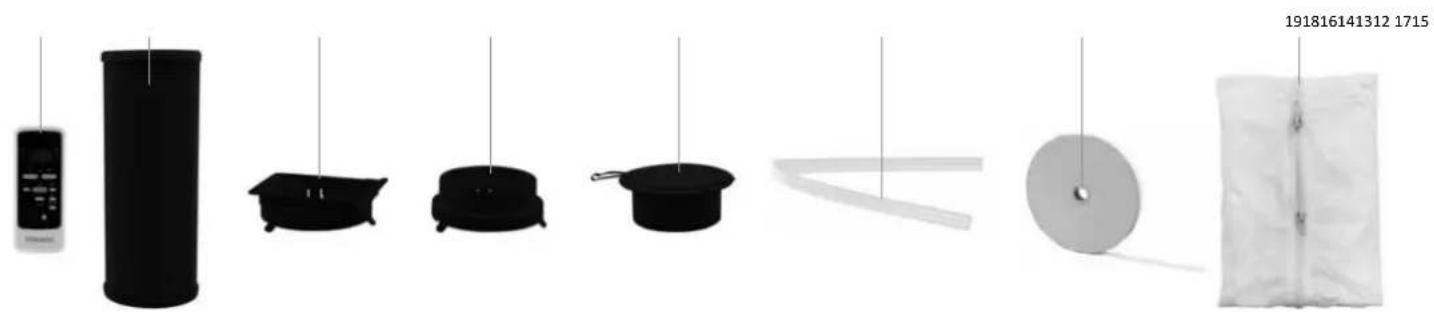
-
Remote control
-
Discharge hose - air
- Connector - square
-
Connector-round
-
Wall outlet with valve
-
Discharge hose - water
- Velcro fastener
- Flexible window seal set
TOMADO
BEFORE USING FOR THE FIRST TIME
Follow these instructions when using the appliance for the first time: Carefully unpack the air conditioner and all accessories and remove all packaging material and any promotional stickers. Keep the packaging (plastic bags and cardboard) out of reach of children.
After unpacking the appliance, carefully check it for external damage that may have occurred during transport.
Place the appliance on a sturdy, flat surface and make sure there is enough space all around for sufficient ventilation.
Check that all mentioned accessories have been supplied.
Clean the air conditioner with a slightly damp cloth.
Prior to connecting the appliance, check that:
- the connection voltage corresponds with what is stated on the information plate;
- the socket and cord are suitable for the appliance;
- the plug of the cord fits in the socket;
the appliance is placed on a stable and flat surface.
PLACEMENT OF THE AIR CONDITIONER
A mobile air conditioner must be placed on a flat surface with sufficient room all around. Do not block the air outlet and ensure a free space of minimum 50 cm around the air conditioner. After placing the appliance in a straight position, allow it to stand for at least 2 hours before inserting the plug in the socket.


INSTALLING THE AIR DISCHARGE HOSE
Place the appliance near a window or opening, so that the air can flow to the outside via the discharge hose.
1. Carefully pull out the discharge hose until the required length is achieved.
2. Screw an end of the discharge hose [a] in the square connector [b].
3. Screw the round connector [c] on the other end of the discharge hose.
4. Slide the square connector [ b ] at the rear of the air conditioner on the air outlet [ d ].
5. Hang the other end of the discharge hose to the outside. Ensure a free passage of the hose. Close the window and door as much as possible. If necessary, use the window seal set.

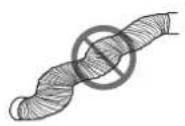
REMARK: Optimum operation of the air conditioner depends on the length of the discharge hose and the number of bends. Try to limit both. The supplied flexible discharge hose has a maximum length of approx. 150~cm and corresponds with the capacity of the air conditioner. The use of any other hoses or extensions could cause failures in the appliance. The air should be able to flow without any hindrance, or else this could cause overheating of the appliance or condensation of water in the air discharge hose. Therefore make sure there are no kinks or sharp bends in the discharge hose. For an optimum result, the discharge hose should be kept shorter than 1 metre during use of the air conditioner.


TOMADO
INSTALLATION OF THE WINDOW SEAL SET
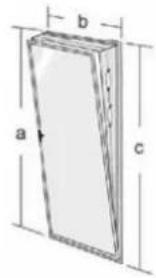
The flexi w s t h t t t t t t t t t t t t t t t t t t t t t t t t t t t t t t t t t t t t t t t t t t t t t t t t t t 0
For windows turning to the outside, we recommend taping all four sides (a+b+c+d) around the window and for windows turning to the inside only three sides (a+b+c). Attach the supplied double-sided tape on the window frame and the window in accordance with one of the drawings below that is similar to your situation.
- Then attach the cloth to the tape that you attached in the openings.


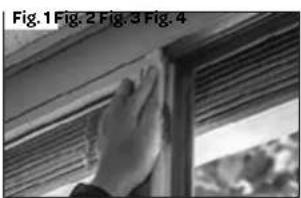
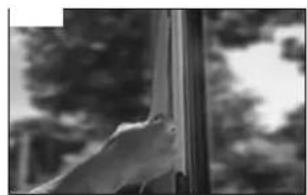


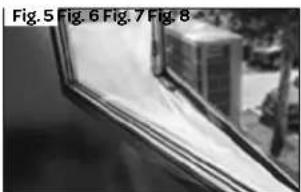


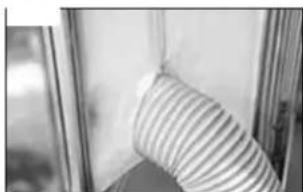
- Attach the supplied double-sided tape on the window frame.
- Then attach double-sided tape on the window.
- Cut away excess tape.
- Make sure the tapes on the corners properly overlap to achieve proper sealing.
- Attach the cloth to the tape attached to the window frame and window.
- Make sure the cloth is neatly attached to the tape on both sides.
- Zip open the cloth.
- Insert the discharge hose through the opening and zip the cloth closed to achieve proper sealing.
WALL INSTALLATION
- Drill a 125 diameter hole in the wall, for the wall outlet with valve.
- Fasten the wall outlet with the provided screws and plugs.
- Attach the end of the discharge hose with the wall outlet connector to the wall outlet.
- Close the valve of the wall outlet when the appliance is not being used.

OPERATION OF THE AIR CONDITIONER
In addition to cooling, the air conditioner has two other functions, i.e. air circulation and dehumidification.
The air conditioner can be operated via the control panel on the appliance and with the provided remote control.
- Choose a location near a socket.
Install the discharge hose in accordance with the figures and make sure the window is closed as much as possible. - Insert the plug in an earthed socket.
- Prior to each use, manually open the fins of the air outlet.
- Press the on/off key to switch on the air conditioner.
The temperature range of the air conditioner is: 17 to 30^ - Check that the discharge hose is mounted correctly.
- Do not share the socket with any other appliances.

COOLING
- Press the mode key [mode] until the indicator light for cooling lights up on the display.
- Press the [temp ▲ and temp▼] keys to set the required room temperature (between 17°C and 30°C).
- Press the [ fan speed ] key on the remote control to adjust the wind speed.
The best temperature in the summer will be between 21 and 24^ . The speed of the fan can be sensed better on the air circulation position than on the cooling position.
DEHUMIDIFICATION
- Press the function key [mode] until the indicator light for dehumidification lights up on the display.
The wind speed is automatically at low speed. This cannot be changed.
When using this position, a garden hose (not Included in the delivery) or something similar must be connected to discharge condensation water. - Unscrew the screw cap on the back of the appliance.
- Mount the end of a garden hose or a similar discharge hose to the drain and place the other end in a receptacle situated lower than the drain of the appliance, so that the condensate water can be discharged properly.

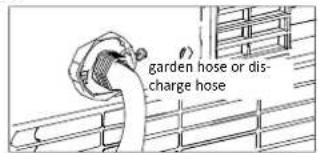
Caution:
- Condensation water may run out of the drain when the screw cap is removed and the appliance has been used in cooling mode. Keep a drip tray at hand when removing the screw cap, in order to collect the condensation water.
Make sure the discharge hose for the condensation water properly descends and is not higher than the drain of the appliance. - When using this position, the air discharge hose does not have to be connected.
- When using the cooling position, it is recommended to not discharge the condensation water continuously, but to close the screw cap again. In this way the appliance is able to provide its best performance.
AIR CIRCULATION
When using this position, the air discharge hose does not have to be connected.
- Press the function key [mode] until the indicator light for air circulation lights up on the display.
- Press the [ fan speed ] key on the remote control to adjust the wind speed - low or high.
THE REMOTE CONTROL
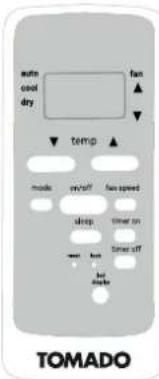
Aim the remote control to the sensor of the appliance. The range of the remote control is approximately 8 metres (without obstacles between the appliance and the remote control). Caution: if you switched on the air conditioner on the appliance itself, you must first activate the remote control before you can control the appliance with the remote control. Press the on/off button on the remote control to activate it.
Insert the two supplied AAA 1.5 Volt batteries in the remote control, as indicated in the drawing. Do take the plus and minus symbols on the inside of the remote control into account.
Note:
When the remote control is being replaced or will no longer be used, remove the batteries and dispose them in accordance with applicable legislation, as they are harmful to the environment.
Do not mix old and new batteries. Do not use a mix of alkaline, standard (carbon-zinc) or chargeable (nickel-cadmium) batteries.
- Batteries could explode or leak when exposed to open fire. Hand in batteries at a waste collection facility or recognised waste collection point.
- Remove the batteries from the remote control when the appliance is not being used for a longer period of time (winter storage) and keep them on a cool, dry place.
Other functions
The remote control can be used for the same functions as described above. By means of the remote control you can also control extra modes, i.e. auto mode, sleep mode, timer mode and wind speed.

TOMADO
AUTOMATIC POSITION
When using the automatic position, the appliance automatically selects whether it should cool or circulate air. This model can only be adjusted with the remote control. This depends on the room temperature.
- Press the mode key [mode] until the arrow on the display lights up at the auto mode.
- Press the [temp ▲ and temp▼] keys to set the required room temperature (between 17^ and 30^ ). 23^ for example. When the room temperature is below 23^ , the appliance starts to circulate the air, and above 23^ the appliance starts to cool.
It is not possible to adjust the wind speed in this mode.
SLEEP MODE
Use the sleep mode when you want to use the appliance at night. This mode can only be adjusted with the remote control.
- Switch on the appliance in the cooling or auto position.
- Press the sleep key.
If the display light on the appliance bothers you, you can switch it off by pressing the [led display] key. Press the key once more to reactivate the display light.
The sleep mode maintains the optimum temperature in the room, without excessive fluctuations in temperature and air humidity. Slightly vary room temperature and air humidity to make sure the room remains comfortable.
The selected temperature will rise every half hour by 1^ for a period of one hour. This new temperature is maintained for the next 7 hours. Then the appliance switches back to the set temperature and remains on in accordance to its setting.
The sleep mode can be cancelled by switching off the appliance, or by pressing the sleep, mode or wind speed key. When using the air circulation and dehumidification positions, it is not possible to use the sleep mode.
ADJUSTING THE TIMER
The timer function can be used to allow the air conditioner to switch on automatically (delayed start) or switch off automatically at a set time (automatic deactivation).
Delayed start
- Press the timer key on when the air conditioner is off. Repeatedly press the key on. The starting time is delayed by half an hour each time, up to a total of 10 hours. If you want to delay the start by more than 10 hours, an hour is added each time until a maximum of 24 hours.
The set number of hours is shown in the display. Once the temperature is shown on the display again, the setting has been confirmed. - When the set number of hours have passed, the air conditioner switches on automatically.
To cancel the delayed start, press the timer key on until the display shows 0.0 again.
Automatic deactivation
- Press the timer key off when the air conditioner is on. Repeatedly press the key off. The required time at which you wish the air conditioner to switch off, will be extended by half an hour each time, up to a total of 10 hours. If you want to delay the deactivation by more than 10 hours, an hour is added each time until a maximum of 24 hours.
The set number of hours is shown in the display. Once the temperature is shown on the display again, the setting has been confirmed. - When the set number of hours have passed, the air conditioner switches off automatically.
To cancel the automatic deactivation, press the timer key off until the display shows 0.0 again.
The settings can also be combined.
RESET BUTTON
The reset button enables you to reset the appliance. All settings are cancelled and the remote control returns to the factory settings.
- Use a pointy object to press down the reset button.
LOCK BUTTON
To prevent the settings of the remote control from being changed, you can lock them with the lock button.
- Use a pointy object to activate the lock. A lock appears in the display on the remote control.
It is no longer possible to control the appliance with the remote control. - Press the lock button once more to deactivate the lock. The lock disappears and the appliance can be controlled again by means of the remote control.
DISPLAY LIGHT
If the display light on the appliance bothers you, you can switch it off by pressing the [led display] key.
Press the key once more to reactivate the display light.
AUTOMATIC RESTART AFTER POWER INTERRUPTION
After a power interruption, the appliance automatically restarts in accordance with the latest settings, once the power supply has been restored.
CHANGING THE TEMPERATURE UNIT CELSIUS / FAHRENHEIT
Simultaneously hold down the + and - keys for 3 seconds to change the display of the temperature unit.
6.7h
TIMER ON
1h
TIMER OFF
5.1h
TIMERONOFF
DRAINING CONDENSATION WATER
When the air conditioner is not used for a longer period of time, remove the rubber cap from the drain opening at the bottom of the appliance and place an empty cup under the outlet. All the water will flow out of the tank.
The water tank is equipped with an alarm sensor. When the water reaches a certain level in the water tank, the appliance beeps 8 times and P1 appears in the display. The cooling process is switched off automatically. It is possible that the appliance continues with air circulation.
Manual discharge - when using the appliance in a room with high air humidity.
- Remove the plug from the socket.
- Place a low receptacle under the lower outlet for condensation water discharge. See the drawing.
- Remove the screw cap.
- The water flows out of the drain into the receptacle.
- Place back the screw cap when no more water is flowing out.
- Switch the appliance on again.
Continuous discharge - recommended when using the dehumidification position.
- Remove the plug from the socket.
- Remove the screw cap. Keep a drip tray at hand when removing the screw cap in order to collect the condensation water that may come out of the outlet.
- Connect the discharge hose (1 / 2^ or 12.7mm) . See drawing.
- The water is discharged continuously via the discharge hose.
- Switch the appliance on again.
Condensation water can also be discharged as described on page 12, at section DEHUMIDIFICATION.

CLEANING AND MAINTENANCE
Before cleaning the air conditioner, switch off the appliance by means of the ON/OFF key, wait a few minutes and remove the plug from the socket.
Cleaning the exterior
Clean the exterior of the appliance with a slightly damp cloth and then wipe it with a dry cloth. If necessary, you can clean
the exterior of the appliance by means of a mild washing-up liquid.
- Never wash the appliance with water. This can be dangerous.
- Do not use petrol, alcohol or similar solvents to clean the appliance.
- Never spray with insect sprays or similar agents.
- Do not use aggressive or abrasive cleaning agents for cleaning the appliance.
- Never submerge the appliance, cord or plug in water or any other liquid.
Cleaning the air filter
In order to allow the appliance to function as well as possible, we recommend cleaning the air filter every week. The air filter could get clogged with dust and dirt. Remove the air filter as shown in the drawing.
Use a vacuum cleaner to remove all the dust from the air filter.
If the air filter is very dirty, you can clean it with lukewarm water.
- Submerge the air filter in lukewarm water (max. 40^ ) containing a soft cleaning agent. Rinse the air filter a few times and allow it to dry in the air. Do not place the air filter in the sun or on the heating to dry it.
- Place back the air filter. Check that it is fully dry, before using the appliance again.

Cleaning the air inlets
In order to allow the appliance to function as well as possible, you can clean the air inlets by means of a vacuum cleaner with a soft brush nozzle.
Start or end of the season
At the start of the season, check that the cord and plug are undamaged. Observe the installation instructions when placing the appliance.
At the end of the season, make sure there is no condensation water left in the appliance. Drain the water in accordance with the instructions in section DRAINING CONDENSATION WATER and make sure the air filter is clean before storing the appliance.
PROBLEMS AND SOLUTIONS
First check the following before submitting the air conditioner for repair.
| Problem Possible cause Solution | ||
| The appliance does not switch on when pressing the on/off key. | The indicator light on the water tank flashes and the water tank is full. | Empty the water tank. |
| The room temperature is lower than the set temperature. | Set the temperature once more. | |
| The appliance does not cool sufficiently. | Not all doors and windows are closed. Make sure that all doors and windows are closed. | |
| There are heat sources that are active in the room. Remove the heat sources or switch them off if possible. | ||
| The temperature is set too high. Set the temperature once more. | ||
| The air inlet is blocked. Clean the air inlet grille. | ||
| The appliance makes a lot of noise. | The surface on which the appliance is placed is not level of flat enough. | Place the appliance on a flat surface, level if possible. |
| The noise is caused by the flowing refrigerant liquid within the air conditioner. | This is normal. | |
| The appliance does not respond to the remote control The appliance has been switched on via the control panel on the appliance itself. The remote control has not been activated. | Press the on/off button on the remote control to activate it. | |
| The appliance does not switch on for a period of 3 minutes after it has been switched on. | The internal safety system of the compressor prevents the appliance from being switched on until 3 minutes have passed since it was switched off. | This delay is normal and the appliance will function normally after the 3 minutes have passed |
| Error code P1 The water tank is full. Empty the water tank. | ||
| Error code E0 EEPROM Technical defect Contact the Tomado service department. | ||
| Error code E1 Sensor for room temperature defective. Contact the Tomado service department. | ||
| Error code E2 Evaporator sensor defective. Contact the Tomado service department. | ||
| Error code E3 Condenser sensor defective. | Contact the Tomado service department. | |
| Error code E4 Operating panel defective. | Contact the Tomado service department. | |
TECHNICAL SPECIFICATIONS
Type number
Voltage
Connected load
Cooling capacity*
EE Class*
EER*
Power consumption kW
Power consumption Standby W
Current consumption nom. A
Air displacement max. m³/h
Dehumidification max. ** L/h
Suitable for m³
Refrigerant/GWP type/gr
Thermostat range ^ C
Fan speeds
Max. noise level dB(A)
Dimensions (hxwxd)
Nett weight
Protection class
Remote control
TMA7000B
220-240Volt 50Hz
980 Watt
7000Btu/h (2.0kW)
A
2.6
0,8
0,5
3.45
272
1,94
60
R-290/3/140g.
17-30
2
62 dB(A)
634×329×318mm
21.5 kg
IPX0
yes
RECYCLING

This symbol means that this product should not be disposed of with regular household waste (2012/19/EU). Observe the rules that apply in your country for the separated collection of electric and electronic products. Correct disposal of the product prevents negative consequences for the environment and for public health. The packaging material of this product can be recycled 100% , return packaging material separately.
Pulsance absorbee kW
Dimensioni (A x L x P)
Peso netto
Grado di protezione
Telecomando
TMA7000B
220-240 volt 50Hz
980 watt
7000 BTU/h (2,0 kW)
产
2,6
0,8
0,5
3,45
272
1,94
60
R-290/3/140
17-30
2
62
634×329×318mm
2
IPX0
Si
SMALTIMENTO

OPSTILLING AF KLIMAANLEGGET
= 0 = 0 = 0 = 0 = 0 = 0 = 0 = 0 = 0 = 0 = 0 = 0 = 0 = 0 = 0 = 0 = 0 = 0 = 0 = 0 = 0 = 0 = 0 = 0 = 0 = 0
UWAGA! • Przestrz
UWAGA!
PROBLEM I ROZWIAZANIA
Pridkosci wentylatora 2
Go to www.tomado.com/support to purchase accessories or spare parts.
WARRANTY CONDITIONS
A 24 month warranty is provided for this product. Your warranty is valid if the product has been used in accordance with the user instructions and for the purpose for which it was made. Also the original proof of purchase must be submitted, stating the date of purchase, the name of the retailer and the item number of the product. For extensive warranty information you are referred to our website: www.tomado.com/support
CONDITIONS DE LA GARANTIE


- IMPORTANT
- TOMADO®
- CAUTION! • Never clo
- WARNING
- REFRIGERANT
- TOMADO
- PRODUCT DESCRIPTION
- BEFORE USING FOR THE FIRST TIME
- PLACEMENT OF THE AIR CONDITIONER
- INSTALLING THE AIR DISCHARGE HOSE
- INSTALLATION OF THE WINDOW SEAL SET
- WALL INSTALLATION
- OPERATION OF THE AIR CONDITIONER
- COOLING
- DEHUMIDIFICATION
- Caution:
- AIR CIRCULATION
- THE REMOTE CONTROL
- Note:
- Other functions
- AUTOMATIC POSITION
- SLEEP MODE
- ADJUSTING THE TIMER
- Delayed start
- Automatic deactivation
- RESET BUTTON
- LOCK BUTTON
- DISPLAY LIGHT
- AUTOMATIC RESTART AFTER POWER INTERRUPTION
- CHANGING THE TEMPERATURE UNIT CELSIUS / FAHRENHEIT
- DRAINING CONDENSATION WATER
- CLEANING AND MAINTENANCE
- Cleaning the exterior
- Cleaning the air filter
- Cleaning the air inlets
- Start or end of the season
- PROBLEMS AND SOLUTIONS
- TECHNICAL SPECIFICATIONS
- RECYCLING
- SMALTIMENTO
- OPSTILLING AF KLIMAANLEGGET
- UWAGA! • Przestrz
- UWAGA!
- PROBLEM I ROZWIAZANIA
- WARRANTY CONDITIONS
- CONDITIONS DE LA GARANTIE
Brand : Tomado
Model : TMA7000B
Category : Air Conditioning