OCS 50BTB - Speaker OK - Free user manual and instructions
Find the device manual for free OCS 50BTB OK in PDF.


| Product Type | Soundbar with built-in subwoofer |
| Brand | OK |
| Model | OCS 50BTB |
| Dimensions (W x H x D) | 810 x 98.5 x 66 mm |
| Power supply | Mains adapter 100-240 V~, 50/60 Hz, output 12 V / 0.5 A |
| Power consumption | 6.0 W (no load: 0.09 W) |
| Bluetooth | Version 2.0, profiles A2DP/AVRCP/HFP/HSP/OPP/HID/SPP/PBAP/GATT/SM, range 10 m |
| Audio inputs | HDMI ARC, optical (TOSLINK), line input 3.5 mm, USB (playback) |
| Output power | 2 x 5 W RMS (stereo) |
| Audio modes | Movie, Music, Dialogue |
| Remote control | Yes, with CR2025 battery included |
| Remote control battery | 1 x CR2025, 3 V |
| Cleaning | Slightly damp cloth, do not use solvents |
| Safety | Double insulation, overvoltage protection, automatic shutdown in case of fault |
| Spare parts and repairability | Contact the manufacturer or an approved repairer; do not open yourself |
Frequently Asked Questions - OCS 50BTB OK
User questions about OCS 50BTB OK
0 question about this device. Answer the ones you know or ask your own.
Ask a new question about this device
Download the instructions for your Speaker in PDF format for free! Find your manual OCS 50BTB - OK and take your electronic device back in hand. On this page are published all the documents necessary for the use of your device. OCS 50BTB by OK.
USER MANUAL OCS 50BTB OK
Remark: This IM is under checking by SZ 16am

OCS 50BT-B
SOUNDBAR // SOUNDBAR // BARRA DE SONIDO // BARRE DE SON

IH_OCS 50B7 B_201103_V04
www.46-2017.com
| CE | OESTRAUCHOI NOMEIRO | 3 | IT | MANUALE DELL VENTE | 20 |
| CN | JUNA MANUAL | 9 | NL | AMMELKANATANIZAR | 47 |
| CS | MARIL HEN PATRICIO CHINAS | 15 | FL | PATRICIA ENSINO | 51 |
| MT | MOOD'EMPLOI | 21 | PT | MANUAL DEUTUZAÇÃO | 57 |
| OR | OABITEX EXERCIE | 27 | TR | BRUKANVEIGING | 55 |
| PO | PEACHASNALÓKEZENOVY | 38 | TR | RULLANIN KILAVUZU | 63 |

- 2023年1月1日
517023(使用)
HERZLICHEN GLÜCKWUNSCH!
4/F, No. 4 Zhenrong Road, No.6 Industrial Zone, Caiwu, Wusha
District, Changan Town, 523857 Dongguan City, Guangdong,
Province, People's of Republic of China
Handelsregister: 91441900699758834P
Importiert durch
: Imtron GmbH
Wankelstraße 5, 85046 Ingolstadt, Germany
Thank you for your purchase of an ok. product. Please read this manual carefully and keep it for future reference.
IMPORTANT SAFETY INSTRUCTIONS. READ CAREFULLY AND KEEP FOR FUTURE REFERENCE.
1.

The lightning flash with arrow head within an equilateral triangle is intended to alert the user to the presence of uninsulated "dangerous voltage" within the product's enclosure that may be of sufficient magnitude to constitute a risk of electric shock to persons and animals.
-
The exclamation point within an equilateral triangle is intended to alert the user to the presence of important operating and maintenance instructions in the literature accompanying the device.
-
For safety reasons, this class II product is provided with double or reinforced insulation as indicated by this symbol.
-
Danger! Excessive sound pressure from headphones can cause hearing loss. If you listen to loud music for a long time, your hearing may be impaired. Set to a moderate volume.
-
This product is only intended for audio entertainment. Do not use the product for any other purpose than described in this manual in order to avoid any hazardous situation. Improper use is dangerous and will void any warranty claim.
-
For household use only. Do not use outdoors.
-
Danger! Excessive sound pressure from earphones and headphones can cause hearing loss. If you listen to loud music for a long time, your hearing may be impaired. Set to a moderate volume.
-
Danger of suffocation! Keep all packaging material away from children.
-
Only use under normal room temperature and humidity conditions.
-
The product is only suitable for use at moderate degrees of latitude. Do not use in the tropics or in particularly humid climates.
-
Do not move the product from cold into warm places and vice versa. Condensation can cause damage to the product and electrical parts.
-
Do not use attachments or accessories other than recommended by the manufacturer or sold with this product. Install in accordance with this user manual.
-
Do not install near any heat sources such as radiators, heat registers, stoves or other products (including amplifiers) that produce heat.
-
Do not shift or move the product when powered on.
-
Do not touch, push or rub the surface of the product with any sharp or hard objects.
-
Danger! To reduce the risk of fire or electric shock, do not expose this product to rain or moisture.
-
The product shall not be exposed to dripping or splashing and no objects filled with liquids, such as vases, shall be placed on the product.
-
Care should be taken so that no objects or liquids enter the enclosure through openings.
-
No naked flame sources, such as lighted candles, should be placed on the product.
-
Refer all servicing to authorised service agent. Do not attempt to repair the product yourself. Servicing is required when the product has been damaged in any way, such as the supply cord or plug are damaged, liquid has been spilled, objects have fallen into the product, the enclosure is damaged, the product has been exposed to rain or moisture, does not operate normally, or has been dropped.
-
Before connecting the product to a socket outlet, make sure the voltage indicated on the product corresponds to your local mains.
-
Only use the product with the provided adapters.
-
Regularly check if the cord, product or extension cable is defective. If found defective, do not put the product into operation. Immediately pull the plug.
-
Place the cord and, if necessary, an appropriate extension cable in such away that pulling or tripping over it is impossible. Do not allow the cord to hang down within easy reach.

10
- Do not jam, bend or pull the cord over sharp edges.
- The power supply is used as the disconnect device; the disconnect device shall remain readily operable. To completely disconnect the power input, disconnect the power supply.
- The product may not function properly or not react to the operation of any control due to electrostatic discharge. Switch off and disconnect the product; reconnect after a few seconds.
- Protect the supply cord from being walked on or pinched particularly at the plug, convenience receptacles and the point where it exits from the product.
- Never touch the power supply with wet hands.
- Disconnect the power supply in case of faults during use, during lightening storms, before cleaning and when not using the product for a longer period of time.
- Danger! Before cleaning, switch the product off and disconnect the power supply from the socket.
- When the product has reached the end of its service life, make it defective by disconnecting the plug from the socket and cutting the cord in two.
- Caution! There is danger of explosion from improper replacement of the batteries. Replace batteries only with the same or equivalent type of battery.
- Always change the entire battery pack. Do not mix old and new batteries, or batteries with different charge state.
- Make sure the batteries are correctly inserted. Observe the polarity (+) plus / (-) negative on the battery and the housing. Improperly inserted batteries can lead to leakage or, in extreme cases, a fire or an explosion.
- Remove used batteries. Remove the batteries if you know that the product will not be used for a longer period of time. Otherwise, the batteries could leak and cause damage.
- If the batteries leak, remove them with a cloth and dispose of them accordingly. Prevent battery fluid from coming into contact with skin and eyes. If you do get battery fluid in your eyes, flush them thoroughly with lots of water and consult a physician immediately. If battery fluid comes into contact with your skin, wash the affected area with lots of water and soap.
- When installing the device, leave sufficient space for ventilation. Do not install in bookcases, built-in cabinets or the like.
- Do not impede ventilation by covering the ventilation openings with items, such as newspapers, table-cloths, curtains, etc. Do not insert any objects.
- WARNING! Do not ingest the battery, Chemical Burn Hazard.
- Keep new and used batteries away from children.
- If you think batteries might have been swallowed or placed inside any part of the body, seek immediate medical attention.
- If the battery compartment does not close securely, stop using the product and keep it away from children.
- Never expose batteries to excessive heat (e.g. bright sun, fire), and never throw them into fire. The batteries could explode.
- Remove the batteries from the product before disposal.
- This product (remote control) contains a coin/button cell battery. If the coin/button cell battery is swallowed, it can cause severe internal burns in just 2 hours and can lead to death.
- Do not allow children to replace batteries without adult supervision.
- Do not charge batteries.
- Do not force discharge batteries.
- Do not weld or solder directly to batteries.
- Do not dismantle batteries.
- Do not deform batteries.
- A lithium battery with a damaged container should not be exposed to water.
- Do not encapsulate and/or modify batteries.
INTENDED USE
This product is intended for audio playback via Bluetooth® or audio input (LINE IN / OPT / HDMI) or USB output. Any other use may result in damage to product or injuries. This product is designed for household use only and not intended for commercial use.
The Imtron GmbH assumes no liability for damage to the product, for property damage or for personal injury due to careless or improper usage of the product, or usage of product which does not meet the manufacturer's specified purpose.
COMPONENTS
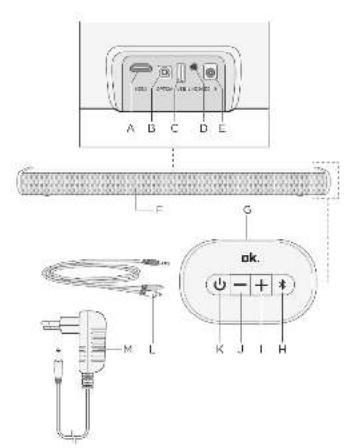
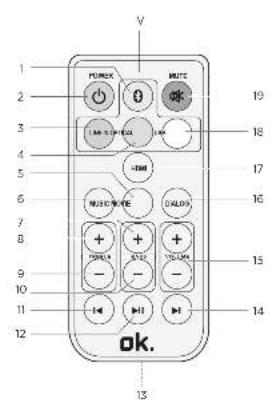
| Sound system | Remote control |
| A. HDMI input ARCB. OPT inputC. USB inputD. Audio input LINE INE. DC IN inputF. SoundbarG. Control panelH. Bluetooth button [symbol]I. + buttonJ. - buttonK. On / off / Mode selection buttonL. Stereo Cinch cableM. Power supply with cable and DC plug | N. Remote control1. Bluetooth® mode button2. On/off button POWER 📍3. LINE IN button4. OPTICAL button5. MOVIE button6. MUSIC button7. BASS + button8. TREBLE + button9. TREBLE - button10. BASS - button11. Skip back 🎨 button12. Play / Pause ➤ button13. Battery14. Skip forward ➤ button15. VOLUME + / - buttons16. DIALOG button17. HDMI button18. USB button19. MUTE button 🎩 |
Note
All main functions can be accessed with the remote control. If the remote control does not work, please check the followings:
- If there is any object between the product and remote control causing obstruction.
- Try to darken the room or to reduce the distance between device and remote control.
- Is the battery installed with correct polarity (+ to +, - to -)?
- Try with a brand new battery.
BEFORE FIRST TIME USE
Remove the product and accessories from the original packaging carefully. For disposal of the original packaging, follow applicable legal requirements. If you have questions about correct disposal, contact your local authority.
Check the package contents for completeness and damage. If the package content is incomplete or damages can be found, contact your place of purchase immediately.
INSTALLATION
Note:
Close the screw holes on the back of the Soundbar with the 8 supplied screws in order to avoid loss of sound quality.
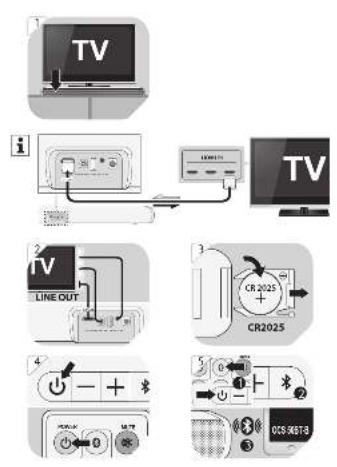
1 Place the soundbar with its rubber feet on a level and horizontal surface (for example, under and in front of the TV). Both components must be placed near a socket outlet. Insert the DC plug of the power supply into the DC IN socket at the soundbar. Connect the power supply to the mains.
USE THE CINCH, LINE IN, OPT OR HDMI SOCKETS

Important note: The soundbar's HDMI input can only be connected to TVs and other devices that have a HDMI ARC (Audio Return Channel) terminal. When a standard HDMI input of a TV or similar device is connected to the soundbar, sound can not be replayed.
2 Use the supplied cinch stereo cable, a HDMI cable, a TOSLINK cable (for OPT/Optical terminal) or an audio cable with 3.5 mm jacks and connect the cinch L / R, HDMI, TOSLINK (OPT/Optical terminal) or LINE OUT outputs of the TV to the HDMI, TOSLINK (OPT/Optical terminal) or LINE IN inputs of the soundbar.
REMOTE CONTROL - INSERTING/REPLACING BATTERY
3 Open the battery compartment. If necessary, remove the old batteries. Insert a new CR2025 battery. Observe the correct polarity +/- as printed on the batteries and in the battery compartment.
Note: Before first time use, remove the battery protection strip by pulling it out.
OPERATION
4 Turn on the soundbar by pushing on / off ⏻ button or POWER ⏻ button of remote control.
5 Bluetooth®
To play via Bluetooth ^® , press the Bluetooth ^® button on the remote control.
Turn on the Bluetooth® connection on the playback device and search for devices. Connect (pair) your player to the Soundbar labelled OCS 50BT-B. If the connection is successful, an acoustic signal sounds. If the soundbar is not found, press the Bluetooth® button and search again for the soundbar. Future use of the same player will automatically connect to the soundbar when the Bluetooth® feature is enabled on both devices. Start playback.
If supported by your playback device you can operate the functions Play / Pause ▶, skip forward ▶ and back ▶ing the remote control.
6 AUDIO Inputs
Press the on / off / mode selection button on the soundbar or the LINE IN, OPTICAL, USB, HDMI or Bluetooth® buttons of the remote control to select the various inputs.
The current audio input mode is shown in display.
Important note: The soundbar's HDMI input can only be connected to TVs and other devices that have a HDMI ARC (Audio Return Channel) terminal. When a standard HDMI input of a TV or similar device is connected to the soundbar, sound can not be replayed.
7 Adjust the volume on the playback device or with the volume buttons - / + on the remote control in 32 steps.
8 Mute the soundbar with the MUTE button if necessary.
9 Switch on the soundbar or turn it in standby mode with the on / off (by pushing for about 1 second) or POWER Buttons. The selected input is retained when it is switched on again.
CLEANING AND CARE
- Pull the power plug from the electrical outlets before cleaning.
- Clean the exterior with a lightly damp cloth.
- Do not use petrol, alcohol or other abrasive cleansers to clean the exterior.
- Do not allow liquids to spill into any openings.
- Use the original packaging if it is necessary to transport the unit.
TROUBLESHOOTING
If there are any problems during operation, please refer to the following table. If problems cannot be solved as indicated under Solution, please contact your manufacturer.
| Problem Possible causes Solution | ||
| Appliance does not work. | Power plug not connected properly. | Check if the power plug is properly connected to an electrical outlet. |
| No sound. Volume is set | too low. Increase the volume level. | |
| Sound is muted. Restore sound by pressing MUTE. | ||
| Settings at the source device are not correct. | Ensure that the external source has correct volume settings and is playing a track. | |
| Soundbar is connected via HDMI to the standard HDMI input of a device. | Connect the HDMI input of the soundbar to a HDMI ARC (Audio Return Channel) terminal at the playback device. | |
| Bad audio quality. Bad Bl | Bluetooth^® reception. Shorten the distance between the Bluetooth ^® device and the appliance and make sure that no obstacles are disturbing the connection. | |
| Connecting cables are not inserted correctly. | Ensure that the connector cables to the source device are correctly plugged in and plugs fully inserted. | |
| Remote control does not work. | Battery empty or not correctly inserted. | Check that the battery is correctly inserted or, if necessary, replace. |
| Distance between appliance and remote control is too big. | Reduce the distance between the remote control and the soundbar and make sure there are no obstacles between them. Aim the remote directly at the Infrared receiver on the soundbar. | |
| Appliance does not react to pressed buttons. | Malfunction due to electrostatic discharge. | Disconnect the appliance from the power supply. Connect the power plugs again to an electrical outlet. |

14
SPECIFICATION
Power Adapter
Manufacturer : Dongguan Yingna Electronic Technology Co., Ltd.
4/F, No. 4 Zhenrong Road, No.6 Industrial Zone, Caiwu, Wusha District, Changan Town, 523857 Dongguan City, Guangdong, Province, People's of Republic of China Business license: 91441900699758834P
Imported by
: Imtron GmbH Wankelstraße 5, 85046 Ingolstadt, Germany Commercial registration number: HRB 4580
Model :YNQX12T120050VL
No-load power consumption : 0.09 W

Remote control
Batteries : 1 x CR2025, 3 V
Connectivity
Bluetooth®: MV BP1048
| Bluetooth®-Profile | :A2DP/AVRCP/HFP/HSP/OPP/HID/SPP/PBAP/GATT/SM |
| Bluetooth®-range | :10 m |
| Bluetooth®-version | :V2.0 |
| Frequency range | :2.4 GHz - 2.480 GHz |
| Max. RF | :-2.2 dBm |
| Input | :HDMI(arc), Optical In, 3.5mm Line in, USB playback |
Speaker
| Output power (RMS), soundbar | : 5W x 2 |
| Sound System, soundbar | : 2.0 Channel |
Dimension
Soundbar (W x H x D) : 810 x 98.5 x 66 mm
DECLARATION OF CONFORMITY
Hereby, [Imtron GmbH] declares that the radio equipment type OCS 50BT-B is in compliance with Directive 2014/537EU. The full text of the EU declaration of conformity is available at the following internet address: http://de.ok-online.com/nc/de/suche.html
DISPOSAL

Do not dispose of this product as unsorted municipal waste. Return it to a designated collection point for the recycling of WEEE. By doing so, you will help to conserve resources and protect the environment. Contact your retailer or local authorities for more information.

Please dispose of batteries in an environmentally friendly manner. Do not put batteries into the household waste. Please use the return and collection systems in your community or contact the dealer where you purchased the product.
ENHORABUENA
4/F, No. 4 Zhenrong Road, No.6 Industrial Zone, Caiwu, Wusha
District, Changan Town, 523857 Dongguan City, Guangdong,
Province, People's of Republic of China
Handelsregister: 91441900699758834P
Importado por
: Imtron GmbH
Wankelstraße 5, 85046 Ingolstadt, Germany
Entrada : HDMI(arc), Optical In, 3.5mm Line in, USB playback
Altavoz
TÉLÉCOMMANDE - INSERTION/REEMPLACEMENT DES PILES
4/F, No. 4 Zhenrong Road, No.6 Industrial Zone, Caiwu, Wusha District, Changan Town, 523857 Dongguan City, Guangdong, Province, People's of Republic of China Handelsregister: 91441900699758834P
Importé par
DÉCLARATION DE CONFORMITÉ
4/F, No. 4 Zhenrong Road, No.6 Industrial Zone, Caiwu, Wusha
District, Changan Town, 523857 Dongguan City, Guangdong,
Province, People's of Republic of China
Handelsregister: 91441900699758834P
εισαγόμενος από
: Imtron GmbH
Wankelstraße 5, 85046 Ingolstadt, Germany
: HDMI(arc), Optical In, 3.5mm Line in, USB playback
Ηχείο
4/F, No. 4 Zhenrong Road, No.6 Industrial Zone, Caiwu, Wusha
District, Changan Town, 523857 Dongguan City, Guangdong,
Province, People's of Republic of China
Handelsregister: 91441900699758834P
Importálò
: Imtron GmbH
Wankelstraße 5, 85046 Ingolstadt, Germany
4/F, No. 4 Zhenrong Road, No.6 Industrial Zone, Caiwu, Wusha
District, Changan Town, 523857 Dongguan City, Guangdong,
Province, People's of Republic of China
Handelsregister: 91441900699758834P
Importato da
: Imtron GmbH
Wankelstraße 5, 85046 Ingolstadt, Germany
Tensione in uscita : 12,0 V
Potenza in uscita : 6,0 W
Ingresso : HDMI(arc), Optical In, 3.5mm Line in, USB playback
Altoparlante
4/F, No. 4 Zhenrong Road, No.6 Industrial Zone, Caiwu, Wusha
District, Changan Town, 523857 Dongguan City, Guangdong,
Province, People's of Republic of China
Handelsregister: 91441900699758834P
Ingevoerd door
: Imtron GmbH
Wankelstraße 5, 85046 Ingolstadt, Germany
Input : HDMI(arc), Optical In, 3.5mm Line in, USB playback
Luidspreker
4/F, No. 4 Zhenrong Road, No.6 Industrial Zone, Caiwu, Wusha
District, Changan Town, 523857 Dongguan City, Guangdong,
Province, People's of Republic of China
Handelsregister: 91441900699758834P
Importowane przez
: Imtron GmbH
Wankelstraße 5, 85046 Ingolstadt, Germany
4/F, No. 4 Zhenrong Road, No.6 Industrial Zone, Caiwu, Wusha District, Changan Town, 523857 Dongguan City, Guangdong, Province, People's of Republic of China Handelsregister: 91441900699758834P
Importado por
Entrada : HDMI(arc), Optical In, 3.5mm Line in, USB playback
Coluna de som
4/F, No. 4 Zhenrong Road, No.6 Industrial Zone, Caiwu, Wusha District, Changan Town, 523857 Dongguan City, Guangdong, Province, People's of Republic of China Handelsregister: 91441900699758834P
Importerad av
Utgående effekt : 6,0 W
Genomsnittlig aktiv effektivitet : 79,5 %
4/F, No. 4 Zhenrong Road, No.6 Industrial Zone, Caiwu, Wusha
District, Changan Town, 523857 Dongguan City, Guangdong,
Province, People's of Republic of China
Handelsregister: 91441900699758834P
íthal eden
: Imtron GmbH
Wankelstraße 5, 85046 Ingolstadt, Germany
Giriş : HDMI(arc), Optical In, 3.5mm Line in, USB playback
Hoparlör
- HERZLICHEN GLÜCKWUNSCH!
- IMPORTANT SAFETY INSTRUCTIONS. READ CAREFULLY AND KEEP FOR FUTURE REFERENCE.
- INTENDED USE
- Note
- BEFORE FIRST TIME USE
- INSTALLATION
- Note:
- USE THE CINCH, LINE IN, OPT OR HDMI SOCKETS
- REMOTE CONTROL - INSERTING/REPLACING BATTERY
- OPERATION
- CLEANING AND CARE
- TROUBLESHOOTING
- SPECIFICATION
- Power Adapter
- Remote control
- Connectivity
- Speaker
- Dimension
- DECLARATION OF CONFORMITY
- DISPOSAL
- ENHORABUENA
- Altavoz
- TÉLÉCOMMANDE - INSERTION/REEMPLACEMENT DES PILES
- DÉCLARATION DE CONFORMITÉ
- Ηχείο
- Altoparlante
- Luidspreker
- Coluna de som
- Hoparlör
Brand : OK
Model : OCS 50BTB
Category : Speaker