TB3CDUALDPDOCK - Other computer accessories i-TEC - Free user manual and instructions
Find the device manual for free TB3CDUALDPDOCK i-TEC in PDF.


| Product type | Thunderbolt 3 Docking Station |
| Brand | i-TEC |
| Model | TB3CDUALDPDOCK |
| Dimensions (L x W x H) | 197 x 78 x 31 mm |
| Weight | 405 g |
| Power supply | AC adapter 20V / 6.75A (DC); AC input 110-230V |
| Thunderbolt 3 port (PC connection) | 1x Thunderbolt 3 (85W Power Delivery) |
| Video ports | 2x DisplayPort |
| Supported resolutions | Up to 8K/30Hz (DP1.4) or 5K/60Hz (DP1.2); 2 monitors 4K/60Hz |
| USB-C ports | 2x USB-C 3.1 Gen.2 (10 Gbps) |
| USB-A ports | 2x USB-A 3.1 Gen.1 (5 Gbps); 1x USB-A 3.1 Gen.2 (10 Gbps, fast charging BC 1.2) |
| Ethernet port | 1x RJ-45 GLAN (Realtek RTL8153, 10/100/1000 Mbps) |
| Audio port | 1x 3.5mm combo jack (headphones + microphone) |
| Additional functions | ON/OFF switch, Kensington lock, Thunderbolt 3 cable included (70 cm) |
| Supported operating systems | Windows 10, macOS, Linux (latest updates) |
| Package contents | Docking station, Thunderbolt 3 cable, AC adapter, quick start guide |
| Care and cleaning | Do not expose to extreme temperatures or humidity; use on a flat surface; disconnect before cleaning |
| Safety | Do not open, do not expose to water; if dropped, contact customer service |
| Spare parts and repairability | Contact support at support@itecproduct.com; repair by authorized service |
Frequently Asked Questions - TB3CDUALDPDOCK i-TEC
User questions about TB3CDUALDPDOCK i-TEC
0 question about this device. Answer the ones you know or ask your own.
Ask a new question about this device
Download the instructions for your Other computer accessories in PDF format for free! Find your manual TB3CDUALDPDOCK - i-TEC and take your electronic device back in hand. On this page are published all the documents necessary for the use of your device. TB3CDUALDPDOCK by i-TEC.
USER MANUAL TB3CDUALDPDOCK i-TEC
natural_image
Black rectangular electronic device with ports and ventilation slots (no visible text or symbols)User guide • Gebrauchsanweisung • Mode d'emploi Manual de instrucciones • Manuale • Uživatelská príručka Instrukcje obsługi • Užívatel'ská príručka • Vartotojo vadovas Handleiding
EN Please read the entire instruction manual carefully. Deta available on our website www.i-tec.cz/en/ in the tab „Manuals, drivers“. In case of any issues, please contact our technical support at: support@itecproduct.com
www.i-tec.cz/en
TB3/USB-C DUAL DISPLAYPORT 4K DOCKING STATION + POWER ADAPTER 135 W
ENGLISH....05-08
DEUTSCH....09-12
FRANÇAIS....13-16
ESPAÑOL....17-20
ITALIANO....21-24
ČESKY....25–28
POLSKI....29-32
SLOVENSKY.... 33-36
LIETUVOS....37-40
NEDERLANDS....41-44
WEEE....45-46
Declaration of Conformity....47-48
FCC....49
INTRODUCTION
Thank you for purchasing the i-tec Thunderbolt™ 3 Docking Station, which allows you to connect your favourite devices to your Thunderbolt™ 3 port equipped laptop or tablet quickly and easily using just a single Thunderbolt™ 3 cable. The docking station is built on the Intel Titan Ridge chipset and thus also has the ability to connect to devices with a USB-C port, but in this case, the transfer rate of the connected devices may be reduced due to the maximum transfer rate of the USB-C port is 10Gb/s.
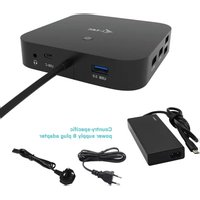
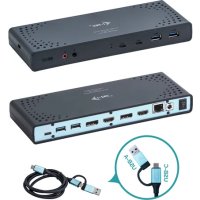
The docking station offers 2x DisplayPort, 2x USB-C, 1x Ethernet GLAN RJ-45 port, 3x USB-A 3.0 port (one BC 1.2 fast charging port), 1x Combo Audio port (headphones and microphone), 1x external power input DC.
Important note about 8K resolution: The docking station supports the resolution up to 8K (7680x4320/30Hz), but this resolution can only be set if supported by your laptop - Thunderbolt™ 3 must support DisplayPort 1.4. In case Thunderbolt™ 3 of your laptop only supports DisplayPort 1.2, the maximum resolution is just 5K 5120x2880/60Hz.
* Important notice about the USB-C port connection: The docking station is built on the Titan Ridge chipset and supports also the USB-C port connection, but it also must be supported by the laptop. USB-C is an open standard, which means that laptop manufacturers can freely customize the USB-C protocol. Unfortunately, this means that docking stations built on the Intel Titan Ridge chipset may not work properly on all devices with the USB-C port.
SPECIFICATION
- 1x Thunderbolt™ 3 port for connecting to a laptop
• Power Delivery: 85 W
• Video ports: 2x DisplayPort - Resolution:
Thunderbolt™ 3 with DisplayPort 1.4 support
1 monitor - 1x DP - up to 8K/30Hz
2 monitors - 1x DP + 1x DP - up to 2x4K/60Hz
Thunderbolt™ 3 with DisplayPort 1.2 support
1 monitor - 2x DP - up to 5K/60Hz
2 monitors - 1x DP + 1x - up to DP 2x4K/60Hz
USB-C with DisplayPort 1.4 support
1 monitor - 1x DP - up to 4K/60Hz
2 monitors - 1x DP + 1x DP - 2x to 4K/60Hz
USB-C with DisplayPort 1.2 support
1 monitor - 1x DP - up to 4K/30Hz
2 monitors - 1x DP + 1x DP - 2x to 1920x1080/60Hz
• 2x USB-C 3.1 ports Gen.2 (10 Gbps)
• 2x USB-A 3.1 port Gen.1 (5 Gbps)
- 1x USB-A 3.1 port Gen.2 (10 Gbps), with fast charge support (BC 1.2)
• 1x Ethernet GLAN RJ-45 port (Realtek RTL8153)
• 1x 3,5mm Audio combo connector
• 1x power input (20V/6.75A)
- ON/OFF switch for turning the docking station on and off
• Kensington lock support
- Thunderbolt™ 3 cable (70 cm)
- OS: Windows 10, macOS and Linux with the latest updates
• Dimensions: 197 x 78 x 31 mm - Weight: 405 g
PACKAGE CONTENTS
- i-tec Thunderbolt™ 3 Docking Station
- Thunderbolt™ 3 cable (70 cm)
• Power adapter (output DC: 20 V / 6,75A, DC cable 160 cm. AC cable 170 cm) - Quick Start
SPECIFICATION AND DESCRIPTION
Front panel:
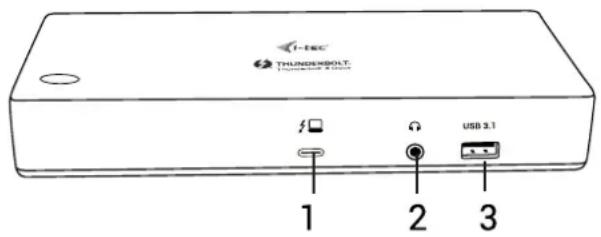
- Thunderbolt™ 3 data port / Power Delivery - for connecting a docking station to the Thunderbolt™ 3 laptop port. This port is capable of delivering up to 85 W for the device.
- 3.5 mm Combo Audio Jack
- USB-A 3.1 port Gen. 2 (10 Gbps) with a quick charge, BC 1.2 specification
Rear panel:
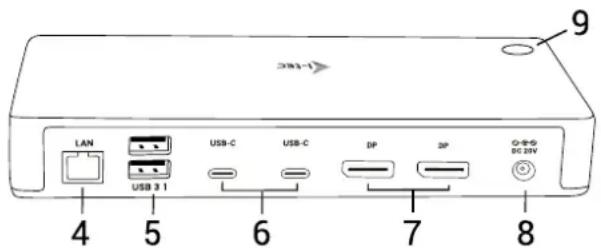
- Ethernet GLAN RJ-45 port – supports 10/100/1000 Mbps
- 2x USB-A 3.1 port Gen. 1 (5 GBps)
- 2x USB-C 3.1 port Gen. 2 (10 GBps)
- 2x DisplayPort - allows to connect up to one 8K/30Hz monitor. Only if the main GPU and Thunderbolt™ 3 support DisplayPort 1.4.
- Power input (20V/6.75A)
- ON/OFF switch for turning the docking station on and off
SYSTEM REQUIREMENTS
Hardware requirements: Device with a free Thunderbolt 3 or USB-C* port
Power Delivery requirements: a device with a free Thunderbolt 3 or USB-C* port with „Power Delivery“ support.
Operating system: Windows 10, macOS and Linux with the latest updates
To play Ultra HD 4K/5K/8K videos, your computer must be able to decode this video with its graphics processor. Especially in less powerful laptops, they can handle 4K/5 video playback, but the result is not ideal (interruption, video tearing).
INSTALLING THE DRIVERS
The docking station can be connected directly, the drivers are included in the operating system. For Windows 10, please make sure that you have the latest Thunderbolt™ 3 drivers from your laptop manufacturer installed in your computer.
HARDWARE INSTALLATION (CONNECTING THE DOCKING STATION TO LAPTOP / TABLET)
- Turn on the laptop / tablet and connect the power adapter to the docking station.
- Connect the docking station power adapter to the AC 110 V / 230 V network
- Connect the Thunderbolt™ 3 cable to the Thunderbolt™ 3 port on the front panel of the docking station.
- Connect the second end to a free Thunderbolt™ 3 / USB-C* port of your laptop / tablet.
- In Windows OS, permit a new Thunderbolt™ 3 device – see figure
- In Linux, enable the new Thunderbolt™ 3 device. Must be displayed as Enabled
- Subsequently, the automatic installation of ports in each system starts.
- After finishing installation, we recommend that you restart the laptop / tablet.
CONNECTING THE DISPLAYPORT MONITOR
For connection of the monitor to the docking station, use a DisplayPort cable. During the installation of an additional monitor, the laptop / tablet monitor may may blink, this is a normal state. Docking station supports up to two monitors. Graphic Interface: 2x DisplayPort
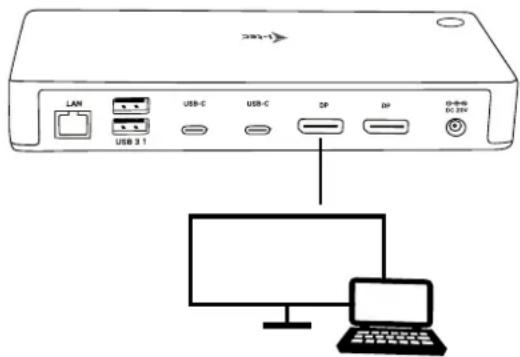
Resolution: 1 monitor connected through 1 DisplayPort cable - resolution up to 8K 7680x4320/30Hz
8K resolution is supported only if Thunderbolt™ 3 connector of your laptop supports DisplayPort 1.4.
If Thunderbolt™ 3 only supports DisplayPort 1.2, the maximum resolution is 5K 5120x2880/60Hz
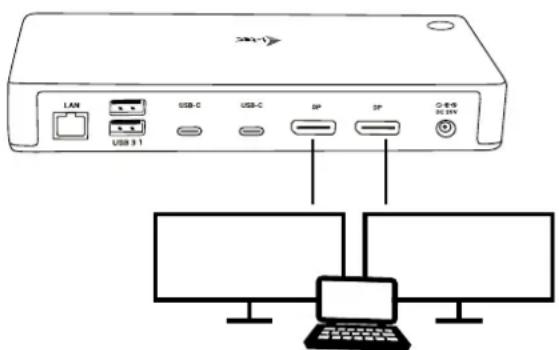
2 monitors connected simultaneously 2x DisplayPort, resolution up to 4K 4096x2160@60Hz
The resolution, the frame rate and the maximum number of connected external monitors depends on the capabilities of the host PC/laptop.
Note: The majority of problems with the docking station and the connected peripheral devices can be solved by disconnecting the Thunderbolt™ 3 cable of the docking station from the Thunderbolt™ 3 port of the PC / Mac / smartphone and reconnecting after approximately 10 s.
SAFETY INSTRUCTIONS
- Do not expose to extreme temperatures and air humidity.
- Use the device on flat surfaces – this will prevent it from slipping and potentially causing damage to the product.
- Keep the user manual for future reference.
In co-operation with the service department:
- Check the functionality if the product receives any damage.
- Send the device back if it does not work in accordance with the user manual.
FREQUENTLY ASKED QUESTIONS
Available on our website www.i-tec.cz/en/ on the "FAQ" tab of this product.
EINLEITUNG
INSTRUCTIONS DE SÛRETÉ
2x monitor - 1x DP + 1x DP - 2x fino a 1920x1080/60Hz
This equipment is marked with the above recycling symbol. It means that at the end of the life of the equipment you must dispose of it separately at an appropriate collection point and not place it in the normal domestic unsorted waste stream. This will benefit the environment for all. (European Union only).
DEUTSCH
Executive Name and Signature,
This equipment has been tested and found to comply within the limits of a Class B digital device pursuant to Part 15 of the FCC Rules. These limits are designed to provide reasonable protection against harmful interference in a residential installation.
www.i-tec.cz/en