CADUA4KDOCKPDLUK - Other computer accessories i-TEC - Free user manual and instructions
Find the device manual for free CADUA4KDOCKPDLUK i-TEC in PDF.


User questions about CADUA4KDOCKPDLUK i-TEC
0 question about this device. Answer the ones you know or ask your own.
Ask a new question about this device
Download the instructions for your Other computer accessories in PDF format for free! Find your manual CADUA4KDOCKPDLUK - i-TEC and take your electronic device back in hand. On this page are published all the documents necessary for the use of your device. CADUA4KDOCKPDLUK by i-TEC.
USER MANUAL CADUA4KDOCKPDLUK i-TEC
natural_image
Two wireless network devices, one with ports and ventilation slots, shown from different angles (no visible text or labels)User guide • Gebrauchsanweisung • Mode d'emploi Manual de instrucciones • Manuale • Uživatelská príručka Instrukcje obsługi • Uživatel'ská príručka Vartotojo vadovas • Handleiding
P/N: CADUA4KDOCKPDL
EN Please read the entire instruction manual carefully. Detailed manual is available on our website www.i-tec.cz/en/ in the tab „Manuals, drivers“. In case of any issues, please contact our technical support at: support@itecproduct.com
Declaration of Conformity....37–38
European Ecodesign Directive.... 39–41
FCC....42

INTRODUCTION
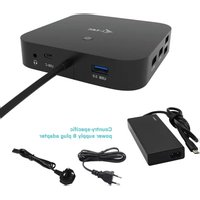
Thank you for purchasing the i-tec Docking Station, our product allows you to connect your favourite devices via a single USB cable to a laptop or tablet with a USB-C or USB-A port. By this, you will gain access to the connection (it applies to connection by means of USB-C or Thunderbolt 3; in case of connection by means of USB 3.0, it is not technologically possible to recharge a laptop via the docking station), up to two monitors with resolution of 4K, or to one monitor with resolution of 5K. Four USB 3.0 ports and two USB-C port will enable you to connect all your favorite accessories. The docking station provides 2x HDMI port and 2x Display Port (only 2 graphics outputs can be active at the same time), 1x Ethernet GLAN RJ-45 port, 4x USB-A 3.0 ports, 2x USB-C ports, 2x Audio ports (earphones and microphone), 1x input for external power supply and On/Off switch. An advantage is the ability to connect a docking station to a USB-A 3.0 or USB-C port on your laptop / tablet.
PACKAGE CONTENTS
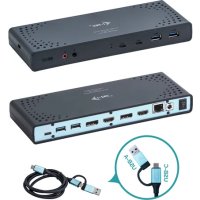
• i-tec USB-A 3.0 / USB-C Docking Station
- Multipurpose USB-C to USB-C cable featuring USB-A adapter (1 m)
• Power adapter (output DC: 20.0V/5.0A max. 100.0W, DC cable 110 cm)
- Quick Start
SPECIFICATION AND DESCRIPTION
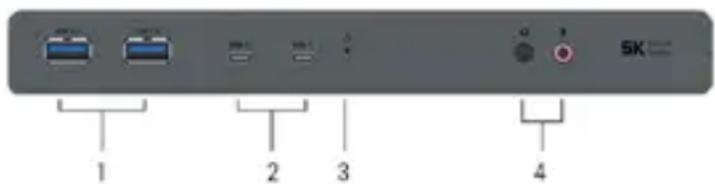
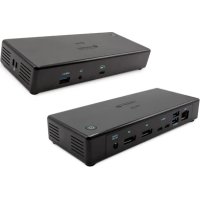
Front panel:
- 2x USB-A 3.0 port for connecting USB 3.1/3.0/2.0 devices and high-speed data transmission up to 5 Gbps; supports USB Hot Swapping function *
- 2x USB-C 3.1 port for connection of your USB-C device, is only determined for data transfer (5 Gbps)
- LED indication
- Separated microphone input and earphone output, 1x 3.5 mm Audio out 5.1, 1x 3.5 mm Mic in
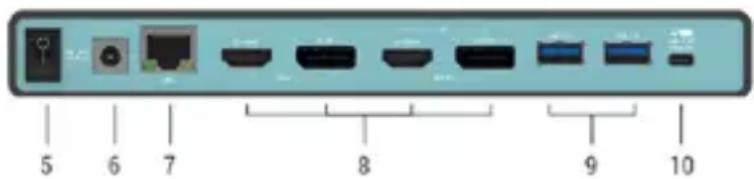
Rear panel:
- On/Off switch for the docking station switching on and off
- Power supply input – external power adapter (output: DC 20.0V/5.0A) External power supply exclusively for use with CADUA4KDOCKPDL.
- 1x Ethernet GLAN RJ-45 port for fast network and Internet access with Gigabit Ethernet connection, it supports speeds of 10 / 100 / 1000 Mbps
- Graphic interface: 2x HDMI and 2x Display Port. Docking station supports up to two monitors. Resolution:
- 1 monitor connected via 2 DP cables: 1x DP + 1x DP supports up to 5K
5120x2880@60Hz, a graphics card on your computer must support 5K resolution - 2 monitors connected at the same time: 1x DP + 1x DP supports up to 4K 4096x2160@60Hz; 1x DP + 1x HDMI supports up to 4K 4096x2160@60Hz; 1x HDMI + 1x HDMI supports up to 4K 4096x2160@60Hz
- 2x USB-A 3.0 port for connecting USB 3.1/3.0/2.0 devices and high-speed data transmission up to 5 Gbps; supports USB Hot Swapping function *
- USB-C port for connection of the docking station to a laptop with a USB-C or USB-A interface (the package contains multipurpose USB-C to USB-C cable featuring USB-A adapter (1 m)). In case of connection to a USB-C or Thunderbolt 3 port of your laptop, the docking station also supports a function of Power Delivery in profile 4 (standardly 60.0W, max. 65.0W upkeeping) for your laptop recharging.
* Docking station supports fast charging of BC 1.2 but only one port at a given moment.
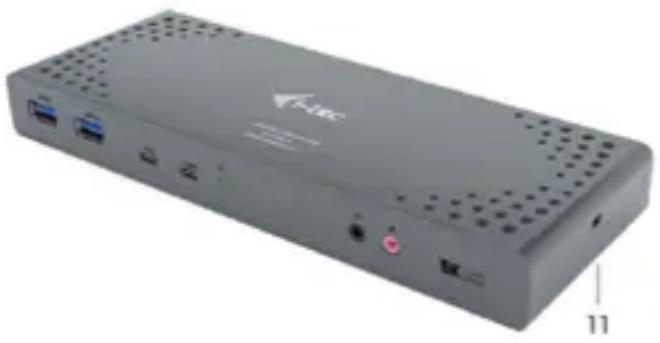
natural_image
Exterior view of a gray rectangular electronic device with ports and ventilation grilles, labeled '11' (no readable text or symbols beyond branding)Side panel:
-
Kensington lock
-
Chipsets: DL6950, FL5002, GL3523
• Product dimensions: 223 x 88 x 27 mm
• Product weight: 338 g
SYSTEM REQUIREMENTS
Hardware requirements: Laptop / tablet with a free USB-A or USB-C port (For USB-C, Power Delivery Alt Mode is recommended for charging)
Operating system: Windows 7 / 8 / 8.1 / 10 32/64 bit, macOS X, Linux Ubuntu 14.04 / 16.04, Android 6 or later. Windows 10 – automatic installation of OS drivers. Other operating systems – manual installation of drivers. Firmware updates automatically.
For routine work on multiple monitors
- Processor: Intel Core i5 2+GHz / AMD Trinity or higher
- RAM: 4GB
• Graphic processor: Intel HD 4000, ATI Radeon HD7xxx, NVidia GeForce 5xxM or higher
• Port USB 3.0 / USB-C
Video playback
- Processor: Intel Core i7 2+GHz / AMD Richland A10-575x / AMD Kaveri A10-7400P or higher
- RAM: 8GB
• Graphic processor: Intel HD 4000, ATI Radeon HD 8650, NVidia GeForce 7xxM or higher - Port USB 3.0 / USB-C
To play Ultra HD 4K/5K videos, your computer must be able to decode this video with its graphics processor. Especially in less powerful laptops, they can handle 4K/5K video playback, but the result is not ideal (interruption, video tearing).
DRIVER INSTALLATION IN WINDOWS 7 / 8 / 8.1 / 10 (32/64 BIT)
ATTENTION! Do not connect the docking station to your laptop / tablet until you have installed the appropriate drivers. Drivers must only be installed before first use. Before installation, make sure that your system has installed the latest drivers for your device and updated BIOS.
For Windows 7/8/8.1, download the drivers from our website www.i-tec.cz/en on the "Download" tab of this product or on www.i-tec.cz/setup. Run the installation from the downloaded file, select the installation language, and follow the instructions on the screen.
In Windows 10, the docking station can be connected directly, drivers are automatically installed from the system when connected to the Internet.
Note: In Windows 7 / 8 / 8.1 / 10, install the drivers as the "Administrator" user. The screen may blink while the drivers are being installed, this is a standard process. Once the installation is complete, we recommend restarting the notebook / tablet.
DRIVER INSTALLATION IN MACOS
ATTENTION! Do not connect the dock to your Mac until you install the appropriate drivers. Drivers must only be installed before first use. We recommend that you have the latest macOS operating system installed.
Download drivers from our website www.i-tec.cz/en/ on the "Download" tab of this product and run the installation.
SAFETY INSTRUCTIONS
- Do not expose to extreme temperatures and air humidity
- Use the device on flat surfaces – you will prevent it from slipping and falling to the ground.
- Save the user manual for a possible use later.
In cooperation with the service department:
- Check functionality after falling to water or to the ground.
- Check functionality when the cover is broken.
- Send the device back if it does not work in accordance with the user manual.
FREQUENTLY ASKED QUESTIONS
Available on our website www.i-tec.cz/en/ on the "FAQ" tab of this product.
EINLEITUNG
natural_image
Front view of a gray electronic device with ports and indicator lights, labeled '11' (no readable text or symbols beyond labels)Seitenpaneel:
- Kensington lock
• Chipsets: DL6950, FL5002, GL3523
- Produktabmessungen: 223 x 88 x 27 mm
- Produktgewicht: 338 g
SYSTEMANFORDERUNGEN
natural_image
Exterior view of a gray rectangular electronic device with ports and ventilation grilles, labeled '11' (no readable text or symbols beyond branding)Panneau latéral:
- Serrure Kensington
natural_image
Front view of a gray electronic device with ports and indicator lights (no visible text or symbols)Panel lateral:
- Kensington lock
Chipset: DL6950, FL5002, GL3523
natural_image
Front view of a gray electronic device with ports and indicator lights (no visible text or symbols)Pannello laterale:
natural_image
Exterior view of a gray electronic device with ports and ventilation grilles (no visible text or symbols)Boční panel:
-
Kensington lock
-
Chipsety: DL6950, FL5002, GL3523
- Rozměry produktu: 223 x 88 x 27 mm
• Hmotnost produktu: 338 g
SYSTÉMOVÉ POŽADAVKY
natural_image
Exterior view of a gray wireless router device with ports and ventilation grilles (no visible text or symbols)Panel boczny:
-
Zamek Kensington
-
Chipset: DL6950, FL5002, GL3523
• Wymiary produktu: 223 x 88 x 27 mm
• Waga produktu: 338 g
WYMAGANIA SYSTEMOWE
natural_image
Front view of a gray wireless router device with ports and ventilation grilles (no visible text or symbols)Bočný panel:
- Kensington lock
• Chipsety: DL6950, FL5002, GL3523
- Rozmery produktu: 223 x 88 x 27 mm
• Hmotnost produktu: 338 g
natural_image
Front view of a gray electronic device with ports and ventilation grilles, labeled with number 11 (no visible text or symbols on the device body)Šoninis panelis:
-
Kensington lock
-
Chipset: DL6950, FL5002, GL3523
• Gaminio matmenys: 223 x 88 x 27 mm
• Gaminio svoris: 338 g
SISTEMOS REIKALAVIMAI
i-tec USB-A 3.0 / USB-C Dual Display Docking Station + Power Adapter 100 W
i-tec USB-A 3.0 / USB-C Dual Display Docking Station + Power Adapter 100 W
natural_image
Front view of a gray electronic device with ports and ventilation grilles, labeled with number 11 (no visible text or symbols on the device body)Zijpaneel:
EN - This equipment is marked with the above recycling symbol. It means that at the end of the life of the equipment you must dispose of it separately at an appropriate collection point and not place it in the normal domestic unsorted waste stream. This wil benefit the environment for all. (European Union only)
USB-A 3.0 / USB-C Dual Display Docking station + Power Delivery 65W
Model, Modell, Modèle, Modelo, Modello, Modelis:
EN Amendment to user manual providing all necessary information required by COMMISSION REGULATION (EU) 2019/1782. (This product meets all the requirements laid down by the above regulation).
This equipment has been tested and found to comply within the limits of a Class B digital device pursuant to Part 15 of the FCC Rules. These limits are designed to provide reasonable protection against harmful interference in a residential installation.
www.i-tec.cz/en