WS 8120 - Clock TECHNOLINE - Free user manual and instructions
Find the device manual for free WS 8120 TECHNOLINE in PDF.



User questions about WS 8120 TECHNOLINE
0 question about this device. Answer the ones you know or ask your own.
Ask a new question about this device
Download the instructions for your Clock in PDF format for free! Find your manual WS 8120 - TECHNOLINE and take your electronic device back in hand. On this page are published all the documents necessary for the use of your device. WS 8120 by TECHNOLINE.
USER MANUAL WS 8120 TECHNOLINE
WS8120 - INSTRUCTION MANUAL
RADIO CONTROLLED WALL CLOCK WITH CALENDAR, TEMPERATURE AND HUMIDITY
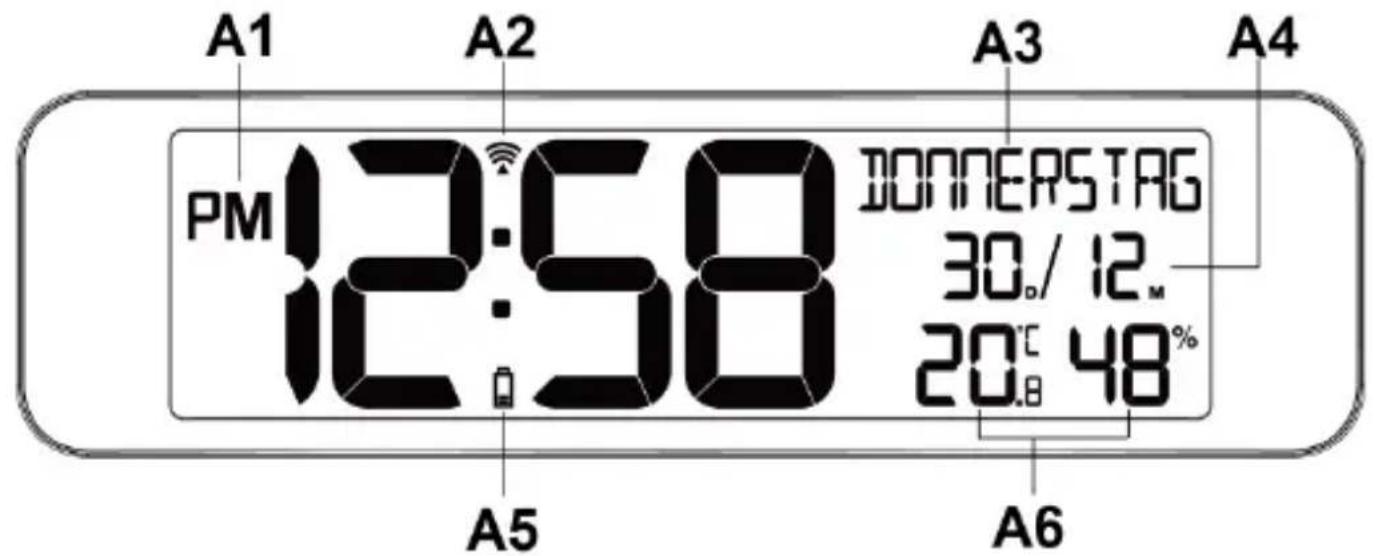
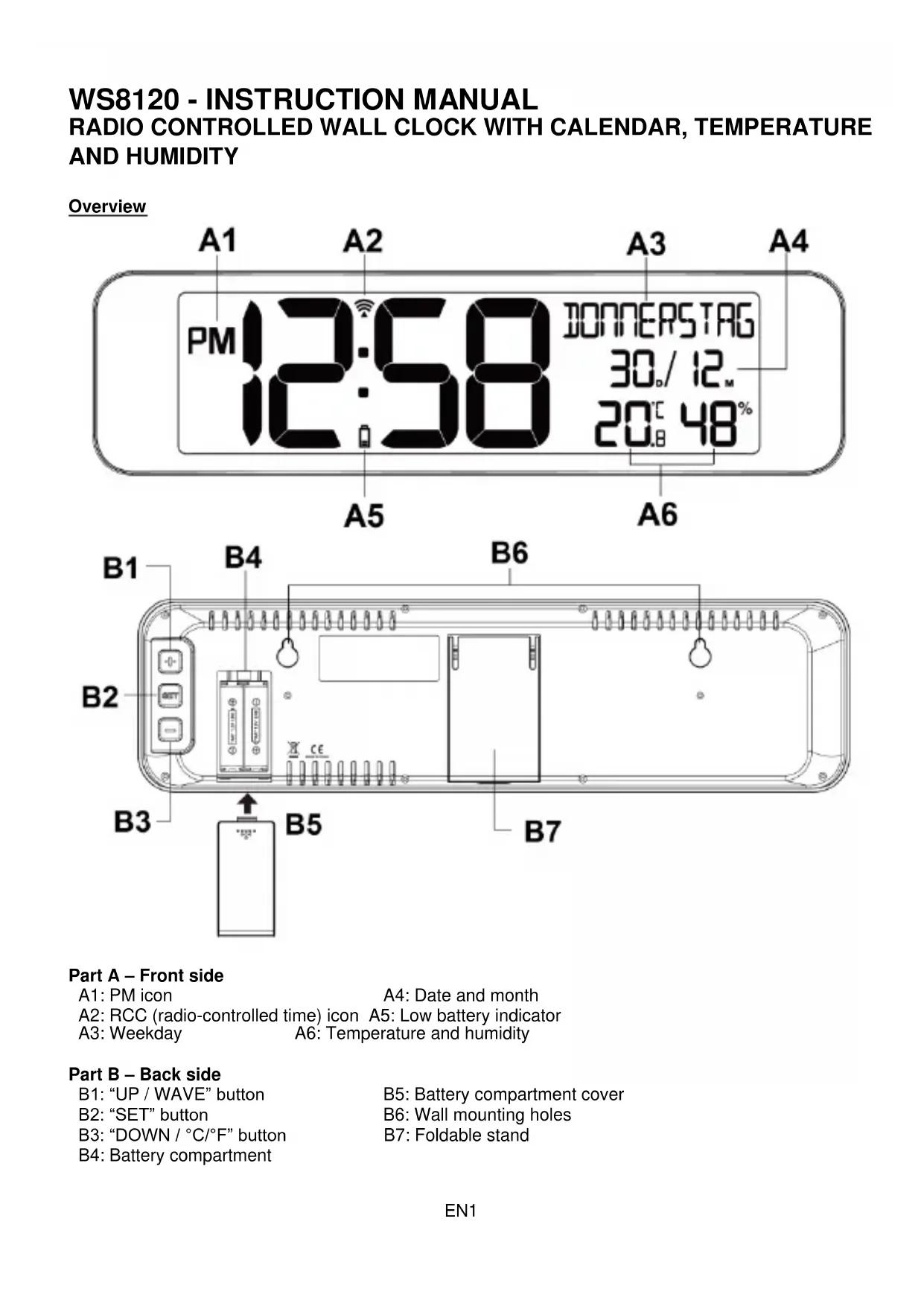
Overview
Part A - Front side
A1: PM icon
A4: Date and month
A2: RCC (radio-controlled time) icon A5: Low battery indicator
A3: Weekday A6: Temperature and humidity
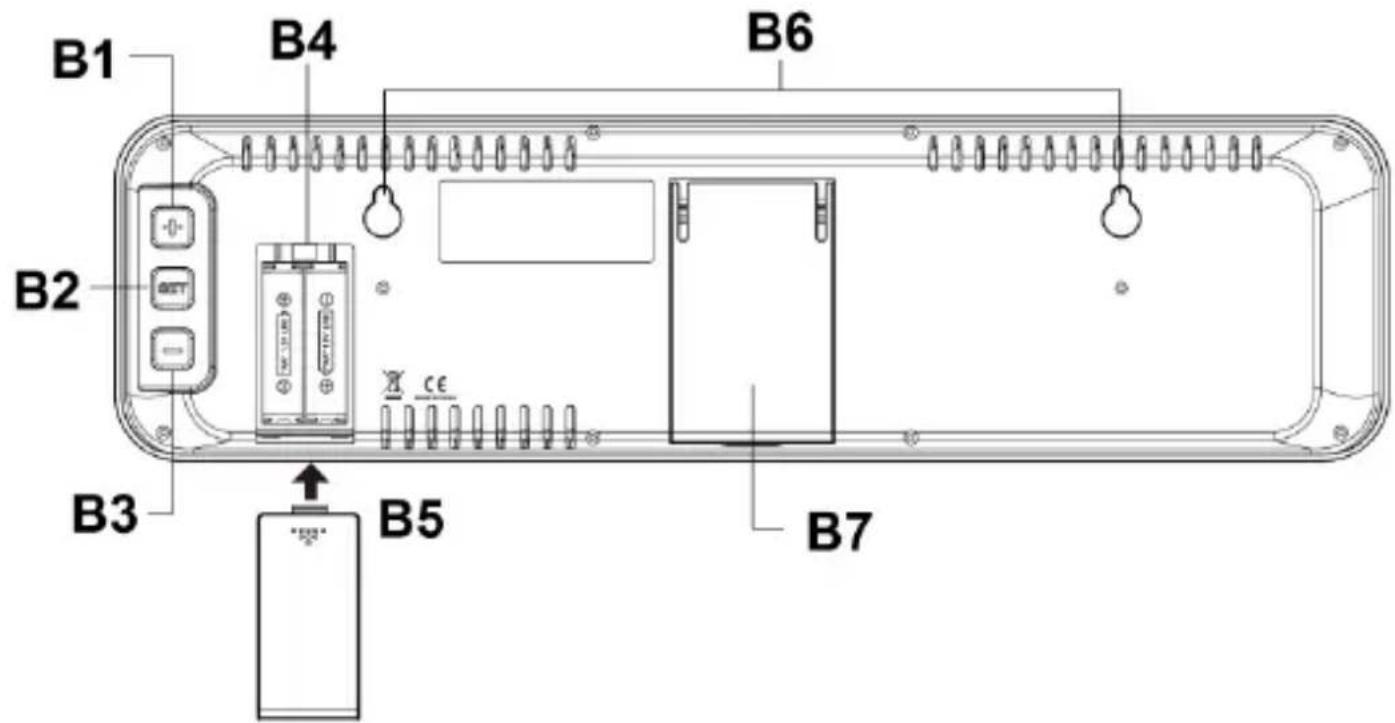
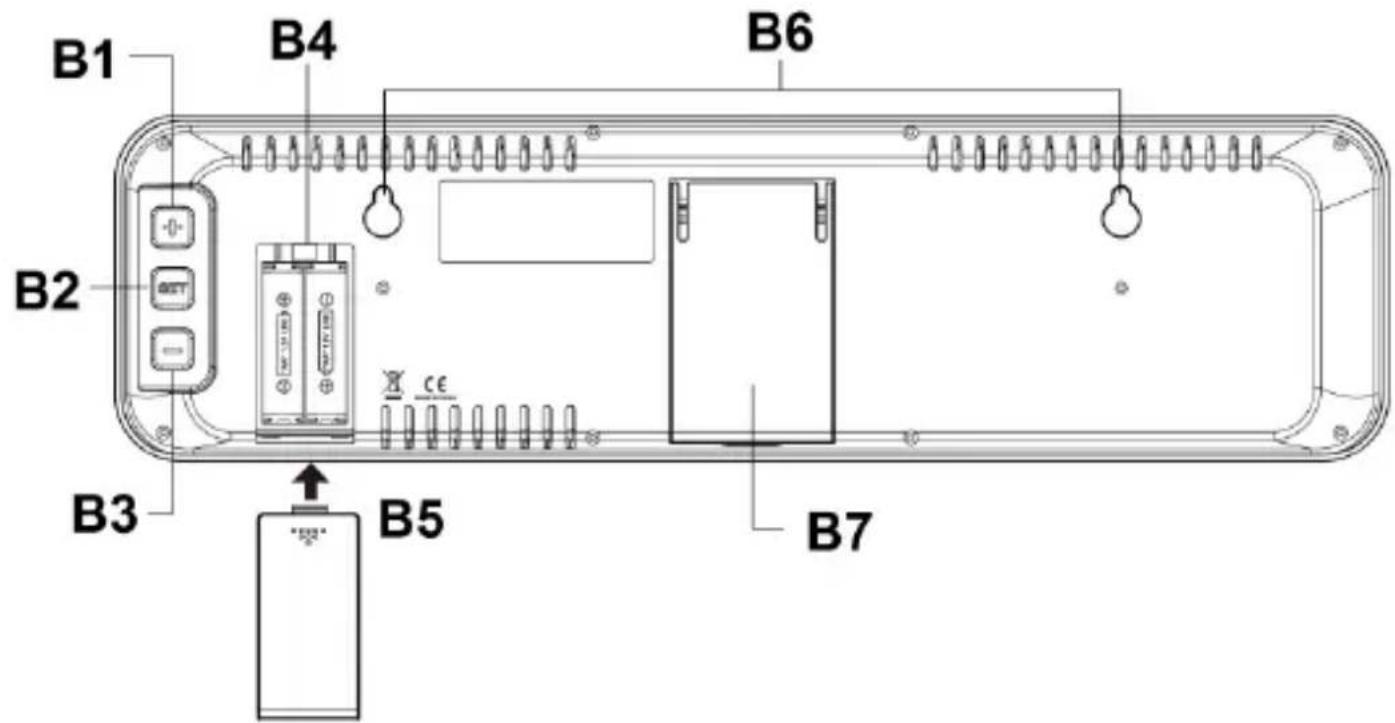
Part B - Back side
B1: "UP/WAVE" button
B5: Battery compartment cover
B2: "SET" button
B6: Wall mounting holes
B3: "DOWN / °C/°F" button
B7: Foldable stand
B4: Battery compartment
INSTALLATION
- Remove the protective film at the front of the clock.
- Place your clock face down on a flat and soft surface.
- Slide off and remove the battery cover at the back of your unit.
- Insert 2 x new AA batteries (not included) into the battery compartment by observing the correct "+" and "-" polarity.
- Slide on and replace the battery cover.

Reminder:
Alkaline batteries are recommended for optimal usage of this clock.
- Do not mix old and new batteries.
- Do not mix alkaline, standard or rechargeable batteries.
DCF SIGNAL RECEPTION AND SIGNAL INDICATOR
After your clock is powered up, it starts to receive DCF signal. The icon flashes.
Receiving DCF signal (icon flashing)
Successful Reception (icon becomes static)
Failed Reception (icon disappear)
AUTOMATIC RECEPTION AND MANUAL RECEPTION
Your clock starts automatic reception everyday at 1:00, 2:00, and 3:00. If it fails to receive the DCF77 time signal at 3:00, it will start reception at 4:00. If it fails again, it will start reception at 5:00. If it fails again, it will start automatic reception at 1:00 again in the next day.
MANUAL RECEPTION
Press and hold ^+ , your clock will start manual reception. Press and hold ^+ again to stop the current DCF reception.
During RCC reception, all buttons do not function and it does not take temperature measurement.
TO TURN ON/OFF RADIO CONTROLLED TIME
When you use this clock in a country where the DCF signal is not available, you can turn off the function of DCF radio controlled time.
Press and hold both + and - few seconds until the upper right LCD shows "DCF OFF". Your clock will return to normal time display and it will not search for DCF signal automatically everyday.
To turn on the function again, press and hold both + and - until "DCF ON" appears.
TO SET DST, TIME ZONE, TIME, 12/24HR,CALENDAR
- Press and hold SET, "DST ON" flashes, press + or - to select "DST OFF" if need.
- Press SET again, "GMT+1" flash, press + or - to select :-
GMT+0 Western European time (U.K., Ireland, Portugal)
GMT+1 Central European time (e.g. Germany, Switzerland, Spain, France, Italy)
GMT+2 Eastern European Time (e.g. Finland, Ukraine, Romania)
GMT+3 Turkey
- Press SET again, "HOUR" appears and hour digit flash, press + or - to set hours.
- Press SET again, "MINUTE" appears and the minute digits flash, press + or - to set minutes.
-
Press SET again, "24HR" flashes, press + or - to select 24HR ⇌12HR. In 12Hr mode, AM will appear on the display to indicate morning time. PM will appear on the display to indicate afternoon time.
-
Press SET again, "YEAR" appears and "2019" flash, press + or - to set year.
- Press SET again, "MONTH" appears and month digit "1" flash, press + or - to set month.
- Press SET again, "DATE" appears and date digit "1" flash, press + or - to set date.
- Press SET again, "D" and "M" flash, press + or - to select M/D (Month-Date) or D/M (Date-Month) calendar display.
- Press SET again, "ENGLISH" flashes, press + or - to select the language of weekday in: ENGLISH (default) / DEUTSCH / FRENCH / ITALIAN / SPANISH / HOLLAND / FINNISH / SWEDISH.
- Press SET once again to confirm. Your clock will return to normal time display mode in around 10 seconds if no further press of any other buttons.
Notes:
- Press and hold + or - to accelerate setting process.
The clock will exit the setting mode and return to normal time display if no buttons are pressed for 10 seconds.
TO SELECT TEMPERATURE CELSIUS OR FAHRENHEIT
During normal time display, press “-” once to select temperature display in ^ C or ^ F .
TO SELECT THE DISPLAY OF TEMPERATURE AND HUMIDITY OR THE YEAR
At normal mode, press ^+ + once to show the year, press ^+ + once again to return to the temperature and humidity display.

TEMPERATURE AND HUMIDITY DISPLAY YEAR DISPLAY
LOW BATTERY INDICATOR
The low battery indicator will appear between the time digits when the batteries are low. Replace with new Alkaline batteries.
TROUBLE SHOOTING
If your clock displays irrelevant time or does not function properly, which maybe caused by electrostatic discharge or other interference, slide open the battery cover, take out the batteries and reinstall them by observing the correct + / - polarity. Your unit will be reset to default settings and you need to set it again.
CARE OF YOUR PRODUCT
- Place your unit on a stable surface, away from sources of direct sunlight or excessive heat or moisture.
- Protect your furniture when placing your units on a natural wood and lacquered finish by using a cloth or protective material between it and the furniture.
- Clean your unit with a soft cloth moistened only with mild soap and water. Stronger agents such as Benzine, thinner or similar materials can damage the surface of the unit.
- If the unit is not to be used for a prolonged period, such as a month or longer, remove the batteries to prevent possible corrosion. Should the battery compartment become corroded or dirty, clean the compartment thoroughly and replace the batteries.
Hereby, Technotrade declares that this product WS 8120 is in compliance with the essential requirements and other relevant provisions of Directive 2014/53/EU and ROHS 2011/65/EC. The original EU declaration of conformity may be found at: www.technoline.de/doc/4029665181202
SPECIFICATIONS
Operation Temperature: 0^ to +45^
Temperature Range 0^ to +50^ (display shows HH.H / LL.L if out of this range)
Humidity Range 20% to 95%
Temperature Resolution 0.1^
Environmental reception effects
The clock obtains the accurate time with wireless technology. Same as all wireless devices, the reception is maybe affected by the following circumstances:
- long transmitting distance
- nearby mountains and valleys
- near freeway, railway, airports, high voltage cable etc.
- near construction site
among tall buildings - inside concrete buildings
near electrical appliances (computers, TV's, etc) and metallic structures - inside moving vehicles
Place the clock at a location with optimal signal, i.e. close to a window and away from metal surfaces or electrical appliances.
Precautions
- This unit is intended to be used only indoors.
- Do not subject the unit to excessive force or shock.
- Do not expose the unit to extreme temperatures, direct sunlight, dust or humidity.
- Do not immerse in water.
- Avoid contact with any corrosive materials.
- Do not dispose this unit in a fire as it may explode.
- Do not open the inner back case or tamper with any components of this unit.
Batteries safety warnings
- Use only alkaline batteries, not rechargeable batteries.
- Install batteries correctly by matching the polarities (+/-) .
- Always replace a complete set of batteries.
- Never mix used and new batteries.
- Remove exhausted batteries immediately.
- Remove batteries when not in use.
- Do not recharge and do not dispose of batteries in fire as the batteries may explode.
- Ensure batteries are stored away from metal objects as contact may cause a short circuit.
- Avoid exposing batteries to extreme temperature or humidity or direct sunlight.
- Keep all batteries out of reach from children. They are a choking hazard.
Use the product only for its intended purpose!
Consideration of duty according to the battery law
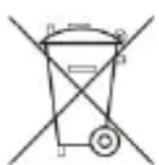
Old batteries do not belong to domestic waste because they could cause damages of health and environment. You can return used batteries free of charge to your dealer and collection points. As end-user you are committed by law to bring back needed batteries to distributors and other collecting points!
Consideration of duty according to the law of electrical devices
This symbol means that you must dispose of electrical devices separated from the General household waste when it reaches the end of its useful life. Take your unit to your local waste collection point or recycling centre. This applies to all countries of the European Union, and to other European countries with a separate waste collection system.
WS8120 - GUIDE D'UTILISATION HORLOGE MURALE RADIO-PILOTÉE AVEC CALENDRIER, TEMPÉRATURE ET HUMIDITÉ
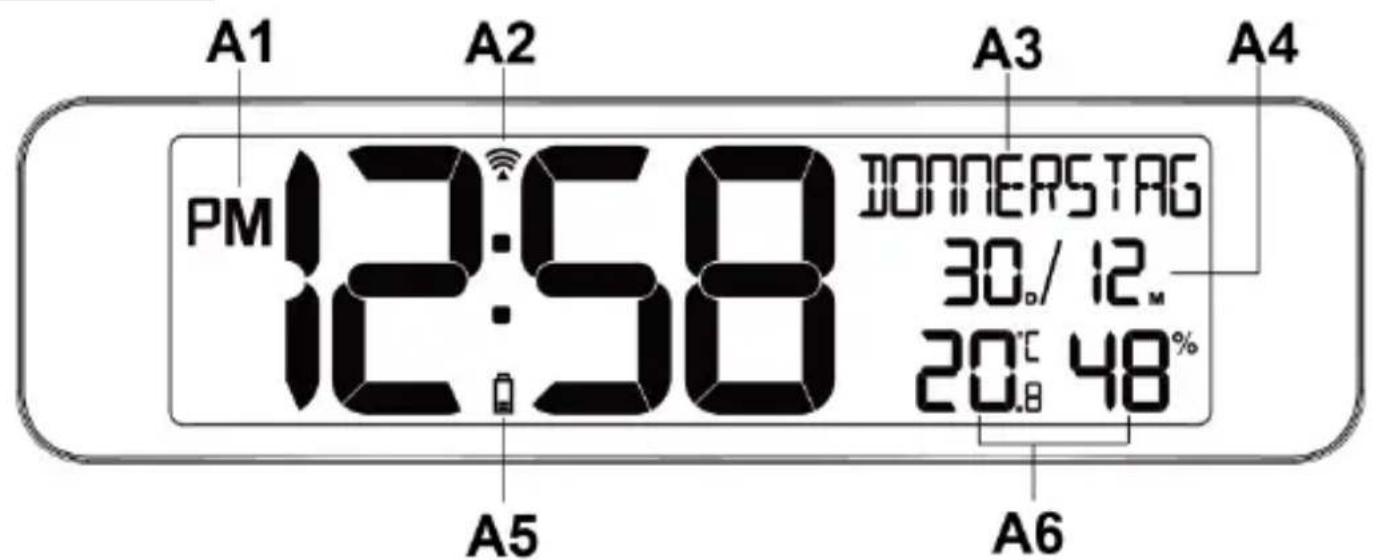
Vued'ensemble