WS 8004 - Clock TECHNOLINE - Free user manual and instructions
Find the device manual for free WS 8004 TECHNOLINE in PDF.


| Product type | Digital alarm clock |
| Brand | TECHNOLINE |
| Model | WS 8004 |
| Power supply | 2 AA batteries (not included) |
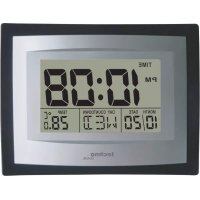
| Display | Digital with time, date, temperature |
| Main functions | Alarm, alarm clock, countdown timer, birthday reminder, temperature °C/°F, melodies |
| Time format | 12h/24h adjustable |
| Number of alarm melodies | 8 melodies to choose from |
| Snooze function | Yes, 3 snoozes at 4-minute intervals |
| Countdown timer | Adjustable countdown up to 23h59 |
| Birthday reminder | Plays birthday song for 5 minutes on the set date |
| Temperature sensor | Built-in, display in °C or °F |
| Housing material | Plastic |
| Dimensions (approx.) | 10 x 6 x 6 cm (estimated) |
| Weight (approx.) | 100 g (estimated) |
| Care and cleaning | Wipe with a dry, soft cloth. Do not use abrasive products. |
| Precautions | Do not expose to water, extreme temperatures, or shocks |
| Batteries | Use only alkaline batteries. Observe polarity. |
| Warranty | Compliant with EU directives 2014/53/EU and ROHS 2011/65/EC |
Frequently Asked Questions - WS 8004 TECHNOLINE
User questions about WS 8004 TECHNOLINE
0 question about this device. Answer the ones you know or ask your own.
Ask a new question about this device
Download the instructions for your Clock in PDF format for free! Find your manual WS 8004 - TECHNOLINE and take your electronic device back in hand. On this page are published all the documents necessary for the use of your device. WS 8004 by TECHNOLINE.
USER MANUAL WS 8004 TECHNOLINE
At normal display status, press "MODE" key to enter into the set mode. "12Hr/24Hr" flashes, then press "UP" or "DOWN" keys to change between 12Hr or 24Hr mode. Press "SET" or "C/F" key to confirm your setting and change to the hour setting. Proceed by using "UP" or "DOWN" keys to adjust and "SET" or "C/F" key. The setting sequence is: Hour, Minute, Year, Month, Date.
At the setting status, if no key is operated within 60 seconds, the previous setting will be confirmed automatically, the clocks then enters into time display status
12Hr/24Hr TIME DISPLAY:
At normal display status, press "MODE" key to enter into the setting of 12Hr/24Hr display. Press "SET" or "C/F" key to confirm your setting and change to the hour setting.
ALARM & SNOOZE FUNCTION:
At normal time display, press “MODE” key twice or press “ALM” key directly to enter alarm mode. Press “SET” or “C/F” to enter key to enter alarm set mode. Then press “UP” or “DOWN” keys to adjust hour. Press “SET” or “C/F” key to confirm your setting and change to the minute setting. Proceed in the settings by using “UP” or “DOWN” keys to adjust and “SET” or “C/F” key to confirm your setting. The setting sequence is: Hour, minute, melodies, exit. You can choose between 8 different alarm melodies.
The alarm is set on when "ALARM" is displayed in normal time mode.
SET ALARM OFF:
At normal time display press "MODE" key twice or press "ALM" key directly to enter alarm mode. Now press "SET" key five times until "--" is shown, the alarm is now set off.
SNOOZE FUNCTION:
In normal time display press "UP" key in order to set snooze function on or off. If the alarm is on and the snooze function is off, it will ring one minute when time is up. Press any key to stop. If the snooze function is on, it will ring for one minute every four minutes interval, lasting three times totally. While alarm is ringing, press any key to stop the alarm, the "SNOOZE" icon is still flashing which indicates that snooze alarm is active. Snooze alarm works three times in a row. Press "UP" to turn of the snooze function.
BIRTHDAY-REMIND SETTING:
At normal display status, press "MODE" key three times to enter birthday-reminding mode. Press "SET" or "C/F" to enter key to enter birthday-reminding set mode. Then press "UP" or "DOWN" keys to adjust hour. Press "SET" or "C/F" key to confirm your setting and change to the minute setting. Proceed the settings by using "UP" or "DOWN" keys to adjust and "SET"
or "C/F" key to confirm your setting. The setting sequence is: Hour → Minute → Year → Month → Date → Exit.
When the set time and date is reached, the clock will play birthday song for 5 minutes to celebrate "HAPPY BIRTHDAY". If you don't want to use the reminder function set a past date.
At the setting status, if no key is operated within 60 seconds, the previous setting will be confirmed automatically, and return to normal display status automatically.
TIMER SETTING:
At normal display status, press "MODE" key four times key to enter into timer mode.
Press SET" or "C/F" to enter key to enter alarm set mode. Then press "UP" or "DOWN" keys to adjust hour. Press "SET" or "C/F" key to confirm your setting and change to the minute setting. Now set minutes by using "UP" or "DOWN" keys to adjust and "SET" or "C/F" key to confirm your setting. The setting range is Hour, Minute (approximately 23Hr : 59Min)
After confirmation of the minute setting, the timer will start to count down. You can stop and reset the timer by pressing the "SET" key while timer mode is displayed.
When the time is up to 0:00:00, alarm will ring for 1 minute and "0:00:00" will flash at the same time.
At the setting status, if no key is operated within one minute, the previous setting will be confirmed automatically, the timer will start and the clock will return to normal display status automatically.
SET TIMER OFF:
At normal time display press "MODE" key four times to enter alarm mode. Now press "SET" four times until "--" is shown, the timer is now set off.
TEMPERATURE DISPLAY °C/°F:
At normal display status, press "SET" or "C/F" key to switch between the °C/°F display.
PLAY MELODIES:
At normal time display, press “DOWN” key to turn on or off music mark “(((。)))”. When the mark is on, the melodies will be played in row until set off by pressing the “DOWN” key.
Declaration of conformity
Hereby, Technotrade declares that this product WS 8004 is in compliance with the essential requirements and other relevant provisions of Directive 2014/53/EU and ROHS 2011/65/EC.
The original EU declaration of conformity may be found at:
- This main unit is intended to be used only indoors.
- Do not subject the unit to excessive force or shock.
- Do not expose the unit to extreme temperatures, direct sunlight, dust or humidity.
- Do not immerse in water.
- Avoid contact with any corrosive materials.
- Do not dispose this unit in a fire as it may explode.
- Do not open the inner back case or tamper with any components of this unit.
BATTERIES SAFETY WARNINGS
- Use only alkaline batteries, not rechargeable batteries.
• Install batteries correctly by matching the polarities (+/-).
• Always replace a complete set of batteries. - Never mix used and new batteries.
- Remove exhausted batteries immediately.
- Remove batteries when not in use.
- Do not recharge and do not dispose of batteries in fire as the batteries may explode.
- Ensure batteries are stored away from metal objects as contact may cause a short circuit.
- Avoid exposing batteries to extreme temperature or humidity or direct sunlight.
- Keep all batteries out of reach from children. They are a choking hazard.
Use the product only for its intended purpose!
Consideration of duty according to the battery law

Old batteries do not belong to domestic waste because they could cause damages of health and environment. You can return used batteries free of charge to your dealer and collection points. As end-user you are committed by law to bring back needed batteries
to distributors and other collecting points!
Consideration of duty according to the law of electrical devices

This symbol means that you must dispose of electrical devices separated from the General household waste when it reaches the end of its useful life. Take your unit to your local waste collection point or recycling centre. This applies to all countries of the European Union, and to other European countries with a separate waste collection
system.