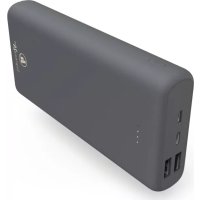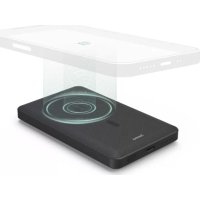
MagPower5 00187270 - Power bank HAMA - Free user manual and instructions
Find the device manual for free MagPower5 00187270 HAMA in PDF.

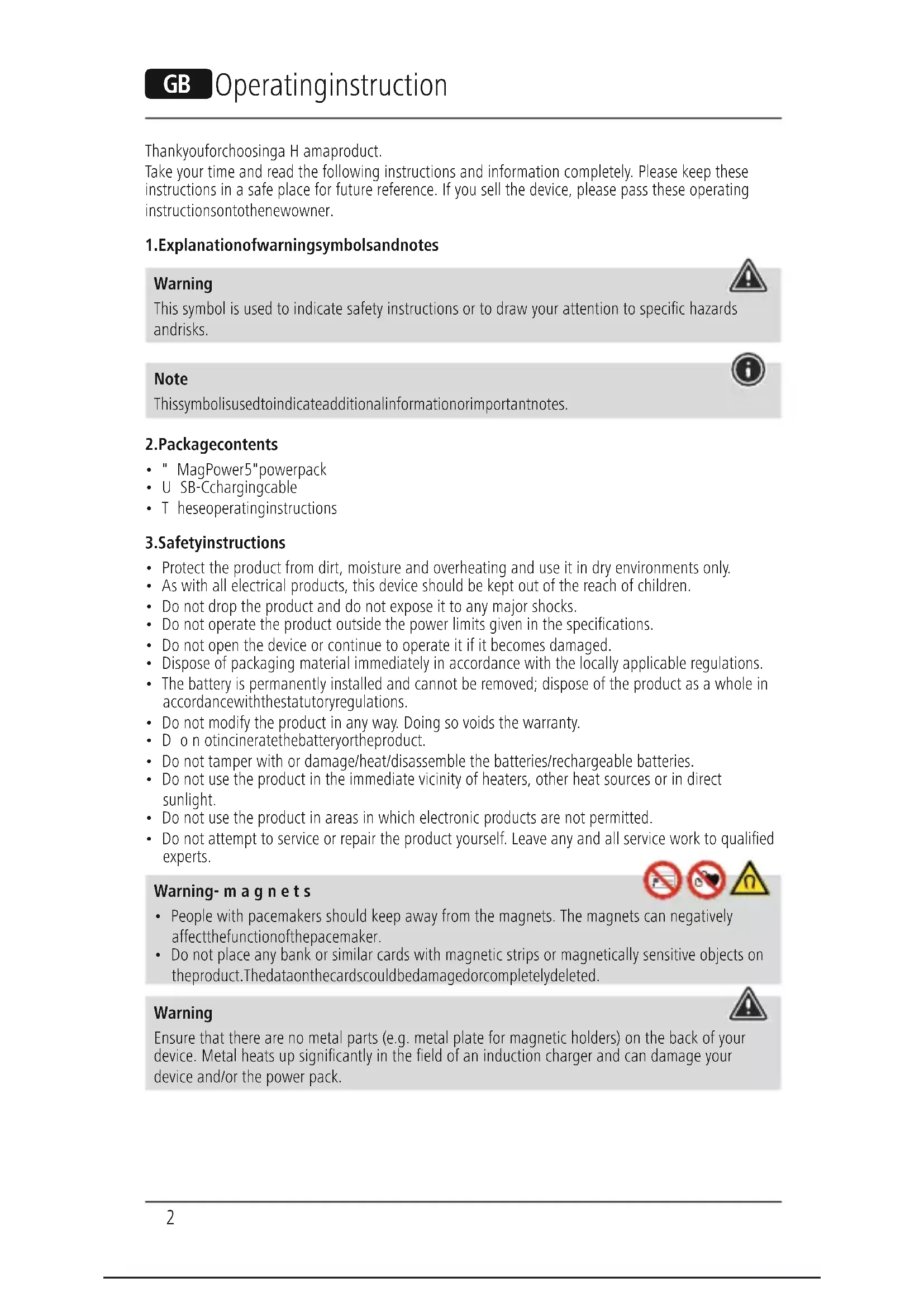


| Product type | Portable battery with wireless charging |
| Brand | Hama |
| Model | MagPower5 00187270 |
| Battery capacity (type) | 5000 mAh / 18.5 Wh |
| Usable capacity (at 5V/2A) | 3266 mAh |
| USB-C input | 5V/2A or 9V/1.5A |
| USB-C output | 5V/2A, 9V/1.5A, 12V/1.1A |
| Wireless output (induction) | 10 W max. |
| Total output | 5V/2A |
| Battery type | Lithium Polymer (Li-Po) 3.7 V |
| MagSafe compatibility | Yes (integrated magnets for iPhone) |
| Capacity indicator | 4 LEDs (25% per LED) |
| Auto shutdown | After about 40 seconds without use |
| Simultaneous charging | Possible (wired + wireless charging) |
| Frequency band (wireless) | 110 kHz – 205 kHz |
| Max. transmission power | 1.24 dBμA/m at 3 m |
| Safety | Magnets (not recommended for pacemaker wearers) |
| Maintenance | Cleaning with a slightly damp lint-free cloth, no harsh detergents |
| Repairability | Do not open or repair yourself; consult a qualified technician |
| Disposal | Integrated battery, do not incinerate; recycle according to local regulations |
Frequently Asked Questions - MagPower5 00187270 HAMA
User questions about MagPower5 00187270 HAMA
0 question about this device. Answer the ones you know or ask your own.
Ask a new question about this device
Download the instructions for your Power bank in PDF format for free! Find your manual MagPower5 00187270 - HAMA and take your electronic device back in hand. On this page are published all the documents necessary for the use of your device. MagPower5 00187270 by HAMA.
USER MANUAL MagPower5 00187270 HAMA
Operating Instructions
Bedienungsanleitung
Moded'employoi
Instruccionesdeuso
Gebruiksaanwijzing
Istruzioniperl'uso
Instrukcjaobslugi
Hasznalatiutmutato
Manualdeutilizare
Navodk p oužiti
Návodnapoužitie
Manualdeinstruções
Bruksanvisning
PykoBODCTBOO3KcNnyatauH
Pa6oTHaHnHCTpyKcua
O8nyiecxpnoonc
Kullanmakilavuzu
Käyttoohje
GB
D
F
E
NL
1
PL
H
RO
CZ
SK
P
S
RUS
BG
GR
TR
FIN

A
B
Thankyouforchoosinga H amaproduct.
Take your time and read the following instructions and information completely. Please keep these instructions in a safe place for future reference. If you sell the device, please pass these operating instructions ontothenewowner.
1.Explanationof warningsymbolsandnotes
Warning

This symbol is used to indicate safety instructions or to draw your attention to specific hazards andrisks.
Note

Thissymbolisusedtoindicateadditionalinformationorimportantnotes.
2.Packagecontents
- "MagPower5"powerpack
U SB-Cchargingcable - T heseoperatinginstructions
3.Safetyinstructions
- Protect the product from dirt, moisture and overheating and use it in dry environments only.
- As with all electrical products, this device should be kept out of the reach of children.
- Do not drop the product and do not expose it to any major shocks.
- Do not operate the product outside the power limits given in the specifications.
- Do not open the device or continue to operate it if it becomes damaged.
- Dispose of packaging material immediately in accordance with the locally applicable regulations.
- The battery is permanently installed and cannot be removed; dispose of the product as a whole in accordance with the statutory regulations.
- Do not modify the product in any way. Doing so voids the warranty.
- D o n otincineratethebatteryortheproduct.
- Do not tamper with or damage/heat/disassemble the batteries/rechargeable batteries.
- Do not use the product in the immediate vicinity of heaters, other heat sources or in direct sunlight.
- Do not use the product in areas in which electronic products are not permitted.
- Do not attempt to service or repair the product yourself. Leave any and all service work to qualified experts.
Warning- m a g n e t s


- People with pacemakers should keep away from the magnets. The magnets can negatively affect the function of the pacemaker.
- Do not place any bank or similar cards with magnetic strips or magnetically sensitive objects on the product. The dataonthecardscouldbedamagedorcompletelydeleted.
Warning

Ensure that there are no metal parts (e.g. metal plate for magnetic holders) on the back of your device. Metal heats up significantly in the field of an induction charger and can damage your device and/or the power pack.
4. Operation
Note- S witchingon/ o f f

- Press the button on the power pack to switch this on, to determine the power pack's current capacity and startthewirelessfunction.
- The power pack switches itself off after around 40 seconds of non-use. Press the Power button twice to switch the power pack off manually. When the power pack switches off, the LED display also goes out.
4.1.ChargingtheMagPower5
- Start the power pack charging process by connecting the enclosed USB-C cable to the USB-C input on the Power Pack (IN 5 V / 2 A or 9 V / 1.5 A) and to a suitable USB-C charger. To do this, consult the operating instructions for the USB charger you are using.
The charging process begins and ends automatically. - Fully charge the power pack once before using it for the first time.
Note-capacity

- D uringthepowerpackchargingprocess, thecapacityisdisplayedconstantly.
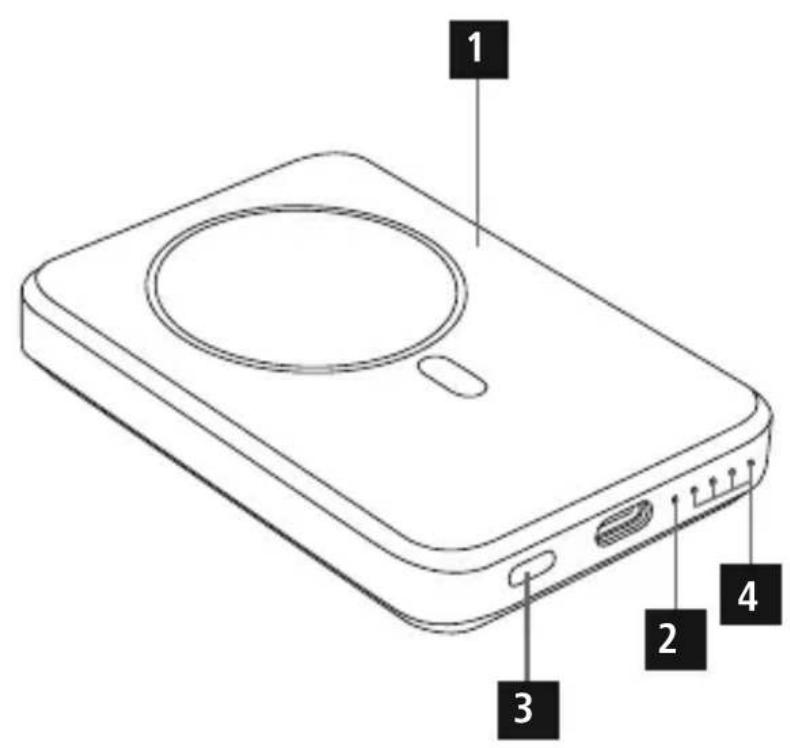
Each LED (4) corresponds to 25% of the capacity. The permanent illumination of an LED indicates that the capacity has already been reached. If three LEDs light up and the fourth one flashes, the powerpack is at least 75% charged.
If all four LEDs (4) light up, the full capacity is available.
Warning - rechargeable battery

- Do not charge the power pack via your PC or notebook. The charging currents can damage the USBportonthePCornotebook.
- Only use suitable charging devices or USB ports to charge the product.
- Do not use defective chargers or USB ports and do not attempt to repair them.
- Do not overcharge the product or allow the battery to completely discharge.
- Avoid storing, charging and using in extreme temperatures and at extremely low atmospheric pressures(suchasathighaltitudes).
- When stored over a long period of time, batteries should be charged regularly (at least every three m onths).
4.2.Chargingdevices
4.2.1. Wireless charging with the induction charging zone:
-firstswitchthepowerpackonusingthePowerbutton(3).
- The blue function LED (2) briefly signals that the power pack is ready and then switches off
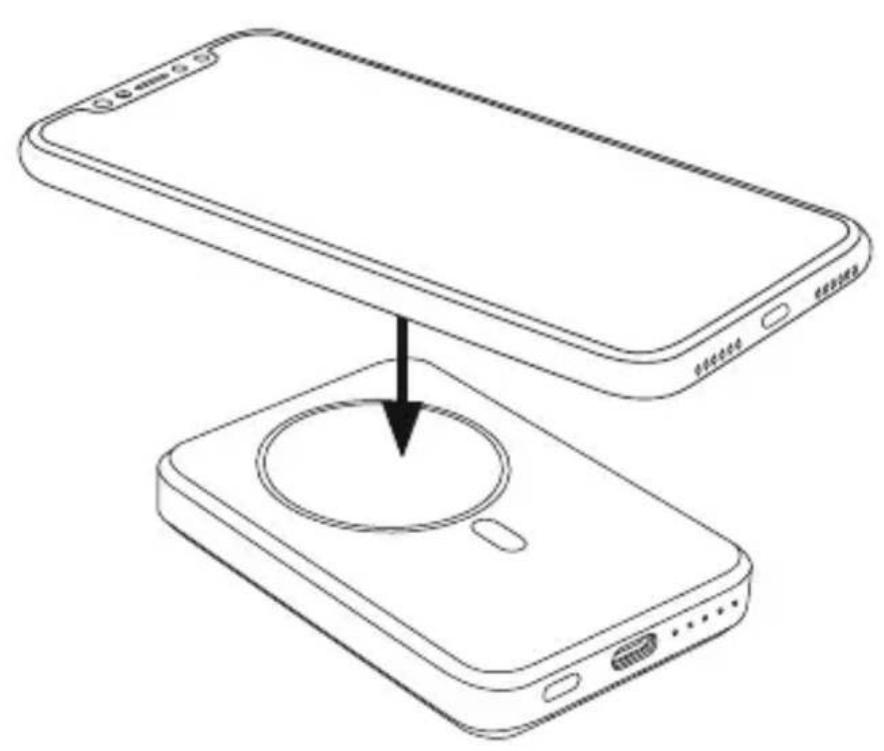
- Place your device with its back on the inductive charging zone (B).
- The "MagPower 5" power pack is compatible with Apple MagSafe technology. The correct alignment and fixation of the device takes place automatically thanks to the magnets integrated into the power pack and the iPhone.
- All other smartphones that support the inductive charging function should also be placed on the induction charging zone (B). In this case, however, the automatic central fixing of the device does not take place.
- The charging process begins as soon as an effective induction field has been established. The status LED (2) lights up blue. The current charge status is displayed on your device.
- If no induction connection can be established, change the position of your device if necessary (B). (For all smartphones that do not feature MagSafe technology)
If your device's battery is fully charged, the status LED (2) goes out once when you remove the device.
- Remove your device from the power pack's induction charging zone and switch it off by pressing the Powerbuttontwiceinquicksuccession. The LEDs(4)goout.

Note
The powerpack can be charged and the inductive charging function uses simultaneously. The Power button (3) is inactive in this situation. The wireless charging function starts automatically when the smartphone is placed in position.
4.2.2. Charging via the power pack's USB-C output:
- connect the enclosed USB-C charging cable to the USB-C port on the power pack (OUT 5V/2A, 9V/1.5A, 12V/1.1A) and with the USB-C port on your device (mobile phone, smartphone, etc.).
- In certain circumstances, the enclosed charging / connecting cable may not match the USB port on your device. In this case, use the USB cable that came with your device.
- The charging process begins automatically. During the charging process, the LEDs (4) the power pack's remaining available capacity.
T hecurrentbatterychargestatusofyourdeviceisindicatedonthis. - Terminate the charging process and switch the power pack off by pressing the power button twice inquicksuccession.ThestatusLEDsqoout.
- In the event that no device is connected, the power pack switches itself off automatically.
Warning- connectingdevices

- Before connecting a device, check whether it can be adequately supplied with the power pack's currentdelivery.
- Ensure that the total current consumption of the connected device does not exceed 2000mA .
- N otetheinstructionsinyourdevice'soperatingmanual.
- You must obey the instructions and safety notes contained therein regarding the supply of powertoyourdevices.
- Please do not charge simultaneously using the wireless charging and USB-C charging options. Doing so may in certain circumstances overload the power pack.
Note- o optimisedcharging

Optimised charging meansthat the powerpack recognises the connected device, supplies it with the ideal current strength and therefore reduces the charging time to a minimum. Note that the power pack's maximum current delivery is 2000mA .
5.Careandmaintenance
Only clean this product using a lint-free, slightly damp cloth and do not use any harsh cleaners.
6.Warranty disclaimer
Hama GmbH & Co KG assumes no liability and provides no warranty for damage resulting from improper installation/mounting, improper use of the product or from failure to observe the operating instructionsand/or safety n otes.
7. Technical data
| USB-Cinput5V 2A, 9V 1.5A | --- |
| USB-Coutput5V | ---2A, 9V=4.5A,12V1.1A-- |
| Inductionoutput10W (max.) | |
| Totaloutput5V | ---2A |
| BATTERYtype3.7V/Li-Po | |
| Mincapacity4995mAh/18.48Wh | |
| Typcapacity5000mAh/18.5Wh | |
| Usablecapacity*3266mAh@5V | ---2A |
- The usable capacity is the capacity that can be drawn from the output sockets, measured at 5V output voltage and a draw current of 2A.
8.Declaration of conformity
Hama GmbH & Co KG hereby declares that the radio equipment type [00201585, 00201695] is in compliance with Directive 2014/53/EU. The full text of the EU declaration of conformityisavailableat thefollowingInternetaddress: www.hama.com->00201585, 00201695->Downloads.
| Frequency band(s) | 110 kHz – 205 kHz |
| Maximum radio-frequency power transmitted | 1.24 dBμA/m at 3 m |
www.hama.com->00201585,00201695->Downloads.
| Bandedifrequency | 110kHz- 2 05kHz |
| Massima potenza a radiofrequenza trasmessa | 1.24 dBμA/m at 3 m |
www.hama.com->00201585,00201695->Downloads.
Frekvenciasav(ok)110kHz-2 05kHz
www.hama.com->00201585,00201695->Downloads.
| Banda (benzile) de frecventa | 110 kHz - 205 kHz |
| Putereamaximă1.24dBμA/mla3m |
Dekujeme,zejstesivybralivyrobekHama!
Najdete si cas a prectete si nejprve nasledujici Pokyny a upozorneni. Uchoveje tento navod k pouziti v dosahu na bezpecnem miste, abyste do nej mohli v priadepotreby nahlednout. Pokud vyrobek prodate, predejte tento navod k obsluze novemu majiteli.
www.hama.com->00201585,00201695->Downloads.
www.hama.com->00201585,00201695->Downloads.
www.hama.com->00201585,00201695->Downloads.
Frekvensband110kHz-205kHz
Max.sandareffekt1.24dBa/mpa 3 ma vstand
BnaOapnmbac3aTo,TOBbIbI6paIINpOyKTHama!
Ipeep nCnoJIb3OBaHnEM BHNMaTeIbHO npOHTe CNeIyUoIe INHCTpyKcIu N yKa3aHn. XpaHnte DaHHoe pyKOBOdCTBO NO 3KcPnyatauB HAnExHOM MeTe, YTObI B cLyae Heo6XoIMOCtN y Bac Bcerda 6bl Doctyn K HeMy. Pp nPoJaxe yCTpoiCTBa nepeaIte pyKOBOdCTBO HOBOMy BlaJeIbCy.
1. PnpeynpeKdaIOUm 3HaKaM yKa3aHnM
PpeynpeKdHne

NcnoJb3yETcAIIaO603HaueHnayka3aHnIOTexHnke6e3oNaChocTnIINJaakceHTnpOBAHnBHHMaHnHaOC6bIXoNaChoctaxn p NCKax.

Yka3aHne
IcnoJIb3yETcAJaIOJIoHHTeBHorOoo6oHaueHnIHΦOpMaunuINBaXhByka3aHn.
2.KomJIeKToCTaBKn
PpeynpeKdEHNe—MaHnTbI
Praom C MaHHTaMHe DoJXHbI HaxOHTbcra IIOuPi, PnIMeHIOUne KapIOCTmMyJrTOpbI. MaHHTbIMORYTOTpuataJIbHOBJMaTbHapa6OtyKapDIOCTmMyJrTOPOB.
He klaIte Ha n3dene 6aHKOBCKne n aHaJorHnHbIe KapTbI C MaHHTHOI NOOCo, a TaKxue yBCTBnTEJIbHbIe K MaHHTHomY noJIIO npEIMTeI. 3TO MOKeT pNpBeCTN K NOBpeXJeHHIO KapT IInydaJIeHHIOCOXpaHEHHOHaHHXINHΦOpMaUIN.
PpeynpexkdeHne

Y6eHNTecb, yTo Ha o6paTHo CTOpOHe BaWero OKOHeUHO yCTpoiCTBa Het MeTALnuecknx 3JIeMeHTOB (HaNPIMep, MetaLInuecko PnactINbI dJa MaHHTHO epXaTeJI). MetaII ouehb CInbHO HArpeBaetcB nOJe INdyKUHOHHO 3apJHO BOblaCTN MoXeT NOBpeHtB NCTOuHNK IITAHNI.
4.3Kcnnyataua

yKa3aHHe-BKJIIOueHHe/BbIKIIOueHHe
Haxmnte KhoNky Ha nctouhne nHTaHn, yTO6bI BkIOuHTb eRO, y3HaTb TeKUyIO emKoCTb 3anyCTnTB6ecnpoBOdHyOΦyHKcIIO.
- Pn HEnCNoJb3ObaHnn NcToUHn KnTaHn CaMOCToTeNbHo OTKnIOuaeTcyepe3 40 cekyH. YTO6bl BbIKNoHTb NcToUHn BpyHyU, DBaXdbI HaxMnte KhoNky Power. Pn OTKJIHOeHNmCTOuHKnAaNTaHnTaKxEracHeTCBtOAnDhInHnDKaTOP.
4.1.ZapdkaNCTouHkannTaHnMagPower5
3anyctnte npoecc 3aprdkn nctouhka nntahna, noCoeHHNB npuJaraembI kaebIb USB-C K pa3bemy USB-C nctouhka nntahna (IN 5 B/2 A nn 9 B/1,5 A) I K noDxOJaEmy 3apraHOMy USB-yctpoiCTby. Co6JIIOaIte pykoBOcTBO no EKcnIyataunncnoJb3yeMoro 3apraHoro USB-yctpoiCTba.
-ПрочьсЗарядкн НачиНаeТСИЗakанчиВаeTСАВТOMATИЧЕСК.
-ПepeДпрВьIMпprimeHHeHMeOДинра3ПОЛHOCtБИЗAPЯДNTUENCTOHTHKNITAHIA.

Yka3aHHe:emKoCTb
B npoucece 3apjkn nctouhka nntaHn 3hauehe emkoctn oTo6paXaetcnoctoHHNO.
Kaxdbn CBeToIOoD (4) COOTBETCTByeT EMKOCTN 25%. NocToHHoe CBeueHne CBeToIOoDa cnHaUN3npyET O TOM, YTO EMKOCTb DOCTINHTa. EcIn TpN CBeToIOoDA rOpT, a YeTBepTbIM CBeToIOoM MfAet, IVcTuHk 3apJxhen He MeHee Yem Ha 75%.
- EcJn ropT Bce Yetbipe CBeToDInoDa (4),doCTnHyTa noJIHaer EMKOCTb.
PpeynpexkdeHne:akKymyIaTOp

He 3apjkaTe nctouHnK nHTaanHuepe3 KOMnbIOTep nn HooTyk. ToKn 3apJkn MoryT nobpeuTbnpotUSBKOMnbIOTepaunHooTy6yka.
-Дязардки ИсплььутToько пдхлгше зардны ecрсntba nln USB-pa3bebl.
He nCnoB3yIe HeNCnPaBHbIe 3apAaHbIe yCTpoiCTBa IIN USB-pa3bEmbl Hne NtTaNTecb nx peMOHTnpoBaTb.
He donyckaTe n36bItoHOn 3apJdkn ngny6oko pa3pJdkn n3deJIna.
- He xpaHnte, He 3apJkaIte n He nCnoJIb3yIte yCTpoIcTBO npn OueHb Hn3Knx I OueHb BbICOKnx TEMpepatpax n OueHb Hn3KOM aTMocΦepHom dAbJeHN (HaNPmEp, Ha 6OJIbux X BicOTax).
- Ppi dIInTeJbHom xpaHenn peYyIaRHO 3apXaIeTne (He pexe oDHorO pa3a B KBaptan).
4.2.3apraKa oKOHeuHbIX yCTpoIcTB
4.2.1. BeçnpoBóNáHá 3apýkα C nOMOùbI έnHydúKuΩHoHθ 3apýHou o6laCTn:
- ChauJaBkJIouHTeNCTOuyHKnNTaHnHaHxKaTneMkhONkP0wer(3).
CnHn CBeToNDoD cyHKUHOHPOBaHn (2) KOpOTKO yKa3bIbAeT Ha rTOBHOCTb NCTOCHKA nITaHnK pa6Ote H 3aTEM rachET. - IonoXnTe oKoHeuHoe yCTpoiCTBO Ha INyDuKUHOHHU 3apAHyO 6bIacTb (B) 6paTHoN CTopoHOH.
- IctouHnK nHTAHn "MagPower 5" coBmecTm C texHOJornei Apple MagSafe. PpI 3om npabNlBHOeBbIPaBHnBaHnei IKcaUNROKOHeuHOrOyCTPOINCTBAOCUeCTBJIeTcA bTOMaTHueCKn NocpeDCTBOM MaHHTOB, BCTPOeHHbIX B I cTouHKe nITaHn, a TAKXe B iPhone.
Bb taKxe moXeTe noIOXnTb Ha INHyKUHOHHy 3apAHyO oBlaCTb (B) IIO6bIe dpYrne cMapTfoHbI, NOIDepXINBaIOUne OyHKUIO INHyKTNBHO 3apAKn. B ATOM Cnyae ABtOMaTHueckar ueHTpaJIbHaN OIKCaunr OKOHeuHOro yCTpOInCTBa He Tpe6yETcR.
- Ipouecc 3aprAnKn HaunHaetc TOrda, KOrDa yCTaHOBHeo AKTNBHOe INHdyKUHOHoe NOJe. CBeToIOIbHbI INHINKaTOp COCTOAHNIA (2) rOpNT cHNM. TekyuIyPOBeHb 3apra Da Yka3aH H aBaWeMOKOHeuHOMyCTpOHTBE.
- Ecln INdyKUHOHoe CoeINHeHne He yCTaHaBnBaetc, MoXHo N3MeHHTb NIOJoxEHe OKOHeuHOyCTpOncBa (B). (Дя BCex CmapTfoHOB, He nOJIepKJBauOux TexHOJOrnIO MagSafe)
- EcInn akKymyIaTOp OKOHeHOrO yCTpoIcTBa NOnHocTbIO 3apJxKeH, CBeToDnOd COCToHnR (2) rachETTOJIbKOIONCNEOTCOeINHEHNOKOHeHOrOYCTPOIcTBa.
-86epnteOKHeHoeyctpOINCTBOUNHyKUHOHHo3aprHNO6JnactNtOHTHKaNTAHnOTKIOHTe NTOUYNK IITAHNA, HAXAB KONky Power IBa pa3a. CBeToIOIbIe INHdkaTOpbI COCTOHN(4)NORachYt.
Yka3aHne

Bo3MOxHa OJHOBpeMeHHa 3apJaNcTOUHnKa NITAHnI NcNoJIb3OBaHne FyHKuIN HNyKTINBHOJ 3apJKn. KhoNka Power (3) aKTHBaH. FyHKuIN 6ecnpoBOHOJ 3apJKn 3anyckaetc ABToMaTUnCeKN pR yKJaDbIBaHm CMapTfoHa.
4.2.2.3apka uepe3 BbIXo USB-C nctouHnKa nHTaHn:
- IopKIOUHTe npULAeMbI 3apAHy Ka6eB USB-C K pa3bemy USB-C nCTOuHnKa NITAHNA (OUT 5 B/2 A, 9 B/1,5 A, 12 B/1,1 A) n K pa3bemy USB-C OKoHeuHOrO yCTpOoiCTBa (MO6NJIbHbI TeJeOH, cMapTfoH n T. d.).
- Ppi onpeJeHbix 6ctoTeJbCTBax npnlaTaembl 3apnHb/coeHHteJbHbKabeMb MoKeT He nOxOHTb K pa3bemy USB OKoHeuHO yCTpoiCTBa. NcnoJIb3yIte USB-Ka6eNb OKoHeuHO yCTpoiCTBa.
- Ppoecc 3apnKn NaHHeTcA BToMaTHueeckn. B npoece 3apnKn CBeToOnOdbI (4) oTo6paKaIoT OCTabUIOcEKMOKCTbNCTOHHKApNTaHn.
- Tekyunt CTatyc 3apn k AKKymIaTopa BaWero OKoHeHoro yCTpoICTBa OTo6paXaETc H aOKOHeHOMyCTPOICTBE.
3aBepuTe npoueCC 3apRKn N BbIKIIOUHTe ICTOCHN KNTAHNA, Haxab KONky Power Dba pa3a. CBeToIOIOBCOCTOHNRAChyT. - Ecln OkohueHoe yctpoCTBO He NIOcOeINHeHO, INTOUHNK NITAHN ORKTJIOHaeTc aBTOMaTHueCKN.
PpeynpexdHne:noKIOueHneOKeHbIXyCTB

- Ipeen TEM KAK NOKJIIOHTb OKOHeHoe yCTPOIcTBO, pOBepbTe, COOTBeTCTByeT JIN eMy BIXOD TOKAINTOCHIKANITAHN.
- Y6eIntecb, yTo o6uee notpe6nHne ToKa nOdkNIOUeHHORo OKOHeHHORo yCTpOiCTBa He npebblaaer2000Ma.
CneyuTe yka3aHnM B pykoBOdCTBe no 3KcnJyatauN OKOHeuHOrO yctpoiCTBa. - PnBedeHbIe Tam yKa3aHn I npaBnJa TexHKn 6e3OnacHcTn npn OBeCneHn EJIeKtpoNTaHn BaUnx ycTpoCTB 083aTeJbHbK CO6JIIOdeHIO.
- He 3apjaKeTe OndHOBpeMeHHO IBa yCTpoiCtBa nocpeDCTBOM USB-C i 6ecnpoBOHOH 3apJKn. 3TOMOKeTBbI3BaTbNepeRpy3KynCTOHNKaHnTaHH.
YKa3aHHe:ONTNMn3npuOBaHHa3aprKa

Оптимиюванha 3ардka 03нааeТ,чTO nCTOчнк пntaHЯ paCNo3HaET NOДКЛоунhoe OKоHeHoe yCTpoIcTBO, NOДaET TOK ONТIMмьнoi CBIи Tem caMbIM COKpaUaet BpeM 3apdKn IO MmHmMyMa. YHTte,чTO MaKcIMmaJIbHbI BBIXoD TOKa nCTOчнka pntaHЯ COCTabJIaR e 2000MA.
5.TexHueckoeo6cnyKuBaHHneu y xOa
OuHuaTe n3dJIe NToBko CnOMoUbO CJIerKa BnaXHOJ 6e3BOpcoBOcAnΦeTK; He nCnoJb3yIte arpeccNBbIeYnCTaUneCpeDCTBa.
6.NcklHueHeHneOTBeCTBeHHOCTM
Hama GmbH & Co. KG He HeceT OTBETCTBEHHOCn 3a NOBpeXdEHH, BO3NkUne B pe3yNbTaTe HeHaJIeXaIeYcTaHOBKn, MOHTaKa I HeHaJIeXaIeero NcNoJIb3OBAHnI N3DeIINr IINI HeCo6JIIODeEHnIaTpe6oBaHnIpyKOBODCTBaNO3KcIIyatauNN/INNyKa3AHINOTExHnke 6e3OnacHOCTn.
7.TexHnuecknHexapakTepncTNKn
www.hama.com->00201585,00201695->Downloads.
Диana3OH/Dиana3OHyacToT110-205K
MaKcImaJIbHaN I3IyuaeMaM MoUHOCtB
1.24ДБМКА/MприЗМ
BnaOapmBu,yeTeu36paJnnpdykThHaHama!
OTDeIe BpeMe n npOte H3zJIo CneBaUte INHCTpyKcnn yka3aHn. CJeT TOBa 3ana3e ToBa pbKOBOdCTBO 3a ekCnloaTaun Ha cnrypHo MxCTO, 3a da MoXeTe da npabnte cnpabKn B Hrro npn Hykda.Ako npoJaTe ypeNa, npedAte TOBa pbKOBOdCTBO 3a ekCnloaTaun Ha HOBnCo6CTBeHNK.
1.06acheHHe Ha npedynpeDnteHNn CmBOLN u yka3aHna
PpeynpeKdHne

I3noJ3Ba ce, 3a da o6o3Haayaba yka3aHne 3a 6e3oNaCHOCT nnn 3a da HAcOuB HnMaHNeTO KbM KOHKpeTHn ONaCHOCTn pUCKOBe.
Yka3aHne

I3noJ3Ba ce, 3a da o6o3Haayaba DonbHnTeJHa nHOpMaun JIn BaxHn yKa3AHn.
2.CbIbpxKaHneHaonakOBkata
- PowerPack"MagPower5"
- USB-Cka6eI3a3apeKdane.
-TOBapbkoBOIDCTBO3aekcnIIOataun
3.Yka3aHn83a6e30nacHOCT
- Na3eTe npOyKTA OT 3aMbpcBaHe, Bnara n ppepBaHe n ro n3noJ3BaIte cMo B cyxa cpea.
- POno6Ho Ha BCnKNe eNeKtpnueckn npOyKT, TOni npOyKT He 6nBa Da IOnaDa B pBuceHa deua!
He no3B0JIaBaiTe Ha npOdykTa da naIa I He ro n3naarKe Ha cnIHH Bn6paun.
He n3no13BaIte npOyKta n3BbH HeROBIne rpaHnCtTa, NOcOueHN B TexHnueCKnTe daHHN.
He oTbapnTe npOykTa n npn noBpeDa He npOdbJxBaBnTe da ro n3non3BaTe. - IV3xBpIe Te onaKOBbUHn MaTePnaJI BeDHaRa CbflaCHO DeNCTBaUHTe Ha MAnTo pa3PiopeBn 3a n3XBpJIrHeHaOTnAdbu.
- BatepnaTa e HenoDbNxo BrpaJeHa n He MoKe Ja ce Maxa, N3XBbPJIeTe npOyKta KaTo cNo CnopeD3aKOHOBnTEpa3nope6n.
He npabete npomeHb ypeHa. TaKa 3aRy6nte npabo Ha BcKaKbI rapaHcIOHHn ppeTeHcN. - HexbpynTe 6aTeepnTa nn npOyK Ta B orBn.
He npomehnyTe n/nn He neΦopMnpaTe/HarpaBaNrTe/pa3rno6BaNrTe aKymyNaTOpHnTe 6aTePn/ 6aTePnnte. - He n3no3BaIte npOykTa B HenocpeIcTBHea 6JI3oCT Do OTOnJIteHN ypeiN, dpyr n3TOHnCn HAToJInHaJIInHaIupeKTHacNbHueBacBETJInHa.
He n3no3BaIe npOyKta B 30Hn, B KOnTo He ca pa3peWeHH eNeKtpoHH npOdyKTH.
He ce onntBaTe camn da o6cnykBaTe nIpeMOHTnpate npOyKta. Octabete BcKaKaBaTexHueckanODpBxKaHaKOMneTeHTHITecneuaJIInCTn.
PpeynpexdHne-MarHHTN

- Лица сбс сьрд Equн CTIMylnatopn Tp6Ba Да StorТДaleу OT MaHHTITE. MarHNTITE Morat Да hapyuataФункцЯтahacbpeuHryCTIMylnatop.
He 3apejdaite EC nIIN dpyrn noo6Hn KapTu C MaHHTHa JeHTa, KaKTo u YyBCTBNTeHN Ha MaHHTHO DeiCTBne PpeMTeN Bbpx npOdykTa. DaHHte OT KApTaT a MoT da 6bDat NOBpeHnnn3TpNTn.
PpeynpexkdeHne

YBepTe ce, ye no Tb6a Ha BaWeTo KpaHNo yCTpoiCTBO HMa MeTaNn IpeMEn (HaPnPmep MetaHa nloa 3a MaHnTeH nbpxa).MeTaNbT ce HaPpBa MHO rCJHo B NOJeTO Ha yCTpoiCTBO TO 3a INNyKcUOnHO 3apExdane H MoKe Da NOBpeDN KpaHnO To Bn yCTpoiCTBO N/nn PowerPack.
4.PexmmHapa6oTa

Yka3aHHe-BKJIIOUBaHe/N3KJIIOUBaHe
- Hatnche 6ytoHa Ha Power Pack, 3a da ro BknoHte, 3a da pa36peTe Tekuun KaanTet Ha Power Pack n 3a da cTnnpate yHKuaTa Wireless.
- Пи HeakTNBHOCT Power Pack ce n3KJIIOUba cAmocToTeJHo cIeJ OkOJIO 40 cekyHdN. HATnCHete 6yToHa Power IBa nbTn, 3a da n3KJIIOUHTe Power Pack pbuHO. Ako Power Pack ce n3KJIIOUH, n3racBaanLEDnHnkaunraTa.
4.1.3apexkaheHaMagPower5
- CstaptnpaIte npoceca Ha 3apeXdahe Ha Power Pack, KaTO cbbpXeTe npnIOXeHna Ka6eJ USB-C KbM USB-C Bpb3KaTHa Power Pack (IN 5V/2A nn CbOTBETHO 9V/1.5A) n KbM noDxOJaTO USB 3apdno yctpoiCTBO. 3a ueIta cna3BaIte nHcTpyKuIra Ta 3a o6CnyXbaHe Ha n3nOJ3BaHOTo USB3apdnoyocptoiCTBO.
- Ppocecbt Ha 3apejdahe cTaptnpa n 3aBbpuBa aBTOMaTHUHO.
- Ппдп nbрва淘汰уnotpe6а nbрвонанho зардente Hanblno Power Pack.

Yka3aHne-KanaunTeT
- ПО ВЕME на поцета на зараздени на Power Pack Kanauitebт ce nokazba noctoHNO.
- BCEKn CBETOJNOI (4) CbOTBETCTBa Ha 25% OT KanaUHTa. Ako IaJeH CBETOJNOI CBETN NOCTOJHHO, TOBA NOKa3Ba Beue IOCTINHAT KanaUHT. Ako CBETHaT TpN CBETOJNOJa, a YETBbPTnT Mira, Power Pack e 3apeJeH Do MNH. 75%.
AkoCBETIuHTeTnPTeCBTeOIOda(4),eHaJIuHEnbJIHHaT KaNaUTeT.
PpeynpexkdeHne-BeTepe

He 3apekdaTe Power Pack ype3 KOMNIObpa NIn HOY6yka cn. 3apnHnte TOKOBe MOrat da nobpeIaTUSBnoptaHaKOMNIObpaunlHaHOY6yka.
- 3a 3apejdahe n3noJ3BaIte caMo noJxOJaUe 3apAInu yctpoiCTba uIN USB n3BOuN.
- IIO npnHnI He n3noJ3BaIte neΦeKTHn 3apAaHn yCTpoiCTBa nn USB n3BODn Hne ce onNTBaIteDaIINonpaBATE.
He no3B0JIaIe npOyKta da ce 3apeXda NOBeue OT Heo6xoIMOTO nIN da ce pa3peXda HnblHO.
- 13684BaTe CbXpaHeHne, 3apeXdaHne H3noJI3BaHne npEekTpeMHn TemnepaTpyn H3KJIIOHTeJIHO HNCO HaJIraHne HA Bb3dyxa (KaTO HApPmEp HrOJemn BvCOuHN)
- Ppi no-npOdbJIxKtJHcBxpaHeHne Do3apexKaITe nepIOuHNO (noHe BeHNbX Ha TpN Meceua).
4.2.3apekdaheNaekpaHnyucTroponCTBa
4.2.1.6e3knH03apeKdaHeCbC3OHaTa3aHnHyKcNoHHo3apeKdaHe:
- Пьрв Вклоче Power Pack ot 6уToHa Power (3).
CINHnT CBeToDnO 3aФyHKuY (2) CnHnIIm3npa 3a KpaTko rotOBHOCTTa Ha Power Pack n n3racBa - NocTaBete yCtpoiCTBOTo Cn C rBp6a HAnOly Bbpxy 30HaTa 3a INHnyKcIOHNo 3apeXdaHe (B).
Power Pack „MagPower 5" e cbbmecTm C TexHIOIgNtA MagSafe Ha Apple. Pn TOBa npabINHOTo peYJInpaHe nФИКСИрАне Ha yCTpoIcTBOTO ce N3BbPWBaT ABTOMaTHUHO OT INTErppaHHTeBPowerPackNiPhonemarHITn.
MoJr, nOCTaBte BCnKn Dpyr CMapTfoHn, KOtTO NOIbpxaT yHKunraTa 3a INyKunHO 3apeXdaHe, CbTo TaKa Bbpyx 3oHaTa 3a INdyKcNoHHO 3apeXdaHe (B). Tyk OTnada Heo6xoDMOCCTTA OT ABOTMaTHNO, CEHTpaHNO fKcnpaHe Ha YCTPOINCTBOTO.
- IpouecbT Ha 3apejdahe 3anoyBa, KOrato 6bJe Cb3daeHO HnykuHNOH NOJe. CBeToIOIOBT 3a ctaTyc (2) CBETN B CnHbO. AkTyalHnT CTatyc Ha 3apejdahe ce noka3Ba Ha BaIeTO KpaHOb YcTPOICTBO.
- Ako He Moxe Ia Ce yCTaHOBn HnykUOnHb Bpb3ka, npu HxJa nPoMeHeTe N03uTnTa Ha BaWeTo yCTpoNCTBO (B). (PpN BCNUKc mApTfoHn, KOnTO He npntexBaT texHOJOrnTa MagSafe)
Korato 6aTePnTa Ha BaWeTo KpaHNo yCTPOcTBO e HAnbIHO 3apeJeHa, CBeTOIOJbT 3a CTATyc (2) n3racBa eDba CneI KaTo OTCTpAHnte KpaHHTO yCTPOcTBO.
B3emete KpaHOTo Cn yCTPOIcTBO OT 30HaTa 3a INyKUHOHHO 3apExJaHe Ha Power Pack nN3KJIIOHTe CbUIN, KaTO HATNCHE Te 6yToHa POwer IBa NtN PocJeIOBaTeJIHO 3a KpaTko. CBetOIOJNTe(4)YrAcBAT.
Yka3aHne

EINHOBpeMeHHOTaApExJaHe Ha Power Pack n 3nIOn3BaHeTo Ha INHyKcNoHHTO 3apexJaHe e Bb3MOxHo. Pn TOBa 6yToHbT Power (3) e DeakTNbupaH. Be3XuHaTa yHKzra 3a apexJaHe CTAPtnpaABTomTuHOpnIOCTaBHeHaCMapTfoHa.
4.2.2.3apekdahenpe3USB-Cn3BodaHaPowerPack:
Cbbpxte npnloxhenka6en 3a 3apekdahe USB-C c USB-C n3bOda Ha Power Pack (OUT 5V/2A,9V/1,5A,12V/1,1A) n C USB-C n3bOda Ha BaWeTo KpaHNo yctpoiCTBO (MO6nJIeH TeIeΦoH, CMapTΦoH n dp.).
- Pn onpeJeHn 6ctoTeJIcTba npIIOxEHNr 3apJeH/cBbP3BaU KabeH e e noXOJa 3a USB n3BOda ot ctpaHa Ha KpaHOTO yCTpoiCTBO. Toraba n3noJ3BaIte USB Ka6eJa Ha KpaHOTO yCTpoiCTBO.
- Ppocecbt Ha 3apejdahe cTaptna ABTomatnH. No BpeMe Ha npoceca Ha 3apejdahe CBtoDIOINTE (4) noka3BaT BCE OSe HAIuHnI KanaunTe HA Power Pack.
- Tekyunt CTatyc Ha 3apejdahe Ha akymylatophata 6atepna Ha BaJeTo KpaHOb yctpoiCTBO ce nOKa3BaHaHero.
3aBbPseTe npoeca Ha 3apeKdahe n N3KJIIOHcTe Power Pack, KaTO HATNCHe TBA nTINocJeIOBaTeHNO3aKpaTKO6yToHaPower.CBeToNDIOHTe3actatcyraCbaT.
B CnyaH Ye He cBbp3aHo KpaHNo yCTpoNcTBO, Power Pack ce n3KIOUba ABTomaTuHO.
PpeynpeKdHne-Cbbp3BaHeHaKaPaHHyctPoIcTBA

- Прази CBbp3BaHe Na Ддeно Краину устpoиТВО npOBepeTo ДдИ TO може Да 6ьдe 3axpaHeNo DoCTaTbHNO C ИЗХODнЯ TOK Ha Power Pack.
- YBepTe ce, ye He ce npeBnShaBa o6uata KOHCyMaun Ha ToK OT 2000 mA Ha Cbbp3aHOTo KpaHNO y CTPOINCTBO.
Cb6JIOdaBaIte yka3aHnraTb pbKOBOcTBO 3a ekCnloaTaunHa BaWeto yctpoiCTBO. - Henpemehno Cb6JIOdaBaIte NocOeHIne TaM DaHHN yKa3aHn 3a 6e3onacHOCT3a eKeKtpo3axpaHbaHeHaBauNTyeCtpoIcTBA.
- MoJr, He 3apeXJaIte eHIOBpeMeHHO ype3 IBeTe OIcII 3a 3apeXJaHHe - 6e3XuHOr 3apeXJaHne i USB-C. B pe3yIIT a ToBa Power Pack MoKe da 6bIe npTeOBapeH.
Yka3aHHe-OnTmMn3npaHo 3 apexKahe

Оптимирано 3аразхдане 03начаы, Que Power Pack pa3no3нава CBbp3aHOTо Краи Ho устю, 3axpaHBA ro C ONТIMалha сиla Ha TOKa И NO T03n Haun Hc HamaЯBa Do MInHMym Врету до заразхданe. OБьрhte Bнманe, Que cboTBETHOTo OTdabaHе Ha TOK Ha Power Pack e Мakmym2000mA.
5.TexHnueckoo6cnyXbaHen n oDnpbKka
IOnuCTBaIte To3n IpoDyKT cAmO cJIeKO HaBlaJxHeHa KbPna 6e3 BlnacHKn n He n3NoJ3BaIte arpeCunBnIOuNCTBaUInpEnapaTn.
6.N3KlHouBaHeHaOtroBOPHOCT
Hama GmbH & Co KG He noema otrobohopocnt nI rapaunca 3a nobpeNi, KOITo ca pe3yIiTat OT He npabnHa nHctanaqna, MOHTax N ynoTpe6a Ha npOdykTa nIi OT He cna3BaHe Na pBkoBOIDCTBOTO 3aekcnloatauyn/nnHayka3aHnraTaa360nacHOCT.
7.TexHnuecknDaHHn
| USB-C Bxoid | 5V -2A, 9V -1.5A |
| USB-Cn3B0d5V | -2A, 9V=4.5A,12V1.1A-- |
| Индунционияод | 10 W (мас.) |
| Изховобш5V | -2A |
| Тильбатерия3,7V/Li-Po | |
| Мин. калачитet | 4995 mAh/18,48Wh |
| Тиь. калачитet | 5000 mAh/18,5Wh |
| Полешикалачитet* | 3 -2A 266mAh@ 5V |
www.hama.com->00201585,00201695->Downloads.
| Чебта Лени/Чеботни Лени | 110 kHz - 205 kHz |
| Мakсимална Ильчateлна моцност | 1.24 dBμA/M на 3 m |
ZaeeuxapiootoueennouenieEateevanpoiovntHama!
Apixka, aipewote liyo xpovo yia va diaabaete tic napakatw odyiec kai unodeiEic. tN ouvexia, pfalaTe to eyyeipidio odnyiw vaeofoaalec mepoc yia mealovtik npon, av xpeiaot. Eav dwoet en oukeun o altoo, ta npenla va npadawote to eyyeipidio odnyiw otov veo idioktntn.
1. EneHynon npoEiDOnoiNtikov ouβλov kal unodεiεωv
Pnoeisdoonoin

www.hama.com->00201585,00201695->Downloads.
www.hama.com->00201585,00201695->Downloads.