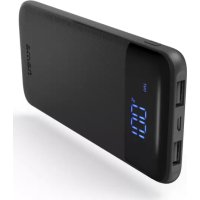
LED10S - Power bank HAMA - Free user manual and instructions
Find the device manual for free LED10S HAMA in PDF.



| Product type | Portable battery (PowerPack) |
| Brand | Hama |
| Model | LED10S |
| Battery capacity | 10000 mAh (min.) / 10250 mAh (typ.) / 37.92 Wh |
| Useful capacity | 5900 mAh (at 5V, 2.1A) |
| Battery type | Lithium-Polymer (Li-Po) 3.7V |
| Micro-USB input | 5V, 2A |
| USB-C input | 5V, 2A |
| USB-A output 1 | 5V, 2.1A |
| USB-A output 2 | 5V, 2.1A |
| Total output | 2.1A max |
| Number of output ports | 2 USB-A ports |
| Charge indicator | LED indicator with percentage display |
| Optimized charging | Yes, automatic recognition of connected device |
| Auto shutdown | Yes, if no device is connected |
| Package contents | PowerPack, micro-USB cable, user manual |
| Maintenance | Clean with a slightly damp lint-free cloth, avoid harsh detergents |
| Safety instructions | Do not open, do not expose to heat, do not use while charging and discharging simultaneously |
| Warranty | Warranty void if operating instructions not followed |
| Power supply | Recharge via micro-USB or USB-C |
Frequently Asked Questions - LED10S HAMA
User questions about LED10S HAMA
0 question about this device. Answer the ones you know or ask your own.
Ask a new question about this device
Download the instructions for your Power bank in PDF format for free! Find your manual LED10S - HAMA and take your electronic device back in hand. On this page are published all the documents necessary for the use of your device. LED10S by HAMA.
USER MANUAL LED10S HAMA
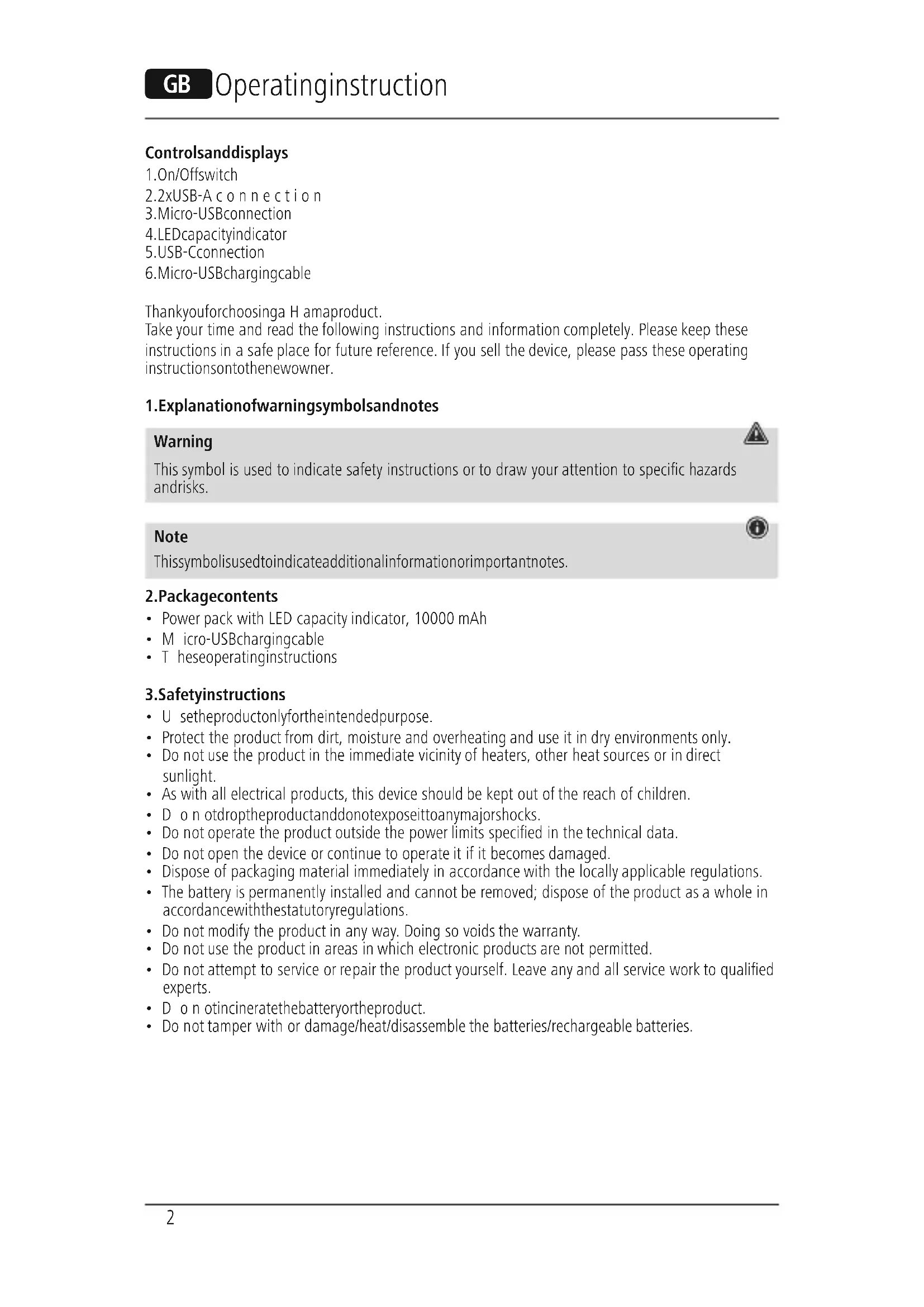
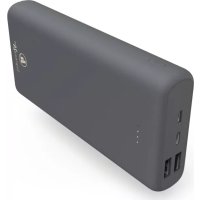
- On/Offswitch
2.2xUSB-A connection - Micro-USBconnection
- LEDcapacityindicator
5.USB-Cconnection
6.Micro-USBChargingcable
Thankyouforchoosinga H amaproduct.
Take your time and read the following instructions and information completely. Please keep these instructions in a safe place for future reference. If you sell the device, please pass these operating instructions ontothenewowner.
1.Explanationof warningsymbolsandnotes
Warning
This symbol is used to indicate safety instructions or to draw your attention to specific hazards and risks.
Note
This symbolis used to indicate additional information or important notes.


2.Packagecontents
Power pack with LED capacity indicator, 10000 mAh
- Micro-USBChargingcable
T heseoperatinginstructions
3.Safetyinstructions
- U setheproductonlyfortheintendedpurpose.
- Protect the product from dirt, moisture and overheating and use it in dry environments only.
- Do not use the product in the immediate vicinity of heaters, other heat sources or in direct sunlight.
- As with all electrical products, this device should be kept out of the reach of children.
- D o n otdroptheproductanddonotexposeittoanymajorshocks.
- Do not operate the product outside the power limits specified in the technical data.
- Do not open the device or continue to operate it if it becomes damaged.
- Dispose of packaging material immediately in accordance with the locally applicable regulations.
- The battery is permanently installed and cannot be removed; dispose of the product as a whole in accordance with the statutory regulations.
- Do not modify the product in any way. Doing so voids the warranty.
- Do not use the product in areas in which electronic products are not permitted.
- Do not attempt to service or repair the product yourself. Leave any and all service work to qualified experts.
- D o n otincineratethebatteryortheproduct.
- Do not tamper with or damage/heat/disassemble the batteries/rechargeable batteries.
4. Operation
4.1.Chargingthepowerpack
- S tartthepowerpackchargingprocessbyconnectingtheenclosedMicro-USBchargingcableto the Micro-USB input on the power pack (IN 5V/2A) and to a suitable USB charger. Alternatively, you canalsocharge the powerpack via the USB-Cinput(IN5V/2A).Todothis, consult the operating instructions for the USBChargeryouare u sing.
T hechargingprocessbeginsandendsautomatically. - Fully charge the power pack once before using it for the first time.
Note-capacity

- Duringthepowerpackchargingprocess, the capacity is displayed constantly.
- T heLEDcapacityindicatorshowsthecurrentchargelevelinpercent.Thecapacityindicator flashesduringthechargingprocess.
- When the capacity indicator shows a constant 100% , the power pack is fully charged.
- Press the button on the power pack to switch this on and to determine the power pack's current capacity.
- To switch the power pack off, press and hold the button until the LED indicator goes out.
Warning- rechargeablebattery

- O nlyusesuitablechargingdevicesorUSBportstochargetheproduct.
- Do not use defective chargers or USB ports and do not attempt to repair them.
- Do not overcharge the product or allow the battery to completely discharge.
D on otstore,chargeorusethedeviceminextremetemperatures.
C hargeregularly(atleastquarterly)duringperiodsofprolongedstorage.
4.2.Chargingdevices
- C onnecttheenclosedMicro-USBchargingcabletotheUSBportonthepowerpack(see8.
TechnicalData)andtotheMicro-USBportonyourdevice(mobilephone,Smartphone,etc.). - In certain circumstances, the enclosed charging / connecting cable may not match the USB port on yourdevice. Inthiscase, use the USB cable that came with your device.
- The charging process begins automatically. During the charging process, the LED capacity indicator indicates the powerpack's remaining available capacity.
- T hecurrentbatterychargestatusofyourdeviceisindicatedonthis.
- T erminate the charging process and switch the powerpack off by pressing the button on the powerpack twice in quick succession. The LED indicator goes out.
- In the event that no device is connected, the power pack switches itself off automatically.
Warning- C onnnectionofdevices

- Before connecting a device, check whether it can be adequately supplied with the power pack's currentdelivery.
- Ensure that the total current consumption of the connected device is not exceeded (see 8. TechnicalData).
- N otetheinstructionsinyourdevice'soperatingmanual.
- Y oumustobeytheinstructionsandsafetynotescontainedthereinregardingthesupplyof powertoyourdevices.
T hepowerpackmustnotbechargedanddischargedatthesametime!
Note- optimisedcharging

- O optimisedchargingmeansthatthepowerpackrecognisestheconnecteddevice, suppliesit with the ideal current strength and therefore reduces the charging time to a minimum.
Warning

- Never connect the power pack's charging cable to its input and output simultaneously. This can damage the battery.
- Do not connect any devices during the power pack charging process. Doing so can damage the powerpack and connected devices.
5.Careandmaintenance
Only clean this product with a slightly damp, lint-free cloth and do not use aggressive cleaning agents.
6.Warranty disclaimer
Hama GmbH & Co KG assumes no liability and provides no warranty for damage resulting from improper installation/mounting, improper use of the product or from failure to observe the operating instructionsand/or safetynotes.
7. Technical data
| Micro-USBinput5 V 2 A | --- |
| USB-Cinput5 V 2 A | --- |
| USB-A o output15V | = 2.1 A |
| USB-A o output2 | 5 --- |
| Totaloutput2.1A ( max.) | |
| Batterytype3.7V/Li-Po | |
| Min_capacity10000mAh/ 3 7 W h | |
| Typ_capacity10250mAh/ 3 7.92Wh | |
| Usable capacity* | 5900 mAh @ 5V = 2.1 A |
- T heuristic capacityisthecapacitythat can be drawn from the outputsockets, measured at 5V output voltage and a draw current of 2.1 A.
3.Yka3aHn83a6e3oNaCHOCT
-ИзпοлзВаиТeнpoДуКтСаMuоЗаэпpeДВиДeHaTацел.
- Na3eTe npOyKta OT 3aMbpcBaHe, Bnara n ppepRbAne I ro n3noJ3BaIte cMo B cyxa cpeJa.
- He n3noJ3BaIte npOyKt B HENOCpeICTBeHa 6In30CT DO OTONJIteJIHn ypeiN, Ipyr N3TOHnCn HAToJINHAnJInHaI INPEKTHaCJIbHYeBaCBETJInHa.
- POnIO6Hn Ha BCnKn eIeKtpnueckn npOyKT, To3n npOyKT He 6nBa Da nonaDa B pBcTe Ha deua!
He no3B0JIaBaiTe Ha npOdykTa da naHa He ro n3JaRaIe Ha cnHn Bn6paun.
He n3noJ3BaIte npOyKta N3BbH HeROBIne rpaHnUHa MOuHOCCTa, NOCOueHN B TexHnueCKNTe daHHN.
He oTbapnTe npdykTa n npn nobpea He npoNbJxabaBte da ro n3noN3BaTe.
-3XbBpIeTeOnaKOBbHnMaTepeHaJIBeHAracbIaCHOJeCTBaUHTeHaMЯCTopa3nope6n3a n3XBbPJIHeHaOTnAbu.
- BaTePnIa e HEnoDbNkHo BrpaIeHa I He MoKe Da Ce Maxa, N3XbPJIeTe npOyKTa KaTo cIaNo CnopeZakoHOBntepa3npope6n.
- He npabete npomEnb ypeJa. Taka 3a4y6nTe npabo Ha BcKaKbI rapaHcIOHH npeTeHcN.
He n3no3BaIte npdykTa B 30Hn, B KOnTO He ca pa3peWeHH eJEnKtpoHH npOdykTN.
He ce onntBaTe cAmn da o6CnykBaTe nI npOHTnpate npOdykTa. OCTaBe TBCaKaBb TeHNueCKAnOpDpbXkaHaKOMneTeHTHNTecneuaJIncTNI.
- He XbpbJnTe 6aTepejraTn nn npOyKtB OfBn.
He npomeHnTe n/nn He neΦopMnpaTe/HarpaBaTe/pa3rno6BaTe akymyNatOpHnTe 6aTepn/ 6aTepeHnTe.
4.Pexmmhapa6ota
4.1.3apexkahehaPowerPack
- CstaptnpaTe npoceHa 3apeXdaHe Ha Power Pack, KaTO cbbpXeTe npinloXeHnKa6eI3a 3apeXdaHe Micro USB KbM Micro USB BxOJa Ha Power Pack (IN 5 V/2 A) n KbM noJxoJaIO USB 3apJnHO yCTpoiCTBO. AnTepHaTnBHO moXeTe Ja 3apeXdaTe Power Pack n Upe3 USB-C BxOJa (IN 5 V/2 A). 3a ZeIeta cna3BaIte INHctpyKzIraTa 3a O6CnyXbaHe Ha n3noJI3BaHoTo USB 3apJnHO yCTpoiCTBO.
- Празсыт На захданестори Авршва abTomatунно.
-Предуньразауntpe6anbpbOHaЧалноЗаpeDEteHAnbIHoPowerPack.
Yka3aHne-KanaunTeT

- По врeme на пюцета на заекдане на Power Pack KanauNTeTbTe ce noka3Ba NOCTOHRNO.
- Ppi TOBa LED INHnIkaunraTa 3a KanaIHTeTa NOKa3Ba aKtYaIHOTo CbCTOHNHe Ha 3apeJdaHe B npoceHTn. NobpeMeHa3apeXdAheTOnHnIkaunraTa3aKaanaIHTeTaMnIg.
Korato INdkaeta 3a kanaTeTa nokaxe noctoHHO 100% , Power Pack e HantbIHO 3apehen. - Hatnche 6ytoHa Ha Power Pack, 3a da ro BkIIOHTe n da pa36epTe Tekyuia KaNaIITeHa PowerPack.
- HaTnCHeTe n 3aIpBxKTe 6yToHa, IOKaTO LED INHnKaunra yrache, 3a Da IN3KJIIOHTe Power Pack.
PpeynpexkdeHne-BeTepe

- 3a 3apejdahe n3no3BaTe caMo noxOJaIz 3apAnH yctpoiCTba nn USB n3bOIn.
- IIO npnucn He n3noJ3BaIte DeΦeKTHn 3apAaHn yctpoiCTBa nn USB n3BOu n He ce onNTbaTeDaIgnonpaBATE.
-HeNo3B0JIaBaiTe npOdyKtaIace3apeXdaIIOBeueoTheo6xOIMOTOnIINdacepa3peXdaHnblHo. - ɪЗбягbaɪte CBxpaHeneHne, əpækjʌdæn y uŋoTpe6a pnp ekctpeMn TemnepaTyPn.
- Ppi no-ppoIbJIxIeJIHo cIbXpaHeHne Ioo3apeJdaIte IepNoDnUHO (nohe BeIbIX Ha TpI Meceua).
4.2.3apexkaheNaHpaHnHycTpoiCTBa
- Cbpxte npioxehn Micro USB ka6eJ 3a 3apejdahe c USB n3bOJa ha Power Pack (Bx. 8. Texnueckn daHn) n C Micro USB n3bOJa ha BaWeTo KpaHNo yctpoiCTBO (Mo6uJeH TeJeΦoH, cMapTΦoHn d p).
- Пи onpeJeHn obCToTeJIcTBA npInOxEHHr 3apJeH/cBbP3BaUKa6eJ He e noIxOJaU 3a USB n3BOJa OT cTpaHa Ha KpaHOTo yCTpoiCTBO. Toraba n3NoJI3BaIte USB ka6eJa Ha KpaHOTo yCTpoiCTBO.
- Пюцьт Ha зарекданестора abTomatунно. Ровeme Ha поцета Ha zapекдахе LED INДИКАЦЯТAZAKANAцNTeTANO3BabCEOцЕнALINHYNKANAPaцNTeTHaPowerPack.
TeKuyuTCTaTycha3apeXdaHeHaakymyIaTopHaTa6aTePnHaBaWeToKpaHoycTpoiCTBOce nOKa3BaHaHaero.
3aBbPwTe npoceHa 3apeXdahe n 3KJIHouyete Power Pack, KaTO HATNCHe TBA nTINocJeIOBaTeHNO3aKpaTko6yToHaHaPowerPack.LEDInnKaunayracBa.
B CnyaH Ye He cBbP3aHO KpaHNO yCTpOncTBO, Power Pack ce n3KJIIOyBa ABTomaTuHNo.
PpeynpexkdeHne-Cbbp3BaHeHaKpaHnycTpoNCTBa

-П repicnbp3BaHeHaJaIeHOKpaHoycTpoiCTBONpOBepeTeJaIHTOMOxEda6bJe 3axpaHEoIOCTaTBHOCn3XoHNnToK Ha Power Pack.
- YBepTe ce, ye He ce npeBnIaBa 06uTa KOHCymaun Ha TOK Ha CBbp3aHOTo KpaHO yCTPOINCTBO (BX. 8. TexHnueckn daHHn).
Cb6JIIOaBaIe yka3aHnIaTb pbKOBOcTBO 3a ekcnloaataun Ha BaWETo yCTpOcTBO.
- Henpemehno c6bIIOaBaIte nocOeHnte TaM daHHn uKa3aHna 3a 6e30NaCHOCT 3a eKeKtpo3axpaHbAHeHaBauNTyeCTpoIcTba.
Power Pack He Tp86Ba Da ce 3apeXda npa3peXda eHOBpeMeHHO!
Yka3aHHe-OnTmMn3npaH03apeKdaHe

-ОптUMИЗИРано Зарждане 03начаBA,у Power Pack pa3no3HABA CBbp3aHOTOKpaHoyCTPOIcTBO,3axpaHBA FO C ONTIMaJIHa CIIJa HA TOKa I NO TO3N HaHH CE HaMaJIbA Do MUNHMyBpeMeToHa3apexДaHe.
PpeynpexkdeHne

- HNKORA He cBbP3BaIe 3apAaHnKa6eHa Power Pack eHOBpeMeHNo KbM BXoJa N3XoJa My.Ito3HaHmOxedacenOBpeNaKMyJatopHaTa6aTePN.
- Поваме на пюеса на зараздане на Power Pack He CBbp3BaIte краин устpoиства.потои наим Power Pack и CBbp3aHITe краин устpoиства могат да ce nobpeяг.
- Доступа вдддддддддддддддддддддддддддддддддддддддддддддддддддддддддддддддддддддддддддддддддддддддддддддддддддд
- Валуху валуху валуху валуху валуху валуху валуху валуху валуху валуху валуху валуху валуху валуху валуху валуху валуху валуху валуху валуху валуху
- Доступа валуху валуху валуху валуху валуху валуху валуху валуху валуху валуху валуху валуху
- Достotypicality
- Достotypicality
- Достotypicality
- Достotypicality
- Дostypicality
- Дostypicality
- Дostypicality
- Дostypicality
- Дostypicality
- Дostypicality
- Дostypicality
- Дostypicality
- Дostypicality
- Дostypicality
- Дostypicality
- Дostypicality
- Дostypicality
- Дostypicality
- Дostypicality
- Дostypicality
- Дostypicality
- Dostypicality
- Dostypicality
- Dostypicality
- Dostypicality
- Dostypicality
- Dostypicality
- Dostypicality
- Dostypicality
- Dostypicality
- Dostypicality
- Dostypicality
- Dostypicality
- Dostypicality
- Dostypicality
- Dostypicality
- Dostypicality
- Dostypicality
5.TexHueckoo6cnykBaHen n oDpBkKa
IOnuCTBaIte To3n IpoDyKT cAmO CJIeKO HaBlaJxHeHa KbPna 6e3 BlnaCInHKn Hne n3NoJ3BaIte arpeCunBnIOuNCTBaUINpEnapatn.
6.N3KnHouBaHeHaOtroBOPHOCT
Hama GmbH & Co KG He noema OTROBOPHOCT uI rapaun3a nobpeu, KOITo ca pe3yntat OT He npabnHa nHctanaun, MOtax u ynoTpe6a Ha npOdykTa uIN OT HeCna3BaHe Ha pbKOBODCTBOTO 3aeknloataun/nnHayka3AHra3a6e3onacHOCT.
7.TexHnuecknDaHHN
| MicroUSBBx05V2A | --- |
| USBTinCBx05V2A | --- |
| USB-Au3x01 | 5--- |
| USB-Au3x02 | 5--- |
| I3x0d obu | 2,1 A (maks.) |
| Tin6aTePn3.7V/Li-Po | |
| MIn.KanaunTeT10000mAh/3 7 W h | |
| Tin.KanaunTeT | 10250 mAh / 37,92 Wh |
| Полесен кацитeT* | 5900 mAh @ 5 V---2,1 A |
* Pone3HnT kanaunTe e kanaunTebT, KOTo ce noJyaba OT n3XoHNte 6yKcN, n3MepeH np5 V n3XoHNappeKeHne p a3pJeHTOK2,1A.
Ttoixiaxepiouooukaievdeltaic
1.Δiaokontncon/off
2.2xunioδoxεcUSBType-A
3.Ytio8oxnMicro-USB
4.Evδειξηxωρπικότητας(LED)
5.UntoδoxεcUSBType-C
6.KaawdiopoptioncMicro-USB
ZaeeuxayapiotououenoueIaeEvaetovpoivnHama!
Apixika, aphiwote liyo xpov yia va diaabaote tic napakatw obnyiec kai unodoeic. tN ouvexia, pfalaTe to eyyepidio odnyiwv oae aopalc es mec yia meaovtik npn, av xpeiaot. Eav dwoet tn oukeun o ae alo atofo, 0a npenlva napaedwote to eyyepidio odnyiwv stov vdo idioktntn.
1.EnEynonnpoEiDOnountikwovuβoawkaiunodεiεωv
Pnoeio

- 1.Explanationof warningsymbolsandnotes
- Warning
- Note
- 2.Packagecontents
- 3.Safetyinstructions
- Operation
- 4.1.Chargingthepowerpack
- Note-capacity
- Warning- rechargeablebattery
- 4.2.Chargingdevices
- Warning- C onnnectionofdevices
- Note- optimisedcharging
- 5.Careandmaintenance
- 6.Warranty disclaimer
- Technical data
- 3.Yka3aHn83a6e3oNaCHOCT
- 4.Pexmmhapa6ota
- 4.1.3apexkahehaPowerPack
- Yka3aHne-KanaunTeT
- PpeynpexkdeHne-BeTepe
- 4.2.3apexkaheNaHpaHnHycTpoiCTBa
- PpeynpexkdeHne-Cbbp3BaHeHaKpaHnycTpoNCTBa
- Yka3aHHe-OnTmMn3npaH03apeKdaHe
- PpeynpexkdeHne
- 5.TexHueckoo6cnykBaHen n oDpBkKa
- 6.N3KnHouBaHeHaOtroBOPHOCT
- 7.TexHnuecknDaHHN
- Ttoixiaxepiouooukaievdeltaic
- 1.EnEynonnpoEiDOnountikwovuβoawkaiunodεiεωv
- Pnoeio
Brand : HAMA
Model : LED10S
Category : Power bank