BDCOS18N - Multitools BLACK & DECKER - Free user manual and instructions
Find the device manual for free BDCOS18N BLACK & DECKER in PDF.



| Product Type | Cordless Oscillating Multi-Tool |
| Brand | Black & Decker |
| Model | BDCOS18N |
| Rated Voltage | 18 V DC |
| No-Load Speed | 8000 – 18000 min⁻¹ |
| Oscillation Angle | 1.4° or 2.8° |
| Weight | 1.4 kg |
| Battery | Lithium-ion, 1.5 / 2.0 / 4.0 Ah (depending on model) |
| Charger | Ref. 906349, input 220-240 V AC, output 18 V DC, 1 A |
| Sound Pressure Level (LpA) | 94.2 dB(A) (uncertainty 3 dB(A)) |
| Sound Power Level (LWA) | 105.2 dB(A) (uncertainty 3 dB(A)) |
| Vibration Emissions (wood/metal cutting) | 7.9 m/s² (uncertainty 1.5 m/s²) |
| Vibration Emissions (sanding) | 8.2 m/s² (uncertainty 1.5 m/s²) |
| Accessory Attachment | Tool-free, Super-lok™ system |
| Variable Speed | Yes, 6-position dial |
| Work Light | Automatic LED |
| Included Accessories | Cutting blades, scrapers, sandpaper sheets, etc. |
| Maintenance | Clean ventilation slots with a soft brush; motor with a damp cloth |
| Safety | Double insulation, PPE recommended |
| Warranty | 24 months |
Frequently Asked Questions - BDCOS18N BLACK & DECKER
User questions about BDCOS18N BLACK & DECKER
0 question about this device. Answer the ones you know or ask your own.
Ask a new question about this device
Download the instructions for your Multitools in PDF format for free! Find your manual BDCOS18N - BLACK & DECKER and take your electronic device back in hand. On this page are published all the documents necessary for the use of your device. BDCOS18N by BLACK & DECKER.
USER MANUAL BDCOS18N BLACK & DECKER
Your BLACK+DECKER BDCOS18 oscillating tool has been designed for DIY applications such as sanding operations. It is also suitable for cutting wooden materials, plastic, gypsum, non-ferrous metals and fastening elements (e.g., unhardened nails, staples), working soft wall tiles and scraping of small surfaces. This tool is intended for consumer use only.
Safety instructions
General power tool safety warnings

Warning! Read all safety warnings, instructions, illustrations and specifications provided with this power tool. Failure to follow all instructions listed below may result in electric shock, fire and/or serious injury.
Save all warnings and instructions for future reference.
The term "power tool" in the warnings refers to your mains-operated (corded) power tool or battery-operated (cordless) power tool.
- Work area safety
a. Keep work area clean and well lit. Cluttered or dark areas invite accidents.
b. Do not operate power tools in explosive atmospheres, such as in the presence of flammable liquids, gases or dust. Power tools create sparks which may ignite the dust or fumes.
c. Keep children and bystanders away while operating a power tool. Distractions can cause you to lose control. - Electrical safety
a. Power tool plugs must match the outlet. Never modify the plug in any way.
Do not use any adapter plugs with earthed (grounded) power tools. Unmodified plugs and matching outlets will reduce risk of electric shock.
b. Avoid body contact with earthed or grounded surfaces such as pipes, radiators, ranges and refrigerators. There is an increased risk of electric shock if your body is earthed or grounded.
c. Do not expose power tools to rain or wet conditions. Water entering a power tool will increase the risk of electric shock.
d. Do not abuse the cord. Never use the cord for carrying, pulling or unplugging the power tool. Keep cord away from heat, oil, sharp edges or moving parts. Damaged or entangled cords increase the risk of electric shock.
e. When operating a power tool outdoors, use an extension cord suitable for outdoor use. Use of a cord suitable for outdoor use reduces the risk of electric shock.
f. If operating a power tool in a damp location is unavoidable, use a residual current device (RCD) protected supply. Use of an RCD reduces the risk of electric shock.
3. Personal safety
a. Stay alert, watch what you are doing and use common sense when operating a power tool.
Do not use a power tool while you are tired or under the influence of drugs, alcohol or medication. A moment of inattention while operating power tools may result in serious personal injury.
b. Use personal protective equipment. Always wear eye protection. Protective equipment such as a dust mask, non-skid safety shoes, hard hat, or hearing protection used for appropriate conditions will reduce personal injuries.
c. Prevent unintentional starting. Ensure the switch is in the off-position before connecting to power source and/or battery pack, picking up or carrying the tool. Carrying power tools with your finger on the switch or energising power tools that have the switch on invites accidents.
d. Remove any adjusting key or wrench before turning the power tool on. A wrench or a key left attached to a rotating part of the power tool may result in personal injury.
e. Do not overreach. Keep proper footing and balance at all times. This enables better control of the power tool in unexpected situations.
f. Dress properly. Do not wear loose clothing or jewellery. Keep your hair, clothing away from moving parts. Loose clothes, jewellery or long hair can be caught in moving parts.
g. If devices are provided for the connection of dust extraction and collection facilities, ensure these are connected and properly used. Use of dust collection can reduce dust-related hazards.
h. Do not let familiarity gained from frequent use of tools allow you to become complacent and ignore tool safety principles. A careless action can cause severe injury within a fraction of a second.
- Power tool use and care
a. Do not force the power tool. Use the correct power tool for your application.
The correct power tool will do the job better and safer at the rate for which it was designed.
b. Do not use the power tool if the switch does not turn it on and off. Any power tool that cannot be controlled with the switch is dangerous and must be repaired.
c. Disconnect the plug from the power source and/or remove the battery pack, if detachable, from the power tool before making any adjustments, changing accessories, or storing power tools. Such preventive safety measures reduce the risk of starting the power tool accidentally.
d. Store idle power tools out of the reach of children and do not allow persons unfamiliar with the power tool or these instructions to operate the power tool. Power tools are dangerous in the hands of untrained users.
e. Maintain power tools and accessories. Check for misalignment or binding of moving parts, breakage of parts and any other condition that may affect the power tool's operation. If damaged, have the power tool repaired before use. Many accidents are caused by poorly maintained power tools.
f. Keep cutting tools sharp and clean. Properly maintained cutting tools with sharp cutting edges are less likely to bind and are easier to control.
g. Use the power tool, accessories and tool bits etc. in accordance with these instructions, taking into account the working conditions and the work to be performed.
Use of the power tool for operations different from those intended could result in a hazardous situation.
h. Keep handles and grasping surfaces dry, clean and free from oil and grease. Slippery handles and grasping surfaces do not allow for safe handling and control of the tool in unexpected situations.
5. Battery tool use and care
a. Recharge only with the charger specified by the manufacturer.
A charger that is suitable for one type of battery pack may create a risk of fire when used with another battery pack.
b. Use power tools only with specifically designated battery packs. Use of any other battery packs may create a risk of injury and fire.
c. When battery pack is not in use, keep it away from other metal objects, like paper clips, coins, keys, nails, screws, or other small metal objects, that can make a connection from one terminal to another. Shorting the battery terminals together may cause burns or a fire.
d. Under abusive conditions, liquid may be ejected from the battery; avoid contact. If contact accidentally occurs, flush with water. If liquid contacts eyes, additionally seek medical help. Liquid ejected from the battery may cause irritation or burns.
e. Do not use a battery pack or tool that is damaged or modified. Damaged or modified batteries may exhibit unpredictable behaviour resulting in fire, explosion or risk of injury.
f. Do not expose a battery pack or tool to fire or excessive temperature. Exposure to fire or temperature above 130^ may cause explosion.
g. Follow all charging instructions and do not charge the battery pack or tool outside the temperature range specified in the instructions. Charging improperly or at temperatures outside the specified range may damage the battery and increase the risk of fire.
6. Service
a. Have your power tool serviced by a qualified repair person using only identical replacement parts. This will ensure that the safety of the power tool is maintained.
b. Never service damaged battery packs. Service of battery packs should only be performed by the manufacturer or authorized service providers.
Additional power tool safety warnings

Warning! Warning! Additional safety warnings for Oscillating tools
Hold power tool by insulated gripping surfaces, when performing an operation where the cutting accessory may contact hidden wiring. Cutting accessory contacting a "live" wire may make exposed metal parts of the power tool "live" and could give the operator an electric shock.
Use clamps or another practical way to secure and support the workpiece to a stable platform.
Holding the work by hand or against your body leaves it unstable and may lead to loss of control.

Warning! Contact with or inhalation of dusts arising from sanding applications may endanger the health of the operator and possible bystanders. Wear a dust mask specifically designed for protection against dust and fumes and ensure that persons within or entering the work area are also protected.
Thoroughly remove all dust after sanding.
Take special care when sanding paint which is possibly lead based or when sanding some woods and metal which may produce toxic dust:
Do not let children or pregnant women enter the work area.
- Do not eat, drink or smoke in the work area.
Dispose of dust particles and any other debris safely.
The intended use is described in this instruction manual. The use of any accessory or attachment or performance of any operation with this tool other than those recommended in this instruction manual may present a risk of personal injury and/or damage to property.
The accessory will continue to move after releasing the switch. Always switch the tool off and wait for the accessory to come to a complete standstill before putting the tool down.
Keep hands away from cutting area. Never reach underneath the work piece any reason. Do not insert fingers or thumb into the vicinity of the reciprocating blade and blade clamp. Do not stabilize the saw by gripping the shoe.
Keep blades sharp. Dull or damaged blades may cause the saw to swerve or stall under pressure. Always use the appropriate type of saw blade for the workpiece material and type of cut.
When cutting pipe or conduit, make sure that they are free from water, electrical wiring, etc.
Do not touch the workpiece or the blade immediately after operating the tool. They can become very hot.
Be aware of hidden hazards, before cutting into walls, floors or ceilings, check for the location of wiring and pipes.
Safety of others
This appliance is not intended for use by persons (including children) with reduced physical, sensory or mental capabilities, or lack of experience and knowledge, unless they have been given supervision or instruction concerning use of the appliance by a person responsible for their safety.
Children should be supervised to ensure that they do not play with the appliance.
Vibration
The declared vibration emission values stated in the technical data and the declaration of conformity have been measured in accordance with a standard test method provided by EN62841 and may be used for comparing one tool with another. The declared vibration emission value may also be used in a preliminary assessment of exposure.
Warning! The vibration emission value during actual use of the power tool can differ from the declared value depending on the ways in which the tool is used. The vibration level may increase above the level stated.
When assessing vibration exposure to determine safety measures required by 2002/44/EC to protect persons regularly using power tools in employment, an estimation of vibration exposure should consider, the actual conditions of use and the way the tool is used, including taking account of all parts of the operating cycle such as the times when the tool is switched off and when it is running idle in addition to the trigger time.
Residual risks.
Additional residual risks may arise when using the tool which may not be included in the enclosed safety warnings. These risks can arise from misuse, prolonged use etc.
Even with the application of the relevant safety regulations and the implementation of safety devices, certain residual risks can not be avoided. These include:
Injuries caused by touching any rotating/moving parts.
Injuries caused when changing any parts, blades or accessories.
Injuries caused by prolonged use of a tool. When using any tool for prolonged periods ensure you take regular breaks.
Impairment of hearing.
Health hazards caused by breathing dust developed when using your tool (example:- working with wood, especially oak, beech and MDF.)
Labels on tool
The following pictograms are shown on the tool along with the date code:

Warning! To reduce the risk of injury, the user must read the instruction manual.

Do not stare at operating lamp.
Additional safety instructions for batteries and chargers
Batteries
Never attempt to open for any reason.
Do not expose the battery to water.
Do not store in locations where the temperature may exceed 40^
Charge only at ambient temperatures between 10^ and 40^ .
Charge only using the charger provided with the tool.
When disposing of batteries, follow the instructions given in the section "Protecting the environment".

Do not attempt to charge damaged batteries.
Chargers
Use your BLACK+DECKER charger only to charge the battery in the tool with which it was supplied. Other batteries could burst, causing personal injury and damage.
Never attempt to charge non-rechargeable batteries.
Have defective cords replaced immediately.
Do not expose the charger to water.
Do not open the charger.
Do not probe the charger.

The charger is intended for indoor use only.

Read the instruction manual before use.
Electrical safety

our charger is double insulated; therefore no earth wire is required. Always check that the mains voltage corresponds to the voltage on the rating plate. Never attempt to replace the charger unit with a regular mains plug.
- If the supply cord is damaged, it must be replaced by the manufacturer or an authorised BLACK+DECKER Service Centre in order to avoid a hazard.
Features
This tool includes some or all of the following features.
- On/Off switch
- Variable speed dial
- Super-lokTM Tool free accessory clamping lever
- Battery
- LED Work light
Accessories
This tool includes some or all of the following accessories. The performance of your tool depends on the accessory used. BLACK+DECKER accessories are engineered to high quality standards and designed to enhance the performance of your tool.
By using these accessories you will get the very best from your tool.
| Precision plunge cut saw blade for wooden materials, soft plastics. (Part number - STA26105-XJ) Separating, plunge and flush cutting of wood and soft plastics. Ideal for working on doors, skirting boards, windowsills and flooring. | |
| Plunge cut saw blade for wood and metal. (Part number - STA26110-XJ) Separating, plunge and flush cutting of wood, plastics, thin-walled non-ferrous pipes and extrusions, nails and screws. | |
| Plunge cut saw blade for wood and metal. (Part number - STA26115-XJ) Separating, plunge and flush cutting of wood, plastics, thin-walled non-ferrous pipes and extrusions. | |
| Segmented saw blade. (Part number - STA26120-XJ) Long life blade which is ideal for cutting wood, plastics, thin walled ferrous and non-ferrous material. | |
| Rigid scraper. (Part number - STA26135-XJ) Ideal for removal of hard and soft material from flat surfaces such as the removal of vinyl flooring, bonded carpet adhesive, tile floor adhesive, grout, paint and varnish. | |
| Flexible scraper. (Part number - STA26140-XJ) Ideal for removal of elastomer materials from hard flat surfaces in difficult to reach areas such as silicon sealant and other caulking materials. | |
| Carbide grout removal blade. (Part number - STA26125-XJ) Carbide coated surface ideal for clearing grout and tile adhesive from flat surfaces and for fast stock removal of wood, chipboard and fibreglass. |
| Carbide rasp. (Part number - STA26130-XJ) Carbide coated surface ideal for grout removal and for fast stock removal of plastics, chipboard and fiberglass. | |
| Sanding Sheets. (Part number - STA32348-XJ) Various grades for sanding of wood, painted and varnished surfaces. |
Charging the battery (fig. A)
The battery needs to be charged before first use and whenever it fails to produce sufficient power on jobs that were easily done before. The battery may become warm while charging; this is normal and does not indicate a problem.

Warning! Do not charge the battery at ambient temperatures below 10^ or above 40^ . Recommended charging temperature: approx. 24^ .
Note: The charger will not charge a battery if the cell temperature is below approximately 10^ or above 40^ . The battery should be left in the charger and the charger will begin to charge automatically when the cell temperature warms up or cools down.
To charge the battery (4), insert it into the charger (6). The battery will only fit into the charger in one way. Do not force. Be sure that the battery is fully seated in the charger.
Plug in the charger and switch on at the mains.
The charging indicator (6a) will blink.
The charge is complete when the charging indicator (6a) switches to continuously on. The charger and the battery can be left connected indefinitely. The LED will switch on as the charger occasionally tops up the battery charge.
Charge discharged batteries within 1 week. Battery life will be greatly diminished if stored in a discharged state.
Leaving the battery in the charger
The charger and battery pack can be left connected with the LED glowing indefinitely. The charger will keep the battery pack fresh and fully charged.
Charger diagnostics
If the charger detects a weak or damaged battery, the charging indicator (6a) will flash red at a fast rate. Proceed as follows:
Re-insert the battery (4).
If the charging indicators continue flashing red at a fast rate, use a different battery to determine if the charging process works properly.
- If the replaced battery charges correctly, the original battery is defective and should be returned to a service centre for recycling.
If the new battery gives the same indication as the original battery, take the charger to be tested at an authorised services centre.
Note: It may take as long as 30 minutes to determine that the battery is defective. If the battery is too hot or too cold, the LED will alternately blink red, fast and slow, one flash at each speed and repeat.
Fitting and removing the battery (fig. B)
To fit the battery (4), line it up with the receptacle on the tool. Slide the battery into the receptacle and push until the battery snaps into place.
To remove the battery, push the release buttons (4a) while at the same time pulling the battery out of the receptacle.
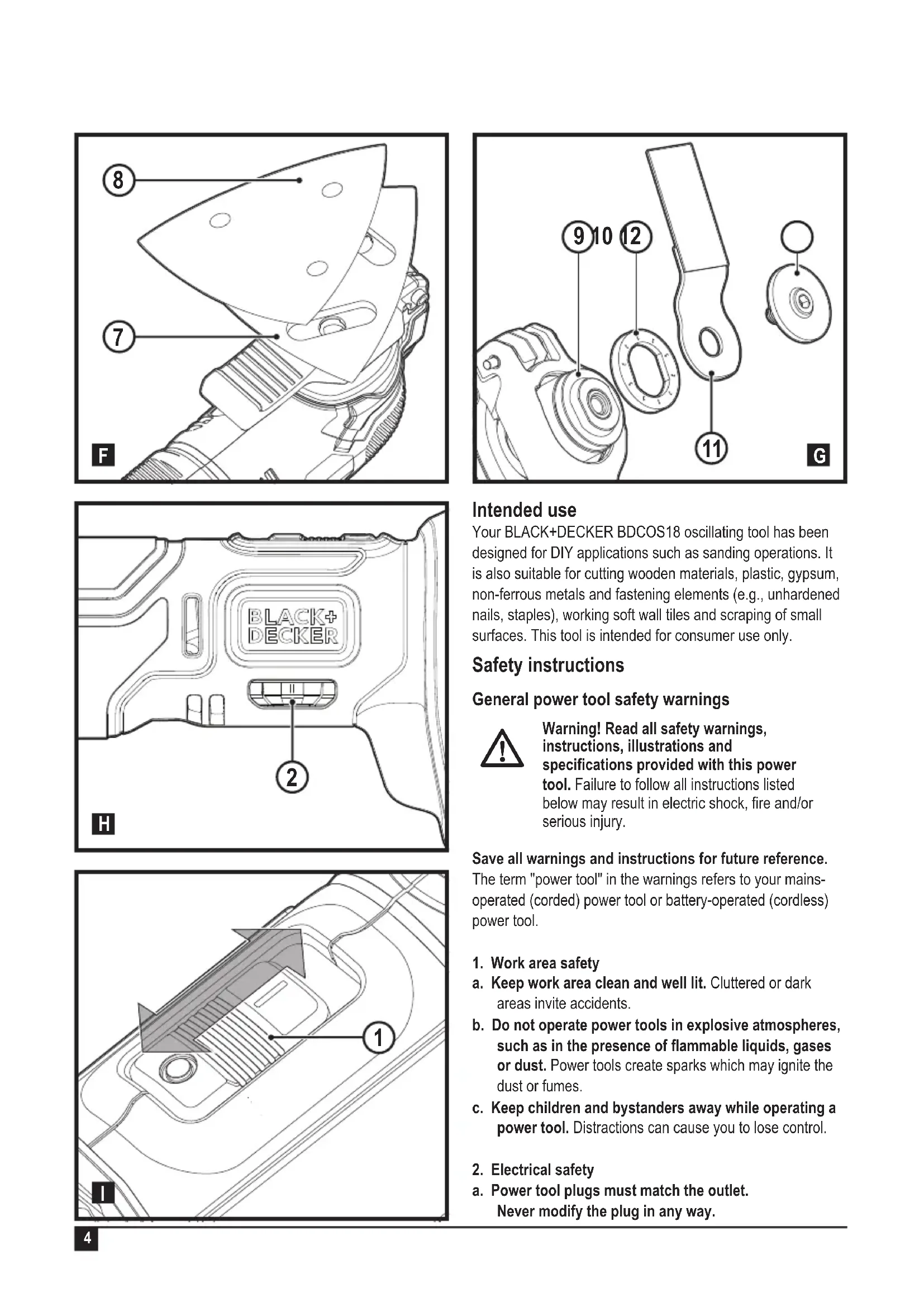
Fitting and removing the accessories (fig. C-G)
Warning! Before fitting an accessory, disconnect the tool from the mains supply/Remove battery from tool.
Fitting a BLACK+DECKER accessory (fig. C-F)
Hold the tool and squeeze the accessory clamping lever (3).
Slide the accessory (7) between the shaft and the accessory holder making sure the accessory engages all eight pins on the holder and is flush with the shaft.
Release the accessory clamping lever.
Note: Some accessories, such as scrapers and blades can be mounted at an angle if required (fig. E).
Removing a BLACK+DECKER accessory (fig. C)
Hold the tool and squeeze the accessory clamping lever (3).
Pull the accessory from the tool making sure the accessory dis-engages from all eight pins on the holder.
Release the accessory clamping lever.

Warning! Gloves must be worn when removing accessories as they may become hot during use.
Fitting a sanding sheet (fig. F)
Line up the sanding sheet (8) with the sanding base (7) as shown.
Press the sheet firmly and evenly onto the sanding base, making sure that the holes in the sheet coincide with the holes in the base.
Removing a sanding sheet
Pull the sanding sheet off the sanding base (7).

Warning! Never use the sanding base without a sanding sheet or accessory in place.
Fitting alternative accessories (fig. G)
Place the spacer (10) onto the collar (9).
Place the alternative accessory (11) onto the collar (9).
Firmly attach the fixing bolt (12) into place to ensure a tight fit for the alternative accessory (11).
Note: The spacer and fixing bolt are not used to attach BLACK+DECKER accessories. BLACK+DECKER accessories are attached using the Super-lok™ Tool free accessory clamping lever.
Variable speed control (fig. H)
The variable speed control allows you to adapt the speed of the tool to the application.
Set the variable speed dial (2) to the desired setting. At setting 1 the tool will operate at low speed, 8,000 min-1. At setting 6 the tool will operate at the maximum speed, 18,000 min-1.
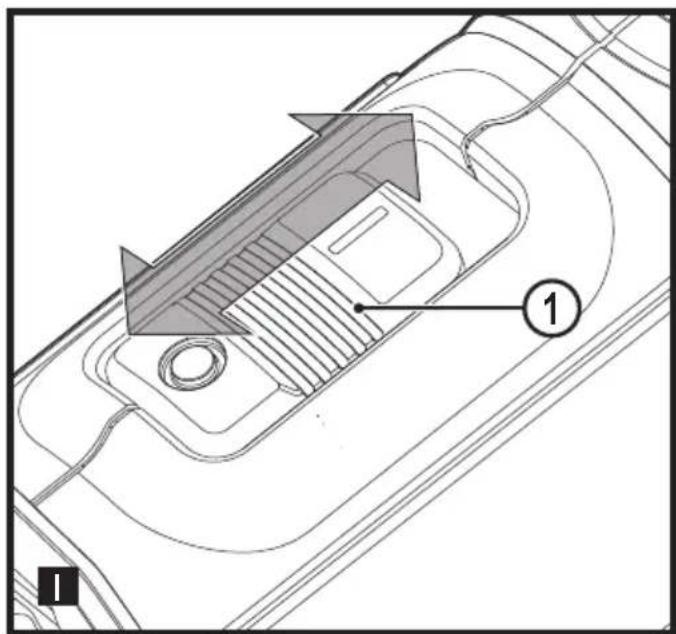
Switching on and off (fig.1)
To switch the tool on, slide the on/off switch (1) forward (position I).
To switch the tool off, slide the on/off switch (1) to the rear (position O).
LED work light
The LED work light (5) is activated automatically when the tool is switched on.
Low-battery Indicator
If the LED worklight (5) begins to rapidly and continuously flash when the switch on the tool is depressed, the battery-pack power has run out, and the battery pack should be recharged.
Unlike other battery pack types, Lithium-1on battery packs deliver fade-free power for their entire run time. The tool will not experience a slow, gradual loss of power as you work. To signal that the battery pack is at the end of its run time and needs to be charged, the power to the tool will drop quickly. Note: The LED may also flash due to an overload or high temperature (see Battery Protection).
Hints for optimum use
Always hold the tool securely. For precision work, hold the tool near the front.
Clamp the workpiece whenever possible, especially when using cutting blades.
Do not exert too much pressure on the tool.
ENGLISH
(Original instructions)
Always use the appropriate type of attachment for the workpiece material and type of cut.
Regularly check the condition of accessories. Replace when necessary.
Mark the desired starting point.
Switch the tool on and slowly feed attachments into the workpiece at the desired starting point.
Clamp a piece of plywood or soft wood to the back of the workpiece and saw through the combination in order to obtain a clear cut.
Do not force the cutting blade into the workpiece. Note that cutting sheet metal will normally take more time than sawing thicker wooden workpieces.
When cutting metal spread a thin film of oil along the cutting line before cutting.
When sanding new layers of paint before applying another layer, use extra fine grit.
- On very uneven surfaces, or when removing layers of paint, start with a coarse grit. On other surfaces, start with a medium grit. In both cases, gradually change to a fine grit for a smooth finish.
Consult your retailer for more information on available accessories.
Maintenance
Your BLACK+DECKER corded/cordless appliance/tool has been designed to operate over a long period of time with a minimum of maintenance. Continuous satisfactory operation depends upon proper tool care and regular cleaning.
Warning! Before performing any maintenance on corded/ cordless power tools:
Switch off and unplug the appliance/tool.
Or switch off and remove the battery from the appliance/ tool if the appliance/tool has a separate battery pack.
Or run the battery down completely if it is integral and then switch off.
Regularly clean the ventilation slots in your appliance/tool/ charger using a soft brush or dry cloth.
Regularly clean the motor housing using a damp cloth. Do not use any abrasive or solvent-based cleaner.
Mains plug replacement (U.K. & Ireland only)
If a new mains plug needs to be fitted:
Safely dispose of the old plug.
Connect the brown lead to the live terminal in the new plug.
Connect the blue lead to the neutral terminal.
Warning! No connection is to be made to the earth terminal. Follow the fitting instructions supplied with good quality plugs Recommended fuse: 5 A.
Protecting the environment

Separate collection. Products and batteries marked with this symbol must not be disposed of with normal household waste.
Products and batteries contain materials that can be recovered or recycled reducing the demand for raw materials. Please recycle electrical products and batteries according to local provisions. Further information is available at www.2helpU.com.
Technical data
| BDCOS18 H1 | ||
| Voltage V | dc | 18 |
| No-load speed min | -1 | 8000 - 18000 |
| Oscillating angle Degrees | 1.4 or 2.8 | |
| Weight | kg 1.4 | |
| Charger 906349* | ||
| Input Voltage V | AC | 220 - 240 |
| Output Voltage V | DC | 18 |
| Current A 1 |
| Battery BL | 1518 BL | 2018 BL4018 | ||
| Voltage V | DC | 18 18 18 | ||
| Capacity | Ah | 1.5 | 2.0 | 4.0 |
| Type | Li-Ion | Li-Ion | Li-Ion |
| Level of sound pressure according to EN62841: |
| Sound pressure (LpA) 94.2 dB(A), uncertainty (K) 3 dB(A) |
| Sound power (LmA) 105.2 dB(A), uncertainty (K) 3 dB(A) |
| Vibration total values (triax vector sum) according to EN62841: |
| Cutting wood (a, cm) 7.9 m/s2, uncertainty (K) 1.5 m/s2 |
| Cutting metal (a, cm) 7.9 m/s2, uncertainty (K) 1.5 m/s2 |
| Sanding (a, ) 8.2 m/s2, uncertainty (K) 1.5 m/s2 |
| Sanding (a, ) 8.2 m/s2, uncertainty (K) 1.5 m/s2 |
| Rigid scraper - Removal of glued carpet from a floor: (a, ) 12.0 m/s2,uncertainty (K) 1.5 m/s2 |
| Rasp/grout removal blade- Scraping concrete: (a, ) 9.7 m/s2,uncertainty (K) 1.5 m/s2 |
Declaration of Conformity
The Supply of Machinery (Safety) Regulations 2008

Cordless Oscillating Tool - BDCOS18
BLACK+DECKER declares that these products described
under "technical data" are in compliance with:
EN62841-1:2015, EN62841-2-4:2014.
These products conform to the following UK Regulations: The Supply of Machinery (Safety) Regulations, 2008, S.I. 2008/1597 (as amended).
Electromagnetic Compatibility Regulations, 2016, S.I.2016/1091 (as amended).
The Restriction of the Use of Certain Hazardous Substances in Electrical and Electronic Equipment Regulations 2012, S.I. 2012/3032 (as amended).
For more information, please contact BLACK+DECKER at the following address or refer to the back of the manual.
The undersigned is responsible for compilation of the technical file and makes this declaration on behalf of BLACK+DECKER
Ed Higgins
Director - Consumer Power Tools
Black & Decker Europe, 270 Bath Road, Slough,
Berkshire, SL1 4DX
United Kingdom
07/09/2021
EC declaration of conformity
MACHINERY DIRECTIVE

Cordless Oscillating Tool - BDCOS18
BLACK+DECKER declares that these products described under "technical data" are in compliance with:
2006/42/EC, EN 62841-1:2015, EN 62841-2-4:2014
These products also comply with Directive 2014/30/EU and 2011/65/EU. For more information, please contact BLACK+DECKER at the following address or refer to the back of the manual.
The undersigned is responsible for compilation of the technical file and makes this declaration on behalf of BLACK+DECKER.

Patrick Diepenbach
General Manager, Benelux
BLACK+DECKER,
Black & Decker is confident of the quality of its products and offers consumers a 24 month guarantee from the date of purchase. This guarantee is in addition to and in no way prejudices your statutory rights. The guarantee is valid within the territories of the Member States of the European Union and the European Free Trade Area.
To claim on the guarantee, the claim must be in accordance with Black & Decker Terms and Conditions and you will need to submit proof of purchase to the seller or an authorised repair agent. Terms and conditions of the Black & Decker 2 year guarantee and the location of your nearest authorised repair agent can be obtained on the Internet at www.2helpU.com, or by contacting your local Black & Decker office at the address indicated in this manual.
Please visit our website www.blackanddecker.co.uk to register your new Black & Decker product and receive updates on new products and special offers.
General Manager, Benelux
BLACK+DECKER,
6. Révision/Réparation
General Manager, Benelux
BLACK+DECKER,
General Manager, Benelux
BLACK+DECKER,
General Manager, Benelux
BLACK+DECKER,
accessory clamping lever.
Director General, Benelux
BLACK+DECKER,
Director-Geral, Benelux
BLACK+DECKER,
General Manager, Benelux
BLACK+DECKER,
General Manager, Benelux
BLACK+DECKER,