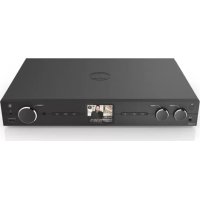
DIT2006BT - Radio HAMA - Free user manual and instructions
Find the device manual for free DIT2006BT HAMA in PDF.



| Product type | Digital Hi-Fi Radio |
| Brand | Hama |
| Model | DIT2006BT |
| Power supply | Mains adapter (included) |
| Standby power consumption | ≤ 1.00 W (with display) |
| Operating power consumption | Variable by mode (max 16.5 dBm WiFi) |
| Radio receiver | DAB/DAB+, FM, Internet (WiFi) |
| Connectivity | Bluetooth 4.2, WiFi 2.4/5 GHz |
| Inputs | AUX IN socket (3.5 mm), USB (charging/playback) |
| Outputs | Headphone socket (3.5 mm), optical, coaxial, RCA L/R, LINE OUT |
| Antenna | Telescopic FM/DAB antenna + external WiFi antenna (coaxial connector) |
| Display | 2.8-inch colour display |
| Remote control | Yes, with AAA batteries included |
| Main functions | DAB/DAB+/FM radio, Internet radio, Bluetooth streaming, alarm, equaliser, presets |
| Care and cleaning | Clean with a slightly damp, lint-free cloth, no harsh detergents |
| Safety | Do not open, do not expose to moisture, indoor use only |
| Batteries | Use only the specified battery type, observe polarity |
| General information | Warranty void if instructions not followed; Hama customer service |
Frequently Asked Questions - DIT2006BT HAMA
User questions about DIT2006BT HAMA
0 question about this device. Answer the ones you know or ask your own.
Ask a new question about this device
Download the instructions for your Radio in PDF format for free! Find your manual DIT2006BT - HAMA and take your electronic device back in hand. On this page are published all the documents necessary for the use of your device. DIT2006BT by HAMA.
USER MANUAL DIT2006BT HAMA
| AudioConnectors AudioAnschlüsse | |
| InputsAUXIn3.5mm | |
| OutputsHeadphone3.5mm, DigitalOptical, DigitalCoaxial, RCAL/R, LineOut3.5mm | |
| Sources Quellen | Presents Favorite | |
| DAB/DAB+ (174.928-239.2MHz) | ✓ | 30 |
| FM (87.5-108MHz) | ✓ | 30 |
| InternetRadio | ✓ | 30 |
| SpotifyConnect | ✓ | 10 |

Furtherinformationandfeaturesareavailableon/
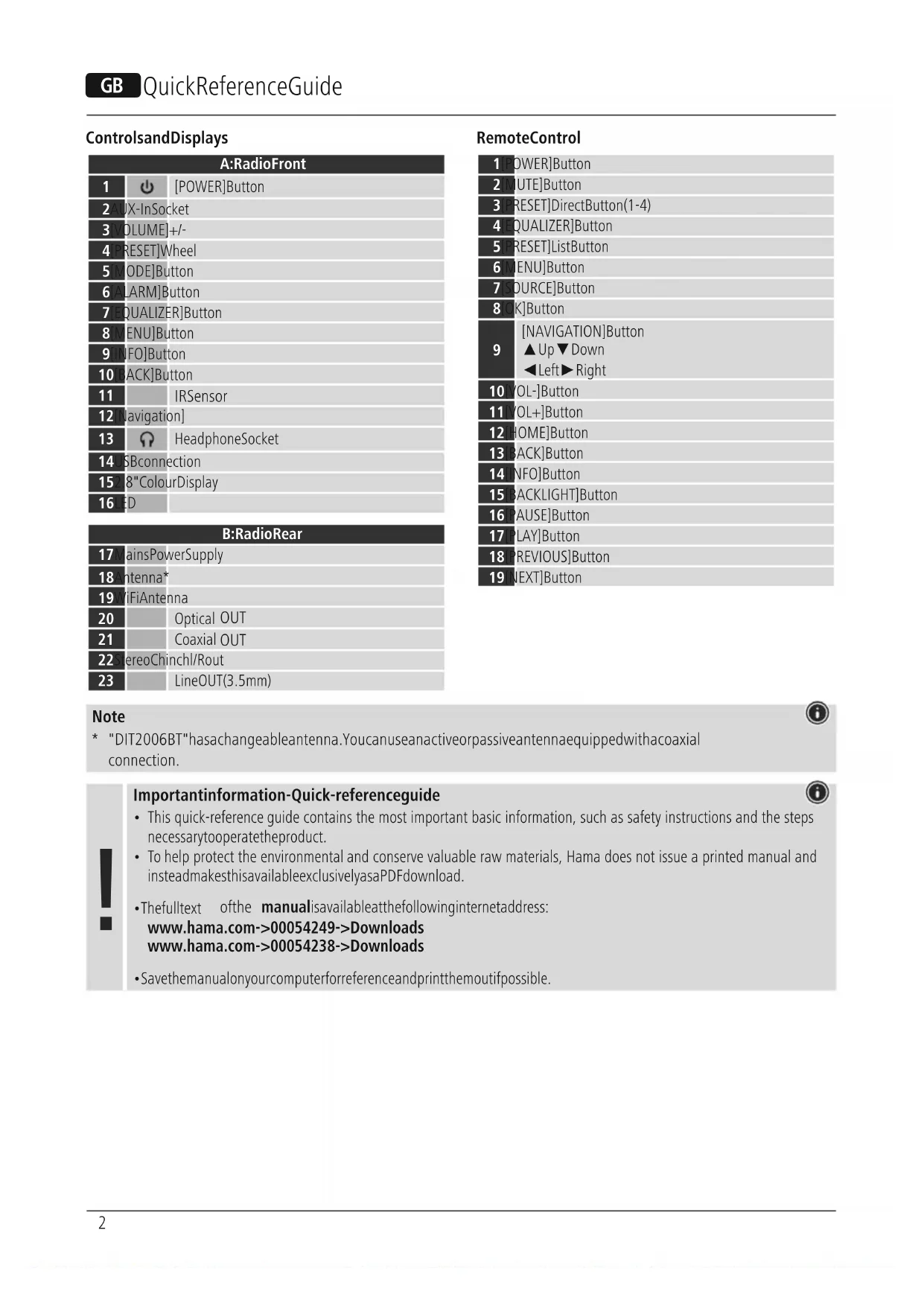
| A:RadioFront | ||
| 1 | [POWER]Button | |
| 2 | [POWER]Button | |
| 3 | +/- | |
| 4 | [RESET]Wheel | |
| 5 | [MODE]Button | |
| 6 | [ARM]Button | |
| 7 | EQUALIZER]Button | |
| 8 | ENU]Button | |
| 9 | NFO]Button | |
| 10 | BACK]Button | |
| 11 | IRSensor | |
| 12 | Navigation | |
| 13 | HeadphoneSocket | |
| 14 | USBconnection | |
| 15 | "ColourDisplay | |
| 16 | ED | |
| B:RadioRear | ||
| 17 | MainsPowerSupply | |
| 18 | Antenna* | |
| 19 | WiFiAntenna | |
| 20 | Optical OUT | |
| 21 | Coaxial OUT | |
| 22 | stereoChinchl/Rout | |
| 23 | LineOUT(3.5mm) | |
RemoteControl
| 1 POWER]Button | |
| 2 MUTE]Button | |
| 3 PRESET]DirectButton(1-4) | |
| 4 EQUALIZER]Button | |
| 5 PRESET]ListButton | |
| 6 MENU]Button | |
| 7 SOURCE]Button | |
| 8 OK]Button | |
| 9 | [NAVIGATION]Button ▲Up▼Down ←Left→Right |
| 10 VOL-]Button | |
| 11 VOL+]Button | |
| 12 [HOME]Button | |
| 13 [BACK]Button | |
| 14 [NFO]Button | |
| 15 [BACKLIGHT]Button | |
| 16 [PAUSE]Button | |
| 17 [PLAY]Button | |
| 18 [PREVIOUS]Button | |
| 19 [NEXT]Button | |
Note
- "DIT2006BT"haschangeableantenna.Youcanuseanactiveorpassiveantennaequippedwithacoaxial connection.

1.ExplanationofWarningSymbolsandNotes
| Riskofelectricshock Thissymbolindicatesariskofelecricshockfrom touchingproductpartscarryinghazardousvoltage. |
| Warning Thissymbolisusedtoindicatesafetyinstructionsorto drawyourattentionospecifichazardsandrisks. |
| Note Thissymbolisusedtoindicateadditionalinformationor importantnotes. |
2.PackageContents
Digital-HiFi-TunerDIT2006BT
- Telescopicantenna
- 1xAntenna(Wifi)
- RCAcable(forstereoL/RRCAoutput)
- Remotecontrol
-2xAAAbatteries
Quickguide
3.Safety Instructions
The productis intended for private, non-commercial use only.
- Donotusetheproductinareasinwhichelectronic productsarenotpermitted.
- Protecttheproductfromdirt, moisture and overheating and useitindryroomsonly.
- Aswithallelectricalproducts, thisdevicesshouldbekept outofthereachofchildren.
- Donotdroptheproductanddonotexposeittoany majorshocks.
- Donotoperatetheproductoutsidethepowerlimits specified inthetechnicaldata.
- Keepthepackagingmaterialoutofthereachofchildren duetotheriskofsuffocation.
- Disposefpackagingmaterialimmediatelyin accordancewiththelocallyapplicableregulations.
- Donotmodifythedeviceinanyway.Doingsovoidsthe warranty.
- Use the product only for the intended purpose.
- Donotusetheproductintheimmediatevicinity of heaters,otherheatsourcesorindirectsunlight.
- Donotusetheproductinadampenvvironmentand avoidsplashingwater.
-Onlyusetheartleundermoderateclimaticconditions.
RiskofElectricshock

- Donotopenthedeviceorcontinuetooperateititifit becomesdamaged.
- Donotusetheproductifthe ACadapter, theadaptercableorthemainscablearedamaged.
- Donotatempttoserviceorrepairtheproduct yourself.Leaveanyandallserviceworktoqualified experts.
Warning-Batteries

- When inserting batteries, notethe correct polarity (+ and -) and markings) and insert the batteries accordingly. Failure to dosos could result in the batteries leaking or exploding.
Onlyusebatteries(orrechargeablebatteries)that matchthespecifiedtype. - Beforeyouinsertthebatteries,cleanthebattery contactsandthepolarcontacts.
- Donotallowchildrentochangebatterieswithout supervision.
- Donotmixoldandnewbatteries,orbatteriesof differenttypesorfromdifferentmanufacturers.
- Removethebatteriesfromproductsthatarenotbeing usedforanextendedperiod(unlessthesearebeing keptreadyforanemergency).
- Donotshort-circuitbatteries.
- Donotchargebatteries.
- Donotburnbatteries.
- Keepbatteriesoutofthereachofchildren.
- Neveropen, damageorswallowbatteriesorallow themtoentertheenvironment. Theycancontaintoxic, environmentallyharmfulheavymetals.
- Removespentbatteriesfromtheproductanddisposefthemwithoutdelay.
- Avoidstoring, charging or using the device in extreme temperatures and extremely low atmospheric pressure (foreexample, athigh altitudes).
4.BeforeFirstUse
Note

Adetaileddescriptionofthe UNDOKappandallofits functionscanbefoundinour UNDOKguideat:

www.hama.com->00054249->Downloads www.hama.com->00054238->Downloads
Notesonuse

The[OK]buttonand
ontheremotecontrol
correspondtothe[NAVIGATION]button(12)onthe frontoftheradio.
The
buttonontheremotecontrolcorrespondsto
the[BACK]buttononthefrontoftheradio
The
buttonsontheremotecontrolcorrespond
toturningthenavigationcontrollertotheleftand rightonthefrontoftheradio.
Preparingtheremotecontrolforuse
Openthecoveronthebatterycompartment.This can be found on the back of theremotecontroland can be opened by sliding in the direction indicated.
TheextentofdeliveryinclustwoAAAbatterieswhich mustbeinsertedintothebatterycompartmentfortheremotecontroltowork.Wheninsertingthebatteries, ensurethattheyareinsertedwiththecorrectpolarity. Therelevantpolarity (+/-) ismarkedinsidethebattery compartment.
Settingupanetworkconnection WLAN(wirelessnetwork)
- Ensurethattherouterisswitchedon,isfunctioning correctly and that there is a connection to the internet.
- Activate the WLAN function of your router.
- Followyourrouter'soperatinginstructionsasregardsthe correctfunctioningofthewLANconnection.
- Thenproceeddirectlyasdescribedundersection5,Gettingstarted'.
5. Getting Started

Note-optimisingreception
"DIT2006BT"hasanantennaconNECTIONexternal antennaswithacoaxialconnection.Asuitabletelescopic antennathallowsDAB,DAB ^+ andFMreceptionis includedintheextentofdelivery.Alternatively,you canuseanactiveorpassiveantennatoimprovethereceptionortoadaptittoyourrequirements.
Pleasednote:
- Alwayspulltheantennaoutcompletely.
- Werecommendyouadjusttheantennaverticallyto ensureoptimalreception.
5.1GeneralNotesonUse
5.1.1SwitchOn/Off/Standby
- PressPOWERtoswitchontheradio.
- PressPOWERtoswitchtheradioon(Standby).
- Tocompletely switchoffthedevic, disconnectit from thepowersupply.
5.1.2NavigationandControl
- Afterpressingashortcutbutton, navigate through the menu items using.
- Selecttheindividualmenuitemsbyturning NAVIGATION.
- Confirm the selection by pressing [NAVIGATION] (12).
5.1.3VolumeAdjustment
- Turnthevolumeup(right)ordown(left)byturning VOLUMEaccordingly.
5.2SwitchingON
Warning

- Only operate the product from a socket that has been approved for the device. The socket must be installed close to the product and must be easily accessible.
- Disconnect the product from the power supply using the On/Off switch - if this is not available, unplug the power cord from the socket.
- If using a multi-socket power strip, make sure that the total power consumption of all connected devices does not exceed the power strip's maximum throughput rating.
-
If you will not be using the product for a prolonged period, disconnect it from mains power.
-
Connect the power supply to the mains connection (1) on the back of the radio.
- Connect the network cable to a properly installed and easily accessible network socket.
- Wait until the radio has initialised fully.
- Press [POWER] (1) to switch on the radio.
Note-switchingonforthefirsttime

- The Setup Wizard starts up automatically when the radio is turned on for the first time.
- The language can be set during commissioning. To do this, use the rotary control to select the required language and confirm your choice by pressing [NAVIGATION] (12).
- You can skip the wizard.
5.3Language
To change radio's menu language, proceed as follows:
- Press [MENU] (8) to access the Settings menu.
- Use [NAVIGATION] (12) to navigate to the "Settings" menu item.
- Confirm the selection by pressing [NAVIGATION] (12).
- Use [NAVIGATION] (12) to navigate to the "Language" menu item. Confirm the selection by pressing [NAVIGATION] (12).
- Use [NAVIGATION] (12) to select your preferred system language.
- The language setting currently selected is marked with an asterisk (^*) .
Note

The following languages are available: English, German, Danish, Dutch, Finnish, French, Italian, Norwegian, Polish, Portuguese, Spanish, Swedish, Turkish, Czech and Slovak.
6.CareandMaintenance
- Only clean this product with a slightly damp, lint-free cloth and do not use aggressive cleaning agents.
If you do not plan to use the product for a prolonged period, turn off the device and disconnect it from the power supply. Store it in a clean, dry place away from direct sunlight.
7.WarrantyDisclaimer
Hama GmbH & Co KG assumes no liability and provides n warranty for damage resulting from improper installation/ mounting, improper use of the product or from failure to observe the operating instructions and/or safety notes.
8. Service and Support
Please contact Hama Product Consulting if you have any questions about this product. Hotline: +49 9091 502-115 (German/English)
Further support information can be found here: www.hama.com
The full text of the manual is available at the following
internet address:
www.hama.com->00054249->Downloads
www.hama.com->00054238->Downloads
9.DeclarationofConformity
C HamaGmbH&CoKGherebydeclaresthatthe radioequipmenttype[00054249,00054238]isin compliancewithDirective2014/53/EU.Thefull
textoftheEUdeclarationofconformityisavailableatthefollowinginternetaddress:
www.hama.com->00054249->Downloads
www.hama.com->00054238->Downloads
| Frequencyband(s) | Maximumradio-frequency powertransmitted |
| BluetoothReceiver 2.402-2.480GHz | 6.5dBm(EIRP) |
| WiFi:2.400-2.480GHz15.5dBm(EIRP) | |
| WiFi:5.150-5.350GHz16.5dBm(EIRP) | |
| WiFi:5.470-5.725GHz16.5dBm(EIRP) | |
| WiFi:5.735-5.835GHz11dBm(EIRP) | |
RestrictionsorRequirementsin
Belgium, Bulgaria, Czech Republic, Denmark, Germany, Estonia, Ireland, Greece, Spain, France, Croatia, Italy, Cyprus, Latvia, Lithuania, Luxembourg, Hungary, Malta, the Netherlands, Austria, Poland, Portugal, Romania, Slovenia, Slovakia, Finland, Sweden, United Kingdom
Note

Ifchannels36-64 channelsoffrequency 5150MHz-5350MHz)areused, thedevicemayonlybe usedinclosedrooms.
Tolimitexposuretoelectromagneticfields

This device is intended for use at a distance of least 20cm from the body of the user or persons nearby. This device must not beworn carried on the body.
- Consumption information according to directive (EU) No.801/2013 amending the directive (EC) No. 1275/2008
| Status | Durationof triggertime | Energy consumption |
| off-mode 0/1mainsswitch (onlyondeviceswith0/1 mainsswitch) | -≤0.50W | |
| manualstandbymode (Readystate(Standby) ondeviceswithout informationorstatus indicator manual)* | -≤0.50W | |
| manualstandbymode (Readystate(standby) on deviceswithinformation orstatusindicator (manual)* | -≤1.00W | |
| automaticstandby (Standbyondevices withoutinformationor statusindicator**) | ≤20min≤0.50W | |
| informationorstatus display (Automaticreadystate (Standby)ondeviceswith informationorstatus indicator**) | ≤20min≤1.00W | |
| networkedstandby***≤20min≤2.00W | ||
PressthePowerbutton
Notnetworked-"Maintainnetworkconnection-NO". NotavailableinFMmode,ifpresent.
**Networked-"Maintainnetworkconnection-YES"
Pleasanotethattheactualpowerconsumptioncan bedependentonmultiplefactors.Theseincludethepersonal settings, theoperatingsmode, theambienttemperature andthefirmwareversionoftheproductused.
Thevaluessetoutaboverepresentmaximumvalues.
Theactualreferencevaluescanbefoundat:
www.hama.com->00054249->Downloads->
Consumptioninformation
www.hama.com->00054238->Downloads->
Consumptioninformation
4.Avantlamiseenservice
Remarque

Restrictionsouexigencesen
OprAhbyIynpaBneHnHHdkaun
-PacklaIbIaIteMaTyaHTaHTeHHbIIOJIHOCTbIO.
-ⅡIaONTmAmJIbHOrOcRHaJIanpneMapeKoMeHJyETcayCTaHOBUTbaHTeHHyBepTKaJIbHO.
5.106uueyka3aHnnonCnoJb3OBaHnIO
5.1.1BkIIOueHHe/BBKIIIOueHHe/peXIMoXnDaHn
- Haxmte KhoNky [POWER] (1), UTo6bI BkNIOuHTb paINo.
-Дя Вьклоченя радио (peхим ожданя) нахмITE KhoNKyPOWER.
-ⅡJINIOHOROBbIKIQUeHnOaTKIHOHTeepn6opOT 3JIeKTPoPNTAHN.
5.1.2Haburaunynpablenne
-ⅡIaBbI6opaeHo6xOdUMoROnyHKTaMeHHOHaXIMaIte KHOKNKy6bIcTporOBbl6opa.
-PyTeMbpaueHnKaHONKnNAVIGATION BbINOJIHReTcBbIbOpOTdeJIbHbIXyHKTOBMeHO.
- Повпевшипту Вьбор Нжатием Кногки [NAVIGATION] (12).
5.1.3PeynilipOBkarpOMKocTn
BpaueHnem KhoNk [VOLUME] (3) MoXHO NOBbIaTb (BnpaBO) nnn noHNxTaB (BNeBO) rPOMKoCTb.
5.2.Поdkлioуснe

PpeynpexkneHc
-Дляпдкючehни3delenuucnoь3уTeToьko po3ety,pa3peшeHHyOДнЯUCNoB3OBaHn. Po3etKadoJxHapacnoJaTaTbCraB6IuN3uN3delenuN6blt b JERKOIOCTyHa.
-OTcoeHnHTeN3dJIneOeTcncNOMoUbI nepeKlIOuATEJnpnOTcyTCTBmHAnpRaeHnABCETN, OTcoeHNHTecTeBOKa6eJIbOTp03ETKn.
-ПинанлчиблoksштencьнхрозКсдпTe 3aTeM,чБIO6UaJnoTpe6JIeMaMAOMUHOCb ПДКЛHQUEHbIX3JIeKTPoPnpi6OpOBHnePbeBIIaHaДОуСТIMOE3HAueHne.
-OTcoeHnHTeN3dEJIneOTcETNBcIyae,eCINBbI eHOHeNCIOJb3yeTeBTEueHEnpOIOJXITeJIbHO BpeMeHN.
-ПодсоeнHTe6лКNTaHЯCCTeBbIMKa6eJem(1) haobpaTHoIcTOpOHepaIIO.
-Подключпсесьоькабелькнадлесьшmo6pa3OM
ПОДКЛЮЧЕНСИДСТУНСИЗТСЕТК.
-IOXJNTeCboKOHuaHnHnHnHaJIu3aLnpaINo.
HaxmTeKhONkyPOwER,yTo6bIKNIOuHTb paIIO.
Yka3aHHe—npnPepBOMBKnHoueHN

-ПрипенивовьклioченnaBOMATNueCKn3aNYcKaETCnacnCTeHTyCTaHOBKn(SetupWizard).
-Пип新股вом3ануckemoxe6btsbHacpoeh3bIK.ДлэTOROBbl6epuTeHyxHbIa3bIKcNOMOuBIO NOBOPTHOROperylaTOpaINoTBePdNTecBOYb6Op HaxkataMekhONKNNAVIGATION.
- BbIMoxTepeNpyCTnTbaccnCTeHTa.
5.3.a3bik
IJIaN3MeHnYcTaHOBNeHHOr83bIKaMeHOppaINOyCTpoiCTBaBbIOnHITecNeDyUOuWeuA.
- HaxmTe [MENu] (8)ДЯпетхODa B MeHIO HaCtpoeK.
C NOMOIOKHOJKN[NAVIGATION] (12) nepeuIteBnyHKTMehoSettings("HacpoiKn").
-Подтвердпгу Вьбор Нжкатием Kногки [NAVIGATION] (12).
C NOMOJIbIO KHOJIKN [NAVIGATION] (12) nepeiDnte B nyHKtmehoLanguage("J3bIK").PoiTBePdIteBbI6Op HaxkTaMeMKHONKnNAVIGATION. - CnOMOJIbIOKHONKNINAVIGATIONBbIbepuTe HxHbIy3bIKMeHIO.
- BbIbpaHHbIy3bIKo6O3HaueH3HaKOM*.
PpmeaHne

HaBbI6OpnpEaTAbHeHbICJeDyUOuueAe3bIKn: aHrnnckn, HemeKn, DaTCKn, rOlnaHdCKn, fHckn, fpaHcy3ckn, nTaJIbHckn, HopBeXckn, noIbckn, nopTyraIbckn, nCnaHckn, WBeDcKn, typeckn, YeeSckaNcNoBaucKa
IJaorpaHnueHnBaO3dEeCTBnA 3JeKTPoMaRHTbIXNoJei

JaHHbI npn6opnppeHa3NaeHJnCNoJIb3OBaHnHapacctoHmMmHmym20cmOTteJanaOJb3OBaTeJnIuPyRnxNIOeHaxOJaXxCpRyOMCHM.3anpeaetcHocntbDaHHbI np6opHaTeJe.
6.Texnueckoeo6cnykBaHneuynxO
- YnCTNTeN3dEJIneToIbKocNOMOu6bIO6e3BOPcBOi, CnErKaBlaJXHOHcAJIΦeTKn,HeNCNoB3yInTe arpeccNBbIeUcTAAueCpeDCTBa.
-ECINBbHeNCNoJIb3yTeu3dJeNHeBteYeHne npOIOJXnTeIbHOROpeMeHH,BbIKIOHTeEROTCOeIHnHTeOTaNEKTPoNTaHna.XpaHtEN3dEJIeBHCtOM,CyXOMMeCTe,3aUuEHHomOTnOaDaHnnpMbIXCOJIHeuHbIXnye.
7.0cbo6oxkdeHneOTBETCTBeHHOCTN
HamaGmbHCo.KGHeHecTeOTBeTCTBeHHocTn3a NOBpeKJdeHnB03HnKUneBpe3yNbTaTeHeHaNdIeKaUeYCTaHOBKnMOHTaXkAUNHeHaNDIeXaUeROINcNOb3OBaHn N3DeJIyNInHEco6JIIOJeHnTpe6OBAHNpyKOBOCTBa N03KcNPyatauNN/Nlyka3aHNoTExHnke 6e3OnacHOCTn.
8.CepBnchoeo6cnyKuBaHHeMnNoIepKka
PnB03HKnHOBeHNHBOnpocBnon3deNIO
O6paauTeCbBCnyx6yynOpndepxxkHama.
Topaaynnr:+499091502-115(HeM./aHrn.)
Дононтельнаннфорmaцяnotexнческо поберхke: www.hama.com
CnoHbIMTeKCTOMNoIp6HoROpyKOBoDCTBaNO
3KcNpyatauMooXHOo3HaKOMTbcra3Decb:
www.hama.com->00054249->Downloads
www.hama.com->00054238->Downloads
9.CepTnΦnKaTCootBETCBH
HactoIIMKOMnHaHamaGmbH&CoKG 3aBnEeT,HTopAINOOBOpyIOBaHneTnna [00054249,00054238]coOTBeCTByeT Tpe6OBAHnMmIpeKtNBbI2014/53/EC.CnoJIhIM TEKCTOMdEKlapaunIOOCOTBEcTBnITpe6OBAHnEMC MOXHO03HaKOMNTbc3deCb: www.hama.com->00054249->Downloads www.hama.com->00054238->Downloads
| Диапазон/диапазоньчacтоТ | Мakсимальнай Излучаямаямоцhoctь |
| Bluetoothприемнik 2.402-2.480GHz | 6.5dBm(EIRP) |
| WiFi:2.400-2.480GHz15.5dBm(EIRP) | |
| WiFi:5.150-5.350GHz16.5dBm(EIRP) | |
| WiFi:5.470-5.725GHz16.5dBm(EIRP) | |
| WiFi:5.735-5.835GHz11dBm(EIRP) | |
OrpaHnueHnJnIITpe6ObaHnB
Bebnna,BoIrrapn,YeUckaPecnybIka,DanHn, TepMaHn,3ctOnn,NpHaHn,IpeuN,NcHnN, PhaHnXOpBaTn,ItaHn,Knnp,LatBn,IITBa, JIOKcEm6ypr,Behrpna,MalTa,HndePaHnbI,ABCTpy, PoiIbSha,PiOpyraHn,PymbHn,CNoBeHn,CNoBaKn, FHHnHnI,ShBeuN,BeNKo6puTahn
PpimmeaHne

PpncnoJb3ObaHnKaHaNoB36-64(ycactota 5150-5350Mu)u3deIeepa3peeHOpnpmHrTo bKOB3aKpbItbIXNOMeHnx.
IlnraorpaHnueHnRABO3deNCTBnA 3JIeKTPoMaRnHTbIXNoJe

DanHbI npBopnppeHa3NaeHJnCNoJb3ObaHn HapacctoHHMmHMMy20cMTeJanaOpJb3ObaTeJI nnpynxHIOe,HaxoJxxCpJdOMCHN. 3aPepaetcHocntbDaHHbI np6opHateJe.
10.DaHbIeOpacxoOdecorJnacHoPernAmEnTy(EC)
N°801/2013OBHeceHnnpaBOKBPerJaMeHT(EC) N°1275/2008
86652Monheim/Germany
www.hama.com
TheSpotifysoftwareissubjecttothirdpartyLICENSEsfoundhere: https://www.spotify.com/connect/third-party-licenses
Alllistedbrandsaretrademarksofthecorrespondingcompanies Errorsandomissionsexcepted, andsubjecttotechnicalchanges. Ourgeneraltermsofdeliveryandpaymentareapplied.
