
IR50 - Radio HAMA - Free user manual and instructions
Find the device manual for free IR50 HAMA in PDF.


| Product type | Internet Radio |
| Brand | Hama |
| Model | IR50 |
| Power supply | Power adapter (power cable included) |
| Screen | 2.4-inch color |
| Connection | WiFi (wireless network) |
| Auxiliary input | AUX IN jack (3.5 mm) |
| Main functions | Internet radio, rotary navigation, volume buttons, station memory, setup wizard |
| Available languages | English, German, French, Italian, Spanish, Dutch, etc. |
| Package contents | IR50 radio, power adapter, user manual |
| Care and cleaning | Slightly damp lint-free cloth, no harsh detergents |
| Safety | Do not open, use in a dry room, keep out of reach of children, unplug if not in use for a long time |
| Customer service | Hotline: +49 9091 502-115 (German/English), online support at www.hama.com |
| Warranty | CE conformity, declaration at www.hama.com |
Frequently Asked Questions - IR50 HAMA
User questions about IR50 HAMA
0 question about this device. Answer the ones you know or ask your own.
Ask a new question about this device
Download the instructions for your Radio in PDF format for free! Find your manual IR50 - HAMA and take your electronic device back in hand. On this page are published all the documents necessary for the use of your device. IR50 by HAMA.
USER MANUAL IR50 HAMA
Quick Guide
Kurzanleitung
Further information and features are available on:
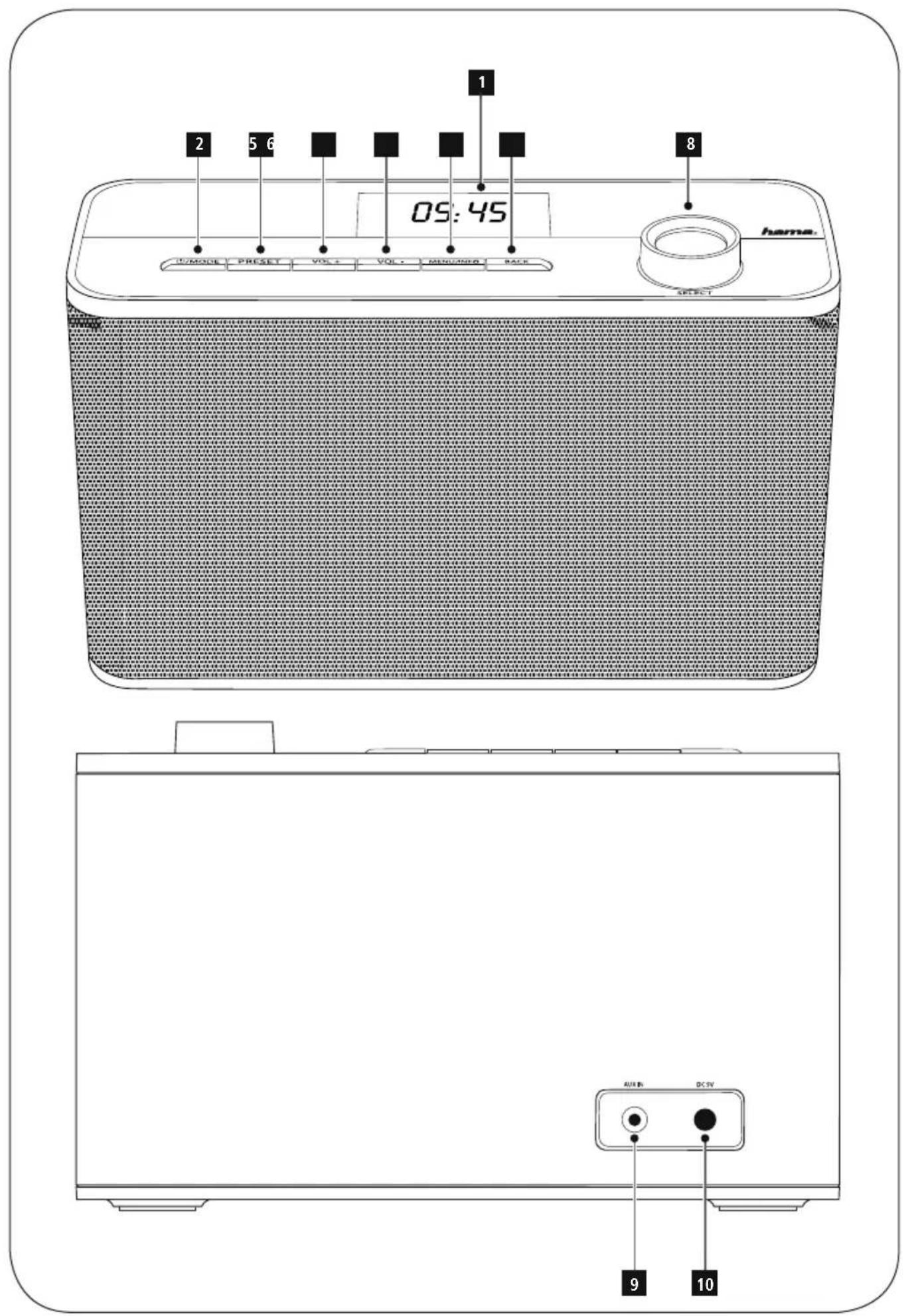
Controls and Displays
Radio
Front
- 2.4" Display
- [POWER / MODE] button
- [MEMORY] button
- [VOLUME+] button
- [VOLUME-] button
- [MENU / INFO] button
- [BACK] button
- [ENTER] (Select) button* / Navigation
Rear
- AUX-In socket
- Mains power supply

Note
* You can navigate the menu structure by turning the control. You can confirm a selection by pressing the role (navigation control).

Important note – Operating instructions:
- This is a quick guide to provide you with the most important basic information, such as safety warnings and how to get started using the product.
- For the sake of protecting the environment and saving resources, Hama dispenses with printed operating instructions and provides them only in the form of PDF files / eManuals on www.hama.com.
- Use the search function with the item number of your product to easily find the product documentation.
- Alternatively, scan the QR code below to be taken directly to the location of the operating instructions.
- Save the operating instructions to your computer's hard drive for future reference, or print it out if necessary.
1. Explanation of Warning Symbols and Notes

Warning
This symbol is used to indicate safety instructions draw your attention to specific hazards and risks.

Note
This symbol is used to indicate additional information important notes.

Risk of electric shock
This symbol indicates product parts energized with a dangerous voltage of sufficient magnitude to constitute a risk of electric shock.
2. Package Contents
- Internet radio IR50
- Power supply unit
- Quick guide, brochure
3. Safety Notes
- The product is intended for private, non-commercial only.
- Protect the product from dirt, moisture and overheating and use it in dry rooms only.
- As with all electrical devices, this device should be kept out of the reach of children.
- Do not drop the product and do not expose it to any major shocks.
- Do not operate the product outside the power limits given in the specifications.
- Keep the packaging material out of the reach of children due to the risk of suffocation.
- Dispose of packaging material immediately according to locally applicable regulations.
- Do not modify the device in any way. Doing so voids the warranty.

Risk of electric shock
- Do not open the device or continue to operate it if it becomes damaged.
- Do not use the product if the AC adapter, adapter cable or power cable is damaged.
- Do not attempt to service or repair the device yourself. Leave any service work to qualified experts.

Warning – Batteries:
- When inserting batteries, note the correct polarity (+ and - markings) and insert the batteries accordingly. Failure to do so could result in the batteries leaking o exploding.
- Do not allow children to change batteries without supervision.
- Do not mix old and new batteries or batteries of a different type or make.
- Remove the batteries from products that are not being used for an extended period
- Do not short-circuit batteries.
use Do not charge batteries.
• Do not throw batteries in a fire. - Keep batteries out of the reach of children.
4. Before starting
4.1 WLAN (wireless network)
- Ensure that the router is switched on, is functionally correctly and that there is a connection to the int
- Activate the WLAN function of your router.
- Follow your router's operating instructions as regards the correct functioning of the WLAN connection.
- Then proceed directly as described under section 5, Getting started'.
5. Getting started
5.1 Switching the device on
- Connect the power cable to a properly installed socket.

Warning
- Only connect the product to a socket that has been approved for the device. The electrical socket must always be easily accessible.
- Disconnect the product from the power supply us the on/off switch — if this is not available, unpl power cord from the socket.
- Wait until the radio initialisation procedure has fini
- Press the [POWER] button to switch the radio on.
5.2 Language and setup wizard
The first time the system starts the radio uses English. To
ng change this, proceed as follows: Press [MENU] > System settings > Language > Select ernet. language
Confirm your selection by pressing the [ENTER] or [OK] button.

Note
- You can choose from the following languages: English, German, Danish, Dutch, Finnish, French, Italian, Norwegian, Polish, Portuguese, Spanish, Swedish, Turkish, Czech and Slovak.
6. Care and Maintenance
been
t• Only clean this product with a slightly damp, lint-free cloth and do not use aggressive cleaning agents.
- If you do not use the product for a long time, turn c ing device and disconnect it from the power supply. Store it u g the a clean, dry place out of direct sunlight.
7. Warranty Disclaimer
Hama GmbH & Co. KG assumes no liability and provides warranty for damage resulting from improper installation/mounting, improper use of the product or from failure to observe the operating instructions and/or safety notes.
8. Service and Support
Please contact Hama Product Consulting if you have any questions about this product.
Hotline: +49 9091 502-115 (German/English)
Further support information can be found here:
www.hama.com
9. Recycling Information
Note on environmental protection:
After the implementation of the European
Directive 2012/19/EU and 2006/66/EU in the national legal system, the following applies:
Electric and electronic devices as well as batteries
must not be disposed of with household waste. Consumers are obliged by law to return electrical and electronic devices as well as batteries at the end of their service lives to the public collecting points set up for this purpose or point of sale. Details to this are defined by the national law of the respective country. This symbol on the product, the instruction manual or the package indicates that a product is subject to these regulations. By recycling, reusing the materials or other forms of utilising old devices/Batteries, you are making an important contribution to protecting our environment.
10. Declaration of Conformity

Hama GmbH & Co. KG hereby declares that the device complies with the essential requirements
and other relevant provisions of Directive 2014/53/
EU. See www.hama.com for the declaration of conformity with the relevant directive.
00054840
Hotline: +49 9091 502-115 (Ger/Ang)
86652 Monheim/ Germany
www.hama.com
The Spotify software is subject to third party licenses found here: www.spotify.com/connect/third-party-licenses
All listed brands are trademarks of the corresponding companies. Errors and omissions excepted, and subject to technical changes. Our general terms of delivery and payment are applied.
- Further information and features are available on:
- Controls and Displays
- Radio
- Front
- Rear
- Note
- Important note – Operating instructions:
- Explanation of Warning Symbols and Notes
- Warning
- Risk of electric shock
- Package Contents
- Safety Notes
- Warning – Batteries:
- Before starting
- WLAN (wireless network)
- Getting started
- Switching the device on
- Language and setup wizard
- Care and Maintenance
- Warranty Disclaimer
- Service and Support
- Recycling Information
- Note on environmental protection:
- Declaration of Conformity
Brand : HAMA
Model : IR50
Category : Radio