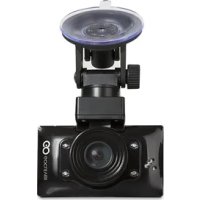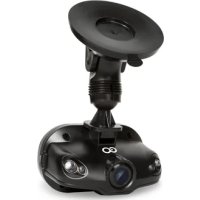
Mini - Voice recorder GOCLEVER - Free user manual and instructions
Find the device manual for free Mini GOCLEVER in PDF.

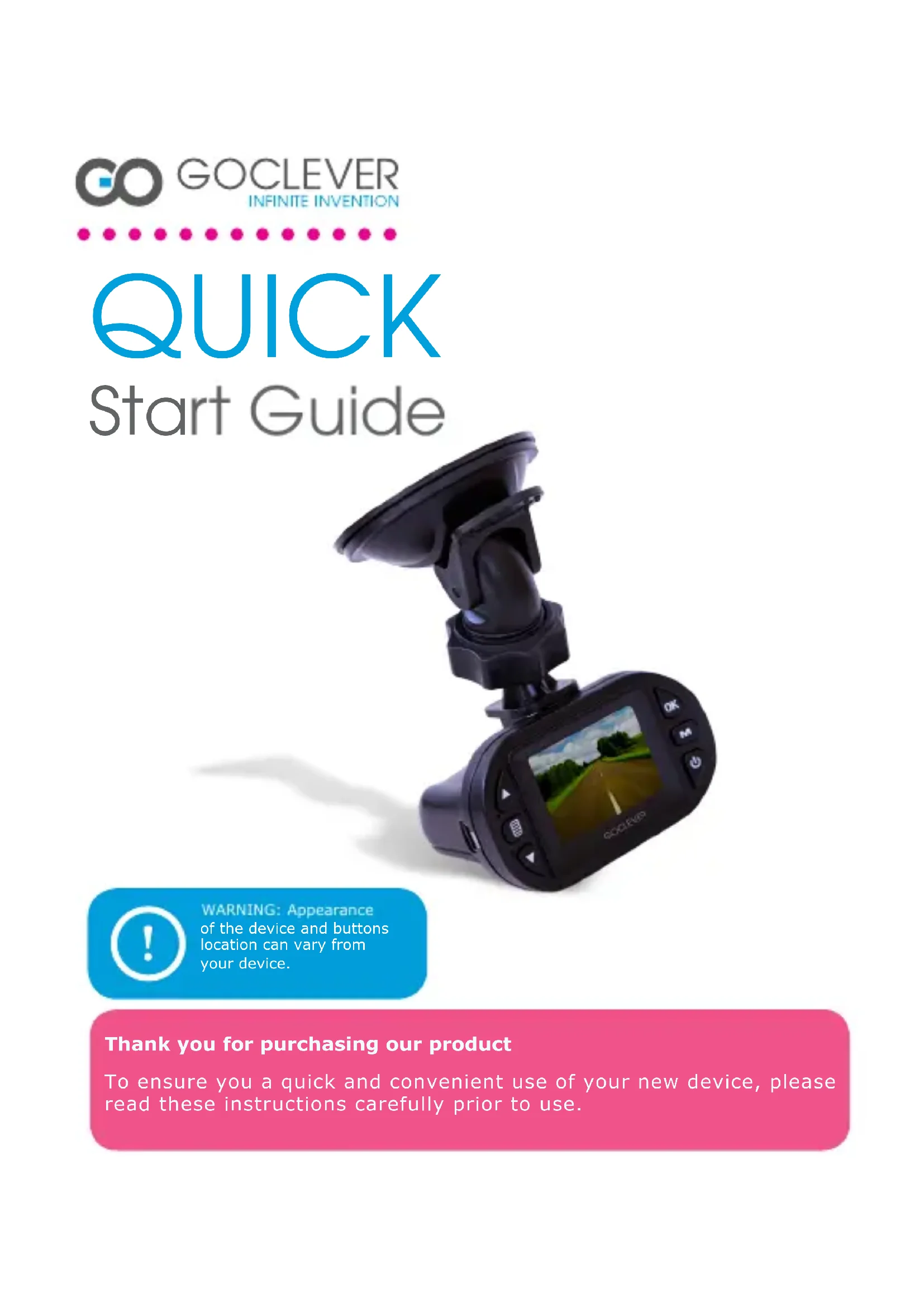


| Product type | Multifunction digital voice recorder (audio, video, photo) |
| Brand | GoClever |
| Model | Mini |
| Dimensions (L x W x H) | 6 x 4 x 2 cm (estimated) |
| Weight | 50 g (estimated) |
| Power supply | Rechargeable lithium-ion battery (charges via USB, mains, cigarette lighter) |
| Storage | Micro SD card (not included), up to 32 GB |
| Supported formats | Audio (WAV), Video (AVI), Photo (JPEG) |
| Battery life | Approximately 2 hours of continuous recording |
| Main functions | Audio/video recording, motion detection, automatic recording when vehicle starts, playback, PC connection |
| Display | Built-in LED screen |
| Connectivity | USB 2.0, input for cigarette lighter charger |
| Included accessories | USB cable, cigarette lighter charger, mount (depending on version) |
| Maintenance | Clean with a soft, dry cloth. Avoid moisture. |
| Safety | Compliant with WEEE directive. Do not dispose of with household waste. |
| Spare parts | Battery, USB cable, charger available on manufacturer's website |
| Warranty | 24 months manufacturer warranty (see terms on website) |
| Compatible operating system | Windows 2000/XP/Vista/7, Mac OS 10.3.6 or higher |
| Automatic recording | Starts/stops with vehicle engine (requires plugged-in cigarette lighter charger) |
Frequently Asked Questions - Mini GOCLEVER
User questions about Mini GOCLEVER
0 question about this device. Answer the ones you know or ask your own.
Ask a new question about this device
Download the instructions for your Voice recorder in PDF format for free! Find your manual Mini - GOCLEVER and take your electronic device back in hand. On this page are published all the documents necessary for the use of your device. Mini by GOCLEVER.
USER MANUAL Mini GOCLEVER
of the device and buttons location can vary from your device.
Thank you for purchasing our product
To ensure you a quick and convenient use of your new device, please read these instructions carefully prior to use.
CONTENTS:
English | GB 2
Polish | PL 5
Croatian | HR 8
Czech | CZ 11
Estonian | EST 14
French | FR 17
German | DE 20
Greek | GR 23
Hungarian | HU 26
Italian | IT 29
Lithuanian | LT 32
Portuguese | PT 35
Romanian | RO 38
Russian | RU 41
Serbian | SRB 44
Slovak | SK 47
Spanish | ES 50
Ukrainian | UA 53
Service center list 55
GOCLEVER | Quick Start Guide | EN
DEVICE: GOCLEVER DVR MINI
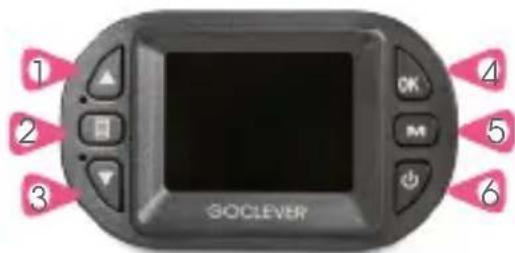
DEVICE OVERVIEW:
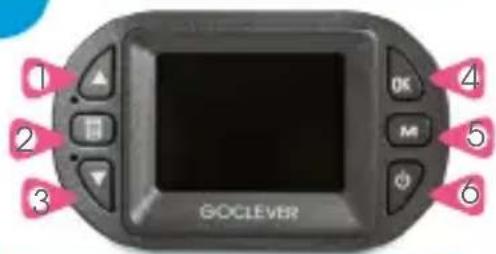
- UP button
- MENU button
- DOWN button
- OK button
- MODE button
- Power button
Power button
MENU button
MODE button
REC button
UP key
DOWN key
ON/OFF
Main menu
Switch operation mode
/corresponding menu
Start/pause
Up/zoom in
Down/zoom out

WARNING: Appearance of the device and buttons location can vary from your device.
AUTOMATIC RECORD
The device supports automatic recording. The recording will start while turning on the car engine. The recording will stop while turning off the car engine. Please note, that the car charger have to be plugged in.
OPERATION:

TURNING ON/OFF
Press the power button once to turn on the device. Light indicator will turn on. Press the power button again to turn off the device. Light indicator will turn off.
Note: low battery icon will be displayed before shutting down the device.
CHARGING THE BATTERY
There are three ways of charging the battery:
- Using the AC adapter
-Using a USB port - Using car cigarette lighter power supply
PLACING A MICROSD CARD
Place the micro SD card into the memory card slot. Press it until you hear a click sound. When the card is full, the device will automatically stop the recording.
BASIC OPERATION
Press MODE button to switch between video, photo and playback mode.
Press MENU button twice to enter system setting menu:
Select format to delete all data on your SD card
Select language to choose the system language
Select reset to restore system settings to default values
Select frequency: 50 / 60Hz
Select date setup to set a date and time
Select mode using a mode button to select the video or photo mode. Press OK to start recording in video mode. Press OK again to stop the recording. Press OK to take a photo in photo mode. Press MENU button in video or photo mode to enter the corresponding settings menu.
MOTION DETECT
Turn on the motion detect function in the menu. The device will automatically start the recording when it detects any movement in range (20 cm).
3
GOCLEVER | Quick Start Guide | EN
VIDEO AND PHOTO PLAYBACK
Select mode using a mode button to select the file management mode. The LCD will display your last recorded video or photo. Press up and down button to select a desired file for playback. Press OK button to start/stop the video playback. Adjust volume by pressing the up or down button.
PC CONNECTION:
Connect the USB cable to your PC. The device will display the start screen and the blue indicator will turn on. Select the mass storage option on your computer to browse and manage files on the device. Unplug the USB cable to turn off the device. Note: If the device will crash for some reason, press the reset.

SYSTEM REQUIREMENTS:
Windows 2000/XP/Vista/Seven, Mac OS 10.3.6 or above.
CERTIFICATE OF CONFORMITY

GOCLEVER Ltd. hereby declares under our sole responsibility that the product GOCLEVER DVR MINI is in conformity with the essential requirements of the following Directives is declared:
EMC DIRECTIVE 2004/108/EC
LVD DIRECTIVE 2006/95/EC
R&TTE DIRECTIVE 1999/5/EC
The full document with detailed information is available on our website:
www.goclever.com. The .pdf file with the CE declaration is placed among the bookmarks of our product catalogue.
This product has been certified as RoHS Compliant.
MARK OF CONFORMITY - UKRAINE
National mark of conformity confirms that the specified product complies with the requirements of the technical
regulations in Ukraine.
END OF LIFE DISPOSAL
Recycling facilities are now available for all customers at which you can deposit your old GOCLEVER devices or any other electrical products. This is a requirement under European legislation (the Waste Electrical and Electronic Equipment - or WEEE - Directive 2002/96/EU). Customers are able to take any old electrical equipment to waste recycling public centers or point of sales. Please remember that this devices/cables etc. will be further handled during the recycling process. To remind you to recycle, all electrical products are marked with a symol.
DISPOSAL OF WASTE BATTERIES (APPLICABLE IN THE EUROPEAN UNION AND OTHER EUROPEAN COUNTRIES WITH SEPARATE COLLECTION SYSTEMS)




The symbol may appear on the battery or on the packaging to indicate that the battery provided with this product shall not be treated as household waste. On certain batteries this symbol might be used in combination with a chemical symbol. The chemical symbols for mercury (Hg) or lead (Pb) are added if the battery contains more than 0.0005% mercury or 0.004% lead. By ensuring these batteries are disposed of correctly, you will help prevent potentially negative consequences for the environment and human health which could otherwise be caused by inappropriate waste handling of the battery.
GOCLEVER | Quick Start Guide | EN
The recycling of the materials will help to conserve natural resources. In case of products that for safety, performance or data integrity reasons require a permanent connection with an incorporated battery, this battery should be replaced by qualified service staff only. To ensure that the battery will be treated properly, hand over the product at end-of-life to the applicable collection point for the recycling of electrical and electronic equipment. Hand the battery over to the applicable collection point for the recycling of waste batteries. For more detailed information about recycling of this product or battery, please contact your local government Office, your household waste disposal service or the shop where you purchased the product.
REGISTER A PRODUCT ON register.goclever.co
Register your GOCLEVER product to get more!
Thank you for choosing GOCLEVER! We want you to enjoy your purchase to the fullest, and that starts with a few easy registration steps. Registration will take you a few minutes. Go to www.goclever.com and get more. Do not miss the chance to find a few of the benefits:
- 12 months of door-to-door warranty (for selected countries and products),
- The warranty period for included accessories is 6 months starting from date of purchase with the exception of mechanical damage,
- Handy tips and rapid technical support,
- Reminders about firmware updates that will keep your product up-to-the-minute,
- Exclusive previews of new products,
- Special offers and promotions - up to 30% of discount (for selected countries and products),
- Free map updates (for selected countries and products).
TECHNICAL SUPPORT
WEBSITE: www.goclever.com/support
- USER GUIDES (have a look on online user's manual, download and share with).
- SOFTWARE AND UPDATE MANUALS (be up to date with the latest OS software or use the backup files to solve your software problems).
- FREQUENTLY ASKED QUESTIONS
- SERVICE CENTRE LOCATIONS (we recommend to use GOCLEVER Central Service and local partner services directly than make a complaint or technical inquiries to stores).
- WARRANTY INFORMATION (your GOCLEVER TAB includes 24 month guarantee. The optional for selected countries is 12 month "door2door" guarantee. See our website for details).
- SERVICE PROCEDURE
- RMA APPLICATION (depends on country).
5
GOCLEVER | Quick Start Guide | PL
URZADZENIE: GOCLEVER DVR MINI
INFORMACJE OGOLNE:
- Przycisk W GÖRE
- Przycisk MENU
- Przycisk W DóL
- Przycisk OK
- Przycisk TRYB
- Przycisk zasilania
Przycisk zasilania
Przycisk MENU
Przycisk TRYB
Przycisk OK/Nagr.
Przycisk W GORE
Przycisk W DóL
DYREKTYWA EMC 2004/108/EC
DYREKTYWA LVD 2006/95/EC
DYREKTYWA R&TTE 1999/5/EC
STRONA: www.goclever.com/support
ZARIZENI: GOCLEVER DVR MINI
- Nahoru
- Menu
3.Dolu - OK
- Mode
- Zapnuti/Vypnuti
Tlačitko napajeni
Tlacitko MENU
Tlačitko REžIM
Tlacitko OK/Nahr.
Tlačitko NAHORU
Tlacitko DOLU

Zapnout/vypnout

Hlavni menu

Prepinač režim

faktuálni menu

Start/pausa

Nahoru/zoom +

Dol/zoom -

www.goclever.com/support
SEADE: GOCLEVER DVR MINI
National mark of conformity confirms that the specified product complies with the requirements of the technical regulations in Ukraine.

KORREKTNE TOOTE UTILISEERIMINE

www.goclever.com/support
www.goclever.com/support
DAS GERÄT: GOCLEVER DVR MINI
ALLGEMEINE INFORMATIONEN:
- Taste NACH OBEN
- Taste MENU
- Taste NACH UNTEN
- Taste OK
- Taste MODUS
- Power-Taste
Power-Taste
Taste MENU
Taste MODUS
Taste OK/Aufnahme
Taste NACH OBEN
Taste NACH UNTEN
www.goclever.com/support
-BENUTZERHANDBUCH
A Y T O M A T H KATAPPAΦH
H ouakeun unoontnpici e1 autouatn kataypapn. H eyypaepn th a Eekivnoe i otav evepyonoite Tn nynavn tou autokivntou. H eyypaepn th otapatnoe, evw tv anevpyonoin on Tou kivtnpa Tou autokivntou. Napakaaw onuewot, oti o foptiattnc autokivntou th npenei va ouvdetheta i eea.
XEIPIeMOe
ENEPRONIOIH/ANENEPRONIOIHZH ΣYΣKEYH
KpatnoTe To nAnkTpo Evpyonoinan yia va EekivnoTe Tny oukeun. H qtwevn evdeiN LED 0a avayi. Nieote Xava to nAnkTpo yia va anevpeyonoioeTe Tny ouokeuun. H qtwevn evdeiN LED 0a oBnoeI.
National mark of conformity confirms that the specified product complies with the requirements of the technical regulations in Ukraine.
www.goclever.com/support
www.goclever.com/support
- VARTOTOJO VADOVAS
ELIMINACAO E RECICLAGEM
www.goclever.com/support
- MANUAL DO USUÁRIO
(consulto guia de iniciq rapiido, baixe arquivos e compatrihe-os).
- SOFTWARE E INSTRUÇOES DE ATUALIZAZão
DISPOZITIV: GOCLEVER DVR MINI
1, Buton SUS
2. Buton MENIU
3. Buton JOS
4. Buton OK
5. Buton MOD
6. Buton PORNIRE
Buton alimentare
Buton MENIU
Buton MOD
Butonul OK
Buton SUS
Buton JOS
www.goclever.com/support
YCTPOICTBO: GOCLEVER DVR MINI
OBUHOPMau:
- Khonka BBEPX
- KhoNka MEHIO
- Khonka BHN3
- Khonka OK
- Khonka PEXKIM
- Khonka nHTaHn
KHONKa NITAHIN
Khoinka MEHIO
Khonka PEXKIM
Khonka OK/3anncb
Khonka BBEPX
KHONKa BHN3

BkIIOUeHne/BbIKIOUeHne

TJIaBHOe MeHIO

IpeekJIOUHTb peXIM

/Tekyuüee MeHIO

CTapT/Naay3a

Bbepx/3ym+

Bn3/3ym-

BHIMAHNE:BheuHnBVD yCTpoiCTBaNpacnoJoxeHne KHONOKMOXETOTINuHaTbcrOT BaWero yCTpoiCTBa.
ABTOMATNUECKA 3APINCb
YCTPOINCTBO
06ecneuBaet
ABTOMATUeCKyU 3aNNCb.
3aNcB HaunHaetc npn BkIoueHnn DBratel naBtOMo6nla.3aNcB OCTaHOBNTcKOrda DBuratelb abTOMo6nla 6yDet BBIKNoueH.
O6paTte BHMaHne, YTO aBTOMo6nIbHoe 3apJdHoe yCTpoICTBO DOJXHO 6bITb NOKJIIOUeHO.
ONEPAUIN:
BKNIOUHNE/BBIKIIOUHNEYCTPOINCTBA
Haxmte u ydepxnBaute KhoNky nHTaHna, yTo6b3anyctntb ycTPOcTBo. 3arOpNTcra CBeToNDo. Haxmte KhoNky eue pa3, yTo6bl BbIKJIooHTb ycTPOcCTBO.CBetoNDo norachet.
BHHMaHHe: Ipea aBTOMaTHueckn BbIKJIuOeHneM yCTpoiCTBa BblyBnDnte 3HaQOK aKKMyJlAToPa.
3APRAKA AKKUMYJTOPA
Ectb Tpn cnocoba, yTo6bl 3apraNTb aKKymyIaTOp:
-Использоване сетево зардно уства
www.goclever.com/support
BKKJIIOUyeHH/BUKJIIOUeHHI PNUCTPOIO
HaTnchItb i yTpmyTe KONky XNBHeHHa, 0o6 3anyCTn npunctpi. 3arOpntbcra
CBITNOIOJ. HatncHtB KhONky ue pa3, 0o6 BmKHytn npucptpi. Cbitnoioj 3rache.
YBara: Npeed abTomuHm BKJIOueHHnmpictpo
Bn no6aHTe 3HaOK aKymyIaTOPa. 3APrDKA AkymyIaTOPA
€tpn cnoocn, 063apndtn akymyjTOp:
-
BnKopncTaHHa MepeXeBOro 3apdHorO npNCTPOH
-
BnKOpncTaHHa USB npoty
-BukopucTaHH npuKpyoBaay PO3MIeHHa KAPTMIICR
BctabTe KapTy Nam'ayi Micro SD B rHi3do dny KapT naM'ayi. HatncHtB Ha HeI Do MOMeHTy KnaaHHa. Pnucpi 3ynHHTb 3anC, kkuO KapTa naM'ayi 3anOBHeHa.
OCHOBHI ONEPAUII
HaTnuchitb Ha KhoNky PEXKIM dny nepemukahm MxpeKIMOM BiDeo, fOTo Ta BiDtBOpEHn.
HaTnchHb Ha KhoNky MEHIO, 0o6 nepeyn Do MeHIO:
Bn6epitb φopMaT, οo6 BndaIaNTn DaHi 3 KapTu nAm'rti
Bn6epitb MOBy, 0o6 3MInTu MOBy npqpramHoro 3a6e3neueHH
BnbepiB CkuaHnn Ja BIDHOeHH
CNCTEM3a3amOByBaHHM
Bn6epitb yactoty:50/60 T
Bn6epitb daty 3mHn daTu i acy
DETEKTOP PYXY
YbIMKHTb cyHKciu BnBHeHHpyxv B MeHIO. 3 cboRo MOMeHTy npncptpi nOue He 3annc BiJeo PnBnBHeHHpyxvBMexkax20cm.
BEECAIT: www.goclever.com/support
IOC16HVK KOPNCTYBAU4A (Tyt Bu'3MOXeTe nepernhyTu Ta 3aBaHTaxnTu NocioHK KopNCyBaau B
OH-naH pexnmi)
IPOI PAMHE 3ABE3NEUHHe TA OHOBJIeHHN IOCIISHnKA KOPNUCTYBAuA (Tyt BN MoKeTe 3haHTn octaHHi
OHOBJIeHHJ
nporpamhoro 3a6e3neueHHRAO Ta 3HaHTN BnpiHHeHH npo6nem, kki BnHnKaIOb npu pO60TI.
HNTAHHJA_BIDNOBIDI
PO3MIUEHHRA CEPBICHNX CEHTPIB (Mn pekomehymo cnpuy 3BepTaTNCI DO cepbichoro uehtpy GOC
LEVER YuHaux
napThepiB, aHIX Do mara3HHiB, de BN npnd6aII npodyKT).
TAPAHITINHA IHΦQPMAIЯ (Baaw nlaanwet GOCLEVER nepe6ybae Ha 2-piuyra pantii. IpoTe e nebhi
KpaIHn, De rapaHTIy
STAHOBHTb 12 MicraicB. IaIe TaIbHOI INΦopMaui BIDiDaIte HaW Be6caNT).
Technical Support UK
tel.: 0844 8566848
email:uk@goclever.com
Technical Support Ireland
email: ireland@goclever.com
Technical Support Spain
tel: 902104953
email: rma@gocleverspain.com
Technical and warranty support Canary Islands
tel: 902 050 255
Partner Services
Partner Services
BELARUS
220053, Republic of Belarus, Minsk,
V.Slutskoi 67-2
email: belarus@goclever.com
tel.:+375(17)3354883
Lithuania, Estonia, Latvia
Servisa ICT
e-mail: suport@servisaict.com
Tel. Lithuania: +370 (37) 329000, +370 (37) 337458,
+370(5)2101160
Tel. Latvia: +371 (674) 08838
Tel. Estonia: +372 (66) 71796
www.servisaict.com
Serbia
ET Servis d.o.o. Beograd
Member of Logo d.o.o. group
Bulevar kralja Aleksandra 265, 11000 Beograd, Srbija
tel: +381 11 3820-535, +381 11 3820-536, +381 11
3820-537
www.etservis.rs
Bulgaria
Stemo
bul. Nikola Vaptsarov 55, EXPO 2000
tel. (+359 2) 8162300
fax: 8162303 e-mail: main@sf.stemo.bg
www.stemo.bg
CZECH REPUBLIC
Bouncer s.r.o
Slavonicka 324, 67531 Jemnice, Czech Republic
email: servis@goclever.cz
tel.: +420 546 606 021
ROMANIA
S.C. Cordon Electronics S.R.L.
Str. Spataru Preda nr 12, sector 5, Bucuresti
email: office@cordongroup.ro
tel.: +40 372324762, +40 213009905
UKRAINE
Service Center KROK-TTC
Geroev Dnepra 2A, 04212 Kiev
email: info@krok-ttc.com
tel.: +380 800504504
Slovenia
BIROTEHNA
Litija cesta 259, 1261 Ljubljana-Dobrunje
tel: 01 5853 777
fax: 01 5400 130
e-mail: servis@birotehna.si
Croatia
PlayCom
Heinzelova 78b, 10000 Zagreb
tel 1: +385 (0)15613-222,
+385(0)15618-433,+385(0)16184-115
e-mail: info@play.com.hr
www.playcom.hr
Bosnia and Herzegovina
System One d.o.o.
Vilsonovo setaliste 10, 71000 Sarajevo
tel: +389 (0) 2-2653-270
fax: +387 33 652 781
e-mail: servis@itd.mk
www.s1see.com
www.itd.mk
Hungary
E-care Solutions
Szent 1102, Laszlo ter 20, Budapest
tel: +36212524688
e-mail: e-care@e-care.hu