Maxrevo 1350W - Power Supply (PC) ENERMAX - Free user manual and instructions
Find the device manual for free Maxrevo 1350W ENERMAX in PDF.



User questions about Maxrevo 1350W ENERMAX
0 question about this device. Answer the ones you know or ask your own.
Ask a new question about this device
Download the instructions for your Power Supply (PC) in PDF format for free! Find your manual Maxrevo 1350W - ENERMAX and take your electronic device back in hand. On this page are published all the documents necessary for the use of your device. Maxrevo 1350W by ENERMAX.
USER MANUAL Maxrevo 1350W ENERMAX
Only a technician, authorized by ENERMAX, is allowed to perform maintenance service!
Warranty is subject to void under unauthorized attempt to open the power case or modification of any kinds, even attempted only, of the power supply or its components!
ENERMAX will not be responsible for damages caused by following situations:
- Opening of the PSU case and/or modification of any component or cable without ENERMAX' written authorization.
- Ignoring connector's wrong insertion prevention design by attaching a connector to a device in wrong orientation.
- Connecting too many devices to one cable unit by using additional adaptor (Y cables).
Usage of non-genuine ENERMAX modular cables. - Damage caused by natural phenomena or uncontrollable forces, such as lightning, flooding, fire, earthquake, etc.
This ENERMAX Technology Corporation product is warranted to be free from defects in material and workmanship for a period of five (5) years from the date of purchase. ENERMAX Technology Corporation agrees to repair or replace the product, at its own option and at no charge, if, during the warranty period, it is returned to nearest ENERMAX Technology
Corporation subsidiary/agent with all shipping charges prepaid and bearing a return merchandise authorization (RMA) number, and if inspection reveals that the product is defective. Charges for removing or installing the product are excluded under the terms of this warranty agreement. This warranty shall not apply to any product, which has been subject to connection to a faulty power source, alteration, negligence, or accident, or to any product, which has been installed other than in accordance with these instructions. In no event shall ENERMAX Technology Corporation, or its subsidiaries, or agents be liable for damages for a breach of warranty in an amount exceeding the purchase price of this product!
If you are uncertain whether or not your ENERMAX PSU is defective, please contact your dealer/reseller for support!
Web Site: http://www.enermax.com
E-mail: enermax@enermax.com.tw
Forum: forum.enermax.com
ENERMAX Technology Corporation, 15F-2, No. 888, Jing-Guo Road, Taoyuan City (330), Taiwan (R.O.C.), Tel. +886-3-316-1675, Fax. +886-3-346-6640
©2011 ENERMAX Technology Corporation. All rights reserved. Specifications are subject to change without prior notice. Actual product and accessories may differ from illustrations. Omissions and printing errors excepted. Content of delivery might differ in different countries or areas. Some trademarks may be claimed as the property of others. Reproduction in any manner without the written permission of ENERMAX is strictly forbidden.
ENERMAX MAXREVO Series Power Supply Specification
| EMR1200EWT EMR350EWT EMR1500EGT | ||||||
| AC Input Voltage | 115-240VAC, 50-60Hz(Maximum range: 100-264VAC, 47-63Hz) | 220-240VAC, 50-60Hz | ||||
| AC Input Current | 12.5- 5.5A 14.5 - 6.5A 8.0 - 7.0A | |||||
| DC Output | ||||||
| Rated Combined Rated Combined Rated | ||||||
| 3.3V 0-25A | 140W | 0-25A | 140W | 0-25A | 140W | |
| 5V 0-25A 0-25A | ||||||
| 12V1 0-30A | 1200W(100A) | 0-30A | 1344W(112A) | 0-30A | 1500W(125A) | |
| 12V2 0-30A 0-30A | ||||||
| 12V3 0-30A 0-30A | ||||||
| 12V4 0-30A 0-30A | ||||||
| 12V5 0-30A 0-30A | ||||||
| 12V6 0-30A 0-30A | ||||||
| -12V | 0-0.5A | 6W | 0-0.5A | 6W | 0-0.5A | 6W |
| 5Vsb | 0-4A | 20W | 0-4A | 20W | 0-4A | 20W |
| Total Power | 1200W | 1350W | 1500W | |||
| Peak Power | 1440W | 1620W | 1650W | |||
| Protection Circuit | ||||||
| Over Current Protection | DC Rail | OCP trigger range | ||||
| 3.3V | 30 - 45A | |||||
| 5V | 30 - 45A | |||||
| 12V1/2/3/4/5/6 | 40 - 50A | |||||
| (DC)Under Voltage /Over Voltage Protection | DC Rail | UVP trigger range | OVP trigger range | |||
| 3.3V | 2.0 - 2.4V | 3.9 - 4.5V | ||||
| 5V | 3.3 - 3.7V | 5.7 - 6.5V | ||||
| 12V1/2/3/4/5/6 | 8.5 - 9.5V | 13.3 - 14.5V | ||||
| -12V | -8.5 - -9.5V | -13.3 - -14.5V | ||||
| (A)Under Voltage Protection | Activated when AC input voltage < 70VAC. | |||||
| Over Power Protection | Activated when output power > 110 ~ 160% of rated max load. | |||||
| Over Temperature Protection | Activated when PSU heat sink > 90 ~ 110°C. | |||||
| Short Circuit Protection | Activated when any DC rails short-circuited. | |||||
| Surge & Inrush Protection | Sustain 2KV surge stroke.Sustain up to 70A inrush current @ 240VAC at cold start. | |||||
| ENVIRONMENT | ||||||
| Temperature | Operation ambient: 0~50°C (for full rated output)Storage ambient: -40~70°C | |||||
| Humidity | Operation: to 85% relative humidity, non-condensing at 25 °CStorage: to 95% relative humidity, non-condensing at 50 °C | |||||
| OTHERS | ||||||
| MTBF | > 100,000 hours at 70% of full rated load, 230VAC/50Hz, 25 °CMIL-HDBK-217F standard) | |||||
| Dimension | 150 (w) x 86 (h) x 180 (d) mm | |||||
| Weight | 2.25kg (without modular cables) ±50g | |||||
| Safety | UL/cUL(Level 6), TUV, CCC, GOST, CB, BSMI (1200/1350W) | |||||
| EMC | CE, FCC, KCC | |||||
User's Manual
Dear customer,
Thank you for choosing this ENERMAX power supply unit (PSU)! Please read this manual carefully and follow its instructions before installing the PSU.
We would like to draw your attention that a computer required very specific conditions to work best for you without failing. To avoid failures and to increase lifetime of the system, we suggest that:
- Your system is NOT located near a radiator or any other heat producing device
- Your system is NOT located near a magnetic device
- Your system is NOT located in a moist and/or dusty and/or vibrating environment
- Your system is NOT exposed to direct sunshine
- Your system is sufficiently cooled by additional fans
- If you use AC extension cables, please make sure it can support all connected appliances' potential peak power draw. Or redistribute other high power consumption equipment, such as laser printers or monitors to other AC wall outlets. Exceeding the extension cable's loading capacity could trigger its circuit breaker and cut off the power.
- If you want to add the UPS (Uninterruptible Power Supply) for your system, please choose adequate Watts/VA capacity UPS. Ex.
| PSU Model | Suggested minimum UPS output power capacity (Based on efficiency & PFC at respective load) |
| EMR1200EWT 1400W / 2000VA | |
| EMR1350EWT 1600W / 2300VA | |
| EMR1500EGT 1700W / 2400VA |
-
If you intend to add other appliance powered by the same UPS, such as monitor or printer, please use higher capacity UPS according to all connected devices' rated power draw.
-
Please do not mistake VA capacity as Watts, or use insufficient power UPS. This would result in less UPS battery runtime or the inability to power the system in battery mode.
NAME OF PARTS
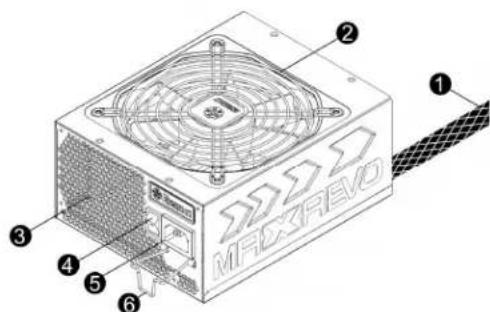
① Output cable: Please check "Cables & Connectors" section.
②Fan.
③ Honeycomb air vent.
④ON/OFF switch (I=ON, O=OFF).#2
⑤ ACInlet.
⑥ CordGuard.#3
1 To ensure best system cooling, do not block PSU fan's air in-take and air vent area.
This PSU offers a special HeatGuard function. When the system is turned off, or goes into ACPI S3/S4 sleep mode, the PSU fan will keep dissipating the remaining heat for 30 60 seconds and prolonging system lifetime.
2 When assembling or maintaining the system, please remove AC cord from AC inlet, or turn ON/OFF switch into "OFF" position. Then you can safely service the system.
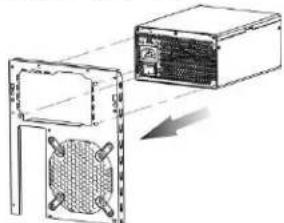
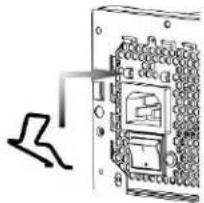
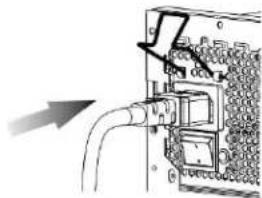
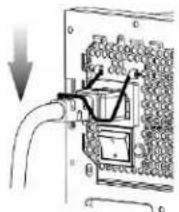
3 AC cord can get loose in many ways. The ENERMAX CordGuard lock can fix your AC cord tightly to the PSU, so that it will not be easily detached and avoid shut-downs of your PC. The following is CordGuard installation:
① Set your PSU into the chassis, and please make sure the I/O switch is on "O" position.
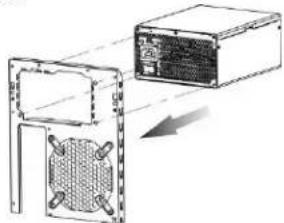
② Press two sides of the CordGuard lock together, and set it into CordGuard holder near the AC inlet.
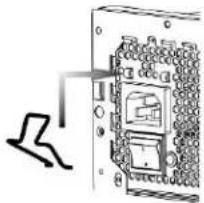
③ Plug the AC cord into your PSU.
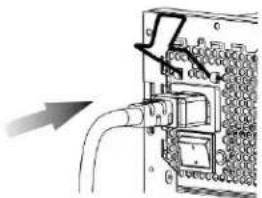
④ Lock CordGuard to latch onto AC cord.
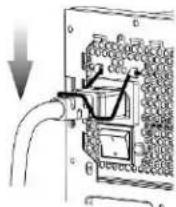
- CordGuard is for AC cords supplied with ENERMAX CordGuard-compatible PSUs. Other AC cords may be incompatible.
- When assembling or maintaining the system, please remove AC cord from AC inlet, or turn I/O switch into "O" position.
CABLES & CONNECTORS
All connectors are designed to prevent insertion in wrong orientation. If you cannot easily insert a connector, please check if you are inserting the connector in the right orientation. Do not try by force to insert it nor modify the connectors. This might damage power supply and system components, and warranty shall be void.
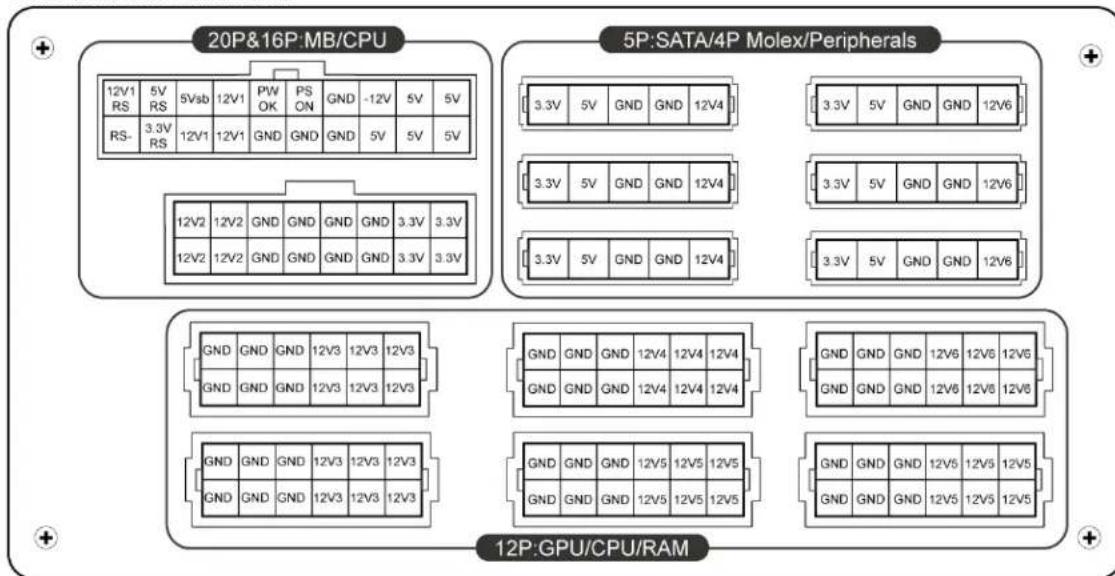
Following graphic illustrates the modular sockets layout and its DC rail distribution.

*You must connect 16-pin and 20-pin connectors into respective sockets to enable 24-pin MB and 8-pin CPU connectors.
*This product incorporates multiple 12V rails over current protection. If you let many peripherals consume the power on only one 12V rail, it may trigger the over current protection and shut down the system. Please re-direct certain peripheral power cable to other 12V rail to share the current loading to ensure highest stability and safety.
- CONNECTOR TYPES
| 24P Mainboard For new generations of ATX/EEB/CEB server/workstation MB. | |
| 4+4P (8P) CPU +12V, in combined mode 8-pin configuration supports multi-CPU server/workstation systems and some single extreme CPU systems. | |
| 4+4P (8P) CPU +12V, in split mode 4-pin configuration supports certain single CPU systems. Some multi-CPU workstation/server system might also need this extra 4-pin 12V connector. Please use the connector with “12V” marking. | |
| 6+2P (8P) PCI Express, in combined mode 8-pin configuration supports latest extreme graphic cards, which require 8-pin PCI-E connector. | |
| 6+2P (8P) PCI Express, in split mode / 6P PCI Express 6-pin configuration supports most performance PCI-E graphic cards, which require 6-pin PCI-E connector. | |
| SATA #1 For SATA/SAS drives. | |
| 4P Molex #2 For IDE/SCSI/SAS drives or some AGP graphic card with traditional 4P power in socket. | |
| FDD For floppy drive or certain add-on card. |
1 Some SATA drives might accept SATA or 4P Molex power. Normally, use either one of power connector to power the driver, BUT NOT BOTH! Please check the drive's manual for details.
2 Some MB might require this connector to share the +12V current from 24-pin Mainboard connector to PCI-E slot. If your system has multiple extreme graphic cards, please plug this connector to MB correspond socket and check the MB's manual for details.
MODULAR CABLES SUPPLIED
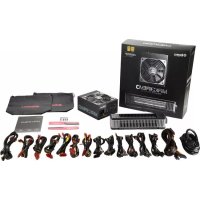
Use ONLY genuine ENERMAX modular cables coming with ENERMAX PSU. Third party cables might not be compatible and might cause damage to your PSU and/or system, and use of third party cable shall void PSU warranty.
| EMC014-G: 2 x 6+2P (8P) PCI-E 2.0 Modular cable for 1 or 2 performance PCI Express graphic cards, which needs 6P or 8P PCI-E connector. | |
| EMC018-G: 8P & 4P +12V CPU/RAM power Modular cable to support special heavy-duty workstation/server with more than 4 CPUs and 16 RAMs. | |
| EMC019-G: 4 x SATA drives Modular cable for SATA/SAS drives like ODD and HDD. | |
| EMC020-G: 4 x 4P Molex (IDE/SCSI) drives & 1 x FDD connector Modular cable for IDE/SCSI/SAS drives and peripheral, plus 1 FDD power connector. | |
| EMC021-G: 2 x SATA & 2 x 4P Molex Modular cable for SATA/SAS/IDE/SCSI drives and other peripherals. | |
| EMC022 :24P MB & 8P CPU |
Special note for System Integrators: If your system requires special modular cable configuration or design, please contact an ENERMAX sales representative.
- ATTACHING / DETACHING THE MODULAR CABLES
| Attaching the modular cable to PSU 5-pin / 12-pin connector on modular cable and PSU's modular socket has an arrow mark. To make correct connection is easy: 1. Black connector to black socket, and red to red. 2. Arrow mark to arrow mark. 3. Then you can easily plug in the connector. | |
| Detaching the modular cable from PSU 5-pin / 12-pin connector on modular cable has two hooks to lock with the PSU's modular sockets. When unplug the modular cable from PSU, please press two hooks together and gently pull out the cable. |
BOOTING YOUR SYSTEM
Before booting your system, please check that:
- Main power connector (24P) is properly connected.
- CPU +12V power connector (4 or 8P configuration), and/or a 4P Molex connector (if required by MB) is properly connected.
- All other needed connectors are properly connected.
- AC cord is properly connected to wall outlet and PSU AC inlet.
- Close your system chassis.
- Turn on the PSU by switching the ON/OFF switch to "ON", and your system is ready.
PROTECTION, SAFETY & SECURITY
This ENERMAX PSU features multiple protections. In case of most abnormal situations, the power supply will automatically turn off to avoid potential danger to itself and other PC components. It is usually a malfunction of components or user's negligence to trigger off a protection event. In such circumstance, please check your PC devices and working environment for malfunction:
- Turn I/O switch of power supply into "O" position, or disconnect AC cord from wall plug and power supply AC inlet.
- Check PSU for temperature by simply touching it. If it is very hot, this can be caused by malfunction of case fans or the PSU fan itself and/or wrong positioning of your PC.
- Wait some minutes until PSU cools off.
- Reconnect AC cord to wall plug and power supply AC inlet.
- Turn I/O switch of power supply into "I" position, and reboot your system.
- Check, if all fans are working.
- Contact technical support of the respective manufacturer of the component which you think might be the cause to the problem. (e.g. MB, GPU or PSU)
If you have any question or need support, please contact your reseller or nearest ENERMAX subsidiary/agent or ENERMAX headquarters service center.
©2011 ENERMAX Technology Corporation. All rights reserved. Specifications are subject to change without prior notice. Actual product and accessories may differ from illustrations. Omissions and printing errors excepted. Content of delivery might differ in different countries or areas. Some trademarks may be claimed as the property of others. Reproduction in any manner without the written permission of ENERMAX is strictly forbidden.
Benutzerhandbuch
PyKOBODCTBO IOJIb3OBaTeJIa
YBaKaembI IIOJB30BaTe.Jb,
Cnac6o 3a To, TTO Bb6paHIN 6IOK HHTAHHH (BII) ENERMAX . Ipey yctahOBKO BII npOHTHe, IOkaIyIcTa, BHIMATEJIbHO DaHHoe pykoBOCTBO H pInepkHBaITecb H3IOKeHHbIX B hem yKa3aHH.
O6paTHTE BHHMaHHe, YTO IJIb 6ccIpepeboho paobTb KOMIIbIOTepa Tpe6yTec coJIIOHeHc OINpcIEeHHbIX Tpe6oBaHn.Bo H36cKaHn C6ocB b paOte N IIpOJIcHn Cpoka cIyKbI ChCTcMbM peKoMeHdyem:
HE yctaHaBtBaTb cHCTeMy Bo3JIe 6aTapeH HIN pyrTO TeIIJOReHeppyIOIero ycToPOiCTBa
HE yctaHaBInBaTb cHCTemy BO3Je ycTpoiCTB CO3JaOIIHX MaHTNHbIe IOMEXH
HE yctaHaBnBaTb cHCTeMy BO BJIaXHOM H/INI INIIBHOM, IIOmeHNN, KOTOpoe MoKet IOJBepraTbCBA3DeIcTBHIO BN6paui.
HEIOIBepratbCHcTeMy BO3JeCTBnIOIpyMbIX COJIHeuHbIX Jyuei
OecnHTb cooTBeCTByIOIe ee OXIAKJHeHc HcTeMb c IOMOIIbIO IOIOJIHHTeJIbHbIX BEHTNJITOPOB
BcIyae HIOJIb3OBaHH yINHHTeJIbHbIX Ka6eIe IepMeHHORO TOKa, cJeIyert y6eIHbCRA, IOIePKNBAiot JIN OHN MAKCHMAJIbHyIO IpePaBaEMYIO MOIIHOCTB BCEX IOIOCoEHNHEHbIX IprH6OpOB. HIN IpeKJIIOHTb O6OpYIOBaHHc C BbICOKHM IOTpeJIeHHem MOIIHOCTH, KAK HApIPMep IA3ePHbIc IIpHHTepbI HIN MOHTOpBI, B IpyrTyIO HaCTeHHyIO PO3ETKy cETN IpeCMHHORO TOKA. IpcBBIIChHCdoIpyckacMOHa rpy3KH Ka6cJIc MoKc T pNBcCTN K cpaTaIBaHHo abapHHORO OTKJIIOUChHH.
HcnoIb3yB cHCTMc HbII, BbIbHpAaTc NoXOJMyIO MOHocTB Br/BA. IIpHM.
④ OnycHTtC 3aIcJky CordGuard, 3aKpeIIJIy TaKH M o6pa3OM, BnIKy IITaHn.
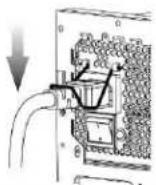
- 3aIIeJa CordGuard IOIOXOINT TOJIbKO JIA Ka6eIe IITAHIN, KOTOpBie IprHJARIoTcB KOMJIJEKeTe BmecTe C COBMeCTHMbIMN 6JIOkAMN IITAHIN IIPOH3BOITeJIA ENERMAX.ДpyTHe Ka6eIIN IITAHIN MOrYt 6bITb He COBMeCTHMbI C ENERMAX-CordGuard.
- Ipn yctaHOBC K HIN 06cIyKHNBAHH CNCTeMbI,IOKaJIyHcTa, BCCITBa BbITrHBAITc BnIKY IIHTAHN HIN BbIKIOHAYTc 6JOK IIHTAHN, IpcckIOHNB KHOIIKY Ha "O"(BbIKL).
KABEJIINIIOJKJIOUHEN
Bce IOKIOHCHN HMCOT KOHCTpyKIIHIO, He IO3BOJIOIHyIO IOIKIOHTb Hx HcnpaBHbHM 6pa3OM. EChn He ydaertc JIEKO BCTaBHb pa3bem, IpOBepbte, JJIaete JIN Bbl 30 TO BipaBHbHO. He IIbTaIrecb BCTaBHb CHIOI HIN H3MeHHTb φOpMy pa3bEMOB. 3TO MOKe IIOBpeINTb KOMIOHEHTb 6JIOKA IIHTAHN HIN CHTeMBI IN PPHBECTN K Ytpate rapaHTHN HEYCTpAHMOI HOJOMKe.
Ha cIeIyIOHcEM pHyHKe IOKa3aHa CXema KOMIOHOBKn MOyJBbIX pa3bEmOB H pacIIpeJeHeHne IIO IIHHAM IOCTOARHOTOKa.
*IIOkaJIyHcTa IIOKJIHOHTe 16-KOHTaKTbH b H 20-KOHTaKTbH pa3bEMb K COOTBeCTByIOHM THe3dAm, TTO6bI o6ecIIeHTb JIEKTPoIHHTaHHe 24-KOHTaKTHO rMB H 8-KOHTaKTHO rCPU IOKJIIOHeHH.
*JAHbI b6IOI HTaHH OCHaHHe 3aIHTOH OT HepepyKb. 3aIHTOH OCHaHHe b KaKb H3 KaHaIOB HAnpKeHH 12B.B cIyae IIOKJIIOHeHH cIINIKOM 6OJIbHIrO KOJIHyCtBA KOMIoHrTO B KODIMy H3 KaIIaTOB, 3aIIHTa MOKeT cpa6oTaTb. IIOYOMy, IIOKaJIyHcTa, cJeITHe YTO6bI KOMIoHrEITb 6bLH IOKJIIOHeHH paBIOMepHO IIO pa3JIHbIM 12 B KaHaIaM, d76e3OaNACIOHn H NaICKHOH pa60bI CnCTcMbI.
BNDIIOJIKJIOUEHNI
| 24-koHTaKTHoe IIOKJIIOUeHHe MaTeRnHcKoI IIJaTbI ДЯ HOBOrO PIIOKJIeHnMaTeRnHcKHX ПЛaT cccBcPoB/pa6OuHx StaHcH N ATX/EEB/CEB. |
| 4+4-koHTaKTbH (8P) CPU +12B KOM6HHnpOBaHbNpa3bEm 8-koHTaTHa JCOHΦHpyaIIH NODIePrJHbAcT CepBCpa/pa6OuHc StaHcH N MHOJcCTBOM IPOIeCCopOB |
| 4+4-koHTaKTbH (8P) CPU +12B paoJIeHbN pa3bEm 4-koHTaTHa KONΦHpyaII H NODIePrJHbAcT yctapeBIIne cnCTeMb c OIIH M CPU. ДЯ IECOTOpbIX pa6OuHx StaHcH/CepBepOB C HeckOJIbKHM CPU MoKeT ПОАДБИТС ДОПОПНeIbHbN 4-koHTaKTHoe 12B ПОДКЛIOUeHne. ИсЮЛБуITE coeINHteIb C МарКирOBKо «12V». |
| 6+2-koHTaKTbH (8P) PCI Express KOM6HHnpOBaHbN pa3bEm 8-koHTaTHa KONΦHpyaIIH NODIePrJHbAcT rpaФHueCKH KeapTB N IOBOrO ПОКЛeHn, ДЯ KOTOpbIX Tpe6yETc8 8-koHTaKTHoe IIOДКЛIOUeHne PCI-E. |
| 6+2-koHTaKTbH (8P) PCI Express, paoJIeHbN pa3bEm / 6P PCI Express 6-koHTaTHa KONΦHpyaIIH NODIePrJHbAcT BoIbIbHnCtBO rpaФHueCKH KapT PCI-E, ДЯ KOTOpbIX Tpe6yETc8 6-koHTaKTHoe IIOДКЛIOUeHne PCI-E. |
| SATA #1 ДЯ IIprIBoIDOB SATA/SAS. |
| 4P Molex #2 ДЯ IIprIBoIDOB IDE/SCSI/SAS И HeKOTOpbIX rpaФHueCKH KapT c TpaIduIHOHbIM 4-koHTaKTbHIM pa3bEhOM IIOITaHn. |
| FDD ДЯ ДИСКOBODA ГбКИX ДИСКOB И HeKOTOpbIX ДИОЛHNTeIbHbIX ПЛaT pa6IHIpeHn. |
1I HeKOTopbIX IpnBOIOB SATA IOxOHT SATA IOKIOHHe HIN 4-KoHTkTHbMolex.KaI ppAHHIO, HcIOJIb3yeTc ToIbKO OHO IOKIOHHe DnI INrTaHHApaiBepa, HO HE JBA PA3bEMA ODHOBPEMEHHO! PioP6Hcc cm. IHcTpyKIIIO K npHBdy.
2 HcKOTOpbIe MaTePHHckHc IIaTbI HyKdAIOrB pa3IcIChHH KaHaJIa +12B or 24-KoHTaKTHOrO IIOKIIIOUcHnMaTePHHckOIIaTbIKrHc3IyPCI-E.EcINB BaaIe cHCTMc HcIOJIb3yIOrCe HccKOJIbKO blicOKOIIPOH3BOIDHTcJIbHbIX BnDCOKApT,IOKaJlyNcTa,IOKIIIOuHTte OTo pa3bEe K COOTBCCTByIOIcMMy rHc3Iy Ha MaTePHHckOIIaTc H IpOBcPbTC pyKOBoIDCTBO IOJIb3OBATeJIa BAIIe MaTePHHckOIIaTbI.
KOMILJEKT MOJYJBHbIX KABEJIEN
Hcno3yte TOIbKO opHHaJIbHeMoYJbHbIE Ka6eJ ENERMAX,IOCTaJIeMbe BMeTe c bI ENERMAX.Ka6eIN ppyTHX IPOHNBOHTeJIcN MOYr 6bITb HccOBMcTHMbI N IOBpcNTb BII n/HH cHCTeMy, HcnoJb3OBAHHe Ka6eJ INpyTHX IPOHNBOHTcJIcN pHBOHT K IOTpc rapaHTn Ha bI.
3AHTA,MEPbI IPEIOCTOPOXHOCTH IN IIPABNJA TEXHNKBE30IACHOCTH
BII ENERMAX ochaieh HcckoJIbKHM cpcCTBaMn 3aHHTb. B 6oJIbIHHcTbc aHOMaJIbHbIX cHTyaIHIN 6JOK IIITAHN ABTOMaTHUcckn BIKIOHAcTcI IIN IpcIOIBpaIChHH IOBpeKHeHH BII IN pyTHX KOMIOHEHTOB IK. 3aHIHaO cpa6aIbIbAe BCIECTBHe HEHCIIpABHOCTH KOMIOHETOB IIK JIN He6peKHOCTH NOJB3OBAReJeE. B TAKOI cHTyaIHH IpOBepBe HCIIpaBHOCTb YcTPOHCTB IIK n ycIOBHN EKCIUYATAUNN.
- OTKIIOHTe IITaHHe BII, IIpeBEEy BbIKIOHateJIb B IOIOJKeHHe «O», HIN OTcoEIMHHK Ka6JIb IIpeMeHHoro TOka OT 3JIeKtpueckoi po3eKn HxOIOHO THe3Ja IIpeMeHHoro TOka BII.
- IIpoBepbTe TEmIepaTpy BII, IprHKoCHyBIIIncb K HcMy. IpeIpeB BII MoKcT 6bITb BB3BaH HeHCIIpaBIOCTbIO BeHTHJrTOpOB Kopnyca IIK HIN BeHTHJrTOpa BII, Jn6o HeIIpaBHJIbIbIM pa3MeIeHHem IIK.
- IIOIOKJNTHe HecKOJIbKO MHHyT, IOKa BII He octbHHT.
- IIOcOeHHHTe Ka6JIb IIepMeHHOro ToKa K 3JIeKTPHueCKoI po3eTKe H K BxOJHOMy THe3Ny IpcmCHHorToKa BII.
5.IIpebcnnte BbIKIOaTcJIb II INIOJKeHHc «I» H BBIIIOIHHTe Ipc3arpy3ky cHcTeMBI.
6.IIpoBepbTc pa6oToocnooc6HocTB cHcTeMbI. - O6paHTTeCb B cIyK6y TexHHuecko IIOJIepKKN IPOH3BOJHTeJI KOMIOHeHTa, KOtOpB, BO3MOKHO, BB3bIbAet Ipo6JIeMy, HAnpHMeP MaTePHeCKo IIaTbI, rpaΦHuecko IIaTbI II bII.
C Bonpocamn H 3a noDcpeKkOo o6paAaTceb K MecTHOMy npoabny HnB 6hhKaHnn HnHaI HnB IIpeCTaBHTeJIbCTBO ENERMAX, Ih6o B rOIOBhoC cepBCHbI ueHtp ENERMAX.
Instrukcja obşugsi
Szanowski Klienci,
wauuunununununununununun (PSU) ENERMAX! uununununununununun unuuuuuuuuuuuuuuuuuuuuuuuuuuuuuuuuuuuuuuuuuuuuuuuuuuuuuuuuuuuuuuuuuuuuuuuuuuuuuuuuuuuuuuuuuuuuuuuuuuuuuuuuuuuuuuuuuuuuuuuuuuuuuuuuuuuuuuuuuuuuuuuuuuuuuuuuuuuuuuuuuuuuuuuuuuuuuuuuuuuuuuuuuuuuuuuuuuuuuuuuUU
wunuulnla uunnnwnnaaunnnae nuaanwnnnaunuun
-
-
5uuyuunununununununununununununununununun
- nnaaannnnaanennnnnnaanennnnnnnnnnnnnnnnnnnnnnnnnnnnnnnnnnnnnnnnnnnnnnnnnnnnnnnnnnnnnnnnnnnnnnnnnnnnnnnnnnnnnnnnnnnnnnnnnnnnnnnnnnnnnnnnnnnnnnnnnnnnnnnnnnnnnnnnnnnnnnnnnnnnnnnnnnn nn
UPS (Uninterruptible Power Supply)
| PSU | wnvwwwnwnwnwnnUPN (wnnnnneennnnnna PFC wannn) |
| EMR1200EWT 1400W / 2000VA | |
| EMR1350EWT 1600W / 2300VA | |
| EMR1500EGT 1700W / 2400VA | |
WuHuaHuaHeatGuard uuaunununnauauauauauauauauauauauauauauauauauuuau
ywnnnsnnnnaaennnnae 30-60 nnnn nnnnnnnnnnnnnnnnnn
2 nannnnaanennnnnnaaannnnnnaaannnnnnaacnncnAC cord aannnAC inlet nauu switch nagnuunnuo "0" naunununnu
3 muaa uauuauuAC uanaann PSU nrae CordGuardanuauu AC 1PSU aunuuuauu uauauuAC uanaann PSU PC shut-down
① nauunanaunnnaeauuPSU uauuuuauuuuuuuuuuuuuuuuuuuuuuuuuuuuuuuuuuuuuuuuuuuuuuuuuuuuuuuuuuuuuuuuuuuuuuuuuuuuuuuuuuuuuuuuuuuuuuuuuuuuuuuuuuuuuuuuuuuuuuuuuuuuuuuuuuuuuuuuuuuuuuuuuuuuuuuuuuuuuuuuuuuuuuuuuuuuuuuuuuuuuUU
② nanaananaananaanCordGuard
③ 甲醇加AC甲醇加PSU
④ CordGuard AC
- CordGuard wunwunwnnwnnwn Enermax wnuu u
- 2023年全国春季AC aan an nnuanw ynnn noaannnneennnnnneennnnnnnnnnnnnnnnnnnnnnnnnnnnnnnnnnnnnnnnnnnnnnnnnnnnnnnnnnnnnnnnnnnnnnnnnnnnnnnnnnnnnnnnnnnnnnnnnnnnnnnn
wua
ywnnnnnaaannnnnnnnnnnnnnnnnnnnnnnnnnnnnnnnnnnnnnnnnnnnnnnnnnnnnnnnnnnnnnnnnnnnnnnnnnnnnnnnnnnnnnnnnnnnnnnnnnnnnnnnnnnnnnnnnnnnnnnnnnnnnnnnnnnnnnnnnnnnnnnnnnnn
| PSU Model | Suggested minimum UPS output power capacity (Based on efficiency & PFC at respective load) |
| EMR1200EWT 1400W / 2000VA | |
| EMR1350EWT 1600W / 2300VA | |
| EMR1500EGT 1700W / 2400VA |
④ON/OFF switch (I=ON, O=OFF).
⑤ACInlet.*2
⑥ CordGuard. #3
| 24P Mainboard For new generations of ATX/EEB/CEB server/workstation MB. | |
| 4+4P (8P) CPU +12V, in combined mode 8-pin configuration supports multi-CPU server/workstation systems and some single extreme CPU systems. | |
| 4+4P (8P) CPU +12V, in split mode 4-pin configuration supports certain single CPU systems. Some multi-CPU workstation/server system might also need this extra 4-pin 12V connector. Please use the connector with “12V” marking. | |
| 6+2P (8P) PCI Express, in combined mode N8-pin configuration supports latest extreme graphic cards, which require 8-pin PCI-E connector. | |
| 6+2P (8P) PCI Express, in split mode / 6P PCI Express 6-pin configuration supports most performance PCI-E graphic cards, which require 6-pin PCI-E connector. | |
| SATA #1 For SATA/SAS drives. | |
| 4P Molex #2 For IDE/SCSI/SAS drives or some AGP graphic card with traditional 4P power in socket. | |
| FDD For floppy drive or certain add-on card. |
| EMC014-G: 2 x 6+2P (8P) PCI-E 2.0 Modular cable for 1 or 2 performance PCI Express graphic cards, which needs 6P or 8P PCI-E connector. | |
| EMC018-G: 8P & 4P +12V CPU/RAM power Modular cable to support special heavy-duty workstation/server with more than 4 CPUs and 16 RAMs. | |
| EMC019-G: 4 x SATA drives Modular cable for SATA/SAS drives like ODD and HDD. | |
| EMC020-G: 4 x 4P Molex (IDE/SCSI) drives & 1 x FDD connector Modular cable for IDE/SCSI/SAS drives and peripheral, plus 1 FDD power connector. | |
| EMC021-G: 2 x SATA & 2 x 4P Molex Modular cable for SATA/SAS/IDE/SCSI drives and other peripherals. |
Catatan spezial buat system integrators: jika systemdanda membrutuhkan konfigurasi spezial untuk kabel modular, silahkan menghubungi ENERMAX sales representative.