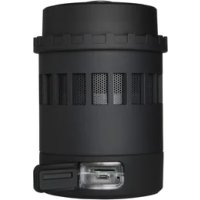
NEOChanger ELC-NC150RGB - Pump ENERMAX - Free user manual and instructions
Find the device manual for free NEOChanger ELC-NC150RGB ENERMAX in PDF.


Pick your language and provide your email: we'll send you a specifically translated version.
| Product Type | Water Cooling Pump |
| Brand | Enermax |
| Model | NEOChanger ELC-NC150RGB |
| Pump Type | Centrifugal |
| Dimensions (L x W x H) | 75 mm x 75 mm x 65 mm |
| Weight | 350 g |
| Power Consumption | 12V DC, 1.2A |
| Max Flow Rate | 1500 L/h |
| Max Head | 3.5 m |
| RGB Lighting | Addressable RGB (5V, 3-pin ARGB) |
| Noise Level | < 20 dBA |
| Bearing Type | Ceramic bearing |
| Connector | 4-pin PWM (pump), 3-pin ARGB |
| Compatible with | Most CPU water blocks and radiators |
| Material | Copper base, PPS housing |
| Warranty | 2 years |
| Maintenance | Clean impeller every 6 months |
| Included | Pump, mounting kit, cables |
| Installation | Easy mount design |
| Safety | Overcurrent protection, dry run protection |
| Compatibility | Intel LGA1200, LGA1700; AMD AM4, AM5 |
| Pump Speed | 2000–4000 RPM (PWM controlled) |
| Liquid Temperature Range | 0–60°C |
Frequently Asked Questions - NEOChanger ELC-NC150RGB ENERMAX
How do I install the NEOChanger ELC-NC150RGB pump?
Installation is straightforward. Mount the pump securely using the included bracket. Connect the 4-pin PWM cable to your motherboard's pump header for speed control, and the 3-pin ARGB cable for RGB lighting. Ensure all fittings are tight to prevent leaks.
Is this pump compatible with my CPU water block?
Yes, the NEOChanger pump is compatible with most standard CPU water blocks and radiators. It uses G1/4 threads, so ensure your components have matching fittings.
How do I connect the RGB lighting?
Connect the 3-pin ARGB cable to a 5V addressable RGB header on your motherboard. The lighting can be controlled via your motherboard's RGB software (e.g., ASUS Aura Sync, MSI Mystic Light).
What is the maximum flow rate of this pump?
The pump delivers a maximum flow rate of 1500 L/h, sufficient for most custom loop cooling systems.
How do I clean the pump?
It is recommended to clean the impeller every 6 months. Disconnect the pump, remove the housing, and gently clean the impeller with a soft brush and distilled water. Avoid using abrasive materials.
Is the pump compatible with AMD AM5 sockets?
Yes, the pump is compatible with AMD AM5 as well as AM4, Intel LGA1200, and LGA1700 sockets. Use the appropriate mounting bracket included.
What is the noise level of this pump?
The pump operates at a very low noise level of < 20 dBA at normal speeds, making it nearly silent in most builds.
Does the pump have dry run protection?
Yes, the pump includes dry run protection to prevent damage if the loop runs out of liquid. However, always ensure your loop is filled before powering on.
What maintenance is required for this pump?
Regular maintenance includes cleaning the impeller every 6 months and checking for any leaks or debris. The ceramic bearing is durable and requires no lubrication.
How do I set up PWM control?
Connect the 4-pin PWM cable to a PWM fan header on your motherboard (preferably a dedicated pump header). Use your BIOS or software (e.g., SpeedFan) to adjust the pump speed curve based on CPU temperature.
User questions about NEOChanger ELC-NC150RGB ENERMAX
0 question about this device. Answer the ones you know or ask your own.
Ask a new question about this device
No questions yet. Be the first to ask one.
Download the instructions for your Pump in PDF format for free! Find your manual NEOChanger ELC-NC150RGB - ENERMAX and take your electronic device back in hand. On this page are published all the documents necessary for the use of your device. NEOChanger ELC-NC150RGB by ENERMAX.