Revolution85+ ERV1020EWT - Power Supply ENERMAX - Free user manual and instructions
Find the device manual for free Revolution85+ ERV1020EWT ENERMAX in PDF.



User questions about Revolution85+ ERV1020EWT ENERMAX
0 question about this device. Answer the ones you know or ask your own.
Ask a new question about this device
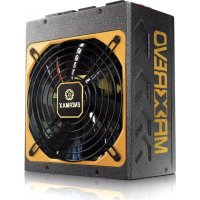
Download the instructions for your Power Supply in PDF format for free! Find your manual Revolution85+ ERV1020EWT - ENERMAX and take your electronic device back in hand. On this page are published all the documents necessary for the use of your device. Revolution85+ ERV1020EWT by ENERMAX.
USER MANUAL Revolution85+ ERV1020EWT ENERMAX
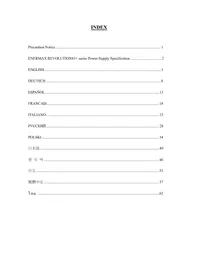
ENERMAX REVOLUTION85+ series Power Supply Specification 2
ENGLISH....3
DEUTSCH 8
ESPAÑOL 13
FRANCAIS 18
ITALIANO 23
РУССКИЙ 28
POLSKI 34
日本語....40
한 국 어 46
中文....52
繁體中文....57
1 n y 62
Precaution Notice
Only a technician, authorized by ENERMAX, is allowed to perform maintenance service! Warranty is subject to void under unauthorized attempt to open the power case or modification of any kinds, even attempted only, of the power supply or its components!
ENERMAX will not be responsible for damages caused by following situations:
- Opening of the PSU case and/or modification of any component or cable without ENERMAX' written authorization.
- Ignoring connector's wrong insertion prevention design by attaching a connector to a device in wrong orientation.
- Connecting too many devices to one cable unit by using additional adaptor (Y cables).
● Usage of non-genuine ENERMAX modular cables.
● Damage caused by natural phenomena or uncontrollable forces, such as lightning, flooding, fire, earthquake, etc.
This ENERMAX Technology Corporation product is warranted to be free from defects in material and workmanship for a period of five (5) years from the date of purchase.
ENERMAX Technology Corporation agrees to repair or replace the product, at its own option and at no charge, if, during the warranty period, it is returned to nearest ENERMAX
Technology Corporation subsidiary/agent with all shipping charges prepaid and bearing a return merchandise authorization (RMA) number, and if inspection reveals that the product is defective. Charges for removing or installing the product are excluded under the terms of this warranty agreement. This warranty shall not apply to any product, which has been subject to connection to a faulty power source, alteration, negligence, or accident, or to any product, which has been installed other than in accordance with these instructions. In no event shall ENERMAX Technology Corporation, or its subsidiaries, or agents be liable for damages for a breach of warranty in an amount exceeding the purchase price of this product!
If you are uncertain whether or not your ENERMAX PSU is defective, please contact your dealer/reseller for support!
Web Site: http://www.enermax.com
E-mail: enermax@enermax.com.tw
Forum: forum.enermax.com
ENERMAX Technology Corporation, 15F-2, No. 888, Jing-Guo Road, Taoyuan City (330), Taiwan (R.O.C.), Tel. +886-3-316-1675, Fax. +886-3-346-6640
©2010 ENERMAX Technology Corporation. All rights reserved. Specifications are subject to change without prior notice. Actual product and accessories may differ from illustrations. Omissions and printing errors excepted. Content of delivery might differ in different countries or areas. Some trademarks may be claimed as the property of others. Reproduction in any manner without the written permission of ENERMAX is strictly forbidden.
ENERMAX REVOLUTION85+ Series Power Supply Specification
| ERV920EWT | ERV1020EWT | ERV1250EGT | ||||
| AC Input Voltage | 115-240VAC, 50-60Hz(Maximum range: 100-264VAC, 47-63Hz) | 220-240VAC, 50-60Hz | ||||
| AC Input Current 10 – | 5A 11 – 5.5A 7.5 – 6A | |||||
| DC Output | ||||||
| Rated | Combined | Rated | ||||
| 3.3V | 0-24A | 120W | 0-24A120W | 170W | ||
| 5V | 0-24A | 0-24A | 0-25A | |||
| 12V1 | 0-35A | 912W(76A) | 0-35A0-35A0-35A0-35A0-35A0-35A0-35A0-35A0-35A0-35A0-35A0-35A0-35A0-35A0-35A0-35A0-35A0-35A0-35A0-35A0-35 | 1248W(104A)0-30A0-30A0-30A0-30A0-30A0-30A0-30A0-30A0-30A0-30A0-30A0-30A0-30A0-30A0-30A0-30A0-30A0-30A0-30A0-30A0-30 | 0-30A0-30A0-30A0-30A0-30A0-30A0-30A0-30A0-30A0-30A0-30A0-30A0-30A0-30A0-30A0-30A0-30A0-30A0-30A0-30 | |
| 12V2 | 0-35A | |||||
| 12V3 | 0-35A | |||||
| 12V4 | 0-35A | |||||
| 12V5 | ||||||
| 12V6 | 0-30A | |||||
| -12V | 0-0.5A | 6W | 0-0.5A | 6W | 0-0.6A | 7.2W |
| 5Vsb | 0-3A | 15W | 0-3A | 15W | 0-5A | 25W |
| Total Power | 920W | 1020W | 1250W | |||
| Peak Power | 1010W | 1120W | 1500W | |||
| Protection Circuit | ||||||
| Over Current Protection | DC Rail | OCP trigger range | ||||
| 3.3V 920/1020W: 30 – 40A, 1250W: 30 – 45A | ||||||
| 5V | 920/1020W: 30 – 40A, 1250W: 30 – 45A | |||||
| 12V | 920/1020W: 40 – 50A , 1250W: 34 – 45A | |||||
| (DC)Under Voltage /Over Voltage Protection | DC Rail | UVP trigger range | OVP trigger range | |||
| 3.3V | 2.0 – 2.4V | 920/1020W: 3.7 – 4.1V1250W: 3.9 – 4.5V | ||||
| 5V | 3.3 – 3.7V | 5.7 – 6.5V | ||||
| 12V | 8.5 – 9.5V | 920/1020W: 13.1 – 14.5V1250W: 13.3 – 14.5V | ||||
| -12V | -8.5 – -9.5V | 920/1020W: -13.1 – -14.5V1250W: -13.3 – -14.5V | ||||
| (AC)Under Voltage Protection | Activated when AC input voltage < 70VAC. | |||||
| Over Power Protection | 920/1020W: Activated when output power > 110 ~150% of rated max load.1250W: Activated when output power > 120 ~160% of rated max load. | |||||
| Over Temperature Protection | 920/1020W: Activated when PSU heat sink > 90 ~ 120°C.1250W: Activated when PSU heat sink > 90 ~ 110°C. | |||||
| Short Circuit Protection | Activated when any DC rails short-circuitcd. | |||||
| Surge & Inrush Protection | Sustain 2KV surge stroke.Sustain up to 70A inrush current @ 240VAC at cold start. | |||||
| ENVIRONMENT | ||||||
| Temperature | Operation ambient: 0~50°C (for full rated output)Storage ambient: -40~70°C | |||||
| Humidity | Operation: to 85% relative humidity, non-condensing at 25°CStorage: to 95% relative humidity, non-condensing at 50°C | |||||
| OTHERS | ||||||
| MTBF | >100,000 hours at 70% of full rated load, 230VAC/50Hz, 25°C(MIL-HDBK-217F standard) | |||||
| Dimension | 920/1020W: 150 (w) x 86 (h) x 175 (d) mm1250W: 150 (w) x 86 (h) x 190 (d) mm | |||||
| Weight | 920/1020W: 2.4kg (without modular cables) ±50g1250W: 2.95kg (without modular cables) ±50g | |||||
| Safety | UL/cUL(Level 6), TUV, CCC, GOST, CB, BSMI(920/ 1020W) | |||||
| EMC | CE, FCC, KCC | |||||
User's Manual
Dear customer,
Thank you for choosing this ENERMAX REVOLUTION85+ power supply unit (PSU)! Please read this manual carefully and follow its instructions before installing the PSU.
We would like to draw your attention that a computer required very specific conditions to work best for you without failing. To avoid failures and to increase lifetime of the system, we suggest that:
- Your system is NOT located near a radiator or any other heat producing device
● Your system is NOT located near a magnetic device
● Your system is NOT located in a moist and/or dusty and/or vibrating environment
● Your system is NOT exposed to direct sunshine - Your system is sufficiently cooled by additional fans
- If you use AC extension cables, please make sure it can support all connected appliances' potential peak power draw. Or redistribute other high power consumption equipment, such as laser printers or monitors to other AC wall outlets. Exceeding the extension cable's loading capacity could trigger its circuit breaker and cut off the power.
- If you want to add the UPS (Uninterruptible Power Supply) for your system, please choose adequate Watts/VA capacity UPS. Ex.
| PSU Model | Suggested minimum UPS output power capacity(Based on efficiency & PFC at respective load) |
| ERV920EWT 1100W | / 1600VA |
| ERV1020EWT 1200W | / 1700VA |
| ERV1250EGT 1500W | / 2100VA |
* If you intend to add other appliance powered by the same UPS, such as monitor or printer, please use higher capacity UPS according to all connected devices' rated power draw.
* Please do not mistake VA capacity as Watts, or use insufficient power UPS. This would result in less UPS battery runtime or the inability to power the system in battery mode.
COMPATIBILITY
- ENERMAX REVOLUTION85+ series is compliant with:
SSI PSDG 2008/2009 Power Supply Design Guide specification and downward compatible with SSI PSDG 2008 v1.0, EPS12V v2.92, v2.91 and v2.8
- This PSU does not support MB with ISA expansion slot, which might need -5V power. -5V has been cancelled from Intel ATX12V v1.3 specification onwards.
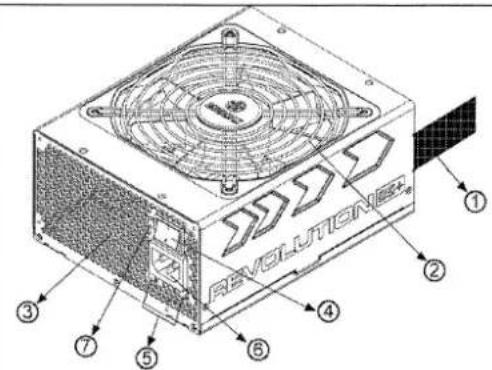
NAME OF PARTS
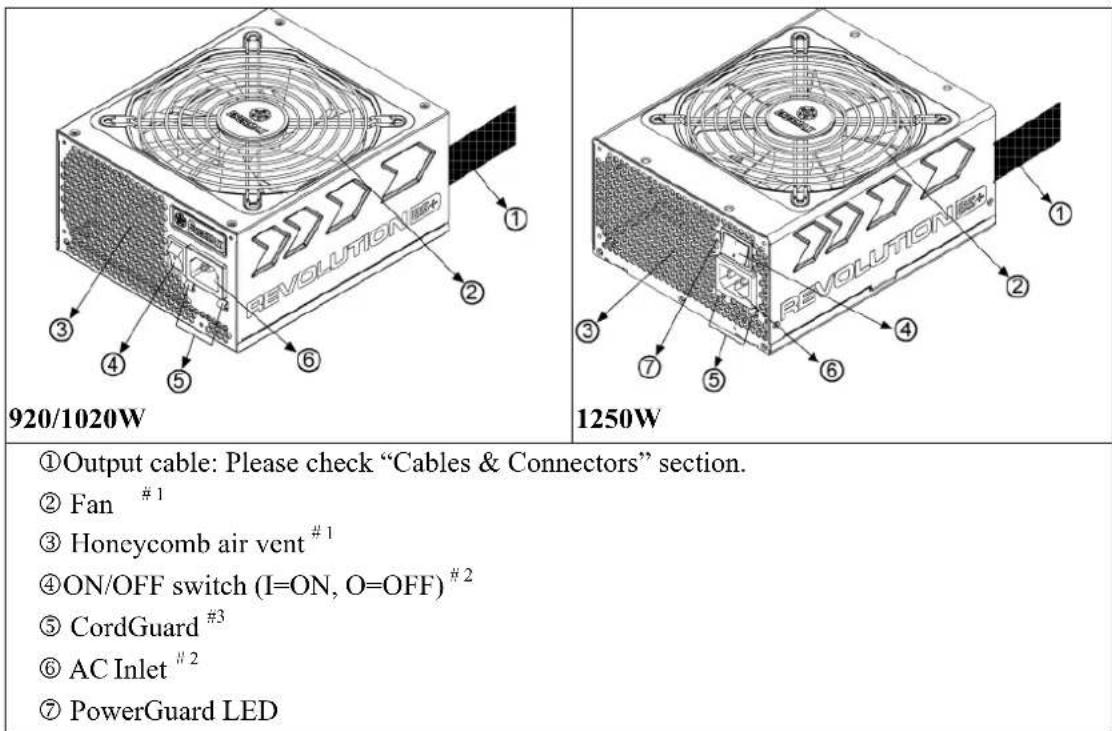
①Output cable: Please check "Cables & Connectors" section.
② Fan #1
③ Honeycomb air vent ^#1
④ON/OFF switch (I=ON, O=OFF) ^#2
⑤ CordGuard #3
⑥ AC Inlet ^2
⑦ PowerGuard LED
1 To ensure best system cooling, do not block PSU fan's air in-take and air vent area.
This PSU offers a special HeatGuard function. When the system is turned off, or goes into ACPI S3/S4 sleep mode, the PSU fan will keep dissipating the remaining heat for 30 \~ 60 seconds and prolonging system lifetime.
2 When assembling or maintaining the system, please remove AC cord from AC inlet, or turn ON/OFF switch into "OFF" position.
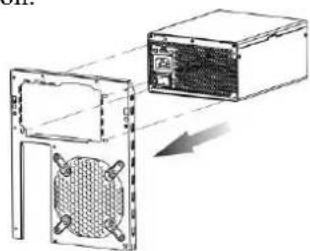
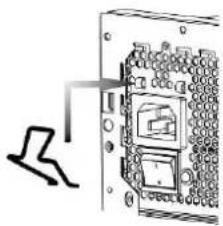
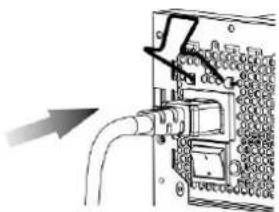
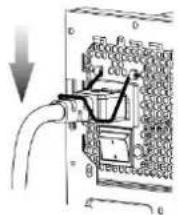
3 AC cord can get loose in many ways. The ENERMAX CordGuard lock can fix your AC cord tightly to the PSU, so that it will not be easily detached and avoid shut-downs of your PC. The following is CordGuard installation:
① Set your PSU into the chassis, and please make sure the I/O switch is on “O” position.
natural_image
Technical line drawing of a computer case with a mesh fan and adjacent storage unit (no text or symbols)② Press two sides of the CordGuard lock together, and set it into CordGuard holder near the AC inlet.
natural_image
Diagram of a device panel with a hand pointing to a component, showing no text or symbols.③ Plug the AC cord into your PSU.
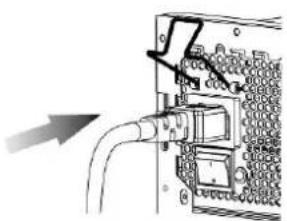
natural_image
Diagram of an electronic device showing a cable inserted into a connector with a switch (no text or symbols visible)④ Lock CordGuard to latch onto AC cord.
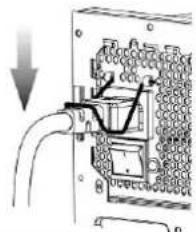
natural_image
Electrical socket assembly diagram showing wiring and socket layout (no text or labels)- CordGuard is for AC cords supplied with ENERMAX CordGuard-compatible PSUs. Other AC cords may be incompatible.
- When assembling or maintaining the system, please remove AC cord from AC inlet, or turn I/O switch into "O" position.
CABLES & CONNECTORS
All connectors are designed to prevent insertion in wrong orientation. If you cannot easily insert a connector, please check if you are inserting the connector in the right orientation. Do not try by force to insert it nor modify the connectors. This might damage power supply and system components, and warranty shall be void.
Following graphic illustrates the modular sockets layout and its DC rail distribution.
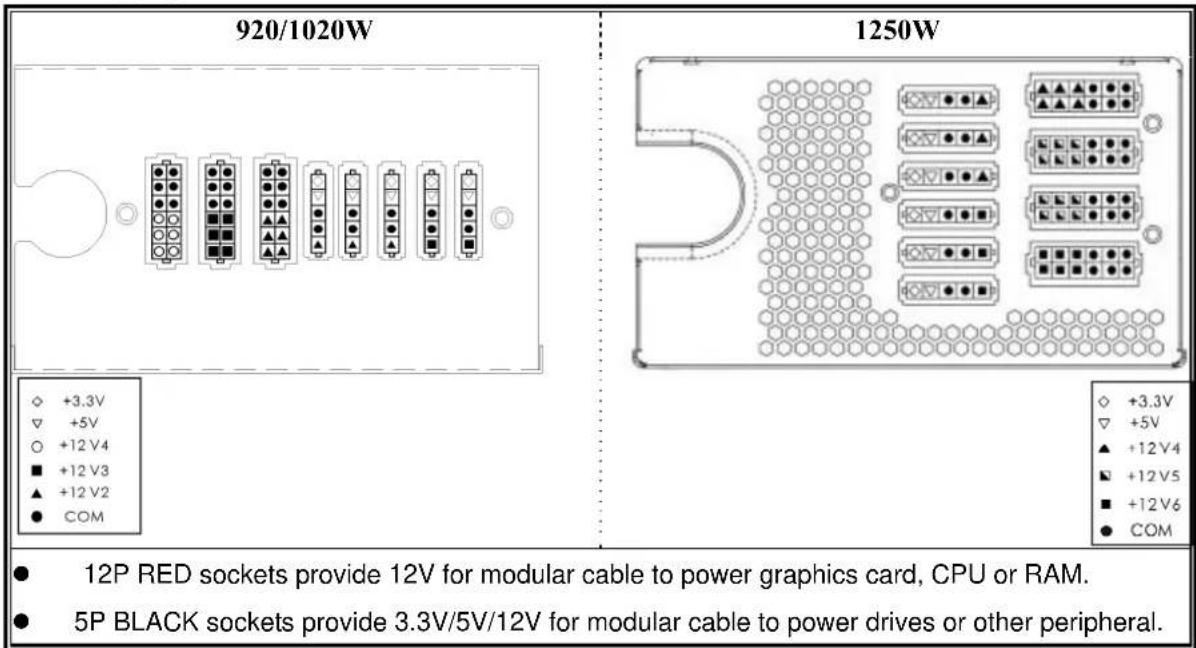
text_image
920/1020W 1250W ◇ +3.3V ▽ +5V ○ +12 V4 ■ +12 V3 ▲ +12 V2 ● COM ● 12P RED sockets provide 12V for modular cable to power graphics card, CPU or RAM. ● 5P BLACK sockets provide 3.3V/5V/12V for modular cable to power drives or other peripheral.- CONNECTOR TYPES
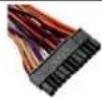 | 24P MainboardNative cable, 12V rail supplied by 12V1For new generations of ATX/EEB/CEB server/workstation MB. |
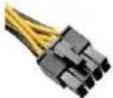 | 8P CPU +12VNative cable, 12V rail supplied by 12V1(920/1020W) / 12V1+V2(1250W)Supports multi-CPU server/workstation systems and some single socket systems. |
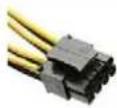 | 4+4P (8P) CPU +12V, in combined modeNative cable, 12V rail supplied by 12V1(920/1020W) / 12V1+V2(1250W)8-pin configuration supports multi-CPU server/workstation systems and some single extreme CPU systems. |
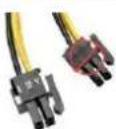 | 4+4P (8P) CPU +12V, in split modeNative cable, 12V rail supplied 12V1(920/1020W) / 12V1+V2(1250W)4-pin configuration supports certain single CPU systems. Some multi-CPU workstation/server system might also need this extra 4-pin 12V connector.Please use the connector with “12V” marking. |
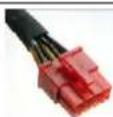 | 6+2P (8P) PCI Express, in combined modeNative cable, 12V rail supplied by 12V4(920/1020W) / 12V3(1250W)8-pin configuration supports latest extreme graphic cards, which require 8-pin PCI-E connector. |
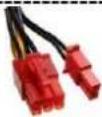 | 6+2P (8P) PCI Express, in split mode / 6P PCI ExpressNative cable, 12V rail supplied by 12V4(920/1020W) / 12V3(1250W)6-pin configuration supports most performance PCI-E graphic cards, which require 6-pin PCI-E connector. |
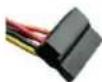 | SATA ^1 For SATA/SAS drives. |
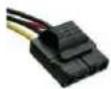 | 4P Molex#2For IDE/SCSI/SAS drives or some AGP graphic card with traditional 4P power in socket. |
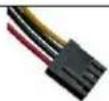 | FDDFor floppy drive or certain add-on card. |
 | FM (FAN RPM MONITOR)#3For FAN RPM detection (1250W only). |
1 Some SATA drives might accept SATA or 4P Molex power. Normally, use either one of power connector to power the driver, BUT NOT BOTH! Please check the drive's manual for details.
2 Some MB might require this connector to share the +12V current from 24-pin Mainboard connector to PCI-E slot. If your MB already supports 24-pin Mainboard connector, you may not need to add the 4P Molex connector on it. Please check the MB's manual for details.
3 Most MB offer 2 \~ 4 3-pin system/PSU fan power sockets, but only one or two socket(s) might support the fan RPM signal. If you connect the PSU FM connector on the MB, but BIOS or system monitor software cannot read the PSU fan RPM, please relocate the PSU FM connector to another socket.
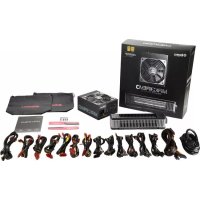
MODULAR CABLES SUPPLIED
Use ONLY genuine ENERMAX modular cables coming with ENERMAX PSU. Third party cables might not be compatible and might cause damage to your PSU and/or system, and use of third party cable shall void PSU warranty.
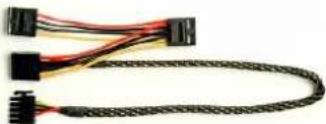 | EMC012: 3 x 4P Molex (IDE/SCSI) drivesModular cable for IDE/SCSI/SAS drives and other peripherals. |
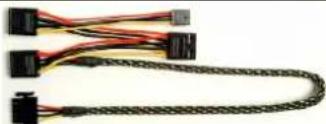 | EMC013: 3 x 4P Molex (IDE/SCSI) drives & 1 X FDD connectorModular cable for IDE/SCSI/SAS drives and peripheral, plus 1 FDD power connector. |
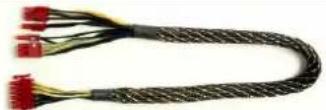 | EMC014: 2 x 6+2P (8P) PCI-E 2.0Modular cable for 1 or 2 performance PCI Express graphic cards, which needs 6P or 8P PCI-E connector. |
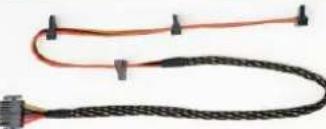 | EMC017: 4 x SATA drivesModular cable for SATA/SAS drives like ODD and HDD. |
■ Supplied modular cables might differ by models and in different region.
We offer more optional cables. Please visit our website for more information: www.enermax.com
Special note for System Integrators: If your system requires special modular cable configuration or design, please contact an ENERMAX sales representative.
- ATTACHING / DETACHING THE MODULAR CABLES
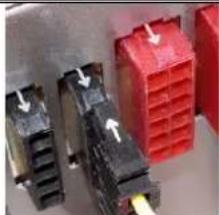 | Attaching the modular cable to PSU5-pin / 12-pin connector on modular cable and PSU's modular socket has an arrow mark. To make correct connection is easy:1. Black connector to black socket, and red to red.2. Arrow mark to arrow mark.3. Then you can easily plug in the connector. |
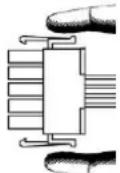
Detaching the modular cable from PSU
5-pin / 12-pin connector on modular cable has two hooks to lock with the PSU's modular sockets. When unplug the modular cable from PSU, please press two hooks together and gently pull out the cable.
BOOTING YOUR SYSTEM
Before booting your system, please check that:
- Main power connector (24P) is properly connected.
- CPU +12V power connector (4 or 8-pin configuration), and/or a 4P Molex connector (if required by MB) is properly connected.
- All other needed connectors are properly connected.
- AC cord is properly connected to wall outlet and PSU AC inlet.
- Close your system chassis.
- Turn on the PSU by switching the ON/OFF switch to "ON", and your system is ready.
PROTECTION, SAFETY & SECURITY
This PSU features PowerGuard (1250W) & SafeGuard function to monitor the PSU itself. With tri-color LED, PowerGuard tells you the current PSU status. In case of abnormal situations, the power supply will automatically turn off to avoid potential danger to itself and other system components.
PowerGuard indication (1250W)
| LED | ON/OFF switch | Information & what to do |
| OFF | OFF | * No AC input- Turn the I/O switch to ON position. |
| OFF | ON | * No AC input or PSU malfunction- Check if AC cable is firmly plugged into wall outlet and AC inlet. If LED still does not turn to orange light, then- Contact ENERMAX service center. |
| Orange | ON | PSU normal and system in standby/ sleep mode |
| Green | ON | PSU normal and system in operation |
| Red | ON | * System abnormal, protection circuit activated.If you push the system power button, and PSU refuse to turn on, the LED turn from orange to red light:- Short-Circuit protection activated.- Completely check if all connectors are correctly inserted, and clean the chassis to prevent undesired objects, which might short circuit any device/terminal.If during system operation, the PSU suddenly shut down- Touch the PSU housing and check if it is hot. If yes, wait till it cool down and restart the system to see if all system fans and PSU fan are running. Add or replace the system fan if required.- If same situation repeat, recheck if all connectors are well connected to system, or redistribute certain drives/PCI-E power to different 12V rail connector. |
If you have any question or need support, please contact your reseller or nearest ENERMAX subsidiary/agent or ENERMAX headquarter service center.
©2010 ENERMAX Technology Corporation. All rights reserved. Specifications are subject to change without prior notice. Actual product and accessories may differ from illustrations. Omissions and printing errors excepted. Content of delivery might differ in different countries or areas. Some trademarks may be claimed as the property of others. Reproduction in any manner without the written permission of ENERMAX is strictly forbidden.
Benutzerhandbuch
natural_image
Diagram showing a device with a fan and a computer case, no text or symbols presentnatural_image
Diagram of a device with a bracket and internal components, no visible text or symbolsnatural_image
Diagram of an electronic device showing a cable inserted into a housing with a switch (no text or symbols visible)natural_image
Diagram of an electronic device showing a cable inserted into a connector (no text or symbols visible)natural_image
Diagram showing a computer tower with a mesh panel and an external drive housing (no text or symbols)natural_image
Diagram of a device with internal components and a hand gesture (no text or symbols)natural_image
Diagram of a mechanical or electrical component with a pipe and connector, no visible text or symbolsnatural_image
Diagram showing a computer tower with a fan blade and an external drive housing (no text or symbols)natural_image
Diagram of a device showing cable routing and a switch (no text or symbols)Indications PowerGuard (1250W)
natural_image
Diagram showing a device with a mesh fan inside a housing, connected to a rectangular box (no text or symbols visible)natural_image
Diagram of an electronic device showing a cable inserted into a socket with a switch, no text or symbols presentACCENSIONE DEL SISTEMA
natural_image
Diagram showing a device with a mesh fan inside a housing, connected to a rectangular box (no text or symbols present)natural_image
Diagram of a device with cable and connector, no visible text or symbolsnatural_image
Diagram showing a device with a mesh panel inside a frame, connected to a box with an arrow indicating rotation (no text or symbols present)natural_image
Diagram of an electrical contactor with a hand inserting a cable (no text or symbols present)natural_image
Diagram of a device with cable and connector, showing an arrow pointing to a component (no text or symbols present)natural_image
Diagram showing a device with a mesh cover inside a frame and an adjacent computer case with a grid, no text or symbols present.natural_image
Diagram of a device with a bracket and internal components, no visible text or symbolsnatural_image
Diagram of an electrical outlet with a pipe and connector (no text or symbols visible)natural_image
Diagram of a device housing with a grid pattern and an external box, showing no text or symbols.natural_image
Diagram of a device panel with a magnified view showing internal components (no text or symbols)natural_image
Diagram of an electronic device showing a cable inserted into a connector with a port, no text or symbols presentnatural_image
Diagram of an electrical outlet with wires and connectors, no text or symbols present©2010 ENERMAX Technology Corporation. All rights reserved. Specifications are subject to change without prior notice. Actual product and accessories may differ from illustrations. Omissions and printing errors excepted. Content of delivery might differ in different countries or areas. Some trademarks may be claimed as the property of others. Reproduction in any manner without the written permission of ENERMAX is strictly forbidden.
使用说明书
亲爱的使用者:
natural_image
Diagram showing a computer tower with a mesh panel and an external power unit, no text or symbols present.natural_image
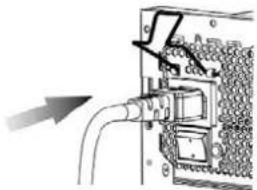
Diagram of an electrical switchgear box with a lightning bolt symbol (no text or labels)③ 将电源线插入 AC 交流电插座中。
natural_image
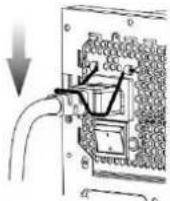
Diagram of a mechanical or electrical component with pipes and connectors, no visible text or symbols④ 将「电源线扣」扣在电源线上。
natural_image
Diagram showing a device with a mesh panel and an external box, no text or symbols presentnatural_image
Diagram of a device with a bracket and internal components, no visible text or symbols③ 將電源線插入 AC 交流電插座中。
natural_image
Diagram of an electrical connector with a cable inserted, showing internal components and wiring (no text or symbols)④ 將「電源線扣」扣於電源線上。
text_image
REVOLUTIONS ① ② ③ ④ ⑤ ⑥920/1020W
text_image
REVOLUTIONS ① ② ③ ④ ⑤ ⑥ ⑦1250W
natural_image
Diagram showing a device with a mesh panel and an external box, no text or symbols presentnatural_image
Diagram of an electrical outlet with wires and a switch, showing no text or symbolsnatural_image
Diagram of an electrical switchgear box with a resistor symbol (no text or labels)natural_image
Diagram of an electrical outlet with wires and connectors, showing a cable connection (no text or symbols)PowerGuard indication (1250W)