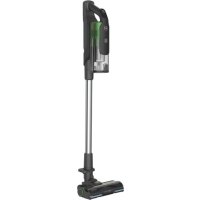
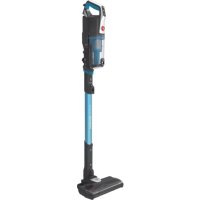
HFREE 100 HF122PTA 011 - Broom HOOVER - Free user manual and instructions
Find the device manual for free HFREE 100 HF122PTA 011 HOOVER in PDF.



| Product type | Cordless stick vacuum |
| Brand | Hoover |
| Model | HFREE 100 HF122PTA 011 |
| Power source | Removable rechargeable Lithium-ion battery |
| Charger voltage | 230 V (240 V for Great Britain) |
| Charging time | Approx. 6 hours |
| Charge indicator | Red LED (charging) / white (full charge) |
| Operating modes | Turbo, Eco, Continuous |
| LED lighting | Yes, front on the brush |
| Brush type | Motorized brush with hard floor roller (removable) |
| Dustbin capacity | Not specified (recommendation: empty after each use) |
| Filters | Washable mesh filter + exhaust filter with washable sponge |
| Included accessories | Integrated flat nozzle, integrated furniture brush, mini turbo brush, accessory adapter, crevice tool, radiator tool, deep cleaning brush, flexible deep crevice tool, wall mount, accessory bag |
| Safety | Automatic roller stop in case of blockage |
| Use | Indoor, dry surfaces only |
| Maintenance | Wash filters with lukewarm water (dry 24h), clean the roller |
| Battery warranty | 6 months from purchase date |
| Approximate weight | Approx. 2.5 kg |
Frequently Asked Questions - HFREE 100 HF122PTA 011 HOOVER
User questions about HFREE 100 HF122PTA 011 HOOVER
0 question about this device. Answer the ones you know or ask your own.
Ask a new question about this device
Download the instructions for your Broom in PDF format for free! Find your manual HFREE 100 HF122PTA 011 - HOOVER and take your electronic device back in hand. On this page are published all the documents necessary for the use of your device. HFREE 100 HF122PTA 011 by HOOVER.
USER MANUAL HFREE 100 HF122PTA 011 HOOVER
* Certain models only, accessories may vary according to model
15
a
b
C
16
INSTRUCTIONS FOR SAFE USE
This appliance should only be used for domestic cleaning, as described in this user guide. Please ensure that this guide is fully understood before operating the appliance.
Always switch off and remove the charger from the socket before cleaning the appliance or any maintenance task.
This appliance can be used by children aged from 8 years and above and persons with reduced physical, sensory or mental capabilities or lack of experience and knowledge if they have been given supervision or instruction concerning use of the appliance in a safe way and understand the hazards involved. Children shall not play with the appliance. Cleaning and user maintenance shall not be made by children without supervision.
If the power cord is damaged stop using the appliance immediately. To avoid a safety hazard, an authorised Hoover service engineer must replace the power cord.
Keep hands, feet, loose clothing and hair away from rotating brushes. Use only the original charger supplied with the appliance.
Check that your supply voltage is the same as that stated on the charger.
This appliance is supplied with a double insulated battery charger which is only suitable for insertion in a 230V (UK 240V) socket outlet.
Plug the charger in to suitable socket outlet and connect the charger jack plug to the appliance.
When charging the appliance, the power switch lever must be in the off position.
Before first use, charge your appliance for at least 24 hours. The battery pack LED light will illuminate Red during charging and will turn WHITE when fully charged.
Re-connect the appliance to the charger after use to recharge the battery.
Never charge the batteries in temperatures above 37° C or below 0° C .
It is normal for the charger to become warm to the touch when charging.
Do not unplug the charger by pulling on the power cord.
Unplug the charger in the event of prolonged absence (holidays, etc.). Recharge appliance again before use as batteries may self discharge over increased periods of storage.
If the appliance is to be disposed of the batteries must first be removed. The appliance must be disconnected from the supply mains when removing the battery. Dispose of the batteries safely. Run the appliance until it stops because the batteries are fully discharged. Used batteries should be taken to a recycling station and not disposed of with household waste. To remove the batteries, please contact the Hoover Customer Centre or proceed according to the following instructions.
IMPORTANT: Always fully discharge the batteries before removal.
Run the cleaner until the batteries are completely empty.
Remove the charger jack plug from the appliance.
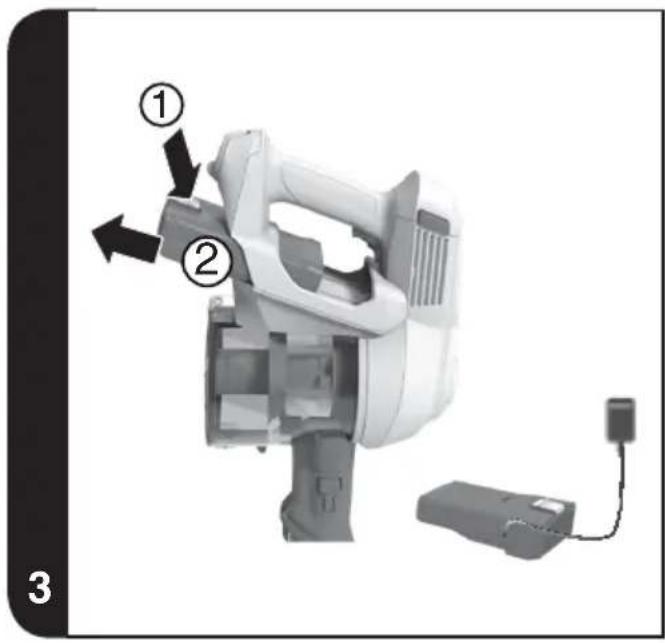
Press the battery pack release button and slide to remove. [3]
Note: Should you experience any difficulty in dismantling the unit or for more detailed information on treatment, recovery and recycling of this appliance, please contact your local city office or your household waste disposal service.
Use only attachments, consumables or spares recommended or supplied by Hoover.
Static electricity: some carpets can cause a small build up of static electricity. Any static discharge is not hazardous to health.
Do not use your appliance out of doors or on any wet surface or for wet pick up.
Do not pick up hard or sharp objects, matches, hot ashes, cigarette ends or other similar items. Do not spray with or pick up flammable liquids, cleaning fluids, aerosols or their vapours.
Do not run over the power cord when using your appliance or remove the plug by pulling on the power cord. Do not continue to use your appliance or charger if it appears faulty.
Hoover service: To ensure the continued safe and efficient operation of this appliance we recommend that any servicing or repairs are only carried out by an authorised Hoover service engineer.
GB
Do not use the appliance to clean animals or people.
Do not replace the batteries with non-rechargeable batteries.
The Environment:
This appliance is marked according to the European directive 2011/65/EC on Waste Electrical and Electronic Equipment (WEEE). By ensuring this product is disposed of correctly, you will help prevent potential negative consequences for the environment and human health, which could otherwise be caused by inappropriate waste handling of this product. The symbol on the product indicates that this product may not be treated as household waste. Instead it shall be handed over to the applicable collection point for the recycling of electrical and electronic equipment. Disposal must be carried out in accordance with local environmental
regulations for waste disposal. For more detailed information about treatment, recovery and recycling of this product, please contact your local city office, your household waste disposal service or the shop where you purchased the product.

This product complies with the European Directives 2014/35/EU, 2014/30/EU and 2011/65/EU.
CANDY HOOVER GROUP S.r.l. Via Privata Eden Fumagalli, 20861 Brugherio (MB) Italy
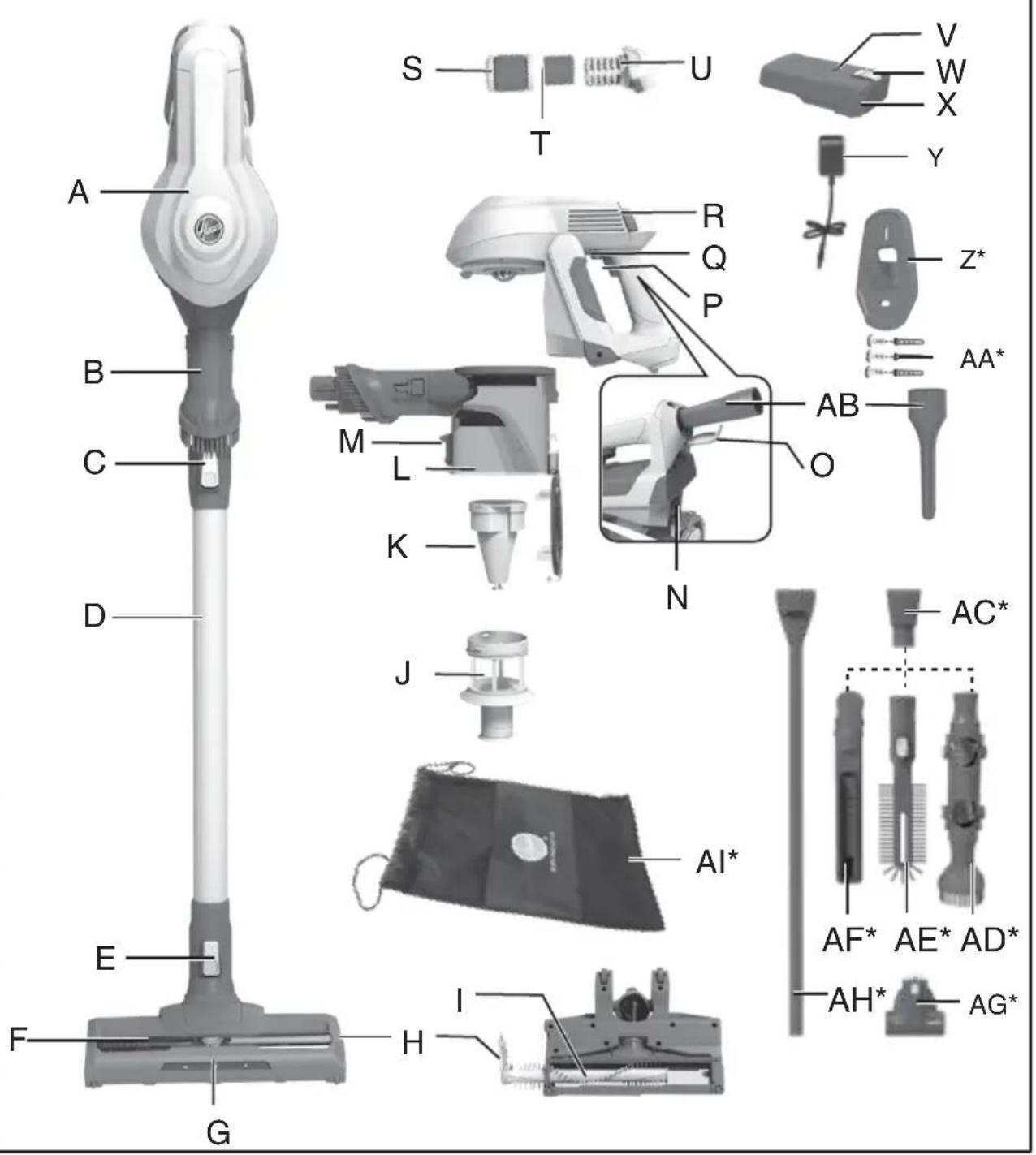
PRODUCT COMPONENTS
A. Main Body
B. Integrated Dusting Brush
C. Tube Release Button
D. Tube
E. Nozzle Release Button
F. Nozzle
G. Front Led Lights
H. Agitator Release Flap
I. Intense Floor Roller
J. Mesh Filter
K. Single Cyclone
L. Dust Bin
M. Dust Flap Release Button
N. Dust Bin Release Button
O. Crevice Cover Cap
P. Switch ON/OFF
Q. Switch Lever
R. Exhaust Filter Release Buttons
S. Exhaust Filter
T. Sponge
U. Exhaust Filter Frame
V. Battery Pack Led Light
W. Battery Pack Release Button
X. Battery Pack
Y. Charger
Z. Wall Mount
AA. Screws Plugs *
AB.Crevice Tool
AC. Accessory Adaptor *
AD. Up To Top Tool *
AE.Radiator Tool
AF. Deep Cleaning Brush *
AG. Mini-Turbo Nozzle *
AH. Long Flexible Crevice Tool *
AI. Accessory Bag*
PREPARING YOUR CLEANER
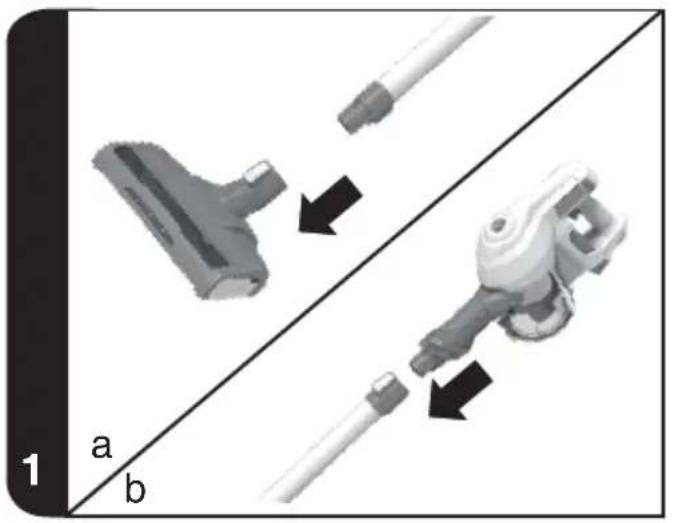
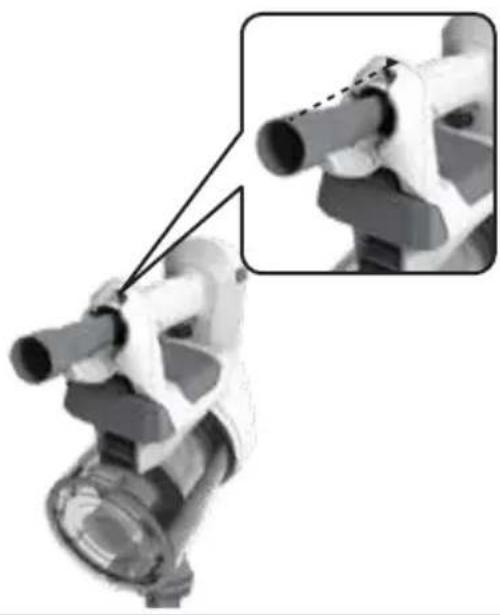
- Insert the nozzle head into one side of tube until you hear a "click" sound. [1a]
- Insert the another side of tube into handheld until you hear a "click" sound. [1b]
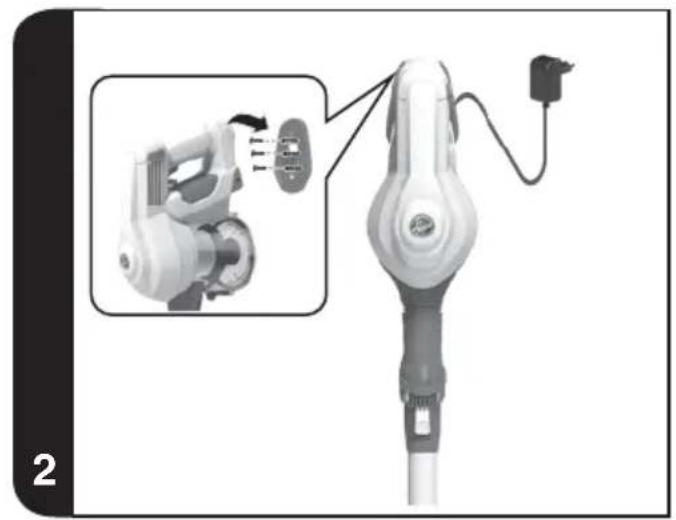
- Fix the wall mount to your wall using the screws and screw plugs provided. [2]
- To fully charge the appliance, connect the charge jack plug to the removable battery pack. It will take around 6Hrs. [2,3]
NOTE: To remove the nozzle press the nozzle release button and pull away from the main body.
NOTE: Use only the charger supplied with your cleaner to recharge.
IMPORTANT: When charging the cleaner, switch lever must be in the OFF position. You can charge the removable battery pack also when released from the product.
It is normal for the charger to become warm to touch when charging.
- Certain Models Only
USING YOUR CLEANER
There are three working modes:
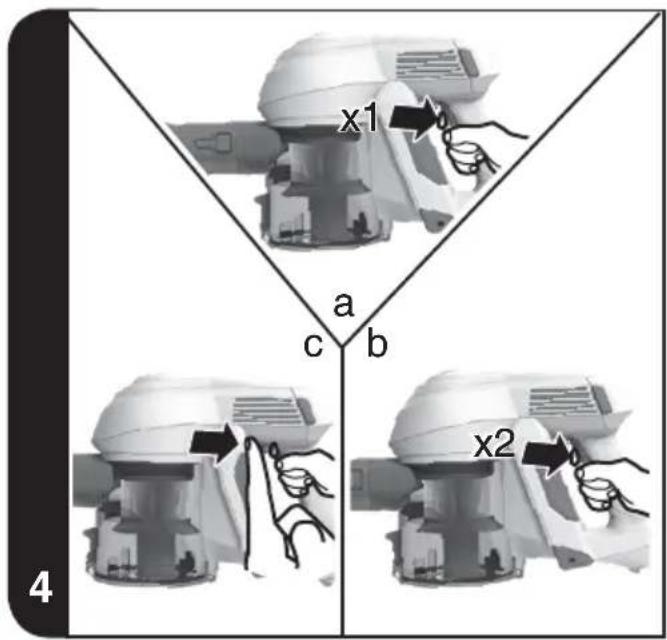
- TURBO MODE: The product will start on full power with agitator ON when you press the ON/OFF switch and stop when released. [4a]
- ECO MODE: The product will start on lower power with agitator ON when you press the ON/OFF switch 2 times consecutively and stop when released. [4b]
- CONTINUOUS MODE: To enable continuous mode push back lever until locked. It is advisable to disable continuous mode after every time actioned, this is completed by simply pushing the lever forward to the unlocked position. [4b]
IMPORTANT: After each use of your product, please ensure to push the switch lever forward to the unlocked position. Failure to do so may result in a reduction in battery life or failure.
SAFETY PROTECTION SYSTEM
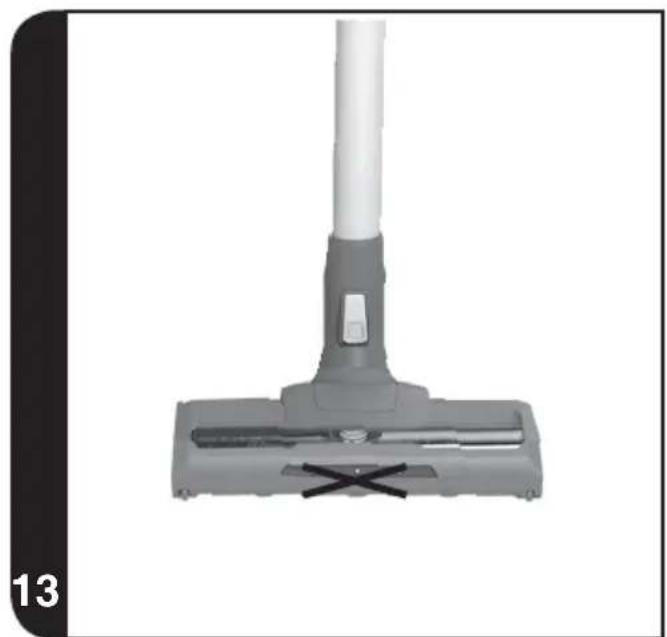
To ensure the reliability of the product is not affected if used under arduous conditions, the product features an integrated safety protection system. [13]
NOTE: The Safety protection system will action if the agitator has a blockage or is locked, once actioned the agitator will stop rotating, the white Led lights on the front of the nozzle will go out. If this happens, simply switch off your product and clear the agitator obstruction. To resume cleaning, press the on/off button and the product will restart in turbo mode.
BATTERY
DISPLAY LED:
This cleaner is equipped with a Battery Status LED Lights.
BATTERY LEVEL:
White colour: 100% - 5% charge
Blink White colour: < 5% charge
Red colour: during the charging
There are two methods of charging:
Charge the battery when fitted to the product. [2]
Insert the battery charger jack to the battery pack. The LED status indicator will illuminate red when charging. When charging is complete, the LED status indicator will illuminate white.
Charge the battery when removed from the product. [3]
Remove the battery from the product by pressing the battery release button.
Insert the battery charger jack to the battery pack. The battery pack LED will illuminate red when charging. When charging is complete, the LED indicator will illuminate white.
NOTE: It is normal for the charger to become warm to touch when charging. Use only the charger supplied with your product.
NOTE: If you are not going to use the cleaner for a long period of time, please remove the removable battery pack from the cleaner to maintain the battery life.
ACCESSORIES*
CREVICE TOOL ON BOARD, INTEGRATED DUSTING BRUSH, MINI TURBO NOZZLE, ACCESSORY ADAPTOR, UP TO TOP TOOL, RADIATOR TOOL, DEEP CLEANING BRUSH AND LONG FLEXIBLE CREVICE TOOL.
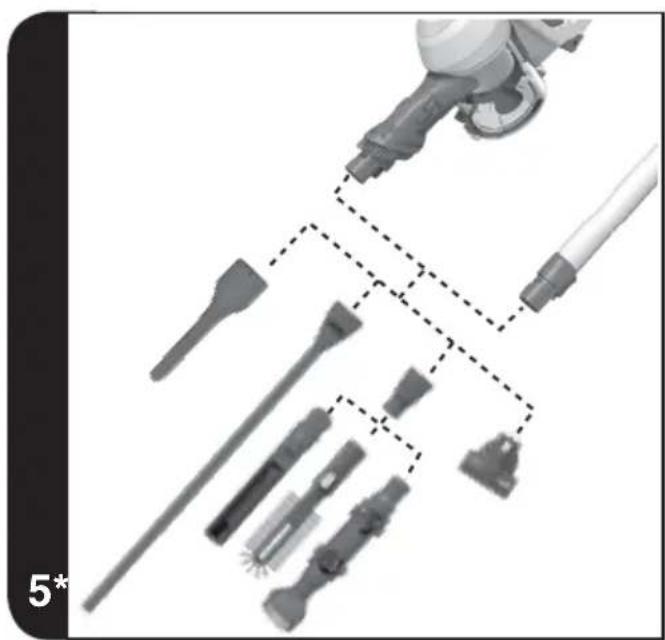
All the accessories can be fitted on the main product and on the tube. [5]
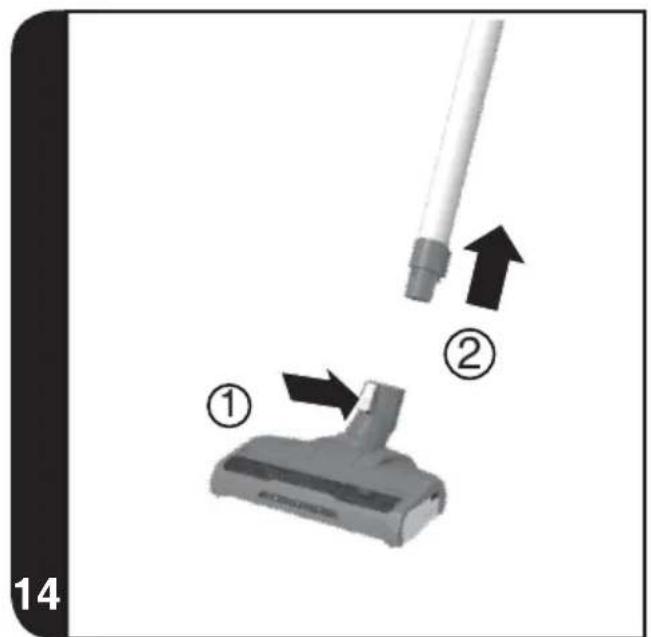
NOTE: To remove the nozzle or main body unit from the tube, press the respective release button and pull apart.
RADIATOR TOOL* / DEEP CLEANING BRUSH*/ UP TO TOP TOOL*
The accessory adaptor* must be fitted when using these 3 accessories. [5]
NOTE: There is only one way to store the crevice tool in the main body. Align the slot on the crevice tool with the arrow on the main body, push crevice tool into the main body. [16]
NOTE: The mini-turbo nozzle is ideal for deep cleaning textile surfaces (i.e. sofas) and pet hair removal. Move it steadily backwards and forwards. After using, please remove hair / threads collected on the brush with scissors if necessary.
NOTE: The up to top tool is designed to easily clean delicate surfaces without scratching and to reach difficult areas.
- Certain Models Only
NOTE: The radiator tool is ideal for cleaning inside and around cabinets, radiators, blinds and more.
NOTE: The deep cleaning brush is useful to clean in tight spaces without scratching surfaces, and inside your car.
NOTE: The long flexible crevice tool is ideal for cleaning in hard to reach areas, underneath furniture and in your car.
ACCESSORY BAG*
Accessories can be stored in the accessory bag.
WALL MOUNT*
For storage and space saving, your appliance can be fixed to your wall using the three screws and screw plugs included. [2]
CLEANER MAINTENANCE
Emptying the Dust Container
- Press the tube release button and remove the tube.
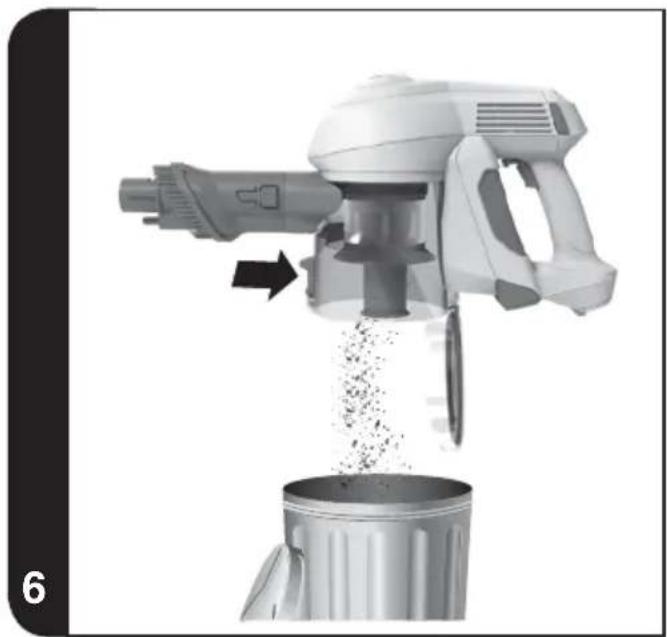
- Press the Dust flap release button to open the bin flap and empty the contents. [6]
- Close the dust cup up, you will hear a click when fully locked.
NOTE: It is recommended to empty the dust cup after each use or when dust is up to the max fill line.
Cleaning the Dust Container and Filter
- Press the tube release button and remove the tube.
- Press the dust flap release button to open the bin flap and empty the contents. [6]
- Press the battery release button and remove the battery pack. [3]
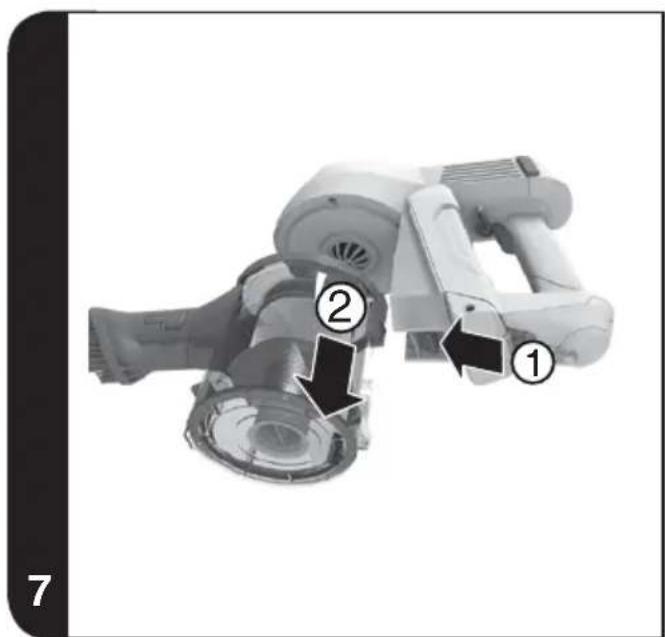
- Press the dust bin release button and remove the dust bin from the main body. [7]
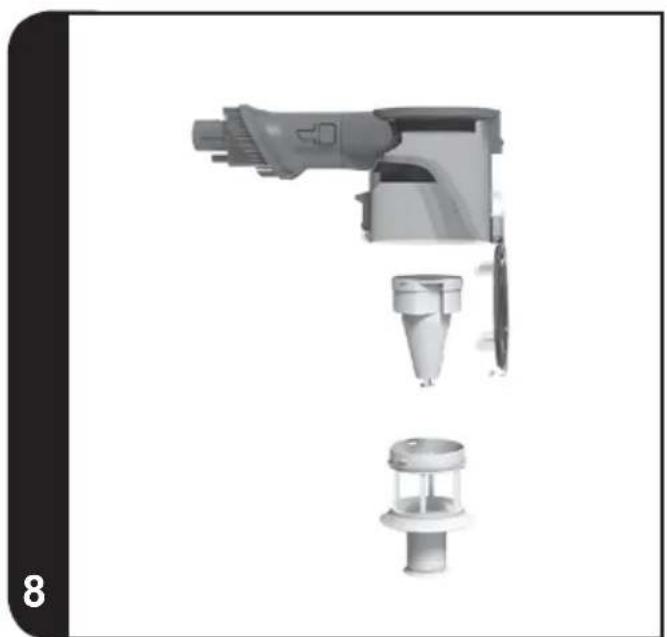
- Turn the mesh filter frame unclockwise direction and remove from the product. [8]
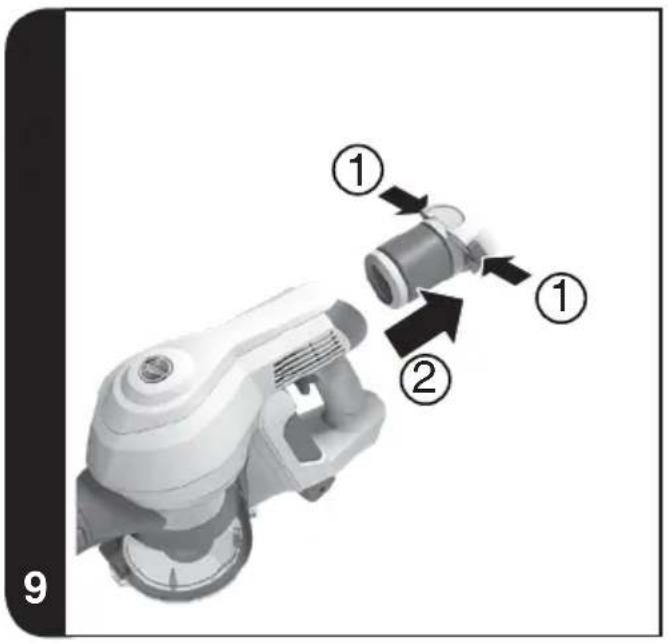
- Press the exhaust filter release buttons to remove the exhaust filter. [9]
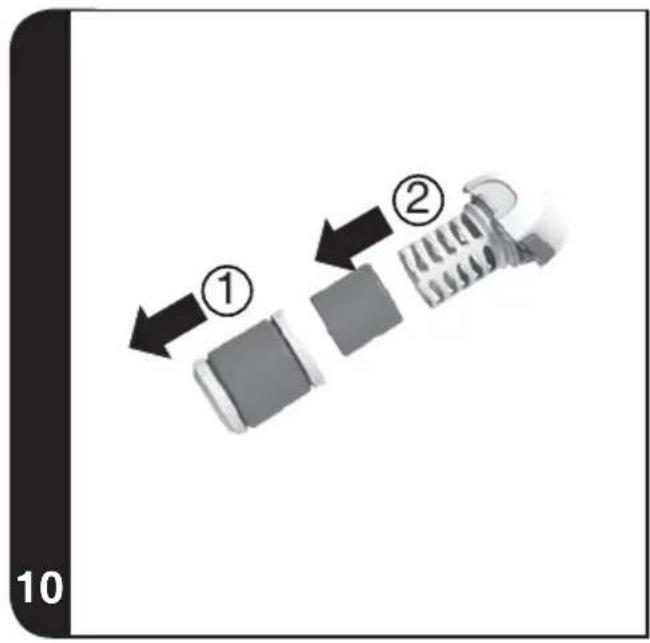
- Remove the sponge from the exhaust filter and take out the exhaust filter from its frame. [10]
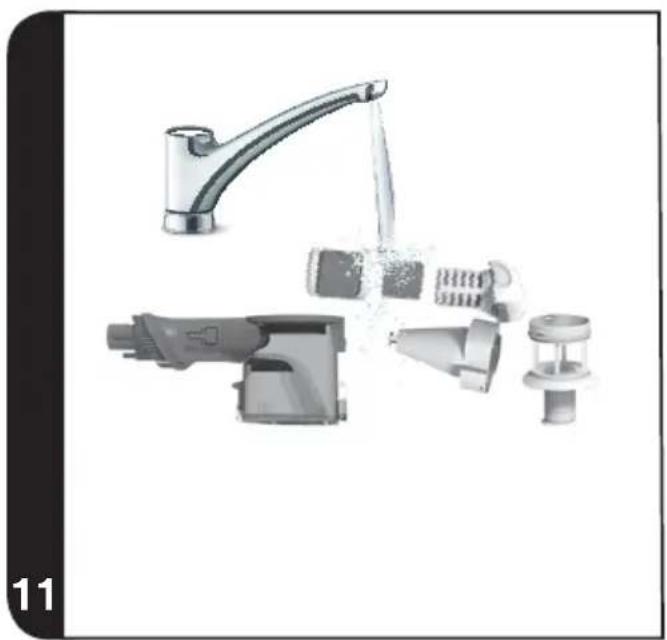
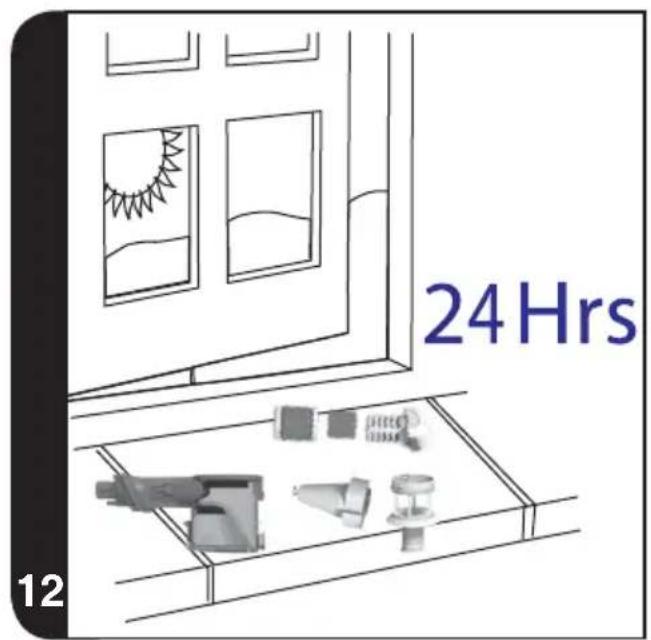
- When cleaning exhaust filter, wash the sponge and the exhaust filter frame in lukewarm water and leave to dry for 24 hours. Please ensure all parts are completely dry before reassembling. [11, 12]
- When cleaning the single cyclone, wash the mesh filter and dust bin in lukewarm water and leave to dry for 24 hours. Please ensure all parts are completely dry before reassembling. [11, 12]
- Ensure it is fully dry before returning to the main body of the cleaner. [12]
NOTE: Do not use hot water or detergents when cleaning the filters. If the filters are incidentally damaged, fit a genuine Hoover replacement. Do not try use the product without a filter fitted.
IMPORTANT: For optimum performance, always keep your filter clean. We recommend that the filter should be washed at least once a month.
Changing and Cleaning the Intense Floor Roller
IMPORTANT: Always switch off the cleaner and remove the removable battery pack before changing or cleaning the agitator.
- Detach the nozzle from the tube. [14]
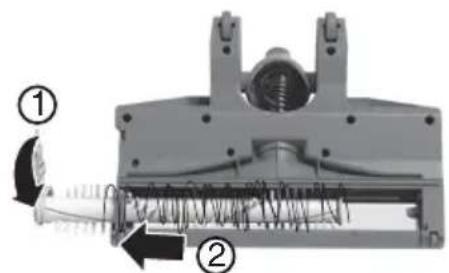
- Position the nozzle with the Intense Floor Roller facing you. Pull the agitator release system lever upwards and remove Intense Floor Roller. [15a]
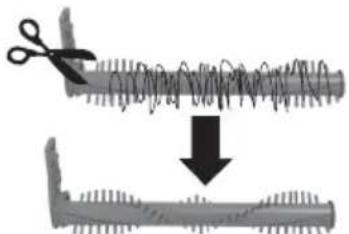
- Remove all debris, fibers and hair from Intense Floor Roller, using scissors. [15b]
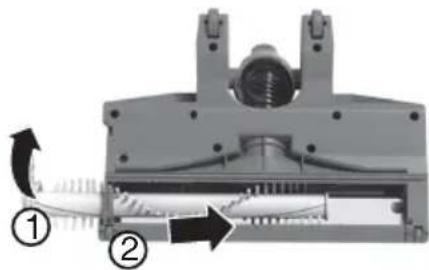
- Re-insert Intense Floor Roller and locate agitator release system back in position. [15c]
Replacing the Batteries
This cleaner is fitted with a rechargeable Lithium ion removable battery pack and it is replaceable. Moreover, the battery can be charged also out of the product.
WARNING: Only use approved replacement parts for your cleaner. Using parts not validated by Hoover are dangerous and will invalidate your guarantee.
WARNING: Do not try to open the removable battery pack and repair it by yourself.
- Press the removable battery pack release button and it can be taken out from main body.
- Remove the old removable battery pack and replace it with the new one.
-
Dispos of the batteries safely. Used batteries should be taken to a recycling station and not disposed off with household waste.
-
Certain Models Only
TROUBLE SHOOTING
Should you have any problem with you cleaner, follow this simple check list before calling the Hoover Customer Service Centre:
A. Cleaner does not switch on
Check if the battery pack is charged.
Check if the battery pack is assembled in place.
B. Loss of suction or no suction
Empty the dust cup and wash the mesh filter and cyclone separator.
Remove nozzle and check for any blockages in the duct.
C. Batteries cannot be charged
Ensure that the continuous mode switch has not been actioned as your battery will not have been charging. This may also result if the product has not been used or stored for a long period. Contact Hoover customer service to arrange a replacement battery. If the problem persists, contact the Hoover customer service.
HOOVER SPARES AND CONSUMABLES
Always replace parts with genuine Hoover spares. These are available from your local Hoover dealer or direct from Hoover. When ordering parts always quote your model number.
YOUR GUARANTEE
The guarantee conditions for this appliance are as defined by our representative in the country in which it is sold. Details regarding these conditions can be obtained from the dealer from whom the appliance was purchased. The bill of sale or receipt must be produced when making any claim under the terms of this guarantee.
IMPORTANT: The battery in this cleaner is guaranteed for 6 months from the date of purchase. After 6 months the customer is liable for the cost of a new battery.
Subject to change without notice.
GB
INSTRUCTIONS DE SECURITE D'UTILISATION
Blanc clignotant: < 5% charge
Rd farge: under ladingen
VEDLIKEHOLD AV STØVSUGEREN
Tommestovbeholderen
KaapioTe to doxEIO kovnc KaI to pIAtpo
- PatnoTe To koumi ane euvepwoc Tou oWnva Kai apaipote Tov ownva.
- Patrote to koumu ane uepwnc tou nepuyiou kovnc yia va aovie to kanaki tou kabou kalva adiaet e ta nepiexoeva. [6]
- Pathe To kouptaneleuepwocnTcmuataipack aqapoeTe nmuatapia. [3]
- Patnote To koupi aneuevepwnc kadoou okovnc kai apapoeTo tv kdo okvnc aoTo kupio owaia. [7]
- Tuplote to IAtpo nAeYmuToC apIOTePoOToPoa kai apaipoeTo aNo to npoiov. [8]
- Patnote ta koumuia ane aeuepwoc tou qiatpou eaywyh yia va aqapieoet to qiatpo eaywyh. [9]
- Apaipote to opouyyapn oto piaTro Eaywnic kai yalte to piaTro Eaywnic ano to nlaio tou. [10]
- KaT a Tov KaBapiaoTOU pIaPou Eaywnic, NauveTe TO spouyyapai KAI TO PAIAIO TOU pIaPou Eaywnc OXHApO VEPO Ka apnoTe To va otewosieYia 24 wpc. Bebaaithefe oI ola Ta upeyn elvai vteawocoteyva npiv Tnv enavaovapuoloyon. [11, 12]
- Kata tov kaθαριομό tou μενονωμένου κυκλωνα, πλένετο το φιλτο πλέγματος και to doxείο σκόνης σε χλιαρο ερόο και αρήσετa va στεγνωσουν για 24 υρες. Beβαιωθείτε οτόλα ta μερη εἰναι ευτελώς στεγνα πριν ητήν επαναύναρμολόγηση. [11, 12]
- Bebaowte eti elvai evelewocoteyovipv to tonoetnoeote oto kuplc wua tnc okouanac.[12]
ZHMIEQH:Mv xpoiioieTe ZTo vepo n anoppunavtka yia to nauio twv ptpw. TnV anihavn nepinwn baaicnc twv ptpwEeywnc,tonoetne auvtikovatlaaktoHoover.Mnv dokiacee ka un npoiioite To npoiovxipc foTpo.
ENIeHMANsH:Ia meyioan odoon, povtiote to piltpo oac va eiva navta kaapo. Suviotoue va kaapiceteto qipto ma foopa to miva.
Aaayn Kai Kaapiooc tou kuiivspou Evrovou kaqapoiou danEou
ENIHMANSH: ANeVeyonoiite navta tn oKouna kai apaipote tnv anooiuev npatapia npiv aalalete n kaapiaete tov ava6eutnpa.
- ApaipéoTe to akpopouo ano tov oληva. [14]
- ToToeTeIto aKpOuio Me Tov KluVbOp EvTovou KaThApIOu DanEsbO npoc To hpcoc oac. TpaBnTe To moXIo tou ouTJmuoc aneLeuBepwong Tou avadeutnpa npoc Ta enavw kai apaipeote Tov KluVbOp EvTovou KaThApIOu danEsbO. [15a]
- Apaipoe ola ta okouniia, tic ivc kai tic trixc ano tov kuivdpo evtovou kaqapiou danedou xpnoiopoiovvtac paaiid [15b]
- Enavatoonoetne tov kulivdp oevtroovou kaqapioou danedou kai baTe to ouotma aneuepwoanc tou avadutnpa onn teon tou.[15c]
Avtikataotaon mataipiwv
Autn n okouna evai epoiaouevn ea apaiopouevn enavaopopticoeyn natapia 1ovtwv liiou nou eiva avtikataotaoiun. EinnLiov, n npatapia npopei va opptiotel enianc ano to npoiov.
BHIMAHHE! Ipeed Tem KaK n3Bneyb 6aTapeu N3 nbIineCoca, y6eINTecb, yTO OHa NOJIHOCTbIO pa3pJKeHa.
Ctataueckoe 3neKtpnueCTBO: HeKOtOpbI TINbl KOBPOBbIX NOKpbTNI CNOCO6HbI HaKaPnIBaTb He6oJbWOn 3apRd CtaTnueckoro 3neKtpnueCTBa. Pa3pRd CtaTnueckoro 3neKtpnueCTBa He npedctabJIaret ONaCHOCTN DnRA 3DopOBbI.
He npimehnyTe npnbop BHe nomeuHn, Ha BnaJhbIX NOBepxHOCTaX nn dIra c6opa XndKoCTeN.
He nCnoIb3yIte npnbop dIra c6opa ocTpbIX npeIMeTOB, cnueK, ropeyero neIIa, okypkoB nIIa anHanoNHybIX o6beKTOB. He paCnblJrTe nIIu He cO6npaIte rOpoune XndKOCTN, uNCTAunie cpeDcTBa, a3pO30JI nIIu npOyne napbl.
RU
He nepeBO3nTe nbIeCoc uepe3 npoBOD nITaHnI He TAHnTe 3a npoBOD, BbIHMaBnKy n3 po3eTKn. He nCpOJIb3yIte np6Op nI3 3apJHoe yCTpoiCTBO, eCNI OHN HeNCnPabHbl.
CepBnchA cnjx6a Candy: Ira oecneueHn npoJXntbHo, 6e30nachon n 3oekTNBHO paobtla DAHHoro 6bITOBORO 3JeKtpopnp6opa IIO6o BnD peMOHTa peKOMeHnyetc npOn3BOuNTb TOnbKO CneuaJIncTOM aBTOpN3OBaHHORO cepBnCHORO ueHTpa Candy.
He nCnoB3yIe np6op Ira OuNCTK JNBOThbIX IIN JIOdei.
He nCnoB3yIte o6bIuHbIe Henepe3apJxAeMbIe 6aTapeN BMeCTO nepe3apJxAeMbIX aKKymyJIrTOpHbIX 6aTapeN.
Okpykaoua cpea:
Pnp6op mapKnpyetc cornacHO Ebponecko dneKtnbe 2011/65/EC no OTOxOam 3eKtpueckoro n 3eKtpOHoro 6b03MOXHbte OTPaTeBbHe bocnclCTBn dno Okpykaoue cpebl n 3OpOBba YenOBeka, KOtOpe MoNb 6bl IMTe MTo np HnPaBnHoh yTNIn3aun DaHHORo yCPOCTBA.CmBON Ha DAHHOM yCPOCTBE O3Haayet, qTO er Heh3Ba yTNIn3uPoBaTb Ka k6bIOBble OTXoDb. Ero Heo6xOIMNO DOCTABNb B COOTBeTCTBYUoi nIyHK Tynr3aun 3eKtpueckoro n 3eKtpOHHO 6b03MOHn yTNIn3aun pApOooPAHteNBbHMn PpAINNAmNo OTNNa3aun OTXoOB. JnOnyueHn 6Oone NpObo6Hn INΦopMaun POxOyD, BOCCTAHOBJIeHIO n Ieppa6OTKe DAHHORo yCPOCTBA o6patNTecB K rOpODkMn BnactM, B Cnyk6y yTNIn3aun 6b10BoBx OTXoOB INN B MaarzH, B KOTOPM 6bl NO KYNlHo H3dene.

DAnHHbI np6Op OTBeaet Tpe6oBaHmE BpOeNcKIN DnpeKTIN 2014/35/EU, 2014/30/EU n 2011/65/EU.
CANDY HOOVER GROUP S.r.l. Via Privata Eden Fumagalli, 20861 Brugherio (MB) Italy
I03HAKOMbTECb C KOHCTPYKUEN BAAJEFO NBJIECOCA
A.OchOBHoeyCTpoNCTBO
B.BCTpoEHHaIeTkaIydaJIeHnIbIIN
C. KhoNkA oToCoeDInHeHn Tpy6b HacaDOK
D. Tpy6a
E. KhoNka oTcoeDInHeHnOCHOBHOHaCaDKn
F.OCHOBHnHa HacdaKa
G. CBETOIOHOHNA NOCDBEKA HACIKN
H. Khonka OTOCoEINHeNHaBnKa
I.BpauaouuniCBAIIK
J.CetTuatbIyΦnNbTp
K. LükkoHHbI cenapaTOp
L. KoHTeHep dIra c6opa nbnn
M. KhoNka OTKpbTnKa KOHTeHepa dIa c6opa nbIn
N. KhoNka n3BneeynKa KOHTeHepa dny c6opa nbIN
O.KpbIka OTCeKa IxpaHEnIeJeBOHacdKn
P. Khonka BkN./BbKJ.
Q.ФИКСАТОР рекIMанрepьВHо pa60Tb
R.KHONKaI3BneueHnBbIXoHOrofoNtpa
S.BbIXoHNOHnBtp
T.γ6θaTBHΦnJBTp
U.PamKa BbIXoHOro FnIbTp
V.CBToDnOHDhINHnDKaTOP3apra6aTapeu
W. Khonka n3BneueHnA kkymyTOpHoI 6aTapeN
X.AkkymyTopna6aTape
Y.3apAHOe yCTpOHTBO
Z. HacTeHHoe KpeJIeHHe*
AA.BuHTCJIO6eHem*
AB. UeJebBaHacaJa
AC. IepexoHnK nI HaCaIOK
AD.HacaIaIy6opKnBbICOKNX NobepxHocTei
AE. HacaKa dIy ouHCTKn paHaTOpob*
AF. Μετκα ἀνηλύβοκού Κυπιχής *
AG. MHHI Typ6oUeTka
AH.YdInHeHHaRn6kaJueleBaHaHacdaKa*
AI. CymkaДЯ AkceccayapOB*
IPOIOTOBKA IIbJIeCOCA K PABOTE
- BctaBbTe Hacadky B Tpy6y Do ueNka. [1a]
- BcTaBbTe dpyryo cToPOHy Tpy6bl B OCHOBHoe ycTpoNCTBO.[1b]
- 3aKpeHnTe HaCTeHHoe KpeHnEHe Ha CteHe C NOMOuB BuHTOB C DIO6eMaN, NOCTaBnEbIX B KOMnKeTe. [2]
4.ДлпNonHoro 3apЯДа npiбopa nOcOeDnHITe 3apЯHoe yCtpoIcTBO KaKKyMnyaTOpHoi 6aTapee.Ipouecc 3apЯdkn MoKet 3aHrTb OKONO 6 yapocB.[2,3]
PIMMEUHNE: Yo6bI ChrTb HacaKy, HaKMITE Ha KONky OToCoEINHeHHa cAaKn N BbITHNe ee n3 Kopnyca.
PIMMEAHHE: 3ap4kN nCnObl3yTe TOnbKO 3ap4Hoe yCTpoIcTBO, NOCTABJREMOe C nbNEcOCOM.
BHIMAHHE! Pn3apdKe nbIeocCa pbUar BbIKHouaTeNaTaNHOJXeH HAXOHTCBA NOJOKeHN "BbIKHooHeo"
AkkymyIaTOpHyIO 6aTapeIO MoXHO 3apRAnTb OTJeNbHO, DocTab ee N3 nbIeNecoca.
CobepeHNO HopMaIbHo,ecnBvBpeM3apJKn3apJHoe yctpoCTBO HarpeBaETCA.
- Tôngko Дяп НекTopbIX Mоделей
3KCNPLYATAUINIbILECOCA
IbueocMOxETpaOToTbBtpexpeKIMax:
- PEXIM TYP60: Пылесoc Bкюаетс Ha NOHуо мошоньс с рботаин CBpaаioимCBaIKOM, KOrДa Bbl HaxnMaTeHa KONky BkN./BbIKI., n octaHabnBaetc, korДa KhONka 6oJIbse He haxtata. [4a]
-3KOHOMHbIPEXMM: BJIncoc BKNIOaETc H6OJee HN3KO MoHOCn Cpa6oTaIOUMBpaAIOUIMCBaIKOM, KOrDa Bbl HaKmMaTe Ha KNkY BKn./BbKn. 2 pa3a NoPra n OctaHaBnBaetc, KOrDa KNkKa 6oJIbHe He Haxata.[4b] - PEXKUM HENPEPBIBHO PA60TbI:ДЯ AKTNBaUN pexkma HENpepbIBHO pa60TbHyxho nepeDbHnybФKCAtOp Ha3aIdo noNoJKeHn 6NoKupOBKn. Nocne KaKDoRo IcNoB3OBAHN PbInecoca peKomeHdyTeBbIKIOuTa bpeKIM HENpepbIBHO pa60TbI;ДЯ 3TOrO nepemectteФКCaTOp BnpeB nnoJoxHe npa36NoKupOBKn. [4b]
BHIMAHHE! Nocne kaxdofo nCnoB3OBAHn IbIeCoa nepeMeaai Te KCaTOp BnepeD nNoJxHeNe paoKpOBKn.
B npotnbom cnyae cokpaatac rcpok cnjkbblakymyIaTropHo 6aTapein BnloTb do ee bixoHa3 cTpoA.
CNCTEMA 3AUHTbI
YPOBEHb 3APRA DA BATAPEN:
Белы: 100% - 5% за?
Muraioqun 6eblb: <5%3apra
KpaHbI:BnpOceEe3apAekn
CyueCTByeT Dba cnoc6a 3apAdkn:
3apka6atape,yctahOBHeHbBnIeCoc[2]
BCTaBbTe 3apeKep 3apHoro yctpoNCTBa B 6atapeHO.Bo Bpem 3apJKN INHdkatop rOpNT KpaChbIM cBeTom. No 3abepweHH 3apJKN CBETOIONDHy INHdkatop 3arOpNTc6enbIM cBeTom.
TAKKE MOXHO 3aprntb 6atapeo OTdenebHOOT nbinecoca. [3]
OoctaHbTe 6atapeo n3 nbInecocca, Haxba Ha KNhONky n3BneueHHAKKyMnyTopHo 6atapen.
BCTaBtbe 3apnHoro yctpoCtBA B 6aTapeo. CBeToIOHbI INHnKATop 3apnK 6yET RopeTB KpaChbIM BO BPemr npouecca 3apnKn. I0 3abepeHnIO 3apnKn CBeTOIOHbI INHnKATop 3arOpNTc 6Belm UCBOTOM.
PIMMEYAHNE: CoBepHHeHO HopMaJIbHo, eCNI BO BpeM 3apJIKI 3apJIDHOe yCTpoiCTBO HArpeBaETc. IcNoJIb3yIte TOnbKO 3apJIDHOe yCTPOICTBO, NOCTaBnREMOE B KOMIIKeTE C nbIEcOCOM.
PIMMEAHNE: Ecn Bb He noIb3yeTeB nbIeCocom B TeueHne dIITeBHoro BpeMeHn, n3BNeKeTne npedBaHTeBHO 3apJxehHyO aKKyMJIaTOpHyO bTaapeIO n3 nbIeCocA dIra npOJeHn ee cpoKa cnYk6bl. Ira npOJeHn cpoKa cnYk6bl 6batapeH he peKOMeHdyTc OCTaBnTb ee B pa3paJxehHOM COCTOHN.
JOIOJIHHTENbHbIEAKCECCYAPbI*
JEBAHACDAKA HA KOPNYCE, BCTPOEHHA JETKA IINYDAJIENI NBIIM, MNHN TYPBOJETKA*, NEPEXODHNI HACADOK*, HACDAKA IINYBOPKN BBICOKNX IOBEPXHOCTEIN*, HACDAKA IINYOCHCTKN PAIDNATOPOB*, IETKANI YBOKOON ONUCTKN* INYDINIHEHHAR IINKAR IEEBAH HACDAKA*.
Bce hacaikn n akccecyapbMoYr yctaHaBnBaTcKa KaH aOCHOBHom yCTpoiCTBe, TaK n Ha Tpy6e. [5]
PIMMEAHHE: Ira OToCeoDInHeHnHaCaKn Nn Tpy6bI OT Kopnyca nbinecoca, HaxMnte
COOTBETCTBYUOYKHNKNYNOTAHHTOEOTCOEINHREMbleaCTNBpa3HbIe CTOPoHbl.
HACADKA DJIY ONUCTKN PAUATOPOB* /IETKA IINI YBOKOJ ONUCTKN*/ HACADKA IINY BOPK N BICOKNX IOBEPXHOCTEIN
Пинспьбогин 3Тnx 3 HacAOK Heo6xOIMU yCTaHOBnTB nepexoHNK nIЯ HacAOK*. [5]
PIMMEAHHE: CyueCTByET ToIbKO OIN CnOc6 xpaHEny IeNeBOH HacApNHa KOpnyCe. CoBmectne OTBepctne Ha IeNEBOHacAdKe co CTpeKoH Ha OCHOBOM yCTpoiCTBe, HaxaTmem YCTaHOBtne IeNeByIO HacAky B KopnyC.[16]
PIMMEUAHNE: MHN Tpy6oetKa IdeaIbHO NOxOuNT Dn OuchTKe TKCTNbHbIX NOBepXHOCTe (HaNPIMep, DnBaHO) IN ydaJIeHnI UepCTN JINBOTbIX. PIABHO nepeMeuaTe ee BnepeN Ha3aI. Iocne nCnONb3OBaHnI CpexbTe HOJHnAAMN HAOTaBUnecr Ha UcETky BOLOcbI HHTKn.
PIMMEUHNE: Hacaikon dny y6opkn Bblcoknx nobepxhocte neKo YnCTntb TpyHNOocTyHbIe MeCTa N deNkAThble noBepxHOCTN, He capanar nX.
PIMMEUAHHE: HacaKa DnO ONUCTKN paDnaTOpOB NDeaIbHO NOxOuNT DnO ONUCTKN BHyTpN IN BOKpyr ShkaΦOB, paDnaTOpHBIX 6atapei, kAnIO3n n np.
PIMMEAHHE: LETKdIgrrny60kOOnuCTKn none3Ha npn y6opKe By3KNX npocTpaHCTbax 6e3 pncA noapaNaTb NOBepxHocTN, a TAKKe npn y6opKe BHYTPn ABTOMO6NJ.
PIMMEUHHE: yDInHeHHa r6Ka aeneBa HacaKa nDeaIbHO nOxOHT Ira OuNCTKn TpyHNOcTynhIx yAcTKOB, NOd Me6BIO B ABOTOMoHne.
CUMKA JIAKCECCYAPOB*
DOnOHnTeBhIe HaCaJkn N aKceccyapbMOxHO xpaHHT B CneuaJIbHOcMKe.
HACTEHHOE KPEIIEHNE*
Длг Экогомп Мсета пи Хранень Вbl можerte 3aФИКсИрOBаь BaW ПьIЕСОС Ha CTe He пи ПOMOДи BnHTOB C ДIOБЯМN, NOCTABIЯEMbIX C nbIeCOCOM. [2]
TEXHNUECKOEOBCLNYXINBAHINEIbJIECOCA
OuNTKa KOHTeHepa dIa c6opa nblnn
- Haxmnte KhoNky OToCoeHHeHn Tpy6bl n CHmnte Tpy6y.
- HaxmTe Ha KhoNk OTKpbTn KaHHepe, YTO6bI OTKpbTb KpbIaKu BBcBInaTb COepXHMoe. [6]
- 3aKpOTe KOHTeHep IJI nIi npn npabInbHO nnHOH KCaUN 6yTe CJIbWeH eNQOK.
PIMMEUHNE: PekomeHyetcOnyctOaTb KOHeHep NoCle KaKdOro NcNoB3OBaHn nn npn er0 3anONHeHN Do MaKcMaJIbHOI OTMeKN.
OuNTKa KOHTeHepa nla c6opa nbInn nΦnbTpOB
- HaxMnTe KhoNky OToCoeUHeHn Tpy6bl n CHmMnTe Tpy6y.
- HaxMnte Ha KHONIKY OTKpbTINa KOHTENHepa, YTO6bI OTKpbTb KpbIHKy N BbCbINA Tb COdEpxIMoe.[6]
- Haxmte Ha KhoNky n3BneueHn aKkymyIaTOPHO 6aTapeu N doCTaHbTe ee.[3]
- HaxMMTe KONKU INBLeueHn KOHTeHepa IIN C6Op a NbIIN N DOCTaHbTe erO n3 nbIeocca.[7]
- NObepHnTe paMKy cetTuTo rO fNtBtpa npOTNB YacOBn CTpeKN n N3BneKeTte ee n3 nbIeocca. [8]
- HaxMMTe KhoNky n3BneeyHnBbIXoHOrO fHnlbTpA. [9]
- CHIMNTE r64aTbI hnnbTp c BblxOHO rO hnBtpa n N3BNEKnTe hnBtp n3 pAMKn.[10]
- PpOMOHTe rgyuTbI hHnBtpn pAMKy BixoHOro 0HnBtpa B TcNIOBoe n octabTe cyuNTbcra Ha 24 yaca. Npeed c6opkoyny6eINTecbBTOM, qTO BCE uactn BblCOxIN. [11, 12]
- PpomouTe UKIOHHbIcenapaTOp,ceTuBtI KOHTeHep Ira c6opa NbIN B TENIOB OBe N OCTABBe cyuNTbcra Ha 24 yaca. NepeC6OpKOy6eDntecB ToM,TO BCE YACTN BILCOXIN.[11,12]
- y6eIntecb, yTO Bce cAaTIN NIOHOCTbIO BBiCOxN IIpeKJe, Yem yCTaHOBnTB INO6paTHo. [12]
PIMMEUAHNE: He nCnOJb3yIe TOpAHy BOy IIN MOIOuIe CpeCTBa npI pOmbIBKe fNtBPOB. NOBpeKdHne fNtBPOB MaNOBepoARTHO, HO ECIN 3TO CnyHNOcB,TO nCnOJb3yIe TnIaMehb TOnbKO opunHAnhHe fNtBtpb Hoover. 3anpeaaetcR nCnOJIb30BAHHe Nblncocca 6e3 yCTaHOBHeHHoro fNtBtpa.
BHUMAHNE! Ia oecneueHn onTmAbHo npOn3BODnteHbHOCTn BcTe a cneIte, TTo6bl fInbTp 6bl YnctbIM. Mbl peKoMeHdyem npMbBaTb fNtBtpbHepeKe Ondoro pa3 B Mecau.
OuNTKa N 3aMeHa BpaauoeroC BAIIka
BHIMAHHE! Npeed 3ameHoi nn OunchKoBpaauooceBaNkA BcTeJa OTKJIouaHTe np6op ot cetn n N3BneKaTe 6atapeo.
- CHNMTe Hacdky Ctpy6bl.[14]
- Pacnoonoknte Hacaiky taK, yTo6bI BnDeTb BaIINK. NotaHInTe BBepx KhoNky dna OTcoeHNHeHnBpaauoOerocBaIIka n doCTaHbTe erO.[15a]
- YdaJIaIte C BaIIKa BeCb MyCop, BONcBn HHTKn pN NOMOoi HOXHNU. [15b]
4.YCTaHOBnTE BaIIHK Ha MeTO n 3aΦNKcpyIeero B npaBnIbHOM NIOJKeHHN.[15c]
3aMeHa aKKymyTOpHoi 6aTapei
3TOT nbIeoc pa6oTaet Ha nepe3apJxAeMoN IINHIOHN aKKyMylTopHO 6aTapee, KOTopyo MoXHO 3aMeHHTb. BataeKO MoXHO TAKKe 3apJxAe Tb OTdEnBHO, OTCOeDnHB ee OT nbIeococa.
BHUMAHNE: NcnoB3yIe ToIbKO opuHnHaJIbHbIe 3aIacHbIe qactn dBaIwero IbIneCoca. NcnoJb3OBAHHe 3aIacHbIX qacte, KOTOpbe He Odo6peHb IpnOn3BOIDTeIeM, ABInETCA OnaChbIM nPiueBeT KaHHynPObAHIO BaWe rapaHTIN.
BHUMAHNE: He nItaiTecb BCKpbBaTb AKKyMylTOpHyo 6aTapeIO n peMOHTnPoBaTb ee camOCToTeNbHO.
RU
- Haxmte Ha KhoNkU n3BneHnA kKymyIaTOPHo 6aTapeu n 3BKeIte ee n 3bIeOca.
2.3aMeHHTe CTapyIO 6aTapeIO Ha HOByIO. - Co6IIOaIte npabInaTexHnK 6e3ONaChocT npu yTuIN3aun 6aTapen. NcOnb3oBaHHbIe aKKMyIaTOpHbIe 6aTapen Heo6XoIMo CdaBaT B CneuaBbHbIpyHK Tnpema H Be b6paCbBaTb C o6bUHbIMN 6bITOBbIM NTxOaAMn.
ПОИСК И YYSTРАЕННО HEINCPAPBHOCTEД
Ecn y Bac cctb kaKne-n6o npOBeMbI C nbInecocOM, noXanyuCTa, BblOnHnTe npocTyIO npOBepky nepd 3BOHKOM B ABTOPU3OBAHHb CepBnCHb ueHTp:
A.Пылесочь Вкючаетс
y6eDntecb,yTO6atapera3apxkeHa
PpOBepbTe, npabunlboHn ly yctaHObnHe aKKyMnyTOpHa 6atapera.
B. Nopetra ann OTCYCTBne MOUHOCTN BCAcbIBAHNA
OnyctoWnte KOHTeHep dIa c6opa nblnn npomOte ceTaTbI nnlbTp u KIOHHbI cenapatop.
CHIMITE HacaIky I npOBepbTe, Het nn 3acopa B Tpy6e.
C.AkkymyIaTOPHa6atapae He 3apxkaetc
y6eHNTecb, yTO BO Bpem3apKn peKIM HENpepbBHO pa60tBI OTKNIOeH. TaKoe MoKET cIyUHTcBc, ecnn nblncocdoJrO xpaHnCnHe 6bIN B INCNOJIb3OBaHn. CBAKNTecb c ABTOPN3OBaHHbIM cepBNCbHM CEHTPOM dIg opraHn3aun 3ameHbI 6bataen. Ecn npo6nema He yCTpaHaHa, o6paTneCbB A bTOpN3OBaHHbI cEBuCbHbI cHTp.
3ANACHbIE YACTN PACXODHbIE MATEPNAJIbl
Pn3aMeHe nCIOB3yIe TOnbKO opunHbHbIe 3anachble aactN paccOHNbIe MaTePnAblpno3BODntEn. Hx MoKHO npno6peCTny Baawero MeCTHOro dInepa KomnaHm Hoover.PacXoHNbIe MaTePnAbl (KpOME 3anachbIX aacte) MOKHO npno6peCTN B OfniuaHbHom INTepHET-MarAsHe shop.hoover.ru. Pn oOpMJIeHN 3aKa3a Ha 3anachble aactN o8raTeNbHO yka3bBaIte Homep moEIN PbIeCoca.
UCIOBNA TAPAHTN
YcnoBra rapaHTm I daHnHO 6bI TOBO OJNEKTPuueckoro npnbopa onpeJeTc HauIM npeCTabNTbCTBOM B Toi cTaPe, B KOTOpO 3ToT 3eKnTpnp6op 6bn kynne. Boone npo6HyIO INHOPMaNIO 06 3TxN YcNoBx BB MoKeTe NOnyUHTy npodabua nn 13 rapaHTm HorO ceptnfikata Ha daHHbI npnbop. B Cnyae BO3HKnHOBeHn CnTuayn, NOkpbBaemr rapaHTm HbIMM o83aTeBCTBAMn 13ROTOBtEn, npn 6paueHN B yonlHMOeHHyIO cepBNCHyIO orpHaH3aCNUIO Heo6XoDIMO npedbAIBTb TOBAPHO-KaccOBMy eK IIIN HNO DOKyMeH, NOITBepXdaUOuN HAAYIO NCTeueHn rapaHTm HorO cPoka, npedyCMOTpeHHORO ycNoBMA m rapaHTm I daHnHO npnbopa.
BHIMAHNE! PpOu3BOOnTeNb He 6epeT Ha ce6b OTBeTCTBeHHocTb 3a OUn6Kn B DaHHO INHCTpyKUN,BO3HNKUme B npOcece neaTu. PpOu3BOOnTeNb IMeet npabo BHOCnTB CBOU N3dEINN IN3MeHEHIN, KOtOpBle OH COHT TIOJIe3HbMn DnA CBONX IN3dEIN, coxpaHra npn ATOM OCHOBHbe XapaKTEpNCNTKN.
Bc npctabHe H BnCTpykun HnHOpMaun, KacAoUaC KOMNKeTaun, TexHuecknx XapAKTePNCHKn, UBeTobx CoetAHm N T.D. Hocnt HnHOpMaunHbH xapaKTe n Hn npn KaNX yCNOBHX He ABnEeTc ny6nHOn oepToi. N3rOBoNTeH He yCTaHaBnBaEt YCNOBn I NOJooHeNIOyKn, OHn DOJXHbI COOTBeCTBOBaT b Tpe6oBaHm m pnoHaHbHor n/nn HaioHOhBO 3akoHOdaTeBCTBa CTpaHb npdoaKn TOBAPOB.
INSTRUKCJE BEZPIECZNEGUZYTKOWANIA
NAVODILA ZA VARNO UPORABO


- INSTRUCTIONS FOR SAFE USE
- DO NOT USE THE APPLIANCE TO CLEAN ANIMALS OR PEOPLE
- DO NOT REPLACE THE BATTERIES WITH NON-RECHARGEABLE BATTERIES
- THE ENVIRONMENT
- PRODUCT COMPONENTS
- PREPARING YOUR CLEANER
- USING YOUR CLEANER
- SAFETY PROTECTION SYSTEM
- BATTERY
- ACCESSORIES
- ACCESSORY BAG
- WALL MOUNT
- CLEANER MAINTENANCE
- EMPTYING THE DUST CONTAINER
- CLEANING THE DUST CONTAINER AND FILTER
- CHANGING AND CLEANING THE INTENSE FLOOR ROLLER
- REPLACING THE BATTERIES
- TROUBLE SHOOTING
- HOOVER SPARES AND CONSUMABLES
- YOUR GUARANTEE
- INSTRUCTIONS DE SECURITE D'UTILISATION
- VEDLIKEHOLD AV STØVSUGEREN
- TOMMESTOVBEHOLDEREN
- KAAPIOTE TO DOXEIO KOVNC KAI TO PIATPO
- AAAYN KAI KAAPIOOC TOU KUIIVSPOU EVROVOU KAQAPOIOU DANEOU
- AVTIKATAOTAON MATAIPIWV
- OKPYKAOUA CPEA
- I03HAKOMBTECB C KOHCTPYKUEN BAAJEFO NBJIECOCA
- IPOIOTOBKA IIBJIECOCA K PABOTE
- 3KCNPLYATAUINIBILECOCA
- CNCTEMA 3AUHTBI
- YPOBEHB 3APRA DA BATAPEN
- CYUECTBYET DBA CNOC6A 3APADKN
- 3APKA6ATAPE,YCTAHOBHEHBBNIECOC[2]
- TAKKE MOXHO 3APRNTB 6ATAPEO OTDENEBHOOT NBINECOCA. [3]
- JOIOJIHHTENBHBIEAKCECCYAPBI
- JEBAHACDAKA HA KOPNYCE, BCTPOEHHA JETKA IINYDAJIENI NBIIM, MNHN TYPBOJETKA*, NEPEXODHNI HACADOK*, HACDAKA IINYBOPKN BBICOKNX IOBEPXHOCTEIN*, HACDAKA IINYOCHCTKN PAIDNATOPOB*, IETKANI YBOKOON ONUCTKN* INYDINIHEHHAR IINKAR IEEBAH HACDAKA
- HACADKA DJIY ONUCTKN PAUATOPOB* /IETKA IINI YBOKOJ ONUCTKN*/ HACADKA IINY BOPK N BICOKNX IOBEPXHOCTEIN
- CUMKA JIAKCECCYAPOB
- HACTEHHOE KPEIIEHNE
- TEXHNUECKOEOBCLNYXINBAHINEIBJIECOCA
- OUNTKA KOHTEHEPA DIA C6OPA NBLNN
- OUNTKA KOHTEHEPA NLA C6OPA NBINN NΦNBTPOB
- OUNTKA N 3AMEHA BPAAUOEROC BAIIKA
- 3AMEHA AKKYMYTOPHOI 6ATAPEI
- ПОИСК И YYSTРАЕННО HEINCPAPBHOCTEД
- 3ANACHBIE YACTN PACXODHBIE MATEPNAJIBL
- UCIOBNA TAPAHTN
- INSTRUKCJE BEZPIECZNEGUZYTKOWANIA
- NAVODILA ZA VARNO UPORABO
Brand : HOOVER
Model : HFREE 100 HF122PTA 011
Category : Broom