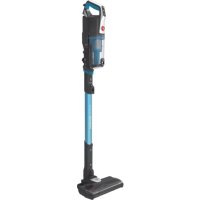
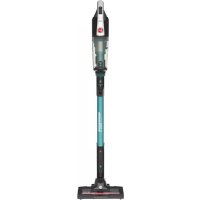
HF522STP 011 - Broom HOOVER - Free user manual and instructions
Find the device manual for free HF522STP 011 HOOVER in PDF.


| Product type | Cordless vacuum mop |
| Brand | Hoover |
| Model | HF522STP 011 (W31) |
| Power supply | Rechargeable lithium-ion battery 4000 mAh, 115 Wh, charging via 100-240 V AC adapter |
| Charging time | Less than 5 hours |
| Runtime | More than 32 minutes |
| Rated power | 250 W |
| Noise level | ≤ 72 dBA |
| Clean water tank capacity | 600 ml |
| Dirty water tank capacity | 550 ml |
| Main functions | Vacuuming, washing, water spraying, two speeds (high/low), self-cleaning and self-drying |
| Brush type | Removable multi-surface cylindrical brush, optional carpet roller brush |
| Display | LED display showing battery level, water shortage alert, self-cleaning/drying status |
| Maintenance | Regular cleaning of dirty water tank, sponge filter, and cylindrical brush |
| Self-cleaning | Yes, with automatic drying function after each use |
| Safety | Anti-overflow float in dirty water tank, automatic shut-off if tank is full, short-circuit protection |
| Included spare parts | Additional sponge filter, cleaning tool, floor cleaning solution |
| Optional accessories | Carpet roller brush |
| Warranty | 24 months |
| Estimated weight | Approximately 4.5 kg |
| Estimated dimensions (L x W x H) | 30 x 25 x 110 cm |
Frequently Asked Questions - HF522STP 011 HOOVER
User questions about HF522STP 011 HOOVER
0 question about this device. Answer the ones you know or ask your own.
Ask a new question about this device
Download the instructions for your Broom in PDF format for free! Find your manual HF522STP 011 - HOOVER and take your electronic device back in hand. On this page are published all the documents necessary for the use of your device. HF522STP 011 by HOOVER.
USER MANUAL HF522STP 011 HOOVER
For FAQs and more information, please visit
www.eufylife.com


natural_image
Illustration of a vacuum cleaner with handle and wheels (no text or symbols)OWNER'S MANUAL
Wet & Dry Vacuum
W31 51005003248 V01
English
Français
Italiano
Español
Nederlands 82
Deutsch
Русский
Türkçe
Table of Contents
02 Important Safety Instructions
07 What's in the Box
08 Overview
09 Assembly
09 Charging
10 Selecting a Voice Prompt Language
11 Adding Water and Floor Cleaner
11 Using the Vacuum
13 LED Screen Guide
13 Carrying with the Handle
14 Maintenance
Clean the Dirty Water Tank and Sponge Filter Clean the Rolling Brush
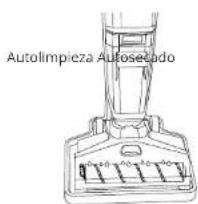
Self-Cleaning and Self-Drying
20 Troubleshooting
20 Specifications
21 Customer Service
Thank you for purchasing this appliance. Carefully read all instructions before using this product, and keep this manual for future reference.
EN 01
Important Safety Instructions

THIS APPLIANCE IS FOR HOUSEHOLD USE ONLY.
- READ ALL INSTRUCTIONS BEFORE USING. Failure to follow the warnings and instructions may result in electric shock, fire and/or serious injury.
• This appliance can be used by children aged from 8 years and above and persons with reduced physical, sensory or mental capabilities or lack of experience and knowledge if they have been given supervision or instruction concerning use of this appliance in a safe way and understand the hazards involved.
• Children should be supervised to ensure they do not play with this appliance. - Not intended to be used as a toy. Close attention is necessary when used by or near children.
- Cleaning and maintenance shall not be performed by children without adult supervision.
• This appliance is only to be used with the power supply unit provided. - Do not soak this appliance in any liquid.
- Keep hair, loose clothing, fingers, and other body parts away from openings and moving parts.
- Do not use with a damaged cord or plug. The damaged power cord should be replaced by a professional technician or the original manufacturer to avoid accidents.
- If the appliance is not working as it should, or has been dropped, damaged, or submerged in water, contact our customer service for advice.
- Have servicing performed by a qualified repair person using only identical replacement parts. This will ensure that the safety of the product is maintained.
- Do not throw this appliance into fire, as the battery may explode
- Do not remove the built-in battery by yourself. The battery should only be replaced by the manufacturer.
• The used battery should be placed in a sealed plastic bag and disposed
02 EN EN 03
of safely according to local environmental regulations.
• The battery must be removed from this appliance before it is disposed of.
- Charge this appliance with the supplied charging base only. Using another charging base may cause fire.
- Recharge only with the adapter (US/CA: OH-1048B3601000U3-UL; UK: OH 1048B3601000U3 UK; EU: OH 1048B3601000U3 VDE; AU: OH-1048B3601000U3-SAA) and the battery pack specified by the manufacturer. Use of any damaged, modified, or any other battery packs and adapters may create a risk of injury and fire.
- Do not unplug the adapter by pulling on the cord. To unplug, grasp the plug, not the cord.
- Do not handle the plug or unplug the adapter with wet hands.
- Do not charge or use this appliance outdoors.
- Avoid electrical short-circuit caused by power outlets or plugs.
- Do not charge, dissemble, burn the discarded battery, or heat above 60°C.
- Before using this appliance, make sure the rolling brush cover is installed correctly to avoid any damage.
- Do not put any object into the openings of the appliance.
- If the opening is blocked, do not use the appliance. Clean up any debris such as hair, soft cloth, and cotton threads from the opening before use, otherwise the suction power will be decreased.
• Take special care when cleaning stairs to avoid injury.
- Do not pick up flammable or combustible liquids, such as gasoline, or use in areas where they may be present.
- Do not pick up toxic substances (such as chlorine bleaching agent, ammonia water, drain cleaner, etc.).
- Do not use in a confined space filled with oil-based paint, mothproof substances, flammable dust, or other explosive and toxic substances.
- Do not pick up hard or sharp objects such as glass, nails, screws, coins, etc.
- Do not pick up anything that is burning or smoking, such as cigarettes, matches, or hot ashes.
- Make sure the sponge filter is installed correctly before using. Do not use without water tank or filters in place.
- Do not store this appliance in a place where it may freeze.
- Do not expose this appliance to rain. Store it indoors.
- Use only as described in this manual. Use only manufacturer recommended attachments.
- Store this appliance on a flat surface.
- Only use the floor cleaner designated by eufy and in a proper ratio. We are not responsible for any damage and injury caused by unauthorized floor cleaners.
- Do not ingest the floor cleaner. If accidentally swallowed, seek professional help or contact a poison control center immediately.
- Under abusive conditions, liquid may leak from the battery; avoid contact. If contact accidentally occurs, flush with water. If liquid comes in contact with the eyes, seek immediate medical help. Leaking liquid from the battery may cause irritation or burns.
- Avoid accidental activation. Before lifting or operating this appliance, make sure that the switch is off. Carrying the appliance with your finger on the switch or energizing appliance that has the switch on invites accidents.
- This appliance includes a rechargeable lithium-ion battery pack. Do not expose the battery pack or appliance to fire or excessive temperatures (above 130ircC ), as it may catch fire and/or explode.
- Charging, using and storing of the appliance should be within a room temperature range of 4-35°C.
- Follow all the charging instructions and do not charge the battery pack out of the temperature range specified in the instructions, otherwise, it may damage the battery and increase the risk of fire.
- Unplug the appliance from the outlet before cleaning or maintaining the appliance.
- Before cleaning, add 2 bottle caps of floor cleaner into a full tank of clean water with a dilution ratio of 1:40.
- Use extra care when cleaning with the rolling brush as a hazard may occur if the appliance runs over the supply cord.
- Do not pull or carry by the cord, use the cord as a handle, close a door on the cord, or pull the cord around sharp edges or corners. Do not run the appliance over the cord. Keep the cord away from heated surfaces.
- Turn off all controls before unplugging.
- Unplug before connecting the main body or charging base.
- Do not modify or attempt to repair the appliance or the battery pack, except as indicated in the instructions for use and care.
SAVE THESE INSTRUCTIONS
04 EN EN 05
Notice
This symbol on the device or its packaging indicates: Do not dispose of electrical appliances as unsorted municipal waste; use separate collection facilities. Contact your local authority for information regarding the collection systems available. If electrical appliances are disposed of in landfills or dumps, hazardous substances can leak into the groundwater and get into the food chain, damaging your health and well-being. When replacing old appliances with new ones, the retailer is legally obliged to take back your old appliance for disposal at least free of charge.
FCC Statement
This device complies with Part 15 of the FCC Rules. Operation is subject to the following two conditions:
(1) This device may not cause harmful interference, and
(2) this device must accept any interference received, including interference that may cause undesired operation.
Warning: Changes or modifications not expressly approved by the party responsible for compliance could void the user's authority to operate the equipment.
Note: This equipment has been tested and found to comply with the limits for a Class B digital device, pursuant to Part 15 of the FCC Rules. These limits are designed to provide reasonable protection against harmful interference in a residential installation.
This equipment generates, uses, and can radiate radio frequency energy and, if not installed and used in accordance with the instructions, may cause harmful interference to radio communications. However, there is no guarantee that interference will not occur in a particular installation. If this equipment does cause harmful interference to radio or television reception, which can be determined by turning the equipment off and on, the user is encouraged to try to correct the interference by one or more of the following measures: (1) Reorient or relocate the receiving antenna. (2) Increase the separation between the equipment and receiver. (3) Connect the equipment into an outlet on a circuit different from that to which the receiver is connected. (4) Consult the dealer or an experienced radio / TV technician for help.
The following importer is the responsible party (for FCC matters only). Company Name: POWER MOBILE LIFE, LLC
Address: 400 108th Ave NE Ste 400, Bellevue, WA 98004-5541 Telephone: +1 (800) 988 7973
ISED Compliance Statement
This device contains licence-exempt transmitter(s)/receiver(s) that comply with Innovation, Science and Economic Development Canada's licence-exempt RSS(s). Operation is subject to the following two conditions:
-
This device may not cause interference.
-
This device must accept any interference, including interference that may cause undesired operation of the device.
EU Declaration of Conformity
Hereby, Anker Innovations Limited declares that the product type W31 is in compliance with Directives 2014/35/EU & 2014/30/EU.
The full text of the EU declaration of conformity is available at the following internet address: https://www.eufylife.com/
GB Declaration of Conformity
Hereby, Anker Innovations Limited declares that the product type W31 is in compliance with Electrical Equipment (Safety) Regulations 2016 & Electromagnetic Compatibility Regulations 2016 & The Restriction of the Use of Certain Hazardous Substances in Electrical and Electronic Equipment Regulations 2012 & The Ecodesign for Energy-Related Products Regulations 2010. The full text of the GB declaration of conformity is available at the following internet address:
https://www.eufylife.com/
The following importer is the responsible party (contract for EU and UK matters)
Anker Technology (UK) Limited
GNR8, 49 Clarendon Road, Watford, Hertfordshire, WD17 1HP, United Kingdom
Anker Innovations Limited
Room 1318-19, Hollywood Plaza, 610 Nathan Road, Mongkok, Kowloon, Hong Kong
06 EN EN 07
What's in the Box
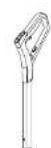
Handle bar
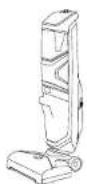
Main body (with a multi surface rolling brush ® inside)
* For hard floor cleaning

Charging base

Cleaning too

Floor cleaner

Additional filter

Carpet rolling brush (optional, for carpet / rug cleaning)

Overview


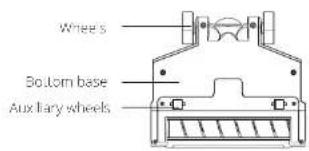
08 EN EN 09
Assembly
The vacuum consists of three parts: handle bar, main body, and charging base. After unpacking, install the vacuum as illustrated.

Charging
The vacuum is powered by a lithium-ion battery. Before first use, charge the battery for more than 5 hours.
-
Install the vacuum onto the charging base.
-
Connect the adapter to a power outlet. The LED display lights up, indicating that the vacuum is ready for charge.

Selecting a Voice Prompt Language
- Gently step on the foot pedal and push the handle bar backward until you hear a click.
- Press and hold the water spray button with one hand, then hold the self-cleaning button with the other hand to enter the language selection mode.
- Press the water spray button repeatedly to select from the available languages.
- When you hear the desired language, press the speed control button to confirm. The selected language will be saved.
Adjust Volume
Press and hold the self-cleaning button for 3 seconds to adjust the volume level or turn off the voice prompts.

Adding Water and Floor Cleaner
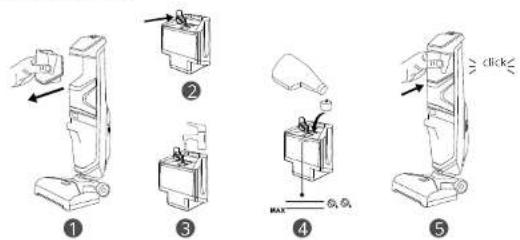
- Remove the clean water tank from the main body.
- Open the rubber cover.
- Add water until it reaches the MAX water line.
- Add 2 bottle caps of floor cleaner into the water tank, then close the rubber cover.
- Place the water tank back into the body.

Do not add too much cleaner. Use the floor cleaner designated by eufy only. Use with any other cleaner may cause severe damage to the vacuum.
- Do not also hot water into the water tank
- Do not put the water tank into a microwave for heating.
• Do not add floor cleaner with too much foam as it will cause false alarms.
10 EN EN 11
Using the Vacuum
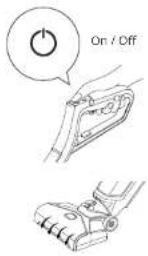
- Gently step on the foot pedal and push the handle bar backward until you hear a click.
- Press the power button. The rolling brush will begin to rotate.

natural_image
Line drawing of a hand using an electric vacuum cleaner to lift a power strip (no text or symbols present)1
②
- Press the speed control button to select a rotation speed: High / Low.
- Press and then release the water spray button. Water and floor cleaner will spray onto the rolling brush.

- It is not recommended to use the water spray function when cleaning your carpets.
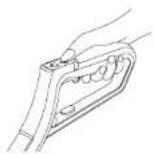
- After cleaning, push the handle bar forward until you hear a click. The vacuum will automatically turn off and you will hear the corresponding voice prompt.


3
12 EN EN 13
- Place the vacuum onto the charging base to charge, and then start self-cleaning and self-drying (see the Maintenance section).

• To prevent unpleasant smells, clean the dirty water tank after each use (see the Maintenance section).
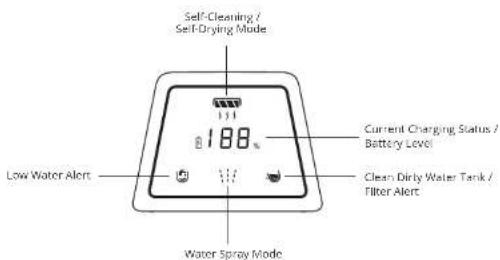
LED Screen Guide
The LED screen will show you the working status of this vacuum.
Carrying with the Handle
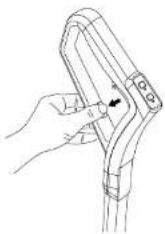
We recommend moving and carrying the vacuum by lifting it by the specially designed, ergonomic handle, instead of the handlebar, to avoid damage.

Maintenance
Clean the Dirty Water Tank and Sponge Filter

The floater is what prevents the dirty water tank from overflowing. When the dirty water tank is full, the floater will shut off your suction motor and produce a loud sound, indicating that the tank needs to be cleaned.

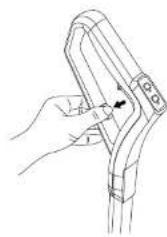
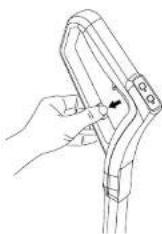
- Press the release button and hold the handle as illustrated.
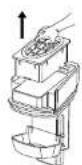
- Pull out the dirty water tank.
- Remove the filter component. Empty the dust and dirty water.

1

●

●
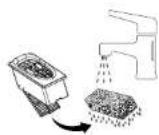
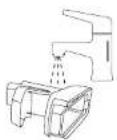
- Rinse the water tank thoroughly with water. Do not use hard material tools to clean or rub the inner part of the water tank as it may damage the protective layer.
- Remove the filter cover.
- Remove and clean the sponge filter.
14 EN EN 15

4

●
[NO TEXT]
- Clean the filter component with water or mild detergent.
- Clean the floater and top container as illustrated.
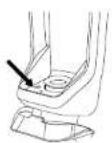
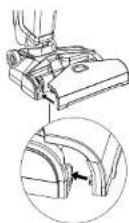
- If there is any debris around the area as illustrated, clean with a cloth or towel.

7
●
The image is too blurry to recognize any text content.
- Make sure to completely air dry all the components.
- Reassemble these components.

10

11

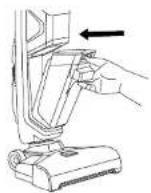
- Reassemble the dirty water tank.
- Place the dirty water tank back into the main body.

12
The image is too blurry to recognize any text content.


Make sure the dirty water tank has been cleaned and all the components are completely dry before use.
Clean the Rolling Brush

Before removing the rolling brush cover, make sure the vacuum has been turned off.
- Pull out to open the rolling brush cover.
- Lift the rolling brush to remove.
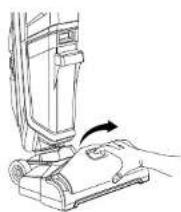
1

2
16 EN EN 17
- Clean the rolling brush with the supplied cleaning tool.

natural_image
Line drawing of a cleaning brush inside a hooded frame (no text or symbols)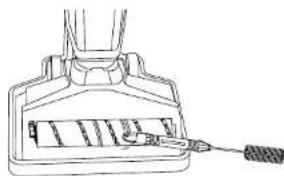
natural_image
Technical line drawing of a mechanical component with a tool inserted (no text or symbols)-
To reinstall the rolling brush, insert the end of the rolling brush into one side of the head, then fix the pin of the rolling brush into the hole on the other side of the head. Make sure the rolling brush is installed properly, otherwise it may be damaged during use.
-
Reinstall the rolling brush cover.

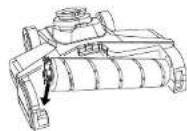
4
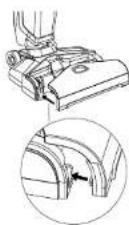

5
Self-Cleaning and Self-Drying
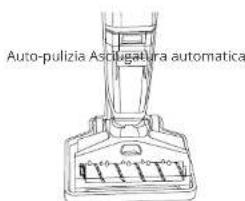
- After cleaning, place the vacuum onto the charging base.
- Make sure the battery level is high and there is enough water in the clean water tank.
- Press the self-cleaning button. The vacuum will start self-cleaning and will self-dry automatically. It will take a while and you will hear a voice prompt when the self-drying is complete.

natural_image
Diagram of a vacuum cleaner with a downward arrow indicating motion, showing mechanical components and wiring (no text or symbols)1

2

3

4
18 EN EN 19
Troubleshooting
Vacuum is not working normally:
-
Make sure the battery is fully charged.
-
Make sure the handle bar has been pushed backward and you have heard a click before use.
-
Check if the rolling brush is stuck.
-
If the self-cleaning is not working due to low battery, charge for 5 minutes before restarting the self clean.
Suction power is decreased or there is a loud noise:
- Check if any objects are stuck in the opening.
- Check if the dirty water tank is properly installed.
- Check if the dirty water tank and sponge filter are clean.
Specifications
| Model | W31 |
| Charging voltage | AC 100-240 V |
| Rated Power | 250 W |
| Battery life | >32 minutes |
| Battery energy | 115 Wh |
| Battery capacity | 4000 mAh |
| Charging Time | <5 hours |
| Noise | ≤72 cBA |
| Clean water tank capacity | 600 mL |
| Dirty water tank capacity | 550 mL |
Customer Service
For tutorial videos, FAQs, manuals, and more information,
please visit: https://support.eufylife.com/
Warranty: 24-month limited warranty

support@eufylife.com

www.eufylife.com

(US) +1 (800) 988 7973
Mon-Sat 6:15 AM - 6:45 PM (PT);
Sun 6:15 AM - 5:45 PM (PT)
(UK) +44 (0) 1604 936200 Mon-Sun 6:00 - 19:00
(DE) +49 (0) 69 9579 7960 Mo-Fr 8:00 - 16:00;
Sa 9:00 - 16:00
For more support phone numbers, please visit:
https://support.eufylife.com/s/phonecontactus
Or scan the QR code below:


@EufyOfficial

@EufyOfficial

@EufyOfficial

@EufyOfficial
Sommaire
natural_image
Line drawing of a cleaning brush inside a container with a handle (no text or symbols)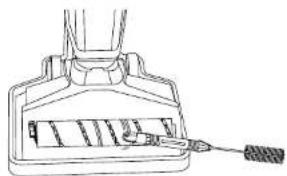
natural_image
Technical line drawing of a mechanical component with a handle and internal structure (no text or symbols)natural_image
Diagram showing a vacuum cleaner above a base with an attached cable, no text or symbols present1

2

3

4
38 FR FR 39
Dépannage
support@eufylife.com

www.eufylife.com

(US) +1 (800) 988 7973 Mon-Sat 6:15 AM - 6:45 PM (PT);
Sun 6:15 AM - 5:45 PM (PT)
(UK) +44 (0) 1604 936200 Mon-Sun 6:00 - 19:00
(DE) +49 (0) 69 9579 7960 Mo-Fr 8:00 - 16:00;
Sa 9:00 - 16:00
https://support.eufylife.com/s/phonecontactus
Indice
52 IT IT 53
The image is too blurry to recognize any text content.

[NO TEXT]
natural_image
Line drawing of a cleaning brush applying paint to a surface (no text or symbols)
natural_image
Technical line drawing of a mechanical component with a tool inserted (no text or symbols)natural_image
Diagram showing a device with a downward arrow and a separate mechanical component with an arrow (no text or symbols)1
2
3

4
58 IT IT 59
support@eufylife.com

www.eufylife.com

(US) +1 (800) 988 7973 Mon-Sat 6:15 AM - 6:45 PM (PT); Sun 6:15 AM - 5:45 PM (PT)
(UK) +44 (0) 1604 936200 Mon-Sun 6:00 - 19:00
(DE) +49 (0) 69 9579 7960 Mo-Fr 8:00 - 16:00;
Sa 9:00 - 16:00
https://support.eufylife.com/s/phonecontactus
f @EufyOfficial @EufyOfficial @EufyOfficial @EufyOfficial
Índice

The image is too blurry to recognize any text content.

The image is too blurry to recognize any text content.


natural_image
Line drawing of a cleaning brush applying paint to a surface (no text or symbols)
natural_image
Technical line drawing of a mechanical component with a tool inserted (no text or symbols)natural_image
Diagram of a vacuum cleaner with attached circuit board and power outlet (no text or symbols)1

2
support@eufylife.com

www.eufylife.com

(US) +1 (800) 988 7973 Mon-Sat 6:15 AM - 6:45 PM (PT); Sun 6:15 AM - 5:45 PM (PT)
(UK) +44 (0) 1604 936200 Mon-Sun 6:00 - 19:00
(DE) +49 (0) 69 9579 7960 Mo-Fr 8:00 - 16:00;
5a 9:00 - 16:00
https://support.eufylife.com/s/phonecontactus
f @EufyOfficial @EufyOfficial @EufyOfficial @EufyOfficial
Inhoudsopgave
natural_image
Line drawing of a mechanical component with a tool inserted into a slot (no text or symbols)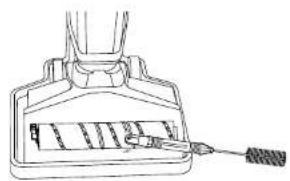
natural_image
Line drawing of a mechanical component with a spring attached (no text or symbols)natural_image
Diagram showing a device with a downward arrow and a separate mechanical component with an arrow (no text or symbols)1
natural_image
Line drawing of a hand holding a tool or device with an arrow indicating rotation (no text or symbols present)2

support@eufylife.com

www.eufylife.com

(US) +1 (800) 988 7973
Mon-Sat 6:15 AM - 6:45 PM (PT);
Sun 6:15 AM - 5:45 PM (PT)
(UK) +44 (0) 1604 936200 Mon-Sun 6:00 - 19:00
(DE) +49 (0) 69 9579 7960 Mo-Fr 8:00 - 16:00;
Sa 9:00 - 16:00
https://support.eufylife.com/s/phonecontactus
Of scan onderstaande QR code:


@EufyOfficial

@EufyOfficial

@EufyOfficial

@EufyOfficial
Inhaltsverzeichnis
natural_image
Line drawing of a person using a vacuum cleaner with a hand and arrow indicating motion (no text or symbols)1

②
natural_image
Line drawing of a cleaning brush inside a container with a brush tip (no text or symbols)
natural_image
Technical line drawing of a mechanical component with a tool inserted (no text or symbols)natural_image
Technical line drawing of a mechanical component with two views (top and side), no text or symbols present.4

5
natural_image
Diagram showing a vacuum cleaner's internal structure being connected to a cable via a plug (no text or symbols present)1
2

support@eufylife.com

www.cufylife.com

(US) +1 (800) 988 7973 Mon-Sat 6:15 AM - 6:45 PM (PT); Sun 6:15 AM - 5:45 PM (PT)
(UK) +44 (0) 1604 936200 Mon-Sun 6:00 - 19:00
(DE) +49 (0) 69 9579 7960 Mo-Fr 8:00 - 16:00;
Sa 9:00 - 16:00
(日本)0344557823月·金9:00-17:00
https://support.eufylife.com/s/phonecontactus
@EufyOfficial @EufyOfficial @EufyOfficial @EufyOfficial
120 DE DE 121
Содержание
130 RU RU 131
natural_image
Line drawing of a hand holding a vacuum cleaner next to a device, showing a change in motion (no text or symbols)①

natural_image
Line drawing of a cleaning brush applying paint to a surface (no text or symbols)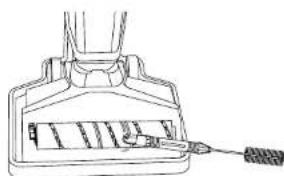
natural_image
Line drawing of a mechanical component with a tool inserted, no text or symbols presentnatural_image
Diagram showing a vacuum cleaner performing a lift operation with a separate clamp device (no text or symbols present)1

2

support@eufylife.com
www.eufyllife.com
(US) +1 (800) 988 7973 Mon-Sat 6:15 AM - 6:45 PM (PT); Sun 6:15 AM - 5:45 PM (PT)
(UK) +44 (0) 1604 936200 Mon-Sun 6:00 - 19:00
(DE) +49 (0) 69 9579 7960 Mo-Fr 8:00 - 16:00;
Sa 9:00 - 16:00
152 TR TR 153
156 TR TR 157

The image is too blurry to recognize any text content.

●
natural_image
Line drawing of a cleaning brush applying paint to a surface (no text or symbols)
natural_image
Line drawing of a mechanical component with a tool inserted, no text or symbols presentnatural_image
Diagram showing a device with a cable being inserted into a base, indicated by an arrow (no text or symbols present)1

natural_image
Line drawing of a hand holding a tool or device with a circular arrow indicating motion (no text or symbols)2

support@eufylife.com

www.cufylife.com

(US) +1 (800) 988 7973 Mon-Sat 6:15 AM - 6:45 PM (PT);
Sun 6:15 AM - 5:45 PM (PT)
(UK) +44 (0) 1604 936200 Mon Sun 6:00 19:00
(DE) +49 (0) 69 9579 7960 Mo Fr 8:00 16:00;
Sa 9:00 - 16:00
(TR) +90 850 460 14 14 Pzt-Cuma 09:00-18:00
(日本)0344557823月-金9:00-17:00


- Table of Contents
- Important Safety Instructions
- THIS APPLIANCE IS FOR HOUSEHOLD USE ONLY.
- SAVE THESE INSTRUCTIONS
- Notice
- FCC Statement
- ISED Compliance Statement
- EU Declaration of Conformity
- GB Declaration of Conformity
- What's in the Box
- Overview
- Assembly
- Charging
- Selecting a Voice Prompt Language
- Adjust Volume
- Adding Water and Floor Cleaner
- Using the Vacuum
- LED Screen Guide
- Carrying with the Handle
- Maintenance
- Clean the Rolling Brush
- Self-Cleaning and Self-Drying
- Troubleshooting
- Vacuum is not working normally:
- Suction power is decreased or there is a loud noise:
- Customer Service
- https://support.eufylife.com/s/phonecontactus
- Sommaire
- Dépannage
- Indice
- Índice
- Inhoudsopgave
- Inhaltsverzeichnis
- Содержание
Brand : HOOVER
Model : HF522STP 011
Category : Broom