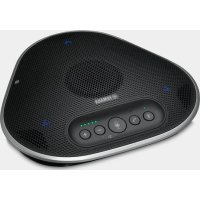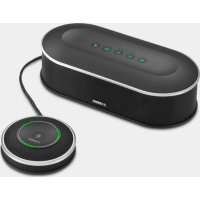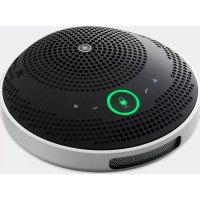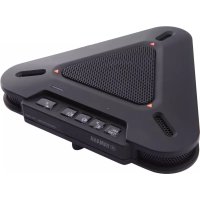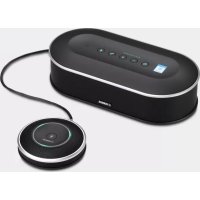
YVC1000MS - Phone YAMAHA - Free user manual and instructions
Find the device manual for free YVC1000MS YAMAHA in PDF.



| Product Type | Integrated speaker and microphone system for unified communications |
| Brand | YAMAHA |
| Model | YVC-1000MS |
| Control unit dimensions (W x H x D) | 332 x 95 x 162 mm |
| Control unit weight | 1.8 kg |
| Microphone dimensions (W x H x D) | 136 x 36 x 136 mm |
| Microphone weight | 0.4 kg |
| Power supply | US and Canada models: AC 120 V (60 Hz); Japan model: AC 100 V (50/60 Hz); China model: AC 220 V (50 Hz); Korea model: AC 110/220 V (60 Hz); UK, Europe and Russia models: AC 220-240 V (50 Hz) |
| Power consumption (max) | 20 W (1 microphone connected), 35 W (5 microphones connected) |
| Interfaces | USB 2.0 high speed, Bluetooth, NFC, audio inputs (stereo RCA), audio outputs (stereo RCA), external speaker terminals (RCA) x 2, microphone terminal |
| Microphone | Unidirectional x 3 |
| Speaker | Wideband x 1 |
| Frequency band (capture and reproduction) | 100 to 20,000 Hz |
| Signal processing | Adaptive echo suppression, noise reduction, automatic tracking, automatic gain control, automatic room equalizer, dereverberation, automatic audio frequency adjustment |
| Voice guide languages | English, Japanese, Chinese, Korean, French, Spanish, German |
| Main functions | Microphone mute, volume adjustment, call/answer via Skype for Business, Bluetooth pairing, NFC connection, firmware update |
| Maintenance and cleaning | Clean with a dry cloth only; do not expose to water; regularly dust the power plug |
| Safety | Use at least 22 cm away from a pacemaker; do not open the device; unplug during storms; follow safety instructions in the manual |
| Spare parts and repairability | Repair by qualified personnel only; contact dealer for inspections |
| Warranty | Warranty covers product repairs; see conditions on Yamaha website for EEA and Switzerland |
Frequently Asked Questions - YVC1000MS YAMAHA
User questions about YVC1000MS YAMAHA
0 question about this device. Answer the ones you know or ask your own.
Ask a new question about this device
Download the instructions for your Phone in PDF format for free! Find your manual YVC1000MS - YAMAHA and take your electronic device back in hand. On this page are published all the documents necessary for the use of your device. YVC1000MS by YAMAHA.
USER MANUAL YVC1000MS YAMAHA
Unified Communications Microphone & Speaker System
YVC-1000MS
natural_image
Exterior view of a black YAMAHA audio device with a connected earbuds (no text or symbols visible)Quick Start Guide
Update the firmware and use the latest features.
Please also refer to the user's manual that provides detailed information on how to use this product.
You can download the latest firmware and user's manual from the following website:
https://uc.yamaha.com/resources/support/
https://sound-solution.yamaha.com/download/
请更新固件以使用最新功能。
https://www.yamaha.com/products/zh/communication/support/
Contents
IMPORTANT SAFETY INSTRUCTIONS ......2
Safety Precautions ....3
Precautions for Use ....5
About Bluetooth ^® ....5
Locations of name plates ....6
Introduction ....7
Check the contents 7
About this manual ....7
Please read other instruction manuals as well as this manual ....8
Using the Latest Features ....8
Use of open-source software 8
Controls and Functions ......9
Control Unit (YVC-CTU1000) 9
Control Unit (YVC-CTU1000): Back .....10
Control Unit (YVC-CTU1000): Bottom .....10
Microphone (YVC-MIC1000) 11
Microphone (YVC-MIC1000): Side ....11
Microphone (YVC-MIC1000): Bottom .....12
Setting up for use 13
Installation 13
Connecting the microphone and power cables ..... 14
Changing the setting 14
Changing the language of the voice guidance ..... 14
Connecting to communication equipment ...... 15
Connecting to a PC or Mac using the USB cable ... 15
Connecting to a video conference system using audio cables 15
Connecting to a smartphone or tablet via Bluetooth 16
Specifications 17
General 17
Audio 18
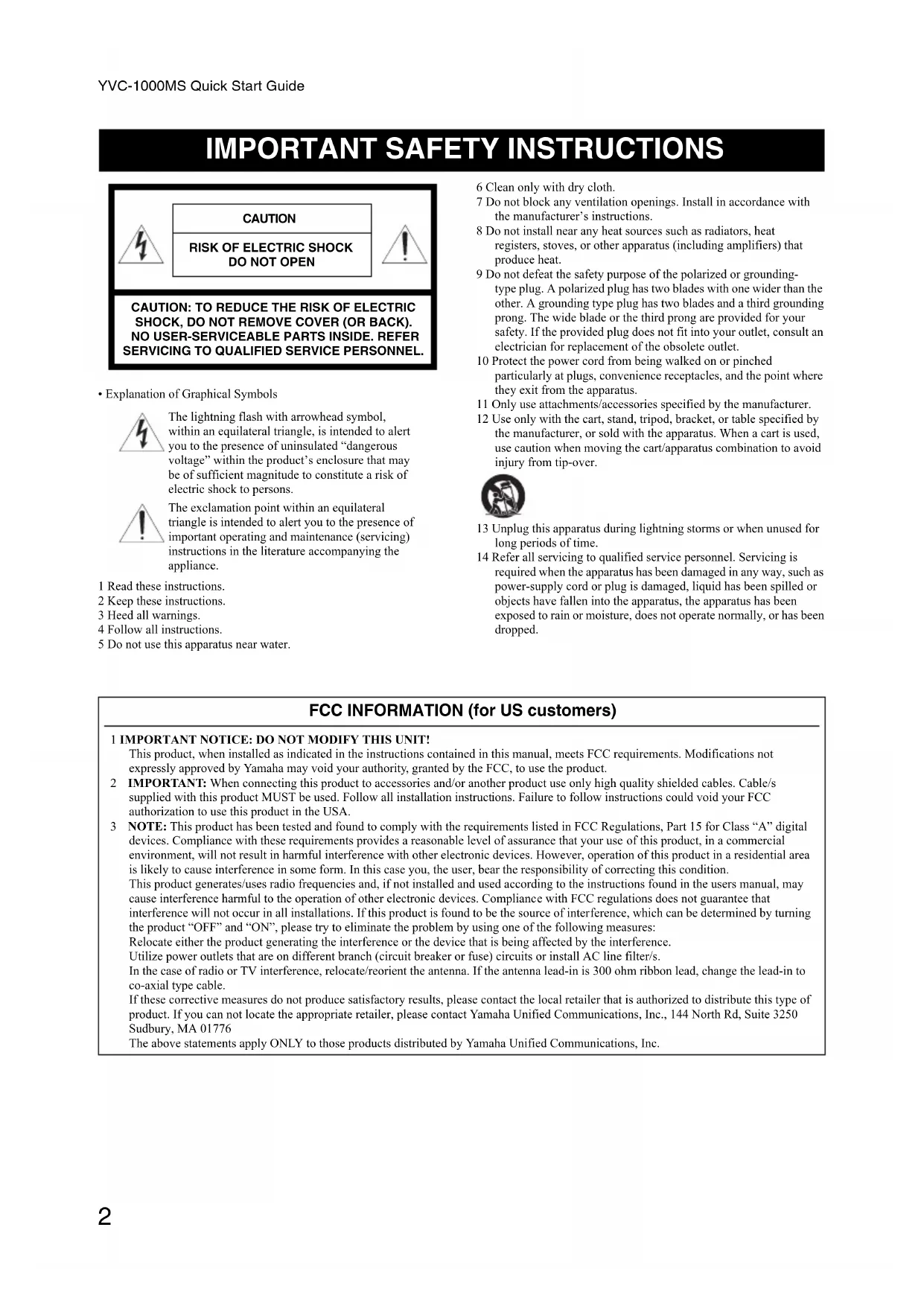
IMPORTANT SAFETY INSTRUCTIONS

CAUTION
RISK OF ELECTRIC SHOCK DO NOT OPEN

CAUTION: TO REDUCE THE RISK OF ELECTRIC SHOCK, DO NOT REMOVE COVER (OR BACK). NO USER-SERVICEABLE PARTS INSIDE. REFER SERVICING TO QUALIFIED SERVICE PERSONNEL.
- Explanation of Graphical Symbols

The lightning flash with arrowhead symbol, within an equilateral triangle, is intended to alert you to the presence of uninsulated “dangerous voltage” within the product’s enclosure that may be of sufficient magnitude to constitute a risk of electric shock to persons.

The exclamation point within an equilateral triangle is intended to alert you to the presence of important operating and maintenance (servicing) instructions in the literature accompanying the appliance.
1 Read these instructions.
2 Keep these instructions.
3 Heed all warnings.
4 Follow all instructions.
5 Do not use this apparatus near water.
6 Clean only with dry cloth.
7 Do not block any ventilation openings. Install in accordance with the manufacturer's instructions.
8 Do not install near any heat sources such as radiators, heat registers, stoves, or other apparatus (including amplifiers) that produce heat.
9 Do not defeat the safety purpose of the polarized or grounding-type plug. A polarized plug has two blades with one wider than the other. A grounding type plug has two blades and a third grounding prong. The wide blade or the third prong are provided for your safety. If the provided plug does not fit into your outlet, consult an electrician for replacement of the obsolete outlet.
10 Protect the power cord from being walked on or pinched particularly at plugs, convenience receptacles, and the point where they exit from the apparatus.
11 Only use attachments/accessories specified by the manufacturer.
12 Use only with the cart, stand, tripod, bracket, or table specified by the manufacturer, or sold with the apparatus. When a cart is used, use caution when moving the cart/apparatus combination to avoid injury from tip-over.

13 Unplug this apparatus during lightning storms or when unused for long periods of time.
14 Refer all servicing to qualified service personnel. Servicing is required when the apparatus has been damaged in any way, such as power-supply cord or plug is damaged, liquid has been spilled or objects have fallen into the apparatus, the apparatus has been exposed to rain or moisture, does not operate normally, or has been dropped.
FCC INFORMATION (for US customers)
1 IMPORTANT NOTICE: DO NOT MODIFY THIS UNIT!
This product, when installed as indicated in the instructions contained in this manual, meets FCC requirements. Modifications not expressly approved by Yamaha may void your authority, granted by the FCC, to use the product.
2 IMPORTANT: When connecting this product to accessories and/or another product use only high quality shielded cables. Cable/s supplied with this product MUST be used. Follow all installation instructions. Failure to follow instructions could void your FCC authorization to use this product in the USA.
3 NOTE: This product has been tested and found to comply with the requirements listed in FCC Regulations, Part 15 for Class "A" digital devices. Compliance with these requirements provides a reasonable level of assurance that your use of this product, in a commercial environment, will not result in harmful interference with other electronic devices. However, operation of this product in a residential area is likely to cause interference in some form. In this case you, the user, bear the responsibility of correcting this condition.
This product generates/uses radio frequencies and, if not installed and used according to the instructions found in the users manual, may cause interference harmful to the operation of other electronic devices. Compliance with FCC regulations does not guarantee that interference will not occur in all installations. If this product is found to be the source of interference, which can be determined by turning the product "OFF" and "ON", please try to eliminate the problem by using one of the following measures:
Relocate either the product generating the interference or the device that is being affected by the interference.
Utilize power outlets that are on different branch (circuit breaker or fuse) circuits or install AC line filter/s.
In the case of radio or TV interference, relocate/reorient the antenna. If the antenna lead-in is 300 ohm ribbon lead, change the lead-in to co-axial type cable.
If these corrective measures do not produce satisfactory results, please contact the local retailer that is authorized to distribute this type of product. If you can not locate the appropriate retailer, please contact Yamaha Unified Communications, Inc., 144 North Rd, Suite 3250 Sudbury, MA 01776
The above statements apply ONLY to those products distributed by Yamaha Unified Communications, Inc.
Safety Precautions
1 Please ensure to immediately remove the power plug from the outlet in any of the following cases.
Failure to observe this may result in fire or an electric shock. Please ensure to request the dealer concerned to carry out any necessary repairs or inspections.
- Any abnormal odor or noise occurs;
- Smoke is emitted;
• The product is broken; or
• The product has been exposed to water.
2 Ensure not to damage the power cable. Failure to observe this could result in fire, electric shock, or damage to the product.
- Ensure not to place any heavy objects on the cable.
- Ensure not to process the cable in any way.
- Ensure not use any staples to fix the cable in place.
- Ensure not to apply excessive force to the cable.
- Ensure to keep the cable away from anything hot.
3 Ensure to only use the included power cable. Failure to observe this could result in fire, electric shock, or damage to the product.
4 Ensure to only use the specified power supply voltage. Failure to observe this could result in fire, electric shock, or damage to the product.
5 Connect the power plug to an outlet that you can see and reach in thereby ensuring that you can easily remove it if the necessity arises.
6 Ensure to fully and securely insert the power plug into the outlet. Being insufficiently inserted could result in an electric shock. It could also lead to dust accumulating on the plug, which could then result in heat or fire.
7 Verify that the current capacity of the outlet or a power strip in thereby ensuring that use of the product does not exceed it. Any overheating or degradation of the power strip could result in fire.
8 Do not touch the terminals with your fingers or metal objects. Failure to observe this may result in electric shock or damage to the product.
9 Ensure the product does not fall or strongly impacted. The internal parts could break, which could then result in electric shock, fire, or damage to the product.
10 If the product has been damaged, request repair or inspection services from a dealer.
Continued use of the product may result in fire or electric shock.
11 Do not disassemble or alter this product in any way.
Failure to observe this could result in fire, electric shock, or damage to the product.
12 Do not obstruct heat dissipation.
- Do not place a cloth, tablecloth or other such object over the product.
- Do not place the product on top of a rug, carpet, etc.
- Do not wedge or squeeze the product into a narrow space that has poor air circulation.
- Do not block the ventilation holes.
Allow ventilation space of at least 1 cm on the top, 1 cm on the left and right, and 5 cm on the back of this product.
Failure to observe the above may result in heat being trapped inside the product and cause a fire or damage to the product.
13 Do not place the product outdoors or in a location where water may drip on it.
Failure to observe this may result in fire, electric shock or damage to the product.
14 Do not install the product anywhere it will be exposed to dust or humidity, oily smoke or steam, or corrosive gas. Failure to observe this could result in fire, electric shock, or damage to the product.
15 Ensure that the product is on the level.
Do not place it upside down or in a vertical orientation. Failure to observe this may result in fire, electric shock or damage to the product.
16 Avoid installing the product where foreign object may fall onto the product and/or the product may be exposed to liquid dripping or splashing. On the top of the product, do not place:
- Other components, as they may cause damage and/or discoloration on the surface of the product.
- Burning objects (i.e. candles), as they may cause fire, damage to the product, and/or personal injury.
- Containers with liquid in them, as they may fall and liquid may cause electrical shock to the user and/or damage to the product.
17 Do not insert foreign objects such as metal or paper in the product. Failure to observe this may result in fire, electric shock or damage to the product.
18 If thunder is heard, avoid touching the product.
Failure to observe this may result in electric shock.
19 Periodically remove any dirt and dust from the power plug. Failure to observe this could result in fire.
20 The product should be used at least 22 cm away from persons using a pacemaker, defibrillator, or similar device. Failure to observe this may affect the pacemaker, resulting in a serious accident.
21 Do not use this product near medical equipment. Radio waves from this product may adversely affect the operation of electro-medical equipment. Do not use this product in locations where use of radio waves is restricted, such as near medical equipment.
22 Avoid damaging the USB and microphone cables.
- Do not place heavy objects on cables.
- Do not modify cables.
- Do not affix cables using staples.
- Do not apply unnecessary force to cables.
- Do not place cables near heat sources.
Doing so may result in fire, electric shock or damage to the product.
23 Be sure to use the USB and microphone cables that come with the product.
Using other USB or microphone cables may result in fire, electric shock, or damage to the product.
24 When this product is not used for a long period of time, be sure to unplug all power plugs.
Failure to observe this may result in fire or electric shock.
25 Ensure your hands are dry when connecting or disconnecting the power plug or cables.
Failure to observe this may result in electric shock or damage to the product.
26 Ensure not to install the product anywhere unstable or where it will be exposed to vibrations as it could fall over or turn upside down, thus resulting in injury or damage to the product.
27 Ensure not to install the product anywhere it will be exposed to direct sunlight or extraordinarily high temperatures (near a heater, etc.). Failure to observe this could result in damage to the product.
28 Do not sit/stand on the product or place other objects on top of it. Failure to observe this may result in damage to the product.
29 Turn the volume down to the minimum level before starting playback.
Failure to observe this will cause loud noises to be emitted that may result in hearing impairment.
30 Ensure not to use the product anywhere it will be exposed to rapid changes in the ambient temperature. Any rapid change in the ambient temperature could result in condensation on the product, which could then result in damage to the product. Ensure to leave the product for a while until it has dried off with the power turned off if any condensation has occurred.
31 Ensure not to connect any cables while the power is turned on. Failure to observe this could result in damage to the product and any connected equipment.
32 Ensure to earth any static electricity from your body or clothing before touching the product. Failure to observe this could result in damage to the product.
33 Route and connect the cables correctly. If the cables are pulled or become caught on someone's leg, the product or connected equipment could tip over or fall, thus resulting in injury or damage to the product.
34 Before connecting external equipment, thoroughly read the instruction manuals provided with the equipment and make connections according to the instructions.
This unit is not disconnected from the AC power source as long as it is connected to the AC wall outlet, even if this unit itself is turned off. This state is called the standby mode. In this state, this unit is designed to consume a very small quantity of power.
WARNING
TO REDUCE THE RISK OF FIRE OR ELECTRIC SHOCK, DO NOT EXPOSE THIS APPARATUS TO RAIN OR MOISTURE.
WARNING
This is a class A product. In a domestic environment this product may cause radio interference in which case the user may be required to take adequate measures.
Precautions for Use
- This product is intended for use in general offices and is not designed for use in any fields requiring a high degree of reliability in the handling of human lives or valuable assets.
- Please note that Yamaha cannot assume any responsibility for any damage resulting from improper use or configuration of the product.
- Depending on the usage environment, this product may generate noise in a telephone, radio, television etc. If this occurs, change the location where it is installed or its orientation.
- If you transfer this product to a third party, please pass this manual and accessories along with it.
- Ensure to follow the instructions of your local government when disposing of the product.
- Do not connect any equipment that generates any noise on the same power line as the product.
This device complies with part 15 of FCC Rules and Industry Canada's licence-exempt RSSs. Operation is subject to the following two conditions: (1) this device may not cause harmful interference, and (2) this device must accept any interference received, including interference that may cause undesired operation.
This transmitter must not be co-located or operated in conjunction with any other antenna or transmitter.
This equipment complies with FCC/IC radiation exposure limits set forth for an uncontrolled environment and meets the FCC radio frequency (RF) Exposure Guidelines and RSS-102 of the IC radio frequency (RF) Exposure rules. This equipment has very low levels of RF energy that it deemed to comply without maximum permissive exposure evaluation (MPE). But it is desirable that it should be installed and operated keeping the radiator at least 20 cm or more away from person's body.
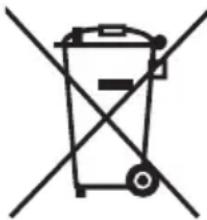
Information for users on collection and disposal of old equipment:
natural_image
Simple line drawing of a trash bin with two crossed lines indicating no waste or prohibition (no text or symbols)
This symbol on the products, packaging, and/or accompanying documents means that used electrical and electronic products should not be mixed with general household waste.
For proper treatment, recovery and recycling of old products, please take them to applicable collection points, in accordance with your national legislation.
By disposing of these products correctly, you will help to save valuable resources and prevent any potential negative effects on human health and the environment which could otherwise arise from inappropriate waste handling.
For more information about collection and recycling of old products, please contact your local municipality, your waste disposal service or the point of sale where you purchased the items.
For business users in the European Union:
If you wish to discard electrical and electronic equipment, please contact your dealer or supplier for further information.
Information on Disposal in other Countries outside the European Union:
This symbol is only valid in the European Union. If you wish to discard these items, please contact your local authorities or dealer and ask for the correct method of disposal.
About Bluetooth®
- Bluetooth is a technology for wireless communication employing the 2.4 GHz frequency band, a band which can be used without a license.
- The 2.4 GHz band used by Bluetooth compatible devices is a radio band shared by many types of equipment. While Bluetooth compatible devices use a technology minimizing the influence of other components using the same radio band, such influence may reduce the speed or distance of communications and in some cases interrupt communications.
- The speed of signal transfer and the distance at which communication is possible differs according to the distance between the communicating devices, the presence of obstacles, radio wave conditions and the type of equipment.
- Yamaha does not guarantee all wireless connections between this product and devices compatible with Bluetooth function.
Locations of name plates
The name plates are placed on the bottom of the Control Unit and the microphone.
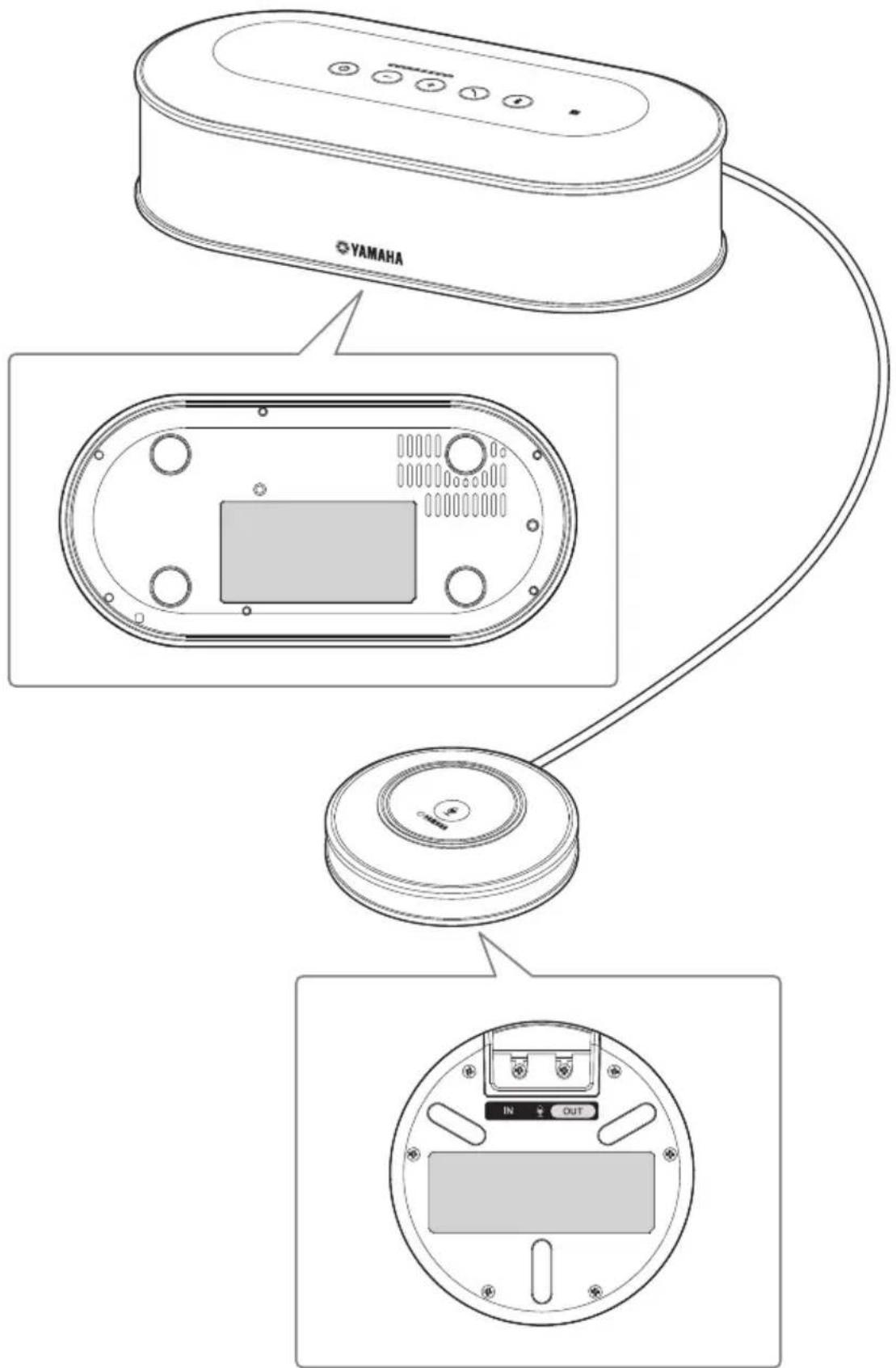
Introduction
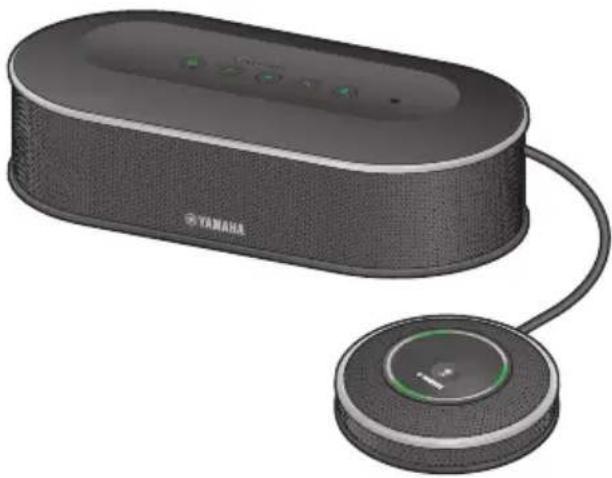
Thank you for purchasing a Yamaha YVC-1000MS. The YVC-1000MS is a unified communications microphone and speaker system that serves as an audio terminal when connected to communication equipment, such as a PC or a Mac, a smartphone or tablet, and a video conference system.
Please thoroughly read this manual before installing and connecting the product.
Keep this manual in a safe place for future reference.
- No part of this manual may be copied or used in any form without permission of Yamaha.
- The contents of this manual apply to the latest specifications as of the publishing date. To obtain the latest manual, access the following website then download the manual file. https://uc.yamaha.com/resources/support/
- Yamaha is not liable for any loss or damage to data resulting from use of the product. Please note that the warranty covers repair of the product only.
Check the contents
• Control Unit (YVC-CTU1000) x 1
- Microphone (YVC-MIC1000) x 1
• Power cable (3 m) x 1
- USB cable (5 m) x 1
- Microphone cable (5 m) x 1
- Quick Start Guide (this manual) x 1
About this manual
■About abbreviations
In this manual, the product names are described as follows.
- Yamaha YVC-1000MS: the product
- Microsoft ^ Windows ^ : Windows
- macOS ^ : macOS
■About trademarks
- Microsoft and Windows are registered trademarks of Microsoft Corporation in the United States and other countries.
• Mac and macOS are registered trademarks of Apple Inc. - Android ^TM is a trademark or registered trademark of Google Inc.
- Bluetooth ^ is a registered trademark of the Bluetooth SIG and is used by Yamaha in accordance with a license agreement.
- NFC logo (N-Mark) is a trademark or registered trademark of NFC Forum, Inc.
Please read other instruction manuals as well as this manual
This manual contains fundamental information only.
For detailed information on how to use the product, please read the following:
User's manual: Contains information about utilizing the product, including detailed settings and useful features.
Please download the latest user's manual from the download page of our website.
To configure the settings of communication equipment, refer to the instruction manuals provided with the equipment.
Using the Latest Features
You can download the firmware (program of the product) from the download page of our website to use the latest features.
■Download page
https://uc.yamaha.com/resources/support/
Use of open-source software
This product uses open-source software.
The contents of the license are included in the user's manual.
Controls and Functions
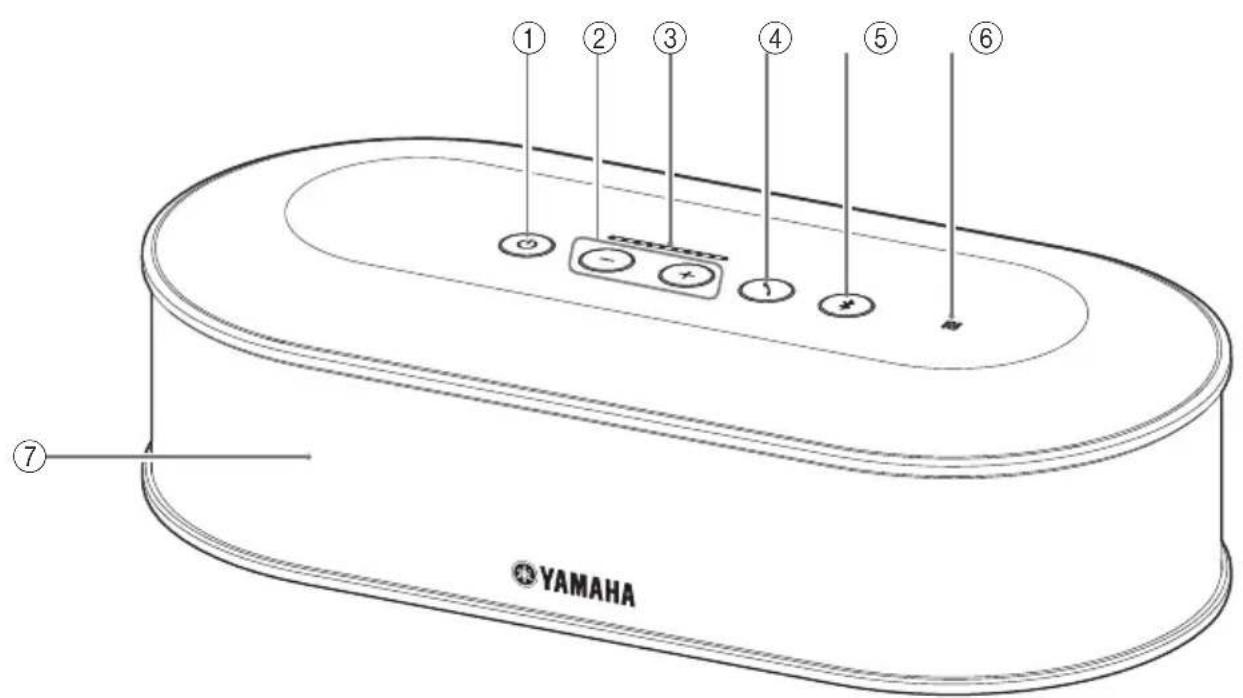
Control Unit (YVC-CTU1000)
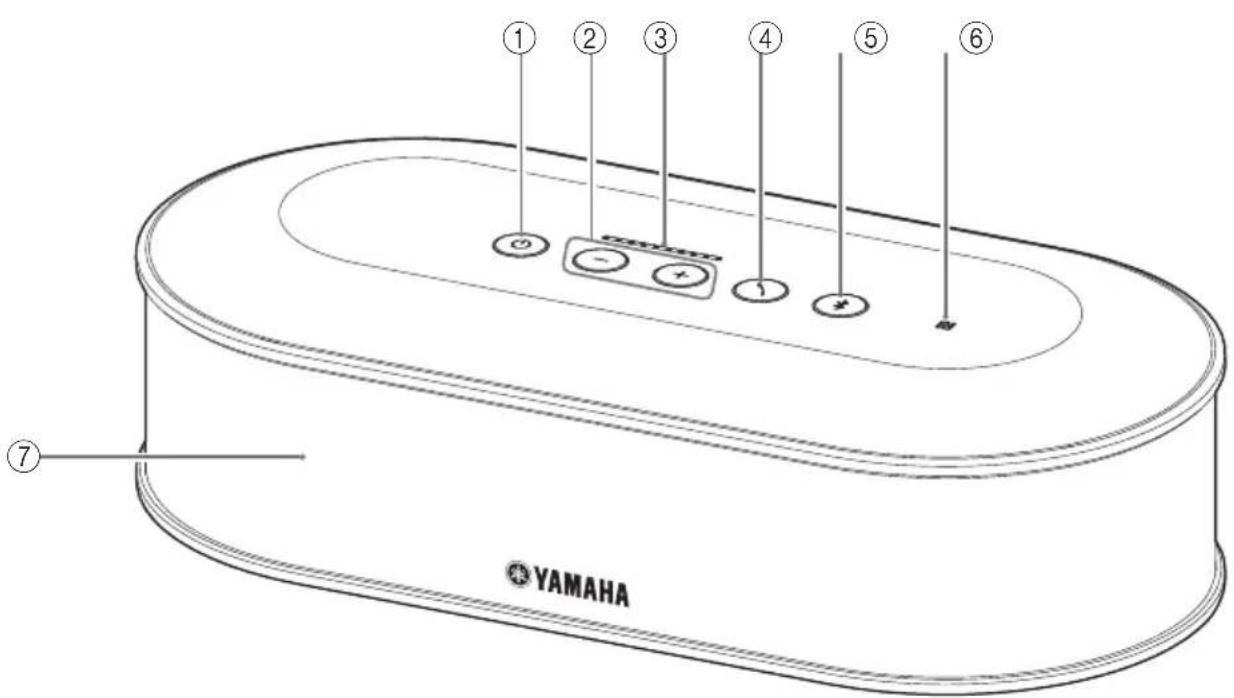
①Power button/indicator
Press to turn the product on. Press and hold the power button for two or more seconds to enter standby mode. It lights up green when the product is turned on and lights up red in standby mode.
②Volume +/- button/indicator
Press to adjust the speaker volume. Hold down the appropriate button for 0.5 or more seconds to continuously increase or decrease the volume. Press both the + and - buttons simultaneously for two or more seconds to switch the output device between the built-in and external speakers.
③Volume level indicator
It normally indicates the input level of an incoming voice. It indicates settings when adjusting the speaker volume or when selecting an output speaker.
④Call button/indicator
While being connected to PC or Mac, press this button to operate a call (answering a call, ending a call, etc.) on Skype for Business.
When it is pressed and held for two or more seconds while waiting for a call, the product automatically measures acoustic conditions and tunes the audio settings to an optimal condition (automatic audio tuning).
⑤Bluetooth button/indicator
Press to pair or connect with a Bluetooth compatible smartphone or tablet.
If this button is pressed while being connected to a Bluetooth device, Bluetooth will be disconnected.
⑥NFC logo (N-Mark)
Placing an NFC (Near Field Communication)-equipped Bluetooth compatible smartphone or tablet over the N-Mark allows you to pair or connect it with the product, or to disconnect it.
⑦Built-in speaker
Outputs an incoming voice.
Control Unit (YVC-CTU1000): Back
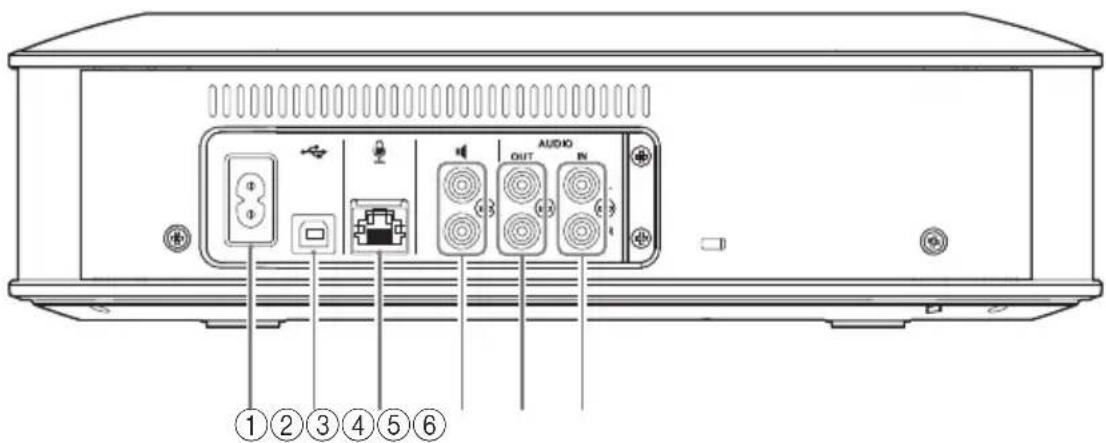
①Power terminal
Used to connect the supplied power cable.
②USB port
Used to connect the product to a PC or Mac using the supplied USB cable.
③Microphone terminal
Used to connect the supplied microphone using the microphone cable.
④ External speaker terminals
Used to connect the speakers with a built-in amplifier.
⑤Audio output terminals (AUDIO OUT)
Used to connect to the audio input terminals of a video conference system.
⑥Audio input terminals (AUDIO IN)
Used to connect to the audio output terminals of a video conference system.
Control Unit (YVC-CTU1000): Bottom
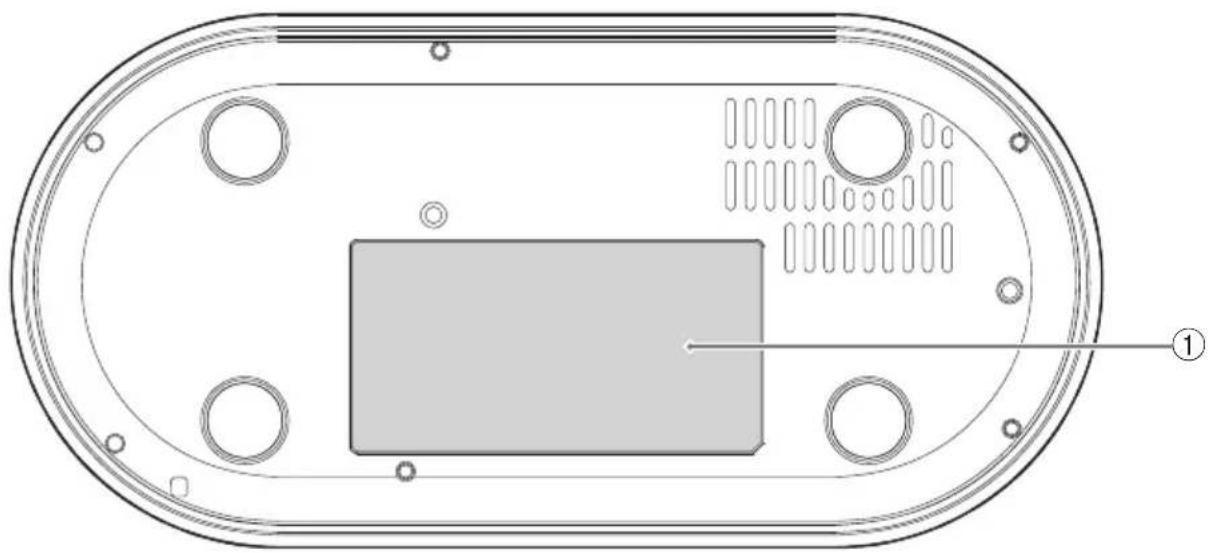
natural_image
Technical diagram of an electronic device casing with internal components and mounting holes (no text or symbols)① Name plate
Provides the following information.
Model No.: Model number of the product
SERIAL LABEL: Serial number of the product
Microphone (YVC-MIC1000)
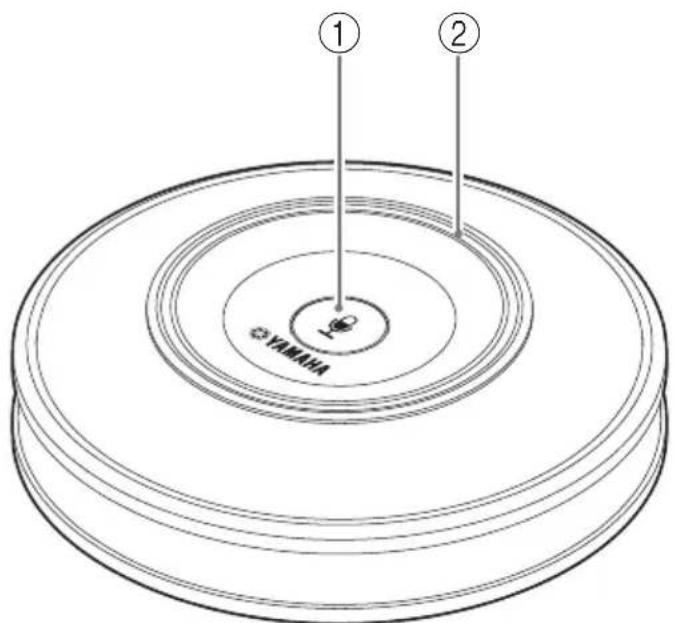
①Microphone mute button
Press to temporarily turn off (mute) the microphone. To cancel the mute function, press it again.
②Microphone status indicator
Lights up green when the microphone is active. Flashes red when the microphone is set to mute.
Microphone (YVC-MIC1000): Side
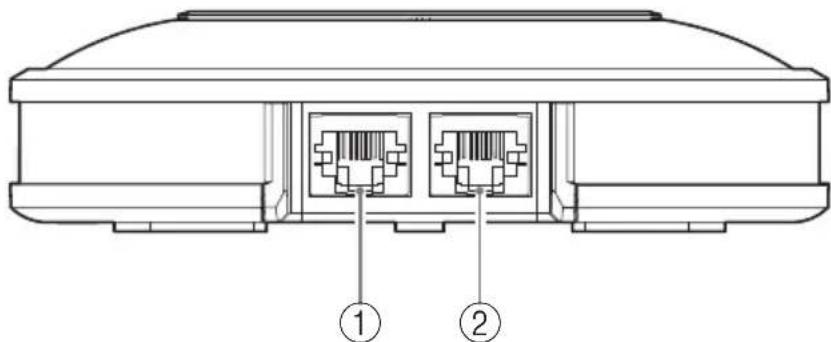
①Input terminal (IN)
Connects the optional microphone (YVC-MIC1000EX) using the microphone cable.
②Output terminal (OUT)
Connects the Control Unit using the microphone cable.
Microphone (YVC-MIC1000): Bottom
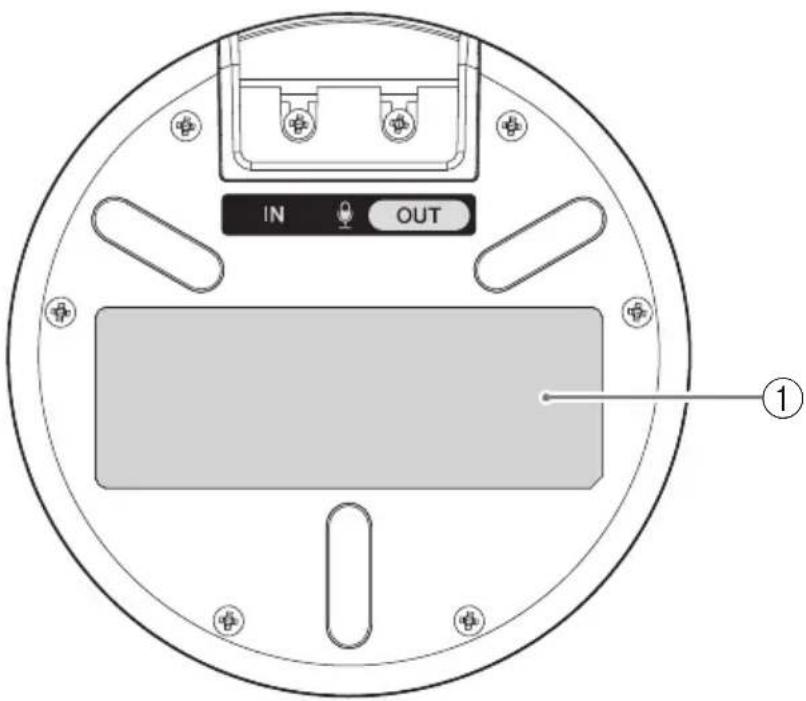
①Name plate
Provides the following information.
Model No.: Model number of the product
SERIAL LABEL: Serial number of the product
Setting up for use
Installation
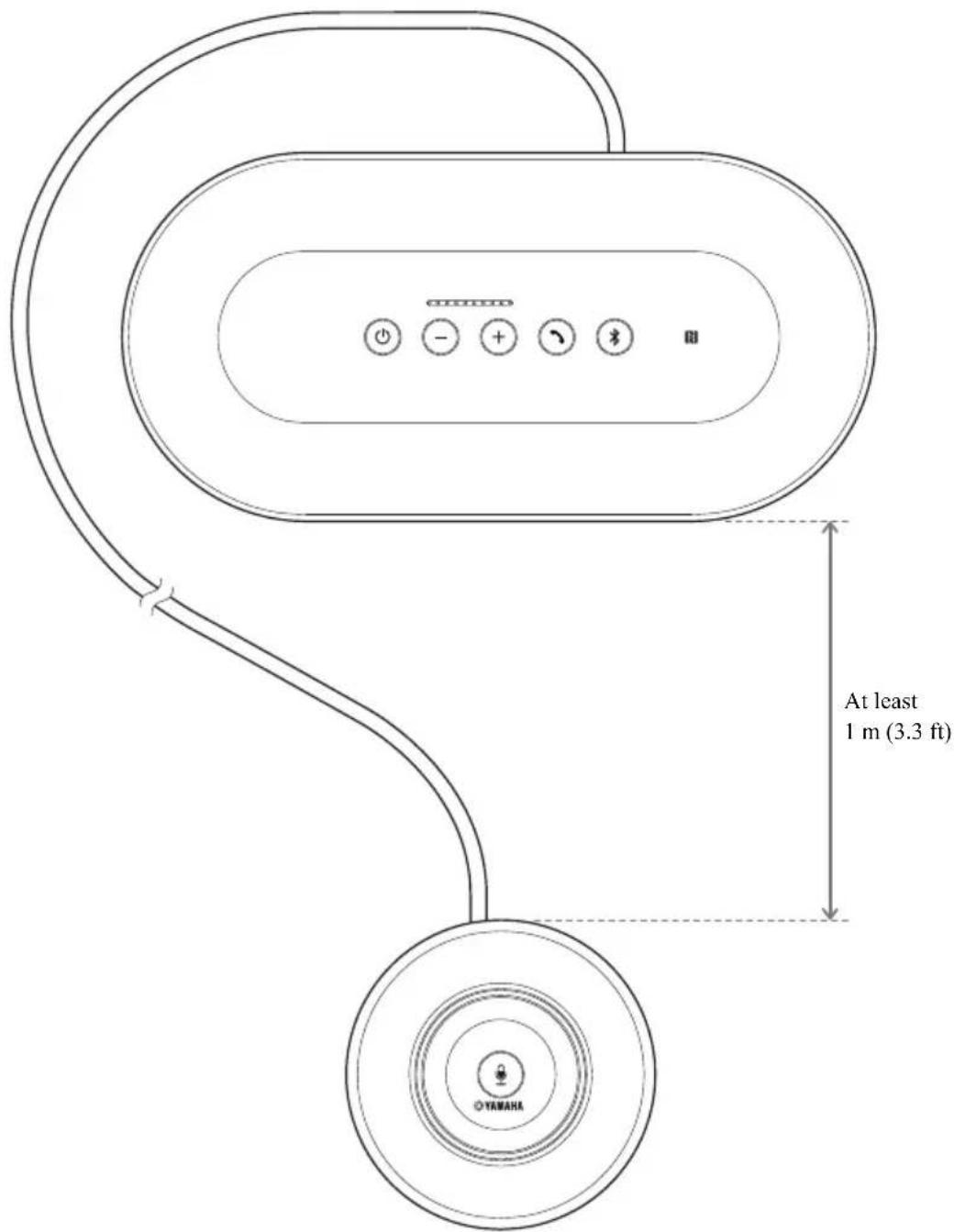
Install the product in a location where it will be used.
Notes on installation
- Place the microphone at least 1 ~m (3.3 ft) away from the Control Unit.
- Keep the microphone away from any noise sources.
Connecting the microphone and power cables
Connect the microphone and power cables supplied with the product.
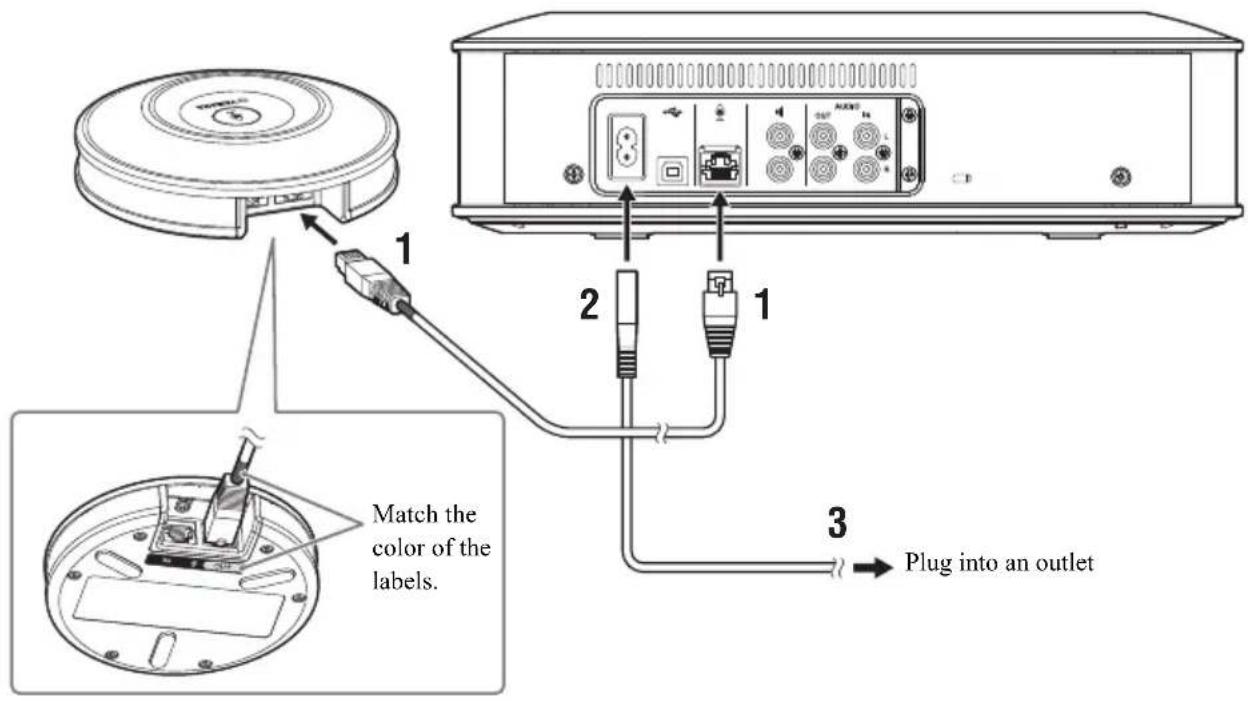
Notes
- When connecting the microphone cable, be sure to match the color of the labels on the microphone cable and of the microphone output terminal (OUT).
- Be sure to fully insert the power cable into the power terminal of the Control Unit and into the outlet.

Tip
A total of five microphones, including the supplied microphone and optional microphones (YVC-MIC1000EX), can be connected to the product. (For details, refer to the user's manual.)
Changing the setting
Changing the language of the voice guidance
While pressing the call button ( ), press the volume + button ( ) repeatedly. The language changes every time you press the volume + button ( ).+
For detailed instructions, refer to the user's manual.
Connecting to communication equipment
Connecting to a PC or Mac using the USB cable
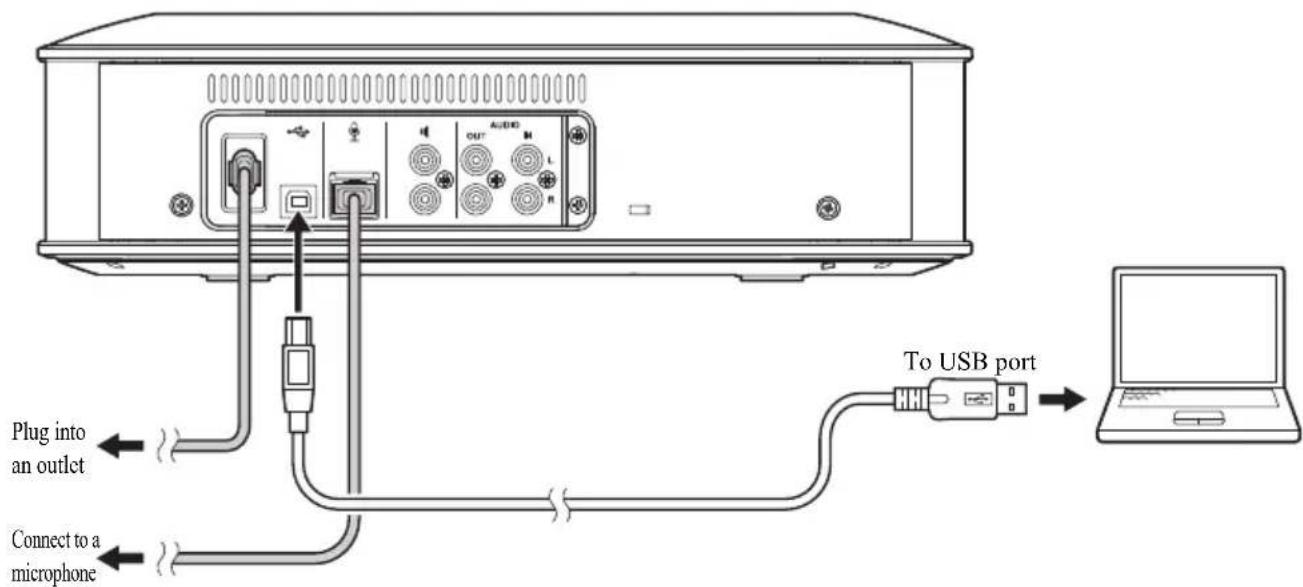
After connecting the product, turn the product on and confirm that it is recognized correctly by the PC or Mac. For detailed instructions, refer to the user's manual.
Connecting to a video conference system using audio cables
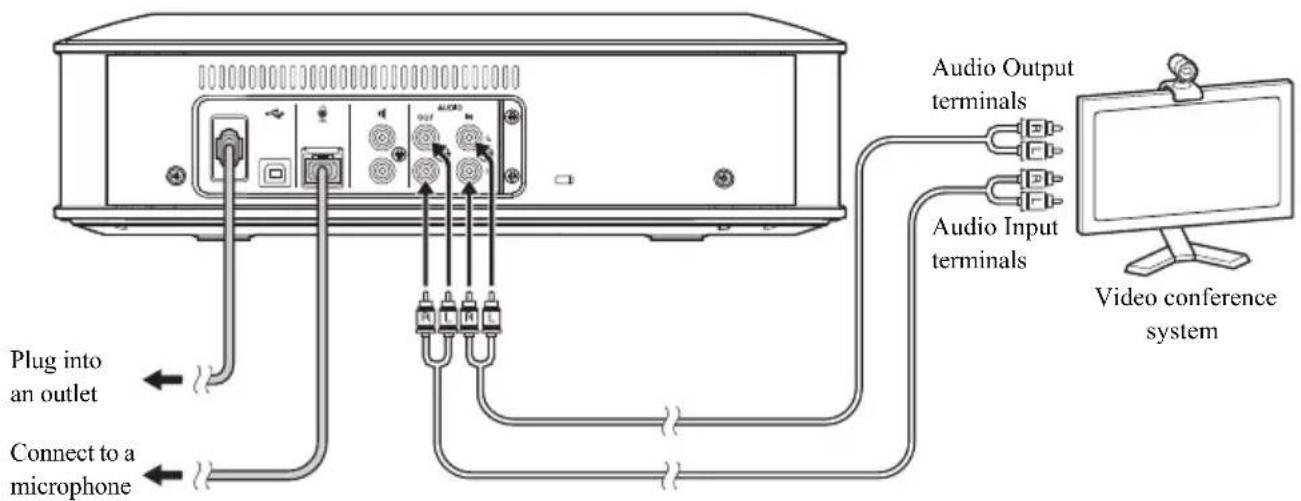
After connecting the product, change the settings of the video conference system so that the product will be used as a microphone and speaker.
For detailed instructions, refer to the user's manual.
Connecting to a smartphone or tablet via Bluetooth
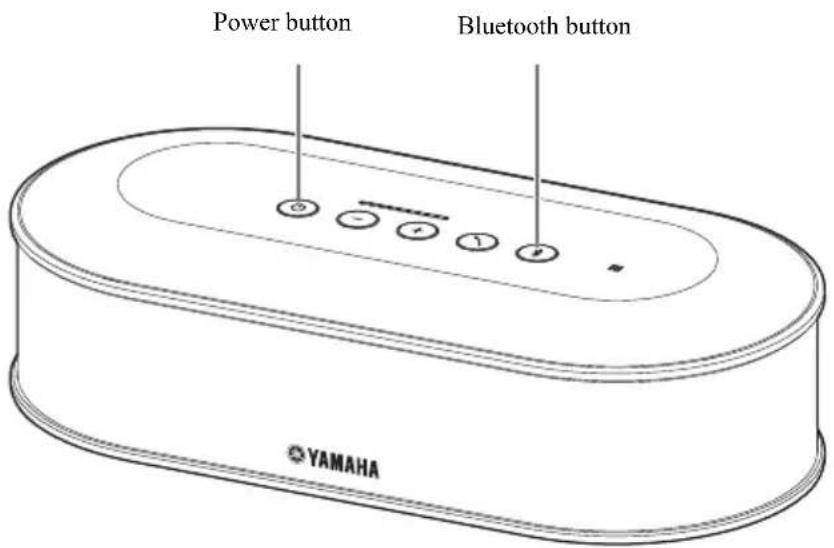
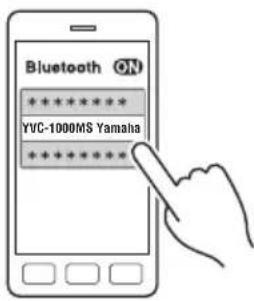
Pairing
1 Press the power button to turn the product on.
2 Press the Bluetooth button.
The Bluetooth button blinks blue.
3 Press and hold the Bluetooth button for two or more seconds.
The Bluetooth button blinks blue quickly to indicate that pairing can be performed.
4 Perform the pairing procedure using the smartphone or tablet.
■Connecting to a paired smartphone or tablet via Bluetooth
1 Press the power button to turn the product on.
2 Press the Bluetooth button.
The Bluetooth button blinks blue to indicate that the product can be connected via Bluetooth.
3 Perform the Bluetooth-connection procedure using the smartphone or tablet.
When the connection is established, the Bluetooth button lights up blue.
For detailed instructions, refer to the user's manual.
Specifications
General
| Interface: Control Unit: USB 2.0 High Speed, Bluetooth, NFC (Near Field Communication),Audio Input terminals (stereo RCA pin), Audio Output terminals (stereo RCA pin), External speaker terminal (RCA pin) x 2, Power terminal, Microphone terminalMicrophone: Input and output terminals | |
| Power consumption (max): | 20 W (one microphone connected), 35 W (five microphones connected) |
| Operating environment: | Temperature: 0 to 40°C (32 to 104°F)Humidity: 20 to 85% (no condensation) |
| Storage environment: | Temperature: -20 to +50°C (-4 to 122°F)Humidity: 10 to 90% (no condensation) |
| Dimensions: Control Unit (W x H x D): 332 x 95 x 162 mm (13.1 x 3.74 x 6.38 in)Microphone (W x H x D): 136 x 36 x 136 mm (5.35 x 1.42 x 5.35 in) | |
| Weight: Control Unit: 1.8 kg (4.0 lbs)Microphone: 0.4 kg (0.9 lbs) | |
| Power source: US and Canada models: AC 120 V (60 Hz)Japan model: AC 100 V (50/60Hz)China model: AC 220 V (50 Hz)Korea model: AC 110/220 V (60 Hz)UK, Europe and Russia models: AC 220-240 V (50 Hz) | |
| PC/Mac environment: | OS: Windows (*1), macOS (*1)USB: USB 2.0 or later |
| Bluetooth: Bluetooth specification version: 2.1 + EDRSupported profiles: HFP (1.6), A2DPSupported Codec: SBC, mSBC, CVSDWireless output: Class 2Maximum communication distance: 10 mRadio frequency (Operational frequency): 2,402 MHz to 2,480 MHzMaximum output power (EIRP): 4.0 dBm (2.5 mW) | |
| NFC: Compatible devices: NFC-compatible Android devices | |
| Voice guidance: | English, Japanese, Chinese, Korean, French, Spanish, German |
| Accessories: | Power cable (3 m), USB cable (5 m), Microphone cable (5 m), Quick Start Guide |
| Others: Firmware update (transfer from PC through USB) | |
(*1) For the supported versions, refer to the following website:
https://uc.yamaha.com/
Audio
| Microphone units: | Unidirectional x 3 |
| Speaker unit: Full-range x 1 | |
| Frequency bandwidth for sound pickup: | 100 to 20,000 Hz |
| Frequency bandwidth for playback: | 100 to 20,000 Hz |
| Signal processing: | Adaptive echo canceller, Noise reduction, Automatic tracking, Automatic gain control, Automatic room EQ, Dereverberation, Automatic audio tuning |
Table des matières
PRÉCAUTIONS CONCERNANT LA
SÉCURITÉ....2
natural_image
Simple line drawing of a trash bin with two crossed lines indicating no waste or restriction (no text or symbols)https://uc.yamaha.com/resources/support/
natural_image
Top-down schematic of a device casing with internal components and mounting holes (no text or symbols)https://sound-solution.yamaha.com/download/
箱の中身をご確認ください
https://sound-solution.yamaha.com/download/
https://sound-solution.yamaha.com/support/uc/
各部の名称とはたらき
本体(YVC-CTU1000)

①電源ボタン / インジケーター
natural_image
Top-down schematic of a device casing with internal components and mounting holes (no text or symbols)① 銘板
以下の情報が記載されています。
①マイクミュートボタン
①入力端子(IN)
https://www.yamaha.com/products/zh/communication/support/
使用开源软件
本产品使用开源软件。
许可内容包含在用户手册内。
控制装置和功能
控制终端 (YVC-CTU1000)
①电源按钮 / 指示灯
natural_image
Technical diagram of an electronic device casing with internal components and mounting holes (no text or symbols)① 铭牌
提供以下信息。
①输入端口 (IN)
https://uc.yamaha.com/resources/support/
오픈 소스 소프트웨어 사용
natural_image
Top-down schematic of an electronic device casing with internal components and mounting holes (no text or symbols)① 명판
다음 정보를 제공합니다
①마이크로폰 음소거 단추
①입력 단자 (IN)
natural_image
Simple line drawing of a trash bin with two crossed lines indicating no waste or prohibition (no text or symbols)
https://uc.yamaha.com/resources/support/
natural_image
Top-down schematic of an electronic device casing with internal components and mounting holes (no text or symbols)① Typenschild
natural_image
Symbol of a trash bin crossed out by two diagonal lines (no text or labels)
https://uc.yamaha.com/resources/support/
natural_image
Top-down schematic of an electronic device casing with internal components and mounting holes (no text or symbols)① Targa informativa
①Ingresso (IN)
natural_image
Line drawing of a YAMAHA electronic device casing with control buttons and indicator lights (no text or symbols on the device itself)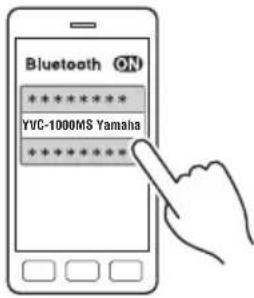
■Accoppiamento
natural_image
Simple line drawing of a trash bin with two crossed lines indicating no waste or prohibition (no text or symbols)
https://uc.yamaha.com/resources/support/
natural_image
Technical line drawing of a device casing with internal components and mounting holes (no text or symbols)① Placa identificativa
①Terminal de entrada (IN)
natural_image
Line drawing of a YAMAHA electronic device with control buttons and a base plate (no text or symbols on the device itself)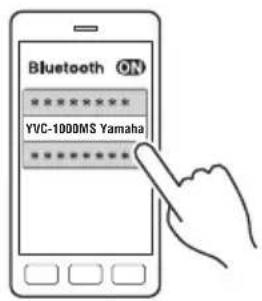
■Emparejamiento
natural_image
Simple line drawing of a trash bin with two crossed lines indicating no waste or prohibition (no text or symbols)
https://uc.yamaha.com/resources/support/
Utilizar software open source
natural_image
Technical diagram of an electronic device casing with internal components and mounting holes (no text or symbols)① Terminal de entrada (IN)
Para ligar o microfone adicional (YVC-MIC1000EX) com o cabo de microfone.
②Terminal de saída (OUT)
https://uc.yamaha.com/resources/support/
natural_image
Technical diagram of an electronic device casing with internal components and mounting holes (no text or symbols)Important Notice: Guarantee Information for customers in European Economic Area (EEA) and Switzerland
Important Notice: Guarantee Information for customers in EEA* and Switzerland
English
For detailed guarantee information about this Yamaha product, and Pan-EEA* and Switzerland warranty service, please either visit the website address below (Printable file is available at the website) or contact the Yamaha representative office for your country. * EEA: European Economic Area
https://europe.yamaha.com/warranty/
厂名:雅马哈电子 (苏州)有限公司
厂址:中国江苏省苏州新区鹿山路 18号
YAMAHA CORPORATION
Manual Development Group
© 2017 Yamaha Corporation
Published 01/2019
2019年1月 发行
ABES-C0
VCR9380