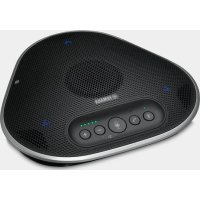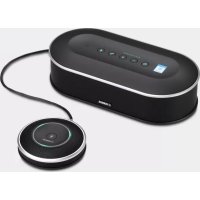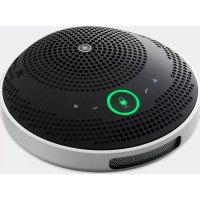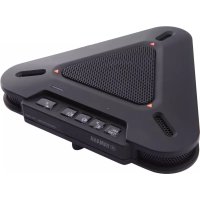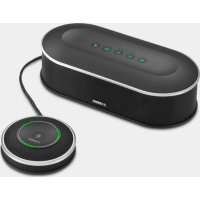
YVC1000 - Phone YAMAHA - Free user manual and instructions
Find the device manual for free YVC1000 YAMAHA in PDF.

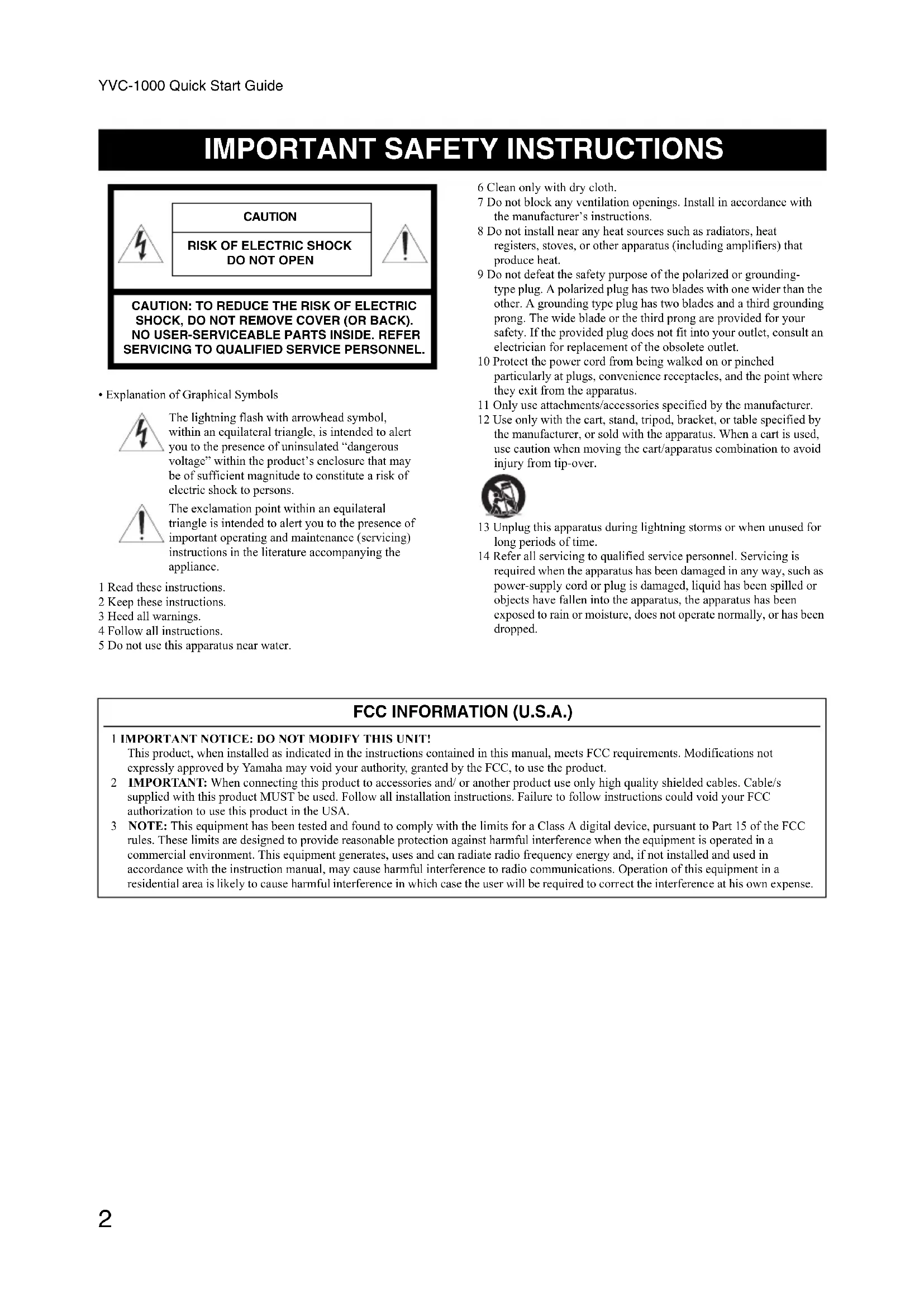


| Product type | Hands-free audio conference system |
| Brand | YAMAHA |
| Model | YVC1000 |
| Dimensions (control unit) | 332 x 95 x 162 mm |
| Dimensions (microphone) | 136 x 36 x 136 mm |
| Weight (control unit) | 1.8 kg |
| Weight (microphone) | 0.4 kg |
| Power supply | AC 100-240 V, 50/60 Hz (depending on model) |
| Power consumption | 20 W (1 microphone), 35 W (5 microphones) |
| Interfaces | USB 2.0, Bluetooth, NFC, RCA audio inputs/outputs, external speaker, microphone |
| Main functions | Adaptive echo suppression, noise reduction, automatic gain control, automatic room equalizer, multilingual voice guide |
| Maintenance and cleaning | Clean with a dry cloth only. Do not use chemicals. |
| Safety | Unplug during thunderstorms or prolonged disuse. Do not expose to water or moisture. Use only the supplied power cable. |
| Spare parts and repairability | Contact an authorized dealer for any repairs. Available parts: power cable, USB cable, microphone cable, optional microphone (YVC-MIC1000EX). |
| General information | Operating temperature: 0 to 40°C. Humidity: 20 to 85% without condensation. Bluetooth version: 2.1+EDR. |
Frequently Asked Questions - YVC1000 YAMAHA
User questions about YVC1000 YAMAHA
0 question about this device. Answer the ones you know or ask your own.
Ask a new question about this device
Download the instructions for your Phone in PDF format for free! Find your manual YVC1000 - YAMAHA and take your electronic device back in hand. On this page are published all the documents necessary for the use of your device. YVC1000 by YAMAHA.
USER MANUAL YVC1000 YAMAHA
Unified Communications Microphone & Speaker System
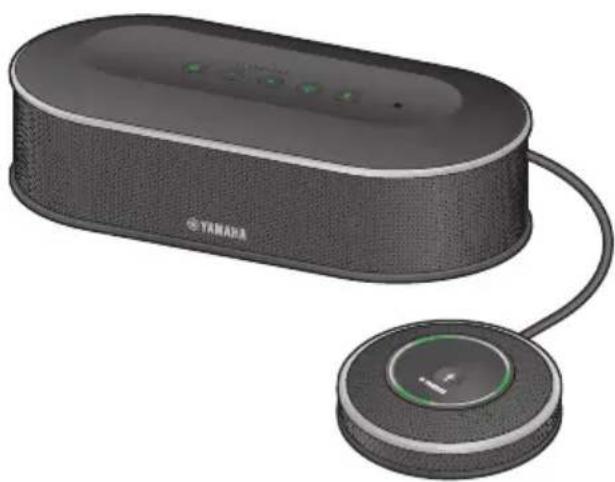
YVC-1000
Quick Start Guide
Update the firmware and use the latest features.
Please also refer to the user's manual that provides detailed information on how to use this product.
You can download the latest firmware and user's manual from the following website: https://uc.yamaha.com/resources/support/
https://sound-solution.yamaha.com/download/
请更新固件以使用最新功能。
https://www.yamaha.com/products/zh/communication/support/
Contents
IMPORTANT SAFETY INSTRUCTIONS 2
Safety Precautions 3
Precautions for Use 5
About Bluetooth 5
Locations of name plates 6
Introduction 7
Check the contents 7
About this manual 7
Please read other instruction manuals as well as this manual 8
Using the Latest Features 8
Use of open-source software 8
Controls and Functions 9
Control Unit (YVC-CTU1000) 9
Control Unit (YVC-CTU1000): Back 10
Control Unit (YVC-CTU1000): Bottom 10
Microphone (YVC-MIC1000) 11
Microphone (YVC-MIC1000): Side 11
Microphone (YVC-MIC1000): Bottom 12
Setting up for use 13
Installation 13
Connecting the microphone and power cables 14
Changing the setting 14
Changing the language of the voice guidance 14
Connecting to communication equipment 15
Connecting to a PC or Mac using the USB cable 15
Connecting to a video conference system using audio cables 15
Connecting to a smartphone or tablet via Bluetooth 16
Specifications 17
General 17
Audio 18
IMPORTANT SAFETY INSTRUCTIONS
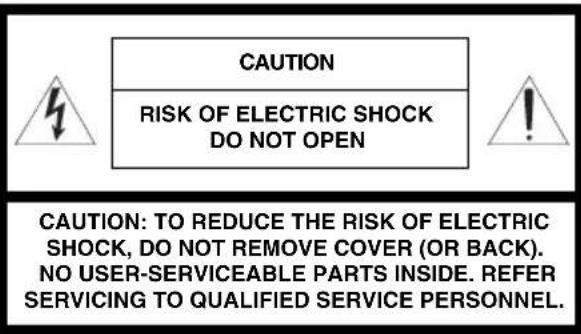
- Explanation of Graphical Symbols

The lightning flash with arrowhead symbol, within an equilateral triangle, is intended to alert you to the presence of uninsulated "dangerous voltage" within the product's enclosure that may be of sufficient magnitude to constitute a risk of electric shock to persons.

The exclamation point within an equilateral triangle is intended to alert you to the presence of important operating and maintenance (servicing) instructions in the literature accompanying the appliance.
1 Read these instructions.
2 Keep these instructions.
3 Heed all warnings
4 Follow all instructions.
5 Do not use this apparatus near water.
6 Clean only with dry cloth.
7 Do not block any ventilation openings. Install in accordance with the manufacturer's instructions.
8 Do not install near any heat sources such as radiators, heat registers, stoves, or other apparatus (including amplifiers) that produce heat.
9 Do not defeat the safety purpose of the polarized or grounding-type plug. A polarized plug has two blades with one wider than the other. A grounding type plug has two blades and a third grounding prong. The wide blade or the third prong are provided for your safety. If the provided plug does not fit into your outlet, consult an electrician for replacement of the obsolete outlet.
10 Protect the power cord from being walked on or pinched particularly at plugs, convenience receptacles, and the point where they exit from the apparatus.
11 Only use attachments/accessories specified by the manufacturer.
12 Use only with the cart, stand, tripod, bracket, or table specified by the manufacturer, or sold with the apparatus. When a cart is used, use caution when moving the cart/apparatus combination to avoid injury from tip-over.

13 Unplug this apparatus during lightning storms or when unused for long periods of time.
14 Refer all servicing to qualified service personnel. Servicing is required when the apparatus has been damaged in any way, such as power-supply cord or plug is damaged, liquid has been spilled or objects have fallen into the apparatus, the apparatus has been exposed to rain or moisture, does not operate normally, or has been dropped.
FCC INFORMATION (U.S.A.)
1 IMPORTANT NOTICE: DO NOT MODIFY THIS UNIT!
This product, when installed as indicated in the instructions contained in this manual, meets FCC requirements. Modifications not expressly approved by Yamaha may void your authority, granted by the FCC, to use the product.
2 101t t i s supplied with this product MUST be used. Follow all installation instructions. Failure to follow instructions could void your FCC authorization to use this product in the USA.
3 NOTE: This equipment has been tested and found to comply with the limits for a Class A digital device, pursuant to Part 15 of the FCC rules. These limits are designed to provide reasonable protection against harmful interference when the equipment is operated in a commercial environment. This equipment generates, uses and can radiate radio frequency energy and, if not installed and used in accordance with the instruction manual, may cause harmful interference to radio communications. Operation of this equipment in a residential area is likely to cause harmful interference in which case the user will be required to correct the interference at his own expense.
Safety Precautions
1 Please ensure to immediately remove the power plug from the outlet in any of the following cases. Failure to observe this may result in fire or an electric shock.
Failure to observe this may result in fire or an electric shock. Please ensure to request the dealer concerned to carry out any necessary repairs or inspections.
- Any abnormal odor or noise occurs;
Smoke is emitted;
The product is broken; or
The product has been exposed to water.
2 Ensure not to damage the power cable. Failure to observe this could result in fire, electric shock, or damage to the product.
- Ensure not to place any heavy objects on the cable.
- Ensure not to process the cable in any way.
- Ensure not use any staples to fix the cable in place.
- Ensure not to apply excessive force to the cable.
- Ensure to keep the cable away from anything hot.
3 Ensure to only use the included power cable. Failure to observe this could result in fire, electric shock, or damage to the product.
4 Ensure to only use the specified power supply voltage. Failure to observe this could result in fire, electric shock, or damage to the product.
5 Connect the power plug to an outlet that you can see and reach in thereby ensuring that you can easily remove it if the necessity arises.
6 Ensure to fully and securely insert the power plug into the outlet. Being insufficiently inserted could result in an electric shock. It could also lead to dust accumulating on the plug, which could then result in heat or fire.
7 Verify that the current capacity of the outlet or a power strip in thereby ensuring that use of the product does not exceed it. Any overheating or degradation of the power strip could result in fire.
8 Do not touch the terminals with your fingers or metal objects. Failure to observe this may result in electric shock or damage to the product.
9 Ensure the product does not fall or strongly impacted. The internal parts could break, which could then result in electric shock, fire, or damage to the product.
10 If the product has been damaged, request repair or inspection services from a dealer.
Continued use of the product may result in fire or electric shock.
11 Do not disassemble or alter this product in any way.
Failure to observe this could result in fire, electric shock, or damage to the product.
12 Do not obstruct heat dissipation.
- Do not place a cloth, tablecloth or other such object over the product.
- Do not place the product on top of a rug, carpet, etc.
- Do not wedge or squeeze the product into a narrow space that has poor air circulation.
- Do not block the ventilation holes.
Allow ventilation space of at least 1cm on the top, 1cm on the left and right, and 5cm on the back of this product.
Failure to observe the above may result in heat being trapped inside the product and cause a fire or damage to the product.
13 Do not place the product outdoors or in a location where water may drip on it.
Failure to observe this may result in fire, electric shock or damage to the product.
14 Do not install the product anywhere it will be exposed to dust or humidity, oily smoke or steam, or corrosive gas. Failure to observe this could result in fire, electric shock, or damage to the product.
15 Ensure that the product is on the level.
Do not place it upside down or in a vertical orientation. Failure to observe this may result in fire, electric shock or damage to the product.
16 Avoid installing the product where foreign object may fall onto the product and/or the product may be exposed to liquid dripping or splashing. On the top of the product, do not place:
- Other components, as they may cause damage and/or discoloration on the surface of the product.
- Burning objects (i.e. candles), as they may cause fire, damage to the product, and/or personal injury.
- Containers with liquid in them, as they may fall and liquid may cause electrical shock to the user and/or damage to the product.
17 Do not insert foreign objects such as metal or paper in the product. Failure to observe this may result in fire, electric shock or damage to the product.
18 If thunder is heard, avoid touching the product.
Failure to observe this may result in electric shock.
19 Periodically remove any dirt and dust from the power plug. Failure to observe this could result in fire.
20 The product should be used at least 22cm away from persons using a pacemaker, defibrillator, or similar device.
Failure to observe this may affect the pacemaker, resulting in a serious accident.
21 Do not use this product near medical equipment. Radio waves from this product may adversely affect the operation of electromedical equipment. Do not use this product in locations where use of radio waves is restricted, such as near medical equipment.
22 Avoid damaging the USB and microphone cables.
- Do not place heavy objects on cables.
- Do not modify cables.
- Do not affix cables using staples.
- Do not apply unnecessary force to cables.
- Do not place cables near heat sources.
Doing so may result in fire, electric shock or damage to the product.
23 Be sure to use the USB and microphone cables that come with the product.
Using other USB or microphone cables may result in fire, electric shock, or damage to the product.
24 When this product is not used for a long period of time, be sure to unplug all power plugs.
Failure to observe this may result in fire or electric shock.
25 Ensure your hands are dry when connecting or disconnecting the power plug or cables.
Failure to observe this may result in electric shock or damage to the product.
26 Ensure not to install the product anywhere unstable or where it will be exposed to vibrations as it could fall over or turn upside down, thus resulting in injury or damage to the product.
27 Ensure not to install the product anywhere it will be exposed to direct sunlight or extraordinarily high temperatures (near a heater, etc.). Failure to observe this could result in damage to the product.
28 Do not sit/stand on the product or place other objects on top of it. Failure to observe this may result in damage to the product.
29 Turn the volume down to the minimum level before starting playback. Failure to observe this will cause loud noises to be emitted that may result in hearing impairment.
30 Ensure not to use the product anywhere it will be exposed to rapid changes in the ambient temperature. Any rapid change in the ambient temperature could result in condensation on the product, which could then result in damage to the product. Ensure to leave the product for a while until it has dried off with the power turned off if any condensation has occurred.
31 Ensure not to connect any cables while the power is turned on. Failure to observe this could result in damage to the product and any connected equipment.
32 Ensure to earth any static electricity from your body or clothing before touching the product. Failure to observe this could result in damage to the product.
33 Route and connect the cables correctly. If the cables are pulled or become caught on someone's leg, the product or connected equipment could tip over or fall, thus resulting in injury or damage to the product.
34 Before connecting external equipment, thoroughly read the instruction manuals provided with the equipment and make connections according to the instructions.
This unit is not disconnected from the AC power source as long as it is connected to the AC wall outlet, even if this unit itself is turned off. This state is called the standby mode. In this state, this unit is designed to consume a very small quantity of power.
WARNING
TO REDUCE THE RISK OF FIRE OR ELECTRIC SHOCK, DO NOT EXPOSE THIS APPARATUS TO RAIN OR MOISTURE.
Warning: Operation of this equipment in a residential environment could cause radio interference.
This transmitter must not be co-located or operated in conjunction with any other antenna or transmitter.
This device complies with Part 15 of the FCC Rules. Operation is subject to the following conditions:
1) this device may not cause harmful interference, and
2) this device must accept any interference received including interference that may cause undesired operation.
This device contains licence-exempt transmitter(s)/receiver(s) that comply with Innovation, Science and Economic Development Canada's licence-exempt RSS(s). Operation is subject to the following two conditions:
- This device may not cause interference.
- This device must accept any interference, including interference that may cause undesired operation of the device.
This equipment complies with FCC radiation exposure limits set forth for an uncontrolled environment and meets the FCC radio frequency (RF) Exposure Guidelines. This equipment should be installed and operated keeping the radiator at least 20cm or more away from person's body.
This equipment complies with ISED radiation exposure limits set forth for an uncontrolled environment and meets RSS-102 of the ISED radio frequency (RF) Exposure rules. This equipment should be installed and operated keeping the radiator at least 20~cm or more away from person's body.
Precautions for Use
- This product is intended for use in general offices and is not designed for use in any fields requiring a high degree of reliability in the handling of human lives or valuable assets.
- Please note that Yamaha cannot assume any responsibility for any damage resulting from improper use or configuration of the product.
- Depending on the usage environment, this product may generate noise in a telephone, radio, television etc. If this occurs, change the location where it is installed or its orientation.
If you transfer this product to a third party, please pass this manual and accessories along with it. - Ensure to follow the instructions of your local government when disposing of the product.
- Do not connect any equipment that generates any noise on the same power line as the product.
Information for users on collection and disposal of old equipment:
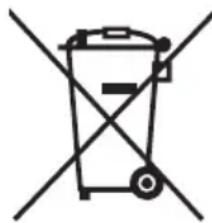

This symbol on the products, packaging, and/or accompanying documents means that used electrical and electronic products should not be mixed with general household waste.
For proper treatment, recovery and recycling of old products, please take them to applicable collection points, in accordance with your national legislation.
By disposing of these products correctly, you will help to save valuable resources and prevent any potential negative effects on human health and the environment which could otherwise arise from inappropriate waste handling.
For more information about collection and recycling of old products, please contact your local municipality, your waste disposal service or the point of sale where you purchased the items.
For business users in the European Union:
If you wish to discard electrical and electronic equipment, please contact your dealer or supplier for further information.
Information on Disposal in other Countries outside the European Union:
This symbol is only valid in the European Union. If you wish to discard these items, please contact your local authorities or dealer and ask for the correct method of disposal.
About Bluetooth®
- Bluetooth is a technology for wireless communication employing the 2.4 GHz frequency band, a band which can be used without a license.
- The 2.4 GHz band used by Bluetooth compatible devices is a radio band shared by many types of equipment. While Bluetooth compatible devices use a technology minimizing the influence of other components using the same radio band, such influence may reduce the speed or distance of communications and in some cases interrupt communications.
- The speed of signal transfer and the distance at which communication is possible differs according to the distance between the communicating devices, the presence of obstacles, radio wave conditions and the type of equipment.
- Yamaha does not guarantee all wireless connections between this product and devices compatible with Bluetooth function.
Locations of name plates
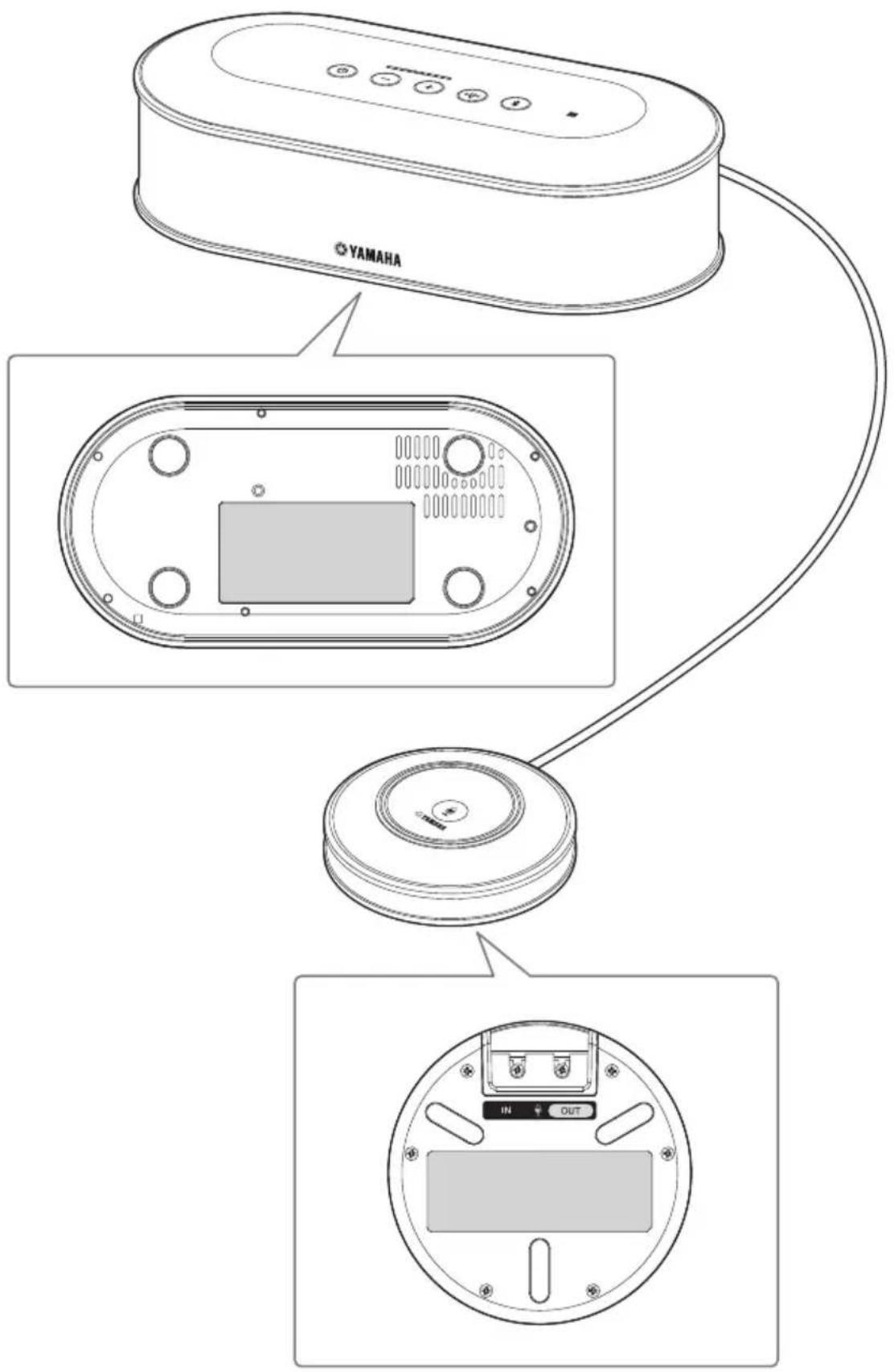
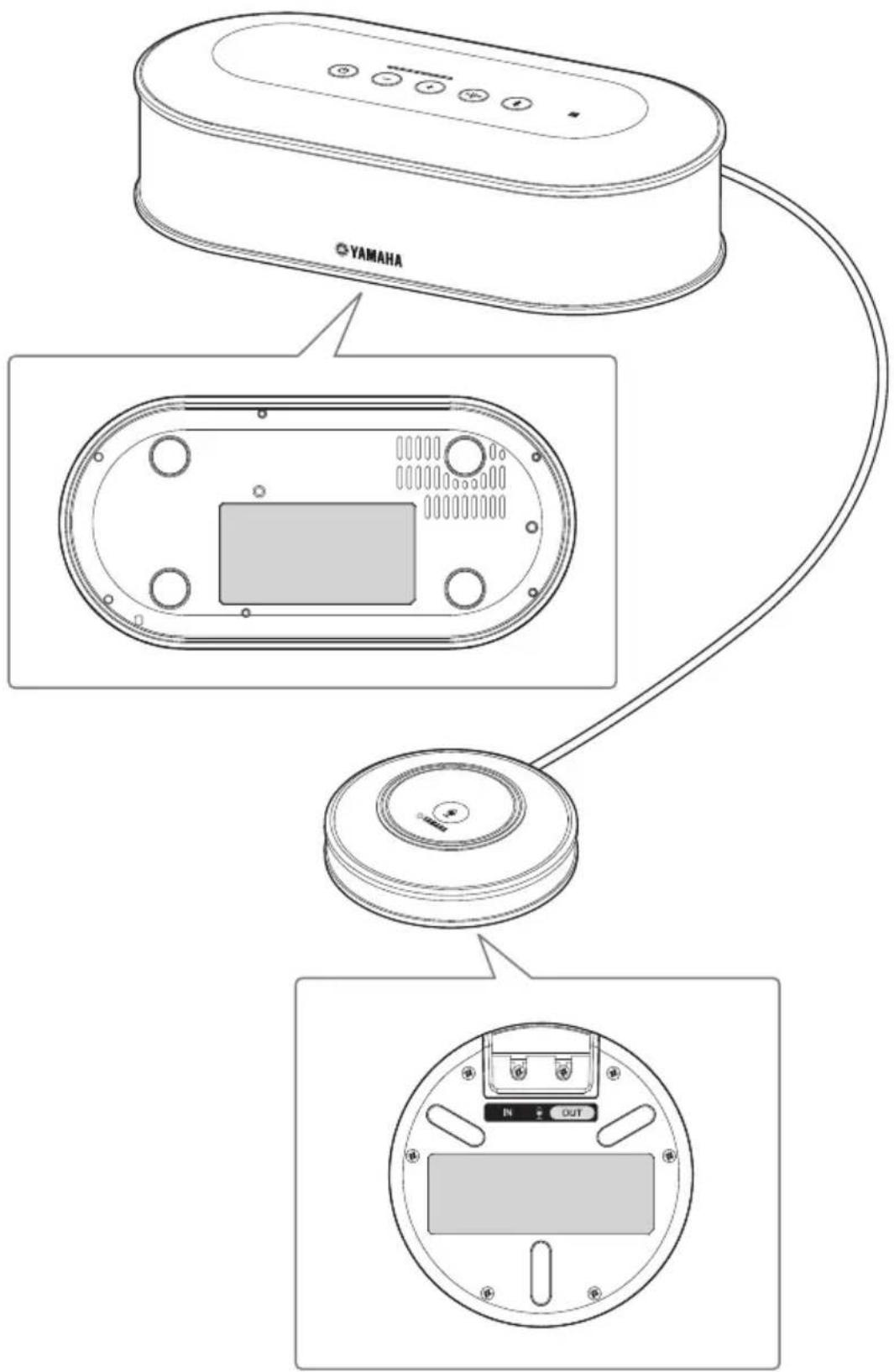
The name plates are placed on the bottom of the Control Unit and the microphone.
Introduction
Thank you for purchasing a Yamaha YVC-1000. The YVC-1000 is a unified communications microphone and speaker system that serves as an audio terminal when connected to communication equipment, such as a PC or a Mac, a smartphone or tablet, and a video conference system.
Please thoroughly read this manual before installing and connecting the product.
Keep this manual in a safe place for future reference.
- No part of this manual may be copied or used in any form without permission of Yamaha.
- The contents of this manual apply to the latest specifications as of the publishing date. To obtain the latest manual, access the following website then download the manual file. https://uc.yamaha.com/rcources/support/
- Yamaha is not liable for any loss or damage to data resulting from use of the product. Please note that the warranty covers repair of the product only.
Check the contents
Control Unit (YVC-CTU1000) x 1
- Microphone (YVC-MIC1000) x 1
- Power cable (3m)× 1
- USB cable (5 m) x 1
- Microphone cable (5m) x 1
- Quick Start Guide (this manual) x 1
About this manual
■About abbreviations
In this manual, the product names are described as follows.
- Yamaha YVC-1000: the product
- Microsoft Windows: Windows
- macOS: macOS
■About trademarks
Microsoft and Windows are registered trademarks of Microsoft Corporation in the United States and other countries.
Mac and macOS are registered trademarks of Apple Inc.
- Android™ is a trademark or registered trademark of Google Inc.
- Bluetooth® is a registered trademark of the Bluetooth SIG and is used by Yamaha in accordance with a license agreement.
- NFC logo (N-Mark) is a trademark or registered trademark of NFC Forum, Inc.
Please read other instruction manuals as well as this manual
This manual contains fundamental information only.
For detailed information on how to use the product, please read the following:
User's manual: Contains information about utilizing the product, including detailed settings and useful features.
Please download the latest user's manual from the download page of our website.
To configure the settings of communication equipment, refer to the instruction manuals provided with the equipment.
Using the Latest Features
You can download the firmware (program of the product) from the download page of our website to use the latest features.
Download page
https://uc.yamaha.com/resources/support/
Use of open-source software
This product uses open-source software.
The contents of the license are included in the user's manual.
Controls and Functions
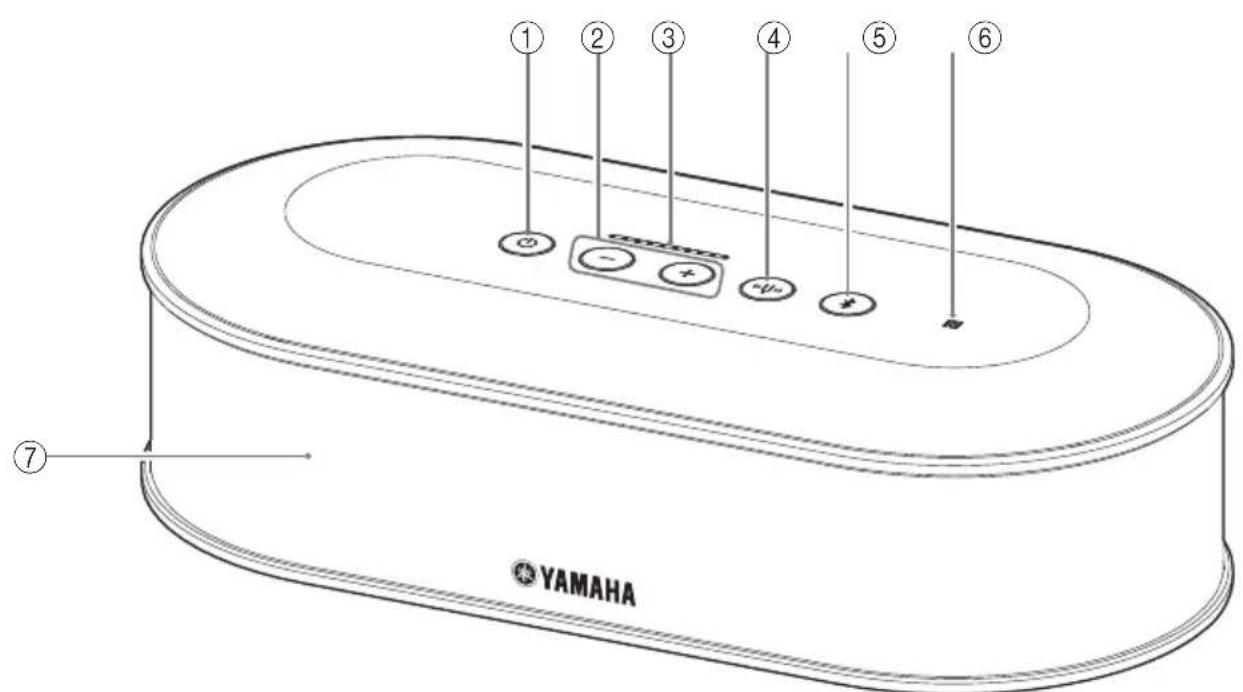
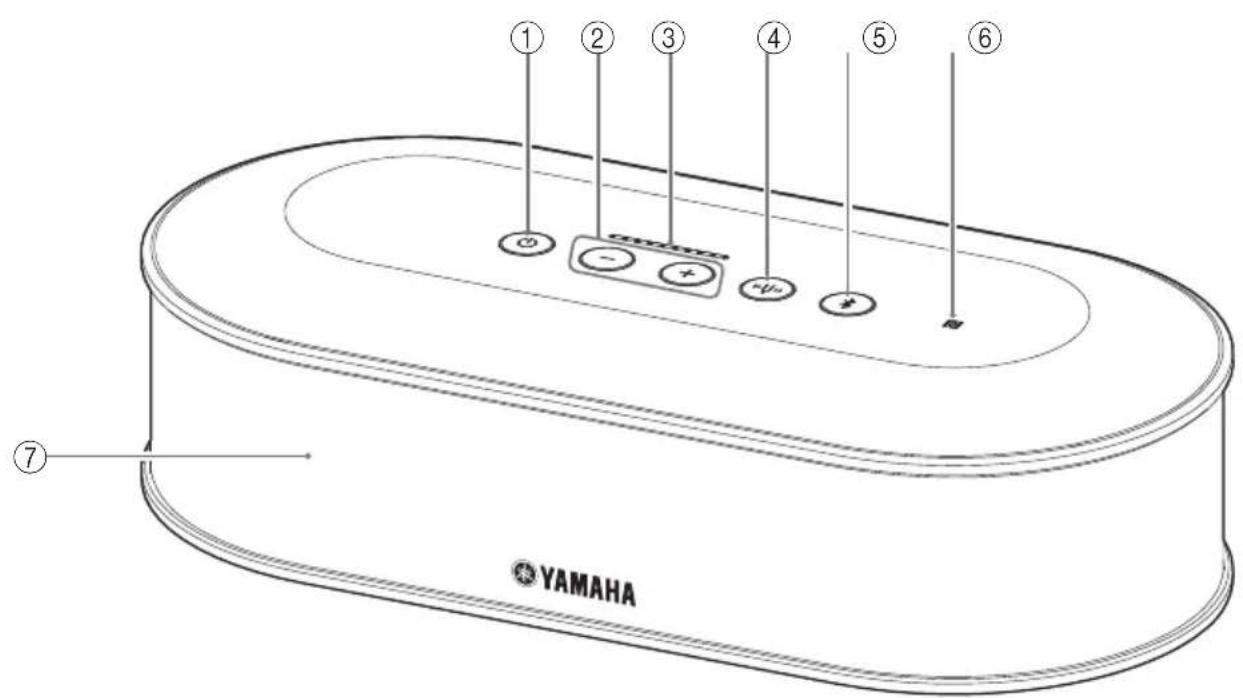
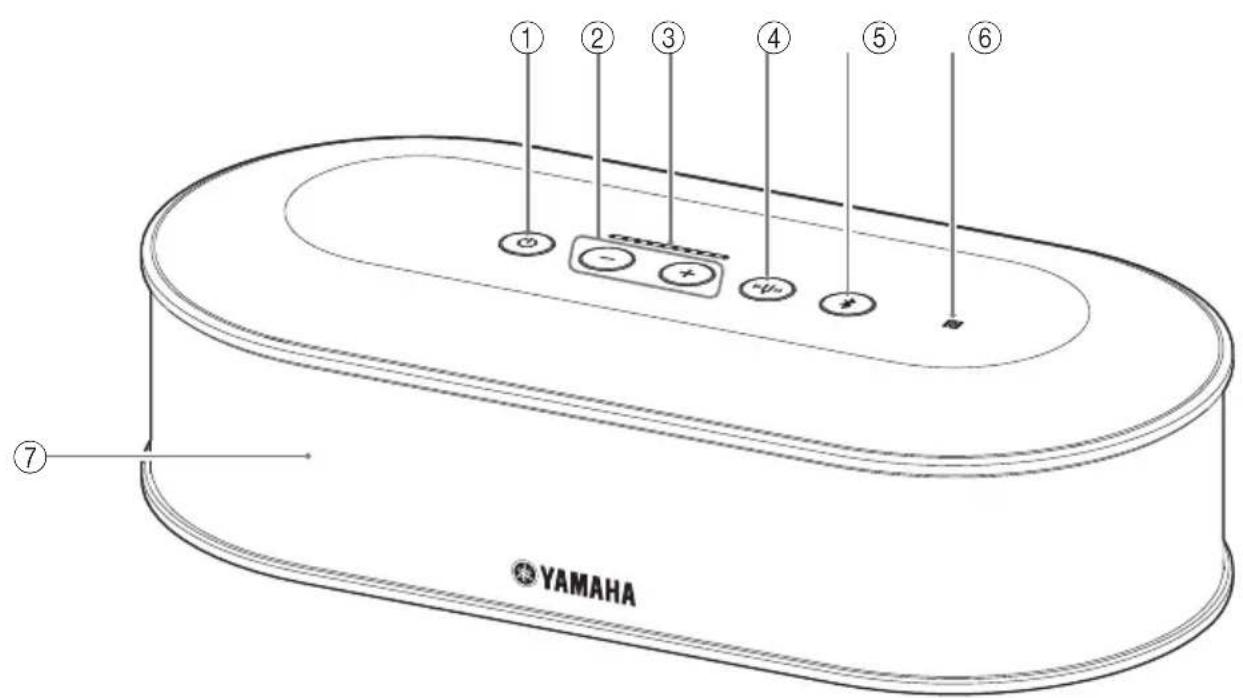
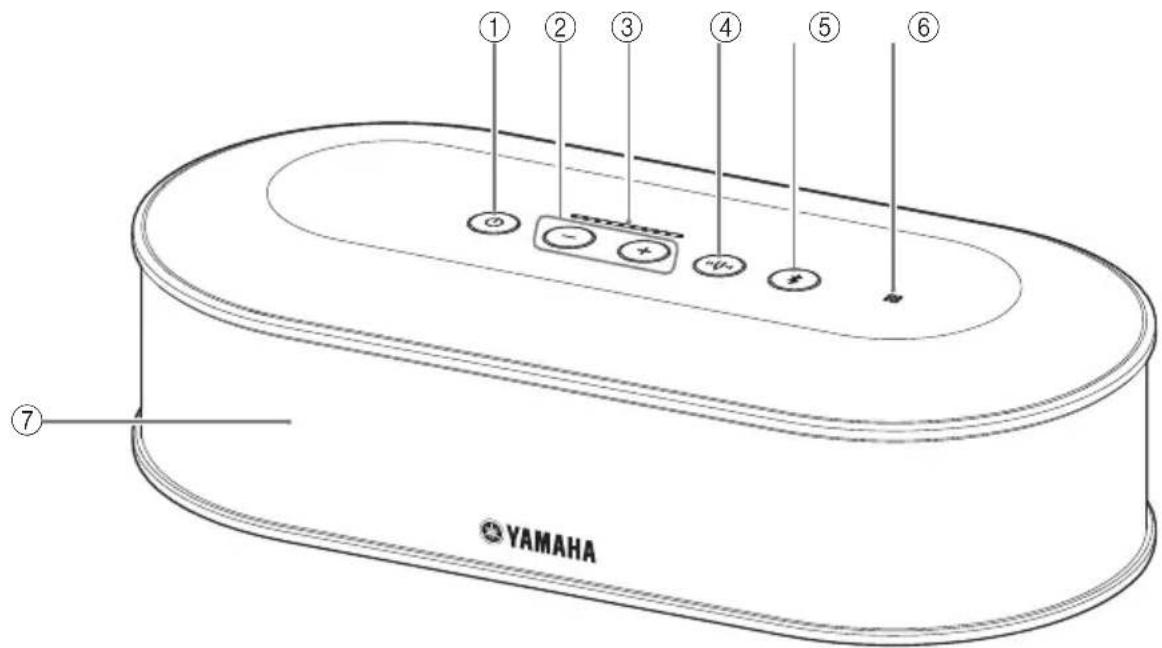
Control Unit (YVC-CTU1000)
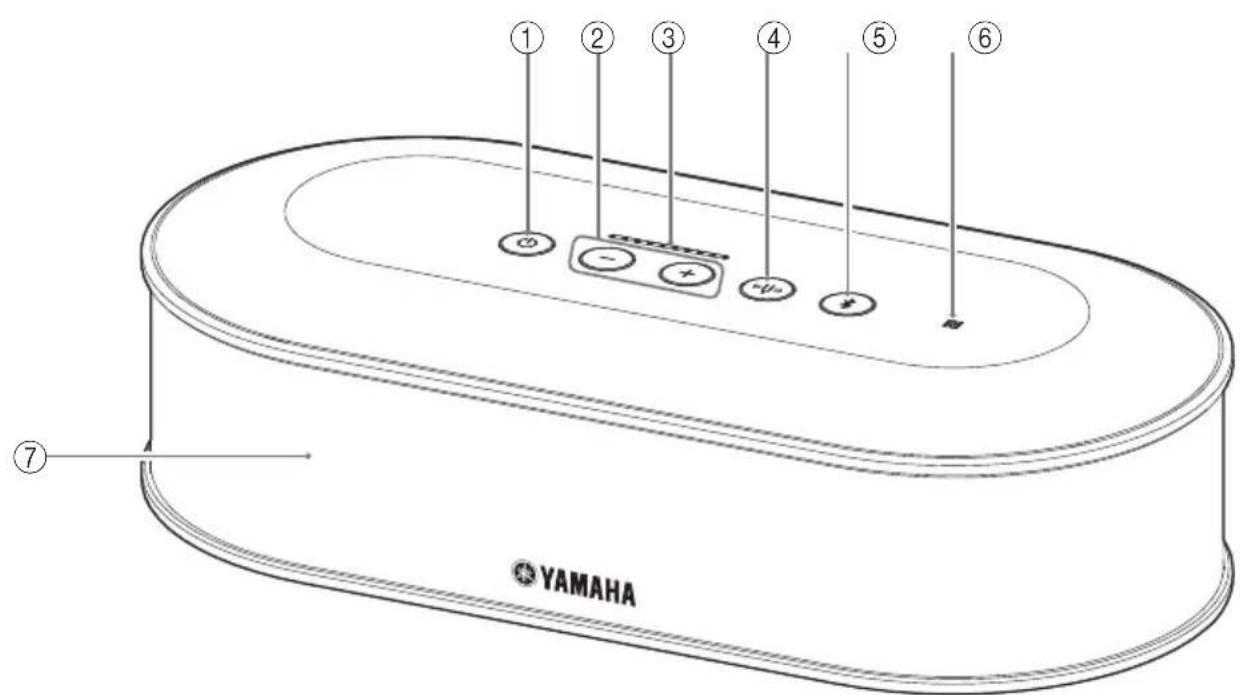
①Power button/indicator
Press to turn the product on. Press and hold the power button for two or more seconds to enter standby mode. It lights up green when the product is turned on and lights up red in standby mode.
Volume +/- button/indicator
Press to adjust the speaker volume. Hold down the appropriate button for 0.5 or more seconds to continuously increase or decrease the volume. Press both the + and - buttons simultaneously for two or more seconds to switch the output device between the built-in and external speakers.
③Volume level indicator
It normally indicates the input level of an incoming voice. It indicates settings when adjusting the speaker volume or when selecting an output speaker.
④Tuning fork button/indicator
It lights up or flashes orange if there is a problem. If a problem is indicated, press the tuning fork button to activate the voice guidance about the detected problem.
When it is pressed and held for two or more seconds, the product automatically measures acoustic conditions and tunes the audio settings to an optimal condition (automatic audio tuning).
⑤Bluetooth button/indicator
Press to pair or connect with a Bluetooth compatible smartphone or tablet.
If this button is pressed while being connected to a Bluetooth device, Bluetooth will be disconnected.
⑥ NFC logo (N-Mark)
Placing an NFC (Near Field Communication)-equipped Bluetooth compatible smartphone or tablet over the N-Mark allows you to pair or connect it with the product, or to disconnect it.
⑦Built-in speaker
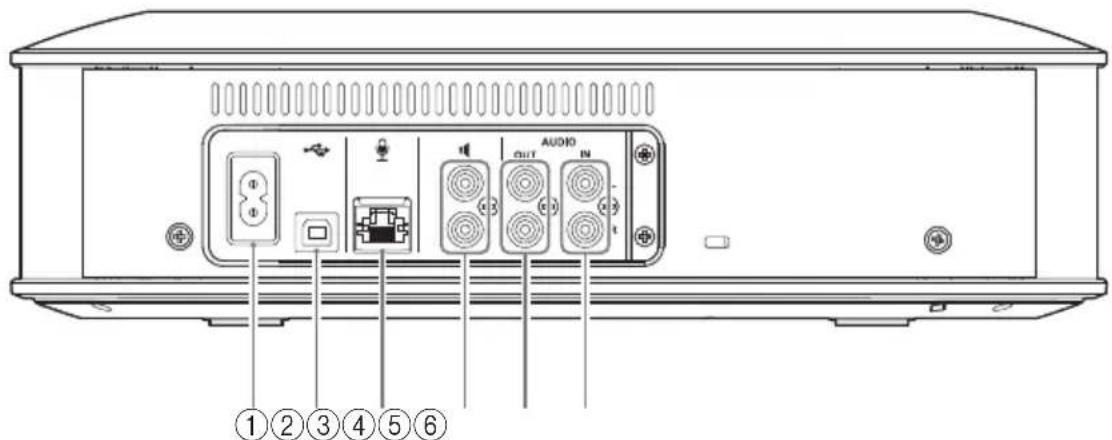
Outputs an incoming voice.
Control Unit (YVC-CTU1000): Back
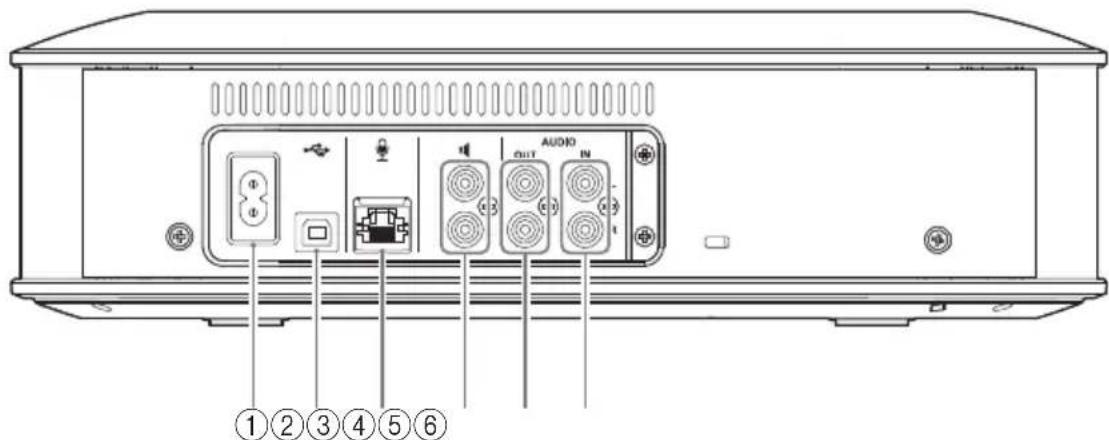
① Power terminal
Used to connect the supplied power cable.
②USB port
Used to connect the product to a PC or Mac using the supplied USB cable.
③ Microphone terminal
Used to connect the supplied microphone using the microphone cable.
④ External speaker terminals
Used to connect the speakers with a built-in amplifier.
⑤ Audio output terminals (AUDIO OUT)
Used to connect to the audio input terminals of a video conference system.
⑥ Audio input terminals (AUDIO IN)
Used to connect to the audio output terminals of a video conference system.
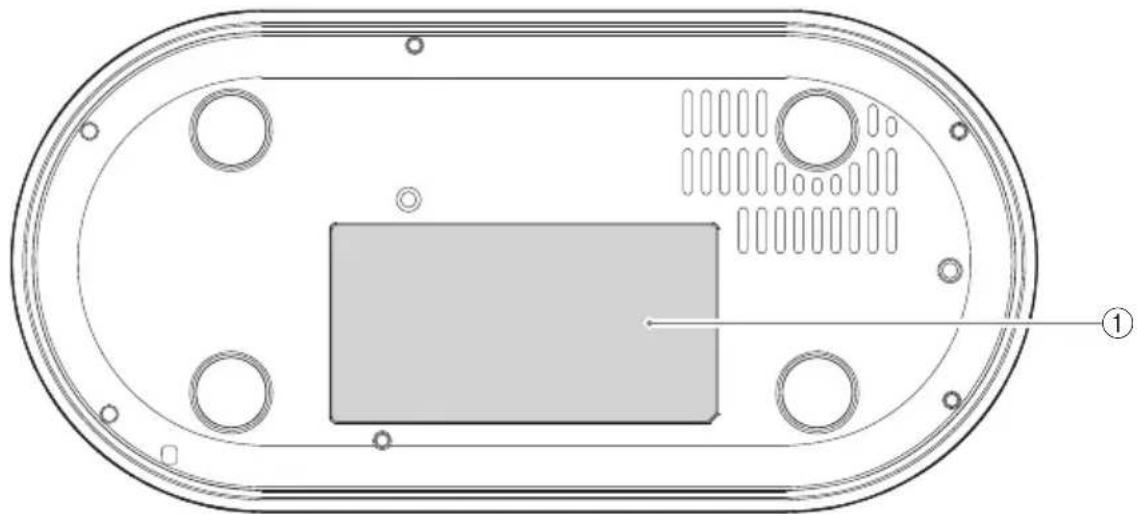
Control Unit (YVC-CTU1000): Bottom
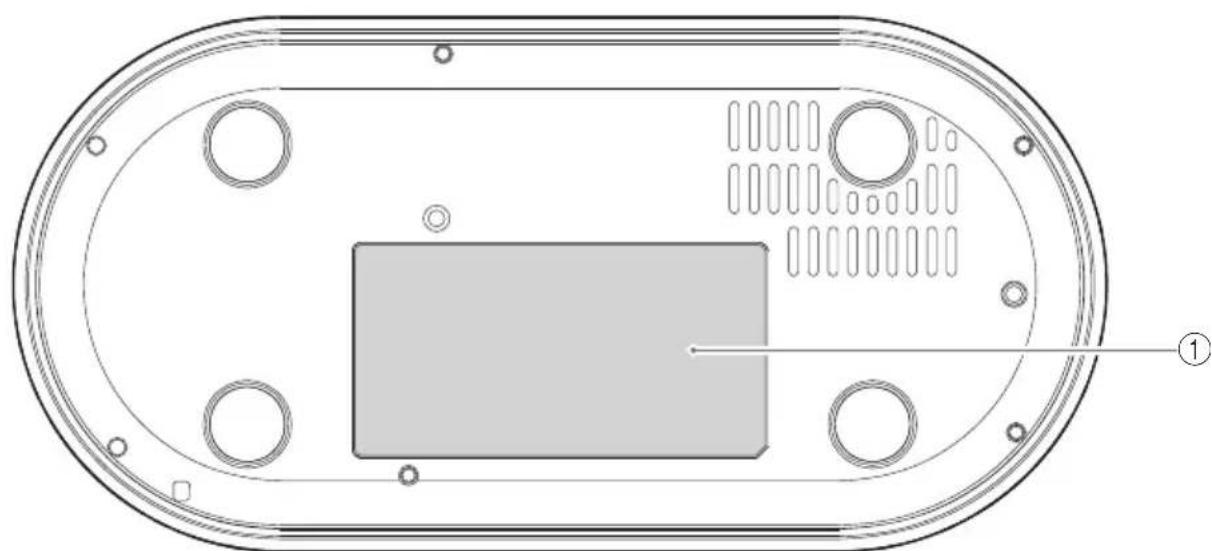
① Name plate
Provides the following information.
Model No.: Model number of the product
SERIAL LABEL: Serial number of the product
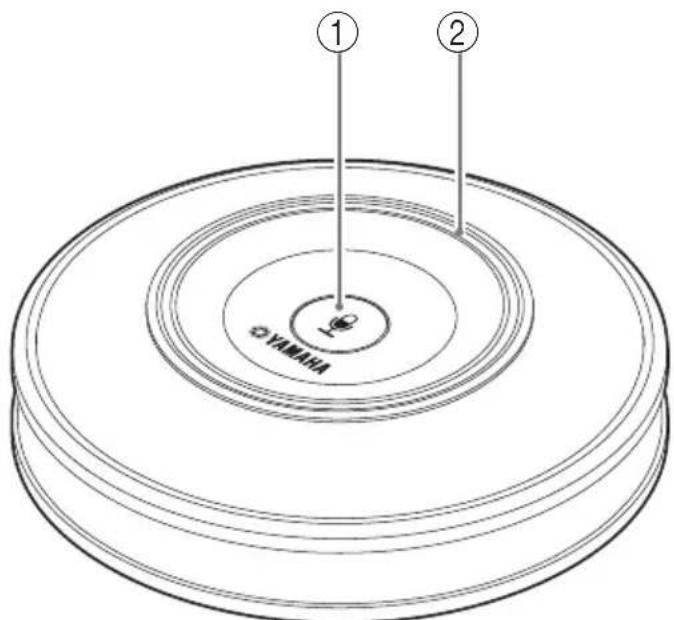
Microphone (YVC-MIC1000)
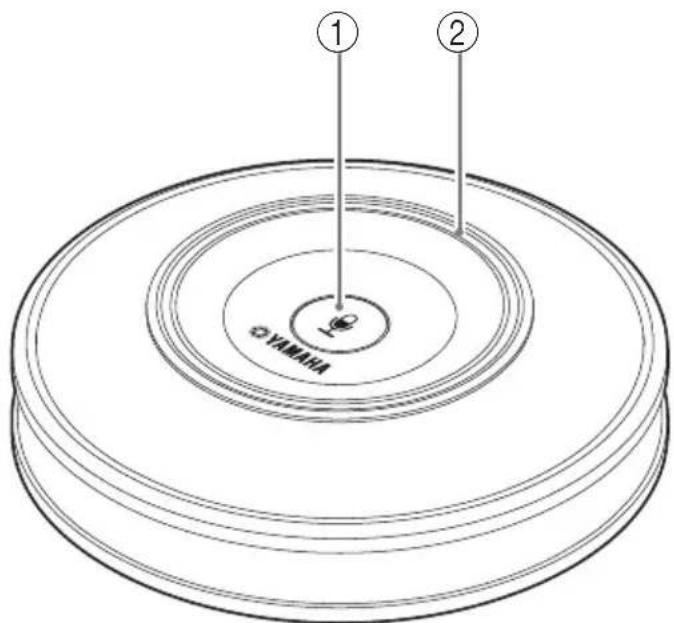
① Microphone mute button
Press to temporarily turn off (mute) the microphone. To cancel the mute function, press it again.
② Microphone status indicator
Lights up green when the microphone is active. Flashes red when the microphone is set to mute.
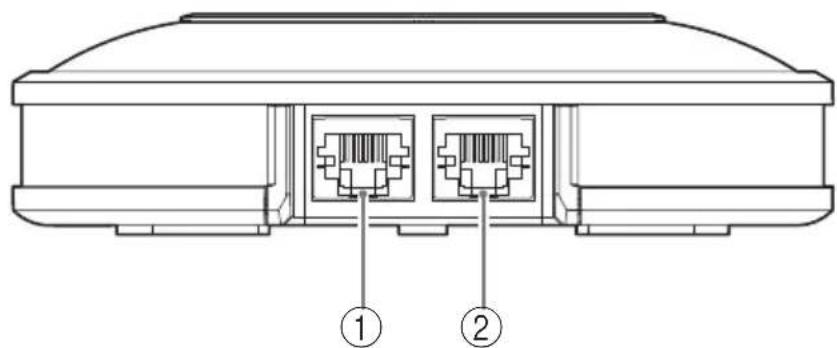
Microphone (YVC-MIC1000): Side
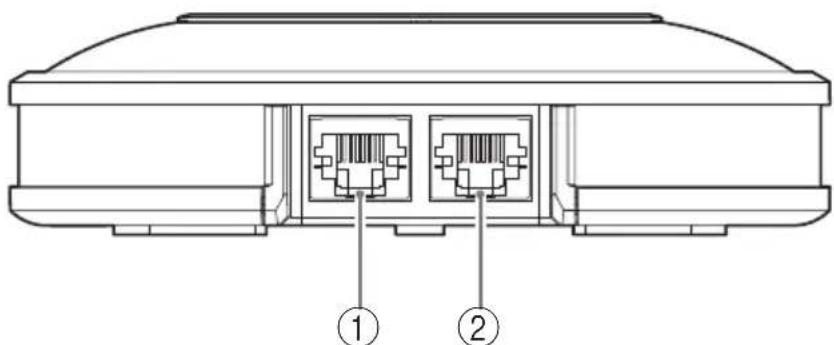
①Input terminal (IN)
Connects the optional microphone (YVC-MIC1000EX) using the microphone cable.
② Output terminal (OUT)
Connects the Control Unit using the microphone cable.
Microphone (YVC-MIC1000): Bottom
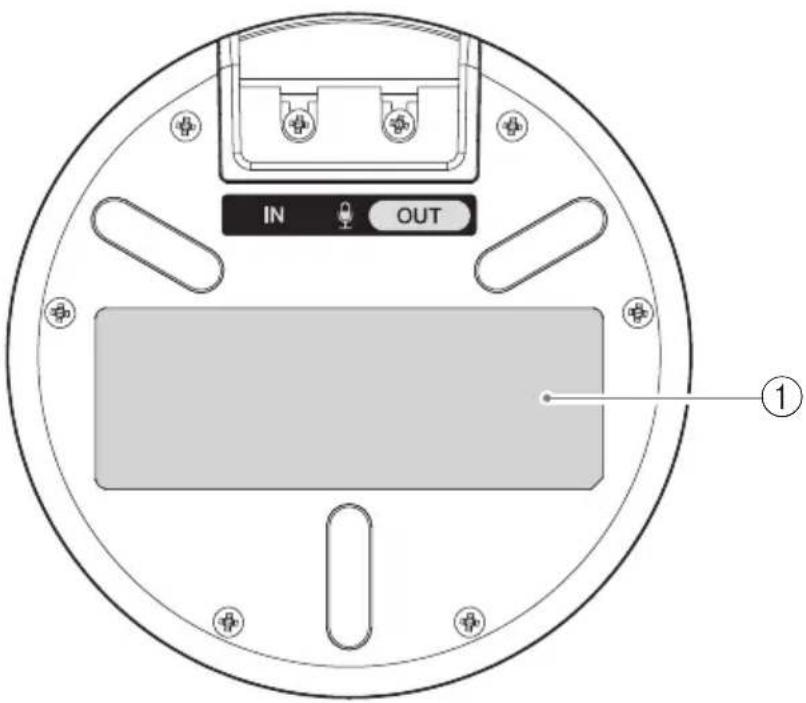
①Name plate
Provides the following information.
Model No.: Model number of the product
SERIAL LABEL: Serial number of the product
Setting up for use
Installation
Install the product in a location where it will be used.
Notes on installation
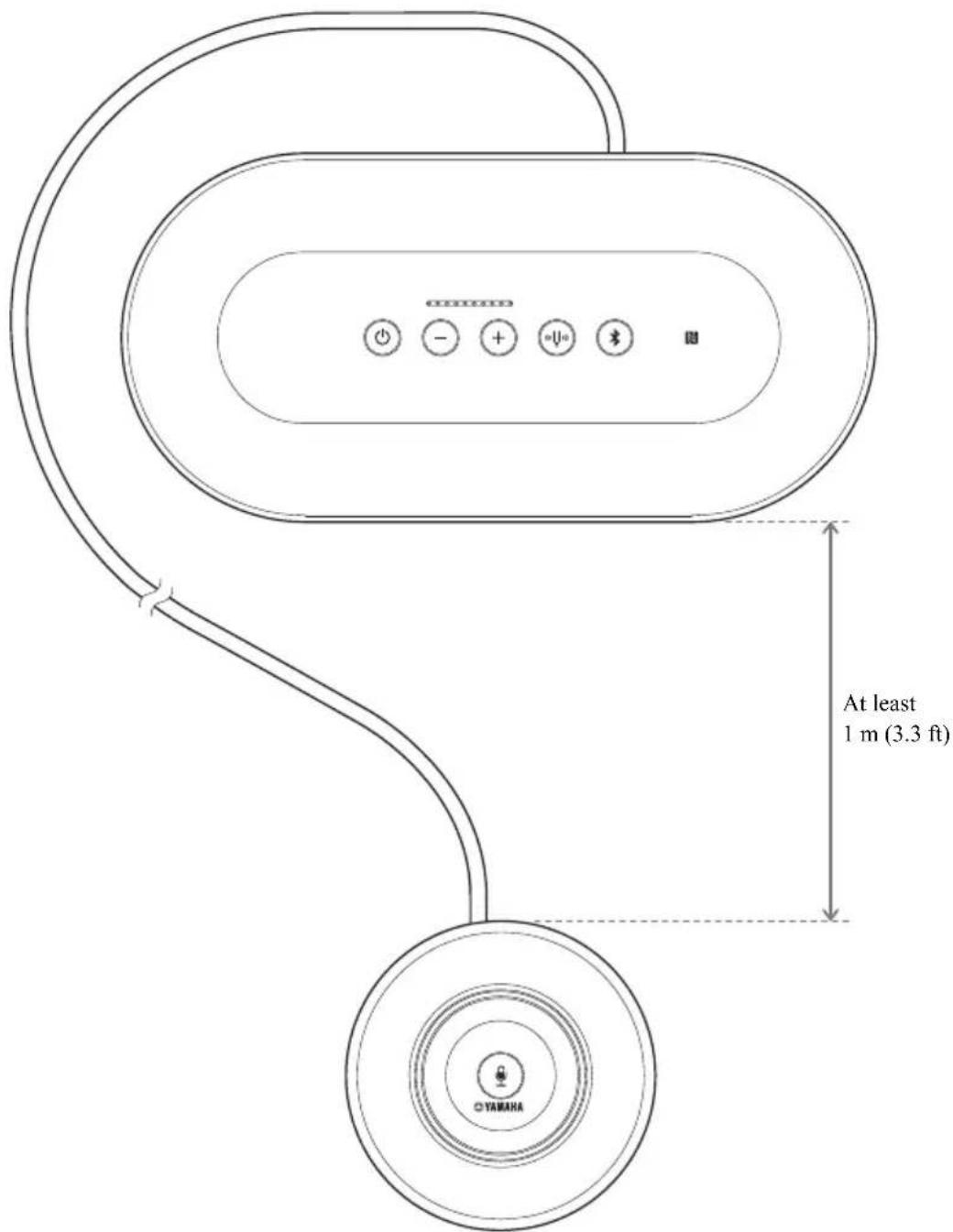
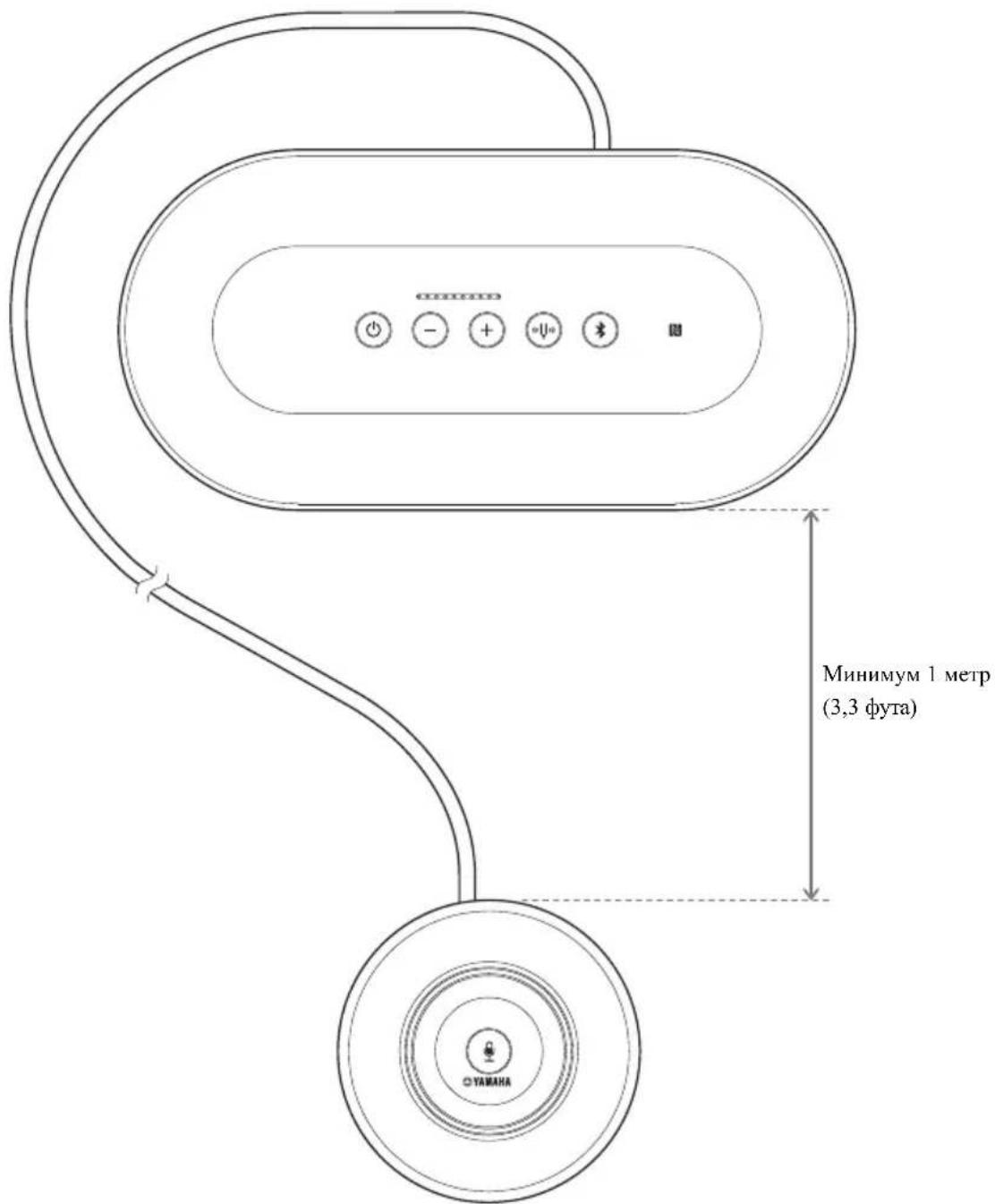
- Place the microphone at least 1m (3.3 ft) away from the Control Unit.
- Keep the microphone away from any noise sources.
Connecting the microphone and power cables
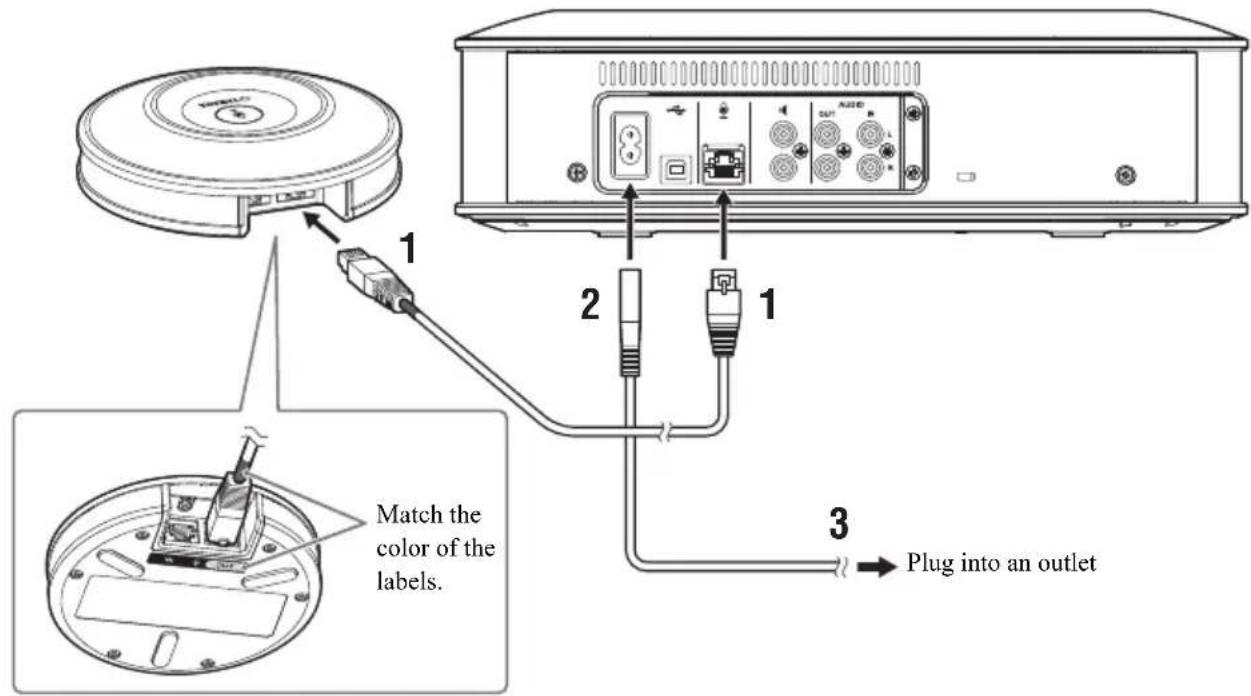
Connect the microphone and power cables supplied with the product.
Notes
- When connecting the microphone cable, be sure to match the color of the labels on the microphone cable and of the microphone output terminal (OUT).
- Be sure to fully insert the power cable into the power terminal of the Control Unit and into the outlet.

Tip
A total of five microphones, including the supplied microphone and optional microphones (YVC-MIC1000EX), can be connected to the product. (For details, refer to the user's manual.)
Changing the setting
Changing the language of the voice guidance
While pressing the tuning fork button ( ) press the volume + button () repeatedly. The language changes every time you press the volume + button ()
For detailed instructions, refer to the user's manual.
Connecting to communication equipment
Connecting to a PC or Mac using the USB cable
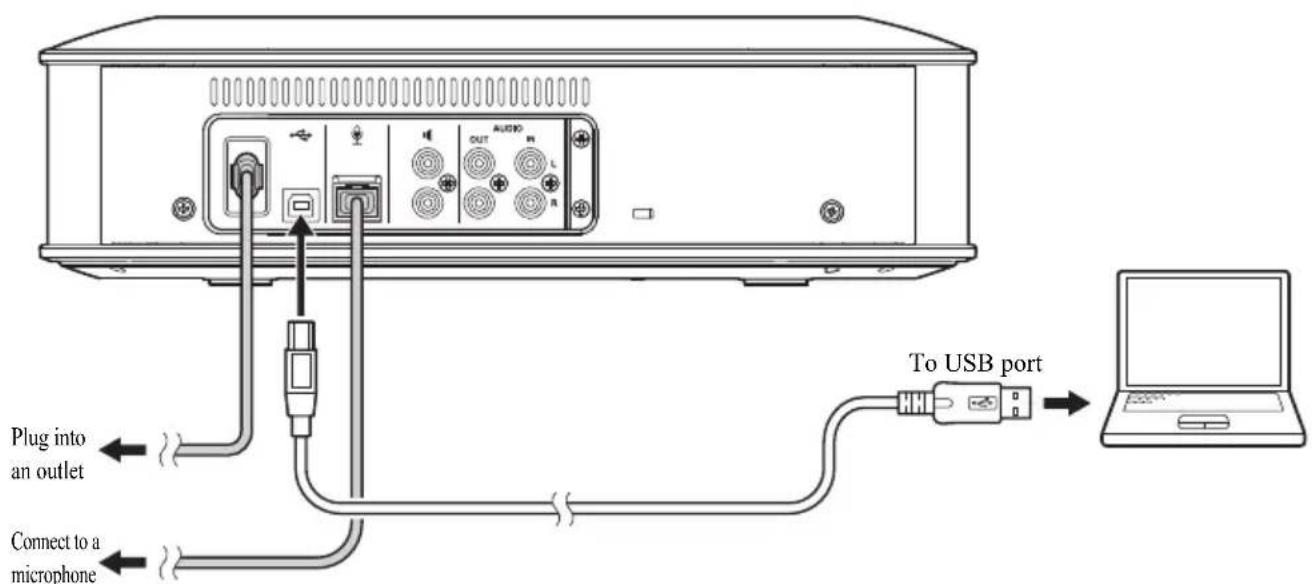
After connecting the product, turn the product on and confirm that it is recognized correctly by the PC or Mac. For detailed instructions, refer to the user's manual.
Connecting to a video conference system using audio cables
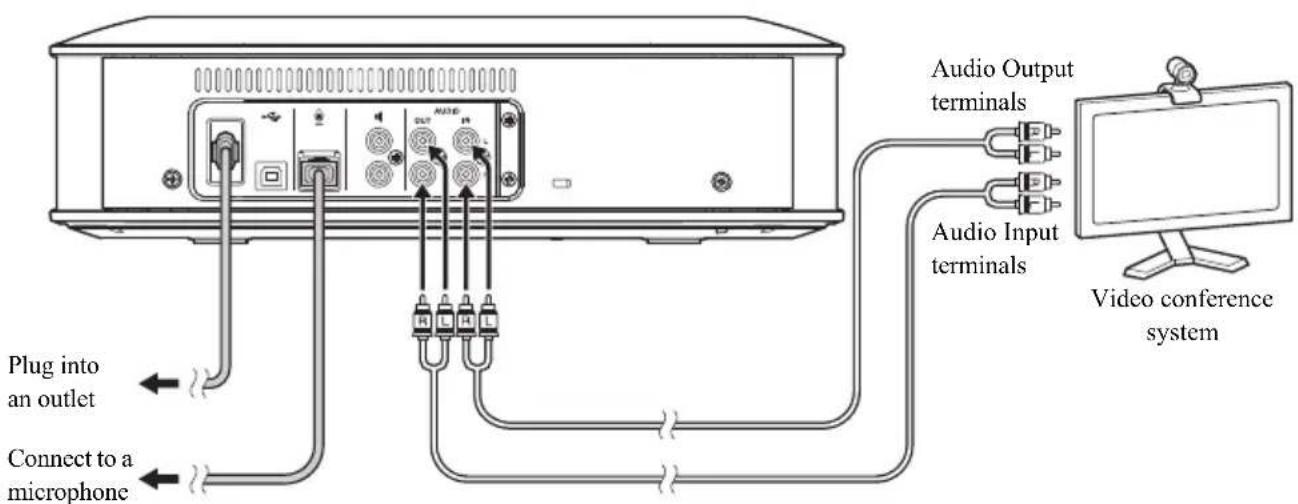
After connecting the product, change the settings of the video conference system so that the product will be used as a microphone and speaker.
For detailed instructions, refer to the user's manual.
Connecting to a smartphone or tablet via Bluetooth
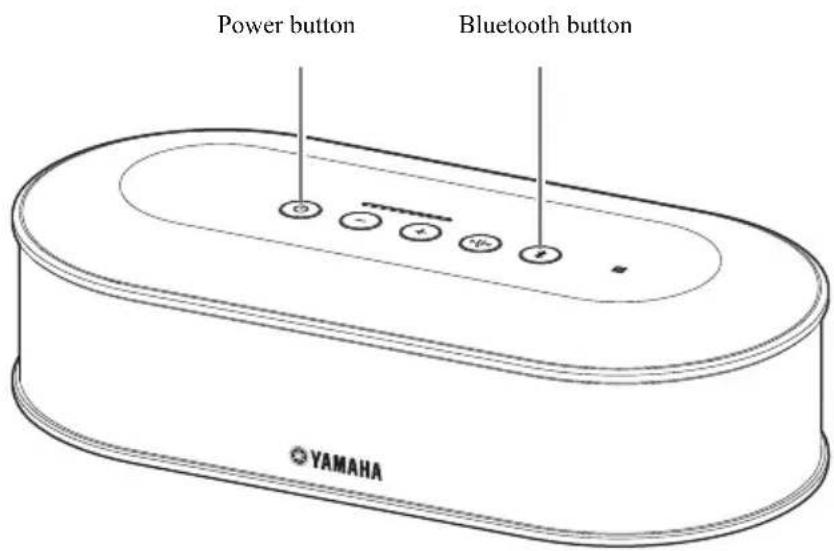
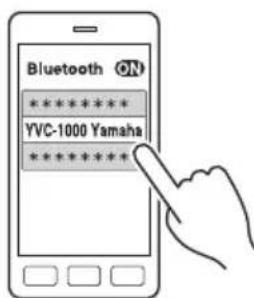
■Pairing
1 Press the power button to turn the product on.
2 Press the Bluetooth button.
The Bluetooth button blinks blue.
3 Press and hold the Bluetooth button for two or more seconds.
The Bluetooth button blinks blue quickly to indicate that pairing can be performed.
4 Perform the pairing procedure using the smartphone or tablet.
Connecting to a paired smartphone or tablet via Bluetooth
1 Press the power button to turn the product on.
2 Press the Bluetooth button.
The Bluetooth button blinks blue to indicate that the product can be connected via Bluetooth.
3 Perform the Bluetooth-connection procedure using the smartphone or tablet.
When the connection is established, the Bluetooth button lights up blue.
For detailed instructions, refer to the user's manual.
Specifications
General
| Interface: Control Unit: USB 2.0 High Speed, Bluetooth, NFC (Near Field Communication), Audio Input terminals (stereo RCA pin), Audio Output terminals (stereo RCA pin), External speaker terminal (RCA pin) x 2, Power terminal, Microphone terminal Microphone: Input and output terminals | |
| Power consumption (max): | 20 W (one microphone connected), 35 W (five microphones connected) |
| Operating environment: | Temperature: 0 to 40°C (32 to 104°F) Humidity: 20 to 85% (no condensation) |
| Storage environment: | Temperature: -20 to +50°C (-4 to 122°F) Humidity: 10 to 90% (no condensation) |
| Dimensions: Control Unit (W x H x D): 332 x 95 x 162 mm (13.1 x 3.74 x 6.38 in) Microphone (W x H x D): 136 x 36 x 136 mm (5.35 x 1.42 x 5.35 in) | |
| Weight: Control Unit: 1.8 kg (4.0 lbs) Microphone: 0.4 kg (0.9 lbs) | |
| Power source: US and Canada models: AC 120 V (60 Hz) Japan model: AC 100 V (50/60Hz) China model: AC 220 V (50 Hz) Korea model: AC 110/220 V (60 Hz) UK, Europe and Russia models: AC 220-240 V (50 Hz) | |
| PC/Mac environment: | OS: Windows (*1), macOS (*1) USB: USB 2.0 or later |
| Bluetooth: Bluetooth specification version: 2.1 + EDR Supported profiles: HFP (1.6), A2DP Supported Codec: SBC, mSBC, CVSD Wireless output: Class 2 Maximum communication distance: 10 m Radio frequency (Operational frequency): 2,402 MHz to 2,480 MHz Maximum output power (EIRP): 4.0 dBm (2.5 mW) | |
| NFC: Compatible devices: NFC-compatible Android devices | |
| Voice guidance: | English, Japanese, Chinese, Korean, French, Spanish, German |
| Accessories: | Power cable (3 m), USB cable (5 m), Microphone cable (5 m), Quick Start Guide |
| Others: Firmware update (transfer from PC through USB) | |
(^*1) For the supported versions, refer to the following website:
https://uc.yamaha.com/
Audio
| Microphone units: | Unidirectional x 3 |
| Speaker unit: Full-range x 1 | |
| Signal processing: | Adaptive echo canceller, Noise reduction, Automatic tracking, Automatic gain control, Automatic room EQ, Dereverberation, Automatic audio tuning |
Table des matieres
PRECAUTIONS CONCERNANT LA
SECURITE 2
https://uc.yamaha.com/resources/support/
https://sound-solution.yamaha.com/download/
才一丶一丶一丶一丶一丶一丶一丶一丶一丶一丶一丶一丶一丶一丶一丶一丶一丶一丶一丶一丶一丶一丶一丶一丶一丶一丶一丶一丶一丶一丶一丶一丶一丶一丶
https://sound-solution.yamaha.com/support/uc/
各部の名称のはたらき
本体 (YVC-CTU1000)
①電源木たん / 伊ンジー―た一
https://www.yamaha.com/products/zh/communication/support/
https://www.yamaha.com/products/zh/communication/support/
使用开源软件
本产品使用开源软件。
许可内容包含在用户手册内。
控制装置和功能
控制终端 (YVC-CTU1000)
① 电源按钮 I 指示灯
Bluetooth 電圧電圧電圧電圧電圧電圧電圧電圧電圧電圧電圧電圧電圧電圧電圧電圧電圧電圧電圧電圧電圧電圧電圧電圧電圧電圧電圧電圧電圧電圧電圧電圧電圧電圧電
2 16
16
音韵 17
安徒 關 聯 孫 的
1 daengguaabangbngwueqkneEeepi
https://uc.yamaha.com/resources/support/
OJn sns sFTrE/Oh
i
拉伊斯内用是人有信明,
賊者增志
兄三异L/(YVC-CTU1000)
https://uc.yamaha.com/resources/support/
https://uc.yamaha.com/resources/support/
https://uc.yamaha.com/resources/support/
https://uc.yamaha.com/resources/support/
m = 311 ;
■Sobre as MARCAS COMERCIAIS
https://uc.yamaha.com/resources/support/
Utilizar software open source
O daHHOM pyKOBOCTBC 6
IIOkaJIyIcTa, IOMHMO DaHHOro pyKOBoIDCTBa, IIpoHTHe BCE dpyrHe pyKOBoIDCTBa IIO 3KcIIJyatauHn
HcIOJIb3OBAHHe HOBeIINHX yHKUHOHaJIbHbIX BO3MOxHOCTeI 7
HcnoJIb3OBAHHe IporpaMMHO O6ecIeHHc OKpbITbIM HCxOINbIM KOJOM 7
3JementbI ynpab.IchHn H fYHKuHH 8
YcpoiCTBO yipabHeHHa(YVC-CTU1000) 8
YcTpoIcTBO ynpaBJIeHnR (YVC-CTU1000): TbJIbHa r cToPOHa 9
YcpoIcTbO ynpaBJIeHnR (YVC-CTU1000): HxKnra cToPOHa 9
MnKpoΦoH (YVC-MIC1000) 10
MHKpooh (YVC-MIC1000): BoKobar cTropoha ...10
MnKpo0H (YVC-MIC1000): HxKn8 ctopoHa ...11
IpeKJIyataHnHOHHa noIroTOBka 12
YcTaHOBka 12
IIOKIIIOHHe MHKpOoHHOrKa6eJI H Ka6eJIa 3JIeKtpoiHTaHHn 13
H3meHeHne hAcTpoek 13
H3MeHeHHe 3bIka RoIOcoBbIX IOcKa3OK 13
IoiKIOueHHe K O6OpyIOBaHHIO CB8N 14
OctabTnBeHTHHPyEmoIPOCTpHaCTBOHeMeHee 1caHTHMETPOCBepxy,1caHTHMETPOCBcBaHcIIpaBa,aTaKke
5caHTHMetpoBc3aJHei cTOpObIyctPoiCTBa.
HecobIOeHHN Tp6oBAHH MOKET B3BaTb AKKyMIIPOBAAHBEIIEAEMOROBIIPOUECE pa60TBTeIa BHHTPH yCtPOHCTBA H IPhBCTHK CTO BO3rOpAHIO HIN IOBpeKDeHIO.
13 He yctahabHbHte yctpoCTBO HA OTKpbTOM BO3dyXe HIN B MecTAX, Ie Ha Hero MoKet IIIOHaCTb BOJa.
HecobIOIeIHIE 3TOIO Tpe6OBAHHMOKET IIpHBcETN K BO3ropaHHIO, IopApKeHHIO 3JIeKTpHuEcKHM TOKOM HIN IOBpeKJdeHHIO yTePOCTBA.
14 He yctahabHbAHte yctpoIcTBO TaM, tne OHO 6yET IOJIbepeKeHO BO3JeHCTBIO IIIN HIN BIAKIOCTH, KOIOIH HIN Iapa, a TAKKe Koppo3HOHHoro r3a. HecO6JIIOJHeHNE 3TOI Tpe6OBaHHMOKET IIpHBecTH K BO3ROPaIIHIO, IOPaKeHHIO 3JIeKTPueckHM TOKOM HIN IOBpeKJEHHO yctpoIcTBA.
15 YcTaHABINBAHTe yCTPOHCTBO B TOPH3OHATAHBOM IOIOXKeHH. He cTABTE erO BBepx HOM HIN BEPTHKALIBHO. Hec6JIyIeHNHe 3TOrTO Tpe6OBAHM MOKET INPBecTH K BO3IOpaHHIO, IOPaKeHHIO 3JIEKTPHueCKHM TOKOM HIN IOBpeKJeHHIO yCTPOHCTBA.
16 He yctahabHbAteyctpoCTBO TaM, Ie Ha Hero CBepx MoKeT yHaactb HocToPOHHI UpcMetn/HHa Hcero MOYr HOACTb KAnHn HIN 6pb3Hn KaKHX-JIOHO KHNKOcTei. He NOMeuaHTe CBepxHa ycTPOCTBO CICdYIOUHC Upcmctb:
IpyTHE 3IeMeHTb CHCTeMH BO H36eKaHHe IOBpeKJehn H/HIN H3MCHHH IBCTa IOBepXHOCTH yCtpoHCTBa.
TopnHHe IpeIMetbI (HaHpHMep, CcEH) BO H36eKaAHne BO3rOpaHHNIOBpeKdEHHyycTpoHCTBA H/HINTPaBMbl.
KoHTeHepbC KnIOKCTbIO BO HIOBcKaHHeHX OIOPOKNbBaHHa pa3INbAIIH 0THX KINIOCTeY,TO MOKeT INPBecTH K IOPaKCHNO 0ICKTpHcckHM TOKOM IOJIb3OBaTeJ H/INI INOBpeKdIIHO yCTpOCTBa.
17 He BCTABJIHIE MTCAJIINHIECKHE, GymKHeI H IpoHc IIocTopoHHIIe IIpeIMETB BYcTPOHCTBO. HecobIODeHHIe 3TOI Tpe6OBAHHI MOKeT IIpHBecTH K BO3ROPAHHIO, IOPaKeHHIO 3JEKTpHueckHM TOKOM HIN IOBpeKJDeHHIO yCTPOHCTBA.
18 He npHKacaiTecb K yctpoHCTBY BO Bpem rpo3bl. Hec6IIOJIeIIHe 3TOrTOpe6oBaan MoKeT pHBeCTN K IIOpaKeIIIO 3JIeKTPnueckHM TOKOM.
19 IeepnoIueckn yuaTne Tp3b H IIILc B NHIK Ka6eJIaIEKtpoHHTaHH. Heco6IIOJeHne 3TOrO npABHa MoKeT npBecTHK BO3ROPaHHIO.
20 YcTPOHCTBOIOJIKHO HCHOHTB3OBATbCnHa pacctToHHN IO MehBiHei Mepe 22-X caHTHMeTPOB OT JINI,IOJIb3yIOUHXCe KApJIOHOCTHMyITOTOPAMn,IOcH6PbJIIBTOpAMn IINJpyTMMn aIIaIOIHIMM ycTPOCTBaMH. Hcc6JIIOJDCHE 3TOIO IpaBnJA MOKcI IOB.IIHrTaHb Ha pa6Oty KApJIOHcTMyITOpA Hi pRbEcTh N IIecCaCTHOMy cIyuaIO C TIKKKMNIOICJCTBHMMH.
21Ile HcIOJIb3yIte yCTPOINCTBO pAOM cMeIHINHCKHM 06OpYIOBAHHem. HcIIyCaEMbc yCTPOINCTBO pAINOHOJIb MOYr OTRHnATEJbHO IOBJIHnTb Ha pa6Ory 3eKTPo-MeIHINHCKORO 06OpYIOBAHHa. He HcIOJIb3yIte yCTPOINCTBO B MecTx ORpaHHueHHN HCIOJIb3OBAHn PAINOHOJIH (HaIPHMep, PIAOM C MeIHINHICKHM 06OpYIOBAHHem).
22 He donyckai Te Nobpeckien Hs USB- mHKpofoHHbIX Ka6ei.
He cTABtBe CbepxHa Ka6eJIITaKeJIbIe IpeIMTeBtI.
He moHnHnpyTe Ka6eJIH.
He 3aKpeIJIyTe Ka6eJIn C IOMOIIbIO cKo6.
He npHKlaIbIbIaIe H3.IIIIIIOIO cHly npH o6paIIHH c Ka6eIeM.
He pacnoIaraiKe Ka6eHb B6H3N HcToHHKOB TeIIa. Heco6JIIOeHHe 3THX Tpe6oBaHH MoKet IpiBecTH K BO3rOpaHHIO, IopapKeHHIO 3JKeTpHueCKHM TOKOM HIN IOBpeKJeHHO yCTpoHCTBa.
23 06a3aTeIbHO HcIOJIb3yIte USB-H MmKpOfoHHBe Ka6eH, HpiHaIaeMbE B KOMIIeKTE K yctpoHCTBy. HcIOJIb3oBAHHe HhIX USB-H MHKpOfoHHBX Ka6eJeM oKet HpHBCCTH K BO3rOpAHHO, IopApKeHHO 3JckTpHcckHM TOKOM HIN IOBpeKeJdeHHO ycTPOHCTBA.
24 O63aTeBHO OTKIOHOTBE BcKa6eHN 3IEKTPOHHTAHHH, c0JIyCTPOIcTBHO He HcIOJIb3yETcB TceHHe JITHEBO IepHOBA BPCMENH. HecO6JIOJIeHHe 3TOI TOpe6OBaHHMOKeT IIpHBecTH K BO3rOpAHIIIO HIN IopAkeHHIO 3IEKTPueckHM TOKOM.
25 OcyIeCTbJIeTeIOKIIIOeHHe HIN OTKIOueHHe Ka6eJIa ⅡeKtpoIHHTaHHn HIN IpyTHX Ka6eJIe cyxHMn pyKaAMn. HecobIOeHHe 3TOrTOpeBOAHn MOKeI pNHBeCTN K IopaeHHO ⅡeKtpHueCKHM TOKOM HIN IOBpeKJdeHHIO yCTpOHCTBa.
26 He yctahabHbAteyctpoiCTBO B HeycToHbOM MecTe HIN TaM, Ie OIO 6yET IOBepaTbCBAO3JeCTBIO B6paHH. B IPOTHBHOM Clyae OHO MOKeT yIAcTb HIN IIpeBepHyTBcR BBePx IHom, YTO IIPHBedT K TpaBME HIN IOBpeKDeHHIO ycTPOHCTBa.
27 He yctahabHbaite ye cTPOHCTBO B MecTx, HOBepKeHHbIX BO3HehCTBHO IPMORO COJIHEHORO CBETA HIN Upe3BBuHaHBOBCHX TEMHepatyp (B6IH3H HAIpeBaTeJeH T. ). Heco6IOHeHcETOrTO Tpe6oBAHMAoKET PnHBecTH K IOBpeJDeHIO yCtPOHCTBA.
28 He caIINTEcB, Hc BCTaBAHc Ha ycTPOHCTBO Hc CTABbTe Ha HcTO npyTHe IpeIMETbI.
HecooIOeHHNE 3TOI Tpe6oBaHH MoKET IpHBecTH K IOBpeKDeHHO yCtpoiCTBA.
29IpeJIIaJIOMBOCIIPOH3BeEINH3ByKaIOIH3BTe rPOMKocTbMOHHMaJIbHOrOypOBH.
HecobIOeHHe 3TOI Tpe6oBaHH MoKeT IIpHBecTH K BOCIIPOH3BEeHnIO 3ByKa CJIINIKOM 6OJIbIOI rPOMKcTH H HApYJHIIo CJIyxa.
30 He HcHIOJIb3yIte yCTPOIECTBO BMeCTax, IIOJIBePKeHHbIX pe3KHM H3MEHeHHM TEMepaTpyBk OKpyKaHOIIeI cpeIi. JIO6oe b6ICTpoE H3MEHeHHC TEMEPaTpyBk OKpyKaHOIIeI cpeIb MoKET IIpHBecTe K KOHDeHCAIHN BJIaRn Ha yCTPOIECTBE N K ERO IIIOJOMKe. IIpH IIOBcHHHn HA yCTPOIECTBC KOHdCHCHPOBaHHo BJIaTH OctabBe T ETO BIKIOUeHHM MIO IOJHOTO BMCbXaHHI.
31 He IIOJIIOHOHaIe HHKaKHe Ka6eH INp BIKIOCHHOM 3JIeKTPOINHTAHHH. HecO6JIIODeHne 3TOrTO Tpe6OBAHn MOKeT IIpHBcCTN K IOBpcKdEHHIO yCTpoHCTBa H IOKIIIOCHHIO TO 06OpyIOBAHn.
32 IpeTcM, KaK IIpHKacatbck K yCtPOHCTBy, CHMHTE CO CBOEIO TeIa HIN OJekDcTaTHueCKoe 3JIeKtPHueCTBO. IHeco6IIoDEHNE 3TOI Tpe6OBAHHMOKeIT INPBecTH K IOBpeKDeHHIO yCtPOHCTBA.
33 IIpaBnIbHbIM o6p3OM IPOTAHHE H IOKIIHOHTe Ka6JIH. EcIIIEOCTOPOKIO IOITHIY 3a Ka6JIH HII 3AIHYtCB O IHX, TO yCTPOJCTBO HIN IOKIIIOOHe OOBpyOBAHHe MOKe T OIPOKHIyTBc HIN YIacTB, YTO IIpHBed K TpaME HIN eRO IOBpeJDeHHIO.
34IpeTeM,KaHauHHaTbIOKIOHOeHHe BHeIIHero 06pyOBAHn, BHMMATEbHO O3HaKOMbTEcB CO BCCMH IpiHaraembIMNK HeMy pyKOBOCTBaMH IO KcCJIpyataHH H BbHOJHTEIOKIOOHcHcNE COJIacHO H3IOKCHHbIM B HIX HHCTpyKIIHM.
JaHHoe yctpoCTBO He OTKJIIOUaTcR OHT cTOHnKa IIepemEHORo TOKa Do TEX IOP, NOKA OHO OCTaETcIIOKJIIOueHHbIM K po3eK IIepemEHORo TOKa, DaKe B cJIyae, KOJa OHO BBIKJIOueHo. TaKe COCTOAHHe Ha3bIBaETcpeXHMOM OKNJaHH. IIO CBOe KOnCTpyKINH yctpoCTBO B 3OM COCTOAHHH IOTp6JIACr Hc3HaHTCJIbHOe KOJIInueCTBO 9JEKTPO3HepHH.
Меры пе dioctopoxhoCTN ри ekplnyatauyn yctpoiCTBa
-Даиhoe yctpoicTBO cnpoeKTHPOBAHIO nIg HcIIOBaHHB O6bHbIX OΦHCbIX NOMEeHHx H KOHCTpyKTHBHO He IpeHa3NaHeO IJI npHMeHHB BJI06bIX Tpe6yIOHx BICOKO CTeNEHH HaJeKHOCTH pa6OTb OJIactx, OTBeTCTBeHHbIX 3a JHN IIIOe HIN IeHHbIe aKTHBbl.
- Piochm Bac npHHb BO BHMaHHe TOT AKT, YTO KOMHaHa YamaHa He Hecet HKAaOH OTBeCTBeHHOCT Ha JIO60yIe6, npuHHeHHb B pe3yIbTaTe HnPaBnHbHO HcNOJb3OBaHH Nn HAcTpOKn DaHHOrO yCtPoIcTBa.
B 3aBcHMOCTH OT ycIOBHN KcIJIyataIHIN, daHHoe yctpoNCTBO MOKeT ABJITbCn IIpNHHO BO3HHKHOBEHn IOMEX B TeJIefoHHo, paHNO, TeJIeBN3HOHHO CB3H N T. II. B TAkOM cIyuae H3MeHHTe MecTO eTO yCTaHOBN HIN eTO IOJOKeHne.
- Pn npepaue yetpoieTba B TpeTbH pyKN, IIOKaIyIeTa, PnIOKHTe K Hemy DaHHoe pyKOBOCTBO, a TaKKe BCE NdyIIHe B KOMIIeKTe akcccccayapbl.
- Pn yTHIN3aHn ycTpoCTBa cIcIyITc IpcIIHCAHHB BaIIErO opraHa MecTHORo camoyipabHn.
- Hc IIOIocIHHHHe rHcHpyIOHc IIyM O6OpUOBaHHe K ToH JIHHH NckTpOHTaHH, K KOtOpMy IIOIKIIIOCHo IaHHOC yCTpOHTBO.
OФункцnNBluetooth
- ΦyHKiHa Bluetho 0chOBaHa Ha TexHOIOHn 6ecIPOBIOHO CB3n, HcIOJIb3yIOIIe He Tpe6yIOUcIEHaJIbHO rHHeH3npOBAHHIOLOcy UactOT 2,4 IT.
Piioca cactot 2,4 TII, HcnoIb3yEma Bluteoth-coBmEhMn yctpoiCTBaHn, ABJETc paHNOHaia3OHOM pa60tbp a3HOOobpHH. HeCMOTpa HA TO, YTO B Bluteoth-coBmEhMbIX yctpoiCTBax HCIOJIb3yIOITc TEXHOIOHIN, IO3BOJIHOIIa MHHMN3HPOBaT bJIHHHe IpyrOHOHIOJIb3yIOUeToT JKe paHNOHaia3OH O6OpYOBAHN, IOIO6HOe BJIHHne MOKet yMeHbIIIbckopocTb HIN pacCToHHe CB3H, a B HEKOToPbix CUYaX H IIpePBAtb ee. - CkopocTb n pacctOHHne Ipeepaun CHHaJa pa3JHuaKOTcB 3aBnCHMOCTN OT pacctOHHM MeKJy KOMMyHHKaIHHbIMN ycToPcTBAMH, HJIHNH INPePTCTBn MEKJy HNM, ycIOBn paJINOpHema N TTHa o6OpyIOBaHH.
- KomnHnYamaHa He rapaHTpyet 6ecIPOBODHOe coeINHeHHe daHHoro yctpoNCTBa c JIObIMN BluetoothCOBMcCTHMbIMN ycTPONCTBaMn.
MecTa paCnoJIOXeHnY Ta6JIuYeK cTexHnYeCKnIMN DaHHbIMN
TaJIHcNtexHHueckHMnIaIIbHMn paIOJOKeHbHa IIHKHNx HAcTeX YcTpoHCTBa ynpabJIeHnH MHKpOfoHa.
В级以上
Blaorapm Bac 3a NoknyiYamaH YAVC-1000.YVC-1000IpeCTabJETco6o MHKpOHHyIO akyctnueckyIO cnCTeMy IyHnHnnpOBaHbIX KOMMyHKaIIN, BblIOJIHHOUYo POJIb ayINO TepMHHaII pN IOIKIOHeHH K O6OpUOBaHNO CB3N (Haipmep, PC HIN Mac, cMaprOHOy HIN IIIAHITety, a TaKke K CNCTeME BNIOEOKOHpepeHHCB3N).
PokaJyIcTa, BHMaTeJIbHO IIpoHTaIe IaHHoe pyKOBOCTBO IIpeI yCTaHOBKoi HIOIKJIIOHeHNEM yCTPOIcTBA.
Bepexho xpaHHTe daHHOe pyKOBOCTBO B HaeXHom MecTe IITTO, TIObI B CJIyuae Heo6xOIMOCTH IM BceTJa MOxHO 6blIO BOCTIOJIb3OBaTbcra.
- Hnkaaayactb daHHoro pyKOBOcTBa He MoKet 6bITb cKIOHPOBaHa HIN HCIOJIb3OBAHa B JIO6oI φOpMe 6e3 pa3peHHeHH KOMIIaHHYama.
CoepkaHHe JaHHoro pyKOBOCTBA OTHOCHTcK CaMOI NOCJIeHNHe Ha DaTy erO Iy6IIHKaIHn TExNHuecKOI cIeINHfHKaIHN yctpoIcTBa. JIra TORO, YTObI NIOJYHTb O6HOBJIEHHOe pyKOBOCTBO NOCJIeHN He BepCN, 3aJITHe Ha cJeIyHOHn Be6-caHn CKaHaTe COOTBeTcTBYIOHn FaiJI. https://uc.yamaha.com/resources/support/ - Kompana Yamaha HC HCCCTHHKAKOJ OTBCTCTBCHHOCTH 3a JIO6bIC BO3MOXHBIC NOTcPH HIN IOBpcKDCHHaAHbIX Bpc3yIbTaTc HcIOJIb3OBaHHa DAHHoro yctpoHCTBa. O6paHTc BHHMaHNC, YTO rapaHTHa pacpoctpaHcTc TaTbKO Ha peMOHT DAHHoro yctpoHCTBa.
IpoBepbTe cOeepxHmoe KOMnJIeKTa nOCTaBKn
- YcTpoiCtBO yIpaBJIeHHa (YVC-CTU1000) x 1
- MinkpoΦOH (YVC-MIC1000) x 1
Ka6eJIb 3JIeKtpOnHtAnHn (3 MeTp a) x 1
USB-Ka6cJIb (5 McTpOB) x 1
MnKpOfoHHbKa6cJIb(5McTpOB)x1
KpaTKOC BBOJHOC pyKOBoCTBO (daHHoc pyKOBoCTBO) x 1
O daHHOM pyKOBOdCTBe
O cokpaueHnax
B DAHHOM pyKOBOCTBC Ha3BaHHaYcTPOHCTB H IPOyKTOB IIpHBOITcB HINKCCJIyIOIcM BHNc
Yamaha YVC-1000: danhoe yctpoictbo
- Microsoft® Windows®: Windows
- macOS: macOS
TobapHbIe 3HaKn
- Microsoft Windows KBHOT3AapeHTpHPOBAHHbIMTOBAPbIMN 3HaKaAMN KOpIopaMH Microsoft B CoeINHeHHbx IIItaTAX HpyTHX cTpaHax.
Mac n macOS 8BJIOTc3apeTHeCTpHPOBaHHbIMN TOBapHBIMN 3HaKaAMN KOMIaHH Apple Inc.
Android TM ABJCTC TOBAPHBIM 3HaKOM HJN 3apcHCTpnpOBAHHbIM TOBAPHBIM 3HaKOM KOMIIaHH Google Inc. - Bluetooth® YBJIACTc3aPcHcTpHpOBaHHbIM TOBaHbIM 3HaKOM KOMIIaHHn BlcTooth S1G HcIIOJIb3yctc KOMIIaHHcYamaha B COOTBCCTBHN C JINCH3HOHHbIM COJIaIHChm.
JlorotnNFC (N-Mark) ABIEcTcTOBapHbIM 3HaKOM HIN 3apeTcPpOBAHHbIM TOBapHbIM 3HaKOM KOMIIaHHN NFC Forum, Inc.
IoxaIyIcTa, NOMMO daHHoro pyKOBoIDCTBa, npoYtTe BCE dpyrHe pyKOBoIDCTBa no 3KcPnLyatauH
JaHIOe pyKOBOCTBO COeIeKHT TOJIbKO OCHOBHyIO HOpMaHIO.
IIOJIyueHH6OJIe IIOJPO6HOH HOpMaHn O6 HcIOJB3OBAHN DaHHOro yCTpOHTBa, IOKaJIyIcTa, IPOHTHe CJJeDyIOUee:
PykoBOCTBOIOJIb3OBATeJIa:coepKHTHΦOpMaIHHo6 HIOJIb3OBaHHn DaHHOrO yctpoIcTBa, B TOM YHCJIe O IIOJpO6HbIX NaCTPOIKAX HIOJIe3HBxΦyHKUHX.
PokaHcTa, ckaaTe NocJIeHHIO BepChIO PykoBOCTBa IOJIb3OBateJIO CTpaHNb 3aRpy3KN Ha HauHem caHr.
TTO, TTO6bI IPOBcTH HAcTpoH Ky KOMMyHHKaIHHOHHORO O6OpyIOBaHH, 6paHTecb K IIpHJIaTaEMbIM K HcMy pyKOBOCTBAM IO EKIIpyaHH.
IcnoJb3OBaHne HOBeiXx yHKUHOHaJIbHbIX BO3MOXHOCTe
BbMOKTe 3aRpy3HTb BCTpoeHHoe IporpAMHHe oecieueHne co ctpaHHIb 3aRpy3Kn Ha HAIeM caHTe, TTO6blIOJyHTb IOCTyIN K HOBCIIHM fYHKUHOHAJIbHbIM BO3MOXHOCTM ycTPOIcTBa.
CTpaHnca 3arpy3kn
https://uc.yamaha.com/resources/support/
IcnoJb3OBAHne npoRpaMMHOrO oecpeHnC OTKpbITbIM NCXODHBIM KODOM
B daHHOM yctpoHCTBC HcnoJIb3yEcTcI IporpaMMHOC o6ccIeHHc c OTKpbITbIM HxOHNbIM KOJOM.
CoepKaHHe JInIeH3HH H3IOKeHO B PyKoBOcTBC IIOJIb3ObaTeJIA.
3JIemHeTbI ynpaBJeHnI ΦyHKcNl
YcTpoIcTBo ynpaBJIeHnY (YVC-CTU1000)
①KhONKa-нДиКaTOp BKJIQUeHnA
HaKMHTc, TTO6bI BKNIOHHTb yCTPOINCTBO. HaKMHTc H ydepKHNBAITc KHOIKy BKNIOHCHN B TcueHNc IByx HJH 6OJIe CckyHd, YTO6bI BOITH B PCKHM OKnJaHHa. OHa 3aropactra 3eICHeBIM, cCIIH yCTPOINCTBO BKIOUChO, H rOpHT KpaCHbIM B PCKHMc OKnJaHHa.
②KHONKN-нДИКaTOPbI ГOMKOCTN +/-
HaKMHTe IJIpeRyINHPOBKNrPOMKOCTHINHAMHKa. YIepKHBaIte COOTBETCTBYIOUYIO KHOIKY B TeueHne IIOJy-CEKHyIbI HIN BOJIee, YTO6bI IOCTOHHO yBeJIHNHBaTB HIN yMeHbIaTb rPOMKocTb. HaKMHTe HyePekHBaIte OIOHOpeMeHHO KHOIKH + H - B TceHHe NByx H 60JIee CcKHyI, YTO6bI NpcckJIouHTb ycToHCTBO BBIOJa HA BCTPOeHHbc HIN BHCIIHHc INHHAMNK.
③Индзкадурвна
O6bHNO 603Haetae ypOBeH BxOHHORo rJIOCOBOr cHnHaJa. OH IOKa3bIbAeT KcYuH N ypOBeH rPOMKocTH np erO peryINpOBKe JJI BCTpoEHHO HJN BHeHHeO dHnAMKa.
④KhONka-инДикaTOP «KaMeрTOH»
OHa 3aRopaeTcH Hm MHrae T opaHKeBbIM IIpH BO3HHKHOBeHH HEnoJIAIOK. B TaKOM cIyuae HaKMHTe KHOIIky «KaMePToH》,TO6bI aKTHBnPoBaT b I0IOcoBbIE IOIcka3KN IIO NOBOy O6HApyeHHoH HeIoJaIKN.
EcH ee HaKaTb H yIepKHaBaTb B TeueHne 1Byx H 60Jee ckyH,TO yCTPOHCTBO aBTOMaTHueCKn IPOBEET 3aMep aKyCTHueCKHX ycIOBHN HACtpoNkOITHMajlbHbIX aKyCTHueCKHX IapametpOB (aBTOMaTHueCKyIO HAcTPOH Ky 3Byka).
⑤KhONka-инДикaTop Bluetooth
HaKMHTe ee IIOI TO, Yo6b II POBecTH coIIpJKeHHe HIN COEHHITb ycTPOcTBo C Bluetooth-COBmecTHMBIMN cMapTfoHOM HIN IIaHHeTOM. EcHn HaKaTb 3Ty KHOIKy B COCTOHN IIIOJIIOUeHnK Bluetooth-COBmecTHMOMy ycTPOcTBY, Bluetooth-IOIKIOueHne 6yTe IIpePbaHo.
⑥Лorotin NFC (N-Mark)
IIOJIHee Bluetooth-coBMeCTHMBie cMaprfoH HIN IJIaHIiet, oHaIIeHHbIe texHOJIorHei NFC (Near Field Communication, KomMyHNKaIIHs 6JIHXeRr IOJI), K MTeK e N-Mark, MoXHo BbINOJIHHTb Hx COpJKeHHe HIN COeIHHeHHe C DaHHbIM yCTpoHCTBOM, JIno OTKIOHTb HX.
⑦BCTpoeHHbI INHaMnK
Bocnpo3BODHT BXOJAHNI RTOIOC.
YcIpoIcTBo ynpaBHeHn (YVC-CTU1000): TbIbHa cTOpOHa
①Pa3bem 3JNeKTpOnnTaHn
HcnoJb3yeTcIINIOKIOUOeHHIpHJIaraeMOrIOPOBOJa 3IEKTPoPHTaHH.
②USB-nopt
HcnoIb3yETcIJIIOKJIHOeHHyycTpoIcTBaKPC HIN Mac c NOMOIIbIO npHlaRaemOro USB-ka6JIa.
③Pa3bem MmKpOΦoHa
HcnoJb3yctcIJIIOKJIIOUeHHI pNJlaFoEMORO MHKpOfoHa C NOMOUBMOKpOfoHHo Ka6JIa.
④Pa3beMbI BHeuHnX dHaMnKOB
HcIIOJIb3yIOCTaIIIIOIKJIOHeHHaHmKOBco BCTpoEHbIM yCHINTEJIeM.
⑤Pa3bemblaydnoBbIXOda(AUDIO OUT)
HcnoJIb3yeTcI IIOIKJIOHeHH K pa3BeMaM ayIOHOxOa CnCTeMb BNDeOKOHfpeEHICB3H.
⑥Pa3beMbI aydnoBxoJa (AUDIO IN)
HcnoB3yETcIINIOKIIOueHHKa pa3bEmaayHOBBIXOa cHCTeMbI HneOKOHpepeHHCB3H.
YcTpoIcTBo ynpaBJIeHnA (YVC-CTU1000): HxKHe CTOpOHa
① Ta6nUka cTexHnuecknMn daHHbIMN
CoepKHT cJIeIyIOIyIO IHOpMaIIHO.
Model No.:Homep moJIeIycTpoIcTBA
SERIAL LABEL: CepHnHbH HmOp ycTpoiCTBa
MnKpoΦoH (YVC-MIC1000)
① KhonkaBpeMeHHoroOTKIOUyeHNA MKNPOOHa
HaKMHTe, YTO6bI BpEmcHHO OTKIOOHb (BbIKIOHTb 3ByK) MHKPOoOH. IJIr TOrO, YTO6bI OTMeHHTb cyHKINHO BpEmcHoro BbIKIOueHHa 3ByKa, HaKMHTe 3Ty KHOIIky eIe pa3.
②HnKaTOp COCToHnMa NKpoOHa TOpHT 3eJIeHbIM, KOrJa MHKpoOoh BkIIOueH. Mnraet KpaCHbIM, KOrJa MHKpoOH BpEmHo OTKIOueH.
MnKpoΦoH (YVC-MIC1000): BoKobar cTopoHa
① BxoHno pa3bem (IN)
HcnoJb3yeTcIJIa IIOJIHOueHHa DIOJIHNHTeJIbHOrOMHKpofoHa (YVC-MIC1000EX) c IOMOnIIbOIMKpofoHHoro Ka6JIa.
②BbIXoHNo pa3beM (OUT)
HcnoB3yeTcnaIIOKJIHOeHHaYcpoIcTaBa ynpabJIeHHc nMOOIbIO MHkpofoHHoro Ka6JIa.
MnKpoΦoH (YVC-MIC1000): HxHЯ cTOpOHa
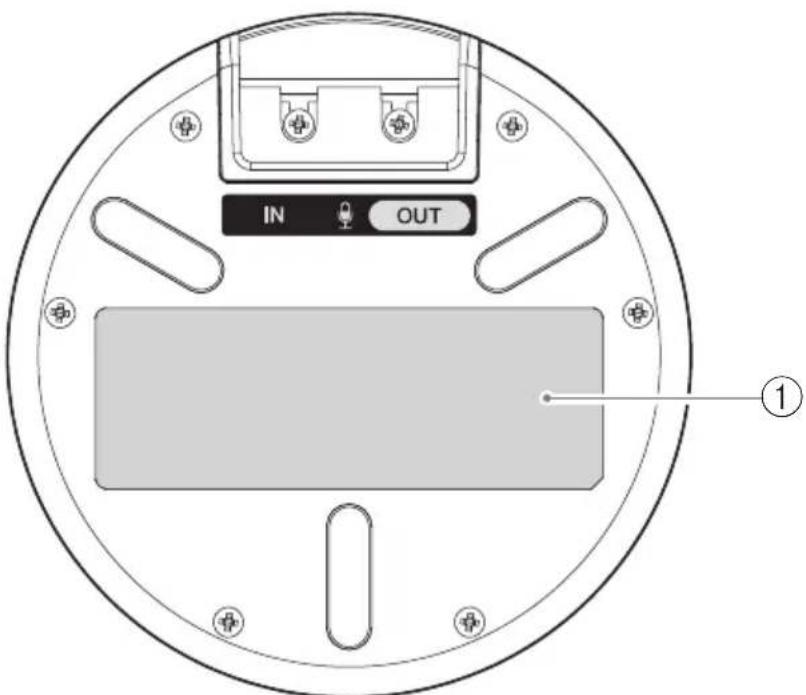
① Taşnéчka c TexHnueCKnIMn DaHHbIMN
CoepKHT cJeIyIOU IO HhOpaHIO. Model No.:Homep MoeJIIN ycTpoiCTBa SERIAL LABEL: CepnHbI Homep ycTpoiCTBa
PpeKcIpyaTaUHHaNoTROBKa
yctaHOBka
YcTaHOBHTyeTPOHCTBO TaM, Ie OHO 6yTe HcIOJIb3OBaTbcra.
PnHMeaHnnIO BOIpcOy ycTaHOBKn
- YcTaHOBHTe MHKpoΦoH He 6JIHKe 1 MeTpa (3,3 ΦyTa) or YcTpoHCTBa yIpaBHeHIA.
He np6JHKaIe MHKpOfoH KIO6bIM HcToHHKaM IIyMa.
KhoNka Bluetooth HauHcT MHaTaB cHHM.
3 HaKMHe n ydepknBaTe KhoNky Bluetooth B TeueHnC DByx Hn6oJIce cekyH.
Khoika Bluetooth 3aMHTAc TcHMM, yKa3bBaHa To, YTo IpoIcIpya cOpJKeHH MoKet 6bIT BbIIIOJIHeHa.
4 BbIIOJIHITc IpoUcIpy coIpKHeHH Ha cMaprfoHc HIN IIaHIte.
Important Notice: Guarantee Information for customers in European Economic Area (EEA) and Switzerland
| Important Notice: Guarantee Information for customers in EEA* and Switzerland For detailed guarantee information about this Yamaha product, and Pan-EEA* and Switzerland warranty service, please either visit the website address below (Printable file is available at the website) or contact the Yamaha representative office for your country. * EEA: European Economic Area | |
| Wichtiger Hinweis: Garantie-Information für Kunden in der EWR* und der Schweiz Für{nahere Garantie-Information über diesen Produkt von Yamaha, sowie über den Pan-EWR*- und Schweizer Garantieservice, besuchen Sieitte entweder die folgenden angegebene Internetadressee (eine druckfähige Version befindet sich auch auf der Website), oder wenden Sie sich an den für Ihr Land zuständigen Yamaha-Vertrieb. *EWR: Europäischer Wirtschaftsa rum | |
| Remarque importante: informations de garantie pour les clients de l'EEE et la Suisse Pour des informations plus détaillées sur la garantie de ce produit Yamaha et sur le service de garantie applicable dans l'ensemble de l'EEE ainsi qu'en Suisse, consultez notre site Web à l'adresse ci-dessous (le fjichier imprimable est disponible sur le site Web) ou contactez directement Yamaha dans vos pays de résidence. * EEE: Espace Economique Européen | |
| Belangrijke mededeling: Garantie-informatiek voor klanten in de EER* en Zwitserland Voor gedetailleerde garantie-informatiek over dit Yamaha-product en de garantieservice in heel de EER* en Zwitserland, gaat u maar de onderstaande website (u vind een afdrukbaar bestand op de website) of neemt u contact op met Yamaha-vertegenwoordiger in uw land. * EER: Europese Economische Ruimte | |
| Aviso importante: información sobre la garantía para los clientes del EEE* y Suiza Para una información detallada sobre este producto Yamaha y sobre el soporte de garantía en la zona EEE* y Suiza, visite la Directions web que se incluye más bajo (la version del archiv para imprintir está disponible en el situ web) o póngase en contacto con el representante de Yamaha en su País. * EEE: Espacio Económico Europeo | |
| Avviso importante: informazioni sulla garanzia per i clienti residenti nell'EEA* e in Svizzera Per informazioni dettaglia sulla garanzia relativa a questo prodotto Yamaha e l'assistenza in garanzia nei paesi EEA* e in Svizzera, potete consulhare il site Web all'indirizzo riportato di seguito (è disponibile il file in formato stampabile sul site) oppure contattare l'ufficio di rappresentanza locale della Yamaha. * EEA: Area Economica Europea | |
| Aviso importante: informações sobre as garantias para cliente da AEE* e da Suira Para obter uma informação pormenorizada sobre este produits da Yamaha e sobre o服务于 de garantia na AEE* e na Suira, visite o site a seguir (o arario para impressão está disponible no site) ou entre em contacto com o escritório de representação da Yamaha no seu País. * AEE: Área Econômica Europaia | |
| Σημαντή Σημείωηπη Πληροφορίες ευγύσης για τους πελάτες στόν ΕΟχ* και Ελβείσια Για Ελεπιομερίες πληροφορίες ευγύσης σχετικά με το παρόν τροίουν τις Yamaha και την καλιμη ευγύσης σε ολες τις χωρες του ΕΟχ και την Ελβείσια, επιοκερίεITE την παρακατων Μιθοελίδα (ΕKTιμώσιμη μορρή εινα διαθέσιμη στήν Μιθοελίδα) ἡ απιεύθυνθείτε στήν αντιπροσωπεία τις Yamaha στη χωρα σας. * EOX: Eupωπταίκός Εικονομίκός χωρος | |
| Viktigt: Garantiinformation für kunder i EES-området* och Schweiz För detaljerad information omenna Yamahaproduktsamt garantiservice i hela EES-området* och Schweiz kan du antingen besöka nedanstäende webaddress (en utskriftsvänlig fil finns på webplatsen) erler kontaktea Yamaha officiella représentant i ditt land. * EES: Europaiska Ekonomiska Samarbetssområdet | |
| Viktig merknad: Garantiinformationsonkunder i EØS* og Sveits Detaljert garantiinformationsonmDette Yamaha-produktet og garantiservice for heile EØS-området* og Sveits kan fãs enten ved ab besøke nettadressen nedenfor (utskriftsvorsjon finnes på nettiden) erler kontaktea Yamaha-kontoret i landet der du bor. *EØS: Det europeiske økonomiske samarbeidsområdet | |
| Vigtig oplysning: Garantioplysninger til kunder i EØO* og Schweiz De caninde detailjerede garantioplysninger on dette Yamaha-product og den fælles garantiserviceordning for EØO* (og Schweiz) ved at besøge det websted, der er angivet nedenfor (der findes en fil, som kan udskrives, på webstedet), erler ved at kontaktee Yamaha nationale represeationskontor i det land, hvor De bor. * EØO: Det Europaiske økonomiske Område |
https://europe.yamaha.com/warranty/
https://europe.yamaha.com/warranty/
| Tärkeä ilmoitus: Takuutiedot European talousalueen (ETA)* ja Sveitsin asiakkaille | |
| Tämän Yamaha-kuitone sekë ETA-alueen ja Sveitsin takuuta koskevat yksityiskohtaiset tiedod saatte alla olevasta nettiosoitteesta. (Tulostettava tiedosto saatavissa sivustolla.) Voitte myös ottaa yhteyttä paikalliseen Yamaha-edustajaan.*ETA: Euroopan talousalue | |
| Wažne: Warunki gwarancjyne obowiazujace w EOG* i Szwajcarii | Polski |
| Aby dowiedzieć sie weitere na temat warunków gwarancjynych去除 productu firmy Yamaha i serwisu gwarancjnego w calym EOG* i Szwajcarii, nały odwiedźć wskazana ponije strom internetowa (Plik gotowy do wydruku znejduje są na stromie internetowej) lub skontatkość z przystawicielstwem firmy Yamaha w swoim kraju. * EOG - Europejski Obszar Gospodarczy | |
| Duležité oznámeni: Záručni informace pro zákazniky v EHS* a ve Švýcarsku | Česky |
| Podrobné záručni informace o toto produktu Yamaha a záručnim servisv u celém EHS* a ve Švýcarsku naleznete na niže uvedene webové adrese (soubor k tisku je dostupné na webovych stránkách) nebo se muzete obrátit na zastoupení firmy Yamaha ve své zemi. * EHS: Evropský hospodáfský prostor | |
| Fontos figyelmeztétés: Garancia-információk az EGT* területén és Švájcban elő vásárlók számáraA jelen Yamaha termékre vonatkozó részletes garancia-információk, valamint az EGT*-re és Švájcra kiterjedó garanciáliszolgaltatas tekintetény keresse fel webhelyūnket az alábbi cimen (a webhelyen nyomtatható fajlt is talál), vagy pedig lépjen kapcsolatba az országában működő Yamaha képviceleti iródával. * EGT: Europai Gazdasági Térşég | |
| Olunine markus: Garantiileave Euroopa Majanduspirkonna (EMP)* ja Šveitsi klientidele | Eesti keel |
| Täpsema teabe saamiseks selle Yamaha toote garantii ning kogu Euroopa Majanduspirkonna ja Šveitsi garantiiteeninduse kohta, kúlastage palun veebisaiti alljärgneval adressil (sel saidil on saadaval prinditav fail) või poörduge Teie regiooni Yamaha esinduse poole. * EMP: Euroopa Majanduspirkond | |
| Svarigs pazijojums: garantijas informácija klientiem EEZ* un ŠveicéLai sāgemu t delalizētu garantijas informáciçu par šo Yamaha produktu, kã arī garantijas apkalpošanu EEZ* un Šveicé, lūdzu, apmeklëjet zemäk norādīto timekla viétrnes adresi (timekla vietnê ir pieejams drukājams fails) vai szainieties ar jūsu valsti apkalpojso Yamaha pärstāvniecūb. * EEZ: Eiropas Ekonomikas zona | |
| Démesio: informacija del garantijos pirkéjams EEE* ir ŠveicarijojeJei reikia išsamos informacijos apie ši „Yamaha" Produkta ir jo techniné priežūră visoje EEE* ir Šveicarijoje, apsilankykite mūsugvetainéjole tliau nurodytu adresu (svetainéje yra spausdintinas failas) arba kreipkitès j „Yamaha" atstovybe savo šaliai.*EEE - Europos ekonomié erdvè | |
| Doležité upozornenie: Informáciо o záruke pre zákaznikov v EHP* a Švajciarsku Podrobné informáciо o záruke týkajúce sa tohto produktu od spolučnosti Yamaha a garancnorm servisi v EHP* a Švajciarsku nájdete na webovej stránke uvedenej nižsie (na webovej stránke je k dispezicii kBor na tlac) alebo sa obràtte na zástupcu spolučnosti Yamaha vo svojej krajine. * EHP: Europsky hospodársky priestor | |
| Pomembno obvestilo: Informáciо o garanciji za kupce v EGP* in ŠviciZa podrobnéjse informáciо o garanciji za ta Yamaha inizdelek ter garancijskem servisv u celotnem EGP in Švici, obišcite spltno mesto, ki je navedeno sporad (natisljiva datoteka je na voljo na tem spltnem mestu), ali se obrnite na Yamahainega predstavnika v svoji državi. * EGP: Evropski gospodarski prostor | |
| Baxnio sböumbände: Инфомразиязmaуа з rapанцьята за клиенти вЕП* и ШевцарияЗа podоби Инфомразиязmaуа з rapанць�пто на Ту�и рpopут на Yamaha и гаранцьонною обсточьи в палеворецьската зona наЕП* и Шевцаря посете посоченью по-dolyu уб сait (на уб сaitа лима Фаль за чeuот), по сөвөдөгүхүлүдүдүдүдүдүдүдүдүдүдүдүдүдүдүдүдүдүдүдүдүдүдүдүдүдүдүдүдүдүдүдүдүдүдүдүдүдүдүдүдүдүдүдүдүдүдүдүдүдүдүdүдүдүдүдүдүдүдүдүдүдүдүдүдүдүдүдүдүдүдүдүдүдүдүдүдүдүдүдүдүдүдүдүдүдүдүдүдүдүдүдүдүдүдүдүдүдүдүдүдү徳ы ошпсьпсьпсьпсьпсьпсьпсьпсьпсьпсьпсьпсьпсьпсьпсьпсьпсьпсьпсьпсьпсьпсьпсьпсьпсьпсьпсьпсьпсьпсьпсьпсьпсьпсьрпсьпсьпсьпсьпсьпсьпсьпсьпсьпсьпсьпсьпсьпсьпсьпсьпсьпсьпсьпсьпсьпсьпсьпсьпсьпсьпсьпсьпсьпсьпсьпсьпсь. Notificare importanta: Informati despre garantiè pentru clienti din SEE* si ElvetiaPentru informati detaliate privind acest produs Yamaha si serviciul de garantè Pan-SEE* si Elvetia, vizità site-la adresa de mai jos (fişierul imprimabil este disponibil pe site) su contactati biroul reprentantei Yamaha din țara dumneavoastră.* SEE: Spajul Economic European | |

厂名:雅马哈电子 (苏州)有限公司
厂址:中国江苏省苏州新区鹿山路 18号
YAMAHA CORPORATION
Manual Development Group
© 2014 Yamaha Corporation
Published 04/2021
2021年4月发行
ABES-10
VFF4530