
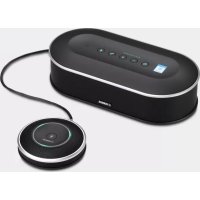
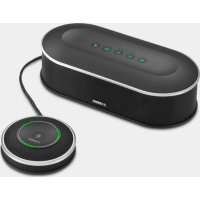
PJP-10UR - Telephone YAMAHA - Free user manual and instructions
Find the device manual for free PJP-10UR YAMAHA in PDF.


| Product Type | Conference Telephone / Speakerphone |
| Dimensions (W x D x H) | 250 mm x 230 mm x 60 mm |
| Weight | 1.0 kg |
| Power Supply | USB bus power (5V, 500mA) |
| Interfaces | USB 2.0, Audio output (3.5mm) |
| Microphone | Built-in omnidirectional microphone array |
| Speaker | Built-in full-range speaker |
| Audio Features | Full-duplex audio, Acoustic Echo Cancellation, Noise Reduction |
| Compatibility | Windows, macOS, Linux (USB audio class) |
| Operating Temperature | 0°C to 40°C |
| Storage Temperature | -20°C to 60°C |
| Cable Length | 2.0 m |
| Package Contents | Main unit, USB cable, Quick Start Guide |
| Cleaning | Wipe with a soft, dry cloth. Do not use solvents. |
| Safety | Do not expose to liquids or high temperatures. Do not disassemble. |
| Spare Parts | No user-serviceable parts. Contact Yamaha support for repairs. |
| Repairability | Not user-serviceable. Refer to authorized service center. |
Frequently Asked Questions - PJP-10UR YAMAHA
User questions about PJP-10UR YAMAHA
0 question about this device. Answer the ones you know or ask your own.
Ask a new question about this device
Download the instructions for your Telephone in PDF format for free! Find your manual PJP-10UR - YAMAHA and take your electronic device back in hand. On this page are published all the documents necessary for the use of your device. PJP-10UR by YAMAHA.
USER MANUAL PJP-10UR YAMAHA
Conference Microphone Speaker

natural_image
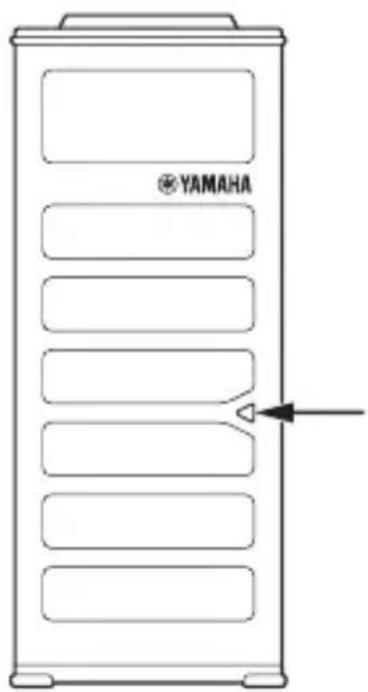
Front view of a gray industrial battery pack with dotted patterned panels and a Yamaha logo on the front (no readable text or symbols beyond branding)Contents
English....3
Japanese(日本語)....21
Chinese(中文)……41
Korean(한국어)57
IMPORTANT SAFETY INSTRUCTIONS

CAUTION
RISK OF ELECTRIC SHOCK DO NOT OPEN

CAUTION: TO REDUCE THE RISK OF ELECTRIC SHOCK, DO NOT REMOVE COVER (OR BACK). NO USER-SERVICEABLE PARTS INSIDE. REFER SERVICING TO QUALIFIED SERVICE PERSONNEL.

- Explanation of Graphical Symbols
This graphic symbol is intended to alert you to the presence of uninsulated “dangerous voltage” within the product’s enclosure that may be of sufficient magnitude to constitute a risk of electric shock to persons.

This graphic symbol is intended to alert you to the presence of important operating and maintenance (servicing) instructions in the literature accompanying the appliance.
1 Read Instructions – All the safety and operating instructions should be read before you operate the product.
2 Retain Instructions - The safety and operating instructions should be retained for future reference.
3 Heed Warnings - All warnings on the product and in the operating instructions should be adhered to.
4 Follow Instructions - All operating and use instructions should be followed.
5 Cleaning – Unplug this product from the PC before cleaning. Do not use liquid cleaners or aerosol cleaners.
6 Attachments - Do not use attachments not recommended by the product manufacturer as they may cause hazards.
7 Water and Moisture – Do not use this product near water – near a bath tub, wash bowl, kitchen sink, or laundry tub; in a wet basement; or near a swimming pool; and the like.
8 Accessories – Do not place this product on an unstable cart, stand, tripod, bracket, or table. The product may fall, causing serious injury to a child or adult, and serious damage to the product. Use only with a cart, stand, tripod, bracket, or table recommended by the manufacturer, or sold with the product. Any mounting of the product should follow the manufacturer's instructions, and should use a mounting accessory recommended by the manufacturer.
9 A product and cart combination should be moved with care. Quick stops, excessive force, and uneven surfaces may cause the product and cart combination to overturn.
10 Power Sources - This product should be operated only from the type of power source indicated on the mark.
11 USB Cable Protection – USB cable should be routed so that they are not likely to be walked on or pinched by items placed upon or against them, paying particular attention to cords at plugs, convenience receptacles, and the point where they exit from the product.
12 Lightning – For added protection for this product during a lightning storm, or when it is left unattended and unused for long periods of time, unplug it from the PC. This will prevent damage to the product due to lightning.
13 Object and Liquid Entry – Never push objects of any kind into this product through openings as they may touch dangerous voltage points or short-out parts that could result in a fire or electric shock. Never spill liquid of any kind on the product.
14 Servicing – Do not attempt to service this product yourself as opening or removing covers may expose you to dangerous voltage or other hazards. Refer all servicing to qualified service personnel.
15 Damage Requiring Service – Unplug this product from the PC and refer servicing to qualified service personnel under the following conditions:
a) When the USB cable is damaged,
b) If liquid has been spilled, or objects have fallen into the product,
c) If the product has been exposed to rain or water,
d) If the product does not operate normally by following the operating instructions. Adjust only those controls that are covered by the operating instructions as an improper adjustment of other controls may result in damage and will often require extensive work by a qualified technician to restore the product to its normal operation,
e) If the product has been dropped or damaged in any way, and
f) When the product exhibits a distinct change in performance - this indicates a need for service.
16 Replacement Parts – When replacement parts are required, be sure the service technician has used replacement parts specified by the manufacturer or have the same characteristics as the original part. Unauthorized substitutions may result in fire, electric shock, or other hazards.
17 Safety Check – Upon completion of any service or repairs to this product, ask the service technician to perform safety checks to determine that the product is in proper operating condition.
18 Heat - The product should be situated away from heat sources such as radiators, heat registers, stoves, or other products (including amplifiers) that produce heat.
COMPLIANCE INFORMATION STATEMENT
(DECLARATION OF CONFORMITY PROCEDURE)
Responsible Party: Fontel Inc.
Address: 804 E st. Aurora NE 68818
Telephone: 402-694-4204
Hours of operation: 8:30AM-5:00PM Central Time Monday-Friday
Type of Equipment: Conference Microphone Speaker Model Name: PJP-10UR
This device complies with Part 15 of the FCC Rules. Operation is subject to the following two conditions:
1) this device may not cause harmful interference, and
2) this device must accept any interference received including interference that may cause undesired operation.
See user manual instructions if interference to radio reception is suspected.
This device complies with the requirements listed in FCC regulations, Part 15 for Class “B” digital devices. If you are using a cardiac pacemaker, please note that this device can radiate radio frequency energy in the area near the product.
FCC INFORMATION (for US customers)
1 IMPORTANT NOTICE: DO NOT MODIFY THIS UNIT!
This product, when installed as indicated in the instructions contained in this manual, meets FCC requirements. Modifications not expressly approved by Yamaha may void your authority, granted by the FCC, to use the product.
2 IMPORTANT: When connecting this product to accessories and/or another product use only high quality shielded cables. Cable/s supplied with this product MUST be used. Follow all installation instructions. Failure to follow instructions could void your FCC authorization to use this product in the USA.
3 NOTE: This product has been tested and found to comply with the requirements listed in FCC Regulations, Part 15 for Class "B" digital devices. Compliance with these requirements provides a reasonable level of assurance that your use of this product in a residential environment will not result in harmful interference with other electronic devices.
This equipment generates/uses radio frequencies and, if not installed and used according to the instructions found in the users manual, may cause interference harmful to the operation of other electronic devices.
Compliance with FCC regulations does not guarantee that interference will not occur in all installations. If this product is found to be the source of interference, which can be determined by turning the unit "OFF" and "ON", please try to eliminate the problem by using one of the following measures;
Relocate either this product or the device that is being affected by the interference.
Utilize power outlets that are on different branch (circuit breaker of fuse) circuits or install AC line filter/s.
In the case of radio or TV interference, relocate/reorient the antenna. If the antenna lead-in is 300 ohm ribbon lead, change the lead-in to co-axial type cable.
If these corrective measures do not produce satisfactory results, please contact the local retailer authorized to distribute this type of product. If you can not locate the appropriate retailer, please contact Fontel Inc.,
Address: 804 E st. Aurora NE 68818
The above statements apply ONLY to those products distributed by Fontel Inc.
CAUTION: READ THIS BEFORE OPERATING YOUR UNIT.
1 To assure the finest performance, please read this manual carefully. Keep it in a safe place for future reference.
2 Install this unit in a well ventilated, cool, dry, clean place — away from direct sunlight, heat sources, vibration, dust, moisture, and/or cold.
3 Locate this unit away from other electrical appliances, motors, or transformers to avoid humming sounds.
4 Do not expose this unit to sudden temperature changes from cold to hot, and do not locate this unit in an environment with high humidity (i.e. a room with a humidifier) to prevent condensation inside this unit, which may cause an electrical shock, fire, damage to this unit, and/or personal injury.
5 Avoid installing this unit where foreign object may fall onto this unit and/or this unit may be exposed to liquid dripping or splashing. On the top of this unit, do not place:
- Other components, as they may cause damage and/or discoloration on the surface of this unit.
– Burning objects (i.e. candles), as they may cause fire, damage to this unit, and/or personal injury.
- Containers with liquid in them, as they may fall and liquid may cause electrical shock to the user and/or damage to this unit.
6 Do not cover this unit with a newspaper, tablecloth, curtain, etc. in order not to obstruct heat radiation. If the temperature inside this unit rises, it may cause fire, damage to this unit, and/or personal injury.
7 Do not install this unit near mobile phones and/or television sets to prevent operation failure caused by electromagnetic waves and/or magnetism.
8 Install this unit in a stable place horizontally to prevent a fall and damage to this unit.
9 Use the supplied USB cable. Using other USB cables may cause an electric shock or fire.
10 Keep your hands dry when connecting or disconnecting the USB cable to prevent an electric shock.
11 Connect this unit and the PC directly. Connecting them through a USB hub may cause problems in operation.
12 Do not use force on the USB cable. Doing so may cause a fire, electrical shock, damage to this unit, short circuit, and/or disconnection.
13 When not planning to use this unit for long periods of time, disconnect the USB cable from the PC to prevent a fire.
14 When disconnecting the USB cable grasp the plug: do not pull the cable.
15 Do not clean this unit with chemical solvents; this might damage the finish. Use a clean, dry cloth.
16 Do not attempt to modify or fix this unit. Contact qualified Yamaha service personnel when any service is needed.
17 Condensation will form when the surrounding temperature changes suddenly. Disconnect the USB cable from the PC, then leave this unit alone.
18 When using this unit for a long time, this unit may become warm. Disconnect the cables, then leave this unit alone for cooling.
19 To prevent damage by lightning, keep the USB cable disconnected during a lightning storm.
20 Always turn down the volume to the minimum level before using this unit.
WARNING
TO REDUCE THE RISK OF FIRE OR ELECTRIC SHOCK, DO NOT EXPOSE THIS UNIT TO RAIN OR MOISTURE.
WARNING
This is a class B product. In a domestic environment this product may cause radio interference in which case the user may be required to take adequate measures.
Introduction
Thank you for purchasing Yamaha PJP-10UR.
For your safety, please read all safety instructions and precautions stated in this booklet carefully and keep it in a safe place for future reference.
Check the contents
PJP-10UR (this unit) x 1, USB cable (1.2 m) x 1, Carrying case x 1, This booklet x 1
Check the latest information
Descriptions in this booklet are based on the firmware currently available (as of November 2009). For the latest information, please visit the Yamaha conference systems home page.
■Using the Latest Features
You can download the firmware (program to control the functions of this unit) to use the latest features. For details, please visit the Yamaha conference systems home page.
Yamaha conference systems home page
http://www.yamaha.co.jp/english/product/projectphone/
Information for Users on Collection and Disposal of Old Equipment


This symbol on the products, packaging, and/or accompanying documents means that used electrical and electronic products should not be mixed with general household waste.
For proper treatment, recovery and recycling of old products, please take them to applicable collection points, in accordance with your national legislation and the Directives 2002/96/EC.
By disposing of these products correctly, you will help to save valuable resources and prevent any potential negative effects on human health and the environment which could otherwise arise from inappropriate waste handling.
For more information about collection and recycling of old products, please contact your local municipality, your waste disposal service or the point of sale where you purchased the items.
[For business users in the European Union]
If you wish to discard electrical and electronic equipment, please contact your dealer or supplier for further information.
[Information on Disposal in other Countries outside the European Union]
This symbol is only valid in the European Union. If you wish to discard these items, please contact your local authorities or dealer and ask for the correct method of disposal.
About this manual
■About abbreviations
In this manual, the product names are described as follows.
•Yamaha PJP-10UR: this unit
•Microsoft ^® Windows ^®
•Microsoft ^ Windows ^ 7: Windows 7
•Microsoft ^® Windows Vista ^® : Windows Vista
•Microsoft ^® Windows XP ^® : Windows XP
•Microsoft ^® Windows 2000 Professional ^® : Windows 2000
•Macintosh ^® : Mac
■About trademarks
- Microsoft and Windows are registered trademarks of Microsoft Corporation in the United States and other countries.
- Intel, Pentium and Celeron are trademarks or registered trademarks of Intel Corporation or its subsidiaries in the United States and other countries.
•Macintosh and Mac OS are registered trademarks of Apple Computer, Inc.
- No part of this document may be copied or used in any form without permission of Yamaha.
- Specifications of this unit and contents of this document are subject to change without notice.
- Yamaha does not accept any liability for any loss or damage resulting from any use of this unit. The warranty covers a repair of this unit only.
CONFIRMATION SOFTWARE LICENSE AGREEMENT
BY USING THE "SOFTWARE", YOU ARE DEEMED TO AGREE TO BE BOUND BY THE TERMS AND CONDITIONS OF THIS AGREEMENT.
SOFTWARE LICENSE AGREEMENT
This License Agreement (the "AGREEMENT") is a legal agreement between you and Yamaha Corporation ("YAMAHA") under which YAMAHA is providing the firmware of YAMAHA's Projectphone (the "PRODUCT") and related software program, documentation and electronic files (collectively, the "SOFTWARE").
This AGREEMENT applies to the SOFTWARE which YAMAHA provides you and the installed copy thereof, subject to the provision of 1-1 herein, into the PRODUCT or personal computer owned by you.
1. GRANT OF LICENSE:
1-1. YAMAHA grants you a personal non-exclusive license to install the SOFTWARE and use the SOFTWARE on the PRODUCT or other devices, including but not limited to the personal computer, which you own.
1-2. You shall not assign, sublicense, sell, rent, lease, loan, convey or otherwise transfer to any third party, upload to a web site or a server computer to which specified or unspecified persons may access, or copy, duplicate, translate or convert to another programming language the SOFTWARE except as expressly provided herein. You shall not alter, modify, disassemble, decompile or otherwise reverse engineer the SOFTWARE and you also shall not have any third party to do so.
1-3. You shall not modify, remove or delete a copyright notice of YAMAHA contained in the SOFTWARE.
1-4. Except as expressly provided herein, no license or right, express or implied, is hereby conveyed or granted by YAMAHA to you for any intellectual property of YAMAHA.
2. OWNERSHIP AND COPYRIGHT:
The SOFTWARE is protected under the copyright laws and owned by YAMAHA. You agree and acknowledge that YAMAHA transfers neither ownership interest nor intellectual property in the SOFTWARE to you under this AGREEMENT or otherwise.
3. EXPORT RESTRICTIONS:
You agree to comply with all applicable export control laws and regulations of the country involved, and not to export or re-export, directly or indirectly, the SOFTWARE in violation of any such laws and regulations.
4. SUPPORT AND UPDATE:
YAMAHA, YAMAHA's subsidiaries and affiliates, their distributors and dealers are not responsible for maintaining or helping you to use the SOFTWARE. No updates, bug-fixes or support will be made available to you for the SOFTWARE.
5. DISCLAIMER OF WARRANTY:
5-1. THE SOFTWARE IS PROVIDED "AS IS" WITHOUT WARRANTY OF ANY KIND, EITHER EXPRESS OR IMPLIED, INCLUDING, BUT NOT LIMITED TO THE IMPLIED WARRANTIES OF MERCHANTABILITY AND FITNESS FOR A PARTICULAR PURPOSE.
5-2. IN NO EVENT SHALL YAMAHA, YAMAHA'S SUBSIDIARIES AND AFFILIATES, THEIR DISTRIBUTORS AND DEALERS BE LIABLE FOR ANY DAMAGES WHATSOEVER (INCLUDING WITHOUT LIMITATION, LOSS OF BUSINESS PROFITS, LOSS OF BUSINESS INFORMATION, LOSS OF BUSINESS INTERRUPTION OR OTHER INCIDENTAL OR CONSEQUENTIAL DAMAGES) ARISING OUT OF THE SOFTWARE, USE THEREOF, OR INABILITY TO USE THEREOF EVEN IF YAMAHA, YAMAHA'S SUBSIDIARIES AND AFFILIATES, THEIR DISTRIBUTORS OR DEALERS HAVE BEEN ADVISED OF THE POSSIBILITY OF SUCH DAMAGES. SOME STATES DO NOT ALLOW THE LIMITATION OR EXCLUSION OF LIABILITY FOR INCIDENTAL OR CONSEQUENTIAL DAMAGES, SO THE ABOVE LIMITATION OR EXCLUSION MAY NOT APPLY TO YOU.
5-3. YAMAHA, YAMAHA'S SUBSIDIARIES AND AFFILIATES, THEIR DISTRIBUTORS AND DEALERS SHALL HAVE NO OBLIGATION TO INDEMNIFY YOU AGAINST ANY CLAIM OR SUIT BROUGHT BY A THIRD PARTY ALLEGING THAT THE SOFTWARE OR USE THEREOF INFRINGES ANY INTELLECTUAL PROPERTY OF SUCH THIRD PARTY.
6. TERM:
6-1. This AGREEMENT becomes effective upon your agreeing the terms and conditions herein and continues in effect unless or until terminated in accordance with the provision of 6-2 or 6-3 herein.
6-2. You may terminate this AGREEMENT by deleting the SOFTWARE installed into the PRODUCT.
6-3. This AGREEMENT will also terminate if you fail to comply with any of the terms and conditions of this AGREEMENT.
6-4. In case this AGREEMENT is terminated in accordance with the provision 6-3, you shall promptly delete the SOFTWARE.
6-5. Notwithstanding anything contains herein, Sections 2 though 6 shall survive any termination or expiration hereof.
7. SEVERABILITY:
In the event that any provision of this AGREEMENT is declared or found to be illegal by any court or tribunal of competent jurisdiction, such provision shall be null and void with respect to the jurisdiction of that court or tribunal and all the remaining provisions of this AGREEMENT shall remain in full force and effect.
8. U.S. GOVERNMENT RESTRICTED RIGHTS NOTICE:
The Software is a "commercial item," as that term is defined at 48 C.F.R. 2.101 (Oct 1995), consisting of "commercial computer software" and "commercial computer software documentation," as such terms are used in 48 C.F.R. 12.212 (Sept 1995). Consistent with 48 C.F.R. 12.212 and 48 C.F.R. 227.7202-1 through 227.72024 (June 1995), all U.S. Government End Users shall acquire the Software with only those rights set forth herein.
9. ACKNOWLEDGMENT:
You agree that this AGREEMENT is the complete and exclusive statement of agreement between you and YAMAHA concerning the subject matter hereof and supersedes all proposals or prior agreements, verbal or written, and any other communications between you and the parties relating to the subject matter hereof. NO amendment to this AGREEMENT shall be effective unless signed by a duly authorized representative of YAMAHA.
10. GOVERNING LAW:
This AGREEMENT shall be governed by and construed in accordance with the lows of Japan without reference to the principles of conflict of laws.
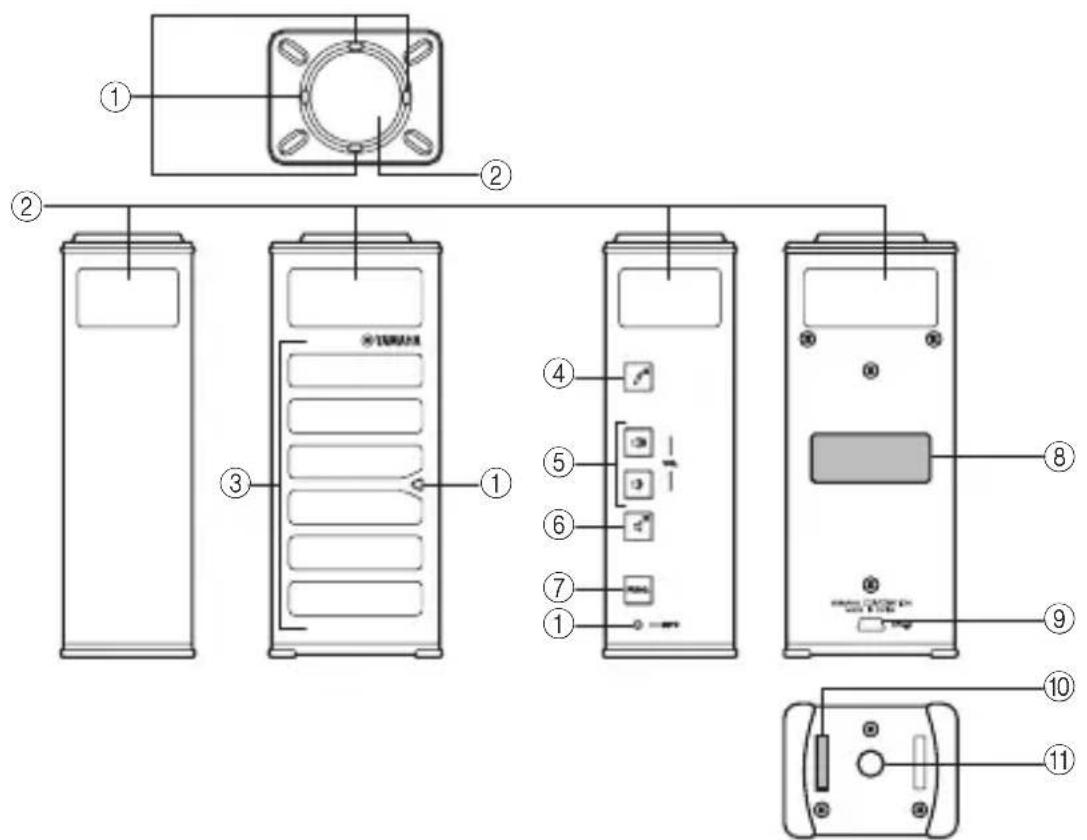
Controls and Functions

① LEDs
Light to indicate the status of this unit.
②Microphones
Pick up the talker's voice.
③Speakers
Outputs the sounds.
④Microphone mute
Press to temporarily turn off (mute) the microphones. To cancel the mute function, press it again.
⑤VOL +/-
Press to adjust the speaker volume. Holding either key increases or decreases the volume continuously.
⑥Speaker mute
Press to temporarily turn off (mute) the speakers. To cancel the mute function, press it again.
⑦FUNC.
For future expansion.
⑧MODEL No.
Model number of this unit.
⑨USB port
For connecting the USB cable.
⑩SER.
Serial number of this unit.
⑪Tripod socket
For attaching a commercially available tripod.
■Functions of the LEDs
Microphone LEDs
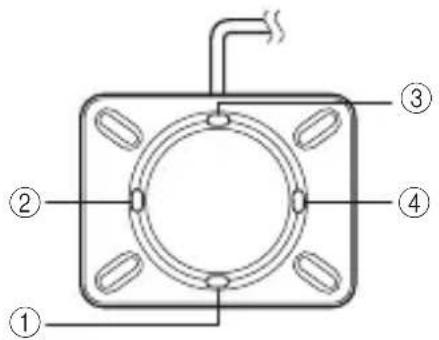
Normal: ①②④ light up
Microphone muted: ①②④ blink
Waiting for firmware update: All blink
During firmware update: ①③ and ②④ blink alternately
Firmware update error: Off
Speaker LED

Normal: Lights up
Speakers muted: Blinks
Maximum volume: Blinks 5 times
Waiting for firmware update: Blinks
During firmware update: Off
Firmware update error: Off
Information LED
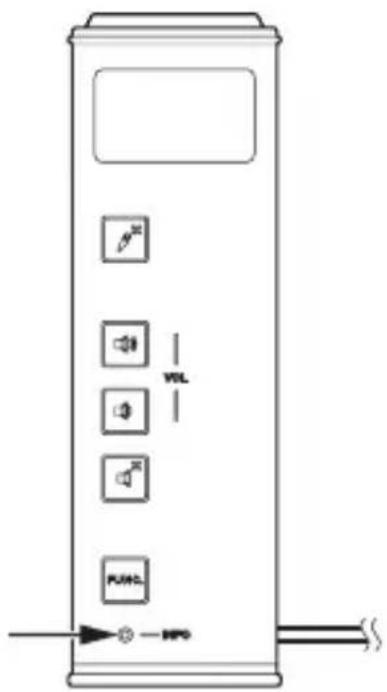
Normal: Off
Waiting for firmware update: Blinks in red
During firmware update: Off
Firmware update error: Blinks in red
Using this unit with Windows
System Requirements
Use a PC that meets the following requirements.
- OS: Windows 7 (32bit), Windows Vista SP1 or later (32bit), Windows XP SP2 or later (32bit), Windows 2000 SP4 (32bit)
•CPU: 750MHz or more, Intel Pentium/Celeron processor (or compatible one)
•Memory: 256 MB or more - USB port: USB1.1 or later (USB2.0 recommended)
Notes
- You cannot connect multiple microphone speaker devices including this unit to the PC at the same time.
- Connect this unit and the PC directly. Connecting them through a USB hub may cause problems in operation.
- Audio reproduction may be interrupted depending on the PC usage situations (workloads or available memory space).
Connection
1 Connect this unit to the PC using the supplied USB cable.

natural_image
Diagram showing a server tower connected to a laptop via an Ethernet cable (no text or symbols present)The USB driver is automatically installed on the PC.
Note
Stand this unit on a flat surface and face the speaker side toward your position.

- You do not need to install the USB driver separately because this unit is recognized as a basic audio device by the PC.
- The microphones of this unit pick up audio mainly from the speaker side direction. Use this unit at the position where the speaker side of this unit faces your position.
Checking the Connection
Follow the procedure below to check whether the PC recognizes this unit properly.
- Check that this unit is recognized properly while all the peripheral devices are connected.
- If the microphones of this unit cannot pick up audio and/or the speaker cannot output sounds when you are using this unit for a Web conference, this unit may not be selected as a sound playback and/or recording device on the Web conference software. Refer to the owner's manual of the Web conference software and check the settings.
■When using Windows XP/Windows 2000
In this procedure, Windows XP is used as an example.
1 Click the "start" menu and click "Control Panel".
2 Click "Sounds, Speech and Audio Devices".
3 Click "Sounds and Audio Devices".
The "Sounds and Audio Devices Properties" box opens.
4 Click the "Audio" tab.

5 Check the settings.
- "Default device" in "Sound playback": Yamaha PJP-10UR
- "Default device" in "Sound recording": Yamaha PJP-10UR


Normally, "Yamaha PJP-10UR" is automatically selected when this unit is connected to the PC. If "Yamaha PJP-10UR" is not selected, select it manually.
6 Click the "Voice" tab.

7 Check the settings.
- "Default device" in "Voice playback": Yamaha PJP-10UR
- "Default device" in "Voice recording": Yamaha PJP-10UR


Normally, "Yamaha PJP-10UR" is automatically selected when this unit is connected to the PC. If "Yamaha PJP-10UR" is not selected, select it manually.
8 Click "OK" to close the "Sounds and Audio Devices Properties" screen.
■When using Windows 7/Windows Vista
In this procedure, Windows 7 is used as an example.
1 Click the "Start" menu and click "Control Panel".
2 Click "Hardware and Sound".
3 Click "Sound".
The "Sound" screen appears.
4 Click the "Playback" tab.
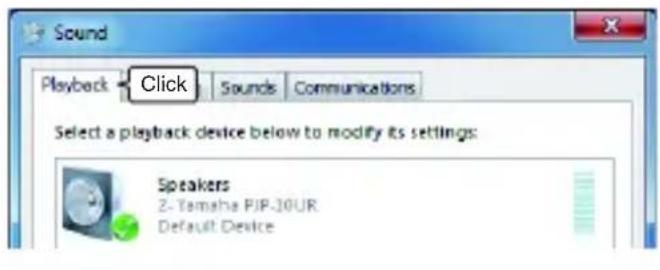
5 Make sure this unit is set to "Default Device".
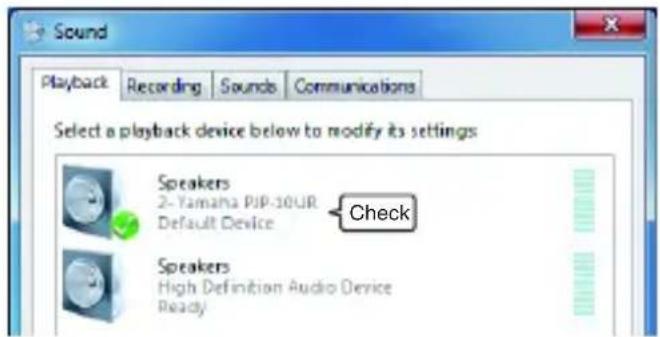

Normally, "Yamaha PJP-10UR" is automatically set when this unit is connected to the PC. If "Yamaha PJP-10UR" is not selected, select it manually.
6 Click the "Recording" tab.

7 Make sure this unit is set to "Default device".
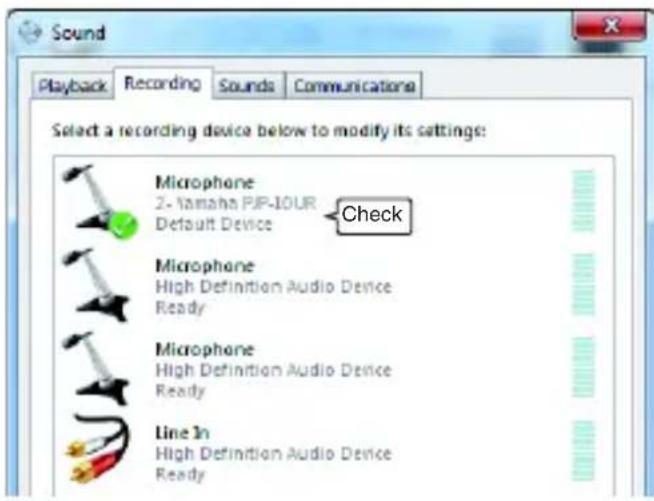

Normally, "Yamaha PJP-10UR" is automatically set when this unit is connected to the PC. If "Yamaha PJP-10UR" is not selected, select it manually.
8 Click "OK" to close the "Sound" screen.
Adjusting the microphone sensitivity
■When using Windows XP/Windows 2000
1 Click the "start" menu and click "Control Panel" - "Sounds, Speech, and Audio Devices" - "Sounds and Audio Devices".
The "Sounds and Audio Devices Properties" screen appears.
2 Click the "Audio" tab and click "Volume" in "Sound recording".

The "Capture" screen appears.
3 Adjust the microphone sensitivity in the "Volume".

■When using Windows 7/Windows Vista
1 Click the "Start" menu and click "Control Panel" - "Hardware and Sound" - "Sound".
The "Sound" screen appears.
2 Click the "Recording" tab.
3 Select this unit and click "Properties".

The "Microphone Properties" screen appears.
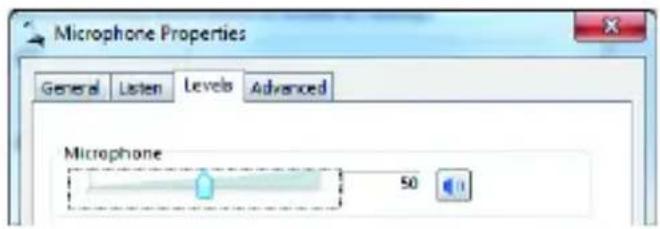
4 Click the "Levels" tab.
![Microphone Properties General Listen Levels Click Microphone Change [con] Controller Information 2- Yamaha PJP-LOUR [Generic USB Audio] Properties](/content/2026/05/1073515/images/7f7a3401afba594629177d8ed772a91fcf67d280781fe2393b2b21338371471d.jpg)
5 Adjust the microphone sensitivity in the "Microphone".
Using this unit with Mac
System Requirements
Use a Mac that meets the following requirements.
•OS: Mac OS 10.5 (Leopard)
•CPU: Intel processor
•Memory: 256MB or more
- USB port: USB1.1 or later (USB2.0 recommended)
Notes
- You cannot connect multiple microphone speaker devices including this unit to the Mac at the same time.
- Connect this unit and the Mac directly. Connecting them through a USB hub may cause problems in operation.
•Audio reproduction may be interrupted depending on the Mac usage situations (workloads or available memory space).
Connection
1 Connect this unit to the Mac using the supplied USB cable.

The USB driver is automatically installed on the Mac.
Note
Stand this unit on a flat surface and face the speaker side toward your position.

- You do not need to install the USB driver separately because this unit is recognized as a basic audio device by the Mac.
•The microphones of this unit pick up audio mainly from the speaker side direction. Use this unit at the position where the speaker side of this unit faces your position.
Changing the sound settings
You need to change the sound settings when using this unit with Mac.
1 Click the Apple menu and select "System Preferences".
The "System Preferences" screen appears.
2 Click "Sound".

3 Click the "Output" tab.

4 Select "Yamaha PJP-10UR" from the device list.

5 Click the "Input" tab.
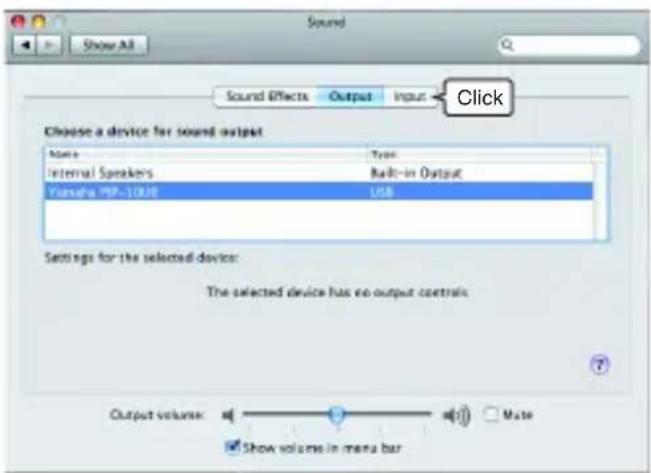
6 Select "Yamaha PJP-10UR" from the device list.

Adjusting the microphone sensitivity
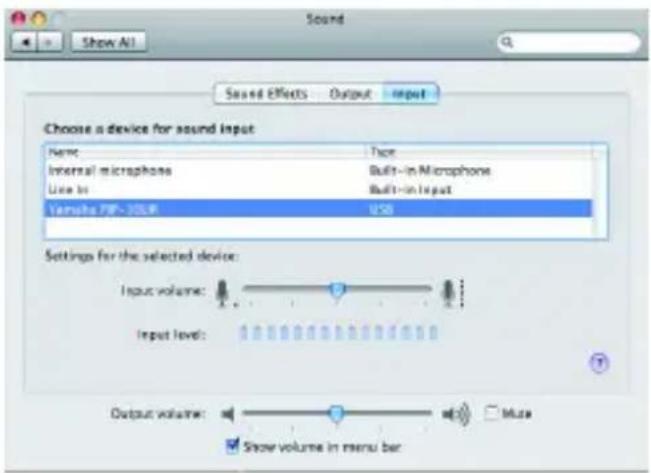
1 Click the Apple menu and select "System Preferences" - "Sound" - "Input" tab.
2 Adjust the microphone sensitivity in the "Input volume".
Troubleshooting
Refer to the following tables when this unit does not function properly. If the problem you are experiencing is not listed or the instruction does not solve, please contact the retailer or dealer who you purchased the product from.
Q1: LED indicator does not light up
Problem Cause Remedy
| The power is not turned on. | The USB cable is not connected properly. | Check that the USB cable is connected firmly. |
Q2: Have an audio problem
Problem Cause Remedy
| The audio from the other unit cannot be heard. | The speakers are muted on this unit. Turn off the speaker mute function. | |
| The microphone is muted on the other unit. - | ||
| The speaker volume is set to the minimum on this unit. | Turn the speaker volume up. | |
| The microphone sensitivity is set to the minimum on the other unit. | - | |
| The audio from this unit can-not be heard on the other unit. | The microphone is muted on this unit. Turn off the microphone mute function. | |
| The speakers are muted on the other unit. - | ||
| The microphone sensitivity is set to the minimum on this unit. | Increase the microphone sensitivity. | |
| The speaker volume is set to the minimum on the other unit. | - | |
| The unit generates feedback noises or echoes. | Another microphone is connected. Select this unit in the Audio settings of PC/Web conference software. | |
| An object is placed near this unit. Avoid placing an object in front of the micro-phones of this unit. | ||
| This unit is placed near the wall. Move this unit away from the wall. | ||
| This unit is used in a room with high reverbera-tion. | •Place objects with high sound absorbance in the room other than in front of the micro-phones.•Turn the speaker volume down to reduce reverberations. | |
| There is a problem with the equipment configu-ration on another unit. | - | |
| The unit generates noises. A device that interferes with this unit is placed near this unit. | Move this unit away from the device. | |
| The audio is cracking. | The speaker volume is too high. | Turn the speaker volume down. |
| This unit does not work. | This unit is not recognized by the PC. | If you see "?" or "!" in the device manager, delete the device and then reconnect the USB ca-ble of this unit. |
Support Information
Please visit the Yamaha conference systems home page.
■Yamaha conference systems home page
http://www.yamaha.co.jp/english/product/projectphone/
Specifications
General Audio
Interface:
USB2.0 Full Speed
Power consumption (max):
Approx. 2.5W
Radio interference standard:
FCC Part 15 (US)
EN55022 (EU)
Operating environment:
Temperature: 0 to 40°C (32 to 104°F)
Humidity: 20 to 85% (no condensation)
Dimensions:
Main body (W x H x D):
49 x 121 x 38 mm
(1-15/16" x 4-25/32" x 1-1/2")
Weight:
210 g (7.4 oz)
Power source:
USB bus power (5V/500mA)
Windows environment:
OS: Windows 7 (32bit),
Windows Vista SP1 or later (32bit),
Windows XP SP2 or later (32bit),
Windows 2000 SP4 (32bit)
CPU: 750MHz or more, Intel Pentium/
Celeron processor (or compatible one)
Memory: 256 MB or more
USB port: USB1.1 or later
(USB2.0 recommended)
Mac environment:
OS: Mac OS 10.5 (Leopard)
CPU: Intel processor
Memory: 256 MB or more
USB port: USB1.1 or later
(USB2.0 recommended)
Accessories:
USB cable (1.2 m), Carrying case, This booklet
Other:
Firmware update
(transfer from PC through USB)
Microphones:
4 units (Array microphone)
Speakers:
2 units
Frequency bandwidth for sound pickup:
300 to 7,000 Hz
Frequency bandwidth for playback:
300 to 20,000 Hz
Signal processing:
Adaptive echo canceller, Noise reduction,
Microphone array control
はじめに
The Software is a "commercial item," as that term is defined at 48 C.F.R. 2.101 (Oct 1995), consisting of "commercial computer software" and "commercial computer software documentation," as such terms are used in 48 C.F.R. 12.212 (Sept 1995). Consistent with 48 C.F.R. 12.212 and 48 C.F.R. 227.7202-1 through 227.72024 (June 1995), all U.S. Government End Users shall acquire the Software with only those rights set forth herein.
9. 一般条項
①LED
通常時:①②④が点灯
マイクミュート時:①②④が点滅
ファームウェア更新待ち状態:全て点滅
ファームウェア更新時:①③と②④が交互
に点滅
ファームウェア更新エラー時:消灯
スピーカー LED
通常時:点灯
スピーカーミュート時:点滅
ボリューム最大時:5 回点滅
ファームウェア更新待ち状態:点滅
ファームウェア更新時:消灯
ファームウェア更新エラー時:消灯
インフォメーション LED

通常時:消灯
ファームウェア更新待ち状態:赤色点滅
ファームウェア更新時:消灯
ファームウェア更新エラー時:赤色点滅
Windows で使用する
PC の仕様を確認する
接続する
natural_image
Diagram showing a server tower connected to a laptop via an Ethernet cable (no text or symbols present)1-1. YAMAHA grants you a personal non-exclusive license to install the SOFTWARE and use the SOFTWARE on the PRODUCT or other devices, including but not limited to the personal computer, which you own.
1-2. You shall not assign, sublicense, sell, rent, lease, loan, convey or otherwise transfer to any third party, upload to a web site or a server computer to which specified or unspecified persons may access, or copy, duplicate, translate or convert to another programming language the SOFTWARE except as expressly provided herein. You shall not alter, modify, disassemble, decompile or otherwise reverse engineer the SOFTWARE and you also shall not have any third party to do so.
1-3. You shall not modify, remove or delete a copyright notice of YAMAHA contained in the SOFTWARE.
1-4. Except as expressly provided herein, no license or right, express or implied, is hereby conveyed or granted by YAMAHA to you for any intellectual property of YAMAHA.
2. OWNERSHIP AND COPYRIGHT:
The SOFTWARE is protected under the copyright laws and owned by YAMAHA. You agree and acknowledge that YAMAHA transfers neither ownership interest nor intellectual property in the SOFTWARE to you under this AGREEMENT or otherwise.
3. EXPORT RESTRICTIONS:
You agree to comply with all applicable export control laws and regulations of the country involved, and not to export or re-export, directly or indirectly, the SOFTWARE in violation of any such laws and regulations.
4. SUPPORT AND UPDATE:
YAMAHA, YAMAHA's subsidiaries and affiliates, their distributors and dealers are not responsible for maintaining or helping you to use the SOFTWARE. No updates, bug-fixes or support will be made available to you for the SOFTWARE.
5. DISCLAIMER OF WARRANTY:
5-1. THE SOFTWARE IS PROVIDED "AS IS" WITHOUT WARRANTY OF ANY KIND, EITHER EXPRESS OR IMPLIED, INCLUDING, BUT NOT LIMITED TO THE IMPLIED WARRANTIES OF MERCHANTABILITY AND FITNESS FOR A PARTICULAR PURPOSE.
5-2. IN NO EVENT SHALL YAMAHA, YAMAHA'S SUBSIDIARIES AND AFFILIATES, THEIR DISTRIBUTORS AND DEALERS BE LIABLE FOR ANY DAMAGES WHATSOEVER (INCLUDING WITHOUT LIMITATION, LOSS OF BUSINESS PROFITS, LOSS OF BUSINESS INFORMATION, LOSS OF BUSINESS INTERRUPTION OR OTHER INCIDENTAL OR CONSEQUENTIAL DAMAGES) ARISING OUT OF THE SOFTWARE, USE THEREOF, OR INABILITY TO USE THEREOF EVEN IF YAMAHA, YAMAHA'S SUBSIDIARIES AND AFFILIATES, THEIR DISTRIBUTORS OR DEALERS HAVE BEEN ADVISED OF THE POSSIBILITY OF SUCH DAMAGES. SOME STATES DO NOT ALLOW THE LIMITATION OR EXCLUSION OF LIABILITY FOR INCIDENTAL OR CONSEQUENTIAL DAMAGES, SO THE ABOVE LIMITATION OR EXCLUSION MAY NOT APPLY TO YOU.
5-3. YAMAHA, YAMAHA'S SUBSIDIARIES AND AFFILIATES, THEIR DISTRIBUTORS AND DEALERS SHALL HAVE NO OBLIGATION TO INDEMNIFY YOU AGAINST ANY CLAIM OR SUIT BROUGHT BY A THIRD PARTY ALLEGING THAT THE SOFTWARE OR USE THEREOF INFRINGES ANY INTELLECTUAL PROPERTY OF SUCH THIRD PARTY.
6. TERM:
6-1. This AGREEMENT becomes effective upon your agreeing the terms and conditions herein and continues in effect unless or until terminated in accordance with the provision of 6-2 or 6-3 herein.
6-2. You may terminate this AGREEMENT by deleting the SOFTWARE installed into the PRODUCT.
6-3. This AGREEMENT will also terminate if you fail to comply with any of the terms and conditions of this AGREEMENT.
6-4. In case this AGREEMENT is terminated in accordance with the provision 6-3, you shall promptly delete the SOFTWARE.
6-5. Notwithstanding anything contains herein, Sections 2 though 6 shall survive any termination or expiration hereof.
7. SEVERABILITY:
In the event that any provision of this AGREEMENT is declared or found to be illegal by any court or tribunal of competent jurisdiction, such provision shall be null and void with respect to the jurisdiction of that court or tribunal and all the remaining provisions of this AGREEMENT shall remain in full force and effect.
8. U.S. GOVERNMENT RESTRICTED RIGHTS NOTICE:
The Software is a "commercial item," as that term is defined at 48 C.F.R. 2.101 (Oct 1995), consisting of "commercial computer software" and "commercial computer software documentation," as such terms are used in 48 C.F.R. 12.212 (Sept 1995). Consistent with 48 C.F.R. 12.212 and 48 C.F.R. 227.7202-1 through 227.72024 (June 1995), all U.S. Government End Users shall acquire the Software with only those rights set forth herein.
9. ACKNOWLEDGMENT:
You agree that this AGREEMENT is the complete and exclusive statement of agreement between you and YAMAHA concerning the subject matter hereof and supersedes all proposals or prior agreements, verbal or written, and any other communications between you and the parties relating to the subject matter hereof. NO amendment to this AGREEMENT shall be effective unless signed by a duly authorized representative of YAMAHA.
10. GOVERNING LAW:
This AGREEMENT shall be governed by and construed in accordance with the lows of Japan without reference to the principles of conflict of laws.
44 Chinese
控制装置和功能
①LED
用来显示本设备工作状态的灯。
②麦克风
收集发言者的声音。
③扬声器
输出声音。
④麦克风静音
正常:灭
等待固件更新:闪烁红色
固件更新期间:灭
固件更新错误:闪烁红色
通过 Windows 使用本设备
系统要求
请使用符合下列要求的电脑。
USB 驱动程序自动安装在电脑上。
注意
1-1. YAMAHA grants you a personal non-exclusive license to install the SOFTWARE and use the SOFTWARE on the PRODUCT or other devices, including but not limited to the personal computer, which you own.
1-2. You shall not assign, sublicense, sell, rent, lease, loan, convey or otherwise transfer to any third party, upload to a web site or a server computer to which specified or unspecified persons may access, or copy, duplicate, translate or convert to another programming language the SOFTWARE except as expressly provided herein. You shall not alter, modify, disassemble, decompile or otherwise reverse engineer the SOFTWARE and you also shall not have any third party to do so.
1-3. You shall not modify, remove or delete a copyright notice of YAMAHA contained in the SOFTWARE.
1-4. Except as expressly provided herein, no license or right, express or implied, is hereby conveyed or granted by YAMAHA to you for any intellectual property of YAMAHA.
2. OWNERSHIP AND COPYRIGHT:
The SOFTWARE is protected under the copyright laws and owned by YAMAHA. You agree and acknowledge that YAMAHA transfers neither ownership interest nor intellectual property in the SOFTWARE to you under this AGREEMENT or otherwise.
3. EXPORT RESTRICTIONS:
You agree to comply with all applicable export control laws and regulations of the country involved, and not to export or re-export, directly or indirectly, the SOFTWARE in violation of any such laws and regulations.
4. SUPPORT AND UPDATE:
YAMAHA, YAMAHA's subsidiaries and affiliates, their distributors and dealers are not responsible for maintaining or helping you to use the SOFTWARE. No updates, bug-fixes or support will be made available to you for the SOFTWARE.
5. DISCLAIMER OF WARRANTY:
5-1. THE SOFTWARE IS PROVIDED "AS IS" WITHOUT WARRANTY OF ANY KIND, EITHER EXPRESS OR IMPLIED, INCLUDING, BUT NOT LIMITED TO THE IMPLIED WARRANTIES OF MERCHANTABILITY AND FITNESS FOR A PARTICULAR PURPOSE.
5-2. IN NO EVENT SHALL YAMAHA, YAMAHA'S SUBSIDIARIES AND AFFILIATES, THEIR DISTRIBUTORS AND DEALERS BE LIABLE FOR ANY DAMAGES WHATSOEVER (INCLUDING WITHOUT LIMITATION, LOSS OF BUSINESS PROFITS, LOSS OF BUSINESS INFORMATION, LOSS OF BUSINESS INTERRUPTION OR OTHER INCIDENTAL OR CONSEQUENTIAL DAMAGES) ARISING OUT OF THE SOFTWARE, USE THEREOF, OR INABILITY TO USE THEREOF EVEN IF YAMAHA, YAMAHA'S SUBSIDIARIES AND AFFILIATES, THEIR DISTRIBUTORS OR DEALERS HAVE BEEN ADVISED OF THE POSSIBILITY OF SUCH DAMAGES. SOME STATES DO NOT ALLOW THE LIMITATION OR EXCLUSION OF LIABILITY FOR INCIDENTAL OR CONSEQUENTIAL DAMAGES, SO THE ABOVE LIMITATION OR EXCLUSION MAY NOT APPLY TO YOU.
5-3. YAMAHA, YAMAHA'S SUBSIDIARIES AND AFFILIATES, THEIR DISTRIBUTORS AND DEALERS SHALL HAVE NO OBLIGATION TO INDEMNIFY YOU AGAINST ANY CLAIM OR SUIT BROUGHT BY A THIRD PARTY ALLEGING THAT THE SOFTWARE OR USE THEREOF INFRINGES ANY INTELLECTUAL PROPERTY OF SUCH THIRD PARTY.
6. TERM:
6-1. This AGREEMENT becomes effective upon your agreeing the terms and conditions herein and continues in effect unless or until terminated in accordance with the provision of 6-2 or 6-3 herein.
6-2. You may terminate this AGREEMENT by deleting the SOFTWARE installed into the PRODUCT.
6-3. This AGREEMENT will also terminate if you fail to comply with any of the terms and conditions of this AGREEMENT.
6-4. In case this AGREEMENT is terminated in accordance with the provision 6-3, you shall promptly delete the SOFTWARE.
6-5. Notwithstanding anything contains herein, Sections 2 though 6 shall survive any termination or expiration hereof.
7. SEVERABILITY:
In the event that any provision of this AGREEMENT is declared or found to be illegal by any court or tribunal of competent jurisdiction, such provision shall be null and void with respect to the jurisdiction of that court or tribunal and all the remaining provisions of this AGREEMENT shall remain in full force and effect.
8. U.S. GOVERNMENT RESTRICTED RIGHTS NOTICE:
The Software is a "commercial item," as that term is defined at 48 C.F.R. 2.101 (Oct 1995), consisting of "commercial computer software" and "commercial computer software documentation," as such terms are used in 48 C.F.R. 12.212 (Sept 1995). Consistent with 48 C.F.R. 12.212 and 48 C.F.R. 227.7202-1 through 227.72024 (June 1995), all U.S. Government End Users shall acquire the Software with only those rights set forth herein.
9. ACKNOWLEDGMENT:
You agree that this AGREEMENT is the complete and exclusive statement of agreement between you and YAMAHA concerning the subject matter hereof and superscdes all proposals or prior agreements, verbal or written, and any other communications between you and the parties relating to the subject matter hereof. NO amendment to this AGREEMENT shall be effective unless signed by a duly authorized representative of YAMAHA.
10. GOVERNING LAW:
This AGREEMENT shall be governed by and construed in accordance with the lows of Japan without reference to the principles of conflict of laws.
60 Korean
제어장치 및 기능
①LED
본 장치의 상태를 나타내는 표시등.
②마이크
화자의 음성을 포착합니다.
③스피커
소리를 출력합니다.
④마이크 음소거
보통상태: 꺼짐
natural_image
Diagram showing a server tower connected to a laptop via an Ethernet cable (no text or symbols present)© 2011 Yamaha Corporation All rights reserved.
- Contents
- IMPORTANT SAFETY INSTRUCTIONS
- CAUTION
- RISK OF ELECTRIC SHOCK DO NOT OPEN
- COMPLIANCE INFORMATION STATEMENT
- FCC INFORMATION (for US customers)
- IMPORTANT NOTICE: DO NOT MODIFY THIS UNIT!
- CAUTION: READ THIS BEFORE OPERATING YOUR UNIT.
- WARNING
- Introduction
- Check the contents
- Check the latest information
- ■Using the Latest Features
- Yamaha conference systems home page
- Information for Users on Collection and Disposal of Old Equipment
- About this manual
- ■About abbreviations
- ■About trademarks
- CONFIRMATION SOFTWARE LICENSE AGREEMENT
- SOFTWARE LICENSE AGREEMENT
- GRANT OF LICENSE:
- OWNERSHIP AND COPYRIGHT:
- EXPORT RESTRICTIONS:
- SUPPORT AND UPDATE:
- DISCLAIMER OF WARRANTY:
- TERM:
- SEVERABILITY:
- U.S. GOVERNMENT RESTRICTED RIGHTS NOTICE:
- ACKNOWLEDGMENT:
- GOVERNING LAW:
- Controls and Functions
- ■Functions of the LEDs
- Using this unit with Windows
- System Requirements
- Notes
- Connection
- Connect this unit to the PC using the supplied USB cable.
- Note
- Checking the Connection
- ■When using Windows XP/Windows 2000
- Check the settings.
- Check the settings.
- Click "OK" to close the "Sounds and Audio Devices Properties" screen.
- ■When using Windows 7/Windows Vista
- Click the "Start" menu and click "Control Panel".
- Click "Hardware and Sound".
- Click "Sound".
- Click the "Playback" tab.
- Make sure this unit is set to "Default Device".
- Click the "Recording" tab.
- Make sure this unit is set to "Default device".
- Click "OK" to close the "Sound" screen.
- Adjusting the microphone sensitivity
- Using this unit with Mac
- Connect this unit to the Mac using the supplied USB cable.
- Changing the sound settings
- Click the Apple menu and select "System Preferences".
- Click "Sound".
- Click the "Output" tab.
- Select "Yamaha PJP-10UR" from the device list.
- Click the "Input" tab.
- Select "Yamaha PJP-10UR" from the device list.
- Troubleshooting
- Q1: LED indicator does not light up
- Q2: Have an audio problem
- Support Information
- ■Yamaha conference systems home page
- Specifications
- General Audio
- Interface:
- Power consumption (max):
- Radio interference standard:
- Operating environment:
- Dimensions:
- Weight:
- Power source:
- Windows environment:
- Mac environment:
- Accessories:
- Other:
- Microphones:
- Speakers:
- Frequency bandwidth for sound pickup:
- Frequency bandwidth for playback:
- Signal processing:
- はじめに
- 一般条項
- Windows で使用する
- PC の仕様を確認する
- 接続する
- Chinese
- 控制装置和功能
- 通过 Windows 使用本设备
- 系统要求
- 注意
- Korean
- 제어장치 및 기능
Brand : YAMAHA
Model : PJP-10UR
Category : Telephone