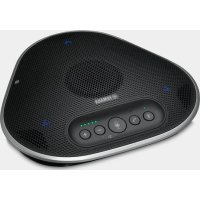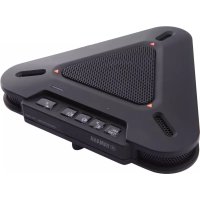
YVC200 - Phone YAMAHA - Free user manual and instructions
Find the device manual for free YVC200 YAMAHA in PDF.



| Product Type | Phone (conference speaker) |
| Brand | YAMAHA |
| Model | YVC200 |
| Color | Black (estimated) |
| Dimensions (W x H x D) | 140 x 43 x 140 mm |
| Weight | 280 g |
| Power | USB (bus or USB power adapter 5V) |
| Built-in battery | Rechargeable lithium-ion |
| Battery life | Approximately 10 hours |
| Wireless connectivity | Bluetooth 4.2, NFC |
| Bluetooth range | 10 m (without obstacles) |
| Bluetooth profiles | HFP 1.6, A2DP |
| Bluetooth audio codecs | SBC, mSBC, CVSD |
| Wired connectivity | USB 2.0 (Type A), 3.5 mm headphone jack |
| Main functions | Microphone and speaker mute, call button, volume control, NFC pairing |
| LED indicators | Battery indicator, Bluetooth indicator |
| Included accessories | USB cable (1 m), safety brochure, quick reference guide, carrying case |
| Care and cleaning | Wipe with a soft, dry cloth |
| Safety | Use only a certified USB adapter |
| Warranty | Consult the dealer or Yamaha website |
Frequently Asked Questions - YVC200 YAMAHA
User questions about YVC200 YAMAHA
0 question about this device. Answer the ones you know or ask your own.
Ask a new question about this device
Download the instructions for your Phone in PDF format for free! Find your manual YVC200 - YAMAHA and take your electronic device back in hand. On this page are published all the documents necessary for the use of your device. YVC200 by YAMAHA.
USER MANUAL YVC200 YAMAHA
natural_image
Circular electronic device with perforated grille and central button (no visible text or symbols)Quick Start Guide Guide de référence rapide Kurzanleitung Guida rapida Guía de Inicio Rápido Guia de Início Rápido Краткое вводное руководство 快捷启动指南
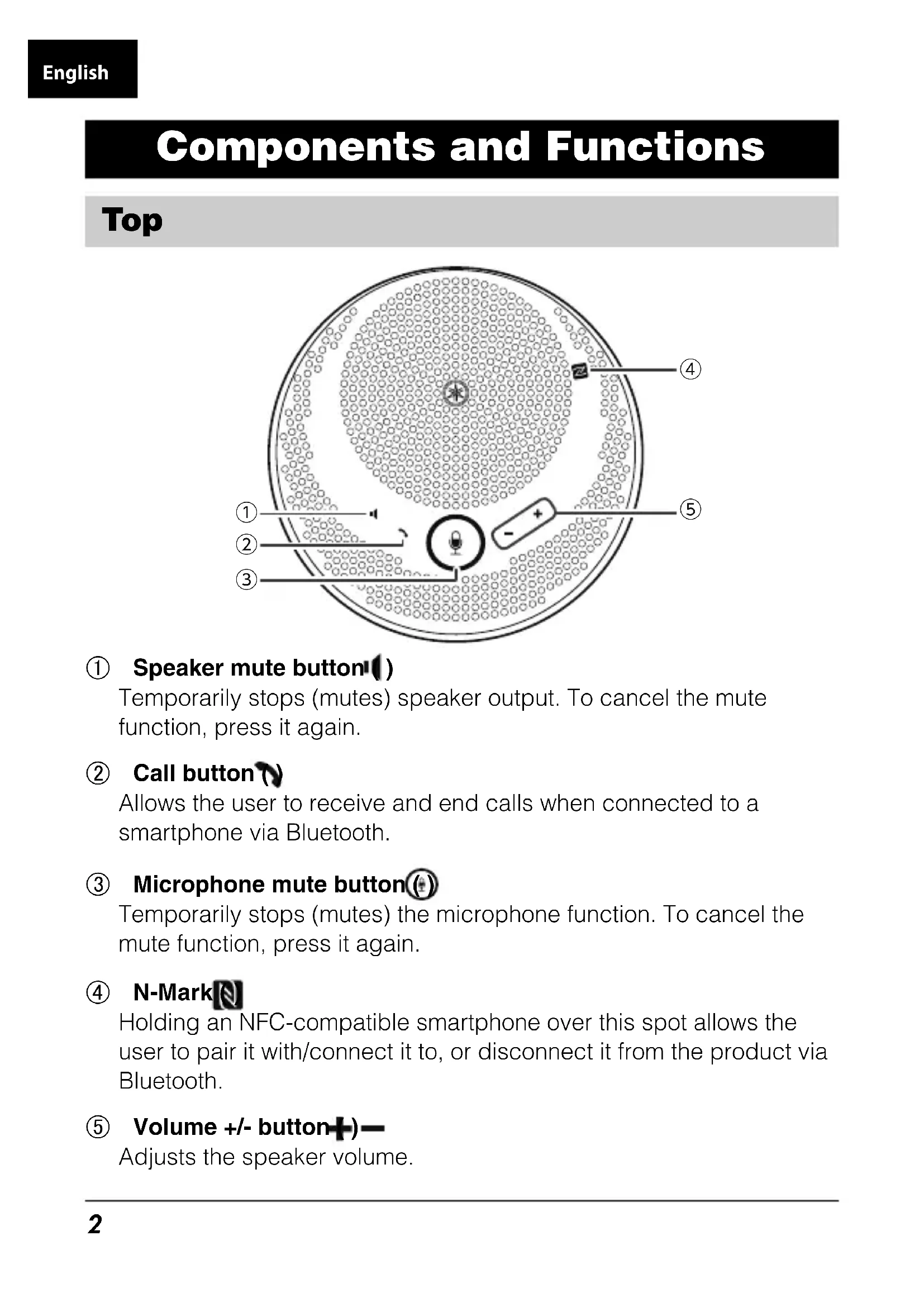
Components and Functions
Top
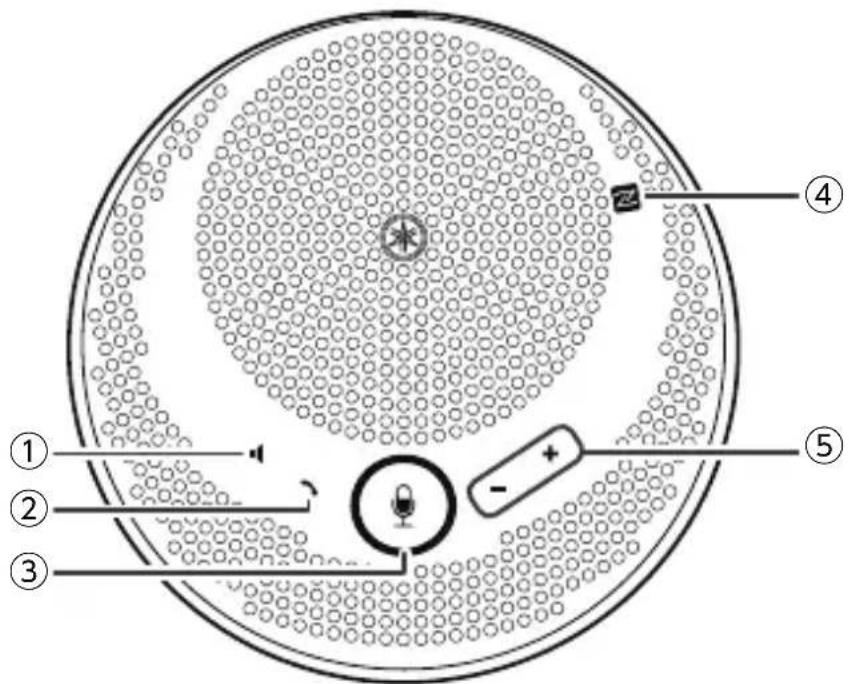
① Speaker mute button()
Temporarily stops (mutes) speaker output. To cancel the mute function, press it again.
② Call button ( )
Allows the user to receive and end calls when connected to a smartphone via Bluetooth.
③ Microphone mute button(⊕)
Temporarily stops (mutes) the microphone function. To cancel the mute function, press it again.
④ N-Mark
Holding an NFC-compatible smartphone over this spot allows the user to pair it with/connect it to, or disconnect it from the product via Bluetooth.
⑤ Volume +/- button+)
Adjusts the speaker volume.
Side
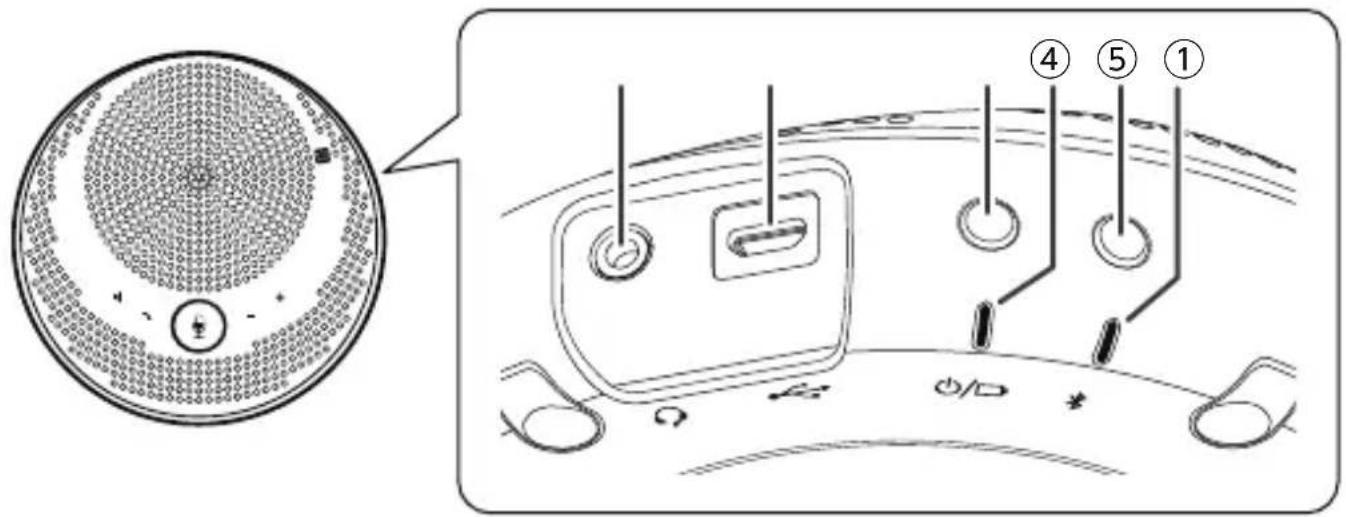
① Headset port ()
Connects a commercial headset to the product.
② USB port( )
Connects a computer or a commercial USB power adapter to the product with the supplied USB cable.
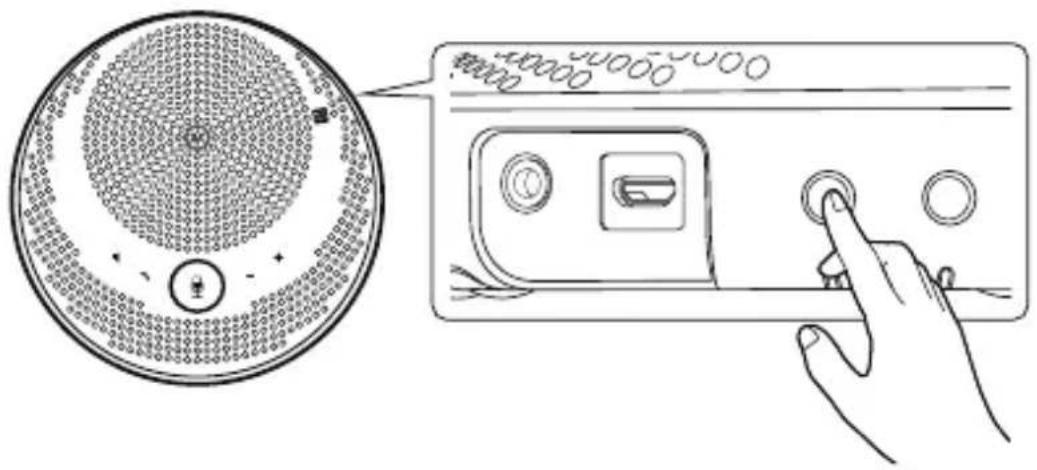
③ Power button ⏻/□
Turns on the product when pressed for more than 2 seconds. Turns off the product when pressed again for more than 2 seconds.
④ Battery indicator(○)/□
Flashes when the built-in rechargeable battery runs low. Indicates the remaining battery level when the power button is pressed.
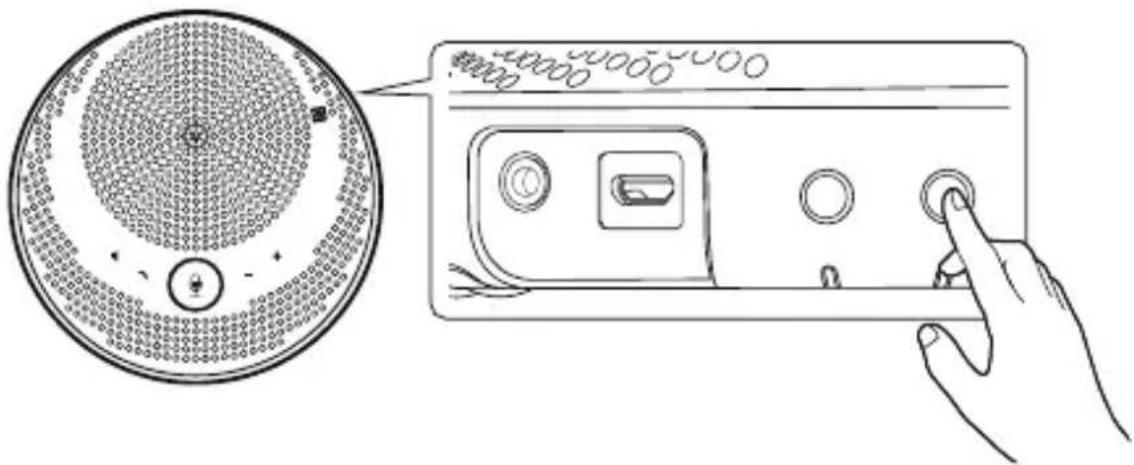
⑤ Bluetooth button( )
Allows the user to pair the product with, connect the product to, or disconnect the product from a smartphone via Bluetooth.
⑥ Bluetooth indicator(\*)
Indicates the Bluetooth connection status.
For more details, refer to the User Guide on the following website: https://manual.yamaha.com/uc/yvc-200/
Charging
Use the supplied USB cable to transmit power and start charging. Power can be transmitted by connecting the product to either a computer or a commercial USB power adapter.
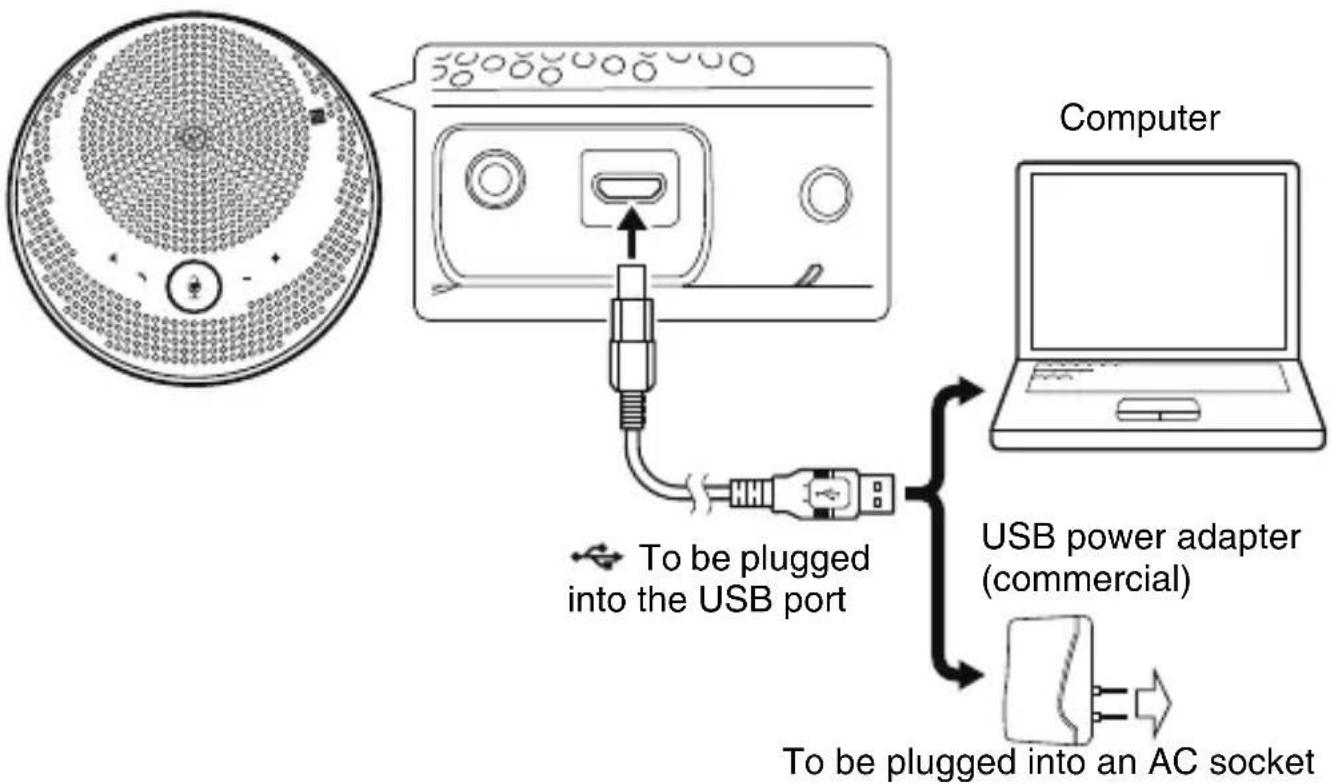
flowchart
graph TD
    A["Computer"] --> B["USB port"]
    B --> C["USB power adapter (commercial)"]
    C --> D["AC socket"]
    style A fill:#f9f,stroke:#333
    style D fill:#ccf,stroke:#333
Turning on the Power
Press the power button (☐) for more than 2 seconds to turn on the product.
Connecting a Smartphone via Bluetooth
Pairing
1 Press the Bluetooth button ( ) for more than 2 seconds.
The product turns to pairing standby mode when the Bluetooth indicator starts to flash quickly.
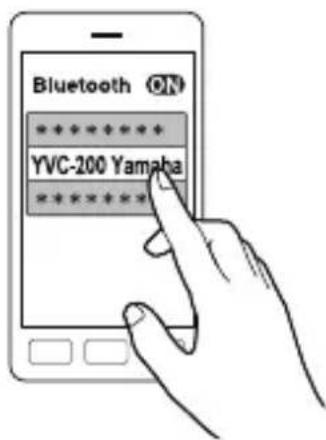
2 Pair the product with the smartphone.
Enable Bluetooth on the smartphone to be connected, and then pair it with "YVC-200 Yamaha." When required to enter a passkey, enter "0000."
Smartphone
Connecting to a Paired Smartphone
Pressing the Bluetooth button (✗) connects the product with the most recently paired/connected smartphone.
Pairing/Connecting via NFC
Holding an NFC-compatible smartphone over the N-Mark (N) allows the user to simultaneously pair it with and connect it to the product via Bluetooth.
For more details, refer to the User Guide on the following website: https://manual.yamaha.com/uc/yvc-200/
Connecting a Computer via USB
1 Connect the product to the computer.
Connect the product to the computer with the supplied USB cable. The product will start up automatically as power is transmitted from the computer.
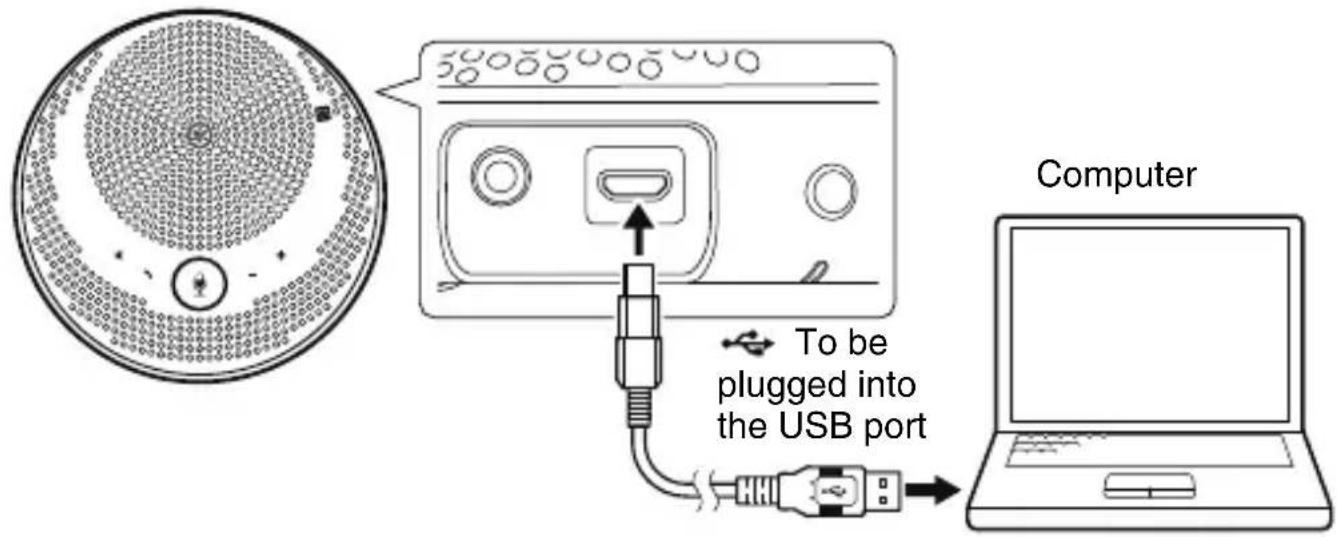
2 Configure the sound settings with the computer.
Select “Yamaha YVC-200” on the computer’s sound settings (microphone and speaker).
Specifications
| Power: USB bus power, USB power adapter (commercial) | |
| Rechargeable battery: Type: Lithium-ion batteryCharging temperature: 0 to 40°CContinuous usage time: approx. 10 hours | |
| Power consumption (max): | 2.5 W |
| Interface: USB 2.0 Full Speed, Bluetooth, NFC (Near Field Communication), 3.5 mm headset jack | |
| Connectable devices: USB: Computer running Windows or macOSBluetooth: Smartphone running Android or iOS | |
| Bluetooth: Version: 4.2Supported profiles: HFP (1.6), A2DPSupported Codec: SBC, mSBC, CVSDWireless output: Class 2Maximum communication distance: 10 m (without interference)Radio frequency (Operational frequency): 2,402 to 2,480 MHzMaximum output power (EIRP): 4.0 dBm (2.5 mW) | |
| NFC: Compatible devices: NFC-compatible Android devicesRadio frequency (Operational frequency): 13.56 MHz | |
| Dimensions: | (W x H x D): 140 x 43 x 140 mm (5.51 x 1.69 x 5.51 in.) |
| Weight: 280 g | |
| Operating environment: | Temperature: 0 to 40°C (32 to 104°F)Humidity: 20 to 85% (no condensation) |
| Storage environment: | Temperature: -20 to +50°C (-4 to 122°F)Humidity: 10 to 90% (no condensation) |
| Accessories: USB cable (1 m), Safety Brochure,Quick Start Guide, Carrying case | |
Connexion d'un smartphone via Bluetooth
Jumelage
Jumelage/connexion via NFC
① Headset-Anschluss
① Puerto del auricular Q
Conectar a um smartphone via Bluetooth
Emparelhamento
① Порт гарнитуры
① 扬声器静音按钮()
① 耳机端口Q)
将市售耳机连接至本产品。
② USB 端口 (←)
经蓝牙连接智能手机
配对
1 按下蓝牙按钮() 2 秒钟以上。
2 将本产品与智能手机配对。
① 스피커 음소거 버튼(1)
① 헤드셋 포트
제품에 시판 헤드셋을 연결합니다.
② USB 포트( )
2 제품과 스마트폰을 페어링합니다.
① スピーカーミュートボタン!()
① ヘッドセット端子Q()
市販のヘッドセットを接続します。
② USB 端子(→)
2 スマートフォンとペアリングします。
https://sound-solution.yamaha.com/support/uc/policy/
サポート窓口
https://sound-solution.yamaha.com/support/uc/
保証と修理について
■ 保証書と保証期間
This warranty is valid only in Japan.
For details of products, please contact your nearest Yamaha representative or the authorized importer listed below.
Yamaha Unified Communications, Inc. (U.S.A)
144, North Rd, Suite 3250, Sudbury, MA 01776 United States of America
Tel: +1-800-326-1088
EUROPE
Yamaha Music Europe GmbH
Siemensstrasse 22-34, 25462 Rellingen, Germany
Tel: +49-4101-303-0
RUSSIA
Yamaha Music (Russia) LLC.
Room 37, entrance 7, bld. 7, Kievskaya street, Moscow, 121059, Russia
Tel: +7-495-626-5005
THE PEOPLE'S REPUBLIC OF CHINA
Hakuto Enterprises (Shanghai) Ltd.
Room 303, Longemont Yes Tower, 369 Kaixuan Road, Shanghai, 200051, P.R. China
伯东企业(上海)有限公司
891/1 Siam Motors Building, Rama1 Road, Wangmai, Pathumwan, Bangkok, 10330, Thailand
Tel: (+66)2-2152626 ext. 1520, 1408
OTHER COUNTRIES
https://www.yamaha.com/products/en/communication/
HEAD OFFICE / MANUFACTURER
Yamaha Corporation
10-1, Nakazawa-cho, Naka-ku, Hamamatsu, 430-8650, Japan
Important Notice: Guarantee Information for customers in European Economic Area (EEA) and Switzerland
| Important Notice: Guarantee Information for customers in EEA* and Switzerland | English |
| For detailed guarantee information about this Yamaha product, and Pan-EEA* and Switzerland warranty service, please either visit the website address below (Printable file is available at the website) or contact the Yamaha representative office for your country. * EEA: European Economic Area | |
| Wichtiger Hinweis: Garantie-Information für Kunden in der EWR* und der Schweiz | Deutsch |
| Für nähere Garantie-Information über dieses Produkt von Yamaha, sowie über den Pan-EWR*- und Schweizer Garantieservice, besuchen Sie bitte entweder die folgend angegebene Internetadresse (eine druckfähige Version befindet sich auch auf der Webseite), oder wenden Sie sich an den für Ihr Land zuständigen Yamaha-Vertrieb. * EWR: Europäischer Wirtschaftsraum | |
| Remarque importante: informations de garantie pour les clients de l’EEE et la Suisse | Français |
| Pour des informations plus détaillées sur la garantie de ce produit Yamaha et sur le service de garantie applicable dans l’ensemble de l’EEE ainsi qu’en Suisse, consultez notre site Web à l’adresse ci-dessous (le fichier imprimable est disponible sur le site Web) ou contactez directement Yamaha dans votre pays de résidence. * EEE : Espace Economique Européen | |
| Belangrijke mededeling: Garantie-informatie voor klanten in de EER* en Zwitserland | Nederlands |
| Voor gedetailleerde garantie-informatie over dit Yamaha-product en de garantieservice in heel de EER* en Zwitserland, gaat u naar de onderstaande website (u vind een afdrukbaar bestand op de website) of neemt u contact op met Yamaha- vertegenwoordiger in uw land. * EER: Europese Economische Ruimte | |
| Aviso importante: información sobre la garantía para los clientes del EEE* y Suiza | Español |
| Para una información detallada sobre este producto Yamaha y sobre el soporte de garantía en la zona EEE* y Suiza, visite la dirección web que se incluye más abajo (la versión del archivo para imprimir está disponible en el sitio web) o póngase en contacto con el representante de Yamaha en su país. * EEE: Espacio Económico Europeo | |
| Avviso importante: informazioni sulla garanzia per i clienti residenti nell'EEA* e in Svizzera | Italiano |
| Per informazioni dettagliate sulla garanzia relativa a questo prodotto Yamaha e l'assistenza in garanzia nei paesi EEA* e in Svizzera, potete consultare il sito Web all'indirizzo riportato di seguito (è disponibile il file in formato stampabile sul sito) oppure contattare l'ufficio di rappresentanza locale della Yamaha. * EEA: Area Economica Europea | |
| Aviso importante: informações sobre as garantias para clientes da AEE* e da Suíça | Português |
| Para obter uma informação pormenorizada sobre este produto da Yamaha e sobre o serviço de garantia na AEE* e na Suíça, visite o site a seguir (o arquivo para impressão está disponível no site) ou entre em contato com o escritório de representação da Yamaha no seu país. * AEE: Área Econômica Européia | |
| Σημαντική σημείωση: Πληροφορίες εγγύησης για τους πελάτες στον ΕΟΧ* και Ελβετία | Ελληνικά |
| Για λεπτομερείς πληροφορίες εγγύησης σχετικά με το παρόν προϊόν της Yamaha και την κάλυψη εγγύησης σε όλες τις χώρες του ΕΟΧ και την Ελβετία, επισκεφτείτε την παρακάτω ιστοσελίδα (Εκτυπώσιμη μορφή είναι διαθέσιμη στην ιστοσελίδα) ή απευθυνθείτε στην αντιπροσωπεία της Yamaha στη χώρα σας. * ΕΟΧ: Ευρωπαϊκός Οικονομικός Χώρος | |
| Viktigt: Garantiinformation för kunder i EES-området* och Schweiz | Svenska |
| För detaljerad information om denna Yamahaprodukt samt garantiservice i hela EES-området* och Schweiz kan du antingen besöka nedanstående webbaddress (en utskriftsvänlig fil finns på webbplatsen) eller kontakta Yamahas officiella representant i ditt land. * EES: Europeiska Ekonomiska Samarbetsområdet | |
| Viktig merknad: Garantiinformasjon for kunder i E∅S* og Sveits | Norsk |
| Detaljert garantiinformasjon om dette Yamaha-produktet og garantiservice for hele E∅S-området* og Sveits kan fås enten ved å besøke nettadressen nedenfor (utskriftsversjon finnes på nettsiden) eller kontakte Yamaha-kontoret i landet der du bor. *E∅S: Det europeiske økonomiske samarbeidsområdet | |
| Vigtig oplysning: Garantioplysninger til kunder i E∅O* og Schweiz | Dansk |
| De kan finde detaljerede garantioplysninger om dette Yamaha-produkt og den fælles garantiserviceordning for E∅O* (og Schweiz) ved at besøge det websted, der er angivet nedenfor (der findes en fil, som kan udskrives, på webstedet), eller ved at kontakte Yamaha nationale repräsentationskontor i det land, hvor De bor.* E∅O: Det Europæiske ∅konomiske Område | |
| Tärkeä ilmoitus: Takuutiedot Euroopan talousalueen (ETA)*ja Sveitsin asiakkaille | Suomi |
| Tämän Yamaha-tuotteen sekä ETA-alueen ja Sveitsin takuuta koskevat yksityis-kohtaiset tiedot saatte alla olevasta nettiosoitteesta. (Tulostettava tiedosto saata-vissa sivustolla.) Voitte myös ottaa yhteyttä paikalliseen Yamaha-edustajaan.*ETA: Euroopan talousalue | |
| Ważne: Warunki gwarancyjne obowiązujące w EOG* iSzwajcarii | Polski |
| Aby dowiedzieć się więcej na temat warunków gwarancyjnych tego produktu firmy Yamaha i serwisu gwarancyjnego w całym EOG* i Szwajcarii, należy odwiedzić wskazaną poniżej stronę internetową (Plik gotowy do wydruku znajduje się na stro-nie internetowej) lub skontaktować się z przedstawicielstwem firmy Yamaha w swoim kraju. * EOG — Europejski Obszar Gospodarczy | |
| Důležité oznámení: Záruční informace pro zákazníky v EHS*a ve Švýcarsku | Česky |
| Podrobné záruční informace o tomto produktu Yamaha a záručním servisu v celém EHS* a ve Švýcarsku naleznete na níže uvedené webové adrese (soubor k tisku je dostupný na webových stránkách) nebo se můžete obrátit na zastoupení firmy Yamaha ve své zemi. * EHS: Evropský hospodářský prostor | |
| Fontos figyelmeztetés: Garancia-információk az EGT* területén és Svájcban élő vásárlók számára | Magyar |
| A jelen Yamaha termékre vonatkozó részletes garancia-információk, valamint az EGT*-re és Svájcra kiterjedő garanciális szolgáltatás tekintetében keresse fel web-helyünket az alábbi címen (a webhelyen nyomtatható fájlt is talál), vagy pedig lép-jen kapcsolatba az országában működő Yamaha képviseleti irodával. * EGT: Euró-pai Gazdasági Térség | |
| Oluline märkus: Garantiiteave Euroopa Majanduspiirkonna (EMP)* ja Šveitsi klientidele | Eesti keel |
| Täpsema teabe saamiseks selle Yamaha toote garantii ning kogu Euroopa Majan-duspiirkonna ja Šveitsi garantiiteeninduse kohta, külastage palun veebisaiti alljärg-neval aadressil (sel saidil on saadaval prinditav fail) või pöörduge Teie regiooni Yamaha esinduse poole. * EMP: Euroopa Majanduspiirkond | |
| Svarīgs paziņojums: garantijas informācija klientiem EEZ* un Šveicē | Latviešu |
| Lai saņemtu detalizētu garantijas informāciju par šo Yamaha produktu, kā arī garantijas apkalpošanu EEZ* un Šveicē, lūdzu, apmeklējiet zemāk norādīto tīmekļa vietnes adresi (tīmekļa vietnē ir pieejams drukājams fails) vai sazinieties ar jūsu valsti apkalpojošo Yamaha pārstāvniecību. * EEZ: Eiropas Ekonomikas zona | |
| Dėmesio: informacija dėl garantijos pirkėjams EEE* ir Šveicarijoje | Lietuvių kalba |
| Jei reikia išsamios informacijos apie šį „Yamaha“ produktą ir jo techninę priežiūrą visoje EEE* ir Šveicarijoje, apsilankykite mūsų svetainėje toliau nurodytu adresu (svetainėje yra spausdintinas failas) arba kreipkitės į „Yamaha“ atstovybę savo šaliai. *EEE – Europos ekonominė erdvė | |
| Dôležité upozornenie: Informácie o záruke pre zákazníkov v EHP* a Švajčiarsku | Slovenčina |
| Podrobné informácie o záruke týkajúce sa tohto produktu od spoločnosti Yamaha a garančnom servise v EHP* a Švajčiarsku nájdete na webovej stránke uvedenej nižšie (na webovej stránke je k dispozícii súbor na tlač) alebo sa obrátte na zástupcu spoločnosti Yamaha vo svojej krajine. * EHP: Európsky hospodársky priestor | |
| Pomembno obvestilo: Informacije o garanciji za kupce v EGP* in Švici | Slovenščina |
| Za podrobnejše informacije o garanciji za ta Yamahin izdelek ter garancijskem servisu v celotnem EGP in Švici, obiščite spletno mesto, ki je navedeno spodaj (natisljiva datoteka je na voljo na tem spletnem mestu), ali se obrnite na Yamahinega predstavnika v svoji državi. * EGP: Evropski gospodarski prostor | |
| Важно съобщение: Информация за гаранцията за клиенти в ЕИП* и Швейцария | Български език |
| За подробна информация за гаранцията за този продукт на Yamaha и гаранционното обслужване в паневропейската зона на ЕИП* и Швейцария или посетете посочения по-долу уеб сайт (на уеб сайта има файл за печат), или се свържете с представителния офис на Yamaha във вашата страна. * ЕИП: Европейско икономическо пространство | |
| Notificare importantă: Informații despre garanție pentru clientii din SEE* și Elveția | Limba română |
| Pentru informații detaliate privind acest produs Yamaha și serviciul de garanție Pan-SEE* și Elveția, vizitați site-ul la adresa de mai jos (fișierul imprimabil este disponibil pe site) sau contactați biroul reprezentanței Yamaha din țara dumneavoastră.* SEE: Spațiul Economic European | |
https://europe.yamaha.com/warranty/
Information
| The company names and product names in this manual are the trademarks or registered trademarks of their respective companies.No part of this manual may be reproduced or used in any form without the permission of Yamaha.The contents of this manual apply to the latest specifications as of the publishing date. To obtain the latest manual, access the Yamaha website then download the manual file.The illustrations and screens in this manual are for instructional purposes only. | English |
| Les noms de société et les noms de produit mentionnés dans ce manuel sont des marques commerciales ou des marques déposées de leurs sociétés respectives.Aucune partie du présent manuel ne peut être reproduite ni utilisée sous quelque forme que ce soit sans l'autorisation de Yamaha.Le contenu du présent manuel s'applique aux dernières spécifications à la date de publication. Pour obtenir le dernier manuel, accédez aux sites Web de Yamaha, puis téléchargez le fichier du manuel.Les illustrations et les captures d'écran figurant dans ce manuel servent uniquement à expliciter les instructions. | Français |
| Die Unternehmens- und Produktnamen in dieser Anleitung sind Markenzeichen oder eingetragene Markenzeichen der entsprechenden Unternehmen.Kein Teil dieses Handbuchs darf ohne Genehmigung von Yamaha reproduziert oder in irgendeiner Form verwendet werden.Der Inhalt dieses Handbuchs entspricht der neuesten Spezifikation zum Zeitpunkt der Veröffentlichung. Um das neueste Handbuch zu erhalten, rufen Sie die Yamaha-Website auf und laden Sie die Handbuchdatei herunter.Die in dieser Anleitung enthaltenen Abbildungen und Bildschirmdarstellungen dienen nur zur Veranschaulichung. | Deutsch |
| Le denominazioni sociali e i nomi dei prodotti riportati nel manuale sono marchi o marchi registrati delle rispettive società.Nessuna parte di questo manuale può essere riprodotto o utilizzata in qualsiasi forma senza autorizzazione di Yamaha.Il contenuto di questo manuale si applica alle specifiche più recenti alla data di pubblicazione. Per ottenere il manuale più recente, accedere al sito Web di Yamaha e scaricare il file del manuale.Le illustrazioni e le schermate in questo manuale vengono fornite esclusivamente a scopo descrittivo. | Italiano |
| Los nombres de empresas y productos utilizados en este manual son marcas comerciales o marcas comerciales registradas de sus respectivos titulares.Ninguna parte de este manual puede copiarse o utilizarse bajo ningún concepto sin el permiso de Yamaha.El contenido de este manual se aplica a las últimas especificaciones según la fecha de publicación. Para obtener el último manual, acceda al sitio web que se indica abajo y descargue el archivo del manual.Las figuras y pantallas de este manual solo tienen propósitos ilustrativos. | Español |
| Os nomes das empresas e dos produtos neste manual são as marcas comerciais ou as marcas comerciais registradas de suas respectivas empresas.Nenhuma parte deste manual poderá ser reproduzida ou usada de qualquer forma sem a permissão da Yamaha.O conteúdo deste manual aplica-se às mais recentes especificações a partir da data de publicação. Para obter o manual mais recente, acesse o site da Yamaha e faça o download do arquivo.As ilustrações e as capturas de tela neste manual são apenas para fins instrutivos. | Português |
| Названия компаний и продуктов в данном руководстве являются товарными знаками или зарегистрированными товарными знаками соответствующих компаний.Запрещено копировать и использовать любую часть данного руководства в любой форме без разрешения компании Yamaha.Содержание данного руководства относится к самой последней на дату его публикации технической спецификации устройства. Для того, чтобы получить обновленное руководство последней версии, зайдите на веб-сайт компании Yamaha и скачайте соответствующий файл.Иллюстрации и снимки экранов в данном руководстве приведены только в качестве примеров. | Русский |
| 本使用说明书中所使用的公司名和产品名都是相应公司的商标或注册商标。未经 Yamaha 许可,不得以任何形式复制或使用本说明书的任何内容。本说明书的内容适用于截止出版日期的最新规格要求。若想获取最新版说明书,请访问 Yamaha 网站并下载说明书文件。本说明书中出现的插图和画面仅供说明用途。 | 中文 |
| 본 설명서에 기재된 회사명과 제품명은 각 회사의 상표 또는 등록 상표입니다.본 설명서의 어떠한 부분도 Yamaha 의 승인 없이는 어떠한 형태로도 복사 또는 사용할 수 없습니다.본 설명서의 내용은 발간일을 기준으로 최신 사양에 적용됩니다. 최신 설명서를 받으려면 Yamaha 웹 사이트에서 설명서 파일을 다운로드하십시오.본 설명서에 수록된 그림 및 화면은 설명 용도로만 사용됩니다. | 한국어 |
| 本書に記載されている会社名および商品名等は、各社の登録商標または商標です。本書の記載内容の一部または全部を無断で転載することを禁じます。本書は発行時点での最新仕様で説明しています。最新版はヤマハウエブサイトからダウンロードできます。本書に記載されているイラストや画面は、すべて説明のためのものです。For more details, refer to the User Guide on the following website: | 日本語 |
| Pour plus de détails, reportez-vous au Mode d'emploi sur le site Web suivant : | Français |
| Weitere Informationen finden Sie in der Bedienungsanleitung auf der folgenden Website: | Deutsch |
| Per ulteriori dettagli fare riferimento alla Manuale dell'utente sul seguente sito web: | Italiano |
| Para más información, consulte el manual de usuario en el siguiente sitio web: | Español |
| Para obter mais informações, consulte o Guia do usuário no endereço a seguir: | Português |
| Дополнительные сведения см. в Руководстве пользователя на веб- сайте по адресу: | Русский |
| 有关更多详细信息,请参阅以下网站上的用户指南: | |
| 자세한 내용은 다음 웹 사이트의 사용설명서를 참조하십시오 . | |
| 詳細は下記のウェブサイトにあるユーザーガイドをご覧ください。 |
https://manual.yamaha.com/uc/yvc-200/