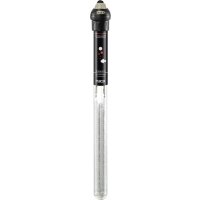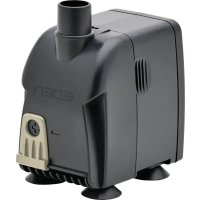
PAS 1200 - Aquarium EDEN - Free user manual and instructions
Find the device manual for free PAS 1200 EDEN in PDF.



| Product type | Circulation pump for aquarium |
| Brand | EDEN |
| Model | PAS 1200 |
| Connection voltage | 230 V AC |
| Frequency | 50 Hz |
| Maximum power consumption | 25 W |
| Maximum flow rate | 1150 l/h |
| Maximum head height | 2 m |
| Protection rating | IPX8 (immersion up to 1 m) |
| Maximum immersion depth | 1 m |
| Outlet connection diameter | 17 mm |
| Allowed water temperature range | +4 to 35 °C |
| Dimensions (L x W x H) | 54 x 78 x 89 mm |
| Power cable length | 1.5 m |
| Weight | 0.6 kg |
| Flow regulator | Yes, integrated |
| Mounting | Suction cups included |
| Housing material | Robust plastic (estimated) |
| Maintenance | Clean with fresh water and soft brush at least twice a year |
| Wear parts | Suction cups, motor unit (rotor) |
| Application | Indoor, private aquarium, fresh or salt water |
| Warranty | Not specified in the manual |
Frequently Asked Questions - PAS 1200 EDEN
User questions about PAS 1200 EDEN
0 question about this device. Answer the ones you know or ask your own.
Ask a new question about this device
Download the instructions for your Aquarium in PDF format for free! Find your manual PAS 1200 - EDEN and take your electronic device back in hand. On this page are published all the documents necessary for the use of your device. PAS 1200 by EDEN.
USER MANUAL PAS 1200 EDEN
natural_image
Three black industrial water purifiers with ports and mounting brackets, displayed against a white background (no text or symbols visible)Sicherheitshinweise
text_image
Technical diagram showing two mechanical device configurations with 2x and 4x magnified views and labeled components.PAS0006
natural_image
Diagram of a mechanical device with fluid flow and motion indicators (no text or symbols)PAS0001
HINWEIS
natural_image
Diagram of a cable being inserted into a socket, showing wire routing (no text or symbols)text_image
Diagram showing a device with directional arrows and a labeled component, likely illustrating a mechanical or electrical process.BSE0003
PAS0004
text_image
Diagram showing mechanical assembly steps with numbered instructions for component identificationEDEN PAS 600, 800, 1200
text_image
Diagram illustrating a mechanical device assembly with labeled parts and directional arrows indicating motion or assembly.PAS0003
Störungsbeseitigung
Electrical connection
- Only connect the unit if the electrical data of the unit and the power supply match.
- Only plug the unit into a correctly installed outlet.
- Protect open plugs and sockets from moisture.
Safe operation
- Disconnect all electrical devices in the water from the power supply before reaching into the water. Otherwise there is a risk of severe injuries or death by electrocution.
- Do not use the unit, if electrical lines or the housing are damaged.
- The supply cord cannot be replaced. If the cord is damaged, the appliance should be scrapped.
- The impeller unit in the pump contains a magnet with a strong magnetic field that may affect the operation of pacemakers or implantable cardioverter defibrillators (ICDs). Keep a distance of at least 0.2 m between the implant and the magnet.
- Never pull on electric cables. In particular, never carry units on their cables.
- Route lines in such a way that they are protected from damage and do not present a tripping hazard.
- This unit can be used by children aged 3 and above and by persons with reduced physical, sensory or mental capabilities or lack of experience and knowledge if they are supervised or have been instructed on how to use the unit in a safe way and they understand the hazards involved. Do not allow children to play with the unit. Only allow children to carry out cleaning and user maintenance under supervision.
- Never carry out technical changes to the unit.
• Always unplug the unit before working on it. - Only carry out work on the unit that is described in this manual.
- Only use original spare parts and accessories.
- Should problems occur, please contact the authorised customer service or EDEN.
Intended use
Only use the product described in this manual as follows:
- For maintaining the water circulation in an aquarium.
- For transferring water from and draining basins or ponds/pools.
- Indoors and for private aquarium-keeping purposes.
- While adhering to the technical specifications. (→ Technical data)
The following restrictions apply to the unit:
- Do not use in swimming ponds.
- Never run the unit without water.
- Do not connect to the domestic water supply.
- Do not use for commercial or industrial purposes.
- Do not use the unit together with chemicals, food, flammable, explosive substances or other liquids aside from water.
Product Description
Overview
EDEN PAS 300, 500
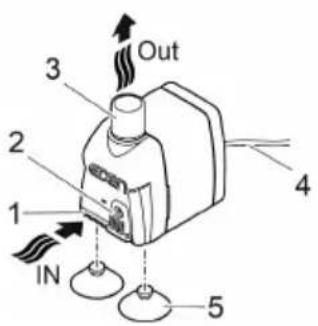
text_image
1 2 3 4 5 IN OutEDEN PAS 600, 800, 1200
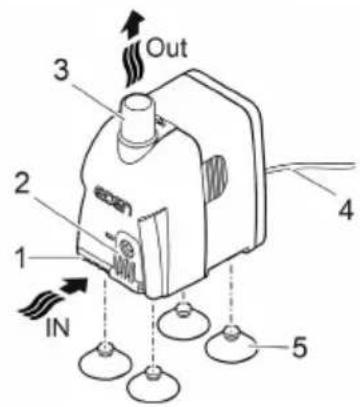
text_image
1 2 3 Out 4 IN 5PAS0002
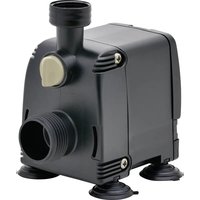
| 1 | Inlet |
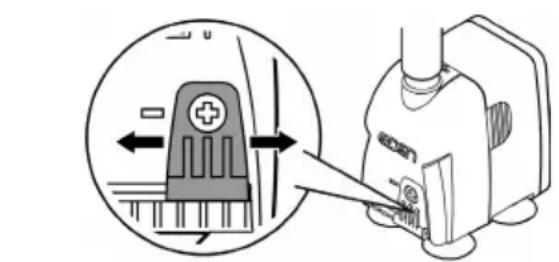
| 2 | Flow rate controller |
| 3 | Outlet (pressure side) |
| 4 | Power cable |
| 5 | Suction cups |
Symbols on the unit
| IPX8 1.0 m | The unit is protected against the results of permanent immersion in water to a depth of 1 m. | |
 | Only use the unit in indoor spaces. | |
 | Protect the unit from direct sunlight. | |
 | Do not dispose of the unit with normal household waste. | |
 | Read the operating instructions. | |
Installation and connection
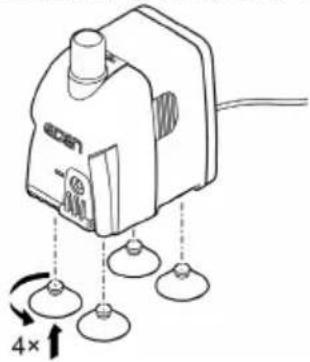
• Install the suction cups.
EDEN PAS 300, 500 EDEN PAS 600, 800, 1200
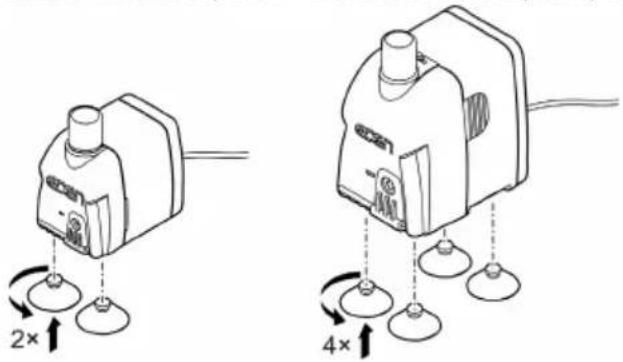
text_image
Diagram showing two types of electrical switchgear with 2x and 4x speed indicators and labeled componentsPAS0006
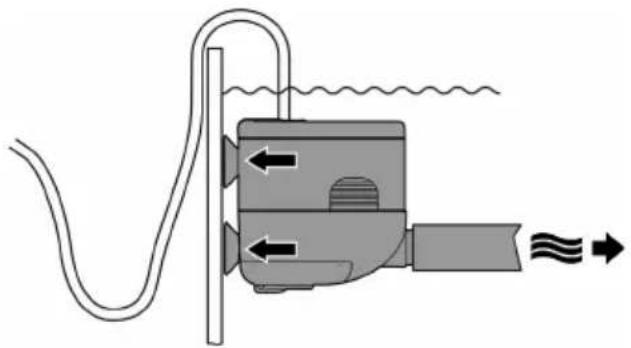
- If required, attach a hose at the outlet (pressure side) of the pump. ( Technical data)
- Fasten the pump on the aquarium wall using the suction cups.
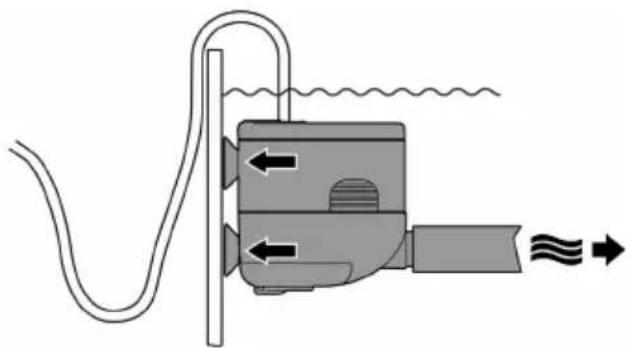
natural_image
Diagram of a mechanical device with fluid flow and motion indicators (no text or symbols)PAS0001
Commissioning/start-up
NOTE
Never allow the pump to run dry. Otherwise the pump may be destroyed.
▶ Only operate the pump when it is submerged or flooded.
EN
Switching ON/OFF
- Switching on: Plug the power plug into the outlet.
– The unit switches on immediately.
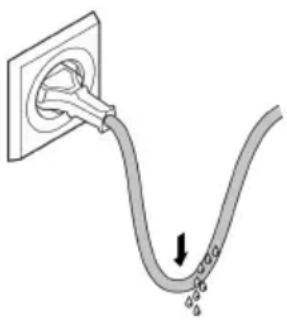
- Lay the mains cable so that a drip loop is formed and the lowest point is below the socket. This prevents dripping water from entering the socket.
- Switching off: Pull the power plug from the outlet.
Form a drip loop
natural_image
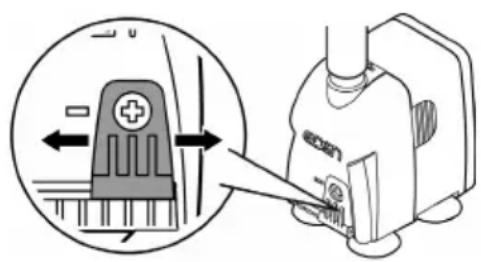
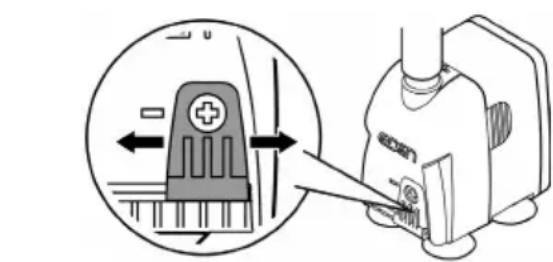
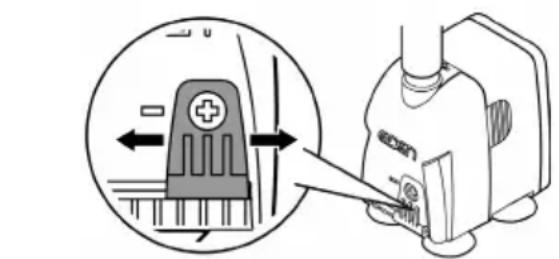
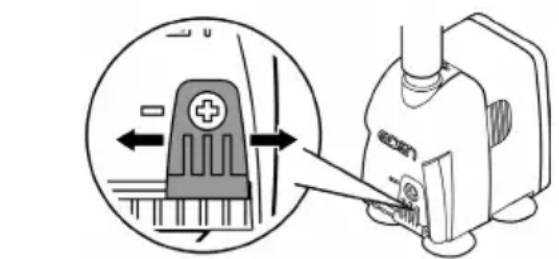
Diagram of a cable being inserted into a socket, showing wire routing and a downward arrow indicating direction (no text or symbols)Set the flow rate
text_image
Diagram showing a device with a plus symbol and directional arrow, alongside a close-up of its internal structure labeled 'econ'.BSE0003
PAS0004
Maintenance and cleaning
CAUTION
Risk of injury due to unexpected start-up. Internal monitoring functions may switch off the unit and automatically reactivate it.
▶ Disconnect the power plug before carrying out any work on the unit.
NOTE
Do not use aggressive cleaning agents or chemical solutions. These agents can damage the housing, impair the function of the device and harm animals, plants and the environment.
▶ If possible, clean the unit with clear water and a soft brush or a sponge; remove stubborn dirt with the aid of the recommended cleaning agents.
Cleaning the device
① Clean the unit as required but at least twice per year.
- Recommended cleaning agent for removing stubborn limescale deposits: – Vinegar- and chlorine-free household cleaning agent.
• After cleaning, thoroughly rinse all parts in clean water.
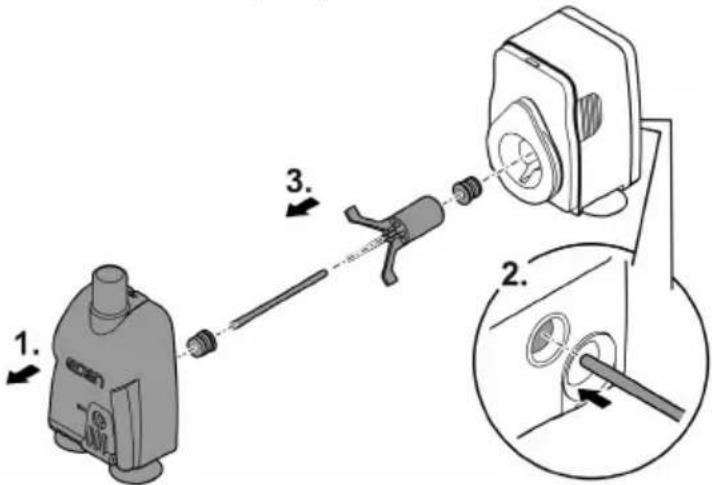
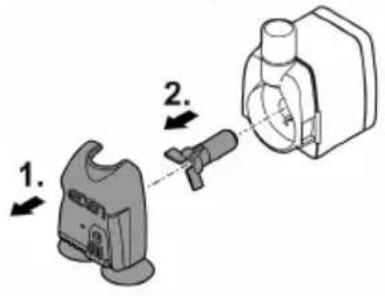
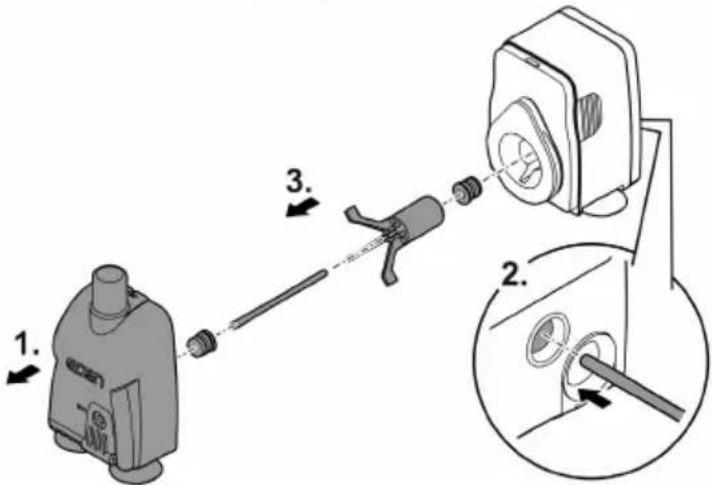
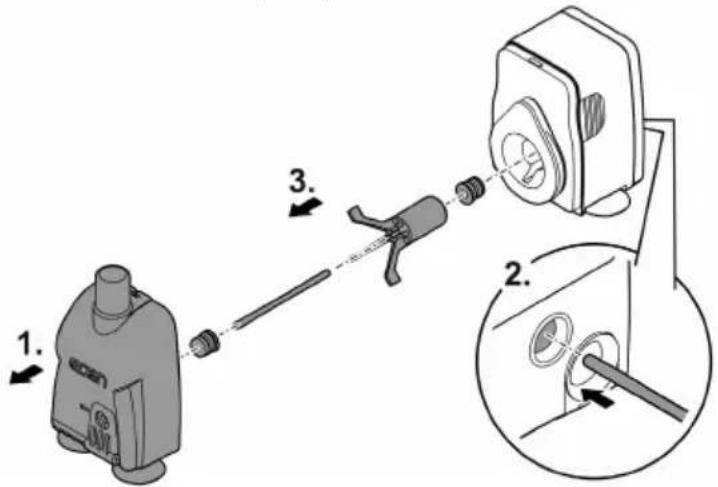
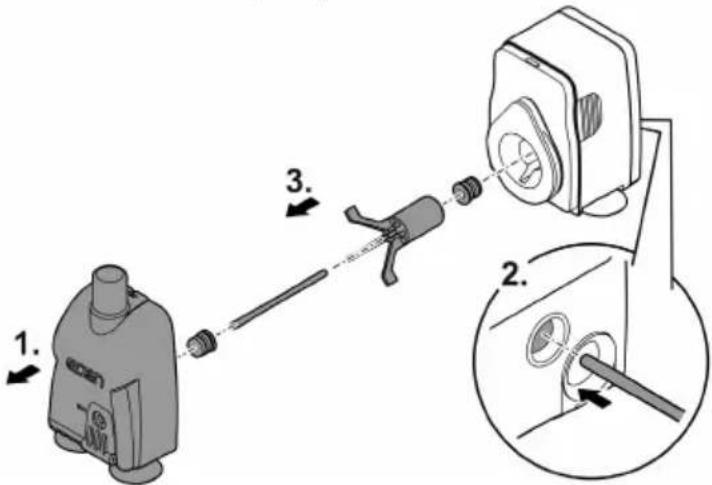
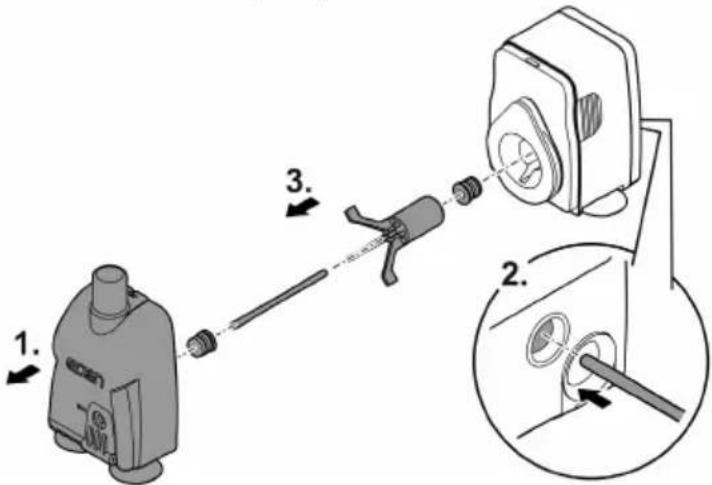
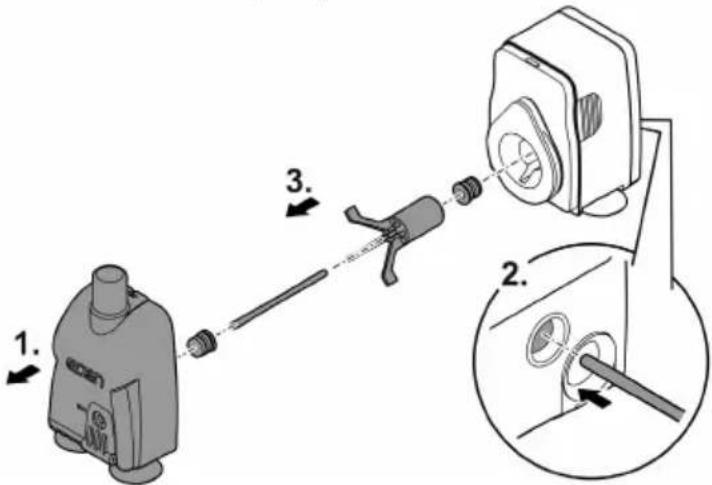
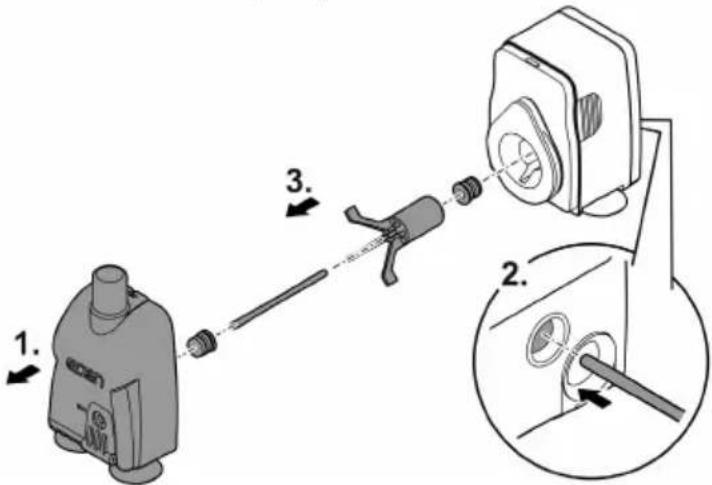
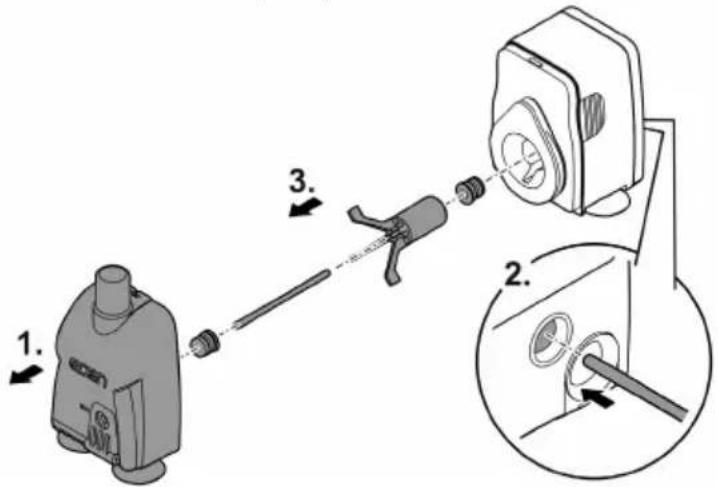
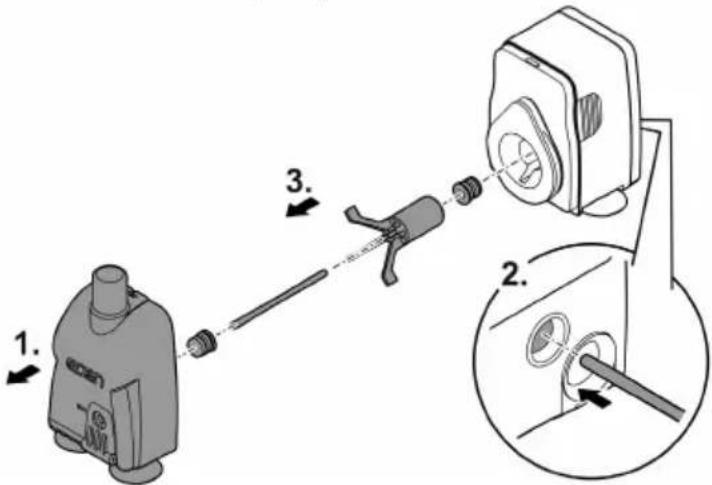
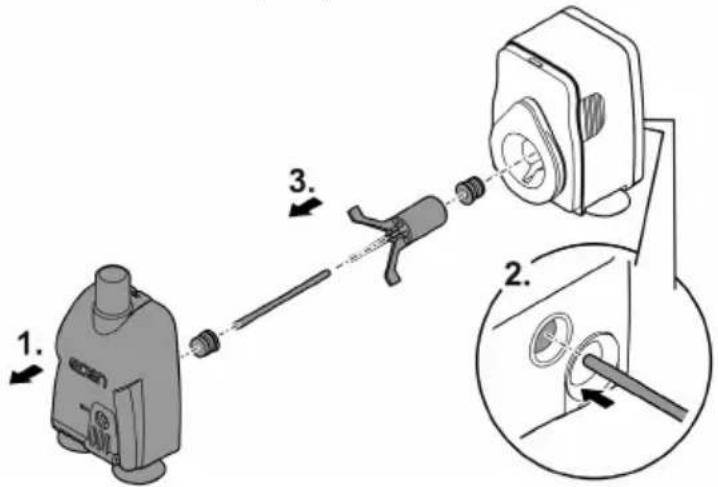
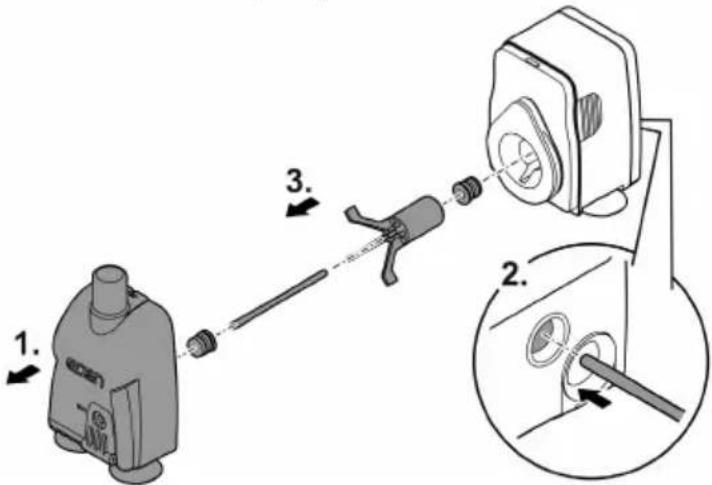
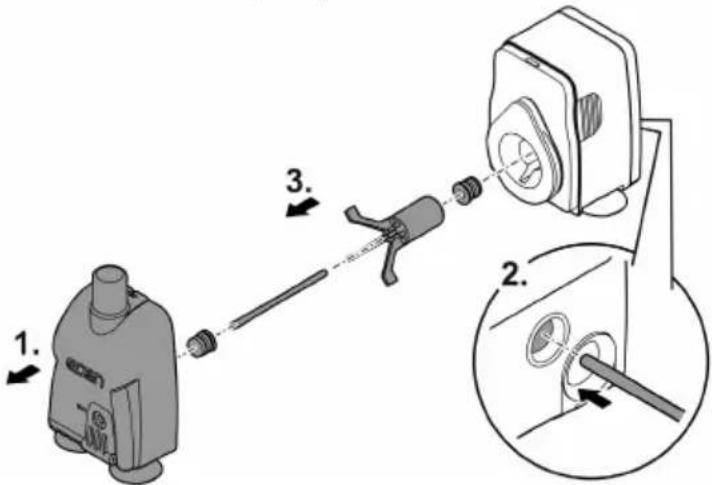
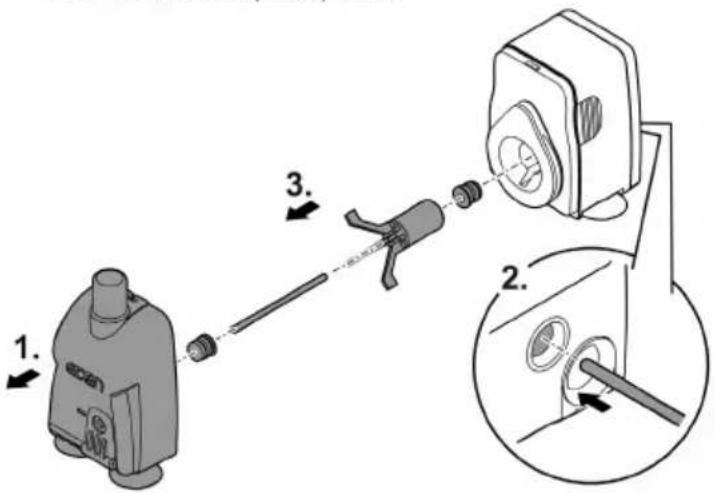
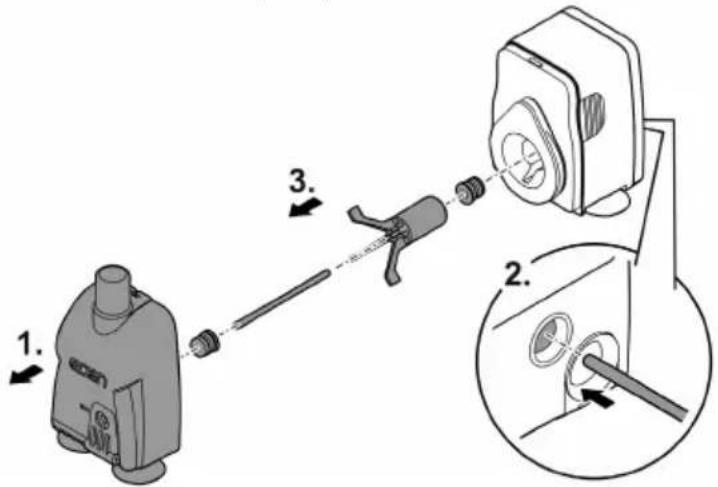
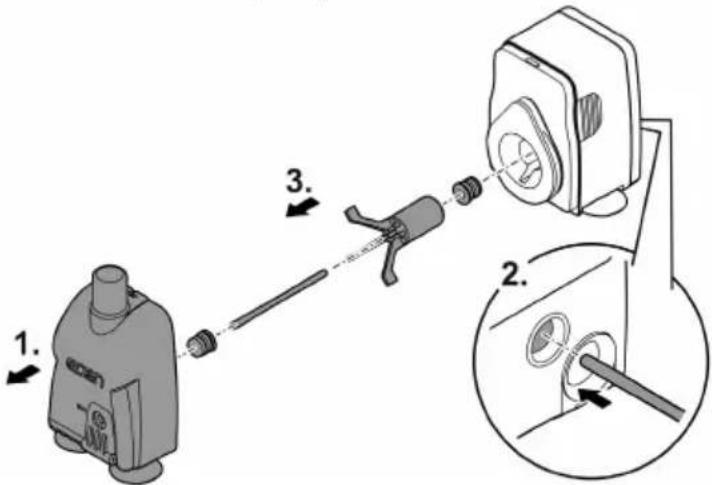
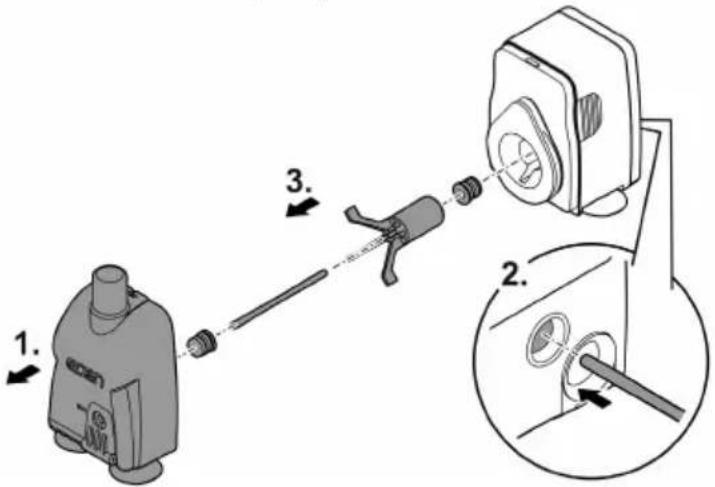
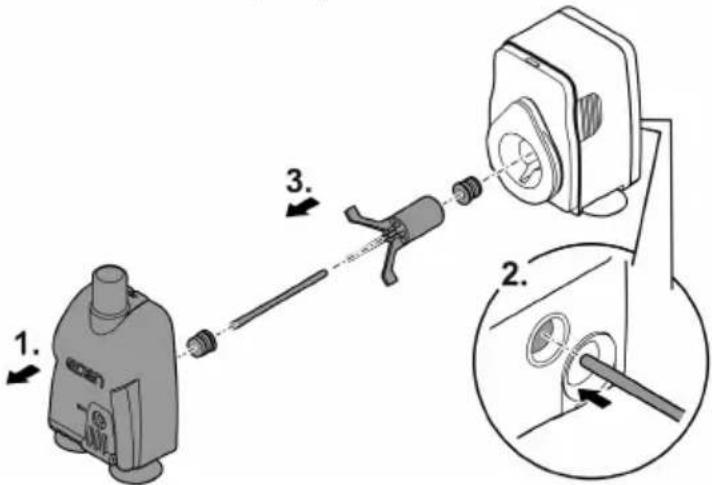
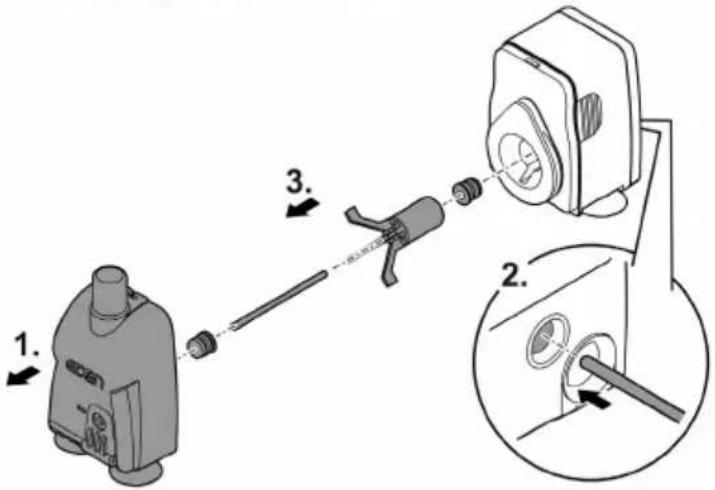
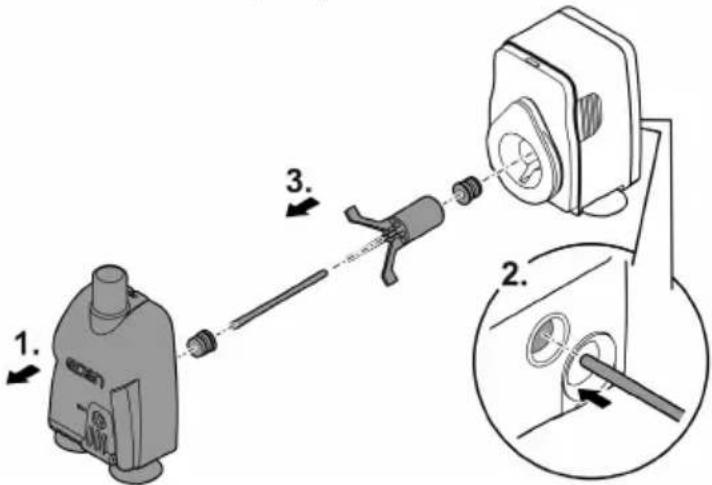
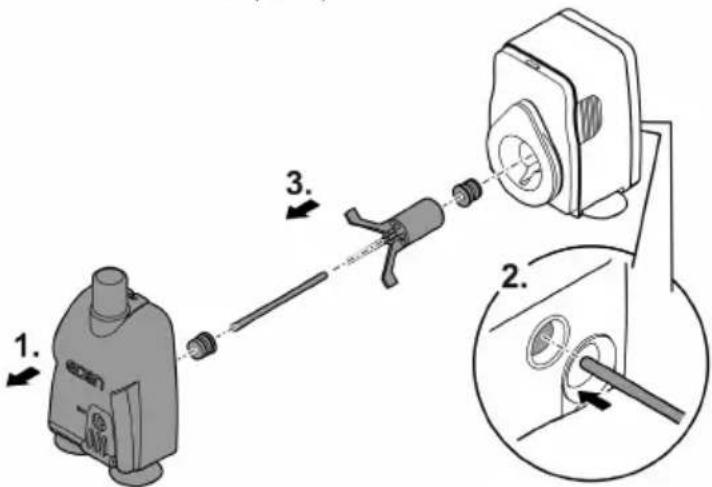
Cleaning/replacing the impeller unit
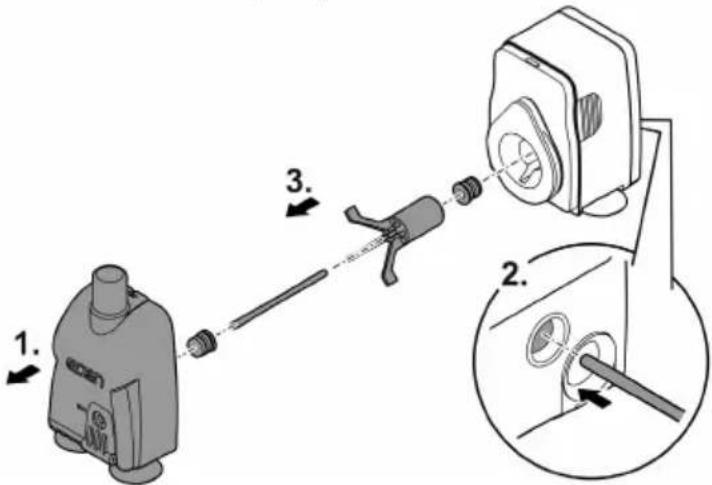
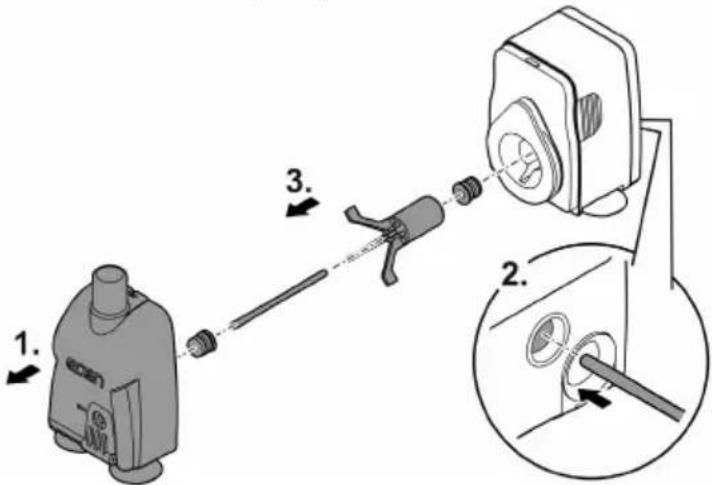
How to proceed:
- Pull the filter cage off the motor block by applying strong pressure.
- Remove the impeller unit, clean or replace.
- Reassemble the unit in the reverse order.
EDEN PAS 300, 500
text_image
Diagram showing mechanical assembly steps with numbered instructions for component identificationEDEN PAS 600, 800, 1200
text_image
Diagram illustrating a mechanical device assembly with labeled parts and directional arrows indicating motion or assembly.PAS0003
Malfunction remedy
| Malfunction | Cause | Remedy |
| The unit does not start up | No mains voltage | Check the mains voltage. |
| Impeller unit blocked | Clean the unit | |
| Water flow insufficient | Pump housing or impeller unit soiled | Clean the unit |
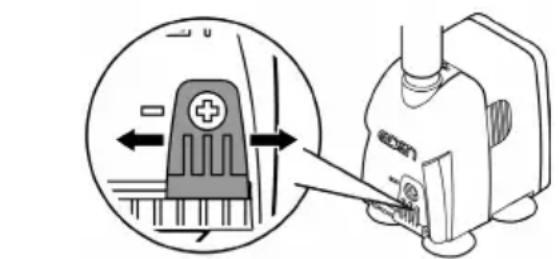
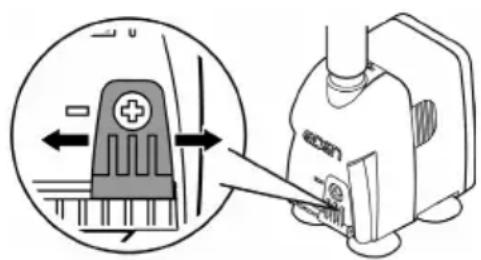
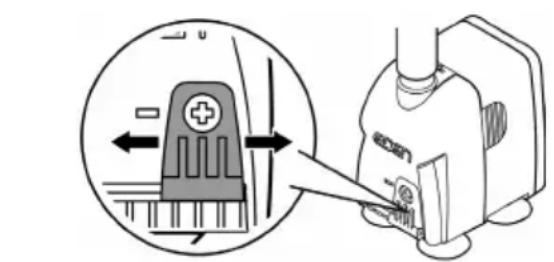
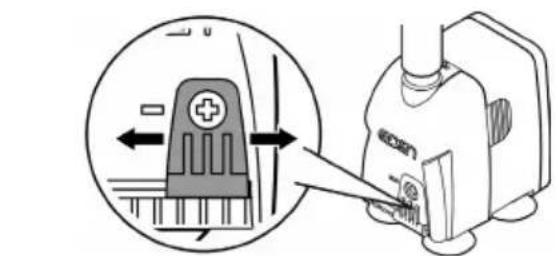
| Flow controller set to insufficient flow rate | Move the flow controller in the + direction | |
| Impeller unit worn | Replace the impeller unit. | |
| Pump housing clogged | Clean the unit |
Wear parts
- Suction cups, impeller unit
Technical data
| PAS | 300 | 500 | 600 | 800 | 1200 | ||
| Connection voltage | V AC | 230 | 230 | 230 | 230 | 230 | |
| Mains frequency | Hz | 50 | 50 | 50 | 50 | 50 | |
| Max. power consumption | W | 5 | 5 | 11 | 20 | 25 | |
| Max. pump capacity | l/h | 300 | 500 | 600 | 800 | 1150 | |
| Max. pump head | m | 0.5 | 0.8 | 1.3 | 1.5 | 2 | |
| Protection type | IPx8 | IPx8 | IPx8 | IPx8 | IPx8 | ||
| Max. immersion depth | m | 1 | 1 | 1 | 1 | 1 | |
| Connection diameter, pressure side | mm | 13 | 13 | 13 | 17 | 17 | |
| Permissible range, water temperature | °C | +4 ... 35 | +4 ... 35 | +4 ... 35 | +4 ... 35 | +4 ... 35 | |
| Dimensions | Length | mm | 35 | 35 | 45.5 | 54 | 54 |
| Width | mm | 51 | 51 | 65 | 78 | 78 | |
| Height | mm | 54 | 54 | 78 | 89 | 89 | |
| Length of power cable | m | 1.5 | 1.5 | 1.5 | 1.5 | 1.5 | |
| Weight | kg | 0.2 | 0.2 | 0.4 | 0.6 | 0.6 | |
EN
Disposal
NOTE
Do not dispose of this unit with household waste.
▶ Dispose of the unit by using the return system provided for this purpose.
▶ Should you have questions, please contact your local disposal company. They will give you information on how to correctly dispose of the unit.
▶ Render the unit unusable by cutting the cables.
text_image
Diagram showing a device with a 2x speed indicator and circular components, likely illustrating a mechanical or electrical setup.EDEN PAS 600, 800, 1200
natural_image
Line drawing of a small electronic device with four base components and a 4x rotational arrow indicator (no text or symbols)PAS0006
natural_image
Diagram of a mechanical device with fluid flow and motion arrows, no text or symbols presentPAS0001
Mise en service
REMARQUE
natural_image
Diagram of a cable being inserted into a socket, showing wire routing and a downward arrow indicating direction (no text or symbols)Régler le débit
text_image
Diagram showing a device with directional arrows and a magnified view of the component, likely illustrating a mechanical or electrical process.BSE0003
PAS0004
text_image
Diagram showing mechanical assembly steps with numbered labels indicating component identificationEDEN PAS 600, 800, 1200
text_image
Diagram illustrating a mechanical assembly process with labeled steps 1, 2, and 3 showing tool path and component positioning.PAS0003
Dépannage
text_image
Technical diagram showing two mechanical device configurations with 2x and 4x magnified views and labeled components.PAS0006
natural_image
Diagram of a mechanical device with fluid flow and motion indicators (no text or symbols)PAS0001
Ingebruikname
OPMERKING
natural_image
Diagram of a cable being inserted into a socket, showing wire routing and a downward arrow indicating direction (no text or symbols)Stel het debiet in
text_image
Diagram showing a device with a plus symbol and directional arrow, alongside a close-up of its component being inserted into a machine.BSE0003
PAS0004
text_image
Diagram showing mechanical assembly steps with numbered labels indicating component identificationEDEN PAS 600, 800, 1200
text_image
Diagram illustrating a mechanical device assembly with labeled parts and directional arrows indicating motion or assembly.PAS0003
Storing verhelpen
natural_image
Diagram of a mechanical device with fluid flow and motion indicators (no text or symbols)PAS0001
Puesta en marcha
INDICACIÓN
natural_image
Diagram of a cable being inserted into a socket, showing wire routing and a downward arrow indicating direction (no text or symbols)Ajustar el flujo
text_image
Diagram showing a device with a plus button and directional arrow, likely illustrating a mechanical or electrical component.BSE0003
PAS0004
text_image
Diagram showing mechanical assembly steps with numbered labels indicating component identificationEDEN PAS 600, 800, 1200
text_image
Diagram illustrating a mechanical device assembly with labeled parts and directional arrows indicating motion or assembly.PAS0003
text_image
Diagram showing a device with a 2x speed indicator and directional arrows, likely illustrating a motion or control mechanism.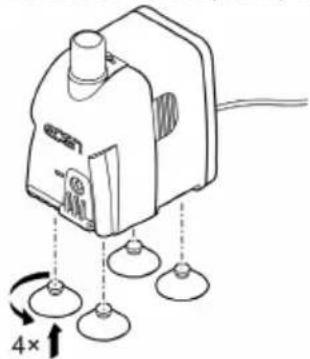
natural_image
Line drawing of a small electronic device with three base components and a 4x rotational arrow indicator (no text or symbols)PAS0006
natural_image
Diagram of a mechanical device with fluid flow and directional arrows, no text or symbols presentPAS0001
natural_image
Diagram of a cable being inserted into a socket, showing wire routing and a downward arrow indicating direction (no text or symbols)natural_image
Diagram showing a device with a plus symbol inside a circular arrow, connected to a mechanical component (no text or symbols present)BSE0003
PAS0004
text_image
Diagram showing mechanical assembly steps with numbered labels indicating component identificationEDEN PAS 600, 800, 1200
text_image
Diagram illustrating a mechanical device assembly with labeled parts and directional arrows indicating motion or assembly.PAS0003
text_image
Technical diagram showing two mechanical device configurations with 2x and 4x magnified views and labeled components.PAS0006
natural_image
Diagram of a mechanical device with fluid flow and motion indicators (no text or symbols)PAS0001
Messa in funzione
NOTA
natural_image
Diagram of a cable being inserted into a socket, showing wire routing and a downward arrow indicating direction (no text or symbols)text_image
Diagram showing a device with directional arrows and a magnified view of the device's internal structure.BSE0003
PAS0004
text_image
Diagram showing mechanical assembly steps with numbered labels indicating component identificationEDEN PAS 600, 800, 1200
text_image
Diagram illustrating a mechanical device assembly with labeled parts and directional arrows indicating motion or assembly.PAS0003
text_image
Diagram showing a device with a 2x speed indicator and circular components, likely illustrating a mechanical or electrical setup.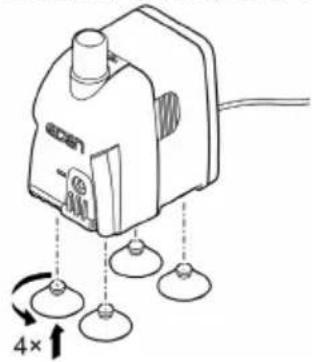
natural_image
Line drawing of a portable electronic device with four base sensors and a 4x speed indicator (no text or symbols)PAS0006
natural_image
Diagram of a mechanical device with fluid flow and motion indicators (no text or symbols)PAS0001
Ibrugtagning
BEMÆRK
natural_image
Diagram of a cable being inserted into a socket, showing wire routing (no text or symbols)text_image
Diagram showing a device with a plus button and directional arrow, alongside a close-up of its internal components.PAS0004
text_image
Diagram showing mechanical assembly steps with numbered instructions for component identificationEDEN PAS 600, 800, 1200
text_image
Diagram illustrating a mechanical assembly process with labeled steps and componentsPAS0003
Fejlafhjælpning
natural_image
Diagram of a mechanical device with fluid flow and motion indicators (no text or symbols)PAS0001
Igangsetting
MERK
natural_image
Diagram of a cable being inserted into a socket, showing wire routing and a downward arrow indicating direction (no text or symbols)text_image
Diagram showing a device with directional arrows and a close-up of its internal components, likely illustrating a mechanical or electrical process.PAS0004
text_image
Diagram showing mechanical assembly steps with numbered labels indicating component identificationEDEN PAS 600, 800, 1200
text_image
Diagram illustrating a mechanical device assembly with labeled parts and directional arrows indicating motion or assembly.PAS0003
Utbedrefeil
text_image
Technical diagram showing two mechanical device configurations with 2x and 4x magnified views and labeled components.PAS0006
natural_image
Diagram of a mechanical device with fluid flow and motion indicators (no text or symbols)PAS0001
Driftstart
ANVISNING
natural_image
Diagram of a cable being inserted into a socket, showing wire routing and a downward arrow indicating direction (no text or symbols)text_image
Diagram showing a device with directional arrows and a close-up of its component, likely illustrating a mechanical or electrical process.PAS0004
text_image
Diagram showing mechanical assembly steps with numbered instructions for component identificationEDEN PAS 600, 800, 1200
text_image
Diagram illustrating a mechanical assembly process with labeled steps 1, 2, and 3 showing tool path and component positioning.PAS0003
Felavhjälpning
text_image
Technical diagram showing two mechanical device configurations with 2x and 4x magnified views and labeled components.PAS0006
natural_image
Diagram of a mechanical device with fluid flow and motion indicators (no text or symbols)PAS0001
Käyttöönotto
OHJE
natural_image
Diagram of a cable being inserted into a socket, showing wire routing and a downward arrow indicating direction (no text or symbols)text_image
Diagram showing a device with directional arrows and a close-up of its component, likely illustrating a mechanical or electrical process.BSE0003
PAS0004
Puhdistus ja huolto
HUOMIO
text_image
Diagram showing mechanical assembly steps with numbered instructions for component identificationEDEN PAS 600, 800, 1200
text_image
Diagram illustrating a mechanical device assembly with labeled parts and directional arrows indicating motion or assembly.PAS0003
natural_image
Diagram of a mechanical device with fluid flow and motion indicators (no text or symbols)PAS0001
Üzembe helyezés
TUDNIVALÓ:
natural_image
Diagram of a cable being inserted into a socket, showing wire routing and a downward arrow indicating direction (no text or symbols)text_image
Diagram showing a medical device with a cross symbol and directional arrow, likely illustrating a procedure or operation.BSE0003
PAS0004
text_image
Diagram showing mechanical assembly steps with numbered labels indicating component identificationEDEN PAS 600, 800, 1200
text_image
Diagram illustrating a mechanical device assembly with labeled parts and directional arrows indicating motion or assembly.PAS0003
Hibaelhárítás
text_image
Diagram showing a device with a 2x speed indicator and circular components, likely illustrating a mechanical or electrical setup.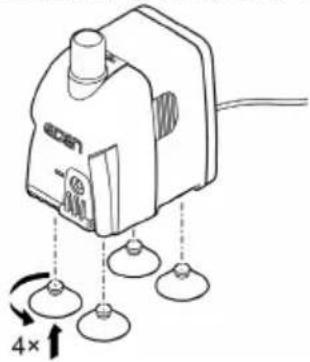
natural_image
Line drawing of a small electronic device with four base components and a 4x rotational arrow indicator (no text or symbols)PAS0006
natural_image
Diagram of a mechanical device with fluid flow and motion arrows, no text or symbols presentPAS0001
Rozruch
WSKAZÓWKA
natural_image
Diagram of a cable being inserted into a socket, showing wire routing and a downward arrow indicating direction (no text or symbols)text_image
Diagram showing a device with directional arrows and a labeled component 'econ' in a circular inset.BSE0003
PAS0004
PL
text_image
Diagram showing two steps of a device operation: first with a device labeled '1', second with a tool labeled '2'.EDEN PAS 600, 800, 1200
text_image
Diagram illustrating a mechanical assembly process with labeled steps 1, 2, and 3 showing tool path and component alignment.PAS0003
Usuwanie usterek
text_image
Technical diagram showing two mechanical device configurations with 2x and 4x magnified views and labeled components.PAS0006
natural_image
Diagram of a mechanical device with fluid flow and motion indicators (no text or symbols)PAS0001
Uvedení do provozu
UPOZORNĚNÍ
natural_image
Diagram of a cable being inserted into a socket, showing wire routing (no text or symbols)Nastavení průtoku
text_image
Diagram showing a device with directional arrows and a labeled component 'econ' inside a circle, likely illustrating a mechanical or electrical process.BSE0003
PAS0004
Čištění a údržba
CS
POZOR
text_image
Diagram showing mechanical assembly steps with numbered instructions for component identificationEDEN PAS 600, 800, 1200
text_image
Diagram illustrating a mechanical assembly process with labeled steps 1, 2, and 3 showing tool path and component positioning.PAS0003
Odstraňování poruch
text_image
Diagram showing a device with a 2x speed indicator and circular components, likely illustrating a mechanical or electrical setup.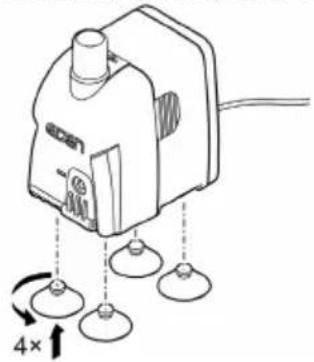
natural_image
Diagram of a device with four base sensors and a 4x rotational arrow, no text or symbols presentPAS0006
natural_image
Diagram of a mechanical device with fluid flow and motion indicators (no text or symbols)PAS0001
natural_image
Diagram of a cable being inserted into a socket, showing wire routing and a downward arrow indicating direction (no text or symbols)text_image
Diagram showing a device with directional arrows and a close-up of its component, likely illustrating a mechanical or electrical process.PAS0004
Čistenie a údržba
POZOR
text_image
Diagram showing mechanical assembly steps with numbered instructions for component identificationEDEN PAS 600, 800, 1200
text_image
Diagram showing a device being connected to a pump via a tool, with labeled parts and an inset view of the device's internal components.PAS0003
Odstráňte poruchu
text_image
Diagram showing a device with a 2x speed indicator and circular components, likely illustrating a mechanical or electrical setup.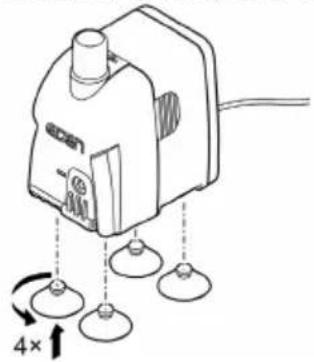
natural_image
Diagram of a device with four base sensors and a 4x rotational arrow, no text or symbols presentPAS0006
natural_image
Diagram of a mechanical device with fluid flow and motion indicators (no text or symbols)PAS0001
Zagon
NASVET
natural_image
Diagram of a cable being inserted into a socket, showing wire routing and a downward arrow indicating direction (no text or symbols)text_image
Diagram showing a device with directional arrows and a close-up of its component, likely illustrating a mechanical or electrical process.PAS0004
text_image
Diagram showing mechanical assembly steps with numbered instructions for component identificationEDEN PAS 600, 800, 1200
text_image
Diagram illustrating a mechanical assembly process with labeled steps 1, 2, and 3 showing tool path and component alignment.PAS0003
Odpravljanje motenj
| Motnja | Vzrok | Ukrep |
| Naprava ne steče | Ni omrežne napetosti. | Preverite omrežno napetost. |
| Tekalna enota je blokirana | Očistiti napravo | |
| Nezadosten vodni tok | Ohišje črpalke ali tekalna enota sta umazana | Očistiti napravo |
| Regulator pretoka je nastavljen na prenizko količino pretoka | Regulator pretoka premaknite v smeri + | |
| Tekalna enota je obrabljena | Zamenjava tekalne enote | |
| Ohišje črpalke zamašeno | Očistiti napravo |
Deli, ki se obrabijo
- Priseski, tekalna enota
Tehnični podatki
| PAS | 300 | 500 | 600 | 800 | 1200 | ||
| Priključna napetost | V AC | 230 | 230 | 230 | 230 | 230 | |
| Omrežna frekvenca | Hz | 50 | 50 | 50 | 50 | 50 | |
| Najv. moč | W | 5 | 5 | 11 | 20 | 25 | |
| Najv. moč črpanja | l/h | 300 | 500 | 600 | 800 | 1150 | |
| Najv. višina črpanja | m | 0,5 | 0,8 | 1,3 | 1,5 | 2 | |
| Vrsta zaščite | IPx8 | IPx8 | IPx8 | IPx8 | IPx8 | ||
| Najv. potopna globina | m | 1 | 1 | 1 | 1 | 1 | |
| Premer priključka na tlačni strani | mm | 13 | 13 | 13 | 17 | 17 | |
| Dovoljeni razpon temperature vode | °C | +4 ... 35 | +4 ... 35 | +4 ... 35 | +4 ... 35 | +4 ... 35 | |
| Dimenzije | Dolžina | mm | 35 | 35 | 45,5 | 54 | 54 |
| Širina | mm | 51 | 51 | 65 | 78 | 78 | |
| Višina | mm | 54 | 54 | 78 | 89 | 89 | |
| Dolžina omrežnega kabla | m | 1,5 | 1,5 | 1,5 | 1,5 | 1,5 | |
| Teža | kg | 0,2 | 0,2 | 0,4 | 0,6 | 0,6 | |
Odlaganje odpadkov
NASVET
text_image
Technical diagram showing two mechanical device configurations with 2x and 4x magnified views and labeled components.PAS0006
- Ako je potrebno, možete spojiti crijevo na izlaz (tlačna strana) pumpe. (→ Tehnički podatci)
- Pričvrstite pumpu na stijenku akvarija pomoću vakuumskih čašica.
natural_image
Diagram of a mechanical device with fluid flow and motion indicators (no text or symbols)PAS0001
Stavljanje u pogon
NAPOMENA
natural_image
Diagram of a cable being inserted into a socket, showing wire routing and a downward arrow indicating direction (no text or symbols)Namještanje količine protoka
text_image
Diagram showing a device with directional arrows and a labeled component, likely illustrating a mechanical or electrical process.BSE0003
PAS0004
text_image
Diagram showing mechanical assembly steps with numbered labels indicating sequence of componentsEDEN PAS 600, 800, 1200
text_image
Diagram illustrating a mechanical device assembly with labeled parts and directional arrows indicating motion or assembly.PAS0003
text_image
Diagram showing a device with a 2x speed indicator and directional arrows, likely illustrating a motion or control mechanism.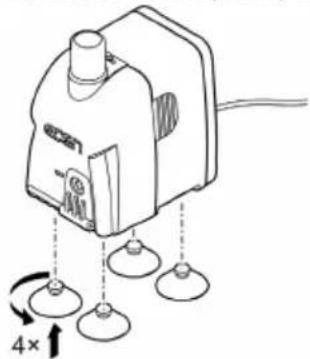
natural_image
Line drawing of a small electronic device with three base components and a 4x rotational arrow indicator (no text or symbols)PAS0006
natural_image
Diagram of a mechanical device with fluid flow and directional arrows, no text or symbols presentPAS0001
natural_image
Diagram of a cable being inserted into a socket, showing wire routing and a downward arrow indicating direction (no text or symbols)Reglarea debitul
natural_image
Diagram showing a device with a plus symbol inside a circular arrow, connected to a mechanical device (no text or symbols present)BSE0003
PAS0004
text_image
Diagram showing mechanical assembly steps with numbered labels indicating component identificationEDEN PAS 600, 800, 1200
text_image
Diagram illustrating a mechanical device assembly with labeled parts and directional arrows indicating motion or assembly.PAS0003
Resetarea defectiunii
natural_image
Diagram of a mechanical device with fluid flow and motion indicators (no text or symbols)PAS0001
natural_image
Diagram of a cable being inserted into a socket, showing wire routing and a downward arrow indicating direction (no text or symbols)Настройка на дебита
natural_image
Diagram showing a device with a plus symbol inside a circular arrow, connected to a mechanical device (no text or symbols present)BSE0003
PAS0004
text_image
Diagram showing mechanical assembly steps with numbered instructions for component identificationEDEN PAS 600, 800, 1200
text_image
Diagram illustrating a mechanical device assembly with labeled parts and directional arrows indicating motion or assembly.PAS0003
natural_image
Diagram of a mechanical device with two base components and a 2× rotational arrow indicator (no text or symbols)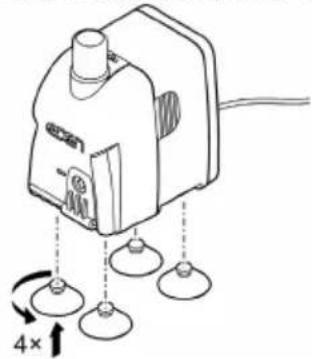
natural_image
Diagram of a portable electronic device with four base sensors and a 4x speed indicator (no text or symbols)PAS0006
natural_image
Diagram of a mechanical device with fluid flow and directional arrows, no text or symbols presentPAS0001
natural_image
Diagram of a cable being inserted into a socket, showing wire routing (no text or symbols)text_image
Diagram showing a device with directional arrows and a close-up of its internal components, likely illustrating a mechanical or electrical process.PAS0004
Чистка і догляд
ОБЕРЕЖНО
text_image
Diagram showing a mechanical assembly with labeled parts and directional arrows indicating motion or assembly steps.EDEN PAS 600, 800, 1200
text_image
Diagram illustrating a mechanical assembly process with labeled steps 1, 2, and 3 showing tool path and component positioning.PAS0003
text_image
Diagram showing two types of electrical switchgear with 2x and 4x speed indicators and labeled componentsPAS0006
natural_image
Diagram of a mechanical device with fluid flow and motion indicators (no text or symbols)PAS0001
Пуск в эксплуатацию
УКАЗАНИЕ
natural_image
Diagram of a cable being inserted into a socket, showing wire routing and a downward arrow indicating direction (no text or symbols)text_image
Diagram showing a device with directional arrows and a magnified view of the component, likely illustrating a mechanical or electrical process.BSE0003
PAS0004
Очистка и уход
ОСТОРОЖНО
text_image
Diagram showing mechanical assembly steps with numbered labels indicating component identificationEDEN PAS 600, 800, 1200
text_image
Diagram illustrating a mechanical assembly process with labeled steps 1, 2, and 3 showing tool path and component alignment.PAS0003
natural_image
Diagram of a mechanical device with a coiled tube and fluid flow direction arrow (no text or symbols)PAS0001
调试
提示
泵不得无水运转。否则会毁坏该泵。
natural_image
Diagram of a cable being inserted into a socket, showing wire routing and installation (no text or symbols)设置流量
text_image
Diagram showing a device with directional arrows and a close-up of its component, likely illustrating a mechanical or electrical process.BSE0003
PAS0004
清洁和保养
小心
text_image
Diagram showing a device being inserted into a housing, labeled with steps 1 and 2.EDEN PAS 600, 800, 1200
text_image
Diagram illustrating a mechanical assembly process with labeled steps 1, 2, and 3 showing tool path and component insertion.PAS0003