SL472 - Power bank Schumacher - Free user manual and instructions
Find the device manual for free SL472 Schumacher in PDF.


| Brand | Schumacher |
| Model | SL472 |
| Product type | External battery (jump starter) |
| Internal battery | Lithium-ion, rechargeable |
| Starting output voltage | 12 V for lead-acid batteries |
| USB output ports | 2 ports: 1x 5 V / 2.4 A and 1x Quick Charge 3.0 (5 V / 3 A, 9 V / 2 A, 12 V / 1.5 A) |
| Wireless charging | Yes, 10 W |
| Charging input | Micro USB / USB-C, 5 V DC, 2 A recommended |
| Charging time (SL472) | 2.5 to 4 hours |
| Minimum charge level for jump start | 75% of internal battery |
| Maximum jump start duration | 3 seconds, with a 1-minute pause between attempts |
| Storage temperature | -10 °C to +45 °C |
| Battery level indicator | LCD screen with percentage |
| Integrated LED light | Yes, SOS and strobe modes |
| Smart cable with protection | Yes (reverse polarity, short circuit, overheating) |
| Package contents | Smart cable, USB-C cable, travel pouch |
| Safety | Protection against reverse polarity, short circuits, and overheating |
| Usage | Emergency jump start for 12 V vehicles and charging mobile devices |
Frequently Asked Questions - SL472 Schumacher
User questions about SL472 Schumacher
0 question about this device. Answer the ones you know or ask your own.
Ask a new question about this device
Download the instructions for your Power bank in PDF format for free! Find your manual SL472 - Schumacher and take your electronic device back in hand. On this page are published all the documents necessary for the use of your device. SL472 by Schumacher.
USER MANUAL SL472 Schumacher
BOOSTER LITHIUM AND USB POWER SOURCE
SL 472
SL 473
SL 474
EN·English English 2
AR·Arabic 8
DA·DanishDansk14
DE·German Deutsch 20
EL·Greek EAnnuka 26
ES·Spanish Espanol 32
NL·Dutch Netherlands 56
NO·Norwegian Norsk 62
PL·Polish Polski 68
EN - English - Instructions for use
Charge the booster immediately after purchase, after each use and every 30 days or when the charge level falls below 85% , to keep the internal battery fully charged and extend battery life.
1. CAUTION - SAFETY INSTRUCTIONS
| Read the instructions before use. Keep these instructions for future reference. This manual will explain how to use the appliance safely and effectively. Please read and follow these instructions and safety guidelines carefully. Failure to do so could result in serious injury or death. | |
| Read, understand and follow all instructions of the battery, vehicle and any equipment used. Review the cautionary markings on the battery and on the engine. | |
| Do not expose to rain, snow, moisture or dust. | |
| WARNING: Explosive gases. Prevent flames and sparks. Provide adequate ventilation during charging/use. | |
| Risk of electric shock. | |
| Risk of fire. | |
| Risk of hazardous materials. | |
| Wear protective clothes; complete eyes and body protection, including safety goggles. |
1.1 Keep out of reach of children.
1.2 The appliance is not to be used by persons (including children) with reduced physical, sensory or mental capabilities, or lack of experience and knowledge, unless they have been given supervision or instruction.
1.3 Children being supervised not to play with the appliance.
1.4 Do not use with non-rechargeable batteries.
1.5 Use in a dry, well-ventilated area away from liquids.
1.6 Use only attachments recommended by the manufacturer.
1.7 Do not use the appliance with damaged input or output cables.
1.8 Do not open or disassemble the appliance; take it to a qualified service person when service or repair is required.
1.9 Do not use the appliance if it has received a sharp blow, been dropped or otherwise damaged in any way.
1.10 Do not put fingers or hands into the appliance.
1.11 Never put the appliance on top of the battery while using it.
1.12 Do not attempt to start a damaged battery.
1.13 Never start a frozen battery. Do not permit the internal battery of the appliance to freeze.
1.14 Never connect the appliance to a battery or starter which is in short-circuit.
1.15 Do not use the booster to jump start a vehicle while charging the internal batteries.
1.16 Keep away from jewelry. Remove personal metal objects such as rings, bracelets, necklaces and watches when working with a lead-acid battery. A lead-acid battery can produce a short-circuit current high enough to weld a ring or the like to metal, causing a severe burn.
1.17 Keep away from tools. Be extra cautious, to reduce the risk of dropping a metal tool onto the battery. It might spark or short-circuit the battery or other electrical part that may cause an explosion.
1.18 Never allow clamps to touch together or contact the same piece of metal.
1.19 Consider having someone close enough by to come to your aid when you work near a lead-acid battery.
1.20 If battery acid contacts your skin or clothing, immediately flood the area with water for at least 30 minutes. If acid enters your eyes, immediately flood the eyes with running water for a least 10 minutes and get medical attention right away.
1.21 If battery acid is accidentally swallowed, do not induce vomiting. Seek medical attention immediately.
1.22 Determine the voltage of the battery by referring to the vehicle owner's manual and make sure that the output voltage of the appliance is correct.
1.23 Position the output cables to reduce any the risk of damage by the hood, door and moving or hot engine parts. If it is necessary to close the hood during the jumps starting process, ensure that the hood does not touch the metal part of the battery clamps or cut the insulation of the cables.
1.24 The battery terminal not connected to the chassis has to be connected first. The other connection is to be made to the chassis, remote from the battery and fuel line.
1.25 Refer to the instructions for cleaning and user maintenance.
1.26 Cleaning and user maintenance shall not be made by children without supervision.
1.27 The appliance must only be supplied at safety extra low voltage corresponding to the marking on the appliance.
1.28 This product contains a lithium ion battery. In case of fire, please contact the emergency service to seek help. You may use a dedicated extinguisher to extinguish the fire. Use water in last resort. Never attempt to pick up or move a hot smoking, or burning product, as you may be injured.
2. GENERAL INFORMATION
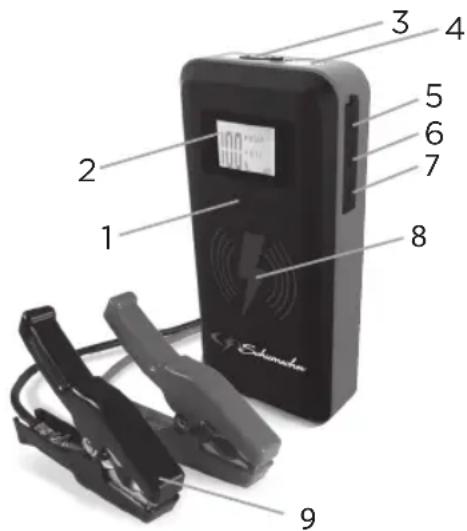
2.1 Description
- Display button
- LCD display
- Output socket for Smart cable
- LED light
- USB-C input socket for recharging
- USB output port 5 V - 2.4 A
- USB output port 5 V - 3 A
- Pad for wireless charging
- Smart cable with battery clamps
Not shown:
Type C / USB cable & Travel bag
3. THE INTERNAL BATTERY
3.1 Charging level
Checking the level of the internal battery:
Press the display button. The LCD display will show the battery's percentage of charge. A fully charged internal battery will read 100% . Charge the internal battery if the display shows it is under 85% .
3.2 Charging the internal battery
Charge the unit as soon as possible after use. Never completely discharge the battery. Use a 2 A USB charger (not included), or a 2 A USB charging port to quickly recharge the booster. Using a charger with less than 2 A will increase charge time.
- Plug the USB-C end of the charging cable into the input port. Next, plug the USB end of the charging cable into a charger's USB port.
- Plug your charger into a live AC or DC power outlet.
- The LCD display will light; the digit begins to flash and show "IN", indicating that charging has begun.
- By using the 5 V DC, 2 A charging input, the booster will be fully charged in about:
SL472: 2.5-4 hours
SL473: 3-5 hours
SL474: 7-8 hours
- When the unit is fully charged, the display will show "100%".
- When the battery is fully charged, disconnect your charger from the outlet, and then remove the charging cable from the charger and the unit.
4. USING THE LED LIGHT
- Press the display button.
- Hold down the display button for 3 seconds.
-
Once the LED light is on (steady glow), press and release the display button to cycle through the following modes:
-
Flash for an SOS signal;
-Flash in strobe mode -
When finished using the LED light, press the display button until the light turns off.
- Recharge the unit as soon as possible after each use.
5. CHARGING A MOBILE DEVICE
5.1 Charging with the USB ports
The booster includes two USB ports. One provides up to 2.4 A at 5 V DC; the other is a Quick Charge 3.0, which provides up to 5 V at 3 A, 9 V at 2 A or 12 V at 1.5 A.
- Consult your mobile device manufacturer for proper charging power specifications. Connect a mobile device cable to the appropriate USB port.
- Press the display button. Charging should begin automatically. The display will show which port is in use.
- Charging time will vary, based on the mobile device battery size and the charging port used.
NOTE: Most devices will charge with either USB port, but may charge at a slower rate.
4. When finished using the USB port, disconnect the charging cable from your mobile device and then disconnect the charging cable from the unit. The unit switch OFF automatically.
5. Recharge the unit as soon as possible after each use.
NOTE: If no USB device is connected, power to the USB ports will automatically shut off after 30 seconds.
5.2 Wireless charging
The wireless charging pad provides 10 W of power to quickly charge your compatible mobile devices.
Consult your mobile device manufacturer to make sure your device supports wireless charging. Place the compatible device face-up on top of the charging pad.
- Press the display button.
- Charging should begin automatically. A symbol appears on the display.
- When finished charging, remove your mobile device.
- Recharge the unit as soon as possible after each use.

6. OPERATING INSTRUCTIONS
6.1 To start a vehicle
IMPORTANT:
- Using the booster without a battery installed in the vehicle will damage the vehicle's electrical system.
- Only jump start a 12V lead-acid battery system vehicle.
- Only use the smart cable provided with the product for the jump start function.
NOTE: The internal battery must have a charge if at least 75% to jump start a vehicle.
Ignite OFF and all electrical devices (heating, lighting...) before using the booster.
Lay the DC cables away from any fan blades, belts, pulleys and other moving parts.
- Connection to the booster - Stand-by mode
Plug the battery clamps smart cable into the booster's output socket. The green LED is flashing on the smart cable, which means that the booster is in "Jump Start Stand-by mode". - Connection to the battery
Check first if the negative terminal is connected/grounded to the chassis. If not, contact your reseller.
Connect the red clamp (+) to the positive terminal (+) of the battery, then connect the black clamp (-) to the earth/chassis of the vehicle (a heavy gauge metal part of the frame or engine block. Do not connect to the carburetor or fuel lines).
3. Jump Start mode
The green LED on the smart cable turn into solid green, which means that the booster is in "Ready to Jump Start mode".
NOTE: If the vehicle battery is extremely discharged, the initial current draw from the booster may activate short circuit protection in the smart cable. When the condition is corrected, the smart cable will automatically reset.
4. Start the engine
Crank the engine for maximum 3 seconds and wait at least 1 minute before a second attempt.
- Disconnect the output cable
After the engine starts, unplug the battery clamps from the booster socket. - Disconnection
Disconnect the black clamp (-) at first and then the red clamp (+) .
- Recharging
Recharge the unit as soon as possible.
6.2 Starting attempt
When using the booster to start an engine, do not crank for more than 3 seconds, and wait at least 1 minute before a second attempt.
If the car does not crank a second time, check the smart cable to see if the green LED is lit (solid). If you hear beeping or an LED is flashing, refer to Troubleshooting.
NOTE: Cold weather may affect the performance of the booster's lithium battery. If you hear only a click and the engine does not turn over, try the following:
With the booster connected to the car battery and the green LED solid on the smart cable, turn on all lights and electrical accessories for one minute. This draws current from the booster and warms the battery. Now try to crank the engine. If it does not turn over, repeat the procedure. Extremely cold weather may require two or three battery warmings before the engine will start.
IMPORTANT: DO NOT attempt to jump start your vehicle more than three consecutive times. If the vehicle will not start after three attempts, consult a service technician.
7. MAINTENANCE AND STORAGE
After unplug and disconnect the unit, use a dry cloth to wipe all battery corrosion and other dirt or oil from the battery clamps, cords, and the outer case.
Charge battery to full capacity before storage. Charge at least once every month, if not in frequent use, to prevent over-discharge.
Store this unit at temperatures between -10^ and +45^ , in a dry place to protect it against humidity and moisture.
8. TROUBLESHOOTING
8.1 Booster
| Problem Solution | |
| The booster's display will not turn on. Make sure the unit is charged. Connect to a power source, to reset. Make sure you have pressed the display. | |
| The thermometer symbol is flashing. The unit is too hot or cold. The thermometer symbol will disappear when the condition is corrected. | |
| The booster will not recharge. Make sure the power source is live. Check if the charging cable is well connected. | |
| The booster turns on, but will not jump start my vehicle. | Check connections. |
| Verify the charge level of the booster is at least 50%. | |
| Do not attempt to jump start your vehicle more than three consecutive times. If the vehicle still does not start, consult a qualified service technician. | |
| Check the red/green LED on the cable and check in below table the problem. |
8.2 Smart cable LED and alarm behavior
| LED display | Buzzer warning | LED and buzzer description | Description / Reason |
| Green LED flashing No beep | Stand-by mode Cable properly connected to booster but no battery is connected. TO DO: Connect the booster to the vehicle battery. | ||
| False detection of high voltage "Fake" high battery voltage is detected, but reverse charging protection did not activate. TO DO: Turn key to jump start the vehicle. | |||
| Green LED solid No beep | Jump Start Ready mode Cable properly connected to both booster and battery. TO DO: A jump starting of the car engine is ready. | ||
| ((Beep)) | 2 Red LEDs solid Rapid beeping | Reverse polarity protection The clamp polarity has not been respected. TO DO: Connect the clamps correctly (see step 4.1 - point 2 - Connection to the battery). | |
| ((Beep)) | No lights/LED No beep | Battery exhausted or poor connection (1) the smart cable is not properly connected to the booster OR (2) The jump starter battery is over discharged. TO DO: First check the connection between smart cable and booster. Then check the battery status of the booster. | |
| ((Beep)) | 1 Red LED solid Rapid beeping | Shot circuit protection (1) there is a short circuit on the clamps OR (2) There is a short circuit on the car battery. TO DO: First check the clamp connection. Then check the car battery and replace it. | |
| ((Beep)) | Red and green LED solid Beeps once per second | Temperature protection The booster has automatically switched to temperature protection mode. TO DO: Let the booster cool down before considering any new attempt. | |
Electrical products should not be discarded with household products. Electrical products used must be collected separately and disposed of at collection points provided for this purpose. Talk with your local authorities or dealer for advice on recycling.
alwXlIaJle -AeJI -AR
J 30 Jg jj j j j j j j j j j j j j j j j j j j j j j j j j j j j j j j j j
aJbIg JolKJg aJgXoo aJdJg aJrBglc bIg .857.
1
| . . . . . . . . . . . . . . . . . . . . . . . . . . . . . . . . . . . . . . . . . . . . . . . . . . . . . . . . . . . . . . . . . . . . . . . . . . . . . . . . . . . . . . . . . . . . . . . . . . . . .. . . . . . . . . . . . . . . . . . . . . . . . . . . . . . . . . . . . . . . . . . . . . . . . . . . . . . . . . . . . . . . . . . . . . . . . . . . . . . . . . . . . . . . . . . . . . . . . . . . . . . . . . . . . . . . . . . . . . . . . . . . . . . . . . . . . . . . . . . . . . . . . . . . . . . . . . . . . . . . . . . . . . . . . . . . . . . . . . . . . . . . . . . . . . . . . . . . . . . . .. . . . . . . . . . . . . . . . . . . . . . . . . . . . . . . . . . . . . . . . . . . . . . . . . . . . . . . . . . . . . . . . . . .. . . . . . . . . . . . . . . . . . . . . . . . . . . . . . . . . . .. . . . . . . . . . . . . . . . . . . . . . . . . . . . . . . . . . . . . . . . . . . . . . . . . . . . . . . . . . . . . . . . . . . . . . . . . . . . . . . . . . . . . . . . . . . . . . . . . . . . ? . . . . . . . . . . . . . . . . . . . . . . . . . . . . . . . . . . . . . . . . . . . . . . . . . . . . . . . . . . . . . . . . . . . . . . . . . . . . . . . . . . . . . . . . . . . . . . . . . . . - - - - - - - - - - - - - - - - - - - - - - - - - - - - - - - - - - - - - - - - - - - - - - - - - - - - - - - - - - - - - - - - - - - - - - - - - - - - - - - - - - - - - - - - - - - - - - - - - - - - - - . . . . . . . . . . . . . . . . . . . . . . . . . . . . . . . . . . . . . . . . . . . . . . . . . . . . . . . . . . . . . . . . . . . . . . . . . . . . . . . . . . . . . . . . . . . . . . . . . . . - . . . . . . . . . . . . . . . . . . . . . . . . . . . . . . . . . . . . . . . . . . . . . . . . . . . . . . . . . . . . . . . . . . . . . . . . . . . . . . . . . . . . . . . . . . . . . . . . . . . 2 3 4 5 6 7 8 9 10 11 12 13 14 15 16 17 18 19 20 21 22 23 24 25 26 27 28 29 30 31 32 33 34 35 36 37 38 39 40 41 42 43 44 45 46 47 48 49 50 51 52 53 54 55 56 57 58 59 60 61 62 63 64 65 66 67 68 69 70 71 72 73 74 75 76 77 78 79 80 81 82 83 84 85 86 87 88 89 90 91 92 93 94 95 96 97 98 99 100 101 102 103 104 105 106 107 108 109 110 111 112 113 114 115 116 117 118 119 120 121 122 123 124 125 126 127 128 129 130 131 132 133 134 135 136 137 138 139 140 141 142 143 144 145 146 147 148 149 150 151 152 153 154 155 156 157 158 159 160 161 162 163 164 165 166 167 168 169 170 171 172 173 174 175 176 177 178 179 180 181 182 183 184 185 186 187 188 189 190 191 192 193 194 195 196 197 198 199 200 201 202 203 204 205 206 207 208 209 210 211 212 213 214 215 216 217 218 219 220 221 222 223 224 225 226 227 228 229 230 231 232 233 234 235 236 237 238 239 240 241 242 243 244 245 246 247 248 249 250 251 252 253 254 255 256 257 258 259 260 261 262 263 264 265 266 267 268 269 270 271 272 273 274 275 276 277 278 279 280 281 282 283 284 285 286 287 288 289 290 291 292 293 294 295 296 297 298 299 300 301 302 303 304 305 306 307 308 309 310 311 312 313 314 315 316 317 318 319 320 321 322 323 324 325 326 327 328 329 330 331 332 333 334 335 336 337 338 339 340 341 342 343 344 345 346 347 348 349 350 351 352 353 354 355 356 357 358 359 360 361 362 363 364 365 366 367 368 369 370 371 372 373 374 375 376 377 378 379 380 381 382 383 384 385 386 387 388 389 390 391 392 393 394 395 396 397 398 399 400 401 402 403 404 405 406 407 408 409 410 411 412 413 414 415 416 417 418 419 420 421 422 423 424 425 426 427 428 429 430 431 432 433 434 435 436 437 438 439 440 441 442 443 444 445 446 447 448 449 450 451 452 453 454 455 456 457 458 459 460 461 462 463 464 465 466 467 468 469 470 471 472 473 474 475 476 477 478 479 480 481 482 483 484 485 486 487 488 489 490 491 492 493 494 495 496 497 498 499 500 501 502 503 504 505 506 507 508 509 510 511 512 513 514 515 516 517 518 519 520 521 522 523 524 525 526 527 528 529 530 531 532 533 534 535 536 537 538 539 540 541 542 543 544 545 546 547 548 549 550 551 552 553 554 555 556 557 558 559 560 561 562 563 564 565 566 567 568 569 570 571 572 573 574 575 576 577 578 579 580 581 582 583 584 585 586 587 588 589 590 591 592 593 594 595 596 597 598 599 600 601 602 603 604 605 606 607 608 609 610 611 612 613 614 615 616 617 618 619 620 621 622 623 624 625 626 627 628 629 630 631 632 633 634 635 636 637 638 639 640 641 642 643 644 645 646 647 648 649 650 651 652 653 654 655 656 657 658 659 660 661 662 663 664 665 666 667 668 669 670 671 672 673 674 675 676 677 678 679 680 681 682 683 684 685 686 687 688 689 690 691 692 693 694 695 696 697 698 699 700 701 702 703 704 705 706 707 708 709 710 711 712 713 714 715 716 717 718 719 720 721 722 723 724 725 726 727 728 729 730 731 732 733 734 735 736 737 738 739 740 741 742 743 744 745 746 747 748 749 750 751 752 753 754 755 756 757 758 759 760 761 762 763 764 765 766 767 768 769 770 771 772 773 774 775 776 777 778 779 780 781 782 783 784 785 786 787 788 789 790 791 792 793 794 795 796 797 798 799 800 801 802 803 804 805 806 807 808 809 810 811 812 813 814 815 816 817 818 819 820 821 822 823 824 825 826 827 828 829 830 831 832 833 834 835 836 837 838 839 840 841 842 843 844 845 846 847 848 849 850 851 852 853 854 855 856 857 858 859 860 861 862 863 864 865 866 867 868 869 870 871 872 873 874 875 876 877 878 879 880 881 882 883 884 885 886 887 888 889 890 891 892 893 894 895 896 897 898 899 890 891 892 893 894 895 896 897 898 899 890 891 892 893 894 895 896 897 898 899 890 891 892 893 8 |
.
aJgI gI gI gI gI gI gI gI gI gI gI gI gI gI gI gI gI gI gI gI gI gI gI gI gI gI gI gI gI gI gI gI gI gI gI gI gI gI gI gI gI gI gI gI gI gI gI gI gI gI gI
1.1.JolbJgLi
1.2
1.3.jgJb
1.4.
Jgwwj c 152e gge yg jk JgJgJgJgJgJgJgJgJgJgJgJgJgJgJgJgJgJgJgJgJgJgJgJgJgJgJgJgJgJgJgJgJgJgJgJgJgJgJgJgJgJgJgJgJgJgJgJgJgJgJg
aaioll kssllg yogjll lalalllbdo 1.6
.1.7
.18
Jkswj no Jsw g bglgBawllg aagaaol jlgjllpddw 1.9
jIJI JJI 1
aolaxwsljaybll jgglgai
aJl aJy Jz 18
aJgJUdJUdJUdJUdJUdJUdJUdJUdJUdJUdJUdJUdJUdJUdJUdJUdJUdJUdJUdJUdJUdJUdJUdJUdJUdJUdJUdJUdJUdJUdJUdJUdJUdJUd
.0000 1.14
J 1.15
a a a a a a a a a a a a a a a a a a a a a a a a a a a a a a a a a a a
1 1
S BCD = S COD + S BDO - S BOC
olbgaewjblao JdJlJn no nn dssll jll lll 1.17
1 1
jaiil 1g 9 aaii 1oo
[1]
1.18.aJzallaek
1.19 aJbJoo
a.aaalolol
8 oalg jll lslly aieaall aobial cbw, kdylo g kyyj yaiy bll 1.20
J8 8oal jll sllyjgall lc lagabwl, luee yaaal Jds |la .aee 30 jc Jai
JJIJI 10 Jc
JJIJI JIJIJIJIJIJIJIJIJIJIJIJIJIJIJIJIJIJIJIJIJIJIJIJIJIJIJIJIJIJIJIJIJIJIJIJIJIJIJIJIJIJIJIJIJIJIJIJIJIJIJIJIJIJIJIJIJIJIJIJIJIJIJIJIJIJIJIJIJIJIJIJIJIJIJIJIJIJIJIJIJIJIJIJIJIJIJIJIJIJIJIJIJIJIJIJIJIJIJIJIJIJ
J 1.22
2020 lg lv,yol( )
1.23 1g
y
Jjle jg b g o Jbll lss no jdall s jll aoslo pdo
J 1.24
a
1.25
1.26.
jgeJl jc gogallloxlgo gagglgol aasdoaegjll 1.27
yIgblalda JlaaJr jrgn gwagglgglgglg 1.28
Jglj 2. Jj slll psswol .gwrll slab y aaa oolabo plx wol sckay .osclawll cbbl
aagaaal aalal alalalalalalalalalalalalalalal
.85% jolj awhl lal 13a hlll llll 100% JolJy
3.2.
J J 1 J 2 2 2 2 2 2 2 2 2 2 2 2 2 2 2 2 2 2 2 2 2 2 2 2 2 2 2 2 2 2 2 2 2 2 2 2 2 2 2 2 2
J 2 Jd 1
JU USB 1 JU USB-C .1
JLWJGJGJL USB Jiaio
J.aaal gI glllal lal jll J J 9.2
.3
Jg> JolKJb jaoall jn 2- yoo J5 Jdo a
4-2.5 :SL472
5-3 :SL473
8-7 :SL474
.5
J 6
.0g1g jwjj 0
4
.00012345678901.1
.1g3 3doJ Jol jol Jol Jol Jol Jol Jol .2
J 1 J 1 J 1 J 1 J 1 J 1 J 1 J 1 J 1 J 1 J 1 J 1 J 1 J 1 J 1 J 1 J 1 J 1 J 1 J 1 J 1 J 1 J 1 J 1 J 1 J 1 J 1 J 1 J 1 J 1 J 1 J 1 J 1 J 1 J
15
Jd.4
aaii aolal l j 15 3 3 3
CJJJ5Jaa9.5
jssssssssssssssssssssssssssssssssssssssssssssssssssssssssssssssssssssssssssssssssss
Juaill .6
. (+) 20051 sLswol1 p8g[-] s9w81 sLswol1 J001
Jwll 3le1.7
.000g 2001 g 000
6.2 J
3 2 1 1 1 1 1 1 1 1 1 1 1 1 1 1 1 1 1 1 1 1 1
aJgLpaJgJc
LLED 1s l slll jlll jlll jlll jlll jlll jlll jlll jlll jlll jlll jlll jlll jlll jlll jlll jlll jlll jlll jlll jlll jlll jlll jlll jlll jlll jlll jlll jlll jlll jlll jlll jlll jlll j
8g baaab caw 13. jzjallya aalal ybaa bla s al g yabll qd: ab>lo :aaiiagbglbgsf jzjssl Jy w p, C, T, L, L, L, L, L, L, L, L, L, L, L, L, L, L, L, L, L, L, L, L, L, L, L, L, L, L, L, L, L, L, L, L, L, L, L, L, L, L, L, L, L, L, L, L, L, L, L, L, L, L, lLg yjw yjw yjw yjw yjw yjw yjw yjw yjw yjw yjw yjw yjw yjw yjw yjw yjw yjw yjw yjw yjw yjw yjw yjw yjw yjw yjw yjw yjw yjw yjw yjw yjw yjw
Jai 15. aai i 158 159 160 Jia Jia Jia Jia Jia Jia Jia Jia Jia Jia Jia Jia Jia Jia Jia Jia Jia Jia Jia Jia Jia Jia Jia Jia Jia Jia
7 .jzjjg
Jg 10000000000000000000000000000000000000000000000000000000000000000000000000
- > 100!
8.1 jjeal
| الل吳 | الشام |
| . . . . . . . . . . . . . . . . . . . . . . . . . . . . . . . . . . . . . . . . . . . . . . . . . . . . . . . . . . . . . . . . . . . . . . . . . . . . . . . . . . . . . . . . . . . . . . . . . . . . . . . . . . . . . . . . . . . . . . . . . . . . . . . . . . . . . . . . . . . . . . . . . . . . . . . . . . . . . . . . . . . . . . . . . . . . . . . . . . . . . . . . . . . . . . . . . . . . . . . . .. . . . . . . . . . . . . . . . . . . . . . . . . . . . . . . . . . . . . . . . . . . . . . . . . . . . . . . . . . . . . . . . . . . . . . . . . . . . . . . . . . . . . . . . . . . . . . . . . . . . . . . . . . . . . . . . . . . . . . . . . . . . . . . . . . . . . . . . . . . . . . . . . . . . . . . . . . . . . . . . . . . . . . . . . . . . . . . . . . . . . . . . . . . . . . . . . . . . . . . . . . . . . . . . . . . . . . . . . . . . . . . . . . . . . . . . . . . . . . . . . . . . . . . . . . . . . . . . . . . . . . . . . . . . . . . . . . . . . . . . . . . . . . . . . . . . . . . . . . . . . . . . . . . . . . . . . . . . . . . . . . . . . . . . . . . . . . . . . . . . . . . . . . . . . . . . . . . . . . . . . . . . . . . . . . . . . . . . . . . . . . . . . . . . . . . . . . . . . . . . . . . . . . . . . . . . . . . . ? . . . . . . . . . . . . . . . . . . . . . . . . . . . . . . . . . . . . . . . . . . . . . . . . . . . . . . . . . . . . . . . . . . . . . . . . . . . . . . . . . . . . . . . . . . . . . . . . . . . - . . . . . . . . . . . . . . . . . . . . . . . . . . . . . . . . . . . . . . . . . . . . . . . . . . . . . . . . . . . . . . . . . . . . . . . . . . . . . . . . . . . . . . . . . . . . . . . . . . . - 2 . . . . . . . . . . . . . . . . . . . . . . . . . . . . . . . . . . . . . . . . . . . . . . . . . . . . . . . . . . . . . . . . . . . . . . . . . . . . . . . . . . . . . . . . . . . . . . . . . . . ; . . . . . . . . . . . . . . . . . . . . . . . . . . . . . . . . . . . . . . . . . . . . . . . . . . . . . . . . . . . . . . . . . . . . . . . . . . . . . . . . . . . . . . . . . . . . . . . . . . . 15 50% 50% 50% 50% 50% 50% 50% 50% 50% 50% 50% 50% 50% 50% 50% 50% 50% 50% 50% 50% 50% 50% 50% 50% 50% 50% 50% 50% 50% 50% 50% 50% 50% 50% . 50% 50% 50% 50% 50% 50% 50% 50% 50% 50% 50% 50% 50% 50% 50% 50% 50% 50% 50% 50% 50% 50% 50% 50% 50% 50% 50% 50% 50% 50% 50% 50% 50% 15 50% 50% 50% 50% 50% 50% 50% 50% 50% 50% 50% 50% 50% 50% 50% 50% 50% 50% 50% 50% 50% 50% 50% 50% 50% 50% 50% 50% 50% 50% 50% 50% 15 15 15 15 15 15 15 15 15 15 15 15 15 15 15 15 15 15 15 15 15 15 15 15 15 15 15 15 15 15 15 15 15 15 25 25 25 25 25 25 25 25 25 25 25 25 25 25 25 25 25 25 25 25 25 25 25 25 25 25 25 25 25 25 25 25 25 2 2 2 2 2 2 2 2 2 2 2 2 2 2 2 2 2 2 2 2 2 2 2 2 2 2 2 2 2 2 2 2 2 2 2 2 2 2 2 2 2 2 2 2 2 2 2 2 2 2 15 15 15 15 15 15 15 15 15 15 15 15 15 15 15 15 15 15 15 15 15 15 15 15 15 15 15 15 15 15 15 15 15 |
8.2Jg