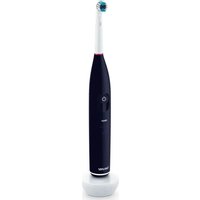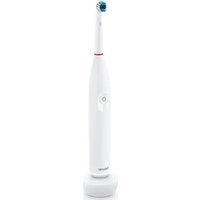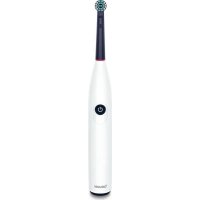
TB 15 - Toothbrush BEURER - Free user manual and instructions
Find the device manual for free TB 15 BEURER in PDF.



| Product type | Electric toothbrush |
| Brand | Beurer |
| Model | TB 15 |
| Dimensions | 20.5 cm x 29 mm (diameter) |
| Weight | 124 g (toothbrush + brush head) |
| Power supply | USB-C, 5.0 V, 1.0 A, 5.0 W |
| Battery type | Lithium-ion, 600 mAh, 3.7 V |
| Charge indicator | Flashing white light ring (charging), solid (charged) |
| Brushing modes | Clean (thorough cleaning), Sensitive (gentle on gums) |
| Timer | Reminder every 30 seconds, automatic shutdown after 2 minutes, turns off after 6 minutes |
| Water protection | IPX4 (splash protected) |
| Included brush head | 1 brush head |
| Brush head replacement | Every 3 months recommended |
| Included accessories | USB-C charging cable, instruction manual |
| Available spare parts | Clean Eco heads (ref. 105.27) and Sensitive Eco heads (ref. 105.28) |
| Usage | For humans aged 8 and up |
| Cleaning | Under running water, do not immerse |
| Warranty | See provided warranty card |
Frequently Asked Questions - TB 15 BEURER
User questions about TB 15 BEURER
0 question about this device. Answer the ones you know or ask your own.
Ask a new question about this device
Download the instructions for your Toothbrush in PDF format for free! Find your manual TB 15 - BEURER and take your electronic device back in hand. On this page are published all the documents necessary for the use of your device. TB 15 by BEURER.
USER MANUAL TB 15 BEURER
Read these instructions for use carefully. Observe the warnings and safety notes. Keep these instructions for use for future reference. Make the instructions for use ac
cessible to other users. If the device is passed on, provide the instructions for use to the next user as well.
CONTENTS
1.Warnings and safety notes.. 13
2. Included in delivery 16
3. Signs and symbols 16
4. Intended use 18
5. Device description 18
6.Use 18
6.1 Preparing for use 18
6.2 Starting use 18
- Cleaning and maintenance 19
- Accessories and/or replacement parts 19
- Disposal 19
- Technical specifications 20
- Warranty 20
1. WARNINGS AND SAFETY NOTES
WARNING
- Keep the device and the charging cable away from water or other liquids.
-
Do not place the device near a sink or bathtub full of water.
-
This device may be used by children over the age of 8 years and by people with reduced physical, sensory or mental capabilities or a lack of experience or knowledge, provided that they are supervised or have been instructed on how to use the device safely, and are fully aware of the risks of using the device.
Children must not play with the device.
- Cleaning and user maintenance must not be performed by children unless supervised.
- Do not use the device if it shows signs of damage or does not function properly. In these cases, contact Customer Services.
- If the mains connection cable is broken, you must dispose of the charging cable.
- Only use the USB-C charging cable supplied with your device.
- Never use the device with the mains adapter near a bath, sink, shower or other containers filled with water or other liquids – risk of electric shock.
- The device may only be charged with a mains adapter (not included in delivery) with a safety extra-low voltage output of 5 V and max. 1 A.
- Under no circumstances should you open or repair the device yourself, otherwise proper functionality can no longer be guaranteed. Failure to comply will invalidate the warranty.
Notes on handling batteries
WARNING
- Risk of explosion! Risk of fire! Failure to comply with the points mentioned can result in personal injury, overheating, leakage, venting, breakage, explosion, or fire.
- Always use the correct or supplied charging cable/ charger/mains adapter for charging.
- Avoid continuous charging or overcharging. Unplug the charger when charging is complete.
- To charge the device, only use a protection class 2 mains adaptor ( l ), which is approved for use with household appliances and whose output corresponds to the safety extra-low voltages of 5V and max. 1A .
- Charge the device under supervision, paying attention to any heat generated, deformation, or release of gases. If in doubt, stop charging.
- Dispose of defective batteries/charging cables/ chargers immediately and properly (see chapter on disposal).
- Do not use modified or damaged batteries/charging cables/chargers.
-
Always select the correct battery type. Contact Customer Services for information on whether a battery replacement part can be replaced.
-
Do not throw batteries into a fire.
- Never forcibly discharge, heat, disassemble, open, crush, deform, encapsulate, modify, or knock batteries.
- Never short-circuit batteries or battery compartment contacts.
- Protect the batteries from direct sunlight, rain, heat, and water.
- Exposure of batteries to an environment with extremely high temperatures or an extremely low air pressure may result in explosion or leakage of flammable liquids and gases.
- Always insert the batteries correctly, taking into account the polarity (+/ -).
- If a battery has leaked, put on protective gloves and clean the battery compartment with a dry cloth.
- If fluid from a battery comes into contact with your skin or eyes, wash the affected areas with water and seek medical assistance.
- Choking hazard! Keep batteries out of the reach of children. Seek medical attention immediately if swallowed. Swallowing them may cause severe internal burns and death.
- Never allow children to replace batteries without adult supervision.
CAUTION
- Store battery replacement parts away from metal objects in a well-ventilated, dry, and cool place.
- Keep batteries clean and dry.
- Keep batteries away from water.
2. INCLUDED IN DELIVERY
Check that the exterior of the cardboard delivery packaging is intact and make sure that all contents are present. Before use, ensure that there is no visible damage to the device or accessories and that all packaging material has been removed. If you have any doubts, do not use the device and contact your retailer or the specified Customer Services address.
- 1 electric toothbrush
- 1 brush head
- 1 USB-C charging cable
1 instructions for use
3. SIGNS AND SYMBOLS
The following symbols are used on the device, in these instructions for use, on the packaging and on the type plate for the device:
DANG
Indicates an imminent danger. If it is not avoided, it will result in death or serious injury.
WARNING
Indicates a potentially impending danger. If it is not avoided, there is a risk of death or serious injury.

CAUTION
Indicates a potentially impending danger. If it is not avoided, slight or minor injuries may result.
NOTICE
Indicates a potentially harmful situation. If it is not avoided, the system or something in its vicinity may be damaged.
| Product information Note on important information | |
| Read the instructions | |
| Disposal in accordance with the Waste Electrical and Electronic Equipment EC Directive (WEEE) | |
| Do not dispose of batteries containing harmful substances with household waste | |
| The products demonstrably meet the requirements of the Technical Regulations of the EAEU | |
| CE labelling This product satisfies the requirements of the applicable European and national directives. | |
| Separate the product and packaging elements and dispose of them in accordance with local regulations. | |
| Marking to identify the packaging material. A = material abbreviation, B = material number: 1-7 = plastics, 20-22 = paper and cardboard | |
| Conformity assessed marking for the United Kingdom | |
| Class III device | |
| Importer symbol | |
| Manufacturer | |
| IPX4 | Protection against splashing water |
| USB / Micro-USB connection | |
| For indoor use only | |
| GRS - standard for independent certification of recycled material | |
| Packaging made from recycled material | |
4. INTENDED USE
Only use the device to clean teeth on humans. Do not use the device on animals! The device is not suitable for children under 8 years. The device is only intended for the purpose described in these instructions for use. The manufacturer is not liable for damage resulting from improper or careless use.
5. DEVICE DESCRIPTION
The associated drawings are shown on page 3.
1 Brush head
2 ON/OFF/Mode button
Short press: Switches the device on/off
Long press: Changes the mode
3 Light ring
Charge level indicator
Light ring flashes white: Low battery power
Light ring pulsates white: Battery charging
Light ring permanently white: Battery charged
6. USE
6.1 Preparing for use
Charging the electric toothbrush
Fully charge the electric toothbrush before first use.
To do so, proceed as follows:
-
Connect the USB-C charging cable to the electric toothbrush. Plug the USB-C charging cable into a USB port or into a suitable mains adapter and plug it into a socket.
-
During the charging process, the light ring 3 pulsates white. As soon as the electric toothbrush is fully charged, the light ring 3 illuminates permanently in white.
Fitting the brush head
Place the brush head 1 onto the device from above until it clicks into place A. Make sure that the brush head 1 points in the same direction as the ON/OFF/ Mode button 2.

We recommend changing the brush head 1 after 3 months. If the bristles of the brush head are worn or frayed, they may need to be replaced more frequently.
6.2 Starting use
-
To switch on the electric toothbrush, briefly press the ON/OFF/Mode 2 button. The electric toothbrush vibrates briefly every 30 seconds to remind you to clean all 4 jaw quadrants for the same amount of time B. The electric toothbrush has an automatic timer and vibrates three times after 2 minutes. The toothbrush switches off automatically after 6 minutes.
-
Select your desired mode by pressing and holding the ON/OFF/Mode button 2. The following modes are available:
| “clean” For the | rough and complete cleaning |
| “sensitive” For | gentle and gum-friendly cleaning |
Differentiation of modes based on rotation speed: Faster rotation if "clean" is selected Slower rotation if "sensitive" is selected
- To cancel a session prematurely, briefly press the ON/OFF/Mode button 2
- Clean the device as described in Chapter "Cleaning and maintenance".
7. CLEANING AND MAINTENANCE
Clean the device and the brush head 1 after each use. To do so, proceed as follows:
1.Pull the brush head 1 upwards and off.
2. Clean the brush head 1 under running water C. Make sure to clean the inside of the brush head 1 as well.
3. Clean the device under running water D. Do not submerge the device in water. Water might enter the device and damage it.
4. Keep USB-C charging cable away from water.
8. ACCESSORIESAND/OR REPLACEMENT PARTS
To purchase accessories and/or replacement parts, visit www.beurer.com or contact the corresponding service address (as per the service address list) for your country. Accessories and/or replacement parts are also available from retailers.
| Designation Item number and order number | |
| Brush heads Clean Eco Blue 4 pcs | 105.27 |
| Brush heads Sensitiv Eco Blue 4 pcs | 105.28 |
9. DISPOSAL
For environmental reasons, do not dispose of the device in household waste at the end of its service life. Dispose of the device at a suitable local collection or recycling point in your country. Observe the local regulations
for material disposal. Dispose of the device in accordance with EC Directive Waste Electrical and Electronic Equipment (WEEE). If you have any questions, please contact the local authorities responsible for waste disposal. You can obtain the location of collection points for old devices from the local or municipal authorities, local waste disposal companies or your retailer, for example.
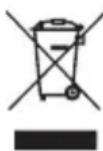
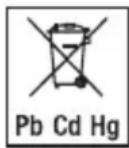
The empty, completely flat batteries must be disposed of in specially designated collection boxes, at recycling points or at electronics retailers. You are legally required to dispose of the batteries.
The codes below are printed on rechargeable batteries
containing harmful substances:
Pb = battery contains lead
Cd = battery contains cadmium
Hg = battery contains mercury
Removing the battery
- Remove the rubber seal in the bottom of the toothbrush with a pointed object.
- Remove the membrane with a pointed object.
- The visible screw can now be removed with a suitable screwdriver.
- Remove the bottom of the toothbrush.
- Pull out the inner housing of the toothbrush.
- Remove the battery from the inner housing.
- Dispose of the battery separately in specially designated collection boxes, at recycling points or at electronics retailers.
10. TECHNICALSPECIFICATIONS
| Type TB 15 | |
| Dimensions Length: | 20.5 cm x diameter 29 mm (width) |
| Weight 124 g (toothbrush + brush head) | |
| Battery: Capacity | 600 mAh |
| Nominal voltage | 3.7 V |
| Type designation | Lithium-Ion battery |
| Power supply 5,0 V | ---1,0 A, 5,0 W |
Subject to technical changes
11. WARRANTY
Further information on the warranty and warranty conditions can be found in the warranty leaflet supplied.
FRANÇAIS

Remarques relatives aux batteries
A AVERTISSEMENT
8. ACCESSORI E/O RICAMBI
I P E D U N P E X K D E H N E
He donyckaite nonadaHnB OdbI IJI IN dpynx XnIDKOCTeHa np6Op n 3apdHbI Ka6eIb.
He pa3meaTe np6Op B6IIN HaONHeHNO BO-Doi paKOBnHbI INBaHHbl.
I P E D U N P E X K D E H N E
-
OnachocTb B3pbIba! OnachocTb noXapa! Hecob6IIOHeHne CJIeDyUOuNX yKa3aHn MOKe T pINBeCTN K TpaBMam IIN K NpePgeBy, BbITeKaHnHO, BbIpyCKy BO3dyxa, NOJOMKe, B3pbIBy IIN BO3rOpAHIO.
-
Дязардки Всгда ИспьзуITE порхогши ИИВхогши B KOMПлков Зарднь Кабел/ЗардhoeyctpoiCTBO/6LOK ПИТанЯ.
He donyckaTe dnteIbHOn nnn ype3mepHO 3aprKn. No 3aBepWeHN npoceca 3aprKn OTKIOchte 3aprHoe yCTPOJCTBO OT CETn NTaHn.
-Дязардк npибopa nCnoJb3yIte TOnIbKO ceTeBOH aAnTep KnaCCa 3aunTbI II ,doNyueHnBk K nCnoJb3OBAHNIO C 6bITOBbIMn npi6opamNHa BbIXOde COOTBeTCTByUoMn napameTpam 6e30NaChoro CBepxHn3KOrO HaprJKeHnA 5 B n He 6oJIee1A.
3apxkaTe yctpoCTBO NOI npncMOTpOM, npn 3TOM cIeNTe 3a BbIeJIeHHeM TeNla, n3MeHHeHEm fOpMbI N BblJeHHeM ra3OB. B Cnyae comHneHn npepBHTe npoecc 3apJkN. - Ytun3npyuTe HeucnpaBhIe 6aTapeKn/3apJHbI Ka6JIb/3apJHoe yCTpOJCTBO CBOEbpemHOn HnHaJIeKaUIM O6pa3OM (CM. rIaby «Ytun3aU»).
He nCnoB3yIte MoDnΦuNpOBAHbIe NII NOBpeKdEHHbIe 6aTapeiKn/3apAHyI Ka6eIb/3apArdHOe yCTpoIcTB0. - Bcerda BbIbupaIte 6aTapeKn NOxOJaUeero Tuna. O6paITecb B cepBnCHyO cIyX6y, yTO6bl y3HaTb, MOxHO JIN 3aMeHInTB 6aTapeKny.
He 6pocainTe 6aTapeKn B oroHb.
3anpeaaetc npHynTeNbHO pa3pKaTb,HarpeBaTb,pa36nPaTb,BCKpbBaTb,pa36nBaTb,deΦopMnPoBaTb,repMeTuNPOBaTb,MOuΦuNPOBaTbIINIOBepraTb ynapam 6aTaapeKn. - He Донусякайт e KopoТКOrO 3aMbIkaHnA 6aTapeeK n KOHTaKToB 6aTapeHOrO OTeKa.
3aunuane 6aTapeKn OT BO3deNCTBnI npMbx COJIHeHbIX Lyuei,doXJr,CINbHOro HArpeBa nNo- naDaHnB BObl. - Bo3deicTBHe Ha 6aTapeiKn Upe3BbUaHIO BbICOKoI TempeaTypbI IIN Upe3BbUaHIO Hn3KOrO DaBLeHnR BO3dYxA MOKeT BbI3BaTb B3pbIB IIN yTeKY JeKOBocPJIaMeHraIOUxxCr KJNDKCTeN rA3OB.
- Bcerda npabnIbHo yCTaHaBnBaIte 6aTapeKu C yHeTOM NOJARPHOCTN (+/-).
- Ecπn 6aTapeηKa nOTeKna, oUHCTnTe OTCeK dIy 6aTapeeK cyXoN caJIΦeTKoN, HaNDeB 3aUHTbIe nepuATKN.
- Пи пonaдани кидкови ИЗ ваташи Кожу ИИВ Глаза помоITE пожени участOK 60ЛБИМ KОЛИЧECTBOM BODьИ ВОБРТЕСКВВрач.
- Onachoctb nporlaTbIBaHn! XpaHnte 6bTaapeKn B HeIOCTyINHom IJRA DeTei MeCTe. Ppi nporlaTb BaHn HEmeIeHNO O6paITcB K BpaCy. PporlaTbIBaHne MOKeT pUBeCTN K T8KeJIbIM BHyTpEHNM OXoRAM N JEtAInbHOMY NCxOy.
- He no3BOLJNe DeTm 3aMeHrTb 6aTapeiKn 6e3 npuCMOTpa B3pOcJIbIX.
BHIMAHNE
XpaHnTe CMeHHbIe 6aTapeKu BdaIIN OT MeTaJIIn-uecknx npedMeTOB, B XopoIo npoBeTpNbAembIX, cyNX INpoXlaIhBX NOMEeHnIX.
- Codepxnte 6aTapeiKn B uHcTote n cyXocTn.
-ДержinteбатаразикИВдалиOTВобл.
- Ecnn npnbop dInntelbHoe BpeM He nCnNoJb3yETcra, n3BVeKeNTe 6aTaPeuKn n3 OTceKa dny 6aTaapeek.
2. KOMJIeKT NOCTABKN
PpOBepbTe KOMnIeKr NocTABKn y6eDntEcB TOM, YTO Ha KAPToHHOy yNAKOBKe HET BHeUHIX NOBpeXdHNI. Ipeed nCnoJIb3OBAHNem y6eDntEcB B TOM, YTO npu6Op n erO npHaJnEJXHOCTHn He IMeIOT BuIMbIX NOBpeXdHNI n BCE yNAKOBOUHbIe MaTePnaJIbI ydaJIeHbI. PpH aJIuHcN COMHeHn He nCNoJIb3yIte np6Op n o6paTIn-TECb K npoDaBuY nII B CepBVCHyO clyXbY no yKa3aH-NOMy aIpecy.
1 3JIeKtpnuecka 3y6Na yETka
- 1 HacaДka ΜeТКИ
- 1 zapnky Kaebj USB-C
-1 INHCTpyKzmaIIO npIMHeHHIO
3. ПОЯСHEняк СИМBOЛAM
Ha npnbope, B nHctpyKuIN no npimHeHIO, Ha ynaKOBke n qnpMeHHoTbJnUe npnbopa nCnoJIb3yOTcCneDyUOune CmBOLbl.
ONACHOC
Yka3bIbaeT Ha HeNocpeDCTBeHHO yrpoXaIOuIOnaChocTb. Ecnn ee He npedotBpaNTb, rpo3rTJxKeJeWne TpaMbbl Nn daXe Cmeptb.
A I P E D U N P E X K D E H N E
Yka3bIbaet Ha notehuajbHyIO onachocTb. Ecn ee He npedOTbpaTb, BO3MOXHb TjXKeJne TpaBmbl NN daKe Cmeptb.
BHIMAHNE
Yka3bIbaet Ha NoteHuaJIbHyIO ONaCHOCTb. EcJn ee He npedOTbpaTNTb, BO3MOXHbI JeKNe IIN He3HaUNTeJbHbI TpaBMbl.
YBEOMJIEHNE
Yka3bIbaet Ha BO3MOXHbI MaTePnaJIbHbI yuep6.Ecnn ero He npedotBpaTtB,BO3MOxHo nOBpeKdHe npi6opa nn OkpykaIoUnx OBeKTOB.
| i | Информацья обиздени Указывает на вaxжнию Информацьию |
| Прочтinte Иструksию | |
| Утлізацья ріпбора дOLжна прізво- Діntься в COOTBEТСТВИС C Діректувоі EC пО оТхODам зЛ\'еКТрическOTO и зЛ\'eКТроH Нoro оборуданья (Waste Electrical and Electronic Equipment, WEEE) | |
| iB c e Hg | Утлізацья затAPEЕВ ВмсTe CсыITOBblM МycOPOM запгшени ИЗ-3a содэржциnxСЯ В НIX TOKСИЧьХ ВELЦЕТВ |
| EAC | Пюдунця rapаHTИРованно COOTВETCTBYET Т repeбованьМн HOPMaTINBHO-TexHnueckоI ДOKум entaци EA3C |
| CE | Mapкировka CE Данhoe ИЗделпе COOTВETCTBYET T repeбован- Я М DeйСТВУЮДNXЕВОЕСКИХ И HAЦЮHAЛБ- Ных ДИрЕKTИВ |
| B A | СнIMITE уразовку с Издelenу и утUIL- Зирейte ee B COOTВETCTBIM C MECTHBIM празписимуIM |
| UK CA | Знak coOTВETCTBIM ДЯ Велковобпатани |
| III | Пробор класca III |
| CIMBOЛ ИМNotepe | |
| IPX4 | ЗашITA OT 6рьИЗ |
| USB / Micro USB | |
| Toлько Ддя ИСПОЛБЗОВANЯ BNYТРИ РOME- шени | |
| GRS - стадAPT He3aВиСИМОЛ сертуфikaци перетабOTAHьIX MaTeриалOB | |
| Уразовka ИЗ перетабOTAHного мaterиала |
4.ИСПОЛьЗOBAHNEЮ HA3HAUYEHNUO
NcnoIb3yIte np6op NCKHIOHTeJIbHO DnO ONUCTKn 3y6OB YeIOBeka.He nCnoIb3yIte np6Op Ha XNBOT HbIX! He dOnyckaETcN cNoJIb3OBAHne np6Op aTeTbMn MnaJSe 8 let! DOnyckaETcN cNoJIb3OBAHne np6Op pa TOLbKO B CEJAX, ONNCAHbIX B DaHHo INHCTpyKUIN NO pnpMeHeHIO. PpON3BOdNTeJIb He Hecet OTBet CTBeHHOCt 3a yUep6 BCJeDCTBVE HeHaJNeXaUeRO NcNoJIb3OBAHnA np6Op a nn XaNaTHoro ObpaueHnA C HIM.
5.ОПИСАНЕ ПИБОРА
COOTBETCTBYUOUIneYeptexnIpeDCTaBHeHbHaCTp.3.
1 Hacadka 电Tkn
2 KhoNka BKJI./BbIKJI./peXIM
KopoTkoe HaxaTne: BkJIIOUeHn N BbIKIOUeHne
πριδορα
Долгoe Haxkatae: cMeHa peKIma
3 CBETOBOE KOJbIO
HdNkaTOp yPOBn3apra
CBeTOBOE KOJIbIcO MmraET 6eJIbIM CBETOM: Hn3Kn yPoBeHb 3apra aKKymyJrTopa.
CBeTOBOe KOJIbUO nIybcNpyeT 6eJIbIM CBeTom: aKKymJrTOp 3apXkaeTc.
CBeTOBOE KOJIb4O NOCToRHHO CBETITc8 6eJIbIM: AkKymyIaTOp 3apJKeH
6. ПРИМЕHEHNE
6.1 NpOdrTOBka K npMmeHnIO
3apdka 3JeKtpnuecko 3y6HOJ 8eTKI
Ipeed nepBbIM nCNOlb3ObaHnEM noJIHOCTbIO 3aprAnTe 3JIeKTPnueckyIO 3y6HyIO UeTKy. IJRA 3TORO BblONHInTe CJeNyUoune DeiCTBnIa.
1.ПоdkлочteЗарднькавьUSB-CК3neKtpn-уесковубовиетke.BcTaBbTe 3apdнькавьUSB-CВUSB-pa3bemИNINВpo3eTKy,ИСпОЛьзуяпoxordшсeteвоаадтep.
2.Bo Bpem3ap4nCBeTOnNOHoe KOJIbO npIbCnpy- 36eJbIM CBeTom.KoJa 3neKtpnuecka 3y6Haar 3eTKa 6ydtNtIOHocTbIO 3apJxHe, CBeTOBc KOJIb- 36ydt NcTOrHHo CBETITbc6JIbIM.
YCTAHOBKa HacaIKN IeTKN
YctaHOBNTe HacAnky 1CBepxHa npnbop do uenka A.CneNTe 3a TEM,HTO6bl HacAnka1 yka3bIbana B TOM Xe HappaBJIeHIM, YTO N KOnIKA BKJ./BblKJ.PexHM 2.

PekomeHdyetcMeHrtb HacaKy 1 KaKdbie 3 Meca. Ecnu UeTnHKn HacaKn n3HaUNBaOTc Nn pa3NOxMaUHBAOTc, MoKET NOTpe6OBaTbcr BoIee YacTa 3ameHa.
6.2 Haayano npimehenra
- YTo6bI BKNIOHTb 3JIeKTPnueCKyO 3y6HyO 5eTky, KpaTKOBpeMeHHo HaxMMte KhoNkY BKN./BblKJ./ peKIM 2 KaKdIbe 30 cekyHd 3JIeKTPnueCKa 3y6H aH aTeKa Bn6pnpyET, HAnOMInHa o Heo6xOIMoCTn OUYaTb BCE 4 YeHIOCTbIX KBaDpaHTa B TeeyHe pABHO BpeMeHN B. 3JIeKTPnueCKa 3y6H aZeTka OCHaUeHa aBTOMaTIuCeCKm TaMepom n TpIXkbI bN6pnpyET yepe3 KaXdbIe 2 MmHytbl. Yepe3 6 MmHT 3y6H aZeTKa aBTOMaTIuCeCK bIKLIOuaTcra.
- BbI6epnte HxHbI pexnIM npoJnxTeJIbHbIM HaKtaTne KhoNkBKL./BblKl./peXnM 2. DocTyIhblyKa3aHHbIe HIXe peXnMbI.
| clean Д�� Тца | телови понов Очирten |
| sensitive Д�� Мягкови садяшев deechы Очирten |
OTJNUHpe pexmOB Ha OCHOBE CKOPoCTN Bpaue Hn: 60JIe 6bICTPoe BpaueHne B pexmeclean 60JIe MeIeHHoe BpaueHne B pexmse sensitive
- Дя досочио OTMeHbI peKIMa HaxMITE KHOKNB KJI./BblKJI./peKIM 2.
- OuInCTIte npin6op, KaK OINcaHO B rIaBe «OuInCTKa n yXoD.
7. OYNCTKA N YXOD
OuHaaTe np6op n HacaKy 1 nocJe kaxdo rnpMeHenra. Jn3TOro BbInolHnTe cJeNyUOpne deiCTBna.
- CHIMNTE HaCaIky 1, NotaryB ee BBepx.
- OuHCTnTe HacaIky 1 nOJ npoToUHO BODO C CJIeIte 3a TEM, UTO6bl BHyTpEHHRA NOBepxHOCtB HacaIKN 1 TAKKe 6bla OOniSeHa.
- OuuaTe np6Op NOI npoToHoi BOOHe no-rgykaTe np6Op B BOy. 3TO MOKeT npBecTN K no-npaHaHIO BObl B np6Op n erO nobpeJeHIO.
- He donyckaIte nonaHaHna BODbI Ha 3apAHyB KAb6eJIb USB-C.
8. AKCECCYAPbIN/UNIN 3ANAC-HbIE DETAJIN
AkeccyapbI n/nn 3anachbIe deTaJIIM MOxHIO npNo6peCTn Ha caITe www.beurer.com nIIu Ype3 cepBncHyO cnJX6By B CTpaHcNpONb3OBaHnI u3dJIINr (CM. CnICOK aDpecoB cepBnCHOn cnJX6bl). AkeccyapbI n/nn 3a- naChbIe deTaN TAKKe MoxHIO npNo6peCTn B po3HNHbIX MaRa3InHax.
10. TEXHnueCKne DAHHbIe
1. WAARSCHUWINGEN EN VEILIGHEIDSRICHTLIJNEN

WAARSCHUWING
5. BESCHRIJVING VAN HET APPARAAT
BEURER UK Ltd., Suite 16,
Stonecross Place, Yew Tree Way
WA32SH Golborne
United Kingdom