TB 50 - Toothbrush BEURER - Free user manual and instructions
Find the device manual for free TB 50 BEURER in PDF.


| Product Type | Electric toothbrush |
| Brand | BEURER |
| Model | TB 50 |
| Dimensions (device) | 205 × 29 mm |
| Dimensions (storage case) | 213 × 57 × 34 mm |
| Weight (with brush head and charger) | 214 g |
| Weight (case with accessories) | 224 g |
| Battery type | Rechargeable lithium-ion |
| Battery capacity | 1500 mAh |
| Battery voltage | 3.7 V |
| Power supply | 100-240 V ~ 50/60 Hz, 0.2 A |
| Charger output | 5.0 V === 1.0 A, 5.0 W |
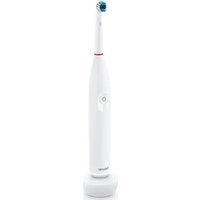
| Brushing modes | Clean, Sensitive, White |
| Built-in timer | 2 minutes (automatic), reminder every 30 seconds |
| Pressure sensor | Yes (red light ring if excessive pressure) |
| Charging indicator | Flashing white light ring (charging) or solid (fully charged) |
| Protection class | Class II (double insulation) |
| Package contents | 1 toothbrush, 1 brush head, 1 charging station, 1 USB cable, 1 power adapter, 1 storage case, 1 instruction manual |
| Replacement parts available | Clean brush heads (4 or 8 pieces) and Sensitive (4 or 8 pieces) |
| Recommended cleaning | Clean the brush head and device under running water; do not immerse; clean the station with a damp cloth |
| Warranty | According to Beurer warranty conditions (see included sheet) |
Frequently Asked Questions - TB 50 BEURER
User questions about TB 50 BEURER
0 question about this device. Answer the ones you know or ask your own.
Ask a new question about this device
Download the instructions for your Toothbrush in PDF format for free! Find your manual TB 50 - BEURER and take your electronic device back in hand. On this page are published all the documents necessary for the use of your device. TB 50 by BEURER.
USER MANUAL TB 50 BEURER
natural_image
Black and white photo of a Beurer electric toothbrush with a circular head and power button (no text or symbols on the object itself)EN Electric toothbrush Instructions for use......16
natural_image
Illustration of an open book with a diagonal arrow indicating rotation (no text or symbols)EN Unfold page 3 before reading the instructions for use.
natural_image
Simple line drawing of a vertical cylindrical object with a circular button and radiating lines, next to a square labeled 'D' (no text or symbols on the object itself)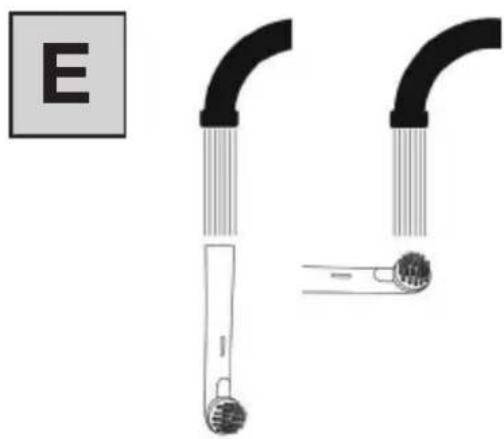
natural_image
Diagram showing two curved pipe fittings with a labeled section E (no text or symbols on the main components)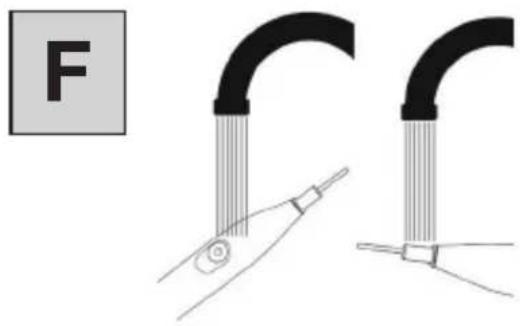
natural_image
Diagram showing two curved pipe fittings with a tool inserted, labeled 'F' in the top-left corner (no text or symbols on the figures themselves)DEUTSCH

Read these instructions for use carefully. Observe the warnings and safety notes. Keep these instructions for use for future reference. Make the instructions for use accessible to other users. If the device is passed on, provide the instructions for use to the next user as well.
CONTENTS
- Warnings and safety notes......16
- Included in delivery 18
- Signs and symbols....19
- Intended use....21
- Device description....21
- Use 21
6.1 Preparing for use 21
6.2 Starting use 22 - Cleaning and maintenance....22
- Accessories and replacement parts......23
- Disposal....23
- Technical specifications 24
- Warranty 24
1. WARNINGS AND SAFETY NOTES
WARNING
- Keep the charging unit and the mains adapter away from water or other liquids.
- Do not place the charger or mains adapter near a sink or bathtub full of water.
- This device may be used by children over the age of 8 years and by people with reduced physical, sensory or mental capabilities or a lack of experience or knowledge, provided that they are supervised or have been instructed on how to use the device safely, and are fully aware of the risks of using the device.
• Children must not play with the device.
- Cleaning and user maintenance must not be performed by children unless supervised.
- Do not use the device if it shows signs of damage or does not function properly. In these cases, contact Customer Services.
- If the mains connection cable is broken, you must dispose of the charger.
- Only use the USB charging cable with mains adapter and the corresponding charger supplied with your device.
- Do not pull on the mains cable or on the device to disconnect the mains part plug from the socket.
- The mains part plug must only be operated using the voltage specified on it.
- Under no circumstances should you open or repair the device yourself, otherwise proper functionality can no longer be guaranteed. Failure to comply will invalidate the warranty.
Notes on handling batteries
WARNING
- If your skin or eyes come into contact with fluid from a battery cell, wash the affected area with water and seek medical assistance.
- Risk of explosion! Never throw batteries into a fire.
- If the battery leaks, put on protective gloves and clean the battery compartment with a dry cloth.
- Do not disassemble, split or crush the batteries.
CAUTION
- Protect batteries from excessive heat.
- Only use chargers specified in the instructions for use.
- Batteries must be charged correctly prior to use. The instructions from the manufacturer and the specifications in these instructions for use regarding correct charging must be observed at all times.
- Fully charge the battery prior to initial use (see Chapter “Preparing for use”).
- In order to achieve as long a battery service life as possible, fully charge the battery at least 2 times a year.
2. INCLUDED IN DELIVERY
Check that the exterior of the cardboard delivery packaging is intact and make sure that all contents are present. Before use, ensure that there is no visible damage to the device or accessories and that all packaging material has been removed. If you have any doubts, do not use the device and contact your retailer or the specified Customer Services address.
• 1 electric toothbrush
- 1 brush head
- 1 charger
• 1 USB charging cable with mains adapter
- 1 storage box
• 1 copy of instructions for use
3. SIGNS AND SYMBOLS
The following symbols are used on the device, in these instructions for use, on the packaging and on the type plate for the device:

DANG
Indicates an imminent danger. If it is not avoided, it will result in death or serious injury.

WARNING
Indicates a potentially impending danger. If it is not avoided, there is a risk of death or serious injury.

CAUTION
Indicates a potentially impending danger. If it is not avoided, slight or minor injuries may result.
NOTICE
Indicates a potentially harmful situation. If it is not avoided, the system or something in its vicinity may be damaged.

Product information
Note on important information
Read the instructions
Disposal in accordance with the Waste Electrical and Electronic Equipment EC Directive (WEEE)
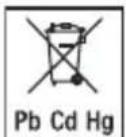
Do not dispose of batteries containing harmful substances with household waste

The products demonstrably meet the requirements of the Technical Regulations of the EAEU

Separate the packaging elements and dispose of them in accordance with local regulations.
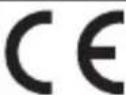
CE labelling
This product satisfies the requirements of the applicable European and national directives.
 | Separate the product and packaging elements and dispose of them in accordance with local regulations. |
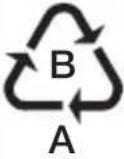 | Marking to identify the packaging material.A = material abbreviation,B = material number: 1-7 = plastics,20-22 = paper and cardboard |
 | Conformity assessed marking for the United Kingdom |
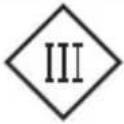 | Class III device |
 | Importer symbol |
 | Manufacturer |
 | Protection against splashing water |
| ta=40°C | Rated ambient temperature |
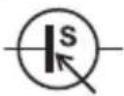 | Power supply unit, switch mode;switch mode power supply unit;SMPS |
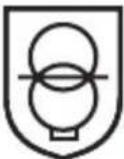 | Safety isolating transformer, short-circuit proo |
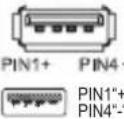 | USB / Micro-USB connection |
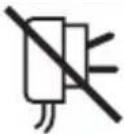 | Do not use the power adapter if the plug is damaged. |
 | Energy efficiency leve 6 |
 | Protection class II deviceThe device is double-protected and thus corresponds to protection class 2 |
 | For indoor use only |
4. INTENDED USE
Only use the device to clean teeth on humans. Do not use the device on animals! The device is not suitable for children under 8 years. The device is only intended for the purpose described in these instructions for use. The manufacturer is not liable for damage resulting from improper or careless use.
5. DEVICE DESCRIPTION
The associated drawings are shown on page 3.
1 Brush head
2 ON/OFF/Mode button
Short press: Switches the device on/off Long press: Changes the mode
3 Mode indicator
4 Light ring
Pressure control
Red light ring: Pressure too high
White light ring: Pressure OK
Charge level indicator
Light ring flashes white: Low battery power
Light ring pulsates white: Battery charging
Light ring permanently white: Battery charged
5 Base charger
6. USE
6.1 Preparing for use
Charging the electric toothbrush
Fully charge the electric toothbrush before first use. To do so, proceed as follows:
- Connect the USB charging cable to the base charger 5. Plug the USB charging cable into a USB port or into a suitable socket using the supplied adapter.
- Place the electric toothbrush on the base charger 5. During the charging process, the light ring 4 pulsates white (see Figure A). As soon as the electric toothbrush is fully charged, the light ring 4 illuminates permanently in white.
Fitting the brush head
Place the brush head 1 onto the device from above until it clicks into place. B Make sure that the brush head 1 points in the same direction as the ON/OFF/Mode button 2.

We recommend changing the brush head 1 after 3 months. If the bristles of the brush head are worn or frayed, they may need to be replaced more frequently.
6.2 Starting use
- To switch on the electric toothbrush, briefly press the ON/OFF/Mode 2 button. The electric toothbrush vibrates briefly every 30 seconds to remind you to clean all 4 jaw quadrants for the same amount of time C. The electric toothbrush has an automatic timer and vibrates three times after 2 minutes. The toothbrush switches off automatically after 6 minutes.

The electric toothbrush has a pressure sensor. As soon as you press the brush head 1 too firmly onto your teeth or gums during use, the light ring 4 will illuminate red (see Figure D).
- Select your desired mode by pressing and holding the ON/OFF/Mode button 2. The currently selected mode will light up in the mode indicator 3. The following modes are available:
| “clean” For | thorough and complete cleaning |
| “sensitive” | For gentle and gum-friendly cleaning |
| “white” Cleaning for natural teeth whitening | |
-
To cancel a session prematurely, briefly press the ON/OFF/Mode button 2.
-
Clean the device as described in Chapter "Cleaning and maintenance".
7. CLEANING AND MAINTENANCE
Clean the device and the brush head 1 after each use.
To do so, proceed as follows:
- Pull the brush head 1 upwards and off.
- Clean the brush head 1 under running water E. Make sure to clean the inside of the brush head 1 as well.
- Clean the device under running water F Do not submerge the device in water. Water might enter the device and damage it.
- Regularly clean the base charger 5 with a damp cloth and a mild soap solution. Do not use any abrasive cleaning products. Keep the base
charge 5 and the USB charging cable with mains adapter away from water.
8. ACCESSORIES AND REPLACEMENT PARTS
To purchase accessories and replacement parts, please visit www.beurer.com or contact the corresponding service address (according to the service address list) in your country. Accessories and replacement parts are also available from retailers.
| Designation Item number and/or order number | |
| Brush heads Clean 4 pcs. 10 | 1.56 |
| Brush heads Clean 8 pcs. 10 | 1.54 |
| Brush heads Sensitive 4 pcs. | 101.58 |
| Brush heads Sensitive 8 pcs. | 101.39 |
9. DISPOSAL
For environmental reasons, do not dispose of the device in household waste at the end of its service life. Dispose of the device at a suitable local collection or recycling point in your country. Observe the
local regulations for material disposal. Dispose of the device in accordance with EC Directive Waste Electrical and Electronic Equipment (WEEE). If you have any questions, please contact the local authorities responsible for waste disposal. You can obtain the location of collection points for old devices from the local or municipal authorities, local waste disposal companies or your retailer, for example.
The empty, completely flat batteries must be disposed of in specially designated collection boxes, at recycling points or at electronics retailers. You are legally required to dispose of the batteries.
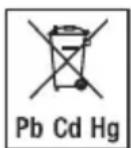
The codes below are printed on rechargeable batteries containing harmful substances:
Pb = battery contains lead
Cd = battery contains cadmium
Hg = battery contains mercury
Removing the battery
- Remove the rubber seal in the bottom of the toothbrush with a pointed object.
- Remove the membrane with a pointed object.
- The visible screw can now be removed with a suitable screwdriver.
-
Remove the bottom of the toothbrush.
-
Pull out the inner housing of the toothbrush.
- Remove the battery from the inner housing.
- Dispose of the battery separately in specially designated collection boxes, at recycling points or at electronics retailers.
10. TECHNICAL SPECIFICATIONS
| Type TB 50 | |
| Dimensions Device | 205 x 29 mmStorage box: 213 x 57 x 34 mm |
| Weight Device: 21 | 4 g (toothbrush + brush head + charger)Storage box incl. accessories: 224 g |
| Battery:CapacityNominal voltageType designa-tion | 1500 mAh3.7 VLithium-Ion battery |
| Power supply | Input: 100-240 V ~ 50/60 Hz,0,2 AOutput: 5,0 V === 1,0 A, 5,0 W |
Subject to technical changes
11. WARRANTY
Further information on the warranty and warranty conditions can be found in the warranty leaflet supplied.
FRANÇAIS

Remarques relatives aux batteries
AVERTISSEMENT
1. WAARSCHUWINGENEN VEILIGHEIDSRICHTLIJNEN
WAARSCHUWING
5. BESCHRIJVING VAN HET APPARAAT
5. BESKRIVELSEAF APPARATET
BEURER UK Ltd., Suite 16,
Stonecross Place, Yew Tree Way
WA32SH Golborne, United Kingdom