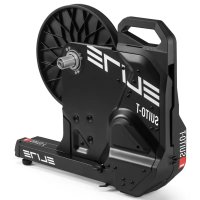
SuitoT - Bike trainer ELITE - Free user manual and instructions
Find the device manual for free SuitoT ELITE in PDF.



User questions about SuitoT ELITE
0 question about this device. Answer the ones you know or ask your own.
Ask a new question about this device
Download the instructions for your Bike trainer in PDF format for free! Find your manual SuitoT - ELITE and take your electronic device back in hand. On this page are published all the documents necessary for the use of your device. SuitoT by ELITE.
USER MANUAL SuitoT ELITE
17INSTALLING THE SUITO ON BICYCLES WITH
012L=142MM CHAINSTAYS 38
18_POWER SUPPLY 38
19_REMOVING THE BICYCLE 38
20 INSTALLATION OF CAMPAGNOL9/10/11
SPEED COMPATIBLE CASSETTE FREEHUB BODY 38
21_MAINTENANCE 39
22_WARINGS 39
23_TROUBLESHOOTING 39
24PACKAGING 40
25_COPYRIGHT 40
26_PRODUCT MODIFICATIONS 40
27_DISCLAIMER 40
28_INFORMATION ON PRODUCT DISPOSAL 40
DECLARATION OF CONFORMITY 112
WARRANTY 116
ES - ESPANOL
01_ADVERTENCIAS GENERALES DE SEGURIDAD 41
02_INTRODUCCION 41
03_COMPATIBILIDAD RUEDA LIBRE 41
04_INTERVALO DE POTENCY 42
05_PENDIENTE 42
06.PROTOCOLOS DE TRANSMISION 42
07_LEDS DE ESTADO 43
08_POWER METER LINK (PML) 43
09_PRECISION DEL VALOR DE POTENCY 44
10_SENSOR DE CADENCA 44
11_FRECUENCIA CARDIACA 44
12_USO DE SUITO CON LA SOFTWARES/ APP / DISPOSITIVO 44
13_NOMBRE Y RELACION DE COMPONENTES 44
14_ENSAMBLAJE DE SUITO 45
15.InstALAR EL CASSETTE DE PINONES 45
16_MONTAJE DE LA BICICLETA 45
17_INSTALACION EN SUITO DE BICICLETA CON TIRANTES TRASEROS DE 012 L=142 MM 45
18_ALIMENTACION 46
19_RETIRAR LA BICICLETA 46
20_INSTRUCCIONES DE INSTALLACION RUEDA LIBRE
COMPATIBLE CON CASSETTE DE PINONES
CAMPAGNOL 9/10/11 VELOCIDADES 46
21_MANTENIMIENTO 46
22_ADVERTENCIAS- 47
23_RESOLUCION DE PROBLEMAS 47
24_EMBALAJE 47
25_COPYRIGHT 48
26_MODIFICACIONES EN LOS PRODUCTOS 48
27_EXENCION DE RESPONSABILIDAD 48
28_INFORMACIONES ACERCA DE LA ELIMINACION DEL PRODUCTO 48
DECLARATION OF CONFORMITY 112
GARANTIA 116
FR - FRANÇAIS
01_APERTISSEMENTS GENERAUX EN MATIERE DE SECURITE 49
02_INTRODUCTION 49
03_COMPATIBILITE CORPS DE ROUE LIBRE 50
04_INTERVALLE DE PUISSANCE 50
05_PENTE 50
06.PROTOCOLES DE TRANSMISSION 50
07_LED D'ETAT 51
08_POWER METER LINK (PML) / LIAISON WATTMÈTRE 51
09_PRECISION DE LA VALEUR DE PUISSANCE 52
10_CAPTEUR DE CADENCE 52
11_CARDIO-FREQUENCEMETRE 52
12 UTILISATION DE SUITO AVEC LOGICIEL / APPLI / PERIPHERIQUE 52
13_NOM ET LISTE DES PIECES 53
14_ASSEMBLAGE DE SUITO 53
15.InstALLER LA CASSETTE SUR LE SUITO 53
16_ASSEMBLAGE DE LA BICYCLETETTE 53
17 INSTALLATION SUR LE SUITO DE VELOS DOTES
DE CHARIOTS DE 012 ET L = 142 MM 54
18_ALIMENTATION 54
19.DECROCHAGE DE LA BICYCLETTE 54
20_INSTRUCTIONS D'INSTALLATION DU CORPS
DE ROUE LIBRE COMPATIBLE AVEC DES CASSETTES DE PIGNONS CAMPAGNOLO® 9/10/11 VITESSES
21 ENTRETIEN 55
22_AVERTISSEMENT 55
23_AIDE AU DÉPANNAGE 55
24_EMBALLAGE 56
25_COPYRIGHT 56
26_MODIFICATIONS APORTÉES AUX PRODUITS 56
27CLAUSE DE NON-GARANTIE 56
28_INFORMATIONS SUR LA DESTRUCTION DU PRODUIT 56
DECLARATION OF CONFORMITY 112
GARANTIE 117
IT - ITALIANO
AWERTENZEGENERALI DI SICUREZZA 57
02_INTRODUZIONE 57
03_COMPATIBILITA' CORPETTO RUOTA LIBERA 57
04_INTERVALLO DI POTENZA 58
05_PENDENZA 58
06.PROTOCOLLI DI TRASMISIONE 58
07_LED DI STATO 59
08_POWER METER LINK (PML) 59
09_ACCURATEZZA DEL VALORE DI POTENZA 60
10_SENSORE DI CADENZA 60
11_CARDIOFREQUENZIMETRO 60
12UTILIZO DELLO SUITO CON SOFTWARE /APP/PERIFERICA 60
13_NOME E LISTA DEI COMPONENTI 61
14_ASSEMBLAGGIO SUITO 61
15_CAMBIO CASSETTA PIGNONI SUL SUITO 61
16_ASSEMBLAGGIO DELLA BICI 61
(http://www.thisisant.com/dirctory/)
07_LED STATUS
Suito sender dataene for hastigheden, kadencen og effekten via protokollerne ANT+ og Bluetooth Smart.
Congratulations on your purchase of the Suito cycling simulator
01GENERAL SAFETY WARNINGS
Before using your trainer, carefully read the warnings listed below for your health and safety.
- The appliance is not to be used by persons (including children) with reduced physical, sensory or mental capabilities, or lack of experience and knowledge, unless they have been given supervision or instruction.
- Children being supervised not to play with the appliance.
- Before beginning a training programme, undergo a physical examination certifying good health.
- Choose a training level compatible with your physical endurance and the status of your health.
- If you feel particularly fatigued or sore while exercising, stop using the trainer immediately and consult your doctor.
- Use only the supplied charger (mod. 6A-181WP12).
The Suito compliance with EU laws (see "Declaration of conformity", page 112) may be voided if a charger different from the original is used.
The above warnings are general and not exhaustive of all the precautions that should be taken for the proper and safe use of the trainer; which is solely the responsibility of the user.
02_INTRODUCTION
Suito is a direct transmission hometrainer with electronically managed magnetic resistance.
- Suito features an extensive range of resistance and power output, smooth pedalling and compatibility with open data transmission standards.
Resistance is generated by an extremely quiet integrated magnetic braking unit.
- The electronic Suito is able to connect to personal computers (Windows, Mac), mobile devices (iOS and Android) and cycle computers that feature ANT+ and/or Bluetooth Smart technology.
The My E-Training software/app features a wide range of training / test modes suitable for all cyclists, from amateurs to seasoned pros.
The app is available on the App Store (iOS) and Google Play (Android), while the PC / MAC version is available on the www.elite-it.com website.
Important features are:
Video training
- Personalized training programs
- Google maps training
- Saving, importing and exporting data
By using an open ANT+ FE-C protocol, Suito is also compatible with many other non-Elite software programs that feature the same wireless protocol.
There are many software programs / apps / devices on the market that are compatible with this protocol, and therefore are fully compatible with Suito.
03_FREHUBCOMPATIBILITY
ELITE supplies Suito with a freehub body compatible with 9/10/11 speed Shimano® / SRAM® (and other manufacturers using the Shimano® standard) sprocket cassettes, pre-assembled with an 11-speed Shimano® sprocket cassette 105 (11-28).
An accessory freehub body compatible with Campagnolo 9/10/11 speed cassettes is available to replace the original Shimano compatible body provided on Suito; body replacement instructions can be found on paragraph 20.
Suito is compatible with bikes with 130 to 135mm hubs with 5mm diameter quick release and with bikes with 12mm× 142mm thru-axle hubs.
The following accessories are available:
-adapter for bicycles with 148mm thru axle with 12mm
diameter.
- adapter for bicycles with 135mm thru axle with 10mm and 12mm diameter.
If you are unsure about the type of derailleur on your bicycle, refer to the bicycle documentation or contact your dealer to ensure compatibility with Suito.
04_POWER RANGE
The power range covered by the roller is very wide and depends on the speed. The faster you pedal, the wider the power range. Nevertheless there may be extreme conditions where the required power is outside of the range (too high or too low).
In these cases the roller delivers the maximum/minimum possible, and resumes working correctly as soon as the conditions return to being compatible with the power deliverable by the Suito. When the required power is outside the available power range, the roller displays on the monitor the actual power it is producing and not the theoretical power.
05_SLOPE
The maximum simulatable slope on the Suito is a function of speed and the weight of the individual rider. In fact, the power required to pedal up a slope is a function of the speed (faster= more power) and of the weight (the heavier the rider, the more power is required to climb any given slope).
Suito uses a magnetic braking system that acts directly on a moving metallic disc to gradually and uniformly adjust resistance. This technology allows for very accurate changes in slope, even when small, by taking into account the inertia experienced when riding on the road. Both increases and decreases in resistance adjustment are thereby gradual. This system also ensures that pedals will not lock-up, which could have occurred at exceedingly high power outputs.
06_DATA TRANSMISSION PROTOCOLS
Suito uses two different transmission protocols to interact and send data to software / app / device.
Please contact the app / software / device manufacturer to verify compatibility with one or more of these protocols.
BLUETOOTH SMART
"Fitness Machine - Indoor Bike service" (FTMS) protocol. This protocol sends training data to compatible software / app / device and adjusts resistance on the hometrainer. This protocol offers total interaction with the hometrainer.
"Speed&Cadence Service" protocol: this protocol transmits hometrainer speed and cadence data, but does not allow interaction between software / app / device and the hometrainer.
"Power Service" protocol: this protocol transmits the cyclist's power output data, but will it also not allow interaction
between software / app / device and the hometrainer.
In most cases, smartphones and tablets already feature Bluetooth Smart connectivity, so there is no need for additional components to communicate with the Suito. However, the more outdated devices might not be compatible. Please consult your app provider to make sure that it's Bluetooth Smart compatible.
NOTE: When the hometrainer is connected to the device by a Bluetooth Smart protocol, it cannot be connected to additional BLE devices.
This is a restriction of the Bluetooth Smart protocol itself.
ANT+
"ANT+ FE-C" protocol: this protocol allows the software / app / device to receive training data and adjust hometrainer resistance. This protocol permits total interaction with the hometrainer.
"ANT+ Speed&Cadence" protocol: this protocol transmits hometrainer speed and cadence data. Although more common than the ANT+ FE-C, it does not allow interaction and the app/software/device.
"ANT+ Power" protocol: this protocol transmits the cyclist's power output data. Also much more common than the ANT+ FE-C, but this protocol does not allow interaction between the hometrainer and the app/software/device.
With the exception of smartphones that feature integrated ANT+ connectivity, a USB dongle is necessary to connect via the ANT+ protocol.
An ANT+ flash drive is required when using Android, PC Windows and Mac devices. It's available for purchase on the www.shopelite-it.com website or via other channels - it's required to connect the device to the hometrainer via the ANT+ protocol.
An OTG adapter cable is required for Android devices, while iOS devices require a specific flash drive (not included) compatible with the 30-pin iOS connector.
A complete list of ANT+ compatible devices is available at: http://www.thisisant.com/directory/
07 LED LIGHTS
Suito transmits speed, cadence and power data via the ANT+ and Bluetooth Smart protocols.
There are 3 LED lights on the motherboard, displaying power supply status, motherboard status and the protocol being used.
The LED lights come in 3 colors with the following meanings:
Red = status of hometrainer power supply
-
Off = Suito is not receiving power or has the entered sleep mode
-
On = Suito is powered up.
Blue = Suito is connected via the Bluetooth Smart protocol. - Blinking = Suito is awaiting connection.
- On = Suito is transmitting data via the Bluetooth Smart
protocol.
Green = Suito is connected via the ANT+ protocol.
- Blinking = Suito is awaiting connection.
- On = Suito is transmitting data via the ANT+ protocol.
08_POWER METER LINK (PML)
Suito implements also a function, called Power Meter Link, that allows having much more accurate power data.
This function allows Suito to use a power sensor present on the bike as power source.
This way, Suito is more precise since the power data measured by the sensor are more precise than those Suito can calculate with its formulas.
Note: this function cannot be used if no power sensor is installed on the bike.
USE
- Coupling
On start-up, Suito automatically looks for a few seconds for any power sensors present. If it finds one, it connects to it and uses its data. For this reason, it is good to ensure that the power sensor is transmitting before powering the trainer.
Moreover, once connected, Suito will save the serial number of the sensor for the following training sessions.
If in the room there are more power sensors, Suito will connect to the power sensor with the strongest signal, that will normally be the one on the bike.
- Following sessions
The following sessions, every time it is switched on, Suito will try to connect always to the sensor it coupled with the first time.
If it cannot connect to the sensor or the sensor is not present, Suito will use its algorithms to calculate the power.
- Cancelling the coupled sensor
If you wish to change the sensor, just power the trainer making the wheel move (even manually) or pedalling a few times within few seconds. In fact, on start-up, if the speed exceeds zero, Suito resets the sensor saved in the memory and starts looking for another sensor, as if it were the first time.
When the Suito resets the serial number of the power sensor, it performs 6 slight vibrations to confirm the cancellation.
NOTES:
- If Suito has connected to an incorrect sensor, just reset the coupled sensor and repeat the coupling operation, paying attention to move the sensor you do not want Suito to connect to, away.
- If, during training, Suito loses the connection with the power sensor, it goes automatically to using the formulas to calculate the power. In the meantime, it keeps trying to re-connect with the sensor.
- The trainer looks for ANT+ sensors first and Bluetooth
afterwards. If the power sensor is both ANT + and Bluetooth, very likely the trainer will latch on to the ANT + signal.
- The cancellation vibrations are very light. To feel them, it may be necessary to lay your hand on the resistance unit.
- In case of Bluetooth pedals / cranks, the trainer latches onto just one of the two. In this case, it is not possible to predetermine which pedal / crank it will latch onto. Moreover, since in this case each pedal / crank measures the power developed by the relative leg, the value sent is about half the total power developed by the cyclist. In this case, for correct use, it is is necessary to enable the "Double Power" option with the my E-training app (Parameters - Advanced configuration).
- During the initial search for power sensors, the green LED flashes quickly.
09_POWER VALUE ACCURACY
Power data sent by Suito is the result of multiple calculations. These calculations take into account pedalling speed, hometrainer brake and other factors.
Elite calibrates every single Suito in order to improve accuracy and reduce any margin of error, though some factors might change over time and thus decrease power accuracy.
Spindown is a hometrainer calibration procedure that evaluates changes arising from prolonged use and compensates their influence on the resistance generated by the hometrainer.
Procedure:
It's important to conduct the calibration when the hometrainer has been working for at least 10 minutes.
To conduct the procedure, select the related command on the app or My E-Training software and follow the instructions.
The procedure start command can be found inside the settings page of the app.
The procedure requires to start pedalling and increase speed up to a pre-determined value.
Stop right away once you're notified to stop pedalling.
After a few seconds the procedure will notify that the calibration procedure has been successfully completed.
The spindown value is then memorized in the Suito so the correct power data is always sent to every connected device, including non-Elite third parties software / apps / devices.
Note:
- The previous calibration procedure can also be conducted with software / apps / devices other than Elite's.
- Do not lift your feet from the pedal until the procedure is complete.
- The aforementioned notes are no longer valid if the hometrainer connects to your bike's ergometer (if available) as power is no longer calculated but measured by the sensor on the bicycle. Please read the "Power Meter Link (PML)"
chapter for further info.
10_CADENCE SENSOR
The Suito uses an innovative "sensorless" system and it's obtained via sophisticated speed-based calculations.
When maintaining a high pedal cadence at low resistance levels, there may occasionally be a slight inaccuracy in the cadence value since it is the result of calculation and not direct monitoring. This occurs especially with fast pedalling and low resistance.
Should the "sensorLess" system not be accurate enough, you can purchase a wireless sensor to attach to the bike/crank.
Most apps/software/devices give you the ability to select a sensor as source for the cadence value.
11_HEART RATE MONITOR
- Suito hometrainer does not read heart rate monitor data. Heart rate monitor data can be read directly from a device that includes a heart rate function.
- Compatibility with various types of heart rate monitors depends on the device / software / app being used only ANT + and is also compatible with Bluetooth Smart monitors allowing connection with monitors by both protocols.
12_USING THE SUITO WITH THE SOFTWARE /APP/DEVICE
We suggest using the My E-Training software/app, available on iOS, Android, Windows and Mac OS.
My E-Training is a complete system with several training modes, including videos, configurable software, Google Maps races, Internet competitions and much more.
It's possible to use third-party software that is compatible with the hometrainer communications protocol/standards.
There are several software/apps/devices currently on the market that can connect to the Suito.
Please refer to the instructions for the specific software/app/ device for a proper connection to the hometrainer.
Before beginning the connection procedure with any app, make sure that the hometrainer is powered up and is not on the energy saver mode. The supplied hometrainer charger must be connected to a power source.
The hometrainer motherboard features LED lights indicating the current hometrainer status. Please check the "Status LED lights" paragraph for an in-depth description.
13_NAME AND LIST OF COMPONENTS
Your Suito includes:
N.1 Suito body (A)
N.2 Freehub body spacer (B)
N.1 Chainstay adapter (C)
N.1 Right rotating chainstay adapter L=130-135mm (D)
N.1 Left chainstay adapter L=130-135mm (E)
N.1 Right rotating chainstay adapter L=142mm (F)
N.1 Left chainstay adapter L = 142mm (G)
N.1 Quick Release (H)
N.1 Riser block (I)
N.1 Power supply (L)
WARNING: adapters ref. C, D, E, F, G are small sized components and might easily be misplaced or lost. If you move the hometrainer it's advisable to remove the adapters and store them in their bag as they might easily slip out during transport.
Any spare parts are available in our online store or by directly contacting Elite and/or your country's distributor.
14 ASSEMBLING THE SUITO
- Unpack the Suito (A)
- Place the Suito (A) in a vertical position and hold it in place with the upper handle
- Unfold the right leg until the safety locking mechanism clicks (Pic 1)
- Unfold the left leg until the safety locking mechanism clicks (Pic 2)
- Make sure that the hometrainer is stable (Pic 3) or alternatively adjust its feet (Pic 4).
15Install THE SPROCKET CASSETTE ON THE SUITO
An 11 speed Shimano® / SRAM®105 (11-28) sprocket cassette is pre-assembled on the Suito.
In order to use a 9/10 speed Shimano® / SRAM® (or other manufacturers using the Shimano® Standard) sprocket cassette, or other manufacturers you must:
1) Remove the pre-assembled cassette from the freehub body (Pic 5)
2) Place the spacers (ref B) on the freehub body before inserting the new sprocket cassette.
- 2 spacers (Ref. B) are usually needed for the Shimano®/SRAM® 9 speed cassette (Pic. 6) and 1 spacer for the 10 speed cassette (Pic. 7).
Depending on the cassette brand you are using there might be some differences with the aforementioned general data.
3) Using the torque wrench, tighten the lock ring supplied with the cassettes onto the freehub body (Pic. 8).
CAUTION!
Strictly follow the instructions provided by the cassette manufacturer with regard to specific installation techniques, the need for additional spacers and torque specifications.
NOTE: please contact your dealer if you have questions or are unable to install the cassette. The warranty does not cover any damage to the bicycle and/or Suito in the event of
incorrect installation.
On bikes with 130-135 mm (5,1 -5,3 inch) chainstay you must insert the right chainstay adapter (Ref. D) (Pic. 9) and the left adapter (E) (Pic. 10). However, on bikes with 12mm ( 0.47 inches) thru-axle and 142~mm (5,6 inches) chainstay please check paragraph 17.
16_INSTALLING THE BICYCLE ON SUITO
- Loosen the bike's rear brake and place the chain on the smallest rear sprocket and the largest front chainring. Remove the quick release from the rear wheel.
- Remove the rear wheel from the bicycle.
- Insert the quick release and the dropout adapter (Ref. C) on the Suito sprocket cassette (Pic. 14).
- Place the bicycle chain onto the smallest sprocket of Suito (Pic 15).
- Fully fit the bicycle's rear dropouts onto Suito's cassette (Pic. 16), paying careful attention to the correct internal or external position, based on the type of bicycle:
- External triangle adapter (Ref. C) for road and time trial bikes (130mm triangle) (Pic.17).
- Internal triangle adapter (C) for mountain bikes (135mm triangle) (Pic. 18).
NOTE: the knurled side of the triangle adapter (Ref. C) must be facing the bicycle dropout.
- Securely fix the bicycle to Suito and firmly close the quick release. The resulting pressure should keep the bicycle dropouts locked to the Suito.
- Make sure the bike is perfectly vertical once installed.
WARNING: the dropout of the bicycle must be leaning on the edges of the adapter and not on the Quick Release.
Elite shall not be liable for any damages that might arise from an improper assembly of the bicycle on the hometrainer.
17_INSTALLING THE SUITO ON BICYCLES WITH 012 L=142 MM CHAINSTAYS
1) Insert the left and right adapters (Ref. F - G) for 142mm chainstays (Pic. 16);
2) Loosen the rear brake of the bicycle and place the chain on the smallest sprocket of the rear wheel and the front chainring. Remove the thru-axle from the rear wheel.
3) Position the bicycle's rear dropouts on the axle of the sprocket cassette of the Suito.
4) Insert the thru-axle on the Suito sprocket cassette shaft.
5) Make sure the bicycle is safely positioned on the Suito and lock the thru-axle with a strong push. The pressure should make the bike dropouts remain locked onto the structure of the Suito.
6) Make sure the bike is stable by pushing and pulling the top tube of the frame and the saddle. Should the bike still be moving a little on the Suito, use more force to lock the
thru-axle.
7) If you wish for more bicycle stability it's advisable to use the provided Riser block (Ref I) to be placed under the front wheel.
- Start pedalling. Ride very slowly at first and increase your speed gradually until you become familiar with the features of Suito.
18_POWER SUPPLY
- Suito feature electronic circuitry inside and is powered up by a standard power supply (included).
Insert the power supply in the electrical outlet and the jack plug in the connector on the back of the Suito (Pic. 17), a slight vibration indicates that the system is adjusting to its initial position. This can last up to 15 seconds.
Place the cable inside its housing in the rear of the hometrainer and hook it in the edges in the lower area of the rear plastics (pic. 18)
The Suito compliance with EU laws (see "Declaration of conformity", page 112) may be voided if a charger different from the original is used.
19_REMOVING THE BICYCLE
- Shift the bicycle chain on the smallest cassette sprocket of Suito and of the smallest front chainring of the bicycle.
- Open up the quick release (or remove the thru-axle) and remove the bicycle from the Suito.
- For transportation or to reduce clutter when not using the hometrainer: Raise the selectors (Pic. 19) and fold the side legs (Pic. 20 - 21).
WARNING: the adapters ref. C, D, E, F, G are small sized components and might easily be misplaced or lost. If you move the hometrainer it's advisable to remove the adapters and store them in their bag as they might easily slip out during transport.
Any spare parts are available in our online store or by directly contacting Elite and/or your country's distributor.
20 INSTALLATION OF CAMPAGNOLO® 9/10/11 SPEED COMPATIBLE CASSETTE FREEHUB BODY
- To replace the original freehub body installed on Suito with the accessory body compatible with Campagnolo® 9/10/11 speed cassettes, follow the procedure below:
1) Remove the cassette pre-assembled on the hometrainer (Pic 22)
2) Unscrew the fastening sleeve (Pic 23).
3) Remove the freehub body from the Suito shaft (Pic. 24).
4) Fully insert the Campagnolo® cassette compatible freehub body (Pic. 25-26).
5) Tighten the fastening sleeve with a 17 straddle wrench
with a 5Nm (44in-lbs) tightening torque. Use the medium resistance threadlocker suitable for oily surfaces to lock the sleeve on the shaft.
6) You can now assemble the 9/10/11 speed Campagnolo® sprocket cassette by directly placing it on the freehub body. (Pic. 27).
ATTENTION!
Strictly follow the instructions provided by the cassette manufacturer with regard to specific installation techniques, the need for additional spacers and torque specifications.
NOTE: Please contact your dealer if you have questions about installation or if you cannot install the cassette. The warranty does not cover any damage to the bicycle and/or Suito in the event of incorrect installation.
21_MAINTENANCE
Suito does not require any specific scheduled maintenance, however the following precautions are recommended:
- wipe the trainer clean with a cloth after each training session to prevent the accumulation of dust and sweat;
- do not clean or degrease the bicycle chain while the bike is mounted on Suito as solvents can cause irreparable damage to the bearings or other internal mechanical parts;
- check that the quick release is properly secured and fully working before every training session.
- Changing a bicycle usually poses no problems after the assembly on the Suito, though occasionally you might have to make some adjustments to ensure that it works properly. Should you have any doubts please contact your retailer to make sure that it works properly with the Suito.
22 WARNINGS
- Suito becomes hot during use. Wait for it to cool before touching the resistance unit covers.
- Use the Suito trainer as described in the manual.
- Suito is not equipped with an emergency brake.
- Suito has been designed and manufactured to ensure maximum safety of the user and/or third parties, but people, children and pets should be kept away from the trainer during use as contact with the moving parts of the trainer and the bicycle may result in damage or injury.
- Never put your fingers or foreign objects of any kind through the slots on Suito, as there will be high risk of damage to the trainer and/or serious physical injury.
- Before you start training, place the trainer in a suitable location, away from any potentially dangerous objects (furniture, tables, chairs...) so as to avoid any risk of accidental or inadvertent contact.
- The Suito is to be used by only single rider at a time.
-
Always check the safety and stability of the bicycle on Suito before training.
-
No part of the product has any use beyond its original application. The warranty will be void if the unit has been opened or tampered with.
- Since the feet are made of soft non-slip material, they may leave traces of rubber on the floor during use.
- Do not leave the charger plugged in while not in use.
- Do not store the Suito in cold and damp places. This may damage its electronic components.
- Use only the supplied charger. The Suito compliance with EU laws (see "Declaration of conformity", page 112) may be avoided if a charger different from the original is used.
- Elite cannot be held responsible for any malfunction involving third party software / app / device.
- The presence of high-voltage electric lines, traffic lights, electric railway lines, bus or tram electric lines, television sets, automobiles, cycle computers, gym equipment and mobile phones inside the operating range of the console, etc., can be the cause of interference. Therefore the use of other wireless receivers may alter or completely inhibit operation of the Suito due to such interference.
- Do not expose the Suito to direct sunlight for long periods when they are not in use.
23.TROUBLESHOOTING
- Problem: The wheel appears to be skipping slightly while training.
- Answer: The internal transmission belt might be slightly loose. Please contact Elite for further info on how to proceed. WARNING: Don't proceed with tensioning the belt on your own as it might break. Should it break, you'll have to send the hometrainer back to Elite or one of its service centers.
- Problem: the displayed speed appears to be very high (even more than 100km / h ).
- Answer: It's possible that the roller circumference has been incorrectly set on the device you're using.
Suito sends training data based on various protocols. One of these is the protocol used by speed sensors. If the device you're using employs said protocol you must change the wheel circumference that had been set.
The wheel circumference value that must be set equals the actual value of the wheel divided by 24,8. For instance: if the circumference is 2095mm , the value you must insert as circumference equals 2095 / 24,8 = 84mm .
- Problem: Suito is not connecting to the device.
- Answer: try restarting the device / phone /tablet /computer.
Also restart the hometrainer before reconnecting.
- Problem: the bicycle isn't perfectly vertical.
- Answer: First make sure that the bicycle is properly locked with the quick release. Alternatively make sure that the quick release is fully inserted in the dropouts on both sides by fully
opening the frame.
Try adjusting the two external feet by unscrewing to raise the related leg.
24 PACKAGING
If the roller needs to be shipped, careful packaging is critical:
-
remove the charger cable from the Suito;
-
pack up the Suito in its original box.
During shipments, packs often undergo mistreatment and very hard impacts, therefore inadequate packing can result in permanent damage to the roller. This type of damage is not covered by the warranty.
Note: before sending the roller or any other component assistance, always firstly consult Elite or the distributor.
Any items received without prior agreement will be rejected.
25_COPYRIGHT
No part of this manual may be reproduced or transmitted without the written authorization of Elite S.r.l.
The Elite Suito software and relative code are property of Elite S.r.l.
26_PRODUCT MODIFICATIONS
Also in view of any technical update, ELITE reserves the right to make changes to the products or their specifications without being obliged to notify or inform the Customer beforehand for:
a) changes that do not affect negatively the product performance;
b) changes required to meet or improve the product specifications;
c) changes necessary for the products to comply with the applicable legal requirements.
ELITE also reserves the right to supply these products with these improvements without being obliged to or responsible for applying the same modifications to any previously purchased products, reserving also the right to change prices and model availability according to market conditions, component availability and other corporate considerations.
27 DISCLAIMER
Elite S.r.l. is not liable for any temporary or permanent damage to the physical integrity of the user, whether direct or indirect, resulting from the use of the trainer.
28 INFORMATION ON PRODUCT DISPOSAL
1) WITHIN THE EUROPEAN UNION
This product conforms with European Directives 2002/95/CE, 2002/96/CE and 2003/108/CE.

The crossed bin symbol given on the equipment or on the packaging indicates that at the end of its service life the product must be collected separately
from other waste.
Therefore at the end of its useful life the user must take the equipment to an appropriate centre for the differentiated collection of electronic and electrotechnical waste, or return it to the dealer when purchasing a new product of equivalent type.
Adequate differentiated collection for subsequent sending of the scrapped equipment to recycling, treatment and environmentally-friendly disposal can help prevent possible negative consequences for the environment and the health of people and favours the resume and/or recycling of the materials from which the equipment is made.
Improper disposal of the product by the user could involve penalties as specified by the regulations in force.
2) IN NON-EU COUNTRIES
If you want to dispose of this product, please contact your local authorities and ask them what disposal method applies.
Technical assistance:
Phone +39 049 5940044
e-mail: info@elite-it.com
ESPANOL
MuchasgraciasporadquirireltrainerEliteSuito
26_MODIFICATIONS APPORTÉES AUX PRODUITS
1) BINNEN DE EUROPESE UNIE
Protokóf „Fitness Machine --- Indoor Bike service"(FTMS).
13_NAZWY I WYKAZ CZESCI
26_ZMIANY W PRODUKTACH
(http://www.thisisant.com/dirctory/)
07_LED DE ESTADO
26_ALTERACOES AOS PRODutos
23_RIESENIE PROBLEMOV
- Problem: poças tréngu pocitujete jemné presmykovanie kolesa.
- Riesenie: prevalovy remen sa mozno trochu uvolnil. Kontaktujte spolocnost Elite pre informacia o dalsom postupe.
POZOR: nesnăzte sa sami dotiahnut' prevodovy remen, moze to viest' k pretrhnutiu remea. V pripad pretrhutia remea je nutné poslat valec na opravu do spolocnosti Elite alebo jegneho z jeho centier.
Satisfies all the technical regulations applicable to the product within the scope of Council Directives 2014/35/UE and 2014/30/EU:
MANUFACTURER or AUTHORISED REPRESENTATIVE:
CONSTRUCTEUR ou REPRESENTANT AUTORISE:
This declaration is issued under the sole responsibility of the manufacturer and, if applicable, his authorized representative.
- In accordance with the law no. 24 of 02/02/2002 and CE directive 1999/44, ELITE s.r.l. guarantees its products and the components used for a period of two (2) years from the date of purchase.
2.Warranty is void for defects caused by reasons not chargeable to the manufacturer such as negligence or carelessness whilst using the product, impacts, maintenance done by non-authorised personnel, damage caused by transportation, normal wear. Additionally, warranty is void in
case of improper use of the product, wrong observation of instruction, especially the notice concerning installation and use supplied by ELITE s.r.l. for which in any case it is not responsible for eventual direct or indirect damages.
3.In case of repaired or replaced product done by the Factory or in one of its authorized Service Centers, ELITE s.r.l. is not responsible for any loss or damage during transportation.
4.To take advantage of the warranty service it is necessary to carefully fill in all its parts the "CUSTOMER ASSISTANCE CARD" which needs to accompany, along with the fiscal receipt or other document issued by the Seller which bears the name of the Seller and date selling, the eventual returned product. Warranty is void in case one of these documents are missing.
5. All the information supplied by the Purchaser on the "CUSTOMER ASSISTANCE CARD" will be handled in accordance with the rules of the law no. 675 of 31/12/1996. 6. In case there is, along with the documentation supplied with the product, a technical drawing of the product itself, indicate the defective or malfunctioning part by signing on the correspondent number. The drawing needs to be attached to the "CUSTOMER ASSISTANCE CARD".
7.ELITE s.r.l. reserves the right to apply technical and aesthetic modifications to its products without obligation of notice.
GARANTIA ESPANOL
Indizio/Address/Adressi/Direcston/Adres
Tel,fax e-mail