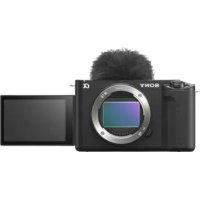
ZVE1L - Camera SONY - Free user manual and instructions
Find the device manual for free ZVE1L SONY in PDF.



User questions about ZVE1L SONY
0 question about this device. Answer the ones you know or ask your own.
Ask a new question about this device
Download the instructions for your Camera in PDF format for free! Find your manual ZVE1L - SONY and take your electronic device back in hand. On this page are published all the documents necessary for the use of your device. ZVE1L by SONY.
USER MANUAL ZVE1L SONY
https://www.sony.net/SonyInfo/Support/
SONY.
5-050-817-41(1)
"Help Guide" (Web manual)
Refer to "Help Guide" for in-depth instructions on the many functions of the camera.
https://rd1.sony.net/help/ic/2310/h_zz/
L3-AZ
ZV-E1
E-mount
| Interchangeable Lens Digital Camera/Startup Guide EN | |
| Appareil photo à objectif interchangeable/Guide de démarrage FR | |
| Digitalkamera mit Wechselobjektiv/Einführungsanleitung DE | |
| Câmara Digital de Lentes Intercambiables/Guía de inizio ES | |
| Fotocamera digitale con objettivo intercambiabile/Guida di avvio IT | |
| Câmara Digital de Objetivas intercambiáveis/Guía de inizio PT | |
| Digitalte camera met verwisselbare lens/Beknopte gids NL | |
| Aparat cyfrowy z wymiennymi objektywami/Przewodnik uruchamiania PL | |
| Líncρobovi φοτοANNAPAT co CSmenhím ObjectsKTBOM/Pуководъно насану равочи RU | |
| Líncρobová kámepa 3i 3MHNIM oběćTKTBM/Посібник 3н поатку ровоти UA | |
| Digitalkamera med utbytbart objektiv/Startguide SE | |
| Digitaalinen camera vaihdettavalla objektivilla/Aloitusopas FI | |
| Digitalkamera med utskiftbart objektiv/Startveilednong NO | |
| Digitalkamera med udskifeltigt objektiv/Startvejlednong DK |
©2023 Sony Corporation
Printed in Thailand
5050817410
ZV-E1
About the "Help Guide"
For detailed instructions on using the camera, refer to the "Help Guide" (web manual). https://rd1.sony.net/help/ilmc/2310/h_zz/
ZV-E1 Help Guide
Preparations
Checking the supplied items
The number in parentheses indicates the number of pieces.
- Camera (1)
- Rechargeable battery pack NP-FZ100 (1)
- Wind screen (1) (attached to the wind screen adaptor)
- Wind screen adaptor (1)
-
Shoulder strap (1)
-
Body cap (1) (attached to the camera)
- Shoe cap (1) (attached to the camera)
- Startup Guide (this manual) (1)
- Reference Guide (1)
Inserting the battery pack (supplied)/memory card (sold separately) into the camera
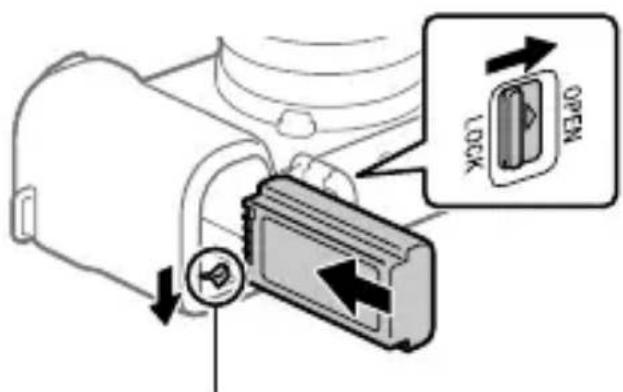
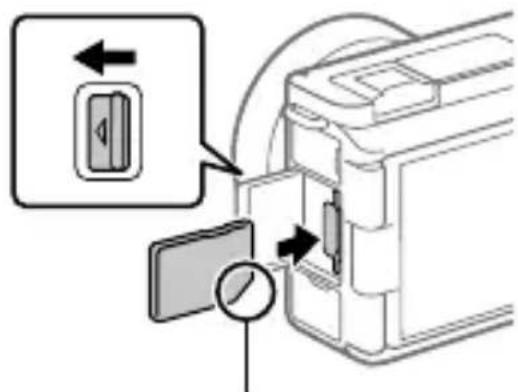
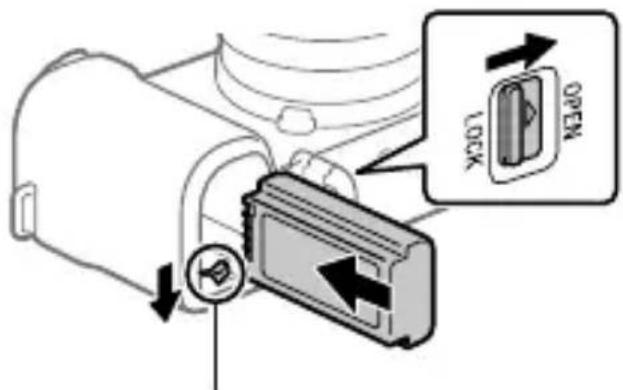
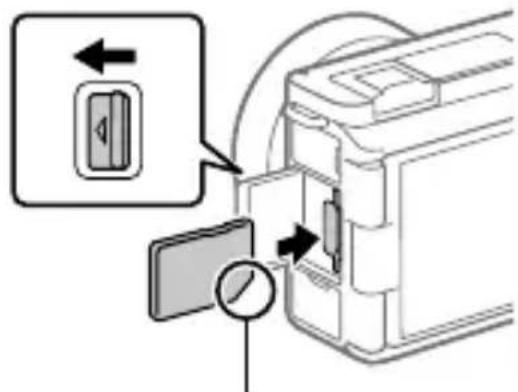
Open the battery cover and the memory card cover, insert the battery/memory card, and close the covers.
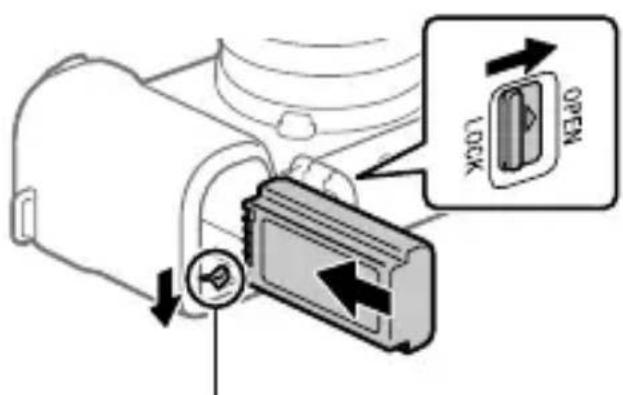
Insert the battery pack while pressing the lock lever.
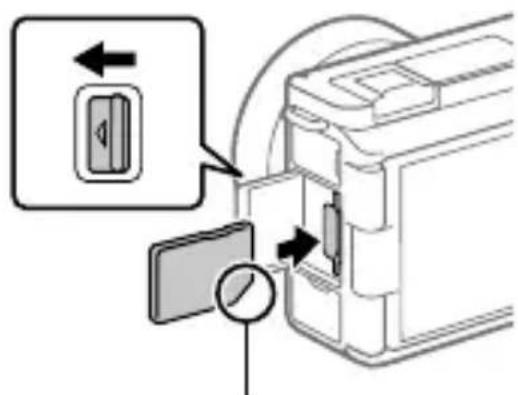
Ensure the notched corner faces correctly.
This camera is compatible with SD memory cards.
When you use a memory card with this camera for the first time, format the card using the camera in order to stabilize the performance of the memory card.
Charging the battery pack
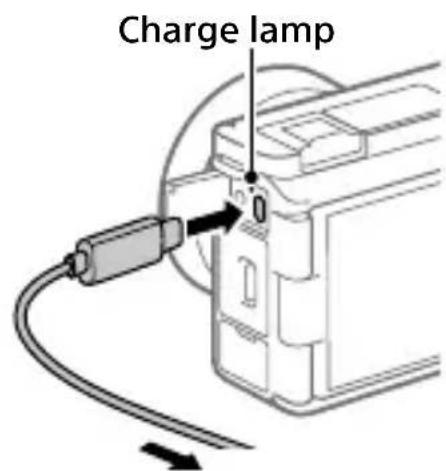
To an external power source
1 Turn the power off.
- If the camera is turned on, the battery pack will not be charged.
Using a commercially available USB Type-C cable, connect the USB Type-C terminal on the camera to an external power source, such as a commercially available USB AC adapter or mobile battery.
- The charge lamp will light up when charging starts. When the charge lamp turns off, charging is completed.
This camera is compatible with USB-PD (USB Power Delivery). When a device compatible with USB-PD is connected to the camera, fast charging is possible. We recommend using a USB-PD device that is compatible with an output of 9 V/3 A or 9 V/2 A.
Attaching a lens
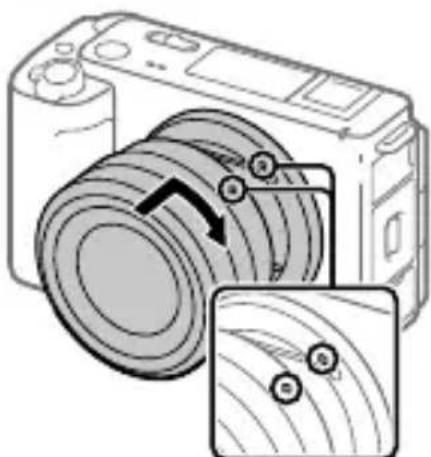
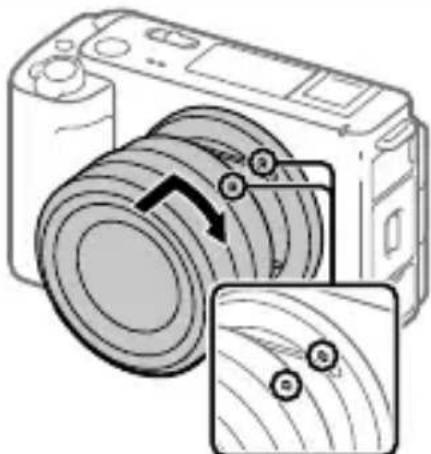
Mounting indexes
Mount the lens by aligning the two white index marks (mounting indexes) on the lens and camera.
While pushing the lens lightly toward the camera, turn the lens slowly in the direction of the arrow until it clicks into the locked position.
Performing initial setup for the camera
By establishing a Bluetooth connection (pairing) between the camera and a smartphone, you can perform initial camera setup such as date and time settings from the smartphone. Install the dedicated application on your smartphone in advance, and then follow steps ① to ④ under "Procedures for initial camera setup."
■ Installing the dedicated smartphone application
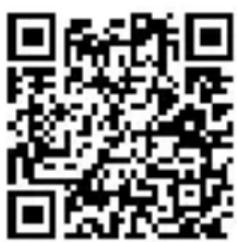
Install the application from the following website. Also, update to the latest version of the dedicated application. The specifications of the dedicated application may change without notice. https://www.sony.net/ca/
Procedures for initial camera setup
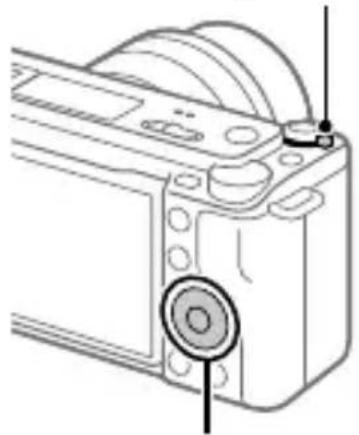
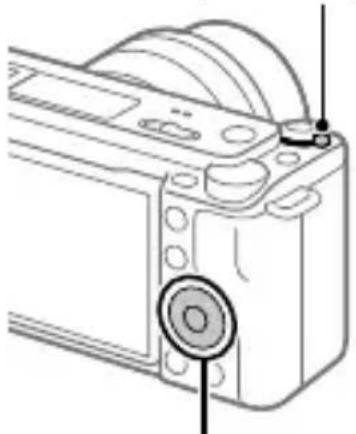
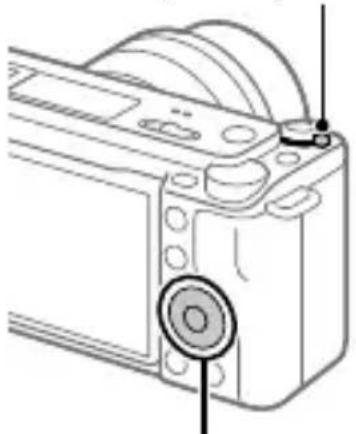
ON/OFF (Power) switch
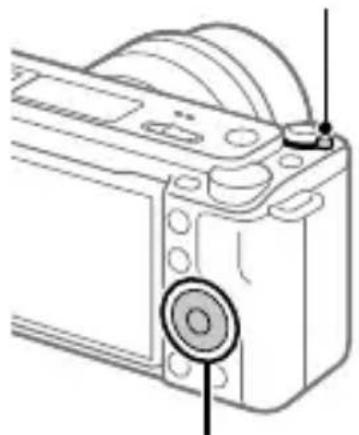
Control wheel/center button
1 Set the ON/OFF (Power) switch to "ON" to turn on the camera.
Select the desired language and then press the center of the control wheel.
- The privacy notice screen will appear. Read the privacy notice regarding biometrics by opening the link using your smartphone, etc.
Press the center of the control wheel.
Follow the instructions on the camera screen to connect the camera with your smartphone and perform the initial setup.
- You can also configure or change the initial settings later from the MENU of the camera.
- Connecting (pairing) the camera with your smartphone later
For details on the connection method, refer to the following Help Guide URL: https://rd1.sony.net/help/ilmc/2310_pairs/h_zz/
Shooting movies
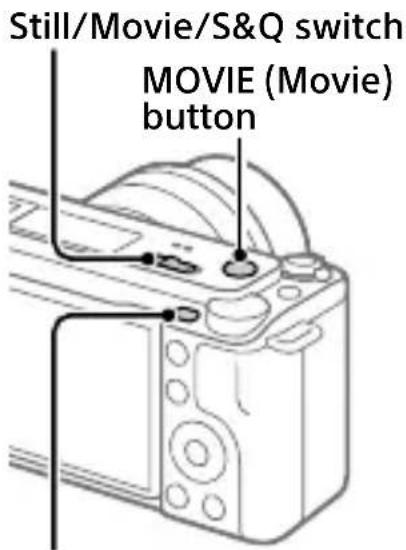
MENUButton
1 Set the Still/Movie/S&Q switch to Movie).
Press the MENU button and select (Shooting) → [Shooting Mode] → [Shoot Mode] → the desired shooting mode.
Press the MOVIE (Movie) button to start recording.
Press the MOVIE (Movie) button again to stop recording.
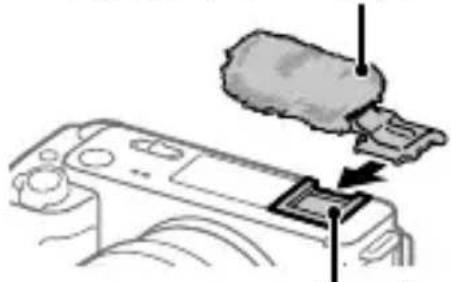
Using the wind screen (supplied)
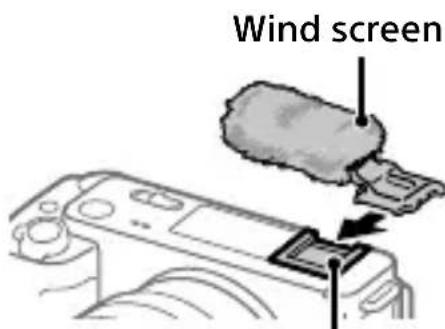
Multi Interface Shoe
Use the wind screen to reduce wind noise picked up by the internal microphone when recording a movie. Attach the wind screen to the Multi Interface Shoe.
Notes on use
Refer to "Precautions" in the "Help Guide" as well.
Notes on handling the product
- Do not leave the lens exposed to a strong light source such as sunlight. Because of the lens's condensing function, doing so may cause smoke, fire, or a malfunction inside the camera body or the lens. If you have to leave the camera exposed to a light source such as sunlight, attach the lens cap to the lens.
- If sunlight or other strong light enters the camera through the lens, it may focus inside the camera and cause smoke or fire. Attach the lens cap when storing the camera. When shooting with backlighting, keep the sun sufficiently far away from the angle of view. Even if it is slightly away from the angle of view, smoke or fire may still occur.
- Do not look at sunlight or a strong light source through the lens when it is detached. This may result in unrecoverable damage to the eyes or cause a malfunction.
- This camera (including accessories) has magnet(s) which may interfere with pacemakers, programmable shunt valves for hydrocephalus treatment, or other medical devices. Do not place this camera close to persons who use such medical devices. Consult your doctor before using this camera if you use any such medical device.
-
Increase the volume gradually. Sudden loud noises can damage your ears. Be especially careful when listening to headphones.
-
Do not leave the camera, the supplied accessories, or memory cards within the reach of infants. They may be accidentally swallowed. If this occurs, consult a doctor immediately.
- If the monitor is damaged, stop using the camera immediately. The damaged parts may harm your hands, face, etc.
- When shooting still images continuously, the monitor may flash between the shooting screen and a black screen. If you keep watching the screen in this situation, you may experience uncomfortable symptoms such as feeling of unwellness. If you experience uncomfortable symptoms, stop using the camera, and consult your doctor as necessary.
-
When recording or streaming for long periods of time or recording 4K movies, if the same part of your skin touches the camera for a long period of time while using the camera, even if the camera does not feel hot to you, it may cause symptoms of a low-temperature burn such as redness or blistering. Pay special attention in the following situations and use a tripod, etc.
-
When using the camera in a high temperature environment
- When someone with poor circulation or impaired skin sensation uses the camera
- When using the camera with [Auto Power OFF Temp.] set to [High]
Sony lenses/accessories
Using this unit with products from other manufacturers may affect its performance, leading to accidents or malfunction.
Note on the 5 GHz band for wireless LAN
When using the wireless LAN function outdoors, set the band to 2.4 GHz by following the procedure below. (WW694956 only)
- MENU [Network) [Wi-Fi]
→[Wi-Fi Frequency Band]
How to turn off wireless network functions (Wi-Fi, etc.) temporarily
When you board an airplane, etc., you can turn off all wireless network functions temporarily using [Airplane Mode].
For Customers in the U.S.A. and Canada
This equipment complies with FCC radiation exposure limits set forth for an uncontrolled environment and meets the FCC radio frequency (RF) Exposure Guidelines. This equipment has very low levels of RF energy that is deemed to comply without testing of specific absorption rate (SAR). The available scientific evidence does not show that any health problems are associated with using low power wireless devices. There is no proof, however, that these low power wireless devices are absolutely safe. Low power Wireless devices emit low levels of radio frequency energy (RF) in the microwave range while being used. Whereas high levels of RF can produce health effects (by heating tissue), exposure of low-level RF that does not produce heating effects causes no known adverse health effects. Many studies of low-level RF exposures have not found any biological effects. Some studies have suggested that some biological effects might occur, but such findings have not been confirmed by additional research.
This equipment has been tested and found to comply with ISED radiation exposure limits set forth for an uncontrolled environment and meets RSS-102 of the ISED radio frequency (RF) Exposure rules.
For Customers in the U.S.A.
For question regarding your product or for the Sony Service Center nearest you, call 1-800-222-SONY (7669).
Supplier's Declaration of Conformity
Trade Name : SONY
Model:WW694956
Responsible Party : Sony Electronics Inc.
Address: 16535 Via Esprillo, San
Diego, CA 92127 U.S.A.
Telephone Number : 858-942-2230
Important note on use of 5 GHz wireless LAN
Compliance with FCC requirement 15.407(c)
Data transmission is always initiated by software, which is the passed down through the MAC, through the digital and analog baseband, and finally to the RF chip. Several special packets are initiated by the MAC. These are the only ways the digital baseband portion will turn on the RF transmitter, which it then turns off at the end of the packet. Therefore, the transmitter will be on only while one of the aforementioned packets is being transmitted. In other words, this device automatically discontinue transmission in case of either absence of information to transmit or operational failure.
Frequency Tolerance: ± 20 ppm
For Customers in Canada
5 150-5 350 MHz band is restricted to indoor operation only.
High-power radars are allocated as primary users (i.e. priority users) of the bands 5 250-5 350 MHz and 5 650-5 850 MHz and that these radars could cause interference and/or damage to LE-LAN devices.
For Customers in Europe
| IEEE802.11 b/g/n | 2 400 MHz | < 60 mW e.i.r.p. |
| IEEE802.11 a/n/ac | 5 150 - 5 350 MHz 5 470 - 5 725 MHz | < 35 mW e.i.r.p. |
| IEEE802.11 a/n/ac | 5 725 - 5 850 MHz | < 25 mW e.i.r.p. |
| Bluetooth | 2 400 MHz | < 10 mW e.i.r.p. |
Hereby, Sony Corporation declares that this equipment is in compliance with Directive 2014/53/EU.
The full text of the EU declaration of conformity is available at the following internet address:
https://www.compliance.sony.eu
Hereby, Sony Corporation declares that this equipment is in compliance with the UK relevant statutory requirements.
The full text of the declaration of conformity is available at the following internet address:
https://compliance.sony.co.uk
For this radio equipment the following restrictions on putting into service or of requirements for authorization of use apply in AT/BE/BG/CY/CZ/DK/ EE/FI/FR/DE/EL/HU/IE/IT/LV/LT/LU/ MT/NL/PL/PT/RO/SK/SI/ES/SE/UK/ UK(NI)/HR/IS/LI/NO/CH/AL/BA/MK/ MD/RS/ME/XK/TR: 5150 - 5350 MHz band is restricted to indoor operations only.
For customers who purchased their camera from a store in Japan that caters to tourists
Note
Some certification marks for standards supported by the camera can be confirmed on the screen of the camera.
Select MENU (Setup)
[Setup Option] [Certification Logo].
Specifications
Camera
[System]
Camera Type: Interchangeable Lens Digital Camera
Lens: Sony E-mount lens
[Image sensor]
Image format: 35 mm full frame, CMOS image sensor
Effective pixel number of camera:
Approx. 12 100 000 pixels
Total pixel number of camera:
Approx. 12 900 000 pixels
[General]
Rated input: 7.2V - 3.5W
Operating temperature: 0 to 40^ (32 to 104^ )
Storage temperature: -20 to 55^ (-4 to 131 F)
Dimensions (W/H/D) (Approx.): 121.0 × 71.9 × 54.3 mm ( 47/8 × 27/8 × 21/4 in. )
Mass (Approx.): 483 g (1 lb 1.1 oz) (including battery pack, SD Card)
[Wireless LAN]
WW694956 (see name plate on the bottom of camera)
Supported format: IEEE 802.11 a/b/g/n/ac
Frequency band: 2.4 GHz/5 GHz
WW942672 (see name plate on the bottom of camera)
Supported format: IEEE 802.11 b/g/n
Frequency band: 2.4 GHz
Rechargeable battery pack NP-FZ100
Rated voltage: 7.2 V---
Design and specifications are subject to change without notice.
Compatible iPhone/iPad models
iPhone SE (3rd generation), iPhone 13 Pro Max, iPhone 13 Pro, iPhone 13, iPhone 13 mini, iPhone 12 Pro Max, iPhone 12 Pro, iPhone 12, iPhone 12 mini, iPhone SE (2nd generation), iPhone 11 Pro Max, iPhone 11 Pro, iPhone 11, iPhone XS Max, iPhone XS, iPhone XR, iPhone X, iPhone 8 Plus, iPhone 8, iPhone 7 Plus, iPhone 7, iPhone SE, iPhone 6s Plus, iPhone 6s, iPad Air (3rd, 4th, and 5th generation), iPad (5th through 9th generation), iPad mini (6th generation), iPad Pro 12.9-inch (1st through 5th generation), iPad Pro 11-inch (3rd generation), iPad Pro 11-inch (2nd generation), iPad Pro 11-inch, iPad Pro 10.5-inch, iPad Pro 9.7-inch, iPad Air 2, iPad mini (5th generation), iPad mini 4 (As of September 2022)
Trademarks/Licensees
- is a trademark of Sony Group Corporation.
- Apple, iPhone and iPad are trademarks of Apple Inc., registered in the U.S. and other countries.
- USB Type-C® and USB-C® are registered trademarks of USB Implementers Forum.
- Wi-Fi, the Wi-Fi logo and Wi-Fi Protected Setup are registered trademarks or trademarks of the Wi-Fi Alliance.
- The Bluetooth® word mark and logos are registered trademarks owned by Bluetooth SIG, Inc. and any use of such marks by Sony Group Corporation and its subsidiaries is under license.
-
QR Code is a trademark of Denso Wave Inc.
-
In addition, system and product names used in this manual are, in general, trademarks or registered trademarks of their respective developers or manufacturers. However, the ^TM or ® marks may not be used in all cases in this manual.
IMPORTANT - Read the End User Software License Agreement before using your Sony product.
Using your product indicates your acceptance of the End User Software License Agreement. The software license agreement between you and Sony is available at the following URL: (https://rd1.sony.net/help/di/el23/h_zz/)
- Use of the Made for Apple badge means that an accessory has been designed to connect specifically to the Apple product(s) identified in the badge, and has been certified by the developer to meet Apple performance standards. Apple is not responsible for the operation of this device or its compliance with safety and regulatory standards.
Made for
iPhone iPad
Additional information on this product and answers to frequently asked questions can be found at our Customer Support Website.
https://www.sony.net/
https://rd1.sony.net/help/iloc/2310/h_zz/
ZV-E1 Guide d'aide

Préparatifs
https://www.sony.net/ca/
Griffe multi-interface
Batterie rechargeable NP-FZ100
https://rd1.sony.net/help/iloc/2310/h_zz/
ZV-E1 Guía de ayuda

Preparativos
https://rd1.sony.net/help/iloc/2310/h_zz/
ZV-E1 Guida

Preparazioni
https://rd1.sony.net/help/iloc/2310/h_zz/
ZV-E1 Guia de ajuda

Preparativos
Verificacao dos itens fornecidos
https://www.sony.net/ca/
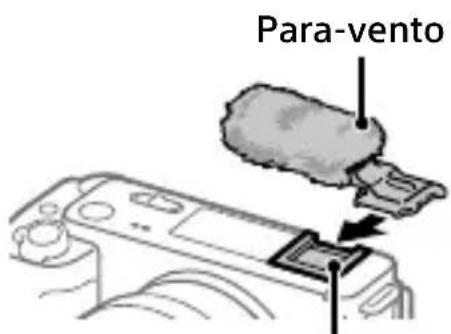
Sapata multi-interface
Use o para-venture para reduzir o ruido doventurecaptadopelomicrofone interno quando gravar um这部电影.
Coloque o para-venture na sapata multi-interface.
https://rd1.sony.net/help/iloc/2310/h_zz/
ZV-E1 Helpgids

Voorbereidingen
https://www.sony.net/ca/
https://rd1.sony.net/help/ilc/2310/h_zz/
https://www.sony.net/ca/
https://rd1.sony.net/help/ilc/2310/h_zz/
ZV-E1 CnpaBoHoe pyKOBoDCTBO

ПодгOTOBka
Поберka komплектуни
YncloBcKo6kax yKa3bIBaET KOJIInueCTBO WtYK.
Kamepa (1)
- AkkymyjTop NP-FZ100 (1)
- Bětrpo3aùnTHbɪŋ ឃkpaɪn (1) (πρικρeŋλen K aʌdʌnTepy Bětrpo3aùnTHo rO ឃkpaɪnə)
- Адампетер Ветрозаши THОЗкрана (1)
-Плесьов ременb (1)
Kpbiuka Kopnyca (1) (npnkpenlaetc K kamepe)
Kpbiuka pa3bema (1) (npnkpenlaetc K kamepe)
PykoBoDCTBO no Haayalny pa60TbI (daHHOe pykoBoDCTBO) (1)
CnpaBoUHnK(1)
BcTaBka aKKymyIaTopa (npnlaeraTc)/KapTbI naMaTn (npoJaETcOtdeIbHo) B KaMepy
OTKpoITe KpbIshky aKKymyJIaTOpHOrO OTceKa N KpbIShKy OTceKa KapTbI NaMaTI, BCTaBbTe aKKymyJIaTOp/KapTy NaMaTIu 3aKpoITe KpbIshKn.
HaXaB pbIyaxok fNkcaTopa, BCTaBbTe aKKymyJrTOp.
Y6eIntecb, YTO cpe3aHHbIyroI paCNOJoxKe H npabNlbHO.
- Ecnn KaMepa BKNIOUeHa, aKKyMylrTop He 6yJeT 3apJxKaTbcra.
C nomoubIO mMeoueOcB npoJaKe Ka6eIy USB Type-C noKlouHte pa3bem USB Type-C Ha Kamepe K BHeuHemy NCTOCHKY NHTaHn, HapnpMep mEoueMycB npoJaKe aAnTepy nepemehHoro ToKa USB IIN nepeHocHMy aKKymyJrTOpy.
Korda NaHcHeTc3apdka, 3aRopntcNnDnKaTOp 3apdKn. Korda 3apdKa 3aBepuNTc, nDnKaTOp 3apdKn IOracHeT.
https://www.sony.net/ca/
IpoceDypblI JnHaJbHn HaCTpOKn KaMepbl
BbIKIOuataTeIb ON/OFF (IITaHne)
Kolencko ynpaBJeHn/ ceHTpaJIbHa KHOJa
1ДяВКЛIOUeHЯKaMepbl yCTaHOBNTe BbIKJIIOuAteIb ON/OFF (Ntahne)B“ON".
2 BbI6epnte HxKhbl I3blk, a 3aTeM haxMnte no ceHTpy KoIecnka ynpablenna.
MhoronHTeppechbippa3bem
IcnoJIb3yIte BeTpOaUHTbI
3KpaH IJIy UMeHbUeHnY Shyma
BeTpa, YJaBInBaEMoR O BHyTpEHHM
MnKpOfoHOM BO BpeM
BnDeO3aPiNCn.
PpIKpeNITe BeTpOaUHTbI 3KpaH K
MHOrOHTePoeiChOMy pa3beMy.
"MepblnpedoctopoxkHOCTN" B "CnpabOuHoe pyKOBODCTBO".
PpimmeaHn no o6paueHnIO c n3deJnem
He octabIyTe obBeKTHB noD BO3dEInCTBnEM CINbHOrO nCTOCHNka CBeta, HApPIMep COJHeuHO rCBeta. B pe3yIbTaTe KOHNcaun Ha oBeKTHBE 3TO MOKeT pINBeCTN K NOBJIeHIO DbIMa, BO3rOpAHIO NII HEnCnPaBHOCTN BHyTpN KopnyCa KaMepBi IIN OBeKTHBa. EcII HJxHOb OCTaBnTB KaMepy IOd BO3dEInCTBnEM nCTOCHNka CBeta, HApPIMep, COJHeuHO rCBeta, npIKpePiTE KpbIiSKy ObBeKTHBa K OBBeKTHBy.
- EcIn coJIHeHbI nIN dpyroJrPKn CBET nonaTeB KaMepyYepe3 obBeKTHB, OH MOxEtCfOkycuPoBaTbcra BHyTpN KaMepblN pRiVeCTN K NOBLeHNIo DbIMaNII BO3rOpAHNIIO. YCTaHOBNTeKpbIshky obBeKTbA npn XpaHEnnKaMepbl. Ppi CbemKe c noDcBtKO paCpOlaRaTecb TaK, YTO6bl COJIHcE HaxOdiNoCb DoCTaTOUHO daJeKOOT yrna 063opa. DaXe ecIn OHO HaxODITcHemHOro B CTopoHE OTyrna 063opa, 3TO BCE Jx Me MoXeT pRiVeCTN K NOBLeHNIo DbIMaNII BO3rOpAHNIIO.
He cmOTpnte Ha coJHneuHbI CBET NIN CNJbHbI NCTOCHNK CBeta Ype3 06BeKtNB, KOrda OH OTcoeHNHeN. 3TO MOxET npNBecTN K Heo6paTMOMy NOBpeXdEHNIO Tla3 INI CTaTB pUHHOH HenCnpaBHOCTN.
-Данная камера (ВКЛючая
akceccyapbl) ochaшеHa
MaHHTOM(AMN), KOTOpbI
MOXeT BJIЯТь Ha pa6Oty
KapdIOCTMMyJATOPOB,
ПрограммИруемых УHTиpyUOx
Кларанов Ддя Лechен
rIДроцфалпи Илдpyгnx
MeDицнСнХУСТРОИСТВ. He
pa3MeцайTe ДанHyю Камер
ВБлзи ЛIC, ПОльЗУОxxCЯТКIMN
MeDицнСнIMU YСТРОИСТВам.
ПрOKонсльтирУITECB C ВрачOM
пeredи ИСПОЛьЗОВАнEM ДадНоH
Камерbl, ecIN Bbl ПОЛьЗYEТсь
ЛIOбьIM MeDицнHСКIM UYSTPОИСТВOM.
- YBENEuBaTe rpoMkoCTb nocTepeHNo. BHe3aHbIe rpoMKne Wymbl MOryT npNBecTN K NOBpeXdEHNIO opraHOB Clyxa. Bydte ocObeHNO OCTOpoxHbI npn IcNoJIb3OBAHn HayUHKnOB.
He octabJyTe KaMepy, npnlaRaembIe npHaJdLeXHOCTn IJI KApTbI NaMAYTN B MeCTe, DOCTynHom dJa MaJeHbKnx DeTei. Ix MoXHo cIyauaHNo npOrIOTntb. Ecn 3TO npOnzOuIeT, HemeJeHNO o6paNTecb K BpaUy.
-При поврждени монитopa
HemeДленHo пекрази
Использоване Камерbl.
Поврждени частMuут
Травмироваты Ваши руки, Лю
и T.I.
BoBpemHaHepbIBHOJ
OToOCbEMKn BO3MOxH0 MURaHne
MOHITOPa MeKdy 3KpaHOM
CbeMKn UeRbIM 3KpaHOM.EcIn
Ha6JIIOdaTb 3a 3KpaHOM B 3TOI
CHTyaUHN, Bbl MOKeTe OUsyuaTb
CMMTOMbl DnCKOMΦOpTa,
HaPmEep NLOXoe CaMOyBCTBHe.
Pn BO3HKNHOBeHn CmMTOMOB
DnCKOMΦOpTa PpeKpaTnte
NCNoJIb3OBAHne KaMepbl
O6paTNTecb K BpaCy B Clyuae
Heo6XODIMOCTN.
- PnpДЛNTeJbHOB 3aNcN INIINCTPMMNHRe, ININ JKe BnDeO3aNcN4K, ecIn BO BpeM nCNoJIb3OBAHnKaMEpbI OINH I TO JKe yUacTOKBaWei KoxN KacaETcR KaMEpbIBTeueHne DINTeJIbHOrO nepNoJaBpeMeHn, DaXe ecIn KaMepa HeYBIAETcR TOpAYe H aOyNb, 3TOMOxKET npNBecTN K NOABLeHIO CmMTOMOB Hn3KOteMpePaTyphORO OXORA, NaPpIMep NOKpaChEnIO INI NoABLeHIO BOLdbipeB. B cJeDyUoix CnTyauqnx 6yDbTe ocObeHNO OCTOpOXHbl INCNoJIb3yIte WtTaINB I T.I.
Cpok rapaHTn (JeT): 2. Cpok cnYx6bI (JeT): 7.
IpnOBnapyKeHnIpOu3BODCTBeHHbIX HeIOCTaTKOB N3dJIINB TeueHne Cpoka rapaHTn COHn IIN ABTOpU3OBaHHbIE CepBnCHbIe LcHTpbI (ACU) no CBOEMY YCMOTpeHnIO JIn6o yCTpaHrT INCNOJb3OBaHNEm HObIX IIN BOCCTaHOBJIeHHbIX 3aNuaCTeN, JIn60 3aMeHrT IN3dJIeNae aHaJOnuHbIM HOBbIM IIN BOCCTaHOBJIeHHbIM, JIn60 BO3MeCTrT UJNaueHHyO CTOnMOCTb. PeKOMeHnyETc CoXpaHNTb DOkUMeHT, NOITBepKdaIOUsn DaTy NOKyPKN IN3dJIeNIA.
Для coхpaheHЯ ГаHTи
Heo6xOIMo CO6JIIOdaTb
INCTpyKUIM NO INCNOJb3OBaHNUO,
XpaHeHIO I TpaHCnOpTIpOBKe,
3KcPnyaTIpOBaTb N3DeJIne TOlbKO
B JInuHbIX N DOMaUHNX UeJIAX, He
NoDBeRpaTb MoINΦNkauN INI
HeKBaJINΦNcIPoBaHHomy peMOHTy,
He yJaJIaTb 3TNKeTKy C cepNHBIM
HOMEpOM.
TapaHTnA CoHn He orpaHnUBaET npaBa nOTpe6nteJe, yCTaHOBJeHHbIe npIMeHMbIM 3aKOHOJaTeJIbCTBOM B OTHoWeHm TOPROBn IOTpe6nteJbCKMn TOBapAMN.
Cny6a npDpeKKn:
Pocsn88002007667
Bénapycb 8 820 0071 76 67
Ka3axCTaH 88000707035
https://rd1.sony.net/help/iloc/2310/h_zz/
ZV-E1 DoBikka

Підrostовka
Ipebipka npilaand, 0o doaTbc8
YncnoBdykkax Bka3yeHaKilbKiCTb WtYK.
- Φοτοapanapat (1)
- Akymy列入 NP-FZ100 (1)
- Bitpo3axnchn ekpaH (1) (npncdHaHO do aanTepa BiTp03axnchoro ekpaHa)
- Адампетер Витрахи chorо ekрара (1)
-Плесовий ремиь (1)
Kpnka Kopnycy (1) (yctaHOJIeHO Ha foToanapati)
KpnskaYepeBnka (1) (yctaHOJIeHO Ha foToanapati)
- Посibнк i3 поатку
po6otn (цeй посibнк) (1)
- DoBikobn noci6HnK (1)
BctablanHHaTaapei (doaetbca)/kaptn nam'raTi (npodaetboc OkpemO) y fotoanapat
Bidkpinykny Bicikny dny 6atapei kpiy Bicikny dny Kaptn nam'ayi, BCTaBe 6atapeo/kapTu naM'ayi Ta 3akpy Te Kpwn.
BCTaTe 6aTapeIO, OndHocHo HATnCKaIouN BaXijb φikcaTopa.
CniDkyuTe, uo6HaDpi3aHn KyT 3HaXoDnBCaY npaBnIbHomy nOLOKeHHi.
Ie foanapat cmyichn i3 kaptamn nam'ayi SD.
Ko kaTaNAM'AYTI BIKOPNCTOBYETbCra i3 foanapatom
yepwe, BiDfOpMaTyIe ii 3a donomoroio fotoanapata, o6
3a6e3neuHTn hadiHny po6Otu.
3apxkan76atapei
I03HaayKn BCTaHOBJIeHHJ
YctaHOBiTb 06'KTKB, BnpiBnBm mix c06OIO dBi 6iJI nO3HaUKN (no3HaUKN BCTaHOBJeHHa) Ha 06'KTKBi Ta foTOanapati.
2 3JIeRka npHTnCKaHouN 06'KTKNBdo foToanapata, o6epTaIte 06'KTKB y HAnpMky cTpiJKN, DOKN BIn He Klaune y 3aΦiKCOBaHOMY nIoJKeHHi.
Tapaantia nooepbca Ha Bnpobn, npd6ahi Ha TepuToPi YkpaHn.
TepmiH rapaHTii (pokib): 2. TepmiH cnjx6n (pokib): 7.
Pn BnAeHHi BnpO6HuX
HeDolikB Bnpo6y npotraom TepmiHy
rapaHTI CoHi a6o YnoBHOBaKeHn
LcHTp 3 O6CnyroByBaHHa «Cohi»
(ULO) Ha cBi po3cyn a6o ycHyTb
ix 3 BnKOpNCTaHHaM HOBnx a6o BiHOBJIeHNX 3aNuaCTINH, a6o
3aMiHЯTb Bnpi6 aHaIoriguHIM HOBIM
aO BIDHOBHeHM, aO BIDUKOyIOTb
cnpaehy BapTicb. PeKoMeHnyEtbcra 36epertn DokymeHT, kN
LJIaX, He NiIaBaTaM MoNΦiKaUII
a6o HeKbaiifikOBaHOMy pemHTy,
He BuaJATn eTKeTKy 3 cepiHm
HOMEpOM.
TapaHTi CoHi He obmexyec npaba
CNOXNBaUIB, BCTaHOBJIeHI YHHNIM
3aKHOdaBCTBOM IOIO TOpRIBJI
CNOXKNBcIMNTOBaPamN.
Cnyk6a niIDTpumMkn:
YkpaHa 0 800 307 669
e-mail info@sony.ua
Ampcnyo:
https://www.保养.ua/support
(TG-01-1)
Cymichi mojeli iPhone/iPad
iPhone SE (3 поколинь), iPhone 13 Pro Max, iPhone 13 Pro, iPhone 13, iPhone 13 mini, iPhone 12 Pro Max, iPhone 12 Pro, iPhone 12, iPhone 12 mini, iPhone SE (2 поколинь), iPhone 11 Pro Max, iPhone 11 Pro, iPhone 11, iPhone XS Max, iPhone XS, iPhone XR, iPhone X, iPhone 8 Plus, iPhone 8, iPhone 7 Plus, iPhone 7, iPhone SE, iPhone 6s Plus, iPhone 6s, iPad Air (3, 4 ta 5 поколинь), iPad (3 5 no 9 поколинь), iPad mini (6 поколинь), iPad Pro 12,9-дюма (3 1 no 5 поколинь), iPad Pro 11-дюмib (3 поколинь), iPad Pro 11-дюмib (2 поколинь), iPad Pro 11-дюмib, iPad Pro 10,5-дюмa, iPad Pro 9,7-дюмa, iPad Air 2, iPad mini (5 поколинь), iPad mini 4 (Стоном на весянь 2022 p.)
Tobaphi 3HaKn/JIiueH3ii
- GTOBAPHIM 3HaKOM KOMnHaHII Sony Group Corporation.
Apple, iPhone Ta iPad € TOBapHMn 3HaKaMn Apple Inc., 3apeCtpoBaHmN B CUSA Ta iHux KpaIHax. - USB Type-C® Ta USB-C® ∈ 3apečtpoBaHIMM TOBAPHIMN 3HaKaMa USB Implementers Forum.
Wi-Fi, Jorotn Wi-Fi Ta Wi-Fi Protected Setup e 3apeectpoBaHmN TOBapHmN 3HaKaMn a60 TOBapHmN 3HaKaMn Wi-Fi Alliance.
CIOBecnTobapHn 3HaK iIorottnn Bluetooth 念 3apeCTpOBaHMn TOBapHMn 3HaKaMn, IIO HaJeXaTb Bluetooth SIG, Inc., i6yDb-jaKe BIKOPNCtAHNr TaKINx 3HaKIB KOMnaiEio Sony Group Corporation Ta II DoOpHIMn KOMnaHiaMn 3diCHIOETbCra 3a LiueH3ieIO. - QR Code εΤΟΒαρΗΜ 3ΗΑΚΟ Komηαιδι Denso Wave Inc.
KpIM TOrO,Ha3Bn CnCTeM Ta BInpo6iB,RAKi BnKOpNCTOByOTbcy U cIbOMy Noc6Hnky,RA npaBnIO, E TOBaPHmN 3HaKaAMn a6o 3apeCtPOBaHmN TOBaPHmN 3HaKaAMN BiINOBiDnHX PO3po6HnKIB Y BInpo6HnKIB. Ipote 3HaKn TM a6o R MoKyTB BnKOpNCTOByBaTnCay Y cIbOMy Noc6Hnky He B ycix BnPaIkax.
BAJKINBO -Почиайт e liueh3iHy yrody 3 kInceBm KOpNCTyBauchem nporpamHoro 3a6e3neuHn, nepsh hIX KOpNCTyBatncs Bnpo6om Sony.
BnKOpNCtAHNBApo6yO3HaayaE BaUy 3rOdy 3IiueH3iINHOIO yroIo 3 KInCeBIM KopncTyBaueM nporpamHOro 3a6e3neuHHe. IiueH3iHa yroDa Ha nporpamHe 3a6e3neuHnMix Bamn Ta Sony doCTynHa 3a TakoU URL-aDpeco: (https://rd1.sony.net/help/di/ el23/h_zz/)
BnKOpNCTaHnMaTK "BnroTOBJeHO IaApple"O3Hauea, 10 akcecyap po3po6JeHo cneuaJIbHo Ira nIeHNaHHaIO npOdyKTIB Apple, Bka3aHnx B MiTci, i ceptuΦiKOBaHO PO3po6HnKOM Ha BiINoBIHicTb cTaHdaptAm kocTi Apple. Apple He Hece BiINoBIdaNbHocTi 3a pO6OTy Cboro npncTpOHO a6o Noro BiINoBIHcTb cTaHdaptAm 6e3neKn Ta HopMaTINBHnM BIMOram.

IodatkoBy iHopmaciIO CTOCOBHO 乙bOro Bnpo6y Ta BiINoBIi Ha TUNOBI 3aNTaHH MoXHa 3HaHTN Ha Be6caTl CnyK6n NiITpIMKn CNOXNBaivB.
https://www.sony.net/
UA
Om "Hjalpguide"
https://rd1.sony.net/help/ilc/2310/h_zz/
ZV-E1 Hjalpguide

Förberedelser
https://www.sony.net/ca/
https://rd1.sony.net/help/iloc/2310/h_zz/
ZV-E1 Käytöopas

Valmistelut
https://www.sony.net/ca/
https://www.sony.net/ca/
ON/OFF (Strømbryter)
Kontrollhjul/senterknapp
(https://rd1.sony.net/help/di/ el23/h_zz/)
NO
https://www.sony.net/ca/
Procedure for den indledende kameraopsæting
ON/OFF (Strøm)-kontakt
Kontrolhul/midterknap