
LZR2 - Laser level BLACK & DECKER - Free user manual and instructions
Find the device manual for free LZR2 BLACK & DECKER in PDF.


| Brand | Black & Decker |
| Model | LZR2 |
| Product type | Laser level with cable and conduit detector |
| Laser class | 2 (per EN 60825-1) |
| Operating voltage | 9 V (6LR61 battery) |
| Battery type | 6LR61 (9V) |
| Weight (without battery) | 0.45 kg |
| Operating temperature | 0 °C to 40 °C |
| Main functions | Projection of leveling laser lines, detection of live cables (230 V AC) and metal conduits in walls |
| Live cable detection | Yes, up to 230 V AC |
| Metal conduit detection | Yes |
| Included accessories | Marking/suspension accessory, keyhole accessory, spacing accessory |
| Laser safety | Do not look directly into the beam. Class 2: max exposure 0.25 s. |
| Power supply | 9V battery (non-rechargeable) |
| Warranty | 24 months (domestic use) |
| CE compliance | EN 61010-1, EN 60825-1, EN 61000-6-3, EN 61000-6-1 |
| Intended use | Domestic (DIY) |
| Maintenance and cleaning | Wipe with a soft, dry cloth. Do not use solvents. |
| Repairs | Entrust to an authorized technician using original parts. |
| General information | Manufactured by Black & Decker. More info at www.blackanddecker.com. |
Frequently Asked Questions - LZR2 BLACK & DECKER
User questions about LZR2 BLACK & DECKER
0 question about this device. Answer the ones you know or ask your own.
Ask a new question about this device
Download the instructions for your Laser level in PDF format for free! Find your manual LZR2 - BLACK & DECKER and take your electronic device back in hand. On this page are published all the documents necessary for the use of your device. LZR2 by BLACK & DECKER.
USER MANUAL LZR2 BLACK & DECKER
This Black & Decker tool has been designed to aid in DIY applications: projecting laser lines, and locating live wires operating at mains voltage (230 V AC) and metal pipes behind internal walls. This tool is intended for consumer use only.
Safety instructions
Warning! When using battery-powered tools, basic safety precautions, including the following, should always be followed to reduce the risk of fire, leaking batteries, personal injury and material damage.
- Read all of this manual carefully before operating the tool.
- Retain this manual for future reference.
Keep work area clean
Cluttered areas and benches can cause accidents.
Consider work area environment
Do not expose the tool to rain. Do not use the tool in damp or wet conditions. Keep the work area well lit. Do not use the tool where there is a risk of causing fire or explosion, e.g. in the presence of flammable liquids and gases.
Keep children away
Do not allow children, visitors or animals to come near the work area or to touch the tool.
Do not overreach
Keep proper footing and balance at all times.
Stay alert
Watch what you are doing. Use common sense.
Do not operate the tool when you are tired.
Use appropriate tool
The intended use is described in this instruction manual.
Warning! The use of any accessory or attachment or performance of any operation with this tool other than those recommended in this instruction manual may present a risk of personal injury.
Check for damaged parts
Before use, carefully check the tool for damage. Ensure that the tool will operate properly and perform its intended function. Do not use the tool if any part is damaged or defective.
Store idle tools
When not in use, tools and batteries should be stored in a dry, locked up or high place, out of reach of children.
Repairs
This tool complies with relevant safety requirements.
Repairs should only be carried out by qualified persons using original spare parts; otherwise this may result in considerable danger to the user.
Additional safety instructions for non-rechargeable batteries
- Never attempt to open for any reason.
Do not store in locations where the temperature may exceed 40^
- When disposing of batteries, follow the instructions given in the section "Protecting the environment". Do not incinerate the batteries.
Under extreme conditions, battery leakage may occur. When you notice liquid on the batteries, proceed as follows:
- Carefully wipe the liquid off using a cloth.
Avoid skin contact.
Additional safety instructions for lasers

Warning! Laser radiation.

Do not look into the laser beam.

Do not view the laser beam directly with optical instruments.

Refer to the laser product characteristics.
This laser complies with class 2 according to EN 60825-1:1 1994+A11. Do not replace a laser diode with a different type. If damaged, have the laser repaired by an authorised repair agent.
- Do not use the laser for any purpose other than projecting laser lines.
An exposure of the eye to the beam of a class 2 laser is considered safe for a maximum of 0.25 seconds. Eyelid reflexes will normally provide adequate protection. At distances over 1m the laser complies with class 1 and thus is considered completely safe.
- Never look into the laser beam directly and intentionally.
- Do not use optical tools to view the laser beam.
- Do not set up the tool at a position where the laser beam can cross any person at head height.
- Do not let children come near the laser.
Additional safety instructions for pipe and wire detectors
- Do not use the tool to detect AC voltage in uninsulated, exposed or free wires.
- Do not use the tool as a substitute for a voltmeter.
-
Be aware that the tool may not always properly detect all pipes and wires. The following conditions can cause inaccurate results:
-
Low battery
- Thick walls with thin pipes or wires
- Very thick walls
-
Very deep wires or pipes
-
Walls covered with metal
- Very humid conditions
-
Shielded cables
-
Before use, always test the tool by detecting a known pipe or wire.
- If in doubt contact a qualified contractor.
Warning! This tool will not detect wires in circuits isolated from the mains supply, cables operating at direct current (DC) or wires used for telecommunication or computer systems. Hidden wires (e.g. wall lights) may not be detected when switches are in the off position.
Warning! This tool will not detect pipes of any other material than metal.
Features
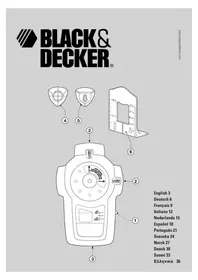
- On/off switch (laser)
- On/off switch/sensitivity dial (detector)
3 LED indicator (metal pipes) - LED indicator (live wires)
- Laser apertures
- Marking/hanging insert
- Keyhole insert
- Spacer insert
Assembly
Warning! Make sure that the tool is switched off.
Fitting the battery (fig. A)
- Remove the battery cover (9) from the tool.
- Connect the battery to the connector. The larger battery terminal connects to the smaller connector terminal.
- Refit the cover and let it click into place.
Fitting and removing inserts
The marking/hanging insert is used to make a mark on the level line or to hang the tool on a drywall board using the drywall pin supplied. The keyhole insert is used to hang the tool on other types of wall using a screw or nail. The spacer insert is used to extend the laser line.
Fitting
- Place the insert into the holder from the back of the tool.
- Align the notches on the insert with the recesses in the insert holder.
- Let the insert click into place.
Removing
- Keep the notches on the insert depressed.
- Push the insert out of the holder.
Use
Using the laser level function (fig. B)
- Place the tool flat against the wall as shown.
- Push the on/off switch (1) up to switch the tool on.
- Move the tool as necessary to position the laser line.
- If necessary, hang the unit on the wall using the appropriate insert.
Note: the laser lines will only be level if the tool is kept within 5^ from vertical.
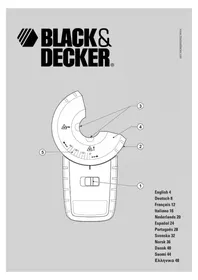
Using the detector function (fig. C)
Detecting live wires
Warning! Test the unit on a known source of AC current before use.
- Make sure unit is away from area being scanned and any other AC current source.
- Turn the sensitivity dial (2) clockwise until the LED indicator (3) is on.
- Slowly turn the dial (2) counterclockwise until the LED indicator (3) is off.
- Test the unit by holding it adjacent to a plug connected to a live socket. Confirm the operation of the LED indicator (3).
The unit is now ready for use and is set to maximum sensitivity.
- While holding the unit with one hand place your other hand on the surface close to the area being scanned.
- Move the tool slowly and smoothly across the surface area, approaching from different directions.
When an AC source is located, the LED indicator (4) will blink intermittently.
After detecting the work area repeat the testing procedure to confirm the operation of the unit.
Detecting metal pipes
Warning! Test the unit on a known metal object before use.
- Make sure unit is away from area being scanned or any other metal objects when preparing for use.
- Turn the sensitivity dial (2) clockwise until the buzzer sounds and the LED indicator (3) is on.
Slowly turn the dial (2) counterclockwise until the buzzer stops sounding and the LED indicator (3) is off.
Test the unit by holding it adjacent to an exposed metal object. Confirm the operation of the LED indicator (3) and the buzzer.
The unit is now ready for use and is set to maximum sensitivity.
- While holding the unit with one hand place your other hand on the surface close to the area being scanned.
- Move the tool slowly across the wall, approaching from different directions.
When a metal object is detected, the buzzer will sound and the LED indicator (3) will come on.
ENGLISH
After detecting the work area repeat the testing procedure to confirm the operation of the unit.
Hints for optimum use
- If you need to extend the laser line, use the spacer insert as shown (fig. D).
If because of the lighting conditions it is difficult to see the laser line, you can use one of the inserts as shown to enhance the line (fig. E). - After detecting a hidden object, the sensitivity of the unit can be gradually reduced to maximise the accuracy (fig. C). Slightly turn the sensitivity dial counterclockwise and continue to move the tool across the detected area from different directions until the location of the hidden object is more accurately defined.
Protecting the environment
Tools

Should you find one day that your tool needs replacement, or if it is of no further use to you, think of the protection of the environment. Black & Decker repair agents will accept old Black & Decker tools and ensure that they are disposed of in an environmentally safe way.
Battery

If you want to dispose of the tool yourself, the battery must be removed as described above and disposed of in accordance with local regulations.
- Place the battery in a suitable packaging to ensure that the terminals cannot be short-circuited. Take the batteries to a local recycling station.
Technical data
LZR2
Voltage V 9
Battery size 6LR61
Laser class 2
Operating temperature ^ C0 - 40
Weight (without battery) kg 0.45
EC declaration of conformity
Black & Decker declares that these products conform to: EN 61010-1, EN 60825-1, EN 61000-6-3, EN 61000-6-1

Peter Holmes, Director of Engineering
Black & Decker Bai Yu Road,
Suzhou Industrial Park
Suzhou, Jiangsu 215021
Guarantee
Black & Decker is confident of the quality of its products and offers an outstanding guarantee. This guarantee statement is in addition to and in no way prejudices your statutory rights. The guarantee is valid within the territories of the Member States of the European Union and the European Free Trade Area.
If a Black & Decker product becomes defective due to faulty materials, workmanship or lack of conformity, within 24 months from the date of purchase, Black & Decker guarantees to replace defective parts, repair products subjected to fair wear and tear or replace such products to ensure minimum inconvenience to the customer unless:
- The product has been used for trade, professional or hire purposes;
- The product has been subjected to misuse or neglect;
- The product has sustained damage through foreign objects, substances or accidents;
- Repairs have been attempted by persons other than authorised repair agents or Black & Decker service staff.
To claim on the guarantee, you will need to submit proof of purchase to the seller or an authorised repair agent. You can check the location of your nearest authorised repair agent by contacting your local Black & Decker office at the address indicated in this manual. Alternatively, a list of authorised Black & Decker repair agents and full details of our after-sales service and contacts are available on the Internet at:
www.2helpU.com.
Please register at our website www.blackanddecker.com to be kept up to date on new products and special offers. Further information on the Black & Decker brand and our range of products is available at www.blackanddecker.com.
Peter Holmes, Director of Engineering Black & Decker, 56 Bai Yu Road Suzhou Industrial Park Suzhou, Jiangsu, 215021
Garantie
Peter Holmes, Director of Engineering
Black & Decker, 56 Bai Yu Road
Suzhou Industrial Park
Suzhou, Jiangsu, 215021
Garantie
Peter Holmes, Director of Engineering
Black & Decker, 56 Bai Yu Road
Suzhou Industrial Park
Suzhou, Jiangsu, 215021
Garanzia
Peter Holmes, Director of Engineering Black & Decker, 56 Bai Yu Road Suzhou Industrial Park Suzhou, Jiangsu, 215021
NEDERLANDS
Garantie
Peter Holmes, Director of Engineering Black & Decker, 56 Bai Yu Road Suzhou Industrial Park Suzhou, Jiangsu, 215021
ESPANOL
Garantía
Peter Holmes, Director of Engineering
Black & Decker, 56 Bai Yu Road
Suzhou Industrial Park
Suzhou, Jiangsu, 215021
PORTUGUES
Garantia
Forvaras utom rackhall for barn
Peter Holmes, Director of Engineering
Black & Decker, 56 Bai Yu Road
Suzhou Industrial Park
Suzhou, Jiangsu, 215021
Reservdelar / reparationer
Peter Holmes, Director of Engineering
Black & Decker, 56 Bai Yu Road
Suzhou Industrial Park
Suzhou, Jiangsu, 215021
Peter Holmes, Director of Engineering
Black & Decker, 56 Bai Yu Road
Suzhou Industrial Park
Suzhou, Jiangsu, 215021
Reservedele / reparationer
Varoitus! Lasersately.

Peter Holmes, Director of Engineering
Black & Decker, 56 Bai Yu Road
Suzhou Industrial Park
Suzhou, Jiangsu, 215021
H evdeevyn xnpoionoinan avapepetal oaeutc tic obnyiex npoews.
Ppoox! Too n xpnon EApntmuWv npooqnkwv ooo kal npaypatonoin npyaowv nou dovuotwta otic odnyie autc ekyuovei kivduvo tpaumoiou.
EaeyTe eav to epyaieio oac exi 8a6c
Piv ano T xpon, ElambdaE TE PPOeKtka To epyaeeio yia TuXov Znuec. Bebaowtei on to epyaeeio aeitoupei kavovka kal Xpnoonoiitei ia to okoia tv oono i npooipetai.
Mn xnpaonoeite to epyaleio av kanoio eAptnma tou napouaizl eAattwa.
Uayetyaepyaleiaoaosopaeaes
Otav dev xnooioovta, ta epyaia kai o i naTapie npene va anoekuovtae npo xwp, aakpi ana ta ndi.
Emokeues
To epyaieio auto oumuoppwvetae Tc oxetikec npounoEoeiaocpaaleia.
OeIOKeuE Ga npTeI va yivovtal mvo ano EIDKEUeVouc
TEXVIKOUC KAI ME Tn Xpnoan AnokAiotka Ymawv
avtaaakTikw, diaopoptika unapx1 To EvdxOevo OoBapou
kivouu YA TO xnpotn.
Uunnnpwatakecs obnyies aopaaiayia n enavaopntoevc matarie
MnyKoiTaTe m degou ton auieep.

Mny kntate kateuthetaiav ot n deaun tou laeep kavovtac xpon onn otnikw evpyaleiwv.

AvatpeTe oTa xaapaktnpiotika tou npoiovtoc p
Autn n akiva ep euninte otyn katayopia 2 oupwa to EN 60825-1:1 1994+A11. Mny avtkataoTne Tn
biodo p e aan thiaopotikou toun. Eav naTei
Baa, zntote tvn eniokeun Tc diobou aeep ano
Eouoiodotmevo Kevtro enokuwv.
Mx npnouoie to aeep yia onoiodnote aAlo oKoTo EKToc an npoBoaynpauuaw aeep.
Hekeon twu patwov eakiva aeep katnyopiac 2 ev
thepeitai enukivuvn yia eyioto xpov0,25
deutepoentwv. Taavvaklaotka twv bepapidw tou
muio npexouv enapkn npootaia. Ia anoataon naw
an1m, n aktiva aeizepival knatyopiac 1 kal ouveiw
thepeitai evtewc akivovn.
Noté μην Koitāte aneuθεiaac kai okɔntua tən δεομλειερ.
Mx npoonoeite ontik ayeia yva bienet e nV aktiva aeizep.
Mny TOnoTheTeTo epyaIio o8 Theon onou n AKTiva npoei va diaoxioi kanoio aToo oTo uoc Tou Kepaiou.
Mny apnve Te naiia va nnaiaouv to aeizep.
Sigma npwpatikc oynie c aoaiaac yia avixveutcs aywyov kai kalomega
Mn xonouoioite to epyaleio auto yia va evtoniTe Taon evaalaoooevou peuatoC 0e n movueva, EKTeEmueva n ELeuOepa kaWdia.
Mn xnpaonoiite to epyaiaovti iaBoItoeTpo.
Na exe unoog oTo epyaleio npoei va uyn Evtonicia navta oouc touc aywyouc kai ta kaawdia. Oikoloutheta ouvthekc evexouevwca npokalaeouv avakpi anotelaoata:
-Xaunnmuatapia
-ToixoiEe yao npaxoc kai aenntouc aywouc n aeTTa Kaawla
-ToixoiE nouEyalo naxos
-Kaawia kai aywoi nou piokovta baia eoa oToiv
-Toixoi e taiakn Eikauu
-Yyunuypaaia
-ωρακισενα καλωδι
Piv ano tn xpon, va dokae Te navTa to epyaia Evtonicovtac evav hynywwto aywo n kalwio.
Ia onoaohntoe anopia eikovwnoe e Tov Eouaoobotmevoavipoo
Ppoeioon! To epyaia auto dev evtoni Kaawia 8e movwéva kukawata ano thv nEkptipn tropooboa, kaawia nou aitoupyou vceuvexcpeu (DC) n Kaawia nou xpnoantoiouvtai tnaenikovwvie c ouotmuata unoloyiotw.
Peter Holmes, Director of Engineering Black & Decker, 56 Bai Yu Road Suzhou Industrial Park Suzhou, Jiangsu, 215021
PapakaawvyypaeeiTe oTo website a www.blackanddecker.com, yia va evnmupewveoTc oxetika u Ta vaa pao npoiovta kai tic eikoc npooopoc ma.
PiopooTepec nnpopoipiec oxetikac m npapka Black & Decker kai tn oepa npoiovtwu mac tha bpseite otn
dueuvon www.blackanddecker.com.
Eyyunon
H Black & Decker eiva oiyoun yia thy noioteta twv npoiovtwv nC kai napexi onmavtikn eyunon. H napouoa ypantn nyuunon anotalei npootheo dikaiwa oac kai dev zniwvei ta ouvtaymuata oac diakawata. H eyunon loxuei evtoc nC enikpateia cTwv Kpatow Meawv ts Eupwnaiknc Evongkaiqnk Zwnc Eaeuepov Suvaalayov.
Dealer address Date of purchase
Handleradresse Kaufdatum
Black & Deckers adress I Ditt land.
Lipp ut donne delen umiddelbart e
ditt produit og legg det i en adres
(Norge) A/S.


- Safety instructions
- Keep work area clean
- Consider work area environment
- Keep children away
- Do not overreach
- Stay alert
- Use appropriate tool
- Check for damaged parts
- Store idle tools
- Repairs
- Additional safety instructions for non-rechargeable batteries
- Additional safety instructions for lasers
- Additional safety instructions for pipe and wire detectors
- Features
- Assembly
- Fitting the battery (fig. A)
- Fitting and removing inserts
- Fitting
- Removing
- Use
- Using the laser level function (fig. B)
- Using the detector function (fig. C)
- Detecting live wires
- Detecting metal pipes
- ENGLISH
- Hints for optimum use
- Protecting the environment
- Tools
- Battery
- Technical data
- LZR2
- EC declaration of conformity
- Guarantee
- www.2helpU.com.
- Garantie
- Garanzia
- NEDERLANDS
- ESPANOL
- Garantía
- PORTUGUES
- Garantia
- Forvaras utom rackhall for barn
- Reservdelar / reparationer
- Reservedele / reparationer
- EaeyTe eav to epyaieio oac exi 8a6c
- Uayetyaepyaleiaoaosopaeaes
- Emokeues
- Uunnnpwatakecs obnyies aopaaiayia n enavaopntoevc matarie
- Sigma npwpatikc oynie c aoaiaac yia avixveutcs aywyov kai kalomega
- Eyyunon
Brand : BLACK & DECKER
Model : LZR2
Category : Laser level