LZR310 - Laser pointer BLACK & DECKER - Free user manual and instructions
Find the device manual for free LZR310 BLACK & DECKER in PDF.



| Product type | Laser pointer |
| Brand | Black & Decker |
| Model | LZR310 |
| Power supply | 2 LR03 (AAA) batteries – 3 V |
| Weight | 0.45 kg |
| Wavelength | 635 – 670 nm |
| Laser class | 2M (EN 60825-1) |
| Laser power | < 3.5 mW |
| Operating temperature | 0 °C to 40 °C |
| Main functions | Horizontal and vertical laser line projection, built-in level |
| Included accessories | Adjustable stand, keyhole wall mount, wall anchor |
| Usage | Domestic – DIY |
| Maintenance and cleaning | Clean with a dry cloth. Do not use solvents. Store in a dry place. |
| Safety | Do not look directly into the beam. Keep out of reach of children. Repairs by a qualified technician. |
| Warranty | 24 months |
Frequently Asked Questions - LZR310 BLACK & DECKER
User questions about LZR310 BLACK & DECKER
0 question about this device. Answer the ones you know or ask your own.
Ask a new question about this device
Download the instructions for your Laser pointer in PDF format for free! Find your manual LZR310 - BLACK & DECKER and take your electronic device back in hand. On this page are published all the documents necessary for the use of your device. LZR310 by BLACK & DECKER.
USER MANUAL LZR310 BLACK & DECKER
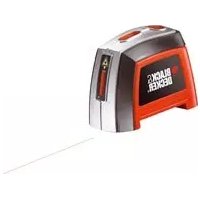
This Black & Decker tool has been designed to project laser lines to aid in DIY applications. This tool is intended for consumer use only.
Safety instructions
Warning! When using battery-powered tools, basic safety precautions, including the following, should always be followed to reduce the risk of fire, leaking batteries, personal injury and material damage.
Read all of this manual carefully before operating the tool.
Retain this manual for future reference.
Keep work area clean
Cluttered areas and benches can cause accidents.
Consider work area environment
Do not expose the tool to rain. Do not use the tool in damp or wet conditions. Keep the work area well lit. Do not use the tool where there is a risk of causing fire or explosion, e.g. in the presence of flammable liquids and gases.
Keep children away
Do not allow children, visitors or animals to come near the work area or to touch the tool.
Do not overreach
Keep proper footing and balance at all times.
Stay alert
Watch what you are doing. Use common sense. Do not operate the tool when you are tired.
Use appropriate tool
The intended use is described in this instruction manual.
Warning! The use of any accessory or attachment or performance of any operation with this tool other than those recommended in this instruction manual may present a risk of personal injury.
Check for damaged parts
Before use, carefully check the tool for damage. Ensure that the tool will operate properly and perform its intended function. Do not use the tool if any part is damaged or defective.
Store idle tools
When not in use, tools and batteries should be stored in a dry, locked up or high place, out of reach of children.
Repairs
This tool complies with relevant safety requirements.
Repairs should only be carried out by qualified persons using original spare parts; otherwise this may result in considerable danger to the user.
Additional safety instructions for non-rechargeable batteries
-
Never attempt to open for any reason.
Do not store in locations where the temperature may exceed 40^ -
When disposing of batteries, follow the instructions given in the section "Protecting the environment". Do not incinerate the batteries.
Under extreme conditions, battery leakage may occur. When you notice liquid on the batteries, proceed as follows: Carefully wipe the liquid off using a cloth. Avoid skin contact.
Additional safety instructions for lasers

Warning! Laser radiation.

Do not look into the laser beam.

Do not view the laser beam directly with optical instruments.

Refer to the laser product characteristics.
This laser complies with class 2M according to EN 60825-1:1993+A2:2001. Do not replace a laser diode with a different type. If damaged, have the laser repaired by an authorised repair agent.
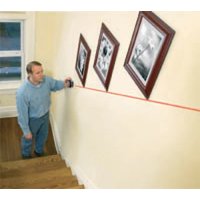
Do not use the laser for any purpose other than projecting laser lines.
An exposure of the eye to the beam of a class 2M laser is considered safe for a maximum of 0.25 seconds. Eyelid reflexes will normally provide adequate protection. At distances over 1m the laser complies with class 1 and thus is considered completely safe.
Never look into the laser beam directly and intentionally.
Do not use optical tools to view the laser beam.
Do not set up the tool at a position where the laser beam can cross any person at head height.
Do not let children come near the laser.
Features
- On/off switch
- Vial
- Laser aperture
- Stand
- Adjusting wheel
- Wall pin
- Keyhole wall mount
Assembly
Fitting the batteries (fig. A)
Slide the battery cover (8) off the tool
- Insert the batteries into the tool in the orientation as shown.
Refit the cover and let it click into place.
Installing the tool (fig. B - E)
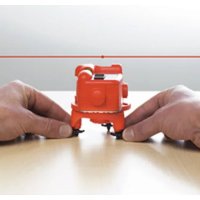
The tool can be installed on a horizontal surface such as a floor or a table. Alternatively, the unit can be mounted to a wall.
Fitting the tool to the stand (fig. B - D)
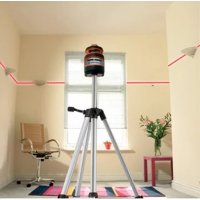
The tool can be installed on the adjustable stand (4), both horizontally and vertically.
Choose a smooth and level surface to install the stand.
- When projecting horizontal laser lines on walls, place the tool on the stand horizontally, aligning the bottom of the tool with the profile on the stand.
- When projecting vertical laser lines on walls, place the tool on the stand horizontally, inserting the protrusion on the long side of the tool into the recess of the stand.
- When projecting laser lines on ceilings, place the tool on the stand vertically, inserting the protrusion on the short side of the tool into the recess of the stand.
Fitting the tool to a wall (fig. E)
The unit can be mounted to walls using one of the wall mounts.
Warning! Keep the wall mounts in a safe place when not in use.
The keyhole wall mount (7) is used for mounting to most wall constructions.
Drive a screw or nail into the wall.
Hang the wall mount onto the fastener by the keyhole.
Fit the tool to the wall mount by clinging the magnet (8) to the steel knob (9).
If the unit is mounted to drywall or other soft materials, the wall pin (6) must be used:
Hold the bracket in front of a suitable location.
Twist the knob (10) to press the pin (11) straight into the wall.
Fit the tool to the wall mount by clinging the magnet (8) to the steel knob (12).
Use
Install the tool as required.
To increase working distance and accuracy, place the laser in the middle of your working area. Brightness of area may affect line visibility.
-If necessary, hang the unit on the wall using the appropriate wall mount.
Switching on and off
To switch the tool on, slide the on/off switch (1) to the ON' position.
To switch the tool off, slide the on/off switch (1) to the 'OFF' position.
Adjusting the laser line (fig. B - E)
Using a wall set-up (fig. E)
Switch the tool on.
Hold the wall mount with one hand.
Adjust the tool with the other hand until the vial parallel to the wall is level.
Using the adjustable stand (fig. B - D)
Switch the tool on.
Move the tool as necessary to position the laser line.
When projecting horizontal laser lines on walls, level the vials on top of the unit.
- When projecting vertical laser lines on walls, level the vial on top of the unit.
When projecting laser lines on ceilings, level the vials on the adjacent sides of the unit.
Adjust the wheels (5), until the line is level.
Protecting the environment

Separate collection. This product must not be disposed of with normal household waste.
Should you find one day that your Black & Decker product needs replacement, or if it is of no further use to you, do not dispose of it with household waste. Make this product available for separate collection.

Separate collection of used products and packaging allows materials to be recycled and used again. Re-use of recycled materials helps prevent environmental pollution and reduces the demand for raw materials.
Local regulations may provide for separate collection of electrical products from the household, at municipal waste sites or by the retailer when you purchase a new product.
Black & Decker provides a facility for the collection and recycling of Black & Decker products once they have reached the end of their working life. To take advantage of this service please return your product to any authorised repair agent who will collect them on our behalf.
You can check the location of your nearest authorised repair agent by contacting your local Black & Decker office at the address indicated in this manual. Alternatively, a list of authorised Black & Decker repair agents and full details of our after-sales service and contacts are available on the Internet at: www.2helpU.com
ENGLISH
Batteries

At the end of their useful life, discard batteries with due care for our environment.
Remove the batteries as described above.
- Place the batteries in a suitable packaging to ensure that the terminals cannot be short-circuited.
Take the batteries to a local recycling station.
Technical data
LZR310
Voltage V 3
Battery size LR03
Operating temperature ^ C0 - 40
Wave length nm 635-670
Laser class 2M
Laser power mW < 3.5
Weight kg 0.45
EC declaration of conformity
LZR310
Black & Decker declares that these products conform to:
89/336/EEC, EN 61010, EN 60825
Kevin Hewitt
Director of Consumer Engineering
Spennymoor, County Durham DL16 6JG
United Kingdom
1-12-2004
Guarantee
Black & Decker is confident of the quality of its products and offers an outstanding guarantee. This guarantee statement is in addition to and in no way prejudices your statutory rights. The guarantee is valid within the territories of the Member States of the European Union and the European Free Trade Area.
If a Black & Decker product becomes defective due to faulty materials, workmanship or lack of conformity, within 24 months from the date of purchase, Black & Decker guarantees to replace defective parts, repair products subjected to fair wear and tear or replace such products to ensure minimum inconvenience to the customer unless:
The product has been used for trade, professional or hire purposes;
The product has been subjected to misuse or neglect;
The product has sustained damage through foreign objects, substances or accidents;
Repairs have been attempted by persons other than authorised repair agents or Black & Decker service staff.
To claim on the guarantee, you will need to submit proof of purchase to the seller or an authorised repair agent. You can check the location of your nearest authorised repair agent by contacting your local Black & Decker office at the address indicated in this manual. Alternatively, a list of authorised Black & Decker repair agents and full details of our after-sales service and contacts are available on the Internet at:
www.2helpU.com
Please visit our website www.blackanddecker.co.uk to register your new Black & Decker product and to be kept up to date on new products and special offers. Further information on the Black & Decker brand and our range of products is available at www.blackanddecker.co.uk
Director of Consumer Engineering
Spennymoor, County Durham DL16 6JG
United Kingdom
1-12-2004
Garantie
Spennymoor, County Durham DL16 6JG
Royaume-Uni
1-12-2004
Garantie
Spennymoor, County Durham DL16 6JG
United Kingdom
1-12-2004
Garanzia
Director of Consumer Engineering
Spennymoor, County Durham DL16 6JG
United Kingdom
1-12-2004
Garantie
Spennymoor, County Durham DL16 6JG
United Kingdom
1-12-2004
Garantía
Kevin Hewitt Engenheiro Responsavel, bounty Durham DL16 6JG, United Kingdom
1-12-2004
Garantia
Forvaras utom rackhall for barn
Director of Consumer Engineering
Spennymoor, County Durham DL16 6JG
United Kingdom
1-12-2004
Reservdelar / reparationer
Director of Consumer Engineering
Spennymoor, County Durham DL16 6JG
United Kingdom
1-12-2004
Director of Consumer Engineering
Spennymoor, County Durham DL16 6JG
United Kingdom
1-12-2004
Reservedele / reparationer
Varoitus! Lasersately.

Director of Consumer Engineering Spennymoor, County Durham DL16 6JG,
United Kingdom
1-12-2004
Mn xnpaonoiieTe to epyaiao tav iote koupaevoC
XpoHOnIOeTe To oWTo EpyAeio
H evdeevn xnpouooinan avapepetal e autc TIG oonyiesxnoeos.
Ppoox! Too n xpon EApntmuatwv n npooqkwv ooo kal npaypaTOnioiOn epyaowv nou dEv ouviotwral otic odnyie autcE ykuovei kivduvo tpaumaou.
EaeyTe eav to epyaieo aocexi 8a6
Piv ano m xpon, eYeTe npoeekta to epyaiaio yia tuxov Znuec. Beaawte oT to epyaiaio aeitoupyei kavovka kal Xpnoantoietai yia to oKoTo ia tv onio npooipetai. Mn xpanoantoieTe to epyaiaio av kaio 8Eaptna tou napouiae Eaattwa.
duayety Ta epyaia oac OE aopaae espos
Otav xv npoionoiouvt, ta epyaia kai o i nataipies npenla va anoekuovtae npo xwpo, maepia ano ta naia.
Emokeues
To epyaiao autouuupopwveTaue Tc oxetikec npounoehoeic aoapaleiac. Oeiokeuec Ta npene va yivovta mvo ano elikueevoc texvikouc kai eTn xpno anoklaotika yvnaow avtaalaktkw, dlapopeetka unapxei to evexoevo oapou kivdvouyia To xpnoTn.
Uunnpwpatikc oynieca aopaaiaa yia n enavaoprotocoevcs npatapies
MnyKoiTaTe mEoum Tou aeIep.

Mny koiatae katueiav otn dou aeicep Kavovtac xpon onnKwv epyaewv.

AvaTpeEe Oa xapakmpiotkau Tou npoiovtoc p
AutoTo epyaaleio alecpoumuoppwvTeaie TnV kaTnyopi 2M ouuqwvae To npotuno EN 60825-1:1993+A2:2001. Mnyavtkataohtoe TbiOo alezepae aaN diapopeTKOU tUou.Eav naBcI bAbn,ntne Tnv ENIOKeun TcS biDou aeIep ano Esoauioobtmevo Kevtpo eIOKEuwv.
Mn xnpaonpoite To aeicep yia oioohtne aAlo oKoTo EKTOS an npoBoAn ypaumw aeicep.
H EkEoan paWv oA kTiva aeIep kaTyopiac 2M dEv
eewpeiTa enikivouv yia meyioTo xpOvo 0,25 deuTepoAeTTov. Ta avtavakaaotika tw vBaepapidwv tou maIOu npExouv
eapkn npootaia. Ia anoTaon naW ano 1m, n aktiva
AEeP eivai katnyopiac 1 kal ouveWc theweiitai eVTeAoc
akivdvun.
- Noté μην Koītāte anεθείας και σκόπια τη δεομη λέιερ.
Mn xnooioie oonka epyaia ia va bIeTe Tnv aktiva aeizep.
Mny tonotheite to epyaiao ae thon onou n aktiva npoei va diaoxio kanoio atofo oto uoc tou Kepaiou.
Mny apnvTe naia va naioiacouv to aeep.
Xapaktnpiotika
Spennymoor, County Durham DL16 6JG
United Kingdom
1-12-2004
| Australia Black & Decker (Australia) Pty. Ltd. Tel. 03-8720 510020 Fletcher Road, Mooroolbark, Victoria, 3138 Fax 03-9727 5940 | |
| België/Belgique Black & Decker (Belgium) N.V. Tel. 015 - 47 92 11Campus Noord, Schaliënhoevedreef 20E Fax 015 - 47 92 102800 Mechelen | |
| Danmark Black & Decker Tel. 70 20 15 15Sluseholmen 2-4, 2450 København SV Fax 36 94 49 01Internet: www.blackanddecker.dk | |
| Deutschland Black & Decker GmbH Tel. 06126/21 - 0Black & Decker Str. 40, D - 65510 Idstein Fax 06126/21 29 80 | |
| Ελλάδα Black & Decker (Ελλάς) A.E. Tnλ. 210 8981616Στράβωνος 7 & Αεωφ. Bουλιαγμένης 159 Φαξ 210 8983285166 74 Γλυράδα - Αθήναwww.blackanddecker.gr | |
| Espana | Black & Decker Ibérica, S.C.A.Parque de Negocios "Mas Blau"Edificio Muntadas, c/Bergadá, 1, Of. A608820 El Prat de Llobregat (Barcelona) |
| France | Black & Decker (France) S.A.S.B.P. 21, 69571 Dardilly Cedex |
| Helvetia | ROFO AGGewerbezone Seeblick3213 Kleinbosingen |
| Italia | Black & Decker Italia SpAViale Elvezia 220052 Monza (MI) |
| Nederland | Black & Decker BeneluxJoulehof 12, 4622 RG Bergen op Zoom |
| New Zealand | Black & Decker Tel. 09 579 760081 Hugo Johnston DrivePenrose, Auckland, New Zealand |
| Norge | Black & Decker (Norge) A/SPostboks 4814, Nydalen, 0422 OsloInternet: www.blackanddecker.no |
| Österreich | Black & Decker Vertriebsges.m.b.HErlaerstraße 165, 1231 Wien |
| Portugal | Black & Decker Tel. 214667500Rua Egas Moniz 173S. João do Estoril2766-651 Estoril |
| Suomi | Black & Decker OyKeilasatama 3, 02150 EspooBlack & Decker Oy,Kägelhamnen 3, 02150 Esbo |
| Sverige | Black & Decker ABFabriksg. 7, 412 50 Göteborg |
| Türkije | İntratek Mühendislik ve Düş Tic. A.§Ortaklar Cad. No:19/280290 Mecidiyeköy / Istanbul |
| United Kingdom | Black & Decker Tel. 01753 511234210 Bath RoadSlough, Berkshire SL1 3YD |
| Middle East & Africa | Black & Decker (Overseas) A.G.PB 5420, Dubai, United Arab Emirates Fax +971 4 2826464 |
Dealer address Date of purchase
Handleradresse Kaufdatum
Address Adresse Adresse Indirizzo
EAAnyika Papakaaw Koptye auto to Koumu kal tauxopounate to aoeos

- Safety instructions
- Keep work area clean
- Consider work area environment
- Keep children away
- Do not overreach
- Stay alert
- Use appropriate tool
- Check for damaged parts
- Store idle tools
- Repairs
- Additional safety instructions for non-rechargeable batteries
- Additional safety instructions for lasers
- Features
- Assembly
- Fitting the batteries (fig. A)
- Installing the tool (fig. B - E)
- Fitting the tool to the stand (fig. B - D)
- Fitting the tool to a wall (fig. E)
- Use
- Switching on and off
- Adjusting the laser line (fig. B - E)
- Using a wall set-up (fig. E)
- Using the adjustable stand (fig. B - D)
- Protecting the environment
- ENGLISH
- Batteries
- Technical data
- EC declaration of conformity
- Guarantee
- www.2helpU.com
- Garantie
- Garanzia
- Garantía
- Garantia
- Forvaras utom rackhall for barn
- Reservdelar / reparationer
- Reservedele / reparationer
- XpoHOnIOeTe To oWTo EpyAeio
- EaeyTe eav to epyaieo aocexi 8a6
- duayety Ta epyaia oac OE aopaae espos
- Emokeues
- Uunnpwpatikc oynieca aopaaiaa yia n enavaoprotocoevcs npatapies
- Xapaktnpiotika
Brand : BLACK & DECKER
Model : LZR310
Category : Laser pointer