AC18BT - Air-conditioner LG - Free user manual and instructions
Find the device manual for free AC18BT LG in PDF.



| Product type | Wall-mounted split air conditioner |
| Brand | LG |
| Model | AC18BT |
| Indoor unit dimensions (approx.) | 900 x 300 x 200 mm |
| Outdoor unit dimensions (approx.) | 800 x 550 x 300 mm |
| Indoor unit weight (approx.) | 10 kg |
| Outdoor unit weight (approx.) | 30 kg |
| Power supply | 220-240 V, 50 Hz |
| Refrigerant | R32 (flammable) |
| Operating modes | Cooling, heating, dehumidification, fan, auto, Jet |
| Fan speed | 5 speeds (Low, Medium-Low, Medium, Medium-High, High) + Natural |
| Airflow direction | Vertical and horizontal (oscillation) |
| Timer | Programmable On/Off, Sleep, Simple |
| Special functions | Air purification (ionizer/plasma), silent, auto clean, energy control (80%/60%/40%) |
| Smart | Built-in Wi-Fi, LG SmartThinQ app, Smart Diagnosis |
| Remote control | Wireless with AAA batteries (1.5 V) |
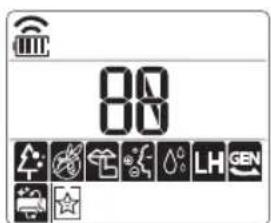
| Display | Temperature, defrost, Wi-Fi, timer, on/off |
| Maintenance and cleaning | Air filter to clean every 2 weeks, ionizer every 6 months |
| Spare parts and repairability | Filters, remote control, batteries; repairs by certified professional |
| Safety instructions | Use of flammable refrigerant, mandatory grounding, do not block air inlets/outlets |
| General information | Wall mounting, domestic use, 758-page manual available for download |
Frequently Asked Questions - AC18BT LG
User questions about AC18BT LG
0 question about this device. Answer the ones you know or ask your own.
Ask a new question about this device
Download the instructions for your Air-conditioner in PDF format for free! Find your manual AC18BT - LG and take your electronic device back in hand. On this page are published all the documents necessary for the use of your device. AC18BT by LG.
USER MANUAL AC18BT LG
Read this owner's manual thoroughly before operating the appliance and keep it handy for reference at all times.
TYPE: WALL MOUNTED
Original instruction
EN English FR Français EL Eλληνικα NL Nederlands PL Polski
GA Gaeilge SR srpski
MK MaKeDoHcKn
SQ Shqip
BS
Bosanski
TABLE OF CONTENTS
This manual may contain images or content different from the model you purchased.
This manual is subject to revision by the manufacturer.
SAFETYINSTRUCTIONS 3
IMPORTANT SAFETY INSTRUCTIONS 4
OPERATION 11
Notes for Operation 11
Parts and Functions 11
Wireless Remote Control. 12
Restarting the Air Conditioner Automatically 17
Using the Mode Function 17
Using the Jet Mode Function 20
Using the Fan Speed Function 21
Using the Air Flow Direction Function. 21
Setting the On/Off Timer 22
Using the Sleep Function (Optional) 23
Using the Simple Timer Function (Optional) 23
Using the Energy Display Function (Optional). 24
Using the Light Off Function (Optional) 24
Using the Comfort Air Function (Optional) 24
Using the Energy Control Function (Optional) 25
Using Special Functions 25
SMART FUNCTIONS 27
Using LG SmartThinQ Application 27
MAINTENANCE 30
Clean the Air Filter 32
TROUBLESHOOTING 33
SAFETY INSTRUCTIONS
EN
The following safety guidelines are intended to prevent unforeseen risks or damage from unsafe or incorrect operation of the appliance.
The guidelines are separated into 'WARNING' and 'CAUTION' as described below.

This symbol is displayed to indicate matters and operations that can cause risk. Read the part with this symbol carefully and follow the instructions in order to avoid risk.

WARNING
This indicates that the failure to follow the instructions can cause serious injury or death.

CAUTION
This indicates that the failure to follow the instructions can cause the minor injury or damage to the product.
The following symbols are displayed on indoor and outdoor units.

This symbol indicates that this appliance uses a flammable refrigerant. If the refrigerant is leaked and exposure to an external ignition source, there is a risk of fire.

This symbol indicates that the Operation Manual should be read carefully.

This symbol indicates that a service personnel should be handling this equipment with reference to the Installation Manual.

This symbol indicates that information is available such as the Operating Manual or Installation Manual.
IMPORTANT SAFETY INSTRUCTIONS

WARNING
To reduce the risk of explosion, fire, death, electric shock, injury or scalding to persons when using this product, follow basic precautions, including the following:
Children in the Household
This appliance is not intended for use by persons (including children) with reduced physical, sensory or mental capabilities, or lack of experience and knowledge, unless they have been given supervision or instruction concerning use of the appliance by a person responsible for their safety. Children should be supervised to ensure that they do not play with the appliance.
For use in Europe:
This appliance can be used by children aged from 8 years and above and persons with reduced physical, sensory or mental capabilities or lack of experience and knowledge if they have been given supervision or instruction concerning use of the appliance in a safe way and understand the hazards involved. Children shall not play with the appliance. Cleaning and user maintenance shall not be made by children without supervision.
Installation
- Do not install the air conditioner on an unstable surface or in a place where there is danger of it falling.
-
Contact an authorized service center when installing or relocating the air conditioner.
Install the panel and the cover of the control box safely. -
Do not install the air conditioner in a place where flammable liquids or gases such as gasoline, propane, paint thinner, etc., are stored.
-
Make sure that the pipe and the power cable connecting the indoor and outdoor units are not pulled too tight when installing the air conditioner.
-
Use standard circuit breaker and fuse that conform to the rating of the air conditioner.
-
Do not input air or gas into the system except with the specific refrigerant.
-
Use non-flammable gas (nitrogen) to check for leak and to purge air; using compressed air or flammable gas may cause fire or explosion.
-
The indoor/outdoor wiring connections must be secured tightly, and the cable should be routed properly so that there is no force pulling the cable from the connection terminals. Improper or loose connections can cause heat generation or fire.
-
Install dedicated electric outlet and circuit breaker before using the air conditioner.
-
Do not connect the ground wire to a gas pipe, a lightning rod, or a telephone ground wire.
-
Keep any required ventilation openings clear of obstruction.
Operation
-
Be sure to use only those parts listed in the service parts list. Never attempt to modify the equipment.
-
Make sure that children do not climb on or hit the outdoor unit.
- Dispose of the batteries in a place where there is no danger of fire.
-
Use only the refrigerant specified on the air conditioner label.
-
Cut off the power supply if there is any noise, smell, or smoke coming from the air conditioner.
-
Do not leave flammable substances such as gasoline, benzene, or thinner near the air conditioner.
-
Contact an authorized service center when the air conditioner is submerged by flood waters.
-
Do not use the air conditioner for an extended period of time in a small place without proper ventilation.
-
In the event of a gas leak (such as Freon, propane gas, LP gas, etc.) ventilate sufficiently before using the air conditioner again.
-
To clean the interior, contact an authorized service center or dealer. Using harsh detergents may cause corrosion or damage to the unit.
-
Be sure to ventilate sufficiently when the air conditioner and a heating appliance such as a heater are used simultaneously.
- Do not block the inlet or outlet of air flow.
- Do not insert hands or other objects through the air inlet or outlet while the air conditioner is operating.
- Make sure that the power cable is neither dirty, loose, nor broken.
-
Never touch, operate, or repair the air conditioner with wet hands.
-
Do not place any objects on the power cable.
-
Do not place a heater or other heating appliances near the power cable.
- Do not modify or extend the power cable. Scratches or peeling insulation on the power cables may result in fire or electric shock, and should be replaced.
-
Cut off the power supply immediately in the event of a blackout or a thunderstorm.
-
Take care to ensure that power cable could not be pulled out or damaged during operation.
- Do not touch refrigerant pipe, water pipe and any internal parts while the unit is operating or immediately after operation.
Maintenance
- Do not clean the appliance by spraying water directly onto the product.
- Before cleaning or performing maintenance, disconnect the power supply and wait until the fan stops.
Technical Safety
- Installation or repairs made by unauthorized persons can pose hazards to you and others.
- Any person who is involved with working on or breaking into a refrigerant circuit should hold a current valid certificate from an industry-accredited assessment authority, which authorizes their competence to handle refrigerants safely in accordance with an industry recognized assessment specification.
Servicing shall only be performed as recommended by the equipment manufacturer. Maintenance and repair requiring the assistance of other skilled personnel shall be carried out under the supervision of the person competent in the use of flammable refrigerants. - The information contained in the manual is intended for use by a qualified service technician who is familiar with the safety procedures and equipped with the proper tools and test instruments.
-
Failure to read and follow all instructions in this manual can result in equipment malfunction, property damage, personal injury and/or death.
-
The appliance shall be installed in accordance with national wiring regulations.
-
When the power cord is to be replaced, the replacement work shall be performed by authorized personnel using only genuine replacement parts.
-
This appliance must be properly grounded to minimize risk of electric shock.
-
Do not cut or remove the grounding prong from the power plug.
-
Attaching the earth wire to the power outlet cover screw does not ground the appliance unless the cover screw is metal, uninsulated, and the power outlet is grounded through house wiring.
-
If you have any doubt whether the air conditioner is properly grounded, have the power outlet and circuit checked by a qualified electrician.
-
The refrigerant and insulation blowing gas used in the appliance require special disposal procedures. Consult a service agent or a similarly qualified person before disposing of them.
-
If the supply cord is damaged, it must be replaced by the manufacturer, its service agent or similarly qualified person in order to avoid a hazard.
-
The appliance shall be stored in a well-ventilated area where the room size corresponds to the room area as specified for operation.
-
The appliance shall be stored in a room without continuously operating open flames (for example an operating gas appliance) and ignition sources (for example an operating electric heater).
-
The appliance shall be stored so as to prevent mechanical damage from occurring.
#
CAUTION
To reduce the risk of minor injury to persons, malfunction, or damage to the product or property when using this product, follow basic precautions, including the following:
Installation
- Do not install the air conditioner in an area where it is directly exposed to sea wind (salt spray).
- Install the drain hose properly for the smooth drainage of water condensation.
Exercise caution when unpacking or installing the air conditioner. -
Do not touch the leaking refrigerant during installation or repair.
-
Transport the air conditioner with two or more people or use a forklift.
- Install the outdoor unit such that it is protected from direct sunlight. Do not place the indoor unit in a place where it is directly exposed to sunlight via the windows.
- Safely dispose of packing materials such as screws, nails or batteries using proper packaging after installation or repair.
- Install the air conditioner in a place where the noise from the outdoor unit or the exhaust fumes will not inconvenience the neighbors. Failure to do so may result in conflict with the neighbors.
Operation
-
Remove the batteries if the remote control is not to be used for an extended period of time.
-
Make sure that the filter is installed before operating the air conditioner.
- Be sure to check if there is a refrigerant leak after installing or repairing the air conditioner.
- Do not place any object on the air conditioner.
- Never mix different types of batteries, or old and new batteries for the remote control.
- Do not let the air conditioner run for a long time when humidity is very high or when a door or a window has been left open.
- Stop using the remote control if there is a fluid leak in the battery. If your clothes or skin are exposed to the leaking battery fluid, wash off with clean water.
- Do not expose people, animals, or plants to the cold or hot wind from the air conditioner for extended periods of time.
- If the leaking battery fluid has been swallowed, rinse the inside of the mouth thoroughly and consult a doctor.
- Do not drink the water drained from the air conditioner.
- Do not use the product for special purposes, such as preserving foods, works of art, and etc. It is an air conditioner for consumer purposes, not a precision refrigeration system. There is risk of damage or loss of property.
- Do not recharge or disassemble the batteries.
Maintenance
-
Never touch the metal parts of the air conditioner when removing the air filter.
-
Use a sturdy stool or ladder when cleaning, maintaining, or repairing the air conditioner at a height.
- Never use strong cleaning agents or solvents when cleaning the air conditioner or spray water. Use a smooth cloth.
OPERATION
EN
Notes for Operation
Suggestion for Energy Saving
- Do not over-cool the space. This may be harmful for your health and may consume more electricity.
- Block sunlight with blinds or curtains while you are operating the air conditioner.
- Keep doors or windows closed tightly while you are operating the air conditioner.
- Adjust the direction of the air flow vertically or horizontally to circulate indoor air.
- Speed up the fan to cool or warm indoor air quickly, within a short period of time.
- Open windows regularly for ventilation. The indoor air quality may deteriorate if the air conditioner is used for long durations.
- Clean the air filter once every 2 weeks. Dust and impurities collected in the air filter may block the air flow or reduce the unit performance.
Parts and Functions
Indoor Unit Outdoor Unit
Indoor Display Screen
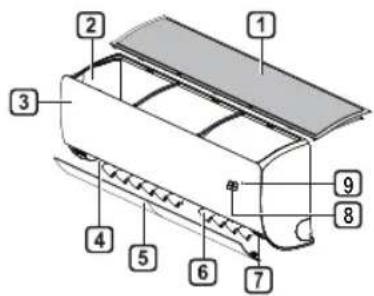

Air Filter
2 Air Intake
3 Front Cover
4 Air Outlet
5 Air Deflector (Horizontal Vane)
6 Air Deflector (Vertical Louver)
7 On/Off Button
8 Display
9 Signal Receiver
Air Intake Vents
Air Outlet Vents
3 Base Plate
4 Power Supply Cable
5 Drain Hose
Coolant Piping
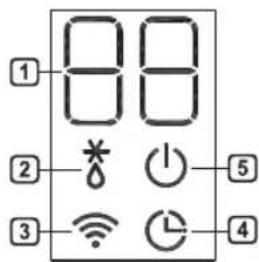
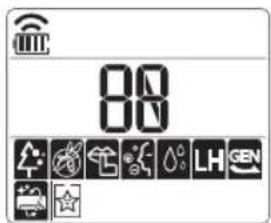
1 Desired temperature / Room temperature
Defrosting / Preheating
3 Wi-Fi
4 Timer
5 On/Off
NOTE
- The number and location of operation lamps may vary according to the model of the air conditioner.
The feature may be changed according to the type of model.
Wireless Remote Control
Inserting Batteries
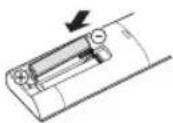
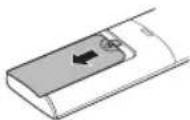
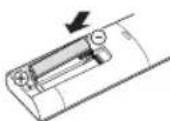
If the display screen of the remote control begins to fade, replace the batteries. Insert AAA (1.5 V) batteries before using the remote control.
1 Remove the battery cover.
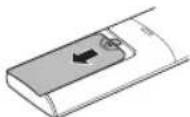
2 Insert the new batteries and make sure that the + and - terminals of the batteries are installed correctly.
Installing the Remote Control Holder
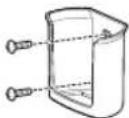
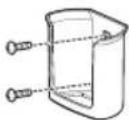
To protect the remote control, install the holder where there is no direct sunlight.
1 Choose a safe and easily accessible location.
2 Fix the holder by fastening 2 screws firmly with a screwdriver.
Operating Method
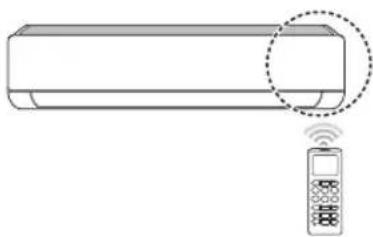
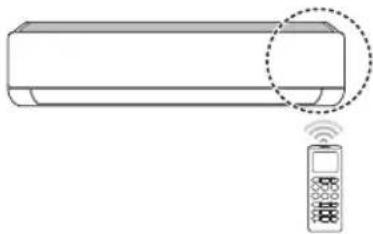
Point the remote control towards the signal receiver at the right side of the air conditioner to operate it.
NOTE
- The remote control may operate other electronic devices if it is directed towards them. Make sure to point the remote control towards the air conditioner signal receiver.
- For proper operation, use a soft cloth to clean the signal transmitter and receiver.
In case of a function not provided in the product, no buzzer sound occurs from the product when a button for such function on the remote control is pressed except for Air Flow Direction (SWING), Energy Display (KW[3s]), Air Purification function (P).
Setting the Current Time
1 Insert batteries.
- The icon below blinks at the bottom of the display screen.

2 Press or button to select the minutes.
3 Press SET/CANCEL button to finish.
NOTE
- The On/Off Timer is available after setting the current time.
Using the ^ C / ^ Conversion Function (Optional)
This function changes unit between ^ C and ^ F
Press and holding button about 5 seconds.
Operating the Air Conditioner without the Remote Control
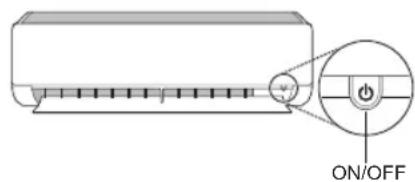
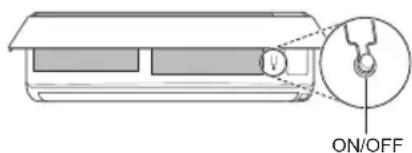
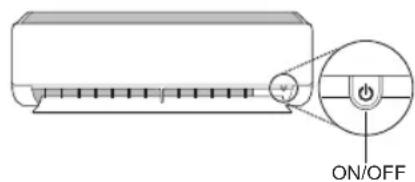
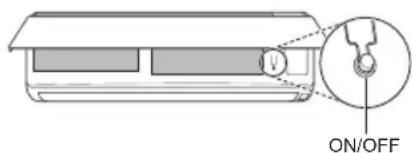
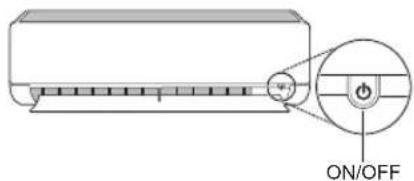
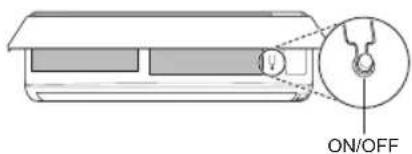
You can use the ON/OFF button of the indoor unit to operate the air conditioner when the remote control is unavailable.
1 Open the front cover (Type2) or horizontal vane (Type1).
2 Press the ON/OFF button.
Type1
Type2
NOTE
- The stepping motor may be broken, if the horizontal vane opens rapidly.
The fan speed is set to high.
The feature may be changed according to the type of model. - The temperature cannot be altered when using this emergency ON/OFF button.
- For cooling & heating models, the temperature is set from 22^ to 24^
Using Wireless Remote Control
You can operate the air conditioner more conveniently with the remote control.
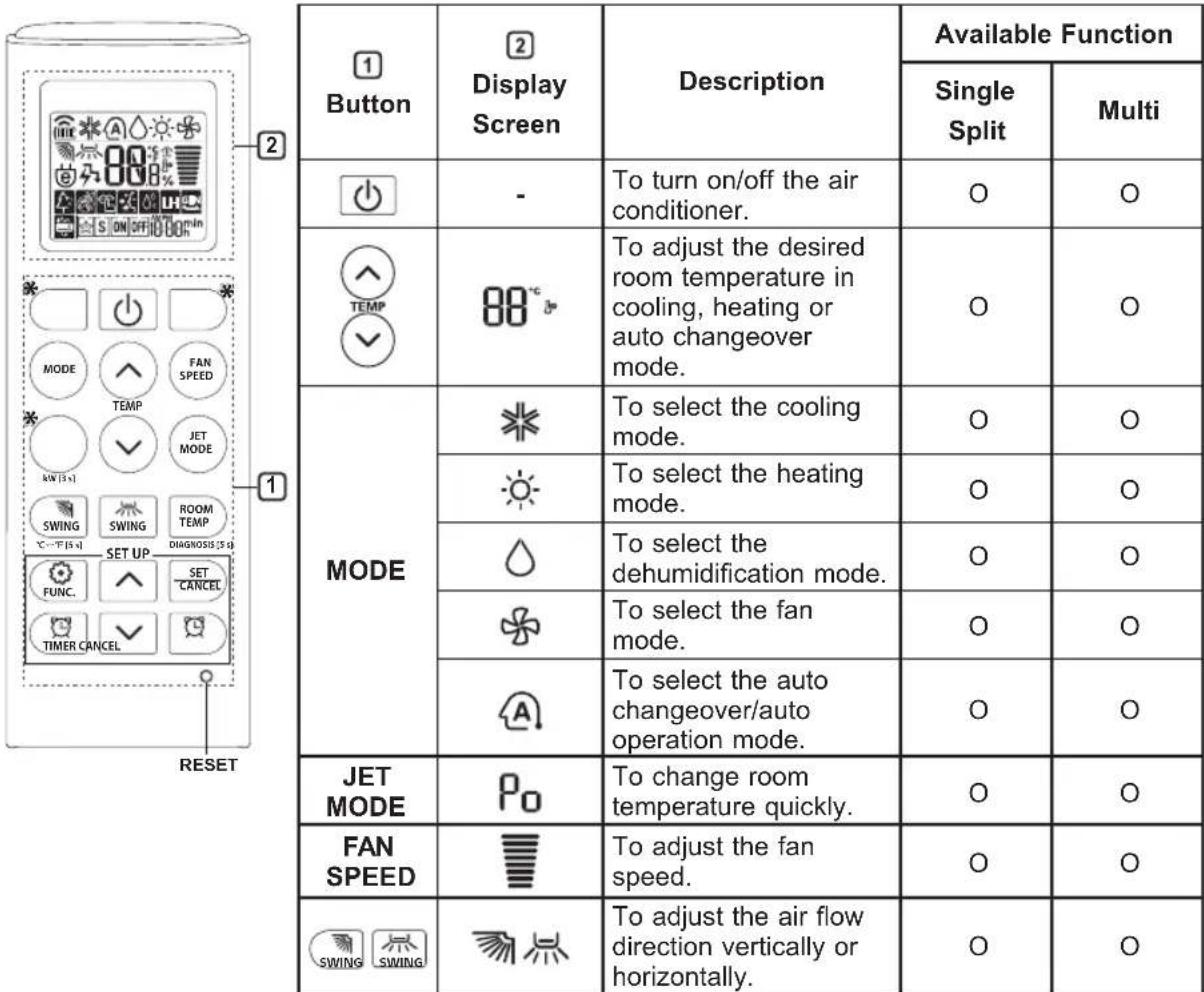
NOTE
-
- buttons may be changed according to the type of model.
-
When connected to the Multi Outdoor unit, the Energy Display, Energy Control, Silent and Smart Diagnosis function may not be supported.
EN
| 1 Button | 2 Display Screen | Description | Available Function | |
| Single Split | Multi | |||
| TIMER | ON OFF | To turn on/off air conditioner automatically at desired time. | O | O |
| SET/CANCEL | - | To set/cancel the special functions and timer. | O | O |
| CANCEL | - | To cancel the timer settings. | O | O |
| - To adjust | just time. O O | |||
| *LIGHT OFF | - | To set the brightness of the display on the indoor unit. | O | O |
| ROOM TEMP | 8 | To display the room temperature. | O | O |
| °C←°F [5 s] | °C °F | To change unit between °C and °F | O | O |
| *COMFORT AIR | 7 | To adjust the air flow to deflect wind. | O | O |
| kW [3 s] | - | To set whether or not to display information regarding energy. | O | X |
| *ENERGY CTRL | 88 x | To bring the effect of the power saving. | O | X |
| DIAGNOSIS [5 s] | - | To conveniently check maintenance information of a product. | O | X |
EN
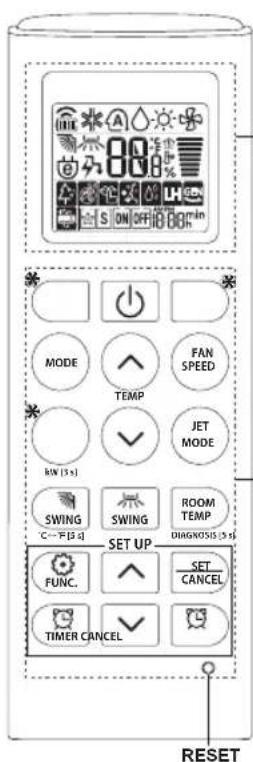
2
| 1 Button | 2 Display Screen | Description | Available Function | |
| Single Split | Multi | |||
| FUNC. | To purify the air by removing particles that enters the indoor unit. | O (Optional) | O (Optional) | |
| To reduce noise from outdoor units. | O | X | ||
| To remove moisture generated inside the indoor unit. | O | O | ||
| RESET - | To initialize the remote control settings. | O | O | |
NOTE
- Some functions may not be supported, depending on the model.
-
- buttons may be changed according to the type of model.
- Press the SET/CANCEL button to operate the selected FUNC.
Restarting the Air Conditioner Automatically
When the air conditioner is turned on again after a power failure, this function restores the previous settings.
Disabling Auto Restart
1 Open the front cover (Type2) or horizontal vane (Type1).
2 Press the ON/OFF button and hold it for 6 seconds, then the unit will beep twice and the lamp will blink twice 4 times.
To re-enable the function, press the ON/OFF button and hold it for 6 seconds. The unit will beep twice and the lamp will blink 4 times.
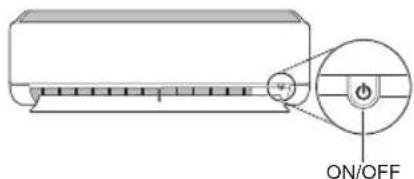
Type1
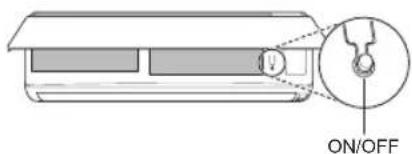
Type2
NOTE
The feature may be changed according to the type of model.
- If you press and hold the ON/OFF button for 3 - 5 seconds, instead of 6 seconds, the unit will switch to the test operation. In the test operation, the unit blows out strong cooling air for 18 minutes and then returns to factory default settings.
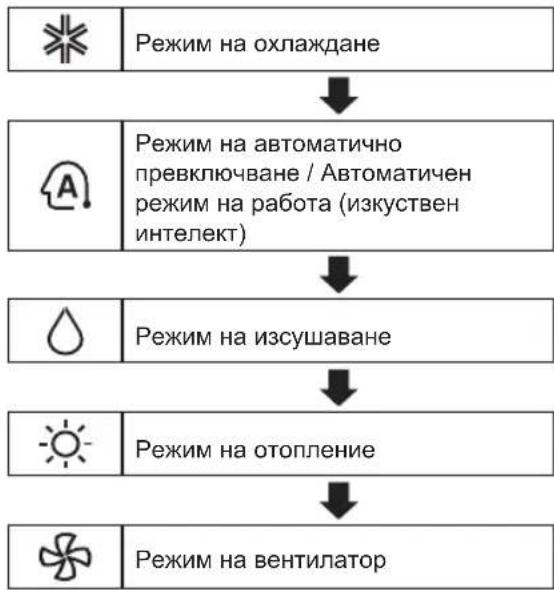
Using the Mode Function
This function allows you to select the desired function.
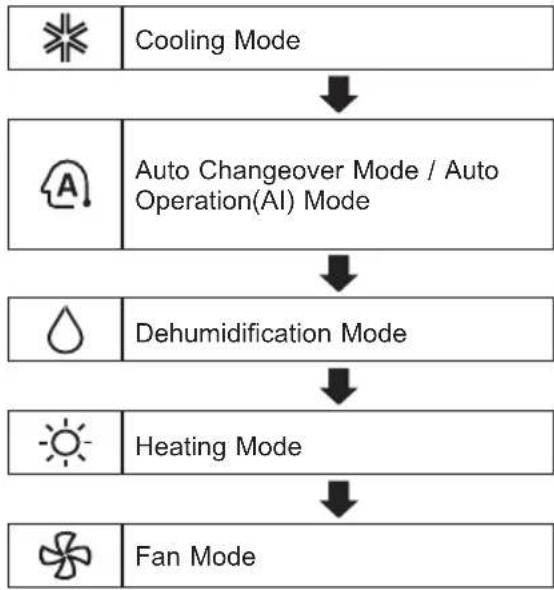
Cooling Mode
1 Turn the appliance on.
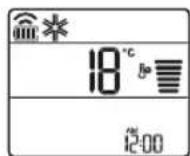
2 Press MODE button repeatedly to select the Cooling Mode.
- is displayed on the display screen.
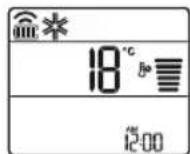
3 Press or button to set the desired temperature.
Auto Operation (Artificial Intelligence)
Multi Model
In this operation mode, the system is automatically operated by the electronic controls.
1 Turn the appliance on.
2 Press MODE button repeatedly to select the Auto Operation.
A is displayed on the display screen.
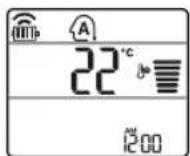
3 Press or button to set the desired temperature.
4 Press FAN SPEED button to adjust the fan speed.
Auto Changeover Mode
Single Split Model
This mode changes the mode automatically to maintain the set temperature at ± 2^
1 Turn the appliance on.
2 Press MODE button repeatedly to select the Auto Changeover Mode.
A is displayed on the display screen.
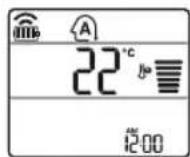
3 Press or button to set the desired temperature.
4 Press FAN SPEED button to adjust the fan speed.
Dehumidification Mode
This mode removes excess moisture from a highly humid environment or during the rainy season, in order to prevent mildew from setting in. This mode adjusts the room temperature and the fan speed automatically to maintain the optimal level of humidity.
1 Turn the appliance on.
2 Press MODE button repeatedly to select the Dehumidification Mode.
is displayed on the display screen.
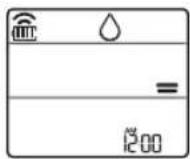
NOTE
- In this mode you cannot adjust the room temperature, it is adjusted automatically.
- The room temperature is not displayed on the display screen.
Heating Mode
1 Turn the appliance on.
2 Press MODE button repeatedly to select the Heating Mode.
is displayed on the display screen.
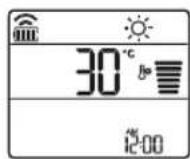
3 Press or button to set the desired temperature.
NOTE
will be displayed on the indoor unit when defrosting is operating.
- Furthermore, this indication will be displayed on the indoor unit:
- When preheating is operating.
- When the room temperature has been reached to the set temperature.
Fan Mode
This mode only circulates the indoor air without changing the room temperature.
1 Turn the appliance on.
2 Press MODE button repeatedly to select the Fan Mode.
is displayed on the display screen.
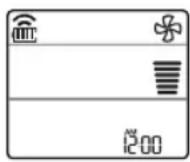
3 Press FAN SPEED button to adjust the fan speed.
Using the Jet Mode Function Changing Room Temperature Quickly
This function allows you to cool indoor air quickly during the summer or warm it quickly during winter.
- The Jet Mode function is available with Cooling, Heating and Dehumidification Mode.
1 Turn the appliance on.
2 Press MODE button repeatedly to select the desired mode.
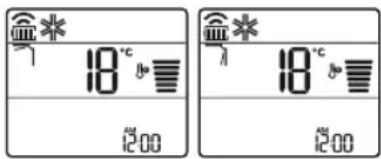
3 Press JET MODE button. is displayed on the display screen.
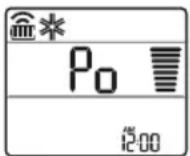
NOTE
- Jet Heating Mode is not available on some models.
- In Jet Cooling Mode, strong air blows out for 30 minutes.
After 30 minutes later, setting temperature is maintaining 18^
If you want to change the temperature, Press

button to set the desired nature.
- In Jet Heating Mode, strong air blows out for 30 minutes.
After 30 minutes later, setting temperature is maintaining 30^
If you want to change the temperature, Press

button to set the desired nature.
- This function may operate differently from the remote control display.
Using the Fan Speed Function
Adjusting the Fan Speed
- Press FAN SPEED button repeatedly to adjust the fan speed.
| Display Screen Speed | |
| High | |
| Medium - High | |
| Medium | |
| Medium - Low | |
| Low | |
| - Natural Wind | |
NOTE
- The fan speed of Natural Wind adjusts automatically.
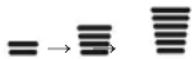
- The fan speed icons are displayed on some indoor units.

- Indoor unit display is displayed only 5 seconds and return to the setting temperature on some models.
Using the Air Flow Direction Function
This function adjusts the direction of the air flow vertically (horizontally).
-
Press SWING button repeatedly and select the desired direction.
-
Select to adjust the direction of the air flow automatically.
NOTE
- Adjusting the air flow direction horizontally may not be supported, depending on the model.
- Adjusting the air deflector arbitrarily may cause product failure.
- If you restart the air conditioner, it starts to operate with the previously set direction of air flow, so the air deflector may not match the icon displayed on the remote control. When this occurs, press SWING or SWING button to adjust the direction of the air flow again.
- This function may operate differently from the remote control display.
Setting the On/Off Timer
This function sets the air conditioner to turn on/ off automatically at desired time.
On/Off Timer can be set together.
Setting the On Timer
1 Press button repeatedly.
The icon below blinks at the bottom of the display screen.
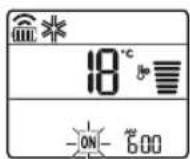
2 Press or button to select the minutes.
3 Press SET/CANCEL button to finish.
After setting the timer, current time and icon are displayed on the display screen indicating that the desired time is set.
Canceling the On Timer
1 Press button repeatedly.
The icon below blinks at the bottom of the display screen.
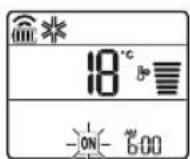
2 Press SET/CANCEL button to cancel the setting.
Setting the Off Timer
1 Press button repeatedly.
- The icon below blinks at the bottom of the display screen.
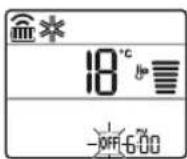
2 Press or button to select the minutes.
3 Press SET/CANCEL button to finish.
After setting the timer, current time and OFF icon are displayed on the display screen indicating that the desired time is set.
NOTE
- This function is disabled when you set Simple Timer.
Canceling the Off Timer
1 Press button repeatedly.
- The icon below blinks at the bottom of the display screen.
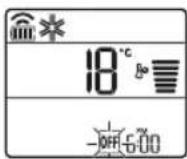
2 Press SET/CANCEL button to cancel the setting.
Canceling the Timer Setting
- Press button to cancel all timer settings.
Using the Sleep Function (Optional)
This function turns off the air conditioner automatically when you go to sleep.
1 Turn the appliance on.
2 Press button repeatedly.
- The icon below blinks at the bottom of the display screen.
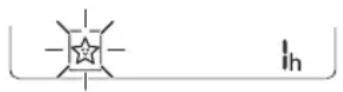
3 Press or button to select the hour (up to 7 hours).
4 Press SET/CANCEL button to finish.
is displayed on the display screen.
NO
is displayed on some indoor units.
- Indoor unit display is displayed from 1H to 7H which is displayed only 5 seconds and then return to the setting temperature.
- In the Cooling and Dehumidification Mode, the temperature increases by 1^ after 30 minutes and additional 1^ after another 30 minutes for a more comfortable sleep.
- The temperature increases up to 2^ from the preset temperature.
- Although the remark for fan speed on the display screen may be changed, the fan speed is adjusted automatically.
Using the Simple Timer Function (Optional)
This function turns off the air conditioner automatically when you go to sleep.
1 Turn the appliance on.
2 Press button repeatedly.
- The icon below blinks at the bottom of the display screen.
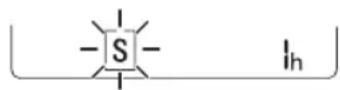
3 Press or button to select the hour (up to 7 hours).
4 Press SET/CANCEL button to finish.
is displayed on the display screen.
NOTE
- This function is disabled when you set Off Timer.
Using the Energy Display Function (Optional)
This function displays the amount of electricity generated on the indoor display as the product operates.
Display the Current Energy Usage
1 Turn the appliance on.
2 Press button and hold it about 3 seconds.
The instantaneous power consumption (88) is displayed for a while on some indoor units.
NOTE
It is not displayed on the wireless remote control.
The unit of the displayed value is kW.
If it is more than 99kW which is the range of expression, maintain it as 99kW .
- Display wattage under 10 kW with 0.1 kW unit, and display one over 10 kW with 1 kW unit.
- The actual power may differ from the power displayed.
- When connected to the Multi Outdoor unit, this function may not be supported.
Using the Light Off Function (Optional)
Display Screen Brightness
You can set the brightness of the indoor unit display screen.
- Press LIGHT OFF button.
NOTE
- Turn on/off the Display screen.
Using the Comfort Air Function (Optional)
Comfort Vane Operation
This function conveniently sets the vane to a preset position to deflect the supply air away from blowing directly onto the occupants in the room.
1 Turn the appliance on.
2 Press COMFORT AIR button repeatedly and select the desired direction.
or is displayed on the display screen.
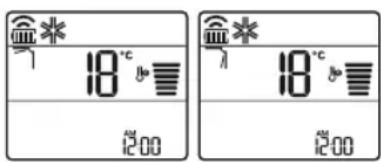
NOTE
or Lis displayed on some indoor units.
- This function is disabled when you press MODE or JET MODE button.
- This function is disabled and auto swing of vertical direction is set up when you press
SWING button.
- When this function is off, the horizontal vane operates automatically depending on the set mode.
Using the Energy Control Function (Optional)
1 Turn the appliance on.
2 Press ENERGY CTRL button.
- Press ENERGY CTRL button repeatedly to select each step.
| 1 step 2 step 3 step | ||
| 80 % | 60 % | 40 % |
| 200 | 200 | 200 |
NOTE
- 1 step : The power Input is decreased by 20% compared to rated power input.
80 is displayed on the display screen. - 2 step: The power Input is decreased by 40% compared to rated power input.
60 is displayed on the display screen. - 3 step (Optional): The power Input is decreased by 60% compared to rated power input.
40 is displayed on the display screen.
(1 step), (2 step) is displayed on some indoor units.
- This function is available with Cooling Mode.
- Capacity may decrease when Energy Control mode is selected.
- Desired temperature is displayed about 5 seconds if you press FAN SPEED, or button.
- Room temperature is displayed about 5 seconds if you press ROOM TEMP button.
- When connected to the Multi Outdoor unit, this function may not be supported.
Using Special Functions
1 Turn the appliance on.
2 Press FUNC button repeatedly to select the desired function.
3 Press SET/CANCEL button to finish.

| Display Screen | Description |
| To purify the air by removing particles that enters the indoor unit. | |
| To reduce noise from outdoor units. | |
| To remove moisture generated inside the indoor unit. |
NOTE
- Some functions may not be supported, depending on the model.
- Some functions may operate differently from the remote control display.
Canceling Special Functions
1 Press FUNC button repeatedly to select the desired function.
2 Press SET/CANCEL button to cancel the function.
Using the Air Purification Function
These functions supply clean and fresh air by ion particles and the filter.
| Function D | splay Description | tion |
| Ionizer | Ion particles from lonizer sterilize the aerial bacteria and other harmful substances. | |
| Plasma | It removes microscopic contaminants from the intake air completely to supply clean and fresh air. |
NOTE
- You can use this function without turning the air conditioner on.
- Both the plasma lamp and the cooling lamp light up while Smoke Away/Plasma is in operation on some models.
- Do not touch ionizer during operation.
- This function may operate differently from the remote control display.
Using the Silent Function
This function prevents potential claims by neighbors, reducing noise from outdoor units.
is displayed on the display screen.
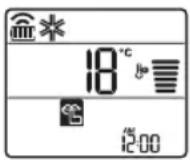
NOTE
- This function is disabled when you press MODE or ENERGY CTRL or JET MODE button.
- This function is available with Cooling, Heating, Auto Changeover, Auto Operation Mode.
- When connected to the Multi Outdoor unit, this function may not be supported.
Using the Auto Clean Function
In the Cooling and Dehumidification Mode, moisture is generated inside the indoor unit. This function removes such moisture.
is displayed on the display screen.
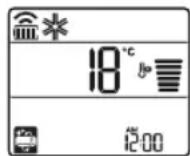
NOTE
- Some functions cannot be used while the Auto Clean function is in operation.
- If you turn off the unit, the fan continues to run for 30 minutes and cleans the inside of the indoor unit.
SMART FUNCTIONS
EN
Using LG SmartThinQ Application
Things to check before using LG SmartThinQ
For appliances with the logo
1 Check the distance between the appliance and the wireless router (Wi-Fi network).
- If the distance between the appliance and the wireless router is too far, the signal strength becomes weak. It may take a long time to register or installation may fail.
2 Turn off the Mobile data or Cellular Data on your smartphone.
- For iPhones, turn data off by going to Settings Cellular Cellular Data.
3 Connect your smartphone to the wireless router.
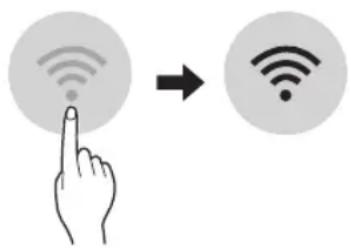
NOTE
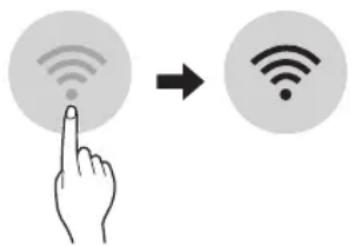
To verify the Wi-Fi connection, check that Wi-Fi icon on the control panel is lit.
- The appliance supports 2.4 GHz Wi-Fi networks only. To check your network frequency, contact your Internet service provider or refer to your wireless router manual.
- LG SmartThinQ is not responsible for any network connection problems or any faults, malfunctions, or errors caused by network connection.
- If the appliance is having trouble connecting to the Wi-Fi network, it may be too far from the router. Purchase a Wi-Fi repeater (range extender) to improve the Wi-Fi signal strength.
- The Wi-Fi connection may not connect or may be interrupted because of the home network environment.
- The network connection may not work properly depending on the Internet service provider.
- The surrounding wireless environment can make the wireless network service run slowly.
- The appliance cannot be registered due to problems with the wireless signal transmission. Unplug the appliance and wait about a minute before trying again.
- If the firewall on your wireless router is enabled, disable the firewall or add an exception to it.
- The wireless network name (SSID) should be a combination of English letters and numbers. (Do not use special characters.)
- Smartphone user interface (UI) may vary depending on the mobile operating system (OS) and the manufacturer.
- If the security protocol of the router is set to WEP, you may fail to set up the network. Please change it to other security protocols (WPA2 is recommended) and register the product again.
Installing LG SmartThinQ
Search for the LG SmartThinQ application from the Google Play Store or Apple App Store on a smart phone. Follow instructions to download and install the application.
Wi-Fi Function
For appliances with the logo
Communicate with the appliance from a smart phone using the convenient smart features.
Smart Diagnosis™
If you use the Smart Diagnosis function, you will be provided with the useful information such as a correct way of using the appliance based on the pattern of use.
Settings
Allows you to set various options on the appliance and in the application.
NOTE
- If you change your wireless router, Internet service provider, or password, delete the registered appliance from the LG SmartThinQ application and register it again.
- The application is subject to change for appliance improvement purposes without notice to users.
- Functions may vary by model.
Open Source Software Notice
Information
To obtain the source code under GPL, LGPL, MPL, and other open source licenses, that is contained in this product, please visit http:// opensource.lge.com.
In addition to the source code, all referred license terms, warranty disclaimers and copyright notices are available for download.
LG Electronics will also provide open source code to you on CD-ROM for a charge covering the cost of performing such distribution (such as the cost of media, shipping, and handling) upon email request to opensource@lge.com. This offer is valid for a period of three years after our last shipment of this product. This offer is valid to anyone in receipt of this information.
Smart Diagnosis™ Using a Smart Phone
Use this function if you need an accurate diagnosis by an LG Electronics customer information centre when the appliance malfunctions or fails.
Smart Diagnosis™ can not be activated unless the appliance is connected to power. If the appliance is unable to turn on, then troubleshooting must be done without using Smart Diagnosis™.
NOTE
- Be sure to keep ambient noise to a minimum or the phone may not correctly receive the buzzer beeps from the indoor unit.

WARNING
- Before cleaning or performing maintenance, disconnect the power supply and wait until the fan stops.
If the air conditioner will not be used for an extended period of time, dry the air conditioner to maintain it in best condition. Clean the product regularly to maintain optimal performance and to prevent possible breakdown.
- Dry the air conditioner in Fan mode for 3 to 4 hours and disconnect the power. There may be internal damage if moisture is left in its components.
- Before using the air conditioner again, dry the inner components of the air conditioner in Fan mode for 3 to 4 hours. This will help to remove the odor generated from moisture.
The feature may be changed according to the type of model.
| Type Description Interval | ||
| Air filter Clean with a vacuum or hand wash. 2 weeks | ||
| Ionizer (Optional) | Use dry cotton bud to remove any dust. Every 6 months | |
| Indoor unit | Clean the Indoor unit surface by using a soft, dry cloth. Regularly | |
| Have a professional clean the condensate drain pan. Once a year | ||
| Have a professional clean the condensate drain pipe. Every 4 months | ||
| Replace the remote control batteries. Once a year | ||
| Outdoor unit | Have a professional clean the heat exchanger coils and the panel vents. (Consult with technician.) | Once a year |
| Have a professional clean the fan. Once a year | ||
| Have a professional clean the condensate drain pan. Once a year | ||
| Have a professional verify that all the fan assembly is firmly tightened. | Once a year | |
| Clean the electric components with air. Once a year | ||
NOTE
- Never use water that is higher than 40^ when you clean the filters. It may cause deformation or discoloration.
- Never use volatile substances when you clean the filters. They may damage the surface of the product.
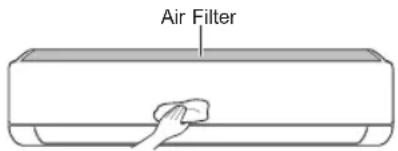
Clean the Air Filter
Clean the air filters once every 2 weeks, or more, if necessary.
NOTE
The air filter can be broken when it is bent.
- When the air filter is not assembled correctly, dust and other substances can enter into the indoor unit.
Type1
If you look at the indoor unit from above it, can assemble the top filter easily.
1 Turn off the power to the unit.
2 Hold the knobs of the air filter, lift it up slightly.
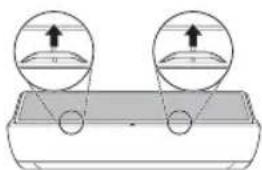
3 Remove it from the indoor unit.
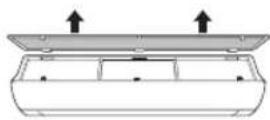
4 Clean the filter with a vacuum cleaner or with lukewarm water with neutral detergent.
5 Dry the filter in the shade.
6 Insert the hooks of the air filter into the front cover.
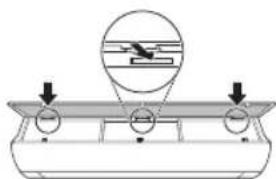
7 Push down hooks to assemble the air filter.
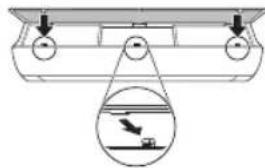
8 Check the side of the front cover for correct assembly of the air filter.
Type2
1 Turn off the power to the unit.
2 Open the front cover.
- Lift up both sides of the cover slightly.
3 Hold the knobs of the air filters, pull them down slightly and remove them from the indoor unit.
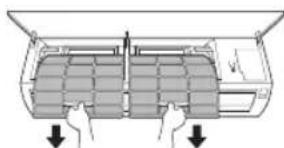
4 Clean the filters with a vacuum cleaner or with lukewarm water with neutral detergent.
5 Dry the filters in the shade.
6 Insert the hooks of the air filters into the front cover.
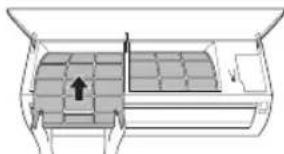
7 Check the side of the front cover for correct assembly of the air filters.
Self-diagnosis Function
This product has a built-in self-diagnosis function. If an error occurs, the lamp of the indoor unit will blink in 2 second intervals. If this occurs, contact your local dealer or service center.
Before Calling for Service
Please check the following before you contact the service center. If the problem persists, contact your local service center.
| Problem Possible | Le Causes Corrective Action | |
| The air conditioner does not work normally. | Burning smell and strange sounds are coming from the unit. | Turn off the air conditioner, switch OFF, or disconnect the power supply, and contact the service center. |
| Water leaks from the indoor unit even when the humidity level is low. | ||
| The power cable is damaged or it is generating excessive heat. | ||
| A switch, a circuit breaker (safety, ground), or a fuse is not operated properly. | ||
| The unit generates an error code from its self-diagnosis. | ||
| The air conditioner does not work. | The air conditioner is unplugged. | Check whether the power cord is plugged into the outlet or the power isolators are switched on. |
| A fuse exploded, or the power supply is blocked. | Replace the fuse or check if the circ breaker has tripped. | |
| A power failure has occurred. | Turn off the air conditioner when a power failure occurs. When the power is restored, wait 3 minutes, and then turn on the air conditioner. | |
| The voltage is too high or too low. | Check if the circuit breaker has tripped. | |
| The air conditioner was turned off automatically at a preset time. | Turn the air conditioner on. | |
| The battery setting in the remote controller is incorrect. | Make sure that the batteries are inserted correctly in your remote controller. If the batteries are placed correctly, but the air conditioner still does not operate, replace the batteries and try again. |
EN
| Problem Possible | Le Causes Corrective Action | |
| The air conditioner does not emit cool air. | Air is not circulating properly. | Make sure that there are no curtains, blinds, or pieces of furniture blocking the front of the air conditioner. |
| The air filter is dirty. | Clean the air filter once every 2 weeks.See“Clean the Air Filter”for more information. | |
| The room temperature is too high. | In summer, cooling the indoor air fully may take some time. In this case, select the Jet Mode to cool the indoor air quickly. | |
| Cold air is escaping from the room. | Make sure that no cold air is escaping through the ventilation points in the room. | |
| The desired temperature is higher than the current temperature. | Set the desired temperature to a level lower than the current temperature. | |
| There is a heating source nearby. | Avoid using heat generators like electric ovens or gas burners while the air conditioner is in operation. | |
| Fan Mode is selected. | During Fan Mode, air blows from the air conditioner without cooling or heating the indoor air.Switch the operation mode to cooling operation. | |
| Outside temperature is too high. | The cooling effect may not be sufficient. | |
| The fan speed cannot be adjusted. | The Jet Mode, or Auto Operation Mode is selected. | In some operation modes, you cannot adjust the fan speed. Select an operation mode in which you can adjust the fan speed. |
| The temperature cannot be adjusted. | The Fan Mode or Jet Mode is selected. | In some operation modes, you cannot adjust the temperature. Select an operation mode in which you can adjust the temperature. |
| The air conditioner stops during operation. | The air conditioner is suddenly turned off. | The Timer Function may have timed out, which turns the unit off. Check the timer settings. |
| A power failure has occurred during operation. | Wait for the power to come back. If you have the Auto Restart function enabled, your unit will resume its last operation several minutes after power is restored. |
EN
| Problem Possible | Le Causes Corrective Action | |
| The indoor unit is still operating even when the unit has been turned off. | The Auto Clean function is being operated. | ·Allow the Auto Clean function to continue since it removes any remaining moisture inside the indoor unit. If you do not want this feature, you can turn the unit off. |
| The air outlet on the indoor unit is discharging mist. | The cooled air from the air conditioner makes mist. | ·When the room temperature decreases, this phenomenon will disappear. |
| Water leaks from the outdoor unit. | In the heating operations, condensed water drops from the heat exchanger. | ·This symptom requires installing a drain hose under the base pan. Contact the installer. |
| There is noise or vibration. | A clicking sound can be heard when the unit starts or stops due to movement of the reversing valve.Creaking sound: The plastic parts of the indoor unit creak when they shrink or expand due to sudden temperature changes.Flowing or Blowing sound: This is the flow of refrigerant through the air conditioner. | ·These are normal symptoms. The noise will stop. |
| The indoor unit gives off an odor. | Odors (such as cigarette smoke) may be absorbed into the indoor unit and discharged with airflow. | ·If the smell does not disappear, you need to wash the filter. If this does not work, contact the service center to clean your heat exchanger. |
| The air conditioner does not emit warm air. | When Heating Mode starts, the vane is almost closed, and no air comes out, even though the outdoor unit is operating. | ·This symptom is normal. Please wait until the unit has generated enough warm air to blow through the indoor unit. |
| The outdoor unit is in Defrosting Mode. | ·In Heating Mode, ice/frost is built up on the coils when the outside temperature falls. This function removes a layer of frost on the coil, and it should finish in approximately 15 minutes. | |
| Outside temperature is too low. | ·The heating effect may not be sufficient. |
EN
| Problem Possible | Le Causes Corrective Action | |
| Your home appliance and smartphone is not connected to the Wi-Fi network. | The password for the Wi-Fi that you are trying to connect to is incorrect. | Find the Wi-Fi network connected to your smartphone and remove it, then register your appliance on LG SmartThinQ. |
| Mobile data for your smartphone is turned on. | Turn off the Mobile data of your smartphone and register the appliance using the Wi-Fi network. | |
| The wireless network name (SSID) is set incorrectly. | The wireless network name (SSID) should be a combination of English letters and numbers. (Do not use special characters.) | |
| The router frequency is not 2.4 GHz. | Only a 2.4 GHz router frequency is supported. Set the wireless router to 2.4 GHz and connect the appliance to the wireless router. To check the router frequency, check with your Internet service provider or the router manufacturer. | |
| The distance between the appliance and the router is too far. | If the distance between the appliance and the router is too far, the signal may be weak and the connection may not be configured correctly. Move the location of the router so that it is closer to the appliance. |
NOTE
- Some functions may not be supported, depending on the model.
MANUEL DU PROPRIÉTAIRE
CLIMATISATION
Kaepiote to FiItpo Aepa 32
ENIAYEH IPOBAHMATQN 33
O△HΓIEΣ AΣΦΑΛΕΙΑΣ
EL
Oi npakatw obnyiec aopaaiaac npoopiciovtai yia va atotpaouv aipobaettoi kivduvoi n 3a2n ano mnaa aan n avthetaaevn leitoupyia tou pioiovto.
Oi obnyiec xwpiocovtai oE 'NPOEIADONOIHsH' kai 'NPOOXH' oTws Tepiypapetai npakatw.

To 0 auto a yia va uTOnEiEi ZnTnmaT Kai AIToupyieC Tou mTOpEi va TpokaIeOuv Kivduvo.
AiaBaoTe to Tmuae auto to OuMuBoLo TPOeKTIKAa
aKoLouhnoTe Tc oDnyieC ouTwc wote va aTnOtpaTei KivduvoC.

ПОНДОПОIHSH
Autó uTIOδεIKVUEI oTI n aδuvαμia va Tnpθouv oi oδnyiεs μTOpεi va TpokaλeσεI σoβapó Tpaumatioμo n θávato.

ПОБOXH
Autó uTIOBεIKVúεI oTI n aδuvαμia va Tnpθouv oi oBnyiεs μTOpεi va Tpokaλεσει μikpotpaumatioμo n βλαβn σTo Tpoiov.
eut, eav tarnote to koupi ROOM TEMP.
Kamauvdeon me TnV Eeotpiikn ovaa TnAanlou tuTou, autn n aeitoupyia mtopei va unu uoatnpicetai.
Xpnoεiδikwv λεitoupyiwv
1 EvpyoToiOnTe Tn ouKeun.
2 NaTnTo Koupti FUNC EtnaveIaumuEv yia va EIIAEET Tyn EITIOUPTN Aetoupyia.
3 NATNOTE TO KOUPTI SET/CANCEL yia va TEAEIWOTE.
Tia ouakeuec e to Aoyotune
SuvdeEeite e Tn ouakeun e Tn Bontheia evoc Eeuttvou tnAeewou, XpnoioutoiwVtac Tc Eeuttvec Aetoupyies.
Smart DiagnosisTM
Eav xpoiioite Tn aeitoupyia Smart Diagnosis, 0a aoc dooovxphoiue paoopiec otw es voac oawtocpotoosxphonncns ouakeung ebaan to ootibo xphons.
Puθμiσεις
PROBLEEMOPLOSSING 33
VEILIGHEIDSVOORSCHRIFTEN
NL
PpeBOd Ha opnHnHaJIHOTo pkoBOCTBO
CbIbPjXAHNE
ToBa pBKOBOCTBO MOKe Da CbIbPka
H3O6paKHeNn cBDbPkaHne, pa3NNUHOOT
MoJeNa, KOITcTe 3aKyNnN.
PbKOBOcTBOTo noDnexH na peDaKunr OTo npou3BOdnten.
HHCTPYKLIIN 3A BE3ONACHOCT 3
Baxnnn nhtpykun 3a 6e0nachocct. 4
EKCPIIOATALIaI 11
BaxHH HnHCTpyKcnn 3a 6e30naCHOCT
I PPEdUnPExKdEHNr
3a da HamaJIte pIcka OT noXap, eJekTpUcEsKn yIap nIIHapaHЯBaHnHa Xopa npu yNoTpe6a Ha npOdyKta, Tp86BaDa ce Cpa3BaT OCHOBHTe PpeDna3HN MepKN, BkJIouHTeJIHO n CJIeDHNTe :
TexHnuecka 6e3oNaCHOCT
-
MohtaЖьт Илп ремоHTbT OT HeOTOp3npaHи Лиca може дa n3LOXn BAC И ДPyrN Xopa Ha OnaCHOCT.
Bcekn YOBek, KOIto pa60n Bbpxy OxnaNTeJHaTa Bepnra, Tp6Ba Da npntexkaba BaINdHO CBnTeJIcTBO, N3daJeHO OT akpeiHTnpaH OprAH B IpOMnIeHnry OTPacBJ, KoEtO yIOCTOBepRABa HeROBaTa KOMnTeHTHOCT Da pa60n C XJaINHn areHTN 6e3OnaCHO n B CbOTBeTCTBne C ONpeJeHnTE HOpMn B OTPacBJna.
-ObcnykBaHeTo Tp6Ba Da ce n3BbPbBA B CbOTBeTCTBnE C npenOpbknte Ha npOn3BOdnteIa Ha o6OpyDbaHeTo. NopdpkKaTa n peMOHTnte, n3NCKBaUH NOMOHTa Ha dpyr ObyeH nepcoHaI, Tp6Ba Da ce n3BbPbBAT NOd HAd3Opa Ha IInCeTO, KOMPeTeHTHO B n3NoJ3BaHeTo Ha 3aNaJIIMXJaADNJH aReHTN.
-Инфорmaцята В HabстoryоTo pьковдъBo eпpeДиа3начеHa 3a 3нОЛЗВанe OT KBалифицран СервизЕн ТхИК, KOИTO e 3aNo3HAT C пpoцEDурпte 3a 6e3ОпаСНСТ И рa3ПОЛARA C HeOБхODIMITE ИНСТPyмЕNTI ИИНСТPyмЕNTI 3a TECTВанe.
-Преберва_HETO Ha почитаянTo И n3пьнEHнeto Ha BCnKInHCTpyKUIM MOKe Да DOВеДо He npaBnHa pa6Ota HaOBopydBaHeTo, MaTePnaJIHn UeTn, ФИЗЧЕСКО habaHЯBaHe n/NiNcMbPT. -
YpeIbT Ce MOHTnpa B CbOTBETCTBHe C HaUHOHaJIHnTe pa3nope6n 3a eJekTpnuYeCKn MOHTaX.
Ako e Heo6xOIMa NOmHa Ha 3axpaHbauJa Ka6eJ, Ta Ce n3BbPwBa OT OToPn3IpaH NepcoHaJI, KaTO Ce n3NoJ3BaT CaMO opnHaJIH pe3epBHN qactN. - YpeNbT Tp6Ba Da ce 3a3eMn npaBnHNo, 3a Da ce HamaN pncKbT OT TOKOB yap.
He npepra3BaIte n He OTcTpaHraBaIte 3a3eMaBauNnT Ha 3axpaHbAunu IeNceJ.
-3akpenBaHeTo Ha 3a3emBaUaTa KJema Ha aAnTepa KbM BnHTOBaTa pe36a Ha KaNaYeTo Ha UeNceJIHaTa KyTna Ha CTeHata He 3a3emBa YpeDa, OCBEN aKO BnHTOBaTa pe36a Ha KaNaYeTo He e MeTaNHa N Hen3OJIpaHa N UeNceJIHaTa KyTna Ha CTeHata He e 3a3EmeHa Upe3 eJeKtpuYeCKaTa INHCTaJaUaIHa Na CrpaJaTa. - Ako He cTe cnrypHn daJIIN KJIIMMaTnKbTe 3a3eMeH npaBnIHO, obbpHeTe ce KbM KBaIIuΦnUpaH eJeKtpOTexHnK, KOITo Da npOBepn UeNcEJHaTa KyTna Ha CTeHaTa n PpeKbcBaYa Ha Bepurata.
- OxjkaaTO BeueCTBO n 30launOHnT neHoo6pa3yBaU ra3, n3noJ3BaHn B ypeDa, n3NCKBaT cneuaJIHn npoceIpyn 3a n3XBpIHe. CbpxTe ce cbc cepBn3eH npedctabNTeI nn IIn IuCe C noD6Ha KBaIIncKaua, npdI da rN n3XBpINe.
Ako 3axpaHbauT Ka6eI e NOBpeDeH, Toi Tp8Ba Da 6bJe IOdMeHeH OT npOn3BOIDTeJIa, OT HeROBtE cepBN3HN aReHTN IJN OT TexHnK C NoD6Ha KBaINΦkauZra, 3a Da Ce N36eRhe OnaCHOCT.
-Урет Тгябва да ce постая в добpe поветравимпомешике, чимто размер OTROваря на onpeделеня за paбота на урета. - YpeIbT TpI6Ba Da ce NocTaB B NOMEuHne 6e3 HEnpeKbCHaTo pa6OteU OTKPITn PIIaMbU (HaNPIMep pa6OteU yCTPOiCTBO Ha ra3) I n3TOUHnU Ha 3aNaJIbAHe (HaNPIMep pa6OteU eJIeKTPnueCKn KOTJIOH).
- YpeIbT Tp6Ba Da ce NocTaBra Taka, Ye Da Ce IpeIoTbPaTBA Bb3HnKBaHe Ha MExaHnUHn NOBpeDi.
A
BHIMAHNE
3a HamaJIyBaHe Ha pIcKa OT He3HaUHTeJIH0 HapaHЯBaHe Ha IInuca, HeIpaBnJIHa pa6Ota IIn NoBpeJa Ha npOdyKtA IIn MaTePnaJIHn 5eTn C7a3BaIte OCHOBHNe IpeJNa3HN MepKn, BKJIIOUHTeJIHO:
Mонтуранe
He MoHTnpaIte KJIIMMaTnKa Ha MAcTo, KbJeTo e N3IOXeH DInpeKTHo Ha MOpCKn 6pN3 (COneHN nPbCKn).
- MoHTnpaIte npaBnH0 Mapkya 3a OTTuHaHe Ha KOHDeH3npaJa BODa.
-Быдete BHHMaTeJIHn npu pa3ONaKOBaHeTo n MOHTaKa Ha KJIIMaTnKa.
He DOKOCBaIte n3TnuaaTO OxJaXdaaO BeIeCTBO npN MOHTaX IIN peMOHT.
- TpaHcnpTnpaIe KJIIMaTnka C DBaMa IIN NOBueYe DuShN IIN N3NoJ3BaIte BNCOKO NobnraY.
MoHTnpaIte BbHsHOTo TnO TaKa, Ye da e 3aunTeHO OT npraKa CbHueBa CBETnHa. He nocTabraIe BbTppeHOTo TnO Ha MxCTO, KbDeTo e N3IOKeHO Ha npka CbHueBa CBETnHa npe3 P03OpUNTe.
-3xbpnaTe 6e30nacHO ynlbTHNTEN MaTePnAn KaTO BnHTOBe, INPOHn IIN 6aTePNB NOxODa ONAKOBA CneMOHTAX NII PemOH.
MoHTnpaIte KINMaTnKa Ha MxCTO, KbDeTo WymbT OT BbHsHOT O TAn N3rOpEnTe r30Be HMA Da npuHraBt Heyo6CTBO Ha CbCeIte. B npotInBeH cnyaM MoKe CTnHete Do KOHpJNKT CbC CbCeIte.
Ekspnoataza
-ИЗВаде Te 6atepnte OTДиCTaHcNoHHOTo,akO HЯMa Da ce N3ПОЛ3Ba 3a npOДьЖNTeJIeH nepNOd OT BpeMe.
-Преши有很大даиета на Клиатika ce ybepeTe, ue Фптбт e noctabeh.
-3aДьЖиTeHNO npOBepeTe 3a n3TnUaHe Ha OXJaXdaIoo BeIecTBO CJIeM MoHTaKa IJI N peMOHTa Ha KJIIMMaTtKa.
He noctabrai Te npedMeTu Bbpx Ky KInMaTuKa.
- Hnkora He cmeBaIte pa3nHn BnOBe 6aTePN nI IN CTapN INHOBn 6aTePN 3a DnCTaHcNOHHOTO.
He octabraye KInMaTnKa da pa6oTu npOdbJxNtEnHO, aKO HbOTO Ha BnaXHocTe e MHOrO BnCOKO nIIN BpaTa IIN npO3OpEc e OCTaBeH OTBOpeH.
- Cnpete Da n3noJ3BaTe dNCTaHcNoHHOTo B clyuaH Ha n3TnueHa TeuHOCT B batepnaTa. Ako dpexnte nn Koxata Bn ca n3IOxehn Ha n3TuHaaOa ot batepnaTa TeuHOCT, n3pepe TnINn 3MNTE C uNCTa BOda.
He n3naarTe npoBnKntHo Xopa, KINBOTNI pAcTeHnHa CTydeHaTa NIN TOnJaTa Bb3DyUHa Ctpyr OT KInMaTnKa.
-При польшане на ИЗтуашиа OT батерият TeuноCT ИЗпалкет
-обилно устна тухини NG COHсулtnupaite C lekap.
He niiTe BODaTa, n3TOueHa OT KINMaTnKa.
He n3noJ3BaIte npOdyKta 3a cneuaJIHn ceJIu KaTO 3ana3BaHe Ha XpaHn, npON3BeDeHnHa n3KyCTBOTO n dpyrN. KInMaTnKbTe npEJa3HaueH 3a Notpe6nteJcKn ceJIu, a He e npeu3Ha oxJaDaUa cnCTema. Ima pNCK OT MaTePnaJHa ueta nn 3ary6a.
He npe3apejdaIte n He pa3rno6BaIte 6atepnnte.
PoaepbXka
YnpaBJIeHHe Ha KJIIMaTnKa 6e3 DInCTaHcNOHOTO
MoxTe Da n3nON3BaTe 6yToHa ON/OFF Ha BbTpeWHOTo TAno 3a ynpabNeHne Ha KNIMaTNKa, KOrATO dNCTAHNOHHTO He e HAIuHo.
1 OTBopTe npednna Kanak (Tun2) nnxopn3oHTaHtO KoNIO (Tun1).
2 HaTnchTe 6yToHa ON/OFF.
Tun1
Tun2
3ABEJIENKKA
-БьрзOTO OТВаряне Ha xOpu3oHTaHTo KpIno MOKeДЯ NOBpeDn CTbIKNOBnMOTOp.
3aIaIeBaKopoCT Ha BeHTnIaTopa e TBbpDe Bucoka.
-Функцялхеда ce pa3ичава B 3aBNCIMOCT OT TINa Ha MoTeNa.
Tempeata He moke da ce perynpa npn n3no3BaHe Ha To3n 6yToH ON/OFF (6yToH 3a BKIOUOBAHe/IN3KIOUOBAHe) 3a IN3BbHpeHN CNTyaUN.
3aDnKoTOnCa npedHa3HaueHn 3a oxJaHaHe n OTOpJIeHne, TempepaTypaTa ce HacTpoBa MExdy 22°C n 24°C
N3noJ3BaHe Ha 6e3KNUHOTO dIcTaHcUHHO
Mokete da ynpabnbaTe KImatka C nctaHOnHOto 3a no-tJMO ydo6CTBO.
A B T O M A T N U H O p e c t a p t n p a h e h a K I N M A T N K A
PnIOBTOPO BKNIOUBAHe Ha KINIMATNcIeN pKeKbCBAHe Ha eNEKtpNUeCTBOTO Ta3N FyHKuNBA B3CTaHOBRA 3aadaHInTe PpeDN HAcTPOKn.
3a6paHЯBaHe Ha ΦyHKcIyTa 3a aBTOMaTNo pecTapTnpaHe
1 OTbopeTe npednna Kanak (Tun2) nnn xopn3oHTaHnOTo KpNIO (Tun1).
2 HaTnCHete 6yToHa ON/OFF n ro 3aApbXkTe 3a 6cekyHn, cneJ KOeTO TAnOT Oe N3daTe Dba 3ByKOBn CnHana "Bn" n CBETnHHnTn HnNkATOp ige MmHe DByKpaTHo 4 nTn.
3a 3peuNTe OTHOBO yHKUraTa, HATNCHE6byToHa ON/OFF n rto 3aApbXTe 3a 6cekyHn. TJNoto uI3daJe 3ByKOB CnHAn "6nn" n CBETNIHHnT nHnKAtOP Ue MInHe 4 nbTu.
Tun1
Tun2
3A6EJIEXKKA
-Функцятma moKe da ce pa3nHyaBa B 3aBNCMOCT OT Tnna Ha MoDeNa.
AkoHcHeTe 3aDbpxKHe 6yToHa ON/OFF 3a 3-5cekyHnBMeCTo 3a 6cekyHn, TAnTO ue npemHe B pexmHa TectBaHe. B pexmHa TectBaHe OT TaIOTO DyaXa CnHa CTpy OxlanJaBb3dyx B npobJkeHne Ha 18 MInHyt, Cnei KOeTO HAcTpoKnTe My ce Bpbat KbM pa6pnHnTe no nOpda3bnpaHe.
I3noJ3BaHe Ha cyHKnraTa 3a peXIM
Ta3nФyHKUBA Bn NO3BOJRA Ba n36epeTe JekanHn peKIM.
PexmHa oxJaKaDaHe
1 Bknouteypeja.
2 HaTnCHHe 6yToHa MODE HraKoJIko nBtN,3a Da n36epe pexkma Ha oxJaKaHe.
Haekpaha ce noka3a
3 HaTnCHTe 6yToHa nn , 3aJa HactponTe XeJHaHata TemnepaTypa.
A B T O M A T N U E H p e x i m Ha pa 6 o T a (n3K y c t B e h n H T e l e k T)
Moe mIITncntema
BTo3n pa60TeH pexm cncTemMaTa ce ynpabNraBa aBTOMaTHUHOOT eNEKTPoHHOTynpaBHeHne.
1 BknHouTe ypeJa.
2 HaTnchete 6yToHa MODE HrKoNko NbTN,3a Da n36epTe ABtOMaTHHnpeXmHa pa6Ota.
Ha nncnne ce noka3Ba
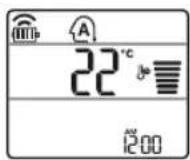
3 HaTnchTe 6yToHa ,3aHa Hactponte XeJHaHata TemnepaTypa.
4 HaTnchete 6yToHa FAN SPEED,3a Da HAcTpOnte CKOpocTTHa BeHTnIaTopa.
PexmHa aBTOMaTHUHO npEbkIouBaHe
Moe en eHHueH cnnnt
To3n peKIM npOMEHa ABTomaTHNo peKIMa, 3a da nOndbpxKa HAcTpoEHaTa TempeHata ± 2^
1 Bknnoye ypeja.
2 HaTnchete 6yToHa MODE HrKoNko NbTN,3a da n36peTe peXIMHa aBTOMaTHUHO npEeKnIOvBaHe.
Ha nncnne ce noka3
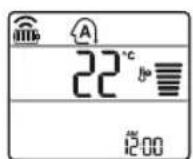
3 HaTnCHeTe 6yToHa nn , 3a Ta HactponTe JeNaHata TemnepaTypa.
4 HaTnchete 6yToHa FAN SPEED,3a Da HAcTpOnte CKOpocTTHa BeHTnlaTopa.
PekmHa n3cyaBaHe
To3n peKIM npemaxBa n3nnuHaTbBna npu
ycIOBnC BnCOKO HNBO Ha Bnara nnnpes
DbXIOBnCe3OH, 3a Da npedOTbpATn
O6pa3yBaHeTO Ha pIneceH. To3n peKIM perynipa
ABTomAtNUHO CTaNHaTa TEMepaTy a CKOpocTTa
Ha BeHTNJaTopa, 3a da ce noDlbpKa ONTMAnHO
HNBO HA BnAxAHOCT.
1 BknnoeTrepea.
2 HaTnchTe 6yToHa MODE HrKoNko NbTN,3a Da n36epete pekma Ha n3cyuBaHe.
Ha nncnnepe neoka3ba.
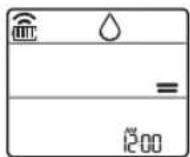
3A6EJIEXKA
BTo3npeXIM He MoXeTe Da npOmeHrTe cTaNHaTa TemnepaTypa, Tb KATO ce perynipa aBTOMaTHUHO.
CTaHbTeMnepaTypa He ce noka3Ba Ha DCnpe.
PexmHa oToJIeHne
1 BknHoyTe ypeJa.
2 HaTnchTe 6yToHa MODE HrKoNk nTn,3a da n36epTe pexma Ha OTonJIeHne.
Haekpana ce noka38.
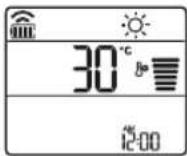
3 HaTnchTe 6yToHa nn , 3aJa HactponTe KeJanaHata TemnepaTypa.
3ABEJIEXKA
Ie ce nokaxe Ha BbTpueHOTO TnO, KOraTO ce 13BbpuBa pa3Mpa3raBaHe.
Taaikauyuece noka3BaHaBbTpewHOTrno
- 083e n3BpWBA npEaBapuTeJHO 3aTOnJIHe (TOnbI CTapt).
- Tbtpewhata TemepaType e DocTnHa 3aadaehata TemepaTypa.
PexnHaBeHTnlaTop
To3n peKIM eINHCTBeHO cIrpKyInpa Bb3dyxa B nOMEeHNeto, 6e3 da npomeHa CtaHata Tempepatya.
1 BknHouTe ypeJa.
2 HaTnCHHe 6yToHa MODE HrKoNko nTn, 3a Da n36peTe pexima Ha BeHTnJaTOP.
Ha nncnnepe neokaa
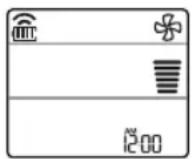
3 HaTnchete 6yToHa FAN SPEED, 3a da HacTpOnte cKOpocTtHa BeHTnTaTopa.
I3noJ3BaHe Ha cyHKunraTa „Pexm Ha cTpy
OTMЯHa HacTpOyKaTa Ha TaMepa
HaTnchTe 6yToB,3a da OTMeHnTe BCnKn HacTPOuKn Ha TaMepa.
N3noJ3BaHe Ha yHKuYTa 3a 3acnBaHe (no n36Op)
Ta3nФyHKUH N3KIOUBA KINMaTnKa aBTOMaTnHo, KOraTO CN JIraTe.
1 BknHouTe ypeJa.
2 HaTnCHHe 6yToHa TIMER HEKONKOKpaTHO.
- IKOHAnIO-DOJy MURA B DOJHaTa Yact Ha DNcNJIe.
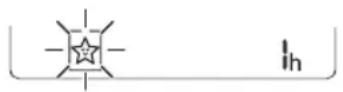
3 HATINCHETe 6yToHa ,3aJa n36epTe yaca (do7 yaca).
4 HaTnCHHeTe 6yToHa SET/CANCEL,3a Da 3aBbPwIte HAcTpOuBaHeto.
ce noka3Ba Ha ekpaHa.
3ABEJIEXKA
H ce noka3Ba Ha HЯКои BbTppeuHn TeHa.
- DnCnIeBbTpEshOTo TAno Noka3Ba O1 74 KOEtCe BnKJa cAmo 3a 5 cek, Cnei KOEt Ce BpbUa Do HAcTpoNkata Ha TempepaTypa.
BpeKnOxnaKaHe n 3CyuaBaHe TemnepaTypaTa ce yBeJnuAba c 1°C cnei 30 MNHyTN IOnbJIHNTeNEH 1°C cnei Oue 30 MNHyTN 3a NO-KOMΦopTeH cbH.
Temneppata ce noBnuaBa c do 2°C ot npedbapntenho 3aadaeHaTa TemnepaTypa.
Bbnpema ot6eJ3BaHeTo Ha ckOpocTtHa BeHTnlaTopa Ha dncnner MoKe da ce npomeH, CKOpocTtHa BeHTnlaTopa ce perynpa ABTomatuHO.
N3noJ3BaHe Ha yHKnIyTa 3a cTaNdApTeH TaMep (no n36Op)
Ta3nФyHKUIN3KNOUBA KINMaTnKa aBTOMaTHNO, KOrato CNJIrATE.
1 Bknoute ypeda.
2 HaTnChHeTe 6yToHa TIMER HeKoJIKOkpaTHO.
-IKOBATO-DOJY MURA B DOJHaT a Yact Ha DnCnJe.
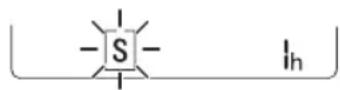
3 HATINCHETe 6yToHa ,3a Da n36epTe Yaca (do 7 yaca).
4 HaTnChHeTe 6yToHa SET/CANCEL,3a Da 3aBbPunTe HacTpOuBaHeto.
S ce noka3Ba Ha ekpaHa.
3ABEJIEXKA
Ta3nФyHKUeE3a6paHeHa,KORAtoHacTpoBate TaIMepe3aN3KnIOuBaHe.
N3noJ3BaHe Ha cyHKnJaTa 3a Noka3BaHe Ha n3pa3XoJeHaTa eHeprna (no n36op)
Ta3nФyHKUnia NOKa3Ba KOJIuYeCTBOTo
N3pa3XoDBAHa eJekTpnuCeKa eHeprna Ha DNcPNeer
Ha BbTpewHOTo TAnO, DOKaTO pOpyKTbT pa6OtN.
Ioka3BaHe Ha TeKyuata H3pa3XoDbHa eHepnia
1 Bknioye ypea.
2 HaTnChHeTe n 3aApbXkTe 6yToHa 00N[3s] 3a OKoNo 3 ceKyuHdN.
MomeHTaKaHcyMaucnHa eHepnna (88) ce Noka3Ba 3a KpaTko Bbpxy Dncnner Ha HRAKO MOneIN BbTpueHN TeNa.
3ABEJIEXKA
THe ce noka3Ba Ha 6e3KmHOTo NCTaHIOHOHO.
- EdnHuaPka 3a cToHocTta, KOrTo ce noka3Ba Ha dncnner, e kW.
- Ako 羽贝海OT 99 KBT, KOeTo e DonyctmnaT dnaa3OH, y noDbpkaaTe Ha 99 KBT.
- IokaemooHocTa nO 10 kBt c 0,1 kBt eHNHn n NOKaKeTe eINH na 10 kBt c 1 kBt eHNHn.
- DeHCTBNTeJIaAMoUHOCT MOKe Da ce pa3NJuYaba OT NOKa3aHaTAMoUHOCT.
- PnC CbP3BaHe KbM BbHJHO TAno Ha MyTINcNCTema Ta3n FyHKUma MoKe Da He Ce NODbPka.
N3noJ3BaHe Ha yHKnraTa 3a N3KJIIOvBaHe Ha OCBETJeHneTo (no n36Op)
Ярков на有很大 полесу.
Moxete da Hactpoite npKocTtHa dncnne Ha BbTpewHOTo TNO.
- HatncytoHa LIGHT OFF.
3ABEJIENKKA
BknHouTe/H3KnHouTe ekpaHa Ha dncnpe.
I3noJI3BaHe Ha ФункцЯТа 3a ydo6Ha nO3nCnHa Hb3dUshnna notok (no n36op)
Ydo6Ha nO3nucna Ha nepkata npi pa6ota
TaNfynKcNna3aabaNo ydo6eHnauHnno3nucnHa nepKaTa, KOrTo ce 3anaMeTBA npedBaPntEJIHO,3a Da OTKnOHN NOdaBaanBb3dyx,Taka Ye da HeDyxa DnpeKTHO cpeSy obNTaTeJNTe B cTaTa.
1 Bknnoche ypeda.
2 HaTnCHeTe 6yToHa COMFORT AIR HeKoJIKoKpaTHO n N36epeTe JeaHaTa no3u.
Haekpaa ce noka3Ba nn.
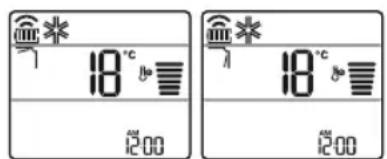
3ABEJIEXKA
Ha Haryon BbTpewHn TeNa ce noka3Ba nn
TachyHKUe 3a6paHeHa, KOraTO HaTuCKate 6yToHa MODE nn JET MODE.
TatyHKUe 3a6paHeHa n ABTOmatuHOTOBbPTHe BbB BepTKaJIHa Nocoka ce 3aJaBA,Korato HaTNCHEt6yToHa SWING.
Koara3nФyHKnueeN3KnHoueHa, XOpu3OHTaJIHATA nepKa ce 3aJeIcTBA aBTOMaTuHOB 3aBNCIMOCOT pexIma Ha HAcTpoBaHe.
N3noJ3BaHe Ha yHKuYra 3a ynpabJeHne Ha eHeprYra (no n36op)
1 Bknouteypeja.
2 Hatachete 6yToHa ENERGY CTRL.
- Hatnoebytoha ENERGY CTRL HEKOLIKOKpAHO 3a H36Op Ha BcKa CTbNka.
| Стбнka 1 Стбнka 2Стбнka 3 | |
| 80 % | 60 % |
| 200 | 200 |
3ABEJIEXKA
- Ctbnka 1: BxodaaTama MoHocTe hAmajra nC 20% BCpaBHeHne c HOMHaJIHaTa BxOJaMa MOHOCT.
Haekpahacenokaa
CTbn2aBxOJaTuata MoHocTe HamaJnA C 40% B cpaBHeHne C HOMHaJIHaTa BXOJaMuHOCT.
Haekpaonoka3Ba 60x.
CTbna(no n36op):BxOJaTaMoHocTe HamaJnca 60% BcpaBHeHne C HomHaJIHaTa BXOJA MOnHOCT.
Haekpaonoka3Ba 40
Ha HrKoBbTpewHn TeNa ce noka3a (CTbnKa 1), (CTbnKa 2).
TayHKnEIOCTbHa cpeKm Ha OXnKaDaHe.
KanaTMOKe Da ce noHnK, Korato e n36paH pexHM Ha ynpabNeHne Ha eHepnTa.
KeNaareMnepaTypa ce noka3Ba 3a OKono 5 cek, ako haTnchete 6yToHa FAN SPEED, - CtaaBaeMnepaTpaCe noka3Ba 3a OKoJIo 5 cek, aKo HATNCHE6yToHa ROOM TEMP.
- PnueBaHe KbM BbHIO TAno Ha MyTNCCTema Ta3N OyHKU MOKe Da He Ce NODbPka.
I3noJ3BaHe Ha cneuaJIHn 0yHKcnn
1 Bknouteypeja.
2 HaTnCHete 6yToHa FUNC HeKOJIkoKpaTHo n36epTe KeJHaHATA No3uJra.
3 HaTnChHeTe 6yToHa SET/CANCEL, 3a Da 3aBbPUnTe HAcTpOuBaHcTo.
Hopmaun3a cooptyep cOTbopeh Koid
3a da nonyuHTe u3xOdHnKoD cbrJnaCHO GPL, LGPL, MPL n dpyr nnueHn C OTBOpEH KOD, cdbpbkaun Ce B TO3n npOdyKT, nocetete ye6 caTahttp://opensource.lge.com.
B DonbJIHeHne KbM n3XoDnHn KOD MoKeTe da n3TerIInTE u BCNUKn CNOMEHaTn JINuCEH3NOHHYcIOBn,OTKa3n OT rapaHcNn N 3BecTn Bbb Bpb3ka C aBTOpCKn npaba.
LG Electronics cBIO ue Bn npedocTabn OTbopen
H3XoJEN KOJ HA CD-ROM cpeu 3aannaahe,
NOKPmbauo pa3xOJNTe 3a H3BbPwBAHe Ha Takaba
DInCTp6yUra (kato Hapnpimep ceHaTa Ha
HocnteJIte, pa3xOJNTe no TpaHcnpTa), Cnei KaTO
NoIyH NOpbUka 3a TOBa NO IMeIN Ha aDpec:
opensource@lge.com. Ta3n opepta e BaNDHa 3a
NepnoD OT TPNrOdHH Cnei NocneHata HN
doCTabKa Ha To3n npOdyKT. Ta3n opepta e
BaNJnDa 3a BCEKn, NoIyHn Ta3n INHOpMaun.
VAŽNE SIGURNOSNE UPUTE

UPOZORENJE
Kako bist esmanjili opasnost od eksplozije, požara, smrti, strujnog udara, ozljede ili opekotina osoba prilikom upotrebe ovog proizvoda, slijedite osnovne mjere opreza, uključujuci sljedeće:
Djeca u kućanstvu
Ovim se ureðajem ne bi trebale koristiti osobe (ukljucujuci djecu) smanjenih tjelesnih, osjetilnih ili mentalnih sposobnosti, ili s manjkom iskustva i znanja, osim ako ih osoba koja je odgovorna za njihovu sigurnost ne nadzire ili im daje upute u vezi s upotrebom ureðaja. Djecu treba naggledati kako bi se osiguralo da se ne igraju s ureðajem.
Za uporabu u Europa:
Olulised ohutusjuhised 4
KASUTAMINE 11
Olulised ohutusjuhised

OHT
Noti ghat-Thaddim 11
Remote Control Bla Wajar 12
Terga Tixghel il-Kundizzjonatur tal-Arja Awtomatikament. 17
L-Uzulal-Funzjoni tal-Modalita 17
L-Uzu tal-Funzoni tal-Modalita Propulsiva (Jet Mode Function) 20
L-uzu tal-Funzjoni tal-Velocita tal-Fann 21
Remote Control Bla Wajar
Meta Ddahal il-Batteriji
Jekk l-iskrin tal-wiri tar-remote control jibda jiccara, ibdel il-batteriji. Dahhal batteriji AAA (1.5 V) qabel ma tuza r-remote control.
1 Nehhi l-ghatu tal-batteriji.
2 Dahhal il-batteriji l-godda u aghmel cert li t-terentials ^+ u - tal-batteriji huma installati tajeb.
Installazzjoni tal-Holder tar-Remote Control
Biex tipprotegi r-remote control, installa I-holder fejn ma hemmx dawl tax-xemx dirett.
1 Aghzel post sigur u fejn tilhqu faciliment.
2 Wahhal il-holder permezz ta'zewg viti mwahla sew b'tornavit.
Metodu ta'hidma
Ipponta r-remote control lejn ir-ricevitur tas-sinjal fuq in-naha leminija tal-kundizzjonatur tal-arja sabiex thaddmu.
NOTA
- Ir-remote control jista'jhaddem apparti elettronici ohrajn jekk ikun IPPuntat lejhom. Aghmel cert li qed tipponta r-remote control lejn ir-ricevitur tas-sinjal tal-kundizzjonatur tal-arja.
Ghal thaddim tajebzacarruta ratba biex tnaddaf it-trazmettitur ur r-riceyitur tas-sinjal.
F'ka zi funzjona tkunx provduta fil-proddott, I-ebda sinjal ta' hoss ma johroig mill-proddott meta buttuna ghal funzjoni bhal din fuq ir-remote control tigi maghfusa ghajr ghall-funzjonijiet tad-Direzzjoni tal-Fluss tal-Arja (SWING), Displej t'Energija (wds), Purifikazzjoni tal-Arja
3 Qabbad I-ismarphone mar-router wireless.
NOTA
- Biex tivverifika l-konnessjoni tal-Wi-Fi, iccekkja li l-icon Wi-Fi li hemm fuq il-panew tal-kontroll hija mixghula.
Dan it-taghmir jiflwi-Fi network ta' 2.4GHz biss. Biex ticckkja l-frekwenza tar-router, ikkuntattja I-formitur tas-servizz tal-internet tieghek jew irferi ghall-manwal tal-wireless router.
LG SmartThinQ mhuwiesponsabblita' problemi, hsarat jew malfunzjonijiet fil-konnessjoni tan-network,ikkawzati mill-konnessjoni tannetwork. - Jekk I-apparat ikühboghod mir-router dan jaf ma jkunx jista' jaghmel konnessjoni man-network kal-Wi-Fi. lxtri Wi-Fi repeater (range extender) biex ittejbeb is-sahha tal-Wi-Fi.
- II-konnessjoni tal-Wi-Fi tistigi interrogatta jew ma taqbadx minhabba I-ambient tan-netwerk tad-dar.
- Il-konnessjoni tan-networkk lista' ma tahdimx kif suppost minhabba l-fornitur tas-servizz talinternet.
- L-ambient tal-wireless tal-madwarta' jikkawza lis-servizz tal-wireless netwerk jahdem bil-mod.
- lt-taghir ma jistigi rregistrar minhabba problemi fit-trasmissjoni ta' qawwa tal-wireless. Skonnetta t-taghir u stenna madwar minuta qabel terga tipprova.
- Jekk il-firewall firerouter wireless tieghek huwaattivat, skonnettja l-firewall jew aghmel eccezzjoni ghal dan.
L-ism tan-network kal-wirelessID) ghandu jkun kombinazzjoni ta' ittri Ingli zu numri. (Tuzax karattri spejali) - II-user interface (UI) tal-ismarphone tista' tvarjghax din tiddependi fuq is-sistema operattiva (OS) tal-mobajl u I-manifattur.
- Jekk il-protokoll ta' sigurtà tar-numer huwa stabbilit ghal WEP, jista'ma jirnexxilekx thaddem in-network. Jekk joghgbok ibdlu ghal protokolli ta' sigurtà ohra (WPA2 huwa rakkomandat) u erga' rregistra I-proddott.
RIESENIE PROBLEMOV 33
BEZPECNOSTNÉ POKNY
SK
LÁMHLEABHAR AN ÚINÉARA
AER-
CHOIRITHEOIR
Leigh an lamhleabhair uineara seo sula n-oibrtear an gleas agus coinnigh in aice leat e an t-am ar fad.
Ag usaid Cianrialtan gan sreang
Bruigh an cnae chun gach socruithe a chealu.
Taispeain Gile Scathlain
Is féidir an gile a shocrú don scáthlán an aonaid laistigh.
- Bruigh an cnaipe LIGHT OFF.
NOTE
Cas ar/as an scailean Taispeain.
Ag uśáid an fheidhm aer compórdach (roghnach)
Oibriuchán Eite Compórd
Socraionn an fheidhm seo an eite go heasca
go suiomh réamhshocraithe chun an aer
solathraithe a sraonú ò dul direach go dtí na
daoine sa seomra.
1 Cas an gléas air.
2 Brúigh an cnaipe COMFORT AIR cusla uair chun an treo ata uait a roghnú.
no mlar a thaispeanann an scathlan.
NOTE
no Lmar a thaispeanann cuple aonaid laistigh.
- Ta an fheidhm seo dizhumasaithe nuair a bhruihare MODE no JET MODE.
Tá an fheidhm seo dichumasaithe agus socraitear an uath-athru treo ingearach nuair a bhrüitear
- Nuair ata an fheidhm seo as, oibrionn an eite cothromanach go huahtoibrioch de reir an mhodh socraithe.
Ag uśáid an fheidhm smacht fuinnimh (roghnach)
1 Cas an gléas air.
2 Bruiigh an cnaipe ENERGY CTRL.
Brüigh an cnaipe ENERGY CTRL cusla uair chun gach ceim a roghnu.
| Céim 1 Céim 2 Céim 3 | ||
| 80 % | 60 % | 40 % |
| 200 | 200 | 200 |
NOTE
- Céim 1: Islionn an lonchur cumhachta 20% i gcomparáid leis an ionchur cumhachta ann.
80 mar a thaispeanann an scathlan. - Céim 2: Islionn an lonchur cumhachta 40% i gcomparáid leis an ionchur cumhachta ann.
60 mar a thaispeanann an scathlan. - Céim 3 (roghnach): Isliönn an lonchur cumhachta 60% i gcomparáid leis an ionchur cumhachta ann.
40 mar a thaispeanann an scathlan.
(1 step), (2 step) mar a thaispeanann
cúpla aonaid laistigh.
- Ta an fheidhm seo ar fail leis an Mhodh Fuarthu.
D'heafadh leis an toilleadh isliu nuair a roghnaitear an mhodh Smacht Cumhachta.
Taispeanfar an teocht ata uait 5 soic ma bhruihear FAN SPEED, or
Taispeanfar an teocht ata uait 5 soic ma bhruiitear ROOM TEMP
D'headfadh nach ndeanfar tacaiocht don feidhm seo agus rudai ceangailte don aonad Iolrach Lasmuigh.
VAŽNA BEZBEDNOSNA UPUTSTVA

UPOZORENJE
He nHCTaJInpajTe ro KInMa ypeIoT Ha MeCTa KaJe wTO ce CyBaat 3aIaJIINBn TeUHOCTn IJIr rAcOBn, KaKO wTO ce 6eH3nH, npOpaH, pa3peDyBaun Ha 6oN nTH.
- OcnrypeTe ce deKa ueBkata n Ka6eNoT 3a HanojyBaHbe, KOINTO rN NOBp3yBaat BHaTpeShHnte N HaDBopeShHnte eDNHn, He Ce npecnJHo 3aTeHnat, pnp HcTaInpaHbe Ha KInMa ypeDoT.
KopncTeTe cTaHdapDeH TnHa npeKnHyBaH N OcNrgPyBaH, KOINTO ce ycorlaCeHN CO OceHkata Ha KInMa ypeDoT.
-He BheCyBajTe BO3dyx IIN rAC BO CnCTeMOT, OCBeh CO CneuHPO pa3JaADHO cpeIcTBO.
- KopncTeTe He3aapanInB rac (a30T), 3a Da npOBepnte daHn HMa nCTeKyBaHbe, KaKo N 3a npOuNcTyBaHBe Ha BO3dyXOT; yNoTpe6aTa Ha KOMnpecnpan B03dyx Nnn 3aapanInB rac, MoKe Da npEduN3BnKa noXap nn EKCnNo3nJa.
BHaTpeHnTe/HaDBopeHnTe Ka6eJcKn BpCKn Tpe6a Da 6nDaT CBpCTO OCNHypeH, a Ka6eJot Tpe6a Da 6nDe COoDBeTHO HacOueH, 3a Da He NoctOn HeKaKBa Cnla UTo Ke To Bnueye OJ PrnKnyOuNTe 3a NOBp3yBaHe. HecooDBeTHNe IInn IabAbN BpCKn MoXaT da npEiIN3BnKaaT HaCTaHyBaIbe Ha TOPnHa IInn INoxap.
-нсталлар te n HameHcknot eNeKtpnueH uTekep npeknhyBaHa ctpyjHOT KOLO, nped yNtpebaTa Ha KInma ypeDoT.
He noBp3yBajTe ja XncaTa 3a 3a3emjyBaHbe CO ueBkata 3a rac, rpomobpaHOT, INI TelefoHcKaTa Xnca 3a 3a3emjyBaHbe.
- OdpjyBajTe rH OTbOpEn IOTpe6HnTe OTbOpN 3a BeHTnlaunja, 6e3 HnKaBn npenpeKn PpeHnB.
PAEOTEHbE
-
OcnrypeTe ce deKa rN KOpNCHTe cAmO OHne DeJIOBn, KOHTo Ce HabeJeHN BO JInCTaTa Ha cepBnCHn DeJIOBn. HnkoraU He 0bNyBaJte ce da ja MeHyBaTe onpemaTata.
-
Ocnypte ce deka decaTa He ce kaCybaaT nnu yDnpaat no HaDbOpeShHaTa eINHua.
-Батэрпге Фрлajтги На MeCTO KaDE StTO He NOCTO ONaCHOCT OД пожар.
Kopnctete ro cmo cpeiCTBOTO 3a naehe, KOeTo e CneuHnHO HabeJeHO Ha etKeTaTHa KInMa ypeDoT.
-П配电инeteTo HanojyBaHbeto aKO NOcTOn 6nlo KaKBa BpeBa, Mnp36a nnn yad, KOnuTo Doaaraat OJ Knma ypeDoT.
He octabajte 3anaIINBn MaTePnn, KaKo ITO ce HaΦTa, 6eH3nH, nn pa3peDyBaU, Bo 6JIn3nHa Ha KInMa ypeIoT.
- KoHTaKtIupajTe ro OBnacteHnot cepBnCeH ueHTap, BO cIyuj KJIIMa ypeDoT da e IOToneH IOd HeKoN IOnJIaBn BODn.
He KopncteTe ro KInMa ypeIOT nOIOIro BpeMe BO HeKOJ MaI npocTOp, 6e3 COoDBeTHa BeHTnlaunja.
-Bo cnyuaj Ha nctekyBaHe Ha rac (kako fpeoh, nponaH, LP rac, nTH.) npoBeTpete IOBOJHO nped NOBTOpHaTa yNtpe6a Ha KInMa ypeDoT.
-3aЧистене на ватрашноста, контей щтг Te Oвл acteHnot cepвисян сентар пп дострпуетер. Коростею на jakи DeTeprHTN може за пpeДИЗВИКа КОРОЗиja пп OшТeТУВаые на edINHцараз.
- OcnrypeTe ce deKa doBOJHO cTe ro npoBeTpIne npocToPOr, npn nCTOBpeMeHaTa yNtpe6a Ha KInMa yPeIOT n HeKoj anapat 3a rpeEbe.
He 6nokpajte ro Bne3OT nnn n3Je3OT Ha npOTOKOT Ha BO3dyX.
He ctabajte ng paueTe nnn HeKOn dpyrN npedMeTu BO BnE3OT nnn H3Je3OT Ha BO3dyXOT,doNeKa pa60Tu KInMa ypeDoT.
- Ocnrypete ce deka ka6eIOT 3a HanojyBaIbe He e HHTy BaIkaH, HHTy Ia6aB, HHTy IpeKpWeH.
Hnkoraaw He donnpajte ro, HHTy paBOTe Te nIN nonpaBajTe ro KInma ypeoT co BnaJHN paue.
He cTabajte 6nlo KaKbN npedMeTn Bp3 Ka6eIOT 3a HanojyBaHbe.
He cTaaJTe rpeaIka nIeHekOn anapatn 3a rpeeHbe, BO 6JIu3Ha Ha KaBeNoT 3a HanojyBaHbe.
- He mehybajte nii npoJyBajTe ro Ka6eIOT 3a hanojyBaJIbe. N3rpe6aHaTAtnNnN3nyHeHATA n3Olaunja Ha Ka6eIOT 3a HanojyBaJIbe MoKe Da DoBeDe Do NoXap nn EneKtpuH yIap, n Tpe6a Da 6nDE 3aMeHeta.
-Bo cnyuaj Ha cHemyBaHe Ha cTpyja nIHa HeBpeMe co rPMOTeBuN, BeDnAaNcknyuTe To HanojyBaHbeto
- IorpnjkeTe ce da 6nndeTe cnrypHn, Deka KaBeJOT 3a HanojyBaHbe He MoKe Da 6nde N3BneueH nJIn OwTeTeH 3a BpeMe Ha pa6oTeHbeto.
He donnpajTe rH ueBkata co pa3JaHOTO cpeDCTBO,ueBkata 3a BODa, nIi 6nIO KOJ OD BHaTpeShHITe DeJOBN, 3a BpeMe Ha pa6oTaHa ypeDoT, nIi BeDaHnNo Hea.
OdpjxvBaHe
-He ynctete ro anapatot npeky dnpekTHo npckahe Boda Ha npOn3BOdOT.
-Пред чисе илл n3Вршуваън НОДРЖУBAьETO, ИСКЛЧЕТо Ганоюваьeto и поекajte додак сеНт He пестах co paбotinga.
Texnuchka 6e36eHocT
-нсталпаьeto Илл порразкite Наразеви OД CTpaHa Ha HeOBlaacteHи Лиca, може Да петсываат OnaCHOCT 3a Bac N dpyrnte lyre.
-
Cekoja liuHocT, koja sto ce 6abn co pa6oTaT a nnI npeknHyBaJIeTO Ha KOJIoTo Ha pa3JaDyBaUOT Ha oPnxNdePoT, 6n Tpe6aIO da NocEduyBa TEKOBHa BaxeUka NotBpda, n3JaDeHa OD INdUcTPnCKn akpeiHTpan Opran 3a npOeHka, KojaSto 6n ja OBnactIna HerOBaTA KOMTeHTHOCT 3a 6e36eJHo paKyBaHe CO pa3JaDyBaUHTe, BO cOrnaCHOCT Co INdUcTPnCKn npn3HaTa CneunФnKauzna 3a npOeHuBaJIe.
-
CepBnCnpaHbeto MoKe Da ce N3BeDyBa eINHCTBeHo OHaKa, KaKo To e npenopaUHO oN CTpaHa Ha npOn3BOdnteIOT Ha ONpeMaTa. OdpKyBaHbeto n NonpaBkata 3a KOnTo e Notpe6Ha NOMoO od DpyrKBAJIInΦnkyBaHN LInca, Ke Ce BpSi NOD HaAD3Op Ha HAdJeXHo JInCe 3a KopNCteHe Ha 3aNaJIINBn pa3JaADn CpeDCTBa.
-ИнфорmaциTe COДржан BO ппрачнКOT ce HameHeTn 3a ynotpe6a Ond CTpaHa Ha KBaIIHФИКУВaH cepBnceH TexHnUap, KoJ ITO e 3aNo3Haen Co 6e36eIHOCHNTe pOpoeIpyn I ONpeMeH CO COODBeTeH aJaT n INHCTpyMeHTn 3a INCnITyBaHbe.
-
HeycneXOT da ce npouHTaT n cIeIaT yNaTCTBaTa oD OBOJ npnpaHnK, MoKe Da DOBeIe Do DepeKT Ha ONpeMaTa, OWTeYBaHbe Ha NMOTOT, JINuH NOBpeDN I/INN CmPT.
-
Anapatot Tpe6a da 6nde nHctaInpaH BO cOrJaCHoCT co HaunOHJIHnTe odpe6n 3a eJekTpika.
Kora Ka6enot Tpe6a Da ce 3aMeHN, 3aMeHaTa Tpe6a Da ce H3BpH N OJ CTpaHa Ha OBlaCTeHN Iuca, KON UTO rN KOpNCtAt CaMO OPINHAHHTe pe3epBHN DeIOBN. - Anapatot Tpe6a da 6nde co npabnHNo 3a3emjyBaHbe, 3a da ce MInHMn3npa pn3NKOT od eJneKtpuyeH yIap.
He npeknHyBajTe nnn OTCpaHyBajTe ro 3a3emjyBauchnot KOHTAKT OyTKaOH.
-Приклuyуbaыeto Ha aадаNTepOT 3a 3a3emjybahe,Ha 3abpTkata Oda KaNAKOT Ha SIndHnot PprkIyUOK,He rO NOCTNHyBa 3a3emjyBaHeto Ha anapaTOT,OCBeH BO CInyaj KOra 3aBPTkata Ha KaNAKOT eOD MeTaN e HEn30InpaHa,a SIndHnot PprkIyUOKe CO 3a3emjyBaHbe Npeky KyKHata eJneKTpnuHa MpeXa. - Ako Imate 6nlo KaKOB COMHex BO npaBnHOTo 3a3emjyBaHe Ha KInMa ypeDoT, NOBnKaJTe KBaINΦnkyBaH eJeKtpuap Da Tn PPOBepn SdHNOT pNknyOK n CtpyJHOTO KONo.
Pa3naHOTcpeDCTBO kaj racot Kojto DyBa BO anapatOT n 30anaJata, bapaat noce6hN NOCTaNKn 3a OTCTpaHyBaHe. KOhcyItpajTe ce co cepBnCeH areHT nIn Hekoja dpyra JInuHOCT CO cINuHN KBaIInФkaUIN, ppeH HNBATO OTCTpaHyBaHe.
Ako e oWTeTeH ka6eNoT, Mopa da 6nnde 3aMeHeT OJ pOn3BOdnteIOT nIN OD HeROBn cepBncepN, INI NaK OJ CInuHO KBaJIINΦnKyBaHo IInCe, 3a Da ce n36eRHe OnaCHOCT.
Anapatot Tpe6a Da ce cyBa BO Do6po npOBeTpena IpocToPnja, KaTe ITO rOleMHaTa Ha c6aTa Ke OndroBapa Ha HabeDeHOTOnpaueje, Notpe6Ho 3a HeROBO pa6oTeHe.
AnapaTOT Tpe6a Da ce CyBa BO Coba KaJe WTo Hema NocTojaHa paBota Ha OTBOpEn PnAmEH (Kako Ha npImep Ha rachn anapatn) n3BOpH Ha NaIeHe (Kako Ha npImep Ha eJekTpUHa rpeaJka).
Anapatot Tpeba da ce yBa Ha hauH,Ha KoJTo 6n ce cnpeuHa nojBa Ha MexaHnUKO OwTeTyBaHe.
A
BHIMAHNE
3a da ce haMaJI np3IKOT od MaJI IOBpeIHa JNuca, HencnpaBHO fYHKUHnPaHe IJI N OWTeTyBaHBe Ha IPOUN3BOJOT IJI N IMOTOT pR KOpNCTeHBe Ha OBOJ IPOUN3BOID, CJIeJeTe rN OCHOBHNe MEPKn Ha IpeTna3JIINBOCT, BKnyuHTeJIHo n CJIeDHIte:
MOHTAXA
He nHcTanipajTe ro KInMa ypeoT BO oBnact KaJe wTo Ke 6nDe DnpeKTHO n3IOJKeH Ha MOpCKN BeTep (npCKaHbe co coI).
-Правино Инсталпajte Го OДВODHOTOцpeBOЗapади Нелрочenv OДВODHa BODaTCo3daNeHa OД KOHNDeH3auNiJaTa.
-Бидete BHHMaTeHnпрИ OTNaKyBaHbETo Ил ИнсТаJInpaHbETo Ha KJIIMa YpeIOT.
He donnpajTe ro ncteueHTo cpeCTBO 3a JaedeIbe, 3a BpeMe Ha HnctaIIpaHbeto nn nonpaBkata.
- TpaHcnpOT Ha KJIIMa ypeoT Tpe6a Da ce N3BpN Od IBe NJIPOBeKe JInca, INN CO YNOTpe6a Ha BnIyukap.
-Инсташираjet ja habdBopeшнata edHHuca taKa, StTo Taa Ke 6nde 3aStnteHa od dInpeKTHata coHueBa CBetnHa. He cTabajte ja BHaTpeShHaTa edHHuca Ha MeCTO KaTe StTO Ke 6nde dInpeKTHO 3ILOXeHa Ha COHueBaTa CBetnHa npeky npo3Opunte.
-Be36eHNO OTCTpaHete rMaTePnJaNte 3a NaKyBaHe, KAKO ITO ce 3aBPTKInTe,KnHcnte Nn BatepInTe, KopncTejkn ro COODBETHOTO NaKyBaHbe NO IHCTaJInpaHbeto NNNONPaBkata.
-Инсталрajte ro Клиma уpeodot ha MeCTO KaTe шTO bUyabTaHa HAnBOpEshHata eINHnca n N3dYBHTe rAcOBn Hema da IM CO3daat HenpNJaTHocTn Ha COcEdnte. HeycnexOT da ro HAnpaBNTe Toa MoKe da DOBeNe Do KOHΦJInk Co COceDInTe.
PAEOTEHbE
-Изва对接ги батугпenteaco далочнсnot упавьач Немада се Корости подог Врemeнскп перов.
-
OcniypeTe ce deKa e nHcTaInpaH fInTepoT, nped ynoTpe6aTaHa KInMa ypeDoT.
-
Ocnypte ce deka Hema nCTekyBaHe Ha cpeIcTBOTo 3a JaedeHBe OTkako Ke IHHCTaIIpate IIIN nonpaBaTe KInMa ypeIoT.
He ctabajTe npedmetn Bp3 KIma ypeoT.
- HnkoraaH Me meajTe pa3nUHN BINOBN Ha 6aTePN, INN cTapu CO HOBn 6aTePN, BO daJeHHCKNOT ynpaByBauch.
He octabajTe ro KInMa ypeIoT da pa6OT nooIro Bpeme, Kora BnaXHOCTa Ha BO3dYxOT e MHOry BnCOKa, IIN CO OTBOpEH BpaTN INN PPO3Opu.
-П prefectа_HEТе сО КориссебеTo Ha Далесуннскnot упраByвач Akо NOCTО ИСТЕКУВАБЕ на Hekoja od bATEриTe. Ако obлескata Или KOKATA Bn ce ИЗLOжЕнHa INCTeKUВaHBeTO od bATEриJaTа, ИЗМЛЛТЕ ГСОЧИСТА ВODа.
He n3nojyBaJTe rN nyfeTo, KINBOTHTe, INn paCTeHnjaTa, Ha DyBaHBeTo Ha IaDHnOT INn TOnIInOT BO3dYx Od KInMa ypeDoT, Bo TEKOT Ha NODOJIr BpeMeHcKn NepNoI.
- Ako Dojde Do roItaHe Ha nCTeueHaTa TeuHocT od 6aTepuJaTa, TeMeJIHO n3MnJTe ja BHaTpeUHocTa Ha yCtata N no6apajTe JeKapcKn COBeT.
He nijte ja BOData wTO nCTekyBa oN KInMa ypeDoT.
He KopnCTeTe ro npOn3BOJOT 3a HeKoCneuJaHn HameHn, KaKo Ha npimep 3a 3aUyByBaHbe Ha XpaHa, yMeTHNuKn DeJa nTH. Toa e KInMa ypei HameHET 3a NotpeBnte Ha NOTPOuYBaUHTe, a He CnCTem 3a npEun3Ho NaJeBe. NocToi pN3NK 3a OwTeTyBaHbe nn rHy6eHBe Ha NMOT.
He nonhe Te nn packnonybajTe n 6aepnnte.
OdpjxvBaHe
- Hikoraш He donnpajTe rN MeTaHnTe DeJIOBn Ha KInMa ypeDoT, npN OTCtpaHyBaHBe Ha qnItePoT 3a BO3dYx.
KopncTeTe UBPCT CToI INn cKaJa KOra Ro YnCTnTe, OndjyBaTe, INN NOnpaBaTe KInMa ypeDoT, KoJwTo e BnCOKO NoCTaBeH.
- HNKORAш He KOpIcTeTe jakn cpeIcTba 3a YIcTeHbe IJIpaCTbOpyBaUH,При YIcTeHbe Ha KJIIMMa ypeIOT, HHTy IprckaHbe COBDA. KopIcTeTe Ma3Ha Kpna.
PAEOTEHe
MK
Hanomehn 3a pa6oTeheTo
PpeIIO3n 3a 3awTeJa Ha eHeprJia
- He naTe ro npTepeHBOBHTpeuHnOT npocToP. Toa moKe da 6nne wTeTHo 3a BaWeTo 3npabJe n MoKe Da doBeDe Do 3rOJemeHa notpoUyBaUka Ha cTpyja.
BjaTe ja coHcEbTa cBeTnHa co poNeTHn nI 3aBecn,doEka pa6oTN KInMa ypeDoT.
-ДржемаТВОЕн ВраТиЕ И позорцпЕ,doDEka pa6OTКИМа уpeДOT. - PnIaTe ja XOpu3oHTaHNO HIn BEPTKcAHO HAcOKaTa Ha npOTOK HT B03dyXOT, 3a da dojde Do Upkylaunja HA BO3dyXOT BO 3aTbOpeHaT npocToJa.
3a6p3ajfeHOT 3apaN no6p3o naeHe nn 3aToNlyBaHe Ha BHaTpeHnO T Bo3dyX, BO KpaTOK BpeMeHcN nepno. - PeIOBHO OTBOPaJIte rI npO3OpUITE 3apaI npOBETpyBaIe. KbaJIHTOT Ha BO3dyXOT BO 3aTbOpeHInTe npocTopn MoKe Da ce BLOuN, aKO KImMa ypeOTo CE KOpCTNu NODr BPemEHKn nepNoD.
- HcBero foHTePOT 3a BO3dyx eHaaw Ha cekon 2 HeDeni. PpaunHaTa n HeuHCTOTnTE KOUTo ce co6bupaat BO fHTePOT 3a BO3dyx MoKAT da ro 6NOKupaat npOTOKo HA BO3dyXOT, nn Da DOBeDat Do cJa6eeHe Ha cyHKUnTe Ha JaedeHe/HaMaNyBaHe Ha BJaXHOCTa Ha BO3dyXOT.
ДeноиФункции
BHaTpeHha eDnHua HaDbopeHha eDnHua
Coben npka3 HaekpaHot
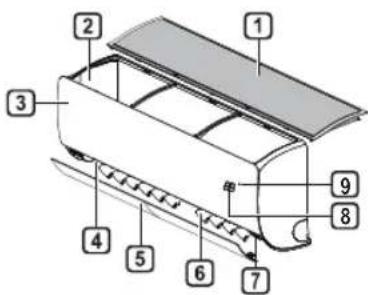
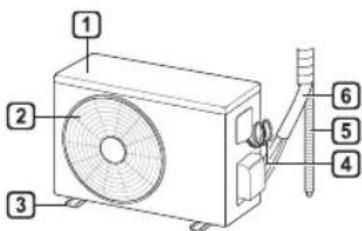
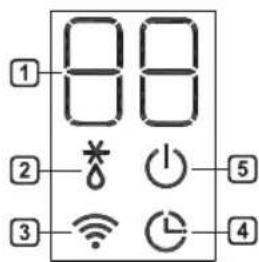
1 ΦιπΤερ 3a BO3dύx
2 IOBOI HA BO3dyx
3 PpeH Kanak
4OBOHnBa03dyx
5 Bo3dyueH deΦneKTop (xopn3oHTaHa nepka)
6 Bo3dyueH deepneKTop (BepTnKaJIHo pe6po)
7 Bknyu/Nccknyu konue
8 Ekpan
9ПиемннкHaCnHn
OTBOPnHaIOBOOToHbO3dyx
OTBOPHaOJBOODTHaBO3dyx
3 Ba3Ha nIoua
4 KaBEnOT3a HanojyBaHe
5 OДВОДноцрево
6 LcEBKOBOHa pa3JaHOTO cpeIcTBO
1 NocakyBaHa TemnepaTypa / Co6Ha TemnepaTypa
2 Odmp3HyBaHBe / Ppe3aRpeBaHBe
3 Wi-Fi
4 Tajmep
5 Bknyu/Nvcknyu
HANOMEHA
- Epojot n Iokaunjata Ha pa60THnTe CBtna MoKe da Bapnpa BO 3aBnCHoCT OJ MOeNoT Ha KInMa ypeoT.
Функгамоcke Да ce MeHyBa BO 3aBnCHOCT OД TINOT Ha MODeJOT.
MoJeHa eHHeuHa noeJ6a
Oboj pekIM ABOMATcKn r MeHyBa peKIMOT, 3a da ja oDpKn NOCTaBeHaTa TEMNepaTpa Ha ±2°C.
1 NywTeTe ro anapaTOT.
2 PnTnCHTe ro konHeTo MODE NOBeKeNaTu, 3a Da ro n36epeTe pexHmOT Ha aBTOMaTcKO MeHyBaHbe.
A ce npkaKyBa Ha ekpaHOT 3a npkaKyaHe.
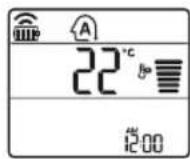
3 PnTNCHeTe ro konyeTo 3a Ja ja nOCTaBnte nocakyBaHaTa TemnepaTypa.
4 PnTINCHETe ro konHTo FAN SPEED 3a da ja npinaarOndte 6p3nHaTa Ha deHoT.
Pexm 3a HamaIyBaIbe Ha BnaXHOCTa
Oboj pexim ro otctpaHyBa BnwoKOT ha BnaRa od BnCOKO BnaXHaTa CpeHHa, Hn 3a BpeMe Ha DoJIOBHaTae30Ha, Co cen Da cnpeu O6NkyBaHeTo Ha NoCTaByBaHBeTo. Oboj peKIM aTOMaTcN rnpNaorOyBa co6HaTa TemepaTypa n 6p3nHaTa Ha fehOT, 3a da To 3aDpxn ONTMaJIHOTo HnBO Ha BnaxHoCT.
1 NywTeTe ro anapatot.
2ПиТиСеTe ro konчeto MODE noBekenatn,3a Da ro n36epeTe pexmOT 3a HamaIyBaHbE Ha BnaXHOCTa.
ce npkaKyBa Ha ekpaHOT 3a npkaKyBaHe.
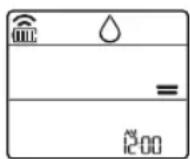
HANOMEHA
- Bo oboj pexim He moKeTe da ja npunarOnde co6HaT a TempepaTypa, Taa abTomatckn Ke ce npunarOdi.
- Co6HaTAMnepaTpya He e npkaKaHa Ha ekpaHOT 3a npkaKyaHe.
Pekim Ha rpeehe
1 NywTeTe ro anapaTOT.
2 PnTncheTe ro konyeto MODE noBeKeNaTH, 3a da ro n36epeTe peKIMOT 3a rpeHe.
ce npkaKyBa Ha ekpaHOT 3a npkaKyBaHe.
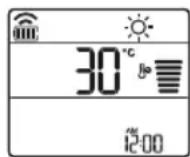
3 PnTnCHeTe ro konyeTo 3a Ja ja nocTabInTe nocakyBaHaTa TempePaTypa.
HANOMEHA
Ke 6nDat npikakahn Ha BHaTpeuHaTa eINHua, Kora Ke pa6OTn Odmp3HyBaHeTo.
-
PohataBoj nokaTei Ke 6nDe npkaKan Ha BHaTpeHHaTa eHHNu:
-
Kpaaobotn nped3arpeBaHbeTo.
-Ko6hata TemnepaTypa Ke ja doctnre noctabeHata TemnepaTypa.
PexkMHaΦeHOT
OBoj peKIM eINHCTBHeO rIupKyInpa BHaTpeuHnOt BO3dyX, 6e3 da ja I3MeHn Co6HaTa TEMnepaTypa.
1 NywTeTe ro anapaTOT.
2 PnTnCHeTe ro konyeTo MODE noBeKeNaTu, 3a Da ro n36epeTe pexmOT Ha deHoT.
ce npkaKyBa Ha ekpaHOT 3a npkaKyBaHe.
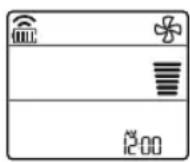
3 PnTnCHeTe ro KOnHeTo FAN SPEED 3a da ja npnaorOnte 6p3HaTa Ha gehot.
KopncTeHe Ha yHKnjaTa Mna3eH peXIM
- IkoBaoja ce Haofa noDony, Ke 3aTpeneepn Ha dHOTo Ha ekpaHOTa npKakyBaHe.
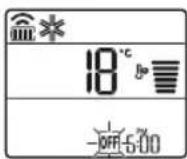
2 PnTNCHeTe ro konHcTo 3a da n36peTe MNHyTu.
3 PnTnCHeTe ro konYeTo SET/CANCEL 3a da 3abpnte.
- Ito NaByBaHTo Ha MepaOT Ha BpeMe, TEKOBHOT BpeMe NIKOHATA OFF ce npKakKyBaAT Ha ekpaHot 3a npKakKyBaHe, yKaKyBajKn DeKa e NoctabeHo NocakyBaHOT BpeMe.
HANOMEHA
Obaa cyHKunja e OheBO3MOXKeHa Kora Ke ro NOCTABNTe EHHOCTabHNOt MepaH Ha Bpeme.
OTkaxyBaBe Ha ncknyeHnot MepaHa BpeMe
1 npTnchTe ro koncheTo noBekenatN.
- IkoBaoja ce HAOf aNoDony, Ke 3aTppeepn Ha dHOTo Ha ekpaHOTa npKakyBaHe.
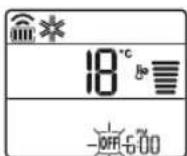
2 PnTNCHeTe ro konHeTo SET/CANCEL 3a da ja otKaKeTe NOCTaBkata.
OTkaxyBaBe Ha noCTaBKnTe Ha MepaOT Ha BpeMe
PnTnCHTe Ro KOnue 3a Da rN OTKaXeTe CHTe NOCTaBKn Ha MepaOT Ha BpeMe.
KopncTeHe Ha yHKnjaTa cHneHe (OncnoHaJIHo)
ObaaФyHKUJa ABTomATcKn ro NCKnyuBa KnMa ypeoT, Kora Ke OTnTe Ha CnneHe.
1 NywTeTe ro anapatoT.
2 PnTncHeTe ro konueTo TIMER noBekeNaT.
- IkoHaRoJa ce Haora noDoJy, Ke 3aTppeepn Ha dHOTo Ha ekpaHOT 3a npkaKxyBaHe.
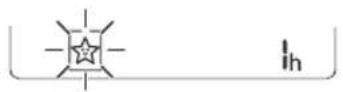
3 PnTncheTe ro konHeTo 3a na ro n36epete yacot (ce do 7 yaca).
4IpnTnCHTe ro konyeTo SET/CANCEL 3a da 3aBPwnte.
ce npnkaKyBa Ha ekpaHOT 3a npnkaKyBaHe.
HANOMEHA
H ce npKakjyBa Ha HekO BHaTpeuHn eHNHnI.
- EkpaHbB HbATpeuHaTa eDHHnCa ce npkaKyBa oD 14 do 74, cAmO BO TEKOT Ha 5 cekyHn, a nToa ce Bpaka Ha NoCTaBeHaTa TemnepaTpa.
Bo pexKaMaHa IaedeHbe n peKIMOT Ha HamaNyBaHe Ha BnaXHoCTa, TempePaTypaTa ce 3rOleMyBa 3a 1°C no 30 MInHyTn, n DonoJHnteJeH 1°C no dpyrTe 30 MInHyTn, 3apaN noydo6Ho cIneHbe.
Temnepata ce 3ronemyBa do 2^ oMometHaHATA TemnepaTypa. - Nako 3a 6p3nHaTa Ha deHOT Ha ekpaHOT,3a npKakyBaHe MoKe Da ce npomeHn, 6p3nHaTa Ha deHOT ABTomatckn Ce npNarOdyBa.
KopinCTeHBe Ha yHKunjaTa eHOCtBeH MepaHa BpeMe (OncnoHaIHO)
Obaa yHKuJa aBtOMaTcKn ro NCKnyyBa KnMaypeoT, kora Ke OTnTe Ha cnneHe.
1 NywTe re o anapaTOT.
2 PnTnCHete ro konyeTo TINER NOBekenatn.
- NkoBaKaJa ce Haora noDoJy,Ke 3aTppeepn Ha DNHOHa ekpaHOTa npkaKxyBaHe.
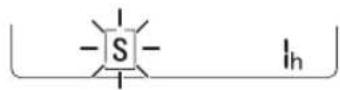
3 PnTncheTo KOnyeto 3a Jro n36epete yacot (cdo7yaca).
4 PnTnCTHeTo KOnHeTo SET/CANCEL 3a Da 3aBpHnte.
S ce npkaKyBa Ha ekpaHOT 3a npkaKyBaHe.
HANIOMEHA
Obaa cyHKunja ce OHAB03MOkyBa Kora Ke ro nocTaNTE Ha NcknyeHo MepaHT Ha Bpeme.
KopncTeHe Ha yHkunjaTa PnkaJyBaHe Ha eHepnjaTata.
ObaaФyHKuJa ja npKakCyBa KOINHnata Ha npOn3BeDeHaTa eJKeTprUHa eHepriJa Ha BHaTePHNt ekpaH, 3a BpeMe Ha paBoTaHa npOn3BODoT.
Приказа наTekOBнатаnotpoшувачка наеелктпчнаеергиJA
1 NywTeTe ro anaparot.
2 PnTncHeTe ro konYeTo 3ceKyHdN.
MomeHnHaTaNtpoWsyBaUkaHa eHepnJa ( 88) ce npKakBya HeKoe OndpeJeHO BpeMe, Ha HekON BHaTpeuHn EINHnCn.
HANOMEHA
He ce npkaKyBa Ha 6e3KuHnO T aJeHHcN ynpaByBa.
- EdnHua npkaKaHaTa BpeHocTe kW.
- AkaneBeke od 99 kW, wTo e oncerot Ha n3pa3aYBaHbe, oDpKyBaJte ro Ha 99 kW.
- Ppikajn Batajata no10 kW co 0.1 kW eHNHua, n npikaxn eoHa koja e Hau 10 kW co 1 kW eHNHua.
-ФakTNHANOjyBaHeMoKeJacepa3NkyBaOДпнkaЖАНОJOyBaHe.
Kora e noBp3aH co MyTn haDbopeuHaTa edHHua, OBaa yHKunja moKe6n Hema da 6nde npdpkaHa.
KopncTeHbe Ha yHKnjaTa NcknyeHo OcBeTnyBaHe (OnuHaJIHO)
OcbetnyBaBeHaekpaHOT3a npkaKByBaBe
Moxete da ro npnilarodnte ocBetJyBaHbeto Ha ekpaHot 3a npkaKayBaHe,Ha BHaTpeUHaTa eDHHuca.
- PnTnCaeKoNueTo LIGHT OFF.
HANOMEHA
BnyuyeTe/nuKnyuyeTo eKpaHOT 3a npkaKyaBaHe.
KopncTeHe Ha yHkunjaTa noroDeH BO3dyx (OnuHaJIHO)
Iorodno pa6oTeHe Ha nepkaTa
Obaa yHKuJa noroJHo ja noCTabyBa nepKaTa BO 3aadaHeHaT aNo3uJa, 3a Da ce CBPTN DOBODHnot BO3dyx Od DnpeKTHOTyBaHe Ha cTaHapnte BO co6ata.
1 NywTeTe ro anapaTOT.
2 PnTnCHeTe ro KOnHeTo COMFORT AIR NOBeKeNaTu, n N36peTe ja NoCaKyBaHaTa HAcOka.

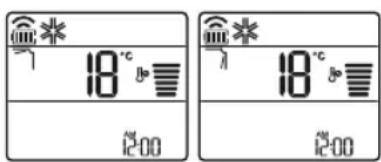
HANOMEHA
7 nnn Ice npkaKyBa Ha Hekon oBhAtpuHInTe eDHHn.
ObaayuJnaeOheBO3MOKeHaKoraKe npTnCHTe KOnyTo MODE JIJI JET MODE.
ObayuJia e OHeBO3MOxHa n aBTOMaTCKOTO 3amabHyBaHbe NO BepTNkAHa HAcOka Ce NOCTabyBa, Kora Ke ro npNTCHeKONHTo SWING.
Koaa yHKunja e NCKnyeHa, XOpN3OHTaHnHaT a nepka aBTOMaTcKn pa6OTn, BO 3aBVCHOCr oD NoCTaBeHNOT pEXM.
KopncTeHe Ha yHKunjaTa KOHTpOHa Ha eJekTpHnHaTa eHeprna (OnuHaHnO)
1 NywTeTe ro anaparot.
2 PnTnCHeTe Ro KOnyeTo ENERGY CTRL. PnTnCReTo KOChETo ENERGY CTRL NOBeKeNaTu, 3a Da ro n36epTe cekoj Yekop.
| 1 чекор 2_checop 3_chekopr | |
| 80% | 60% |
| 200 | 200 |
HANOMEHA
1 yekop: BnE3HTo HanojyBaHe ce HamaNyBa 3a 20 %, cnopeJeHO CO HOMHaHHTO Bne3Ho HanojyBaHe.
80 ce npkaKyBa Ha ekpaHOT 3a npkaKyBaHe.
2 yeKeHne3HOTa HanojyBaHbe ce HamaNyBa 3a 40 %, cnopeJeHO CO HOMHaHnHTo BnE3Ho HanojyBaHbe.
60 ce npkaKyBa Ha ekpaHOT 3a npkaKyBaHbe.
3 YeKpIuHOHaJIHo): Bne3HOTo HanojyBaHe ce HamaJyBa 3a 60% , cnopeJeHO co HOMHaHToBne3HO HanojyBaHe.
40 ce npkaKyBa Ha ekpaHOT 3a npkaKyBaHe.
(1 step), (2 step) ce npikakyba Ha ekpaHOT 3a npikakyBahe.
Obaayuuija e doctanha co peximot ha naedehe.
KanaTMOKeJaCeHamaN, Kora e n3paH peXIMOT 3a KOHTpOJa Ha eneKTPuHata eHepnja.
IocayBaBareMnepaTypa ce npkaKyBa OKony 5 ckyHn, ako ro npntncheTe konheTo FAN SPEED,
CobHnnepepya ce npkaKyBa okny 5 ckyHn, ako ro npntnche To KOnHeTo ROOM TEMP.
Korobp3aCmMyTNHaBOpEHaTa EaHnHa, OBaaФyHKuJaMoKe6nHema Da 6nneNoDPrKaHa.
KopncTeHe Ha cneuJaHn FyHKcN
1 NywTeTe ro anapaTOT.
2 PnTNCHeTe ro konHcTo FUNC NOBeKeNaTn, 3a da ja n36epeTe nocakyBaHaTa cyHKunja.
3 PnTnCTHeTo KOnHeTo SET/CANCEL 3a Da 3aBpHnte.
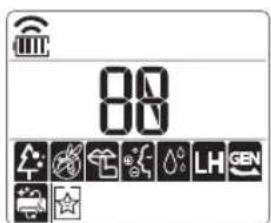
Smart Diagnosis™ cokopncTeHbe Ha naMeTeH TeJeΦoH
KopncTeJe ja Obaa yHKunja ako Bn e notpe6Ha ToHa DnjarHO3o OD LcHTapOT 3a HOpMaun 3a KIneHTn Ha LG Electronics Kora anapatot He pa60Tu npabuHNO nnn mma deqekT.
Smart Diagnosis™ He Moze da ce akTbUpa aKO anapaToT He e npKnyeh BO cTpyja. Ako anapaToT He Moze da CE Bknyu, peShaBaHBeTo Ha np6Jemot Mopa da ce HapPbN 6e3 da ce KopnCTn Smart Diagnosis™.
HANOMEHA
Ocnypete ce da ja oDpxyBaTe ambneHTaHaTa 6yaba Ha MNHmMyM, INI MOKe da ce cnyu TepeohOT da He rnpMa npabnHo 3ByHInTe cnHann O BhatpeWHaTaeHNHua.

PNEyPENEYBAHe
-ПпдчстelveинИЗВPsUyBaHBeHaOДрЖуBaHBeTo,ИСКЛЧЕТо HANOJyBaHBeTO И NOчЕКAJTe ДОДЕКa фенOTHe Ппстанe co pa6ota.
Ako KInMa ypeoT HeMa Da Ce KopnCTn 3a NIOOJIg BpemHcN nepNO, NCyUeTe Ro 3a Da Ce OdpKu BO HajIO6pa coctoJb. PeIOBHO uHCTeTe ro npOn3BOoT, 3a Da ja ODPKHTe ONTMaHata n3BeD6a n da rN cnpEHTe MOKHNTe deΦeKTn.
- Ncywemeknma ypeoT Bo peh pexmmot, BO TEKOT Ha 3 do 4 yaca, n Ncknyte To HanojyBaheTo. Moke da ce nojabn Bnatpeuho OwtetyBahe aKO BnaraTc octaHe BO HerOBNTe COCTABHn DeNoBn.
- IcyuBnBHaTpeHHTe CoCTaBHn DeIOBn Ha KJIIMMa ypeoT, KopNCtejkn ro feh pexHMOT BO TEKOT Ha 3 do 4 yaca, nped HerOBaTa NOBtOpHa ynotpe6a. Oba ke nomorHe BO OTcpaHyBaHeto Ha MUPN36aTa co3daJeHa oD Blarata.
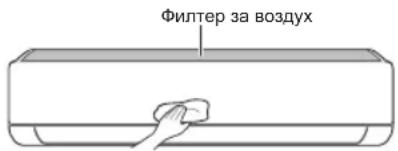
-Функида можда ce MeHyBa BO 3aBnCHoCT OД TINOT Ha MoDeNoT.
| Тип Onис Ичервал | |
| Фильтета воздух | Исучтete со правосмICALа ил рачно Incорпete. 2 недени |
| JOизатор (оштоналho) | Уnotpeбete сува памуна вata за ща отстразнite прашинatable. |
| Виатrelша edиница | Исучтete ja поршинatable на виатrelша тета удиница, користейки мека, сува крпа. |
| Пробесионално Inc Chewтete го садот каде Што с обира КОндан�ларанatable влага. | |
| Пробесионално Inc Chewтete ja севкatingа НИЗ kojaшто с обира КОндан�ларанatable влага. | |
| Замене тг бateршпente на далочинскnot упавувач.Едани� rodiшно | |
| Надворeshа edиница | Пробесионално Inc Chewтete Г 키lemпente зд одаваные Тол莉на и Таблatable с отвори. (Посоветувajte се с от texничар.) |
| Пробесионално Inc Chewтete го сфенot.Едани� rodiшно | |
| Пробесионално Inc Chewтete го садот каде Што с обира КОндан�ларанatable влага. | |
| Пробесионално Лиге Н�а повриддега составнITE Deюви на сфенot сецрст� Затогнати. | |
| Исучтete Г селковине KMПОненentс co Вozдух.Едани� rodiшно |
HANOMEHA
- Hikorai He KopucTe Boa Ito Ima Tepepatya NobuOka o40 ^ C Kora rH uCTnTe fHTPte.Toa MoKe da npedn3Bvka deOpmaunja nIn o6e36oJyBaHe.
- HikoraiKopicTeHeNCnapINMaTePNnPnYncTeHbetoHaΦnITpnte.Tne MoXaT da ja oWTeTaT NOBpuHHata Ha npOn3BODoT.
IcncTeTe ro BO3dUshHnot cnntep
Ynntpe nФuNTpTe 3a BO3dyx eHaH Ha ceko2 HeJI, INI NOBeKeNaTn aKo e NoTppe6Ho.
HANOMEHA
- Φилтерот за BOЗдух може за се скршн ако се ппвтka.
AkoΦHOT3a BO3dyx He npabunHO COCTaBeH, npaUNHaTaNHeKoN Dpyn MaTePN MOXAT Da HABNe3aT BO BHATEpHnTa EHNmu.
Tun1
Ako OoO3ropa nOrrJeHHeTe Ha BHaTpeWHaTa eDHHuca, neCHO Ke MOXeTe Da ro CoCTaBtE rOpHNOT qUnTep.
1 Ncnyte ro HanojyBaHBeTo n 3Bneye ro ka6eNoT 3a cTpyja.
2 DpxkTe n paKnTe Ha fntepoT 3a Bo3dyx mANKy NOINrHETe ro.
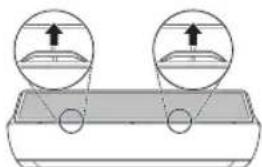
3 OToTaPaHeTe ro od BHaTpeHHaTa eDHHua.
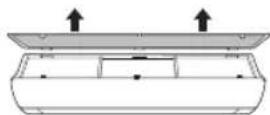
4 NcHnCTeTe ro fHTepOT co npaBocMykaIka IIN CO MnaKa BOda, BO Koja IMa HeyTpaneH detepreH.
5 NcywTe ro qnttepoT BO cEHka.
6 BmETHeTe KkyKeTe HaΦnItePOT 3a BO3dYX BO npeHNOt KaNk.
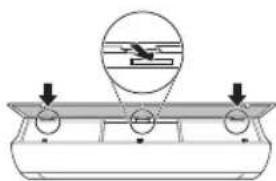
7 PnTncheTe nHaOny KyKnte 3a Da ro coCTaBNTe qntepoT 3a BO3dyx.
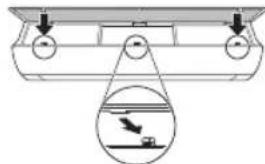
8 IpoBepeTe Ha cTpaHata Ha npEHNOT kanaK, 3a npAunHO COCTaByBaHe Ha fHNTepoT 3a BO3dyx.
Tvn2
1 Ncnyte ro HanojyBaHbeto n 3Bneye ro Ka6eJOT 3a Ctpyja.
2 OTbopeTe ro npedHnoT kaNaK.
- POnuBmKy NDbete CtpaHn KaNAKOT.
3 DpxKeTe r paKnTe Ha fntepOT 3a Bo3dyx, NOBneYeTe r MaKy HADony N OTCpaHeTe r OD BHATpeuHaTa eHNHua.
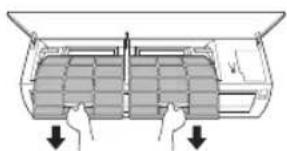
4 NcHCTeTn FInTPnTe Co npabocmykAnKa INN CO MNaKa BOda, BO Koja IMa HeyTpaneH detepreHT.
5 IcyuTe rI qunTpnte BO cEHka.
6 BmETHeTe rKyKNe Ha φnItpnTe 3a BO3dYX BO npedHNOt KaNk.
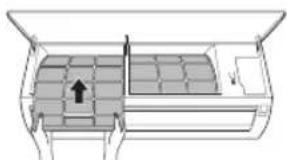
7 IpoBepete Ha cTpaHata Ha npEHNOT kAnak, 3a npAunHO COCTaByBaHe Ha fHNTpnte 3a BO3dyx.
SIGURNOSNA UPUTSTVA 3
VAZNA SIGURNOSNA UPUTSTVA 4
RAD 11
Napomene prilikom rada 11
VAŽNA SIGURNOSNA UPUTSTVA

UPOZORENJE
Da biste smanjili opasnost od eksplozije, požara, smrti, strujnog udara, povrede ili opekatina za osobe prilikom korištenja ovog proizvoda, pridržavajte se osnovnih mjera predostrožnosti, uključujuci sljedeće:
Djeca u domacinstvu
Ovaj uredaj nods namijenjen za upotrebu od strane osoba (uključujuci djecu) sa smanjenim fizickim, senzornim ili mentalnim sposobnostima, ili s nedostatkom iskustva i znanja, osim u slučaju da su te osobe pod stalnim nadzorom ili su instruirane po pitanju korištenja uredaja od strane osobe koja je odgovorna za njihovu sigurnost. Djeca trebaju biti pod nadzorom kako bi se osiguralo da se ne igraju s uredajem.